What Is Salesforce Custom Development? Complete 2026 Guide
Salesforce custom development helps businesses escape rigid CRM setups and build systems that truly fit how teams work. Many companies struggle with limits, slow workflows, and tools that do not scale. This guide of MOR Software explains this solution clearly, shows where it creates real value, and helps you decide if a tailored CRM approach is the right move for long-term growth.
What Is Salesforce Custom Development?
Salesforce custom development adapts the Salesforce platform to match your business needs with precision. Custom Salesforce development helps organizations improve how they manage customer relationships and day-to-day CRM activities.
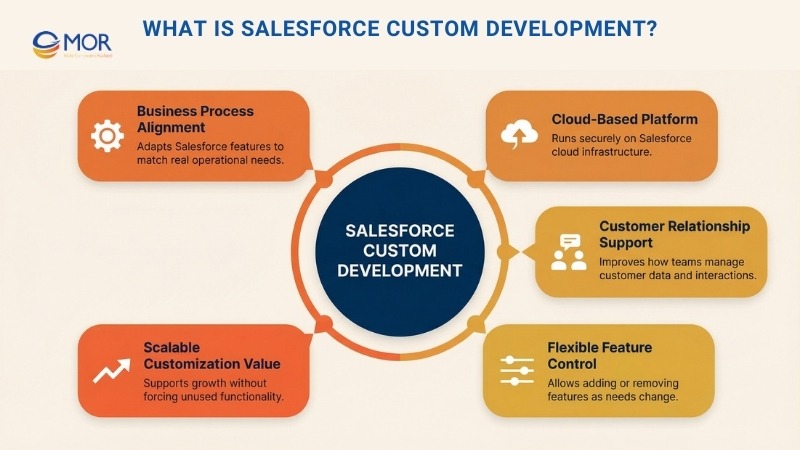
This solution runs on cloud technology. It supports stronger connections with customers, partners, and clients. Teams can track and review customer actions more clearly while staying focused on priority work. Features that no longer fit can be removed, and new ones can be added as business needs shift.
Customization in Salesforce delivers clear value as companies expand and adjust over time. Instead of dealing with unused functions or forcing existing tools to fit, these systems give businesses the freedom to shape the platform so it works the way they need.
Business Benefits Of Salesforce Custom Development
Salesforce custom development gives businesses more control over how their CRM supports daily operations and long-term goals. These benefits focus on system flexibility, user efficiency, and stable growth as business needs change.
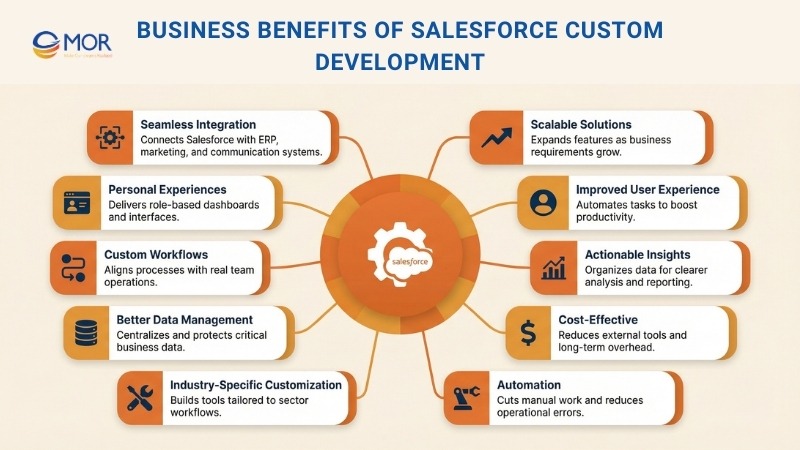
1. Seamless System Integration
Salesforce development connects smoothly with existing systems, including marketing platforms, ERP tools, and communication software. Can you integrate custom Salesforce CRM with development services? The short answer is “Yes”. In MuleSoft’s 2025 Connectivity Benchmark Report, companies say they use an average of 897 apps, and 95% of IT leaders report that integration is a hurdle. This approach allows data to move consistently across systems. As a result, manual input decreases and data errors become less common.
2. Growth-Ready Architecture
Salesforce custom development helps businesses stay competitive and plan for long-term use. New features or advanced capabilities can be added as requirements evolve. This approach allows the platform to expand alongside business growth.
3. Improved User Adoption
Task automation allows teams to concentrate on high-value work and planning. Salesforce research found that sales reps spend just 28% of their week actually selling, with most time going to other tasks like deal work and data entry. This improves how users interact with the system and supports stronger productivity across departments.
4. Data-Driven Visibility
This approach delivers practical insights from your business data. The platform can be adjusted to collect, arrange, and review information in a clear and useful way. In an Accenture study, only 27% of business executives said their data and analytics projects produce actionable insights, which is why clean reporting and clear dashboards are very important.
5. Long-Term Cost Control
Salesforce platform customization represents a long-term investment. It reduces reliance on external tools, supports task automation, and simplifies internal workflows. Nucleus Research found that organizations get an average return of $3.10 for every $1 spent on CRM. This approach also supports future expansion as business needs continue to grow.
6. Process Automation
Automation improves daily operations by cutting down manual work and reducing mistakes. Teams complete tasks faster, avoid repeated errors, and gain more time. McKinsey Global Institute estimates that about a third of sales and sales operations tasks can be automated with today’s technology. This allows greater focus on planning activities and building stronger customer relationships.
7. Industry-Focused Customization
Businesses receive solutions designed for their specific industry needs. Salesforce custom development allows teams to create tools that fit sectors like education, manufacturing, retail, or healthcare, using domain knowledge that matches real workflows.
8. Structured Data Management
Strong data management is essential for business performance. This setup helps keep all critical information in one central system. It also keeps data clear, accurate, and easy for teams to use. Gartner estimates that poor data quality costs organizations at least $12.9 million a year on average, so even small improvements can have real impact. Rules can be applied to protect data quality and organize information more effectively for targeted sales and marketing efforts.
9. Tailored Workflows
Custom workflows in Salesforce help teams collaborate with less friction, handle routine tasks automatically, and keep processes consistent. Departments save time and work more smoothly when steps reflect how the company actually operates.
10. Personal Experiences
Personalized experiences help businesses stand out from competitors. Salesforce custom development allows teams to design tools and interfaces that fit specific roles and user needs. Dashboards can match each position, customer portals can strengthen trust and loyalty, and reports can reflect real business priorities. Forrester reports that customer-obsessed organizations see 41% faster revenue growth and 51% better customer retention than organizations that are not customer-obsessed.
Core Components Used In Salesforce Custom Development
Salesforce custom development relies on a set of built-in tools that support stable, flexible solutions. These components work together inside Salesforce as an application development platform, allowing teams to design logic, interfaces, and data handling that match business needs.
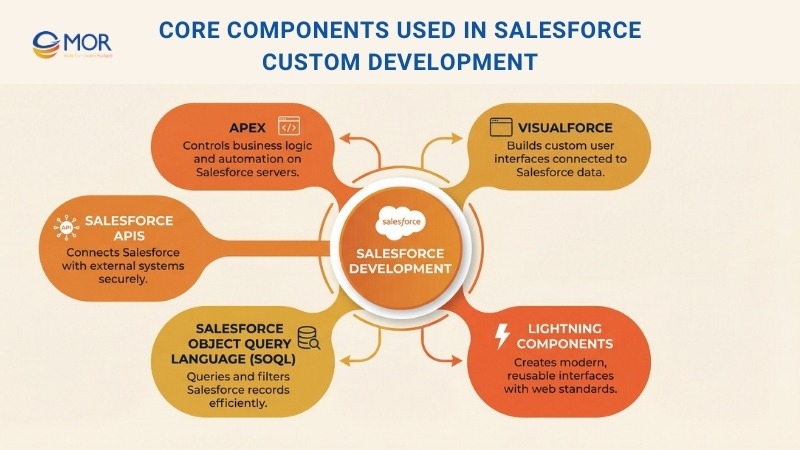
Apex
Apex is a programming language created for Salesforce. Developers use it to manage how transactions run and how logic executes on Salesforce servers. This tool helps teams automate business tasks and create applications that scale across the Salesforce environment.
It allows developers to define business rules, adjust features, and run automated processes based on real operational needs.
Visualforce
Visualforce is a dedicated markup language used inside Salesforce. Developers rely on it to design custom user interfaces within the platform. It is built into the Lightning environment, which supports dynamic pages that connect directly to Salesforce data. It works in a similar way to HTML but is designed for Salesforce use.
This tool supports building pages that display and interact with company data. Visualforce also includes standard controllers that manage basic database actions on the server side.
Lightning Components
Developers rely on Lightning components to build modern interfaces for Experience Builder sites, Salesforce applications, and Lightning Experience. These components stay lightweight and perform well because they follow Lightning Design System styles and accessibility standards.
Web-based applications on Salesforce feel more current with Lightning Web Components (LWC). LWC uses common web technologies like HTML, CSS, and JavaScript to create reusable interfaces that run efficiently inside the platform.
Salesforce Object Query Language (SOQL)
Salesforce Object Query Language, known as SOQL, allows teams to search Salesforce data for specific records. It works well for managing data and supporting report creation.
SOQL helps users locate records using different conditions and filters. Teams can write clear and effective queries across multiple environments when working with Salesforce data.
Salesforce APIs
Salesforce APIs, or Application Programming Interfaces, provide a structured way for external systems to communicate with Salesforce. They allow applications to access, update, and manage Salesforce data while supporting automated processes. Developers use these APIs to link Salesforce with other platforms and services.
REST and SOAP APIs are the most commonly used options for programmatic access to Salesforce data and metadata. They support smooth connections with external systems and help maintain consistent data exchange across applications.
Top 5 Phrases In Salesforce Custom Development
Salesforce custom development follows a structured process to keep the platform aligned with real business needs. When working with a Salesforce custom app development company, it is important that their team applies a clear and disciplined delivery approach.
Below is an overview of the main stages within the Salesforce development lifecycle:
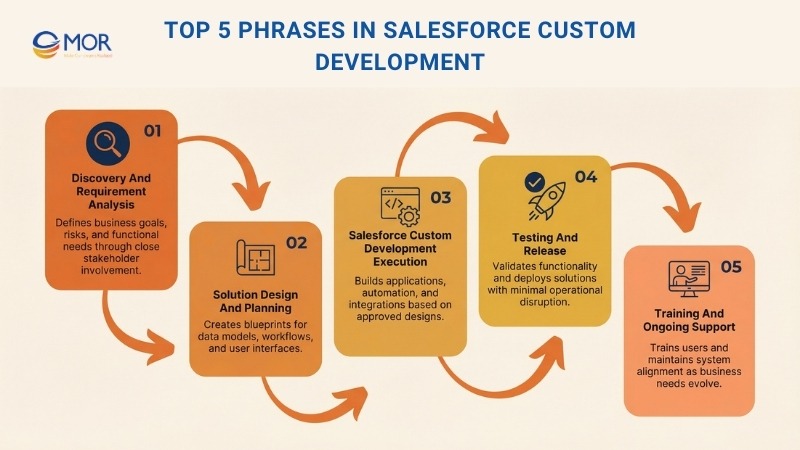
Phase 1: Discovery And Requirement Analysis
The development starts with detailed requirement collection and careful analysis. This phase focuses on understanding business goals, internal processes, and expected outcomes.
When business owners and end users stay involved, research consultants for Salesforce custom development projects and delivery teams can identify core functions, risks, and improvement areas more accurately. This allows the solution to align closely with business objectives and supports a successful Salesforce implementation.
Phase 2: Solution Design And Planning
The next step focuses on design and planning, where teams create detailed blueprints based on the collected information. These blueprints outline data models, workflows, and user interface layouts.
Designers also choose the appropriate tools and technologies, including Apex for backend logic and Lightning Components for user interface development. This phase sets the foundation for the build process and keeps business goals aligned with technical requirements.
Phase 3: Salesforce Custom Development Execution
After the blueprints are finalized, the execution stage begins. During this phase, developers start coding to build and configure the Salesforce solution based on the defined requirements.
This stage covers Salesforce custom application development, process automation, and third-party integrations through APIs. Teams deliver each app development service to improve operational efficiency, support workflow automation, and create a better user experience across the platform.
Phase 4: Testing And Release
After development is complete, teams move into detailed testing to confirm that the solution works as expected. This includes unit testing, system testing, and user acceptance testing to check workflows, data accuracy, and integration behavior.
Once testing is finished, the release phase begins. This step is managed with care to support a stable rollout and limit disruption to daily operations. Tools like Change Sets or DevOps pipelines support a structured and dependable release process.
Phase 5: Training And Ongoing Support
This final stage focuses on user training to help teams operate the system with confidence. Hands-on sessions allow users to understand how the platform works, supported by clear and detailed user documentation.
Ongoing support and maintenance help resolve issues early and allow timely adjustments when needs change. This keeps Salesforce custom development aligned with business growth and supports consistent results over time.
Types Of CRM Apps You Can Build With Salesforce Custom Development
Improving internal processes leads to better customer service, higher satisfaction, and stronger revenue growth. Many businesses adopt CRM because they understand the value of customer focus. Yet CRM supports more than sales alone. When organizations invest in Salesforce custom development, they treat CRM as a company-wide strategy, which makes it practical to build applications for every team.
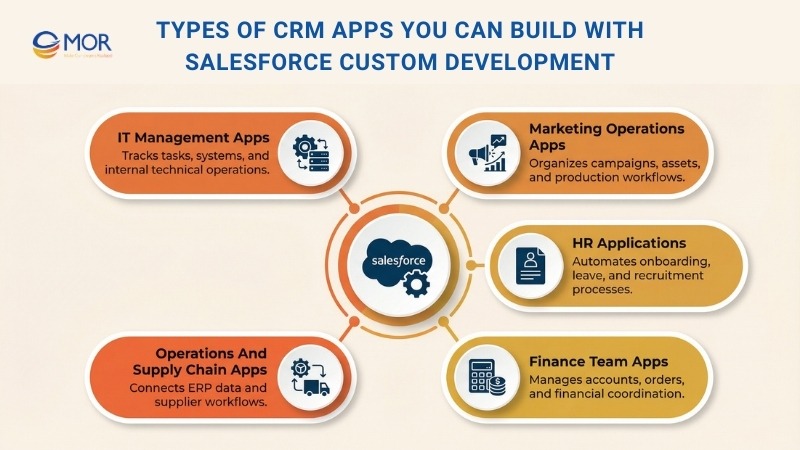
IT Management Apps
Many IT tasks can be automated, allowing teams to focus on complex technical issues instead of routine work. With custom app development Salesforce, development teams can track tasks, tickets, and system changes in one place, which helps projects move faster across departments. IT-focused applications also support quality checks, project oversight, software license tracking, patent management, and internal help desk operations.
Marketing Operations Apps
Applications help marketing teams work with greater efficiency and clarity. Project tracking apps, channel management tools, and production scheduling systems support better control over campaigns, deadlines, and contacts throughout the advertising process. Teams can also create centralized apps to organize marketing content, making current assets easy to find and use when needed.
HR Applications
Many human resource tasks can be automated, which allows HR teams to focus more on people instead of paperwork. Onboarding and learning applications help automate training programs and handle common questions efficiently. Time-off tracking tools allow employees to request leave and receive approvals quickly. Recruitment applications record every interaction during the hiring process to keep candidate data organized.
MOR Software builds custom HR applications like these with a clear goal: make everyday HR work lighter and more human. We design systems that fit how teams actually work, cut down repetitive admin tasks, and give HR leaders more time to focus on people, culture, and long-term workforce growth.
Finance Team Apps
Financial workflows that involve many steps and detailed tracking can be handled through automated applications. Teams can create apps that open new customer accounts from any device, which supports smoother coordination between sales and finance. Purchase order tracking tools follow each order from submission to completion, while commercial onboarding apps support automated setup and fulfillment across multiple projects.
MOR Software also delivers custom finance applications built to handle complex financial workflows without slowing teams down. These systems connect sales and finance in real time, keep every transaction traceable, and help organizations manage approvals, onboarding, and fulfillment with far less manual effort. The result is tighter control, clearer visibility, and finance operations that scale smoothly as projects grow.
Operations And Supply Chain Apps
Operational applications can connect directly with an enterprise resource planning system, which allows teams across the organization to access shared information easily. Supply chain applications also help manage supplier relationships more smoothly and support clearer coordination across operational workflows.
Best Practices For Successful Salesforce Custom Development
When planning Salesforce custom development, following proven practices helps keep the project efficient and aligned with business goals.
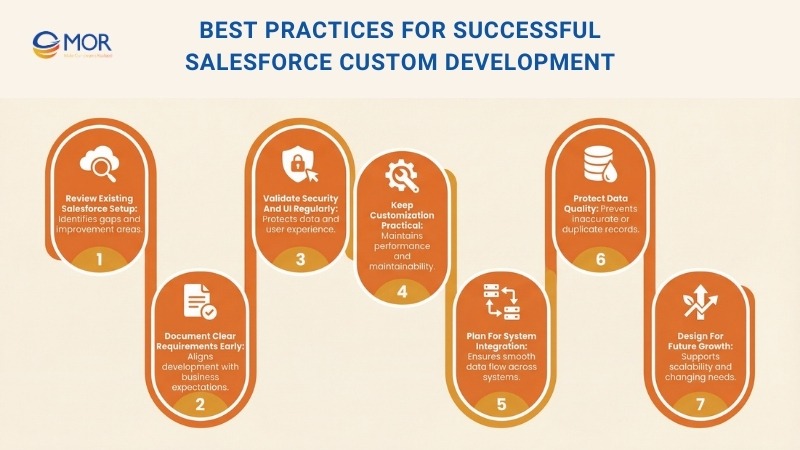
Review Existing Salesforce Setup
Before starting development, teams should review the current Salesforce setup or existing solutions in use. This assessment helps identify gaps, pain points, and areas that need improvement. It also provides clarity on what type of new solution will deliver the most value.
Document Clear Requirements Early
A critical step during Salesforce implementation is defining clear expectations for the final outcome. There are often multiple ways to reach the same goal, and in some cases, business processes may need adjustment to match the customized solution.
During the design stage, requirements and feedback should be reviewed on a regular basis. Updates based on user input help strengthen alignment between the application and its users, which supports smoother adoption and long-term effectiveness.
Validate Security And UI Regularly
Security remains a top priority in Salesforce custom development. Teams need to review access controls at the object, record, and field levels. User permissions should also be checked carefully before the application goes live.
Display behavior should be reviewed on a regular basis to support a consistent user experience. Different permission levels can change how screens appear, so testing across roles helps avoid confusion.
Keep Customization Practical
As customization increases, applications can become heavier and harder to maintain. Complex setups often reduce performance and create long-term maintenance challenges. Salesforce custom development works best when teams focus on simple, clear customizations that are easier to manage and update.
Plan For System Integration
When delivering Salesforce software development, applications should connect smoothly with existing operational systems. Strong integration supports better data sharing and helps daily workflows run without interruption.
Protect Data Quality
During Salesforce development, teams need to prevent inaccurate or incomplete data from entering the system. Clean data supports better usability and reporting. Default values, validation rules, and regular workflow updates help keep records consistent. Duplicate rules and matching rules also reduce the risk of repeated entries across the database.
Design For Future Growth
Salesforce should support the business as it expands. Planning only for current needs can limit long-term value. Applications should be designed to scale with growing operations and changing strategies. This approach helps the system stay aligned as business goals and processes evolve.
Risks To Consider In Salesforce Custom Development Projects
Although Salesforce is a highly flexible platform, it still has clear limits on how much it can be modified. For example, no Salesforce edition allows more than 3,000 custom objects. Each object also has a limit of 900 custom fields, including fields created internally and those added from AppExchange. These limits are only part of the broader constraints that apply during Salesforce customization.
Below are the main risks, limitations, and challenges businesses may encounter during Salesforce custom development.
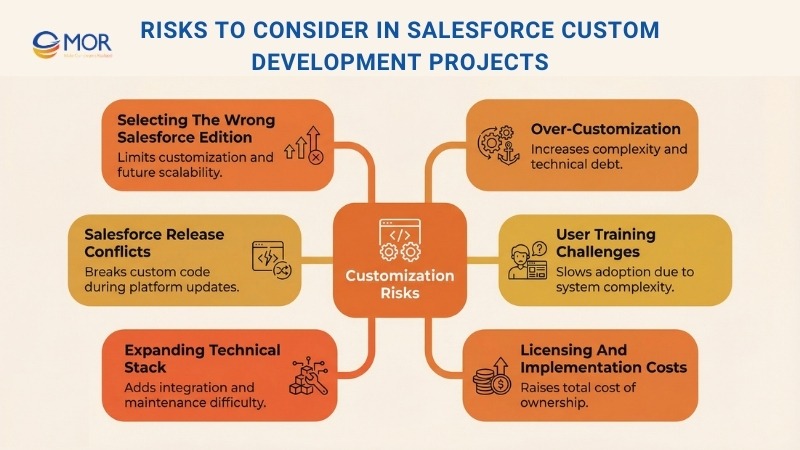
Selecting The Wrong Salesforce Edition
One major risk can occur before any customization work starts. This happens when a business selects a Salesforce edition that does not support the required changes. Salesforce provides several editions, including Essentials, Starter, Pro Suite, Professional, Enterprise, Unlimited, and Developer, but not every option allows deep customization.
Salesforce Essentials and Professional editions support only basic customization and restrict access to advanced automation features and Apex development. Enterprise and Unlimited editions allow far greater flexibility, but they come with higher licensing costs.
Without early planning, businesses may choose an edition that cannot support future needs. This situation often leads to expensive upgrades later or forces teams to rely on complex workarounds to achieve required functionality.
Excessive Customization
Too much customization can make Salesforce harder to manage, scale, and update over time. Adding a large number of custom fields, objects, and automation rules often leads to a crowded interface. Complex workflows and Apex triggers can create hidden dependencies, which may cause slower page loading and delayed automation. This can reduce overall system performance, especially in environments with high data volume.
Heavy customization also increases technical debt within the organization. Managing this level of complexity often requires specialized developers, since standard Salesforce administrators may not have the skills needed to maintain and troubleshoot advanced custom logic.
Salesforce Release Conflicts
Salesforce rolls out platform updates three times each year during the spring, summer, and winter releases. While these updates bring new features and improvements, they can also disrupt existing custom implementations. A common issue involves custom Apex code that no longer works with updated API versions. Fixing these problems often requires refactoring existing logic, which can take time and temporarily affect user experience.
Third-party integrations that depend on Salesforce APIs also present risk during release cycles. Changes to API versions or authentication methods can interrupt connections or cause data synchronization issues. To keep systems stable, teams need to test and resolve issues after every Salesforce release.
User Training Challenges
Salesforce standard features are built to be user friendly, but heavy customization can increase system complexity and demand more training. Custom objects and fields may not follow familiar Salesforce patterns, which introduces new data relationships and navigation paths. When automation depends on complex Flows or Apex triggers, employees may find it hard to understand how records change or why certain actions occur.
Custom dashboards and reports can also slow adoption, especially when they require SOQL knowledge or advanced filtering beyond standard reports. Users need more than basic navigation skills. They must understand validation rules, custom permissions, and role hierarchies to know how access and record updates work.
Expanding Technical Stack
The technical stack becomes more complex when several Salesforce clouds are customized at the same time, including Sales Cloud, Service Cloud, and Marketing Cloud. Each cloud uses different frameworks and data models and requires specific skills. Teams may work with Apex for backend logic, Lightning Web Components and JavaScript for interface updates, and SOQL for database queries. Advanced integrations also require experience with REST and SOAP APIs, middleware tools like MuleSoft, and authentication standards such as OAuth 2.0.
Customizing multiple clouds also creates challenges with data consistency and synchronization. Without a clear data strategy, separate changes can lead to data silos and limit visibility across teams. Third-party integrations add further complexity when external systems do not match Salesforce object structures or API constraints, which can increase middleware configuration efforts.
Licensing And Implementation Costs
Salesforce licensing and setup costs can add up quickly, especially for businesses that need many users and deep customization. Salesforce pricing depends on the chosen edition. Sales Cloud and Service Cloud licenses are billed per user each month, while Enterprise and Unlimited editions cost more due to advanced automation, analytics, and integration options.
Marketing Cloud uses a different pricing structure that often depends on data volume, the number of stored contacts, and selected features like Journey Builder, Email Studio, or Advertising Studio. Marketing Cloud Intelligence, previously known as Datorama, adds additional costs for organizations that need advanced analytics, AI-driven reporting, and multi-channel data connections.
In addition to licensing, companies should plan for implementation expenses. These include consultant fees, data migration, custom development work, and ongoing system administration. Custom features, API integrations, and third-party extensions also raise the total cost of ownership over time.
Choosing A Salesforce Custom Development Partner
Selecting the right partner plays a major role in the success of Salesforce custom development. The right team brings technical skill, industry understanding, and long-term support that helps the platform deliver real business value.
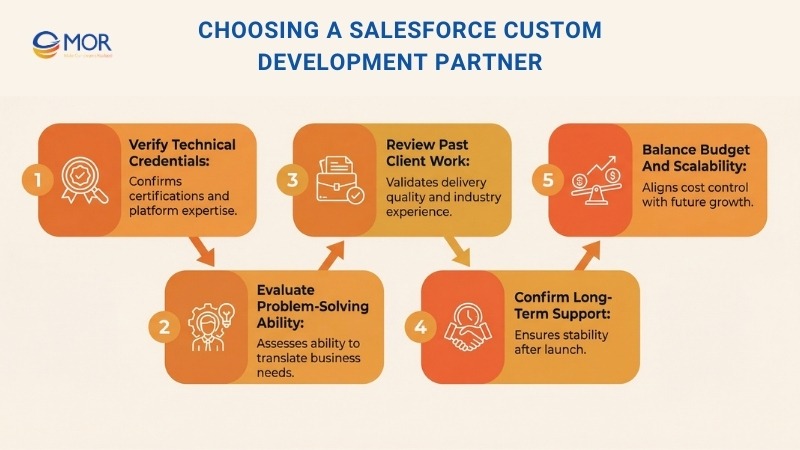
Verify Technical Credentials
Start by reviewing the team’s technical background. The company should have certified developers with proven experience. It is also important that they work across key Salesforce products, including Sales Cloud, Service Cloud, and Marketing Cloud.
Evaluate Problem-Solving Ability
A strong partner understands your specific business challenges and delivers tailored Salesforce solutions. Teams with solid problem-solving skills can translate complex requirements into practical system designs. This level of expertise supports stable delivery and long-term success.
Review Past Client Work
Client testimonials and case studies help confirm a company’s reliability. Honest feedback shows how well the team delivers Salesforce projects in real environments. Experience within your industry adds extra confidence that the partner understands your goals and operational needs.
Confirm Long-Term Support
A reliable partner provides post-development Salesforce support services to keep the system stable after launch. Continuous monitoring helps detect issues early and reduces the risk of bugs. Ongoing support also keeps the Salesforce setup current and aligned with changing business needs.
Balance Budget And Scalability
Budget and scalability should always be reviewed together when selecting a development partner. The right company delivers quality solutions within budget limits while maintaining strong technical standards. It is also important that their services support future growth, so the system can scale as business demands increase.
Why Choose MOR Software as Your Trusted Salesforce Custom Development Partner?
When businesses invest in custom Salesforce development services, results depend on execution, not promises. At MOR Software, we build Salesforce solutions that align with how teams operate day to day and how organizations plan to grow.
We start with business understanding before touching code. That approach helps avoid unnecessary customization and keeps Salesforce flexible over time. Our work focuses on stability, clarity, and long-term usability, not short-term fixes.
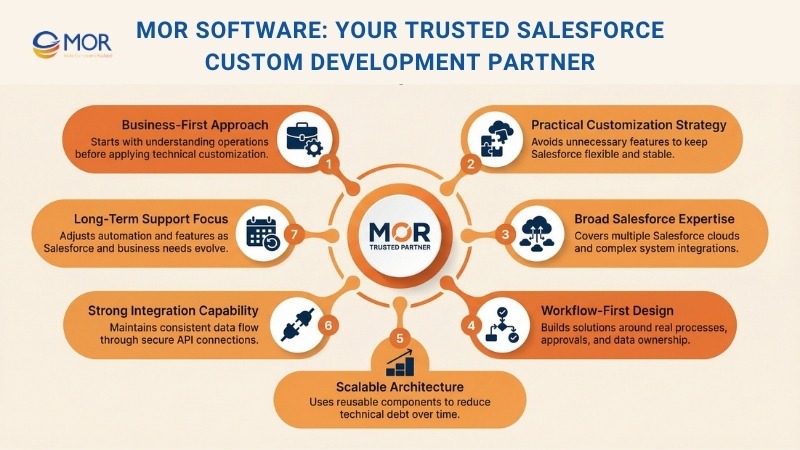
What sets our Salesforce capabilities apart
- Broad Salesforce expertise: Experience across Sales Cloud, Service Cloud, Experience Cloud, and custom integrations with ERP, payment, and internal systems.
- Workflow-first design: Solutions built around real processes, approval flows, and data ownership, not generic templates.
- Clean and scalable architecture: Reusable components, structured logic, and controlled customization to reduce technical debt.
- Strong integration capability: Secure API-based connections that keep data consistent across Salesforce and external platforms.
- Clear delivery process: Defined phases from discovery and design to testing, release, and post-launch refinement, with regular reporting.
- Offshore efficiency without friction: Skilled Salesforce engineers, predictable costs, and communication that feels like an in-house team.
We also think beyond launch. Salesforce evolves through seasonal releases, and business needs shift. Our support model helps clients adjust automation, refine reports, and extend functionality without destabilizing the system. That continuity protects your investment and keeps Salesforce relevant as priorities change.
Over-customization is a common failure point in Salesforce projects. We actively design against it. By keeping logic understandable and components modular, we make future changes easier, faster, and safer.
If you are planning a custom Salesforce development project and want a partner who balances technical depth with business clarity, we are ready to help.
Contact us to discuss how your Salesforce platform can better support your teams and growth plans.
Conclusion
A well-built Salesforce system should remove obstacles, not create new ones. Salesforce custom development works best when every decision supports daily work, future change, and clean system growth. MOR Software focuses on building Salesforce platforms that stay usable long after launch, not ones that need constant fixes. If you want tailored Salesforce development that supports real teams and real plans, contact us to start a focused and practical discussion today.
Share


Rate this article
0
over 5.0 based on 0 reviews
Your rating on this news:
Name
*Email
*Write your comment
*Send your comment
1