


Odoo ERP Integration: Complete Business Guide in 2026
Odoo ERP integration can look simple at first, then turn messy once data starts moving between sales, accounting, inventory, and shipping tools. Many teams deal with delays, duplicate records, and broken workflows without knowing which connection method really fits. In this guide, MOR Software will break down the right methods, common risks, useful Odoo API integration paths, and the key steps to build a system that works in real business operations.
What Is Odoo ERP Integration?
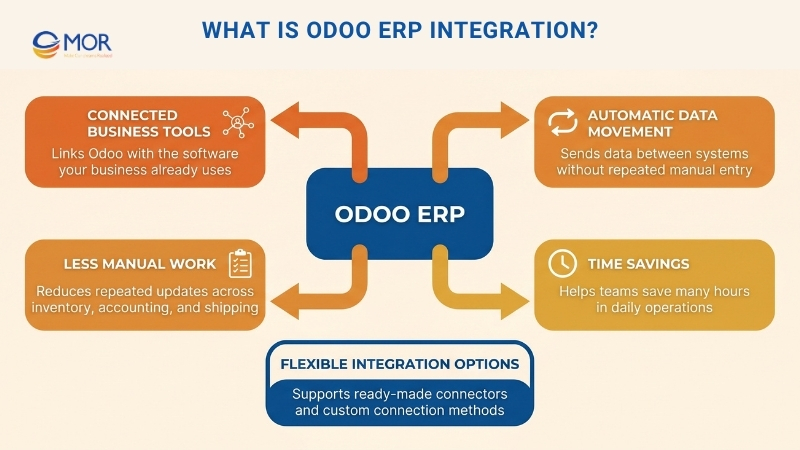
Odoo ERP integration is the process of making Odoo work with the apps, tools, and software your business already depends on. Instead of entering the same details in several places, data can move from one system to another automatically.
Take a simple case:
A customer places an order on your online store. In a manual setup, you may need to add that order to your inventory tool, then your accounting software, and then pass the update to your shipping team. When the systems are connected, all of those steps can happen inside Odoo with much less manual work, which saves many hours.
The platform includes ready-made connectors as well as custom options, and when people compare the difference between Odoo and ERP, they often see that ERP systems Odoo users choose can support anything from basic syncing to more complex automation.
Key Benefits Of Odoo ERP Integration For Modern Businesses
Odoo ERP integration can bring clear business gains that help daily operations run better and support company growth:
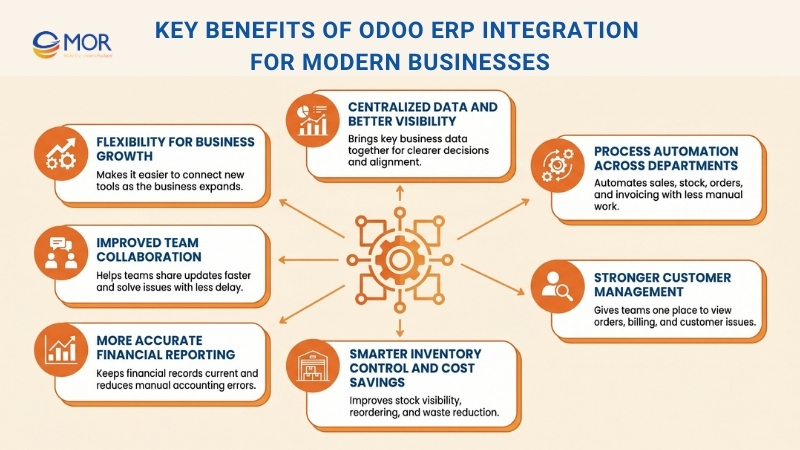
Centralized Data And Better Visibility
Think of a business where sales uses one system, accounting uses another, and inventory runs in a third one. In that kind of setup, it becomes hard to understand the full picture. A connected Odoo system pulls those details into one place. Then managers and teams can all look at the same information. That helps cut mistakes, supports better decisions, and keeps everyone aligned.
Process Automation Across Departments
This Odoo integration can take over many tasks that people still do by hand. When a sale comes in, it can update stock, create an order, and send an invoice without extra typing. That cuts errors, gives staff more time for important work, and helps the business move faster.
Stronger Customer Management
With Odoo ERP integration tied to your current customer system, you can build one full view of each buyer. Your sales team can check orders, open issues, and billing details in a single place.
Smarter Inventory Control And Cost Savings
When Odoo connects with your stock system, inventory tracking becomes much easier. You can see what is available, know when to reorder, and estimate future demand. That helps stop stock shortages and keeps extra goods from sitting too long. Close tracking also lowers waste from old or damaged items. That can lower costs and lift profit.
More Accurate Financial Reporting
Odoo ERP integration with your accounting tool keeps financial data current and more reliable. Sales records move straight into the books, which removes manual entry and cuts the chance of mistakes. You get a live view of your income statement, balance sheet, and cash flow, so financial decisions become easier.
Improved Team Collaboration
A connected setup also helps teams work together with less friction. Sales can pass updates to production more quickly, so orders are handled on time. Shared communication tools in one place lower the risk of confusion and delays. That openness supports teamwork and helps people solve issues faster.
Flexibility For Business Growth
As your company grows, it becomes easier to add new tools. It is also simpler to connect the systems you already use with the ones you add later. Odoo is built to adjust to changing business needs, including future options like Odoo ERP AI integration. You can shape it to match the way your company works. That means the system can grow with your business and keep up with change.
Common Methods Used In Odoo ERP Integration
There is no single way to connect business tools to Odoo, because the right option depends on your systems, data, and daily work. When teams compare payment gateway integration methods Odoo ERP projects may use, they often look at speed, control, and the amount of custom work involved.
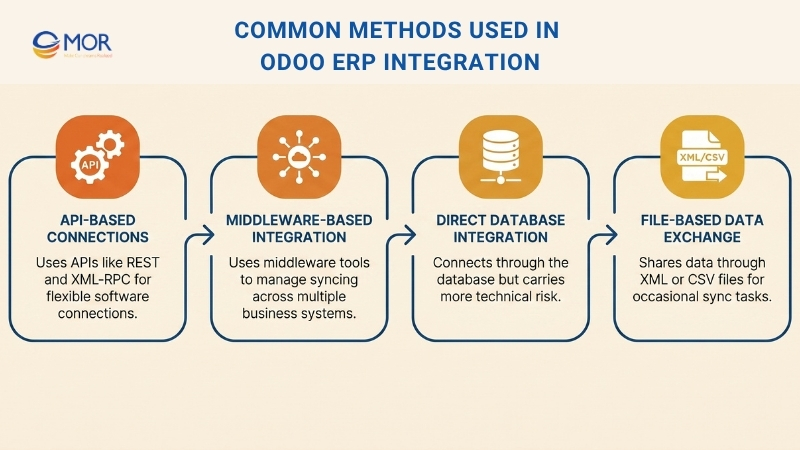
API-Based Connections
Many teams use APIs as the main way to connect systems. In Odoo API integration work, developers use protocols like REST and XML-RPC to link outside software with the platform. A store running on WooCommerce or Shopify can pull product data from Odoo and then send order details back into it. This option gives businesses a lot of flexibility and room for custom work.
Middleware-Based Integration
Middleware sits between Odoo and other business apps and lets them share data without a direct link. Tools like Zapier, Dell Boomi, and MuleSoft are often used for this job. They can handle data changes, fix transfer problems, and manage other technical parts of syncing. This choice is often useful when several systems need to work together.
Direct Database Integration
In some cases, Odoo ERP integration is done through direct database access. This route reads and writes information straight in the Odoo database. Even so, it can be risky because it skips built-in security checks and business rules. Most teams use it only for read-only work or when API and middleware options do not fit.
File-Based Data Exchange
Another option is to exchange information in file form, often through XML or CSV documents. Since Odoo can import and export data in different file formats, this route fits tools that cannot connect through APIs. Teams may use it for occasional sync work, like regular stock updates or finance reporting. Even so, it usually takes more time and manual effort than the other options.
Popular Systems Commonly Connected Through Odoo ERP Integration
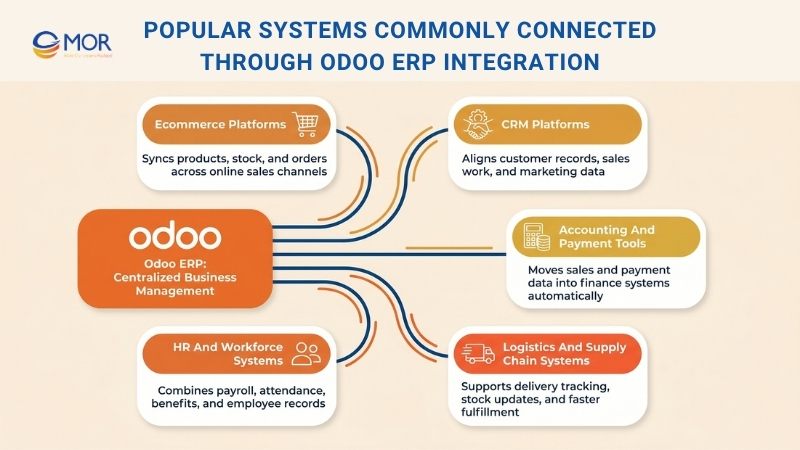
Odoo ERP integration is often used to connect the platform with the tools a business relies on every day. The most common links usually cover sales, finance, delivery, and people management.
Ecommerce Platforms
Retail businesses often connect Odoo with online selling platforms like Magento, Shopify, and WooCommerce. These connections move product details, stock figures, and order records between the two sides without manual steps. That helps teams keep prices and availability current across every sales channel.
CRM Platforms
Some businesses choose specialized CRM tools like Salesforce or HubSpot even though Odoo has its own customer module. In many Odoo ERP integration projects, this fits an Odoo operations management company integrated CRM and ERP model, where customer records, sales actions, and marketing data must stay aligned. This kind of connection is especially useful for companies that depend on customer contact and targeted campaigns.
Accounting And Payment Tools
Finance teams can also connect Odoo with payment tools like PayPal and Stripe, or accounting platforms such as Xero and QuickBooks. Odoo ERP payment gateway integrations let sales data move straight into the accounting side, so staff do not have to enter it by hand. They also support automatic transaction handling, which makes cash flow and revenue tracking easier.
Logistics And Supply Chain Systems
Many companies use SCM and logistics tools to manage stock, shipping, and warehouse work. With Odoo ERP integration, platforms like ShipStation or Easyship can help teams track deliveries, update inventory, and move orders through fulfillment faster. This setup matters a lot for businesses that ship large volumes of physical goods and need stock levels to stay right.
HR And Workforce Systems
Odoo’s HR module can also connect with workforce platforms like BambooHR or ADP to combine payroll, benefits, attendance, and employee records. This helps keep HR data consistent, supports compliance needs, and cuts manual entry in people processes.
Key Steps For A Successful Odoo ERP Integration
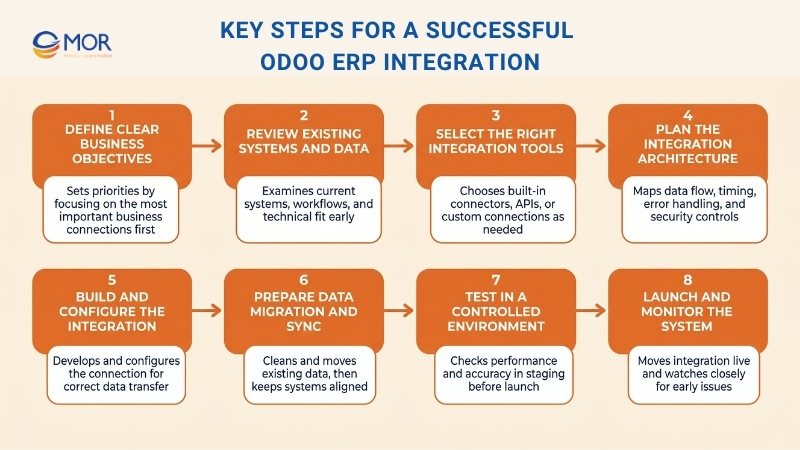
To make Odoo ERP integration work well, you need steady data movement, smoother operations, and fewer business interruptions. A strong Odoo ERP implementation usually depends on the following steps before the system goes live.
Define Clear Business Objectives
Start with the business goals and connection goals you want to reach. Review how your current processes work and find the areas where connected systems can make them better. Focus on the most important connections first and handle those before the less urgent ones.
Review Existing Systems And Data
Study your current platform, workflows, and business processes in detail. Decide which data you need from outside systems. Check how well your Odoo environment matches the other platform so you can see the technical needs early.
Select The Right Integration Tools
You need to decide if built-in connectors and APIs are enough or if custom APIs are needed. In many cases, Odoo ERP integration can connect your platform with third-party tools through API-based methods. Odoo already includes connectors for platforms like Adobe Commerce, Shopify, and QuickBooks. If a ready-made API is not available, developers can build a custom connection for you.
Plan The Integration Architecture
Map the way data will move between systems so formats and units stay consistent. Decide whether updates should happen in real time or at set intervals. Put a method in place to manage transfer failures, bad data, and other sync errors. Make room for security controls too, including protected API access, role-based permissions, and encryption.
Build And Configure The Integration
Custom APIs can be built when your workflows and data rules are unique. The outside platform also needs to be configured so it can work properly with Odoo. This stage may also include Odoo ERP payment gateway integrations setup when payment tools are part of the scope. Full testing is needed here so data can pass correctly between systems.
Prepare Data Migration And Sync
Your data should be cleaned before migration starts. The first migration is usually a one-time transfer of existing records. After that, updates in one system should also appear in the other so the information stays aligned.
Test In A Controlled Environment
Run tests in a staging system or a sandbox before launch. Make sure the data moves correctly from one platform to the next. Let users from the right departments review the setup and confirm that it works as expected.
Launch And Monitor The System
Once testing is complete, move the setup into production. Watch it closely during the first days so expected problems can be found and fixed quickly. It is also smart to keep a backup of the finished integration.
Common Challenges In Odoo ERP Integration
Odoo ERP integration can help improve efficiency, productivity, and customer satisfaction because the platform is open source and flexible. Still, implementation, customization, and system connection can be difficult without expert support. As an Odoo Ready Partner, we can help you put the platform in place and support a smoother rollout and migration.
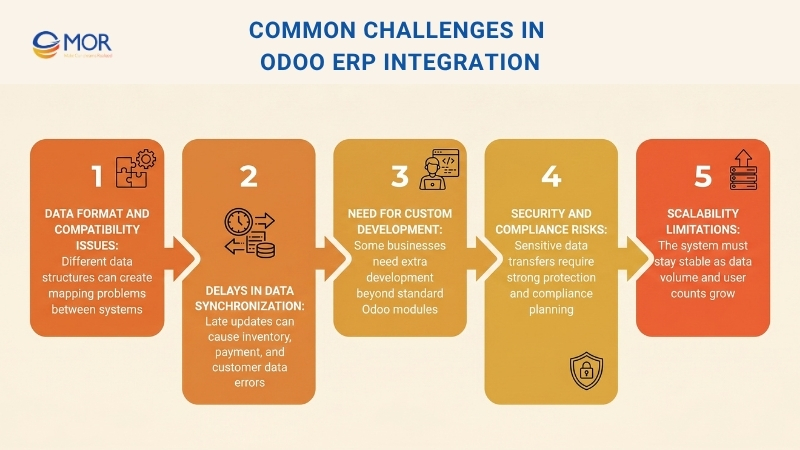
If you plan to connect Odoo with other systems, you may face the following issues:
Data Format And Compatibility Issues
Data formats must match if you want information to move smoothly between systems. Different applications often store data in different ways, which can create mapping issues and inconsistencies. Odoo has strong API handling, but problems can still appear when larger datasets are being merged.
Delays In Data Synchronization
Fast synchronization matters because businesses need current data. When updates arrive late, you may end up with wrong inventory figures, payment matching issues, or inaccurate customer details. That can lead to poor business decisions and hurt customer satisfaction.
Need For Custom Development
Custom work is common in retail, manufacturing, logistics, and many other sectors. Odoo includes many modules, but some businesses still need extra customization to match the way they operate. Standard modules may not cover advanced needs, so extra development is sometimes required.
Security And Compliance Risks
These projects often move sensitive information from one platform to another, which raises security concerns. You need to follow industry security rules and relevant standards if you want your data to stay protected and compliant.
Scalability Limitations
Scalability should be part of your planning from the start. The connected system needs to manage growing volumes of data and a rising number of users. It also needs to stay stable when usage becomes heavy and demand increases.
Odoo ERP Integration Cost Breakdown And Budget Planning
The total cost of connecting Odoo to another platform can vary a lot because pricing depends on your system landscape, the number of data flows, the amount of custom logic, and how much testing and support you need. A simple connection may stay in the lower range, while a larger project with custom modules, staging branches, and long-term support can cost much more. One point matters early in budgeting: Odoo says external API access is only available on the Custom plan, while Standard does not include it. Current official pricing lists Standard at US$16.90/user/month on annual billing and Custom at US$25.50/user/month on annual billing, with Odoo.sh billed separately.
Cost item | Typical cost | What it usually covers |
Odoo license for API-based integration | Custom plan from US$25.50/user/month. Standard starts from US$16.90/user/month, and Standard does not include external API access. | This is the base Odoo subscription. If another platform needs to call Odoo directly through the external API, the Custom plan is usually required. |
Odoo.sh hosting, if custom code is involved | Workers: US$57.60 to US$72/month, Storage: US$0.20 to US$0.25/GB/month, Staging environment: US$14.40 to US$18/month. | This is useful when your project includes custom modules, testing branches, or separate development and staging environments. |
Official Odoo implementation hours | 25h: US$2,040, 50h: US$3,570, 100h: US$6,375, 200h: US$12,750 for new customers. | These packs give a practical benchmark for setup, data import help, training, configuration, and lighter customization work. |
Custom integration work with a partner | A common market range is roughly US$10,000 to US$49,000+ for custom software and connection work, depending on scope. | This usually fits two-way sync work, field mapping, business rules, middleware logic, and projects that connect several systems. |
Developer time, if billed hourly | External developers often fall around US$40 to US$100/hour as a broad benchmark, while senior US specialists can reach US$125 to US$250+ per hour. | This is useful when your vendor charges by time instead of a fixed package. |
As a practical planning range, many companies can treat US$2,000 to US$6,000 as an entry point for a lighter project, US$10,000 to US$20,000 as a likely range for a custom two-way connection, and US$25,000+ as a realistic budget for a broader rollout with several systems or heavier customization. Those working estimates are an inference based on current Odoo plan pricing, Odoo.sh charges, official Success Pack prices, outside market benchmarks, and common Odoo ERP integration services buyers compare when reviewing Odoo ERP solutions or estimating Odoo ERP integration in US delivery models.
MOR Software - Your Trusted Odoo ERP Integration Partner
The team you choose can shape the outcome of an Odoo ERP integration project. A basic connector will not solve weak workflows, poor data quality, or siloed teams on its own. We first look closely at how your current systems operate, then define the logic, data movement, and business rules required to make Odoo support your daily work in a practical way.
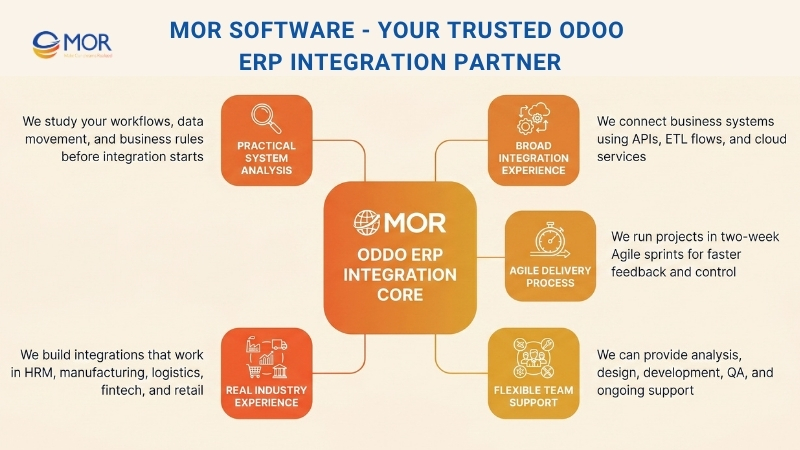
Our background includes system integration, custom software development outsourcing, cloud delivery, and legacy platform connection. We have worked on projects that connected internal business systems with Salesforce, using APIs, ETL flows, and cloud services to keep information accurate and consistent across platforms. We also run projects in two-week Agile sprints, which helps clients check progress early, respond faster, and keep delivery aligned with project goals.
We can shape the team around your actual needs, whether the project calls for business analysis, solution design, development, QA, or ongoing support. Our delivery approach also allows the team to grow more easily when the scope expands. With hands-on work across HRM, manufacturing, logistics, fintech, and retail, we know this kind of integration has to perform in real operating environments, not only on paper.
When you work with MOR Software, you gain a partner that builds integrations your team can use with confidence, manage without friction, and extend as the business changes.
Conclusion
Odoo ERP integration works best when the connection matches your actual workflows, data structure, and growth plans. The right setup can link your teams, cut manual work, and give you clearer control across the business, but poor planning can create new problems fast. That is why the project needs both technical skill and business understanding. At MOR Software, we build practical integrations that fit real operations. Contact us to discuss your Odoo project.
MOR SOFTWARE
Frequently Asked Questions (FAQs)
What is Odoo ERP integration?
It is the process of connecting Odoo with other systems like eCommerce platforms, CRM tools, accounting software, or logistics apps so data can move automatically instead of being entered by hand.
Why do businesses invest in this setup?
It helps cut repetitive work, improves data accuracy, and gives teams one place to manage operations across different departments.
Which systems can be connected with Odoo?
Companies often link it with platforms such as Shopify, Salesforce, QuickBooks, payment gateways, shipping tools, and HR software.
How long does an Odoo ERP integration project take?
A smaller project may take a few weeks, while a more advanced connection involving several systems can take a few months.
What are the main methods used for system connection?
The most common options include API connections, middleware tools, direct database access, and file-based exchange through formats like CSV or XML.
Is it suitable for small businesses?
Yes. Smaller companies can begin with a simple connection and expand it later when their processes become more complex.
What challenges can happen during integration?
Common issues include mismatched data, slow synchronization, compatibility gaps between systems, and security risks during data transfer.
How much does Odoo ERP integration usually cost?
The budget depends on project scope, number of connected platforms, and customization needs. Costs may start in the low thousands for a light setup and rise much higher for enterprise-level work.
Do you need technical expertise for Odoo ERP integration?
Yes. Technical knowledge is usually needed, especially for custom API work, architecture planning, testing, and long-term maintenance.
How do you maintain Odoo after integration is completed?
You need regular updates, data flow monitoring, error fixing, and workflow adjustments to keep the system stable and useful over time.
Share


Make Our-Dreams Realized


© 2023 . MOR Software. All Rights Reserved
Sitemap
Privacy Policy
Terms of Use

Rate this article
0
over 5.0 based on 0 reviews
Your rating on this news:
Name
*Email
*Write your comment
*Send your comment
1