


Odoo for eCommerce Guide | Build, Manage & Grow Your Online Store

Online stores often grow faster than their systems can handle. Orders, stock, payments, shipping, and reports start to split across too many tools. Odoo for eCommerce helps bring that work into one connected setup. This MOR Software guide will explain how the platform supports online selling, daily store work, integrations, pricing, and setup planning.
Key Takeaways
- Odoo for eCommerce connects product pages, checkout, inventory, payments, accounting, customer data, and reports in one system.
- The platform suits growing online stores that need stronger stock control, cleaner order flow, lower manual work, and better sales visibility.
- MOR Software can support planning, custom development, integration, testing, and post-launch care so Odoo fits real store operations.
What Is Odoo For eCommerce?
Odoo for eCommerce is a cloud-based and modular business system that helps online retailers manage their store from one connected place. It brings the website, product catalog, sales orders, inventory, payments, invoices, accounting, and customer records into the same platform. Instead of checking one tool for orders, another for stock, and another for finance, teams can see key store data in one shared system.
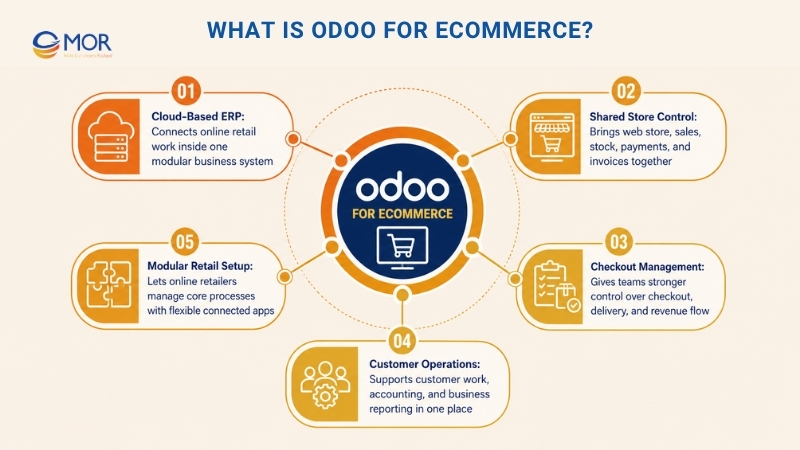
This setup gives businesses better control over the full online selling flow, from checkout and delivery to cash flow and reports. It also helps reduce manual data entry, missed updates, and slow internal handovers. For growing stores, Odoo can work as a practical base for managing daily eCommerce operations and planning future expansion.
Odoo For eCommerce Features For Sales, Marketing, Checkout, And Reports
Odoo for eCommerce gives online sellers one connected toolset to handle products, reach shoppers, process purchases, and read sales results from a shared system. A strong eCommerce app for Odoo also links the storefront, stock, campaigns, payments, delivery, and reports, so teams can run daily selling work with fewer manual steps and fewer data gaps.
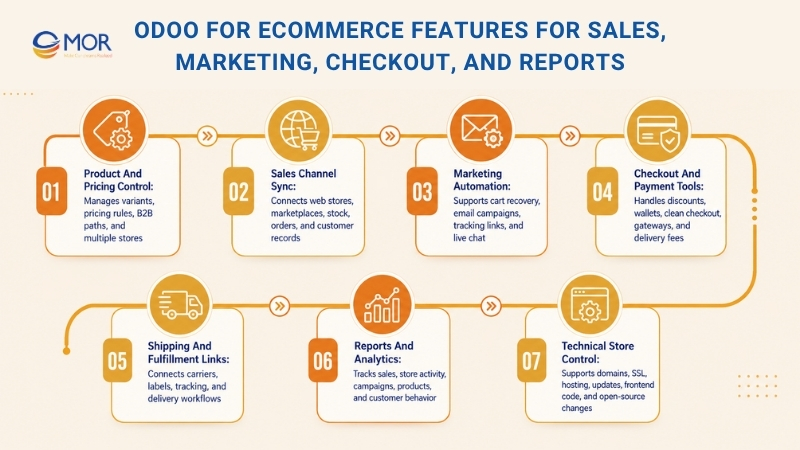
- Product Option Management: Odoo allows sellers to list items with sizes, colors, fabrics, models, and other choices without building a new product page for each version. This keeps catalog work simpler for businesses that sell a high number of SKUs.
- Side-By-Side Product Review: Buyers can check product details, prices, and attributes next to each other before making a purchase. This helps them choose faster, mainly when the store has similar products in one group.
- Flexible Pricing Rules: Companies can set separate price rules for customer types, locations, campaigns, or B2B accounts. This works well for shops that use public prices, wholesale pricing, member rates, or market-based deals.
- Multiple Store Control: Odoo helps companies manage more than one online shop from a shared database. Teams can reuse product data across sites, run separate brands, and manage different markets without repeating backend tasks.
- B2B Store Configuration: Businesses can build different B2B and B2C buying paths with separate prices, customer rules, and purchase terms. This supports wholesale accounts, account-level pricing, and business buyers that place repeat orders.
- Connected Selling Channels: Odoo supports sales across several channels, including web stores and marketplace links. Product records, orders, and stock data can stay synced across channels, which lowers the chance of selling items that are no longer available.
- Recurring Sales And Digital Items: Stores can sell subscription-based products and digital goods like eBooks, files, lessons, or downloadable content. This gives online businesses more ways to build steady and mixed revenue.
- Stock Visibility Rules: Odoo can show current stock and decide whether shoppers can buy based on inventory status. Stores can also send alerts when unavailable products return to stock.
- Customer Ratings And Reviews: Sellers can turn on product reviews and ratings to add trust to product pages. Reviews help first-time visitors judge product quality and feel more ready to buy.
- Tax Setup And Product Data Transfer: Odoo handles tax rules through fiscal positions and customer locations. It also supports bulk import and export for product names, descriptions, prices, and images, which saves time for large catalogs.
- Related Product Suggestions: Odoo can show matching items, add-ons, or alternative products during the shopping journey. These suggestions can raise average order value without adding another product recommendation system.
- Cart Recovery Messages: The platform can send automatic follow-ups when shoppers leave products in their carts. Sellers can use reminder emails or promo messages to bring buyers back to checkout.
- Email Campaigns And Reusable Templates: Odoo includes campaign tools and ready-to-use email layouts. Teams can send offers, product news, cart reminders, and after-sale messages from the same business management suite.
- Campaign Link Measurement: Stores can place tracking codes in campaign links and follow performance from the first visit to the final order. This helps marketing teams see which campaigns create visits, sales, and revenue.
- Real-Time Website Chat: Odoo allows teams to speak with site visitors from the backend while they browse. Sales or support staff can answer quickly, guide shoppers, and lower checkout drop-offs.
- Discount Codes, Gift Cards, And Store Wallet: Sellers can create promo codes, sell gift cards, and let customers pay later with wallet balances. These tools support campaigns, loyalty, repeat sales, and customer retention.
- Live Store Dashboard: Odoo shows current website activity, order data, visitors, and sales performance in one view. Managers can catch trends sooner and react to buyer behavior as it happens.
- Self-Service Customer Area: Customers can open their documents, invoices, support tickets, tasks, and order details through the portal. This improves after-sale support and cuts repeated service questions.
- Product Search, Filters, Groups, And Wishlist: Built-in search, filters, product categories, and wishlist tools help visitors find products with less effort. A cleaner browsing path can improve discovery and bring shoppers back.
- Clean Checkout Flow: Odoo gives stores a simple checkout and allows extra steps when needed. Businesses can collect order notes, delivery details, custom requests, or special instructions without making the process feel heavy.
- Payment Gateway Support: Odoo works with major payment providers, including Stripe, PayPal, Authorize.net, Adyen, Mollie, and other choices. Businesses can also add custom payment methods when their local market needs them.
- Automatic Delivery Fee Setup: Shipping charges can be calculated through Odoo’s delivery method settings. This gives shoppers clearer shipping costs before they finish the order.
- Carrier And Shipping Links: Odoo connects with carriers like DHL, FedEx, UPS, USPS, bpost, Sendcloud, and Easypost. Teams can handle shipping labels, tracking, and fulfillment from the order system they already use.
- Sales Report Tools: Odoo helps companies review sales by units, revenue, products, categories, and salespeople. These reports help teams find top sellers, slow movers, and revenue trends.
- Analytics Tools Connection: Stores can link Odoo with Google Analytics and Plausible to review buyer behavior, traffic sources, audience details, acquisition channels, and website performance.
- Tailored Reports And Charts: Teams can create dashboards for abandoned carts, web orders, best-selling products, leading categories, revenue, and custom sales charts. This makes reporting easier for managers and marketing teams.
- Domain, SSL, Hosting, And System Updates: Odoo supports custom domains, automatic SSL certificates, free updates, and cloud or on-premise hosting choices. These technical tools give businesses more control and safer store operation.
- Open-Source Access And Frontend Code Editing: Since Odoo is open source, companies can adjust tools, themes, and workflows when basic settings do not fit. The code editor lets teams change HTML, CSS, and JS from the frontend.
Why Businesses Choose Odoo For eCommerce
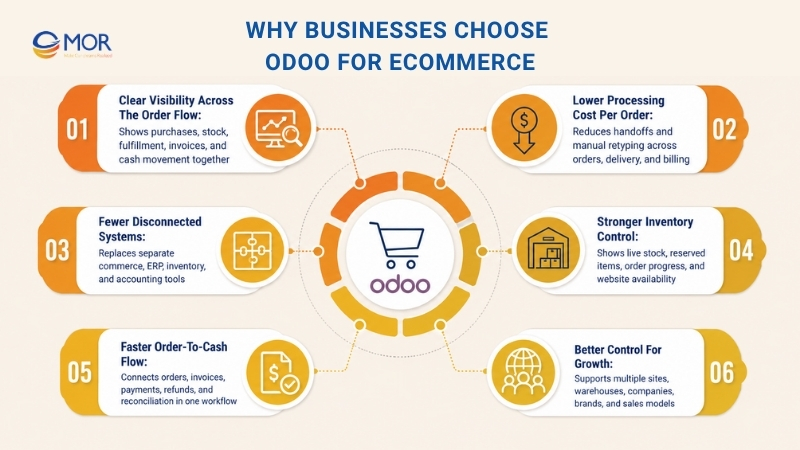
Odoo gives online businesses one place to manage selling, operations, and finance together, which is why many teams asking “is Odoo good for eCommerce” look at it as a serious option.
Clear Visibility Across The Order Flow
The platform gives teams a clear view of the whole order path, covering online purchases, inventory, fulfillment, invoices, and cash movement.
Leaders can see commerce, operations, and finance from one steady source, instead of checking separate systems or fixing data by hand.
Lower Processing Cost Per Order
This Odoo setup links the web shop with stock, delivery, and accounting, so teams avoid repeated handoffs and missing data between tools. Orders move into fulfillment and billing without manual retyping, which lowers effort and helps protect margins as order volume grows.
Fewer Disconnected Systems
Odoo for eCommerce can replace separate tools for the web shop, ERP, inventory, and accounting with one shared platform. This makes the tech stack easier to manage, lowers dependence on connectors and plugins, and helps the business grow without extra system weight.
Stronger Inventory Control
Built-in stock tools and WMS give live details on stock levels, reserved items, and order progress. Website availability follows real warehouse data, which lowers overselling, late delivery, and customer frustration.
Faster Order-To-Cash Flow
Online orders connect straight to invoicing and payment workflows, so revenue work stays steady from order to payment. Automatic invoices, payment flows, and reconciliation help shorten the order-to-cash cycle and make cash flow easier to forecast.
Better Control For Growth
The Odoo erp for eCommerce supports several websites, warehouses, and companies with shared control and clear access rules. Its modular setup helps businesses enter new markets, launch new brands, or test new sales models while keeping governance and visibility in place.
How Odoo For eCommerce Connects The Full Sales Cycle
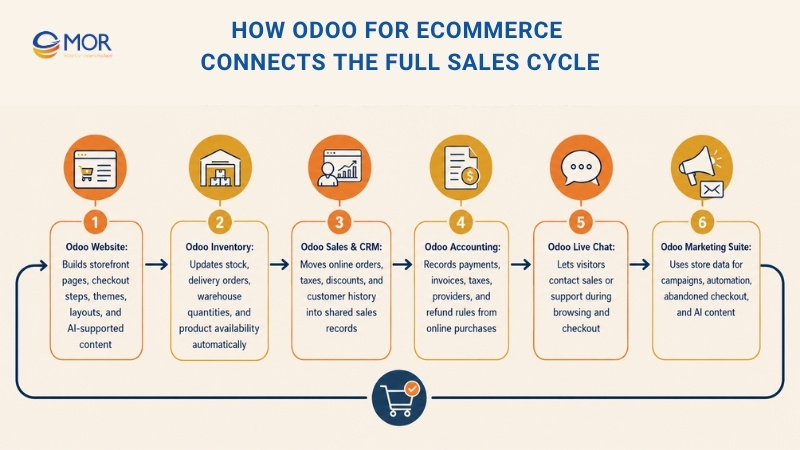
Odoo for eCommerce handles the full online sales process inside one connected workspace. Each app, including Inventory, Accounting, Sales, and the Marketing Suite, sits in the same system, so data connects from the start.
This helps online stores solve common workflow issues because each process stays aligned.
Odoo eCommerce website development works across the full platform in the following way:
Odoo Website
Odoo eCommerce runs from the Website app.
You can build product pages and checkout steps in the same drag-and-drop editor.
Themes, layouts, and dynamic content blocks let you change the Odoo-based storefront without code.
In Odoo 19, AI Fields add text creation and translation support for product and page content inside the Odoo eCommerce builder. SEO meta tags can also be generated with AI support.
Odoo Inventory
Inventory updates on its own after each confirmed online order.
Product availability on the site follows live stock data.
After a sale, Odoo creates a delivery order and adjusts quantities across warehouses.
Routes like dropshipping or cross-docking use the same flow as offline orders, so all stock data stays in one place.
Odoo Sales & CRM
Every online order moves into the Sales app, keeping all sales records in one shared area.
Taxes, discounts, and price lists use the same setup already applied to quotations.
Customer details and purchase history appear in the CRM pipeline for future account work.
Odoo Accounting
Odoo for eCommerce records each payment and invoice created from an online purchase.
Confirmed orders can create customer invoices straight from the sales order.
Taxes, payment providers, and refund rules stay inside the same workflow.
Odoo Live Chat
Live Chat can be placed directly on your eCommerce website.
Visitors can speak with sales or support teams while they browse or check out.
Chats stay in the database and connect to the visitor session or customer record, which gives teams better details for follow-up.
AI chatbots can also run on your website, where the AI Agent can pull eCommerce-related details when helping shoppers.
Odoo Marketing Suite
Odoo Marketing links campaigns and automation flows to your online shop.
Marketing Automation, Email Marketing, and SMS Marketing apps use store data for targeted follow-ups, abandoned checkout messages, and campaign tracking.
Odoo AI for eCommerce can also help create and translate text for campaigns, products, and website pages.
Odoo For eCommerce Integrations With Payments, Marketplaces, And Shipping
Odoo for eCommerce has its own online selling engine, but it can also work with outside platforms. The system supports many payment, delivery, and marketplace connections for daily online store work.
Some connections are already available inside Odoo, including several payment options and providers, while others can be added through API links, such as outside storefronts and shipping tools.
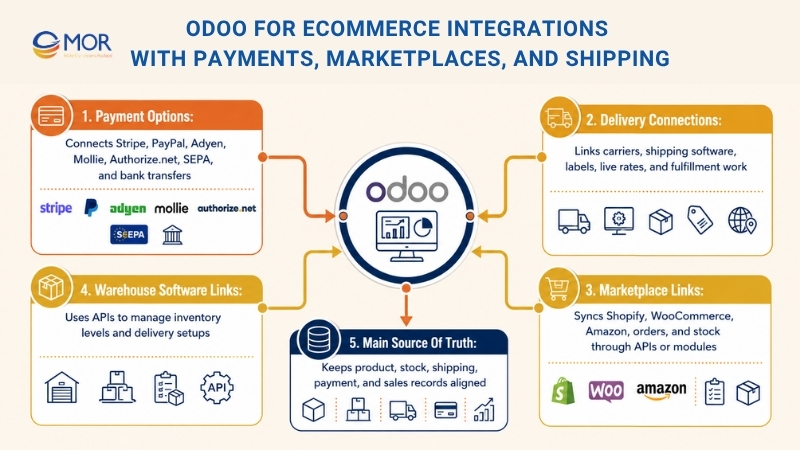
- Payment Options can use Stripe, PayPal, Adyen, Mollie, or Authorize.net. Local choices like SEPA or bank transfer can also be used. Each payment is posted right away to the correct accounting journal, with currency details and provider fees included.
- Delivery Connections link with carriers like DHL, FedEx, and UPS through built-in tools. The platform can also connect with shipping software such as ShippyPro and Sendcloud through API. You can create labels, view live rates, and start fulfillment work directly inside Odoo.
- Marketplace Links for Shopify, WooCommerce, or Amazon can work through API connections or partner modules. Orders move into Odoo on their own, and stock changes are sent back to the sales channel.
- Warehouse Software Links can also use API connections to manage inventory levels and work with delivery setups like dropshipping.
These connections make the Odoo commerce solution flexible, while still keeping its main idea in place: one system that acts as the main source of truth for online selling. This also matters for integrating ecommerce with odoo for nutrition, where brands often need accurate product data, stock, shipping, and payment records across sales channels.
What Daily eCommerce Management Looks Like Inside Odoo
Running an online store with Odoo for eCommerce means working inside one linked system instead of moving between many separate tools.
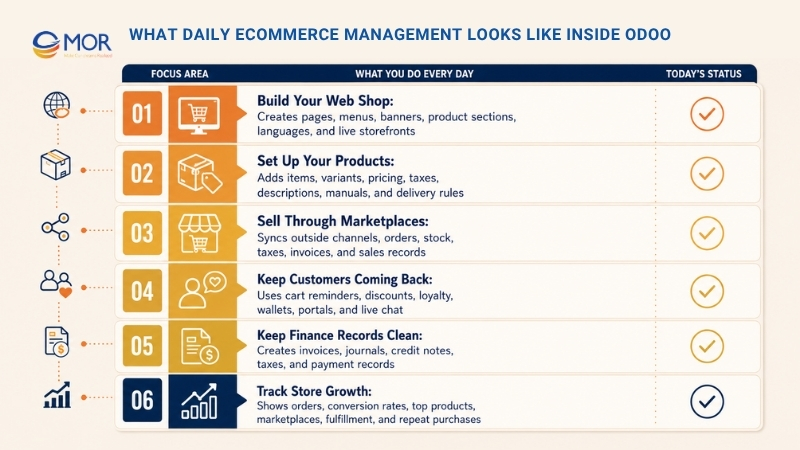
Build Your Web Shop
To create your online business with Odoo, you begin in the Website app and build the public face of your brand.
The drag-and-drop editor helps you design the homepage, create product pages, and arrange menus without writing code.
You can place images, banners, and content blocks to show key products and their variants through dynamic product sections.
The full setup remains active in the same backend that will later handle customer orders. When the layout is ready, you can check it in different languages, publish the site, and make the store live right away.
At that stage, you already have a live storefront linked to the Odoo commerce ecosystem, ready to manage products, payments, and buyers.
Set Up Your Products
Products are the main part of your shop.
You can go into the eCommerce app and start adding items with names, pictures, and product choices. Odoo manages variants for you, so duplicate listings are not needed.
Inside the Odoo online store system, you can set prices and tax rules, add descriptions and manuals, and choose whether each item is shipped, made after purchase, or delivered as a digital product.
From that point, the software keeps product data connected with your stock. When warehouse quantities change, your online shop updates at once without manual imports or CSV files.
Sell Through Marketplaces
After your store goes live, outside sales channels can be connected.
Odoo already includes several marketplace links, but other channels can also sync with the system through connectors or APIs.
One case is connecting Shopify, WooCommerce, or Shopware, which helps you run multi-country or multi-brand sites with large order volume. Marketplace aggregators like ChannelEngine can also open access to close to 1,000 marketplaces worldwide.
When a shopper places an order, it appears in Odoo for eCommerce as a sales order. That action starts the delivery flow in Inventory and records the sale in Accounting.
You do not need to open several dashboards because each sale is shown in one view.
With Odoo as the main data source, every part of your eCommerce sales flow stays in one place: taxes match invoices, stock follows your settings, and each record connects with every app and outside channel.
Keep Customers Coming Back
To improve sales, Odoo eCommerce lets you create automated rules and email campaigns that support customer retention.
When shoppers leave items in their cart, Odoo sends an automatic reminder. You can continue with a discount or an email flow through Email Marketing and Marketing Automation.
Repeat buyers can see tailored product suggestions or receive discount codes for their next order. Odoo’s loyalty program lets customers earn and spend points, while gift cards and e-wallets make repeat purchases easier.
Customers who sign in to the portal can follow deliveries, download invoices, check e-wallet balances and loyalty points, or request returns. The Live Chat tool lets them contact your team from the website when they need support.
Keep Finance Records Clean
After an order is confirmed, Odoo can create an invoice in Accounting. Payments through Stripe, PayPal, or bank transfer show in your journals, including payment fees and currency exchange details.
When a buyer cancels an order or sends an item back, Odoo creates a credit note and adjusts the related accounts.
Your finance view stays organized, so there is no need to export spreadsheets or match records across tools. Taxes follow fiscal positions on their own, whether you sell in one country or across borders.
Track Store Growth
At the end of the week, you can open the dashboard and check store results. Odoo reports show daily orders, conversion rates, and top-selling products.
You can review marketplaces, check fulfillment time, and watch repeat purchase activity.
Since each action takes place in Odoo, your data is ready to read, complete, and traceable from the first ad click to the final payment.
Managing online sales with Odoo feels less like handling separate tools and more like running one connected business operation. From the first product setup to the first sale, each part of the process is already linked.
Odoo For eCommerce Pricing And Total Cost Of Ownership
Odoo for eCommerce may seem low-cost at first because its software fee follows a clear per-user pricing model. The official pricing page shows a One App Free plan at $0, a Standard plan from US$16.90 per user/month, and a Custom plan from US$25.50 per user/month, with all Odoo apps covered in the paid plans. This means companies can use eCommerce, Website, Sales, CRM, Inventory, Accounting, POS, and other apps under one subscription, instead of paying for each module one by one, which is useful when reviewing Odoo erp for eCommerce in us.
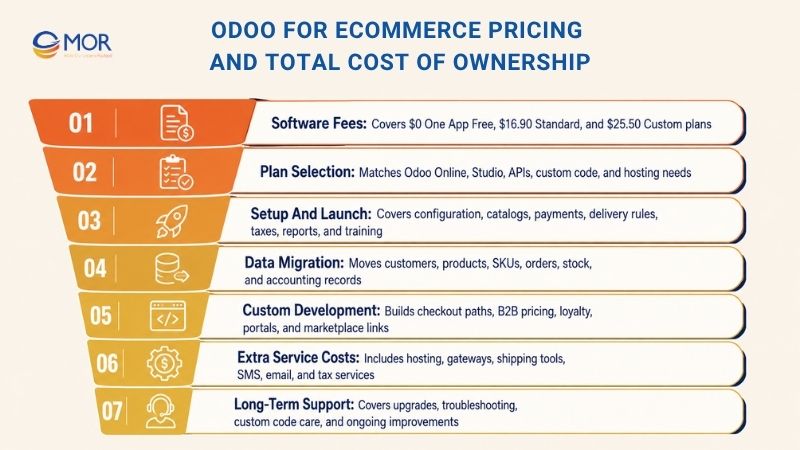
For smaller stores, the One App Free plan may be enough to try Odoo eCommerce with unlimited users. Odoo also explains that when the chosen app needs other apps to work, those required apps are included at no extra cost. As one case, eCommerce may need Website and Invoicing, so companies can begin selling online without moving to a full paid plan right away.
Still, most growing online stores need to look past the monthly software fee. The real total cost of ownership covers setup, custom changes, integrations, data transfer, team training, hosting options, and long-term care. Odoo says its plans cover hosting, maintenance, upgrades, support, backups, security, and access to many apps, but some costs sit outside the plan, including Odoo.sh hosting for custom work, setup services, in-app purchase credits, and support for custom code.
User-Based Software Fees
Odoo pricing depends on paid users, often staff members who enter the backend to create, view, or change business records. Customers who buy products online or check deliveries through the portal are not treated as paid users, which can help lower costs for stores with heavy visitor traffic.
Choosing The Right Plan
The Standard plan fits companies that can use Odoo Online with out-of-the-box tools. The Custom plan suits businesses that need Odoo Studio, multi-company setup, custom code, external API access, Odoo.sh, or on-premise hosting. For online brands with complex stock, ERP work, marketplaces, or third-party links, the Custom plan is often the more practical choice.
Setup And Launch Cost
Setting up the Odoo retail and eCommerce platform often includes business review, configuration, product catalog setup, payment setup, delivery rules, taxes, order flows, reports, and staff training. Odoo states that implementation work is not part of the subscription, and companies may use Odoo Success Packs, an Odoo partner, or a direct enterprise team based on size and needs.
Moving Store Data
Online sellers often need to transfer customer files, product records, SKUs, categories, price lists, order history, stock figures, and accounting data from Shopify, WooCommerce, Magento, Excel, or old ERP systems. Clean migration reduces launch errors, but messy catalogs or outdated customer records can increase project cost.
Custom Work And Development
A simple Odoo web store setup can run with standard tools, but many companies need custom checkout paths, tailored product pages, B2B pricing, special shipping rules, loyalty programs, wholesale portals, or marketplace links. These changes usually need technical work, mainly when custom modules or API links are involved.
Hosting And Technical Setup
Odoo Online hosting comes with the Standard plan, while the Custom plan can use Odoo Online, Odoo.sh, or on-premise hosting. Odoo notes that Odoo.sh hosting for custom development is not part of the standard subscription fee, so companies should plan a separate budget when they need staging, production branches, or custom module deployment.
Outside Tools And Service Fees
Payment gateways, shipping carriers, SMS messages, email tools, tax tools, and marketing platforms can create extra costs. Odoo also lists in-app purchase credits, including SMS and lead generation credits, as items outside the regular plan.
Support And Long-Term Care
Odoo includes standard support and upgrades in its plans, but custom code support, deeper troubleshooting, new function work, and ongoing improvements may need a partner or an internal technical team. This becomes more important as the store grows across more channels, warehouses, countries, or customer groups.
A simple Odoo shopping platform may only need the free plan or a small Standard subscription. A growing online retailer with inventory, accounting, CRM, B2B pricing, shipping rules, and marketing automation should plan for a larger full investment. The safest way to estimate Odoo’s full cost is to split the budget into license fees, implementation, migration, customization, hosting, integrations, training, and ongoing support. This gives companies a clearer view of what Odoo will cost after launch, not only the number shown on the pricing page.
Odoo For eCommerce Implementation Checklist
A strong Odoo for eCommerce rollout begins with a clear check of how your online store works now and what should be fixed before launch. Since Odoo links product pages, checkout, stock, payments, pickup, fulfillment, and reports in one platform, the setup should cover the customer-facing store and the backend flow. A clear checklist helps companies avoid missed settings, broken steps, and weak user experience after go-live, especially when comparing Odoo erp for eCommerce in USA needs with Odoo eCommerce vs Shopify before a migration.
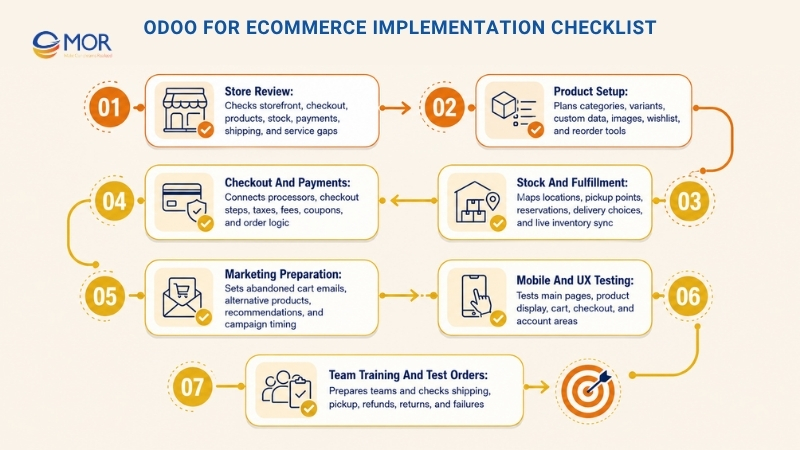
Review Current Store Needs And Friction Points
Begin with your current storefront, checkout journey, product list, stock process, payment methods, shipping rules, and customer service flow. Find where buyers leave, where teams still do manual work, and which tools cause delays or data gaps. This gives your implementation team a clear base before setting up Odoo 19.
Plan Product Categories And Variant Rules
Check how your products are grouped, named, priced, and shown to shoppers. Stores with many sizes, colors, materials, bundles, or product choices should set variant rules with care before data enters Odoo. This matters because Odoo 19 has stronger dynamic option filtering, view-more choices, and search for large variant groups.
Decide Custom Product And Checkout Data Needs
Some online businesses sell custom products, made-to-order items, gift products, or B2B orders that need extra customer details. Before launch, decide whether checkout should ask for embroidery text, delivery notes, custom sizing, gift messages, or special instructions. Odoo 19 supports extra checkout steps, so these details should be planned early.
Map Stock Across Locations
If your company runs several stores, warehouses, pickup sites, or fulfillment points, define how stock should move between each place. Decide which items can be delivered, which items can be picked up, and how stock should be reserved once customers order. This is especially useful for click and collect because Odoo 19 can show live stock by location.
Connect Payment Processors
Add the payment methods your customers already know, such as Stripe, PayPal, Authorize.net, or local providers. Payment badges should appear clearly during the shopping flow, so buyers know their payment choices before checkout. This builds trust and can lower hesitation before payment.
Build The Checkout Path And Extra Steps
Check the full flow from cart to order confirmation. Keep standard orders simple, but add extra steps only when they have a clear business purpose. For custom products, B2B buying, or special delivery needs, Odoo 19 gives you more control over the details customers must provide before payment.
Prepare Abandoned Cart Emails And Timing
Set up cart recovery before launch, including message style, offer, send time, and follow-up rules. Odoo 19 improves this tool because it targets carts left after the function is turned on, helping companies avoid sending old cart emails to past visitors. The email should match your brand voice and give shoppers a clear reason to come back.
Plan Alternative Products For Key Items
Use alternative products to guide shoppers toward stronger choices, replacement items, or related products during browsing. Odoo 19 allows custom titles for alternative product blocks on each product, so teams can write more useful recommendation messages instead of using one general title everywhere.
Set Pickup Locations And Stock Sync
Add each pickup point with correct stock visibility, pickup rules, and payment choices. Customers should be able to pick a location, see if an item is in stock, and know whether to pay online or at pickup. Stock sync must be tested well so the website shows real inventory and avoids overselling.
Check Mobile Layouts On Main Pages
Odoo 19 improves mobile shopping with stronger product comparison, cart summary, and responsive page layouts. Before launch, test the homepage, category pages, product pages, comparison tool, cart, checkout, payment page, account area, and confirmation page on different screen sizes. A smooth mobile flow matters because many buyers shop from phones.
Check Product Images And Display Rules
Product display should be reviewed before go-live, mainly for stores that depend on visuals to drive purchases. Odoo 19 adds improved image options, including carousel, grid, and stronger magnification. Choose the style that suits your products and make sure images are clear, even, and easy to view.
Set Wishlist And Quick Reorder Tools
Turn on wishlist and reorder tools if your customers often compare products, save items, or buy the same goods again. These tools work well for consumables, B2B accounts, gift shoppers, and buyers who need more time before they purchase.
Confirm Taxes, Shipping Fees, And Order Logic
Test tax rules, shipping fees, delivery choices, pickup settings, discounts, coupons, and order confirmation emails before launch. Small mistakes in these settings can hurt customer trust, accounting accuracy, and delivery speed.
Train Teams Before Launch
Sales, warehouse, support, marketing, and finance teams should know how Odoo moves orders from website purchase to delivery, invoice, payment, return, and reporting. Training helps teams answer faster when customers ask about stock, payment status, order edits, or shipping updates.
Run Full Test Orders
Create test purchases for common cases, including standard shipping, click and collect, out-of-stock items, custom products, discounted orders, failed payments, refunds, and returns. These tests show whether Odoo 19 is ready for real customer behavior after launch.
Why Choose MOR Software For Odoo eCommerce
Odoo for eCommerce works best when the system matches how your online store sells, ships, bills, and reports. That is where MOR Software can support businesses that need more than a standard setup. As an Odoo partner and software development outsourcing company in Vietnam, MOR works across web development, mobile development, software outsourcing, offshore development, QC and testing, and IT consulting services.
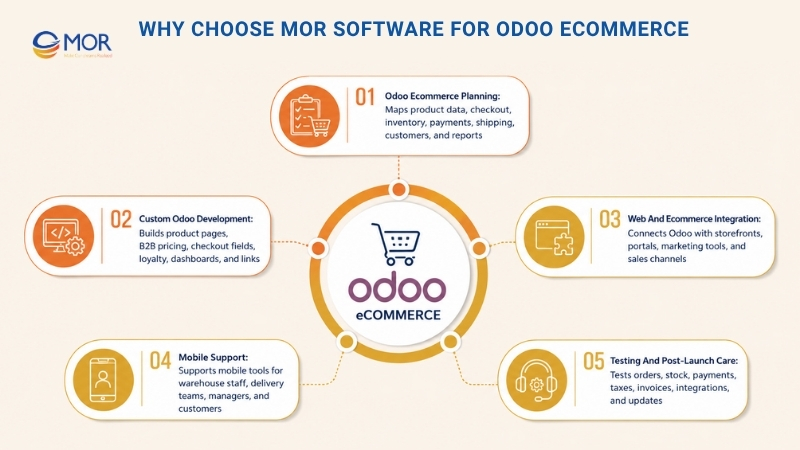
Odoo eCommerce planning
MOR Software can help map product data, checkout steps, inventory rules, payment flows, shipping logic, customer records, and reporting needs before setup starts. This helps the project stay close to real store operations.
Custom Odoo development
Many online stores need custom product pages, B2B pricing, special checkout fields, loyalty rules, marketplace links, or custom dashboards. MOR Software can build these parts around actual business workflows, not a one-size-fits-all setup.
Web and eCommerce integration
MOR Software provides web services across websites, web apps, eCommerce solutions, CMS, QA testing, maintenance, consulting, and system integration. This is useful when businesses need to connect Odoo with storefronts, customer portals, marketing tools, or sales channels.
Mobile support for store teams
Some eCommerce businesses need mobile tools for warehouse staff, delivery teams, store managers, or customers. MOR Software can support native, hybrid, PWA, and mobile backend work when the Odoo setup needs a mobile layer.
Testing and post-launch care
Odoo eCommerce projects need careful testing because small errors can affect orders, stock, payments, taxes, and invoices. MOR Software can support QA, integration testing, maintenance, and long-term updates so the system stays stable after launch.
For growing online stores, MOR Software can help turn Odoo from a basic eCommerce platform into a working system that fits daily operations, from product setup and order flow to fulfillment, finance, and reporting.
Conclusion
Odoo for eCommerce gives online stores a clear way to manage selling, stock, payment, shipping, finance, and reports from one connected system. It can start simple, then grow into a full ERP setup for more complex store needs. The real value comes from careful setup, clean data, and the right custom work. Need help shaping Odoo around your store workflow? Contact us to talk about your project.
MOR SOFTWARE
Frequently Asked Questions (FAQs)
Is Odoo good for eCommerce?
Yes. Odoo is a strong option for eCommerce businesses that need more than a basic online store. It connects website, inventory, sales, CRM, accounting, payments, shipping, and reporting in one system.
How does Odoo eCommerce handle inventory and stock updates?
Odoo updates inventory automatically when an online order is confirmed. Stock levels can also sync across warehouses, stores, and sales channels, helping reduce overselling and manual updates.
Can Odoo support B2B and B2C eCommerce at the same time?
Yes. Odoo supports B2B and B2C selling with separate price lists, customer groups, websites, payment terms, and order rules. This makes it useful for hybrid retail and wholesale businesses.
Does Odoo connect with Shopify, Amazon, WooCommerce, and Shopware?
Yes. Odoo can connect with platforms and marketplaces such as Shopify, Amazon, WooCommerce, and Shopware through connectors, partner modules, or API integrations.
How does Odoo compare with Shopify for growing eCommerce businesses?
Shopify is easier for launching a simple storefront quickly. Odoo is stronger for growing businesses that need eCommerce, inventory, accounting, CRM, and operations connected in one platform.
What are the key Odoo apps needed for an eCommerce store?
The main apps include Website, eCommerce, Sales, Inventory, Accounting, CRM, Email Marketing, Marketing Automation, Live Chat, Invoicing, and Helpdesk.
Does Odoo support payments, shipping, tracking, and returns?
Yes. Odoo supports payment providers, shipping connectors, delivery tracking, invoices, refunds, and returns. These workflows can be linked to the original order for better control.
How much does Odoo for eCommerce cost?
The cost depends on the edition, user count, hosting, implementation, customization, integrations, and support. Community is free to use, while Enterprise requires paid user licenses.
What should businesses prepare before implementing Odoo eCommerce?
Businesses should prepare product data, customer records, inventory rules, payment methods, shipping workflows, tax settings, website structure, and integration needs before setup.
Share


Make Our-Dreams Realized


© 2023 . MOR Software. All Rights Reserved
Sitemap
Privacy Policy
Terms of Use

Rate this article
0
over 5.0 based on 0 reviews
Your rating on this news:
Name
*Email
*Write your comment
*Send your comment
1