


Odoo Implementation Methodology: The Comprehensive Guide 2026
ERP projects often go off track when teams rush planning, overbuild custom features, or train users too late. A clear Odoo implementation methodology gives your business a safer way to plan, launch, and improve Odoo without wasting time or budget. This MOR Software’s guide will walk through the Odoo implementation process, from GAP Analysis to go-live support.
What Defines A Successful Odoo Implementation Project?
As a Project Leader, finding the right balance can be hard. You need to handle the client’s expectations, review new change requests, protect the budget, respect the contract, choose the right depth of analysis, and keep the project timeline under control.
The main goal of a strong Odoo implementation methodology is simple: help users start using the system on time and within the agreed budget. Projects usually fail when they take too long or cost far more than planned.
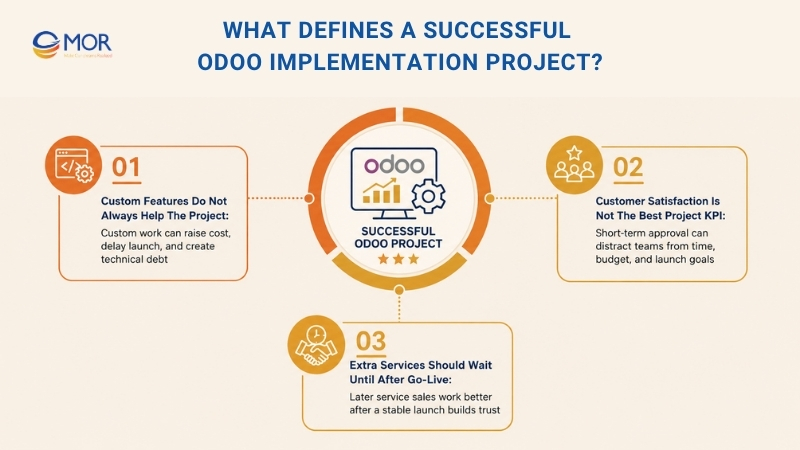
Time and cost should guide the way you shape your ERP rollout approach. Everything else should come after that:
- Building custom functions should not be the main goal.
- Pleasing the client during every part of the rollout should not be the main KPI.
- Selling extra services too early should not matter most.
Custom Features Do Not Always Help The Project
Custom work adds more cost and can slow the whole ERP project down, sometimes enough to put delivery at risk. It also creates technical debt, which the client may later pay for through higher support, fixes, and upgrade work.
A single custom item can look small and cheap at first. But when more custom items are added, project difficulty rises much faster than most teams expect.
A project works well when it is launched within the agreed time and budget. Building around every special request does not prove the project is successful, though it can still be needed when the client’s core operations depend on it.
Customer Satisfaction Is Not The Best Project KPI
Customer satisfaction is a weak way to judge project success. It changes many times across the rollout, and each person on the client side may want something different. A key user may ask for more functions, but the CEO may care more about launching on time and within budget.
When the Project Leader focuses too much on short-term satisfaction, the main project goals can get blurred. It is better for a client to feel unhappy for a short time after a tough decision than to miss the launch date. Some tension is normal in any ERP project.
Customer satisfaction should not be the final goal during delivery, but it can still show how motivated key users are.
For that reason, regular client ratings can help identify accounts that need more care. They should not be used as a direct scorecard for the Project Leader.
Customer satisfaction changes throughout the project.
Extra Services Should Wait Until After Go-Live
Service providers often want to bill as much work as they can. That is part of their business model. Large firms may even use heavy methods that create more paid work, including long analysis stages that are said to lower project risk.
We believe that selling more should not be the starting goal. Business growth should come from good service and clients who trust the work. In many cases, launching the client with fewer service days is better. It lowers failure risk and also helps the provider stay more competitive.
A steady delivery pace gives the company a strong edge when winning new clients. Once the client base grows, selling extra services to current users becomes much easier:
- It is 7x easier to sell more to current users than to win a new client.
- You can split the project into stages and sell optional items after Go-Live. This keeps the project budget from eating into your margin too early.
The main point is simple: stable growth starts with successful projects. When projects work well, clients are more willing to buy more later. Each time you push extra services before Go-Live, client trust gets weaker, and they may hesitate before saying yes to future work.
Odoo Implementation Methodology Phases
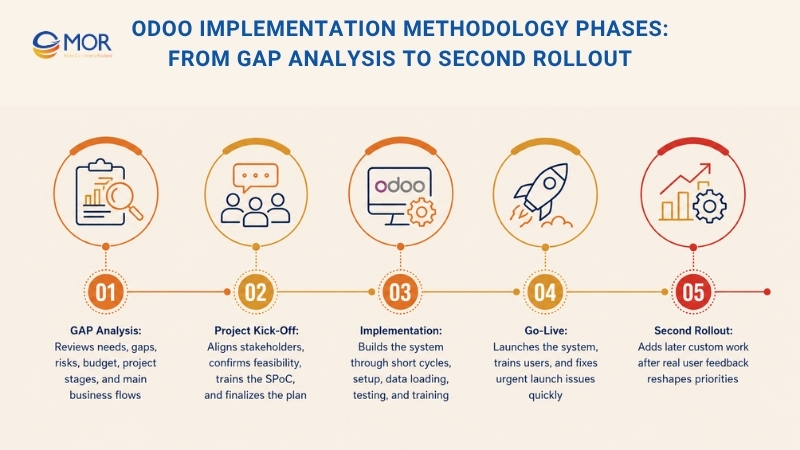
The Odoo official implementation methodology breaks a rollout into clear stages with different time shares:
Phase | Time | Goals |
GAP Analysis | 10% | Review business needs, identify gaps, define phases, and estimate budget. |
Kick-Off | 5% | Align key stakeholders on the rollout approach and run basic training. |
Implementation | 80% | Work through short cycles covering analysis, development, validation, and key-user training. |
Go-Live | 5% | Train end users and resolve launch issues. |
Second rollout | variable | Expand the project scope or add custom functions. |
GAP Analysis
For large projects, GAP Analysis is often sold before the client signs off on the full project and budget. Based on project size, this work may take only a few hours or up to 30 days. For small projects under 4 months, the GAP Analysis is usually handled inside the Kick-Off stage instead of being treated as a separate step.
The GAP Analysis helps clients:
- Adjust their requirements to fit the software,
- Remove doubts about whether the project can work,
- Judge the Project Leader’s ability,
- See the plan and budget more clearly.
The Project Leader provides:
- A match between business needs, product functions, and cost.
- A project plan. → These items are created with the GAP-Analysis Tool and shown in the GAP-Closing presentation.
- A proof of concept, or POC: demos of the main business flows.
The GAP Analysis follows these steps:
- Talk with stakeholders and define goals, reasons, and risks in the GAP Kick-off mindmap.
- Meet key users in each department with the GAP Key-user Interview mindmap, which can work like an Odoo official implementation methodology questionnaire template:
- Review how work is done now
- Define what must change
- Write down the GAP Analysis and project staging.
- Ask Odoo Experts and developers to review it and question the proposed choices.
- Share the results with the client through the GAP Closing presentation and run a product demo.
GAP Analysis Guidance
In stakeholder meetings:
- Think like a trusted adviser, since the project has not been fully sold yet. At this point, your job is to build trust, reduce worry, and show key functions through short demos.
- After key users feel more confident, study their current daily work: ask them to show their present tools and collect copies of the documents they use. The current way of working matters more than future wishes because it sets the smallest scope needed for launch. When you understand today’s process well, you can question future requests more easily.
- Solve each business problem, and stay close to standard features when possible. You do not need to accept every request from key users, since their ideas should be reviewed and challenged.
- Do not give the client several choices: as Project Leader, you should recommend the best option and make the call. The client should challenge your proposal, not design the solution for you.
- Do not ask the client to label items as “must-have” or “optional”. If they do that work, nearly everything may become mandatory. You should make the call and mark items as “optional” when they should stay outside the first scope.
- Ask key users, “what is your biggest problem right now?”. Their answer will help later when people need reassurance. If the project team feels unsure during delivery, bring them back to their stated priorities.
Once meetings are done:
- A solution review should be run with an Odoo Expert who is not part of the project. This person is not shaped by client pressure and can give honest feedback, even when the comments are tough.
- This review checks whether custom work is truly needed and, if it is, which items should come first so the team can cut the cost and shorten the schedule.
- All required custom work should be split into two groups:
- Work that must be finished before launch because the business cannot run without it.
- Work that can move to the second rollout after Go-Live because the business can still operate without it, even if the setup is not perfect.
Before closing the work:
- Wrap up the findings across process coverage, business fit, required resources, timeline, and risks.
- Arrange focused product demos to give stakeholders confidence and show the value they will gain from using Odoo.
Project Kick-Off
The Project Kick-Off brings people into the project. This step builds support inside the client’s company, sets expectations, gets agreement on the delivery approach, and most of all, turns the plan into something real.
This step carries a lot of weight. The project can rise or fall based on how well it is handled. That is why it should take at least 10% of the total project effort.
The kick-off should:
- introduce the SPoC to the method and align the project view,
- run a short GAP Analysis to confirm whether the project can work, if this was not done before,
- complete the project plan,
- train the SPoC and make sure they spend real time learning Odoo.
Kick-Off Guidance
- Face problems early: if the timeline is too tight, ask for more time and push the date back as soon as possible. If there is confusion about feasibility, mindset, or functions, raise it right away instead of waiting. New Project Managers often avoid hard talks, and that creates bigger issues later.
- Review client commitment: check that the right people are involved on the client side. They also need enough time and knowledge to carry out their tasks.
- Spend real time training the SPoC. Show them the eLearning platform, guide them through online documents, and train them on the main business flows. They cannot support the project well if they do not build strong product knowledge.
- Set client expectations carefully because this is a core skill for any Project Leader. Do not agree to unrealistic dates, do not promise complex functions too early, do not claim the change will be easy, and do not say yes to every request. When you promise less, you have room to deliver more.
Implementation
No matter how complex the work is, the project needs to keep moving. A steady rhythm is one of the main success factors. The best way to keep people involved is to keep the SPoC close to every part of the work.
After Kick-Off, the planned solution has already been shown to key users. Now the team needs to turn that plan into a working system.
During each phase, the project team works in short cycles so useful functions can be delivered every week. The solution takes shape step by step and is reviewed by the Project Leader and the SPoC. System setup, data loading, and custom work happen at the same time, led by the Project Leader and the developer when needed.
System Setup
The Project Leader sets up the software directly, including changes made through the Studio app, but without custom code. After the apps are ready, the Project Leader brings in the SPoC and key users through training sessions so the setup can be checked.
Data Loading
The person in charge of data import depends on the amount and difficulty of the data. It may be handled by the Project Leader or by a developer. Based on the Project Leader’s guidance, the SPoC and key users collect the data and prepare the import file.
Moving data from the old system into Odoo can slow the project down, so good choices matter:
- Do not block launch over imperfect data: Clean data is best, but it should not delay launch. If the client did not clean the data in time and already worked with it in that condition, do not postpone Go-Live just to fix it. Some cleanup can happen inside Odoo after launch.
- Move key records, not the whole past when possible: full history takes too much time and money compared with the value it brings.
Custom Build Work
The Project Leader owns the result of the project. For that reason, this person must decide whether custom work is worth the risk of delaying the project. It is always valid to question if a custom item is truly needed. The less custom build work you keep, the better the implementation lifecycle of Odoo usually runs.
At this stage, the Project Leader approves only what should be built. This is usually work the business needs to operate, not items that are only nice to have. The business can run without those extra items, though the setup may not be ideal.
The Project Leader writes the requirements, including the test cases, and the SPoC confirms that they match business needs. After that, the developer handles the task and completes it. They also take care of automated tests.
The Project Leader checks the new functions and confirms that they work well with other apps and flows. After the build is approved, the Project Leader trains the SPoC and key users.
The SPoC also needs to test and approve the custom work. When problems appear, the SPoC reports them to the Project Leader, who works with the developer to fix bugs and make the needed changes.
Final Checks And User Training
When every requirement in a phase has been finished, the SPoC runs the last checks and gives approval for Go-Live.
As internal Odoo experts, the SPoC and key users prepare and train all end users.
The client should also write the user manual because good documents must match its internal process names and business terms. This also proves that the client has tested the software in daily working conditions before launch. Besides, service teams should not spend expensive project time writing basic internal guides.
Implementation Guidance
- Let the SPoC run the flow by themselves. They will learn faster this way. You can guide them, but they should control the mouse and keyboard. This makes training much more useful and shows quickly whether they understand the main ideas.
- Turn the project plan into small wins: regular delivery keeps the client engaged. Once users start working in the system, even in a small area, their product knowledge grows much faster.
- Keep questioning new requests: having a requirement list does not stop the client from adding new ideas. In most cases, you should not accept changes inside an active cycle unless the deadline and budget stay the same. If a change must be added, place it in a later cycle. If it affects a later requirement, accept it only when another item is removed to balance the work.
- Do not build work you cannot support: a promise made during sales can be discussed again. The contract matters, but project success matters more. You can still explain to a CEO why an idea should not be built, even when it was part of the first agreement.
- Hold in-person meetings. They can help solve difficult situations, including fear of change, lack of trust, or weak user involvement.
Go-Live
When the system is ready to launch, some issues may still appear. Most of the time, they come from two areas:
- The system data was not tested enough: make sure key users have checked every main business flow.
- Users did not receive enough practice: if training happened many months before launch, users may forget the steps. If they only watched the training and did not practice, they may miss key actions.
Launch Guidance
- Training should not feel like a lecture. Ask the SPoC to let key users run the flow with support instead of only watching.
- Key users are not trained testers. Testing well is difficult, so they may miss problems. Review risky areas with them again.
- Respond fast. Problems are acceptable when the team fixes them quickly.
- Try not to move the Go-Live date. It may look safer at the moment, but many things can change in 2 months: people may lose focus, new requests may appear, data may need another import, and more. Delays bring more risk and cost. In most cases, a quick launch is better than waiting for a perfect one.
- Stay on-site during the first launch days if users are likely to resist the change. You can coach them directly.
- Check the real launch after a few days. Some teams still use the old software because old habits are hard to break.
Second Rollout
One month after the first launch, the Project Leader reviews the list of custom items that did not go live in Phase 1. These are items planned for a later stage, meaning the business can run without them, but the setup is not yet ideal.
User feedback often changes the order of custom work in the second rollout. In many cases, around 50% of the planned custom work turns out to be unnecessary, while new requests appear after real use. This is why the phases of the ERP implementation process should leave room for learning after launch.
Core Principles Of Odoo Implementation Methodology
A good ERP rollout needs more than a task list. Odoo implementation methodology works best when the team keeps ownership clear, avoids heavy custom work, trains the right people early, and gives the project one strong direction.
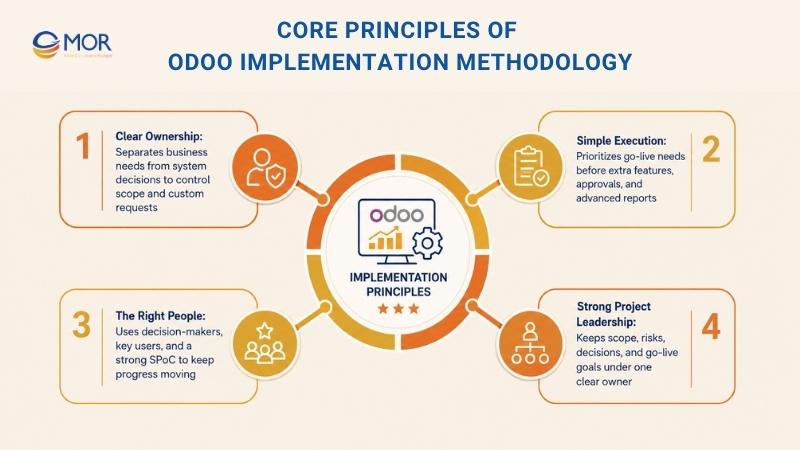
Clear Ownership
A successful Odoo project begins with clear responsibility on each side. The business team needs to explain why the project exists and what problems the system must solve. These problems can include slow manual tasks, broken links between sales and stock data, weak finance reports, or limited business tracking.
The Odoo project team then chooses how those needs should work inside the system. This split matters a lot. When each department tries to copy its old process exactly, the project can become full of custom requests. A strong partner should question those requests, compare them with standard Odoo tools, and suggest the simplest workable path.
For MOR Software clients, this means we do not start with custom build work as the first answer. We first check the business reason behind each request. Then we decide whether standard Odoo, system setup, workflow changes, or custom development makes the most sense.
Simple Execution
Simple work is one of the strongest rules in Odoo implementation methodology. Projects move faster when they avoid needless meetings, long documents, extra approval steps, and custom features that do not support launch.
A simple project does not ignore real business needs. It separates what must be ready for go-live from what can wait. A sales team may need CRM, quotes, customer records, and invoices to work well on day one. Advanced reports, special approval flows, or extra dashboard screens can often come later after the main system is live.
This approach helps SMEs avoid a common trap: trying to create the ‘perfect’ ERP before anyone uses it. A smarter path is to launch a clean and stable version first, train users well, collect real feedback, and improve the system step by step. This is also where Odoo methodology keeps the rollout grounded in real business use, not wish lists.
The Right People
Even a strong Odoo setup can fail when the right people are missing. An Odoo project needs decision-makers, key users, and internal supporters who know how the company runs.
One of the most useful roles is the Single Point of Contact, also called the SPoC. This person speaks for the business, answers questions fast, helps make decisions, and keeps users aligned inside the company. Without a capable SPoC, small questions can become long delays because too many people need to approve each choice.
Key users should learn the system early as well. When they understand Odoo before the wider team does, they can support adoption, test workflows, give better feedback, and help other staff feel more confident with the new system.
For SMEs, this matters even more because teams are often small. One strong internal supporter can keep messages clear and stop the project from losing speed.
Strong Project Leadership
The project manager, or Odoo Project Leader, has a major effect on the whole rollout. This role is not only about checking deadlines. A strong Project Leader also understands business flows, knows standard Odoo tools, manages risks, questions weak requests, and keeps the project moving toward go-live.
Many ERP projects slow down when too many roles are involved. The Odoo implementation methodology official approach favors a more direct model, where the Project Leader brings together project control, business analysis, and product knowledge. This helps the team make quicker and more useful choices.
For SMEs working with MOR Software, the project should always have one clear owner, one clear plan, and one clear route for decisions. When the Project Leader and the client’s SPoC work closely, the project becomes easier to manage, explain, and complete.
A strong Odoo implementation methodology protects the business from common ERP problems: unclear scope, too much custom work, slow decisions, weak user adoption, and rising costs. With the right structure, Odoo becomes easier to launch, easier to use, and easier to expand later.
Key Roles In A Successful Odoo Implementation Methodology
Project Managers, Junior Business Analysts, Senior Business Analysts, Testers, Trainers, and other roles can all appear in ERP projects. But too many people in the decision chain can make the work slower.
Good decisions always require a trade-off between business needs and existing product functions. If the business analyst and product expert are separate people, the team may choose slower or less practical answers.
Odoo is simpler to use than many older ERPs. That means one person can understand the business side and the product side, which many competing ERP models cannot do as easily.
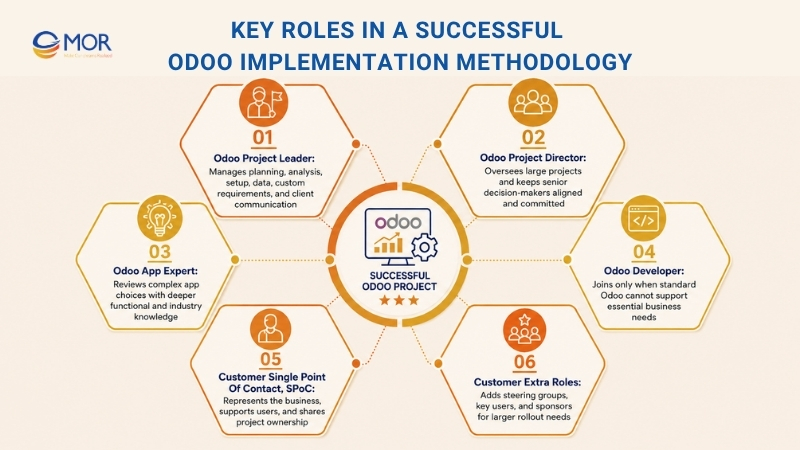
Odoo Project Leader
The Project Leader is the main decision-maker in the project. Yet this person does more than one job. They act as project manager, business analyst, and product expert at the same time.
As project manager, we guide the project through:
- creating the project plan and tracking progress,
- staying focused on the main goals,
- bringing the SPoC into the project,
- assigning the right resources and spotting risks early.
As business analyst and product expert, we keep the setup practical through:
- choosing how each business need should be handled,
- questioning client requests and setting clear expectations,
- setting up Odoo,
- moving the needed data,
- writing requirements when custom development is needed.
The client should see the Odoo Project Leader as the main contact person during the implementation.
Odoo Project Director
For large projects or projects with many internal politics, a Project Director may join the Project Leader. The Project Leader manages the rollout work, while the Project Director helps present the project and manage executive expectations with a wider view.
This role keeps senior decision-makers informed and committed through:
- sharing project updates with the steering committee,
- checking how well the project is running,
- suggesting ways to fix weak points in the project setup on either side.
Unlike the Project Leader, the Project Director does not work full time on the project. They oversee it from start to finish. In smaller projects, the Project Leader usually handles this role directly.
At C.E. Info Systems Private Limited, the project brought 133 Odoo users onto the system.
Odoo App Expert
For major apps, including finance, stock, marketing, manufacturing, and website, the person with the deepest app knowledge acts as the Odoo App Expert. This person has strong functional knowledge of industry-related Odoo tools and solid business experience.
App Experts stay outside the daily project team. They review work across many projects in the company. They often join GAP analyses to review choices. They are most useful in complex projects where deeper product knowledge is needed. A clear Odoo implementation methodology helps decide when this expert review is needed and when the Project Leader can move forward alone.
Odoo Developer
Not every project needs developers. Most small companies with fewer than 50 users can use Odoo in its standard form and do not need custom code. Developers join only when the business truly needs build work.
Customer Single Point Of Contact, SPoC
To keep the rollout fast, simple, and cost-aware, the project also needs a strong partner on the client side. The Odoo Project Leader needs someone with a similar level of ownership in front of them.
As project manager, the SPoC works side by side with the Odoo Project Leader through:
- tracking project progress,
- acting as a change leader who helps convince end users,
- making sure the project timeline fits the company’s calendar and limits.
As the “super key-user”, the SPoC understands the full project view through:
- collecting and checking project requirements,
- training end users with support from the Project Leader, since a colleague who knows internal processes often trains best,
- becoming the internal Odoo expert and giving first-level support to coworkers.
The SPoC shares project success with the Project Leader, so they need to join every step of the rollout. For this reason, the SPoC must:
- have time for the project,
- have authority to decide,
- have trust inside the company.
This role clarity matters in any implementation methodology Odoo teams use, because weak client ownership can slow every decision.
Customer Extra Roles
Large projects may need extra roles:
- Executive steering group: senior client decision-makers and the Odoo Project Director or Leader, who own the delivery method and track project success.
- Department key users: people who support the SPoC with deep knowledge in their own area. They help define needs and also test and approve delivered work.
- Project sponsors: often the CEO or CFO, who funds the project and owns high-level goals. They are often part of the steering group too.
Preparation Steps Before Using An Odoo Implementation Methodology
Before your team starts the main rollout, preparation can decide how smooth the Odoo implementation process feels later. This early work helps your business enter the project with clear goals, cleaner data, stronger user support, and a better view of the work ahead.
When these points are handled early, your team can work better with the implementation partner and get more value from the Odoo implementation methodology. The areas below help shape a stronger start.
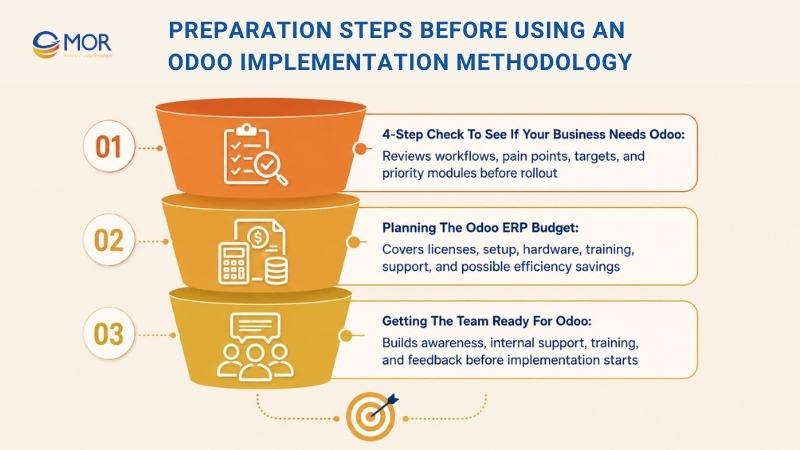
4-Step Check To See If Your Business Needs Odoo
- Review current workflows: What runs well? What slows people down? Be honest.
- Find process pain points: Where do delays, errors, or repeated tasks happen?
- Set clear targets: What should Odoo help your business achieve? Be clear and think about possible return.
- Rank needed modules: Which Odoo tools are must-haves, and which ones can wait?
Planning The Odoo ERP Budget
Do not let the cost surprise your team. Pay attention to these items:
- Software license fees
- Setup costs, including custom changes
- Hardware updates, if needed
- Training costs
- Long-term support and maintenance
Practical tip: Include possible savings from faster work when you build your Odoo implementation plan.
Getting The Team Ready For Odoo
Change can feel hard, but it does not need to scare your team.
This is how to bring people into the project:
- Share messages early and often: Explain the goal and benefits of Odoo.
- Find internal supporters: Choose positive team members who can lead others.
- Give strong training: Help your team build real Odoo knowledge.
- Listen to concerns: Keep space for questions and feedback during the project.
A strong base makes the next steps easier. This early work helps each later stage run better and gives your business a cleaner, safer Odoo rollout.
Choosing The Right Odoo Implementation Methodology For Your Business
Most projects follow similar stages, but the delivery style can change based on company size, scope, cost, risk, and timeline.
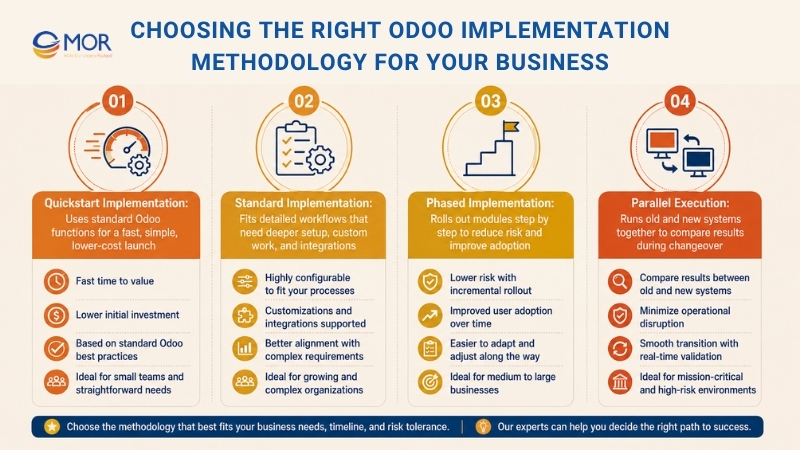
Quickstart Implementation
As noted earlier, this path fits businesses with simple needs. It uses Odoo’s standard functions with very little custom work. The goal is to get your team live within weeks, not months, often with a lower cost and a clearer path. This makes Odoo implementation methodology useful for companies that need a fast and simple start.
Standard Implementation
This type of rollout fits businesses with more detailed workflows and special needs. It may require more setup, custom work, and integration. It usually takes longer, from several months to more than a year, and the final cost may be harder to predict. But it gives you a system built more closely around your company. This Odoo implementation method works best when the business has enough time and budget for deeper setup.
Phased Implementation
This approach rolls out modules or functions step by step instead of launching everything at once. It lowers risk, helps users adopt the system in stages, and gives value after each rollout phase.
Parallel Execution
This model runs the old system and the new system at the same time for a short period. Your team can compare results directly while lowering disruption during the changeover.
Common Challenges In Odoo Implementation Methodology
Even a strong ERP project can run into problems when planning, users, data, testing, or support are weak. Odoo implementation methodology helps teams spot these risks early and fix them before they turn into expensive delays.
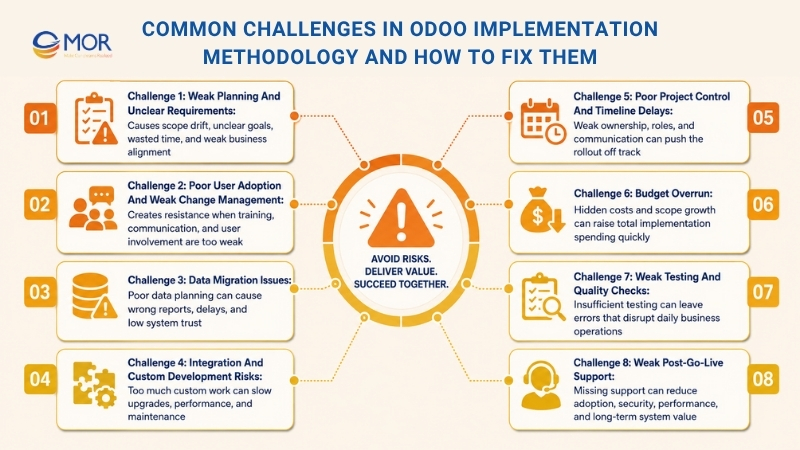
Challenge 1: Weak Planning And Unclear Requirements
Good planning is the base of any successful Odoo rollout. Without clear goals or a close link to business workflows, the project can lose direction fast. When the project starts without enough clarity, teams waste time, expectations drift, and the scope keeps growing.
ERP work can feel complex, but your team does not need to handle it alone. A trusted Odoo consultant can help shape a plan that fits your company’s needs and growth goals.
Frequent Problems:
- Goals and KPIs are not defined
- Main stakeholders do not share the same view
- Scope is too large or ERP needs are unclear
- Business operations and ERP goals are not linked well
Fix:
The first step is to set measurable goals that match your business needs. Run workshops to find the main stakeholders and record business requirements in detail. Build a roadmap that links each business goal to a clear Odoo module or setup choice.
Review goals during the ERP rollout so they stay aligned with changing business needs. Create a formal requirements document that includes performance targets, business process maps, and compliance needs to give the full project a solid base.
Getting Stakeholders Involved
Finding and involving key stakeholders early helps the project keep one shared vision. Bring in department heads from finance, human resources, supply chain, and sales to capture different needs. Meetings and surveys with user groups help the project team collect useful feedback and see adoption risks early.
Mapping Workflows And Module Scope
Map current workflows before system setup starts. Find weak points like repeated data entry or broken flows between departments. Record current and future processes so the team can see how Odoo ERP should improve operations in areas like stock, project work, and finance reports.
Start with core Odoo modules like Accounting, CRM, and Inventory before adding more complex functions. This staged path supports smoother delivery and better user adoption.
Practical Tip: Review your goals during the rollout so the project stays aligned with changing business needs.
Challenge 2: Poor User Adoption And Weak Change Management
User adoption is one of the main parts of a successful Odoo project. Even strong ERP software fails when users do not accept it. Resistance often comes from fear, weak training, or unclear benefits.
Frequent Problems:
- Training is too light and users are not involved enough
- Staff resist leaving legacy systems
- The value of the new system is not explained well
- No change champions are assigned
Fix:
Build a strong change management plan that puts clear messages, teamwork, and user confidence first. Show how Odoo ERP improves workflows, cuts manual data entry, and connects systems that used to sit apart.
Create a role-based training plan with documents, sandbox practice, and sessions for each user group. Hands-on practice helps users gain confidence with new ERP functions.
Support this work with clear messages from leaders that explain how Odoo supports wider business goals.
Practical Tip: Ask for feedback early and choose “Odoo champions” in each department to keep adoption moving.
Handling Change Well
Change management plays a major role in any ERP rollout. Create a clear communication plan that explains project goals, expected results, and how each employee’s work will change. Share regular updates through internal channels, answer concerns, and keep trust during the full project.
Training And User Confidence
Strong training helps employees use the system well. Give refresher courses after go-live and create a support area for continued learning. Training should focus on automation benefits, better reporting, and workflow changes inside the Odoo platform.
Challenge 3: Data Migration Issues
Data migration is one of the most technical parts of Odoo ERP implementation. Poor migration creates wrong reports, work delays, and data gaps that make users lose trust in the system. A clear Odoo implementation methodology gives this stage more control before launch.
Frequent Problems:
- Data migration is poorly planned
- Data is damaged, repeated, or inconsistent
- Old data has no shared format
- Testing before launch is too light
Fix:
Run a full review of old systems to find needed data and remove repeated records. Set clear data mapping rules between current systems and the Odoo ERP system so the imported data stays correct.
Run test migrations in a sandbox environment to find issues early. Check data accuracy through parallel testing before the live launch. This helps the business move over without major disruption.
Move only past data that still supports current business work. Ask end users in different departments to check imported data so the team can confirm it is correct and useful.
Practical Tip: Move core data first, then check results with teams like finance, logistics, and operations.
How MOR Software Helps
For many companies, data migration is the most stressful ERP stage. MOR Software migration specialists use strong technical knowledge and clear methods to protect data accuracy. Their mix of automation and manual QA checks helps prevent data gaps and supports a smoother move from legacy systems to Odoo ERP.
Challenge 4: Integration And Custom Development Risks
Odoo’s modular setup gives businesses a lot of freedom, but too much custom work can make upgrades harder and slow the system down. Teams need the right balance between setup and custom build work to keep the system stable over time.
Frequent Problems:
- Too many changes make maintenance harder
- Existing systems or workflows do not connect well
- Custom modules are poorly documented
- The new system runs slowly
Fix:
Use Odoo’s built-in setup tools before turning to custom development. Many teams overlook native Odoo ERP functions and spend money on changes they do not need. Use existing modules first and adjust them through configuration to match business workflows.
When custom development is required, make sure all code is documented, version-controlled, and checked against future Odoo versions. Use test environments to review new functions before they reach the live system.
For clean integration, create standard API connectors between Odoo and other tools, including accounting, CRM, or third-party logistics systems. A planned integration path protects data and keeps information moving between platforms.
Practical Tip: Avoid code rewrites when they are not needed. Use modular development that is easier to maintain and upgrade.
How MOR Software Helps
MOR Software builds Odoo rollouts with long-term use in mind. Our development team focuses on limiting heavy changes while connecting Odoo with third-party systems in a clean way. We choose configuration first when possible, which helps protect system speed, data quality, and future growth.
Challenge 5: Poor Project Control And Timeline Delays
Strong project control decides whether an Odoo rollout moves forward or gets stuck. Without clear roles, project rules, and open communication, even a well-planned ERP system can fall behind. The Odoo implementation process needs visible ownership from start to finish.
Frequent Problems:
- Roles are unclear or project control is weak
- Budget rises and milestones are missed
- Teams do not take enough ownership
- Key stakeholders do not communicate well
Fix:
Create a clear project control model with named roles and duties. Assign an experienced project manager and build an ERP project team with IT staff, functional leads, and executive sponsors.
Pick a project method that fits your company. Agile works well when flexibility and short delivery cycles matter, while Waterfall fits projects that need fixed and clear phases. Track milestones, deliverables, and dependencies through one shared dashboard so everyone can see progress.
Run regular review meetings to check progress, discuss risks, and keep the team aligned with the full rollout. Each milestone should have clear acceptance rules approved by key stakeholders.
Practical Tip: Regular messages matter. Weekly updates and progress reports keep teams accountable and limit confusion.
How MOR Software Helps
MOR Software applies tested ERP project control practices that connect technical detail with clear operations. Our milestone-based model keeps progress visible and measurable, helping businesses reach Odoo goals on time and within budget.
Challenge 6: Budget Overrun
Many businesses misjudge the real cost of Odoo implementation. Hidden costs, including integrations, training, and support after launch, can push the total budget higher very quickly. Odoo implementation methodology helps control these items before they become serious.
Frequent Problems:
- Cost estimates are incomplete and hidden costs appear later
- Scope grows without budget control
- Training and data migration do not get enough resources
- No tools are used to track live cost changes
Fix:
Build a full budget plan early in the rollout. Include all cost areas, including software licenses, user training, custom work, data migration, and ongoing support.
Set aside a 10 to 20 percent reserve for unexpected problems like scope changes or integration issues. Use project tools that show costs and progress in real time.
To stop scope creep, use a formal change request process. Each request should include the reason, cost effect, and management approval.
Practical Tip: Compare planned costs with real costs often, so gaps can be fixed before they grow.
Challenge 7: Weak Testing And Quality Checks
Testing and quality checks support a successful Odoo ERP rollout. Without proper review, even a well-built system can still cause errors that disrupt daily work.
Frequent Problems:
- Configurations and custom work are not tested enough
- Data errors appear after migration
- Performance drops under real work conditions
- User acceptance testing is missed before go-live
Fix:
Create a clear testing plan that covers unit testing, integration testing, system testing, and user acceptance testing, or UAT. Run test migrations in a sandbox environment and check system behavior with real transaction data.
Run performance tests to copy real workloads and see how the system behaves under pressure. This confirms that Odoo can support the needed number of users and complex transactions without major delay or errors.
Record all test cases, expected results, and issues found during testing. Test again after every update or setup change to keep the system stable.
Practical Tip: Run UAT with real users so the new system matches daily work needs and improves real team output.
Ongoing Improvement
Quality checks should not stop at go-live. Set up regular monitoring for data quality, system speed, and user feedback. Review KPIs like response time, error rate, and adoption rate to keep the system accurate and useful.
Testing should run through the full project life cycle. This helps companies launch Odoo with less downtime and stronger reliability.
Challenge 8: Weak Post-Go-Live Support
A successful Odoo ERP rollout does not end at launch. Long-term support, performance checks, and process improvement keep the system useful. When these areas are ignored, user adoption can drop, security risks can grow, and workflows can become messy.
Frequent Problems:
- Support after launch is missing
- System maintenance and data security are ignored
- Updates are applied without enough testing
- User adoption falls and improvement chances are missed
Fix:
Build a post-launch plan that protects daily operations and supports regular improvement. Set clear Service Level Agreements, or SLAs, for support requests and response times. Run regular system reviews to check data quality, compliance, and performance.
Create feedback loops between end users and system admins. Use quarterly surveys, feedback meetings, and ticketing systems to capture problems and find areas to improve.
Keep training active for new hires, new functions, and process changes. Refresher sessions and updated documents help users stay confident over time.
Practical Tip: Run quarterly checks on system performance and business fit so Odoo keeps matching company needs and rules.
Best Practices For Odoo Implementation Methodology Success
A successful Odoo ERP rollout needs the right balance of technology, people, and process control. Every stage, from planning and training to migration and testing, helps shape the final result.
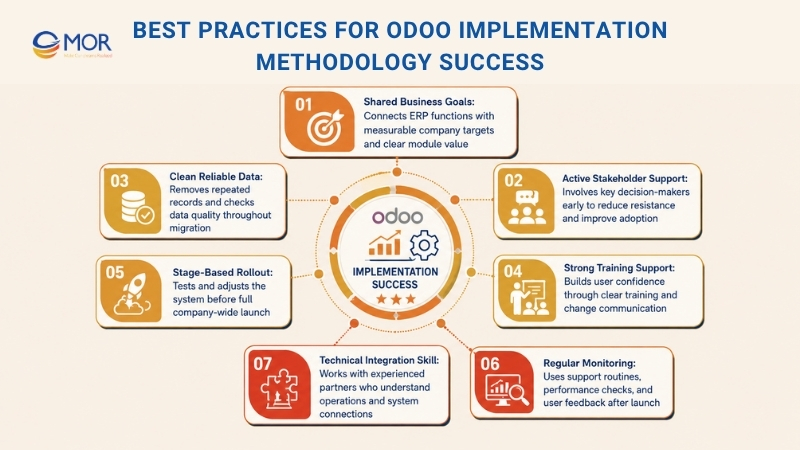
The main practices below can help your team run a smoother and more useful rollout:
- Shared Goals And Business Fit: Set measurable targets that connect ERP functions with business goals. Each module should serve a clear company need.
- Active Stakeholder Support: Find key stakeholders early and involve them in decisions so the project gains support and faces less resistance.
- Clean And Reliable Data: Review old data, remove repeated records, and use shared formats. Check data quality through the full migration stage.
- Strong Training And Change Support: Help employees with user training and a clear change plan. This builds confidence and improves adoption.
- Stage-Based Rollout: Use a phased delivery model that allows testing and adjustment before the full company launch, which lowers risk.
- Regular Monitoring And Support: Set up support routines, post-launch performance checks, and user feedback channels.
- Technical Skill And System Integration: Work with an experienced Odoo partner that understands business operations and technical details.
- Business-Driven Investment: Treat Odoo as a business investment that should bring clear returns through lower cost, faster work, and better decisions.
Strong leadership, technical skill, and user support help companies get more value from Odoo implementation methodology. With these habits in place, the system can improve operations and support business growth.
Apply Odoo Implementation Methodology With MOR Software
A clear Odoo implementation methodology keeps the project focused from the first meeting. At MOR Software, we begin with business goals, current workflows, user roles, and the real problems each team faces. This helps us choose which Odoo modules should come first and which ones can wait.
We do not see Odoo as a simple setup job. ERP changes how people work each day. That is why we map each workflow, review data quality, define the right scope, and create a rollout plan that matches the company’s budget and timeline.
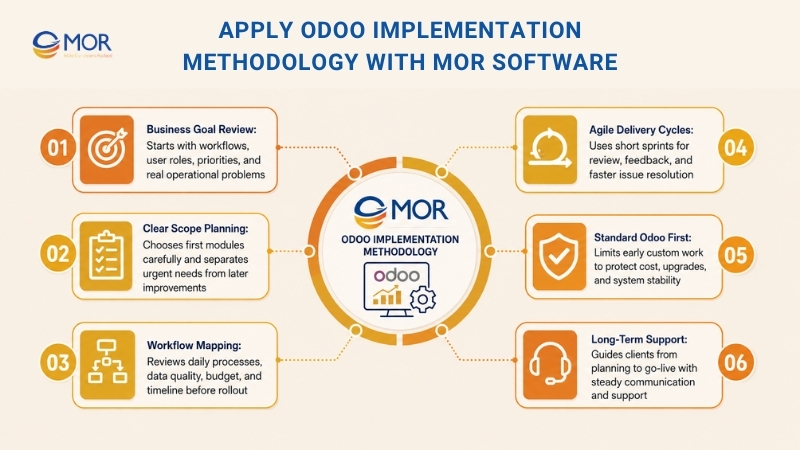
Our team follows Agile and Scrum, so clients can see progress in short delivery cycles. Each sprint gives space for review, feedback, and quick fixes before small issues become costly delays.
We also help companies avoid too much custom work too early. Many teams want Odoo to copy old workflows, but that often creates higher cost and future upgrade problems. We start with standard Odoo first, then suggest custom changes only when they support a real business need.
With MOR Software, Odoo implementation becomes a clear project, not a guessing game. Our Odoo implementation services help businesses move from planning to go-live with clear steps, steady communication, and long-term support.
Conclusion
A successful Odoo implementation methodology starts with clear goals, strong ownership, the right people, and steady project control. When each phase is planned well, your team can cut delays, avoid costly custom work, and launch Odoo with more confidence. MOR Software helps businesses turn ERP plans into real systems through clear steps, Agile delivery, and long-term support. Contact MOR Software today to discuss your Odoo project and build a rollout plan that fits your business.
MOR SOFTWARE
Frequently Asked Questions (FAQs)
How long does an Odoo implementation take?
Small or focused Odoo rollouts usually take 2 to 4 months. Mid-market projects often require 4 to 8 months. Enterprise or multi-region implementations may take 9 to 15 months. Timeline depends on modules, integrations, data quality, customization, testing, and internal decision speed.
What is Odoo Implementation Methodology?
Odoo implementation methodology is the step-by-step way a business plans, configures, tests, launches, and supports Odoo. It covers requirement analysis, module setup, data migration, training, go-live, and post-launch support so the ERP project stays clear and controlled.
Why is methodology important in Odoo ERP projects?
Without a clear method, Odoo projects can face delays, unclear scope, poor data transfer, and low user adoption. A good methodology keeps the team aligned, sets clear duties, and helps the business avoid costly changes late in the project.
Which methodologies are commonly used for Odoo implementation?
Most Odoo projects use Agile, Waterfall, Scrum, or a hybrid model. Agile works well when the business needs regular feedback and short delivery cycles. Waterfall fits fixed-scope projects with stable requirements. Hybrid methods combine planning control with flexible delivery.
What are the typical steps in an Odoo implementation process?
A standard process often starts with requirement analysis, followed by project planning, module configuration, development, data migration, testing, user training, go-live, and support. Each step should have clear owners, timelines, and approval points.
Who is responsible during the Odoo implementation?
The vendor usually handles analysis, configuration, development, testing, and technical support. The client team provides business rules, process details, data, feedback, and approvals. A single point of contact should guide decisions and keep internal teams moving.
What happens if requirements are not well-defined?
Poor requirements can lead to wrong module setup, rework, missed deadlines, and extra cost. Teams may also build features that users do not need. That is why requirement analysis and business process mapping should happen before setup begins.
How does MOR Software handle Odoo implementation?
MOR Software keeps the project simple, practical, and business-led. We review current workflows, define must-have modules, limit early custom work, and run the rollout in clear phases. This helps businesses go live faster without turning Odoo into a heavy ERP project.
Can Odoo implementation be customized for unique business processes?
Yes, Odoo can be adjusted for unique workflows, reports, approval rules, and integrations. Still, custom work should support a real business need. Copying every old process into Odoo can slow the project and make future upgrades harder.
What happens after Go-Live?
After go-live, the team monitors system use, fixes bugs, supports users, and reviews feedback. This stage also helps the business decide what to improve next, which extra modules to add, and which manual tasks can be moved into Odoo later.
Share


Make Our-Dreams Realized


© 2023 . MOR Software. All Rights Reserved
Sitemap
Privacy Policy
Terms of Use

Rate this article
0
over 5.0 based on 0 reviews
Your rating on this news:
Name
*Email
*Write your comment
*Send your comment
1