


Top 10 Software Testing Best Practices for 2026
When releases speed up, test coverage often slips, automation breaks, and teams lose confidence in every deployment. This guide on software testing best practices shows what strong teams do differently, from agile software testing best practices to smarter automated software testing. In this guide, MOR Software will walk you through the methods, principles, and decisions that help teams ship with fewer surprises.
How Software Testing Best Practices Are Changing In 2026
In 2026, software testing best practices are no longer centered only on finding bugs. The bigger aim now is lowering risk and keeping systems dependable in real use. Teams are not trying to show that software works only in perfect settings, they are trying to learn how it acts in daily conditions and where failure is most likely.
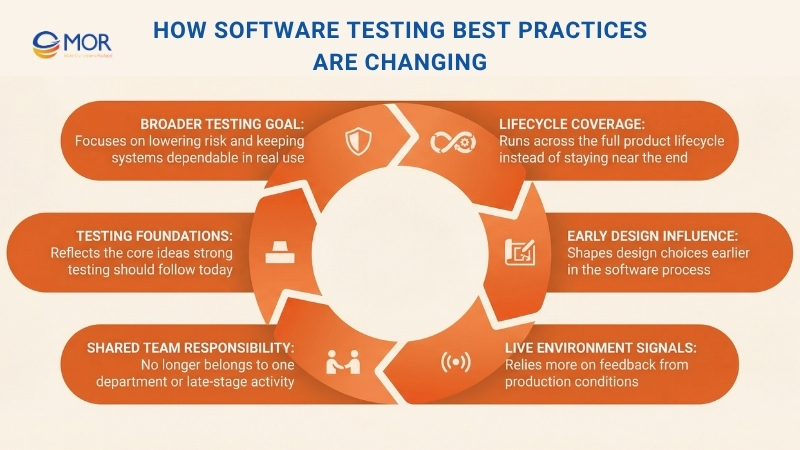
Testing now runs across the full product lifecycle instead of sitting near the end. It shapes design choices early and depends a lot on signals coming back from live environments. It does not belong to one department or one late-stage activity anymore. It now sits inside the way software is planned, built, shipped, and supported. The ideas below show what strong testing practices should stand on in 2026.
Top 10 Software Testing Best Practices In 2026
This article gets to the point quickly. We have gathered 10 of the strongest best practices for testing software that strong teams use to create stable, safe, and scalable products. These ideas are not just theory on paper, they are practical steps teams can start using right away. From writing tests before production code starts to checking behavior under real traffic and placing security checks inside the delivery flow, these methods help teams build a culture that treats quality as a daily job.
When teams use these practices well, they spend less over time, catch regressions earlier, and move faster without lowering standards. If you want a broader view of quality across the full lifecycle, including continuous integration and test-first development. Now let’s move into the main approaches that set strong software apart.
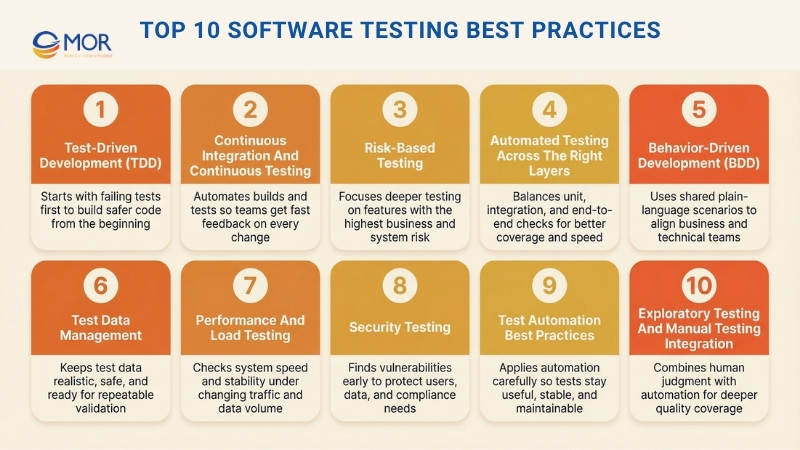
Test-Driven Development (TDD)
Test-Driven Development (TDD) changes the usual order of software work. Instead of building code first and checking it later, you begin with an automated test that fails before any production logic exists. This test-first model is closely tied to software unit testing best practices because it places quality inside the build process from the start, not after the work is already done.
The method follows a clear loop often called Red-Green-Refactor. You begin with a test for a new capability, and it fails because the feature is not there yet, this is Red. Then you write only enough code to make that test pass, this is Green. After that, you improve the code and keep all tests passing, this is Refactor. That steady rhythm gives teams a strong regression safety net, simpler code, and a better design base.
Why This Approach Works And What You Can Do
TDD is not only about checking code, it also improves the way you design it. Since you think about usage before implementation, the result is often cleaner and easier to split into small parts. Google, Microsoft, and NASA’s JPL have all used this style in important systems where failure carries serious cost.
To apply TDD well:
- Begin with small checks: Start with simple tests around one function or one narrow behavior. Do not open with a long user flow.
- Keep each test focused: Let every test confirm one behavior only. That makes failures easier to trace.
- Use names that explain the goal: Write test names that tell the reader what the check is doing, like test_calculates_tax_for_high_income_bracket.
- Do not drop the cleanup step: Refactoring is what keeps the code healthy and stops debt from building up.
Teams that use TDD often make changes with more confidence because they are less afraid of breaking older behavior.
Continuous Integration And Continuous Testing
Continuous Integration (CI) and Continuous Testing (CT) sit at the heart of modern delivery. They automate the work of combining code changes and checking them again and again during development. In teams that follow agile software testing best practices, continous testing helps every merge trigger a build and a fresh round of checks, so people see the condition of the codebase right away.
The main goal is to make integration a normal and low-stress activity instead of a painful event that happens too late. When every change goes through an automated build and test path, the main branch stays in a releasable state more often. That short feedback cycle helps teams move faster, cuts delivery risk, and grows a sense of shared ownership around quality.
Why This Approach Works And What You Can Do
CI and CT pull testing out of a separate manual stage and place it inside the delivery flow itself. That shift matters a lot for teams that want speed without losing trust in releases. Take Amazon, which ships changes at very high volume, and Netflix, which depends on constant checks to keep its streaming service steady, they depend on this model to keep pace high and quality strong.
To use CI and CT in a practical way:
- Automate every major test level: Let unit, integration, and end-to-end checks run automatically on each commit.
- Keep the main pipeline quick: Try to keep the core build and test path under 10 minutes. Longer checks can sit in a later stage.
- Stop early and notify fast: Let the pipeline fail as soon as one serious test breaks, and alert the team at once.
- Run tests in clean environments: Use isolated and container-based setups so results stay consistent and machine-specific issues stay out.
Teams that build around CI and CT usually face fewer merge problems and release with more speed and trust.
Risk-Based Testing
Risk-Based Testing (RBT) gives teams a way to decide where their effort matters most. Instead of spreading the same level of testing across every feature, it pushes more attention toward the parts that could hurt the business most if they fail. Many teams treat this as part of industry best practices for software testing because it ties validation work directly to business loss, customer impact, and system exposure.
The method starts with spotting likely risks, judging how serious they are, and then building tests around the threats with the highest weight. A shopping platform, for one, would spend more effort on checkout and payment than on an information page. That is why this model fits IT testing best practices in large systems, where time and people are limited and not every feature deserves the same depth.
Why This Approach Works And What You Can Do
RBT works well because it gives teams a clear way to choose under pressure. It changes the mindset from “test everything” to “test what matters most.” Financial platforms use this logic where transaction failures can cost money, and healthcare products use it where the wrong defect can affect patient safety.
To put Risk-Based Testing into practice:
- Identify risk together: Bring in people from business, product, and engineering to list the things that could go wrong.
- Use a simple risk chart: Rate each risk by likelihood and impact, then place it in a clear matrix so priorities are easy to see.
- Write decisions down: Keep records of the risks found, how they were scored, and what testing choices came from that.
- Review the risks often: Risk changes over time, so check it again when features shift or new work enters the product.
Teams that use RBT usually spend their energy where it protects the product the most.
Automated Testing Across The Right Layers
Good testing is not about running every check you can think of. It is about choosing the right type of test at the right level and at the right moment. This layered model sits close to best practices software testing because it helps teams place work where it gives the best return instead of loading everything into one slow path.
A common way to explain this is the Testing Pyramid. At the bottom, you have unit tests, which are quick, cheap, and easy to create in large numbers. In the middle, you have integration tests, which check how separate parts work together. At the top, you have end-to-end (E2E) tests, which follow full user flows through the system. That balance gives automated software testing more value because it avoids a pile of fragile E2E checks and still keeps wide coverage.
Why This Approach Works And What You Can Do
This layered model gives teams a dependable safety net. When most checks sit at the fast and isolated unit level, developers learn quickly when something breaks. Google is well known for using a 70/20/10 split, with most checks at unit level, fewer at integration, and only a small share at E2E, to keep speed and confidence in line.
To build this kind of test mix well:
- Put most checks at the bottom: Create the largest share of tests at the unit level where feedback is fastest and upkeep is lower.
- Use integration tests with care: Let them focus on contracts and interactions between services or modules, not on logic that unit tests already cover.
- Keep E2E coverage narrow: Use full-flow tests only for the journeys that matter most, like signup or checkout.
- Use mocks and stubs with care: In unit checks, isolate outside dependencies so the tests stay fast and stable.
- Match the test mix to your pipeline: Run fast checks on every commit, then place slower suites later in the release path.
When teams follow this structure, they usually get a test process that is steadier, easier to grow, and less expensive to maintain as the product gets larger.
Behavior-Driven Development (BDD)
Behavior-Driven Development (BDD) extends the thinking behind TDD and puts stronger attention on teamwork between developers, testers, and business people. It reduces confusion because everyone uses a shared plain-language format to describe how the product should behave for the user. That makes software testing best practices easier to carry from business need to working feature.
At the center of BDD is the Given-When-Then pattern. “Given” explains the starting point, “When” names the action or event, and “Then” states the outcome that should follow. Teams often write these scenarios in Gherkin, which keeps them readable for non-technical people too. This helps everyone agree on behavior before code starts and builds one shared picture of the goal.
Why This Approach Works And What You Can Do
BDD works well because the tests become living documents the whole team can read. That shared view cuts down on confusion and lowers the amount of rework later. It also stands out among QA methods because it connects business language and delivery work in a direct way. Groups like the BBC have used BDD in product work on services like iPlayer, and many financial teams use it to confirm that compliance rules behave as expected.
To use BDD in a practical way:
- Describe behavior from the user side: Write scenarios around what users want to do, not around code details.
- Keep one behavior per scenario: Short and focused scenarios are easier to read and easier to fix.
- Write scenarios with business people: Work closely with product owners and analysts so the scenarios match real needs.
- Keep the language plain: Use clear wording in Given-When-Then steps so everyone can follow the logic.
BDD helps business and technical teams move closer together, so the product built is the one the business actually asked for.
Test Data Management
Test Data Management (TDM) is the work of creating, keeping, and supplying the data needed for manual and automated checks. Strong testing cannot happen with weak data. TDM helps your test runs use data that is realistic, safe, and tied to real use. Weak or messy inputs can also damage every software test report your team depends on.
The main aim of TDM is simple, teams need the right data, in the right place, at the right time. That covers data creation, masking private details, taking smaller but useful data sets, and delivering data to test environments when it is needed. A good TDM plan reduces flaky results caused by bad or changing data, keeps tests repeatable, and supports privacy rules such as GDPR and HIPAA. Without that discipline, teams often fall back on old, poor, or unsafe data and get results they cannot trust.
Why This Approach Works And What You Can Do
TDM closes the gap between test environments and real product use. It helps teams validate software against the kind of conditions users actually create. Banks often create fake transaction data to test fraud logic without touching real customer details. Online stores do something similar with masked customer records so they can test new features without exposing private information.
To manage test data well:
- Automate data delivery: Use tools that create and move test data into environments without manual work.
- Protect sensitive information first: When production data is involved, mask or anonymize names, addresses, and payment details.
- Version your datasets: Treat test data like code so the team can repeat runs and compare results over time.
- Refresh data on purpose: Set a clear cycle for updating test data so it stays useful and does not go stale.
Performance And Load Testing
Performance and Load Testing checks how a system responds when traffic levels and data volumes change. It matters because user experience depends on speed, throughput, and healthy use of system resources. These software testing best practices help teams model real usage, spot pressure points, and confirm that the application can stay stable when demand rises.
This kind of validation answers a few questions that matter a lot to the business. How many people can the system support at one time. How quickly does it respond during busy periods. When does performance start to fall. When teams find those limits early, they can tune code and infrastructure before users feel the pain.
Why This Approach Works And What You Can Do
Performance testing helps teams avoid outages that hurt revenue and brand trust. Take Amazon, which checks its systems hard before big shopping events like Black Friday, and Netflix, which simulates huge viewer volume to keep streaming smooth. That early pressure testing helps them stay steady when real demand arrives.
To run performance and load testing well:
- Create a starting benchmark: Measure normal behavior first so later test results have a clear point of comparison.
- Use realistic usage patterns: Build traffic around real user flows instead of sending random requests at the server.
- Raise traffic step by step: Start low and increase the load in stages so you can see where decline begins.
- Watch the full stack during the run: Track CPU, memory, database activity, and network I/O so the real cause of issues becomes clear.
Security Testing
Security testing is a required part of any product that stores sensitive information or faces the public internet. Functional checks confirm whether a system does what it should do, but security work looks for the weak points attackers could use against it. That is why many teams treat it as part of best practices in security testing for software development, especially when trust, privacy, and compliance are on the line.
This area includes several kinds of work, from automated static analysis (SAST) and dynamic analysis (DAST) to manual penetration exercises where ethical hackers try to break in. The goal is to find and fix flaws such as SQL injection, cross-site scripting (XSS), and weak authentication before someone else can use them. That early action protects your users and helps your company avoid the cost of a breach.
Why This Approach Works And What You Can Do
Security checks work best when they live inside the delivery process instead of sitting at the end like a release blocker. Financial systems use ongoing security validation to protect transaction data, and healthcare platforms do the same to stay aligned with HIPAA. Many teams also use the OWASP Top 10 as a guide so they focus on the web risks that show up most often.
To carry out security testing well:
- Start early and repeat often: Put automated security scanners inside your pipeline so issues appear while code is still fresh.
- Model threats before testing: Think through likely attack paths first so your test cases match real risk.
- Check identity controls deeply: Review login flows, session handling, password rules, and role access with care.
- Treat all input as unsafe until proven otherwise: Test forms, APIs, and URL parameters with harmful input to uncover issues early.
When teams treat security as a shared duty, the result is software that users can trust more easily.
Test Automation Best Practices
Test automation means using tools to run checks and compare actual results against expected ones. The value sounds obvious, speed, repeatability, and less manual effort, but the outcome depends on using the right automation best practices in software testing. Without that discipline, automation can turn into a slow and costly burden instead of helping the team.
The basic rule is simple, automate with care, not everywhere. The best candidates are repetitive tasks, steady features, and high-risk areas where repeat checks save real time. That lets human testers spend more energy on exploration, usability, and unusual cases. With maintainable and focused automation in place, teams can ship faster and trust their releases more.
Why This Approach Works And What You Can Do
Automation gives the best results when teams treat test code with the same care they give product code. It needs clear goals, clean structure, and ongoing upkeep. Google automates a large share of its UI checks, and Salesforce runs large automation suites to protect platform stability across many setups. Their success comes from keeping the suite dependable and manageable over time.
To build useful automation:
- Start with stable areas: Pick features that are mature and unlikely to change often, so upkeep stays under control.
- Keep the test code tidy: Follow coding standards and use patterns like Page Object Model (POM) so the scripts stay readable and easier to update.
- Let each test stand alone: A test should not depend on the state left behind by another one.
- Use smart waits instead of fixed delays: Replace sleep(5) style pauses with explicit waits that check for real conditions.
Teams that follow these habits usually get more speed, more trust, and less waste from automation.
Exploratory Testing And Manual Testing Integration
Exploratory testing steps away from fixed scripts and set paths. It is a live and flexible style of testing where people examine the product actively, using judgment, experience, and curiosity to find issues that automated checks may miss. Many teams see this as part of best QA practices in software testing because it lets testers behave more like real users while they learn and test at the same time.
When this human-led work sits alongside structured manual checks and automation, the result is a fuller quality strategy. Automation is strong at checking known flows and catching regressions, while exploratory work is strong at discovery and at finding unusual edge-case problems. That mix gives teams the combined value of machine speed and human thinking, which often leads to a more dependable product.
Why This Approach Works And What You Can Do
Exploratory work matters because scripted testing has a clear limit, it only catches what the team thought to check in advance. People like James Bach and Michael Bolton have long supported this style, and companies such as Spotify use it to explore new features and give early feedback before wider automation arrives. It often reveals usability problems, workflow gaps, and complex defects that rigid scripts leave behind.
To use exploratory testing well:
- Set a scope and a time box: Give each session a clear mission and a firm limit, like exploring a profile update flow for 90 minutes.
- Write down what you learn: Testers should record what they checked, what they found, and what new questions appeared.
- Aim it at risky areas: Put this effort on new functionality, hard integrations, or places with a weak history.
- Change the people involved: Ask developers, product managers, or others to join at times, since fresh eyes often catch different issues.
When teams blend structured automation with open exploration, they get a deeper view of product quality. That helps the software work as expected and also feel smooth and natural to the people using it.
Top 10 Software Testing Best Practices Comparison
Not every method solves the same problem, and not every team needs the same level of depth, speed, or automation. This comparison helps you see where each approach fits best, what it demands, and what kind of value it can bring.
Approach | Setup Difficulty | Resource Needs | Likely Results | Best Fit | Main Benefits |
Test-Driven Development (TDD) | High, it needs discipline early and a learning period | Medium, developer effort and unit testing tools | High, stronger design, wide test coverage, fewer defects | New products, critical platforms, codebases that need to stay maintainable | Finds issues early, acts as living documentation, supports cleaner design |
Continuous Integration And Continuous Testing (CI/CT) | High, pipeline setup and upkeep take work | High, servers, runners, storage, and supporting infrastructure | High, rapid feedback, steadier quality, faster delivery | Teams with many commits, large systems, fast release schedules | Catches merge problems early, automates checks and release flow |
Risk-Based Testing | Medium, teams need skill in scoring and prioritizing risk | Low to medium, focused testing effort and input from stakeholders | Medium, better priority coverage and smarter defect finding | Projects with limited resources, regulated sectors, high-impact features | Raises ROI through focus on major risks, ties testing to business value |
Automated Testing Across The Right Layers | High, teams need to manage balance and supporting setup | Medium, unit, integration, and end-to-end frameworks | High, fast unit feedback, wide coverage, lower flakiness | Mature teams using CI, products that need dependable regression coverage | Faster feedback, better cost balance, fewer brittle end-to-end checks |
Behavior-Driven Development (BDD) | Medium to high, it needs teamwork and supporting tools | Medium, BDD frameworks and time from stakeholders | High, clear acceptance rules, executable specs, better alignment | Cross-functional teams, acceptance work, features driven by business goals | Improves communication, makes specs readable and linked to requirements |
Test Data Management | Medium, data creation, masking, and versioning take planning | Medium to high, tools, storage, and automation support | High, repeatable tests, realistic conditions, better privacy alignment | Data-heavy products in health or finance, parallel test environments | Supports repeatability, protects privacy, keeps scenarios realistic |
Performance And Load Testing | High, scenario design and result analysis are complex | High, traffic generators, monitoring tools, and test environments | High, clearer scalability limits, stronger capacity planning, fewer outages | High-traffic products, launch periods, systems that must scale well | Finds bottlenecks, proves the system under pressure |
Security Testing | High, this work needs deep skill and constant updating | High, security tools, specialist time, and license costs | High, more vulnerabilities found, lower breach risk, stronger compliance | Public-facing software, regulated sectors, systems with sensitive data | Protects information and compliance, lowers incident and fix costs |
Test Automation Best Practices | Medium, teams need sound engineering habits and upkeep | Medium, frameworks and maintenance effort | High, less manual repetition, steady regression coverage | Products with frequent repeat testing needs and CI-based delivery | Better automation ROI, more maintainable and stable test suites |
Exploratory And Manual Testing Integration | Low to medium, success depends on tester skill and structure | Low, mostly tester time and simple support tools | Medium, better discovery of UX issues and hidden defects | New features, usability work, and cases that are hard to automate | Finds edge cases, surfaces usability issues, stays flexible and quick to use |
Core Principles Behind Effective Software Testing
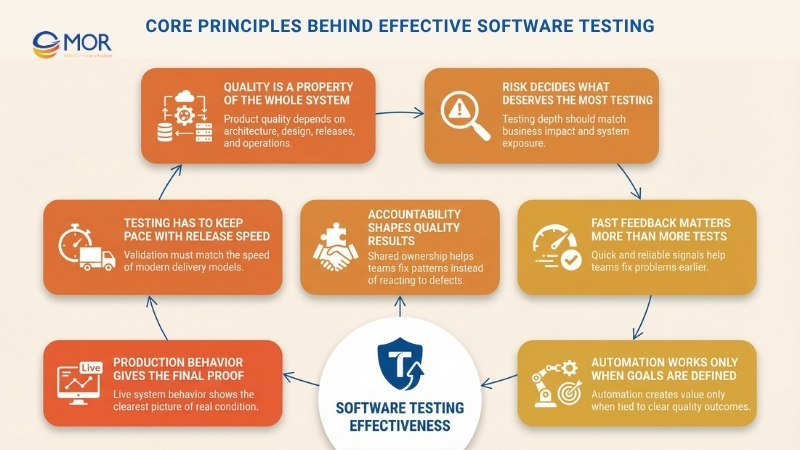
As products and platforms grow larger, testing stops being only a delivery task and starts shaping wider engineering and governance choices. In 2026, software testing best practices are guided by a small group of core ideas that influence system design, effort allocation, and risk control from the first release stage to ongoing operations.
Quality Is A Property Of The Whole System
A strong product does not become high quality because a team ran enough tests. Its quality comes from the structure of the architecture, the design choices behind it, the way releases are handled, and the operating model around it. Testing only exposes the strengths and weaknesses already built into the system. For leaders, that means work on testability, observability, and modular design has a direct effect on how useful the testing effort will be.
Risk Decides What Deserves The Most Testing
The amount of validation a team applies should match the business and operational risk behind each area. Some failures matter far more than others, and some parts of a platform deserve much deeper attention than the rest. This is one reason software testing best practices now move away from simple coverage thinking and toward risk-aware judgment. Teams get better results when they focus testing where the business would feel the biggest loss.
Fast Feedback Matters More Than More Tests
Testing delivers real value when it gives teams useful information quickly. Fast and dependable signals help people fix issues sooner and move ahead with stronger release confidence. Large suites that take too long to finish may look impressive, yet they often slow down learning instead of helping it. Good testing approaches favor feedback loops that move at the same pace as delivery.
Automation Works Only When Goals Are Defined
Automation in software work helps only when the quality target is clear from the start, not when teams chase tool usage or broad coverage numbers for their own sake. If the goal is vague, automated checks usually create extra noise and raise maintenance work instead of cutting risk. When the purpose is tied to clear outcomes like reliability, compliance, or performance, the system becomes far more useful. That is where software testing best practices and software regression testing best practices begin to create real business value instead of adding test volume with no direction.
Production Behavior Gives The Final Proof
No amount of pre-release validation can fully show how a system will behave under live demand and actual user activity. When production checks are possible, the live environment gives the clearest picture of system condition and exposure. Strong testing strategies treat production telemetry, incidents, and customer effect as major inputs for future validation choices.
Testing Has To Keep Pace With Release Speed
When teams release more often, their testing model has to change too. A setup that works for occasional deployments often breaks down once the organization shifts to continuous delivery. This principle keeps the validation strategy tied to the real speed of change, so quality controls do not become a bottleneck or get skipped under pressure.
Accountability Shapes Quality Results
Better quality depends on clear ownership for testing choices and outcomes across engineering teams. When that responsibility is vague or left to one separate group, defects stay in the system and deeper patterns do not get fixed. Shared ownership, backed by QA and platform support, helps teams make lasting improvements instead of reacting only after problems appear.
Key Priorities For Engineering Leaders In Software Testing
As delivery grows in speed and scale, testing choices turn into a set of trade-offs rather than simple yes-or-no decisions. Each one reflects a balance between pace, cost, exposure, and long-term stability. Modern software testing standards and software testing best practices do not remove those tensions. They make them easier to see and manage in ways that protect the product and the business. A few priorities appear again and again in this work.
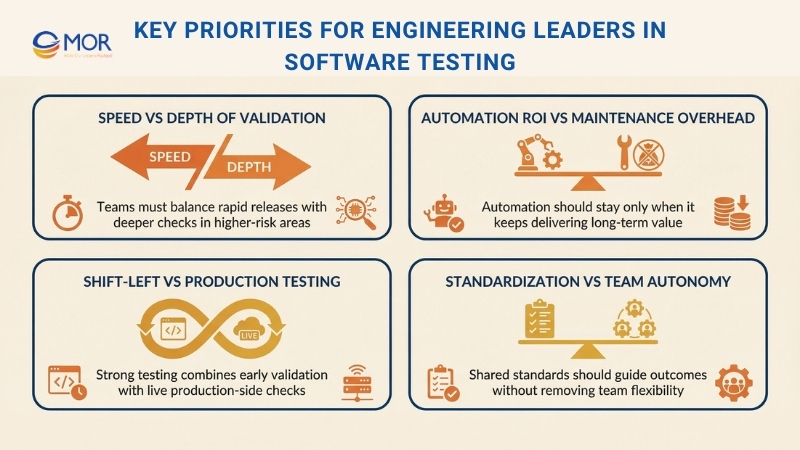
Speed Vs Depth Of Validation
Faster release cycles raise the need for rapid signals, yet deeper validation usually takes more time. This tension becomes obvious when teams try to shorten delivery windows and still keep trust in complex platforms. Research from DORA shows that strong teams combine speed and stability by using quick automated checks for routine changes and saving deeper validation for the areas with greater risk.
Suggested approach: Separate rapid, ongoing validation from focused, risk-based testing. The aim is not to shrink the test effort. The aim is to apply deeper checks where failure would hurt most and use speed where quick feedback has the highest value.
Automation ROI Vs Maintenance Overhead
Automation can scale testing work, but it also creates ongoing upkeep that teams cannot ignore. When suites expand without a clear purpose, they often turn fragile, slow, and expensive to maintain. McKinsey has pointed out that many automation efforts fall short because teams underestimate the time and ownership needed to keep them useful.
Suggested approach: Treat automation as an investment portfolio instead of a blanket rule. A test earns its place when it lowers risk and keeps giving value over time, not when it only helps a coverage number look better. Checks with low value or high upkeep should be removed so the suite keeps pace with the product.
Shift-Left Vs Production Testing
Early validation cuts rework and catches many issues before release, yet no staging setup can perfectly mirror what happens in production. This gap becomes even clearer in distributed architectures, where real data, user behavior, and load conditions are difficult to copy before launch. Software testing best practices now recognize that both early checks and live validation have a place.
Suggested approach: Combine shift-left work with production-side validation. Pre-release testing handles known exposure, while production telemetry, canary releases, and controlled rollouts confirm whether assumptions still hold in real conditions. The strength comes from using both as connected safeguards.
Standardization Vs Team Autonomy
Shared standards improve consistency and governance, but too much control can slow teams down and weaken ownership. This issue often appears when platform groups roll out common frameworks or mandatory quality gates across very different products.
Suggested approach: Standardize the outcome and the interface, not every implementation detail. Teams should keep room to decide how they meet quality targets while still operating inside shared tooling, metrics, and guardrails. That balance helps protect delivery speed without splitting quality practices across the company.
AI-Driven Software Testing Best Practices For 2026
AI in testing has moved far past simple test case suggestions. In 2026, more than 80% of development teams use it somewhere in their testing flow, and current forecasts suggest AI support may cut manual testing work by up to 45%. The real shift is not about removing testers. It is about helping each tester cover more ground and work faster with better support.
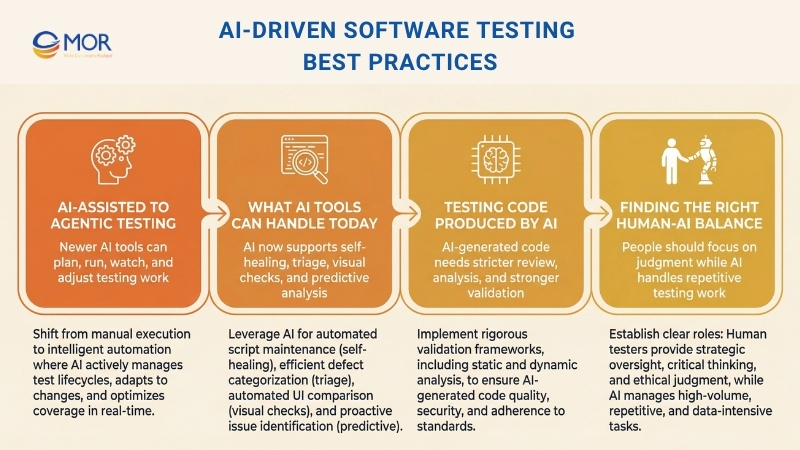
From AI-Assisted Testing To Agentic Testing
The first wave of AI testing products behaved like assistants. You gave them a prompt for a test case, and they generated one. You pointed them to an existing suite, and they suggested which checks might be skipped.
The newer wave acts more like an agent. These tools do not sit still until someone tells them what to do. They plan sessions, run tests, watch results, and adjust when the environment changes. You can think of them as a junior team member who works all day, explores the product, sorts failed checks, and suggests repairs for broken automation.
That difference has strategic weight. An assistant mainly speeds up a task. An agent changes how the team uses its people. When the agent handles regression upkeep, experienced testers can spend more of their time on exploration, risk review, and the creative judgment work that machines still do poorly.
What AI Testing Tools Can Handle Today
The tools available now support much more than creating test cases:
- Self-healing tests: If a UI element moves, gets renamed, or uses a new selector, the tool can spot that shift and update the test for you. This removes one of the biggest maintenance problems in automation.
- Autonomous test generation: Agents can move through the application, read flows from the interface itself, and create checks without manual scripting. They often uncover paths and edge cases that people never wrote down.
- Smarter failure triage: Instead of handing a tester a long list of broken checks, AI can sort each one into likely bug, flaky test, or environment problem. That saves time and lowers alert fatigue.
- Visual regression at scale: AI-driven visual comparison can catch display issues across browsers, screen sizes, and themes that older pixel-based tools either miss or report badly.
- Natural language test creation: A tester can describe a scenario in plain English, and the tool can turn it into an executable test. That gives non-technical contributors a lower barrier into automation work.
- Predictive risk analysis: Using code diffs, past defect history, and coverage data, AI can suggest which parts of the system deserve the most attention in a coming release.
One example is TestCollab and its QA Copilot. The tool uses AI to help teams write stronger test cases faster, suggest edge cases that might be missed, and expose gaps in existing coverage. The aim is not to replace human testing skill. The aim is to extend it.
Testing Code Produced By AI
There is another side to this trend that many testing guides still do not cover enough. More and more of the code your team releases now comes from AI systems.
Tools like Copilot and ChatGPT already sit inside many development workflows. At the same time, study after study shows that AI-produced code often carries more defects than code written only by people. Research has reported that more than half of sampled AI-generated code includes logical or security problems, and most developers say they still need to rewrite or clean up that output before it is safe for production. That reality matters directly to software testing best practices because the origin of the code changes the level of trust teams can place in it.
This shift creates a few direct testing needs:
- Start with specifications, not prompts. Spec-driven development gives AI clear direction instead of loose requests, which usually leads to code that is more predictable and contains fewer defects from the start.
- Raise your static analysis coverage. Run linters and security scanners as automated gates on each pull request. AI-written code is especially likely to hide small security flaws that static analysis can catch.
- Use mutation testing on critical paths. Mutation testing checks whether your test suite can actually detect defects, not just whether current tests pass. It becomes even more useful when the source of the code is harder to trust.
- Review AI-generated code as if it came from a third-party dependency. Apply the same level of review you would give an open-source package. Passing basic checks is not proof that it is correct.
Finding The Right Human-AI Testing Balance
The strongest QA teams in 2026 are not swapping people out for AI. They are redesigning the workflow so the machine handles the work it does best, repetitive regression checks, pattern finding across huge numbers of results, and upkeep of selectors or test data, while people focus on user intent, exploratory work, and the judgment needed to decide what quality means for this product and this audience.
The real strategic question is not how much testing AI can take over. The better question is what your testers should spend time on now that repetitive work can be handled elsewhere. Teams that answer that clearly move faster without lowering quality. Teams that treat AI as a simple replacement for headcount usually lose coverage in the places that matter most.
Common Mistakes That Weaken Software Testing Effectiveness
Many quality problems do not come from low effort or weak tools. They come from structural choices that separate testing from the way software is truly built, released, and run.
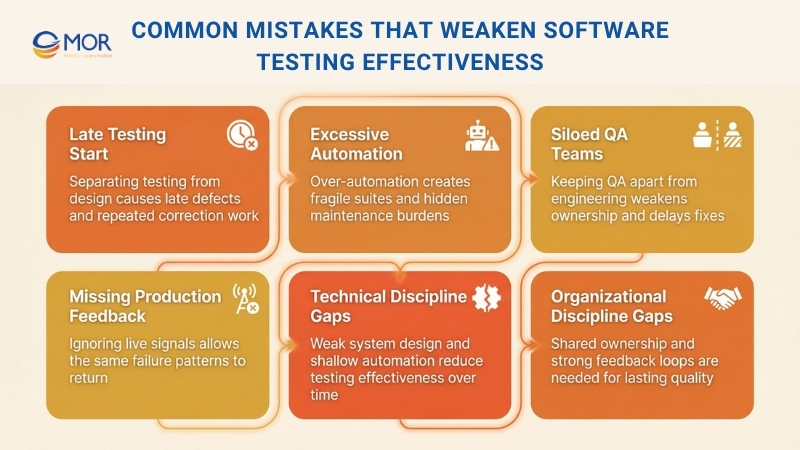
Treating testing as a separate stage cuts it off from design thinking and production learning
If validation begins only after implementation ends, design weaknesses and unclear requirements show up too late. Teams then rely on heavy regression rounds or release slowdowns to make up for missed signals. The result is often slower delivery and repeated correction work instead of better quality.
Automating too much without a clear direction creates hidden upkeep costs
Some teams push automation broadly to raise coverage, then end up with slow and fragile suites that fail every time the product changes. Instead of helping teams release faster, the suite turns into a bottleneck that engineers work around when deadlines get tight. Trust in the quality process starts to fall.
Keeping QA and engineering in separate silos weakens ownership and follow-through
When quality sits with one isolated function, engineers keep their attention on shipping features while QA teams struggle to match growing system complexity. That split often leads to defects being discovered late and the same issues returning because no one group feels fully responsible for permanent fixes.
Ignoring live production signals leaves serious risks in place
Many failures appear because of traffic levels, real usage habits, or integration behavior that pre-release environments cannot fully copy. If incidents and monitoring data do not feed back into the software validation process, the same categories of failure return again and again.
Avoiding these mistakes takes technical discipline, including system design that supports testing and automation that still means something over time. It also takes organizational discipline, including shared ownership, strong feedback loops, and leadership that treats quality as a whole-system responsibility. If your internal team cannot support both sides well enough, outsourcing QA and software testing to a dependable technology partner can be a practical solution.
MOR Software - A Trusted Partner For Businesses In Software Testing
Teams often know the theory. The problem starts when systems grow, deadlines tighten, and testing falls behind. That is where MOR Software steps in. We focus on solving the real gaps that slow teams down and weaken product quality.
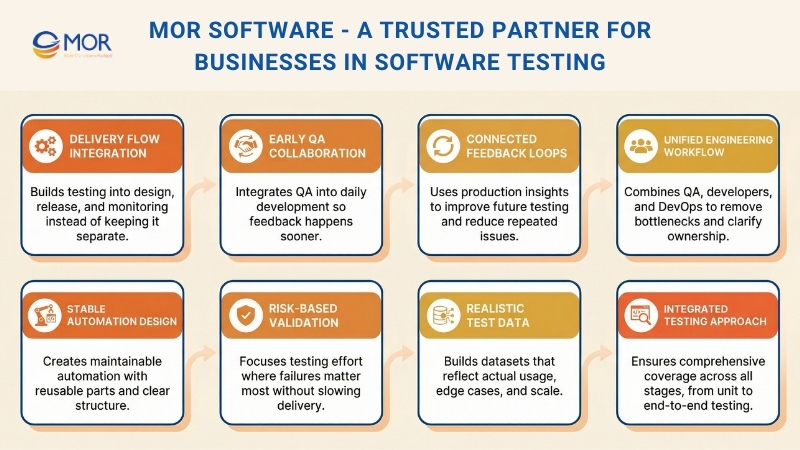
We work directly inside your delivery flow, not outside it. Testing is built into how your system is designed, released, and monitored. That means fewer late surprises and more predictable releases.
We help fix common issues teams struggle with:
Automation that breaks too often and becomes hard to maintain
Test scripts fail after small UI or logic changes, which leads to constant rework. We build stable automation with reusable components and clear structure, so tests stay reliable as the system evolves.
QA teams working separately from developers, causing delays
When QA is isolated, bugs appear late and slow down releases. We integrate QA into daily workflows, so testing starts early and feedback happens continuously.
No clear balance between fast releases and deep validation
Teams either rush changes or over-test everything. We apply risk-based strategies to focus effort where failures matter most, while keeping delivery speed consistent.
Test data that does not reflect real user behavior
Systems pass tests but fail in production because the data is too simple or outdated. We create realistic datasets that match actual usage, including edge cases and scale.
Production issues repeating because feedback loops are missing
The same bugs return because insights from production are not reused. We connect monitoring and testing, so each issue improves future validation and reduces repeat failures.
Instead of adding more tools, we focus on how everything connects. We design test strategies based on risk, build pipelines that give fast feedback, and align testing with real business priorities.
Our teams combine QA, developers, and DevOps into one workflow. This keeps ownership clear and removes bottlenecks. When testing becomes part of engineering, quality improves without slowing delivery.
You do not need more theory. You need a system that works under pressure. That is exactly what we build.
Conclusion
Software testing best practices are no longer just about catching bugs before release. They shape how teams build, validate, and improve software under real pressure. From risk-based planning to AI-supported workflows, the right approach helps you move faster without losing control. MOR Software helps businesses turn these ideas into working systems that fit real delivery needs. If you want stronger releases, steadier automation, and fewer recurring issues, contact us and let’s talk.
MOR SOFTWARE
Frequently Asked Questions (FAQs)
What are software testing best practices?
Software testing best practices are proven ways to plan, run, and improve testing across the development lifecycle. They help teams catch defects earlier, lower release risk, and keep quality standards consistent as products grow.
Why do software testing best practices matter in 2026?
Modern systems change fast, connect with more services, and carry higher reliability demands. Good testing habits help teams deal with frequent releases, tighter deadlines, and rising user expectations without losing control of quality.
How early should testing start in a software project?
Testing should start as early as possible. Teams get better results when they review requirements, discuss risks, and design test cases before development is finished. Early testing cuts rework and helps prevent expensive late-stage issues.
Is automated testing enough on its own?
No. Automation is great for repeatable checks, regression coverage, and fast feedback. It cannot fully replace human judgment, exploratory testing, usability review, or the ability to spot unexpected behavior.
What is the difference between unit, integration, and end-to-end testing?
Unit tests check small parts of the code in isolation. Integration tests verify how components work together. End-to-end tests validate full user flows across the system. Strong teams use all three at the right level.
How can teams keep test automation from becoming hard to maintain?
They should automate stable, high-value flows first. Test code should follow clean standards, use reusable components, and avoid brittle shortcuts. Regular review also helps remove outdated tests before they become a burden.
Why is test data so important in software testing best practices?
Bad test data gives false confidence. If data is too clean or too simple, systems may pass tests but fail with real users. Good test data should reflect real conditions, edge cases, and expected scale.
How do teams balance fast releases with deep validation?
The best approach is risk-based testing. Critical workflows, security-sensitive areas, and revenue-related features need deeper checks. Lower-risk changes can move with lighter validation. This keeps delivery fast without testing everything the same way.
What role does production feedback play in software testing best practices?
Production feedback shows how the system behaves under real traffic, real devices, and real user actions. Logs, incidents, and monitoring data help teams improve future test coverage and stop the same failures from happening again.
What are the most common mistakes teams make with software testing best practices?
Common mistakes include treating testing as the final phase, over-automating without a plan, keeping QA separate from developers, using unrealistic test data, and ignoring recurring production issues. These problems usually slow releases and weaken quality over time.
Share


Make Our-Dreams Realized


© 2023 . MOR Software. All Rights Reserved
Sitemap
Privacy Policy
Terms of Use

Rate this article
0
over 5.0 based on 0 reviews
Your rating on this news:
Name
*Email
*Write your comment
*Send your comment
1