How ChatGPT Help Me Write High-Quality Content Every Time
How can ChatGPT help me write content that stays clear, consistent, and high quality every time? Many teams face the same pain point, scattered prompts, uneven tone, and wasted editing time. This guide from MOR Software explains how to use ChatGPT as a reliable writing system, so content feels intentional, structured, and ready for business use.
The Common Mistake: Treating ChatGPT Like A Thinker
When you first start using ChatGPT, a common mistake appears quickly. You expect it to think instead of execute.
You give it short, unclear prompts and wait for impressive results. The outcome usually falls flat because weak instructions produce weak output. Fixing this starts with changing how you view the tool.
You begin treating ChatGPT as a personal intern.
When you train it the right way, you gain access to an extremely capable assistant. The real issue often comes from poor training, followed by blaming the tool for mistakes it did not cause.
Here are the key mistakes you need to avoid:
ChatGPT struggles when asked to create content entirely “from scratch.”
When prompts lack direction, the system must make too many guesses, which hurts quality. How can ChatGPT help me write strong content? Each prompt needs clear limits. That means adding three firm constraints every time:
- A clear goal with defined input
- A specific output format
- A clear list of things to avoid
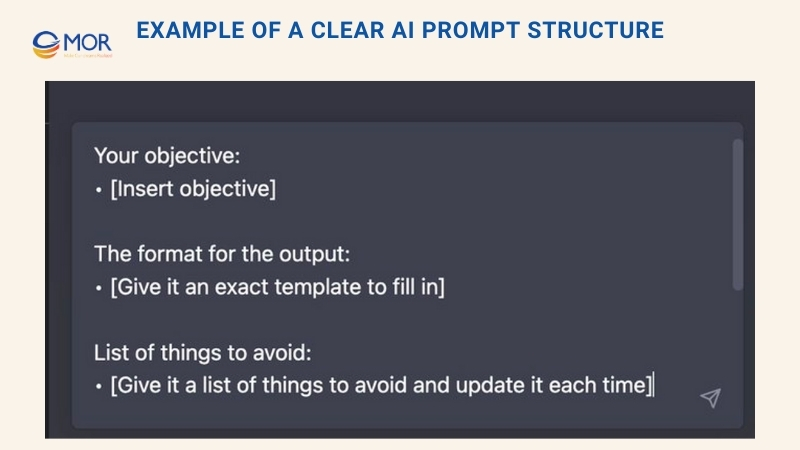
Prompt creation works through repetition. You rarely get it perfect on the first attempt. Like training a new team member, the early effort pays off later. Once a prompt works well, you can reuse it again and again with consistent results.
>>> READ MORE: TOP 12 Popular Machine Learning Algorithms Explained in 2026
You Are Writing Prompts, Not Having A Conversation
ChatGPT often behaves like a friendly assistant, which makes it easy to forget what it really is. Many people treat it politely, speaking as if they are talking to a person. Surveys on social platforms show that almost half of users always use polite language, while many others do so most of the time. You may also find yourself adding “please” or “thank you,” even though the system does not respond differently because of it.
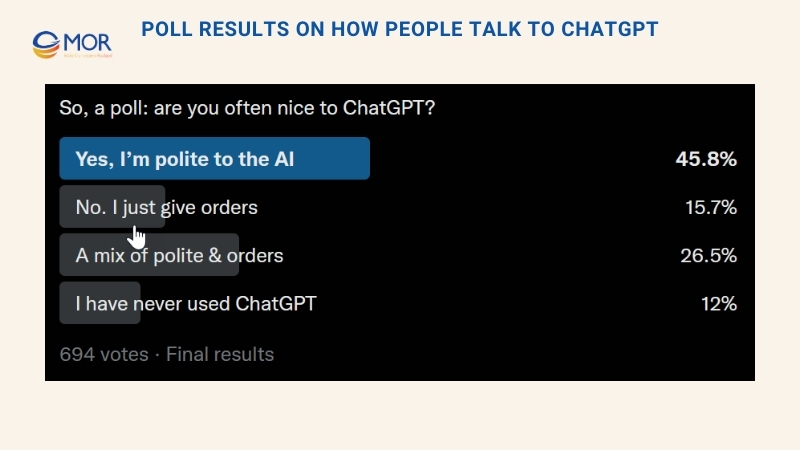
Politeness is not a problem on its own, but it can hide an important truth. You are not talking to a thinking partner. You are giving instructions to a non-sentient system that generates text based on prompts. This confusion appears less often with other generative tools. Image generators, for example, push users to experiment with detailed prompt construction. People adjust wording, test variations, and refine instructions until the output improves. These prompts often become long, abstract, or even poetic. They act as a set of rules the system follows, guiding it through trial and error toward the desired result.
Example Prompt Structure for MidJourney
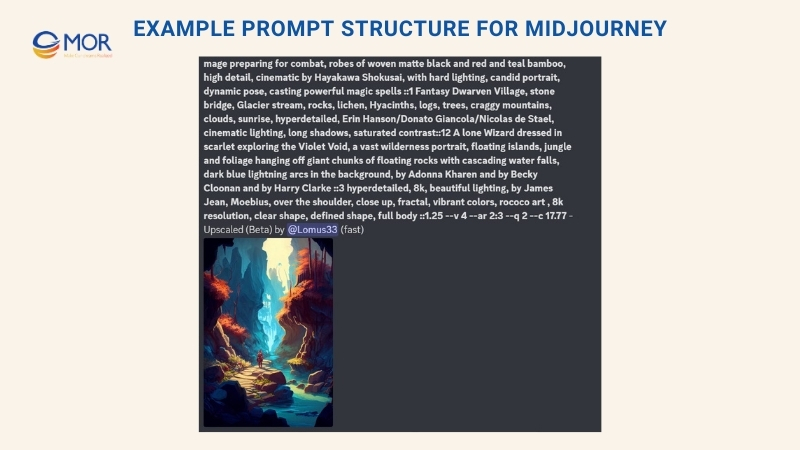
Because chat feels human and written content takes time to judge, many people avoid building clear prompts when using ChatGPT. This habit leads to weaker results. Skipping structured instructions is a mistake. More detailed and precise prompts consistently produce stronger output.
Avoid vague requests like write an essay about how human error causes catastrophes. The system will return a plain and predictable response that barely meets the request. Instead, keep control of the direction. You bring the expertise, and the platform supports execution. Guide it with structure. A simple improvement starts with clear bullet points, for example:
write an essay with the following points: -Humans are prone to error -Most errors are not that important -In complex systems, some errors are catastrophic -Catastrophes cannot be avoided.
Even those outputs feel limited when compared to what a more detailed prompt can produce:
write an essay with the following points. use an academic tone. use at least one clear example. make it concise. write for a well-informed audience. use a style like the New Yorker. make it at least 7 paragraphs. vary the language in each one. end with an ominous note. -Humans are prone to error -Most errors are not that important -In complex systems, some errors are catastrophic -Catastrophes cannot be avoided
Simple Prompt | Detailed prompt |
write an essay with the following points:- Humans are prone to error- Most errors are not that important- In complex systems, some errors are catastrophic- Catastrophes cannot be avoided | write an essay with the following points. use an academic tone. use at least one clear example. make it concise. write for a well-informed audience. use a style like the New Yorker. make it at least 7 paragraphs. vary the language in each one. end with an ominous note.- Humans are prone to error- Most errors are not that important- In complex systems, some errors are catastrophic- Catastrophes cannot be avoided |
Human beings are naturally prone to error. Whether it’s a simple mistake like mixing up the sugar and salt while cooking, or a more serious error like forgetting to turn off the stove before leaving the house, we all make mistakes from time to time. And while most of these errors are not that important in the grand scheme of things, they can still be frustrating or even costly to deal with. | Human error is an inherent part of the human condition. Whether it’s a simple slip-up like mixing up the sugar and salt while cooking, or a more serious error like forgetting to turn off the stove before leaving the house, we all make mistakes from time to time. While most errors are minor and inconsequential, in complex systems, some errors can be catastrophic. |
However, in complex systems, some errors can be catastrophic. This is especially true when it comes to fields like aviation, medicine, and nuclear power, where a single mistake can have devastating consequences. For example, a pilot’s error in judgment could lead to a plane crash, a doctor’s misdiagnosis could have serious consequences for a patient’s health, and a nuclear power plant malfunction could have far-reaching environmental and societal impacts. | Take, for example, the Fukushima Daiichi nuclear disaster of 2011. A massive earthquake and subsequent tsunami caused a series of meltdowns at the Fukushima Daiichi nuclear power plant in Japan, leading to widespread contamination and the evacuation of over 160,000 people. The disaster was caused by a combination of factors, including inadequate emergency response procedures and a failure to properly assess the risks of a tsunami. The consequences of the Fukushima disaster were far-reaching and devastating, with the cost of cleanup and compensation estimated to be in the billions of dollars. |
Despite our best efforts, it is impossible to completely avoid these kinds of catastrophic errors. Humans are fallible creatures, and no matter how many safety measures we put in place, there will always be a chance that something could go wrong. The key, then, is to minimize the likelihood of these errors occurring and to be prepared to respond effectively when they do happen. This means investing in training and education to help professionals in high-stakes fields make better decisions, as well as having robust systems in place to detect and correct mistakes before they can cause harm. | This tragedy serves as a reminder that in complex systems, some errors can have catastrophic consequences. Despite the best efforts of the operators of the Fukushima Daiichi plant, the disaster could not be avoided. This highlights the importance of having robust systems in place to detect and correct mistakes before they can cause harm. While we cannot completely eliminate the risk of catastrophic errors occurring, we can take steps to minimize their likelihood and be prepared to respond effectively when they do happen. |
| It’s not just in high-stakes fields like nuclear power where errors can have serious consequences. In any complex system, whether it’s a financial institution or a transportation network, a single mistake can have far-reaching and potentially catastrophic effects. This is especially true in an interconnected world where the consequences of a single error can ripple out and affect multiple systems and industries. |
| It’s easy to take for granted the complex systems that underpin our daily lives. But the next time you board a plane or visit a hospital, it’s worth taking a moment to consider the potential risks and the steps that have been taken to minimize the likelihood of a catastrophic error occurring. While we may not be able to completely avoid these kinds of errors, by being aware of the potential risks and taking steps to minimize them, we can help to ensure that the systems that support our lives run smoothly and safely. |
| But as we have seen, even with the best efforts and the most robust systems in place, it is impossible to completely eliminate the risk of catastrophic errors occurring. And so we must always be vigilant, always prepared for the worst, and always ready to respond effectively when the unimaginable becomes a reality. |
You may notice that the output does not follow every instruction exactly. The response includes six paragraphs instead of seven. This behavior is normal for generative systems. You rarely receive a perfect match to every request, but careful prompt tuning can move the result closer to something original and engaging.
Test different directions. Ask for writing that is concise, wordy, or detailed. Request more specific explanations or ask it to include examples. Adjust the tone to ominous, academic, or direct. Set the audience as professional or student, or reference a style like the New York Times, tabloid media, or an academic journal. You will not get flawless results every time. Testing variations and using the regenerate option helps refine output. Over time, you begin to understand how this solution responds and how ChatGPT help me write content with more control and consistency.
>>> READ MORE: Difference Between Machine Learning and AI: The 2026 Guide
Controlling Output Length And Context Memory
One major advantage ChatGPT writing has over many other generative tools is memory. It tracks what you type and can recall roughly a few thousand words from the current conversation. At the same time, what it remembers and how that information gets used is not always clear.
In many cases, memory works in your favor. You can ask the system to revise earlier content, for example, change the third paragraph to sound more professional or use a different example in the middle, and it will return an updated version. At other times, it loses context and needs a reminder. You may need to restate the task, like revise the third paragraph of the essay about catastrophes, so the platform stays focused.
Memory can also cause issues. The tool may repeat the same examples or keep the same tone across several requests. When that happens, ask it to switch examples, adjust tone, or revise the earlier instructions. In some cases, the cleanest fix is to reset the session. Starting a new chat clears context and often leads to better results.
Resetting context is simple for this system.
You can also improve control by splitting tasks into smaller requests. Start with an introduction and refine it until the tone feels right. After that, move on to the next sections one at a time.
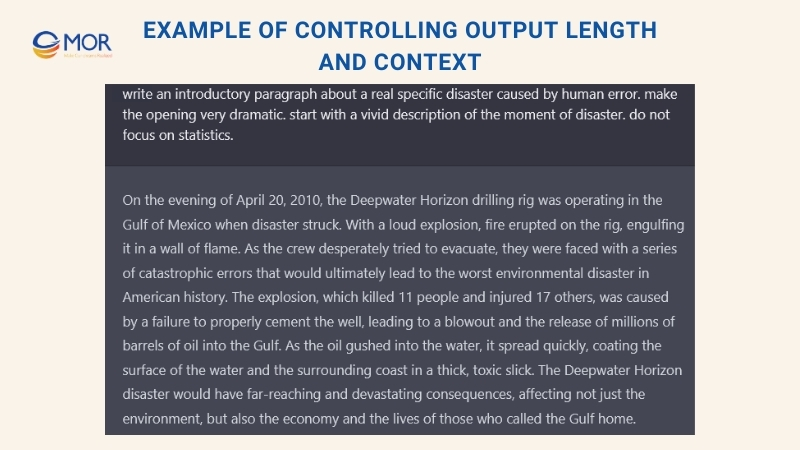
If longer responses stop mid way, a simple request to “continue” is enough to retrieve the remaining content. This approach helps ChatGPT help me write longer pieces without losing flow or structure.
Improving Writing By Changing Roles And Formats
You can ask the system to write in a specific format or style. The output changes depending on whether you request an academic essay, a persuasive article, a blog post, or a corporate memo. Each format guides structure, tone, and word choice in a different way. Testing several writing types during prompt experiments often leads to stronger and more interesting results.
Another way to improve output is to assign the platform a role. You can ask it to write as if it were someone else. It might take on the voice of a chef, a novelist, or even Plato. This method often produces creative and engaging content. A wide range of persona ideas is available in public prompt libraries, including this list of hundreds of role suggestions: https://prompts.chat/. One effective example uses a storyteller role, with instructions like: “Act as a storyteller. Create stories that feel engaging, imaginative, and memorable for the audience. These can include fairy tales, educational stories, or other narratives designed to capture attention and spark imagination. Include rich detail and aim to make each story stand out.”
How To Train ChatGPT To Write More Like You
When ChatGPT first became widely available, many users questioned how much it could truly improve content production. You may have doubts about whether it can support consistent, high quality writing. Once you learn how to refine prompts, that view often changes. When OpenAI later introduced custom instructions and the option to create multiple tailored ChatGPT versions, the tool became far more practical for everyday writing work.
Custom instructions give you a way to guide the platform so it follows your preferred writing style. This approach works best when you clearly understand how you normally write and communicate.
Below is a step by step process that helps you identify your writing style. With that clarity, you can train ChatGPT to follow your patterns more closely and rely on it to support your writing workflow with greater consistency.
The Four Elements That Define Your Writing Style
In simple terms, your writing style consists of four main elements:
- Voice describes how you sound on the page. When you use casual phrases or everyday language, your voice may feel friendly and conversational. If your wording feels formal or literary, the voice may appear more dramatic or refined.
- Tone reflects the attitude your writing shows toward the topic or the reader. Writing filled with irony or sharp questions can feel sarcastic. Content that includes humor or light comparisons may feel playful.
- Style includes voice and tone but also covers how you choose words and build sentences. You may prefer short, direct sentences that deliver the point fast, or longer sentences that explain ideas in more detail.
- Structure goes beyond having an introduction, body, and ending. It shows how ideas are arranged, from sentence order to paragraph flow. Some writing follows a straight timeline, while other pieces move between ideas or time periods.
How To Identify Your Writing Style With ChatGPT
Before you can train the system to follow your writing style, you first need to describe that style clearly. This can feel difficult at first. At the same time, ChatGPT works well as a tool to help you uncover these patterns. The process below shows how to do it.
Collect writing that feels most like you
Choose three to five pieces of content that represent your natural voice or the voice you want the system to follow. Digital copies work best, since you will share them with ChatGPT in the next step.
Ask ChatGPT to review your writing
Provide the platform with one piece of your content and request an analysis of your style. Depending on the model, you can paste a large amount of text at once, often up to around 100,000 words. That limit is usually more than enough. You can use a prompt like this:
[Paste your content]
Analyze the writing voice, tone, and structure of the article above. Output bullet points.
If your work is published online, you can also share links instead and use this prompt:
[Insert links to articles]
Analyze the writing voice, tone, and structure of each article linked above. Output bullet points.
Repeat the process
If the system reviews one article at a time, repeat the same steps for every piece of content you selected.
After ChatGPT reviews all your writing, study the feedback and look for patterns. Some descriptions will appear often and feel accurate. Write those down in your preferred note taking app. Ignore the points that do not match how you want to write.
At this stage, you are ready to move on and set up custom instructions in ChatGPT.
Teaching ChatGPT Your Style Using Custom Instructions
Custom instructions allow you to add background details and rules that the system should follow every time it generates a response. You can ask it to keep a formal tone at all times. You could also request playful habits like adding emojis at the end of sentences, although that choice rarely helps professional writing.
The steps below explain how to train ChatGPT to follow your writing style with custom instructions.
- With ChatGPT open, select your profile:
- Choose Customize ChatGPT.
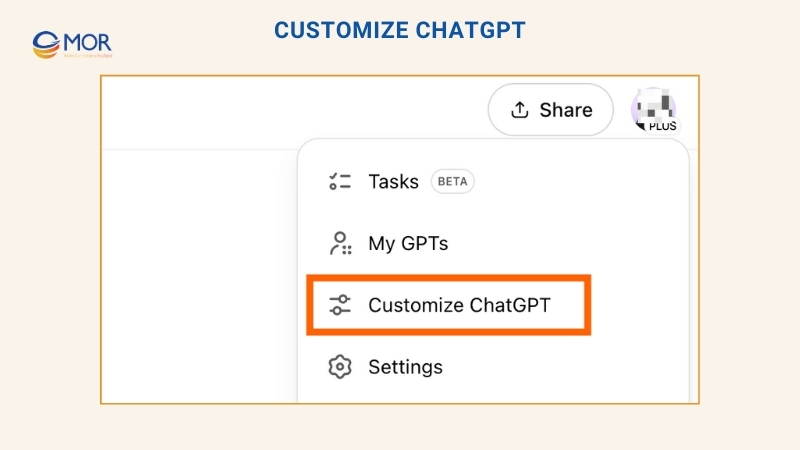
- In the window that appears, enter details that help the platform shape its responses.
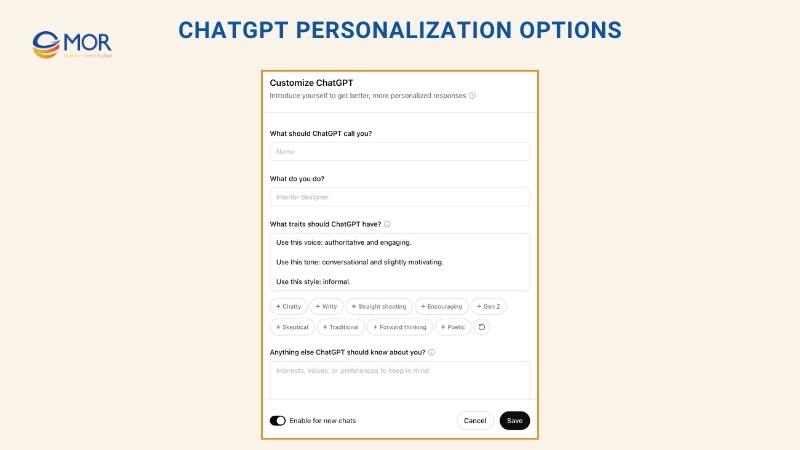
At a minimum, describe your writing preferences in the section labeled What traits should ChatGPT have? You can follow a simple structure like this:
Use this voice: [describe your voice]
Use this tone: [describe your tone]
Use this style: [describe your style]
Use this structure: [describe your structure]
You may also add helpful background details in the section titled Anything else ChatGPT should know about you? This might include notes like writing short stories as a hobby or creating product reviews for a specific publication.
- ChatGPT starts with many tools turned on. You can adjust this setup. Select the down arrow (⋁) next to Advanced and turn off any tools you do not need.
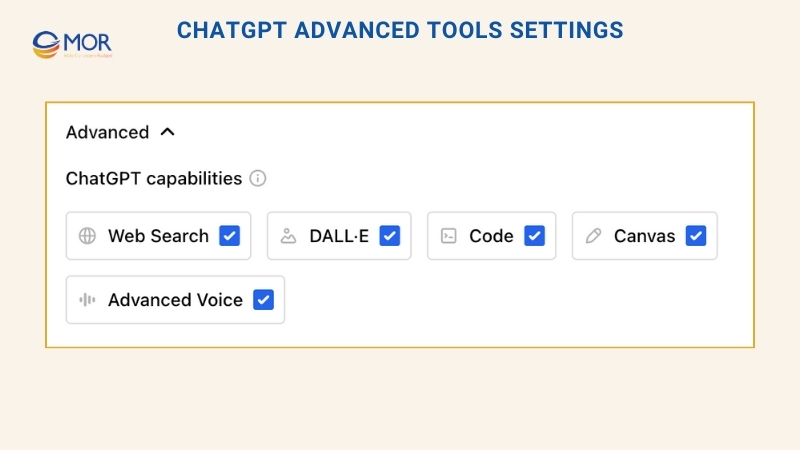
- Turn on the switch next to Enable for new chats so the system remembers these settings in future conversations.
- Select Save.
Everything is now set. The platform will apply these custom instructions each time it generates content unless you change or disable them.
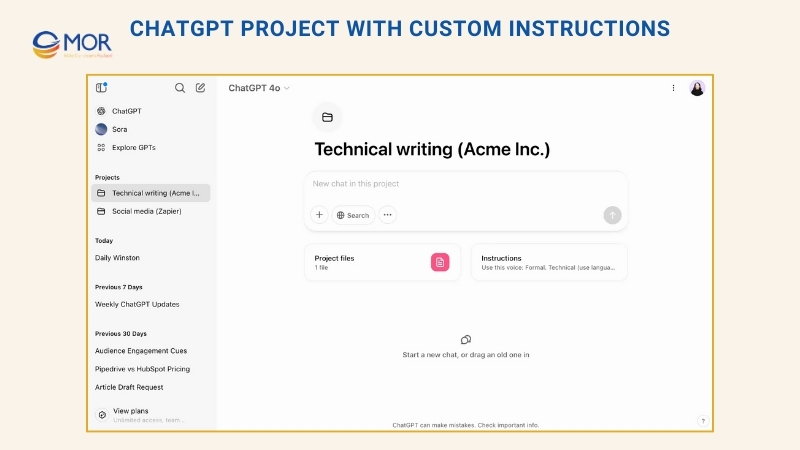
Note: You can also set up separate projects inside ChatGPT and assign different custom instructions to each one. This setup allows quick switching between tasks while keeping the right context for every project.
How To Use ChatGPT For Different Types Of Writing Tasks
With the right setup, you can rely on ChatGPT for three main types of writing work:
- Running templates you already created
- Improving content that already exists
- Turning messy notes into structured output
None of these tasks require original thinking from the platform. The value comes from execution. This approach is exactly how ChatGPT help me write content faster without losing control.
The sections below show practical examples of each task.
Example 1: Generating Ideas
You can create a prompt template focused on idea generation. After spending time refining it, the system becomes easy to reuse. You only need to provide a topic you want to explore. The platform then produces two structured lists:
- A list of actions connected to the topic, with each item starting as a verb
- A list of subtopics, each paired with three guiding questions
These questions naturally turn into writing topics. Answering them creates strong pillar content that you can later reuse for shorter formats or related pieces.
Below is an example using the topic “Building a writing habit”.
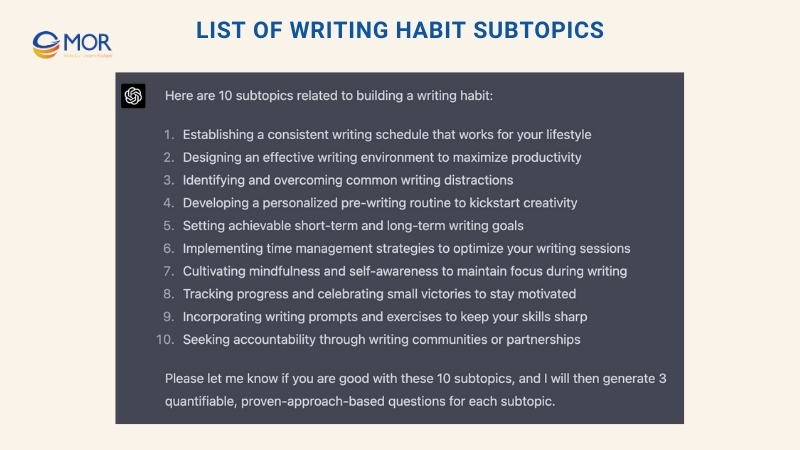
Here is how the subtopics appear once generated:
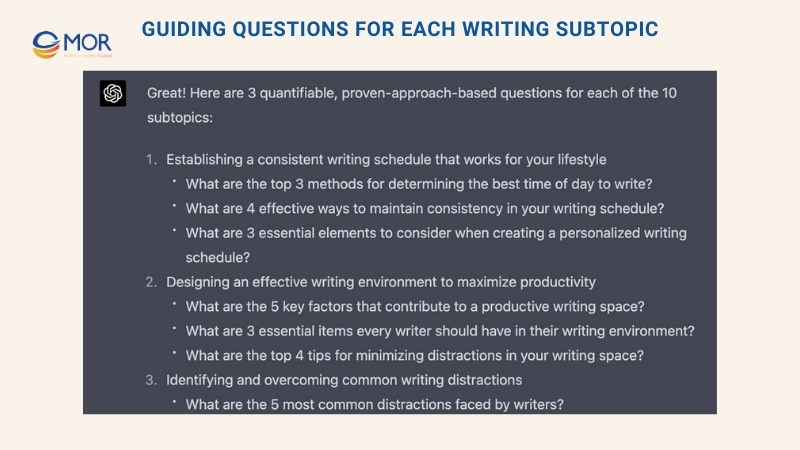
This workflow shows how ChatGPT help me write structured ideas on demand while keeping ownership of the final content.
Example 2: Rewriting And Remixing Content
You can use ChatGPT writing assistant to rewrite existing content in many ways to refine and strengthen your voice:
- Rewrite using different tones, including formal, serious, sarcastic, optimistic, pessimistic, or lighthearted
- Rewrite as if the text were written by different authors, like Gary Vaynerchuk, Maya Angelou, or George R.R. Martin
- Rewrite with different goals in mind, such as concise, emphatic, humorous, descriptive, persuasive, informative, or action oriented
- Rewrite for different audiences, including third graders, eighth graders, college students, busy parents, seniors, or non native English readers
You can also ask the platform to display each version in a table so you can compare results side by side and select the strongest option.
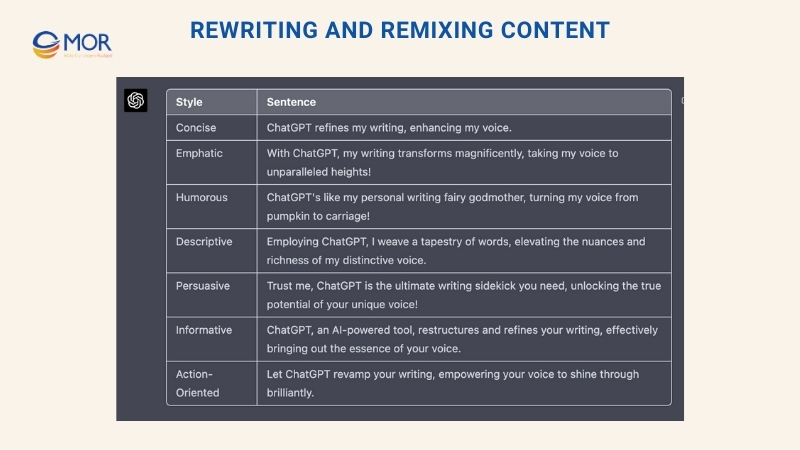
Testing content across these variations helps you identify what works best for your writing goals. The real benefit is speed. This entire process takes seconds, which makes ChatGPT help me write and refine content in ways that would otherwise take hours.
Example 3: Journaling And Reflection
ChatGPT can support journaling by suggesting prompts or expanding on your thoughts and experiences.
To test this approach, write a journal entry in a Google Doc or a Notion page. After that, copy and paste the text into ChatGPT and explore it using one of these four prompts:
- Analyze my journal entry for repeated themes and topics.
- Help me understand my thoughts, emotions, and behavior patterns.
- Suggest another writing prompt that encourages deeper reflection.
- Share inspirational quotes, poems, or short stories connected to these ideas.
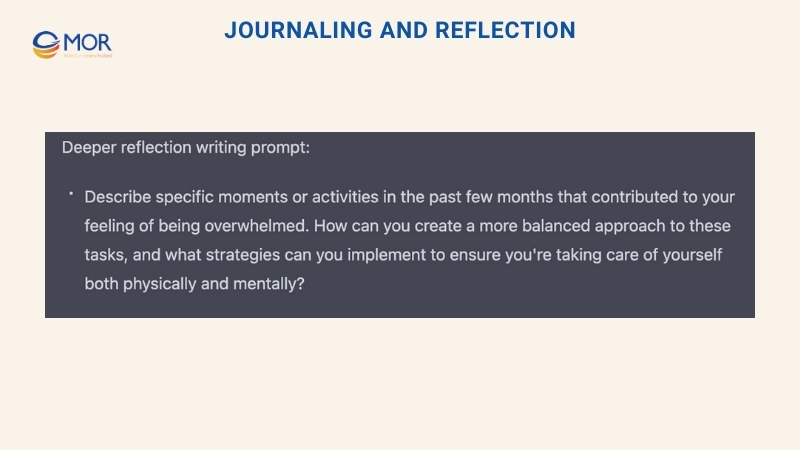
The outcome is a richer journaling process that supports reflection and personal development, showing another way ChatGPT help me write with more clarity and purpose.
Example 4: Iterating On Headlines
You can ask the system to generate many headline options and then select the one that grabs attention.
ChatGPT performs well with headlines once it understands the five core elements that shape strong titles:
- HOW MANY (a number): 6 tips, 7 reasons, 11 mistakes, and similar formats
- THE WHO (an audience): for project managers, for therapists, for founders, and others
- THE WHAT (a noun): tips, reasons, mistakes, lessons, examples, templates, case studies
- THE WHY (a result or outcome): to get promoted, to avoid job loss, to buy your first home
- “TWIST THE KNIFE” (extra benefits): two or three added outcomes that raise urgency or appeal

Avoid stopping at a single option. Ask for 20 headline variations instead. Then combine and refine the strongest parts until the final version feels right. This is another practical way ChatGPT help me write headlines that perform better with less effort.
Example 5: Synthesizing Brain Dumps
You can turn scattered ideas and rough notes into clear, structured content.
This method works well after consuming information. You might finish a podcast or article with a page full of partial thoughts or keywords that stood out. Paste those notes into a chat and ask the system to group them into themes or main ideas.
The result is a clean, organized list. You can then reuse it for tweets, threads, Atomic Essays, or as reference material for later projects.
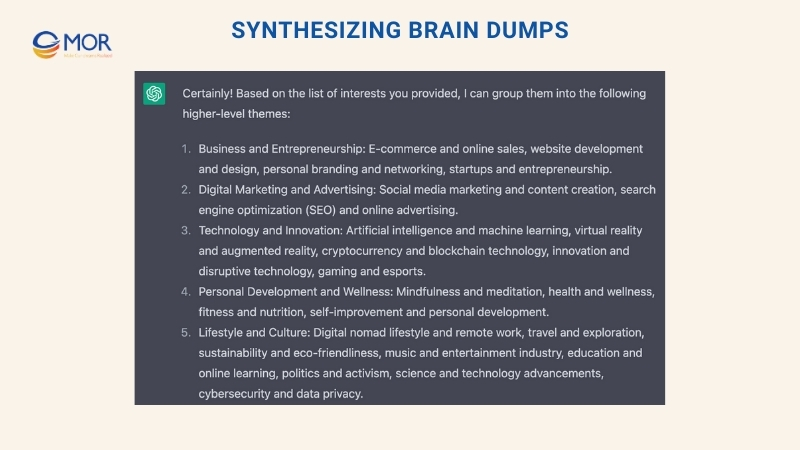
This workflow shows how ChatGPT help me write usable content from ideas that would otherwise stay unorganized.
Example 6: Research And Content Summaries
You can use ChatGPT to support research tasks and summarize important information.
Ask the platform to research a topic and collect details like:
- Dates
- Numbers
- Descriptions
- Historical events
- Other relevant facts
As one example, you might explore the habits of successful non fiction authors. You can request a comparison of the daily routines of the five top selling non fiction writers from the past decade, along with a short explanation of what separates them from others. Limit the summary to 200 words to keep it focused.
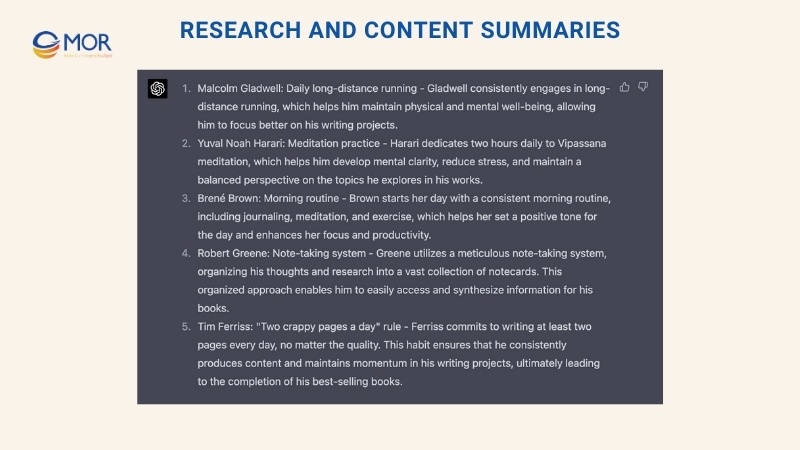
The clearer your thinking, the stronger the output becomes.
As you continue refining prompts and working with this system, its value grows. Over time, ChatGPT helps you write faster, research smarter, and produce more consistent content with less friction.
Remember The Limits And Protect Your Ideas
ChatGPT, like other generative AI tools, functions as a utility. Tools exist to help people complete specific tasks. Viewing it this way helps you use its strengths while avoiding common risks.
Avoid asking it for facts that you cannot easily verify. Do not rely on it to provide accurate references. Skip tasks like complex math or deep analysis. The system can produce confident sounding answers even when they are incorrect. This solution is not the all knowing intelligence often shown in movies. Yet as a way to break writer’s block, speed up drafting, and support consistent output, it performs extremely well.
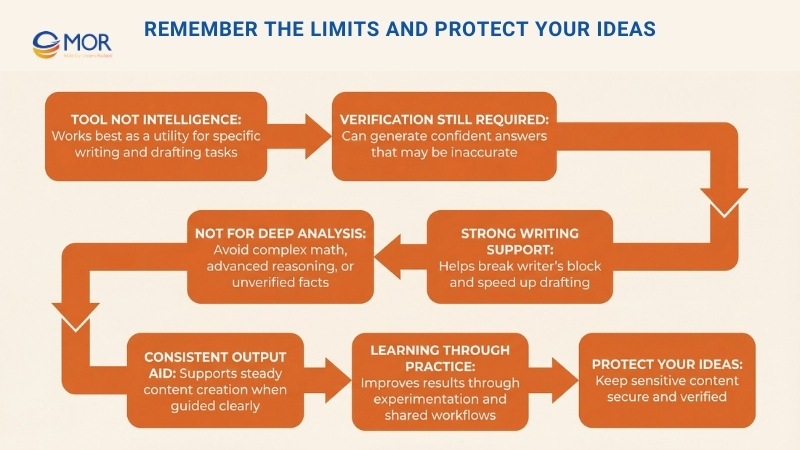
You are encouraged to share prompt ideas or techniques that work well for you. Learning how to use this platform happens through practice and shared experience. Exploring different approaches together helps everyone understand how to guide the system more effectively. What prompts or workflows have improved your results so far?
Conclusion
How can ChatGPT help me write better content? It starts with clear prompts, steady practice, and repeatable workflows. When you focus on proven methods, results stay consistent as content grows. If you want to learn more tips or tricks, contact us today, MOR Software can share practical guidance and real use cases to help you apply ChatGPT more effectively in your content work.
MOR SOFTWARE
Frequently Asked Questions (FAQs)
Can ChatGPT help me write high-quality content?
Yes. ChatGPT can help you draft, expand, edit, and refine content when you give clear instructions. The quality depends on how specific your prompt is. Clear goals, structure, and examples lead to better results.
Can ChatGPT help me write a book?
ChatGPT can support book writing by helping with outlines, chapter drafts, dialogue ideas, and revisions. It works best as a writing assistant rather than the sole author, with you guiding the story, tone, and direction.
Can I use ChatGPT to help me write a book from start to finish?
Yes, but you should stay involved at every step. ChatGPT can help generate drafts and organize ideas, but you need to review, edit, and shape the final manuscript to keep it consistent and original.
Can I publish a book that ChatGPT helped me write?
In most cases, yes. Many platforms allow publishing content created with AI assistance. However, you are responsible for the final work, including originality, accuracy, and compliance with publisher guidelines.
Can ChatGPT help me write a business plan?
ChatGPT can help outline a business plan, explain sections, and draft content like market analysis or value propositions. You should still validate numbers, research data, and tailor the plan to your real business goals.
Can ChatGPT help me write a resume?
Yes. ChatGPT can help rewrite bullet points, improve clarity, and adjust tone for specific roles. It works well for structuring resumes and highlighting achievements when you provide accurate job details.
Can I use ChatGPT to help me write an essay?
You can use ChatGPT to brainstorm ideas, create outlines, and improve wording. For school or academic work, you should follow your institution’s rules and ensure the final essay reflects your own understanding.
Is it safe to rely on ChatGPT for writing important documents?
ChatGPT is useful for drafting and editing, but you should always review the content. Important documents still need human judgment, fact-checking, and final approval before use.
How do I get better writing results from ChatGPT every time?
Better results come from better prompts. Be clear about your goal, audience, tone, length, and structure. Treat ChatGPT as a writing assistant that follows instructions, not as a replacement for your thinking.
Share


Rate this article
0
over 5.0 based on 0 reviews
Your rating on this news:
Name
*Email
*Write your comment
*Send your comment
1