


AI Agent For Customer Support: Benefits and Workflow 2026
Customer support teams are under pressure to answer faster, keep quality steady, and stop agents from drowning in repeat tickets. An AI agent for customer support can help when it is built with clean data, clear handoff rules, and the right support workflow. This MOR Software’s guide will show how these AI support agents work and how businesses can build them safely.
Key Takeaways
- An AI agent for customer support can handle FAQs, ticket routing, account updates, and simple technical issues without slowing down human agents.
- The best setup connects with your CRM, helpdesk, chat tools, knowledge base, and internal systems.
- Strong results depend on clean support data, clear rules, careful testing, and human review during rollout.
What Is AI Agent For Customer Support?
An AI agent for customer support is a smart system that can manage customer chats and solve support problems with little help from your team. The software studies what customers need, finds the right answer, and completes the next action when the case is clear.
Most people have seen a support chatbot before, but AI agents for customer support work in a different way. A basic bot usually follows fixed rules: if the customer types one thing, it gives one preset reply. In contrast, an AI support agent reads the full conversation, judges the situation, and gets better as it handles more chats.
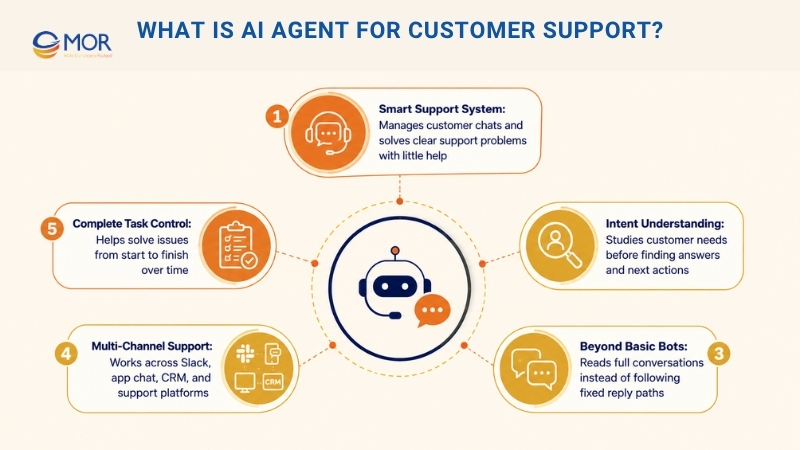
These autonomous AI agents can also work across your main support channels. A user may ask a question in Slack or send a message through an app chat, and the same assistant can manage each thread. It can also pull details from your support platform, review account history, search your knowledge base, update fields in your CRM, and send harder cases to the right human team.
The main difference is control over the full task. These systems do more than reply to fixed prompts. They help solve the issue from start to finish and learn from each case over time.
AI Support Agents Vs Chatbots: What's The Differences?
The word “chatbot” now carries a lot of baggage for many buyers. It often brings up stiff scripts, forced paths, and support loops that push customers to call a real person.
Modern AI chat agents work in another way, not only in promise, but in day-to-day use. The table below shows the main gaps between them.
Comparison Point | Traditional Chatbots | AI Support Agents |
Solving Cases Instead Of Pushing Them Away | Chatbots were often made to lower ticket volume. They may tell a customer where to look after someone asks, “Where’s my order?” | AI chat agents are built to fix the issue. The agent can find the tracking details, explain what caused the delay, and suggest the next step. |
Completing Tasks Instead Of Giving Replies | A basic AI customer support chatbot may find an answer from a help article, then stop there. | Strong AI chat agents can run support flows. They can handle refunds, change subscriptions, cancel orders, and send special cases to the right person. They also connect with your order management system and billing tools, which turns a chat into a real fix. |
Managed Handoff Instead Of Support Dead Ends | Older bots often fail with a blunt message like, “I don’t understand.” Customers then have to explain everything again. | AI chat agents can notice when the case is too complex. They pass the chat history to a human agent, so the customer keeps moving and the support team gets the full story. |
“Chatbot” is still a familiar word, but it no longer says much about real support value. In 2026, buyers care about whether the platform can solve issues on its own, not whether it can send scripted answers.
Key Benefits Of Using AI Agent For Customer Support
Compared with older bots, an AI agent for customer support is better suited to the detailed cases that B2B post-sales teams face. The benefits below show why many support teams add this tool to their daily work.
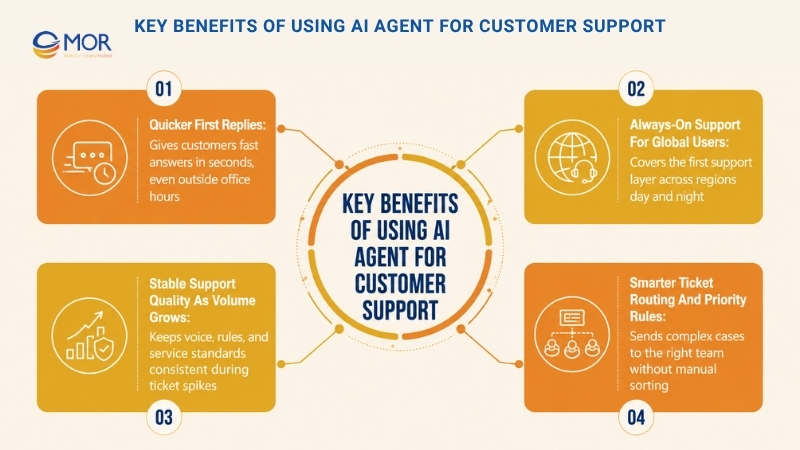
Quicker First Replies
With AI-powered support, customers can receive a first answer in seconds. These agents stay active outside office hours, so users do not sit in a long queue before someone notices the request.
Always-On Support For Global Users
As your customer base grows across regions, these agents can cover the first layer of support all day and night before you hire a larger global team. That gives users help after hours without forcing your staff into night shifts.
Stable Support Quality As Volume Grows
You can set the agent’s voice, product rules, and service standards before it speaks to customers. That helps your team keep answers steady, even when ticket volume rises fast.
Smarter Ticket Routing And Priority Rules
With AI ticketing tools, the support setup can send complex cases to the right team member without manual sorting. If the assistant cannot solve the issue alone, it can pass bugs to engineers, billing questions to account managers, or urgent cases to the on-call support lead.
How AI Agent For Customer Support Works With Your Team
An AI agent for customer support should fit into the support setup you already use. It should not replace the people who handle sensitive, complex, or high-value conversations.
The system takes on repeated questions and routine problems that drain hours from the week. Your team then has more time for cases that need judgment, deep product knowledge, or a careful human response.
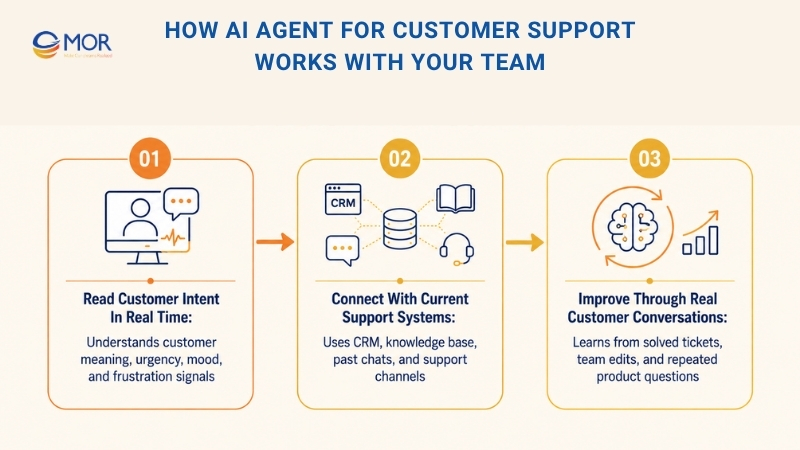
Read Customer Intent In Real Time
AI agents use Natural Language Processing (NLP) to understand what customers mean, even when they write in different ways or include account-specific details.
They can also read signals like urgency, mood, and frustration. If a customer sounds upset or says they cannot finish a key task, the agent can mark the case as urgent or move it to a human right away.
Connect With Current Support Systems
Most AI agents connect with your help desk or support platform, or they come inside AI powered customer service platforms that already include agent tools. In each setup, they can use data from your CRM, knowledge base, and past support chats. They can check customer records, read product documents, create tickets, and reply across your support channels.
You can also set these agents to write new details back into your support system after each conversation. When the agent closes a case, the result is saved like any other support record.
Improve Through Real Customer Conversations
AI agents get better as they learn from solved tickets and team edits. When a support rep takes over or changes an AI reply, the assistant can learn from that corrected answer.
They also become more tuned to your product and customer base. As chat volume grows, the system becomes better at spotting common questions, product quirks, and the way your team explains fixes.
Best Workflows For AI Support Agents
An AI agent for customer support performs best in workflows where the path is clear and the value appears fast. The examples below show the types of tasks these tools usually handle well.
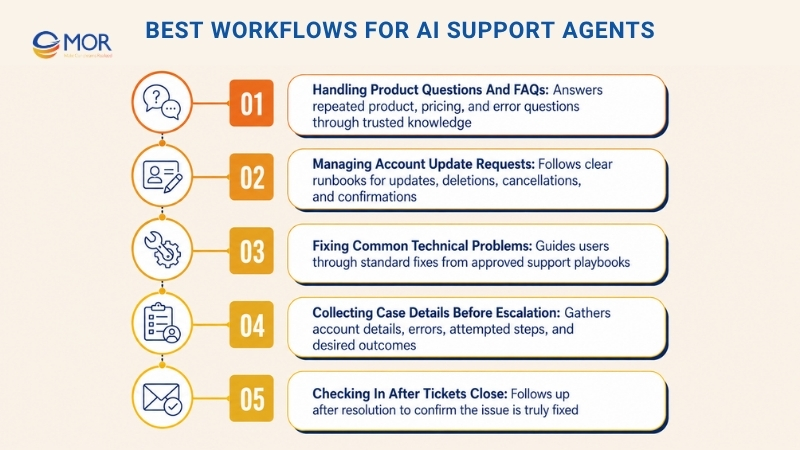
Handling Product Questions And FAQs
AI agents work well with repeat questions about product use, pricing, and common errors. They can search your knowledge base and explain the same idea in different ways for different users. They can also send customers to the right help document when a link is useful.
Managing Account Update Requests
Some platforms let teams create clear runbooks for account tasks, which helps agents manage updates, deletions, and cancellations. You can allow them to change data in the support system, ask your team for approval when needed, and confirm the result with the customer after the task is done.
Fixing Common Technical Problems
AI agents can guide customers through standard fixes for known issues. They may ask users to clear cache, review permissions, update an integration, or restart a service. They follow your support playbooks and can solve routine technical cases without sending every ticket to a human.
Collecting Case Details Before Escalation
When an AI support agent reaches a problem it cannot solve, it can still gather useful details first. That may include account information, error messages, steps already tried, and the result the customer wants. The ticket then reaches your team with cleaner details and less back-and-forth.
Checking In After Tickets Close
You can set AI agents to follow up after a ticket is marked solved and ask whether the issue is truly fixed. These check-ins happen every time, instead of being skipped when the team is busy.
>>> Let's walk through every step, from planning and training models on how to create an AI app that meets real market needs.
AI Customer Service Agent Use Cases Across Industries
An AI agent for customer support can serve many business types, not only software companies. Across AI in customer service examples, these tools handle repeated work, give faster replies, and adjust to the needs of each industry.
Several industries already use AI agents in practical ways.
Industry | How AI Agents Are Used |
Customer Service | AI customer service agents answer FAQs, guide troubleshooting, and process refunds, giving human teams more time for relationship-building work. |
Information Technology (IT) | AI agents help with password resets, VPN access issues, common tech checks, and repeated internal support tasks. |
Human Resources (HR) | AI agents answer staff questions about benefits and policies, support onboarding, and screen job applications. |
Sales And Marketing | AI agents study live customer data and suggest upgrades or new products based on behavior and past activity. |
Healthcare | AI agents help book appointments, answer simple health-related questions, or direct users to the right department. |
Finance | AI can support fraud checks, suggest investment options, and help process loan applications. |
Retail And E-Commerce | AI agents track orders, send status updates, create return labels, answer product questions, suggest items, and shape shopping experiences around past purchases. |
Travel And Hospitality | AI agents help with flight and hotel bookings, answer travel questions, and suggest trip plans based on customer needs. |
Telecommunications | AI agents answer outage-related questions with fast and personal support. |
Entertainment And Media | AI agents help users find shows, films, or music, answer content questions, and suggest new choices. |
Must-Have Capabilities In AI Agent For Customer Support
No two AI agents work the same way. To get real service gains, businesses need to look past simple automation and compare leading AI agent solutions for customer support based on how well they understand, act, connect, and improve.
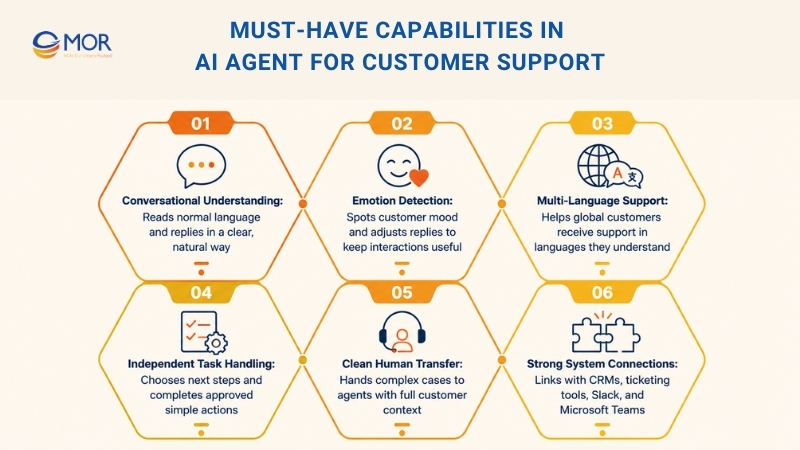
When you review an AI agent for customer support, focus on these must-have capabilities:
- Conversational Language Understanding: Customer service AI agents should read normal language and reply in a clear, natural way, which makes the support experience feel easier.
- Emotion And Mood Detection: Strong agents can spot customer feelings and adjust the reply style to keep the interaction calm and useful.
- Support Across Languages: AI agents should work in different languages so global customers can receive help in a language they understand.
- Independent Task Handling: The agent should be able to choose the next step and complete approved actions without waiting for a human on every simple task.
- Clean Transfer To Human Agents: Complex cases need a smooth handoff, so human agents can take over without forcing the customer to repeat the full story.
- System Connection Strength: Choose agents that connect well with your current stack, including CRMs, ticketing tools, Slack, and Microsoft Teams.
AI agents work best when they sit inside a connected automation setup that links teams and business systems. To reach their full value, they need access to trusted data, clear action rules, and workflows that move across tools without friction. Without that connection, the agent may become another isolated tool instead of a real driver of better service and smoother operations.
How To Build An AI Agent For Customer Support In 6 Steps
Creating your first AI agent for customer support does not have to mean months of heavy code work. The better starting point is a clear business goal and a build approach that moves from idea to a working support tool with the right technical partner, such as MOR Software. This is the path.
A 6-step guide to build a customer support AI agent
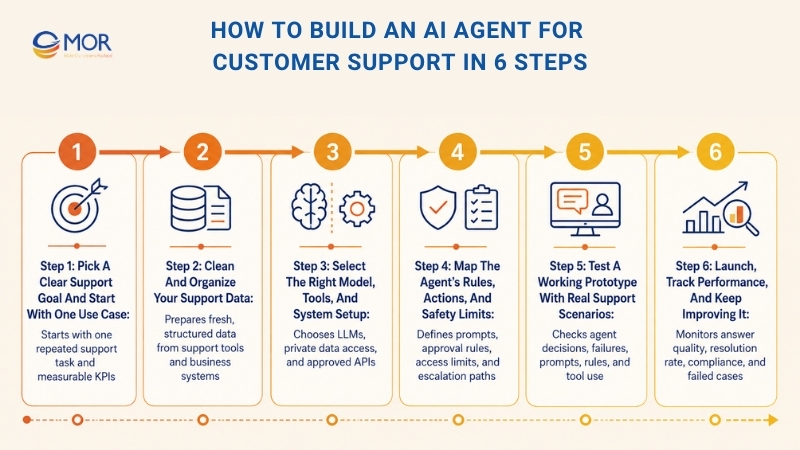
Step 1: Pick A Clear Support Goal And Start With One Use Case
Many teams go wrong when they try to automate the whole support desk on day one. A safer move is to choose one support task with high volume, repeated patterns, and a clear way to solve it. Good first cases include WISMO questions, password resets, or simple product questions.
You also need to set a clear success target with measurable KPIs. Do you want to lower first reply time by half? Do you want automation to handle 30 percent of incoming tickets? A clear goal keeps the whole build process focused.
Step 2: Clean And Organize Your Support Data
The quality of a support AI agent depends on the information it can read and use. You should bring together data from key sources like your help desk, Zendesk, Intercom, Salesforce, knowledge base, product activity records, and logistics systems. The data should be fresh, clean, and structured so the agent can read it without confusion.
How MOR Software Supports Data Preparation: MOR Software can help connect support data across your current business systems, clean scattered records, and prepare a trusted data base for the agent. Our team works across Salesforce Development, Web Development, Mobile Development, AI Development Services, cloud setup, and system integration, so the support tool can read the right data before it answers or acts.
Step 3: Select The Right Model, Tools, And System Setup
After that, you need to choose the main building blocks for the agent. This includes an LLM that handles reasoning, a safe way to connect private business data to the model, and approved APIs that allow the agent to complete actions in other tools. For teams comparing AI virtual agents for customer support, this step decides how smart, safe, and useful the final system can become.
MOR Software Build Approach: MOR Software helps businesses design the system setup around their real support workflow, not around a fixed tool template. Our engineers can work with major model providers, connect the agent with trusted data sources, and build secure workflows through CRM, ticketing, billing, chat, and internal systems, so the assistant can send updates, create records, or trigger support actions under clear rules.
Step 4: Map The Agent’s Rules, Actions, And Safety Limits
At this stage, you define how the agent should work and write clear instructions in natural language prompts. You set its role, main goal, and the steps it must follow.
The most serious part is setting limits, approval rules, and handoff paths. What should happen when the agent is unsure? Which actions must always wait for human approval? These rules help build trust and keep agentic AI for customer support under control.
How MOR Software Helps Shape Logic And Controls: MOR Software works with your team to map task flows, escalation rules, data access levels, and action limits before development goes too far. Our delivery process includes business analysis, architecture planning, QA & Testing, and ongoing maintenance, so the agent only reads approved data and only performs actions your business has allowed.
Step 5: Test A Working Prototype With Real Support Scenarios
Before the agent speaks with real customers, build a prototype and test it with an internal group, often your support team acting as test users. Record each choice the agent makes, review where it succeeds or fails, and collect team feedback to improve prompts, rules, and tool use over time.
How MOR Software Handles Prototype Testing: MOR Software can build a safe test setup where the agent works with sample data, real support flows, and controlled user cases before launch. We can track outputs, decision logs, error cases, response quality, and resolution patterns, then turn those findings into dashboards or reports that help your team improve the agent before it reaches customers.
Step 6: Launch, Track Performance, And Keep Improving It
When the agent performs well enough and passes reliability checks, you can move it into your live support workflow. After launch, you still need to watch its effect on your key metrics. Track answer quality, resolution rate, rule compliance, and failed cases so the tool keeps working as planned and brings the value your team expects.
Risks And Considerations For AI Support Agent Adoption
An AI agent for customer support can raise service standards, but adoption still needs careful planning. Support leaders often face the same tradeoff: faster and more personal answers are useful, yet the business still needs control, trust, and steady quality as automation grows. Teams should plan for possible risks early, so AI improves service without making the support setup harder to manage. Let’s look at several common issues.
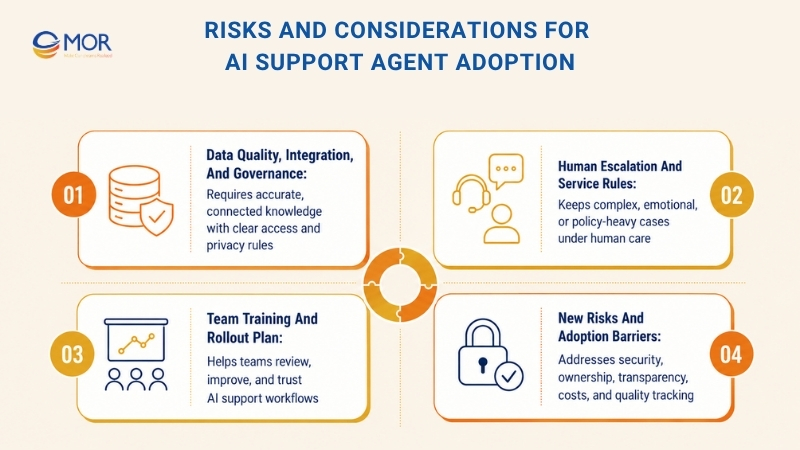
Data Quality, Integration, And Governance
AI results depend on the data behind the system. If knowledge is old, spread across tools, or not tied to daily workflows, the answers become weaker. That leads to mixed responses and weaker customer trust. Accurate, connected knowledge gives the agent the base it needs for useful, case-aware fixes. Siloed information also makes support automation harder to scale.
Treat system connection and governance as must-have work. Set clear user rights, access rules, privacy checks, and visibility into how the data is read and used. Strong governance lowers security and compliance risks, while connected tools give AI the current details it needs to act with confidence.
Human Escalation And Service Rules
AI can change customer service in a big way. Still, artificial intelligence is not human and will not replace human judgment. Even a strong support AI agent should not work alone in every case. Complex, high-risk, emotional, or policy-heavy issues still need human care. Make the handoff to a live agent smooth and keep the full chat history attached.
Service rules matter just as much as the AI tool itself. Decide when AI should solve, when it should ask another question, and when it should hand over. Clear escalation paths protect the customer experience, give agents enough detail to respond fast, and keep trust intact when automation hits its limit.
Team Training And Rollout Plan
Adoption can stall when teams are not ready to use, review, and improve AI. Training helps agents, admins, and support leaders understand where the tool fits, what good outcomes look like, and how to improve results over time. Start with knowledge work and automate common questions first. Then, improve, expand, and manage the setup as your team gains trust.
AI voice agent training for customer support also needs a measured rollout, especially when real conversations are involved. Start with high-volume and lower-risk tasks, watch quality closely, and widen coverage as your knowledge, process, and review rules get stronger.
New Risks And Adoption Barriers
New AI abilities can bring new risks. External AI connections may create separate data pools, add more governance work, and raise security or compliance concerns. Add-on tools can also make the system harder to maintain, raise operating costs, and make results less clear at scale.
Other barriers are more about operations, including unclear ownership, low transparency, weak trust in AI choices, and limited quality tracking. A simple checklist or table can help teams group the main risks and decide how to manage them before rollout grows.
Best Practices For Implementing AI Customer Service Agents
Using an AI agent for customer support well starts with a strong base. Trusted knowledge, narrow use cases, and clear review rules help teams improve service without adding extra risk or clutter. These four practices also help businesses compare the best AI agents for customer support in a practical way.
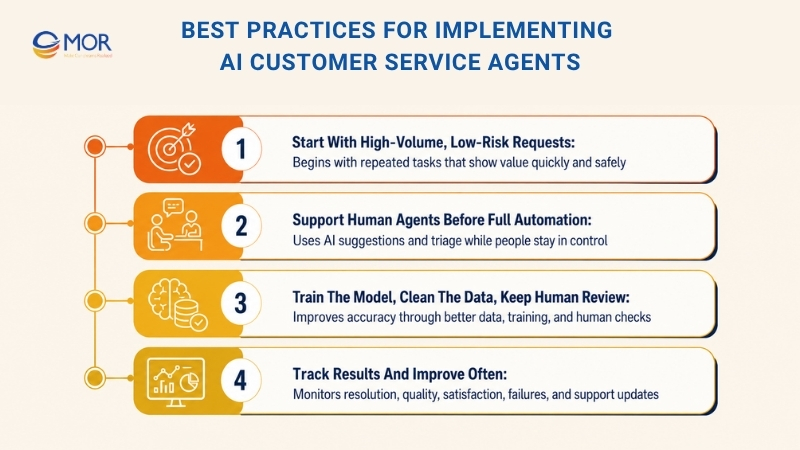
Start With High-Volume, Low-Risk Requests
Start where AI can show value quickly: repeated support tasks like FAQs, order updates, password resets, and other common tickets. These cases bring quick gains, cut manual work for agents, and give the team a safer way to test value before moving into harder workflows.
Small early wins also make wider rollout easier. When AI cuts repeated tickets and speeds up replies in one clear area, teams can measure return, build trust inside the business, and find the next automation cases with less disruption.
Support Human Agents Before Full Automation
Before you move into fully autonomous workflows, use AI to help human agents work faster and stay more consistent. An AI customer service assistant can suggest replies, give real-time guidance, and triage tickets while people stay in control of the conversation. This approach improves service quality and helps teams learn how AI fits into their current work.
This stage also makes wider automation easier later. As AI becomes common in daily work, teams can see where guidance helps, where the knowledge base has gaps, and which processes are ready for more independence.
Train The Model, Clean The Data, Keep Human Review
AI quality depends on what the model learns and how closely the business manages it. Invest time in model training and data cleanup so answers become more accurate. Without a good base, even strong models can return uneven or missing answers.
Human review also matters, mainly during launch and growth. Teams need people to check outputs, adjust instructions, find edge cases, and guide escalation when AI cannot handle the issue. Keep a person in the loop to protect service quality, raise reliability, and scale automation in a safer way.
Track Results And Improve Often
Launch is not the end of the work. Teams need clear visibility into resolution rates, quality scores, satisfaction, and failure points so the system can keep improving.
Feedback loops are just as useful as the metrics themselves. Keep escalation paths clean, run QA reviews, and update knowledge and support steps often so issues get fixed fast and quality does not slip. This steady improvement keeps automation aligned with service standards, supports compliance, and makes AI coverage easier to grow with confidence.
Future Of AI Agents In Customer Support
The role of an AI agent for customer support will keep growing as the technology moves forward. Businesses are heading toward a future where AI supports many customer interactions, with 80% of inquiries expected to be solved without human help.
AI agents are becoming easier to use and faster to improve, so businesses no longer need to trade customer connection for speed or quality for cost control. The right AI-powered customer experience setup can support all these goals at the same time.
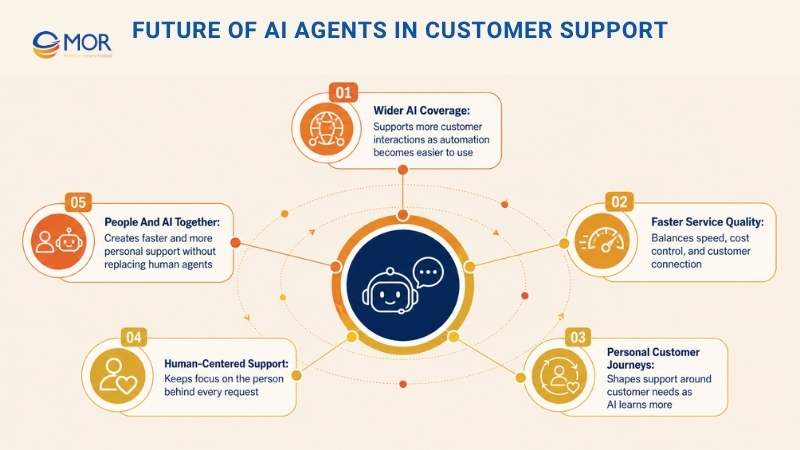
AI agents are also getting better at shaping personal customer journeys, and this skill grows each year. According to the CX Trends Report, 75% of consumers who have used generative AI believe it will change how they interact with companies. As AI keeps learning, it creates more ways to improve the customer experience.
In this period of AI-supported service, teams still need to focus on the person behind every request. The right AI tools should understand your customers, not just respond quickly.
When teams see AI as a way to make service more human, they can create support that feels proactive, quick, empathetic, and real for customers, agents, admins, and everyone touched by the system. Still, AI customer service will not fully replace human agents. Working together, people and AI can create a faster and more personal support experience.
Ready To Build An AI Agent For Customer Support With MOR Software?
An AI agent for customer support works best when it connects with the systems your team already uses. A tool alone cannot fix messy ticket flows, outdated help docs, or scattered customer data. You need clear support logic, clean data, safe handoff rules, and strong links with your CRM, helpdesk, chat tools, and internal systems.
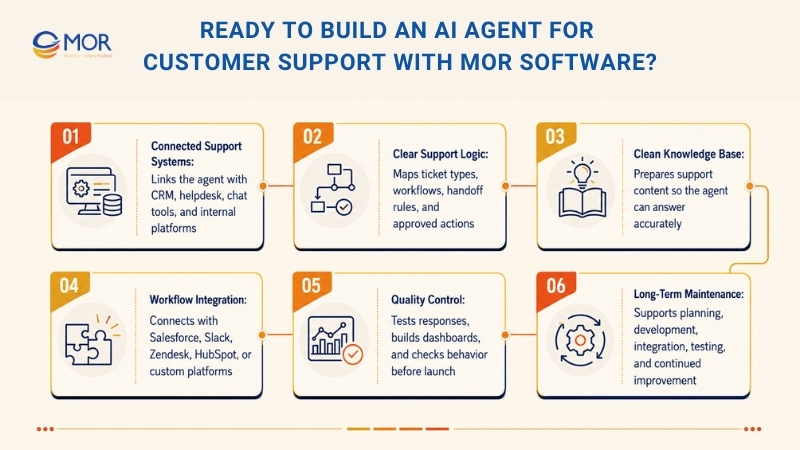
At MOR Software, we help businesses turn AI outsourcing support plans into working products. Our team can review your current support process, map common ticket types, prepare the knowledge base, design agent workflows, and connect the AI agent with tools like Salesforce, Slack, Zendesk, HubSpot, or custom platforms.
We also help build dashboards, test AI responses, set escalation rules, and check system behavior before launch. This gives your team better control over answer quality, security, and customer experience.
If your business wants to build an AI support agent, MOR Software can support the full technical side, from planning and development to integration, testing, and long-term maintenance.
Conclusion
AI agent for customer support can help businesses reply faster, manage more tickets, and keep support quality steady as demand grows. Yet the tool only works well when it connects with clean data, clear workflows, and safe escalation rules. MOR Software helps companies plan, build, integrate, test, and maintain AI support systems that fit real business needs. To discuss the right AI support setup for your team, contact us today.
"Evolution is not a destination, it is a disciplined journey of innovation."
Phung Van Tu


CEO MOR AI
MOR SOFTWARE
Frequently Asked Questions (FAQs)
What is an AI agent for customer support?
An AI agent for customer support is software that can understand customer questions, find the right answer, and complete support tasks. It can reply to users, check data, update records, and pass harder cases to human agents.
How is an AI support agent different from a chatbot?
A chatbot usually follows fixed scripts. An AI support agent can understand intent, read full conversation details, and take action across connected systems. That makes it more useful for real support work.
Can AI agents replace human support teams?
No. AI agents handle repeat questions and simple workflows. Human agents are still needed for complex issues, sensitive cases, unhappy customers, and decisions that need judgment.
What tasks can an AI agent for customer support handle?
It can answer FAQs, check order status, collect ticket details, route issues, update accounts, process simple requests, and follow up after a ticket closes.
What systems should AI support agents connect with?
They should connect with tools like CRM platforms, helpdesks, ticketing systems, knowledge bases, live chat, Slack, email, and internal business systems.
Is customer data safe with AI support agents?
It depends on setup. Teams need clear access rules, data privacy controls, user permissions, audit logs, and safe escalation paths. AI should only use data it is allowed to access.
How long does it take to build an AI agent for customer support?
A simple pilot may take a few weeks. A deeper setup with CRM links, ticket workflows, dashboards, and custom rules may take longer. Timeline depends on data quality, workflow scope, and system links.
What should businesses prepare before using AI support agents?
They should clean their knowledge base, map common ticket types, define escalation rules, review customer data, and decide which tasks AI can safely handle.
How do teams measure AI support agent performance?
Useful metrics include resolution rate, escalation rate, first response time, customer satisfaction, ticket volume handled, answer accuracy, and agent handoff quality.
What is the biggest risk when using AI agents in customer support?
The biggest risk is poor control. Bad data, unclear rules, weak testing, or loose system access can lead to wrong answers and poor customer trust. A careful rollout helps avoid that.
Share


Make Our-Dreams Realized


© 2023 . MOR Software. All Rights Reserved
Sitemap
Privacy Policy
Terms of Use

Rate this article
0
over 5.0 based on 0 reviews
Your rating on this news:
Name
*Email
*Write your comment
*Send your comment
1