


Top 20 Best Desk Booking Software Ranked in 2026
Empty desks on busy days and crowded offices on others often signal poor workspace coordination. Desk booking software helps teams reserve desks in advance, improve office visibility, and support hybrid schedules with a structured workspace reservation system. In this guide, MOR Software will explore the best platforms available and explain how businesses can choose the right solution for flexible workplace management.
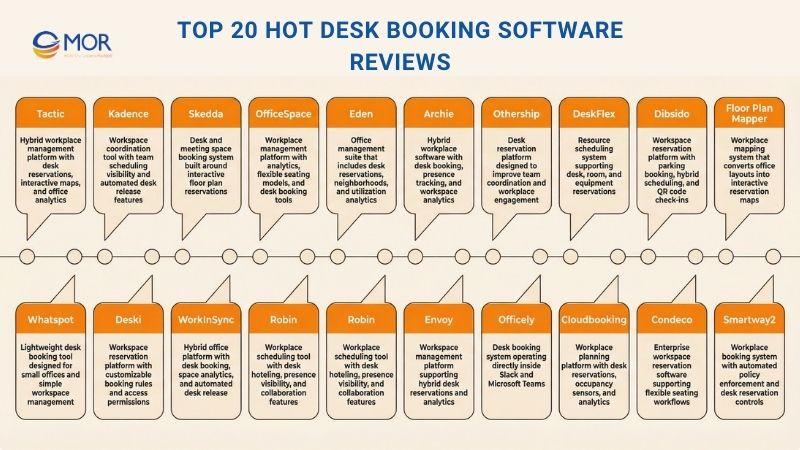
Top 20 Hot Desk Booking Software Reviews For 2026
Below are detailed summaries of the best desk booking software options available today, including highlights of their core capabilities and the reasons they appear on this list. Each platform can help companies manage office space more efficiently and support a safe, productive workplace. If you want to explore further, you can also review many additional workspace reservation systems available across the market.
1. Tactic – Best All-In-One For Office Management
- Rating: 4.6/5
- 14-day free trial
- From $3/desk/month
Tactic’s mobile application also presents attendance tracking, meeting room scheduling, and interactive office maps.
Tactic helps hybrid teams coordinate when and where they work in the office through clear workspace reservations that everyone can see. If your team splits time between remote work, office visits, and occasional guest attendance, this desk booking tool gives you a single platform to manage reservations, monitor usage insights, and keep workplace scheduling organized.
Why We Selected Tactic
We selected Tactic because it lets employees quickly locate desks and meeting rooms using its interactive office map, which removes the guesswork of finding available seating.
For instance, you can use the map filters to locate a workspace within a specific team zone or office area and reserve it for the current day or the following day.
Another benefit is calendar synchronization. Reservations can automatically appear in your calendar, and the platform alerts users if someone fails to check in, preventing empty workstations from sitting unused.
Administrators also gain access to real-time analytics about office usage along with configurable booking rules such as approval workflows or team-based zones. These controls help workplace managers make informed decisions about office layouts and seating policies.
This solution works well for organizations where employees rotate between office days and remote work, and where teams want a unified platform instead of juggling spreadsheets and email coordination.
Key Features Of Tactic
Here are additional capabilities worth noting:
- Interactive office maps: See the entire office layout, team zones, or desk availability in real time so employees can select exactly where they want to sit.
- Recurring and delegated bookings: Schedule consistent office attendance or allow managers to reserve workspaces on behalf of their teams to maintain coordination.
- Automated check-in and release logic: Confirm arrival through the mobile app, WiFi detection, Slack, or NFC, and unused desks are automatically released to avoid wasted space.
- Usage analytics and capacity tracking: Monitor which workstations and meeting rooms are underused, track attendance patterns, and adjust office layouts with reliable data.
Tactic Integrations
Integrations include Microsoft Teams, Microsoft Outlook, Google Workspace, Slack, Okta, Auth0, Azure AD, and DUO.
Advantages And Limitations
Pros:
- Built-in visitor check-in module within the same platform
- Configurable booking rules and delegated administrators support seating policies
- Employees can easily find and reserve desks through the interactive map or mobile app
Cons:
- Visitor management and parking modules may involve additional costs
- The platform does not currently provide built-in AI suggestions for desk assignments
2. Kadence – Best For Visual, Data-Driven Workplace Coordination
- Rating: 4.6/5
- Free trial available
- From $4/user/month
Kadence supports hybrid teams in planning their office presence with clear visibility so everyone understands who will be onsite, where they can sit, and how workspace capacity is being used. Through real-time desk availability, interactive floor maps, and detailed analytics, this office desk reservation system provides a central hub where managers and employees coordinate schedules, workspaces, and team attendance.
Why We Selected Kadence
We selected Kadence because it combines employee scheduling data with workspace insights to support efficient hybrid work coordination. Rather than manually tracking reservations or guessing which colleagues will be present in the office, the platform displays this information clearly across teams and office locations.
Another strength is its automatic desk release feature, which frees reserved workstations when users do not check in. This helps prevent wasted space and allows workplace managers to base real estate decisions on reliable usage data. Integrations with familiar tools such as Slack and Microsoft Teams also allow employees to reserve desks or meeting rooms directly from the collaboration apps they already use daily.
Key Features Of Kadence
Some capabilities that stand out include:
- Interactive Floor Plans: View the office layout visually and reserve desks or meeting spaces directly through the map interface.
- Team “Neighborhoods”: Organize seating by department or team so colleagues can easily collaborate during in-office days.
- Real-Time Availability: Instantly check which desks and rooms are available through desktop or mobile devices.
- Automated Desk Recovery: Detects no-shows and automatically releases unused desks so others can reserve them.
- Workplace Analytics: Track occupancy levels, check-in activity, and usage patterns to guide workspace planning decisions.
Kadence Integrations
Integrations include Microsoft Teams, Slack, Google Calendar, Microsoft Outlook Calendar, Okta (SSO/Directory Sync), OneLogin (SSO/Directory Sync), BambooHR (Directory Sync), and Rippling (Directory Sync).
Advantages And Limitations
Pros:
- Live floor maps allow employees to choose the most suitable workspace
- Analytics reveal occupancy trends and missed check-ins to prevent unused office space
- Teams can easily reserve shared areas or assign seating zones for collaboration
Cons:
- Administrators may need time to become comfortable with the setup
- Some advanced configuration options remain limited
3. Skedda – Best For Interactive Floor Plans
- Rating: 4.7/5
- 30-day free trial
- From $99/month
Skedda allows teams to reserve desks, meeting rooms, and shared workspaces with ease so organizations can avoid double reservations, spend less time managing seating assignments, and keep hybrid offices operating smoothly. This hot desk booking system is designed for facilities managers, office administrators, and workplace operations teams that need clear visibility into who is using each space and at what time.
Why We Selected Skedda
We selected Skedda because it places workspace reservations directly in the hands of employees through interactive floor maps that allow users to choose a desk and complete a reservation within a few clicks.
Another advantage is the platform’s flexible rule configuration. Organizations can define detailed permissions and booking conditions, including who can reserve certain spaces, when reservations are allowed, and how frequently a desk can be scheduled. Native mobile apps for iOS and Android also allow employees to manage workspace reservations while moving between locations.
The system also provides real-time workplace analytics, helping managers identify underused desks or meeting areas and adjust office layouts accordingly. Integrations with Google Workspace and Microsoft 365 keep reservations synchronized with company calendars so employees do not need to switch between different applications.
Key Features Of Skedda
Additional capabilities worth highlighting include:
- Interactive floor plans: Employees browse the office layout visually and select desks directly from the map instead of searching through lists.
- Custom booking rules and roles engine: Configure permissions, booking limits, and time restrictions so workspace reservations follow company policies.
- Mobile app access: Employees can reserve or manage workspaces from smartphones or tablets through iOS and Android apps.
- Workplace utilization insights: Generate reports showing peak occupancy, underused areas, and reservation patterns to guide office space planning.
Skedda Integrations
Integrations include Google Workspace, Microsoft 365/Outlook, Stripe, Zapier, OneLogin, Okta, JumpCloud, Webhooks, and other integration options.
Advantages And Limitations
Pros:
- Deep calendar synchronization prevents double reservations and scheduling conflicts
- Visual floor maps make choosing a workspace simple for employees
- Self-service reservations significantly lower administrative workload
Cons:
- Higher pricing tiers may increase costs when managing many spaces or users
- Some advanced booking rule configurations can require additional setup time
4. OfficeSpace – Best For AI-Guided Desk Booking
- Rating: 4.7/5
- Free demo available
- Pricing upon request
OfficeSpace provides a workplace reservation platform that helps organizations remove unused desks and bring clarity to each office day, whether employees follow hot-desking, hoteling, or fixed seating arrangements. This desk booking software supports workplace managers and hybrid teams that need reliable data on space usage along with a simple way for employees to secure a workspace.
Why We Selected OfficeSpace
We selected OfficeSpace because it provides real-time visibility into desk availability, allowing teams to move away from assumptions and make informed workspace decisions. Employees can reserve desks directly from the mobile application, Microsoft Teams, or Slack, and automatic check-in features prevent wasted time searching for an available desk.
Another advantage is the system’s flexible seating models. It supports neighborhood seating, assigned desks, hot seating, and reverse hoteling, giving organizations control over how desks are allocated while still supporting flexible work arrangements. Facilities and HR teams also gain access to detailed analytics and heat maps, which highlight underused areas and help guide decisions about office space planning.
Key Features Of OfficeSpace
Additional capabilities worth noting include:
- Interactive floor plans: View real-time desk status through color-coded indicators that show whether desks are occupied, reserved, or available.
- Amenity filtering: Search for workstations equipped with specific items such as dual monitors or ergonomic chairs and reserve the one that meets your needs.
- Automated check-in and desk release: Integrate badge or sensor systems so desks are checked in automatically or released when a reservation remains unused.
- Permissions and neighborhoods: Create zones based on teams, projects, or roles and control who can reserve certain desks and when reservations are allowed.
OfficeSpace Integrations
Integrations include Microsoft Teams, Google Calendar/Workspace, Slack, Zoom, Okta (SSO), Active Directory/LDAP, badge and sensor systems through connectors, and Workday.
Advantages And Limitations
Pros:
- Amenity filtering helps employees choose desks equipped with the tools they need
- Real-time desk availability displayed through interactive floor maps
- Detailed analytics support workspace planning and utilization analysis
Cons:
- The platform may be more complex than necessary for very small offices
- Integrating badge or sensor systems may require additional hardware and configuration
5. Eden – Best For A Full Workplace Suite
- Rating: 4.7/5
- Free demo available
- From $2.25–$4/user/month
Eden provides a workspace reservation module designed to help hybrid teams regain control of their office layout while staying connected with colleagues. As an office desk booking software, it supports organizations that need a clearer way to manage shared desks, coordinate seating arrangements, and identify underused workstations.
If your company struggles to track which desks are available or where employees are sitting, the platform allows you to visualize the office floor plan, reserve workstations by the hour or by the day, and organize bookings around team neighborhoods.
Why We Selected Eden Desk Booking
We selected Eden because it gives organizations flexibility to support hybrid work while maintaining structure and collaboration inside the office.
For example, you can design a digital floor plan where some desks remain permanently assigned while others stay available for reservations, allowing companies to support hybrid attendance schedules.
Another benefit is the ability to define seating “neighborhoods,” which lets teams choose workstations near one another. Employees can reserve desks through the web interface, mobile devices, or collaboration tools such as Slack and Microsoft Teams, making workspace reservations part of their daily workflow.
Administrators also gain access to an analytics dashboard that reveals utilization trends across locations, floors, or team groups so unused space becomes easier to identify. Pricing also begins at a relatively modest level, and the modular structure allows organizations to pay only for the features they actually use.
Key Features Of Eden Desk Booking
The platform supports hybrid workplace strategies through several capabilities:
- Floor-plan visualization and mapping: Employees select desks directly from a visual map of the office layout so they can find seats that match their preferences.
- Hourly desk reservations: Users reserve workstations only for the hours they require, allowing desks to become available again when the reservation ends.
- Neighborhood assignment: Administrators group desks by team so colleagues can sit close together and collaborate more easily during office days.
- Utilization analytics: Administrators access dashboards that display reservations, check-in activity, and heat maps showing how workspaces are used across the office.
Eden Desk Booking Integrations
Integrations include Google Calendar, Microsoft Outlook, Slack, Microsoft Teams, Okta, Azure AD, Brivo, and Kisi.
Advantages And Limitations
Pros:
- Modular pricing structure allows organizations to pay only for the tools they need
- Hourly reservations help release underused desks for other employees
- Employees can reserve desks directly through Slack or Microsoft Teams
Cons:
- Uploading and mapping office floor plans requires initial setup time
- Recurring hourly reservations are not currently supported
6. Archie – Best For Hybrid Work Schedules
- Rating: 4.9/5
- Free trial available
- From $109/month
With Archie, employees reserve desks using an interactive office map. The platform allows workspace reservations through web browsers, mobile devices, and office kiosks. Team members can organize their workweek and check when colleagues plan to be in the office. Archie also connects easily with tools such as Microsoft Teams, Outlook, and Slack.
Archie simplifies hybrid workplace coordination by making desk reservations clear and accessible. As a desksharing software, it helps organizations manage changing attendance patterns, avoid empty desks, and align office schedules more effectively.
Why We Selected Archie
We selected Archie because of its flexibility and intuitive design. The platform combines web and mobile reservations with automated check-ins through QR codes or mobile confirmation, while also providing team visibility so employees know who will be in the office each day. These capabilities make hybrid scheduling smoother and encourage spontaneous collaboration.
Administrators also benefit from built-in analytics tools that highlight peak attendance days, underused desks, and overall workspace occupancy. These insights help workplace teams make informed decisions about office layouts and capacity planning.
Key Features Of Archie
Some notable capabilities include:
- Interactive floor plan: Employees view the office layout and reserve desks directly from a visual map.
- Automatic check-in and no-show handling: Desks are released automatically when users fail to check in so others can reserve them.
- Team presence view: Employees see where colleagues are seated and coordinate office visits more easily.
- Usage analytics and reporting: Export CSV reports and review trends related to occupancy, busy office days, and underused workspaces.
Archie Integrations
Integrations include Microsoft Teams, Outlook/Office 365, Google Calendar, Slack, Zoom, Kisi (access control), Salto (access control), and billing integrations with Stripe, GoCardless, QuickBooks, and Xero.
Advantages And Limitations
Pros:
- Team presence view helps coordinate in-office days and nearby seating
- Web and mobile access allow employees to reserve desks from anywhere
- Interactive floor maps make workspace selection simple and transparent
Cons:
- Connecting with non-native applications may require additional configuration
- Some advanced capabilities, such as customized emergency notifications, are not yet included
7. Othership – Best For Helping Build Team Rapport
- Rating: 4.8/5
- Free version available
- From $4/seat/month
Hybrid teams often deal with unused desks, scheduling conflicts, and employees who feel disconnected from their coworkers. Othership was created to address these problems by combining desk reservations, meeting room scheduling, and team presence into one hot desk booking solution.
Why We Selected Othership
We selected Othership because it allows employees to quickly see where colleagues plan to work and reserve a nearby seat using its simple one-click booking process and visibility features.
Another advantage is the platform’s social-style updates and gentle reminders that encourage team interaction while also supporting workspace reservations. Reporting dashboards also provide insights into how office space is used so workplace managers can rely on real data when making decisions. For example, administrators can see when desks remain unused or meeting rooms are consistently overbooked.
Onboarding is also straightforward. Organizations can enable or disable features depending on their needs so they only pay for the capabilities they use. If an office has extra space, the platform even allows companies to manage it through an on-demand marketplace that helps convert underused workspace into revenue opportunities.
Key Features Of Othership
Some additional capabilities worth highlighting include:
- Interactive floor plans: View the office layout visually and reserve available desks or meeting rooms with a single click.
- Team location visibility: See where colleagues plan to work so you can choose nearby seats and collaborate more easily.
- Social nudging: Encourage team interaction through status updates and prompts that help strengthen communication in hybrid teams.
- Usage analytics: Monitor desk occupancy, attendance patterns, and underused areas to guide workplace strategy decisions.
- Visitor management: Manage guest check-ins, visitor workflows, and external user access alongside desk reservations.
Othership Integrations
Integrations include Microsoft Teams, Microsoft Outlook/365, Google Workspace, Okta (SSO/SAML), Microsoft Entra, and WooCommerce.
Advantages And Limitations
Pros:
- Reminders and status updates help encourage in-office collaboration
- Feature toggle options keep deployment simple and manageable
- One-click reservations make scheduling quick and frictionless
Cons:
- Customization options may be fewer than those offered by large enterprise platforms
- Visitor management capabilities may not match specialized tools used on very large campuses
8. DeskFlex – Best For Resource Reservation Capability
- Rating: 5/5
- Free demo available
- Pricing upon request
DeskFlex is built for hybrid and on-site teams that require a dependable system to reserve desks, meeting rooms, and workplace resources without relying on manual spreadsheets. Among modern hot desking software solutions, it provides organizations with clear visibility into office space usage and tools to manage reservations efficiently.
If your organization struggles to locate available workstations or track real-time space utilization, this platform offers control over floor plans and reservations. It works particularly well for facility managers, workplace operations teams, and HR departments aiming to manage office capacity for employees working in-office, remotely, or through hybrid schedules.
Why We Selected DeskFlex
We selected DeskFlex because it allows employees to view live availability for desks and meeting rooms through interactive floor maps, helping teams spend less time searching for available space and more time focusing on work.
Administrators also gain access to a dashboard that allows them to approve or reject reservations and coordinate shift-based seating assignments. This approach maintains control over office resources without requiring administrators to monitor every individual booking.
Another advantage is the flexibility offered through web and mobile applications. Employees can reserve or cancel workspaces from virtually anywhere, which supports hybrid work patterns and changing schedules.
The platform also includes check-in and check-out monitoring together with occupancy tracking so meeting rooms and desks are actually used rather than sitting empty. These capabilities help organizations gain greater value from their office real estate.
Key Features Of DeskFlex
Additional capabilities worth noting include:
- Interactive floor maps: Upload 2D or 3D office layouts so employees can easily locate and select desks or meeting rooms.
- Shift and zone assignment: Assign desks to employees or teams and organize workspace reservations according to shift schedules or office zones.
- Analytics and reporting: Monitor usage patterns, identify underused workspaces, and support data-driven decisions about office space.
- Resource booking: Reserve equipment such as monitors, docking stations, and other tools together with desks so employees have what they need when they arrive.
DeskFlex Integrations
Integrations include Microsoft Office 365, Microsoft Outlook/Exchange, Okta, Zapier, Google Workspace, Microsoft Teams, calendar synchronization connectors, and onsite kiosk or touchscreen systems.
Advantages And Limitations
Pros:
- Supports hot desking and scheduled seating through shift and zone management tools
- Uploadable office layouts make navigating large workplaces easier
- Real-time visibility into desk and room availability simplifies reservation management
Cons:
- Advanced customization may require vendor support or additional development work
- Initial configuration of floor maps and office layouts can take time
9. Dibsido – Best For Quick Setup And Self-Onboarding
- Rating: 4.8/5
- Free plan + free trial available
- From $1.90/user/month (billed annually)
Dibsido is a workspace reservation platform and workplace management system designed to simplify desk reservations for hybrid teams. It allows employees to reserve desks, meeting rooms, parking spaces, and shared vehicles while also supporting carpool coordination within the organization.
Why We Selected Dibsido
We selected Dibsido because it makes reserving workspaces very simple for teams of different sizes and work structures. The platform supports fast self-onboarding with a one-click setup process, allowing users to choose desks based on specific attributes and manage reservations through an easy-to-use interface.
Another useful capability is the use of QR codes to monitor desk usage and provide a clear overview of office occupancy. These insights help organizations control operational costs and manage workplace capacity more effectively. The system also supports hybrid schedules with tools that allow employees to plan their office attendance while generating reports on workspace utilization.
The platform also stands out for its customization options. Organizations can define booking policies for different user groups, control how far in advance reservations can be made, and limit which desks are available to specific teams. Administrators can configure recurring reservations, apply department-based permission levels, and manage multiple office locations from a single dashboard.
Key Features And Integrations Of Dibsido
In addition to workspace reservations, the platform includes parking space booking tools that help companies manage limited parking resources and distribute them fairly among employees. It also supports company car reservations with a built-in logbook that tracks vehicle usage.
Another useful capability is support for carpool coordination, which helps employees reduce commuting costs while lowering environmental impact.
Additional features include a package register that records deliveries and parcels, incident reporting tools, and office notice boards that allow administrators to communicate important information quickly to employees.
The platform also includes a hybrid work scheduler, enabling employees to plan both in-office and remote workdays. A guestbook feature allows visitors to check in through a tablet while the system automatically alerts the employee they are visiting.
Dibsido Integrations
Integrations include Google Calendar, Outlook, Slack, Microsoft Teams, and Entra ID.
Pricing
Pricing begins at $1.90 per user per month (billed annually). A free plan is available for up to 20 users, and premium plans include a free trial option.
10. Floor Plan Mapper – Best For No Limits On Desks Or Users
- Free trial available
- From $28/unlimited users/month
Floor Plan Mapper is a cloud-based workplace mapping platform that converts traditional office layouts into interactive, clickable maps. It allows organizations to organize and visualize office spaces by placing desks, employees, meeting rooms, and workplace assets directly onto a digital floor plan.
Why We Selected Floor Plan Mapper
We selected Floor Plan Mapper because it allows users to quickly spot available desks through visual indicators displayed on the office map and reserve them for specific time periods. Reservations can be made for short durations, full days, or recurring schedules, which supports flexible workplace arrangements and improves space utilization. Another advantage is that every pricing plan includes unlimited desks, rooms, and users.
The platform also connects with employee profile information stored in systems such as Office 365 and Windows Active Directory. This integration keeps staff records current and removes the need for manual updates when new employees join or roles change.
Linking desks directly to employee profiles also makes it easier to locate coworkers and manage seating assignments throughout the office.
Key Features And Integrations Of Floor Plan Mapper
One major capability is the option to upload office layouts in several file formats, including PDF, CAD, and JPG, allowing organizations to begin mapping desks and workplace assets quickly while supporting unlimited users and seating assignments.
The platform also allows administrators to draw shapes on the floor plan to highlight departments or important areas, which improves navigation within the office map. Custom icons can be added to represent items such as computers, equipment, or emergency exits, giving teams a complete view of the workspace layout.
Floor Plan Mapper Integrations
Integrations include Office 365, Azure Active Directory, Microsoft Outlook, Microsoft SharePoint, and Google Calendar.
11. Tribeloo – Best For Customized Spaces Across Locations
- Rating: 4.8/5
- Free demo available
- From $3.33/user/month
Tribeloo is designed for hybrid teams that struggle with messy desk reservations, confusing office layouts, and workspaces that sit unused. This desk booking software gives organizations a visual map of the office along with booking rules and analytics so the right employees reserve the right spaces.
Why We Selected Tribeloo
We selected Tribeloo because employees can reserve desks or meeting rooms directly from their calendar applications, which allows them to keep working in tools they already know while administrators still maintain control over workspace reservations.
Organizations can upload their own office layout and arrange desks through a drag-and-drop interface that mirrors the real office environment. This approach reduces training time and lowers the chance of mistakes during reservations. Desks can also be grouped into neighborhoods, allowing teams to sit together while certain areas remain reserved for specific users.
The check-in system, available through QR codes or email confirmation, helps prevent ghost reservations and keeps desks available for others when users do not arrive. The platform also provides usage heat maps and other analytics so administrators can identify underused areas and make better real estate planning decisions.
Key Features Of Tribeloo
While exploring Tribeloo, several capabilities stand out:
- Visual floor plan builder: Upload your office layout and drag desks or meeting rooms onto the map so employees can see availability instantly.
- Calendar booking integration: Reserve workspaces directly through Outlook or Google Calendar without switching applications.
- Check-in and no-show release: Use QR code or email check-ins so unused desks are automatically released for others.
- Usage insights and heat maps: Administrators can monitor which workspaces are heavily used and which remain underused.
Tribeloo Integrations
Integrations include Microsoft Outlook, Google Calendar, Microsoft Azure AD, Okta (SSO & SCIM), and OneLogin.
Advantages And Limitations
Pros:
- Employees can reserve desks directly from familiar tools such as Outlook or Google Calendar
- Check-in rules help prevent unused reservations
- Visual office maps make workspace selection simple and intuitive
Cons:
- Built-in analytics may be less detailed than those offered by some competitors
- Integrating older internal systems may require manual configuration
12. Whatspot – Best For Small Workspaces With Basic Setup Needs
- Rating: 4.4/5
- Free plan available
- From $16/month
Whatspot is a workspace reservation platform built for hybrid offices, coworking environments, and shared workplaces. This tool allows teams to check desk availability, reserve meeting rooms, and manage office resources through an interactive floor map and QR code system.
Why We Selected Whatspot
We selected Whatspot because it provides straightforward tools for organizations operating smaller offices with simple setup requirements. Teams gain clear visibility into workspace usage, and employees can scan a QR code to instantly view which desks or meeting rooms are available. Administrators can also apply booking quotas so popular workstations remain accessible to everyone.
The interactive office map allows employees to see where coworkers are seated, which improves coordination during office days. Administrators can also apply approval workflows or reservation limits to maintain oversight without needing to monitor every booking manually.
Since the platform works on both mobile devices and web browsers, employees can reserve desks from anywhere, making it convenient for hybrid work schedules.
Key Features Of Whatspot
Several features stand out when using Whatspot:
- Interactive floor plans: Upload an office layout or simple sketch to visualize desk and meeting room availability in real time.
- QR code check-in and booking: Employees scan a QR sticker placed at a desk or meeting room and confirm their reservation immediately through a mobile device.
- Booking rules and quotas: Configure limits on how often certain spaces can be reserved or which teams may access them.
- One-way calendar synchronization (Google/Outlook): Workspace reservations automatically appear in Google Calendar or Microsoft Outlook so employees stay informed.
Whatspot Integrations
Integrations include Google Calendar and Microsoft Outlook.
Advantages And Limitations
Pros:
- Booking quotas help maintain balanced access to shared workspaces
- QR-based reservations work easily on mobile devices without additional hardware
- Visual workspace maps give teams clear visibility into desk and room availability
Cons:
- Calendar synchronization works in one direction only, so external changes are not reflected back in the platform
- Recurring reservations have limitations, typically supporting schedules up to about 20 weeks
13. Deski – Best For Customizable Workspace Booking Rules
- 30-day trial available
- From $49/month
Deski is a workspace reservation platform designed for hybrid offices that need flexibility, visibility, and clear control over shared work areas. The system allows employees to reserve desks, parking spaces, and meeting rooms while administrators manage booking rules and access permissions.
Why We Selected Deski
We selected Deski because it gives employees several ways to reserve workspaces. Users can search through a list, filter desks based on available amenities, or select a workspace directly from an interactive map. The platform also allows employees to see where colleagues are seated, which helps teams coordinate office collaboration days.
Another strength is its automated booking policy engine. Organizations can enforce fair usage rules and prioritize specific desks for certain teams or departments. For administrators responsible for large or multi-location offices, the rule engine and permission controls make it easier to adjust reservation policies for different employee groups.
The platform also runs on cloud infrastructure, which supports system stability and protects data security. Custom branding options allow organizations to align the interface with their company identity, which helps maintain a consistent internal user experience.
Key Features Of Deski
Some notable capabilities include:
- Interactive floor plans: Employees view and reserve desks, meeting rooms, and parking spots directly through a visual office map.
- Automated booking rules: Administrators configure access permissions, priority settings, and reservation limits for teams or departments.
- Health and safety tools: Organizations can apply health questionnaires and distancing configurations to support workplace compliance.
- Multi-site management: Teams monitor and manage workspace availability across multiple office locations through one dashboard.
- Reporting and analytics: Usage and occupancy reports help identify workspace trends and guide office space planning decisions.
Deski Integrations
Integrations include Outlook Calendar, Google Calendar, Single Sign-On (SSO) options, and an API for custom integrations.
Advantages And Limitations
Pros:
- Cloud-based platform accessible on mobile devices
- Customizable booking and access control rules
- Interactive floor plan interface for workspace reservations
Cons:
- Fewer third-party integrations compared with larger platforms
- Limited number of publicly available user reviews
14. WorkInSync – Best For Virtual Scheduling Assistance
- Rating: 4.8/5
- Free demo available
- From $2.50/user/month
WorkInSync is designed for organizations running flexible hybrid workplaces where employees move between remote work and office attendance. The platform allows staff to reserve desks, meeting rooms, and parking spaces while providing real-time workspace updates and full floor plan visibility so teams can easily coordinate office presence.
Why We Selected WorkInSync
We selected WorkInSync because it gives employees control over when and where they work through real-time reservation maps and an intuitive booking application.
Employees can explore an interactive floor plan, filter desks based on specific amenities such as dual monitors, and reserve parking spaces during the same workflow.
The platform also includes health checks and contactless check-in features, allowing organizations to manage safe office occupancy while coordinating workspace reservations.
Administrators gain access to analytics dashboards that reveal which office areas remain unused so they can adjust seating arrangements and avoid wasted desks. Since the system synchronizes with calendar tools and office floor plans, employees are less likely to experience double bookings or miss available desks.
Key Features Of WorkInSync
Several capabilities make WorkInSync stand out:
- Interactive floor plan view: A visual office layout displays desks and meeting rooms so employees can select exactly where they want to sit.
- Real-time availability and auto-release: If a reserved workspace is not checked in, the system automatically releases it for others to use.
- Mobile and Teams-based booking: Employees reserve or cancel workspaces through a mobile app or directly within Microsoft Teams using chatbot commands.
- Space utilization analytics: Dashboards display trends in desk and room usage, helping organizations adjust office layouts or shift schedules.
WorkInSync Integrations
Integrations include Microsoft 365, Microsoft Outlook, Microsoft Teams, Google Workspace, Okta, OneLogin, Active Directory, and Slack.
Advantages And Limitations
Pros:
- Supports scheduling through iOS and Android apps as well as through a Microsoft Teams bot
- Automatically releases unused reservations, reducing idle desk time
- Allows employees to select workspaces near teammates through interactive maps
Cons:
- The interface may feel complex for first-time users due to the number of available options
- Initial configuration can require careful setup
15. Robin – Best For Employee Productivity Features
- Rating: 4.3/5
- 14-day free trial
- From $1,500/year
Robin is a workplace reservation platform that helps hybrid teams coordinate where and when they work. This desk booking software allows employees to reserve desks, see which colleagues are in the office, and locate teammates quickly. At the same time, workplace managers gain real-time insights into occupancy and workspace usage to support better layout and scheduling decisions.
Why We Selected Robin
We selected Robin because employees can easily reserve desks or check who plans to come into the office through tools they already use, including Outlook, Microsoft Teams, and Slack.
The platform also provides several check-in methods such as QR codes, WiFi, or kiosk-based check-ins, which help organizations reclaim unused desks and enforce in-office attendance policies.
Another useful capability is the “who’s in” feature that shows where colleagues are seated. This allows employees to locate teammates quickly without walking around the office searching for them.
Administrators can also access analytics dashboards showing occupancy levels and open desks, which helps organizations adjust office layouts and workspace capacity based on real data rather than assumptions.
Key Features Of Robin
Several capabilities stand out when evaluating Robin for shared workspace management:
- Interactive floor maps: Employees view a visual layout of desks and seating areas to see availability and choose a workspace near their team.
- Automatic desk reservations: For employees with predictable schedules, the system can reserve desks automatically based on previous preferences.
- Multi-channel booking application: Employees reserve desks through iOS, Android, web browsers, or directly within Slack, Teams, or Outlook, allowing reservations to fit into existing workflows.
- Desk sharing and hoteling support: Organizations can assign a single desk to several employees according to schedules or allow flexible hot-desking to improve space utilization.
Robin Integrations
Integrations include Microsoft Outlook, Microsoft Teams, Google Workspace, and Slack.
Advantages And Limitations
Pros:
- Supports both desk hoteling and hot-desking workplace models
- Interactive maps display where colleagues are seated, improving collaboration
- Real-time desk availability appears within familiar tools such as Outlook, Teams, and Slack
Cons:
- Employees who rarely visit the office may find the map interface more complex than having a fixed desk
- Initial floor plan setup and workspace mapping may require time from facilities or IT teams
16. Envoy – Best For Modular Configuration
- Rating: 4.9/5
- Free plan available
- From $3/desk/month
Envoy provides a flexible workspace reservation platform that allows organizations to configure how desks are assigned and managed. This solution supports hybrid workplaces where teams combine fixed seating with flexible reservations, making it easier to adapt desk policies as work models change.
Why We Selected Envoy
We selected Envoy because it gives workplace administrators detailed control over how desks are allocated and used across the office.
Organizations can mark desks as reservable, permanently assigned, or unavailable depending on workplace policies. The interactive office map allows employees to select their preferred workspace, while the neighborhood feature groups colleagues together based on departments or project teams.
Another strength is the built-in analytics that reveal patterns in desk usage and office attendance. These insights allow companies to adjust workspace layouts and improve collaboration by understanding how employees actually use the office.
The platform’s strength lies in balancing employee flexibility with centralized visibility and control for workplace administrators.
Key Features Of Envoy
Several capabilities make Envoy well suited for hybrid teams:
- Customizable desk setup: Configure desks as reservable, permanently assigned, or unavailable to match workplace policies.
- Interactive maps and team neighborhoods: Employees select desks visually and reserve seats near teammates.
- Space analytics: Track real-time occupancy, check-ins, and workspace usage patterns to guide layout decisions.
- Multi-location management: Manage desk reservations and office attendance across several office locations through a single dashboard.
Envoy Integrations
Integrations include Google Calendar, Microsoft Outlook, Slack, Microsoft Teams, Cisco Webex, Zoom, Honeywell, Genetec, Proxy, Aruba, and Cisco Meraki.
Advantages And Limitations
Pros:
- Real-time occupancy analytics help organizations improve planning and reduce unused desks
- Supports hybrid work patterns and multiple offices through one platform
- Highly configurable desk settings allow permanent, flexible, or restricted seating options
Cons:
- Advanced analytics and integrations are available only in paid plans
- Advanced analytics and integrations are available only in paid plans
17. Officely – Best For Simple Desk Booking
- Rating: 5/5
- Free plan available
- From $2.50/user/month
If your organization runs a small or mid-sized distributed team and needs a straightforward system employees will actually adopt, Officely can be a practical choice.
Why We Selected Officely
We selected Officely because it operates directly within collaboration platforms that teams already rely on, including Slack and Microsoft Teams. This approach eliminates the need for separate logins or additional applications.
Employees can reserve desks, check who plans to work in the office, and book shared resources such as meeting rooms or parking spaces without leaving their messaging workspace.
Meanwhile, operations teams receive real-time attendance visibility and workspace analytics. These insights help organizations make more informed decisions about office capacity and space allocation rather than relying on assumptions.
For companies operating across several locations, this mix of ease for employees and data visibility for operations teams provides a practical balance.
Key Features Of Officely
Several capabilities stand out when reviewing Officely:
- In-app desk and resource booking: Employees reserve desks, meeting rooms, or parking spaces in just a few clicks directly inside Slack or Microsoft Teams.
- Attendance and presence visibility: Teams can view whether colleagues are working in the office, remotely, traveling, or on leave to better coordinate office days.
- Workspace usage analytics: Administrators track desk utilization, peak attendance days, no-show patterns, and underused areas to improve space planning.
- Automated check-in and policy rules: Configure check-ins, enforce capacity limits, and set booking policies to release unused spaces without manual oversight.
Officely Integrations
Integrations include Microsoft Teams, Slack, Google Calendar, Microsoft Outlook, HRIS platforms through native setup, floor-map systems, parking management modules, and meeting-room scheduling tools.
Advantages And Limitations
Pros:
- Free plan available for small teams with up to about five users
- Desk reservations can be completed directly within Slack or Teams
- Quick setup process encourages high employee adoption
Cons:
- Floor plan visualization may require additional setup for complex office layouts
- Advanced analytics capabilities may be less developed than those in larger enterprise platforms
18. Cloudbooking – Best For Workspace Planning
- Free demo available
- Pricing upon request
Cloudbooking helps large organizations convert traditional offices into flexible workplaces by connecting employees with suitable workspaces for their in-office activities. As hybrid work becomes more common, many employees prefer offices designed for collaboration and teamwork rather than static desk assignments.
Why We Selected Cloudbooking
We selected Cloudbooking because the platform combines desk reservation capabilities with workplace planning tools that support long-term office strategy.
Many companies are reducing office occupancy as hybrid work expands. Cloudbooking provides data and insights that help leadership teams evaluate decisions such as reorganizing floor layouts, consolidating office areas, or adjusting real estate footprints.
These capabilities allow companies to base workspace planning decisions on usage data instead of assumptions.
Key Features Of Cloudbooking
Several capabilities make Cloudbooking suitable for organizations managing flexible workplaces:
- Multiple desk configuration options: Supports several seating models including hot desks, fixed desks, flexible desks, and hybrid work arrangements.
- Interactive 3D floor plans: Visual workspace layouts display real-time desk availability and help employees locate available spaces quickly.
- Occupancy sensors and usage insights: Sensors capture actual workspace usage patterns, allowing organizations to understand real occupancy levels.
- QR code check-in and check-out: Employees confirm reservations quickly when they arrive at their workspace.
- Colleague search and workspace neighborhoods: Employees can locate teammates and choose seats near their teams.
- Digital signage support: Displays workspace availability and navigation information across the office.
- Multi-language platform: Available in English, French, German, Polish, Spanish, Italian, and Portuguese.
Cloudbooking Integrations
Integrations include Microsoft 365, Google Workspace, and identity platforms such as PingIdentity, Okta, OneLogin, Azure, and ForgeRock. Additional integrations can also be developed using the platform’s API.
Pricing
Pricing details for Cloudbooking are not publicly listed. Organizations can request a free demo through the company’s website to explore the platform and receive customized pricing information.
19. Condeco – Best For Flexible Desk Workflows
- Free demo available
- From $35/user/year
Why We Selected Condeco
Hybrid organizations benefit from Condeco’s flexible workspace configuration options, which support several desk assignment models depending on operational needs.
A fixed workspace remains assigned to a specific employee, though it can still be reserved by others when the primary user is absent. A flexible workspace may be allocated to several regular users but can be reassigned automatically if none of them check in on a given day. A bookable workspace has no permanent owner and can be reserved by any employee whenever it is available.
Employees can reserve workspaces through multiple channels including the web interface, mobile application, or directly within Microsoft Outlook. The platform also provides a visual floor plan where users can locate available spaces and reserve them instantly through the map view. Another useful capability allows employees to reserve parking spaces, which helps manage additional workplace resources alongside desk bookings.
Key Features Of Condeco
The platform also includes collaboration and workplace coordination features designed for larger organizations.
Employees can search for colleagues who are currently in the office or update their status to show they are available on-site. This helps teams coordinate office visits and meet in person more easily.
For organizations with multiple departments or teams, neighborhood zones can be configured so that only designated groups can reserve certain areas. This setup keeps team members seated near one another while maintaining workspace organization.
Condeco Integrations
Integrations are available with more than 15 software platforms, including Microsoft Outlook, Microsoft Teams, and Zoom Rooms. The platform also provides an API that allows organizations to build additional custom integrations when required.
Pricing
Pricing for Condeco begins at $35 per user per year. Organizations can also request a free demo through the company’s website.
20. Smartway2 – Best For Flexible Integrations
- Rating: 4.2/5
- Free demo available
- Pricing upon request
Smartway2 is designed for organizations that want to introduce structure and consistency into hybrid workplaces. The platform allows employees to reserve desks, meeting rooms, and shared resources while automatically applying workplace policies such as capacity limits, distancing requirements, and cleaning schedules.
Companies operating across several offices or managing shared workspace policies can use the platform to maintain fairness and compliance in how office space is allocated.
Why We Selected Smartway2
We selected Smartway2 because it enables organizations to enforce hybrid workplace rules automatically rather than relying on manual monitoring.
Its configurable rules engine allows administrators to define booking limits per day, set minimum distances between desks, and schedule buffer times for cleaning or maintenance. These settings can be customized according to company policies.
Policies can also be configured differently for specific offices or countries, which makes the system suitable for global organizations managing multiple workplace environments.
Another useful capability is the automatic detection of no-shows, which releases unused desks so other employees can reserve them. This feature improves space utilization without creating additional administrative work.
The platform also integrates deeply with Outlook and Exchange, allowing employees to reserve workspaces directly from their calendars.
Key Features Of Smartway2
Several capabilities make Smartway2 useful for hybrid office management:
- Smart desk recovery: Detects no-shows automatically and releases unused desks for others to reserve.
- Localized policy management: Configure region-specific workplace rules such as occupancy limits or cleaning procedures.
- Interactive floor plans: Employees choose workspaces through visual office layouts.
- Room panel check-ins: On-site booking and check-in can be completed using swipe cards, mobile devices, or facial recognition.
Smartway2 Integrations
Integrations include Microsoft 365, Microsoft Outlook, Microsoft Exchange, Active Directory, Single Sign-On (SSO) systems, access control platforms, visitor management tools, and mobile applications for iOS and Android.
Advantages And Limitations
Pros:
- Includes contactless check-in technology for desks and meeting rooms
- Automatically recovers unused reservations to increase availability
- Enforces hybrid workplace policies through configurable booking rules
Cons:
- Rule configuration may require administrator training for optimal setup
- Integration options are more limited outside the Microsoft ecosystem
Quick Comparison Of The Top 20 Hot Desk Booking Software For 2026
Before exploring the detailed reviews, the comparison table below highlights the best hot desk booking software covered in this guide. It summarizes their pricing models, standout strengths, and typical use cases so you can quickly compare options.
Software | Best For | Starting Price | Free Trial / Plan | Key Strength |
Tactic | All-in-one office management | From $3/desk/month | 14-day free trial | Interactive maps and analytics |
Kadence | Visual workplace coordination | From $4/user/month | Free trial | Real-time desk visibility and team neighborhoods |
Skedda | Interactive floor plans | From $99/month | 30-day free trial | Flexible booking rules and role permissions |
OfficeSpace | AI-guided desk booking | Pricing on request | Free demo | Advanced workplace analytics and heat maps |
Eden | Full workplace management suite | From $2.25–$4/user/month | Free demo | Modular workplace tools with desk booking |
Archie | Hybrid work scheduling | From $109/month | Free trial | Team presence visibility and analytics |
Othership | Team collaboration and presence | From $4/seat/month | Free version available | Social-style workspace coordination |
DeskFlex | Resource reservation management | Pricing on request | Free demo | Desk, room, and equipment booking |
Dibsido | Quick setup and self-onboarding | From $1.90/user/month | Free plan available | Simple onboarding and QR-based check-ins |
Floor Plan Mapper | Unlimited desks and users | From $28/month | Free trial | Visual office mapping with unlimited seats |
Tribeloo | Multi-location workspace planning | From $3.33/user/month | Free demo | Calendar-based desk reservations |
Whatspot | Small office desk booking | From $16/month | Free plan available | QR code reservations and simple setup |
Deski | Customizable booking rules | From $49/month | 30-day trial | Advanced policy and permission controls |
WorkInSync | Virtual scheduling assistance | From $2.50/user/month | Free demo | Automated desk release and analytics |
Robin | Employee productivity features | From $1,500/year | 14-day free trial | “Who’s in the office” collaboration tools |
Envoy | Modular workspace configuration | From $3/desk/month | Free plan available | Flexible desk assignment policies |
Officely | Simple Slack-based reservations | From $2.50/user/month | Free plan available | Booking directly inside Slack or Teams |
Cloudbooking | Strategic workspace planning | Pricing on request | Free demo | Real estate analytics and occupancy sensors |
Condeco | Flexible desk workflows | From $35/user/year | Free demo | Multiple desk assignment models |
Smartway2 | Policy-driven hybrid workplaces | Pricing on request | Free demo | Automated rules and policy enforcement |
Essential Capabilities To Look For In Desk Booking Software
When evaluating desk booking software, pay attention to several core capabilities that help teams manage shared workspaces effectively.
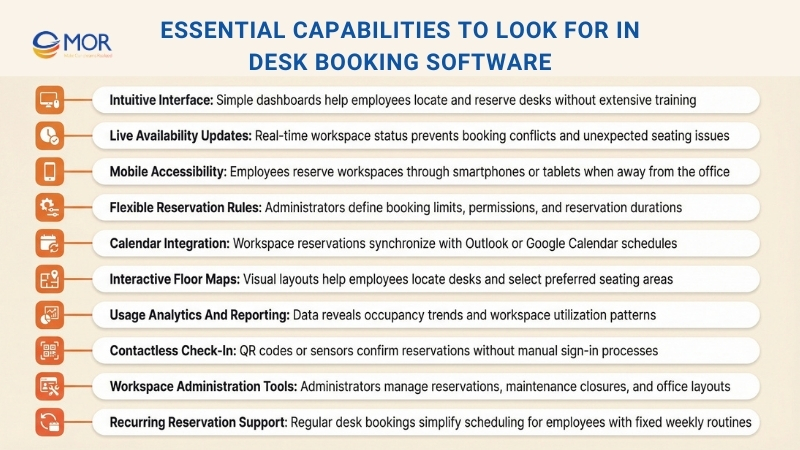
- Intuitive Interface: A clear and easy-to-use dashboard allows you to locate, reserve, and manage desks quickly without relying on manuals or technical assistance. This reduces time spent learning the system, encourages employee adoption, and keeps daily office coordination running smoothly.
- Live Availability Updates: Instantly view which desks are available and which are already reserved. Real-time updates help prevent overlapping reservations, avoid unexpected conflicts, and eliminate the common scramble for seating during busy office days.
- Mobile Accessibility: Reserve a workspace from your phone or tablet while away from the office. This flexibility works well for hybrid teams who often move between locations and need a convenient way to manage reservations.
- Flexible Reservation Rules: Define who can reserve certain desks, how far ahead bookings can be made, and the duration of each reservation. Adjustable rules help maintain fairness and structure as workplace needs shift over time.
- Calendar Integration: Connect desk reservations with workplace calendars such as Outlook or Google Calendar. This synchronization ensures workspace bookings appear alongside meetings and daily schedules.
- Interactive Floor Maps: Visual layouts of the office allow you to locate available desks quickly, choose seating close to colleagues, or avoid noisy areas. Visual navigation often feels far easier than searching through long reservation lists.
- Usage Analytics And Reporting: Reporting tools reveal patterns in desk usage, occupancy levels, and peak office days. These insights help you make better decisions about workspace design and adapt to changing team schedules.
- Contactless Check-In: Employees confirm reservations through QR codes or proximity sensors. This method offers a cleaner and faster alternative to manual sign-in processes.
- Workspace Administration Tools: Administrators can cancel unused reservations, temporarily close desks for maintenance or cleaning, and adjust the workspace layout as office requirements change.
- Recurring Reservation Support: Create repeating desk reservations for employees who follow consistent weekly schedules, which reduces manual booking work and simplifies calendar management.
Top AI Capabilities In Modern Desk Booking Software
Beyond the standard capabilities already mentioned, many desk booking software platforms now include artificial intelligence features that improve how workplaces manage shared desks and office space.
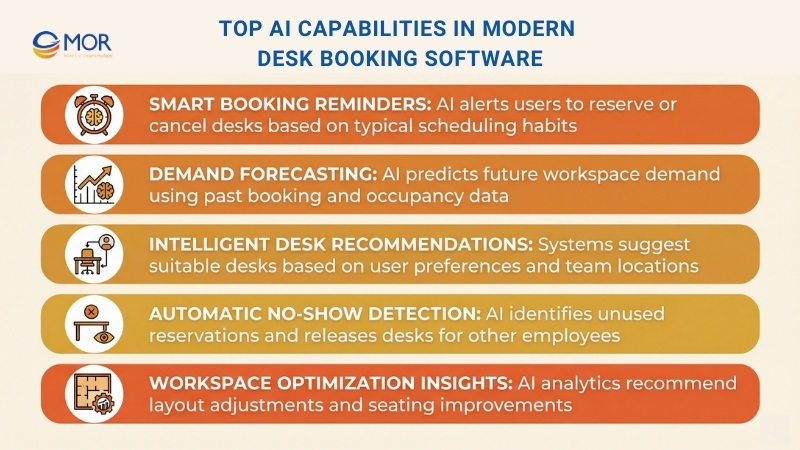
- Smart booking reminders: AI-powered reminders learn your habits and send friendly alerts to reserve or cancel a desk if you forget. These notifications help you stay organized and ensure the workplace reservation system keeps desks available for others when plans change.
- Demand forecasting: AI occupancy prediction studies previous booking behavior and workplace usage patterns to estimate future desk demand. This insight helps you prepare for busy office days and allocate workspaces efficiently so the office avoids overcrowding or unused desks.
- Intelligent desk recommendations: Based on your previous reservations, team location, and personal preferences, the system suggests suitable desks for your next office visit. This saves time during workspace booking and helps you select a seat that fits your working style.
- Automatic no-show detection: AI-based no-show management recognizes when a desk reservation remains unused and releases the workspace for other employees. This feature improves desk availability and reduces wasted office capacity.
- Workspace optimization insights: AI workspace analytics monitor usage trends and recommend adjustments to office layouts or seating arrangements. These insights help organizations manage shared workspaces more effectively and improve how office space supports employee collaboration.
Benefits Of Implementing Desk Booking Software
Desk booking software provides a practical way to modernize hybrid work environments and create a smoother office experience for employees who prefer flexibility in where they work each day.
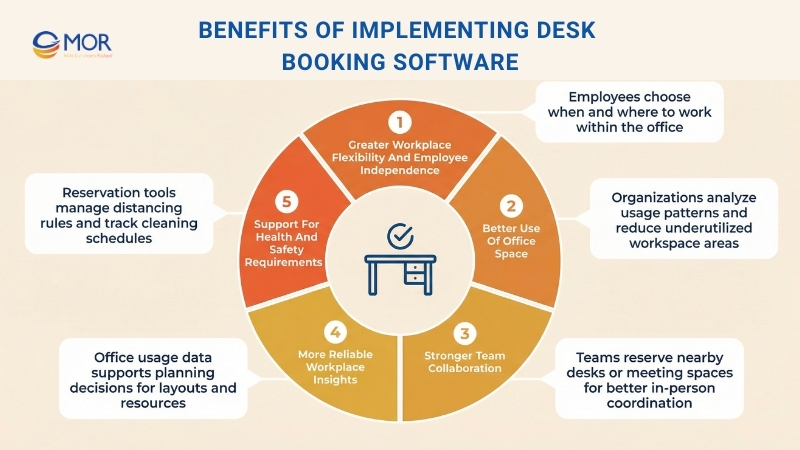
When you adopt a workspace reservation platform, several advantages typically follow:
- Greater Workplace Flexibility And Employee Independence: When employees can decide when and where they work in the office, a hot desk scheduling system gives team members more control over their work routine. This increased independence often supports higher job satisfaction and stronger productivity across teams.
- Better Use Of Office Space: When organizations review workspace usage patterns, they can adjust their real estate plans more effectively. This process ensures office space remains useful rather than sitting empty and may also reduce costs tied to underused areas.
- Stronger Team Collaboration: When employees reserve desks or meeting areas close to their teammates, a workspace reservation platform encourages more interaction. This approach helps build a connected workplace culture and supports stronger teamwork.
- More Reliable Workplace Insights: Organizations can use office usage data to guide decisions about layout design, workplace resources, and long-term office planning. These insights help leaders align workplace strategies with how employees actually use the office.
- Support For Health And Safety Requirements: Maintaining a safe work environment remains an important priority for employers. A shared desk management solution can simplify this responsibility through tools that manage distancing guidelines, track cleaning schedules, and help teams follow workplace health protocols. These functions support safety monitoring and give employees and managers more confidence in the office environment.
These advantages show how strongly a workplace desk management system can influence operational efficiency, employee experience, and workplace planning. When organizations focus on flexibility, clear insights, and safe office practices, they create a workplace that adapts more easily to changing business needs.
When Businesses Should Adopt Desk Booking Software
Desk booking software allows employees to reserve a workspace before arriving at the office, while giving you clear insight into who is present and how your office space is actually used. If the situations below feel familiar, it may be the right time to introduce a workspace reservation platform into your technology stack.
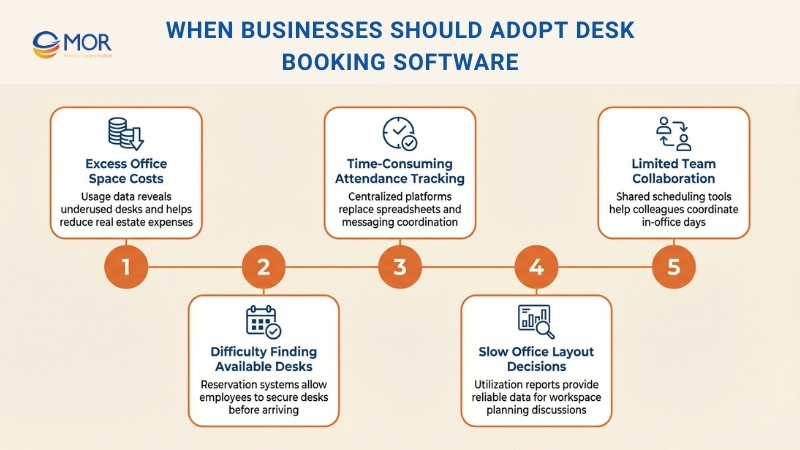
- You are paying for more office space than necessary: Your lease may include 200 desks, yet on a typical Tuesday fewer than 80 are occupied. A hot desk scheduling platform provides workspace usage data that helps you adjust your office footprint and reduce real estate expenses.
- Employees arrive and cannot find available desks: Imagine a busy Wednesday when many employees decide to come to the office without coordination or planning. Desk reservation tools allow employees to secure workspaces in advance, so nobody begins the day searching around the office for a seat.
- Managing hybrid attendance has become time consuming: You may spend hours tracking attendance through spreadsheets, Slack messages, and calendar invitations just to understand who plans to work on-site. A workplace desk management system brings all scheduling into one place so you can view office attendance patterns without constant manual work.
- Office layout changes take too long to approve: When reliable data about desk usage is missing, conversations about office layouts often turn into long debates. Utilization reports generated through desk reservation platforms provide clear numbers that support faster and more confident workspace planning decisions.
- Teams rarely meet each other during office days: Imagine your engineering and product teams both want to collaborate in person but keep arriving on different days. Team zones and shared workspace coordination features help employees align office visits so coming to the workplace becomes more valuable for collaboration.
How To Choose The Right Desk Booking Software
Selecting the right desk booking software means choosing a system that matches how your organization works day to day. The following factors help guide your decision.
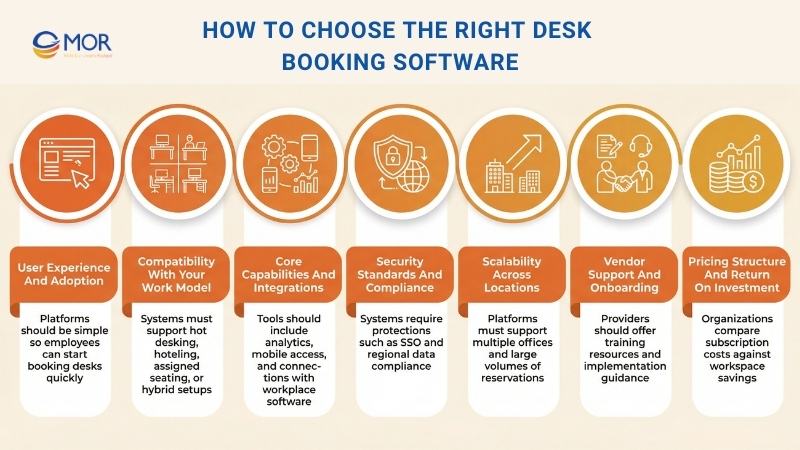
User Experience And Adoption
The platform should be simple enough for employees to start using without difficulty. Look for a clear interface, straightforward reservation steps, and minimal training requirements. If the system feels confusing, employees may stop using it.
Compatibility With Your Work Model
Every hybrid workplace operates differently. The right solution should support hot desking, desk hoteling, team neighborhoods, assigned seating, or a combination of these options so your organization avoids being limited to one strict workspace model.
Core Capabilities And Integrations
Look beyond the basic function of reserving a desk. Strong workplace desk management systems often include several office management features within a single platform, such as:
- Integration with workplace tools: Connect the platform with calendars like Outlook or Google Calendar, collaboration tools such as Microsoft Teams or Slack, and internal HR systems.
- Usage analytics and reporting: Access data that shows occupancy patterns, missed reservations, and peak office activity.
- Mobile and remote access: Allow employees to reserve or release desks through mobile devices when they are away from their computers.
- Interactive floor maps and navigation: Provide visual office layouts that help employees locate available workspaces quickly.
- Desk displays and digital signage: Show live desk or meeting room availability and allow employees to check in with a quick tap or scan.
Security Standards And Compliance
Since the system stores employee information, security remains essential. Look for features such as Single Sign-On (SSO), certifications like SOC 2 or ISO, compliance with GDPR or CCPA, and regional data protection standards such as POPIA in South Africa.
Scalability Across Locations
Whether your company manages a single office or a network of workplaces around the world, the platform should support large numbers of reservations without interruptions. Ask vendors about uptime commitments, performance metrics, and case studies from organizations similar to yours.
Vendor Support And Onboarding
Review the provider’s onboarding process, support services, and long-term product development plans. Leading vendors such as YAROOMS, Robin, and OfficeSpace often provide onboarding guidance, training materials, and additional resources that help teams use the platform effectively.
Pricing Structure And Return On Investment
Compare pricing models carefully. Some platforms charge per desk, others per user, and some offer flat-rate subscriptions. Consider these costs alongside potential savings. Effective hot desk scheduling can reduce office real estate expenses by up to 30%, which may allow the system to pay for itself over time.
Desk Booking Software Pricing And Plan Comparison
The cost of desk booking software can differ depending on the range of capabilities included. Some platforms charge a monthly fee per employee, while others calculate pricing according to the number of desks your organization wants to manage. Certain vendors also provide bundled packages or groups of reservable workspaces offered at a fixed rate.
To give you a clearer view of current pricing patterns, the comparison table below summarizes typical cost ranges for each plan category.
Plan Comparison Table For Hot Desk Booking Software
Plan Type | Average Price Per User | Average Price Per Desk | Common Features Included |
| Free | $0 | $0 | Basic desk reservation, mobile access, and real-time workspace availability |
| Basic | $10 - $20 | $5 - $10 | Improved booking functions, calendar integration, automated notifications, and simple analytics |
| Professional | $20 - $40 | $10 - $20 | Detailed analytics, adjustable booking rules, connections with additional workplace tools, and support for multiple office sites |
| Enterprise | Custom Pricing | Custom Pricing | Dedicated setup and support, advanced security controls, extensive analytics and reporting, API connectivity, and a dedicated account manager |
A comparison of pricing tiers, typical costs, and included features for hot desk booking software.
When deciding which pricing tier fits your organization, consider your operational needs and the capabilities you want to gain compared with the expected expenses for each plan. Select a subscription that supports your current operations while still allowing room to expand as your company grows.
If your organization has a small workforce and simple workspace coordination needs, a free or entry-level plan may be enough to begin. However, several situations may require moving to a higher-tier plan, including:
- Workforce Expansion: As your team grows, you may exceed the user limits included in free or entry-level plans. Higher-tier subscriptions support larger teams and often unlock more advanced functionality.
- Multiple Office Locations: If your organization plans to open another office, you may need to upgrade in order to coordinate workspace reservations across several sites.
- More Advanced Reporting: Entry-level subscriptions often provide only basic reports. Upgrading to a higher plan gives access to detailed analytics that help you measure workspace usage and identify employee patterns.
- Integration With Other Platforms: Smooth operations often require connections with HR platforms, project tools, and calendar systems. Higher-tier subscriptions generally support a wider range of integrations than basic plans.
- Greater Customization: Basic subscriptions often include limited configuration options. Advanced tiers allow you to adjust booking policies, workflow rules, operational settings, and branding to match your organization’s processes.
In the end, choose a pricing plan that delivers the capabilities your team needs to solve current workspace challenges while staying within your budget.
How MOR Software Helps Businesses Implement Desk Booking Solutions
Implementing desk booking software requires more than selecting a platform. Many organizations also need customized integrations, scalable architecture, and workplace tools that match their hybrid work model. MOR Software supports companies that want to design and deploy reliable workspace reservation systems tailored to real operational needs.
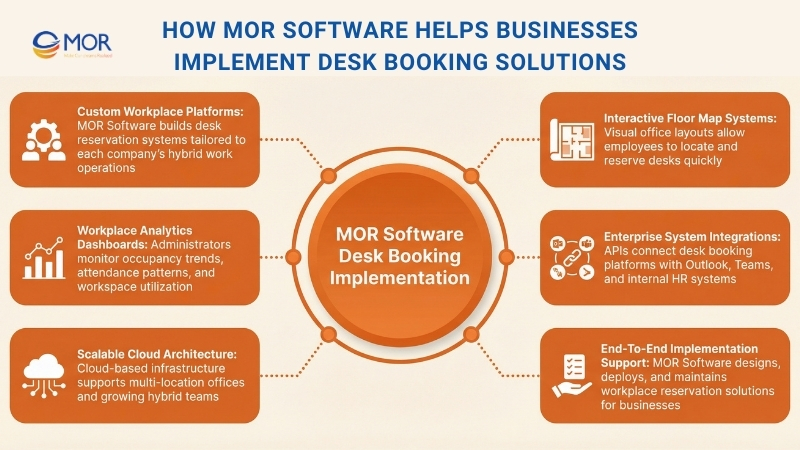
Our teams develop workplace management platforms that allow employees to reserve desks easily while giving administrators full visibility into office usage. These solutions can include interactive floor maps, attendance analytics, automated booking rules, and centralized dashboards that help companies manage shared workspaces across multiple locations.
We also specialize in integrating workplace desk management systems with existing enterprise platforms. Our engineers build secure API connections with calendar tools such as Microsoft Outlook, collaboration platforms like Microsoft Teams, and internal HR or access-control systems. This integration ensures that desk reservations, employee schedules, and workplace policies stay synchronized.
With experience in cloud architecture, enterprise software development, and workplace digitalization, MOR Software helps organizations create scalable office seating management platforms that support long-term hybrid work strategies. Contact us to discuss how we can help you design and implement a workspace reservation system that fits your organization.
Conclusion
Hybrid offices work best when teams know where to sit, when to come in, and how space is being used. The right desk booking software helps organizations coordinate flexible schedules, reduce unused office space, and improve daily workplace planning. The tools reviewed in this guide show how modern workspace reservation platforms support structured hybrid operations. If your company plans to build or upgrade a workplace desk management system, MOR Software can help. Contact us to discuss your workspace technology needs.
MOR SOFTWARE
Frequently Asked Questions (FAQs)
What is desk booking software used for?
Desk booking software allows employees to reserve desks or shared workspaces in advance. It helps offices manage hybrid schedules, avoid double bookings, and track how space is being used.
How does desk booking software support hybrid work?
It gives employees visibility into available desks before they come in. Teams can coordinate in-office days, sit near colleagues, and avoid overcrowded spaces.
Can desk booking software integrate with calendars?
Yes. Most platforms sync with tools like Microsoft Outlook and Google Calendar. This keeps bookings aligned with meetings and reduces scheduling conflicts.
Is desk booking software suitable for small offices?
Yes. Many providers offer free or low-cost plans for small teams. Even offices with fewer than 50 employees can benefit from better space visibility.
Does desk booking software provide real-time availability?
Most systems show live desk status on interactive floor maps. Employees can see which desks are available, reserved, or occupied before arriving.
What security features should I look for?
Look for single sign-on support, role-based permissions, and data encryption. These protect employee data and prevent unauthorized bookings.
Can the software handle multiple office locations?
Many platforms support multi-site management. Admins can manage layouts, policies, and analytics for each location from a single dashboard.
How much does desk booking software typically cost?
Pricing varies. Some tools charge per user per month, starting around $2 to $5. Enterprise plans with advanced analytics and integrations cost more.
Does desk booking software include analytics?
Yes. Most platforms provide reports on occupancy rates, no-shows, and peak usage times. These insights help leaders make smarter real estate decisions.
Is mobile access available?
Many solutions include mobile apps or browser-based access. Employees can book desks, check in, or cancel reservations directly from their phones.
Share


Make Our-Dreams Realized


© 2023 . MOR Software. All Rights Reserved
Sitemap
Privacy Policy
Terms of Use

Rate this article
0
over 5.0 based on 0 reviews
Your rating on this news:
Name
*Email
*Write your comment
*Send your comment
1