


AI Regression Testing: A Complete Guide for Businesses 2026
Release cycles are getting shorter, but one broken checkout flow, login screen, or API call can still hurt user trust fast. AI regression testing helps teams choose the right tests, detect flaky scripts, and run smarter checks inside CI/CD pipelines. In this guide, MOR Software will walk you through how it works, where it fits, and how businesses can apply it in 2026.
Key Takeaways
- AI regression testing helps QA teams test faster, find high-risk defects sooner, and keep release quality stable across web, mobile, API, and enterprise systems.
- Smart test selection, self-healing scripts, visual checks, and CI/CD connection make regression testing easier to manage as products grow.
- Businesses need clean test data, stable automation logic, and human review before AI can bring real value to daily QA work.
What Is AI Regression Testing?
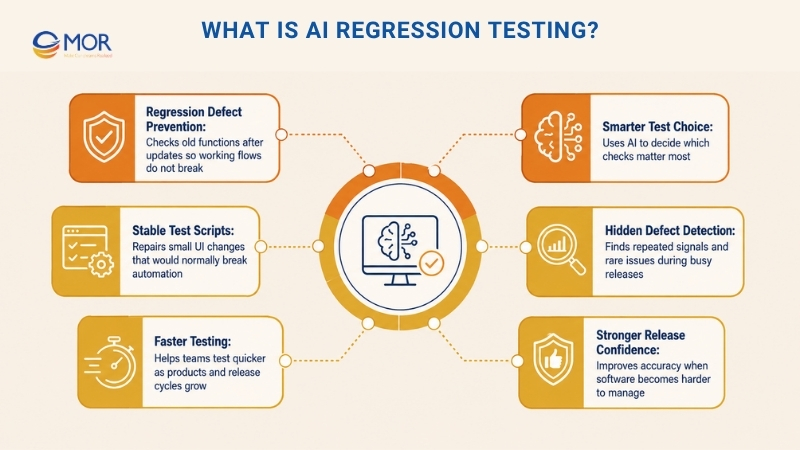
When a product gets a new update, a small code change can still damage a working flow and create regression defects. Teams run regression checks after each release to stop those old functions from breaking again.
As products get larger and release cycles get shorter, manual testing and older automation often become too slow. AI regression testing solves this through smarter test choice, more stable scripts, and faster detection of hidden defects.
AI for regression testing makes the process smarter:
- AI reviews old test results, user actions, and code updates to decide which checks matter most.
- The system can repair itself when small changes, like a renamed button or moved field, would normally break a test.
- It can spot repeated signals and rare issues that testers may not notice during busy release cycles.
Think of it like taking a car to a mechanic after a small repair. The mechanic does not check every single part again. They inspect the areas most likely to be affected. In the same way, this testing approach knows where to check first.
Put plainly, it helps teams test faster, with better accuracy and stronger release confidence as software becomes harder to manage.
How AI Regression Testing Works
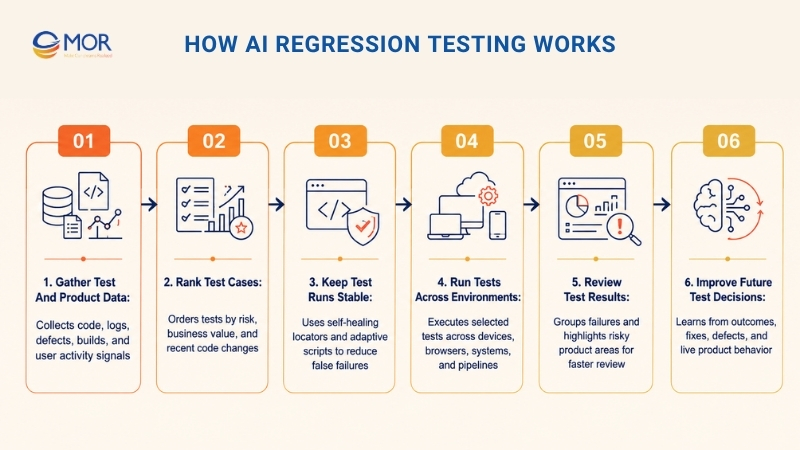
AI regression testing uses a clear, data-led flow that helps QA teams test faster, cut manual work, and catch risky defects earlier in the release cycle. Instead of giving every regression case the same weight, AI based regression testing reviews product updates, past test records, and system behavior to decide what needs attention first.
Gather Test And Product Data
The system begins with signals from many places, including code updates, old test outcomes, user activity, application logs, defect records, and recent builds. This gives the testing model enough context for AI regression analysis, so it can see what changed and where new risks may appear.
Rank Test Cases
Once the data has been reviewed, the platform orders test cases based on risk, business value, and the functions touched by recent work. AI driven non regression test optimization gives higher priority to tests linked with new code, common user paths, or areas that have failed before.
Keep Test Runs Stable
Self-healing locators, smart waits, and adaptive scripts keep execution steady when the UI changes. AI automated regression testing cuts false failures caused by small interface updates, slow page elements, or locator changes that often break older test scripts.
Run Tests Across Environments
After the right cases are chosen, the testing system runs them on real devices, browsers, operating systems, and test environments. When tied to CI/CD, the fastest AI-based regression testing for continuous integration can start after code commits, pull requests, builds, or planned release windows.
Review Test Results
The platform checks outcomes, groups related failures, finds unstable tests, and marks product areas with higher release risk. This regression testing AI automation helps testers and developers avoid reading every failed case one by one, so they can work first on issues that may hurt users.
Improve Future Test Decisions
After every cycle, the system learns from test outcomes, developer fixes, confirmed defects, and live product behavior. Over time, multimodal AI model regression testing gets better at choosing useful tests, lowering noise, and making regression checks more accurate.
Importance Of AI Regression Testing In Modern QA
AI regression testing is becoming a normal part of modern quality work because teams need faster releases without weaker product stability. Its value shows up in several clear business and technical areas:
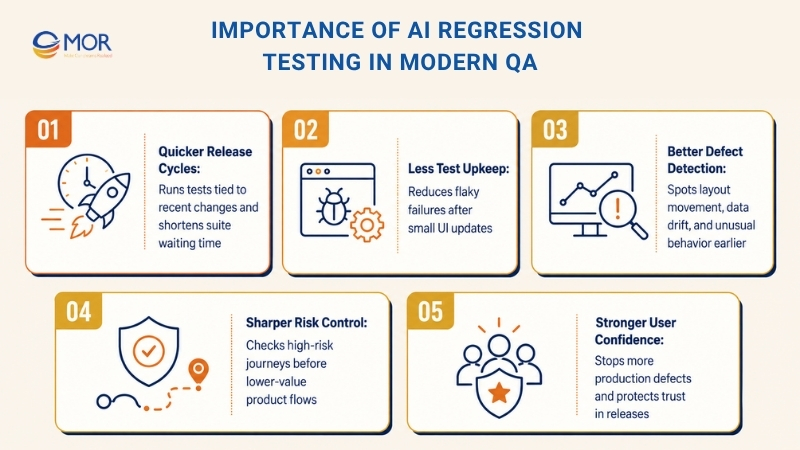
- Quicker release cycles: AI chooses and runs the tests most tied to recent changes, so teams spend less time waiting for large suites to finish.
- Less test upkeep: Self-repairing scripts lower flaky failures and reduce the time testers spend fixing broken automation after small UI updates.
- Better defect detection: The platform can notice small changes that manual checks may skip, including layout movement, data drift, or unusual behavior.
- Sharper risk control: Test order follows code changes and key user journeys, so the riskiest product areas get checked before lower-value flows.
- Stronger user confidence: Earlier bug detection stops more defects from reaching production, which helps users trust each new release.
Modern Regression Testing Problems AI Can Help Solve
Modern apps have become much harder to test. Short release cycles, microservices, API links, regular UI changes, and larger test suites can make regression work feel heavy.
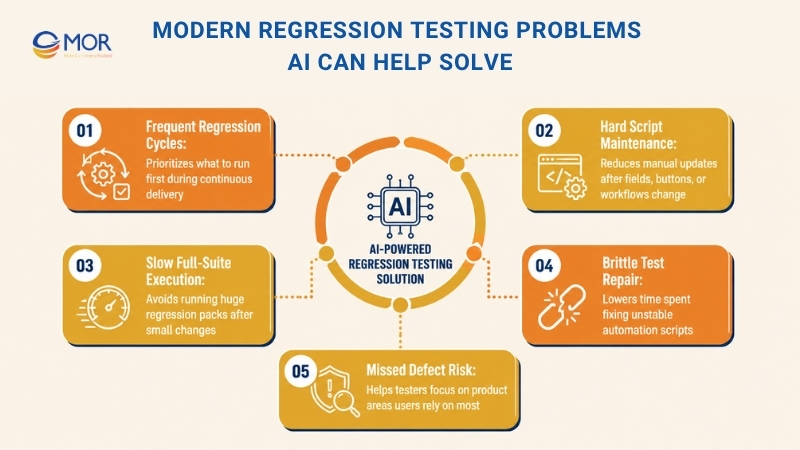
- More frequent regression cycles: Continuous delivery creates more builds and updates, so teams need an AI for regression testing strategy that can decide what to run first.
- Harder script maintenance: Large test suites become costly to manage when testers must update scripts every time a field, button, or workflow changes.
- Slow full-suite execution: Running the whole regression pack after a small change can delay delivery when smarter test choice is not in place.
When your team keeps repairing brittle tests and caring for huge suites, the chance of missed defects grows. Confidence in coverage drops, and testers lose time that should be spent on the product areas users rely on most.
Difference Between Traditional Regression Testing Vs AI Regression Testing
To see the value of AI-powered regression testing, teams need to compare it with the limits of older regression methods. The gap becomes clear when you look at test choice, upkeep, speed, coverage, stability, error review, and scale.
Aspect | Traditional Regression Testing Limitations | AI Regression Testing Advantages |
Test choice | Often runs the full regression pack no matter how relevant it is to the change. Weak change review creates repeated test runs and slower feedback. | Uses ML change review and prediction models to choose high-risk, relevant tests. This cuts waste while keeping coverage strong. |
Test upkeep | Scripts often fail when locators or interface elements change. Teams must update them by hand, which adds heavy maintenance work. | Self-repairing automation adjusts locators when UI elements move or change. This lowers false failures and reduces manual script edits. |
Run speed | Full regression rounds may take hours or days, mainly in large products with many connected parts. | AI can run regression checks across browsers and devices automatically. Smart priority setting helps shorten total runtime. |
Coverage | Coverage depends on test cases written by people. High-risk flows or edge cases may still be missed. | The system studies user patterns and past defects to create or suggest tests for key risk areas. This helps improve test coverage. |
Stability | Tests are more likely to become flaky due to weak locators, unstable environments, and fixed wait times. | AI lowers flakiness through adaptive locators, flexible waits, and anomaly detection. |
Error review | Teams often need to read logs and debug failures by hand before they can find the root cause. | ML models connect logs, stack traces, and past fixes to point out likely causes faster. |
Scale | Larger microservice, API, and UI layers make test suites harder to run and manage. | Smart QA tools can handle growing suites and improve parallel runs, so testing can scale more easily. |
Key Components Of An AI Regression Testing
AI regression testing works best when several smart QA parts support one another. AI regression testing tools help teams lower flaky tests, find real product defects faster, and keep release pipelines steady as the application changes.
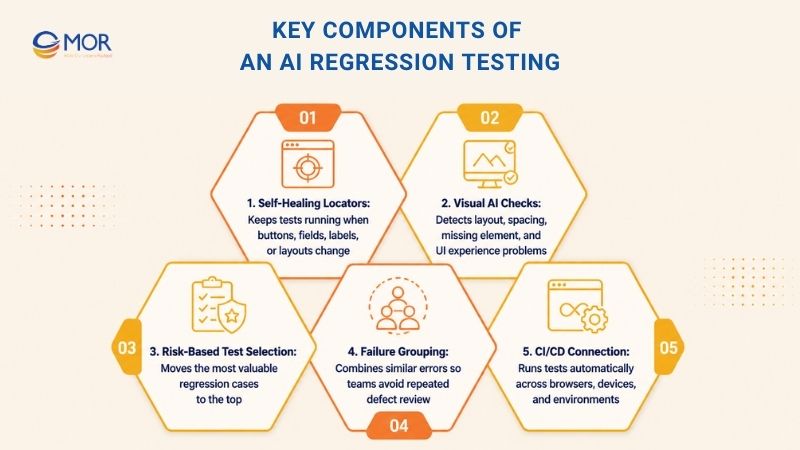
Self-Healing Locators
Self-healing locators keep tests working when buttons, fields, labels, or page layouts change. Instead of stopping at the first changed locator, the platform searches for the closest matching element and lets the test continue with fewer false failures.
Visual AI Checks
AI visual regression testing checks important design and layout changes instead of depending only on exact pixel matching. This helps teams catch broken layouts, missing elements, spacing problems, and UI issues that can hurt the user experience.
Risk-Based Test Selection
Risk-based test selection helps teams run the most valuable checks early. AI regression testing can review code updates, old results, affected modules, and user behavior to decide which regression cases should move to the top.
Failure Grouping
Failure grouping places similar errors together so teams do not waste time checking the same defect again and again. This speeds up root-cause review and helps developers focus on the defects that carry the most risk.
CI/CD Connection
CI/CD connection lets AI regression testing tools with CI/CD integration run automatically across browsers, real devices, and environments. This keeps testing close to development and helps teams catch regression issues before they reach production.
How AI Regression Testing Reduces Flaky Tests And Speeds Up Defect Detection
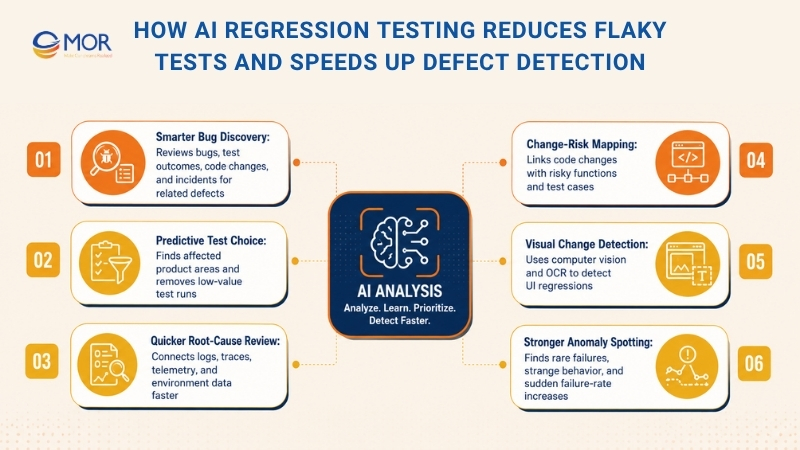
AI regression testing can make regression work steadier, faster, and easier to trust. It supports teams through smarter defect review, stronger test selection, and fewer false failures in fast release cycles.
Smarter bug discovery
ML models review bug records, test outcomes, code updates, and live system incidents to find defects linked to recent code changes. This helps you catch small problems that testers may miss, then fix them before users face them.
Predictive test choice
ML models often learn from past failures, older test runs, and code churn. After reading this data, they predict which product areas may be affected by a change, so your team can spend regression effort where it matters most. Your testing cycle becomes faster when low-value test runs are removed.
Quicker root-cause review
AI can sort and connect large sets of test logs, error traces, telemetry, and environment data to show why a regression check failed. Your team can trace failures back to likely causes with far less manual review.
Change-risk mapping for smarter QA
Modern enterprise AI platforms review code updates and show which functions and test cases may be affected. They connect dependencies with change signals, so testing can focus on the highest-risk parts of the app. With each release, your team can check risky and business-important areas with more confidence.
Visual change detection with AI
Many smart testing tools use computer vision, deep learning, and OCR to detect screen-level changes in your app’s UI that older pixel checks may not catch.
AI-backed visual checks can read buttons, text, layout movement, and screen patterns. They can ignore normal changes like animation or responsive shifts, then flag UI/UX regressions that may affect real users.
Stronger anomaly spotting
Machine learning can find rare edge-case failures, strange product behavior, or sudden failure-rate increases from test and performance data. This helps you notice slower performance and locate unstable parts early in the pipeline. Some teams compare tools in the functionize AI category when they need self-healing support and better flakiness control.
How To Implement AI Regression Testing In Your QA Process
These are the common steps your team can follow when adding AI regression testing to a QA workflow.
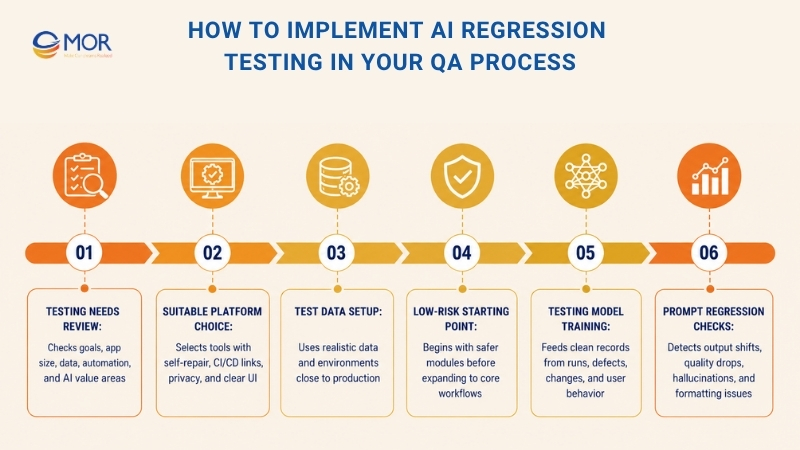
Review your testing needs
Start by checking your business goals, app size, available data, and current automation setup. Then decide where AI can bring the most value. It may support flaky test review, visual checks, or defect analysis.
Focus first on test areas with repeated runs and frequent failures.
Choose a suitable platform
The speed, scale, and accuracy of your regression work depend heavily on the testing platform you pick. Make sure your selected tool supports:
- Self-repairing automation, so your tests do not break after every small code update
- Smooth CI/CD links, so test triggers run automatically and feedback comes back faster
- Strong privacy and control settings to protect sensitive test data and support compliance
- A clear UI, so DevOps and quality teams can begin work without long training time
Set up test data, environments, and pipelines
Your test data should reflect real AI use cases, so your team can check app functions and uncover edge cases in practical conditions.
Your test environment should also stay close to production. It needs correct infrastructure settings, network rules, third-party links, and database versions. After that, connect the AI automation tool to your CI/CD pipeline to support automated test runs. Teams that need setup help may work with AI-powered regression testing services to shorten the rollout.
Start with low-risk updates
Once the setup is ready, begin with modules and changes that carry low user risk, like small UI settings or optional filters. Review test speed, watch for false alerts, and expand to core workflows when the results look stable.
Train the testing model
The more useful data the AI tool or agent receives, the better it can learn and improve prediction quality. Use clean records from past test runs, defect history, change frequency, and user behavior.
Human review still matters because each AI action should be clear, explainable, and aligned with compliance needs.
One more point matters when training AI models. Add automated regression checks for prompts, so your team can detect output changes, quality drops, hallucinations, formatting issues, or behavior shifts.
Key Challenges Of Implementing AI Regression Testing
AI regression testing can improve QA speed, but adoption still brings real limits. Teams must plan around privacy, explainability, and old test systems before they rely on it for release decisions.
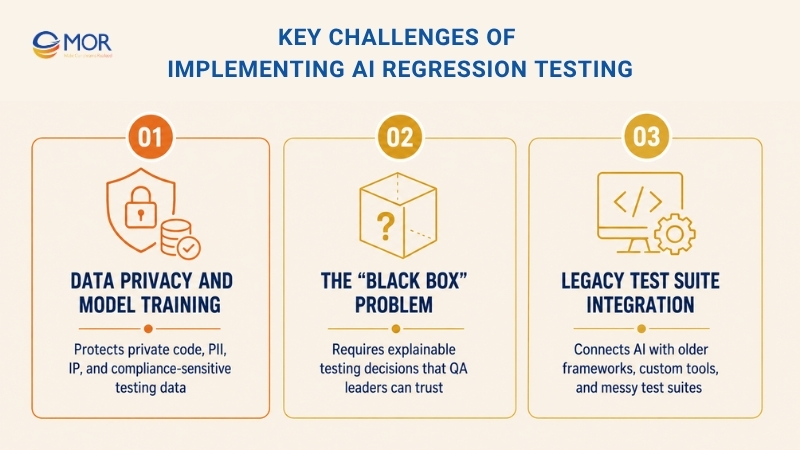
Data Privacy And Model Training
Large companies often face strict rules when they add AI testing platforms, mainly due to private codebases and sensitive customer information.
Many AI testing systems ask teams to send app data to cloud platforms for model training. That can clash with SOC2, GDPR, and other industry rules right away.
On Reddit and QA forums, leaders still point to data safety as their top concern. They often refuse AI testing tools unless those tools can run on their own servers or private instances.
Main Privacy Risks Include:
- Private source code being shared with third-party cloud platforms
- Sensitive PII in testing data
- Company intellectual property being exposed through model training
- Compliance duties linked to SOC2, HIPAA, and GDPR
Vendors have begun to provide self-hosted options, but these setups often need expensive hardware and may not get the same regular cloud updates. Some platforms, including tools that support cloud and on-premise setups, can help teams handle these security limits.
The “Black Box” Problem
Senior QA professionals often worry when they cannot see why an AI system made a certain testing decision.
When a tool skips a test, accepts a visual change, or chooses another locator, testers need a plain reason so they can trust the result.
Accountability needs are driving more interest in Explainable AI. If a major defect reaches production because AI marked a test as unnecessary, QA leaders must show that they made a careful decision.
That calls for clear records, visible decision logic, and the right to reject AI advice when human judgment sees higher risk. Reporting and analytics can also help teams understand why testing choices were made.
Legacy Test Suite Integration
Large business apps are often tested with older frameworks. Many rely on private tools or heavily changed Selenium setups.
Adding AI to these older systems can be hard. It is rarely as simple as installing a new plug-in. Old test suites are often poorly organized and lack the metadata the AI system needs.
Common Integration Problems Include:
- Tests lack clear notes and do not show their business purpose
- Test suites use inconsistent naming rules
- Code and tests are not split into clean modules
- Environment settings and test data are hard-coded
- Tests are tightly tied to the way the app was built
Teams may need months of refactoring before their test setup can support AI well. Modern test-management platforms can help close this gap through integration support and version control.
Best Practices For AI Regression Testing
To get stronger value from AI regression testing, teams need more than a new tool. The QA process should have clear priorities, clean data, human review, and steady tuning after each release.
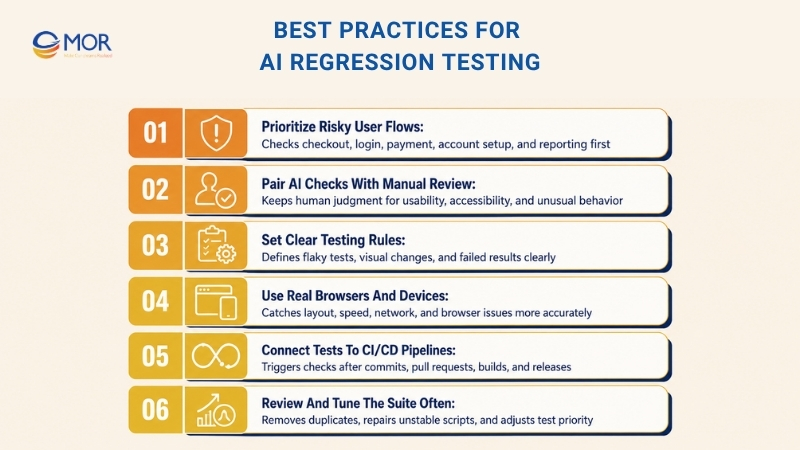
Prioritize Risky User Flows
Start with checkout, login, payment, account setup, reporting, or any module that affects daily users. These areas often carry the highest business risk, so the testing system should check them before lower-value screens.
Pair AI Checks With Manual Review
Let AI handle fast test selection, repeated checks, and wide coverage across releases. Keep human testers involved for usability, accessibility, unusual user behavior, and cases where product judgment matters.
Set Clear Testing Rules
Define what counts as a flaky test, an acceptable visual change, or a failed result. Clear rules help teams avoid noisy alerts and stop the platform from flagging small, harmless changes.
Use Real Browsers And Devices
Run tests on real environments whenever possible, not only emulators or local machines. Real devices help teams catch layout, speed, network, and browser issues that lab testing may miss.
Connect Tests To CI/CD Pipelines
Link the testing flow with CI/CD pipelines so checks can start after each commit, pull request, build, or release cycle. This gives developers faster feedback and helps teams fix issues before code moves forward.
Review And Tune The Suite Often
Use AI findings to remove duplicate cases, repair unstable scripts, and adjust test priority over time. A clean test suite keeps automated release validation useful, fast, and easier to trust.
Need A Technical Partner To Build AI Regression Testing Into Your QA Workflow?
AI regression testing works best when it fits the way your team already builds, tests, and ships software. A new tool alone will not fix flaky suites, weak test data, or slow release checks. You need clean test logic, stable pipelines, and a QA team that understands real delivery pressure.
MOR Software helps businesses bring this approach into daily QA work. We review your current test suite, automation scripts, CI/CD pipeline, cloud setup, release process, and defect history. Then we map where AI can add the most value, like test selection, visual checks, flaky test detection, test upkeep, and root-cause review.
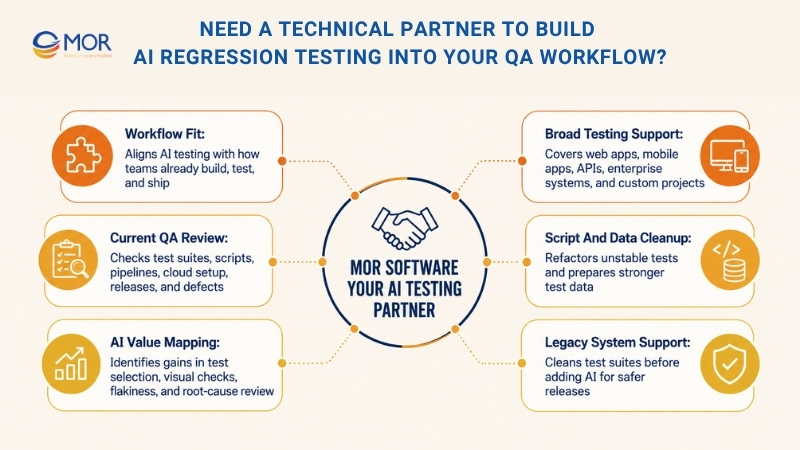
Our QC and testing team works across web apps, mobile apps, APIs, enterprise systems, and custom software development outsourcing projects. We can help refactor unstable scripts, prepare better test data, connect AI testing tools to your pipeline, and build reporting that your QA and engineering teams can trust.
For legacy systems, MOR Software can also support test suite cleanup and automation planning before AI is added. That gives your team a stronger base for faster releases, fewer missed defects, and more reliable software quality.
Conclusion
AI regression testing gives businesses a smarter way to protect software quality as releases move faster. It helps teams focus on risky changes, cut noisy failures, and spot defects before users face them. But the results depend on the right setup, clean test logic, and steady review. If your team wants to build this solution into a real QA workflow, contact MOR Software to discuss your project.
"Evolution is not a destination, it is a disciplined journey of innovation."
Phung Van Tu


CEO MOR AI
MOR SOFTWARE
Frequently Asked Questions (FAQs)
What is AI regression testing?
AI regression testing uses AI to check whether new code changes break existing software functions. It helps choose the right tests, detect failures faster, and keep test scripts more stable.
How is it different from traditional regression testing?
Traditional testing often runs a fixed test suite after each update. AI-based testing uses code changes, past failures, user behavior, and risk signals to decide which tests should run first.
How does AI help with flaky tests?
AI can detect repeated false failures, unstable locators, slow-loading elements, and changing UI patterns. It can also suggest fixes or adjust locators so tests fail less often for the wrong reason.
Can AI regression testing replace QA engineers?
No. AI can support QA teams, but it still needs human review. Testers understand business rules, user behavior, product risk, and edge cases better than any tool.
What types of tests can AI support?
AI can support UI tests, API tests, visual checks, mobile tests, web app tests, and test prioritization. It can also help with log review, failure grouping, and defect prediction.
What data does AI use during regression testing?
AI may review test history, defect records, code changes, logs, user journeys, production incidents, and release data. Better input data leads to smarter test choices.
Is AI regression testing useful for CI/CD pipelines?
Yes. It works well in CI/CD because it can trigger test runs after commits, pull requests, builds, or releases. This helps teams find breakages earlier in the delivery flow.
What are the main risks of using AI in regression testing?
The main risks include poor data quality, privacy issues, unclear AI decisions, false positives, and weak setup. Teams should keep human review and clear reporting in place.
What tools are needed to get started?
Teams usually need an automation tool, test management system, CI/CD platform, stable test data, and clear reporting. Some teams also add visual AI tools or self-healing test tools.
How should teams start with AI-powered regression checks?
Start with one high-risk area, like flaky UI tests or slow regression cycles. Test the tool on a small scope, review the results, then expand after the team trusts the output.
Share


Make Our-Dreams Realized


© 2023 . MOR Software. All Rights Reserved
Sitemap
Privacy Policy
Terms of Use

Rate this article
0
over 5.0 based on 0 reviews
Your rating on this news:
Name
*Email
*Write your comment
*Send your comment
1