


Cost Of An Employee Calculator: Estimate The True Cost to Hire
Salary is only the start of hiring cost. A cost of an employee calculator helps you see the true cost of an employee, from payroll taxes and benefits to equipment, onboarding, and turnover. In this guide, MOR Software will show how this hiring cost calculator helps businesses plan budgets, compare roles, and avoid costly hiring surprises.
Key Takeaways
- A cost of an employee calculator helps businesses estimate total employee cost beyond wages, including taxes, benefits, overhead, onboarding, and turnover.
- Employee costs change by location, industry, role type, benefits package, and hiring market, so benchmarks help teams plan with less guesswork.
- A custom calculator can connect HR, finance, payroll, and accounting data, giving teams one clearer view of workforce spending.
What Is A Cost Of An Employee Calculator?
For any company, paying someone costs far more than their paycheck. So how can you know the full amount tied to a new hire or a current team member?
A cost of an employee calculator, also known as a payroll cost calculator, workers calculator, employment cost calculator, or labor cost calculator, helps estimate gross pay plus other staff-related expenses. These costs include payroll taxes, which may cover local, state, and federal payments, including Social Security, Medicare, and unemployment contributions. The cost of an employee also includes benefits like health insurance and paid leave, plus smaller support costs like meals, tools, or supplies. Overhead expenses, including office space or conference room technology, also belong in the estimate.
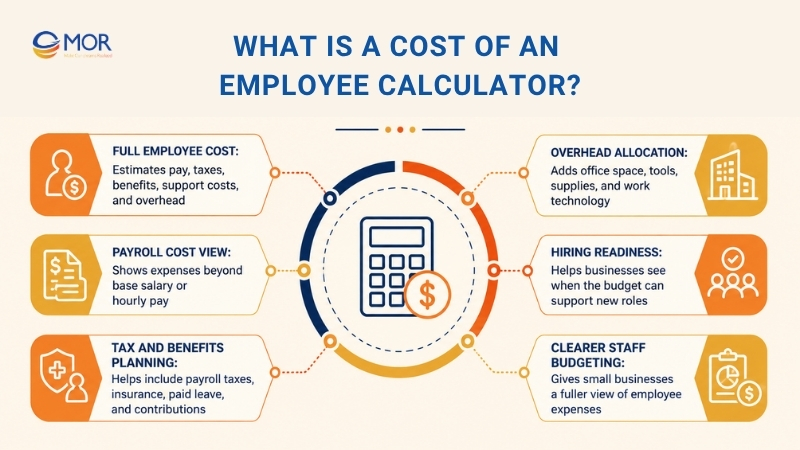
Knowing your tax, benefit, and overhead costs linked to each hire helps you price your services at the right level. It also supports business planning, since you can see when the budget is ready to hire a new employee.
A true cost of an employee calculator gives small businesses a clearer estimate of staff expenses, including payroll tax differences across the 50 states. It helps you see the true cost of an employee beyond base pay alone. Add the required details into the total cost of an employee calculator to estimate what a new staff member may cost your company.
The Basic Formula For Employee Calculator Formula
The real staff cost is not limited to the salary listed in an offer letter.
Salary takes up a large share of the total, but employers also pay extra costs when they hire someone.
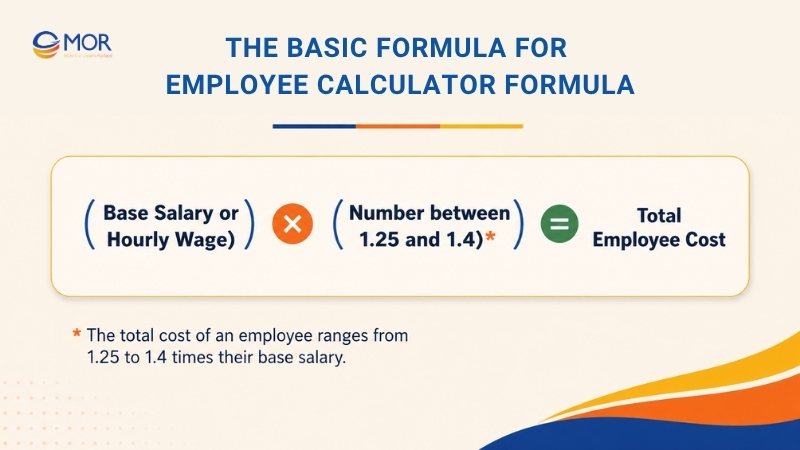
A simple cost per employee formula often places total employee expense at about 1.25 to 1.4 times the base salary. This range includes extra employer costs, including benefits, payroll taxes, and hiring costs.
According to the Society for Human Resource Management (SHRM), the average hiring cost across the industries it reviewed is close to $4,700. That shows recruiting spend goes well beyond the first salary payment for a new hire.
A cost of an employee calculator can help you calculate the cost of an employee with more care, which supports better workforce planning. It gives hiring teams a stronger base for staffing plans and helps leaders see the money tied to each hiring choice. Once businesses understand each employee’s full cost, they can make better calls on budget, staffing, and company performance.
Using The Formula
Let’s apply the formula to a simple case. Say you bring in an hourly worker who earns $20 per hour:
- Lower Cost Range: $20/hour x 1.25 = $25 per hour (total cost)
- Higher Cost Range: $20/hour x 1.4 = $28 per hour (total cost)
Now take a salaried team member who earns $50,000 per year:
- Lower Cost Range: $50,000 x 1.25 = $62,500 per year (total cost)
- Higher Cost Range: $50,000 x 1.4 = $70,000 per year (total cost)
The 1.25 to 1.4 multiplier is a useful first step, but it still misses some costs linked to each employee. Companies with rich benefits, more layered operations, or frequent turnover may need a higher multiplier, while simpler businesses with fewer benefits and low staff movement may use the lower end.
Overhead, training, and staff replacement can change the final number in a big way. We will look at these extra cost drivers in the sections ahead.
Key Components To Include In Your Cost Of An Employee Calculator
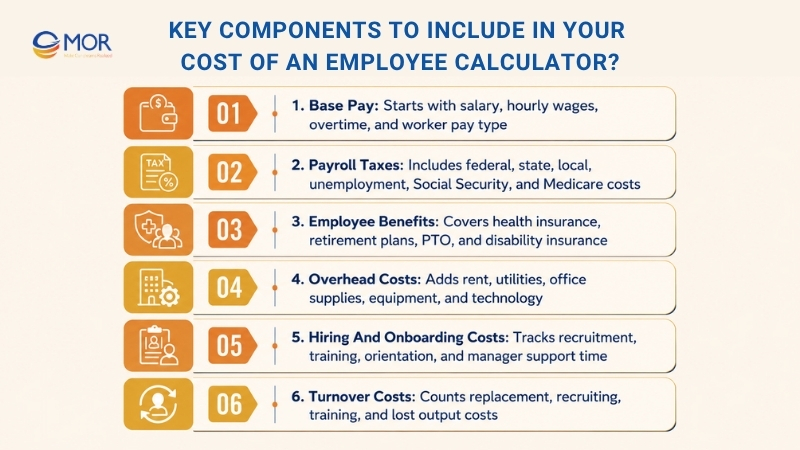
To get a clearer view of labor spend, review the main items that make up the total cost of each employee. Salary or hourly pay is the easiest starting point, but a cost of an employee calculator should also include several other costs that affect your profit.
Base Pay
The starting point for any pay package is the employee’s salary or hourly rate. Salaried workers receive a set pay amount, no matter how many hours they work, while hourly staff are paid for the exact time worked. You need to separate these two pay types when estimating total staff costs.
Overtime can raise labor spend fast, since it often pays at one and a half times the normal rate once work passes a standard week. This usually affects hourly workers, but some salaried staff may also qualify in certain roles or situations. An hourly labor cost calculator or w2 employee cost calculator can help you check these numbers with more detail.
Payroll Taxes
In the U.S., payroll taxes pay for several public programs and usually fall into three groups: federal, state, and local. Employers must handle required employer payments and employee-related payroll amounts, which can raise the full labor cost. Many companies use tax provisioning to predict what they may owe the IRS during the year.
Federal payments include Social Security and Medicare contributions. State payroll costs change by location and may include unemployment insurance. Local rules may also require income tax withholdings.
To estimate average payroll tax per worker, take the total payroll tax amount for a sample employee group and divide it by the number of workers. Treat this as a rough estimate, since the real number can move based on pay level, benefits, and location. A cost of an employee calculator with taxes is helpful when these rules vary across teams or states.
Employee Benefits
Benefits make up a large share of labor cost, with an average of about 33% of employee compensation across civilian workers, private-sector workers, and state and local government workers. Common benefits include health insurance, retirement plans like 401(k) plans, paid time off (PTO), and disability insurance.
To find the average cost of benefits for an employee, divide your total yearly benefits spend by the number of employees. Company size, industry, and location can all change how much a benefits package costs.
If your company spends $100,000 per year on benefits for 50 employees, the average benefits cost for one employee is $2,000.
>>> Explore practical salary review templates that organizations can use to manage staff assessments more effectively.
Overhead Costs
Overhead costs are shared business expenses needed to keep the company running, but they are not linked to one product or service. These costs can include rent, utilities, office supplies, equipment, and technology.
Assigning overhead to each employee can be hard. A common method is to divide total overhead spend by employee count, which gives you an overhead cost for each person.
Still, that method may not show how much each worker really uses, especially with a remote workforce. More detailed methods, like activity-based costing, can give a more accurate view based on actual resource use. A cost of an employee calculator can include these shared costs so the estimate feels closer to real business spending.
Hiring And Onboarding Costs
Finding, hiring, and bringing new people into the company can cost a lot. Recruitment costs may include job ads, paid promotion, recruiter fees, background checks, and pre-employment tests. Onboarding expenses include training content, orientation, and the time managers and HR staff spend helping new hires settle in.
You can estimate onboarding costs when you track time spent on training, orientation, and admin work, then divide that total by the number of new hires. Strong onboarding helps lower turnover and helps employees become productive sooner. A smooth onboarding process can shorten the ramp-up period, which helps lower the cost of hiring an employee, the costs of hiring an employee, and the true cost of hiring an employee over time.
Turnover Costs
Replacing a staff member brings new recruiting, hiring, and onboarding costs. The empty role can also reduce output while the company looks for a replacement. You can estimate these costs in two steps.
Start when you add up the full cost of replacing one employee, including recruiting automation, hiring, training, and lost output during the open-role period. After that, multiply the average amount by the number of employees who left during a chosen time period.
To lower the cost of replacing an employee, companies should pay attention to staff satisfaction, engagement, and growth. Strong retention work, including fair pay, clear career paths, and a healthy workplace, can cut turnover and reduce related expenses.
Other Factors That Can Impact Employee Cost
The cost of an employee calculator above can give you a useful estimate for base wages and payroll taxes, but it still does not show the whole picture.
Several other moving cost drivers can change what your business pays for each employee, so keep these points in view:
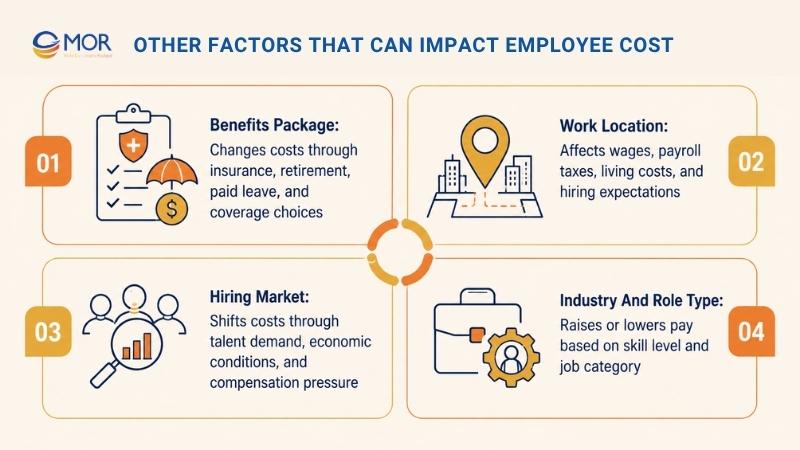
Benefits Package
The cost of employee benefits for an employer can take up a large share of the full pay package. This may include health insurance, retirement plan payments, paid leave for vacation and sick days, dental and vision plans, life insurance, and disability coverage.
The benefits you choose and the amount your company pays toward them will change the final cost for every employee.
Work Location
Business location is a major choice when starting a business, and it can strongly affect employee expenses. State and local tax rates for unemployment insurance and other required payments can differ a lot. Living costs in each area can also shape what candidates expect to earn.
Check state and local tax rules in every place where your company operates. These rules can change your payroll tax burden in a major way. Teams hiring in high-cost states may also compare local rules with a cost of an employee calculator california model before they set pay ranges.
Hiring Market
Hiring costs can shift with economic conditions and the need for certain skills. When talent is hard to find, keeping strong employees and attracting new ones may require higher compensation and stronger benefits. During slower economic periods, employers may have more room to control salary growth, and a cost of an employee calculator can help test different hiring options.
Industry And Role Type
Pay levels also change across industries and job types. A senior technical role in SaaS will usually require a much higher salary than an entry-level office role. Research the market for the industry and position you plan to hire before setting the salary range.
Labor Cost Benchmarks By Industry
Sector | 2023 Unit Labor Cost |
Computers and electronics | $23.40 |
Textile mills | $124.50 |
Transportation equipment | $126.20 |
Oil and gas extraction | $164.40 |
Printing and related support activities | $175.50 |
Machinery | $175.50 |
Coal mining | $176.50 |
Miscellaneous manufacturing | $178.70 |
Primary metals | $178.80 |
Apparel | $189.20 |
Plastics and rubber products | $195.30 |
Mining | $196.00 |
Nonmetallic mineral products | $202.60 |
Paper | $208.70 |
Fabricated metal products | $210.60 |
Furniture and related products | $211.30 |
Mining, except oil and gas | $213.20 |
Leather and allied products | $229.90 |
Food | $231.10 |
Chemicals | $238.40 |
Nonmetallic mineral mining and quarrying | $239.40 |
Wood products | $255.70 |
Petroleum and coal products | $255.80 |
Beverages and tobacco | $327.70 |
Metal ore mining | $378.30 |
A cost of an employee calculator becomes more useful when you compare your numbers with your industry’s usual labor cost range. This gives you a starting point for spotting where staff expenses may be too high or too low.
The Bureau of Labor Statistics (BLS) monitors unit labor costs, which means the labor spending needed to produce one unit of output. The chart above, based on BLS data, shows that labor costs can change sharply from one sector to another.
Several reasons explain these cost gaps:
- Talent And Education Needs: Industries that require rare skills or higher degrees often carry greater labor costs. The financial services field often pays more than manufacturing because it needs trained analysts, investment staff, and other skilled finance workers.
- Rules And Compliance Pressure: Industries with heavy rules often spend more on compliance, and that can raise labor costs. Healthcare and pharmaceutical firms show this well, since strict rules can add more process work and staffing needs.
- Union Coverage: Workforces covered by unions often secure higher wages and stronger benefits, which can push labor costs upward. Construction and manufacturing often have more union activity than information technology.
How Labor Cost Benchmarks Support Business Planning
You can use industry labor cost benchmarks in these ways:
- Find Areas For Cost Control: Compare your labor spend with the industry average. If your costs sit far above the market, review the drivers and look for ways to improve staffing, training, or pay design.
- Guide Budget Decisions: Benchmarks help companies set more realistic expectations for employee-related spending.
- Check Pay Competitiveness: A cost of an employee calculator works better when you also understand normal labor costs in your sector. Market pay data helps you build stronger salary and benefits packages, attract better candidates, keep employees longer, and improve your employer brand.
How Location Changes Employee Costs
Minimum wage rules, living costs, and talent supply can change labor costs a lot across regions and countries. A comparison between the United States and the United Kingdom shows this clearly. The U.K. minimum wage may be lower than some U.S. states, which can lower wage costs in some cases. Yet living costs in large cities like London can reduce that advantage.
Talent supply also matters. Areas with many skilled workers in a certain field may still have higher salaries because companies compete for the same people. Areas with more available workers may support lower wage levels.
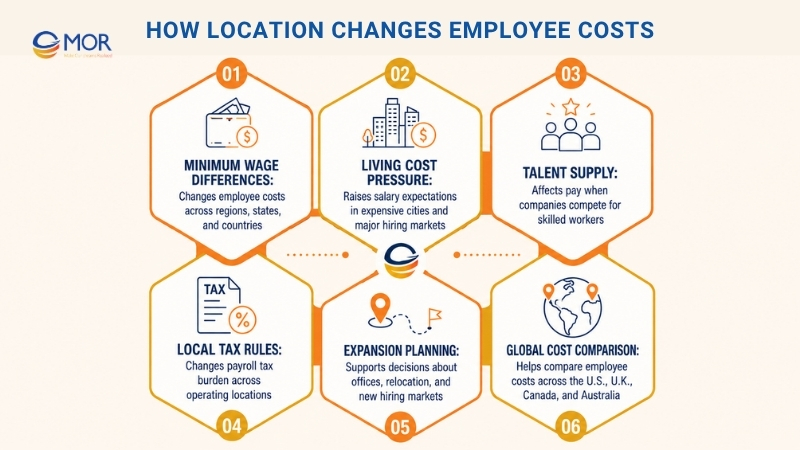
These local differences matter when companies plan a new office, relocation, or hiring market. Tax benefits, infrastructure, and the local business climate also affect the full cost of doing business in each place. Global teams may compare a cost of an employee calculator uk, cost of an employee calculator australia, cost of an employee calculator canada, or true cost of an employee calculator uk when they review country-level hiring costs.
Who Should Use Cost Of An Employee Calculator?
A company may be hiring its first employee or planning team growth for the next year, but the full labor cost still needs to be clear. Better cost visibility helps teams set budgets, price services with more care, and make stronger hiring choices. An employee cost calculator gives businesses a better view of payroll spending beyond base salary.
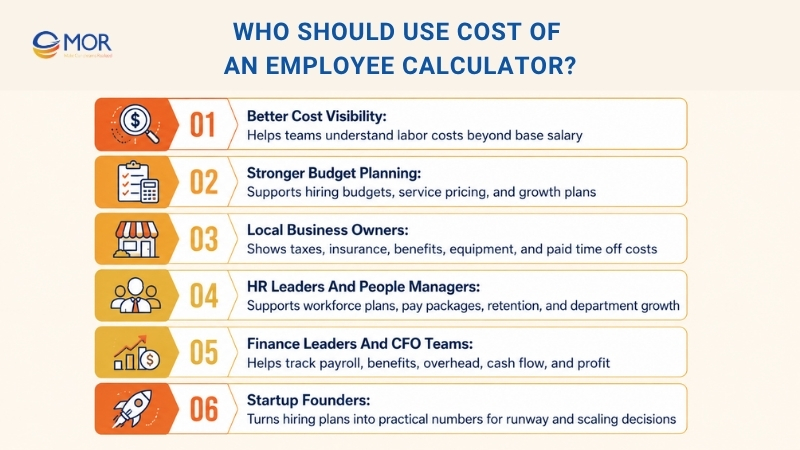
- Local Business Owners: Small business owners usually work with tight budgets and less room for hiring mistakes. This calculator helps show the real money tied to a new employee, including taxes, insurance, benefits, equipment, and paid time off. A more complete labor cost estimate helps companies avoid weak budgets and plan growth with more confidence.
- HR Leaders And People Managers: HR teams can use this tool to create practical workforce plans and longer-term hiring forecasts. They can look past base pay and review the full burden rate linked to each role. This supports better choices around recruitment plans, pay packages, retention work, and department growth.
- Finance Leaders And CFO Teams: Finance teams need accurate labor cost data to manage budgets, predict cash flow, and check profit across teams or business units. A cost tool helps CFOs see how payroll taxes, healthcare payments, retirement plans, and operating overhead shape total employee spend.
- Startup Founders: Startup founders often hire fast while watching investor targets and cash runway. A true employee cost tool turns fundraising plans into practical hiring numbers by showing the full cost behind each new position. This improves financial planning and lowers the risk of scaling too quickly without seeing future workforce costs.
Common Mistakes When Calculating Employee Costs
Employee cost planning can get complicated, and wrong numbers can create serious money problems. Businesses often make these mistakes:
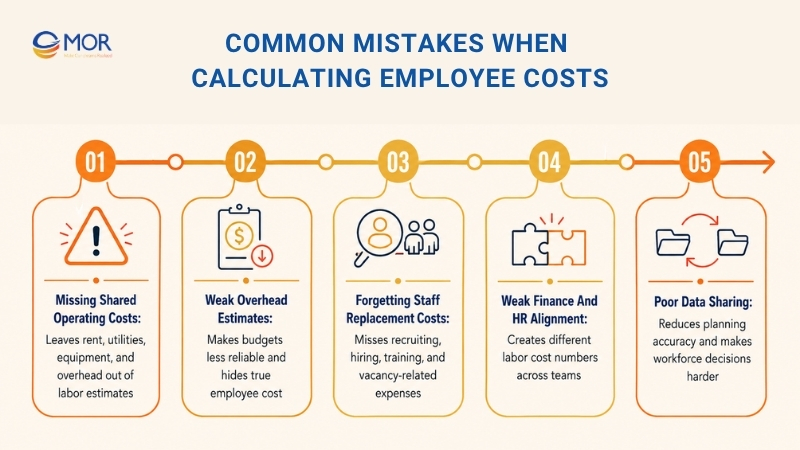
- Missing Shared Operating Costs: When rent, utilities, equipment, and other overhead are not assigned well to employee costs, the real labor number becomes unclear. Low overhead estimates can weaken budgets and make financial plans less reliable.
- Forgetting Staff Replacement Costs: Leaving out the cost of replacing employees, including recruiting, hiring, and training, can make total labor cost look too low. This mistake can leave teams without enough budget for staffing needs and create extra costs when people leave without warning.
- Weak Finance And HR Alignment: Poor data sharing between finance and HR can create different cost numbers across the company. When these teams do not work closely, labor cost data becomes less reliable, which makes financial planning and decisions harder. As Melissa Howatson, CFO of Vena, said in a recent episode of The CFO Show Podcast, “In most companies, people are one of the biggest things we spend money on, so not working with our [HR] experts on that side … is a missed opportunity.” A cost of an employee calculator helps reduce these gaps when teams use the same data.
Using A Cost Of An Employee Calculator For Workforce Planning
Hiring choices affect more than monthly payroll. Companies also have to count taxes, insurance, benefits, equipment, training, and future workforce costs that shape overall financial results. An employee cost calculator helps businesses estimate these expenses with more accuracy, giving leaders a clearer view for budgets, hiring plans, and business growth. The 30-60-90 rule for managers can also support this planning, since it connects early performance goals with the real cost of each new hire.
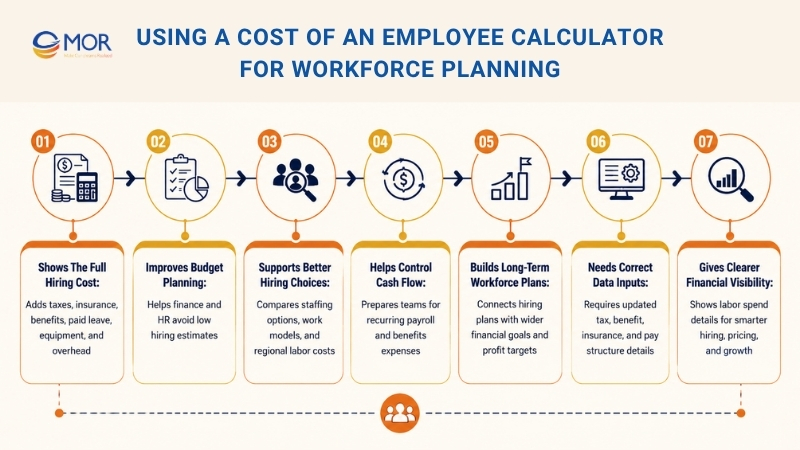
Shows The Full Hiring Cost
An employee cost calculator helps businesses estimate the full money tied to a new role, not just the base salary. It can include payroll taxes, insurance payments, retirement plans, paid leave, equipment, and admin overhead for a more realistic labor cost estimate.
Improves Budget Planning
Companies can use these tools to prepare stronger hiring budgets and workforce forecasts. Knowing the real cost per employee helps finance and HR teams avoid low estimates during growth or recruitment planning.
Supports Better Hiring Choices
Business owners and managers can compare different staffing options before making a decision. This may include full-time versus part-time roles, remote versus office-based employees, or labor costs across different regions.
Helps Control Cash Flow
Better employee cost estimates help businesses prepare for repeated payroll and benefits expenses. This supports stronger cash flow control and lowers the chance of surprise labor costs.
Builds Long-Term Workforce Plans
Startups, growing firms, and enterprise teams can connect hiring plans with wider financial goals. A clearer view of workforce spending helps companies grow in a more stable way while protecting profit targets.
Needs Correct Data Inputs
Good results depend on accurate details, including tax rates, benefit costs, insurance prices, and pay structures. Updating this information on a regular basis improves forecast quality and supports better planning decisions.
Gives Clearer Financial Visibility
Employee cost calculators show more detail on labor-related operating spend. This visibility helps leaders make smarter choices around hiring, pricing, resource planning, and company growth.
How To Optimize Global Workforce Cost Of An Employee Calculator
Running international teams can raise operating costs quickly when companies hire across many countries. Labor rules, tax systems, benefits, payroll duties, and currency changes all shape the full price of a global workforce. Companies that manage these areas closely often gain better cost control while still attracting and keeping skilled people around the world.
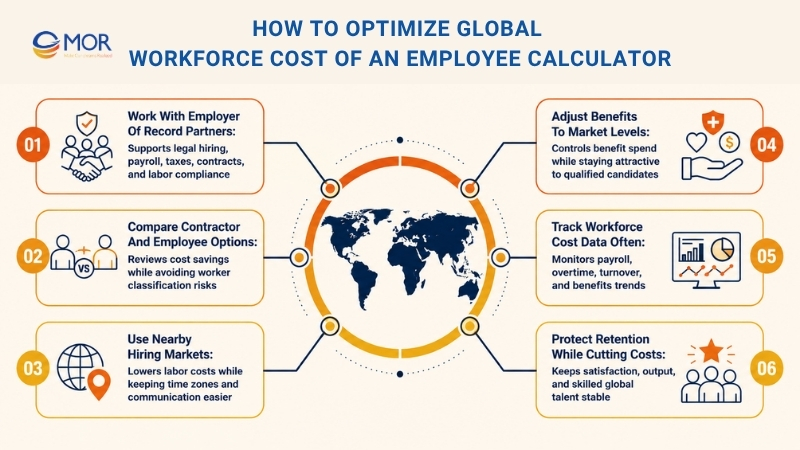
Work With Employer Of Record Partners
Employer of Record (EOR) providers let businesses hire legally in countries where they do not own a local entity. The EOR manages payroll, tax compliance, employment contracts, and labor rules for the company. This model lowers admin work and helps businesses enter new markets faster without building full legal operations.
Compare Contractor And Employee Options
Independent contractors may cost less because companies often do not pay employer taxes, healthcare, or long-term benefits for them. Still, businesses must follow local worker classification rules with care, since wrong classification can cause fines, legal issues, or tax problems in many markets.
Use Nearby Hiring Markets
Nearshoring helps companies hire talent in nearby countries with lower labor costs, while keeping similar time zones and easier communication. Places like Poland, Colombia, and Mexico are often chosen for nearshoring because they offer strong talent pools and lower operating costs than larger markets like the United States or Western Europe.
Adjust Benefits To Market Levels
Businesses can control labor costs when they compare benefits with market averages instead of always giving premium packages. Setting healthcare plans, retirement programs, bonuses, and other perks around the 50th to 75th percentile can lower total workforce spend while still staying attractive to qualified candidates.
Track Workforce Cost Data Often
Companies that review labor expenses often can see where costs are rising without clear value. Monitoring payroll trends, overtime, turnover, and benefits use helps leaders make better staffing and budget decisions over time.
Protect Retention While Cutting Costs
Lowering workforce costs should not hurt employee satisfaction or output. Businesses with fair pay, clear career paths, and supportive work settings tend to keep skilled global talent longer.
Tips For Managing Cost Of An Employee Calculator
Employee expenses can rise fast as companies grow teams, expand operations, or add new benefits and compliance duties. Cost control takes more than cutting payroll. Companies that focus on better planning, stronger operations, and smarter resource use can manage labor spend while keeping productivity and employee satisfaction healthy.
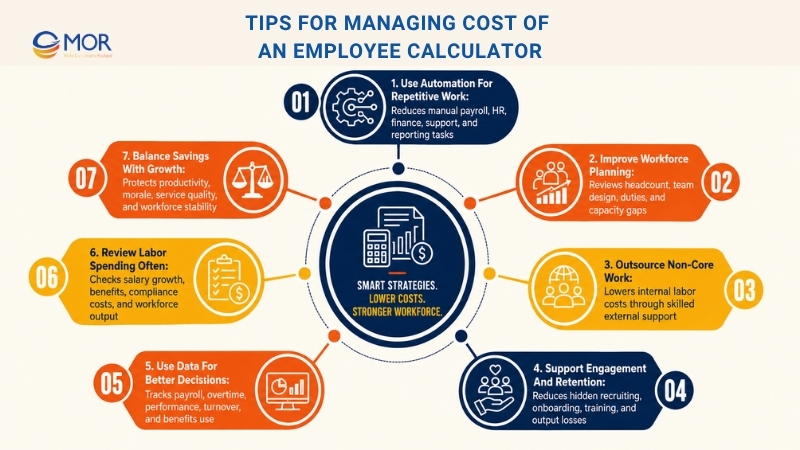
Use Automation For Repetitive Work
Automation tools can cut manual tasks across payroll, HR work, customer support, finance, and reporting. Automating time-heavy workflows helps companies raise output, lower admin costs, and let employees focus on work that brings more value.
Improve Workforce Planning
Reviewing headcount, team design, and employee duties can show where the company can work better. Businesses may find duplicate roles, unused capacity, or departments that need a new structure to match current needs and company goals.
Outsource Non-Core Work
Outsourcing work like payroll processing, IT support, accounting, customer service, or software development can lower internal labor costs. Companies also gain access to skilled support without paying the full long-term cost of building large internal teams.
Support Engagement And Retention
High turnover often creates hidden costs tied to recruiting, onboarding, training, and lost output. Career growth, strong benefits, recognition, and healthy work conditions can improve retention and lower long-term hiring costs.
Use Data For Better Decisions
Workforce analytics tools help companies track payroll trends, overtime, employee performance, turnover, and benefits use. Accurate labor cost data helps leaders make better operating and budget decisions based on real numbers.
Review Labor Spending Often
Employee expenses should be checked often, not only during yearly budget work. Watching salary growth, benefits costs, compliance costs, and workforce output helps businesses adjust early before labor spending becomes hard to manage.
Balance Savings With Growth
Cutting costs should not damage productivity, morale, or service quality. Businesses that manage spending while protecting workforce stability are better placed for steady growth and stronger operations.
Need A Custom Cost Of An Employee Calculator For Your Business?
A generic online tool works well for quick checks. But many businesses need a cost of an employee calculator that reflects real payroll rules, benefit plans, departments, locations, and hiring models.
That is where MOR Software can support your team. We build tailored web and mobile solutions for HR, finance, and operations teams that need better control over workforce cost planning.
Your calculator can include base salary, payroll taxes, health insurance, retirement contributions, paid leave, onboarding costs, equipment, software tools, office overhead, and turnover estimates. It can also compare full-time employees, contractors, offshore teams, and Employer of Record hiring models.
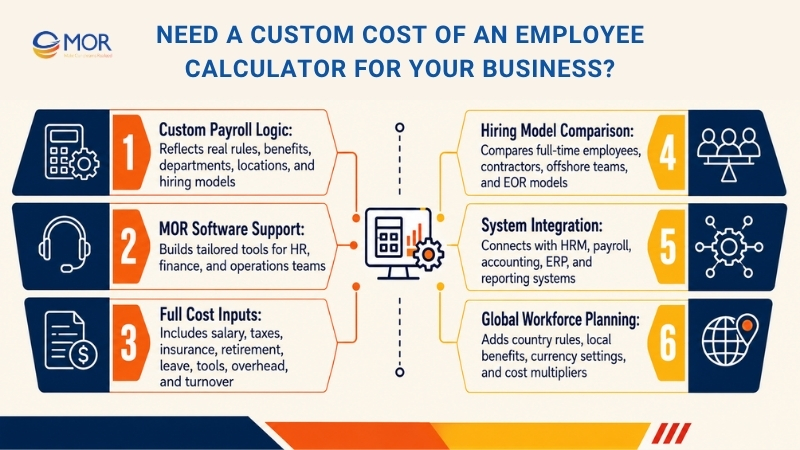
We can connect the tool with your HRM software, payroll management system, accounting, ERP, or reporting system. This helps HR and finance teams work from the same numbers instead of scattered spreadsheets.
For companies hiring across countries, a tailored calculator can also include country-based tax rules, local benefits, currency settings, and cost multipliers. That gives leaders a clearer view before they open a new role or expand a team.
MOR Software provides web development, mobile development, offshore development, software outsourcing, QC and testing, and IT consulting services. If your business needs a practical workforce cost tool, we can help turn it into a working product.
Conclusion
The real cost of hiring goes far beyond salary. Payroll taxes, benefits, equipment, onboarding, overhead, and turnover all shape your final workforce budget. A cost of an employee calculator helps businesses plan hiring with clearer numbers and fewer surprises. If your company needs a custom tool for HR, finance, or global workforce planning, MOR Software can help build it. Contact us to discuss your workforce cost calculator project today.
"Solutions Director at MOR Software, has extensive expertise in software development and management. He leads innovative projects and provides strategic solutions to enhance business operations, helping clients achieve digital transformation goals."
Pham Huu Canh


Solutions Director
MOR SOFTWARE
Frequently Asked Questions (FAQs)
What is a cost of an employee calculator?
A cost of an employee calculator is a tool that estimates the full cost of hiring or keeping an employee. It looks beyond salary and adds payroll taxes, benefits, paid leave, equipment, software, overhead, and other employer-paid costs.
How do you calculate the total cost of an employee?
Start with the employee’s salary or hourly wage. Then add payroll taxes, health insurance, retirement contributions, paid time off, bonuses, onboarding, training, equipment, software, and overhead. A quick estimate often uses 1.25 to 1.4 times the base salary.
What costs should be included beyond salary?
Beyond salary, employers should include payroll taxes, workers’ compensation, benefits, retirement plans, paid leave, bonuses, tools, office space, software, HR admin, recruiting, onboarding, and training. These costs give a truer view of the real hiring budget.
How much does an employee cost beyond their salary?
An employee often costs 25% to 40% more than their base salary. The final number depends on the role, benefits package, location, tax rules, industry, and company size. Some roles may cost far more when turnover or training is high.
Why does employee cost vary by country or location?
Employee cost changes by location because each country, state, or city has different tax rules, wage laws, social contributions, benefit standards, insurance costs, and living costs. A role with the same salary can cost much more in one market than another.
What hidden employer costs do businesses often miss?
Many businesses forget hidden costs like turnover, lost output during training, software licenses, equipment, compliance work, HR admin, office space, paid leave, and manager time. These costs may look small at first, but they add up fast.
How can HR and finance teams use an employee cost calculator for planning?
HR and finance teams can use the tool to compare hiring scenarios, plan headcount, forecast payroll, check budget limits, and review workforce costs by role, department, or location. It helps both teams work from the same set of numbers.
Is a cost of an employee calculator the same as a paycheck calculator?
No. A paycheck calculator estimates employee take-home pay after taxes and deductions. A cost of an employee calculator estimates what the employer pays in total, including salary, taxes, benefits, overhead, and other business costs.
Share


Make Our-Dreams Realized


© 2023 . MOR Software. All Rights Reserved
Sitemap
Privacy Policy
Terms of Use

Rate this article
0
over 5.0 based on 0 reviews
Your rating on this news:
Name
*Email
*Write your comment
*Send your comment
1