


How to Integrate AI Into an App: Step-by-Step Guide for 2026
AI integration connects an app’s frontend, backend, data, and workflows with machine learning models or AI services at selected decision points. Most teams don’t need to train a model from scratch when learning how to integrate AI into an app. APIs, pre-trained models, Retrieval-Augmented Generation (RAG), cloud AI, and on-device models cover many production needs. Gartner expects 40% of enterprise applications to include task-specific AI agents by the end of 2026, up from less than 5% in 2025. This MOR Software guide will map the process from use-case selection and architecture to testing, rollout, and long-term operation.
Key Takeaways
- Start with a narrow business problem and measurable baseline. The right AI model comes later, after you know what users need and what outcome the application must improve.
- Treat data, architecture, UX, security, and model behavior as one delivery scope. An API connection alone doesn’t make an AI function ready for real users.
- Plan post-launch work before release. AI quality, latency, data distribution, API pricing, and user behavior change, so monitoring and model management belong in the product roadmap.
What Does AI Integration Into an App Mean?
AI integration means connecting an application to a model that can classify, predict, rank, recognize, retrieve, or generate information. The model becomes one component inside the existing application architecture rather than replacing the whole product.
A common flow looks like this: the user sends an input through the app interface, the backend validates it, relevant data is added, the model processes the request, and the application checks the result before showing or acting on it. A RAG system may insert another layer that retrieves trusted documents before the model produces an answer.
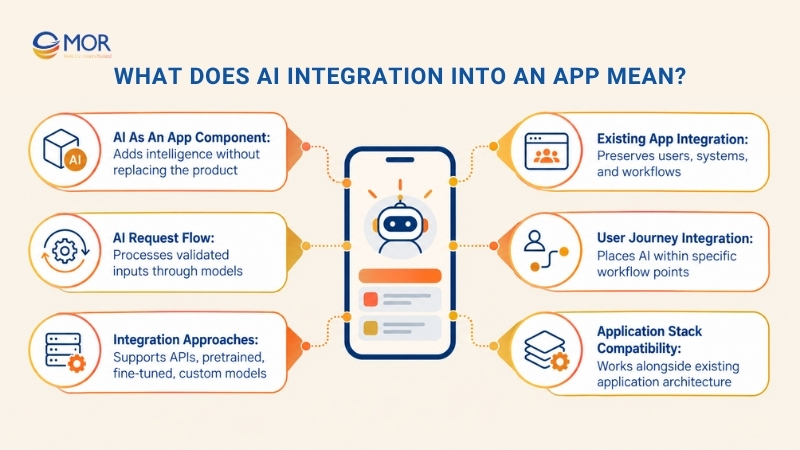
Teams researching how to integrate AI into an app usually have several technical routes. They can call a third-party AI API, deploy a pre-trained model, fine-tune an existing model, train a custom machine learning model, or run a compact model on the user’s device.
Adding AI to an existing application also differs from creating an AI-native product. An existing app already has users, authentication, databases, APIs, business logic, permissions, and operational dependencies. The AI component must fit those systems without breaking established workflows.
The same principle applies when deciding how to incorporate AI into an app. Start at a specific point in the user journey. A support assistant may sit behind the existing help interface, whereas a recommendation model may run quietly after a user views a product.
For web products, AI can sit beside the normal application stack rather than dictate it. Teams planning larger upgrades can compare the requirements of custom web app development services before deciding how much of the existing system needs to change.
Benefits of Integrating AI Into Your App
AI works best when it removes friction from an existing task. Stanford’s 2025 AI Index reported that organizational AI use rose from 55% in 2023 to 78% in 2024, while generative AI use in at least one business function rose from 33% to 71%.
The value depends on where the model enters the workflow.
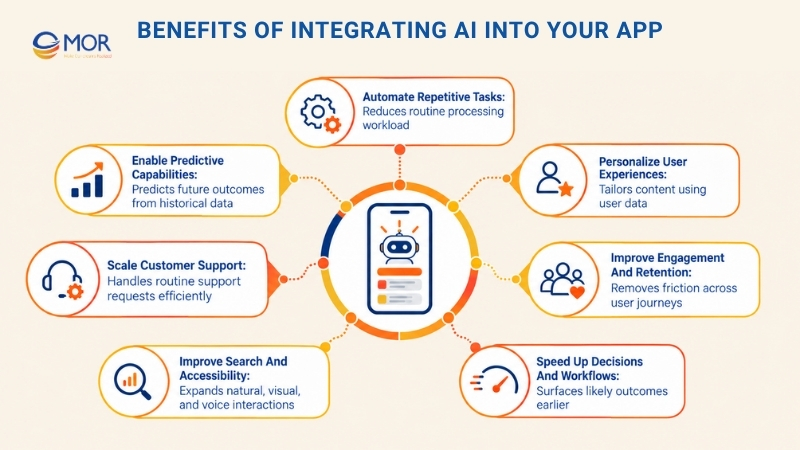
- Automate repetitive tasks: AI can classify tickets, extract document fields, summarize calls, process incoming requests, or route work to the right team. Staff spend less time on repeatable processing and more time on cases that need judgment.
- Personalize user experiences: Recommendation models can rank products, articles, lessons, or actions according to behavior and account data. The result is a product that responds to each user rather than showing the same sequence to everyone.
- Improve engagement and retention: Relevant suggestions, faster support, smarter search, and shorter task flows remove friction at points where users often leave. Product teams can then measure changes through retention, task completion, repeat usage, or conversion.
- Speed up decisions and workflows: Machine learning can process large data sets and surface likely outcomes earlier. Fraud scoring, churn prediction, demand forecasting, and risk classification are common cases.
- Improve search and accessibility: Natural-language search, speech recognition, transcription, translation, OCR, and image recognition create new ways to interact with an application. These functions also help users who find traditional menus or text entry difficult.
- Scale customer support: AI assistants can answer routine questions, find information, summarize account history, and prepare responses. Human agents remain available for complex or sensitive cases.
- Enable predictive capabilities: Historical data can support predictions about demand, fraud, equipment failure, customer churn, or the user’s likely next action. Predictions become useful when the application connects them to a timely decision.
How to Integrate AI Into an App: 10 Practical Steps
A production AI function touches product planning, data, application architecture, UX, security, QA, deployment, and monitoring. Teams learning how to integrate AI into an app should plan these areas together before committing to a model or platform.
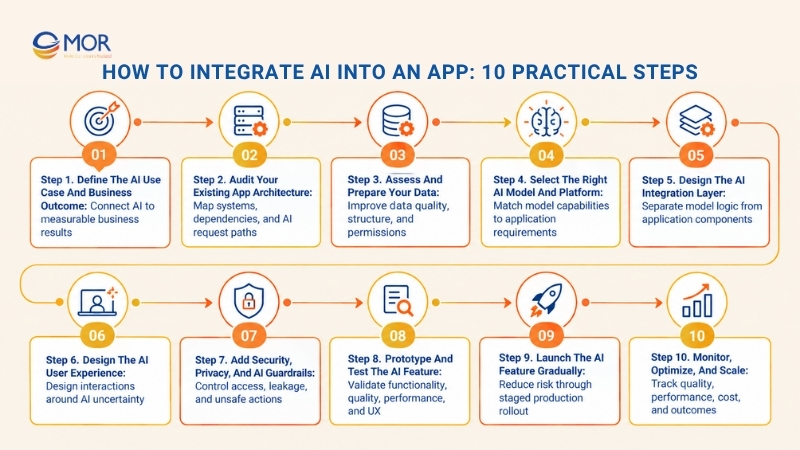
Step 1. Define the AI use case and business outcome
Start with the problem users already face. McKinsey reported in its 2025 State of AI survey that 88% of respondents said their organizations regularly used AI in at least one business function, yet only about one-third had begun scaling AI programs. Broad adoption doesn’t automatically translate into scaled value.
A precise use case keeps the project tied to a result. Asking how to include AI in an app should lead to a business question, not a model shortlist.
- User problem: Map tasks where users wait, repeat the same actions, search manually, or make decisions using scattered information.
- AI suitability: Check whether probabilistic AI adds value over normal rules, search filters, SQL logic, or workflow automation.
- Business outcome: Connect the proposed function to revenue, conversion, retention, support deflection, processing time, or staff productivity.
- Success metrics: Record the current baseline. Useful measures include task completion rate, handling time, error rate, search success, conversion, latency, and cost per completed task.
- Scope: Pick one narrow workflow for the first release. A support summarizer is easier to test than an assistant allowed to modify customer accounts autonomously.
A well-scoped use case also makes later model evaluation easier. Your team knows what 'good' means before seeing model outputs.
Step 2. Audit your existing app architecture
Review the system before adding model calls. Older applications often contain dependencies that don’t appear in product diagrams, including batch jobs, legacy APIs, hard-coded business rules, third-party authentication, and database triggers.
Map the path an AI request will follow and identify every system it touches. This prevents a promising prototype from becoming a production bottleneck.
- Frontend: Decide where users enter prompts, upload data, review suggestions, or approve AI-generated actions.
- Backend: Review API gateways, authentication, services, queues, rate limits, caching, and processing capacity.
- Database: Define where conversation history, embeddings, generated outputs, evaluations, and feedback records belong.
- Infrastructure: Assess cloud services, compute requirements, GPUs, serverless functions, storage, and on-device processing.
- Dependencies: Document CRM, ERP, payment, analytics, identity, and legacy systems that supply or consume information.
- Fallbacks: Define normal application behavior when the AI provider times out, returns an invalid response, or becomes unavailable.
Architecture choices also depend on the technology already in the product. Our guide to top web development tech stacks can help teams map frontend, backend, database, and infrastructure choices before introducing an AI service.
Step 3. Assess and prepare your data
Model quality is tied to the information it receives. A strong model can still return weak results when product data contains duplicates, missing values, stale documents, conflicting permissions, or poorly structured text.
Start by cataloging the data required for the chosen use case. Then trace where it comes from, who owns it, how often it changes, and which users may access it.
- Available data: Review user events, CRM records, product data, documents, tickets, logs, transactions, images, audio, and sensor feeds.
- Data quality: Remove duplicates, correct invalid values, resolve conflicting records, and identify outdated material.
- Structure: Normalize fields and label training examples where the use case needs supervised learning.
- Consent: Confirm that collection and model processing match user agreements and applicable data rules.
- Privacy: Strip personal or sensitive fields when the model doesn’t need them.
- Pipeline: Create a repeatable process for ingestion, validation, transformation, indexing, and updates.
RAG projects need extra attention here. Retrieval quality depends on document splitting, metadata, permissions, embedding strategy, indexing, and ranking, not only on the language model.
Step 4. Select the right AI model and platform
Match the technology to the task instead of starting with the largest model available. NLP fits text classification and language tasks, computer vision works with images and video, speech models process audio, and predictive ML handles outcomes based on historical patterns.
Generative AI is useful when the output must be created rather than selected from a fixed set. Yet a smaller classifier may be cheaper and faster when the task only needs categories.
- Capability: Test whether the model supports the task, data type, language, response structure, and domain.
- Quality: Benchmark candidate models against real examples from the application rather than relying on public benchmark scores alone.
- Latency: Test response time under expected traffic and payload sizes.
- Cost: Estimate inference, token, GPU, storage, retrieval, and network expenses at realistic usage volumes.
- Privacy: Review retention settings, training policies, regional hosting, and enterprise controls from the model provider.
- Scalability: Check quotas, concurrency, deployment regions, fallback models, and capacity limits.
Your application stack also affects model integration work. Teams comparing backend options can review the best web development frameworks before fixing the final integration architecture.
Step 5. Design the AI integration layer
The integration layer separates the model from the rest of the application. It receives requests, applies permissions, assembles input, calls the model, checks outputs, records metrics, and returns a response in a structure the product understands.
This layer answers the practical question of how to embed AI into an app without letting model-specific logic spread across frontend and backend code.
- Internal API: Route model requests through backend services when authentication, private data, business rules, or provider keys are involved.
- Input validation: Check data types, lengths, allowed file formats, and malicious instructions before sending information to the model.
- Context management: Send only the data needed for the request. Large prompts raise latency, cost, and the chance of irrelevant output.
- RAG: Retrieve approved documents or database records when answers must reflect private company information.
- Output processing: Parse structured responses, check required fields, validate citations, apply business rules, and block invalid actions.
- Reliability: Add timeouts, retries, caching, queues, model fallback, and safe default responses.
The same pattern works for AI website integration. A web interface sends the request to an internal service, the service manages model and data access, and the browser receives only the result needed for the user flow.
Step 6. Design the AI user experience
AI output isn’t deterministic, so interface design has to account for uncertainty. Users need to know what the system is doing, how long it may take, and what they can do when a result is wrong.
Figma’s 2025 AI report surveyed 2,500 product builders and found that one in three respondents were launching AI-powered products that year, up 50% from the previous year. The product question has moved beyond whether teams will add AI. Execution quality now carries more weight.
- Transparency: Label AI-generated summaries, recommendations, predictions, or drafts where users need that information.
- Loading states: Show clear progress when model inference takes longer than a normal API call.
- Editable outputs: Let users correct generated text, classifications, recommendations, and extracted fields.
- Feedback controls: Capture ratings, corrections, rejected answers, and user comments for evaluation.
- Human escalation: Route uncertain or high-risk cases to staff with the right authority.
- Error recovery: Give users a useful fallback when a model fails instead of ending the workflow.
A good AI interface also sets expectations. A button labeled 'Draft reply' creates a clearer mental model than a vague 'Ask AI' control placed beside a sensitive workflow.
Step 7. Add security, privacy, and AI guardrails
AI adds new attack paths beside the normal application risks. Prompt injection, data leakage, unauthorized tool calls, poisoned knowledge sources, and over-permissioned agents all need technical controls.
IBM’s 2026 Cost of a Data Breach report found that one in four malicious breaches were AI-enabled, and more than 20% of organizations reported a breach targeting AI models or applications. Those AI-enabled malicious breaches cost an average of $6 million.
- Encryption: Protect model inputs, retrieved documents, logs, and outputs during transfer and storage.
- Access control: Apply existing user and role permissions before retrieving data or allowing an AI action.
- Prompt security: Detect suspicious instructions and separate trusted system rules from untrusted user or document content.
- Data leakage: Prevent private records from appearing in responses to unauthorized users.
- Guardrails: Set blocked actions, allowed tools, output schemas, approval requirements, and confidence thresholds.
- Compliance: Map data handling to GDPR, HIPAA, financial rules, contractual requirements, or local regulations that apply to the product.
Agentic workflows need tighter permission boundaries than a text summarizer. Give each agent access only to the data and actions required for its assigned task.
Step 8. Prototype and test the AI feature
Build a small working version before connecting AI to every part of the application. A prototype exposes problems in data access, model behavior, latency, UX, and cost earlier.
Normal QA still applies, but AI evaluation adds another layer. The system can run without software errors and still produce a poor answer.
- Functional testing: Check authentication, API calls, response parsing, data writes, fallbacks, and user actions.
- AI evaluation: Measure answer relevance, accuracy, groundedness, consistency, refusal behavior, and hallucination rate.
- Edge cases: Test incomplete instructions, slang, conflicting information, malformed files, adversarial prompts, and unusual user behavior.
- Performance: Measure latency, concurrent requests, throughput, failure rate, and resource use.
- UX testing: Watch how real users interpret model suggestions, uncertainty, and errors.
- A/B testing: Compare the AI-assisted journey with the original workflow using the same business metric.
Testing should use real or representative application data. Synthetic examples alone tend to miss messy inputs that users create in production.
Step 9. Launch the AI feature gradually
A staged release limits the number of users exposed to early failures. It also gives the team real production data without committing the whole user base at once.
Start internally, move to selected customers, and widen access only when quality and system metrics remain within agreed limits.
- Internal testing: Let product, engineering, QA, support, and domain experts use the function first.
- Closed beta: Give access to users who understand the test status and can provide useful feedback.
- Limited rollout: Release to a small percentage of production traffic and compare behavior with the control group.
- Feature flags: Keep a switch that can disable the AI path without deploying new application code.
- User education: Explain what the AI can do, where human review remains necessary, and how users can correct results.
- Feedback: Record failure patterns, rejected answers, edits, support requests, and unexpected use cases.
A gradual release also protects cost forecasts. Actual prompt sizes, retry rates, and user frequency often differ from assumptions made during planning.
Step 10. Monitor, optimize, and scale
Deployment starts the operational phase. Teams that know how to integrate AI into an app also plan how they’ll measure its behavior after users, data, prompts, and provider models change.
Track model metrics beside normal application monitoring. A technically healthy service can still return poorer answers over time.
- Model quality: Monitor accuracy, relevance, groundedness, hallucination, refusal rate, and drift.
- System performance: Track latency, errors, throughput, queue time, and uptime.
- Business KPIs: Compare conversion, retention, handling time, task completion, support deflection, or productivity against the original baseline.
- Cost: Track tokens, inference, GPUs, vector storage, API requests, network transfer, and observability tools.
- Feedback loops: Use user corrections and reviewed outputs to improve prompts, retrieval rules, evaluations, or training data.
- Model lifecycle: Retest models after provider updates and replace, fine-tune, or downgrade them when economics or quality change.
Monitoring should connect technical alerts to business effects. A 300 ms latency increase may be harmless in a nightly report generator but damaging in real-time search.
Which AI Integration Approach Should You Choose?
There’s no single architecture for every AI project. Time to market, model control, privacy, data volume, latency, budget, and engineering capacity should drive the decision.
Approach | Best for | Development effort | Control | Data requirement | Key trade-off |
AI API | MVPs and common AI functions | Low | Low-medium | Low | Fastest launch |
API + RAG | Private knowledge and grounded answers | Medium | Medium-high | Medium | Retrieval infrastructure needed |
Fine-tuned model | Domain-specific behavior | Medium-high | High | Medium-high | Training and evaluation overhead |
Custom model | Specialized or high-stakes tasks | High | Very high | High | Highest cost and complexity |
On-device AI | Offline use, privacy, low latency | Medium-high | High | Varies | Device limits |
Hybrid AI | Large production systems | High | Very high | Varies | More architecture work |
AI APIs suit fast MVP development, while API + RAG fits apps that need answers grounded in private business data. Fine-tuned and custom models provide more control for domain-specific tasks but require more data, testing, and maintenance. On-device and hybrid AI work well when privacy, offline access, or low latency matters.
If you’re researching how to integrate AI into an app for free, use free API tiers, open-source models, or local development environments for a prototype. Production still brings hosting, storage, testing, monitoring, security, and maintenance costs. The same trade-off appears when building a website without coding: low-cost prototyping doesn’t remove production engineering requirements.
Common AI Integration Challenges and Solutions
Production issues usually appear where AI meets imperfect data, live users, infrastructure limits, and existing permissions. Addressing those points early saves costly rework later.
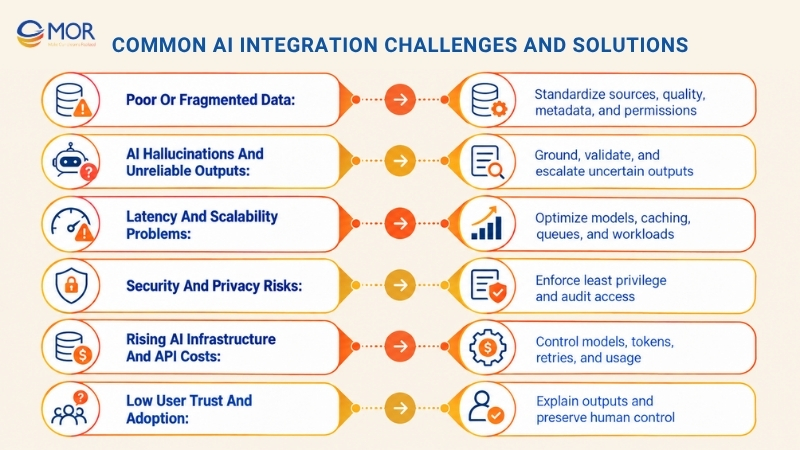
Poor or fragmented data
Data may sit across CRM systems, databases, documents, spreadsheets, and legacy applications. Inconsistent naming, stale records, missing metadata, and permission gaps weaken model outputs and RAG retrieval.
- Create a data inventory: Map sources, owners, formats, access rules, and update frequency.
- Set quality checks: Test completeness, duplication, freshness, schema validity, and retrieval coverage.
- Keep permissions attached: Preserve source-level access rules when documents move into an AI index.
AI hallucinations and unreliable outputs
Generative models can produce confident text that isn’t supported by application data. High-risk workflows need stronger checks than low-risk drafting tools.
- Ground answers: Retrieve approved data before generation where factual accuracy matters.
- Validate outputs: Apply schemas, business rules, confidence scores, and source checks.
- Escalate uncertainty: Send unclear cases to a person instead of forcing an automated decision.
Latency and scalability problems
Large models, long prompts, retrieval calls, and tool use can make an AI flow much slower than a normal application request. Traffic spikes can also expose provider quotas or compute limits.
- Use smaller models: Route simple tasks to faster, cheaper models.
- Cache repeatable work: Reuse summaries, embeddings, or responses that don’t need real-time generation.
- Move long tasks off the request path: Queues and background jobs fit document processing or batch analysis.
Security and privacy risks
An AI service may access information spread across several systems. That raises the cost of weak permissions because one model response can combine data users couldn’t previously see in one place.
- Apply least privilege: Give models and agents the minimum data and tools required.
- Filter sensitive data: Remove private fields before sending requests to external services.
- Keep audit records: Log model access, retrieved data, actions, and human approvals.
Rising AI infrastructure and API costs
A prototype may look cheap at low traffic, then become expensive after usage grows. Long prompts, repeated retrieval, large models, retries, and agent loops all add cost.
- Measure cost per task: Tie AI spend to a completed user or business action.
- Route requests: Reserve larger models for work that actually needs them.
- Set usage controls: Limit loops, token budgets, retrieval depth, and retry counts.
For broader planning, web application development costs can help teams compare AI work against the rest of the application budget.
Low user trust and adoption
Users stop relying on an AI function when they can’t understand or correct it. One wrong answer in a sensitive workflow can outweigh dozens of correct ones.
- Explain AI-generated output: Tell users when a result comes from AI and where its information came from.
- Allow correction: Make generated text, classifications, and recommendations editable.
- Keep human override: Preserve manual control for consequential actions.
Best Practices for Production-Ready AI Integration
A reliable AI function needs boundaries, measurable goals, and operational ownership. The following practices keep the system easier to test and maintain after launch.
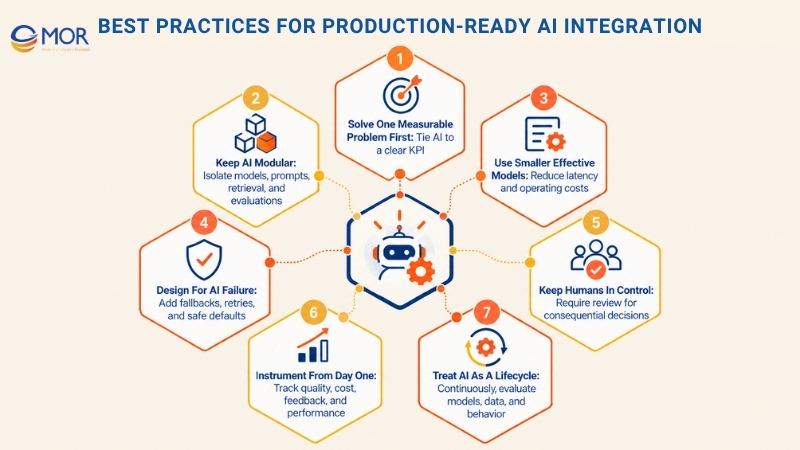
- Solve one measurable problem first: Start where AI can change a known KPI. A narrow success case creates evidence for later investment.
- Keep AI modular: Put model calls, prompt logic, retrieval, evaluations, and provider-specific code behind a defined service boundary. Model replacement then requires fewer changes across the application.
- Use the smallest effective model: A larger model costs more and often responds more slowly. Benchmark smaller alternatives before assigning every task to the most capable endpoint.
- Design for AI failure: Set timeouts, fallbacks, retries, safe defaults, and rollback paths. The product still needs a useful response when the model is unavailable.
- Keep humans in control: Require review for financial, medical, legal, access-control, or other consequential actions. Automation can prepare the decision without owning every decision.
- Minimize data exposure: Send the smallest amount of user and business data needed for each request. This lowers privacy risk and often cuts token usage too.
- Instrument from day one: Log latency, model version, retrieval results, output quality, user feedback, cost, and business outcome. Debugging becomes far easier when these signals already exist.
- Test real-world inputs: Include typos, slang, incomplete requests, conflicting data, long documents, malicious prompts, and low-quality uploads.
- Roll out progressively: Start with internal users, then controlled groups, then wider traffic. Feature flags make rollback faster when a regression appears.
- Treat AI as a lifecycle: Prompts, models, retrieval data, pricing, regulations, and user behavior change. Assign ownership for evaluation and maintenance after release.
Build AI Features Faster and Smarter with MOR Software
MOR Software JSC supports AI work as part of the wider software delivery cycle. Our services cover AI development alongside web development, mobile development, software outsourcing, QA/testing, and IT consulting.
That matters when an AI idea depends on existing applications, APIs, user flows, cloud infrastructure, and production QA rather than a standalone model.
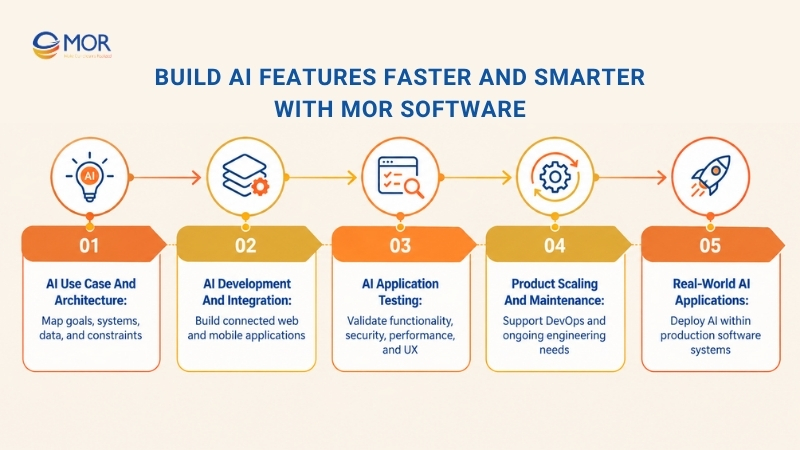
- Plan the AI use case and architecture: Our business analysts and engineers review business goals, current systems, data flows, APIs, permissions, and technical constraints before development.
- Develop and integrate AI functions: We build mobile and web applications, connect backend services and third-party systems, and work with technologies including AI, cloud, and IoT. MOR Software’s mobile service materials also cover backend and third-party integration as part of application delivery.
- Test AI-enabled applications: Our delivery scope can include functional, performance, security, integration, accessibility, and UX testing. Testing covers the software layer around the model as well as the way the application handles model responses.
- Scale and maintain the product: MOR supports maintenance, DevOps, offshore development, and dedicated engineering teams for projects that need ongoing development capacity. Our offshore model also allows clients to adjust team composition as project needs change.
- Apply AI in real applications: In one healthcare mobile project, our team trained AI models to detect spam reviews and used AWS for the application infrastructure. The scope also covered requirements, UI/UX, backend, frontend, system integration, and performance work.
Companies comparing external delivery options can also review top web development outsourcing companies before selecting a partner for the broader application scope.
Conclusion
Knowing how to integrate AI into an app starts with a focused use case, clean data, a suitable model, reliable architecture, strong testing, and measurable production monitoring. The model itself is only one part of the product. MOR Software can support the work across AI development, application engineering, integration, QA, cloud, and long-term delivery.
If you’re planning an AI function for a new or existing product, contact us to discuss the use case, architecture, timeline, and development scope.
"Evolution is not a destination, it is a disciplined journey of innovation."
Phung Van Tu


CEO MOR AI
MOR SOFTWARE
Frequently Asked Questions (FAQs)
Can AI be added to an existing app without rebuilding it?
Yes. Most existing applications can add AI through APIs, backend services, RAG, or on-device models without a full rebuild. The team should first review the current backend, data sources, permissions, infrastructure, and UX to find the safest integration point.
What is the easiest way to integrate AI into an app?
An external AI API is usually the simplest starting point. Your backend sends a structured request to a pre-trained model and processes the result before returning it to the application. This route avoids model training and infrastructure management during an early release.
Should I use an AI API or build a custom model?
Choose an API when the task is common and speed matters. Consider a custom or fine-tuned model when you need specialized performance, tighter data control, domain-specific behavior, or economics that justify owning more of the model lifecycle.
What data do I need to integrate AI into an app?
The data depends on the task. Predictive ML needs relevant historical examples, RAG needs accurate documents or records, and generative API functions may only need runtime input. In every case, data should be current, permitted, structured enough for processing, and tested for quality.
How much does it cost to integrate AI into an app?
A basic AI API function often falls around 10,000-40,000, while RAG systems may reach 30,000-120,000. Fine-tuned systems can run 40,000-150,000+, custom ML projects around 100,000-300,000+, and enterprise integrations can exceed $400,000. Scope, data work, security, integrations, and scale drive the final budget.
How long does AI integration take?
A focused API integration may take roughly 2-6 weeks. RAG systems often need 6-14 weeks, fine-tuning may take 10-26 weeks, and custom machine learning projects commonly run 3-6 months. Enterprise programs involving legacy systems and strict controls may require 6-18 months.
How do I protect user data when integrating AI?
Keep model access behind authenticated backend services, apply least-privilege permissions, encrypt stored and transferred data, remove unnecessary personal information, and review the AI provider’s retention policy. Logs should also record who accessed data and what automated action occurred.
Can AI run directly on a mobile device?
Yes. Compact machine learning and generative models can run on supported phones for tasks involving vision, speech, classification, or text. On-device processing improves privacy, offline access, and latency, but memory, battery, model size, and hardware capability limit what can run locally.
How do I measure whether an AI feature is successful?
Compare it against the pre-AI baseline. Track model quality, latency, error rate, adoption, task completion, user corrections, cost per task, and the business KPI the project was created to change, for example retention, support handling time, conversion, or fraud detection rate.
What should an app do when the AI gives a wrong answer?
The app needs a recovery path. Let users edit or reject output, provide a normal non-AI fallback, route uncertain cases to staff, and record the failure for later evaluation. High-risk actions should require stronger validation or human approval before execution.
Share


Make Our-Dreams Realized


© 2023 . MOR Software. All Rights Reserved
Sitemap
Privacy Policy
Terms of Use

Rate this article
0
over 5.0 based on 0 reviews
Your rating on this news:
Name
*Email
*Write your comment
*Send your comment
1