


Top 10 LLM Security Risks You Must Know (With Mitigation Tips)
LLM security risks can expose private data, weaken business systems, and let attackers control connected tools. Prompt injection, model poisoning, data leaks, and unsafe agent actions now affect many enterprise AI projects. In this guide, MOR Software will explain the top threats, real cases, and practical controls that help teams build safer LLM applications before they reach production.
Key Takeaways
- The top LLM risks include prompt injection, data exposure, supply chain attacks, model poisoning, unsafe outputs, excessive agency, prompt leakage, retrieval weaknesses, false answers, and resource abuse.
- Agent-based AI creates extra threats through shared memory, connected tools, MCP servers, and actions that can change real business data.
- Strong protection starts early. Teams need input checks, access rules, model testing, guardrails, secure cloud setup, activity logs, and human approval for high-risk actions.
What Are LLM Security?
LLM security includes the methods, controls, and tools used to protect apps powered by large language models from data exposure, illegal access, prompt attacks, and other AI-based threats. Managing LLM security risks means protecting the application, model, prompts, business data, and every outside service the system can reach.
Large language models create new security challenges since their answers can change, their commands arrive through normal language, and they often connect with knowledge stores, APIs, or external enterprise AI platforms. These traits introduce attack paths that traditional software does not usually face.
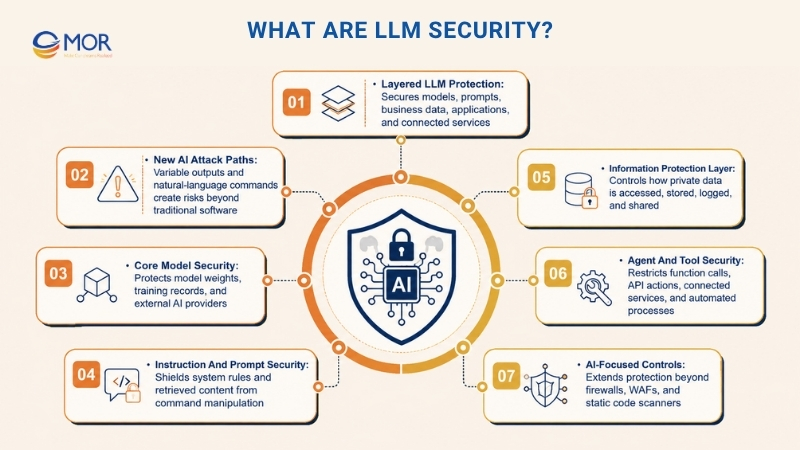
An LLM-powered application can create LLM security vulnerabilities across four main layers:
- Core model security: This layer covers the base model, its training records, model weights, and any outside AI automation provider involved in the system.
- Instruction and prompt security: This area protects system directions, user messages, retrieved files, and other text against prompt injection or command changes.
- Information protection layer: This layer manages how private data is viewed, saved, cached, recorded in logs, and passed into the model.
- Agent and tool security: This area protects function calls, connected services, API actions, and automated processes that let the model act outside a chat window.
This attack surface reaches much further than a standard website or business app, so firewalls, WAFs, and static code scanners cannot cover every weakness. LLM applications need AI-focused controls across the model, data, prompts, agent actions, and every connected tool.
How LLM Security Risks Differ From Traditional AppSec
Traditional AppSec focuses on predictable code, clear input fields, and known software dependencies. LLM security risks create a different problem since language can carry commands, outputs can change, and many LLM security issues depend on meaning rather than fixed attack patterns.
Comparison Area | Standard Application Security | LLM Application Security |
System response | A repeated input normally produces the same result | One prompt can lead to different answers across separate runs |
User input | Data enters through fixed fields with validation rules | Open text can contain commands from anyone who shapes the prompt |
Instructions and content | Programs usually keep executable code separate from stored data | The model may read any piece of text as an instruction |
External dependency chain | Teams can inspect and manage known packages | A third party may host a closed model that customers cannot review |
Threat discovery | Rules, signatures, scanners, and WAF checks catch known patterns | Teams must judge intent and meaning, which fixed signatures often miss |
OWASP Top 10 LLM Security Risks (2026 Update)
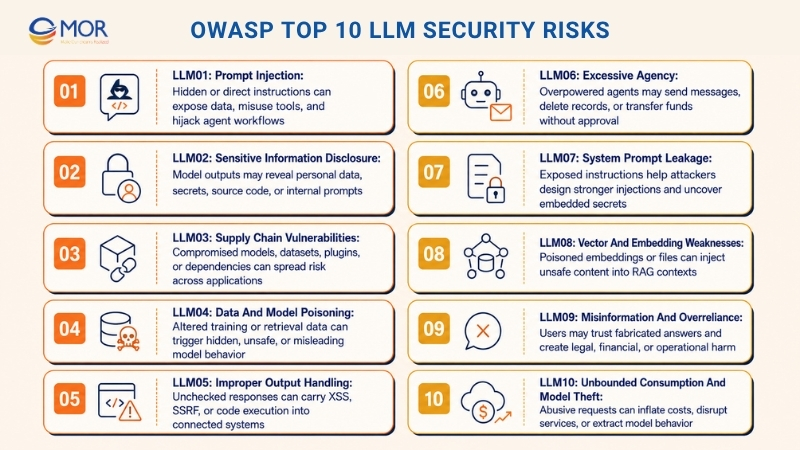
The OWASP Top 10 for Large Language Model Applications has become a common reference for classifying weaknesses in LLM-based products. Its 2025 revision shows a move toward agent attacks, unsafe tool use, and model supply chain failures. Business and technical leaders can use the OWASP LLM security risks list to review major threats before approving a production launch.
Each threat carries a different chance and level of harm. The table gives a working view of LLM security risks 2026, arranged according to the relevant OWASP ID:
Security Risk | OWASP Code | Chance | Business Severity |
| Prompt Injection | LLM01 | High | High |
| Sensitive Information Disclosure | LLM02 | High | Severe |
| Supply Chain Vulnerabilities | LLM03 | Medium | Severe |
| Data And Model Poisoning | LLM04 | Low | Severe |
| Improper Output Handling | LLM05 | High | High |
| Excessive Agency | LLM06 | High | Severe |
| System Prompt Leakage | LLM07 | High | Medium |
| Vector And Embedding Weaknesses | LLM08 | Medium | High |
| Misinformation And Overreliance | LLM09 | High | Medium* |
| Unbounded Consumption And Model Theft | LLM10 | High | Medium |
Hallucinated answers can reach High or Severe levels in healthcare, law, and finance, where the company may carry responsibility for harmful advice.
The sections below explain each threat, its business effect, and the controls that can limit it. Together, these ten weaknesses cover the main attack paths found in an LLM system released in 2026.
LLM01: Prompt Injection
- How the attack works: Teams reviewing LLM security risks prompt injection usually divide the threat into two forms. Direct prompt injection enters through a user message. Indirect attacks hide commands inside documents, websites, emails, or API results that the model later reads.
- Why teams should care: Prompt injection remains one of the most common attacks against LLM apps in 2026. Normal language carries the harmful command, which makes simple filters weak. A successful attack may expose business data, run an unapproved tool, or take control of an agent workflow.
- Ways to limit it: Keep system directions separate from user content, mark each content type with clear boundaries, scan suspicious prompts, and require permission before any model response can trigger a tool action, see Engineering Mitigations > Input Layer.
LLM02: Sensitive Information Disclosure
- What the weakness means: Sensitive information disclosure occurs when a model returns private or restricted details in its answer. This data may include personal records, internal source code, hidden advanced prompt engineering, login details, or company information. The content may come from training memory or data stored in the current session.
- Why teams should care: One leak may lead to GDPR penalties worth up to 4% of annual revenue, while the EU AI Act allows certain fines of up to 7%. Samsung restricted ChatGPT after staff members shared confidential code with the service. Teams should treat model output as a possible channel for data theft.
- Ways to limit it: Filter responses for personal data and secrets, hide restricted fields based on user roles, and apply access rules to every file or record available to the model, see Data Layer.
LLM03: Supply Chain Vulnerabilities
- What the weakness means: Supply chain weaknesses are LLM security risks created by compromised ml models, poisoned data, harmful plugins, changed tokenizers, or other unsafe external parts. Any outside component loaded by the application can introduce this type of exposure.
- Why teams should care: Most business LLM products depend on a model provider, open-source packages, and an embedding process. One infected dependency can spread into every application that uses it. Researchers found close to 100 suspicious models on Hugging Face in 2024, with malicious code present in several files.
- Ways to limit it: Lock model versions, verify file hashes, check the origin of outside models and weights, and assess each provider’s security record before adding it to the product, see Model Layer.
LLM04: Data And Model Poisoning
- How the attack works: Data and model poisoning happens when attackers alter training records, tuning datasets, or retrieval content to create hidden model behavior. A dangerous form uses a backdoor that remains inactive until a chosen word or phrase starts it. Adversarial evasion attacks use normal-looking inputs that guide the model toward unsafe or false answers during use.
- Why teams should care: A poisoned model may pass standard tests and only break after the hidden trigger appears. Finding the cause after release can be very difficult. The exposure grows when companies tune models or use open-source weights. Security reviews must examine every dataset involved in training and retrieval.
- Ways to limit it: Collect training content from trusted sources, scan datasets for unusual patterns during training, and inspect each retrieved passage before placing it inside the model context, see Data Layer.
LLM05: Improper Output Handling
- What the weakness means: Improper output handling is a major part of LLM code generation security risks. It appears when an application trusts model output and sends it straight into a browser, command shell, database, or connected API. The response can then carry XSS, SSRF, or remote code execution attacks into another system.
- Why teams should care: Developers often make this mistake when they treat generated text as safe system content. Model responses should receive the same checks as direct user input. Ignoring this rule can lead to damaged pages, stolen data, or control of the whole system.
- Ways to limit it: Require structured responses through JSON Schema or controlled function calls, clean every output, and block raw model text from reaching any interpreter or executable process, see Model Layer.
LLM06: Excessive Agency
- What the weakness means: Excessive agency appears when an AI agent framework receives more access than its task needs. Broad plugin scopes, weak function permissions, and default-allow settings often create this gap.
- Why teams should care: Among LLM security risks, excessive agency can turn a small prompt attack into a serious business event. The rise of MCP and agent-based systems in 2026 makes this threat more common. The results may be permanent, including emails sent without approval, deleted company records, or money moved to the wrong account.
- Ways to limit it: Give each tool the smallest required permission, ask a person to approve actions that cannot be undone, and check access for each call instead of trusting an entire session, see Agent Layer.
LLM07: System Prompt Leakage
- What the weakness means: System prompt leakage reveals hidden instructions, internal decision rules, or confidential values stored inside a system prompt. Known extraction methods can expose these details in live applications.
- Why teams should care: A leaked prompt shows attackers how the application follows instructions, helping them create stronger injection attempts. Credentials placed inside the prompt can turn the exposure into a full data breach. This weakness is often easier to test than many other vulnerabilities in LLM systems. Teams should work on the assumption that hidden prompts may become visible.
- Ways to limit it: Never place passwords, API keys, or private business rules inside prompts, and use red-team testing to check whether the model can reveal its hidden instructions, see Input Layer.
LLM08: Vector And Embedding Weaknesses
- What the weakness means: Vector and embedding attacks target the retrieval process inside a RAG system. Attackers may poison stored embeddings, upload harmful files, or write queries that bring unsafe text into the model’s working context.
- Why teams should care: Many business LLM applications now use RAG, which makes the vector database an attractive target. One poisoned passage can influence every later request that retrieves it. Teams need retrieval logs and pattern checks to find this behavior.
- Ways to limit it: Restrict vector-store access, check the source and size of retrieved passages, and handle all retrieved text as untrusted input, see Data Layer.
LLM09: Misinformation And Overreliance
- What the weakness means: Misinformation and overreliance arise when users believe an invented model answer and make decisions from it. Hallucination describes the false output itself. User trust turns that wrong answer into a business risk.
- Why teams should care: Companies may carry legal or financial responsibility for bad advice in medical, legal, and financial services. In Mata v. Avianca, a lawyer submitted court cases invented by an LLM as genuine legal sources, and legal groups now use the case in professional training. User interfaces need clear confidence cues and visible evidence sources.
- Ways to limit it: Display confidence information and citations, require human review for high-risk answers, and test the model carefully before moving it into live use, see Model Layer.
LLM10: Unbounded Consumption And Model Theft
- What the weakness means: Unbounded consumption covers denial-of-service attacks aimed at LLM systems. It includes heavy request traffic, token exhaustion, and model extraction, where attackers send many queries to copy model behavior or discover private settings.
- Why teams should care: Attackers can start this type of abuse with little technical skill and use it to raise service costs. A small group may create a five-figure cloud bill in one night. Monitoring must track token volume and spending patterns, not only the number of requests.
- Ways to limit it: Set token limits for each customer, add request controls and spending caps, and send alerts when token use changes sharply, see Observability Layer.
Agentic AI LLM Security Risks Beyond The OWASP Top 10
The OWASP model gives useful coverage for LLM apps that handle one request at a time. Yet it does not fully describe agent-based AI products released in 2026. These LLM security risks and wider LLM security concerns need controls made for connected agents, shared memory, and tool use.
Agent Risk | How It Happens | Main Security Control |
MCP server tool poisoning | A hacked Model Context Protocol server sends prepared content that changes the agent’s actions | Check the source of every MCP server, separate namespaces, and sign server manifests |
Prompt attacks between agents | One agent sends harmful directions to another through shared memory or internal messages | Separate agent workloads, clean messages passed between agents, and use signed agent identities |
Long-term memory contamination | An attacker saves hidden commands in agent memory, which run after a future trigger | Approve memory writes, review stored memory often, and track unusual memory changes |
Credential misuse by a deputy agent | An agent acts for a harmful user through the agent’s own trusted account | Pass the user’s identity token instead of a shared service token. Check user rights inside each tool |
Retrieval-driven repeat injection | A retrieved file carries commands that start another retrieval step and spread the injection | Limit retrieval depth, treat outside text as unsafe, and clean markdown before the model reads it |
Permission growth across tool chains | A function-calling agent gains wider access after joining several tool actions | Check permission for each call rather than the full session. Record every tool request. Follow zero-trust rules |
These six agent security weaknesses follow the same pattern. One request and one answer no longer form the full attack surface. The system now creates a graph made of model calls, tool actions, and memory access that changes during the agent’s life. Security checks must follow this whole graph rather than protect one endpoint alone.
Real-World LLM Security Risks And Incidents From 2023 To 2026
Public cases show how LLM security threats can move from research tests into real business systems.
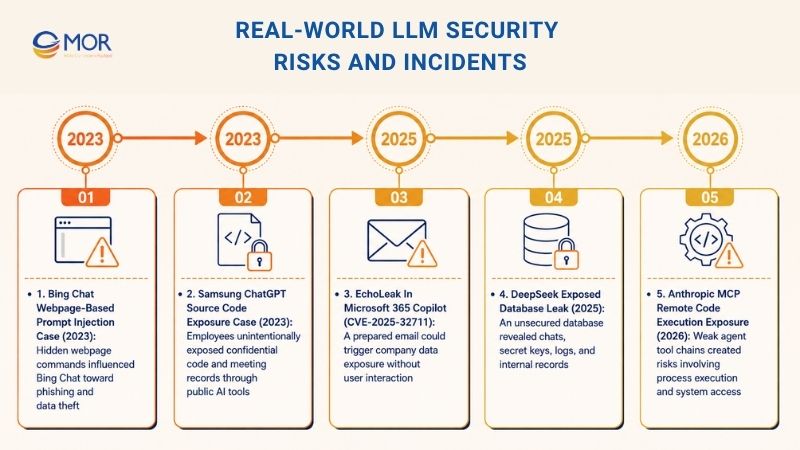
Bing Chat Webpage-Based Prompt Injection Case (2023)
Researchers found that a harmful webpage could change the actions of Bing Chat through an indirect prompt attack. Hidden commands placed inside page content guided the model toward data theft and phishing behavior.
Business lesson: Every outside source that an LLM reads, including websites, emails, uploaded files, and API results, may carry harmful instructions.
Research source: Greshake and co-authors, a 2023 arXiv study on indirect attacks against real LLM-connected applications.
Samsung ChatGPT Source Code Exposure Case (2023)
Engineers at Samsung entered private source code and restricted meeting records into ChatGPT during debugging work. The company limited staff access to generative AI tools soon after the events became known.
Business lesson: Staff members may turn a public AI platform into a data-loss channel without intending to do so. This case showed why companies need clear AI use rules and data loss prevention checks.
News source: Tom’s Hardware coverage of confidential data entered into ChatGPT by Samsung chip staff, published in April 2023.
EchoLeak In Microsoft 365 Copilot (CVE-2025-32711)
Security teams found EchoLeak, the first published zero-click prompt injection weakness reported in a live LLM product. One prepared email could push Microsoft 365 Copilot to expose company data without a user opening or acting on the message.
Business lesson: EchoLeak showed that LLM security risks are no longer limited to lab tests. Prompt injection can become a high-severity weakness inside business AI software development.
Research source: A 2025 arXiv paper describing EchoLeak as a real zero-click prompt injection case in a production LLM system.
DeepSeek Exposed Database Leak (2025)
Wiz Research found a ClickHouse database owned by DeepSeek that anyone on the internet could reach. It held more than one million log entries, including chats, secret keys, backend records, and other private system details. DeepSeek closed the exposed access after Wiz reported the problem.
Business lesson: Model behavior forms only one part of AI application security. Weak cloud settings can expose logs, databases, API keys, and internal services even when the model itself has no direct flaw.
Research sources: Wiz Research reporting on the exposed DeepSeek database and TechCrunch coverage of the leaked chats and internal records, both published in January 2025.
Anthropic MCP Remote Code Execution Exposure (2026)
Researchers reported a serious remote code execution exposure linked to MCP implementations and tool chains used by AI agents. The finding involved common SDKs and agent connections, raising questions about process execution, local system access, and trust in outside MCP servers.
Business lesson: Agentic systems extend LLM security risks far beyond harmful prompts. Once a model can read files, call tools, start processes, or connect with other services, weak control logic may turn a text attack into a full system breach.
Research sources: OX Security analysis of an MCP design weakness and The Hacker News reporting on the related AI supply chain threat, published in April 2026.
Best Practices To Manage LLM Security Risks In Production
Managing LLM security risks in production calls for protection across the full AI lifecycle rather than fixes added only after an incident. A sound plan for LLM security vulnerabilities attacks defenses and countermeasures can use MITRE ATLAS, which maps more than 130 attack methods and 26 protective measures for machine learning systems.
Data source: Findings from the Wiz AI Security Readiness Report
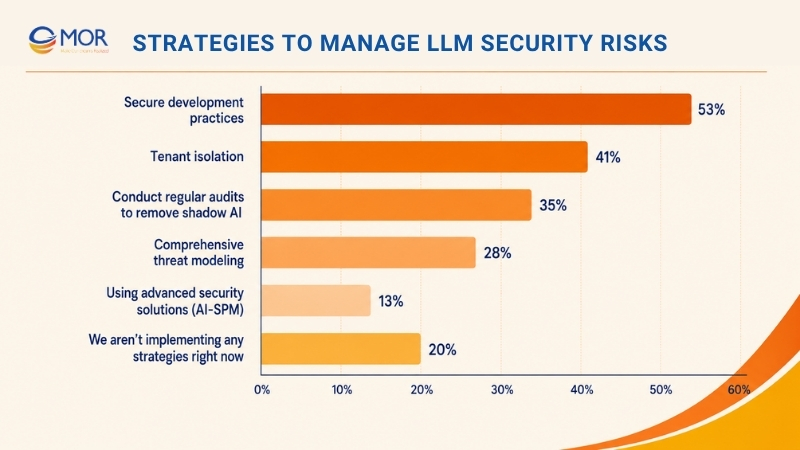
Adversarial Training And Tuning
A model trained with hostile examples can learn common manipulation patterns before it enters live use. This method helps it handle strange or harmful inputs that might pass normal safety rules.
- Refresh hostile training samples: Add new attack examples often so the model can learn recent tactics.
- Run automatic threat checks: Find and mark harmful training inputs before the model reaches production.
- Challenge the model with new methods: Test whether its protection still works against unfamiliar attack styles.
- Apply transfer-based tuning: Train the model again with attack-resistant datasets so it responds better under hostile conditions.
The Adversarial Robustness Toolbox (ART) and CleverHans are open-source projects that can support testing and protection against adversarial input.
Model Evaluation
Testing an LLM across many settings helps teams find weak behavior, including LLM generated code security risks, before customers use the system.
- Run red-team sessions where security staff try to break the model through planned attacks.
- Test the LLM inside settings close to real use, including rare inputs and high-risk tasks, to study its behavior.
- Check how the system responds to unusual and borderline requests so hidden gaps become easier to find.
- Compare the model against common adversarial tests to see how its resistance differs from similar systems.
Input Validation And Sanitization
Input checks form the first barrier against prompt injection and other LLM security risks. Filters can stop prepared commands before they reach the model and attempt to replace its safety instructions.
- Apply firm input rules: Remove manipulated, harmful, or invalid content before the model processes it.
- Set allowed and blocked formats: Decide which input types the application may accept or reject.
- Watch for strange patterns: Mark unusual requests that may show an active attack.
- Test with input fuzzing: Send unexpected values during development and record how the model responds.
Content Moderation And Filtering
Every model response needs checks that stop unsafe or unsuitable content and keep answers aligned with company rules and ethical standards.
- Add moderation tools that scan responses and block harmful or unsuitable material before users receive it.
- Write clear ethical rules and place them inside the application’s decision process so model answers match company standards.
- Review generated content often to find harmful material, unfair results, or compliance failures.
- Give users a reporting channel for unsafe answers so moderation rules can improve over time.
Data Integrity And Provenance
Trusted training records and live inputs help stop data poisoning and maintain customer confidence in the system.
- Check the origin of each training source and confirm that no party has changed it without approval.
- Use data lineage tools to record where information came from and how it changed over time.
- Add cryptographic hashes or watermarks to training files so teams can detect unapproved edits.
- Track live data flows and send alerts when access or content changes in a suspicious way during training.
Access Control And Authentication
Strong identity rules can block model theft and limit each person to approved data, which is also a central concern in local LLM security risks 2026.
- Assign access based on user roles so only approved staff can reach private model parts or datasets.
- Require multi-factor authentication (MFA) for model dashboards and APIs to add another identity check.
- Record every login and access request so teams can find unusual patterns or unapproved activity.
- Encrypt model information and generated answers during transfer and inference to limit data exposure.
- Give outside integrations access tokens with expiry times so stolen credentials cannot remain active for long periods.
Secure Model Deployment
Secure deployment lowers LLM security risks linked to remote code execution and addresses LLM infrastructure security risks 2026 across models, containers, databases, and runtime services.
- Place the model inside a container or sandbox so it cannot freely reach sensitive business systems.
- Patch the model stack and its supporting infrastructure often so known weaknesses do not remain open.
- Run penetration tests against the live setup to find weak controls before attackers do.
- Add runtime monitoring that tracks model actions and marks behavior linked to misuse or exploitation.
Implementing Guardrails
Guardrails are coded controls that review prompts and responses as they move through an LLM application, stopping unsafe requests and harmful answers.
Input guardrails inspect prompts before the model receives them. They look for jailbreak patterns, block known attacks, and refuse requests that break policy. Output guardrails review the answer before it reaches the user. They remove personal data, filter harmful language, and stop responses that may expose private information.
Business systems usually place guardrails in the application layer rather than inside the model. This setup lets teams test, update, and track the controls even when they change the underlying model.
- Restricted tool lists and minimum access: Show the assistant only the tools needed for its task, then limit each one to the smallest data and permission scope.
- Schema-based responses: Make the model return JSON that follows a fixed schema, then reject content that fails validation.
- Prompt and retrieval screening: Block known injection patterns and stop untrusted files from gaining priority over system rules.
- Approval for high-risk actions: Ask for another check before tasks like resetting MFA, transferring money, changing secrets, or deleting records.
- Usage caps and execution limits: Limit tokens, requests, response time, and tool actions to control denial-of-service attacks and runaway agents.
MOR Software can connect LLM apps with managed guardrail services or build custom control layers that match a company’s data and workflow rules. Open-source projects such as Guardrails AI and NeMo Guardrails suit teams that need custom filters or want less dependence on one cloud platform.
AI security posture management also supports this work in real systems. Guardrails limit model actions, but teams must still track every model, endpoint, identity, and dataset so the same rules apply across the company.
LLM Security Risks Checklist Before Production Release
This 10-step release gate shows MOR Software teams how to identify LLM security risks before an LLM application goes live. It addresses the leading weaknesses listed in the OWASP Top 10. Engineering leaders can apply these checks as a firm launch rule.
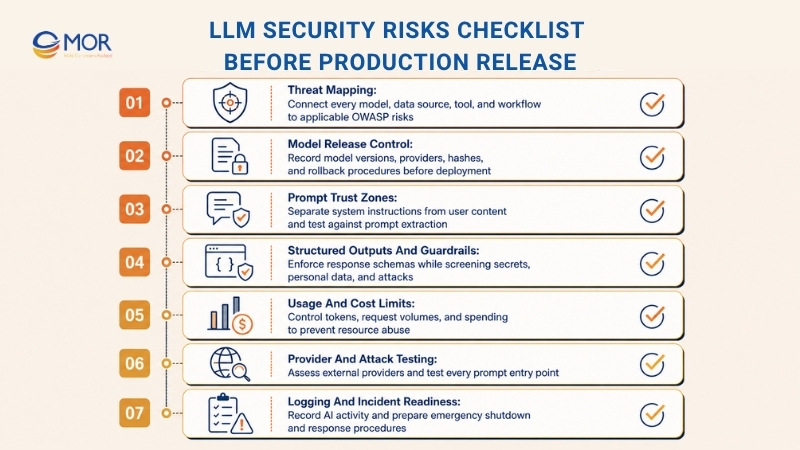
- Build a threat map for the function. Link each model, data source, tool, and user flow to the OWASP Top 10 for Large Language Model Applications. Record which risks apply and explain why any category does not apply.
- Lock the production model release. Save the model hash, provider name, and fixed version used in production. Prepare a written rollback process before changing to another release.
- Keep prompts in separate trust zones. Place system rules apart from user content. Use red-team tests to check that the model cannot expose hidden instructions.
- Require a fixed response format. Any software that reads model output should accept only a defined JSON schema or function contract. Refuse every response that fails the required format.
- Add runtime guardrails and response checks. Screen for personal information, secrets, and prompt attack patterns before any answer leaves the application.
- Control tokens, request volume, and spending. Set customer-level token budgets, rate caps, and cost limits to stop resource abuse and model denial of service.
- Attack-test every prompt entry point. Run hostile prompts, jailbreak methods, and indirect injection cases. Combine automated testing tools with reviews from security staff.
- Check every outside model provider. Review its SOC 2 report, ISO 27001 status, data processing agreement, retention rules, and treatment of customer prompts.
- Send AI activity into the SIEM. Record each prompt, answer, and tool action with the user identity, model release, and trace ID. Run anomaly checks on this AI activity rather than relying only on web server logs.
- Prepare incident steps and an emergency stop. Name the team responsible for LLM incidents. Document how to turn off the function and contact affected users. Run a practice incident exercise before release.
A function that fails any of these ten checks is not ready for production.
Protecting Your LLM Enterprise Applications With MOR Software
LLM security controls should guide every project decision, not sit in a checklist until launch day. MOR Software brings security into AI implementation planning, development, testing, and release so enterprise AI systems can handle sensitive data and business workflows with fewer risks.
MOR Software can support secure LLM application development through:
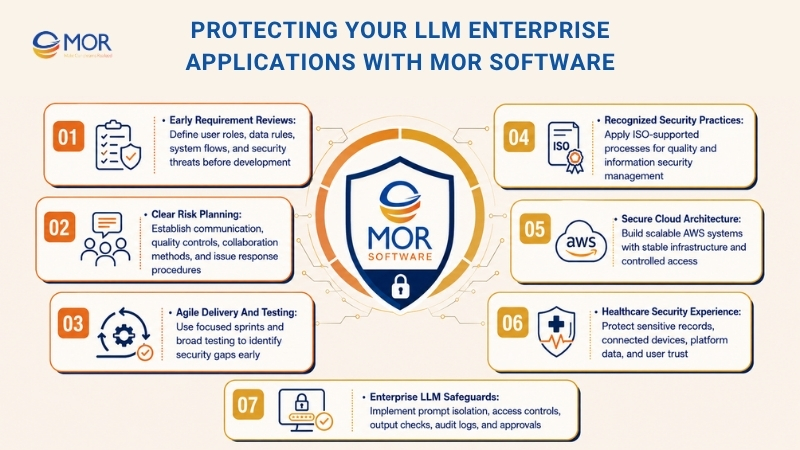
- Early requirement reviews: Define user roles, data access rules, LLM use cases, system flows, technical needs, and possible security threats before development begins.
- Clear risk planning: Set collaboration methods, communication channels, quality controls, and response plans for issues found during delivery.
- Agile project delivery: Use focused sprints and regular reviews so engineers, testers, business analysts, and project managers can spot security gaps early.
- Wide testing coverage: Test system functions, integrations, performance, accessibility, user experience, and security before the application reaches users.
- Recognized security practices: Apply processes supported by ISO 9001:2015 and ISO 27001:2013 certifications for quality and information security management.
- Secure cloud architecture: Build cloud systems on platforms like AWS, with access controls, stable infrastructure, and room for future growth.
MOR Software has applied these practices in data-sensitive enterprise projects:
- Healthcare working environment app in Japan: MOR Software created an app where nurses could review hospital workplaces and find job opportunities. The work covered business analysis, UI/UX design, backend and frontend development, system integration, testing, and AWS infrastructure. Multimodal AI models were trained to detect spam reviews, helping protect platform data and user trust.
- In-depth healthcare system: MOR Software developed a hospital and clinic management platform that connected with medical devices and handled patient records, staff operations, clinic workflows, and billing. The system used Java Spring, ReactJS, and AWS. Security protocols protected sensitive healthcare information throughout daily operations.
The same approach applies to enterprise LLM applications. MOR Software can plan prompt isolation, role-based data access, retrieval controls, output checks, audit logs, secure API connections, and human approval for high-risk actions.
These safeguards help stop prompt attacks, private data leaks, unsafe model responses, and unauthorized system actions before they reach production. Businesses can then use LLMs across internal tools, customer platforms, and enterprise workflows without treating security as a last-minute fix.
Conclusion
LLM security risks can affect data privacy, system access, cloud costs, customer trust, and daily business work. Teams need clear controls across prompts, models, data, tools, and connected agents before release. Regular testing and strong access rules also help find weak points early. MOR Software can help you plan, build, test, and secure enterprise LLM applications that match your workflows and data rules. Contact MOR Software to discuss your AI project today.
"Evolution is not a destination, it is a disciplined journey of innovation."
Phung Van Tu


CEO MOR AI
MOR SOFTWARE
Frequently Asked Questions (FAQs)
What is LLM security risk?
LLM security is the practice of finding and controlling risks in applications that use large language models. It covers the model, prompt, data, and agent loop. Common risks include prompt injection, data leakage, unsafe tool use, supply chain attacks, and excessive agency. These risks are often mapped against the OWASP Top 10 for Large Language Model Applications.
Why is LLM security different from traditional application security?
Traditional apps follow fixed code paths. LLMs read natural language, return variable outputs, and often connect with tools, APIs, documents, or databases. That creates attack paths that normal AppSec tools were not built to catch, especially prompt injection, unsafe outputs, and agent abuse.
What is the biggest LLM security risk?
Prompt injection is one of the most common and dangerous LLM security risks. It lets attackers use text to override system instructions, leak data, or trigger unwanted actions. Indirect prompt injection is harder to detect because the malicious instruction may hide inside emails, webpages, files, or retrieved documents.
How is prompt injection different from SQL injection?
SQL injection targets a database query parser. Prompt injection targets an LLM that may treat any text as an instruction. SQL injection has a clear fix through parameterized queries. Prompt injection needs layered controls, including prompt filtering, context separation, output checks, sandboxing, and human review for high-risk actions.
Do I still need LLM security tools if I already have an AppSec stack?
Yes, if the LLM app is used in production. Standard AppSec tools cannot fully inspect prompts, model responses, vector store retrieval, or agent tool calls. Teams should add input and output guardrails, model monitoring, access control, and logging across prompts, responses, and tool actions.
How do GDPR and the EU AI Act affect LLM security?
They add stricter rules around data use, transparency, documentation, and human oversight. GDPR requires lawful data processing, data minimization, and clear purpose limits for personal data. The EU AI Act adds risk controls for certain AI systems, including monitoring and governance duties. Poor controls can lead to serious fines and legal exposure.
How can companies prevent data leakage in LLM applications?
Companies should limit what the model can access, redact sensitive fields, and block private data from prompts, logs, and outputs. Role-based access control should apply to RAG data, vector stores, chat history, and tool results. Teams should also scan outputs for PII, secrets, source code, and internal business data.
What is excessive agency in LLM security?
Excessive agency happens when an AI agent has more power than it needs. The agent may access tools, send emails, update records, run code, or call APIs without enough checks. A small prompt attack can then become a real business incident. The fix is least-privilege access, per-call approval, sandboxing, and human review for risky actions.
Why are RAG systems exposed to LLM security risks?
RAG systems pull content from documents, vector databases, webpages, tickets, or internal knowledge bases. If that content is poisoned or contains hidden instructions, the LLM may treat it as trusted context. Teams should validate retrieved chunks, enforce access rules on vector stores, and treat retrieved text as untrusted input.
What should teams check before launching an LLM feature?
Teams should threat-model the feature against OWASP LLM risks, pin the model version, isolate system prompts, filter inputs and outputs, and limit tool permissions. They should also log prompts, responses, model versions, and tool calls. A kill switch and incident response plan should be ready before release.
Share


Make Our-Dreams Realized


© 2023 . MOR Software. All Rights Reserved
Sitemap
Privacy Policy
Terms of Use

Rate this article
0
over 5.0 based on 0 reviews
Your rating on this news:
Name
*Email
*Write your comment
*Send your comment
1