


Why Businesses Need Odoo Support Services After Implementation
ERP issues rarely stay small. A broken invoice flow, slow report, wrong stock move, or failed integration can disrupt the whole team. Odoo support services help businesses keep Odoo stable after go-live, from user help to upgrades and long-term system care. This MOR Software’s guide will show you how support works, what it covers, and when your business needs it.
Key Takeaways
- Odoo support services help businesses keep daily ERP work stable after implementation, including bug fixes, user support, system settings, custom modules, integrations, upgrades, and maintenance.
- Strong Odoo support should cover functional needs and technical needs, since many problems come from workflows, user roles, custom code, APIs, hosting, or data quality.
- The right support partner helps your business fix issues faster, prepare upgrades safely, document changes, and keep Odoo aligned with real business operations.
What Are Odoo Support Services?
Odoo support services are the steady help, system care, issue fixing, tuning, and improvement work that keep your Odoo setup stable after launch. Since the platform connects apps like CRM, eCommerce, Accounting, Inventory, POS, and Project Management in one ERP system, Odoo ERP support services help teams keep daily work connected and clear.
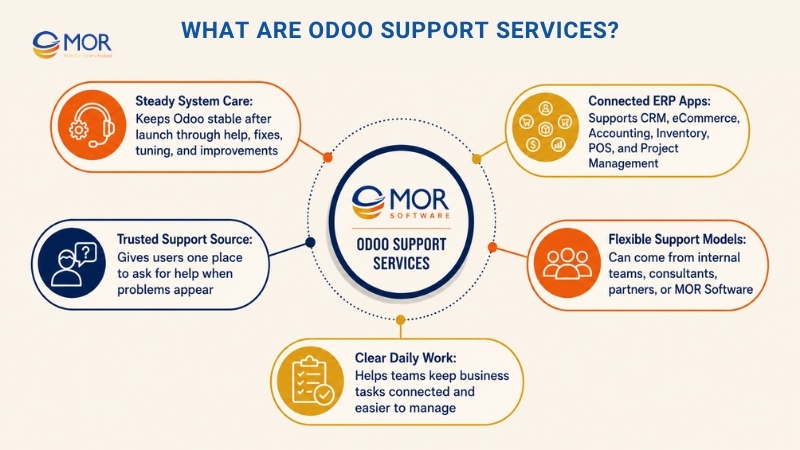
This support can come from your in-house ERP team, a specialist consultant, an official partner, or MOR Software’s experienced development team. A strong support model gives your staff one trusted place to ask for help when the system fails, feels hard to use, or needs a better setup.
Key Odoo Support Services Businesses Should Know
Odoo support can handle basic user questions, deep technical faults, and long-term ERP changes. The scope of each Odoo support service depends on your modules, hosting choice, custom code, integrations, and internal team skills.
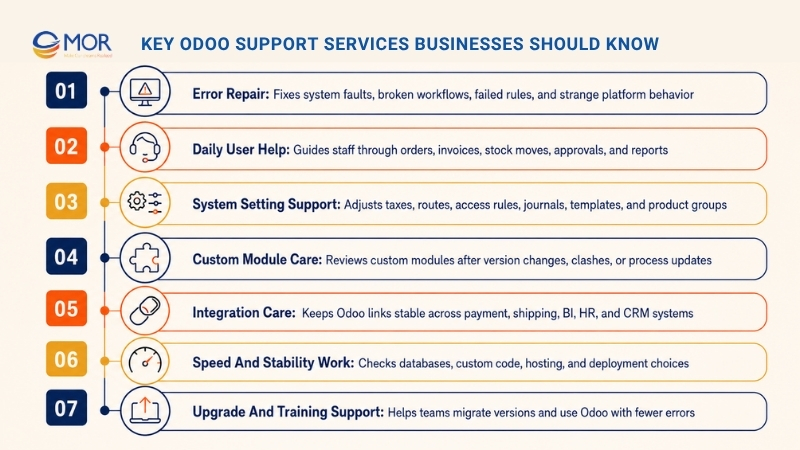
Error repair
Support teams check system faults, broken workflows, failed automation rules, wrong calculations, and strange platform behavior. This work may involve default Odoo settings, custom modules, third-party apps, or server-side problems.
Daily user help
Staff often need guidance with routine tasks, including sales order entry, invoice checks, stock moves, purchase approval, timesheet updates, production order work, or report creation. Good support helps users fix issues faster and lowers the risk of repeated errors.
System setting support
Many Odoo problems come from setup choices, not code. Support may include changes to taxes, units of measure, warehouses, routes, access rules, approval steps, email templates, accounting journals, or product groups.
Custom module care
When your business runs custom Odoo modules, those modules need steady review. They may need fixes after version changes, process updates, data model changes, or clashes with other installed apps.
Integration care
Odoo often links with eCommerce sites, payment tools, shipping vendors, BI tools, HR systems, manufacturing accounting software, CRM platforms, and internal business systems. Support keeps these links stable so data can move across systems in the right way.
Speed and stability work
Odoo speed may depend on database setup, custom module quality, hosting design, and deployment decisions. Performance issues are often tied to database settings, slow custom code, or weak deployment choices, so these cases usually need expert review.
Security and version care
Odoo gives standard support for major versions for three years, covering helpdesk support, bug repair, and security updates. Ongoing help matters for businesses that want their ERP to stay safe and well maintained.
Upgrade and migration help
Odoo brings out new major versions, and companies often need support when moving from an older version to a newer one. This work calls for database checks, module fit review, code migration, testing, user approval, and post-upgrade tracking.
User training and guides
Support is not only about fixing errors. It also helps users learn the system, follow the right steps, stop manual workarounds, and feel more sure when handling daily ERP tasks.
Odoo support gives companies a backup system after launch. It protects the ERP spend, lowers daily risk, and helps the system keep matching real business needs as the company grows.
Why Businesses Need Odoo Support Services After Implementation
An Odoo project can seem finished at go-live, but real work often brings new needs. Users may not follow the same steps planned during setup. Managers may ask for new reports. Departments may find missing approval points. New products, warehouses, branches, or accounting rules may call for extra setup.
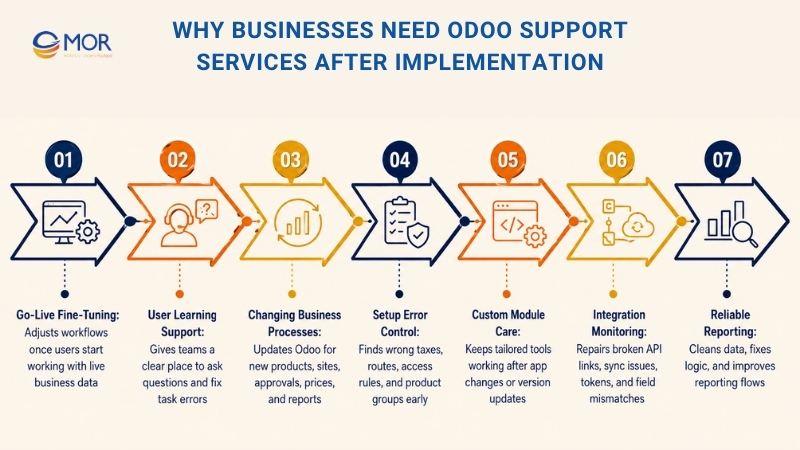
- Go-live is not the finish line: Most ERP systems need fine-tuning once users start working with live data. A flow that looked fine in testing may need edits after hundreds of real records enter the system.
- Users need time to learn: Sales, accounting, Odoo healthcare, warehouse, production, HR, and purchasing teams may use Odoo in different ways. Support gives users a place to ask questions, raise issues, and learn better ways to finish their tasks.
- Business processes keep changing: Companies add new items, open new sites, change approval steps, revise pricing rules, or ask for new reports. Odoo has to move with those changes.
- Small setup errors can spread fast: One wrong tax rule, warehouse route, access setting, or product group may affect orders, invoices, stock value, and reports. Support helps find the real cause before the problem gets bigger.
- Custom modules need regular care: Custom Odoo tools can bring real Odoo benefits, but they also create extra maintenance work. If a custom module clashes with a new version or another app, users may run into errors.
- Integrations can break quietly: A payment tool, shipping connector, marketplace sync, or API link may stop working because of a token error, field mismatch, or outside update. Support teams track and repair these connections.
- Reports must stay reliable: ERP reports only help when the data behind them is correct. Support helps clean wrong records, review logic, fix mapping gaps, and improve reporting flows.
Odoo support makes the ERP more reliable after launch. It cuts downtime, builds user trust, and helps the company gain more value from the system.
Common Issues Covered By Odoo Support Services
Odoo support services can handle many daily problems, from quick user questions to deeper technical checks. The exact scope depends on your setup, hosting model, custom work, and support agreement.
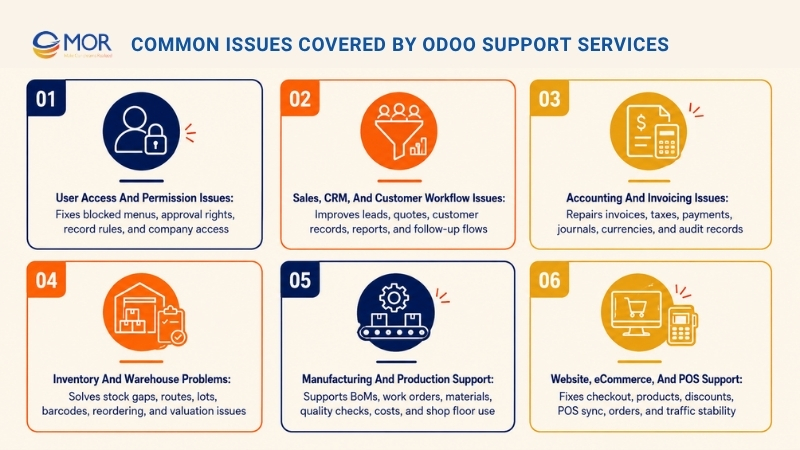
User Access And Permission Issues
Access rights are one of the most common reasons teams ask for help in Odoo. A user may lose a menu, fail to approve a document, be blocked from validating an order, or see data they should not access.
Support teams often check:
- Access levels: Each team member should have permissions that match their role. A warehouse operator, accountant, sales lead, and HR user should not work under the same access setup.
- Record access rules: Odoo can limit records by company, team, department, branch, or assigned owner. Wrong rules can hide valid data or reveal private records.
- Multi-company controls: Businesses with several legal entities need careful access settings. A user may need rights in one company but should stay blocked from another.
- Approval permission setup: Purchase orders, expenses, invoices, production orders, and leave requests need clear approval rights.
- Access updates after staff changes: When staff change jobs or leave, permissions must be updated fast to protect company data.
A clean support process keeps access rights safe, tidy, and matched to the company structure.
Sales, CRM, And Customer Workflow Issues
Sales and CRM teams use Odoo to manage leads, quotes, orders, customer messages, and follow-ups. If the system makes sales work slower, users may go back to spreadsheets or manual notes.
Support may cover:
- Pipeline stage errors: Deals may fail to move through stages, or sales teams may need new stages that fit their real process.
- Quote problems: Pricing, discounts, taxes, terms, delivery fees, or stock status may show wrong details on quotations.
- Email template errors: Sales users may need help with automated emails, quote templates, follow-up alerts, or customer notices.
- Duplicate customer records: Repeated contacts can make reports and messages messy. Support can help merge, clean, and block duplicate data.
- Sales report gaps: Managers may need custom filters, dashboards, or reports to track revenue, win rates, lost reasons, and team results.
When Odoo customer support and sales workflows run well, teams can spend more time selling and less time fixing data.
Accounting And Invoicing Issues
Accounting is one of the areas where Odoo support is most needed. A small setup mistake can affect invoices, journals, tax reports, payments, and financial statements.
Support may involve:
- Invoice approval errors: Users may see missing account, tax, product group, or journal setup errors.
- Tax rule mapping problems: Different regions, product types, or customer groups may need different tax settings.
- Payment matching issues: Bank statements, online payments, and invoices may not line up in the right way.
- Account structure setup: Businesses may need help with accounts, journals, fiscal positions, or analytic accounting.
- Currency handling problems: Exchange rates, currency gains, and reporting values may need review.
- Audit readiness: Accounting teams may need clean records, clear logs, and traceable system changes.
Since accounting affects compliance and business decisions, support teams should fix these issues with care and document each change.
Inventory And Warehouse Problems
Inventory work can get complex when a company runs several warehouses, routes, replenishment rules, lots, serial numbers, packing units, or production flows.
Odoo support services may help with:
- Stock count differences: Gaps between real stock and system stock often come from wrong transfers, missing receipts, bad adjustments, or route mistakes.
- Warehouse route mistakes: Push rules, pull rules, dropshipping, cross-docking, and restock flows need the right setup.
- Lot and serial control: Companies in food, healthcare, electronics, and manufacturing often need traceability at batch level.
- Barcode process issues: Scanning flows may need support when products, locations, packages, or operations do not match warehouse practice.
- Reordering rule errors: Wrong minimum and maximum values may lead to too much stock or stockouts.
- Stock valuation problems: Product cost, stock moves, and accounting links must be checked together.
Inventory support should mix business knowledge with technical skill, since warehouse issues often touch many connected modules.
Manufacturing And Production Support
For manufacturers, Odoo support often centers on BoM, work centers, production orders, quality checks, and cost control.
Support may cover:
- BoM mistakes: A wrong component, unit of measure, or quantity can change stock use and production cost.
- Work order problems: Production steps may show in the wrong way, or users may need help with routing and work center setup.
- Material availability issues: Manufacturing orders may fail when parts are not reserved or restock rules are not set up well.
- Quality check points: Businesses may need help adding inspection steps, pass or fail checks, or corrective actions.
- Production cost review: Costing can change because of labor, overhead, component prices, scrap, and by-products.
- Shop floor ease of use: Operators need simple screens and clear work steps. Support can improve how production teams use Odoo each day.
Manufacturing support works best when the partner understands ERP logic and real factory work.
Website, eCommerce, And POS Support
Odoo includes website, eCommerce, and point-of-sale tools as part of its wider app set. Businesses that use these modules may need help with customer-facing flows and back-office work.
Support may include:
- Checkout problems: Customers may face payment, delivery, tax, or cart errors.
- Product display errors: Variants, images, descriptions, prices, and stock status may not show in the right way.
- Promotion and coupon faults: Discounts may apply wrong values or fail under certain rules.
- POS sync issues: Retail teams may need help syncing products, prices, stock, customers, and payments.
- Order flow errors: Online orders should move correctly into sales, inventory, delivery, and accounting.
- Traffic spike stability: eCommerce stores need quick page loading and stable checkout flows during busy periods.
Support for customer-facing modules matters because these errors can affect revenue and customer trust right away.
Functional Odoo Support Vs Technical Odoo Support
Odoo support services usually fall into two main groups: functional support and technical support. Most businesses need both, but each one requires different skills.
Area | Functional Odoo Support | Technical Odoo Support |
Main focus | Business flows and system settings | Code, hosting, integrations, and database logic |
Typical users supported | Sales, accounting, warehouse, HR, production, managers | Developers, system admins, and technical leads |
Common tasks | Set up modules, adjust workflows, train users, fix process gaps | Debug custom modules, move code, improve speed, manage APIs |
Best for | User issues, process changes, report needs, setup questions | Bugs, custom builds, server faults, integration errors |
Output | Cleaner workflows, better user use, correct settings | Stable code, reliable integrations, faster system response |
Functional Odoo Support
Functional support deals with the way your business uses Odoo. It connects user needs with the right system setup.
Functional consultants usually help with:
- Process review: They check whether Odoo matches how the business sells, buys, stores, produces, invoices, and reports.
- Module setup: They adjust settings across CRM, Sales, Inventory, Accounting, Purchase, Manufacturing, HR, Helpdesk, and other apps.
- User guidance: They show users how to finish tasks in the right way and avoid common errors.
- Report help: They help managers get the right filters, views, dashboards, and export formats.
- Safe data fix guidance: They help users see why records are wrong and how to correct them without causing more issues.
Functional support brings value because many Odoo problems are not coding issues. They come from workflows, settings, or user training gaps.
Technical Odoo Support
Technical support deals with the code and hosting layer behind Odoo. It becomes necessary when the system has custom modules, complex integrations, custom hosting, or speed issues.
Technical teams usually handle:
- Custom module error checks: Developers review Python, XML, JavaScript, QWeb, security files, and business logic.
- API integration help: Odoo can share data with outside systems for integration and reporting through its external API. In Odoo 19, the JSON-2 API gives access to models and data through HTTP endpoints, with models and methods depending on the database.
- Speed checks: Technical experts review logs, database queries, server resources, module behavior, and deployment setup.
- Version upgrade help: Developers move custom code and check whether it works with the target Odoo version.
- Deployment support: Technical teams manage Odoo.sh, on-premise servers, cloud setups, repositories, branches, backups, and staging areas.
- Security hardening: They review access, dependencies, code quality, server settings, and update habits.
Technical support helps protect the stability of customized Odoo systems.
Odoo Support Services For Custom Modules And Integrations
Many companies choose Odoo because it can be shaped around their work. Custom modules and integrations can make the ERP stronger, but they also make ongoing support more necessary.
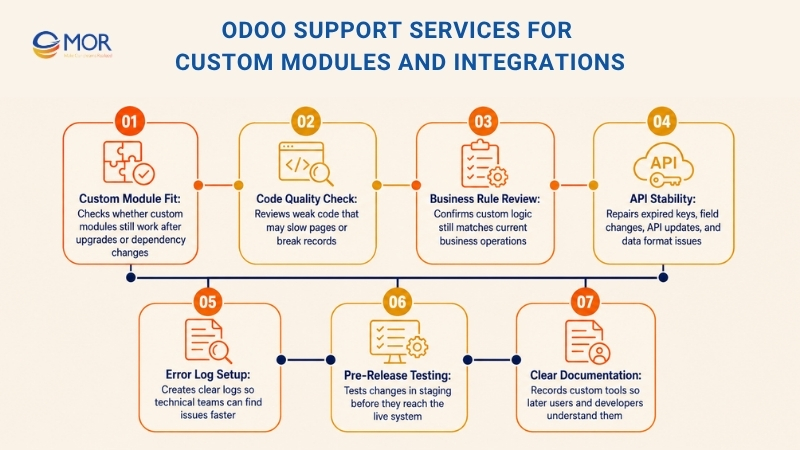
A business may tailor Odoo for pricing rules, approval steps, reports, warehouse flows, production stages, customer portals, API links, or industry-specific needs. These changes need careful care over time.
Important support areas include:
- Custom module fit: A custom module may work well now but fail after an Odoo upgrade, dependency update, or third-party module change.
- Code quality check: Weak code can slow pages, break calculations, damage records, or make upgrades harder.
- Business rule review: Custom tools should still match real business rules. MOR Software’s Odoo consulting services can check whether the logic still fits current operations.
- API stability: Integrations may break because of expired keys, field changes, outside API updates, or data format changes.
- Error log setup: Support should include clear logs so technical teams can find issues quickly.
- Pre-release testing: Changes should be tested in a staging system before they reach the live environment.
- Clear documentation: Custom tools should be documented so later developers and users know how they work.
Odoo upgrade guidance notes that a database with custom modules cannot be upgraded until matching versions of those modules are ready for the target Odoo version. This makes custom module support a key part of long-term ERP growth.
Odoo Maintenance, Security, And Performance Optimization
Odoo support and maintenance services should not start only when the system breaks. Steady care helps your team avoid downtime, guard business data, and keep daily users comfortable with the platform.
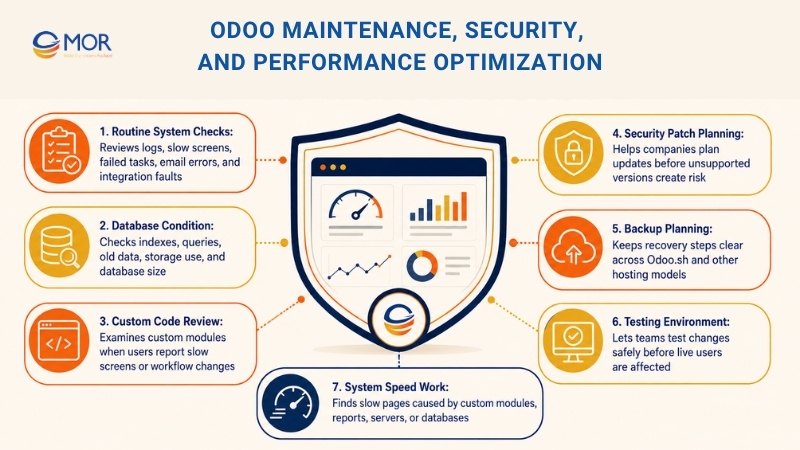
This work often covers system health, module performance, user roles, backups, logs, integrations, speed, and future update planning.
Key maintenance areas include:
- Routine system checks: Support teams should check logs, slow screens, failed scheduled tasks, email errors, integration faults, and user-reported issues.
- Database condition: A larger database can slow the system when nobody manages it well. Technical teams may need to review indexes, queries, old data, and storage use.
- Custom code review: Custom modules should be checked when new workflows are added or when users report slow screens.
- Security patch planning: Odoo gives standard support for major versions for three years, which covers helpdesk support, bug repair, and security updates. Companies on old versions should plan with care because unsupported systems can bring risk.
- Backup planning: Odoo.sh includes hosting tools like staging servers, backup servers, automated testing, SSH access, email gateways, and 24/7 monitoring. Businesses on other hosting models should keep backup and recovery steps just as clear.
- Testing environment: A staging system lets teams test changes safely before live users feel any effect.
- Automated task checks: Scheduled jobs for emails, subscriptions, stock rules, imports, exports, and integrations should be reviewed often.
- System speed work: Slow pages may come from custom modules, large records, report queries, server limits, or database setup. Odoo notes that speed problems often need expert review because they can relate to deployment, database tuning, or custom module issues.
A stable Odoo system needs regular care. Planned maintenance costs far less than urgent repair after a failed workflow, broken connection, or unstable upgrade.
Odoo Upgrade And Migration Support
Odoo upgrades can bring better tools, faster performance, security fixes, and longer platform support. Yet the work needs a clear plan, mainly when your company runs custom modules, third-party apps, or complex integrations.
Odoo support services can help your business move through the upgrade process in a clear order.
Assess The Current System
The first step is to review the current Odoo environment. Support teams should check:
Area | What to Document | Why It Matters for Odoo Support |
Current Odoo version | Exact Odoo version, edition (Community or Enterprise), and applied patches | Helps support teams identify compatibility issues, upgrade paths, and known bugs |
Hosting model | Cloud, on-premise, Odoo.sh, or third-party hosting provider details | Determines infrastructure responsibilities, backup methods, and deployment processes |
Installed official modules | List of standard Odoo modules currently in use | Allows support teams to understand core business operations and dependencies |
Custom modules | Names, purposes, developers, and technical documentation for custom features | Helps troubleshoot custom logic and reduce risks during upgrades or fixes |
Third-party apps | External marketplace apps or plugins connected to Odoo | Identifies potential compatibility or maintenance risks |
Integrations | APIs, payment gateways, ERP connections, CRM tools, shipping systems, or middleware | Critical for diagnosing sync failures and data flow issues |
Database size | Database volume, attachment storage, and transaction history size | Impacts performance tuning, backup strategy, and migration planning |
Critical workflows | Key operational processes such as sales, invoicing, inventory, manufacturing, or HR | Ensures support prioritizes business-critical functions |
Reports and dashboards | Custom reports, KPIs, BI dashboards, and automated exports | Helps maintain reporting accuracy and business visibility |
Known bugs or unstable areas | Existing issues, recurring errors, or modules with performance problems | Allows support teams to proactively monitor and resolve risks |
User groups and access rules | Roles, permissions, approval flows, and security restrictions | Important for troubleshooting access issues and maintaining data security |
This review helps the team estimate upgrade effort before the work starts.
Check Custom Modules
Custom modules often create the biggest upgrade risk. Odoo states that a database with custom modules cannot move to a new target version until those modules also have matching versions ready.
Support teams should review:
- Which custom modules are still used
- Which modules can be removed
- Which modules need migration
- Which modules depend on old APIs or views
- Which modules affect accounting, inventory, sales, or production
- Which modules need rewritten code
Removing unused custom code before an upgrade can lower cost and cut risk.
Prepare A Test Database
A test database lets the team check the upgrade before making changes to production. This step matters even more for companies with active daily operations.
Testing should include:
Area | What Support Covers | Common Issues | Typical Actions |
Login and access rights | User authentication, role permissions, multi-company access, password policies, and security settings | Users cannot log in, incorrect permissions, blocked accounts, or unauthorized access | Reset passwords, adjust user roles, review security groups, and audit access logs |
Sales workflow | Quotations, sales orders, pricing rules, approvals, and customer management | Orders not confirming, pricing errors, missing approvals, or incorrect customer data | Fix workflow rules, update pricing configurations, validate customer records, and test order flows |
Purchase workflow | Vendor management, purchase orders, approvals, and procurement rules | Delayed approvals, duplicate purchase orders, vendor sync issues, or procurement failures | Review approval chains, correct vendor settings, and troubleshoot procurement automation |
Inventory transfers | Stock moves, warehouse operations, transfers, and inventory adjustments | Incorrect stock levels, failed transfers, barcode issues, or warehouse sync problems | Reconcile inventory, repair transfer workflows, and validate warehouse configurations |
Manufacturing orders | Bills of materials, work orders, production planning, and routing | Production delays, missing components, incorrect BOMs, or failed work orders | Update BOM structures, fix routing logic, and monitor production workflows |
Invoicing and payments | Customer invoices, vendor bills, payment reconciliation, and tax calculations | Invoice mismatches, payment failures, tax errors, or reconciliation problems | Correct accounting entries, validate tax settings, and troubleshoot payment integrations |
Reports | Financial reports, operational dashboards, KPI tracking, and custom analytics | Missing data, inaccurate calculations, slow report generation, or export failures | Optimize report queries, validate data sources, and rebuild custom reports |
Integrations | Connections with CRM, eCommerce, payment gateways, shipping tools, and third-party APIs | API failures, sync delays, duplicate records, or authentication errors | Monitor integrations, repair API mappings, and test data synchronization |
Email notifications | Automated emails, alerts, approval notifications, and customer communication templates | Emails not sending, incorrect templates, spam delivery issues, or delayed notifications | Configure mail servers, update templates, and troubleshoot notification triggers |
Custom module behavior | Custom workflows, tailored features, automation scripts, and business-specific logic | Module crashes, compatibility issues, broken workflows, or upgrade conflicts | Debug custom code, apply patches, and test module compatibility |
User acceptance testing | Validation of workflows, business scenarios, and system readiness before release | Failed test cases, workflow inconsistencies, or missing requirements | Prepare test scripts, document issues, retest fixes, and confirm business approval |
Odoo support services can use staging workflows to test copied production data before release. Odoo documentation notes that staging and development databases are not backed up on their own, but production backups can be restored into staging branches for testing or recovery.
Train Users Before Go-Live
A technical upgrade can pass testing, yet users may still feel lost when screens, fields, or workflows change. Training helps cut mistakes during the first days after migration.
Training should cover:
- Changed menus
- New approval flows
- Updated reports
- New buttons or fields
- Removed workarounds
- Known limitations
- Escalation process for issues
A short training plan can stop many support tickets after the upgrade.
Plan Go-Live And Rollback
Upgrade go-live needs careful timing. Businesses should avoid peak sales periods, month-end closing, stock counts, production deadlines, and public holidays.
The go-live plan should include:
- Backup confirmation
- Final data freeze rules
- Migration window
- Responsible team members
- Testing checklist
- Emergency contacts
- Rollback conditions
- Post-go-live monitoring
Good Odoo support can make upgrades less stressful because each step is tested and recorded.
Odoo Support Services By Business Function
Odoo support services can be grouped by department. This helps businesses send tickets to the right specialist and track support results in a cleaner way.
Department | Common Support Needs | Business Risk If Ignored |
Sales | Quotations, pricing, CRM pipeline, customer records | Lost deals, wrong prices, weak follow-up |
Accounting | Taxes, journals, invoices, payments, reconciliation | Wrong finance reports, compliance risks |
Inventory | Stock moves, routes, lots, valuation, replenishment | Stockouts, overstock, late deliveries |
Manufacturing | BoMs, work orders, quality checks, costing | Production delays, wrong costs, material waste |
HR | Employees, attendance, time off, payroll links | Wrong records, slow approvals, user stress |
eCommerce | Checkout, payments, product pages, orders | Lost sales, customer complaints |
Management | Dashboards, KPIs, reports, access | Poor decisions, low visibility |
This setup makes support easier to manage. Each department can explain problems in business terms, while the support team turns those problems into functional or technical tasks.
How To Choose The Right Odoo Support Partner
The right support partner can make Odoo easier to use, maintain, and grow. The wrong partner may keep fixing visible symptoms while leaving the real cause untouched.
A strong Odoo support partner should understand your business process, modules, custom code, and future roadmap.
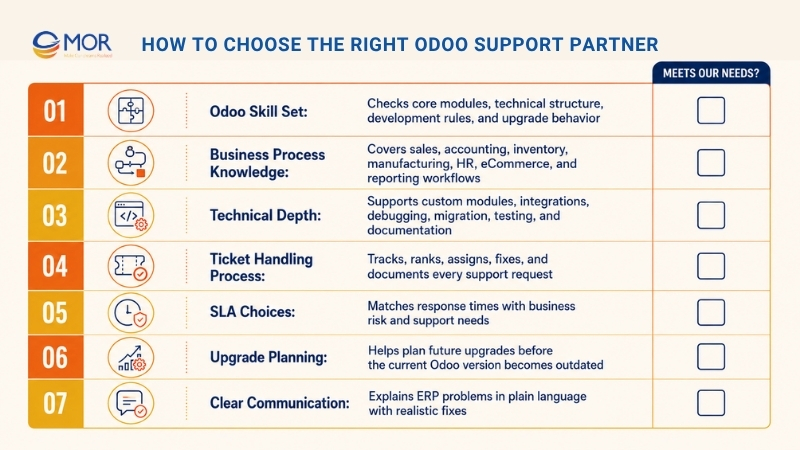
Important selection criteria include:
- Odoo skill set: The partner should understand Odoo’s core modules, technical structure, development rules, and upgrade behavior.
- Business process knowledge: Support should not stop at code. The team should understand sales, accounting, inventory, manufacturing, HR, eCommerce, and reporting workflows.
- Technical depth: If your system has custom modules or integrations, the partner needs developers who can debug, migrate, test, and document code.
- Ticket handling process: Support requests should be tracked, ranked, assigned, fixed, and documented. Without a clear flow, issues can get lost in chat messages.
- SLA choices: Some companies need same-day replies for serious issues. Others can work with a normal monthly support plan. The agreement should match business risk.
- Upgrade planning: The partner should help you plan future Odoo upgrades before your version becomes outdated.
- Documentation habit: Every setup change, custom tool, integration fix, and workaround should be recorded.
- Training support: A good partner helps users become more independent over time.
- Clear communication: ERP issues can feel stressful. The partner should explain problems in plain language and suggest realistic fixes.
- Long-term care: Odoo support partners should improve the system over time, not only fix urgent problems.
Odoo also gives an Official Partner label to companies that provide quality Odoo work. Odoo says official partners are trained on the platform, can access Odoo Enterprise source code, work directly with Odoo to raise issues, publish references on Odoo.com, and follow Ready, Silver, and Gold levels.
This does not mean every company must choose the biggest provider. It means your business should check whether the partner has the right skills, support model, communication process, and industry fit. Some teams compare Odoo support services in India, Odoo support services in Dubai, and offshore partners like MOR Software before choosing a model that fits cost, timezone, and delivery needs.
Odoo Support Services Cost: What Affects Pricing?
Odoo support services cost depends on support depth, system complexity, custom work, hosting model, response time, and required skill. A small company that uses mostly standard Odoo apps needs a different plan from a multi-company manufacturer with custom modules and integrations.
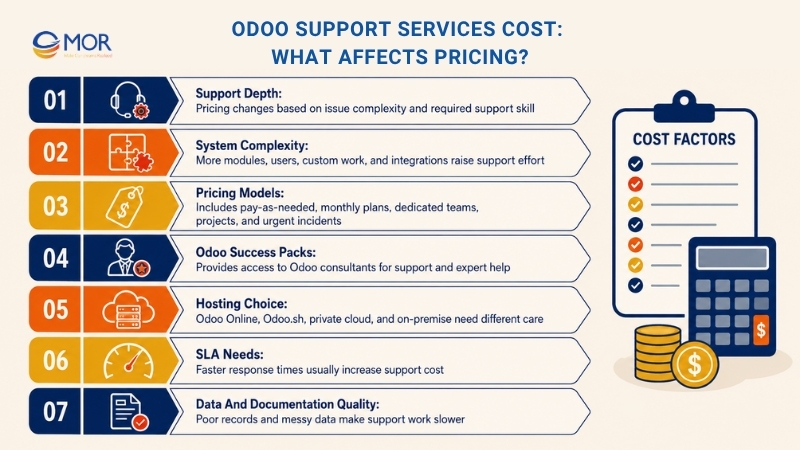
- Pay-as-needed support: The business pays for help only when an issue appears. This works for rare requests but can become hard to predict when the system needs frequent care.
- Monthly support plan: The business buys a set number of support hours each month. This fits companies that need regular maintenance, training, and small improvements.
- Dedicated Odoo team: Larger companies may need a dedicated consultant, developer, tester, or support squad. This gives quicker replies and deeper system knowledge.
- Project-based help: Work like upgrades, migration, custom module repair, or integration rebuilds may be priced as separate projects.
- Urgent incident support: Serious incidents may cost more because they need quick action outside normal support hours.
- Odoo Success Packs: Odoo sells Success Packs that give access to Odoo consultants for support and expert help. Odoo also notes that performance support runs through Success Packs because speed issues are often not caused by standard Odoo code.
Several factors affect support cost:
- User count: More users usually mean more tickets, training needs, access updates, and workflow questions.
- Module count: A system using only Sales and Accounting is simpler than one using Sales, CRM, Inventory, Manufacturing, Accounting, HR, Website, POS, and custom reports.
- Custom work level: Custom modules need technical checks, testing, documentation, and upgrade planning.
- Integration scope: Links with banks, marketplaces, payment gateways, shipping providers, BI tools, and outside platforms add support effort.
- Hosting choice: Odoo Online, Odoo.sh, private cloud, and on-premise setups all have different maintenance needs.
- SLA needs: Faster response times often raise the cost.
- Documentation quality: Poor records slow support because the team has to trace past decisions.
- Data quality: Messy data creates more work across reports, workflows, and accounting.
A practical budget should separate daily support, improvement work, and major upgrade projects. This helps your business avoid spending every support hour on urgent fixes while long-term improvements keep waiting.
What A Good Odoo Support Workflow Looks Like
A clear workflow helps support teams reply faster and helps users know what will happen next. Without structure, support spreads across emails, chat apps, calls, and fixes that nobody records.
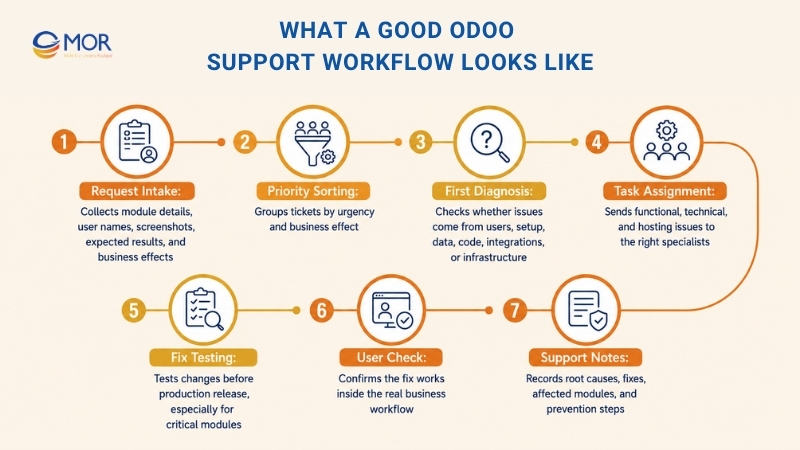
A good Odoo support workflow usually includes:
- Request intake: Users send issues through a form, email, helpdesk portal, or internal ticketing tool. Each request should include the module, user name, screenshots, expected result, actual result, and business effect.
- Priority sorting: Tickets should be grouped by urgency. An accounting issue that stops production work is not the same as a small report layout request.
- First diagnosis: The support team checks whether the issue comes from user error, setup, data, custom code, integration, or infrastructure.
- Task assignment: Functional consultants handle workflow and setup problems. Developers handle code and technical problems. System admins handle hosting and server issues.
- Fix testing: Fixes should be tested before production release, mainly when they affect accounting, inventory, manufacturing, or integrations.
- User check: The user confirms whether the issue is fixed in the real workflow.
- Support notes: The support team records the root cause, fix, affected module, and steps to prevent the issue later.
- Regular review: Repeated issues should be checked each month to find patterns.
Odoo Helpdesk supports SLA policies, so teams can set rules and deadlines for tickets. Odoo documentation explains that SLA deadlines use the ticket creation date and target working hours. If more than one SLA applies, the earliest deadline appears first.
This type of process helps even when the business does not use Odoo Helpdesk. The main goal is to make the Odoo support line clear, visible, measurable, and repeatable.
Signs Your Business Needs Better Odoo Support Services
Some companies wait too long before they improve support. The warning signs often show up in daily work.
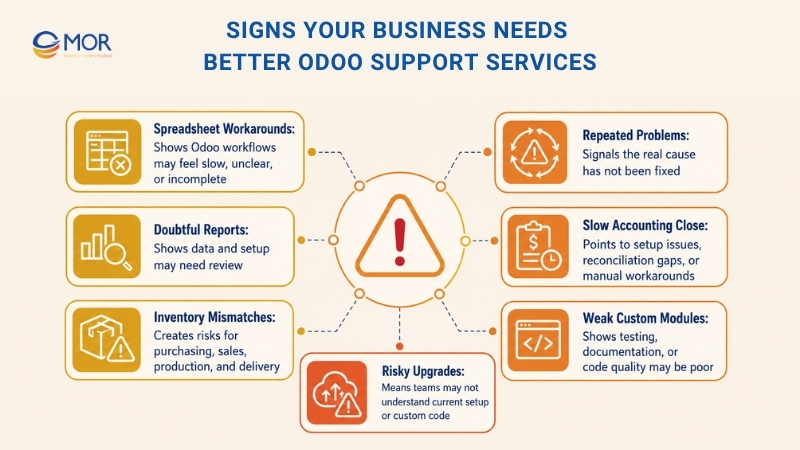
Your business may need stronger Odoo support services if:
- Teams still use spreadsheets outside Odoo: This often means the ERP workflow feels slow, unclear, or incomplete.
- The same problems return often: Repeated issues usually show that the real cause was never fixed.
- Managers doubt reports: If managers keep asking whether numbers are right, the system needs data and setup review.
- Accounting close takes too long: Delays may come from setup issues, reconciliation problems, manual workarounds, or unclear owners.
- Stock records do not match reality: Inventory gaps can hurt purchasing, sales, production, and customer delivery.
- Custom modules fail after changes: This may point to weak testing, poor documentation, or low code quality.
- Users do not know where to ask for help: Support needs one clear channel and one clear owner.
- Upgrades feel too risky: If no one understands the custom code or current setup, upgrades become stressful.
- Integrations fail without alerts: Silent failures can cause wrong orders, missing payments, stock errors, or late shipments.
- The business depends on one internal expert: If only one person understands the system, daily operations carry risk.
Strong support turns Odoo from a fragile tool into a trusted business platform.
Best Practices For Managing Odoo Support Services
Odoo support services work best when the business treats support as a regular operating process, not an emergency rescue plan.
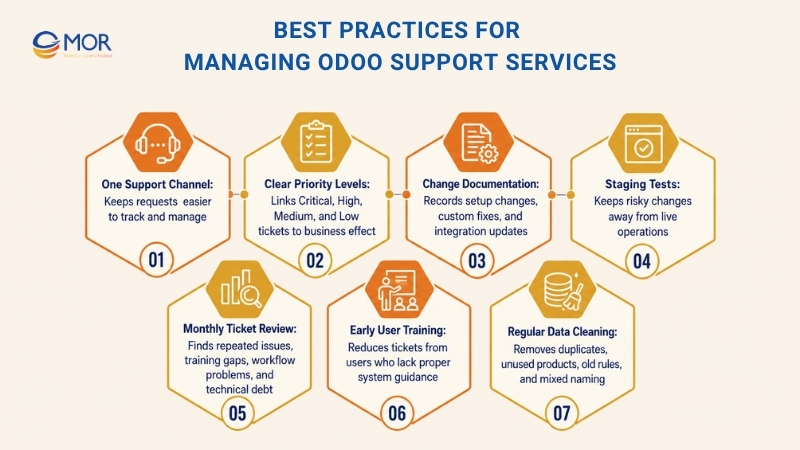
Useful best practices include:
- Use one support channel: Avoid requests spread across personal messages, emails, and calls. One channel makes issues easier to track.
- Set priority levels: Create simple groups like Critical, High, Medium, and Low. Link each level to business effect.
- Record every change: Setup changes, custom fixes, and integration updates should be documented.
- Test risky changes in staging: Do not test major changes in production when they may affect live operations.
- Review tickets each month: Repeated issues may show training gaps, workflow problems, or technical debt.
- Keep fixes and improvements separate: A bug fix repairs something broken. An improvement changes how the system works. Mixing them can confuse priorities.
- Train new users early: Many support tickets come from users who never received proper training.
- Clean data often: Duplicate contacts, unused products, old rules, and mixed naming can create confusion.
- Plan upgrades early: Do not wait until your version becomes old or unsupported.
- Assign department owners: Each department should have someone who understands its Odoo workflow and can work with the support team.
These habits lower support pressure and make the ERP easier to manage over time.
How Does MOR Software Help With Odoo Support Services?
For businesses that need long-term Odoo support services, MOR Software can help maintain, improve, and extend the ERP system based on real operational needs. We support companies that need more than basic troubleshooting. Our team can work across functional analysis, technical development, system integration, testing, and continuous improvement.
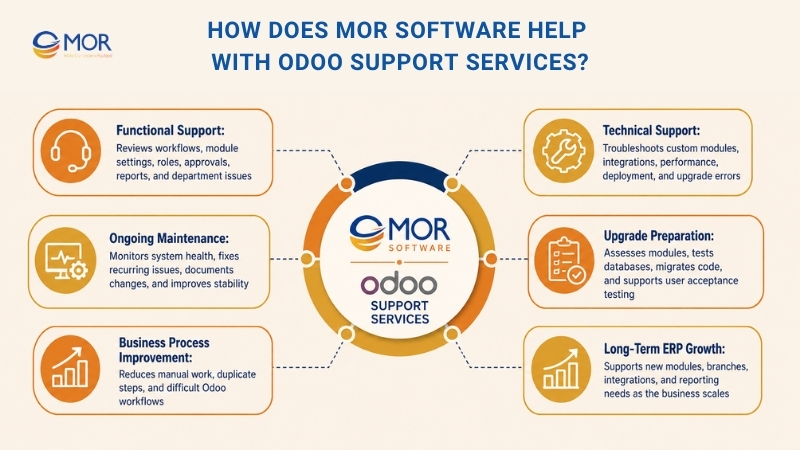
We can help businesses review current Odoo workflows, identify recurring issues, fix unstable modules, improve reports, support users, and prepare the system for future upgrades. When a company uses custom modules, we can check the code, repair bugs, adjust logic, and make sure the customization still fits the current business process. When Odoo connects with other tools, we can support API integration, data mapping, error handling, and synchronization checks.
Our support approach can cover:
- Functional support: We review workflows, module settings, user roles, approval flows, reports, and department-level issues.
- Technical support: We troubleshoot custom manufacturing modules, integrations, performance issues, deployment problems, and upgrade-related errors.
- Ongoing maintenance: We help monitor system health, fix recurring problems, document changes, and improve stability.
- Upgrade preparation: We assess custom modules, test upgraded databases, migrate code, and support user acceptance testing.
- Business process improvement: We help teams reduce manual work, remove duplicate steps, and make Odoo easier to use.
- Long-term ERP growth: We support new modules, new branches, new integrations, and new reporting needs as the business scales.
A good Odoo system should not stay frozen after go-live. It should grow with the business. If your company needs a technical partner that can support Odoo operations, custom development, integrations, and long-term ERP improvement, contact us to discuss the right support model for your team.
Conclusion
Odoo support services help your ERP stay useful long after launch. With the right support process, your team can fix issues faster, protect data, improve workflows, and prepare upgrades with less risk. MOR Software can support Odoo operations, custom modules, integrations, testing, and long-term ERP growth based on your business needs. If your team needs a steady technical partner for Odoo support, contact us today.
"Mr. Cong’s guiding philosophy is simplicity, believing that the simplest solutions are often the most powerful. He sees trust, empowerment, and the opportunity to demonstrate one’s abilities as the key elements that set MOR apart from traditional IT companies."
Mac Tien Cong


Division Manager (Hanoi Branch)
MOR SOFTWARE
Frequently Asked Questions (FAQs)
What are Odoo support services?
Odoo support services are ongoing services that help businesses maintain, troubleshoot, optimize, upgrade, and improve their Odoo ERP system after implementation.
Do businesses still need support after Odoo implementation?
Yes. After go-live, users often discover new needs, data issues, workflow gaps, integration problems, and reporting requirements. Support helps the system stay stable and useful.
What is included in Odoo technical support?
Technical support can include custom module debugging, API integration fixes, database review, hosting support, performance optimization, deployment checks, and upgrade assistance.
What is included in Odoo functional support?
Functional support focuses on business workflows, module configuration, user training, reporting, access rights, approval flows, and process improvement.
How much do Odoo support services cost?
Cost depends on system complexity, number of users, number of modules, customization level, integrations, hosting model, and required response time. Pricing may be hourly, monthly, project-based, or dedicated-team-based.
Can Odoo support services help with upgrades?
Yes. Support teams can assess the current system, check custom modules, prepare test databases, migrate code, run user testing, and support go-live.
Why do custom Odoo modules need ongoing support?
Custom modules may break after updates, conflict with other apps, slow down the system, or stop matching business workflows. Regular support keeps them stable and upgrade-ready.
Can Odoo support improve performance?
Yes. Performance support can review database behavior, custom code, server setup, scheduled actions, reports, and deployment configuration.
Should a company choose an official Odoo partner for support?
An official partner can be a strong option because Odoo says official partners are trained, have access to Enterprise source code, and can escalate issues through a direct relationship with Odoo. Companies should still compare skills, communication, support process, and industry experience.
When should a company change its Odoo support provider?
A company should reconsider its support provider when issues repeat, tickets are poorly documented, response times are unclear, custom modules remain unstable, upgrades feel risky, or users lose trust in the system.
Share


Make Our-Dreams Realized


© 2023 . MOR Software. All Rights Reserved
Sitemap
Privacy Policy
Terms of Use

Rate this article
0
over 5.0 based on 0 reviews
Your rating on this news:
Name
*Email
*Write your comment
*Send your comment
1