


Odoo Manufacturing Module Explained:Comprehensive Guide For Business
Managing production with scattered tools often leads to delays, errors, and poor visibility across your factory. The Odoo manufacturing module solves this by bringing planning, execution, and tracking into one system. In this MOR Software’s guide, we’ll show you how this Odoo manufacturing system works and what you need to run production with more control and clarity.
How Odoo Manufacturing Module Supports Lean Production
Lean manufacturing goes beyond cutting waste. It focuses on building systems that can learn, improve, and adjust with little friction. The Odoo manufacturing module brings this mindset into every step of production. With flexible work order flows and tablet-based shop floor dashboards, the manufacturing module in Odoo supports clear communication, constant feedback, and real-time decisions, all without adding extra complexity to daily operations.
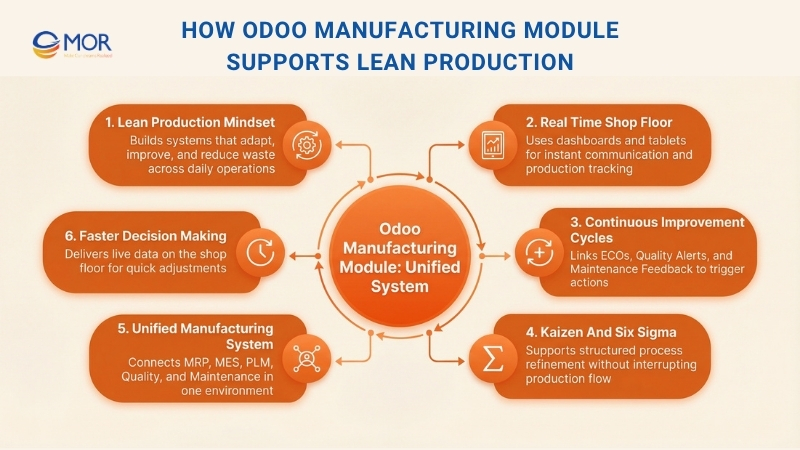
What makes this setup effective is its support for structured improvement cycles. Engineering Change Orders (ECOs), Quality Alerts, and Maintenance Feedback are not isolated tools. Inside this system, each one can trigger pre-set actions like updated instructions, adjusted routings, or maintenance tasks that directly affect upcoming orders. It follows ideas from Kaizen and Six Sigma, so teams can react to issues, refine processes, and improve product quality without stopping production.
With MRP, MES, PLM, Maintenance, and Quality combined in one connected environment, this solution removes the gaps that slow down improvement. Manufacturers can see data where work actually happens, right on the shop floor, and apply controlled changes with very little delay.
Key Features Of The Odoo Manufacturing Module
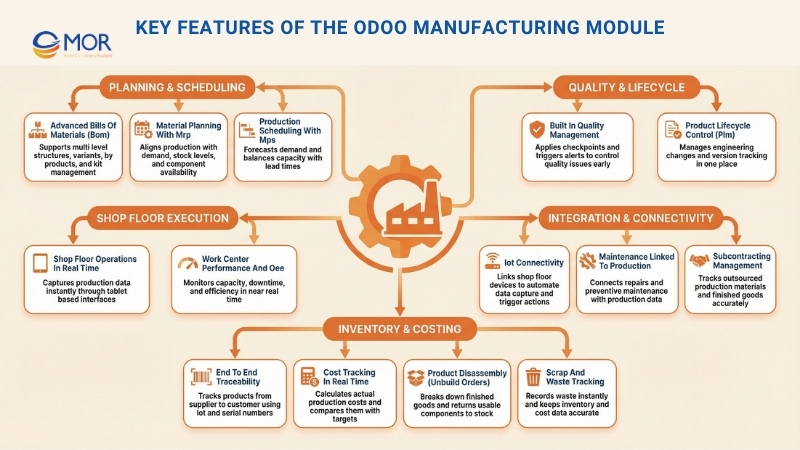
To be honest, production in Odoo includes many capabilities, yet it still feels practical for daily factory work. You can run simple assembly tasks, or manage complex multi-step operations with work orders, work centers, quality checks, and maintenance, all within a single system. These Odoo manufacturing module features cover the core functions you need to understand.
Advanced Bills Of Materials (BoM)
The Odoo manufacturing module supports multi-level BoMs, product variants, and by-products, so your inputs and outputs remain clear and consistent across planning, production, and inventory. It also supports kits, allowing you to handle an assembly as grouped components instead of storing a finished product.
Material Planning With MRP
Plan your production based on actual demand and current stock levels. This system helps you decide what to produce and what to purchase, checks component availability, and keeps manufacturing planning aligned with inventory movements so planning stays accurate.
Shop Floor Operations In Real Time
Replace paper documents with a live shop floor interface on tablets. Operators can process work orders, follow instructions, and record time as tasks happen. Production data is captured instantly instead of being entered later.
Production Scheduling With MPS
Forecast demand and match it with your real machine capacity and lead times. The MPS gives you a clear view of your production plan months ahead, helping you adjust purchasing and schedules to meet deadlines without holding excess stock.
Built-In Quality Management
You can define quality control checkpoints at the steps that matter most and apply checks like instructions, measurements, or images. When an issue occurs, it is recorded at the exact point where it happens and can trigger a Quality Alert immediately, so problems do not move further down the process.
Product Lifecycle Control (PLM)
Handle engineering updates with clear visibility. With ECOs and version tracking, the Odoo manufacturing management system lets you control changes from one place and keep related documents close to both the product and the workflow, making updates easier to apply consistently.
Maintenance Linked To Production
This solution connects production with maintenance, so operators can submit a repair request right from the shop floor. Production data can also support preventive maintenance planning, helping key machines stay stable and lowering the risk of downtime becoming a bottleneck.
IoT Connectivity
The Odoo production module can link with shop floor devices like barcode printers and scanners. With IoT support, you can automate parts of data capture and trigger actions directly from the shop floor application.
Subcontracting Management
Expand production capacity without growing your factory space. The system tracks materials sent to subcontractors and finished goods returned, keeping inventory accurate at each step. It also connects deliveries with accounting records, so outsourced production remains clear and easy to control.
End-To-End Traceability
Track every detail of each item across your process. With lot and serial tracking, the Odoo manufacturing module lets you trace a component back to its supplier or forward to a specific customer in just a few steps. This capability supports compliance, simplifies audits, and helps you control any recall situations more effectively.
Work Center Performance And OEE
This system gives you a clear picture of actual capacity and production constraints. You can monitor work center load and OEE in near real time, then analyze losses based on downtime, speed, or quality. When a machine performs below expectations, you respond to the real cause instead of relying on assumptions.
Product Disassembly (Unbuild Orders)
Errors can happen, but Odoo manufacturing ERP helps you fix them. Unbuild orders allow you to take apart finished goods for repair, reuse, or recycling, and automatically return usable components to the correct inventory locations.
Scrap And Waste Tracking
You can monitor waste exactly where it occurs, from raw materials to final assembly. When an item is scrapped, inventory updates right away, and the financial loss is recorded. Warehouse data stays accurate, valuation remains reliable, and you always understand the true cost of operations.
Cost Tracking In Real Time
Get a clear view of your margins. This production management tool tracks component costs and operation time at work centers, then calculates totals for each manufacturing order. You can compare actual costs with your targets to identify where margins drop and where processes need adjustment.
Key Benefits Of Odoo Manufacturing Module For Businesses
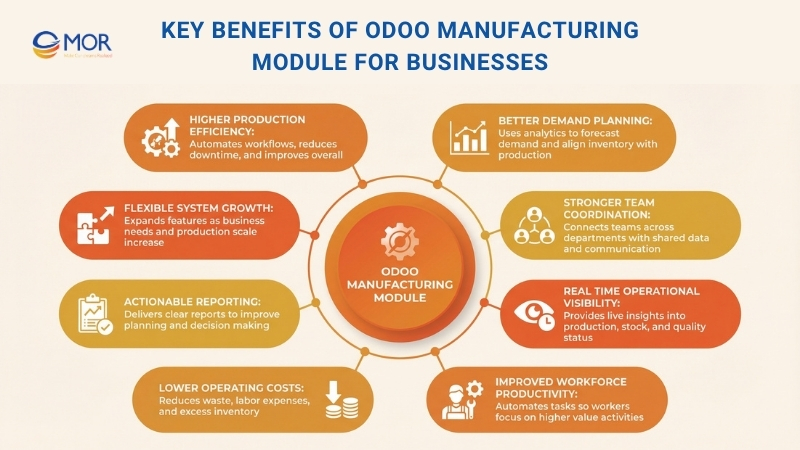
The Odoo manufacturing module brings together production, inventory, and quality into one system. As part of Odoo modules for manufacturing, it helps you manage daily operations with better control and fewer gaps.
Higher Production Efficiency
Odoo modules help automate manual work, connect different business processes, and give real-time data that helps you run operations better. With this system, you can keep workflows stable, reduce downtime, lower errors, and increase output, leading to a smoother production process.
Better Demand Planning
With advanced Odoo reporting and analytics tools, the Odoo manufacturing module helps you forecast demand more accurately. It allows you to plan future inventory needs, check material availability, and schedule production. This approach helps you use resources wisely, cut waste, and improve delivery performance.
Stronger Team Coordination
Odoo’s connected platform helps teams across procurement, production, and quality management work together easily. When communication is centralized and data is shared across users, everyone stays aligned and the risk of errors or miscommunication goes down.
Real-Time Operational Visibility
Access to live data is a key advantage of this solution. Managers can quickly view important details about production status, stock levels, and quality results. This visibility supports faster decisions, quick issue handling, and keeps the entire production flow running without disruption.
Improved Workforce Productivity
With tools like Material Requirements Planning (MRP), Shop Floor Management, and IoT Integration, this solution automates many manual tasks that take time. This helps workers focus on more important work, improves productivity, and keeps production targets on track.
Lower Operating Costs
Another advantage of this system is better resource control, automation of repeated tasks, and smoother supply chain management. It also cuts material waste, lowers labor costs, and avoids excess inventory that can lead to losses.
At the same time, the pricing model allows you to pay only for the functions you use, which makes it a cost-friendly option compared to other systems.
Actionable Reporting
This Odoo platform provides reporting tools that give clear data on production performance, product quality, resource usage, and financial results. Manufacturers receive timely reports that help them find areas to improve, adjust production plans, and make better business decisions.
Flexible System Growth
The modular design allows your business to grow step by step. You can add new functions when needed, whether you expand production or adopt technologies like IoT. This flexibility supports ongoing improvement and helps your operations adjust to change easily.
Implementation Roadmap For The Odoo Manufacturing Module
The Odoo manufacturing module can go live quickly. But a fast launch can fail just as fast if you ignore key basics like BoM accuracy, routing setup, inventory rules, and clear ownership of master data. We often see the same issue across projects. Teams focus on screens and functions, then struggle when real production starts running in the system.
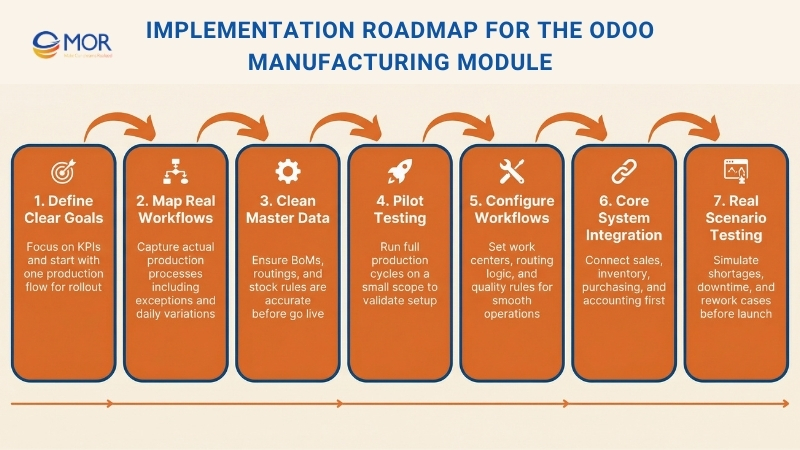
This is the roadmap used in practice. It stays simple and keeps risks visible.
Define Goals And Scope
Start with what you want to improve, then build your rollout around that goal. Choose KPIs that truly matter in your factory, like on-time delivery, inventory accuracy, WIP visibility, scrap rate, or production lead time. Then pick one production flow to handle first, such as make-to-order or make-to-stock, and leave other flows for later phases.
After that, define what “done” looks like for phase one. For example, planners create schedules in the system, operators report production steps inside it, finished goods move correctly into stock, and costing matches finance within an agreed range.
Map Actual Production Workflows
Before setting up anything, map how your production really works. Not how it appears in documents. Think about how it runs on a busy day. Teams often do this in short sessions and record the process so others can review and adjust:
- How orders move into production
- How materials are reserved, issued, and replaced
- How partial work and scrap are managed
- How rework and quality holds actually happen
- How subcontracting works in daily operations
This step matters because small exceptions are often bigger than expected. For example, a company may describe its process as “standard assembly.” In reality, parts get replaced often because suppliers miss deadlines. If replacement rules are not defined, the system becomes a barrier.
That is why you should capture the real workflow first. Then configure Odoo to match it.
Prepare Clean Master Data
This stage decides if the system runs well or becomes something people avoid. If your BoMs, routings, and stock rules are incorrect, planning will fail, work orders will slow down, and costs will become unreliable. Then teams spend time fixing data instead of running production.
Focus on the key data:
- Bills of materials: correct parts, units, versions, and effective dates
- Routings and work centers: real cycle times, setup times, and capacity rules
- Products and stock rules: lead times, reorder points, storage locations
- Traceability: lot or serial tracking rules, if required
Fixing this after go-live leads to constant corrections. Trust drops quickly, people stop using the system properly, and spreadsheets start to return.
Run A Pilot Project
Start with a small scope on purpose. Choose one product line or one production flow that reflects real operations, but does not involve the entire factory in the first stage.
Test the full process from start to finish on that selected line. Create a manufacturing order using an actual BoM and routing. Reserve materials, then consume them during production. Let operators report each step on the shop floor. If quality control is used, record those checks. Complete the process by moving finished goods into stock and do a quick check on the cost accuracy.
Configure Production Workflows
This stage focuses on how work should move through your factory inside Odoo. Not every setting matters, but a few key ones will decide if operators can work smoothly.
These are the decisions that usually matter most:
- Work center setup and capacity rules
- Routing design, from a single operation to step-based work orders
- Timing of work order release and how progress is tracked
- WIP locations and stock movement rules
- Subcontracting setup and material supply flow
- Quality control points and actions when checks fail
Consider a simple case. You require operators to start and stop a timer for each task because it seems helpful. In reality, no one uses that time data. Costing still depends on standard times, planners ignore actual durations, and supervisors do not act on the results.
As a result, operators make extra clicks without real benefit. They forget to start the timer, leave it running, or correct it later. The data becomes unreliable, and trust in the system drops.
Integrate Essential Systems First
Integrations may seem simple, but they often are not. Each connection adds new rules, edge cases, and possible failure points. That is why it is better to handle them in stages.
Start with the integrations that keep production running. The system needs real demand from sales, accurate material data from purchasing, and correct stock movement from inventory. Accounting also needs reliable valuation and cost data so finance can trust the results. If these connections are weak, planning and reporting will fail quickly.
Other integrations can come later. MES, advanced barcode systems, shipping tools, forecasting engines, or external PLM systems can add value, but only after the core flow is stable. You can still design with them in mind, so nothing needs to be rebuilt later. But avoid adding them while the team is still learning how to run production in the system.
Test Real-World Scenarios
Testing should reflect how your factory runs on a normal day. Production rarely follows a perfect path, so your testing should not either. Do not limit testing to ideal cases where stock is available, machines run without issues, and no changes occur. Instead, test the full workflow with real situations you face every day:
- Material shortages and partial availability
- Substitutions and alternative components
- Rework and scrap handling
- Machine downtime and schedule changes
- Backflushing compared to manual consumption
- Delays in subcontracting
- Inventory mismatches and adjustments
If these cases are ignored, your first week of live operation becomes your testing phase. That is when problems appear, people start improvising, and data loses accuracy.
Train Teams By Role
Training works only when people practice the exact tasks they perform daily. General training may show menus, but it does not prepare teams for real production work.
Each role needs a focused training approach:
- Planners: how to build schedules, adjust priorities, and manage exceptions when materials or capacity change
- Warehouse: how to reserve, pick, and issue or consume materials correctly
- Shop floor: how to report progress in the simplest way without affecting traceability or stock accuracy
- Finance: how costs and valuation are calculated, and how to read production reports
After that, assign clear ownership of master data. One person should manage BoM and routing updates, including approvals and version control. When everyone is responsible, no one truly takes ownership.
Launch And Stabilize
Keep the rollout controlled. Start with the pilot scope in real production. Then spend a short period fixing the issues that appear often, such as repeated data errors, unclear steps, missing rules, or small setup gaps. Once that part runs smoothly, extend to other product lines. Add more complex elements like subcontracting or deeper quality processes only after the main flow is stable.
During the first weeks, run short daily check-ins. Review each issue and classify the cause, whether it is a data issue, process gap, training need, configuration problem, or integration error. This makes it easier to see what needs fixing and who should handle it.
Continuous Monitoring And Improvement
After go-live, follow a simple routine to keep the system accurate and useful. Each week, review repeated mistakes and common exceptions, then fix the root cause. Each month, check inventory accuracy, lead times, and whether production follows the plan. Each quarter, review operation times, identify bottlenecks, update rules, and apply small improvements.
Common Challenges When Deploying The Odoo Manufacturing Module
When you implement a new ERP system like Odoo, you will face several challenges. These issues often appear during setup and early use, especially when working with the Odoo manufacturing modul in real production environments.
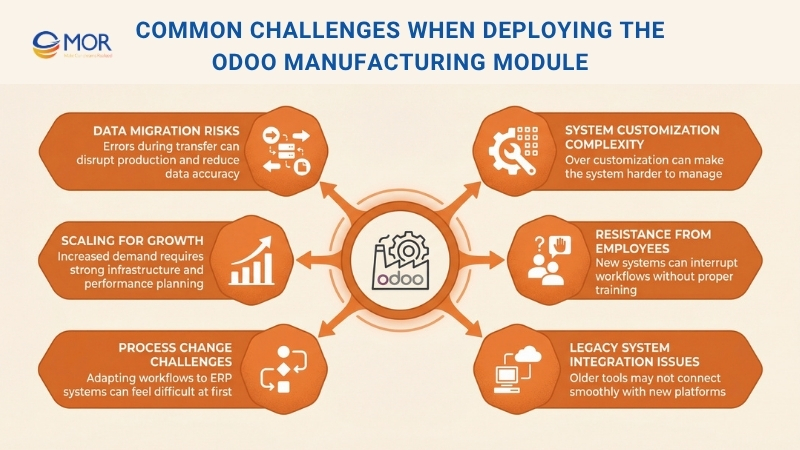
Data Migration Risks
During implementation, moving data such as inventory levels, production schedules, and other records into the new system can lead to errors, delays, and issues with BoMs (Bill of Materials). These problems can disrupt production and reduce data accuracy.
To handle this, you can use Odoo’s migration tools or work with experienced implementation specialists to transfer data correctly. Regular testing and validation during migration help reduce these risks.
System Customization Complexity
Odoo allows a high level of customization, but this can make it harder for manufacturers to adjust the system to fit their exact needs.
A better approach is to start with the core modules and then add custom features step by step based on business needs. Working with certified Odoo partners helps you build custom workflows and modules without making the system too complex.
Resistance From Employees
When you replace old systems with a new platform like the Odoo manufacturing module, employees may struggle with new interfaces. This can interrupt workflows and lower efficiency.
To reduce this issue, it is important to provide proper training for all users. Odoo has a user-friendly design, and with role-based training and ongoing support, teams can adapt more easily to the new system.
Legacy System Integration Issues
Many manufacturers still depend on older software or machines that do not connect easily with this platform. This gap leads to data inconsistencies, manual input, and delays across the production process.
This solution provides connectors and APIs that help link with other systems, including legacy tools. You can also work with specialists to build custom integrations or middleware, so data flows smoothly between systems.
Process Change Challenges
When you introduce an ERP system like Odoo, your business processes will need to change. Adjusting production workflows, inventory handling, and reporting methods to match the system can feel overwhelming.
A structured rollout helps reduce disruption. It is better to focus on one area first, such as inventory or procurement, then expand step by step. Clear communication and teamwork also help you make better use of the system’s capabilities.
Scaling For Growth
As your production grows, the system must support more data, more users, and more facilities. Without proper planning, performance may slow down or become unstable.
This platform can scale, but you still need to plan ahead. Make sure your IT infrastructure, including servers and databases, can handle higher demand, and review system performance regularly to keep everything running smoothly.
Real-World Use Cases Of The Odoo Manufacturing Module
Real projects show how the Odoo manufacturing module works in practice. These cases highlight how companies improve operations, reduce delays, and gain better control over production.
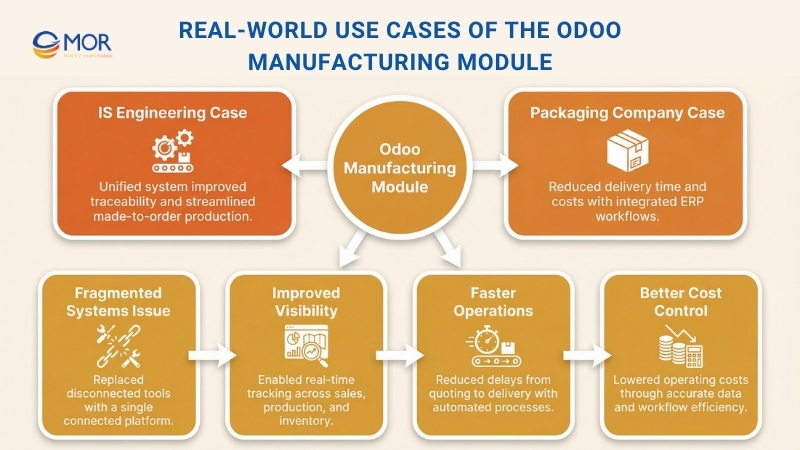
Odoo ERP Rollout For IS Engineering
IS Engineering produces custom brush rollers, but its operations could not keep up with the demands of made-to-order production. Quoting, crate calculations, scheduling, and finance were handled in separate tools, which led to delays, errors, and limited visibility. We implemented Odoo ERP for manufacturing as a unified system covering sales, production, inventory, quality, and accounting, along with crate and pricing tools and DATEV and EBICS integrations. The result was a single workflow from quote to delivery, complete traceability, and much smoother operations.
ERP Transformation For A Packaging Company
Rising order volumes pushed a US packaging company into challenges with a fragmented CRM, separate accounting tools, and production managed through spreadsheets. Inventory data did not match, reporting took too long, and bottlenecks slowed the process from order intake to shipment.
We deployed Odoo ERP Manufacturing as a connected system across Sales, MRP, Stock, Purchase, and Accounting, including data migration, built-in quality checks, and real-time dashboards.
After implementation, order-to-delivery time decreased by 23% (7.9 to 6.1 days) and operating costs dropped by 15%.
>>> Explore what production lead time means, how it differs from production cycle time, and practical strategies companies use to shorten factory lead times and improve operational performance.
Practical Tips For Adopting The Odoo Manufacturing Module
Implementing the Odoo manufacturing module takes careful planning and clear execution. These practical tips help you move step by step and work more effectively with Odoo manufacturing module experts.
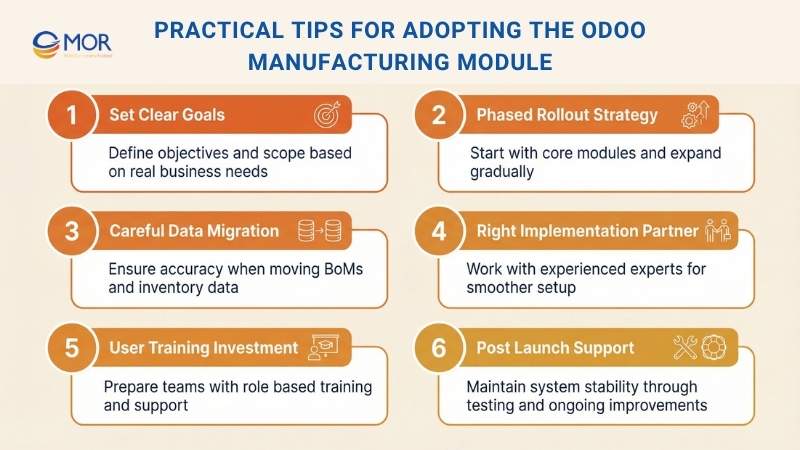
Set Clear Goals And Scope
This is the starting point, and you should give it full attention. You can identify key pain points, main goals, and the scope of your ERP setup through a detailed business analysis. From this, you can build a clear plan for implementation.
Use A Phased Rollout
It is better to roll out the Odoo manufacturing system in stages that are easy to manage. You can begin with core areas like inventory and MRP to gain quick value. Quality, maintenance, and other functions can be added in later phases.
Plan Data Migration Carefully
You need a clear plan to move existing BoMs, inventory data, and customer or supplier records into the system. Incorrect data can cause serious issues and prevent the platform from working properly.
Choose The Right Implementation Partner
Selecting the right partner with strong experience in manufacturing ERP projects is important. A skilled partner understands your business needs and applies proven methods to support a smooth setup.
Invest In User Training
ERP adoption can bring challenges, including resistance from teams. You should invest in proper training and set up a clear change process. This helps your team adapt faster and get full value from the system.
Along with these steps, you should also focus on thorough testing and strong support after go-live to keep the system stable and effective.
The Future Of Manufacturing With The Odoo Manufacturing Module
The future of manufacturing looks strong as the Odoo manufacturing module continues to support digital transformation through innovation and alignment with Industry 4.0. This solution is becoming a key tool for improving efficiency and flexibility in production. When combined with technologies like machine learning development services, and IoT, it can deliver deeper analytics and more advanced capabilities.
The Odoo manufacturing system also improves user experience and supports greater flexibility. You can expect simpler interfaces and better access on mobile devices. It will also support sustainability goals, with tools that track environmental impact and help manage resources more effectively.
MOR Software - Your Trusted Odoo Partner For Manufacturing Success
Choosing the right Odoo partner often decides how stable your system feels after go-live. That is where MOR Software makes a difference. With solid experience in ERP and manufacturing systems, the team focuses on what works on your shop floor, not just what looks good in demos.
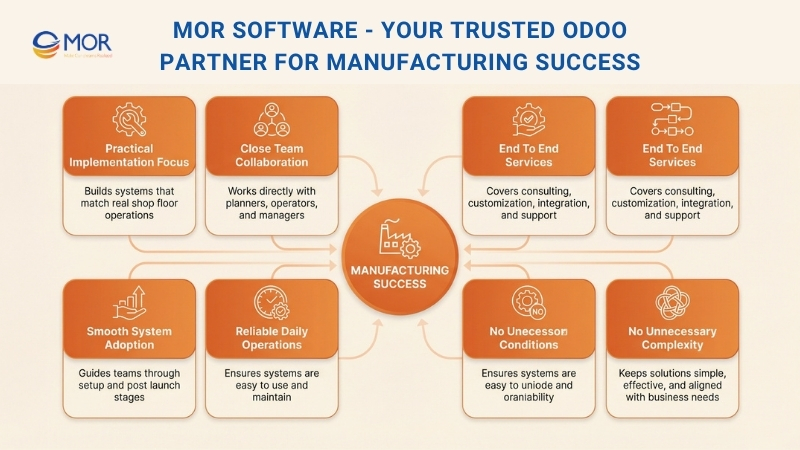
We work directly with your planners, operators, and managers to shape a system that fits your real production flow. From BoM setup to shop floor tracking, each step follows how your team works today, with clear improvements where needed.
MOR Software also delivers full-cycle software outsourcing services. This includes consulting, customization, system integration, and long-term support. You do not have to manage the system alone after launch.
Many companies choose MOR Software for one simple reason. We keep things practical. No unnecessary complexity, no wasted effort, just a system your team can rely on and use every day.
Conclusion
The Odoo manufacturing module gives you a clear way to manage production, from planning to delivery, without losing control of data or workflows. With the right setup, it helps your team work faster and make better decisions every day. If you want a system that truly fits your factory, MOR Software is ready to help. Contact us today to start building a solution your team can trust and use with confidence.
MOR SOFTWARE
Frequently Asked Questions (FAQs)
What is the Odoo manufacturing module used for?
The odoo manufacturing module helps manage production from planning to execution. It connects bills of materials, work orders, inventory, and quality in one system. Teams can track production in real time without switching tools.
Can the Odoo manufacturing module handle complex production processes?
Yes. It supports both simple assembly and multi-step production. You can define work centers, routing steps, and dependencies to match real workflows.
How does Odoo handle inventory during manufacturing?
Inventory updates automatically as materials are consumed and finished goods are produced. This keeps stock levels accurate and avoids planning errors.
Does the Odoo manufacturing module support quality control?
Yes. You can set quality checkpoints at different stages. If an issue appears, it gets logged and can trigger alerts right away.
Is real-time production tracking available?
Yes. Operators can report progress directly from the shop floor. Managers can view live updates on work orders, delays, and output.
Can Odoo integrate with other business systems?
It connects with sales, purchasing, accounting, and inventory inside Odoo. It can also integrate with external systems using APIs.
How does Odoo support production planning?
It includes MRP and MPS tools to plan production based on demand, stock, and capacity. This helps avoid shortages and overproduction.
Is the Odoo manufacturing module suitable for small businesses?
Yes. It works for both small and large companies. You can start small and expand features as your operations grow.
Can Odoo track production costs accurately?
Yes. It tracks material costs and operation time. You can compare planned costs with actual results and identify gaps.
Share


Make Our-Dreams Realized


© 2023 . MOR Software. All Rights Reserved
Sitemap
Privacy Policy
Terms of Use

Rate this article
0
over 5.0 based on 0 reviews
Your rating on this news:
Name
*Email
*Write your comment
*Send your comment
1