


Odoo vs NetSuite: Which ERP Fits Your Business in 2026?
Odoo gives businesses a modular ERP, flexible hosting, broad customization, and published software pricing. NetSuite takes a more controlled cloud approach, backed by deeper financial management and multi-subsidiary tools. The better choice depends on operational complexity, not brand size. In this guide, MOR Software will compare Odoo vs NetSuite across functionality, cost, deployment, customization, implementation, global operations, and long-term scale so you can judge each platform against real business needs.
Key Takeaways
- Odoo fits companies that value modular adoption, lower software costs, manufacturing depth, native commerce tools, and greater control over how the ERP is changed or hosted.
- NetSuite fits finance-led organizations that need structured subsidiary management, consolidation, global reporting, stronger financial controls, and a vendor-managed SaaS model.
- A useful NetSuite vs Odoo comparison must cover implementation, customization, integrations, upgrades, and long-term administration. License price alone gives an incomplete answer.
Odoo vs NetSuite: Quick Comparison
Odoo and NetSuite cover finance, sales, inventory, CRM, and other core ERP processes, yet they take different paths. Odoo centers on modular apps and technical freedom. NetSuite favors a controlled cloud environment and structured financial operations.
Oracle reported in March 2026 that NetSuite serves more than 43,000 customers across 220 countries and dependent territories, which helps explain its strong position among global and mid-market ERP buyers.
Comparison area | Odoo | NetSuite |
Best business fit | SMBs and mid-market firms seeking flexibility and cost control | Mid-market and larger firms with complex finance structures |
ERP architecture | Modular platform with open-source roots | Proprietary cloud-native ERP suite |
Deployment options | Odoo Online, Odoo.sh, or self-hosted | Oracle-managed cloud |
Pricing model | Published per-user plans with broad app access | Negotiated licensing based on users, editions, and modules |
Financial management depth | Strong standard accounting and operational finance | Deeper consolidation, controls, and enterprise finance |
Multi-company support | Multi-company setup through the Custom plan | Multi-subsidiary management through OneWorld |
Manufacturing | MRP, PLM, Quality, Maintenance, and Shop Floor | Manufacturing connected to finance, planning, and supply operations |
CRM and sales | Native CRM, quotations, sales, and connected apps | Native CRM tied closely to finance and order management |
Ecommerce and POS | Native ecommerce, website, and POS | SuiteCommerce for ecommerce; POS may require another solution |
Customization model | Python, XML, Odoo Studio, ORM, and custom modules | SuiteScript, SuiteFlow, and SuiteCloud |
Implementation approach | Works well with phased module rollouts | Often follows a structured enterprise rollout |
Reporting and analytics | Native reports, dashboards, and Spreadsheet | SuiteAnalytics, saved searches, reports, and dashboards |
Scalability | Flexible operational growth with rising governance needs | Strong fit for complex entity and international expansion |
Main trade-off | More technical freedom creates more maintenance responsibility | More platform control means less infrastructure freedom |
The practical NetSuite vs Odoo decision comes down to the structure of your business. Odoo gives you more room to shape the system, whereas NetSuite becomes compelling when finance, subsidiaries, and global governance drive ERP design.
>>> READ MORE: Compare differences between Odoo vs Salesforce to help you choose the right fit for 2026.
What Are Odoo and NetSuite Built For?
The platforms often appear on the same shortlist, yet their roots point to different buyer needs. A NetSuite ERP vs Odoo review becomes easier once you understand how each product approaches architecture, ownership, and deployment.
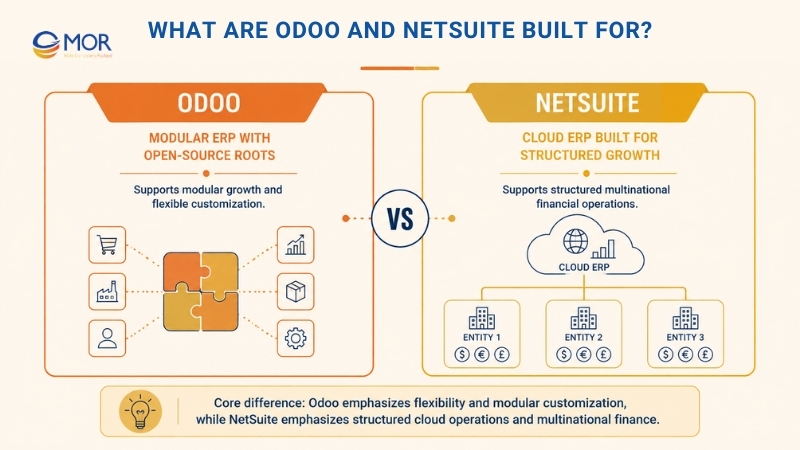
Odoo: Modular ERP With Open-Source Roots
Odoo combines business applications around one shared data model. Companies can start with Accounting, CRM, Sales, or Inventory, then add Manufacturing, Purchase, POS, Ecommerce, Project, HR, Helpdesk, and other apps when business needs expand.
The platform exists in Community and Enterprise editions. Community gives developers access to an open-source base, whereas Enterprise adds commercial apps, services, and paid plans.
Deployment also varies. Odoo Online provides vendor-hosted SaaS, Odoo.sh supports managed hosting for custom development, and self-hosting gives technical teams direct infrastructure control.
That broad ecosystem has grown at scale. Odoo's own comparison page reports 12 million+ users, 44,000+ integrated apps, and more than 20,000 downloads per day.
This architecture suits companies whose workflows don't fit neatly into standard ERP templates. Manufacturing rules, approval flows, customer portals, retail processes, or industry-specific logic can be changed through configuration, Studio, or custom development.
NetSuite: Cloud ERP Built for Structured Growth
Oracle NetSuite uses a cloud-only model. Finance, inventory, order management, CRM, ecommerce, and other business functions run inside an Oracle-managed environment, which removes self-hosting decisions and keeps the core platform under vendor control.
NetSuite OneWorld extends that structure for organizations running subsidiaries in different jurisdictions. Oracle documentation describes separate subsidiary base currencies, tax jurisdictions, parent-child hierarchies, and consolidated exchange rates for group reporting.
Development still exists inside the platform. SuiteScript supports coded extensions, SuiteFlow manages workflows, SuiteCloud supplies platform services, SuiteAnalytics handles reporting, and SuiteCommerce covers commerce use cases.
NetSuite fits buyers that prefer a controlled SaaS operating model and formal enterprise finance processes. That structure becomes useful when the ERP must coordinate legal entities, finance teams, reporting rules, and governance across countries.
Odoo vs NetSuite Features: Where Each Platform Leads
Both ERP systems cover the functions most businesses expect. The differences become easier to see once workflows move beyond a basic sales order, invoice, or inventory receipt.
A useful Odoo vs NetSuite comparison looks at operational depth, finance complexity, and the amount of system control your team needs. Those factors reveal more than a long checklist of modules.
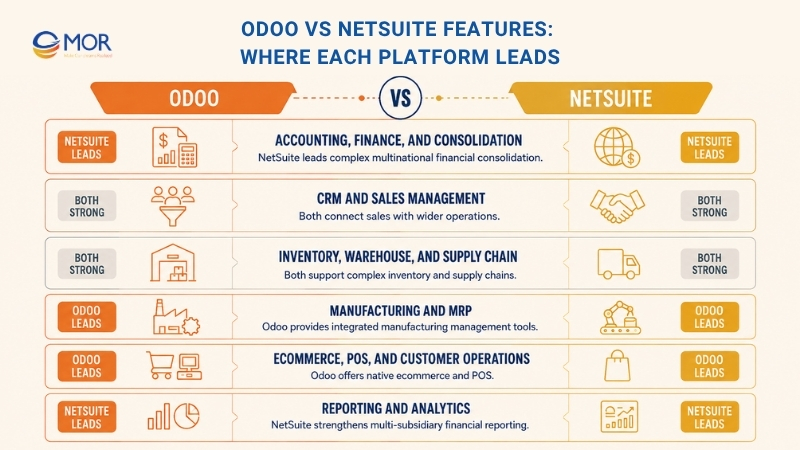
Accounting, Finance, and Consolidation
Odoo Accounting manages the general ledger, accounts payable, accounts receivable, invoicing, bank reconciliation, taxes, expenses, and multi-currency transactions. Operational records can flow into finance through connected Sales, Purchase, Inventory, POS, and other apps.
Multi-company support lets users work across several companies under one Odoo environment. Permissions, company-specific records, currencies, taxes, journals, and reporting still need careful setup as the organization becomes more complex.
NetSuite places greater weight on enterprise finance. Its structure supports subsidiary hierarchies, intercompany processes, consolidated reporting, revenue management, currency translation, and stronger financial governance.
OneWorld becomes relevant once group accounting drives the ERP design. Oracle states that each subsidiary can carry its own base currency, and consolidated reports use separate exchange rates to translate child subsidiary amounts into the parent structure.
The distinction grows with entity count. Odoo can handle multi-company operations, but NetSuite has a stronger structural case when formal consolidation, intercompany controls, and multinational finance dominate the requirements.
CRM and Sales Management
Odoo connects CRM, Sales, Inventory, and Accounting around shared customer records. Sales teams can manage leads, opportunities, activities, quotations, orders, pricing, and customer history without moving data between separate applications.
That close app connection suits companies that want their sales process tied directly to stock availability, fulfillment, invoicing, and customer service. The NetSuite vs Odoo crm comparison becomes less about basic pipeline tools and more about how CRM sits inside the wider operating model.
NetSuite also manages leads, opportunities, customers, quotations, sales orders, and approval processes. Its sales workflows tie tightly into finance and order management, which can suit businesses where pricing approval, credit control, and reporting need stronger governance.
Some companies still pair NetSuite with Salesforce or HubSpot when their sales operation requires a dedicated CRM environment. In that setup, integration design becomes part of the ERP decision.
Inventory, Warehouse, and Supply Chain
Odoo Inventory works closely with Purchase, Sales, Manufacturing, Barcode, and Accounting. It supports warehouses, locations, replenishment, lots, serial numbers, routes, barcode flows, inventory transfers, and procurement rules.
NetSuite handles multi-location inventory, purchasing, replenishment, demand planning, warehouse processes, and broader supply chain coordination. Its appeal rises as businesses manage more sites, formal planning cycles, and finance-linked inventory controls.
The operational result can be substantial when implementation matches the process. Motek, an SMT equipment business operating across China and India, reported a 30% to 40% increase in warehouse efficiency and a 60% drop in overseas shipping errors after moving receiving, picking, and inventory audits into Odoo barcode workflows.
Your warehouse count alone won't decide the winner. SKU complexity, fulfillment channels, transfer rules, demand planning, traceability, procurement dependencies, and reporting needs carry more weight.
Manufacturing and MRP
Odoo's manufacturing stack covers bills of materials, manufacturing orders, work orders, planning, shop-floor operations, subcontracting, quality, maintenance, and PLM. Inventory and purchasing connect directly to production demand.
The current Odoo Manufacturing documentation also includes multi-level BoMs, work centers, work-order dependencies, master production scheduling, lots and serial numbers, shop-floor tracking, production analysis, and overall equipment effectiveness.
NetSuite connects manufacturing to inventory, procurement, planning, accounting, and business reporting. This can work well for organizations that place financial control and enterprise-wide planning at the center of production management.
A NetSuite vs Odoo manufacturing comparison should focus on your actual production model. Product complexity, quality checks, maintenance, scheduling, traceability, plant structure, costing, and financial reporting can shift the decision in either direction.
Ecommerce, POS, and Customer Operations
Odoo includes Website, Ecommerce, CRM, Sales, Inventory, Accounting, and POS inside the same application family. An online order can feed stock, customer, payment, delivery, and finance records without building separate data flows between native Odoo apps.
NetSuite SuiteCommerce connects online commerce with NetSuite inventory, order management, CRM, and finance. Oracle also supports OneWorld links between commerce sites and subsidiaries, including currencies, tax rates, languages, and items tied to the default subsidiary.
Your current commerce stack should guide the architecture. A retailer already committed to Shopify may get more value from a reliable ERP integration than replacing the storefront just to gain native commerce.
POS creates another difference. Odoo supplies a native POS app, whereas NetSuite buyers often assess separate retail technology alongside their ERP setup.
Reporting and Analytics
Odoo includes standard accounting reports, operational reports, dashboards, pivot views, and its Spreadsheet environment. Users can work with live ERP data without exporting every analysis into an external workbook.
NetSuite SuiteAnalytics covers Workbook, Searches, Reports, Dashboards, Connect, and NetSuite Analytics Warehouse. Saved search results can also appear on role dashboards and act as custom KPIs.
NetSuite's reporting structure becomes more valuable in finance-heavy, multi-subsidiary settings. Odoo often gives operational teams faster access to everyday ERP data, especially when group consolidation isn't the main requirement.
External BI can still make sense for either system. Companies with complex data models may connect the ERP to Power BI, Tableau, a warehouse, or another analytics layer rather than force every reporting need into the transaction system.
Odoo vs NetSuite Pricing and Total Cost of Ownership
Pricing creates one of the sharpest differences in the Odoo vs NetSuite discussion. Yet subscription cost covers only part of ERP spending. Implementation, migration, custom work, integrations, training, support, and administration all affect the final number.
A useful NetSuite vs Odoo comparison pricing operations management ERP review should separate recurring software charges from project costs and long-term ownership.
Odoo vs NetSuite Licensing Costs
Odoo publishes its subscription structure. NetSuite pricing remains negotiated, so public NetSuite figures come from consultants, customer quotes, and market benchmarks rather than an Oracle list price.
Cost component | Odoo | NetSuite |
Entry price | One App Free: $0 | Base platform commonly estimated around $999/month |
Standard users | Standard: $24.90/user/month for the first annual term, then $31.10 | Full users commonly estimated at $129-$199/user/month |
Custom plan | $49/user/month for the first annual term, then $61 | Depends on edition, users, and modules |
Modules | All Odoo apps included in Standard and Custom | Manufacturing, WMS, SuiteCommerce, and other additions can increase cost |
Hosting | Odoo Online included; Odoo.sh billed separately | Vendor-managed cloud model |
Multi-company | Included in Custom | OneWorld and subsidiary requirements can change the quote |
Odoo's official pricing page confirms the current plan split. Standard includes all apps on Odoo Online, while Custom adds Odoo Studio, multi-company, external API access, plus Odoo.sh or on-premise deployment options.
At 50 users, the first-year annual math is about $14,940 for Standard and $29,400 for Custom before separate Odoo.sh charges or implementation work. Regular subscription rates would place the same user count at about $18,660 and $36,600 per year.
NetSuite doesn't publish an official list price. BrokenRubik's July 2026 benchmark reports a base platform around $999 per month, full users around $129-$199 per month, and typical 15 to 50-user mid-market licenses around $50,000-$150,000 per year.
Implementation Costs for a 50-User Deployment
ERP implementation adds discovery, configuration, migration, custom work, integration, training, testing, and project management. Scope changes these numbers quickly, so the table below should act as a planning range rather than a quote.
Implementation cost | NetSuite estimate | Odoo estimate |
Discovery and design | $20K-$40K | $5K-$15K |
Configuration | $40K-$80K | $10K-$30K |
Customization | $30K-$100K | $10K-$60K |
Data migration | $20K-$50K | $5K-$25K |
Training | $10K-$25K | $3K-$15K |
Project management | $15K-$30K | $5K-$15K |
Contingency | $20K-$40K | $5K-$25K |
Estimated total | $155K-$365K | $43K-$185K |
ERPLenz uses these ranges for its 2026 50-user mid-market scenario. Its model also shows why customization can change Odoo's cost position sharply even when license fees stay low.
5-Year TCO for Odoo vs NetSuite
A five-year model puts renewal, implementation, and customization into a more useful business view. ERPLenz estimates the following midpoint scenario for 50 users:
Year | NetSuite midpoint | Odoo Enterprise Custom midpoint |
Year 0 implementation | $260K | $90K |
Year 1 subscription | $174K | $28K |
Year 2 subscription | $196K | $29K |
Year 3 subscription | $222K | $30K |
Year 4 subscription | $252K | $31K |
Year 5 subscription | $285K | $33K |
5-year cumulative cost | ~$1.39M | ~$241K |
Treat this as one scenario, not a universal prediction. Heavy Odoo customization can create recurring developer costs, upgrade work, Odoo.sh expenses, and partner support charges. NetSuite's commercial cost also changes with discounts, renewal terms, modules, user mix, subsidiaries, and services.
The better financial test is your three to five-year TCO. Include subscription, implementation, migration, integrations, custom development, training, support, upgrade work, and internal ERP administration.
Deployment, Customization, and Vendor Lock-In
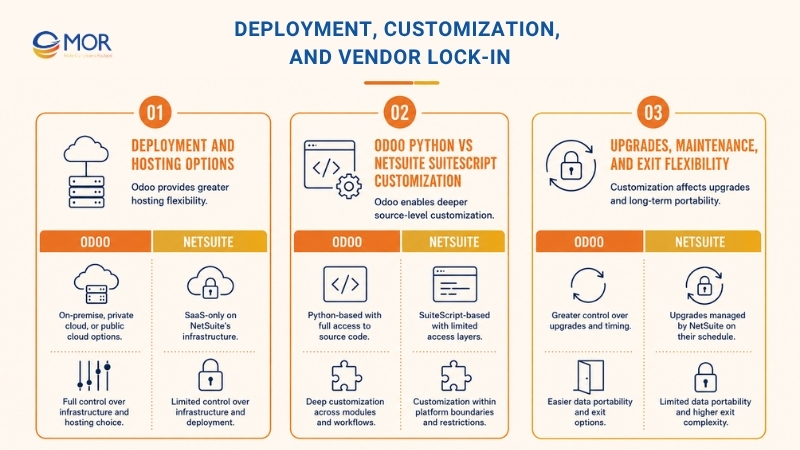
Hosting and customization expose a deeper difference between the platforms. Odoo gives technical teams more control over infrastructure and source-level changes. NetSuite keeps the ERP inside Oracle's managed cloud and channels custom work through its own extension tools.
This also makes the section a useful NetSuite vs open source ERP comparison. More freedom can solve unusual workflows, but every custom decision creates something your team must own later.
Deployment and Hosting Options
Odoo Online provides the simplest SaaS route. Odoo manages hosting and the customer runs within the standard online environment, which suits companies that don't need custom server-side modules.
Odoo.sh supports custom code inside a managed Odoo platform. Self-hosting goes further and lets a business control its infrastructure, database environment, backup policies, hosting provider, and technical architecture.
NetSuite removes those choices. Oracle runs the application as a cloud service, and customers access the platform without selecting their own ERP hosting stack.
Odoo's model appeals to companies with data residency rules, internal DevOps capacity, or strict infrastructure preferences. Yet self-hosting also transfers more responsibility to your technical team.
NetSuite cuts that infrastructure burden. The trade-off is tighter platform dependence and less freedom over the underlying environment.
Odoo Python vs NetSuite SuiteScript Customization
Odoo developers can work with Python, XML, ORM models, APIs, views, and custom modules. Odoo Studio handles simpler changes to fields, screens, forms, and workflows without requiring a developer for every request.
NetSuite uses SuiteScript, SuiteFlow, SuiteCloud, custom fields, and custom records. Developers can add business logic and workflows, but the work stays within NetSuite's proprietary platform rules.
The Odoo path permits deeper source-level change. This suits non-standard manufacturing logic, unique approval chains, custom portals, industry workflows, or integrations that need more than basic configuration.
Freedom needs discipline, though. Delta Brand's Odoo project is a useful example: its implementation partner met about 70% of requirements with standard Odoo and used customization for the remaining 30%. That ratio kept custom work focused instead of rebuilding the whole ERP.
NetSuite's tighter extension model can limit some technical choices, yet it can make governance easier. The right model depends on whether your team values open control or a more bounded development environment.
Upgrades, Maintenance, and Exit Flexibility
Custom code changes the upgrade equation. Standard Odoo deployments carry less technical debt, but custom modules still need compatibility testing when a company moves to a new major release.
NetSuite controls core product releases. Customers don't maintain the ERP infrastructure, though SuiteScript, SuiteFlow, integrations, and business processes still need testing when platform changes arrive.
Partner dependency also looks different. An Odoo customer can change developers, partners, hosting models, or infrastructure, but undocumented modules can trap a business inside one developer's codebase.
NetSuite lowers partner dependence at the infrastructure layer, yet the business remains tied to Oracle's proprietary platform. Migration away still requires data extraction, process redesign, integration replacement, and user retraining.
Look at vendor lock-in as a business continuity question. Data portability, custom documentation, integration ownership, technical talent, and exit cost deserve a place in the ERP selection scorecard.
Implementation, Migration, and Support Compared
ERP timelines need more than a vendor's 'go-live in weeks' claim. A real project includes discovery, process mapping, data preparation, configuration, integration, testing, training, cutover, and stabilization.
Scope drives the schedule more than product branding. Dirty data, heavy customization, entity count, internal availability, or weak project ownership can delay either platform.
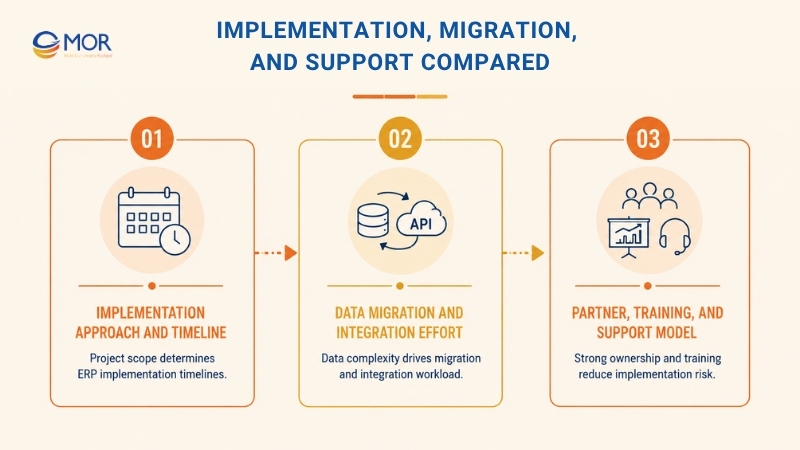
Implementation Approach and Timeline
Odoo works well with phased adoption because applications can be introduced around priority processes. A company might start with Accounting, Sales, and Inventory, then add Manufacturing, CRM, or other areas once the first workflows are stable.
A typical Odoo rollout follows this sequence:
- Discovery and process mapping
- Configuration and customization
- Data migration and integration
- UAT and user training
- Go-live and stabilization
This approach can keep early scope smaller. Timelines still rise quickly when manufacturing logic, custom modules, external systems, or large data migrations enter the project.
NetSuite projects tend to follow a more formal enterprise rollout, especially for SuiteSuccess or OneWorld deployments. Subsidiary structure, intercompany rules, reporting, permissions, and finance controls can require deeper design before cutover.
A common NetSuite sequence looks like this:
- Discovery and solution design
- Configuration and module setup
- Data migration and integration
- UAT and user training
- Go-live, close testing, and stabilization
Neither list gives you a reliable number of weeks on its own. A clean single-entity rollout with standard processes is a different project from an international ERP replacement with custom integrations and five subsidiaries.
Data Migration and Integration Effort
Migration usually exposes old data problems very quickly. Customer records, vendors, products, inventory, account structures, tax data, and duplicate master records need cleaning before they enter the new ERP.
Finance migration adds another layer. Teams must decide how to handle opening balances, unpaid invoices, outstanding payables, historical transactions, bank reconciliation, fixed assets, inventory valuation, and prior-period reporting.
Custom logic also needs a destination. Moving into Odoo may require new modules or replacements for workflows built in a legacy ERP. Moving into NetSuite may require SuiteScript, SuiteFlow, SuiteApps, or new middleware.
APIs can connect CRM, ecommerce, payments, logistics, BI, and other systems, but each integration adds mapping and testing work. Real-time synchronization also needs failure handling, logging, retry rules, ownership, and support plans.
Large finance migrations may need a parallel close before the old ERP is retired. That extra cycle costs time, yet it gives finance a chance to reconcile the new system against known results.
Partner, Training, and Support Model
Odoo customers can buy services directly or work with Odoo partners for business analysis, configuration, development, migration, integrations, training, and maintenance. Partner skill becomes more influential as customization grows.
NetSuite also relies heavily on its partner ecosystem. Consultants often manage solution design, module configuration, OneWorld setup, SuiteCloud work, migration, training, and post-launch support.
Internal ownership still counts. Finance leads need to validate accounting rules, operations teams must test real workflows, and process owners need enough authority to settle scope decisions before they stall the project.
Training also deserves real project time. Users need to understand changed workflows, permissions, exception handling, approvals, and reporting before the new system becomes the source of record.
A cheap license can't rescue a weak implementation. Poor discovery, dirty data, unchecked customization, or rushed UAT often converts the original 'savings' into rework after launch.
Scalability and Multi-Entity Operations
ERP scalability means more than adding user accounts. Structural growth changes legal entities, tax rules, currencies, reporting, data volume, internal controls, and the number of systems that depend on the ERP.
That distinction matters when comparing Odoo vs NetSuite for a business that expects acquisitions, new countries, or more complex finance over the coming years.
Multi-Company vs Multi-Subsidiary Management
Odoo manages separate companies inside one environment. NetSuite OneWorld takes a more formal subsidiary approach centered on legal-entity hierarchies and consolidated multinational finance.
Comparison area | Odoo | NetSuite |
Legal entity structure | Companies can share an environment with company-specific records and controls | Parent and subsidiary hierarchy sits at the center of OneWorld |
Consolidated reporting | Requires suitable multi-company setup and reporting design | Built around consolidated subsidiary reporting |
Intercompany transactions | Supports intercompany workflows with configuration | Formal intercompany processes align with subsidiary structure |
Eliminations | Depends on accounting design and consolidation approach | OneWorld supports elimination subsidiaries and related setup |
Currency translation | Multi-currency supported across company accounting | Subsidiaries can carry separate base currencies and consolidated exchange rates |
Complex finance | Good fit for many standard multi-company models | Stronger fit for multi-book, subsidiary, and group finance demands |
NetSuite's structural advantage grows when the group needs formal eliminations, separate books, currency translation, and consistent group reporting across several legal entities. Odoo remains attractive when operational integration and flexible company management carry more weight than deep consolidation.
Localization and International Operations
Currency support is only one part of international ERP work. Tax calculation, statutory reporting, e-invoicing, account structures, reporting formats, and local rules can change between countries.
International requirement | Odoo | NetSuite |
Multi-currency | Supports foreign-currency transactions and company accounting | OneWorld supports separate subsidiary base currencies |
Tax management | Uses country packages and tax configuration | Supports tax setup around subsidiary jurisdictions |
Country localization | Availability varies by country and Odoo localization | Coverage depends on NetSuite product and country setup |
Global reporting | Multi-company reports depend on configuration | OneWorld supports consolidated subsidiary reporting |
Compliance | Partner skill and localization quality can affect implementation | Finance structure centers on controlled global setup |
Oracle's FiLLi Cafe example shows how this plays out at scale. The UAE-based chain uses NetSuite as it operates 114 locations across 13 countries, tying finance, inventory, and franchise operations to one ERP environment.
Don't accept a broad 'global ERP' label as proof of local fit. Validate each country you plan to enter, including tax, e-invoicing, reporting, currency, payroll dependencies, and statutory requirements.
When Growth Creates Re-Platforming Risk
More users don't necessarily create the hardest ERP problems. Five new legal entities, a new audit requirement, or three new countries can change architecture far more than 50 additional employees.
Growth pressure | What to evaluate in Odoo | What to evaluate in NetSuite |
More legal entities | Multi-company structure and consolidation workload | OneWorld hierarchy and subsidiary setup |
International expansion | Localization coverage and partner capability | Country support and global finance structure |
Reporting complexity | Consolidation and external BI needs | SuiteAnalytics and group reporting |
Higher transaction volume | Hosting, custom modules, and database performance | Subscription configuration and process design |
Audit requirements | Controls, logs, and customization governance | Finance controls and formal approval design |
Customization debt | Upgrade work around custom modules | SuiteScript and SuiteCloud maintenance |
Internal IT capacity | Ability to own technical freedom | Ability to administer a controlled SaaS ERP |
Re-platforming risk appears when business structure grows faster than the ERP setup can support. Model future entities, countries, reporting, controls, and integrations before the first implementation, not after complexity arrives.
Odoo vs NetSuite: Which One Should You Choose?
A useful NetSuite vs Odoo - mid-market ERP comparison for growing companies should end with a business fit decision, not a feature score. The right platform depends on which constraints are hardest for your company to change later.
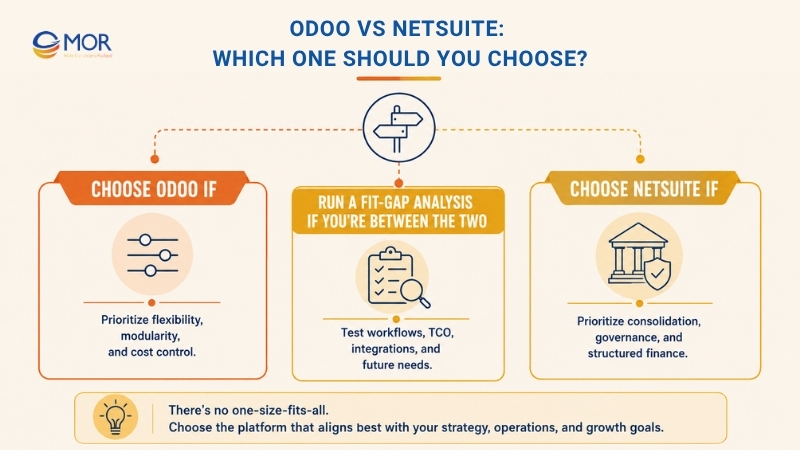
Choose Odoo If
Odoo makes a strong case when operational flexibility and cost control sit high on the buying list. It also works well when a business wants to start with a smaller ERP scope and expand module coverage over time.
- You want published software pricing: Odoo's plans make the recurring software baseline easier to forecast.
- You prefer a modular rollout: Teams can introduce priority apps and add others after the first processes settle.
- You need hosting choice: Odoo Online, Odoo.sh, and self-hosted options support different IT models.
- You expect custom workflows: Python, XML, Studio, APIs, and custom modules provide several paths for tailored logic.
- Manufacturing or retail drives the project: Native MRP, Quality, Maintenance, Ecommerce, Website, and POS can limit the number of separate business apps.
- You have technical support: Internal developers or an experienced Odoo partner can govern custom code and upgrades.
- Your finance structure stays manageable: Odoo works best when enterprise-grade subsidiary consolidation isn't the dominant requirement.
Choose NetSuite If
NetSuite fits better when finance structure and group control determine the ERP architecture. Buyers also gain a fully vendor-managed SaaS model, which removes many hosting decisions.
- Subsidiaries sit at the center of operations: OneWorld is designed for parent-child legal-entity structures.
- International consolidation drives reporting: Currency translation, group reporting, and intercompany design receive greater attention.
- Finance controls carry heavy weight: Complex approvals, close processes, reporting, and governance can justify a more structured setup.
- Your IT team wants SaaS standardization: Oracle controls the underlying application infrastructure and product releases.
- Revenue and finance processes are complex: NetSuite can fit service, SaaS, and finance-heavy organizations that need stronger accounting structure.
- The budget supports the program: Licensing, implementation, modules, and partner work can sit well above a typical Odoo deployment.
Run a Fit-Gap Analysis If You're Between the Two
If you're still debating Odoo or NetSuite, map real business processes before booking another generic vendor demo. A fit-gap analysis turns vague preferences into testable requirements.
- Map must-have workflows: Document order-to-cash, procure-to-pay, manufacturing, inventory, close, reporting, and approval processes.
- Separate configuration from custom work: A system that needs heavy coding for every core process is already telling you something.
- Score finance complexity: Include entity count, consolidation, intercompany activity, currencies, revenue rules, and audits.
- Model three to five-year TCO: Software price is only one line in the ERP budget.
- Test risky processes: Use your hardest business scenarios in vendor demos instead of polished sample data.
- Map integrations: Identify CRM, ecommerce, banking, logistics, payroll, data, and payment systems that must stay connected.
- Check partner experience: Ask for project evidence close to your industry, process complexity, and company size.
- Plan for the future state: Acquisitions, new plants, countries, channels, and compliance rules belong in the evaluation now.
If your shortlist includes Odoo vs SAP vs NetSuite, apply the same scoring model rather than comparing brand size. Teams running an ERP next vs NetSuite vs Odoo shortlist should also test actual workflows, TCO, reporting structure, and implementation burden before narrowing the field.
Final Verdict on Odoo vs NetSuite
Neither ERP wins every buying scenario. Odoo has a stronger case for companies that want modular adoption, published software pricing, native operational apps, hosting choice, and deeper control over custom workflows.
NetSuite becomes stronger as the organization adds complex subsidiaries, international reporting, formal finance controls, and standardized SaaS requirements. Its higher software and implementation cost can make sense when those needs are already part of the business model.
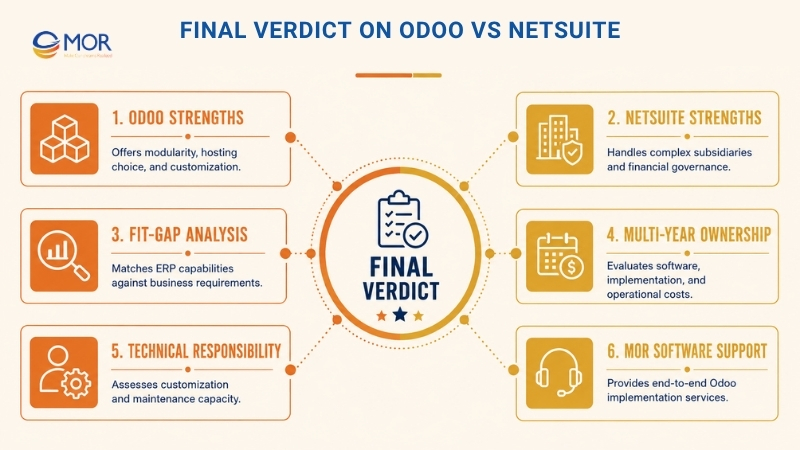
The final decision should come from a fit-gap analysis and a multi-year ownership model. Count the processes you need the ERP to support, the integrations you must maintain, the finance structure you expect to reach, and the technical responsibility your team can realistically carry.
If your evaluation points toward Odoo, MOR Software can turn those requirements into a practical ERP roadmap. Our Odoo Development service covers business process analysis, core module implementation, custom module development, third-party integration, training, and post-go-live support across areas including Sales, Purchase, Inventory, Accounting, Manufacturing, and Logistics. We also support phased implementation and ongoing application management when your Odoo scope expands.
Conclusion
Choosing between Odoo vs NetSuite comes down to the type of complexity your business expects to manage. Odoo favors modular growth, customization, deployment choice, and lower software costs. NetSuite favors structured global finance and multi-subsidiary control. If Odoo matches your operating model, MOR Software can assess your processes, plan the right modules, handle implementation and integrations, and support the system after launch. Contact MOR Software about your Odoo project.
"Mr. Cong’s guiding philosophy is simplicity, believing that the simplest solutions are often the most powerful. He sees trust, empowerment, and the opportunity to demonstrate one’s abilities as the key elements that set MOR apart from traditional IT companies."
Mac Tien Cong


Division Manager (Hanoi Branch)
MOR SOFTWARE
Frequently Asked Questions (FAQs)
Is Odoo better than NetSuite?
Odoo is better for many SMBs and mid-market businesses that value modular apps, lower software costs, flexible hosting, manufacturing tools, and deeper customization. NetSuite has the stronger case for organizations that need structured multi-subsidiary finance, formal consolidation, and global controls. Business complexity should decide the winner.
Is Odoo cheaper than NetSuite?
Odoo usually starts at a much lower software cost because it publishes per-user plans and includes all apps in Standard and Custom. NetSuite uses negotiated pricing built around platform access, users, and modules. Custom development, migration, hosting, partner support, and upgrades can still raise Odoo's long-term TCO.
Can Odoo replace NetSuite?
Yes, in some companies. Odoo can replace NetSuite where finance requirements remain manageable and the business values manufacturing, sales, inventory, ecommerce, CRM, or custom workflows more than deep subsidiary consolidation. A migration needs process mapping, data conversion, integration replacement, financial reconciliation, and careful testing before cutover.
Which is better for small and midsize businesses, Odoo or NetSuite?
Odoo often fits smaller and mid-sized firms because they can start with a lower software budget and expand the ERP in stages. NetSuite makes more sense for a mid-market company when complex finance, subsidiaries, audit demands, or international reporting already justify a larger ERP program.
Which ERP is better for multi-company and global operations?
NetSuite OneWorld has a structural advantage for complicated parent-subsidiary groups, consolidated reporting, separate base currencies, and global finance governance. Odoo supports multi-company operations and country localizations, making it a good fit for many international businesses whose consolidation requirements remain less demanding.
Which has stronger accounting and financial consolidation?
NetSuite generally has greater depth in enterprise financial management and subsidiary consolidation. Odoo covers core accounting, multi-currency, invoicing, AP, AR, bank reconciliation, and multi-company operations well, but finance teams with demanding group consolidation, revenue rules, and formal controls should test those requirements carefully.
Is Odoo or NetSuite better for manufacturing and inventory?
Odoo has a strong native manufacturing stack covering MRP, work orders, PLM, Quality, Maintenance, Shop Floor, inventory, purchasing, and barcode operations. NetSuite connects manufacturing and inventory closely with enterprise finance and supply planning. Production complexity, planning needs, plant structure, and financial control should drive the choice.
Which ERP is easier to customize, Odoo or NetSuite?
Odoo gives developers greater freedom through Python, XML, ORM, APIs, Studio, and custom modules. NetSuite uses SuiteScript, SuiteFlow, and SuiteCloud inside a more controlled environment. Odoo supports deeper changes, but custom code requires stronger documentation, testing, and upgrade management.
How long does Odoo vs NetSuite implementation take?
There isn't one reliable timeline. A standard Odoo rollout can often be phased around selected modules, whereas NetSuite projects tend to follow a more structured enterprise program. Entity count, data condition, integrations, customization, UAT, training, internal decision speed, and migration scope affect the schedule more than the vendor name.
Which ERP scales better as a business grows?
Each scales in a different way. Odoo supports modular operational growth and gives technical teams more control over infrastructure and workflows. NetSuite scales well for complex subsidiary structures, global reporting, and controlled finance processes. Model future legal entities, countries, reporting, audit needs, and IT capacity before deciding.
Share


Make Our-Dreams Realized


© 2023 . MOR Software. All Rights Reserved
Sitemap
Privacy Policy
Terms of Use

Rate this article
0
over 5.0 based on 0 reviews
Your rating on this news:
Name
*Email
*Write your comment
*Send your comment
1