


Odoo vs Salesforce: Comprehensive CRM comparison in 2026
Choosing between Odoo and Salesforce gets hard when CRM needs overlap with finance, inventory, sales, and daily operations. Odoo vs Salesforce also brings different costs, hosting choices, and setup demands, so a poor match can waste time and budget. In this guide, MOR Software will compare both platforms to help you choose the right fit for 2026.
Key Takeaways
- Odoo supports wider business operations. It combines CRM with accounting, inventory, purchasing, manufacturing, HR, ecommerce, and other apps in one suite.
- Salesforce goes deeper into CRM. It suits companies that need detailed sales automation, customer service, forecasting, marketing, and account management.
- Total cost depends on your full setup. Licenses tell only part of the story. Hosting, custom work, integrations, migration, training, and support also shape long-term spending.
Odoo Vs Salesforce At A Glance
Odoo and Salesforce address different company needs. Odoo joins CRM work with a wider ERP system, but Salesforce keeps sales and customer relationships as its main focus.
Comparison Point | Odoo | Salesforce |
Core Purpose | ERP-led company management suite with CRM built in | CRM-led system made for sales work and customer relationships |
Customer Management | Covers leads, deals, pipeline stages, tasks, quotes, and sales results | Provides deep pipeline control, lead tracking, sales automation, and customer communication |
Sales Operations | Manages quotations, orders, invoices, shipping, and sales reports | Manages leads, accounts, contacts, deals, pipeline movement, and sales tasks |
Business Apps | Includes accounting, stock, purchasing, production, POS, and HR apps | Usually relies on connected tools or outside systems for ERP work |
Financial Management | Available within Odoo based on the chosen apps and setup | Often needs a link with an accounting or ERP product |
Stock Control | Includes warehouse and inventory processes inside the platform | Commonly receives inventory data through another system |
Procurement | Supports supplier and purchase order processes within Odoo | Usually requires another platform or a connected application |
Production | Includes tools for factory planning and manufacturing tasks | Usually depends on a separate ERP or production system |
Retail Checkout | Provides an Odoo point-of-sale application | Commonly needs an outside POS product or connector |
Online Commerce | Includes website building and online store apps | Commerce tools depend on the selected Salesforce products and setup |
System Changes | Allows changes across ERP apps, business rules, and company processes | Provides deep CRM setup and flexible company sales processes |
System Connections | Combines native apps with links to outside software | Has a large partner network and many connection choices |
Data Reports | Shows company-wide data based on installed apps and setup | Provides detailed CRM reports, sales data, and manager dashboards |
Staff Learning | Training may cover CRM, finance, operations, ERP apps, and user roles | Training often covers sales work, CRM records, reports, and automation |
Cost Factors | Cost changes with user count, apps, hosting, custom work, and support | Cost changes with editions, users, products, setup, connections, and support |
Best Business Match | Companies seeking CRM and ERP work in one shared system | Companies seeking deep CRM control and customer-focused sales processes |
Salesforce is a strong choice for companies that place CRM, selling, and customer work first.
Odoo is a strong match for businesses that want CRM, finance, stock, and other ERP tasks inside one connected product.
Odoo Vs Salesforce: CRM Features
The main CRM gap relates to reach and depth. Salesforce gives sales and customer teams more detailed controls, but Odoo moves CRM records into the rest of the company system.
CRM Function | Odoo | Salesforce |
Prospect Tracking | Records leads, tasks, pipeline steps, and later contact work | Covers lead capture, routing, scoring, ownership, and follow-up in greater detail |
Deal Control | Moves sales opportunities across clear visual pipeline columns | Uses structured deal records tied to customers, contacts, and accounts |
Sales Quotes | Builds quotations straight from active CRM deals | Usually links deals with quote products or set sales processes |
Revenue Forecasts | Shows expected sales figures inside the wider ERP suite | Provides detailed forecasts by salesperson, team, territory, and pipeline |
Client Information | Shares customer records with sales, invoices, and other Odoo apps | Brings customer data together across sales, support, and engagement products |
Task Automation | Manages common sales tasks and basic process rules | Supports detailed automation for large or complex sales groups |
Links To Other Departments | Connects CRM work with stock, finance, purchasing, and shipping | Often sends CRM data to outside ERP and operations software |
Best Business Match | Companies that need CRM records connected with ERP work | Companies that need close control over sales and customer relationships |
Companies studying Odoo CRM vs Salesforce may prefer Salesforce when deep CRM control is their main need.
Teams reviewing Odoo 19 CRM vs Salesforce CRM, including searches phrased as Salesforce vs Odoo CRM, may choose Odoo when sales records must pass directly into finance and daily operations.
Odoo Vs Salesforce: Sales Management
A useful Odoo vs Salesforce sales review must cover more than pipeline stages. The Salesforce sales cloud vs Odoo choice also includes quotes, approvals, order records, customer history, and reliable sales reports.
Sales Function | Odoo | Salesforce |
Lead And Deal Records | Keeps leads and active deals inside Odoo CRM | Stores detailed records for leads, contacts, accounts, and opportunities |
Sales Tasks | Manages phone calls, meetings, reminders, and planned actions | Provides organized activity records and tools for sales communication |
Quote Creation | Produces quotations from open CRM opportunities | Creates quotes through set tools and linked Salesforce products |
Customer Orders | Changes accepted quotations into confirmed sales orders | Often sends completed deals into an ERP or order system |
Product Availability | Lets sales staff view available items in the same system | Usually needs stock data from an inventory or ERP connection |
Shipping Workflow | Connects approved orders with warehouse and delivery work | Usually completes shipping tasks inside another connected product |
Billing Process | Links customer orders with invoices and payment records | Commonly transfers sales details into finance or ERP software |
Sales Forecasts | Builds forecasts from current Odoo CRM information | Provides detailed forecasts for sales teams, regions, and managers |
Best Business Match | Product companies that need sales and operations in one flow | Large sales teams that need close pipeline and deal control |
Odoo supports a broader path that starts with a lead and continues through orders, stock, delivery, and billing. Salesforce gives sales managers deeper control over deal progress and customer communication.
Odoo And Salesforce: Business Management
The difference becomes easier to see when several teams must work with the same company records. A broader Odoo vs SAP vs Salesforce review shows that Odoo manages more daily operations inside one suite, but Salesforce often serves as the customer and sales layer above other systems.
Company Function | Odoo | Salesforce |
Product Direction | ERP-led suite that contains its own CRM app | CRM-led product supported by several connected cloud services |
Sales Work | Covers CRM, quotes, orders, billing, and sales reports | Covers leads, accounts, deals, forecasts, and customer communication |
Stock Management | Includes warehouse and stock tools inside the suite | Commonly receives stock data through ERP connections |
Financial Work | Includes native billing and accounting applications | Usually works with outside accounting software |
Supplier Purchasing | Manages suppliers, purchase orders, and received goods | Commonly leaves purchasing work to another company system |
Factory Operations | Provides planning and production management apps | Usually depends on a separate manufacturing ERP |
Store Sales | Contains a native retail checkout application | Needs another POS product or a suitable connection |
Online Selling | Includes website and online shop applications | Provides commerce products through separate Salesforce packages |
Projects And Support | Includes project management and help desk apps | Provides service and support tools through Salesforce cloud products |
Employee Management | Includes HR applications in the same product family | Often needs an HR system or an AppExchange application |
Best Business Match | Companies that want shared records across many company teams | Companies with existing systems that need one central CRM layer |
Odoo may take the place of several separate business tools. Salesforce can connect with an existing software stack and control the customer relationship side.
Odoo Vs Salesforce: Inventory And Daily Operations
Retailers, factories, distributors, and trading companies often need sales information linked with stock and shipping tasks. This area shows one of the largest differences between these two products.
Daily Operations Need | Odoo | Salesforce |
Available Stock | Lets sales staff review stock inside the same product | Needs inventory figures from a connected system |
Warehouse Details | Shows quantities by warehouse, shelf, or storage place | Depends on data from an ERP or warehouse product |
Shipping Orders | Produces delivery tasks after a sales order is approved | Usually sends order information into another operations system |
Restocking Plans | Connects low stock levels with supplier purchasing tasks | Needs a separate purchasing or ERP connection |
Production Work | Links customer demand with factory and production planning | Commonly relies on outside manufacturing software |
Stock Reports | Reports on items, warehouse levels, stock moves, and quantities | Can report only on operational data received from connected systems |
Billing Progress | Can show whether customer invoices are created or paid | Usually reads payment and invoice status from finance or ERP software |
Best Business Match | Companies whose daily work centers on physical products | Companies that already use a separate ERP or stock platform |
Odoo places sales and operations staff inside one shared process. Salesforce can take part in the same process, but the company must connect the required stock, purchasing, and delivery tools.
Odoo Vs Salesforce: Finance And Accounting
Sales activity later affects invoices, incoming payments, customer debt, and financial statements. Odoo manages more finance work inside the same suite, but Salesforce usually sends sales records into another accounting system.
Finance Function | Odoo | Salesforce |
Sales Invoices | Produces customer invoices from approved sales orders | Commonly transfers order records into accounting software |
Customer Payments | Records payments and matches them with open invoices | Usually receives payment details from linked finance systems |
Unpaid Balances | Tracks overdue invoices and the amount each customer owes | Depends on information from accounting or ERP software |
Vendor Invoices | Manages supplier bills inside the ERP suite | Usually leaves supplier billing outside Salesforce |
Staff Spending | Includes expense records and approval processes | Needs a connected expense or finance application |
Finance Reports | Produces accounting reports based on the chosen setup | Concentrates more on CRM revenue, deals, and pipeline reports |
Sales And Finance Data | Keeps orders, invoices, payments, and accounts in one database | Requires sales and finance data to move between separate systems |
Best Business Match | Companies that want sales and finance inside one product | Companies that already use a mature accounting or ERP system |
Finance teams still need to check local tax rules, approval steps, and report needs before either product goes live. Good financial controls remain necessary no matter which platform the company selects.
Odoo Vs Salesforce: Customization Options
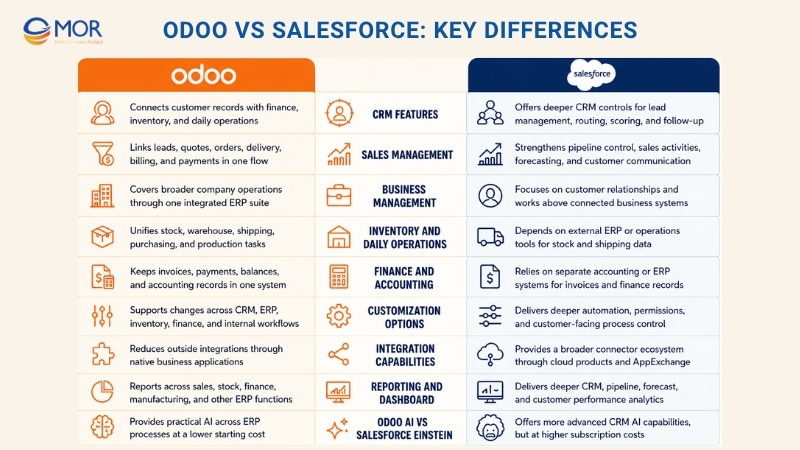
The two business platforms can be shaped around company processes. The main difference in Odoo vs Salesforce customization is the range of work that can change and the technical effort needed to manage those changes.
Change Area | Odoo | Salesforce |
Process Changes | Adjusts CRM, selling, stock, supplier, and finance processes | Concentrates on CRM, support, service, and customer-facing work |
Data Fields And Screens | Allows custom data fields, page views, and forms across apps | Gives admins detailed control over objects, fields, layouts, and pages |
Reports And Manager Views | Reads information from ERP and CRM applications | Provides detailed CRM reports and dashboard settings |
Process Rules | Supports planned actions and rule-based business tasks | Uses Flow and other tools for detailed business automation |
Approval Steps | Adds approval paths inside many operations apps | Creates organized approval paths for CRM records and sales work |
User Access | Sets staff access across teams, roles, and business apps | Uses profiles, roles, and permission sets for detailed access control |
Software Development | Supports custom modules written with Python | Supports Apex, Lightning Web Components, and other platform tools |
Long-Term Upkeep Risk | Large amounts of custom code can make later upgrades harder | Heavy setup and custom code can increase future admin work |
Best Business Match | Companies changing CRM and ERP processes in the same project | Companies building detailed sales, customer service, and support processes |
Custom work should address a real company need. Too many code changes or special rules can increase future support costs on either system.
Odoo Vs Salesforce: Integration Capabilities
Growing businesses often need CRM records to connect with online stores, payment services, email tools, finance systems, and report software. Salesforce has a wider connector market, but Odoo places more company applications inside its own product family.
Connection Area | Odoo | Salesforce |
Native Company Applications | Contains CRM, accounting, sales, inventory, HR, and other apps | Uses separate cloud products and AppExchange applications |
APIs | Allows API links based on the selected version and setup | Provides broad API access based on the purchased edition |
Online Stores | Includes its own ecommerce app and links with outside stores | Connects with Commerce Cloud and third-party shop systems |
Accounting Systems | Native accounting can remove the need for some outside links | Commonly sends CRM records into an accounting or ERP product |
Marketing Tools | Includes email campaign and marketing applications | Connects closely with Salesforce marketing products |
Customer Messages | Can connect with email, WhatsApp, and other communication tools | Provides many customer contact and service channel links |
Online Payments | Supports links with selected payment companies | Commonly connects through commerce, billing, or partner applications |
Application Market | Odoo Apps contains community and partner-built modules | AppExchange contains many products for different company needs |
Best Business Match | Companies that want fewer separate applications | Companies that need a wide CRM partner and connector network |
For teams planning Odoo and Salesforce integration, every data path should have a named owner and one main system that stores the final record.
Odoo Vs Salesforce: Reporting And Dashboard
The value of a report depends on the records available inside the system. Odoo can show data across ERP teams, but Salesforce gives sales leaders deeper customer, pipeline, and CRM reports.
Report Category | Odoo | Salesforce |
Sales Results | Reports on quotations, orders, income, and sales tasks | Shows detailed pipeline, forecast, and seller performance data |
CRM Manager Views | Displays prospects, deals, tasks, and expected sales | Provides detailed CRM dashboards for staff and sales leaders |
Stock Reports | Shows current quantities, product moves, warehouses, and items | Needs inventory records supplied by a connected product |
Accounting Reports | Includes finance statements based on the accounting setup | Commonly reads financial figures from outside software |
Factory Reports | Covers production activity, work orders, and material demand | Depends on information from manufacturing or ERP connections |
Customer Data | Joins CRM records with customer purchase history across Odoo apps | Gives deep customer, account, support, and engagement data |
Reports Across Teams | Can combine information stored in several Odoo applications | Depends on Data Cloud, connected products, and system links |
Best Business Match | Managers who need operational reports across ERP teams | Sales managers who need detailed customer and pipeline reports |
Good source data, regular staff input, and clear KPIs matter more than the visual style of any dashboard.
Odoo Vs Salesforce: Odoo AI Vs Salesforce Einstein
In Odoo vs Salesforce, AI can help with lead scores, sales estimates, reports, and routine seller tasks. Salesforce provides deeper AI for CRM work, but many stronger tools belong to costly editions. Odoo has a lower starting price for teams seeking practical AI inside a broader ERP product.
AI Function | Odoo AI | Salesforce Einstein And Agentforce |
Prospect Scoring | Rates leads with information held in CRM records | Predicts lead quality from past sales and customer information |
Deal Review | Helps teams rank deals and view standard CRM estimates | Scores deals, checks deal health, and finds opportunities that have stopped moving |
Suggested Work | Uses routing rules and proposes later contact tasks | Suggests sales actions and can complete selected CRM tasks |
Business Forecasts | Supports sales and demand estimates across Odoo applications | Provides predictive sales forecasts and detailed pipeline study |
Plain-Language Reports | Allows users to ask for company information with normal written prompts | Supports summaries, prompts, and conversational access to CRM records |
Contact Data Capture | Reads business cards and creates contact profiles | Collects customer details through connected sales and AI tools |
AI Assistants | Has fewer tools that can act without regular staff input | Agentforce can assist with lead care, sales coaching, pipeline work, and employee tasks |
Setup Conditions | Access changes with the Odoo release, installed apps, and chosen plan | Better results need clean past data, the right editions, and careful setup |
Software Subscription Price | Standard: $24.90 per user each month. Custom: $49 per user each month. These prices use annual payment. | Enterprise: $175 per user each month. Unlimited: $350 per user each month. Agentforce 1 Sales: $550 per user each month, paid yearly. |
AI Agent Use Charges | Odoo’s main pricing page does not show a separate use-based agent fee | $500 for 100,000 Flex Credits, close to $0.10 for each action, or $2 for each conversation. |
Main Drawback | Provides less detail for complex sales analysis in large companies | Higher edition prices and extra use fees can increase the full cost |
Neither product automatically records every useful point discussed during a customer call. Sales teams still need clear notes, regular CRM updates, or a connected conversation analysis product. Prices also change by country, contract terms, product choice, and usage, so companies should request a final quote before choosing.
Odoo Vs Salesforce: Pricing Comparison And Total Cost Of Ownership
Teams searching Odoo CRM vs Salesforce capabilities pricing ease of use often find the widest gap in total spending, mainly for small and mid-sized companies. The pricing difference in Odoo vs Salesforce becomes larger when a business needs CRM, finance, inventory, marketing, and HR tools together.
Odoo Subscription And License Costs
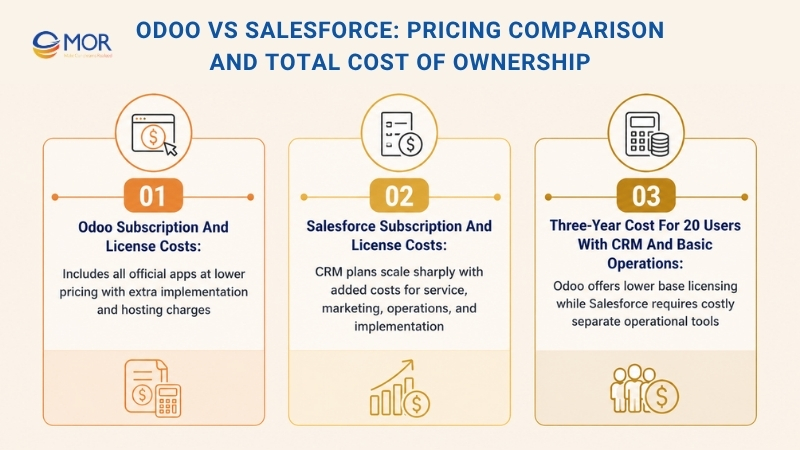
The current US yearly list price for Odoo Standard is about $16.90 per user each month, with an introductory rate near $13.50 for initial users during the first year. That fee covers all official apps, including CRM, accounting, inventory, manufacturing, HR, ecommerce, and other business tools. At the regular yearly rate, a company with 20 users would pay about $4,056 per year, before taxes or later price changes.
Odoo also has a One App Free plan that gives unlimited users access to one app and its required supporting apps. Customers and suppliers who only use the portal are not counted as paid users. Paid cloud plans include hosting, backups, updates, maintenance, and standard support, but Odoo.sh hosting, implementation work, custom-code care, and in-app credits carry separate charges. For a wider budget review, see: How Much Does Odoo Implementation and Development Cost?
Salesforce Subscription And License Costs
Salesforce costs rise quickly after a company moves beyond its entry-level suite:
Salesforce Plan Or Product | Current List Price | Main Coverage |
Starter Suite | $25 per user/month | Entry CRM with basic sales, service, marketing, and commerce tools |
Pro Suite | $100 per user/month | Broader CRM controls and more process settings |
Sales Cloud Enterprise | $175 per user/month | Deep CRM, API access, forecasting, automation, and built-in AI |
Sales Cloud Unlimited | $350 per user/month | Predictive AI, sales engagement, Premier Success, and a full sandbox |
Service Cloud Enterprise | $175 per user/month | Customer service product sold apart from Sales Cloud |
Marketing Cloud Next Growth | $1,500 per organization/month | Campaigns, forms, customer journeys, and agent-based marketing tools |
Commerce Cloud | Quote-based | B2B or B2C ecommerce based on the selected package and usage |
These prices are current official US dollar list rates, and many plans require annual billing.
For a company with 20 Enterprise Sales Cloud users, CRM subscriptions alone reach about $42,000 each year. Adding Enterprise Service Cloud for those same users raises the combined yearly license bill to roughly $84,000, before marketing, finance, inventory, or other operating tools are added.
Salesforce project work may begin near $10,000 for a small setup, while a standard mid-market launch often reaches $75,000 to $150,000, and large programs may cost more. Premier Success and other add-ons can raise the total when they are not part of the selected edition. Salesforce also announced an average 6% list-price rise for Enterprise and Unlimited editions from August 1, 2025, so buyers should confirm current contract and renewal terms.
Three-Year Cost For 20 Users With CRM And Basic Operations
Spending Area | Odoo Standard | Salesforce Enterprise Sales Cloud Plus Separate Operations Tools |
Yearly CRM subscription | About $4,056, with all official apps | About $42,000 for Sales Cloud alone |
Accounting | Included | Separate finance or accounting subscription needed |
Inventory control | Included | Separate inventory, warehouse, or ERP product needed |
Marketing automation | Included among Odoo apps | Marketing Cloud Growth starts near $18,000 per year |
HR tools | Included among Odoo apps | Separate HR product or AppExchange app needed |
Three-year base licensing | About $12,168, before future price changes | About $180,000+ for Sales Cloud and Marketing Cloud, before finance, stock, and HR tools |
Project setup | Around $50,000 to $120,000 for a focused US rollout | Around $75,000 to $150,000+ for a standard mid-market setup |
The figures use current public list rates and broad MOR Software project ranges, so an actual quote will change with scope, users, data, integrations, and custom work.
For companies that need customer management and daily operating apps, Odoo vs Salesforce can produce a large three-year cost difference. Salesforce licensing may remain suitable for CRM-led firms, but a stack of separate finance, stock, marketing, and HR products adds more contracts and support work.
Odoo Vs Salesforce: Implementation, Hosting, And Migration
The earlier comparison explains what each product contains, but your team must also consider the work needed to put the system into daily use.
Odoo vs Salesforce follows two different technical models, even when some business functions overlap. Those foundations affect project timing, hosting choices, data movement, system care, and the skills your internal team needs.
Each option requires planning, data checks, user training, testing, and launch support. The main difference lies in how much control your company has over the infrastructure and software version.
Salesforce Cloud Deployment Model
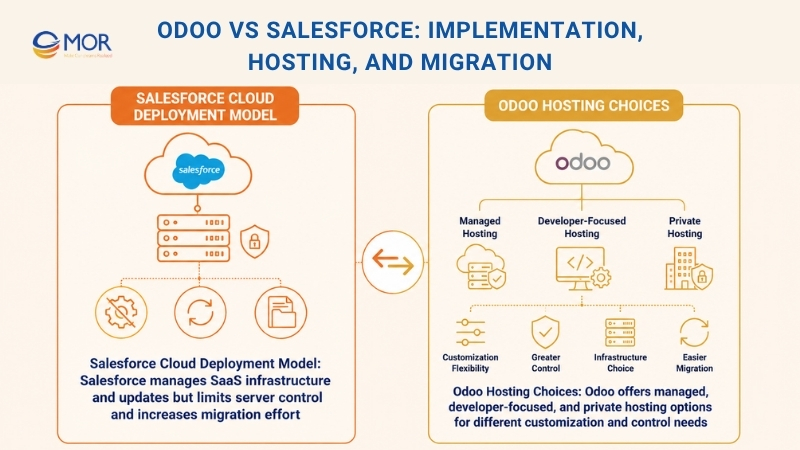
Salesforce is delivered as Software as a Service, or SaaS. Its platform uses a shared multitenant architecture, where customer organizations use common infrastructure and code while their data and settings remain separated.
The main benefit is that Salesforce manages the core infrastructure for you. Your subscription also covers platform updates, base maintenance, and cloud security work handled by Salesforce.
This managed setup removes much of the server work, but a cloud-only model also creates several limits:
- Limited Server Control: Your company cannot select the platform’s core server setup or manage its infrastructure in the same way as a private deployment.
- High Exit Effort: Moving data, custom objects, automation, integrations, and user processes into another CRM may require a large migration project.
- Mandatory Platform Releases: Salesforce controls its platform release cycle, so your team must test and adapt its configuration when new releases arrive.
Odoo Hosting Choices
Teams searching how to host Odoo vs Salesforce are usually comparing Salesforce’s fixed cloud setup with Odoo’s wider hosting choices. Odoo supports Odoo Online, Odoo.sh, and on-premise or private cloud deployment under the Custom plan.
These routes suit different budgets, custom-code needs, internal skills, and data rules.
1. Cloud Or On-Premise Deployment
This model lets a business run Odoo on a private cloud or its own infrastructure, based on security rules, budget, and technical needs.
The company keeps control over its database, custom modules, integrations, hosting settings, and deployment process. Internal IT teams or external specialists can manage migration, testing, updates, monitoring, and system care.
This option gives more freedom than a standard managed cloud plan. It suits growing companies that need custom Odoo functions, stricter data control, or deeper links with existing business systems.
2. Odoo Online
This is the easiest Odoo deployment route. Like Salesforce, it uses a managed cloud setup where Odoo hosts your private database on its own infrastructure.
Odoo handles hosting, monitoring, backups, security patches, and platform updates, so your team has little server work. It works well for startups and smaller companies with standard processes and limited IT staff.
Yet Odoo Online does not support custom Python modules or apps from the Odoo Apps Store. Companies that need deep custom code may outgrow this option.
3. Odoo.sh
Odoo.sh is Odoo’s official cloud platform for hosting and managing custom Odoo applications.
It includes Git connections, continuous integration, web shell access, module management, and separate branches for development, staging, and production work. It fits teams that need custom modules and a managed developer setup without running all server tasks themselves.
Odoo.sh hosting costs sit outside the normal user license, and the bill grows with workers, storage, staging branches, and other infrastructure needs. A company should compare this route with private cloud or on-premise deployment based on its custom work, traffic, internal skills, and long-term support plan.
Odoo Vs Salesforce: Which One Fits Your Business?
There is no universal winner, and wider searches like Odoo vs Zoho vs Salesforce or Odoo CRM vs Hubspot vs Salesforce for SMBS still depend on each company’s goals.
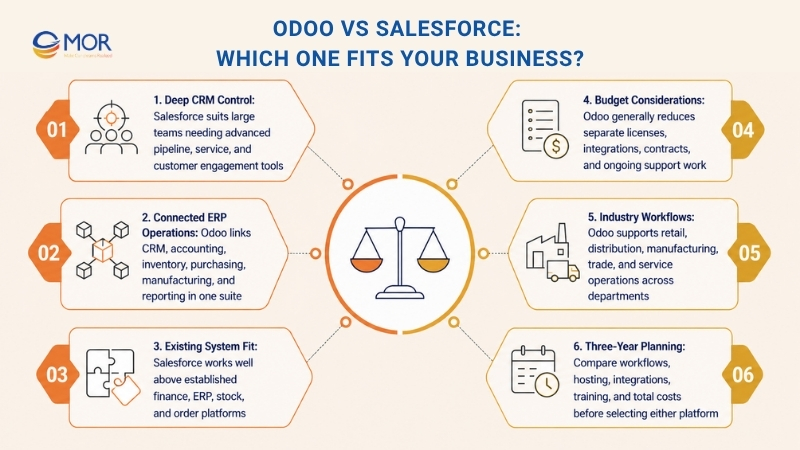
Choose Salesforce if:
- Your main goal is deep CRM control
- Your company has a large sales, service, or customer engagement team
- Your managers need detailed pipeline and customer account records
- You already use stable finance, ERP, stock, and order systems
- Your budget can cover enterprise CRM licenses and project work
- Your teams need detailed sales automation and customer communication processes
Choose Odoo if:
- Your company needs CRM and ERP apps in one suite
- Your sales records must connect directly with inventory and accounting
- You want quotes, invoices, purchasing, stock, and reports in one database
- Your daily work covers retail, distribution, manufacturing, trade, or services
- You want fewer separate products and data links
- Your business needs an ERP system that can support several departments
Either product can bring strong results when the setup matches real business processes.
The right choice in Odoo vs Salesforce depends on company size, available budget, daily workflows, reports, system links, hosting needs, and staff training. When deciding between Odoo or Salesforce, map the full process and three-year cost before signing a contract.
Choose the Right Platform for Your Business with MOR Software
MOR Software is a Global Salesforce Consulting Partner and a strategic Odoo development partner. This gives your business one trusted team to compare, plan, build, connect, and support either platform.
Our team starts with your actual work. We review sales processes, customer data, finance tasks, inventory flows, reporting needs, current systems, and budget. This helps us recommend Odoo, Salesforce, or a connected setup based on real needs rather than brand preference.
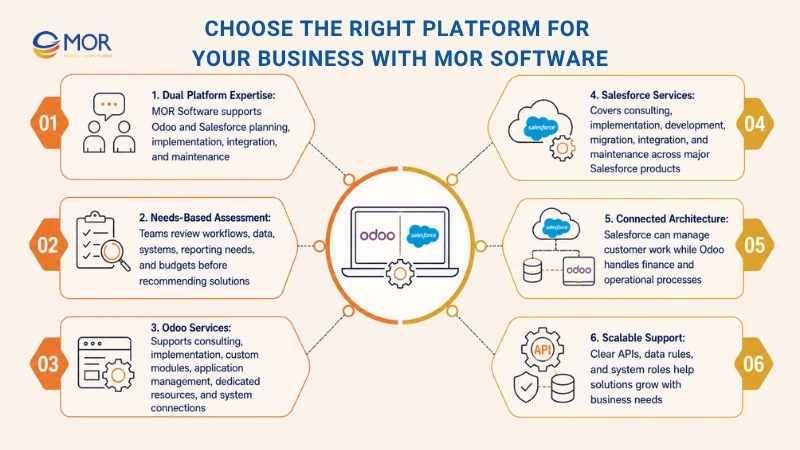
Odoo may suit companies that want CRM, accounting, inventory, purchasing, manufacturing, HR, and other operations in one system. MOR Software supports Odoo development consulting, implementation, custom module development, application management services, and dedicated resources. We can also connect Odoo with existing tools and adjust workflows as your business grows.
Salesforce may fit companies that need stronger CRM control, sales automation, customer service, marketing, and customer engagement. MOR Software supports Salesforce consulting, implementation, development, migration, integration, management, and maintenance across Sales Cloud, Service Cloud, Marketing Cloud, Experience Cloud, Pardot, and MuleSoft.
Some businesses need the strengths of both platforms. Salesforce can manage customer-facing work, while Odoo handles finance and operations. MOR Software can connect them through APIs, shared data rules, and clear system roles.
The right choice starts with your business, not the software. MOR Software helps you select and build the setup that fits how your teams work.
Conclusion
Odoo vs Salesforce comes down to how your company works, what systems you already use, and where you plan to grow. Odoo fits teams that want CRM and ERP apps in one shared suite. Salesforce suits businesses that need deeper sales and customer management. MOR Software can assess your processes, compare both options, and build the right setup for your teams. Contact MOR Software to discuss your project and get a practical platform plan.
"Mr. Cong’s guiding philosophy is simplicity, believing that the simplest solutions are often the most powerful. He sees trust, empowerment, and the opportunity to demonstrate one’s abilities as the key elements that set MOR apart from traditional IT companies."
Mac Tien Cong


Division Manager (Hanoi Branch)
MOR SOFTWARE
Frequently Asked Questions (FAQs)
What is the main difference between Odoo and Salesforce?
Odoo is an ERP-led platform with CRM built in. Salesforce is a CRM-led platform focused on sales, service, marketing, and customer relationships.
Which platform is better for small businesses?
Odoo may suit small firms that want sales, accounting, inventory, and purchasing in one system. Salesforce can fit smaller sales teams that mainly need CRM tools and have room for higher subscription costs.
Is Odoo cheaper than Salesforce?
Odoo usually costs less when a company needs CRM and several back-office apps. Salesforce costs can rise when businesses add service, marketing, analytics, support, and third-party business systems.
Can Odoo replace Salesforce?
Yes, Odoo can replace Salesforce for companies with standard CRM needs and strong ERP requirements. Large sales teams with complex forecasting, territories, or customer programs may still prefer Salesforce.
Can Salesforce manage accounting and inventory?
Salesforce does not provide full accounting or inventory management in the same way Odoo does. Most businesses connect it to an ERP, accounting platform, or warehouse system.
Which system has stronger AI tools?
Salesforce has deeper AI tools for lead scoring, deal health, sales guidance, and AI agents. Odoo includes simpler AI tools for lead scoring, forecasting, document capture, and data queries.
Can a business use Odoo and Salesforce together?
Yes. Salesforce can manage customer-facing sales and service work, while Odoo handles accounting, stock, purchasing, production, and other internal operations. The two systems can share data through APIs.
How does Odoo vs Salesforce market share compare in the CRM platform category?
Based on 6sense’s tracked CRM Platforms dataset, Salesforce holds an estimated 25.66% share, compared with 2.76% for Odoo CRM. These figures reflect 6sense’s detected technology usage rather than audited vendor revenue share.
How many CRM platform customers does each company have?
The same 6sense dataset lists about 156,320 Salesforce customers and 16,790 Odoo CRM customers. These are tracked company or domain records, so they should not be treated as each vendor’s official worldwide customer total.
Which countries use Odoo and Salesforce the most?
The United States is the largest tracked market for each platform. Salesforce also has a strong presence in the United Kingdom and India, while Odoo CRM records high usage in the United Kingdom and France.
How should a company decide between Odoo vs Salesforce?
Start with business processes, not brand names. Review CRM depth, accounting needs, inventory flows, integrations, user count, reporting goals, training needs, and the full three-year cost.
Share


Make Our-Dreams Realized


© 2023 . MOR Software. All Rights Reserved
Sitemap
Privacy Policy
Terms of Use

Rate this article
0
over 5.0 based on 0 reviews
Your rating on this news:
Name
*Email
*Write your comment
*Send your comment
1