


Odoo CRM Features: Inside Odoo 19's Biggest CRM Updates
Sales teams often lose deals because leads sit too long, follow-ups get missed, and quotes live outside the CRM. The right Odoo CRM features can fix that gap with cleaner pipelines, smarter scoring, stronger reporting, and better sales flow. In this guide, MOR Software will highlight Odoo 19 CRM features and how they support real sales teams.
Key Takeaways
- Odoo CRM helps sales teams manage the full lead-to-revenue flow, from lead capture and scoring to quotations, sales orders, invoices, and reports.
- Key features include visual pipelines, predictive lead scoring, automated assignment, lead enrichment, activities, quotations, attribution, reporting, Live Chat, AI automation tools, Chatter, eCommerce, POS, and app connections.
- A strong setup matters more than turning on every tool at once. Teams should match Odoo CRM functionality with their sales process, data quality, and daily workflows.
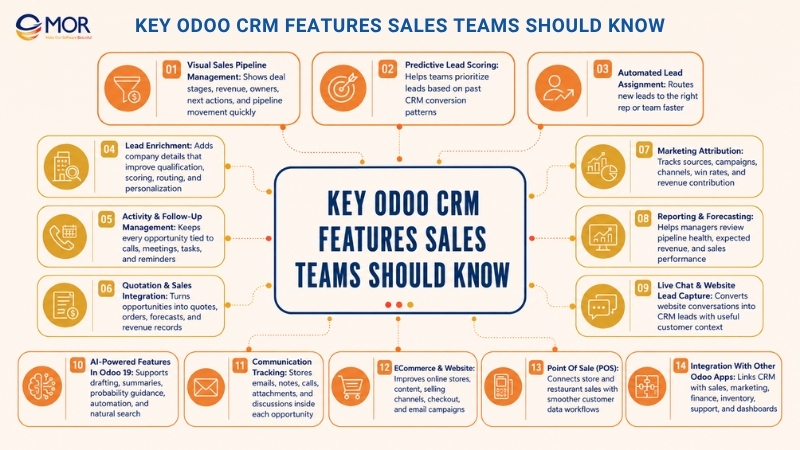
Key Odoo CRM Features Sales Teams Should Know
An Odoo CRM features overview should show one connected sales flow, not a pile of separate tools. The platform supports the whole deal journey from first contact to revenue review. A lead comes in, gets scored, moves to the right owner, gains more data, passes through pipeline stages, gets follow-ups, becomes a quote, and then appears in sales reports. When the setup works as one, Odoo CRM acts like a daily sales control center.
Visual Sales Pipeline Management
Among the CRM features in Odoo, visual pipeline management is often the easiest to notice. Odoo gives sales teams a Kanban pipeline that groups opportunities by stage. Sales reps can move cards between stages, so everyone can see deal status fast.
A standard pipeline can have stages like New, Qualified, Proposition, Negotiation, Won, and Lost. Companies can adjust these stages based on how their sales team really works. A B2B software provider may use Discovery, Demo, Proposal, Legal Review, and Procurement. A distributor may prefer New Inquiry, Quote Sent, Follow-Up, Purchase Order Received, and Closed Won.
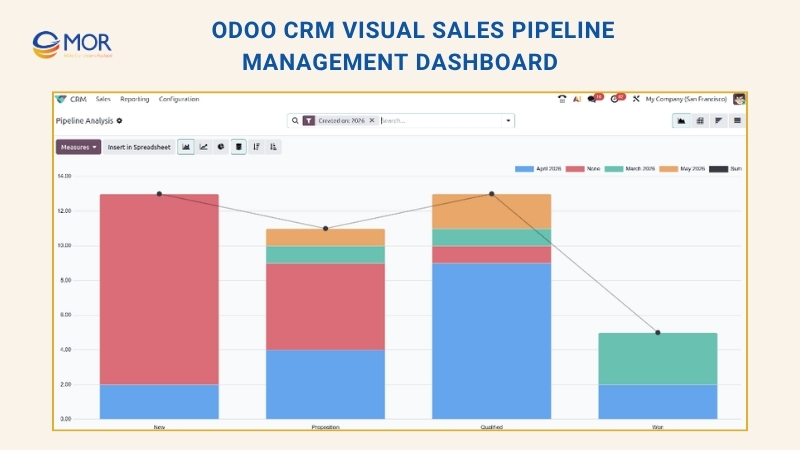
The biggest value of a visual pipeline is speed. Salespeople can spot deals that need action right away. Managers can check the board and see whether each stage has enough active opportunities. If many deals stop at Proposal, pricing, approvals, or slow responses may be the cause. If few leads move into Qualification, lead quality or reply time may be weak.
The pipeline view also links to expected revenue, probability, assigned rep, customer data, next steps, and priority level. That turns the board into more than a tracking screen. It becomes a place where reps can work on each opportunity without jumping between tools.
This capability works well for sales teams that run weekly pipeline meetings. Managers can filter deals by rep, team, campaign, expected close date, or stage. They can also check reports to compare opportunity count, expected revenue, and conversion movement.
A good setup keeps stages simple enough for daily use, but clear enough for reliable forecasting. Too many stages make the board tiring to manage. Too few stages hide sales signals that managers need. The CRM solution works best when every stage marks a real sales step, not a loose label.
Predictive Lead Scoring
For teams with heavy lead volume, predictive scoring shows how Odoo CRM functionality can guide daily priorities. Rather than giving every lead the same level of attention, the system estimates whether a lead or opportunity may turn into a won deal. That estimate comes from past CRM records, including earlier wins and losses.
The business logic is easy to understand. When Odoo has enough past data, it can find patterns linked to successful deals. These patterns may come from lead source, country, language, contact data quality, tags, team, stage, or chosen fields. The system then reads those signals and predicts the chance that a new lead will convert.
This helps sales teams stop spending equal time on every record. A lead with clear contact details, a strong source, and a pattern close to past won deals may need quick action. A record with missing details or weak source data may need more research or nurturing before a sales rep steps in.
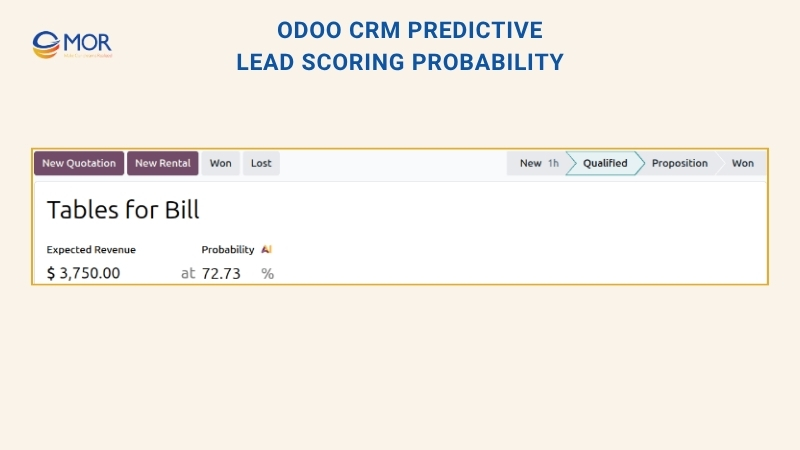
Predictive scoring helps a lot when businesses get many inbound leads. Without a score, reps may pick leads based on habit, free time, or pressure from others. A scoring model gives the team a steadier way to choose which leads deserve attention first.
Odoo 19 adds more value because AI probability analysis can explain score drivers and suggest ways to improve the record. Salespeople can see which details influence the score and what may make the opportunity stronger. Missing phone data, incomplete email fields, poor source tracking, or weak record quality can make the forecast less reliable.
Predictive scoring should support human judgment, not replace it. A low-score lead can still turn into a major account. A high-score lead can still need proper qualification. The smarter method is to treat scoring as a priority signal, then add sales context, account size, past relationship, and timing.
Automated Lead Assignment
Automated lead routing is one of the Odoo CRM features that helps teams cut waiting time and manual sorting. When fresh leads arrive in the CRM, the system can send them to the right sales rep or sales team through clear rules. These rules can use territory, language, source, team, workload, probability, or other business conditions.
This capability is very useful for sales groups with more than one team. Without routing rules, leads may stay in a shared inbox, wait for manager review, or land with the wrong owner. That slows the first response and makes ownership messy.
Odoo lets businesses send leads to the right rep or team based on defined logic. A company with regional teams may send US leads to one group, Europe leads to another, and APAC leads to a third. A company with different customer tiers may give enterprise leads to senior reps and small-business leads to inside sales.
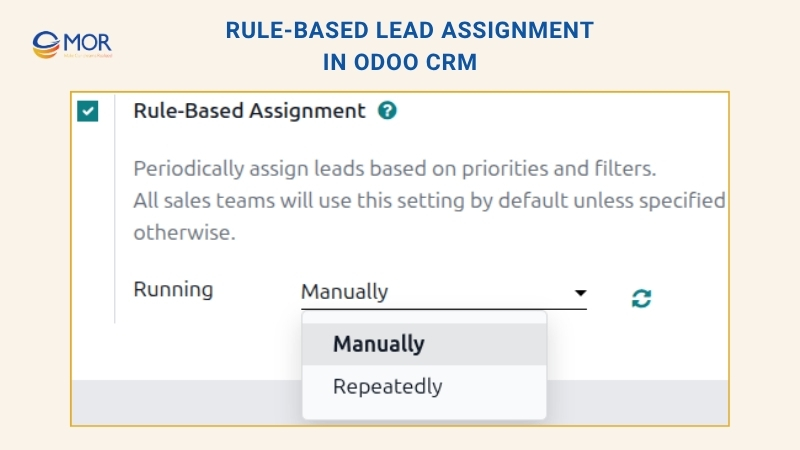
Automated routing also pairs well with predictive lead scoring. Leads with higher win probability can move faster or go to more experienced salespeople. Lower-score records can move into nurturing flows or go to junior reps for early checks.
This capability needs clean rules to work well. If too many routing rules clash, assignment becomes hard to follow. If the rules are too broad, the system may miss useful lead differences. A strong setup often begins with sales teams, regions, languages, lead sources, and product interest. Later, businesses can add probability or workload logic as the CRM becomes more mature.
The main gain is faster sales action. Each minute a high-intent lead waits with no owner makes the deal easier to lose. Automated assignment helps the team respond before the lead goes cold.
Lead Enrichment
Lead enrichment helps sales teams add more company data to lead records. In Odoo, the platform can use a lead’s email domain to pull details like company name, website, logo, company size, revenue signals, social profiles, industry data, known technologies, and other profile details when they are available.
This capability can quietly raise sales output and improve CRM data quality. Salespeople often receive leads with missing details. A website visitor may leave only an email address and a short note. An event contact may share a name and company, but little else. A rep may need to research the account before choosing the right message.
Lead enrichment cuts that research time. Instead of opening many tabs and searching company data by hand, reps can add more detail inside Odoo. Some teams may enrich every lead automatically. Others may let reps enrich records only when needed, so they can control cost and focus on better-fit leads.
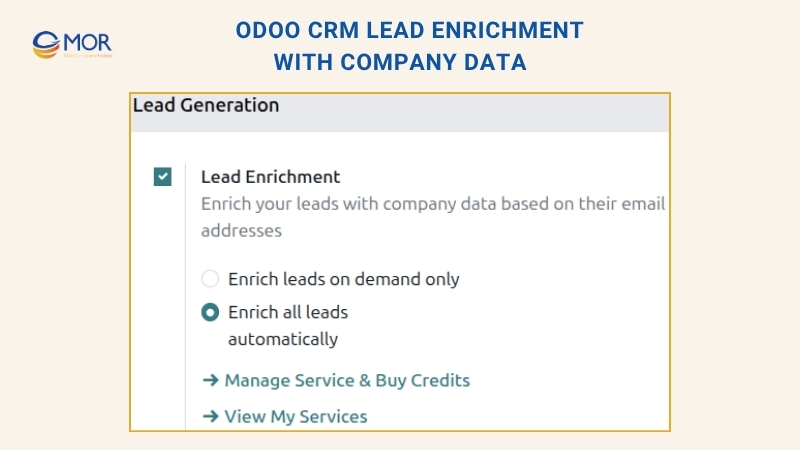
The business value goes past convenience. Better lead data can support segmentation, scoring, routing, and personal follow-up. When a record includes company size, industry, website, and related details, sales teams can write messages that match the account better. Marketing teams can also study which industries or company types bring stronger opportunities.
Lead enrichment works very well for B2B companies. In B2B selling, the company profile can matter as much as the contact person. A rep needs to know whether the account matches the target profile, sits in a priority industry, and deserves direct outreach.
Still, teams should use manufacturing lead time with care. Businesses must follow data privacy rules and avoid using added data in a way that feels too personal. The capability works best for internal qualification and better relevance, not for messages that make prospects feel watched.
Activity & Follow-Up Management
A CRM becomes weak fast when opportunities stay untouched. Odoo handles this through activity and follow-up tools. Sales reps can plan calls, meetings, emails, tasks, and reminders inside lead and opportunity records.
This sounds basic, but it is one of the Odoo CRM features that supports daily sales habits. Many deals fail not because the product is poor, but because the follow-up came late, lacked clarity, or never happened. The activity system helps teams avoid that gap.
Every opportunity can have a next activity. This gives reps a real action plan instead of a loose list of open deals. A rep can plan a call after sending a quote, set a meeting reminder after a demo, create a task for a proposal, or add an email follow-up after discovery.
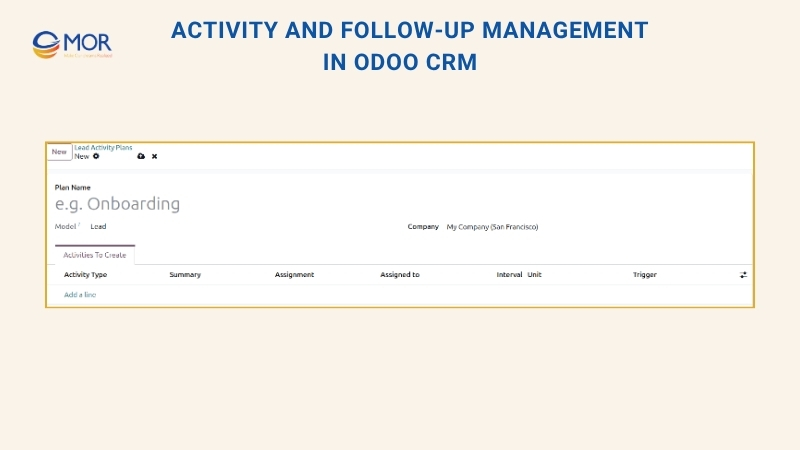
Odoo also shows overdue activities. This helps reps plan their day and helps managers see pipeline risk. If many high-value deals have late activities, the issue may not be one person’s habits. It may mean the team has too much work, the pipeline has too many inactive records, or the process needs more automation.
Odoo 19 improves activity handling with quicker scheduling and simpler actions. This matters because salespeople use CRM more when updates feel easy. If adding an activity takes too many clicks, reps may skip it. If it feels quick, the CRM becomes part of the sales routine.
A strong activity setup should define the usual next step for each stage. When a lead reaches Qualification, the next step may be a call. After a demo, the next step may be a proposal. After a proposal, the next step may be a follow-up email after two days. When teams use steady activity rules, managers can judge pipeline health with more trust.
Quotation & Sales Integration
Odoo CRM connects closely with the Sales module. Odoo ERP integration lets users build quotes from opportunities, turn those quotes into sales orders, and follow revenue from lead capture to payment.
This is one of the most useful Odoo sales management features for companies that want less repeated data entry. In separate systems, reps may create a CRM lead, copy data into a quote tool, send a proposal by email, update a spreadsheet, and then ask finance to issue an invoice. Each handoff can create mistakes.
Odoo narrows that gap. A salesperson can open an opportunity, prepare a quotation, add products or services, use pricelists, include optional items, send the quote, and then turn it into a sales order. The opportunity keeps the deal context, and the sales order connects with later business steps.
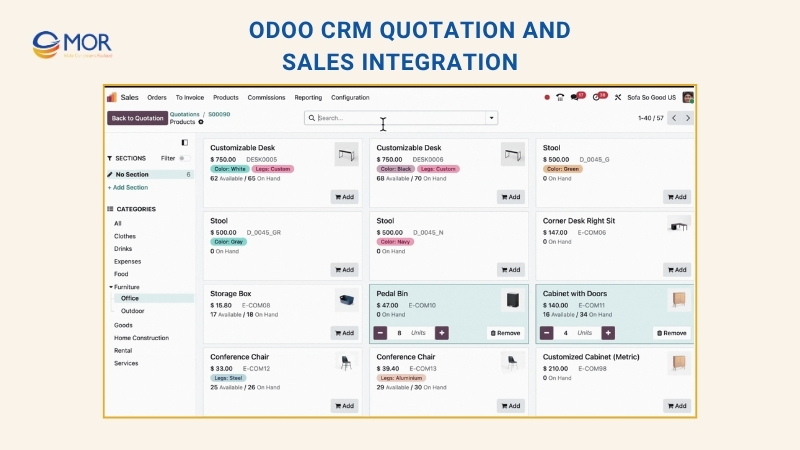
Odoo 19 gives teams more freedom when building quotations with sections, subsections, hidden details, price display controls, and smoother quote creation. This helps teams send clearer proposals without opening another document tool. Businesses that sell complex services, product bundles, setup packages, or tiered plans can present quotes in a cleaner way.
This connection also supports expected revenue and forecasts. Since quotes link back to opportunities, managers can see more than deal count. They can also see how much revenue may come from active opportunities.
For businesses with complex pricing, Odoo quotation and pricelist tools can lower quoting errors. Reps can use pricing based on customer, region, quantity, or contract terms. This is useful for distributors, manufacturers, wholesalers, and B2B service firms.
The best setup should standardize quote templates before launch. When templates, product structures, optional items, and approval rules are ready, reps can build quotes faster and managers can keep better control.
Marketing Attribution
Marketing attribution helps businesses see where leads start and which campaigns help create revenue. Odoo CRM can track lead sources from website forms, email campaigns, social channels, referrals, search traffic, events, and other channels.
This capability connects sales and marketing work. Without attribution, marketing teams may only see campaign activity, and sales teams may only see single opportunities. Odoo brings those signals into one closer view.
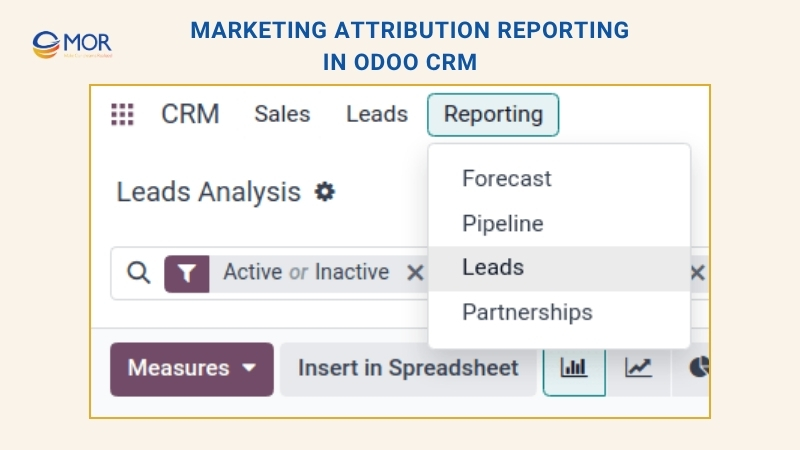
A lead record can store campaign, medium, and source data. This helps teams answer questions like:
- Which campaigns bring in the highest lead count?
- Which sources create the strongest opportunities?
- Which channels show better win rates?
- Which marketing actions turn into real sales revenue?
- Which campaigns create many weak-fit leads?
This level of tracking helps businesses move past ‘vanity’ numbers. A campaign may bring many form fills but only a few qualified deals. Another campaign may bring fewer leads but better close rates. Odoo CRM reporting helps teams compare lead volume, lead quality, conversion rate, and expected revenue.
Marketing attribution also helps teams make better budget calls. If a business knows which channels bring stronger opportunities, it can move spend toward those sources. If a campaign brings poor-fit leads, teams can adjust the message, target audience, or landing page.
Attribution works best when tracking rules stay consistent. UTM parameters, website forms, campaigns, and source fields need careful setup. If each team uses different names, reports get messy. Clean attribution gives sales and marketing one shared view of what works.
Reporting & Forecasting
Odoo CRM includes analytics for pipeline reports, win/loss review, sales forecasts, lead quality reports, expected revenue, conversion tracking, and campaign results. These Odoo CRM key features help managers move away from opinion-based meetings and toward data-led sales management.
This is one of the strongest customer relationship management capabilities for leadership teams. A CRM that only stores opportunities but cannot show useful reports solves only part of the job. Managers need to know whether the pipeline is healthy, which reps need help, where deals slow down, and how much revenue may close soon.
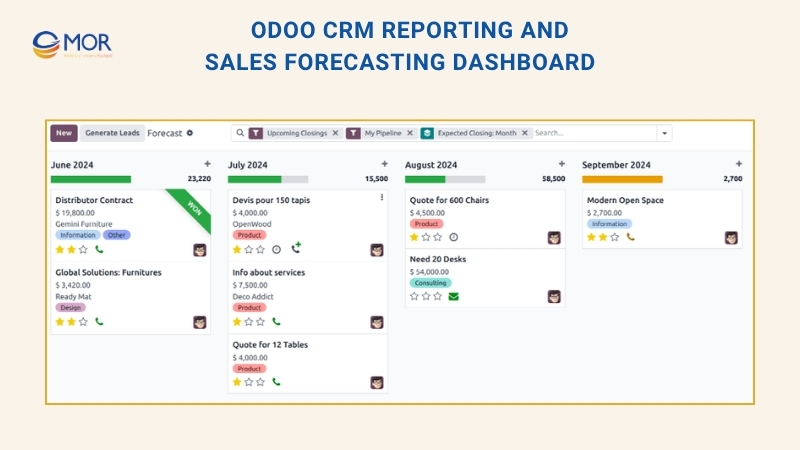
Odoo pipeline analysis gives several report views, including graph, pivot, cohort, and list views. Managers can group opportunities by salesperson, sales team, stage, campaign, source, country, expected close date, closed date, and lost reason. These filters help teams study performance from more than one angle.
Expected revenue reports are very useful. Odoo can pair opportunity value with probability to predict future revenue. A deal worth $50,000 at 60% probability adds $30,000 to expected revenue. When this logic runs across the full pipeline, managers can forecast with more care than raw deal value alone.
Win/loss review helps teams see why deals close or fail. If many deals fail at proposal stage, pricing or proposal quality may need review. If losses often mention one competitor, the sales team may need stronger comparison material. If deals fail because prospects stop replying, follow-up timing may be the problem.
Good reports need good data. Reps must keep stages, expected revenue, close dates, lost reasons, and activities updated. Odoo can support better habits through required fields, automation, and activity reminders, but user adoption still matters.
Live Chat & Website Lead Capture
Odoo Live Chat lets businesses talk with website visitors in real time. It can answer customer questions, check sales interest, route conversations, and create CRM leads or opportunities from chat records.
This is one of the Odoo CRM features that links website visits with real sales action. Many high-intent visitors do not submit a form. They may ask about pricing, stock, setup, support, or product fit. Live Chat gives them a quicker way to start a conversation.
When Live Chat connects with CRM, sales teams can capture leads from those chats. A chat record can be saved on the lead, giving reps useful context before they follow up. If a visitor asked about a product, pricing plan, or delivery timeline, the rep can reply with a message that fits the need.
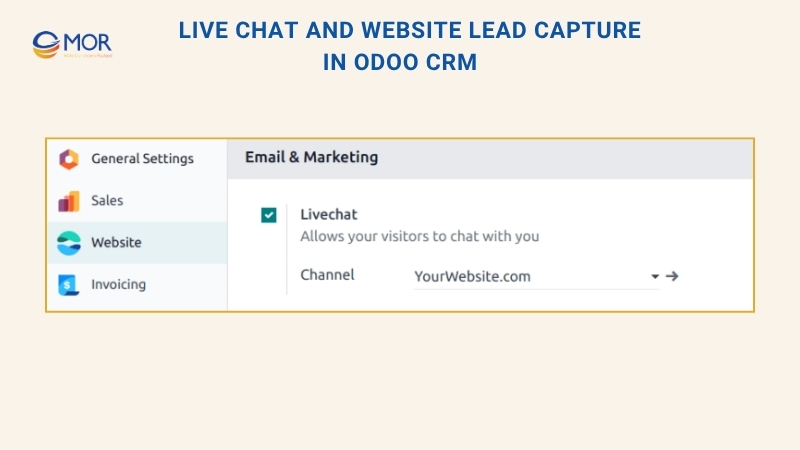
Odoo 19 also supports AI-led lead creation through Live Chat in some workflows. This means a website chat can turn into a CRM opportunity with details taken from the conversation. For companies with steady inbound traffic, this can increase lead capture without adding more manual work.
Live Chat can also help qualify visitors before sending them to a salesperson. Teams can ask about company size, interest level, location, budget, or urgency. This keeps reps from spending time on every casual visitor and helps them focus on stronger prospects.
The main setup point is staffing. Live Chat has value only when someone replies fast or chatbot rules handle early qualification well. If the chat widget looks active but no one answers, trust can drop. Businesses should define operator hours, routing rules, saved replies, and CRM handoff steps before rolling it out widely.
AI-Powered Features In Odoo 19
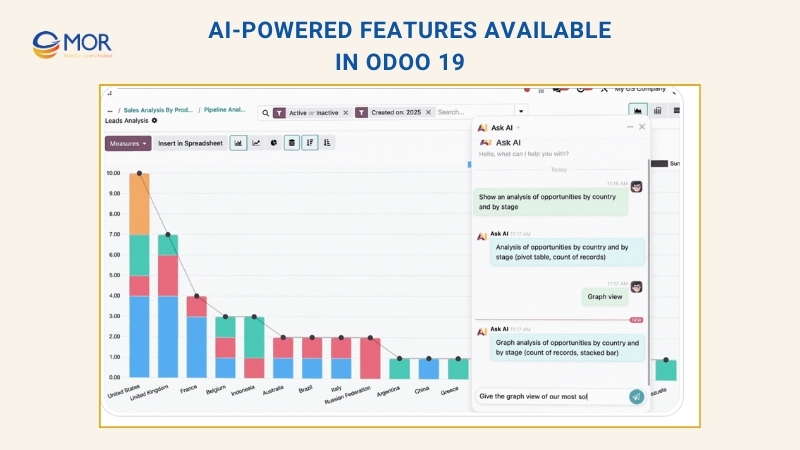
Odoo 19 brings AI deeper into the platform, and CRM teams gain direct value from this shift. Odoo CRM AI features include AI-supported email drafting, AI-created content, AI workflow automation, AI server actions from natural prompts, workflow assistants, natural-language search, and context summaries.
- AI-supported outreach. Sales reps can prepare email replies, follow-up notes, and client messages faster. The AI draft still needs review, but it can remove the blank-page problem and help reps answer sooner.
- AI conversation recaps. Long Chatter threads, attachments, and customer talks can be condensed for handover or quick checks. This helps when a manager joins a deal, a new rep takes an account, or a long opportunity needs fast background.
- AI win-probability guidance. Odoo 19 can show AI automation guidance around the chance of winning a lead. This helps teams see likely close chances and possible steps to improve lead quality or deal movement.
- Prompt-based server actions. Admins and power users can describe workflow automation through natural-language prompts. In a CRM setup, this may support actions like updating open opportunities, marking missing fields, assigning records, or creating follow-up activities from defined rules.
- Plain-language search. Instead of building complex filters by hand, users can ask questions in a more natural style and work with CRM data faster. This helps managers who need quick answers but do not want to create a custom report each time.
These AI options are useful, but teams should not treat them as a replacement for sales process design. AI works best when CRM data is clean, stages are clear, ownership is defined, and users know what AI can change. Sales teams should treat AI as a support layer, not an unsupervised driver.
Communication Tracking
Odoo CRM keeps customer communication inside the opportunity’s Chatter. Emails, notes, call logs, internal messages, attachments, and discussions can all stay linked to the record. This gives sales teams a full history of each interaction.
This is one of the Odoo CRM features that becomes more useful when the sales cycle gets longer. In short sales, a rep may remember most details. In B2B sales, deals can include many stakeholders, long email chains, meetings, quote changes, and internal approvals. Without communication tracking, teams lose context.
Chatter helps teams keep the whole story connected to the opportunity. If a customer asked for a discount, requested a technical file, changed the timeline, or mentioned a competitor, that detail can stay on the record. Managers can check the background without asking the rep to repeat everything.
Communication tracking also helps teams work together. Sales, support, finance, and operations may all touch the same customer. Internal notes let teams discuss the deal without showing comments to the customer. Attachments and logged activities also make the record easier to review later.
Odoo 19 improves communication work with AI summaries and better reply or forward actions. This helps users read long threads faster and continue from the right point.
The best habit is to keep meaningful communication inside the CRM record. If reps still rely on private inboxes and personal notes, the CRM record stays incomplete. Businesses should train teams to log key updates, attach files, and use Chatter for sales context that others may need later.
ECommerce & Website
Odoo 19 adds fresh website themes, better online store tools, and AI content support, helping businesses improve their online presence and reach more sales channels.
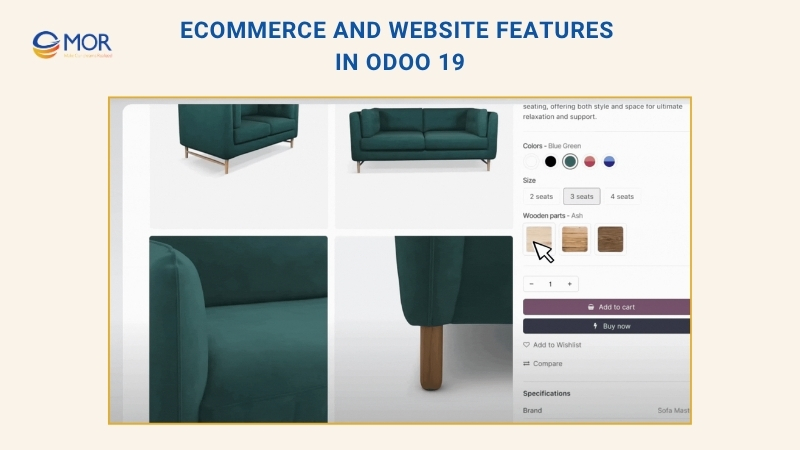
- Page layouts and design blocks: Shop pages, catalog sections, and product page layouts now use cleaner, mobile-ready designs that teams can apply right away
- Product browsing experience: Shoppers can view attributes on hover, check variant images, and move through cleaner category lists as empty groups are hidden on their own
- Search tools and AI content: The website editor can create meta titles, descriptions, and keyword ideas on its own, then translate full pages with one click
- Selling channel connections: Product catalogs can sync with TikTok Shop, Facebook, Instagram, Amazon, and Google Merchant Center so brands can reach more buyers
- Payment and delivery flow: Checkout steps are easier to follow, orders can be confirmed with or without early payment, Click & Collect stock appears, and Cash on Delivery is available
- Email campaign builder: A new drag-and-drop email editor helps teams create and style mass emails quickly inside the website app.
Point Of Sale (POS)
Odoo 19 updates the POS system for shops and restaurants, with stronger speed, more flexible settings, and a smoother customer journey. Some of these Odoo CRM features help connect sales records with later follow-up when customer data matters.
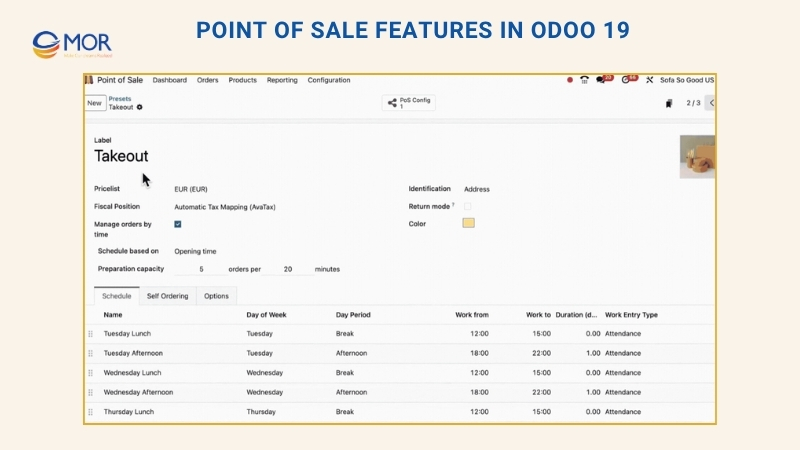
- Faster store payments: Quick-pay buttons complete payments with one click, and limited-access staff profiles let temporary workers handle simple checkout tasks only
- Restaurant service setups: Service types like dine-in, takeaway, or delivery can be prepared with tax positions, price lists, and kitchen capacity rules
- QR menu access: Odoo creates free QR codes that open digital menus with allergen details, combo choices, and online payment support
- Meal course control: Waiters can send courses in the right order, so kitchen staff prepare each dish at the proper time
- Tables and order movement: Table reservations can move into a waiting list shown in a Kanban view, and walk-in guests can be added right away
- Delivery app connection: The POS system can now link with most large delivery platforms, helping teams handle orders with less friction
- Digital receipts: Orders can create receipts and send them straight through WhatsApp.
Integration With Other Odoo Apps
Connection with other Odoo apps is a major reason many businesses select Odoo CRM. The CRM system features Odoo provides connect with Sales, Marketing Automation, Email Marketing, Helpdesk, Accounting, Inventory, Website, Live Chat, Contacts, VoIP, SMS, WhatsApp, and Dashboards.
This connected app model sets the platform apart from many separate CRM tools. In a standalone CRM, sales information often ends once the opportunity closes. After the deal is won, teams usually shift to another tool for orders, invoices, delivery, support, and reports. Odoo keeps those customer steps inside one shared flow.
A simple flow may look like this:
- A visitor sends a website form.
- Odoo adds a new lead to CRM.
- The system routes the lead to the right sales team.
- The rep plans a call and sends a follow-up email.
- Predictive scoring helps the team decide which opportunity needs attention first.
- The rep builds a quotation from the opportunity.
- The customer approves the quote.
- Odoo turns it into a sales order.
- Accounting creates the invoice.
- Inventory or delivery teams complete fulfillment.
- Helpdesk supports the customer after the purchase.
- Dashboards show results across the full journey.
This shared flow cuts repeated data entry and gives teams clearer visibility. Sales can check invoices. Finance can understand the customer background. Support can view related orders. Managers can report on revenue without joining data from different systems by hand.
For growing companies, this connection may matter more than one single tool. CRM becomes part of the company’s operating model, not a stand-alone sales notebook.
What Makes Odoo CRM Different From A Basic Sales Pipeline?
A simple CRM lets teams save leads, move deals across stages, and write notes. Odoo CRM adds more value because sales work links back to the larger ERP system.
Odoo CRM connects with Sales, Contacts, Website, Live Chat, Email Marketing, Marketing Automation, Accounting, Inventory, Helpdesk, Discuss, VoIP, and other Odoo apps. A lead can come from a website form, enter the pipeline, get follow-ups, become a quote, turn into a sales order, and later connect with invoices, delivery, or support.
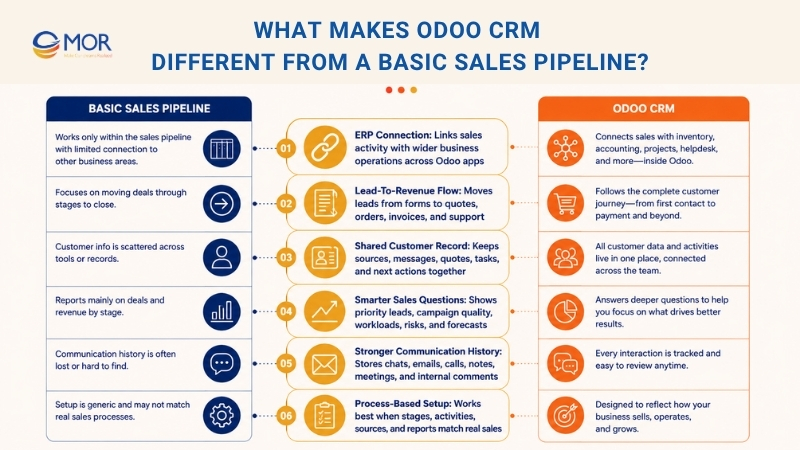
This connected setup is one of the clearest Odoo CRM features and benefits for sales teams. They can check lead source, customer background, expected revenue, past messages, related quotes, open tasks, and next actions from one record.
A basic pipeline board may answer: “Where does this deal stand now?” Odoo CRM can answer a stronger group of questions:
Sales Question | How Odoo CRM Helps |
Which leads need attention today? | Predictive scoring, priority fields, activity views, and routing rules |
Which campaigns create strong leads? | Attribution data, source tracking, campaign reports, and medium tracking |
Which salespeople have too much work? | Team views, activity reports, routing rules, and pipeline filters |
Which opportunities may go cold? | Activity reminders, planned next actions, unattended lead reports, and pipeline signals |
Which deals have a stronger close chance? | Probability scores, expected revenue, forecasts, and pipeline reports |
What customer contact happened earlier? | Chatter, emails, notes, calls, meetings, live chat records, and internal comments |
Which quotes connect to this lead? | Sales app connection, quote creation, customer portal, and order conversion |
Odoo CRM works best when the full lead-to-revenue flow matches the real sales process. Pipeline stages, activities, sales teams, lead sources, and reports should all reflect how the team sells.
The main gain is fewer missing pieces. Lost emails, late replies, wrong quotes, duplicate contacts, and unclear lead sources can weaken sales results. Odoo CRM tools keep sales data and sales action in one shared place.
Why Odoo 19 Changes The Way Sales Teams Use CRM
Odoo 19 shifts how teams think about CRM because the sales system now feels quicker, smarter, and more action-led. Older CRM flows often relied on users to check the pipeline by hand, write every message from scratch, search records with filters, and update fields after each touchpoint. Odoo 19 still keeps users in control, but stronger AI support and workflow changes make daily sales work feel lighter. These Odoo 19 CRM features show why Odoo CRM features now go beyond passive tracking.
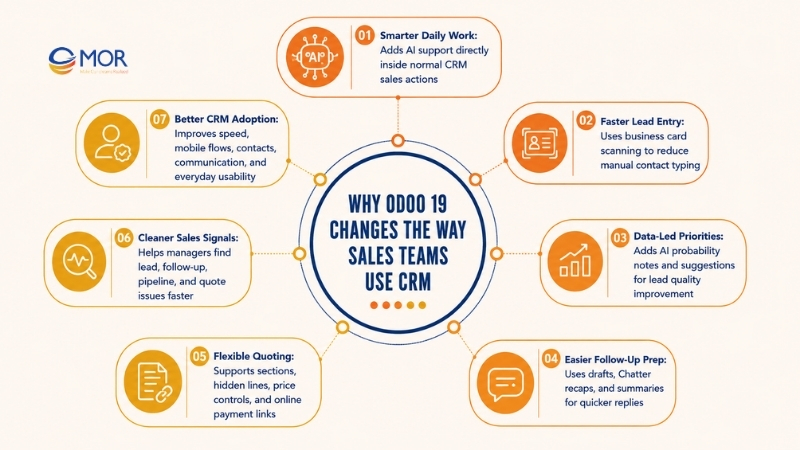
The biggest change is that AI appears more clearly in normal CRM work. Instead of sitting only behind lead scores or background logic, AI can help users read lead quality, prepare messages, summarize communication, and work with CRM data in a more natural way. Salespeople still need to check the output and make the final call, but Odoo 19 supports them right where the work happens.
For sales teams, this brings several practical changes.
- Lead entry gets quicker. Odoo 19 supports business card scanning for lead creation, so reps can save contact details from meetings and events with less manual typing. This is useful for trade shows, partner visits, conferences, and field sales teams.
- Lead priority becomes more data-led. Odoo CRM already includes predictive scoring, and Odoo 19 adds clearer AI probability notes and suggestions for improvement. That helps teams see which leads may close and why the score looks that way.
- Follow-up prep takes less effort. AI email drafts, Chatter recaps, and conversation summaries help reps avoid rereading long threads before they reply. This helps during handovers, team changes, or long sales cycles with many touchpoints.
- Quoting feels more flexible. Odoo 19 updates quote creation with sections, subsections, hidden lines, price display settings, and online payment links. That makes proposals easier to shape without switching to another quoting tool.
- Managers see cleaner sales signals. Stronger pipeline reports, AI probability notes, activity views, expected revenue reports, and attribution help sales leaders find bottlenecks sooner. They can see whether the team has a lead quality issue, follow-up issue, pipeline data issue, or quote issue.
Odoo 19 also improves the wider CRM user experience. Faster loading, better mobile flows, improved contact handling, simpler actions, and cleaner communication screens all help sales adoption. This matters because even the best CRM fails when reps see it as extra admin. When the system helps them sell, they are more likely to use it every day.
A simple way to read Odoo 19 CRM is this: the system helps sales teams move from passive record tracking to active sales execution. It does more than store past actions. It helps suggest, sort, prepare, and connect the next move.
How Odoo CRM Supports The Full Lead-To-Revenue Process
A good review of Odoo CRM features should follow the whole sales path, from first contact to paid customer. Odoo links lead capture, qualification, sales tasks, quoting, orders, invoices, and customer messages in one flow.
This setup helps sales teams avoid broken handoffs between tools. A lead does not end at the pipeline stage. It can move from a website form into a quotation, then into a sales order, invoice, delivery, and support record.
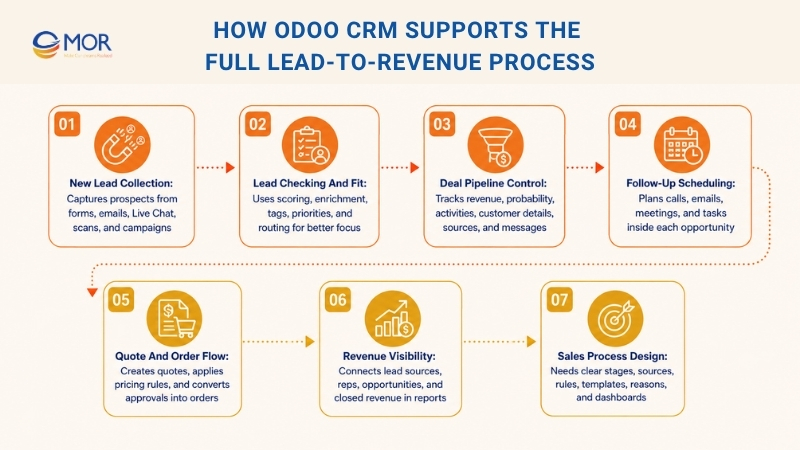
New lead collection
Odoo can gather leads from website forms, email aliases, manual entry, Live Chat, business card scans, and marketing campaigns. This gives companies more entry points for prospects.
Lead checking and fit
Predictive scoring helps estimate conversion chance. Lead enrichment, priority fields, tags, and routing rules help sales teams focus on opportunities with stronger fit.
Deal pipeline control
The visual pipeline gives reps and managers a clear view of each deal. Each opportunity can hold expected revenue, probability, next activity, customer details, source, campaign, notes, and messages.
Follow-up scheduling
Reps can plan calls, emails, meetings, and tasks inside every opportunity. Managers can see late activities and deals that may be losing momentum.
Quote building
CRM connects with the Sales app, so reps can create quotes right from opportunities. Odoo 19 also supports sections, subsections, optional items, pricing rules, templates, and customer portal choices.
Order creation
After a customer accepts a quote, it can become a sales order. That order can then link to invoicing, delivery, inventory, and accounting.
Revenue visibility
Managers can follow the journey from lead source to closed revenue. This makes it easier to see which channels, reps, and deals create real sales.
Sales process design
Odoo CRM B2B sales cycle management long sales process features need clear pipeline stages, lead sources, routing rules, activity types, quote templates, product setup, lost reasons, and reporting dashboards. Odoo gives the tools, but the value depends on the right setup.
Common Mistakes Businesses Make When Using Odoo CRM Features
Odoo CRM gives teams many tools, but businesses often use only a small part of them. The problem is rarely a lack of software capability. More often, the CRM is set up too simply, used unevenly, or treated as a place to store records instead of a system for sales action.
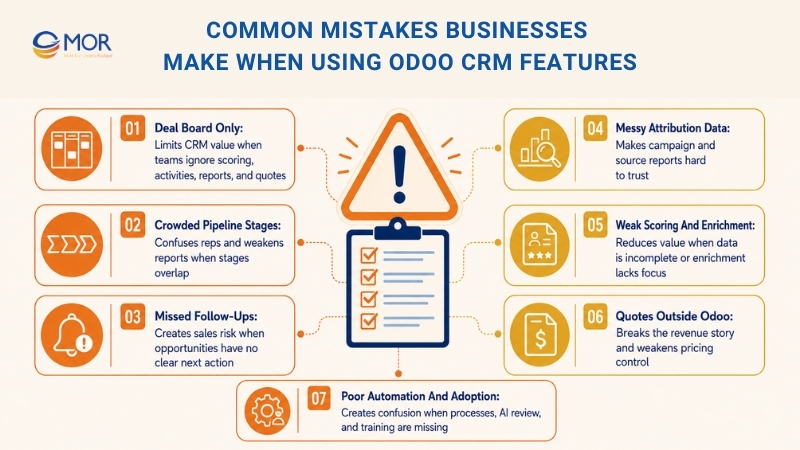
Treating Odoo CRM as only a deal board
Many teams create stages and stop there. They move cards across the board but miss scoring, activities, routing rules, reports, and quote connections. This weakens the value of the platform.
Adding too many sales stages
A crowded pipeline can confuse reps and make reports less reliable. Each stage should mark a clear sales milestone. When stages overlap, reps may update records in different ways.
Ignoring activity habits
Opportunities with no next step are hard to control. Reps may miss follow-ups, and managers may not see risks early. Every active opportunity should have a clear next action.
Leaving lead sources messy
If sources, campaigns, and mediums use mixed names, attribution reports become hard to trust. Teams should set naming rules before campaigns go live.
Skipping predictive scoring setup
Predictive scoring works better when CRM data is clean, complete, and built from enough past records. If fields are missing or filled in unevenly, scores may give less value.
Using enrichment without a plan
Some teams enrich every lead without checking cost or fit. Others skip enrichment and spend too much time on manual research. A better method is to enrich leads that match target criteria or show strong intent.
Creating quotes outside Odoo
If reps prepare quotes in separate files, CRM loses part of the revenue story. Quote connection is one of the most useful Odoo sales management features, mainly for teams that need pricing control.
Forgetting structured lost reasons
Lost reasons can show sales problems, but only when reps use them in a steady way. Without clear lost reasons, managers may not know why deals fail.
Automating before the process is ready
Automation should support a process that already works. If a business automates before it defines stages, owners, and qualification rules, the system can create extra confusion.
Letting AI work without review
AI can draft, recap, and suggest, but people should still check the result. Sales messages affect customer relationships, so human control still matters.
Missing user training
CRM adoption depends on daily habits. Reps need to see how the system helps them sell, not only how managers read reports. Training should focus on daily work, not only tool menus.
Avoiding these mistakes can make the platform far more useful. The goal is not to switch on every tool at once. The goal is to set up the right tools in the right order and make them part of daily sales behavior. Teams comparing Odoo community CRM features should also check which options need extra apps, paid editions, or partner setup before planning the rollout.
How To Choose The Right Odoo CRM Features For Your Sales Team
Choose the right CRM capabilities based on your team size, sales flow, and lead volume. Teams researching Odoo CRM features for small and medium businesses should focus on tools that match daily sales work, not every option in the menu.
- Small teams: pipeline control, activities, email tracking, quotes, and simple reports.
- High lead volume: lead capture, routing rules, lead scoring, enrichment, Live Chat, and attribution tracking.
- B2B sales teams: activity planning, communication history, forecasts, quotes, and AI recaps.
- Multi-region teams: territories, routing rules, pricelists, and regional reports.
- Complex sales processes: quotation tools, optional products, e-signature, online payments, and sales order conversion.
- Marketing-led teams: source tracking, campaign attribution, marketing automation, lead scoring, and conversion reports.
A practical rollout may look like this:
Rollout Stage | Recommended Odoo CRM Features |
Stage 1: CRM Base | Pipeline stages, contacts, opportunities, activities, Chatter, simple reports |
Stage 2: Lead Control | Lead capture, routing rules, lead sources, tags, priorities, lead enrichment |
Stage 3: Sales Work | Quotations, pricelists, optional products, sales orders, customer portal |
Stage 4: Results Review | Expected revenue, pipeline analysis, win/loss reports, marketing attribution |
Stage 5: AI And Automation | Predictive scoring, AI summaries, AI drafting, AI server actions, natural-language search |
Stage 6: Wider App Connection | Marketing Automation, Helpdesk, Accounting, Inventory, VoIP, WhatsApp, dashboards |
The order matters. AI cannot fix a pipeline that lacks clear stages. Attribution reports will not help when lead sources are messy. Managers will still miss risks if reps do not plan activities.
A strong rollout begins with sales process discovery. Teams should define where leads come from, how they qualify them, who owns each lead, how quotes are built, and why deals are won or lost.
After that, businesses can shape Odoo CRM around the way they really sell, not a generic setup. They should also compare their plan with Odoo CRM features official product details and work with MOR Software when they need partner support for setup, app connection, and long-term improvement.
How MOR Software Helps Businesses Implement Odoo CRM the Right Way
Odoo CRM can look simple at first. But a serious CRM rollout needs more than turning on the app and adding pipeline stages. Lead scoring, sales teams, assignment rules, activity types, quotation templates, lead enrichment, reporting dashboards, and app connections all need the right setup.
MOR Software is an Odoo development partner and supports businesses with Odoo CRM implementation, configuration, integration, customization, testing, and long-term maintenance. We help teams set up Odoo around their real sales process, not a generic template.
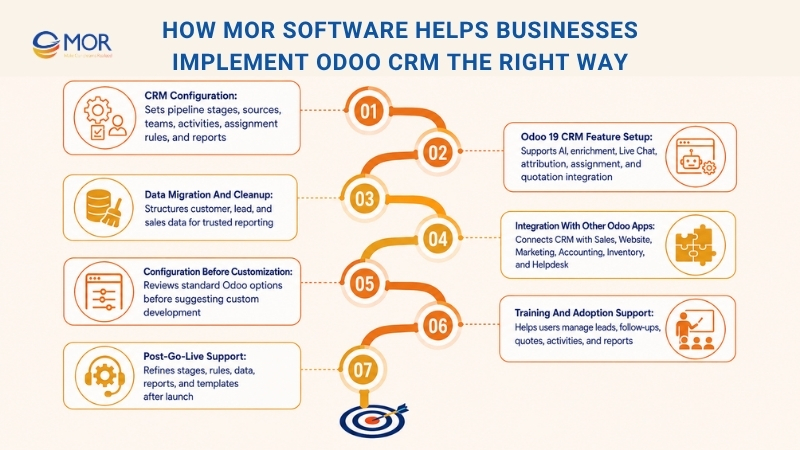
A strong Odoo CRM setup starts with sales process review. Before configuration, MOR Software studies how leads enter the business, how reps qualify opportunities, how sales teams are divided, how quotations are created, and which reports managers need to track performance.
- CRM configuration: MOR Software helps set up pipeline stages, lead sources, sales teams, activities, assignment rules, and reporting views so Odoo CRM matches daily sales work.
- Odoo 19 CRM feature setup: We support businesses in using AI probability analysis, Chatter summaries, business card scans, lead enrichment, Live Chat lead creation, marketing attribution, automated assignment, and quotation integration.
- Data migration and cleanup: CRM data needs to be clean before teams can trust reports. MOR Software helps review, migrate, and structure customer, lead, and sales data with clear ownership.
- Integration with other Odoo apps: Odoo CRM works best when it connects with Sales, Website, Marketing Automation, Accounting, Inventory, Helpdesk, Live Chat, and other business apps. MOR Software helps map these connections based on real workflows.
- Configuration before customization: Many CRM needs can be handled with standard Odoo features. MOR Software reviews what Odoo already supports before suggesting custom work, which helps lower future upgrade risks.
- Training and adoption support: A CRM only works when sales teams use it. MOR Software helps users understand how to manage leads, plan follow-ups, create quotations, track activities, and read reports.
- Post-go-live support: The first weeks after launch matter. MOR Software supports teams as they refine stages, adjust assignment rules, clean data, fix report views, and improve templates.
With the right partner, Odoo CRM becomes more than a sales database. MOR Software helps businesses turn it into a connected sales system that supports lead management, follow-up planning, quoting, reporting, and customer growth.
Conclusion
Odoo CRM features can help sales teams move faster, follow up better, and connect sales data with wider business operations. Odoo 19 adds stronger AI support, cleaner quoting, richer reporting, and better links across apps. Still, the real value comes from setup, adoption, and process fit. MOR Software helps businesses configure Odoo CRM around real sales workflows. Contact us to build a CRM system that supports your next stage of growth.
"Mr. Cong’s guiding philosophy is simplicity, believing that the simplest solutions are often the most powerful. He sees trust, empowerment, and the opportunity to demonstrate one’s abilities as the key elements that set MOR apart from traditional IT companies."
Mac Tien Cong


Division Manager (Hanoi Branch)
MOR SOFTWARE
Frequently Asked Questions (FAQs)
What are Odoo CRM features?
Odoo CRM features help sales teams manage leads, opportunities, activities, quotations, customer messages, and reports in one system. They also connect CRM data with Sales, Website, Marketing, Accounting, Inventory, Helpdesk, and other Odoo apps.
Is Odoo CRM good for small sales teams?
Yes. Small teams can start with pipeline stages, activities, email tracking, quotations, and basic reports. They do not need to set up every tool on day one.
Does Odoo CRM support lead scoring?
Yes. Odoo CRM can score leads based on past sales data and key fields. This helps sales teams focus on leads with a higher chance of becoming customers.
Can Odoo CRM assign leads automatically?
Yes. Leads can be assigned to salespeople or sales teams based on rules. These rules can use source, territory, team, workload, language, or probability.
How does Odoo CRM help with follow-ups?
Sales reps can schedule calls, emails, meetings, tasks, and reminders inside each opportunity. Managers can also see overdue activities and deals that may need attention.
Can users create quotations from Odoo CRM?
Yes. Sales reps can create quotations directly from opportunities. Once a customer accepts a quote, it can become a sales order and connect with invoicing, delivery, and accounting.
What makes Odoo 19 CRM different from older versions?
Odoo 19 adds stronger AI support, faster lead handling, business card scans, AI probability analysis, Chatter summaries, and better quotation tools. These updates help teams prepare follow-ups and manage sales work with less manual effort.
How do Odoo CRM features support marketing teams?
They help track lead sources, campaigns, mediums, and conversion results. Marketing teams can see which channels bring better leads and which campaigns lead to real sales.
Does Odoo CRM work with Live Chat?
Yes. Odoo Live Chat can turn website conversations into CRM leads or opportunities. Chat transcripts can also stay attached to lead records, giving sales reps useful context before follow-up.
How should a business choose the right CRM setup in Odoo?
Start with the real sales process. Define how leads enter, who owns them, which stages they follow, how quotes are created, and what reports managers need. Then choose the features that support those steps.
Share


Make Our-Dreams Realized


© 2023 . MOR Software. All Rights Reserved
Sitemap
Privacy Policy
Terms of Use

Rate this article
0
over 5.0 based on 0 reviews
Your rating on this news:
Name
*Email
*Write your comment
*Send your comment
1