


Odoo Implementation Services: A Digital Transformation for 2026
Odoo implementation services can fail fast when the scope is unclear, the data is messy, and teams are not ready for change. In this guide, MOR Software will show you how Odoo ERP implementation services work, what they cost, which modules matter first, and how the right rollout can turn a complex ERP project into a practical system your business can actually use.
Importance Of Odoo Implementation Services
Strong Odoo implementation services give businesses several clear advantages:
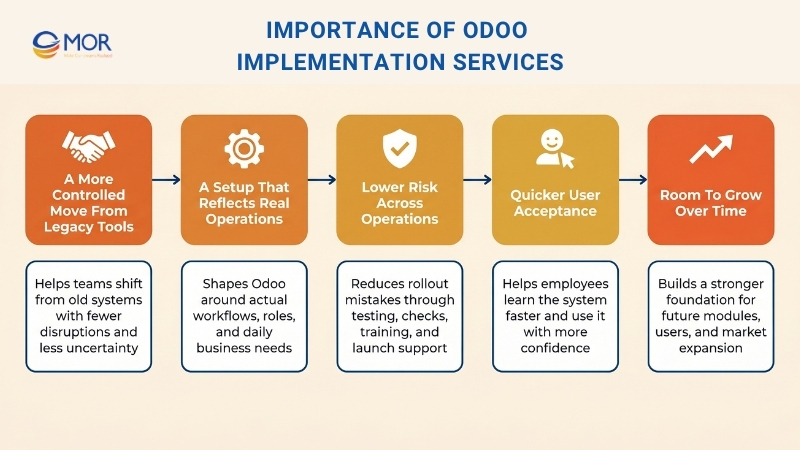
A More Controlled Move From Legacy Tools
When a company leaves spreadsheets, disconnected apps, or older ERP platforms, daily work can slow down fast if the transition is handled badly. A structured rollout helps teams manage data movement, process updates, and launch activities in a clear order, so people can keep working with fewer problems and less uncertainty.
A Setup That Reflects Real Operations
Odoo can adapt to many business models, yet that flexibility only matters when the system is shaped around the way your company truly runs. Skilled implementers map real processes, assign the right access levels, activate suitable modules, and refine workflows so the software supports everyday work instead of pushing users toward slow manual fixes.
Lower Risk Across Operations
Many ERP rollouts struggle because the planning is weak, the data transfer is wrong, user permissions are unclear, or deployment moves too fast. A well-managed implementation approach reduces that exposure through testing, checking, training, and launch support, helping businesses prevent expensive mistakes that can hurt finance, stock control, sales activity, and reporting.
Quicker User Acceptance
Even a solid system can underperform when employees are unsure how to use it in their daily roles. Good rollout support includes training, user guides, and change support that make staff more comfortable with the new platform, which usually leads to smoother adoption and stronger day-to-day use after launch.
Room To Grow Over Time
The platform should do more than solve current problems, it should also support the next stage of business growth. A well-built foundation makes it much easier to add extra modules, bring in more users, support new processes, and enter new markets later without rebuilding the whole system.
Experienced ERP specialists combine technical knowledge, process understanding, and industry awareness to save time, support better decisions, and keep businesses away from avoidable mistakes throughout the rollout.
>>> Scale your business efficiency with our expert Odoo services.
Core Odoo Implementation Services
Good Odoo implementation services involve far more than turning on software. Odoo ERP implementation services work best when planning, setup, migration, integration, training, and ongoing support all work together, because those are the tasks that shape the system around real business operations and keep it useful as the company expands.
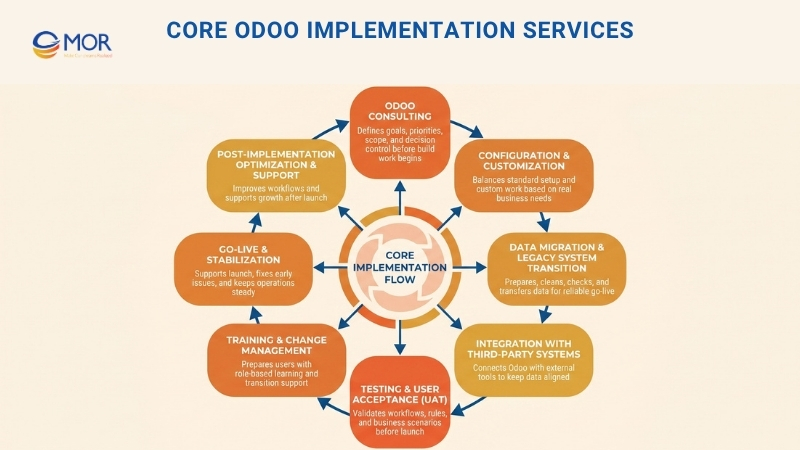
Odoo Consulting
For many companies, the first step in an Odoo implementation service is Odoo consulting, because that early work influences every later stage. Before development starts, Odoo consulting services review business targets, current workflows, pain points, and expectations for the future system. That early review helps teams avoid a vague scope, rank priorities in the right order, and begin with a plan that makes sense in practice.
A solid consulting stage should answer the questions that matter before any build work begins. Which teams need to launch first? Which activities can stay close to standard Odoo functions? Which reports must be ready on day one? Which manual jobs create the biggest delays right now? When businesses settle those issues early, they are less likely to pay for custom work that creates extra complexity without giving clear business value.
Consulting also shapes project control from the start. The team needs clear decision owners, key users, review points, and a shared view of what is inside and outside the scope. Odoo’s partner guidance explains that a sound implementation method should support steady onboarding and budget discipline, not short-term approval of every request, which is why this stage often saves both time and money before the build even starts.
Configuration & Customization
Setup and customization change Odoo from a general ERP tool into a system that matches the way a business really operates. Configuration is about defining modules, access rights, workflow steps, and operating rules inside the standard platform. Customization goes further and changes screens, reports, automations, or functions when the default setup does not cover an important business need.
That difference matters, because not every request should turn into custom coding. Odoo is built in modules, and many business needs can be solved through native settings, user groups, approval chains, fiscal rules, automated actions, or built-in reporting screens. When more needs are solved through configuration, the system is usually easier to maintain and simpler to upgrade later.
Custom work should stay focused on gaps that truly matter. Those gaps often involve industry-specific processes, document formats with unusual requirements, special integrations, or reporting logic that standard tools cannot handle. Good delivery teams compare the value of each change with its cost, future maintenance load, and upgrade risk. The aim is not to add custom work everywhere. The real aim is to shape the platform only where the business clearly needs it.
Data Migration & Legacy System Transition
Among all Odoo ERP development, data migration is one of the most delicate stages, because the new system can only work as well as the information stored inside it. This work covers preparing, cleaning, mapping, checking, and transferring business data from older platforms into the new environment. When it is done carefully, teams face less disruption, data stays more reliable, and daily operations continue with greater confidence after go-live.
Odoo’s import guidance highlights two points that matter during migration. Imported data cannot simply be undone. Large uploads may also need to be split into smaller batches, because big files can trigger timeout issues or processing failures. Those facts show why migration should never be treated as a last-week activity. It needs planning, test environments, trial imports, validation rules, and fallback thinking well before launch.
A strong migration plan usually divides data into clear groups. Master data can include products, suppliers, customers, account charts, bills of materials, and employee files. Transaction data can include open invoices, pending purchase orders, stock balances, subscriptions, and sales orders. Historical records need a separate decision. Some companies bring across everything, while others keep the old system for archive access and move only active records plus data needed for reporting and compliance.
Ownership also matters during the legacy shift. Someone must decide which source file is correct, who approves the cleaned records, and which exceptions can be accepted. Without that discipline, businesses often move duplicate contacts, mismatched SKU data, old prices, or incomplete tax details into the new system, and that can weaken trust in the platform from the very first week.
Integration With Third-Party Systems
Most companies rely on more than one business platform, so integration is a central part of implementation. In many cases, Odoo integration consultants are needed to connect the system with eCommerce stores, CRM solutions, payment gateway integration platforms, shipping services, finance software, or industry-specific applications. When those connections are planned well, information stays aligned across teams and staff spend less time fixing gaps created by disconnected tools.
The exact integration need depends on which systems the business plans to keep. One company may continue using a storefront, a warehouse scanning tool, a payroll platform, a bank link, a marketplace connector, or a customer messaging stack. In that situation, the project team must define which system controls each data point, how often records should sync, which failures should trigger alerts, and what happens when data conflicts or transfers break.
Odoo’s official guidance already shows how complicated integration can become, even with payment setup alone. The platform supports many payment providers, including Stripe, PayPal, Razorpay, Adyen, Xendit, and others, and each option has its own credentials, flow, supported functions, and testing steps. Odoo also advises teams to use test mode in a copied or test database during validation. The same rule applies to wider third-party connections as well, because teams need to test early, define data ownership clearly, and check real business cases rather than only technical links.
Testing & User Acceptance (UAT)
Testing and user acceptance are the stages that show whether the system works in real operating conditions instead of only looking correct on paper. Before launch, this stage checks workflows, module behavior, report accuracy, integrations, and core business rules. In Odoo implementation services, UAT also gives key users a chance to confirm whether the platform matches daily work and whether final changes are still needed.
Strong UAT should be built around real-life scenarios. Sales teams need to create quotes, confirm orders, and follow delivery steps. Finance teams need to check taxes, reconciliations, and payment flows. Inventory teams need to test receipts, transfers, reservations, and stock corrections. HR teams need to verify approvals, user access, and document routing. When testing focuses only on separate screens, important process gaps often stay hidden until after go-live.
Testing also protects linked business logic across departments. A decision inside sales can affect finance. A product rule can change procurement behavior. One permission setting can stop a user at a crucial step. That is why delivery teams usually need functional testing and end-to-end process testing, followed by approval from users who know the daily work well. Odoo’s developer guidance also supports formal module testing, which reinforces the point that a dependable rollout comes from structured validation, not assumption.
Training & Change Management
Even when the platform is built well, it may still fail to deliver value if users are not ready to work with it. Training and change management help employees understand the system, follow updated processes, and feel more secure during the transition. This part of the rollout usually includes role-based instruction, written guidance, hands-on practice, and support that lowers resistance and helps people adapt faster.
Training works best when it reflects the way users actually do their jobs. A warehouse supervisor does not need the same session as a finance officer. A sales lead does not need the same level of detail as a system administrator. Role-based training shortens the learning period because users spend time on the menus, actions, dashboards, and exception paths they will truly use.
Change management covers more than software lessons. It explains why the new process exists, what will change, who approves unusual cases, and what users must stop doing in spreadsheets or older tools. Odoo’s partner guidance also notes that proximity can be helpful for training and change support during sensitive phases, which is a useful reminder that adoption depends on communication and user trust as much as technical readiness.
Go-Live & Stabilization
Go-live is the moment when the project moves out of planning and becomes part of normal operations. This stage includes launch preparation, rollout assistance, issue tracking, and quick support during the first live period. Stabilization matters just as much, because it helps teams fix early issues fast and keeps the new environment dependable under real business pressure.
A strong go-live is rarely a simple overnight switch. In most cases, it requires a clear cutover plan that covers final imports, user activation, access checks, open transaction handling, team communication, support availability, and fallback actions. Businesses also need clear ownership for issue triage in the first few days, including which problems must be fixed at once and which ones can wait for a later improvement round.
This early live period is where user confidence is either built or lost. Small issues are common after launch, but teams need quick answers and visible action. Odoo’s implementation material stresses onboarding users on time and within budget, and that supports a practical truth. Early support after launch is not a nice extra. It is part of making the system work in real operations.
Post-Implementation Optimization & Support
The project does not stop the day the system goes live. After launch, optimization and support help businesses adjust workflows, improve speed, solve problems, and expand the platform as needs change. This continued work keeps the system aligned with business growth and protects the long-term return from the rollout.
Post-launch activity often includes refining reports, changing user roles, redesigning dashboards, adjusting automation, checking performance, turning on new modules, updating documents, and supporting new teams that join later. A system that worked well in phase one may still need changes when transaction volume rises or leadership asks for deeper insight.
This stage matters for another reason as well. Odoo environments keep changing as businesses add users, create new business entities, enter fresh markets, and update internal controls. Official Odoo pricing material notes that listed plans include support and upgrades, which points to an important lesson. Lifecycle support should be discussed from the start of the project, not pushed aside until after launch.
Commonly Implemented Modules In Odoo Implementation Services
When companies begin Odoo implementation services, they often start with the modules that shape daily operations the most. These tools let teams work inside one connected platform, cut down repeated tasks, and keep data aligned across departments. The best starting point depends on your business model, growth level, and internal processes.
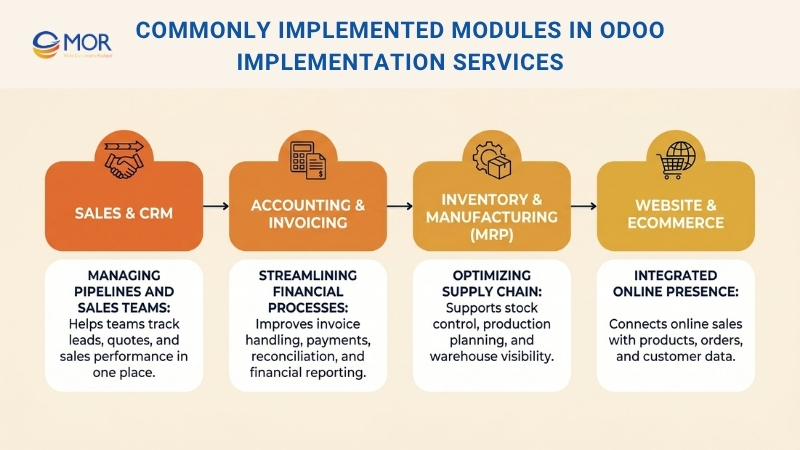
Sales & CRM: Managing Pipelines And Sales Teams.
The Sales and manufacturing CRM software are often among the first areas businesses roll out. They give sales teams one clear place to view leads, opportunities, quotations, and customer activity. That makes it easier to follow pipeline stages, assign work to the right people, and reach prospects at the right time. Managers can also review team performance, estimate revenue, and catch bottlenecks before they hurt results. With the right setup, companies can create a more efficient sales flow and respond to customers faster.
Accounting & Invoicing: Streamlining Financial Processes.
The Accounting and Invoicing modules help businesses manage finance work with stronger accuracy and less manual effort. With Odoo manufacturing accounting software, teams can handle invoices, payments, tax settings, bank reconciliation, and financial reporting inside one system. That reduces the need to transfer data between several tools and helps lower the chance of mistakes. It also gives finance teams quicker access to live numbers, which supports planning and decision-making. For companies that want closer control over cash flow and reporting, this module area is often a major part of the rollout.
Inventory & Manufacturing (MRP): Optimizing Supply Chain.
For businesses that deal with physical products, Inventory and Odoo manufacturing module are highly useful modules. They support stock movement tracking, warehouse visibility, reorder rules, and better production planning. Manufacturers can also manage bills of materials, work orders, and scheduling inside one connected environment. That wider visibility across the supply chain helps reduce shortages, delays, and extra stock. When Odoo implementation services are handled correctly, these modules help operations move faster and support better resource planning.
Website & eCommerce: Integrated Online Presence.
The Website and eCommerce modules let businesses manage their online presence directly inside Odoo. Products, prices, customer data, and orders can connect with back-end processes, which makes online selling easier to control. That connection helps companies keep product details accurate, process orders faster, and deliver a more consistent customer experience across different sales channels.
Working with certified Odoo Gold or Silver Partners can help businesses apply these modules through best practices, correct setup, and a structure that supports future growth.
Odoo Implementation Cost And Timeline
Before businesses approve an ERP project, they usually want clear answers on budget and timing. These two factors shape planning from the start, because the cost can change with scope, customization, integration, and data complexity, while the timeline depends on how ready the business is for rollout, testing, and user adoption.
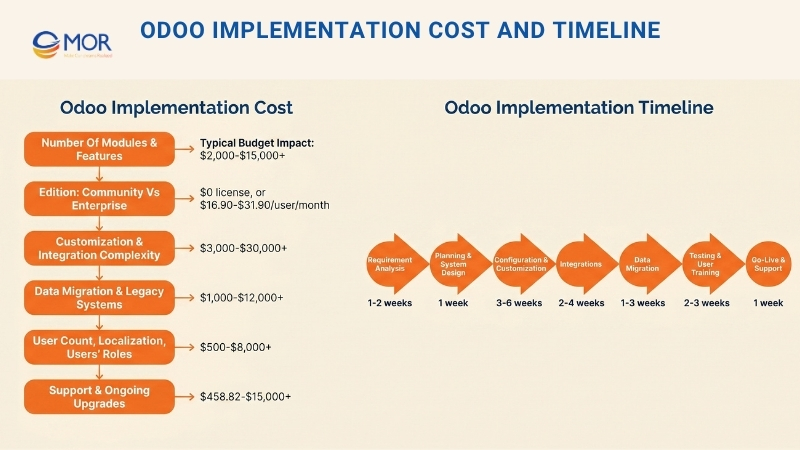
Odoo Implementation Cost
One of the first questions many businesses ask is how much the project will cost. The answer depends on scope, system complexity, number of modules, customization level, integration needs, and business size. In practice, Odoo implementation services cost can vary widely, and Odoo implementation pricing often changes based on how much special logic, migration work, and support your company needs.
Cost Factor | What Drives It | Typical Budget Impact ($) |
Number of Modules & Features | A larger number of modules means more setup work, more testing, and more process alignment. Custom modules also increase development time and add extra QA effort. | $2,000-$15,000+ for implementation work, depending on how many modules are included and how much process adjustment is required. |
Edition: Community vs Enterprise | Community avoids license fees, but Enterprise introduces recurring subscription costs. Custom hosting decisions can raise the total further. | Community: $0 license. Standard: $16.90-$21.10/user/month. Custom: $25.50-$31.90/user/month. Odoo.sh adds hosting charges on top. |
Customization & Integration Complexity | More time is needed when the project includes third-party integrations, custom workflows, or business logic that falls outside standard behavior. | $3,000-$30,000+ depending on the number of integrations, the complexity of the APIs, and the amount of custom code required. |
Data Migration & Legacy Systems | Costs increase when old data is large, inconsistent, spread across many sources, or needs serious cleanup and checking before import. | $1,000-$12,000+ depending on the size of the data, the quality of the source records, and the level of transformation needed. |
User Count, Localization, Users’ Roles | A larger user base means more role setup, more training, and more access management. Localization also adds tax, currency, legal, and reporting complexity. | $500-$8,000+ in extra setup and training effort, plus ongoing per-user subscription fees if Enterprise is selected. |
Support & Ongoing Upgrades | After launch, support, issue fixing, performance work, version upgrades, and change requests all add to the long-term budget. | $458.82-$15,000 for Odoo Success Packs, or more when businesses use partner-led support, retained consulting, or custom maintenance. |
These numbers should be treated as planning estimates, not exact quotes. Final Odoo implementation cost often shifts based on how clear the scope is, how well stakeholders stay aligned, how clean the data is, and how much custom logic the business wants to move into the new system. Odoo’s public pricing page currently lists One App Free at $0, Standard at $16.90 or $21.10 per user/month, and Custom at $25.50 or $31.90 per user/month, while Odoo.sh hosting is charged separately.
For service planning, Odoo’s public estimator and Success Pack pricing give a useful reference point. The estimator describes implementation as a mix of business analysis, setup, training, data import, and customization. At the moment, pack prices are shown from around $458.82 to $15,000, and one sample project estimate appears at €4,500.
Odoo Implementation Timeline Explained
The length of an implementation project changes based on company size, system complexity, and the amount of customization required.
Odoo Implementation Timeline Overview
Implementation Phase | Estimated Duration |
Requirement Analysis | 1-2 weeks |
Planning & System Design | 1 week |
Configuration & Customization | 3-6 weeks |
Integrations | 2-4 weeks |
Data Migration | 1-3 weeks |
Testing & User Training | 2-3 weeks |
Go-Live & Support | 1 week |
The average timeline is usually 2-3 months, though advanced customization can extend it.
That estimate is realistic for focused projects, especially when a business starts with a small group of modules and keeps the scope under control. Odoo’s official estimator shows that smaller projects can often move into production in 200 hours or less. Odoo’s partner guidance also notes that very simple projects with only a few apps may even be handled as self-managed efforts. At the same time, bigger or more demanding projects usually need a partner because integrations, training, migration, and custom logic can quickly increase the schedule.
The timeline often becomes longer when businesses add one or more of these factors: multi-company structure, country localization, custom development, poor legacy data, unclear ownership, shifting requirements, or too many stakeholders involved in every approval. Delays in testing can also extend the project, especially when users do not have enough time to review the platform until late in the build.
A practical way to plan is to treat the first timeline as a phased roadmap instead of a firm promise. Phase one should focus on the most important processes and clean adoption. Later phases can add deeper reporting, more automation, extra business entities, and lower-priority enhancements. That makes launch quality easier to protect and gives business teams a more realistic view of the schedule.
How To Choose The Right Odoo Partner For Your Business?
Choosing a partner can shape the success or failure of the whole project. Businesses looking at the best Odoo implementation services partners and consulting services should evaluate more than price alone, because the right team affects scope control, communication quality, technical stability, and long-term support.
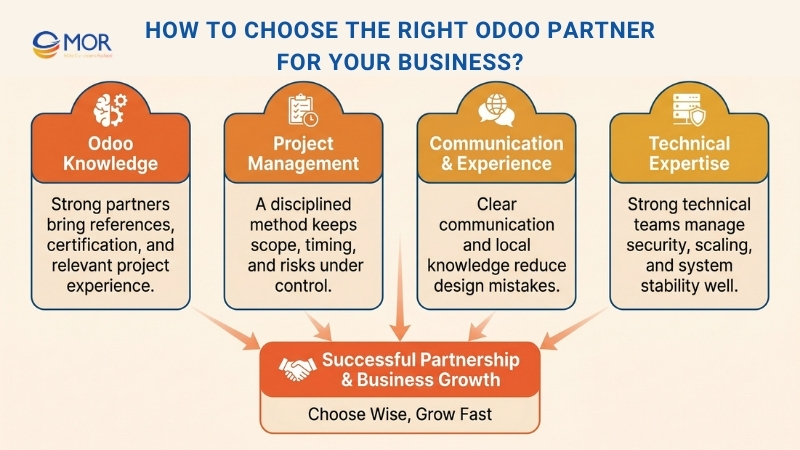
Odoo Knowledge
Choose a certified and recognized partner with relevant references. A strong Odoo implementation partner should have direct experience with projects that match your business needs.
Odoo’s official guidance explains that an Official Partner is a company that has training, access to Odoo Enterprise source code, a direct line to Odoo for escalation, and published references on the Odoo website. Odoo also classifies official partners as Ready, Silver, and Gold according to new Enterprise users sold, the number of certified staff on recent versions, and customer retention. Those signals are useful, but Odoo also makes it clear that rank alone should not decide your choice.
That means businesses need to look deeper than a badge. Ask about similar projects, industry experience, localization knowledge, and the way the partner handles scope decisions when stakeholders want conflicting changes. A capable partner should explain trade-offs in a clear way, not simply approve every request.
Project Management
Choose a partner that follows a disciplined project method and has strong delivery control. Odoo implementation services usually stay on track when the partner can manage scope, timing, and risk in a structured way.
Methodology matters because ERP projects involve many moving parts, including data, permissions, workflows, integrations, approvals, and change support. Odoo’s partner guidance says businesses should ask each provider about its project method and whether that method supports a smooth, predictable, and affordable rollout. The same guidance also stresses that a good approach should get users onboarded on time and within budget.
In daily work, solid project management appears through weekly status routines, issue tracking, decision ownership, phased delivery, documented scope, UAT preparation, and honest escalation when problems show up. A partner may be strong technically, but if those habits are missing, the project can drift, pause, or become hard to control.
Communication & Experience
A consulting team that understands your language can make a major difference. Strong ERP experience, especially in your industry and country, is also a real advantage.
Communication influences project speed more than many companies expect. When a partner understands your terms, reporting needs, and local operating style, discovery moves faster and fewer mistakes enter the design stage. Odoo even points to proximity as a useful factor, especially for training and change support during sensitive phases. In international projects, remote delivery can still work well, but the communication model becomes even more important.
Experience also helps when difficult choices appear. Partners with real delivery history can usually spot risky requests early, identify where standard Odoo will be enough, and warn you when a customization may create future maintenance problems.
Technical Expertise
You need a partner that is stable, responsive, and technically capable. Businesses comparing the best Odoo ERP implementation services should look for teams that can manage software, databases, infrastructure, and long-term scalability with care.
Technical ability is about more than writing custom code. A strong partner should understand security, access rights, module behavior, database effects, import structures, environment planning, and testing methods. Odoo’s own documentation on access rights and user management shows that poor permission setup can cause serious issues, while its module architecture makes it clear that extensions affect both business logic and data structure.
Responsiveness is just as important as raw technical skill. During go-live and the early support period, businesses need clear answers, fast triage, and safe adjustments. A technically strong team that reacts too slowly can still create serious operational risk.
>>> Explore the best manufacturing inventory system tools, key features, and proven ways to improve your inventory operations.
Best Practices For A Successful Odoo ERP Implementation Services
To get the most value from the project, businesses need a practical approach from the start. When evaluating the best Odoo ERP implementation services, it becomes clear that results improve when scope, training, customization, and communication are handled with discipline instead of rushed decisions.
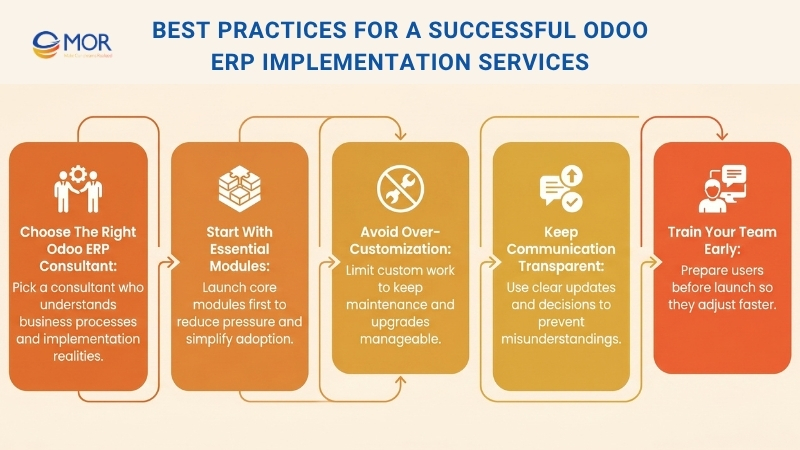
Choose The Right Odoo ERP Consultant
Choosing the right advisor matters because the quality of guidance can strongly affect project success. If you want to hire Odoo expert support, look for someone with strong industry understanding and real implementation experience.
The best consultant is usually the person who can make difficult choices easier without ignoring the complexity of your business. Look for someone who understands process design, not only settings inside the software. A strong advisor helps you separate core needs from old habits and keeps the rollout focused on real business value.
Start With Essential Modules
Begin with the modules your business needs most, then expand in later stages. Businesses often get better results from Odoo implementation services when they avoid starting with too many modules at once.
This approach matches Odoo’s modular structure well. It lowers training pressure, shortens testing cycles, and makes change management easier to handle. It also gives users more time to get comfortable with the new environment before more complexity is introduced.
Avoid Over-Customization
Use standard features whenever possible so long-term maintenance stays manageable.
Too much custom work can raise project costs, increase testing effort, slow future upgrades, and make support more difficult later. Odoo’s own rollout philosophy warns against approving every custom request just to satisfy short-term expectations. In most cases, controlled customization leads to a healthier system over time.
Keep Communication Transparent
Regular reviews and feedback loops help prevent misunderstandings.
ERP projects often fail quietly when decisions are assumed instead of written down. Shared status updates, open issue logs, UAT approvals, and clear decision owners all help reduce confusion. Transparent communication also makes it easier for teams to accept trade-offs when time, budget, and scope move in different directions.
Train Your Team Early
Users adjust faster when they are prepared before the switch happens.
Training should begin before go-live rather than after it. Early exposure helps key users test more effectively, provide stronger feedback, and act as internal champions for their teams. That often lowers resistance and helps the system stabilize faster once it is live.
Why Choose MOR Software for Odoo Implementation Services?
The partner you choose for Odoo can influence the outcome of the entire rollout. At MOR Software, one of top Odoo development companies, we go far beyond basic software setup. We support businesses through planning, workflow mapping, system alignment with real operations, third-party integration, and post-launch assistance. That wider support matters when the platform must match daily business work rather than adding extra tasks for your team.
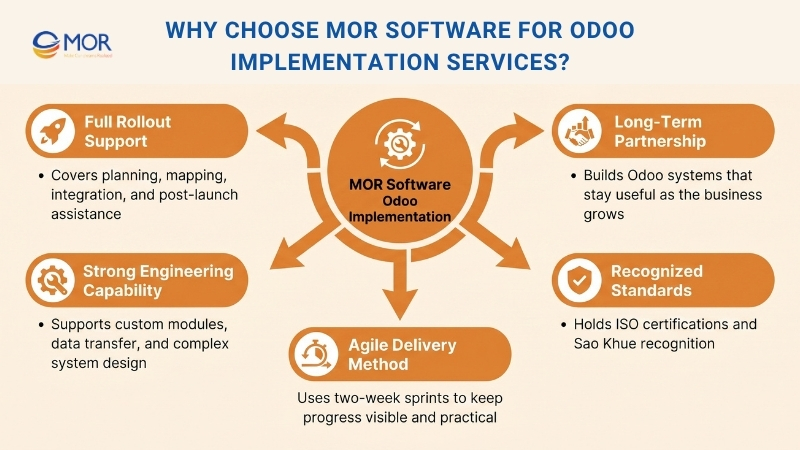
We also bring strong capability in software engineering, system integration, and business consulting. That becomes especially useful in projects that involve custom modules, older platforms, data transfer, or role-based process design. For businesses comparing the best Odoo implementation partners and consulting services, this depth matters because long-term ERP success depends on more than initial setup. We do not treat implementation as a one-time technical task. We build with future use in mind, so your ERP can keep supporting growth without creating avoidable maintenance problems later.
Companies also choose us because of how we manage delivery. Our Odoo developers works with Agile methods, using two-week sprints and clearly defined outcomes, so progress stays visible and feedback remains practical throughout the project. We also bring recognized quality standards and company credentials, including ISO 9001:2015, ISO 27001:2013, and Sao Khue recognition. If your business needs an Odoo partner with technical strength, structured execution, and long-term thinking, we are a reliable choice.
Conclusion
Odoo implementation services can bring real business value when the project is planned with care, aligned with daily workflows, and supported after launch. A strong rollout helps you avoid delays, weak adoption, and costly fixes later. If your business is preparing for an ERP upgrade and needs expert support across planning, migration, integration, and optimization, contact MOR Software to build an Odoo system that supports long-term growth with confidence
MOR SOFTWARE
Frequently Asked Questions (FAQs)
What are Odoo implementation services?
Odoo implementation services cover the work needed to set up, configure, customize, test, and launch Odoo for a business. This usually includes discovery, module selection, data migration, user training, integration, and post-launch support.
How long does an Odoo implementation usually take?
It depends on project scope, number of modules, data quality, and custom requirements. A focused rollout may take a few weeks, while a larger ERP project can take several months.
How much do Odoo implementation services cost?
Costs vary based on the number of users, chosen edition, custom development, integrations, and migration complexity. Small projects may stay within a modest budget, while more advanced rollouts can cost much more.
What is included in the implementation process?
A typical project includes requirement analysis, system design, configuration, customization, data import, testing, user training, go-live support, and optimization after launch.
Do all businesses need Odoo customization?
No. Many companies can cover a large part of their needs with native Odoo features. Customization is usually best for workflows, reports, or integrations that cannot be handled well through standard settings.
Is data migration always part of Odoo implementation services?
In many cases, yes. Businesses often need to move customer records, products, inventory data, financial data, or open transactions from old systems into Odoo in a clean and structured way.
Can Odoo connect with other business systems?
Yes. Odoo can connect with eCommerce platforms, CRM tools, payment gateways, shipping systems, payroll tools, and other third-party software. The exact setup depends on the systems already in use.
Why does testing matter before go-live?
Testing helps catch workflow issues, permission errors, reporting problems, and integration failures before teams start using the system daily. It lowers risk and makes launch smoother.
How can businesses choose the right Odoo partner?
They should look at relevant project experience, technical skill, communication style, project management process, and ability to support the system after launch. A good partner should explain trade-offs clearly, not just agree to every request.
What happens after Odoo goes live?
The work usually continues with bug fixes, user support, report updates, workflow tuning, performance checks, and rollout of extra modules. That is why long-term support matters just as much as the initial setup.
Share


Make Our-Dreams Realized


© 2023 . MOR Software. All Rights Reserved
Sitemap
Privacy Policy
Terms of Use

Rate this article
0
over 5.0 based on 0 reviews
Your rating on this news:
Name
*Email
*Write your comment
*Send your comment
1