


Predictive Lead Scoring in Odoo | MOR Software's Expert Guide
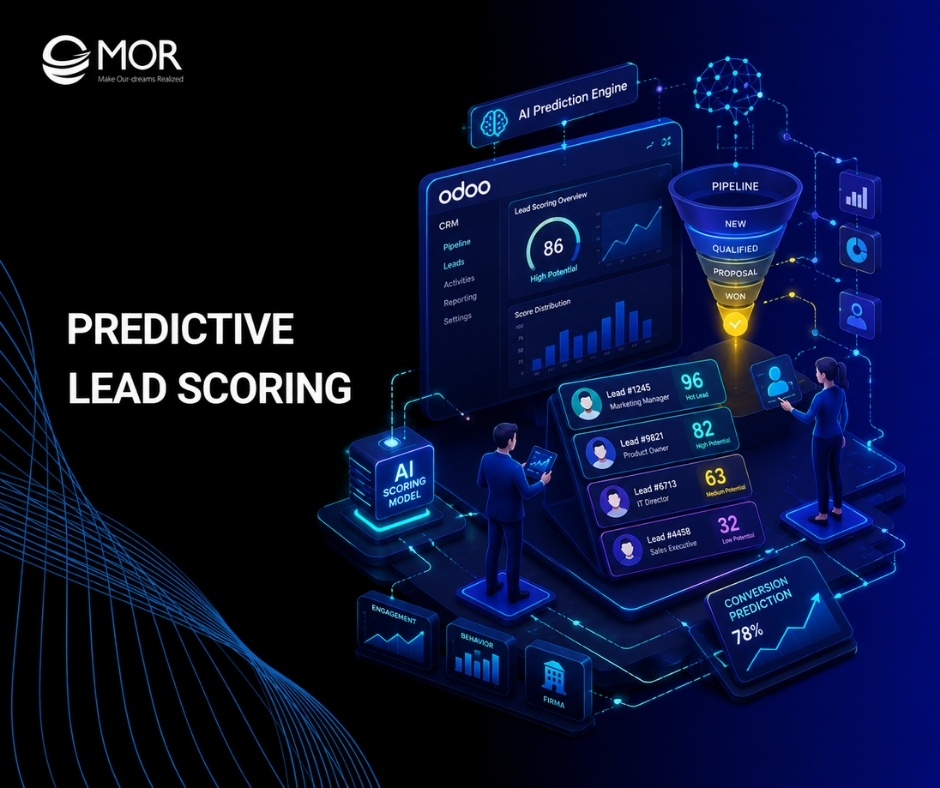
Sales teams lose deals when strong leads sit unnoticed in Odoo CRM while reps chase weak prospects. Predictive lead scoring helps teams spot better opportunities faster through data, behavior signals, and sales history. In this guide, MOR Software will explain how this scoring model works in Odoo and how businesses can set it up for real sales results.
Key Takeaways
- Predictive lead scoring in Odoo uses CRM history, lead data, and buyer behavior to estimate which opportunities are more likely to close.
- A good setup needs clean CRM data, clear sales stages, strong scoring fields, and lead assignment rules that match your sales process.
- MOR Software helps businesses configure Odoo sales pipeline optimization, connect sales automation, and turn lead scores into faster follow-up actions.
Why Predictive Lead Scoring In Odoo Becomes A Bottleneck For Growing Teams
At a basic level, lead scoring helps sales teams sort prospects by their chance of becoming customers. Odoo CRM includes simple score and probability fields, yet larger lead volumes soon expose weak lead scoring methodologies:
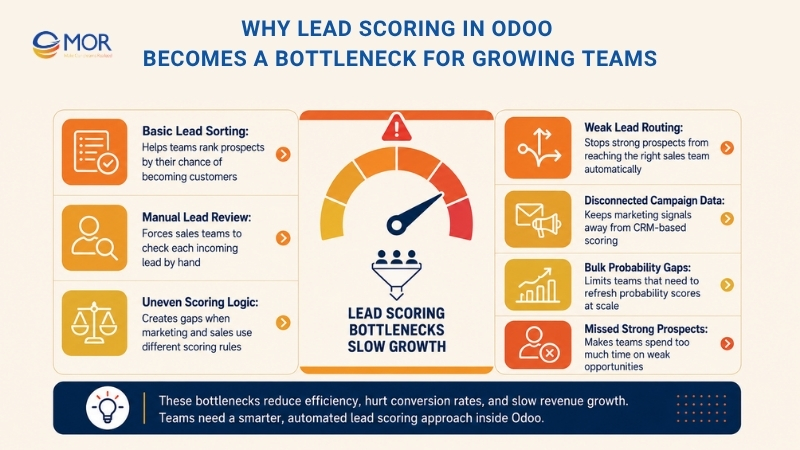
- Sales teams check each incoming lead by hand
- Marketing and sales do not use the same scoring logic
- Leads do not move to the right sales team on their own
- Campaign data stays apart from CRM-based scoring
- Teams lack a simple way to refresh probability scores in bulk with the update probabilities button
Without a clear predictive lead scoring process, sales teams spend too much time on weak leads while stronger prospects get missed.
What Is Predictive Lead Scoring In Odoo?
This system is a predictive lead scoring machine learning model that reads past data from Odoo CRM and gives a score to active leads or open opportunities.
A useful predictive lead scoring B2B sales definition is simple: the system studies won and lost opportunities in the CRM pipeline, then estimates how likely each new lead or deal is to close.
As more opportunities move through the pipeline, Odoo gains a wider data set, which helps the system return better probability scores.
More precisely, Odoo uses the naive Bayes probability model for this scoring method:
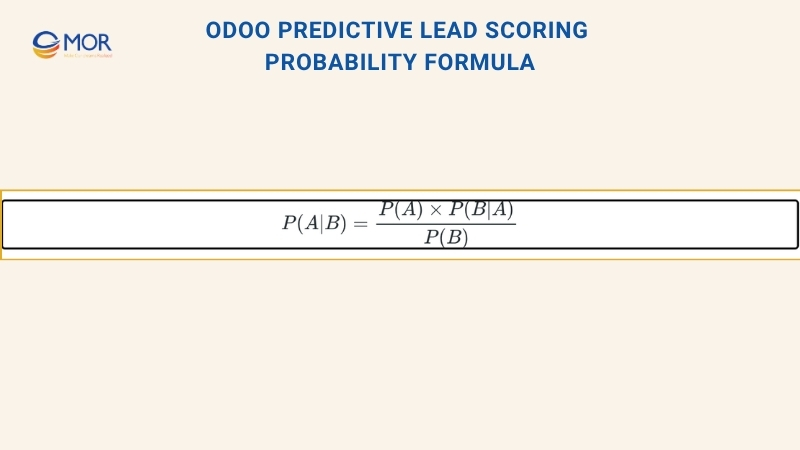
The equation can be read like this:
- P(A|B) = The chance that a lead will succeed under these conditions
- P(A) = The general success rate of leads, without checking specific conditions
- P(B|A) = The chance that these conditions appear when a lead is successful
- P(B) = The chance that these conditions appear overall
The phrase under these conditions points to the lead details that can change the chance of success in Odoo. These details may include the assigned Salesperson, lead source, lead language, past customer traits, and related record data.
You can choose which fields the system should read, so the calculation fits your sales process.
Each opportunity form shows its success probability, and the score changes as the deal moves through the CRM pipeline.
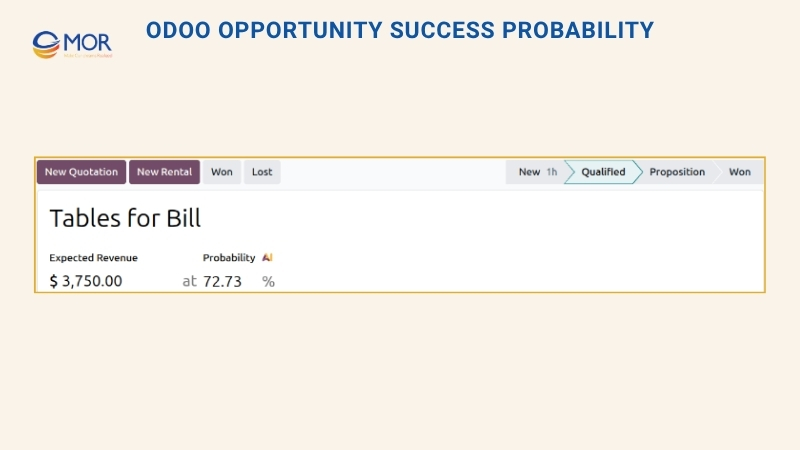
When a deal moves forward to a new stage, its win chance can rise based on the scoring logic inside Odoo.
>>> Let's discover the top manufacturing CRM software solutions, key features, and practical criteria to help you select a system that truly fits your operations in 2026.
How Predictive Lead Scoring Odoo Works?
Odoo 19 AI does not rely on fixed point rules that attach random values to each action, like five points for an opened email or ten points for a clicked link. Instead, the predictive lead scoring algorithm studies conversion patterns from earlier deals. The system reviews several factors:
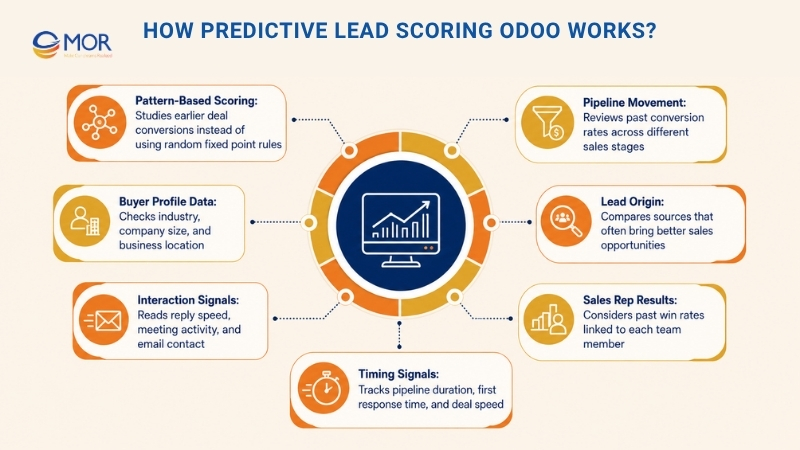
- Pipeline Movement: Past conversion rates across different sales stages
- Buyer Profile Data: Industry, company size, and business location
- Interaction Signals: Reply speed, meeting activity, and email contact
- Lead Origin: Sources like website forms, referrals, or events that often bring better deals
- Sales Rep Results: Past win rates linked to each team member
- Timing Signals: Days inside the pipeline, first response time, and deal speed
AI predictive lead scoring keeps learning as your team wins or loses more deals. Every opportunity gets a clear probability score instead of a loose ‘hot’, ‘warm’, or ‘cold’ label, giving your sales team a better signal on where their time should go.
How Predictive Lead Scoring Odoo Helps Sales Teams Improve Conversion
Predictive lead scoring helps sales teams spend more time on opportunities with a higher chance of turning into revenue.
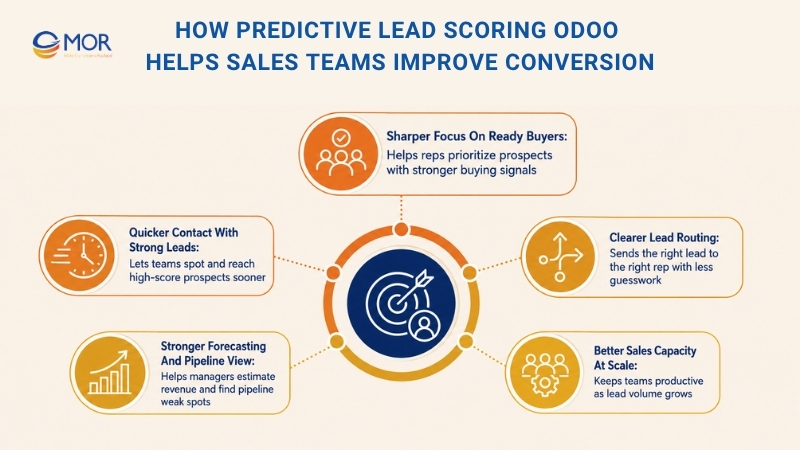
- Sharper Focus On Ready Buyers: Sales reps can give more attention to prospects with stronger buying signals instead of treating all leads the same.
- Quicker Contact With Strong Leads: High-score prospects can be spotted and reached sooner, which raises the chance of a successful deal.
- Clearer Lead Routing: Automated scoring and assignment limit guesswork, so the right sales rep or team receives the right lead.
- Stronger Forecasting And Pipeline View: lead scoring predictive analytics helps managers estimate future revenue and find weak spots in the pipeline sooner.
- Better Sales Capacity At Scale: When lead volume grows, predictive scoring helps teams stay productive without adding too much manual work.
>>> Walk through the Odoo official implementation methodology process, from GAP Analysis to go-live support.
Which Variables Affect Predictive Lead Scoring In Odoo?
Inside Odoo CRM, predictive lead scoring Odoo checks several fields in a lead or opportunity record, then compares them with past CRM results to estimate the chance of winning.
You can adjust these fields through CRM > Configuration > Settings, then select Update Probabilities under Predictive Lead Scoring.
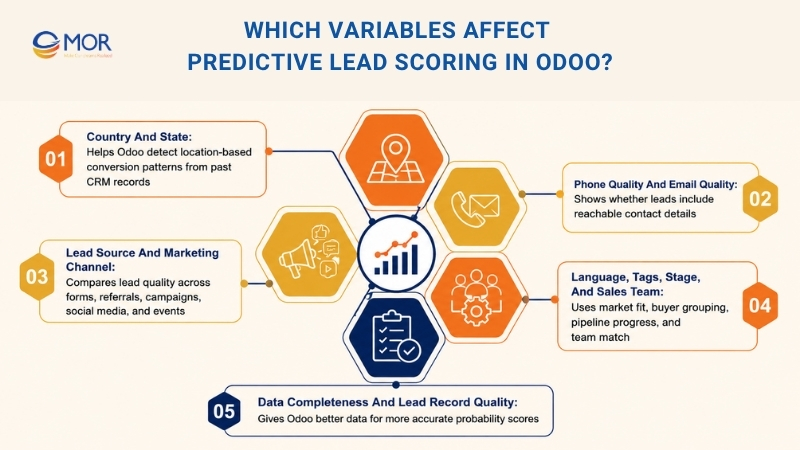
Country And State
Country and State help Odoo detect location-based patterns in past conversions.
When leads from some regions close more often, Odoo may give similar new opportunities a higher probability. This is useful for companies selling across many cities, regions, or countries.
Phone Quality And Email Quality
Phone Quality and Email Quality show whether a lead includes reachable contact details.
Leads with complete contact data are often easier to contact and qualify, so they usually carry more value. When these fields are part of the scoring setup, Odoo can change the probability as email or phone details become better.
Lead Source And Marketing Channel
The Source field tells your team where a lead came from, like website forms, referrals, email campaigns, social media, or events.
Different sources often bring different lead quality. Odoo compares each new lead with past results from the same source, then updates the probability based on that pattern. This helps teams see which channels bring the strongest opportunities for Odoo lead generation and Odoo email lead generation.
Language, Tags, Stage, And Sales Team
Odoo can also read Language and Tags when predictive lead scoring is active.
- Language Fit supports teams that work across different markets or customer groups.
- Lead Tags group prospects by interest, urgency, campaign, or buyer type.
At the same time, Stage and Sales Team are always included.
- Pipeline Stage shows where the opportunity stands in the sales process. Deals in later stages usually carry higher probabilities.
- Sales Team Match matters because teams may cover different products, regions, or customer groups.
Data Completeness And Lead Record Quality
This scoring model works better when CRM records are clean, complete, and up to date.
Useful lead details include:
- Valid email address
- Reachable phone number
- Clear lead source
- Country or state
- Relevant tags
- Correct sales team
- Updated pipeline stage
A fuller record gives Odoo more context to compare the lead with earlier opportunities and calculate the probability.
For this reason, teams should review scoring quality often. Strong Odoo lead enrichment, clean CRM data, and the right scoring fields help the system produce better results over time.
How To Configure Predictive Lead Scoring In Odoo
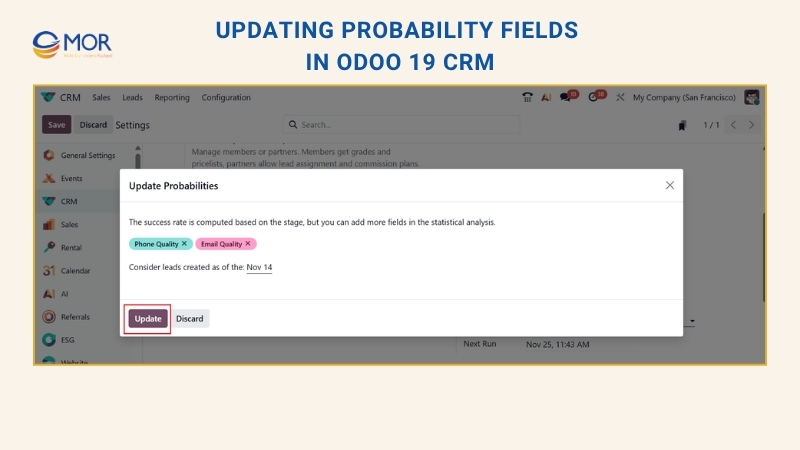
To find the predictive lead scoring setting, open the CRM module and go to Configuration > Settings. Then choose Update Probabilities, as shown in the image below:
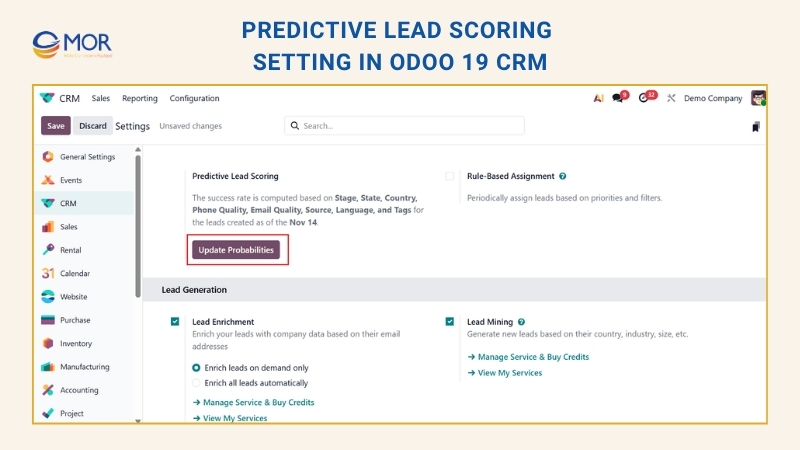
A pop-up window will open, where you can choose extra fields for success rate calculation, including State, Country, Phone Quality, Email Quality, Source, and Tags. You can adjust the probability setup by adding or removing fields based on your needs. These fields play a key part in the scoring process. Odoo uses them to calculate the success rate of each opportunity.
In this case, the success rate uses the State and Country fields. Once the right fields are selected, click the Update button as shown below:
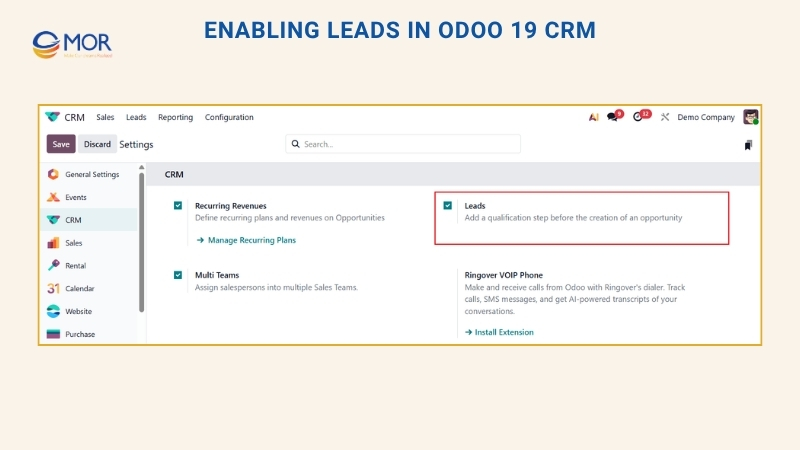
To add a new lead, go back to Configuration > Settings and turn on the Leads option as shown below:
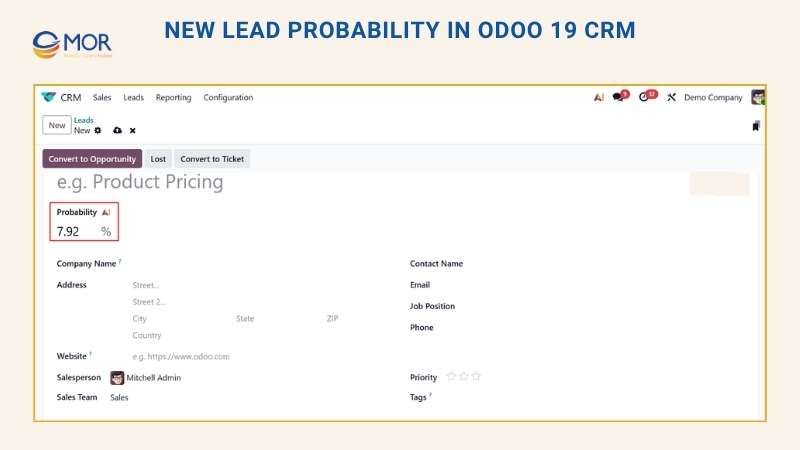
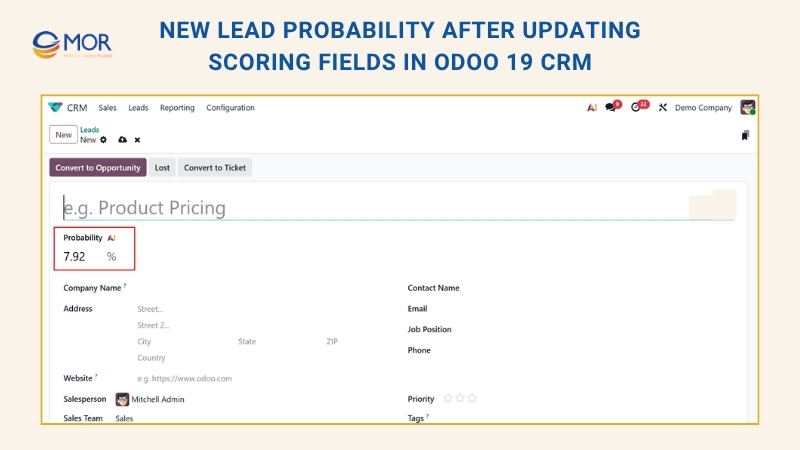
Then open the Leads menu and click New. The new lead form will appear with a probability of 7.92%.
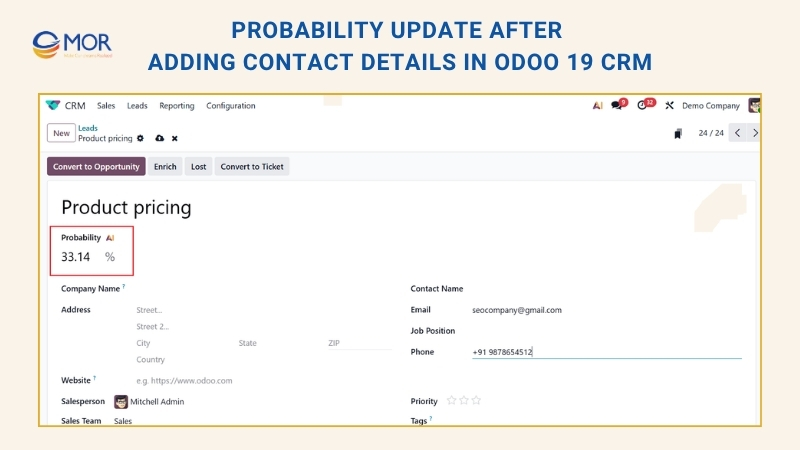
Add the customer details, including email and phone number, in the right fields. The probability will then update on its own to 33.14%, as shown below:
To refresh the lead probability, return to Settings and add more fields, like Country, State, and Tags, as shown below. Then click Update.
After that, return to the Leads menu and create another lead. On the new lead form, the probability appears as 7.92%.
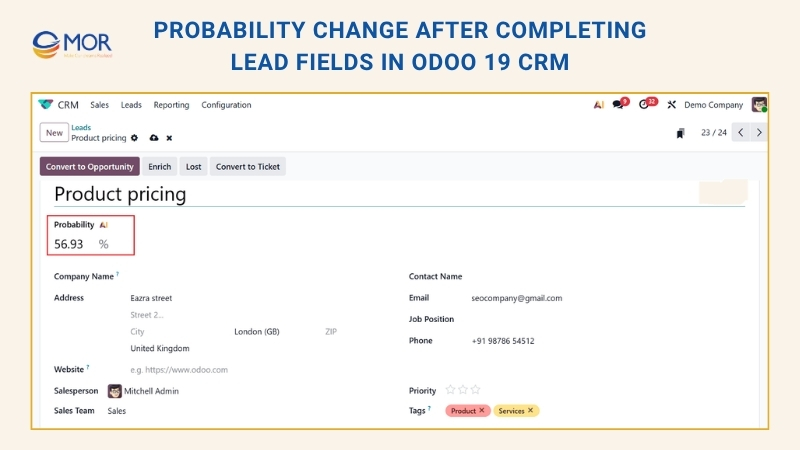
Enter the lead name, then add State, Country, Email, Phone Number, and Tags. The probability will update on its own to 56.93%, as shown below:
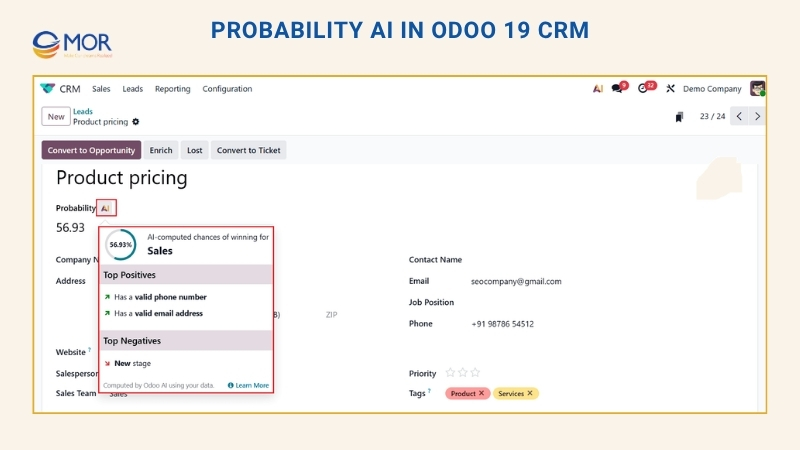
Probability AI in Odoo 19 CRM reads lead behavior, interaction history, and conversion rates through artificial intelligence. It helps sales teams find stronger opportunities and make faster follow-up choices with better data.
This Odoo setup brings together past CRM data, buyer behavior, and machine learning-based scoring, helping companies rank leads with more care. Sales teams can focus on higher-value prospects through automated lead checks, better conversion planning, and clearer sales actions. As time passes, the system learns from each company’s own sales patterns and returns better scores. Odoo 19 gives teams real-time updates, adjustable scoring rules, and connected CRM workflows for modern sales teams. In the end, this capability supports better decisions, cleaner sales tasks, and steadier revenue growth.
Predictive Lead Scoring Vs Rule-Based Lead Scoring In Odoo
Inside Odoo CRM, teams usually work with two lead scoring paths: predictive lead scoring and rule-based scoring. Each one helps sales teams rank leads, but the logic behind them is different.
Predictive scoring studies past CRM records to estimate how likely a lead is to close. Rule-based scoring follows fixed rules, like adding points when someone books a demo or subtracting points when key details are missing.
Many companies get better results when they use AI lead scoring for win probability and rule-based scoring for their own sales rules.
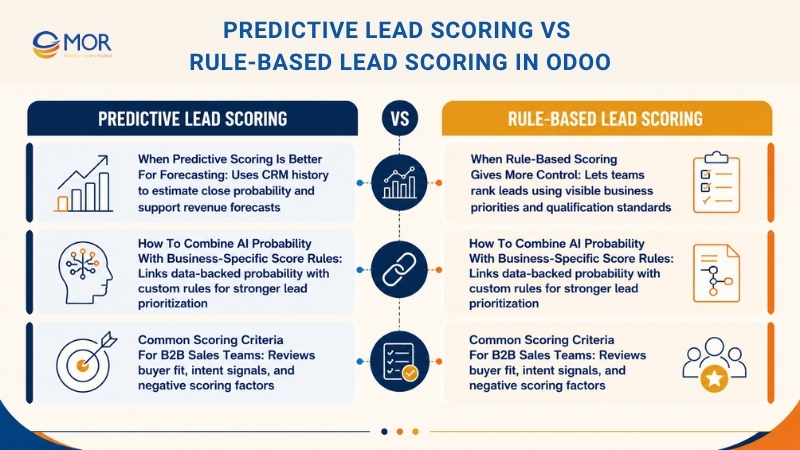
When Predictive Scoring Is Better For Forecasting
Predictive scoring helps sales teams make calls from real data instead of gut feeling. Odoo reviews older opportunities and gives each lead a probability score.
This supports forecasting because the number is tied to real CRM history. Leads from past sources, countries, campaigns, or stages with strong results may get higher probabilities.
It is highly useful when lead volume becomes large, since sales reps can spend time on the most promising prospects first.
Predictive scoring fits best when you need to:
- Improve revenue forecasts
- Rank leads with past CRM data
- Limit personal bias in sales choices
- Find lead sources that close well
- Track pipeline health with less guesswork
The more won and lost deals stored in Odoo, the more reliable predictive scoring becomes.
When Rule-Based Scoring Gives More Control
Rule-based scoring lets businesses decide exactly how leads should be ranked.
Teams can build rules around known priorities, like adding points for demo requests, pricing page visits, email replies, or target company size. Scores can also drop when contact data is missing or the source is weak.
This method works well when the business does not yet have enough past data, often with new products, new campaigns, or new markets.
Rule-based scoring works best when you need to:
- Use your own qualification standards
- Score fresh campaigns without waiting for history
- Build rules that sales teams can read easily
- Lower scores for poor-fit prospects
- Start actions when a lead passes a score level
Since the rules are visible, sales teams can see why a lead got a certain score.
How To Combine AI Probability With Business-Specific Score Rules
A strong Odoo setup links AI probability with custom rule-based scoring.
A common case is when Odoo gives a lead a 62% closing chance based on past CRM data. Rule-based scoring can then raise its priority if the prospect asks for a demo, checks the pricing page, or comes from a target industry.
A common workflow may look like this:
- A lead arrives in Odoo CRM
- Odoo gives the lead a probability score
- Rule-based checks review buyer fit and behavior
- The system changes the lead priority
- Strong leads move to sales
- Lower-priority leads move into nurture flows
This setup connects data-backed signals with business goals. Predictive lead scoring finds likely buyers, while rule-based scoring makes sure strategic accounts still get attention.
Common Scoring Criteria For B2B Sales Teams
Good B2B lead scoring should review buyer fit and buying intent.
Category | Criteria | What It Shows | Example Score Effect |
Fit-Based | Job Title | Shows whether the contact can influence or make a buying choice. Senior leaders and team heads often matter more than junior roles. | Higher score for CEOs, Directors, Managers, or Department Heads. |
Fit-Based | Company Size | Shows whether the prospect fits the ideal customer profile through employee count or business scale. | Higher score for companies that match your preferred size range. |
Fit-Based | Industry | Shows whether the lead works in a sector that often needs your product or service. | Higher score for industries with strong past close rates. |
Fit-Based | Country or Region | Shows whether the lead comes from a market where the business sells or provides support. | Higher score for leads in priority markets or service areas. |
Fit-Based | Business Email Domain | A company email often points to a real business inquiry, while free email addresses may need extra checks. | Higher score for domains like @company.com than generic email providers. |
Fit-Based | Revenue Range | Shows the company’s buying power and possible deal size. | Higher score for companies inside the target revenue range. |
Fit-Based | Product Interest | Shows which product, service, or solution the prospect is reviewing. | Higher score when the interest matches a high-value service. |
Behavioral | Pricing Page Visits | Shows that the prospect is checking cost and may be closer to a purchase choice. | Score rises when a lead visits pricing pages more than once. |
Behavioral | Demo Requests | This is a strong buying signal because the prospect wants to see the product in action. | Large score increase because the intent is strong. |
Behavioral | Email Replies | Shows active interest and a willingness to talk with the sales team. | Higher score for prospects who reply to marketing or sales emails. |
Behavioral | Webinar Attendance | Shows interest in learning about the product, market, or solution. | Medium score increase, mainly when the person attends rather than only registers. |
Behavioral | Case Study Views | Shows that the prospect is checking real results and proof before deciding. | Higher score when the lead views several case studies. |
Behavioral | Form Submissions | Shows that the prospect is ready to share details for content, support, or follow-up. | Score rises based on the value of the submitted form. |
Behavioral | Return Website Visits | Frequent visits often show active research and growing interest. | Higher score for repeat visits within a short time. |
Behavioral | Quick Outreach Replies | Fast replies often show urgency, interest, and readiness to keep talking. | Higher score for leads that answer calls, emails, or follow-ups quickly. |
Behavior signals often show buying intent more strongly than fixed profile data.
Negative scoring also matters. Common cases include:
- Missing phone number
- Invalid email address
- Personal email usage
- No company name
- Email unsubscribes
- Poor-fit industries
- No response after follow-ups
- Very low engagement
After scoring rules are set, Odoo can change lead priority, assign owners, create activities, or move leads through the pipeline.
When predictive and rule-based scoring support each other, sales teams can focus on high-intent leads, spend less time on weak prospects, and get a cleaner view of pipeline quality.
How To Assign Leads Automatically Based On Probability In Odoo
Odoo CRM can route leads or opportunities to sales teams and salespeople through defined rules. Teams can build assignment rules around the probability from predictive lead scoring, then give stronger leads faster attention.
Configure Rule-Based Assignment
To turn on rule-based assignment, go to CRM > Configuration > Settings, then activate Rule-Based Assignment.
This feature can run in Manual mode, which means an Odoo user starts assignment by hand, or in Repeated mode, which lets Odoo trigger assignment at the chosen interval.
To set up automatic assignment, choose Repeated in the Running field. You can set the timing in the Repeat every field. Add a number and choose a time unit to set the interval. The available units run from Minutes to Weeks.
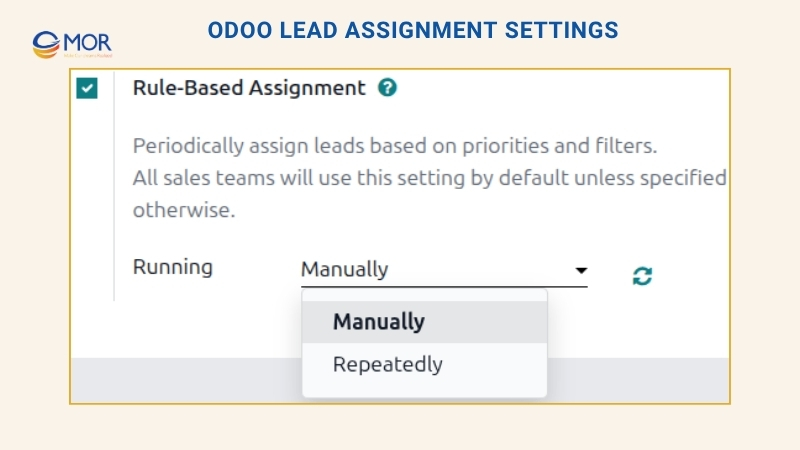
When rule-based assignment is set to Repeated, users can still start it by hand through the Update now icon in Rule-Based Assignment settings or the Assign Leads button on the sales team setup page. After a lead is assigned to a salesperson through this rule, Odoo changes that lead into an opportunity on its own.
Configure Assignment Rules
After that, set the assignment rules for each sales team or salesperson. These rules tell Odoo which leads should go to which people. To begin, open CRM > Configuration > Sales Teams, then choose a sales team.
In the sales team setup form, find Assignment Rules, then click Edit Domain to set the rules Odoo will use for that team. The rules can cover any factor that matters to the company or team, and teams can add as many lines as needed.
Click Add Filter to build a new assignment rule. Click the + symbol on the right side of the rule line to add another condition. Click the x symbol to delete a line.
To base an assignment rule on an opportunity’s success probability, open the left drop-down menu in the rule line and choose Probability.
In the middle drop-down menu, choose the equation sign you need, often greater than, less than, greater than or equal to, or less than or equal to.
In the field on the far right, type the probability number you want to use. Then click Save to keep the change.
To set a rule where a sales team receives leads with a success probability of 20% or higher, create a Domain line like this: Probability >= 20
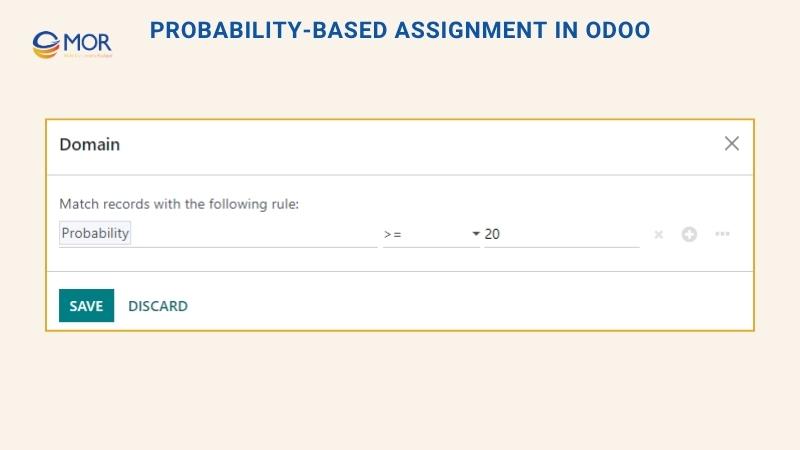
You can also create separate assignment rules for each team member. From the sales team setup page, choose a person in the Members tab, then update the Domain field. Click Save to keep the update.
When automatic lead assignment is active in settings, each sales team and team member can use Skip auto assignment. Tick this box when you want to keep one sales team or salesperson out of automatic assignment from Odoo’s rule-based assignment tool. If Skip auto assignment is turned on, that team or person can still receive leads by hand.
To assign leads manually to this sales team, click Assign Leads at the top of the sales team setup page. Odoo will assign unassigned leads that match the domain set for that team.
A Practical Odoo Lead Scoring Automation Workflow
A strong Odoo lead scoring flow does not stop at one score update. Predictive lead scoring should work as an ongoing automation pipeline that starts when lead data enters the CRM, runs that data through scoring rules, and sends the result back into sales tasks. Unlike a Hubspot predictive lead scoring setup, Odoo gives teams more room to connect scoring with CRM fields, assignment rules, and pipeline actions.
Teams can break this workflow into three clear parts: Trigger, Process, and Action. This setup makes the system easier to build, test, tune, and grow as more leads enter the CRM.
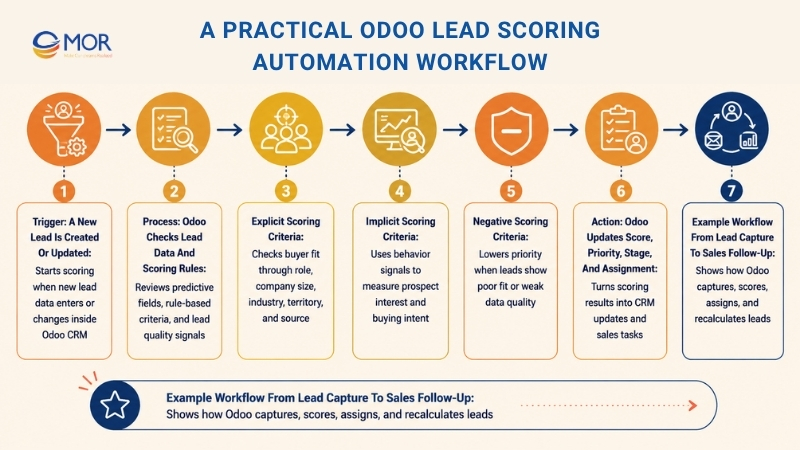
Trigger: A New Lead Is Created Or Updated
The workflow starts when an event takes place inside Odoo CRM. This is the data capture stage, where Odoo records the latest lead details before the scoring process begins.
For lead scoring automation, most triggers usually run on the crm.lead model.
- New Record Trigger: This is the trigger teams use most often. A lead can come from a website form, demo request, email campaign, Live Chat message, imported list, event sign-up, referral source, or manual entry. Once Odoo creates the record, the automation flow starts right away.
- Record Update Trigger: A lead score should change when the record changes. This trigger runs when a salesperson adds company size, updates a job title, chooses a country, adds a tag, or fills in the phone field. The scoring flow can run again and refresh the score.
- Marketing Action Trigger: In more detailed workflows, a record can also change when a prospect interacts with marketing content. This may include an email reply, a campaign link click, a form submission, or a visit to an important website page.
The trigger stage supports lead mining in Odoo because it gives the system the newest lead snapshot. That snapshot then moves into the next phase for scoring.
Process: Odoo Checks Lead Data And Scoring Rules
This is the logic stage, where Odoo applies business rules. The platform checks the lead record against predictive scoring fields, rule-based criteria, or a mix of the two.
A practical scoring setup often uses several criteria groups.
Explicit Scoring Criteria
This information already exists inside the lead record. It helps Odoo judge whether the prospect matches the company’s ideal customer profile.
- Role And Buying Power: Give more value to decision-makers, like CEO, Director, Manager, Founder, or Department Head. Lower scores may fit contacts with less purchase influence.
- Business Scale: Score leads based on employee count, revenue band, or company size. Prospects that fit the target customer profile may get a higher score.
- Market Sector: Give higher priority to industries that usually convert well or match the company’s main service area.
- Sales Territory: Score leads based on target countries, supported markets, or regions with stronger past close rates.
- Lead Channel: Compare leads from referrals, paid ads, organic search, events, or website forms. Better-performing channels can get stronger scoring weight.
Implicit Scoring Criteria
This information comes from the lead’s behavior. Predictive lead scoring can use these signals to show how interested the prospect may be, and these actions often reveal stronger intent than fixed profile fields.
- Site Activity: Raise the score when the lead visits key pages, like pricing, case studies, product pages, comparison pages, or service pages.
- Email Response: Score leads based on email replies, link clicks, and campaign interaction.
- Form Activity: Give higher scores to valuable actions, like demo requests, consultation bookings, pricing questions, or quote requests.
- Chat Signals: Use chat messages to spot urgency, product interest, budget concerns, or follow-up needs.
- Repeated Touchpoints: Raise the score when a lead returns to the website several times or interacts with several marketing assets.
Negative Scoring Criteria
A good scoring flow should also lower scores when leads show poor-fit or low-quality signs.
- Incomplete Contact Data: Lower the score when phone number, email address, company name, or country is missing.
- Weak Contact Quality: Penalize records with unreachable phone numbers, invalid emails, or incomplete details.
- Generic Email Domain: Reduce the score when a B2B inquiry uses a free email domain, like Gmail or Yahoo.
- Poor Market Fit: Lower priority for industries that sit outside the target market or rarely convert.
- Weak Engagement: Reduce the score when a lead ignores several follow-ups or shows no activity after entering the CRM.
At the end of this phase, Odoo has a better view of lead quality and intent. The result may be a predictive probability, a rule-based score, or a combined priority value.
Action: Odoo Updates Score, Priority, Stage, And Assignment
This is the stage where Odoo writes the result back into the CRM and turns the score into sales work. After the platform calculates or refreshes the score, sales teams should be able to act on it right away.
The goal is to make the score useful, not just visible.
- Save Lead Score: Store the calculated value in a lead score field or use Odoo’s probability field to show the lead’s chance of closing.
- Refresh Probability: Change the opportunity probability based on past CRM data, lead source, contact quality, stage, team, and other selected fields.
- Mark Priority: Use the score to set lead priority. High-score leads can get a higher star rating so sales teams can notice them faster.
- Route To The Right Owner: Send leads to sales teams or users based on score, probability, territory, product interest, or team rules. Strong leads can go to senior sales reps, while weaker ones can move to sales development or nurture flows.
- Create A Follow-Up Task: Add an activity for the assigned salesperson when a lead reaches a set score or probability level.
- Move Pipeline Stage: Shift qualified leads from “New” to “Qualified” when they meet the needed score, engagement, or profile conditions.
- Keep In Nurture: Lower-score leads can stay inside marketing automation until they show stronger buying signals.
This action stage stops the lead score from becoming a dead number in the CRM. It turns scoring into a working sales process.
Example Workflow From Lead Capture To Sales Follow-Up
A normal Odoo automation flow for predictive lead scoring may run like this:
- Step 1: Capture The Lead: A prospect submits a demo request on the website. Odoo creates a new record in the crm.lead model.
- Step 2: Start The Trigger: The “On Creation” trigger begins the scoring flow as soon as the record enters CRM.
- Step 3: Read Lead Data: Odoo checks the lead source, country, email, phone number, company name, product interest, and campaign details.
- Step 4: Apply Scoring Logic: The system checks visible criteria, like job title, industry, company size, and region. It also checks behavior data, like demo request, pricing page visit, email reply, and campaign activity.
- Step 5: Check Negative Signals: Odoo looks for missing or weak details, like no phone number, no company name, or no valid business email.
- Step 6: Produce The Score: The lead receives a score or probability based on the available data and scoring rules.
- Step 7: Update CRM Fields: Odoo updates the score field, probability, priority, and pipeline status.
- Step 8: Assign The Lead: If the score is high, the lead goes to the right sales rep or sales team. If the score is low, the lead enters a nurture flow.
- Step 9: Set Follow-Up Work: Odoo creates a follow-up task so the assigned salesperson can contact the lead quickly.
- Step 10: Recalculate Over Time: If the lead answers an email, visits the pricing page again, or adds more company details, the workflow runs again and updates the score.
This setup helps sales teams work from cleaner priorities. High-intent leads move sooner, weak leads take less sales time, and managers can see which deals need attention first.
When set up well, this scoring capability becomes a full automation flow inside Odoo. It captures lead data, turns it into a useful score, and sends that score back into the sales process through priority, assignment, activities, and pipeline movement.
Best Practices To Get More Accurate Predictive Lead Scoring In Odoo
Predictive lead scoring in Odoo works better when CRM data is clean, sales rules are clear, and follow-up habits stay consistent. AI can help teams judge lead quality faster, but the score only matters when the data behind it matches real buyer behavior and real sales results.
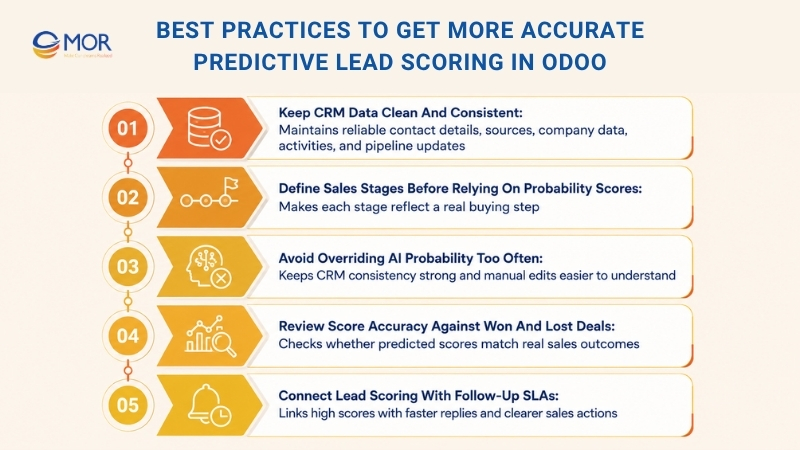
Keep CRM Data Clean And Consistent
Odoo’s predictive scoring depends a lot on CRM data quality. Sales teams should keep contact details, lead sources, company data, activities, and deal updates correct across every pipeline stage. Missing fields, duplicate records, old contact details, or uneven naming can make it harder for the system to know which leads may close.
Teams should also use the same style for lead sources, industries, customer size, and communication history. When each salesperson records data in a shared way, Odoo can compare leads more fairly and find patterns with better accuracy. A simple CRM cleanup routine can make predictive scores more helpful for daily sales work.
Define Sales Stages Before Relying On Probability Scores
Before teams use predictive scoring as a main sales guide, they should define their sales stages well. Each stage should match a real buying step, like new lead, qualified lead, demo scheduled, proposal sent, negotiation, won, or lost.
When stages are vague or each salesperson uses them differently, probability scores can become hard to trust. One rep may mark a lead as “qualified,” while another may still treat a similar lead as early-stage. Clear stage rules help Odoo understand how far the lead has moved and how likely it is to close.
Avoid Overriding AI Probability Too Often
Sales teams can change probability scores in Odoo by hand, but they should not do it too often. Manual edits can help when a salesperson knows something the system cannot see, like a strong verbal yes from the customer or a sudden budget problem.
But frequent manual changes can weaken CRM consistency. Teams should adjust scores only when there is a real reason and should write that reason in the lead notes. This keeps the pipeline easier to read and helps managers compare AI probability with sales rep judgment.
Review Score Accuracy Against Won And Lost Deals
Predictive lead scoring should be checked often against real sales outcomes. Managers can compare high-score leads with won deals and low-score leads with lost deals to see whether the model matches actual performance.
If many high-score leads are lost, the team may need to review CRM data, scoring fields, or the sales process. If low-score leads keep closing, the business may need to change how lead quality signals are captured. Regular checks help teams use predictive scoring as a sales improvement tool, not only as a CRM number.
Connect Lead Scoring With Follow-Up SLAs
Lead scoring becomes more useful when it connects to clear follow-up rules. High-score leads should get faster replies, more sales attention, and more personal messages. Teams can set internal SLAs that define how fast sales reps must contact leads based on score or probability level.
For a simple setup, leads with a high probability score may need a same-day call, while medium-score leads can receive an email sequence or planned follow-up. Low-score leads can remain in nurture campaigns until they show stronger buying intent. This helps sales teams focus on the best opportunities without losing early-stage prospects.
Common Mistakes When Using Predictive Lead Scoring In Odoo
Many companies add predictive lead scoring to Odoo but do not get the results they expect, often because CRM data is weak or the team expects too much from the score. Teams should also avoid copying predictive lead scoring Salesforce logic directly into Odoo without adapting it to Odoo’s CRM fields, probability model, and sales team rules.
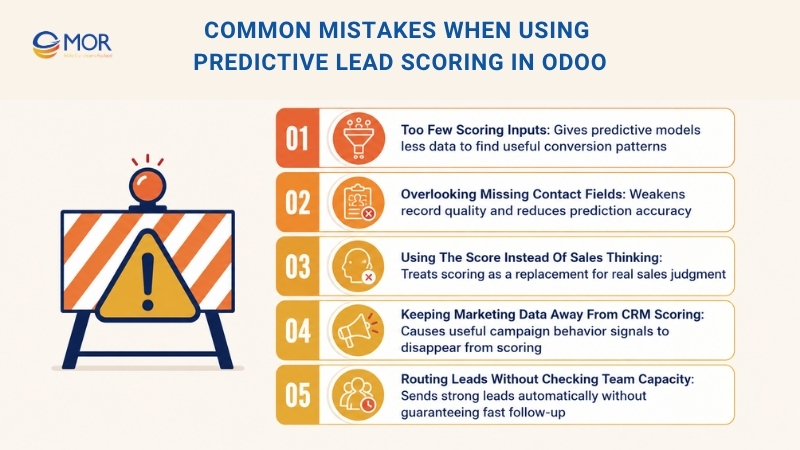
- Too Few Scoring Inputs: Predictive models work better when they can read several signals. A setup that depends on only a small number of fields gives the system less room to find useful patterns.
- Overlooking Missing Contact Fields: Poor contact data weakens record quality and can lower the accuracy of lead score predictions.
- Using The Score Instead Of Sales Thinking: Predictive scoring should guide decisions, not replace sales skill. Reps still need to read customer conversations, timing, deal fit, and buying signals.
- Keeping Marketing Data Away From CRM Scoring: Campaign activity can give useful behavior signals for better lead scoring. When marketing and sales work in separate lanes, strong signals can be lost.
- Routing Leads Without Checking Team Capacity: Automatic routing for high-score leads can help, but teams need enough sales capacity to reply quickly and keep follow-up consistent.
Need Expert Support to Implement Predictive Lead Scoring in Odoo?
Predictive lead scoring in Odoo can help sales teams prioritize better leads, but the setup must match the way your business actually sells. If the CRM data is messy, sales stages are unclear, or assignment rules are too broad, the score may not give your team the right direction.
MOR Software is an official Odoo development partner that helps businesses implement and customize Odoo customization solutions for real sales workflows. Our team can support the full setup, from CRM configuration and scoring variables to rule-based assignment, sales automation, marketing data connection, and long-term system improvement.
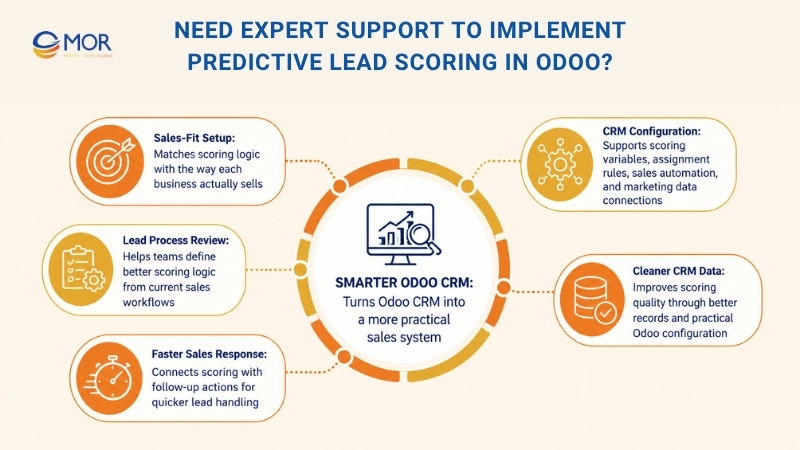
We help businesses review their current lead process, define the right scoring logic, clean CRM data, configure Odoo CRM, and connect predictive lead scoring with follow-up actions. This allows sales teams to respond faster, reduce manual lead review, and focus on opportunities with stronger conversion potential.
If your business wants to use predictive lead scoring in Odoo but needs a setup that fits your sales process, MOR Software can help you turn Odoo CRM into a smarter, more practical sales system.
Conclusion
Predictive lead scoring helps sales teams stop guessing and start working from better CRM signals. In Odoo, the best results come from clean data, clear pipeline stages, and smart assignment rules that match how your team sells. With the right setup, sales reps can act faster and focus on higher-value opportunities. If you need support with Odoo CRM setup or sales automation, contact us to discuss your project with MOR Software.
"Mr. Cong’s guiding philosophy is simplicity, believing that the simplest solutions are often the most powerful. He sees trust, empowerment, and the opportunity to demonstrate one’s abilities as the key elements that set MOR apart from traditional IT companies."
Mac Tien Cong


Division Manager (Hanoi Branch)
MOR SOFTWARE
Frequently Asked Questions (FAQs)
What is predictive lead scoring Odoo?
Predictive lead scoring Odoo is a CRM function that uses past sales data to estimate how likely a lead is to become a customer. It checks won and lost opportunities, lead source, stage, sales team, contact quality, and other fields to calculate a probability score.
How does Odoo calculate lead probability?
Odoo calculates lead probability based on historical CRM data. It compares new leads with past opportunities and looks at patterns across fields like country, state, source, language, tags, stage, and sales team. The score can change as the lead moves through the pipeline.
Is predictive lead scoring always active in Odoo CRM?
Yes. Odoo CRM keeps predictive lead scoring active by default. Teams can still adjust which variables the system uses for probability calculation from the CRM settings.
Which fields can affect lead scoring in Odoo?
Common fields include country, state, phone quality, email quality, source, language, and tags. Stage and sales team are always included in the scoring logic. Better data gives Odoo more signals to calculate a more useful score.
Can I change the probability score manually?
Yes. Users can manually change a lead or opportunity probability in Odoo. But manual changes may stop automatic updates for that record until the AI-based probability is reactivated.
Can Odoo assign leads based on probability?
Yes. Odoo CRM can assign leads to sales teams or salespeople based on probability rules. For example, leads with a probability above a set level can be routed to a senior sales rep, while lower-score leads can stay in a nurturing process.
What is the difference between predictive scoring and rule-based scoring?
Predictive scoring uses historical CRM data to estimate closing probability. Rule-based scoring uses fixed rules created by the business, like adding points for demo requests or reducing points for missing contact details. Many teams use both for better control.
How can marketing data improve lead scoring?
Marketing data shows how a prospect behaves before speaking with sales. Email replies, demo requests, form submissions, pricing page visits, and live chat activity can all help Odoo understand buyer intent more clearly.
Why does CRM data quality matter for Predictive Lead Scoring Odoo?
CRM data quality affects how well Odoo can compare new leads with past opportunities. Missing email addresses, wrong sources, unclear stages, or duplicate records can make scoring less reliable. Clean lead records help the model produce better results.
Is predictive lead scoring Odoo useful for small sales teams?
Yes. Small teams can use it to focus limited time on the most promising leads. It works best when the team keeps CRM data clean, defines sales stages clearly, and follows up with high-probability leads quickly.
Share


Make Our-Dreams Realized


© 2023 . MOR Software. All Rights Reserved
Sitemap
Privacy Policy
Terms of Use

Rate this article
0
over 5.0 based on 0 reviews
Your rating on this news:
Name
*Email
*Write your comment
*Send your comment
1