


Odoo ERP Customization: Complete Guide for Businesses in 2026
Standard ERP flows often look fine at first, then start slowing teams down once real business tasks get messy. Odoo ERP customization helps you fix those gaps with smarter workflows, cleaner screens, and better reporting. In this guide, MOR Software will help you know what to change, what to avoid, and how to make Odoo customization work for your business in 2026.
What Is Odoo ERP Customization?
Odoo ERP customization means changing the standard parts of the ERP platform so they match your business goals and day-to-day processes more closely. Odoo includes many ready-made modules, but this Odoo customization work still gives you room to adjust existing functions, add new ones, or build fresh tools with help from an Odoo app maker when your business needs something more specific.
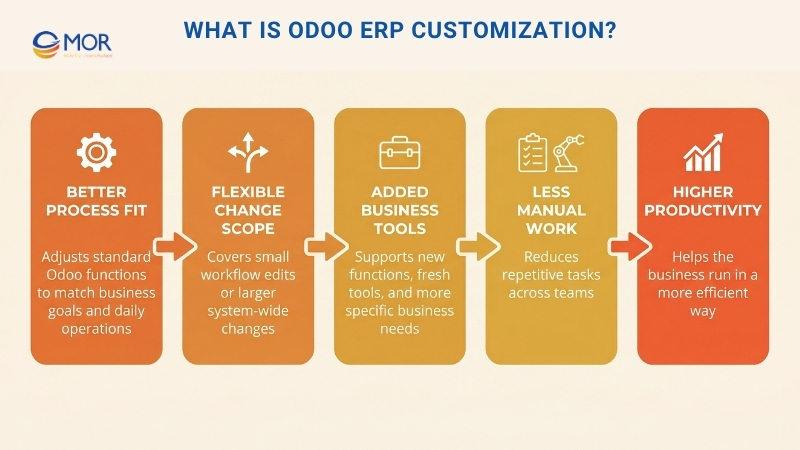
These changes may be small, like editing one workflow, or much larger, like reshaping how the whole system runs. The purpose is to make the platform fit your team better, cut down manual tasks, and help your business work in a more productive way.
Key Benefits Of Odoo ERP Customization For Businesses
When the standard setup does not fully match your operations, a tailored system can close that gap. Odoo ERP customization gives businesses more control over how the platform works, how teams use it, and how data moves across departments.
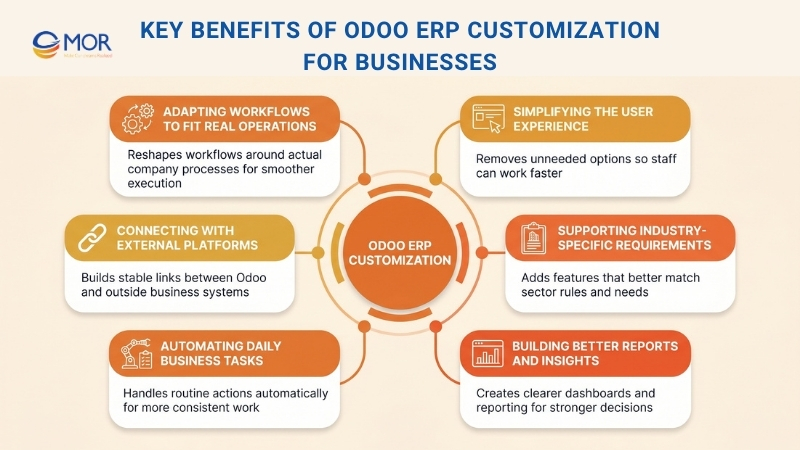
Adapting Workflows To Fit Real Operations
Every business follows its own internal steps, and those steps do not always match the default flows inside Odoo. When teams must work around standard logic, delays and extra effort often follow. A well-planned Odoo ERP customization service for businesses helps reshape those workflows around the way your company already works. That leads to smoother execution and better day-to-day output.
Simplifying The User Experience
Odoo includes many functions, but not every business needs all of them. When screens are filled with too many options, users may feel lost or slow down. A tailored setup lets you keep the parts your team uses and remove the rest. This makes the system easier to follow and helps staff work faster.
Connecting With External Platforms
Most businesses rely on outside tools like eCommerce stores, payment tools, and CRM platforms. The standard version of Odoo may not always connect with them in the way your business needs. Odoo ERP customization and Odoo customization services help create stable links and automatic data movement between systems. That cuts down errors and helps teams work with less manual input.
Supporting Industry-Specific Requirements
The default version of Odoo does not cover every sector in the same way. A retailer may need stronger POS controls, while a manufacturer may need better BOM tracking, and a healthcare provider may need tighter record handling and compliance checks. Odoo custom development services make it possible to add those missing features through an Odoo custom module. This gives businesses tools that fit the rules and needs of their field more closely.
Automating Daily Business Tasks
Repetitive work takes time away from more useful tasks. With the right changes, the system can handle approvals, email alerts, and report creation on its own. That shortens routine processes and reduces the amount of manual work your team must do. It also helps daily tasks stay consistent and accurate.
Building Better Reports And Insights
Standard reports in Odoo may not show the exact data your business wants to track. Custom reporting makes it possible to build dashboards with live figures that match your goals. This helps you follow KPI results more clearly and make better business decisions. With the right setup, you get a clearer view of how the business is performing.
Key Considerations For Odoo ERP Customization
Before changing the system, you need to look at the wider effect of each decision. Odoo ERP customization works best when businesses think about fit, scale, speed, and long-term support from the start.
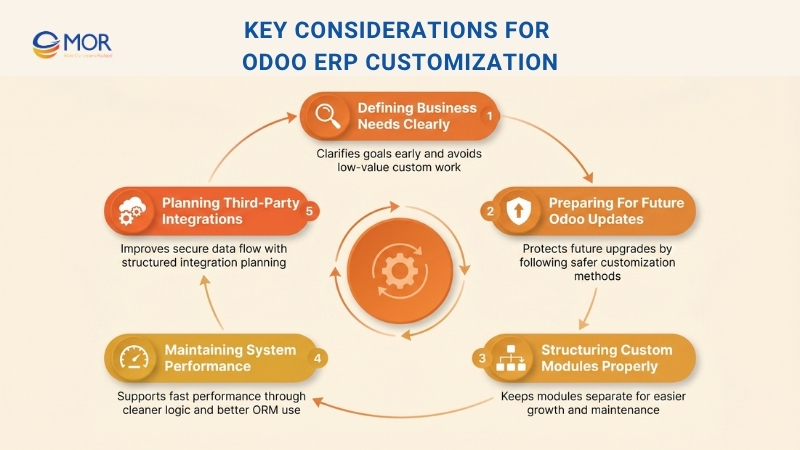
Defining Business Needs Clearly
Start by stating the company’s goals and needs in a clear way before you change anything in Odoo. Before moving into custom work, check whether the built-in features can already cover the need.
Any planned change should fit with third-party tools, system speed, and future upgrades. A careful review supports a smooth user experience and helps you avoid extra work that adds little value.
Preparing For Future Odoo Updates
Any change you make should still work when future versions of Odoo are released, without calling for heavy rework. Following Odoo’s recommended methods makes updates easier and keeps technical debt lower.
Building separate modules instead of changing the core files helps protect your setup during upgrades. This Odoo ERP customization approach keeps the system easier to scale and adjust over time.
Structuring Custom Modules Properly
A modular setup makes custom work easier to organize, reuse, and manage later. In Odoo, the inheritance pattern for models, views, and controllers helps you change behavior without harming core functions.
Custom modules should stay separate from the main Odoo source code to avoid update conflicts. When modules are arranged well, the system becomes easier to grow and maintain.
Maintaining System Performance
Speed should stay a top concern when you tailor Odoo for large transaction volumes. Cleaner database queries and fewer unnecessary calculations help the system stay fast and stable.
Instead of relying on heavy raw SQL logic that may slow things down, use Odoo’s ORM in the right way. Fast load times help users move through the platform without frustration.
Planning Third-Party Integrations
Odoo supports safe communication with outside systems through XML-RPC, JSON-RPC, and REST APIs. A strong integration plan, often delivered through Odoo ERP customization services, helps data move smoothly, cuts manual effort, and supports better daily output.
Authentication methods should be set carefully so business data stays protected during each connection. Clear logging and structured error handling also make it easier to spot issues and keep data moving properly.
A thoughtful integration setup helps Odoo communicate with outside platforms in a stable and useful way.
Getting Started With Odoo ERP Customization
The first steps matter because they shape the rest of the project. If you begin with a clear plan, Odoo ERP customization becomes easier to manage and far more useful for your business.
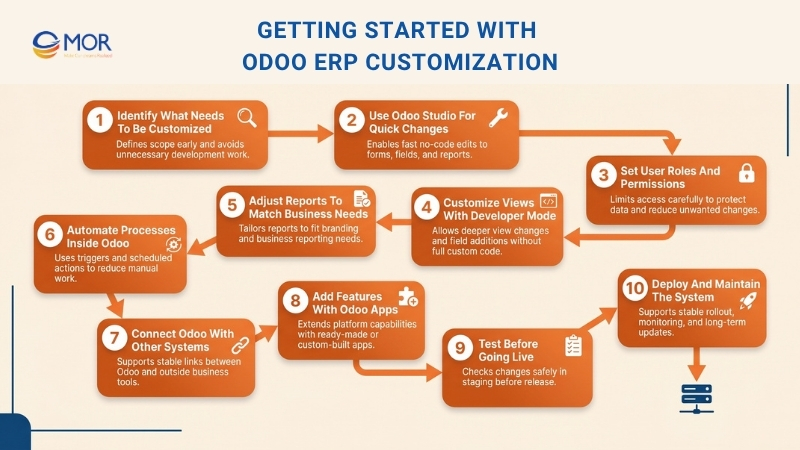
Identify What Needs To Be Customized
Begin by listing the parts of Odoo that may need changes, whether those are modules, fields, processes, or reports. You should also review the current features first to see if they already meet your needs without added development.
This step saves time and helps you avoid work that is not needed. Speak with stakeholders so the team agrees on exact needs and expected results. A clear scope makes the whole customization process easier to manage.
Use Odoo Studio For Quick Changes
Odoo studio lets users change forms, fields, and reports without writing code. Its drag-and-drop tools make it easier to adjust views and layouts in a quick way.
You can also set business rules and automatic actions to support daily work. You need the Enterprise edition to use this tool, since it is not part of other editions. For many businesses, it can be a simple and useful starting point.
Set User Roles And Permissions
Managing user access is a key part of security and daily control in Odoo ERP customization. To change permissions in Odoo, go to Settings > Users & Companies > Users. Roles should be set with care so each employee sees only the data that matches their work.
At a deeper level, record rules help limit what users can view across the system. Good access control gives you tighter oversight and helps prevent unwanted edits.
Customize Views With Developer Mode
After the no-code tools, Developer Mode gives you access to deeper changes. You can rearrange forms and list views so they match your business process more closely. New fields can also be added without building full custom code.
Those fields may be stored in the database or calculated automatically when needed. Used in the right way, Developer Mode can improve the user experience without highly complex technical work.
Adjust Reports To Match Business Needs
Odoo includes built-in tools for editing reports like purchase orders, sales documents, and invoices. Basic changes, such as adding logos or adjusting layout, can be made through the report editor in Odoo Studio. For more detailed work, QWeb templates allow deeper changes with a smaller amount of code.
Once you understand those templates, it becomes easier to create reports that look polished and match your brand. Each report change should be tested carefully so it displays well in different cases.
Automate Processes Inside Odoo
Odoo ERP customization also helps businesses turn repetitive steps into automatic actions. These actions can be configured under Settings > Technical > Automated Actions. Triggers and conditions let the system react when certain events take place.
Scheduled actions can also handle recurring jobs, such as updating records or sending reminders. This kind of workflow automation helps teams save time and lowers manual effort.
Connect Odoo With Other Systems
Odoo already includes built-in links for tools like CRM software, eCommerce platforms, and payment gateways. In many cases, you can set up these connections directly from the settings without extra development.
When a deeper setup is needed, the Odoo API gives you more room to connect with outside systems, including a hosted Odoo environment. The App Store also includes ready-made connectors for some use cases. When integration is planned well, data can move reliably between your business tools.
Add Features With Odoo Apps
Both the Community and Enterprise editions include apps that extend what the platform can do. You can install them directly from the Odoo App Store to add new capabilities without starting from scratch. Many of these tools work as an Odoo customization app with settings you can adjust without much code.
If the available options still do not fit your needs, new modules can be built, though that takes stronger technical skills. It is also wise to choose apps that are updated often so they continue to work with your version of Odoo.
Test Before Going Live
Before moving changes into your live environment, test them in a staging setup as part of your Odoo ERP customization work. This protects daily operations and helps the team catch issues early. Real business scenarios should be used so you can see whether the changes behave as expected. User feedback also helps refine the final result. Careful testing supports a safer launch and lowers project risk.
Deploy And Maintain The System
Once testing is done, move the changes into production in a careful way to keep downtime low. Before any major release, create a full backup of the system. After launch, keep watching the platform so unexpected problems can be found quickly.
Ongoing updates help the system stay current with security patches and new features. A reliable Odoo customization service should also support long-term stability and keep the platform working well over time.
Advanced Techniques In Odoo ERP Customization
Once the basic changes are in place, some businesses need deeper technical work. Advanced Odoo ERP customization can help when your processes, integrations, or business rules go beyond what standard settings can handle.
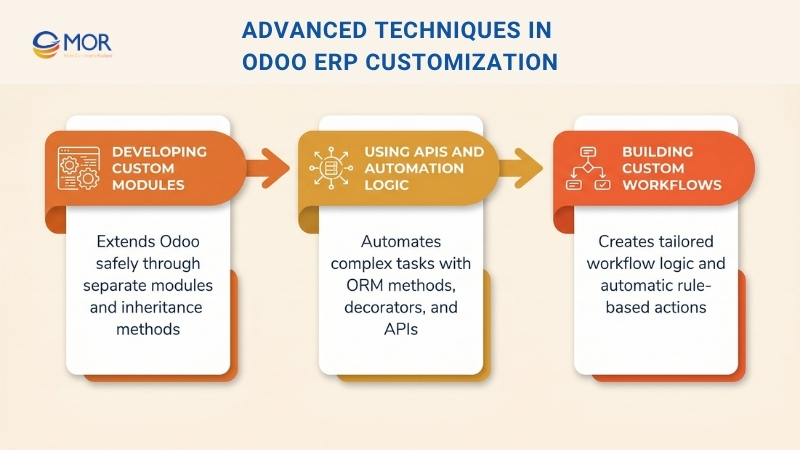
Developing Custom Modules
The safest way to extend Odoo without touching core files is to build separate custom modules. Using model inheritance with _inherit and _inherits makes it possible to add fields or functions while keeping future updates safer.
View inheritance with xpath also helps you change current views without replacing full XML structures.
Controller inheritance lets developers extend or override existing methods for web features, including changes to sales order behavior without touching the core code.
Using APIs And Automation Logic
To handle more complex data tasks, Odoo provides strong ORM methods like search(), write(), and unlink(). Decorators such as @api.model, @api.depends, and @api.onchange help automate field logic, updates, and actions based on what users do, which is also useful in Odoo CRM customization.
Scheduled actions, often called cron jobs, can run repeated tasks like building reports or syncing with outside services on a fixed schedule.
For live data exchange with external platforms, Odoo also supports JSON-RPC and XML-RPC APIs.
Building Custom Workflows
Businesses can push Odoo ERP customization further by designing their own workflow stages and transitions. Server actions also allow complex tasks to run automatically through Python code inside the platform, without manual input.
Rules such as checking order quantities before confirming a sale can be controlled through computed fields and constraints with @api.depends and @api.constrains.
One common use case is updating an order status automatically from data returned by an outside API, so processing stays accurate and smooth.
Risks To Watch In Odoo ERP Customization
Odoo customization can deliver strong business value, yet it also brings risks that companies should take seriously. A system shaped around your workflows can support better productivity, stronger fit, and future growth, but weak decisions during the build stage may cause lasting issues later. When businesses make changes without a clear direction, they often end up with higher spending, weaker speed, and constant support problems. That is why this work should be planned with long-term business use in mind, rather than short-term ease alone.
The right decisions early in the project can prevent many of these problems from growing later. A business should weigh technical choices, support needs, and future updates before moving too far.
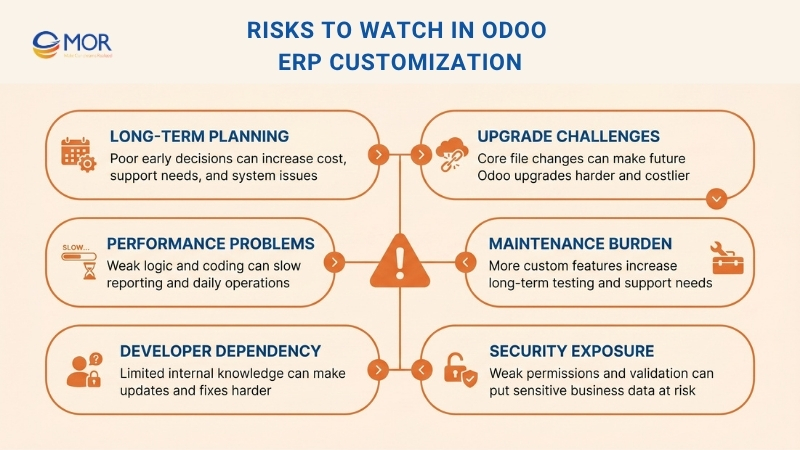
Challenges With System Upgrades
A frequent problem appears when businesses try to upgrade the system. Odoo publishes new versions on a regular basis, and many companies want those releases so they can use new tools, a better interface, and stronger protection. Yet when custom work is built in the wrong way, especially through changes to core files, the upgrade path becomes much harder. That can cause slower projects, more redevelopment, and larger costs whenever a new version arrives.
System Performance Issues
System speed can also suffer after heavy changes. When added functions rely on messy logic or weak coding standards, the platform may begin to lose speed. This often becomes clear in inventory actions, finance work, dashboards, and reporting screens. Once the system slows down, daily work becomes harder and users in different teams may become frustrated.
Ongoing Maintenance Burden
A higher level of Odoo ERP customization often brings more long-term support work. Each new feature adds fresh code that must be checked, tested, and revised over time. When those custom parts are poorly arranged or not documented well, even a small update may take more time and money than expected.
Over-Reliance On Developers
Businesses also run into problems when too much knowledge sits with one developer or one service provider. If that original team steps away and the system logic is hard to follow, the company may find it difficult to update the platform or solve issues in a timely way.
Security Risks
Weak custom work may also open the door to security problems. Loose permission settings or missing validation rules can put sensitive data at risk. For that reason, every module should be created with privacy, access control, and safe handling standards in place, along with reliable Odoo customer support and clear Odoo customer service processes.
Cost Breakdown Of Odoo ERP Customization
The cost of Odoo ERP customization usually comes from two spending layers: the subscription level that allows custom work, and the actual development effort required to fit the system to your business processes. On Odoo’s official pricing page, the Custom plan begins at US$25.50 per user/month and includes Odoo Studio, external API access, and multi-company capability, while Odoo.sh hosting is billed on top of that. In real projects, development time often becomes the larger share of the budget because tailoring the system can take up a major part of overall implementation cost. Recent 2026 planning benchmarks suggest that custom work may account for around 30 to 40% of a full rollout budget, and Odoo enterprise pricing is only one part of that total.
Customization scope | Typical pricing | What it usually covers |
Odoo Custom plan | From US$25.50/user/month | Access to custom development tools, Odoo Studio, API access, multi-company setup |
Minor UI or dashboard changes | US$500 to US$2,500 | Screen layout updates, simple form edits, small dashboard changes |
Workflow automation | US$1,500 to US$7,000 | Approval paths, routing logic, business rule automation |
Advanced reports and dashboards | US$1,200 to US$5,000 | Finance reports, KPI dashboards, custom analytics |
New module extensions | US$4,000 to US$20,000+ | Added module features or mid-level custom functions |
Industry-specific logic | US$5,000 to US$25,000 | Manufacturing rules, traceability, sector-focused workflows |
Major custom modules | US$10,000 to US$50,000+ | Large-scale builds with deeper process changes |
Ongoing support and minor enhancements | US$500 to US$2,000/month | Bug fixes, updates, small changes, maintenance |
These numbers should be used as planning references, not guaranteed quotes. The final cost depends on process difficulty, user count, integrations, legacy data condition, and the team or partner you choose. Rates per hour also differ by region, and recent 2026 market benchmarks place them at roughly US$25 to US$150 per hour depending on location and delivery team.
How To Choose The Right Odoo ERP Customization Partner
Picking the right partner for Odoo ERP customization can shape the success of your ERP project from start to finish. For businesses that want a dependable Odoo ERP software development company, working with MOR Software gives you a team that can plan, build, and support the system around your real business needs:
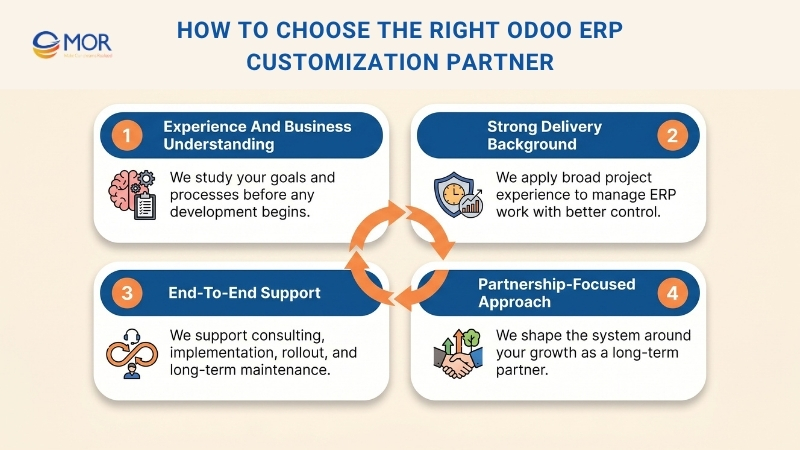
- Experience and Business Understanding: At MOR Software, we take time to learn how your business works before any development starts. Our team studies your goals, processes, and system needs so we can deliver changes that fit your operation in a practical way.
- Strong Delivery Background: We have worked on a wide range of software projects across industries, which helps us handle custom ERP work with clearer structure and stronger delivery control. That project experience helps us build solutions that support real business results.
- End-To-End Support: We support your project from early consulting and implementation planning to customization, rollout, and long-term maintenance. This gives you one team that can stay with you through each stage of the platform journey.
- Partnership-Focused Approach: At MOR Software, we work closely with our clients and treat the engagement as a long-term relationship, not a one-time task. We listen carefully to your business goals and shape the system around them so the final setup fits the way your company needs to grow.
MOR Software - Your Trusted Odoo ERP Customization Partner
The team you choose for Odoo ERP customization can influence the outcome of the entire rollout. At MOR Software, we shape the platform around the way your business already runs, instead of asking your staff to fit into fixed standard workflows. That is why we begin with your actual operations, identify where the default system falls short, and turn those requirements into tailored modules, smoother processes, stronger reporting, and reliable integrations.
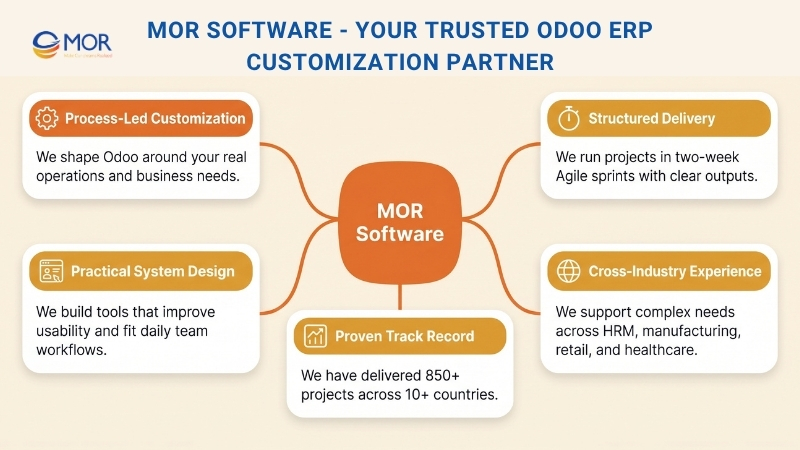
At MOR Software, we deliver that work through a clear and managed Odoo ERP development process. Our Odoo developer includes certified specialists, and we organize each project in two-week Agile sprints with defined outputs and visible progress at every stage. This gives you the chance to review updates sooner, respond with feedback more quickly, and keep the rollout moving without losing oversight.
We also bring wide delivery experience across HRM, Odoo manufacturing, logistics, fintech, retail, and healthcare. That range helps us manage complex rules, external system links, and long-term support with a practical approach. MOR Software has completed 850+ projects for clients in 10+ nations, supported by recognized milestones such as the Sao Khue Award and ISO certifications.
For us, this work involves much more than changing screens or inserting a few extra fields. We build systems that reflect how your teams truly work, so daily operations feel smoother and easier to manage. Every function is created with clear logic and simple usability in mind, which helps your staff adapt to the platform faster without facing unnecessary complexity.
Conclusion
Odoo ERP customization can turn a generic system into one that fits the way your business actually runs. The value comes from making the right changes, keeping the structure clean, and choosing a team that can support the platform over time. At MOR Software, we help businesses shape Odoo with practical planning, careful delivery, and long-term support. Ready to build a system that works for your team? Contact us today.
MOR SOFTWARE
Frequently Asked Questions (FAQs)
What is Odoo ERP customization?
Odoo ERP customization means adjusting system features, workflows, or modules to match how a business actually operates. It can include small interface tweaks or building new functionality.
When should a business customize Odoo?
Customization becomes necessary when default features no longer support daily tasks. If teams rely on manual workarounds or external tools, it usually signals a gap.
How much does Odoo ERP customization cost?
Costs depend on scope and complexity. Simple changes may cost a few hundred dollars, while larger projects with custom modules and integrations can require a much higher budget.
Can Odoo be customized without coding?
Yes, basic changes can be handled with Odoo Studio. It allows users to modify fields, forms, and workflows without technical skills. Advanced needs still require developers.
Will customization affect Odoo upgrades?
It can if the system is modified incorrectly. Using separate custom modules instead of changing core files helps keep upgrades smoother and less risky.
How long does customization usually take?
Small updates may take a few days. More complex projects involving integrations or multiple modules can take several weeks or even months.
What risks should businesses be aware of?
Poor customization can lead to slower performance, higher maintenance costs, and upgrade challenges. Lack of documentation can also make future changes difficult.
Can Odoo connect with other systems?
Yes, Odoo supports integration with CRM platforms, payment systems, and eCommerce tools. Custom APIs can also be built when needed.
How do you maintain a customized Odoo system?
Regular updates, clear documentation, and structured modules are key. Keeping custom code separate from the core system makes maintenance easier.
Is Odoo ERP customization suitable for small businesses?
Yes, as long as the scope stays practical. Small businesses should focus on changes that directly improve daily workflows instead of adding unnecessary features.
Share


Make Our-Dreams Realized


© 2023 . MOR Software. All Rights Reserved
Sitemap
Privacy Policy
Terms of Use

Rate this article
0
over 5.0 based on 0 reviews
Your rating on this news:
Name
*Email
*Write your comment
*Send your comment
1