


Custom iOS App Development: A Complete Business Guide for 2026
A branded template can look custom on the surface yet still force your workflows into someone else’s architecture. Real custom iOS app development starts deeper, covering business logic, UX, integrations, security rules, growth needs, Apple services, and App Store requirements. In this guide by MOR Software, you’ll learn how to plan a native iOS product, choose the right approach, select technologies, control delivery risks, and assess a development partner.
Key Takeaways
- A true custom iOS product maps its architecture, data, workflows, UI, and integrations to your business instead of adapting a generic template.
- Native Swift development makes the most sense when your product depends on Apple APIs, strong device access, complex offline logic, or deep iOS-specific UX.
- Early discovery, clear ownership, structured QA, and App Store planning prevent many costly problems that appear late in development.
What Does Custom iOS App Development Really Mean?
Custom iOS app development means designing software around your users, workflows, data, security rules, and product goals. The engineering team starts with your domain model and operating needs, then shapes the architecture around them.
Changing a logo, color palette, or a few screens doesn’t create a genuinely custom product. Custom iOS software may use Swift, SwiftUI, UIKit, Xcode, Apple SDKs, backend APIs, and a data model designed around the business rather than a ready-made app shell.
Area | Template / Off-the-Shelf App | Custom iOS App |
Architecture | Fixed structure with limited room for change | Architecture follows business rules and expected growth |
Business logic | Generic flows shared across users | Domain rules reflect real operating processes |
UI/UX | Theme-level changes | Custom journeys, components, gestures, and states |
Data model | Predefined entities and fields | Data structure maps directly to business entities |
Integrations | Limited connectors | APIs connect CRM, ERP, payments, cloud systems, and other tools |
Offline behavior | Basic caching or none | Local storage, sync queues, and conflict rules can be planned |
Apple framework access | Often restricted | Direct access to native Apple APIs |
Scalability | Bound by vendor architecture | Modules can grow around product demand |
Source-code ownership | Depends on platform terms | Ownership can be defined in the contract |
A custom iOS app can also extend beyond iPhone. Depending on the use case, the product may connect to iPad, Apple Watch, widgets, Live Activities, Apple Pay, HealthKit, or other Apple surfaces.
Knowing how to program iOS apps is only one part of the work. Product architecture, backend contracts, data ownership, QA, security, and release planning determine how well the app performs after launch.
Why Businesses Invest in Custom Native iOS Apps
Companies choose custom iOS app development when product quality, Apple integrations, and long-term control carry more value than maximum code reuse. Apple reported more than 850 million average weekly App Store users across 175 countries and regions in 2025, giving iOS products access to a large commercial channel.
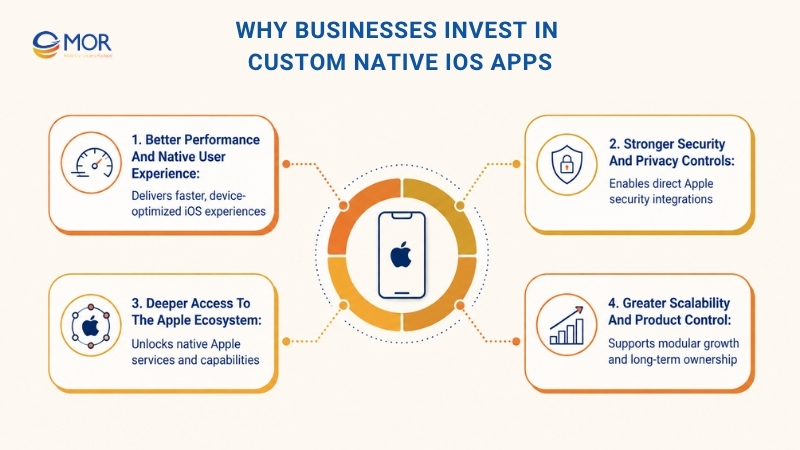
Better Performance and Native User Experience
Native code talks directly to iOS APIs and Apple hardware. That matters when an app handles video, payments, maps, real-time updates, AR, or on-device AI.
- Direct device access: Swift code can work closely with cameras, sensors, location services, biometrics, media tools, and Apple APIs without a cross-platform bridge.
- Familiar interaction patterns: Native navigation, gestures, animations, Dynamic Type, and system controls make the interface feel consistent with iPhone behavior.
- Tighter performance control: Developers can profile memory, startup time, rendering, network calls, and battery use inside Apple’s toolchain.
- Device-aware design: Teams can adjust layouts and interactions for iPhone and iPad instead of stretching one generic interface across every screen.
The practical answer to how to design an app for iPhone starts with user behavior and Apple’s Human Interface Guidelines. Good native design also covers accessibility, text scaling, orientation, safe areas, dark mode, and system gestures.
Stronger Security and Privacy Controls
Native development gives teams direct access to Apple security services. Architecture decisions can keep sensitive data out of weak local storage and limit exposure during network transfers.
- Protected credentials: Keychain stores tokens, credentials, and other sensitive values outside normal application storage.
- Biometric access: Face ID and Touch ID can protect account access or sensitive actions.
- Network protection: App Transport Security sets secure connection requirements for network traffic.
- Hardware-backed protection: Secure Enclave can support sensitive cryptographic and authentication tasks where the use case needs it.
- Private processing: Core ML models and other on-device tools can process certain data without sending every request to a server.
Security still depends on implementation. Encryption, access rules, API design, dependency reviews, logging policies, and backend controls must work together.
Deeper Access to the Apple Ecosystem
Apple provides a large set of platform services for payments, health, commerce, machine learning, voice actions, and connected devices. Native code usually gives product teams the deepest access to these capabilities.
- Commerce: Apple Pay supports native checkout, while StoreKit 2 manages digital purchases and subscriptions.
- Health: HealthKit connects permitted health and fitness data with user consent.
- On-device intelligence: Core ML supports local machine learning tasks where models fit the device.
- Home-screen presence: WidgetKit and Live Activities surface useful data without requiring users to open the app.
- Voice and actions: App Intents can connect app actions with Siri, Shortcuts, Spotlight, and supported system experiences.
- Wearable and spatial use cases: watchOS and visionOS can extend the product when the user journey supports those devices.
Greater Scalability and Product Control
Growth becomes easier to manage when architecture follows the actual domain. Teams can separate modules, change APIs, add new user roles, and replace backend services without rebuilding the entire product.
- Domain-based structure: Modules can map to areas like accounts, payments, booking, messaging, or reporting.
- Backend freedom: The product can connect to custom APIs, cloud services, internal systems, and external providers.
- Code ownership: Your agreement can assign source code, repositories, App Store Connect assets, and technical documents to your company.
- Longer product life: Teams can modernize parts of the codebase as Apple releases new APIs without giving up the entire application.
This level of control also lowers dependence on no-code subscriptions or closed template vendors. Your product roadmap stays tied to business priorities rather than platform limits.
Custom iOS vs Cross-Platform: Which Approach Fits?
Custom iOS app development isn’t automatically the right answer for every mobile project. Native Swift works best when iOS-specific behavior carries real business value, while Flutter or React Native can make more sense when one team must serve iOS and Android at the same time.
Decision Factor | Native iOS | Flutter / React Native | No-Code |
Performance | Direct native execution | Strong for many business apps | Suitable for simple workflows |
Apple API access | Deep access | Often depends on packages or native modules | Limited |
iOS-specific UX | High control | Shared UI needs platform tuning | Restricted by platform components |
Shared Android code | No | High code reuse | Often supported |
Development speed | Fast for one Apple platform | Strong for dual-platform products | Fast for simple prototypes |
Complex offline logic | Full control | Possible with added engineering work | Usually limited |
Long-term maintainability | Strong when architecture is sound | Depends on framework and package health | Vendor dependence can grow |
Platform-specific functions | Direct access | Native bridges may be required | Narrow |
Best-fit project type | Apple-first products with deep device needs | Products targeting iOS and Android together | Low-complexity validation |
Teams that develop apps for iOS should choose native development when Apple Pay, HealthKit, StoreKit, App Intents, high-performance graphics, or complex device behavior sit near the center of the product.
Cross-platform development suits many internal tools, commerce apps, booking products, and content platforms. One shared codebase can save effort when iOS and Android need nearly the same flows.
No-code has a narrower place. It can support simple validation, internal forms, or early prototypes, but custom business rules and deep Apple integrations often expose its limits quickly.
What Custom iOS App Development Services Include
Good custom iOS app development services cover much more than programming screens. Product discovery, design, backend work, native engineering, testing, release management, and maintenance all shape the final result.
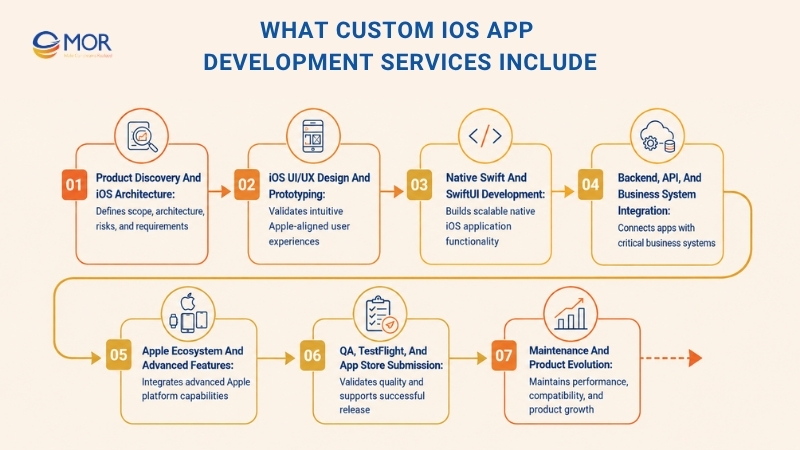
Product Discovery and iOS Architecture
Discovery turns a business idea into a scope the delivery team can estimate and test. Skipping this work often moves uncertainty into later sprints, where changes cost more.
- Business goals: Define what the app must change for customers, staff, revenue, or operations.
- Target users: Map user groups, access levels, environments, and core jobs.
- MVP scope: Rank functions based on business value, technical risk, and launch needs.
- User journeys: Trace entry points, main tasks, edge cases, and failure paths.
- Data structure: Define entities, relationships, ownership, retention, and sync rules.
- Architecture: Select module boundaries, state management, data flow, and backend contracts based on product complexity.
- Device strategy: Decide supported iPhone, iPad, watchOS, and iOS versions before development starts.
- Risk review: Check APIs, external SDKs, payments, privacy needs, and hard technical dependencies early.
A well-scoped custom iOS app development service should leave you with a clearer backlog, technical direction, timeline range, and list of open risks.
iOS UI/UX Design and Prototyping
Mobile design must reflect how people actually hold, read, tap, and move through an iPhone interface. Static desktop-style mockups miss many of these details.
- Wireframes: Map content hierarchy and core actions before visual polish begins.
- Interactive prototypes: Test important user paths before engineering time is committed.
- Apple HIG alignment: Match expected navigation, touch targets, controls, alerts, sheets, and gestures.
- Responsive layouts: Adapt screens for iPhone and iPad sizes without breaking hierarchy.
- Accessibility: Plan Dynamic Type, readable contrast, VoiceOver labels, and touch target sizes.
- System appearance: Check light mode, dark mode, keyboard behavior, orientation, and safe areas.
- Design system: Define reusable components, spacing, type, icon use, and states to keep future screens consistent.
Making an app for iPhone requires decisions about empty states, loading states, errors, interruptions, permissions, and device rotation too. Those details shape user trust after the first few taps.
Native Swift and SwiftUI Development
Swift is Apple’s main language for modern iOS engineering. SwiftUI handles many new interfaces, while UIKit still has value for older codebases or components that need deeper control.
- Swift development: Create business logic, networking, state handling, device integrations, and application behavior in Apple’s native language.
- SwiftUI interfaces: Develop reusable views with state-driven updates and support for Apple platform patterns.
- UIKit interoperability: Keep or connect UIKit when migration, older libraries, or special UI behavior calls for it.
- Modular code: Separate product areas so teams can test and change one module with less disruption.
- Concurrency: Use structured concurrency for network calls, background tasks, and asynchronous work.
- Shared components: Reuse proven UI and logic blocks instead of copying code between screens.
Swift gives engineering teams a direct path to create iPhone apps and support iPad-specific behavior where the product needs it.
Backend, API, and Business System Integration
Many iOS apps depend on a larger software system. The mobile layer may need accounts, cloud storage, ERP records, CRM data, payments, orders, messaging, or business rules stored on a server.
- API connections: REST or GraphQL can exchange data with backend services.
- Identity: Authentication and authorization control who can see or change each resource.
- Enterprise systems: APIs can connect the app with CRM, ERP, HRM, e-commerce, or internal platforms.
- Payments: Apple Pay, payment gateways, and server-side validation need a defined transaction flow.
- Real-time updates: WebSockets or push-based systems can support chat, tracking, alerts, and live status changes.
- Offline sync: Local writes, queues, retry logic, and conflict rules keep workflows usable during poor connectivity.
- SDK governance: Teams should review external SDK permissions, data collection, maintenance status, and release risk before adding them.
Complex integrations often shape architecture more than screen count. A small-looking app can still require substantial backend work.
Apple Ecosystem and Advanced Features
Apple services can extend a product into payments, health, AR, maps, voice, machine learning, home-screen widgets, or wearable devices. Each integration should solve a real user need.
- Apple Pay and StoreKit 2: Support physical-goods payments or App Store digital commerce based on Apple’s rules.
- HealthKit: Exchange approved health and fitness data under user permission.
- Core ML: Run compatible machine learning models on-device.
- ARKit: Add camera-based augmented reality for spatial or visual use cases.
- MapKit: Support maps, annotations, routes, and location-driven experiences.
- WidgetKit and Live Activities: Surface timely information outside the main app.
- App Intents and Siri: Expose supported actions through system tools.
- Apple Watch and Vision Pro: Extend the product when wearable or spatial interaction has a clear business role.
QA, TestFlight, and App Store Submission
QA needs its own delivery plan. A few simulator checks near release won’t catch network faults, device issues, accessibility gaps, or regression bugs.
- Automated tests: Unit, UI, and integration tests protect core logic and flows.
- Regression checks: Retest existing behavior when new code changes shared modules.
- Physical devices: Verify camera, biometrics, notifications, orientation, performance, and real hardware behavior.
- TestFlight: Share beta builds with stakeholders and selected users before public release.
- Privacy files: Review manifests, Required Reason APIs, permission strings, and external SDK data behavior.
- Store assets: Prepare screenshots, metadata, age ratings, privacy details, and review notes.
- Submission support: Track App Review feedback and address questions or rejected items.
Maintenance and Product Evolution
Launch moves the app into a new phase. Real users expose device combinations, data volumes, edge cases, and usage patterns that controlled testing may not reproduce.
- Crash monitoring: Track failures, affected devices, OS versions, and release changes.
- Performance checks: Watch launch time, memory, network behavior, battery use, and slow screens.
- OS compatibility: Review the app when Apple ships new iOS versions and SDK requirements.
- Product releases: Add roadmap items through controlled release cycles.
- Analytics: Track user flows and product outcomes rather than collecting data without a purpose.
- App Store work: Update listings and store assets when positioning changes.
- Technical debt: Schedule refactoring before old shortcuts start blocking new development.
The Tech Stack Behind a Production-Ready iOS App
A production iOS product needs a stack that supports UI, data, backend communication, testing, delivery, and monitoring. For an iOS app dev team, each technology should have a clear job rather than appear in the architecture because it’s fashionable.
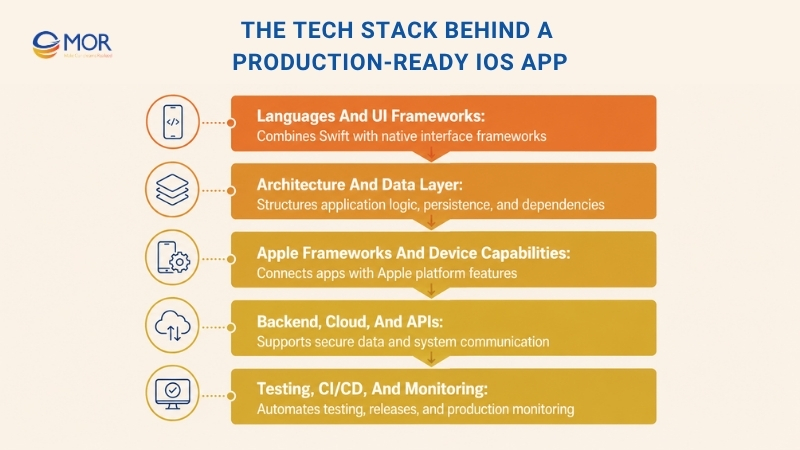
Languages and UI Frameworks
Swift sits at the center of new native iOS work. SwiftUI and UIKit then handle interface development based on product age and UI requirements.
- Swift: Handles application logic, networking, concurrency, platform APIs, and native integrations.
- SwiftUI: Supports declarative UI, reusable views, state updates, accessibility, and shared Apple-platform patterns.
- UIKit: Remains useful for mature codebases and UI cases where teams need established controls or older libraries.
- Objective-C: Mainly appears in legacy maintenance, gradual migration, or older enterprise applications.
Architecture and Data Layer
Architecture should reflect application size, data complexity, team structure, and offline needs. MVVM is common, but teams can select another pattern when it maps better to the product.
- State and domain structure: Keep UI state, business rules, and data access separated enough for testing and change.
- SwiftData or Core Data: Store structured local data when the application needs persistence.
- Keychain: Keep tokens and other sensitive values away from normal app storage.
- Local files: Store documents, media, caches, or exported content under clear retention rules.
- Offline-first logic: Write locally, queue server updates, and define conflict handling where network loss is common.
- Modular packages: Split code into packages or modules to control dependencies and team ownership.
Apple Frameworks and Device Capabilities
Apple APIs connect an app to platform services and hardware behavior. Product requirements should decide which ones belong in the codebase.
- StoreKit 2: Handles App Store purchases, subscriptions, transactions, and entitlements.
- HealthKit: Manages approved health-data exchange.
- Core ML and Vision: Support machine learning and computer-vision tasks on compatible devices.
- ARKit: Powers AR sessions and spatial tracking.
- MapKit: Handles native mapping and location presentation.
- AVFoundation: Controls audio, video, capture, and media playback.
- WidgetKit: Powers widgets and supported Live Activity experiences.
- App Intents: Connects supported actions to Apple system experiences.
Backend, Cloud, and APIs
The mobile app should depend on backend contracts rather than hidden assumptions. API design defines how accounts, data, permissions, payments, and real-time events move across systems.
- REST: Fits resource-based APIs and many enterprise integrations.
- GraphQL: Gives clients tighter control over requested data when the backend supports it.
- WebSockets: Keep live connections for chat, tracking, market updates, or other time-sensitive flows.
- Cloud platforms: AWS, Azure, GCP, or Firebase can host backend services based on architecture and team skill.
- Data stores: PostgreSQL and other databases support server-side application data according to workload.
Testing, CI/CD, and Monitoring
Delivery tooling keeps releases repeatable. Automation also catches certain problems before a developer hands a build to QA.
- XCTest and XCUITest: Cover code-level and UI automation inside the Apple toolchain.
- Snapshot testing: Detect unwanted visual changes in suitable UI components.
- GitHub Actions or Xcode Cloud: Run checks, tests, builds, and release tasks from code changes.
- Fastlane: Automates repetitive signing, build, screenshot, and distribution work.
- TestFlight: Distributes beta versions to internal and external testers.
- Crashlytics or Sentry: Collect runtime failures and diagnostic data.
- MetricKit: Gives teams Apple-provided performance and diagnostics data.
Custom iOS App Development Process: Idea to App Store
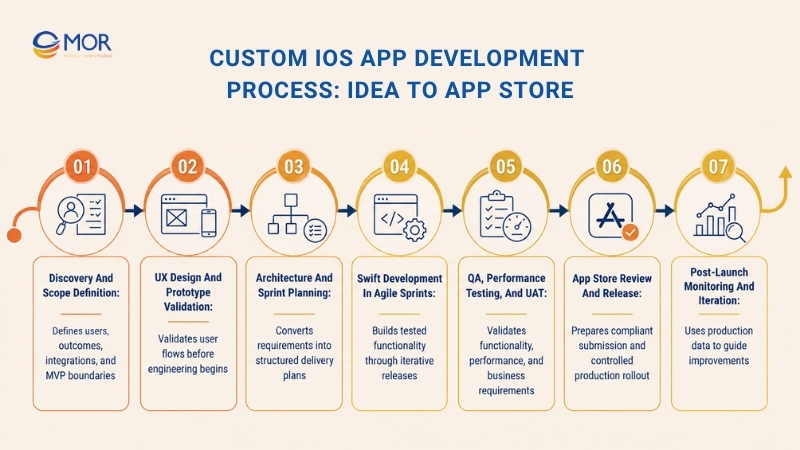
A structured custom iOS app development process turns an idea into a releasable product without treating discovery, testing, or App Review as last-minute tasks. Each phase should produce something that the team can review, test, or approve.
1. Discovery and Scope Definition
Start with the business outcome, target users, core jobs, and launch boundaries. Product research can show where users already have good solutions and where your app needs a real point of difference.
The team should also map integrations, supported devices, data rules, known risks, and acceptance criteria. MVP scope needs firm boundaries, since vague 'phase one' lists tend to expand during development.
2. UX Design and Prototype Validation
User flows turn requirements into a sequence of actions. Wireframes then establish screen structure before time goes into visual details.
Interactive prototypes let stakeholders test key journeys early. Reviews should cover Apple interaction patterns, accessibility, keyboard behavior, permissions, error states, loading, and how the interface reacts to different text sizes.
3. Architecture and Sprint Planning
Technical planning turns approved flows into modules, data models, API contracts, environments, and delivery tasks. Development, staging, and production should have separate configuration where the system needs them.
The team can then set CI/CD rules, testing expectations, code review standards, and sprint scope. A clear backlog also gives product owners a better view of dependencies and delivery order.
4. Swift Development in Agile Sprints
Engineers implement approved functions in small batches and merge code through review. Automated checks run against important logic, while QA starts testing completed work rather than waiting for the whole app.
Working builds should reach stakeholders regularly. TestFlight is useful here because users can install real builds on physical devices and give feedback before a release candidate exists.
5. QA, Performance Testing, and UAT
Functional QA checks whether each flow meets agreed behavior. Regression testing looks for damage to older functions after shared code changes.
Device coverage should include the supported iPhone and iPad range, target iOS versions, weak networks, permissions, background behavior, and accessibility. UAT gives business stakeholders the final chance to validate the product against operational needs before store release.
6. App Store Review and Release
App Store Connect preparation covers app records, builds, privacy details, age ratings, metadata, screenshots, and review notes. Teams should also check privacy manifests, Required Reason APIs, login access for reviewers, and StoreKit flows when digital purchases apply.
A phased rollout can limit exposure during the first production release. Release planning should also include monitoring, rollback decisions, support ownership, and communication if a serious issue appears.
7. Post-Launch Monitoring and Iteration
Production data should feed the product roadmap. Crash-free sessions, startup time, API failures, conversion events, retention, support tickets, and user feedback can show where the product needs attention.
New iOS releases add another maintenance cycle. Teams should test beta versions when appropriate, plan compatibility work, and keep dependencies current before old technical debt becomes a release blocker.
Common iOS Development Risks
Many custom iOS app development problems start long before App Store submission. Poor early decisions around privacy, payments, sync, architecture, account ownership, or testing often surface only when the product reaches real users.
Apple’s 2025 App Store Transparency Report recorded 9,100,620 submissions reviewed and 2,093,244 submissions rejected. Performance alone accounted for 1,354,418 rejection citations, which makes release readiness a business concern rather than a store-listing task.
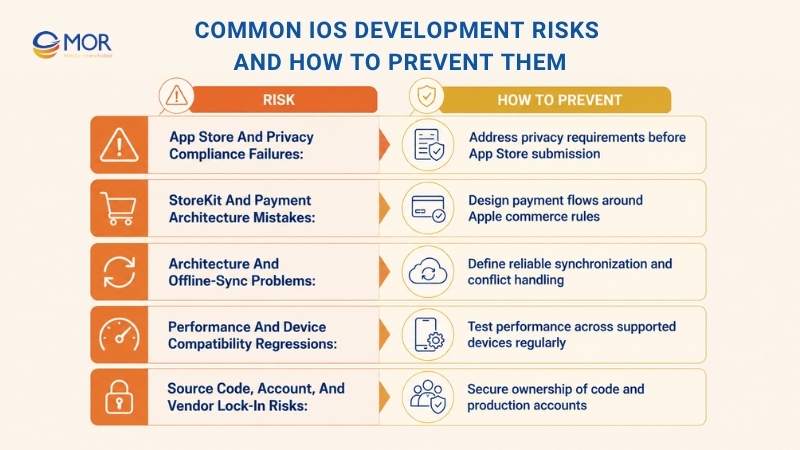
App Store and Privacy Compliance Failures
Privacy work should start when teams choose APIs and SDKs. Waiting until submission creates extra review work and can expose architecture decisions that are expensive to change.
- Privacy manifests: Record required API use and data practices accurately.
- Permission strings: Explain camera, location, photos, contacts, health, or other protected access in language users understand.
- Required Reason APIs: Check Apple requirements before shipping code that calls covered APIs.
- External SDKs: Review data collection, privacy manifests, signing status, and maintenance history.
- Account rules: Apps with account creation may need an in-app account deletion path under Apple policy.
StoreKit and Payment Architecture Mistakes
Payment rules depend on what the customer purchases. Digital content and functions follow App Store commerce requirements, while physical goods and services use different payment paths.
- Digital purchases: Map StoreKit flows before UI implementation begins.
- Subscriptions: Plan purchase, renewal, cancellation, expiration, and entitlement states.
- Restore purchases: Give users a reliable way to regain eligible purchases.
- Server validation: Connect transaction data with backend entitlements where needed.
- Failure handling: Cover interrupted purchases, pending states, refunds, and network loss.
Architecture and Offline-Sync Problems
Offline behavior is a data problem first. A basic cache won’t solve workflows where users create, edit, or delete records without a network connection.
- Data growth: Test assumptions against expected production volumes, not demo data.
- Conflict rules: Decide what happens when local and server changes disagree.
- Background sync: Define retries, queues, expiration, and operating-system limits.
- API failure states: Give users clear outcomes when server actions fail.
- Network-loss testing: Test interrupted workflows instead of assuming a stable connection.
Performance and Device Compatibility Regressions
Small code changes can affect memory, startup time, scrolling, background work, and battery use. Device testing catches problems that simulators may miss.
- Performance baselines: Track startup, memory, network calls, and key interaction times.
- Device matrix: Test representative screen sizes, hardware generations, and supported iOS versions.
- Regression suites: Recheck high-value flows after shared code changes.
- OS releases: Test new iOS versions before customers discover compatibility problems.
- Battery behavior: Watch location, background sync, media, sensors, and long-running tasks closely.
Source Code, Account, and Vendor Lock-In Risks
Ownership needs to be written down before development. A finished app can still leave the buyer dependent on a vendor if repositories, signing assets, cloud systems, or store accounts sit outside the client’s control.
- Git repository: Define where the main codebase lives and who administers it.
- Apple Developer account: Keep company-owned enrollment under the correct legal entity where possible.
- App Store Connect: Assign client access and clear release roles.
- Certificates and signing: Document who controls credentials and renewal tasks.
- Cloud and analytics: Keep production accounts transferable or client-owned.
- IP assignment: State source-code and deliverable ownership in the contract.
- Handover: Require architecture notes, setup instructions, runbooks, credentials inventory, and known-debt records.
How to Choose a Custom iOS App Development Partner
Choosing a custom iOS app development company should start with engineering depth, ownership, QA, and delivery practices. A polished portfolio is useful, but it won’t tell you who controls your App Store account or how often you’ll receive a testable build.
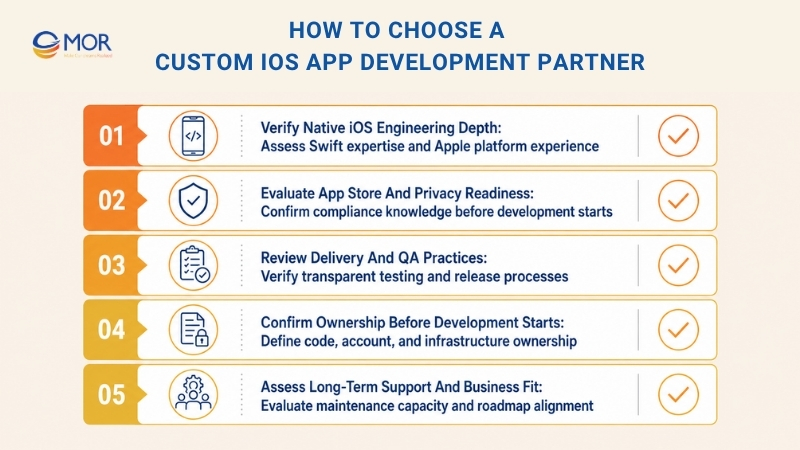
Verify Native iOS Engineering Depth
A good custom iOS app development agency should explain its technical choices in plain language. Ask how the team decides between SwiftUI and UIKit, handles older Objective-C code, structures modules, and selects Apple APIs.
- Swift and SwiftUI: Review recent native work rather than generic mobile credentials.
- UIKit and Objective-C: Check migration skills when you have an older application.
- Apple APIs: Ask for relevant work with StoreKit, HealthKit, Core ML, MapKit, or other APIs your product needs.
- Architecture: Request a sample architecture discussion based on your domain, data, and integration needs.
- Released products: Review live App Store work when client confidentiality allows it.
Evaluate App Store and Privacy Readiness
Store knowledge should appear during planning, not days before release. Ask how the team treats privacy manifests, Required Reason APIs, SDK reviews, account deletion, StoreKit, and ATT when tracking applies.
A partner should also know how to prepare reviewer accounts, review notes, App Store Connect records, and store assets. Ask who handles rejection responses and how those tasks affect the project schedule.
Review Delivery and QA Practices
Reliable delivery leaves a visible trail. Sprint boards, code reviews, builds, testing records, and UAT notes let you see progress without waiting for a status presentation.
- Sprint cadence: Ask how often the team plans, demos, and closes work.
- TestFlight builds: Confirm when installable versions reach your stakeholders.
- Code review: Ask who approves merges and what checks run before acceptance.
- Automated testing: Review how core logic and user flows receive test coverage.
- Physical-device QA: Request the planned device and iOS version matrix.
- UAT: Define business approval before production release.
- Reporting: Agree on progress, risk, defect, and scope reporting.
Confirm Ownership Before Development Starts
Ownership terms deserve the same attention as price. Your company should know where the code, accounts, certificates, infrastructure, analytics, and store listing will live.
A custom iOS app development company US buyers shortlist should state IP assignment and account control in the contract. Ask for the repository model, Apple Developer setup, App Store Connect access, cloud ownership, signing process, and handover plan before work begins.
Assess Long-Term Support and Business Fit
The right team should still make sense six months after launch. Review communication habits, industry knowledge, maintenance terms, security practices, documentation, and capacity for new releases.
If you need to find a partner for custom iOS app development, compare how each vendor handles product growth rather than comparing hourly rates alone. Ask for a sample architecture approach, TestFlight cadence, QA matrix, store responsibility, ownership model, and post-launch terms before making the final choice.
Accelerate Custom iOS Development With MOR Software
Complex mobile projects often need more than coding capacity. At MOR Software, we support mobile consulting, UI/UX, outsource mobile app development, modernization, integration, QA, and maintenance, QC testing so clients can keep discovery, engineering, testing, and post-launch work connected under one delivery setup.
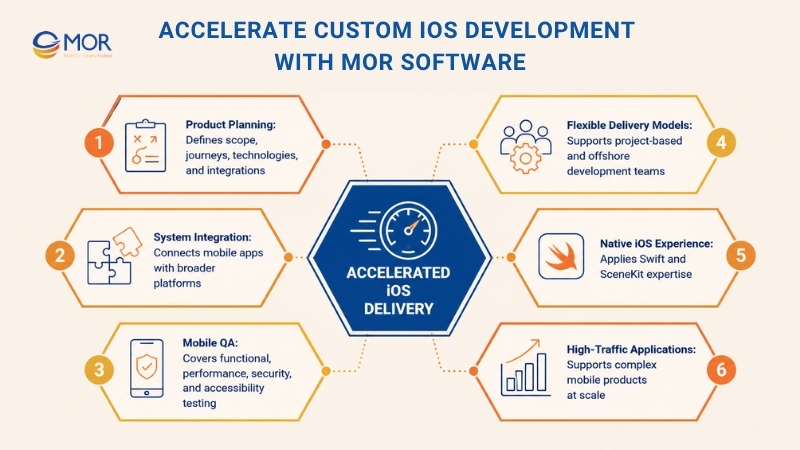
- Define the product before coding: Our mobile consulting and planning work covers business needs, resource estimates, schedules, user journeys, functional components, technology choices, and API connections. This gives stakeholders a firmer scope before development expands.
- Connect mobile products to larger systems: MOR supports native and hybrid mobile applications, web companion development, backend integration, third-party software connections, iOS, and watchOS. Our service materials also cover AI, IoT solutions development, and cloud-based mobile use cases.
- Test beyond screen-level behavior: Our mobile QA scope includes functional, performance, security, accessibility, and UX testing. MOR’s materials also identify ISTQB-certified testing capabilities within its delivery setup.
- Match the delivery model to your roadmap: Project-based work fits a defined scope, while MOR’s Offshore Development Center model can extend an internal team with developers, QA staff, business analysts, project managers, and other roles.
- Apply proven native iOS work: MOR developed the 3D Map SDK in Swift and SceneKit for 360-degree imagery, video streaming, spatial measurements, and 3D objects.
- Support high-traffic mobile products: MOR also worked on the Dan Tri News App using Swift, Kotlin, .NET, and Python. A 10-engineer team worked on the project for 24 months for a news platform that records more than 10 million daily views.
Our mobile delivery model fits startups validating a product, companies modernizing an older app, and enterprises connecting mobile software with larger systems. Share your users, target devices, integrations, launch scope, and technical constraints with MOR Software, and our team can assess the requirements and map a practical delivery approach.
Conclusion
Strong custom iOS app development starts with clear product rules, sound architecture, native Apple knowledge, structured QA, and ownership that stays under your control. Cost and timeline then become easier to estimate because fewer decisions remain hidden. If your product needs custom Swift development, system integration, modernization, QA, or ongoing mobile support, contact MOR Software to discuss your scope, target devices, technical needs, and launch plan.
MOR SOFTWARE
Frequently Asked Questions (FAQs)
What is custom iOS app development?
Custom iOS app development is the process of creating an Apple application around a company’s own users, workflows, data, integrations, security rules, and product goals. The team may use Swift, SwiftUI, UIKit, Xcode, backend APIs, and Apple SDKs. Unlike a template product, the architecture and business logic are designed for the organization’s actual operating needs.
How much does custom iOS app development cost?
Cost depends on scope, backend work, UI complexity, user roles, integrations, offline behavior, payments, AI, security, and device testing. Common custom iOS app development pricing models include fixed scope, time and materials, and dedicated-team arrangements. Clutch’s August 2026 pricing data reports an average mobile app project cost of $90,780.11, with most reviewed projects between $10,000 and $49,999.
How long does it take to build a custom iOS app?
A focused MVP can take a few months, while products with complex backend work, offline sync, payments, AI, external systems, or regulated data take longer. Discovery also affects accuracy because the team needs to define flows, architecture, integrations, device coverage, and acceptance criteria before giving a reliable schedule.
What services are included in custom iOS development?
A full custom iOS app development service can include product discovery, business analysis, architecture, UI/UX, Swift engineering, backend and API work, Apple integrations, QA, TestFlight, App Store submission, analytics, monitoring, and maintenance. The exact scope depends on whether you need a new product, modernization work, a specific module, or an ongoing delivery team.
Should I use SwiftUI or UIKit for a new iOS app?
SwiftUI fits many new iOS products because it supports declarative UI, reusable views, state-driven updates, and close integration with newer Apple APIs. UIKit still makes sense for mature codebases, older components, special UI behavior, or gradual modernization. Many teams combine them instead of forcing one toolkit across every screen.
Is native iOS better than Flutter or React Native?
Native iOS fits products that depend heavily on Apple APIs, iOS-specific interaction, demanding device work, or deep performance tuning. Flutter and React Native fit products where shared iOS and Android code has greater business value. The right choice depends on target users, platform scope, device access, team skills, and long-term product plans.
How can developers reduce App Store rejection risk?
Plan App Review requirements early. Teams should check privacy manifests, Required Reason APIs, permission strings, third-party SDK behavior, account deletion rules, StoreKit flows, metadata, screenshots, reviewer access, and Apple’s current App Review Guidelines. TestFlight and a pre-submission review also give the team time to catch problems before entering Apple’s review queue.
Can a custom iOS app integrate with ERP, CRM, and APIs?
Yes. An iOS product can connect with ERP, CRM, payment, identity, cloud, analytics, and internal systems through REST, GraphQL, WebSockets, middleware, or vendor SDKs. The architecture should define authentication, authorization, error handling, data ownership, sync behavior, and rate limits before teams connect production systems.
Who owns the source code and App Store Connect account?
Ownership depends on the contract, so define it before development begins. Buyers should confirm IP assignment, Git repository access, Apple Developer enrollment, App Store Connect permissions, certificates, cloud infrastructure, analytics accounts, documentation, and handover terms. Client-controlled accounts usually make future maintenance and vendor changes easier.
What happens after a custom iOS app launches?
Post-launch work covers crash monitoring, performance checks, analytics, user feedback, security fixes, dependency updates, iOS compatibility, store changes, and new product releases. Teams should also review support SLAs and release cadence. A maintained app keeps pace with Apple platform changes and avoids letting small technical issues grow into expensive rework.
Share


Make Our-Dreams Realized


© 2023 . MOR Software. All Rights Reserved
Sitemap
Privacy Policy
Terms of Use

Rate this article
0
over 5.0 based on 0 reviews
Your rating on this news:
Name
*Email
*Write your comment
*Send your comment
1