


TOP 12 Data Hygiene Tools to Boost Customer Data Quality 2026
Duplicate records, stale contacts, missing fields, and mixed formats spread quickly once data moves across CRM, analytics, and business systems. Validity found that 37% of CRM users reported revenue loss tied directly to poor data quality, which makes continuous maintenance a business issue rather than a database chore. This MOR Software guide will compare 12 data hygiene tools based on the problem each one handles best.
Key Takeaways
- The best tool depends on where bad data starts: CRM entry, spreadsheets, integrations, warehouses, enrichment pipelines, or enterprise governance.
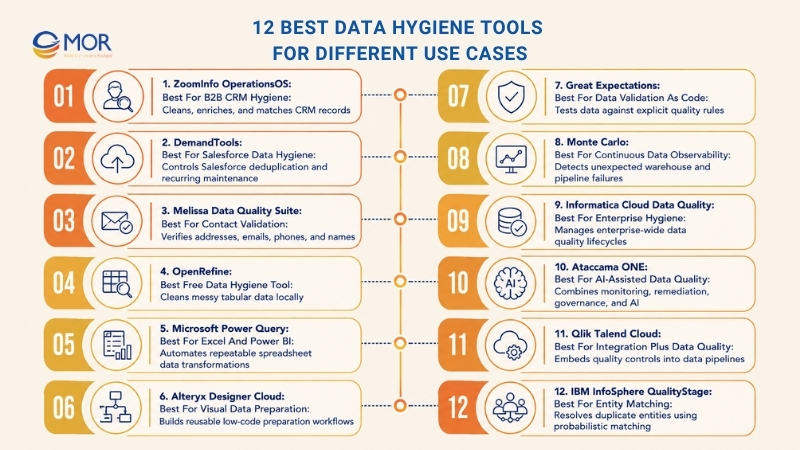
- The 12 options covered are ZoomInfo OperationsOS, DemandTools, Melissa Data Quality Suite, OpenRefine, Microsoft Power Query, Alteryx Designer Cloud, Great Expectations, Monte Carlo, Informatica Cloud Data Quality, Ataccama ONE, Qlik Talend Cloud, and IBM InfoSphere QualityStage.
- Strong data hygiene combines prevention, validation, deduplication, standardization, enrichment, monitoring, ownership, and measurable quality targets.
What Is Data Hygiene Tool?
A data hygiene tool is software that finds, prevents, corrects, validates, enriches, or monitors inaccurate and outdated records. Unlike a one-time cleanup script, data hygiene tools support recurring controls that keep data usable as people change jobs, systems sync, forms collect new records, and business rules change.
The term belongs to database and business-data management in this article. A hand hygiene data collection tool, for comparison, records healthcare compliance activity and belongs to a different software use case.
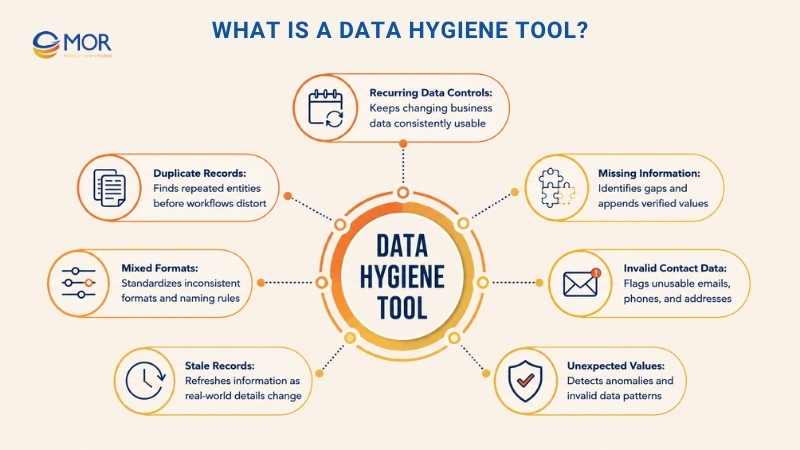
Common problems these tools address include:
- Duplicate records: Matching logic finds repeated customers, contacts, companies, products, or other entities before duplicates distort reports and workflows.
- Missing information: Enrichment or validation processes identify empty fields and may append verified values from trusted sources.
- Invalid contact data: Email, phone, postal address, and domain checks flag records that sales and marketing teams can’t use.
- Mixed formats: Standardization aligns dates, phone formats, country values, abbreviations, casing, and naming rules.
- Stale records: Continuous refresh processes update information that has changed since the record entered the system.
- Unexpected values: Rules and anomaly monitoring catch invalid ranges, schema changes, unusual null rates, and other departures from expected patterns.
You’ll also see the term data cleansing tools used across the same market. Cleansing usually refers to fixing current errors, whereas hygiene covers the wider routine that keeps those errors from returning.
12 Best Data Hygiene Tools for Different Use Cases
The best data hygiene tools solve different failure points. ZoomInfo OperationsOS and DemandTools work close to CRM records, OpenRefine and Power Query suit hands-on cleanup, and platforms like Informatica, Ataccama ONE, and Qlik Talend Cloud address quality across larger data estates.
The comparison below gives you the quick read. Pricing reflects publicly available vendor information checked in August 2026, but enterprise quotes can change with usage, data volume, modules, and deployment.
Tool | Best For | Technical Level | Deployment / Workflow | Pricing Approach |
ZoomInfo OperationsOS | B2B CRM hygiene | Intermediate | CRM and GTM workflows | Contact sales |
DemandTools | Salesforce data hygiene | Intermediate | Salesforce-focused | Contact sales |
Melissa Data Quality Suite | Contact validation | Intermediate | APIs, web services, on-premise | PAYG and subscriptions |
OpenRefine | Free tabular cleanup | Beginner to intermediate | Local desktop | Free, open source |
Microsoft Power Query | Excel and Power BI | Beginner to intermediate | Microsoft data workflows | Included in supported Excel editions |
Alteryx Designer Cloud | Visual data preparation | Intermediate | Cloud and desktop analytics workflows | From $250/user/month, billed annually |
Great Expectations | Validation as code | Technical | Data pipelines and GX Cloud | Free Developer plan, custom paid tiers |
Monte Carlo | Continuous data observability | Intermediate to technical | SaaS monitoring | Credit and monitor-based |
Informatica Cloud Data Quality | Enterprise hygiene | Intermediate to technical | Cloud data quality | Consumption-based |
Ataccama ONE | AI-assisted data quality | Intermediate to technical | Cloud, hybrid, on-premise | Custom pricing |
Qlik Talend Cloud | Integration plus data quality | Technical | Cloud and hybrid data pipelines | Capacity-based |
IBM InfoSphere QualityStage | Entity matching | Technical | Cloud or on-premise | Subscription / custom |
ZoomInfo OperationsOS: Best for B2B CRM Hygiene
ZoomInfo OperationsOS fits B2B sales, marketing, and revenue operations teams that depend on accurate contact and company records. Its data-management capabilities cover deduplication, normalization, enrichment, account matching, and routing, so cleaned records can move directly into GTM workflows.
This focus makes ZoomInfo one of the stronger data hygiene tools for sales teams. It also fits companies comparing AI automation tools for sales data cleaning pipeline hygiene, since matching and record maintenance connect directly to lead assignment, account hierarchy, and segmentation.
Why We Picked ZoomInfo OperationsOS
We picked ZoomInfo because its hygiene functions stay close to revenue activity. Deduplication can work across objects, matching criteria remain configurable, and lead-to-account or contact-to-account matching helps keep related CRM records tied to the right company.
The platform also supports enrichment and normalization behind the scenes. ZoomInfo reports that Tradeshift used OperationsOS for ongoing enrichment and normalization as its database grew, rather than relying on periodic manual fixes.
Pricing
ZoomInfo doesn’t publish a fixed OperationsOS price on its public product pages. Buyers are directed to speak with a specialist for a quote.
Core Hygiene Functions
- Contact and company data cleansing
- Duplicate detection and record merging
- CRM enrichment
- Address, website, and phone normalization
- Lead-to-account matching
- Contact-to-account matching
- Account hierarchy management
- Routing and segmentation support
Pros and Cons
Pros | Cons |
Strong alignment with B2B CRM and RevOps workflows | Broader than teams that only need spreadsheet cleanup |
Connects hygiene with enrichment and account matching | Public pricing isn’t listed |
Supports recurring CRM maintenance | Best value depends on how central CRM data is to revenue operations |
DemandTools: Best for Salesforce Data Hygiene
DemandTools centers on Salesforce data maintenance. Validity positions it as a CRM data-management platform covering deduplication, standardization, mass updates, imports, exports, and recurring quality tasks.
For Salesforce administrators dealing with duplicate Contacts, inconsistent state values, mixed phone formats, or bulk ownership changes, the tool provides much more control than editing individual records. It also supports scheduled jobs for routine maintenance.
Why We Picked DemandTools
We picked DemandTools because Salesforce data hygiene often requires more than duplicate removal. Validity’s own material covers standardization, mass modification, lead conversion, import/export work, and automated maintenance alongside deduplication.
Its matching logic also goes beyond exact duplicates. DemandTools supports customizable dedupe scenarios, fuzzy matching, cross-field matching, and winning-record rules, which gives administrators more control over how records are consolidated.
Pricing
Validity currently directs DemandTools buyers to its sales team for enterprise access. DemandTools File Edition separately uses pay-as-you-go duplicate-processing credits, but that product serves file-based cleanup rather than the full Salesforce workflow.
Core Hygiene Functions
- Salesforce duplicate detection
- Fuzzy and cross-field matching
- Record merging
- Bulk field updates
- Data standardization
- Scheduled maintenance jobs
- Import and export operations
- Winning-record and field selection rules
Pros and Cons
Pros | Cons |
Built around Salesforce administration workflows | Less relevant outside Salesforce-centered environments |
Detailed dedupe and merge controls | Enterprise pricing requires sales contact |
Supports recurring standardization and mass updates | Admin teams still need sound merge rules before automating jobs |
Melissa Data Quality Suite: Best for Contact Validation
Melissa Data Quality Suite focuses on contact data. It validates and standardizes postal addresses, phone numbers, email addresses, and names, with coverage for more than 250 countries and deployment through web services or on-premise APIs.
That scope suits customer databases where failed outreach starts with inaccurate contact fields. Teams can place validation at data entry or run it in batch against existing records.
Why We Picked Melissa Data Quality Suite
We picked Melissa for its depth across contact verification. Email checks cover domain, syntax, spelling, and SMTP signals, while phone services can authenticate mobile and landline numbers. Address services also correct and standardize postal records.
Its deployment choices add flexibility for companies that can’t send sensitive data through a cloud-only workflow. REST, JSON, and XML web services sit alongside on-premise APIs for Windows and other supported environments.
Pricing
Pricing varies by service and record volume. For example, Melissa lists U.S. Address Verification PAYG from $40 for 10,000 credits, while Global Address Verification starts with a free 250-record monthly tier and paid subscriptions from $40 per month for 1,000 records.
Core Hygiene Functions
- Postal address verification
- Email validation
- Phone verification
- Name parsing and verification
- Address standardization
- Contact-data correction
- Point-of-entry validation
- Batch processing
Pros and Cons
Pros | Cons |
Strong depth across contact verification | Pricing varies across separate services |
Supports cloud and on-premise deployment | Less suited to warehouse observability |
Works well for forms, CRM records, and batch files | Broader data-pipeline governance needs another platform |
OpenRefine: Best Free Data Hygiene Tool
OpenRefine is a free, open-source application for messy tabular data. It works locally and gives users faceting, clustering, transformation, reconciliation, and operation-history tools for cleaning datasets without building a custom application.
Among data cleansing tools open source users can adopt directly, OpenRefine remains one of the most accessible. It suits analysts, researchers, and operations teams working with CSV files, inconsistent categories, repeated names, or mixed text values.
Why We Picked OpenRefine
We picked OpenRefine because its clustering engine handles one of the most frustrating manual tasks: finding values that look different but may mean the same thing. Users can merge similar spellings, filter large datasets through facets, and match records against external databases through reconciliation services.
It also records the cleaning history. That means a user can roll back changes or replay the same operation sequence on a new version of the dataset.
Pricing
OpenRefine is free and open source. Data is processed on the user’s machine unless the user connects external services.
Core Hygiene Functions
- Faceting and data inspection
- Similar-value clustering
- Bulk value correction
- Data transformation
- Reconciliation with external databases
- Operation history
- Undo and redo
- Local tabular-data processing
Pros and Cons
Pros | Cons |
Free and open source | Limited always-on automation |
Strong clustering for messy text values | Not built as a CRM enrichment platform |
Local processing suits focused cleanup work | Large recurring pipelines need extra tooling |
Microsoft Power Query: Best for Excel and Power BI
Power Query is built into supported Excel editions and helps users connect, transform, combine, load, and refresh data. Microsoft records each transformation as an applied step, so a cleanup sequence can run again when source data changes.
That makes it a natural choice for teams looking for data cleansing tools in Excel. Monthly reports, exported transaction files, inventory sheets, and recurring finance data can follow the same transformation logic instead of being corrected manually every cycle.
Why We Picked Microsoft Power Query
We picked Power Query because it turns common spreadsheet cleanup into a repeatable process without forcing business users into Python or SQL. Removing columns, changing data types, filtering rows, merging tables, and combining sources all become stored steps.
Refresh is the practical advantage. Once the query is set, the same steps run again against updated source data, which cuts the chance that someone forgets one manual correction.
Pricing
Power Query isn’t sold as a separate Excel product. Microsoft lists it as available across supported Excel versions, including Microsoft 365, Excel 2024, Excel 2021, Excel 2019, and Excel 2016, with capability differences by platform.
Core Hygiene Functions
- Data-type correction
- Column removal and splitting
- Value replacement
- Table merging
- Source combination
- Filtering and reshaping
- Applied-step history
- Query refresh
Pros and Cons
Pros | Cons |
Familiar choice for Microsoft users | Limited enterprise entity resolution |
Repeatable transformations replace recurring manual edits | Governance depth depends on the wider Microsoft stack |
Works well for spreadsheet and BI preparation | Complex rules can require M language knowledge |
Alteryx Designer Cloud: Best for Visual Data Preparation
Alteryx Designer Cloud gives analysts a visual way to prepare, combine, and analyze data. The current Alteryx platform supports browser-based and desktop experiences, and its visual workflow model lets users build preparation steps without writing every transformation in code.
It fits teams that have outgrown Excel but still want a low-code workflow. Analysts can prepare larger recurring datasets, blend sources, and save logic for repeated processing.
Why We Picked Alteryx Designer Cloud
We picked Alteryx because its drag-and-drop model makes repeatable data preparation easier for analysts who don’t work primarily in Python or SQL. Alteryx positions the platform around preparation, blending, analytics, and reusable workflows across cloud and desktop setups.
The visual approach also makes a workflow easier to inspect. Each preparation stage stays visible, which is useful when teams need to review how raw data became report-ready data.
Pricing
Alteryx One Starter Edition currently starts at $250 per user per month, billed annually. Alteryx describes this tier for small teams working with basic business analytics and flat files.
Core Hygiene Functions
- Visual data preparation
- Source blending
- Field transformation
- Data profiling
- Repeatable workflow creation
- Flat-file preparation
- Cloud and desktop processing
- Workflow sharing on higher plans
Pros and Cons
Pros | Cons |
Visual interface lowers the coding barrier | Higher entry cost than spreadsheet tools |
Strong fit for reusable analyst workflows | More platform than occasional file cleanup needs |
Handles preparation and analytics in one environment | Some governance and deployment capabilities require higher tiers |
Great Expectations: Best for Data Validation as Code
Great Expectations, or GX, approaches hygiene through explicit rules called Expectations. An Expectation is a verifiable assertion about data, and teams can group these rules into suites and run them against batches in a validation workflow.
This is a different job from visual record correction. GX suits data engineers who want to catch nulls, schema changes, uniqueness failures, invalid ranges, and broken business rules before poor-quality data reaches downstream systems.
Why We Picked Great Expectations
We picked GX because it turns hidden assumptions into testable rules. Teams can validate uniqueness, schema structure, data types, ranges, and relationships, then use validation results in scheduled or pipeline-based processes.
That approach works well when data quality belongs inside engineering delivery. Teams reviewing AI tools for project data hygiene may also find GX Cloud’s AI-enabled recommendations useful, but the main strength remains controlled validation rather than autonomous record repair.
Pricing
GX Cloud has a free Developer plan with up to five validated data assets per month and three users. Team and Enterprise plans use custom pricing.
Core Hygiene Functions
- Expectation-based validation
- Schema checks
- Null checks
- Uniqueness validation
- Range and pattern validation
- Integrity checks
- Validation results
- Pipeline-triggered actions
Pros and Cons
Pros | Cons |
Quality rules stay explicit and testable | Requires technical skills |
Strong fit for CI/CD and data pipelines | Doesn’t act as a visual record-cleaning workspace |
Free Developer tier lowers entry cost | Teams must define what valid data means |
Monte Carlo: Best for Continuous Data Observability
Monte Carlo focuses on data observability rather than direct cleansing. Its monitoring model tracks freshness, distribution, volume, schema, and lineage, which helps teams catch unexpected failures across warehouses and pipelines.
This suits teams that already run production data stacks and need to know when something changes outside the rules they wrote in advance. A stale table, sudden row-count drop, schema change, or abnormal field distribution can trigger investigation.
Why We Picked Monte Carlo
We picked Monte Carlo because rule-based validation alone can miss new failure patterns. Its automated monitors cover freshness, volume, and schema, while lineage shows which upstream and downstream assets connect to an incident.
Root-cause information is another strong point. Instead of only telling a team that a table looks wrong, Monte Carlo links anomalies with related data assets and possible sources of failure.
Pricing
Monte Carlo uses credits and monitor consumption. Its Start tier supports up to 1,000 monitors and 10 users, while Scale and Enterprise expand integrations, API limits, security, and governance. Public dollar amounts aren’t listed.
Core Hygiene Functions
- Freshness monitoring
- Volume monitoring
- Schema monitoring
- Distribution checks
- Data lineage
- Incident triage
- Root-cause analysis
- Automated anomaly detection
Pros and Cons
Pros | Cons |
Finds unexpected production-data failures | Primarily detects problems rather than fixing records |
Strong lineage and incident investigation | Pricing requires a sales conversation |
Fits modern warehouses and lakehouses | Overbuilt for one-time spreadsheet cleanup |
Informatica Cloud Data Quality: Best for Enterprise Hygiene
Informatica Cloud Data Quality covers profiling, cleansing, standardization, validation, enrichment, deduplication, and observability across enterprise data. It sits inside Informatica’s broader Intelligent Data Management Cloud, so quality can connect with governance, cataloging, integration, and MDM.
Companies comparing enterprise-grade customer data hygiene tools should consider Informatica when data quality extends well past the CRM. The platform is designed for organizations where the same records move into analytics, operations, AI systems, regulatory reporting, and customer applications.
Why We Picked Informatica Cloud Data Quality
We picked Informatica for the breadth of its quality lifecycle. Profiling finds data issues, built-in transformations handle standardization and deduplication, and AI-driven functions support anomaly detection and rule generation.
Its reusable rule model also suits large organizations. Teams can apply common quality logic across many data sources instead of rebuilding the same checks for each application.
Pricing
Informatica uses consumption-based pricing for Data Quality and Observability, so customers pay according to resources used rather than a single public seat price.
Core Hygiene Functions
- Data profiling
- Data cleansing
- Standardization
- Validation
- Enrichment
- Deduplication
- Data-quality monitoring
- AI-assisted rule generation
Pros and Cons
Pros | Cons |
Covers a wide enterprise data-quality lifecycle | More setup than point tools |
Connects quality with governance and integration | Internal administration skills may be required |
Consumption model fits varying usage patterns | Small teams may not need the wider platform |
Ataccama ONE: Best for AI-Assisted Data Quality
Ataccama ONE combines data quality, observability, lineage, cataloging, reference data, and remediation. The ONE AI Agent can assist with rule creation and broader quality workflows, while no-code transformation plans handle standardization and cleansing.
The platform targets companies that want quality controls tied to ownership and governance. It can also validate data at entry through APIs and place quality rules inside pipelines, which pushes hygiene closer to the source.
Why We Picked Ataccama ONE
We picked Ataccama because it connects detection with remediation. Users can monitor quality, identify failing records, compare and merge records, assign issues, correct data, and re-evaluate results inside the same product family.
Its AI direction is also substantial. Recent 2026 releases added AI-assisted alert assessment, pipeline observability, and data-product trust signals, making Ataccama relevant for mature teams preparing governed data for AI use.
Pricing
Ataccama doesn’t publish a standard list price for ONE. Buyers are directed to request a discovery call or product discussion.
Core Hygiene Functions
- AI-assisted rule creation
- Data-quality monitoring
- Standardization and cleansing
- Data remediation
- Record comparison and merging
- Pipeline observability
- Reference data management
- Governance and lineage
Pros and Cons
Pros | Cons |
Connects monitoring, correction, and governance | Scope can exceed smaller teams’ needs |
Strong AI-assisted quality workflow | Public pricing isn’t listed |
Supports entry-time and pipeline validation | Adoption works best when ownership processes already exist |
Qlik Talend Cloud: Best for Integration Plus Data Quality
Qlik Talend Cloud combines data integration, quality, and governance. Qlik positions the platform around trusted data pipelines, quality rules, stewardship, lineage, and reusable data products rather than treating cleaning as a detached activity.
That approach fits organizations where quality problems start during data movement. Records may begin clean in a source system and become inconsistent after ETL jobs, transformations, joins, or movement across warehouses.
Why We Picked Qlik Talend Cloud
We picked Qlik Talend Cloud because data integration and quality sit in the same operating model. Automated profiling can identify quality issues, and Qlik’s governance functions connect those issues with stewardship and reusable data assets.
The platform also works across cloud and client-managed deployment patterns. That makes it relevant when an organization has a mix of modern cloud data and systems it still manages directly.
Pricing
Qlik Talend Cloud uses a capacity model based around factors including data moved, job executions, and job duration. Enterprise pricing requires contact with Qlik.
Core Hygiene Functions
- Automated data profiling
- Data integration
- ETL and ELT workflows
- Quality rules
- Data stewardship
- Lineage
- Governed data products
- Quality controls inside pipelines
Pros and Cons
Pros | Cons |
Connects quality work directly to data movement | Too broad for basic CRM cleanup |
Supports governance and stewardship | Technical teams usually own deployment |
Capacity model aligns cost with usage | Pricing isn’t expressed as a simple public monthly amount |
IBM InfoSphere QualityStage: Best for Entity Matching
IBM InfoSphere QualityStage is built for profiling, standardization, probabilistic matching, enrichment, and record consolidation. IBM positions it as part of a wider information-integration platform, with deployment choices across cloud and on-premise environments.
Its strongest fit is entity resolution. Matching logic can identify records that refer to the same customer, supplier, location, or product even when values aren’t identical.
Why We Picked IBM InfoSphere QualityStage
We picked QualityStage for its depth in standardization and probabilistic matching. IBM’s Match Designer lets technical teams build and test match specifications that identify duplicate entities across one or more files.
That makes it particularly useful before MDM work. IBM documents direct use of QualityStage standardization and matching within InfoSphere MDM, which supports teams building trusted master records across complex source systems.
Pricing
IBM supports subscription pricing and flexible cloud or on-premise deployment, but it doesn’t publish one standard list price for QualityStage. Buyers need an IBM quote based on deployment and capacity.
Core Hygiene Functions
- Data profiling
- Standardization
- Probabilistic matching
- Entity resolution
- Duplicate identification
- Record consolidation
- Data enrichment
- Information-governance support
Pros and Cons
Pros | Cons |
Strong match logic for complex entities | Requires more technical skill than self-service cleaners |
Good fit for MDM and regulated data estates | Pricing requires a quote |
Supports cloud and on-premise deployment | Smaller teams may find the platform too heavy |
Core Capabilities to Look for in Data Hygiene Tools
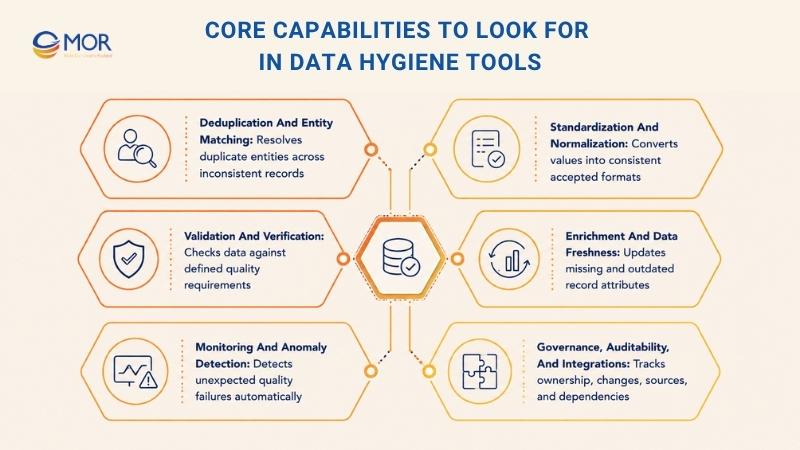
Tool lists become easier to evaluate once you map each product against the actual failure modes in your data. The strongest data hygiene tools cover enough of the hygiene lifecycle to stop bad records, fix existing issues, and show whether quality stays within target.
Deduplication and entity matching
Deduplication starts with exact matches but quickly becomes harder. “Acme Inc.”, “ACME Incorporated”, and “Acme, Inc” may represent the same organization, yet basic equality rules treat them as separate values.
Look for fuzzy matching, configurable thresholds, cross-field comparison, entity resolution, and survivorship rules. Golden-record logic also matters when several systems disagree about the same customer attribute.
Standardization and normalization
Standardization turns different representations into one accepted form. Dates, international phone numbers, postal addresses, country codes, company names, abbreviations, casing, and naming conventions are common targets.
Consistency becomes more valuable once records move across applications. One system writing “United States” and another writing “US” can break joins, segmentation, routing, and analytics unless a shared rule normalizes them.
Validation and verification
Validation tests whether incoming or stored data follows a defined requirement. Email syntax, phone reachability, address validity, required fields, numeric ranges, referential integrity, and schema rules fall into this group.
The right controls depend on the record. A sales CRM needs live contact channels, whereas an analytics pipeline may care more about null limits, unique keys, type consistency, and relationships between tables.
Enrichment and data freshness
Incomplete data weakens segmentation and scoring. Enrichment appends missing values or refreshes stale attributes using trusted internal or third-party sources.
Freshness needs a schedule. Job titles, employer names, addresses, firmographic values, and phone numbers age at different rates, so one yearly cleanup often leaves large gaps between refresh cycles.
Monitoring and anomaly detection
Rules catch known errors. Monitoring fills the gap when the failure pattern hasn’t been defined yet.
Watch freshness delays, sudden null-rate changes, schema drift, unusual record volume, distribution changes, and broken upstream jobs. These signals become especially useful in custom AI and analytics pipelines where unexpected upstream changes can quietly alter outputs.
Governance, auditability, and integrations
A data issue needs an owner, history, and correction path. Enterprise systems should show who changed a value, which rule triggered, which source created the record, and what downstream assets depend on it.
API support also deserves close review. CRM connectors, warehouse connections, ETL integrations, webhooks, and audit logs decide how well the product fits the wider stack rather than becoming another isolated 'cleanup island.'
How to Choose the Right Data Hygiene Tool?
Start with the failure you want to stop. Buyers often compare long capability lists, yet the right tools to clean data depend more on the system, record type, update frequency, and people responsible for correction.
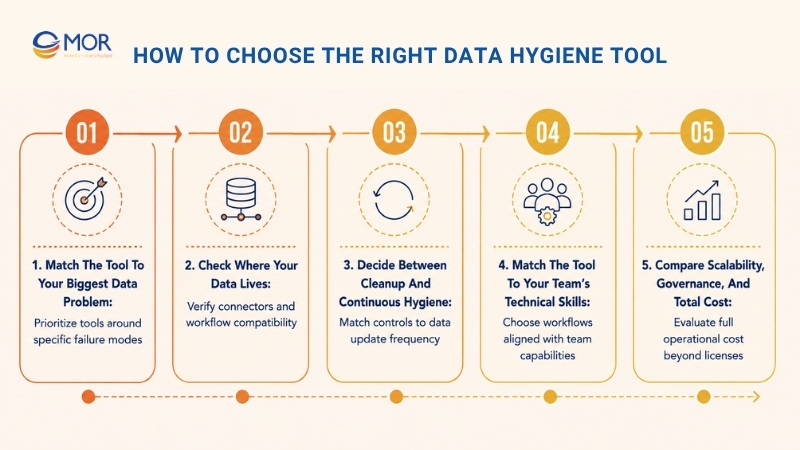
Match the tool to your biggest data problem
Duplicates point toward matching and merge tools. Dead email addresses need contact verification, whereas missing company attributes call for enrichment.
Pipeline freshness failures sit closer to observability. Governance-heavy programs need ownership, lineage, controls, and audit history along with record correction.
Check where your data lives
Salesforce users should examine CRM-native access, object support, field mappings, merge logic, and scheduled processes. Excel teams need reusable transformations that business users can maintain without a development queue.
Snowflake, BigQuery, Databricks, PostgreSQL, and other database teams should check connector depth, pushdown processing, API access, alerting, and pipeline compatibility. A product may support a data source but still lack the workflow you need around it.
Decide between cleanup and continuous hygiene
One-time cleanup works for a migration, acquisition, import, or isolated dataset. Ongoing CRM and pipeline operations need repeated checks because new records keep entering after the cleanup ends.
Real-time validation blocks bad input earlier. Scheduled sweeps catch decay later, and observability detects unexpected changes between planned checks.
Match the tool to your team’s technical skills
Business users usually work faster in visual interfaces. RevOps and Salesforce administrators need direct control over CRM objects, match rules, bulk changes, and scheduling.
Data engineers often prefer code-driven tests and pipeline hooks. Governance teams need scorecards, ownership, policy mapping, remediation, and audit trails that non-developers can follow.
Compare scalability, governance, and total cost
License price rarely tells the full story. Add implementation, connectors, training, admin time, engineering work, processing volume, storage, remediation labor, and support.
A cheap tool becomes expensive when every run takes hours of manual review. An enterprise platform can also be wasteful when a small operations team only needs to fix duplicate CSV records once a month.
Data Hygiene KPIs and ROI to Track
Data hygiene tools need measurable targets. A lower duplicate rate or faster correction time means more when you can tie it to lead routing, reporting quality, campaign delivery, analyst time, or fewer manual fixes.
KPI | What It Measures | Example Calculation | Why It Matters |
Duplicate rate | Repeated records | Duplicate records / total records | CRM and reporting accuracy |
Completeness rate | Required fields populated | Populated required fields / total required fields | Segmentation and enrichment |
Validation failure rate | Invalid values | Failed checks / total checks | Entry quality |
Email bounce rate | Invalid contact data | Hard bounces / emails sent | Deliverability |
Data freshness age | Time since verification | Average days since last verification | Decay control |
Enrichment match rate | Records successfully enriched | Matched records / submitted records | Provider performance |
Time to resolution | Repair speed | Average time per issue | Team workload |
Cost per clean record | Cleaning economics | Tool + labor cost / corrected records | ROI comparison |
Don’t stop at the quality metric itself. Link a lower bounce rate to usable campaign reach, a lower duplicate rate to cleaner forecasting, and better routing accuracy to speed-to-lead.
Cost per clean record is useful when comparing manual and automated approaches. It exposes a common trap: a free license can still cost more if analysts spend days fixing data by hand.
Choose MOR Software for Data Hygiene Solutions
MOR Software supports companies whose data problems start inside disconnected CRM AI integration platforms, legacy applications, APIs, and internal workflows. Its relevant services include Salesforce Development, IT Consulting, custom software outsourcing, Offshore Development, QC and Testing, and custom software work, backed by project-based and ODC delivery models.
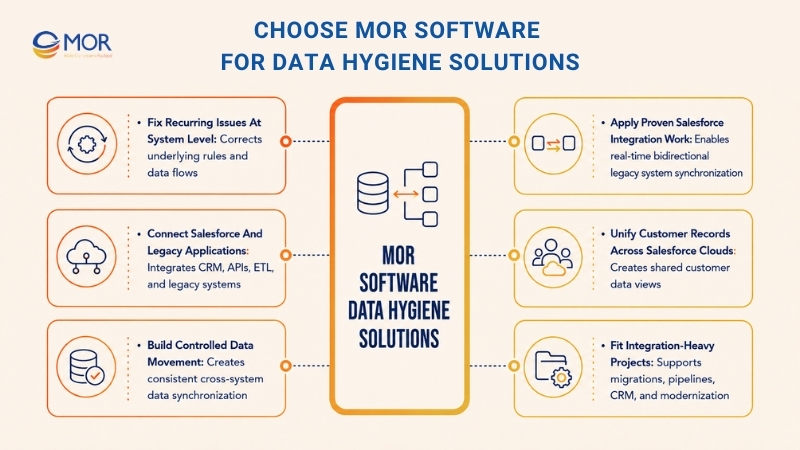
- Fix recurring issues at the system level: MOR Software can address cases where duplicate, stale, or inconsistent records keep returning because applications don’t share the same business rules or data flow. Its IT Consulting scope includes business analysis, software architecture consulting, technology consulting, application modernization, infrastructure management, and Process Quality Assurance consulting.
- Connect Salesforce and legacy applications: MOR’s Salesforce service covers consulting, implementation, development, integration, management, maintenance, customization, migration, and third-party connections. The team works with Salesforce technologies including Apex, Lightning Web Components, Visualforce, APIs, ETL, and cloud services.
- Build controlled data movement: Integration projects can use API Gateway, ETL, AWS services, Salesforce, Node.js, Java, Python, C#, .NET, and other components already represented in MOR Software’s engineering stack and case studies. The goal is consistent movement between systems rather than repeated manual repair.
- Apply proven Salesforce integration work: MOR Software integrated a Japanese client’s legacy PitTouch system with Salesforce through API Gateway and ETL. The 15-month project involved 18 team members and delivered real-time bidirectional synchronization with improved data accuracy and simpler management.
- Unify customer records across Salesforce clouds: Another MOR project customized Sales Cloud, Service Cloud, Experience Cloud, and Account Engagement to bring customer data from marketing activities into a shared customer view. Apex, LWC, Aura, and Visualforce supported the implementation.
- Fit integration-heavy projects: MOR Software is suited to companies migrating old systems, rebuilding CRM workflows, connecting internal applications, creating custom data pipelines, or adding an offshore engineering team to a long-running data program.
Map where your records become duplicated, stale, or inconsistent before buying another cleanup product. Then contact MOR Software to discuss the right mix of Salesforce integration, IT consulting, custom development, and QA for your data flow.
Conclusion
Reliable data requires continuous control over entry, movement, correction, and monitoring. The right data hygiene tools depend on your stack, data type, team skills, and where errors begin. Compare products against real failure modes rather than long capability lists. If disconnected systems or Salesforce integrations keep creating inconsistent records, MOR Software can help redesign the data flow, build the required integrations, and test the result. To discuss the right approach for your project, contact MOR Software today.
"Evolution is not a destination, it is a disciplined journey of innovation."
Phung Van Tu


CEO MOR AI
MOR SOFTWARE
Frequently Asked Questions (FAQs)
What is a data hygiene tool?
A data hygiene tool keeps business data accurate, complete, consistent, current, and free of unwanted duplicates. It may validate new records, repair existing ones, standardize formats, enrich missing fields, merge duplicates, or monitor quality over time.
Different products cover different parts of that process. CRM tools focus on customer records, file-based products clean tables, and enterprise platforms manage quality across databases, pipelines, and business applications.
What is the difference between data hygiene and data cleaning?
Data cleaning is a corrective activity. You find bad records, repair or remove them, and produce a cleaner dataset.
Data hygiene is the recurring operating practice around that work. It includes prevention, validation, standards, scheduled cleanup, enrichment, monitoring, ownership, and quality measurement.
What is the AI tool used for data hygiene?
There isn’t one universal AI data-hygiene product. Ataccama ONE uses AI to support rule creation, monitoring, detection, and remediation, whereas Informatica applies AI to issue detection and rule generation across enterprise data.
Monte Carlo takes another path through learned baselines and anomaly detection. The right product depends on whether you need record repair, quality rules, observability, CRM enrichment, or governance.
How do I choose the right data hygiene tool for my organization?
Start by identifying the data problem and its source system. Duplicate Salesforce records point toward a CRM tool, whereas schema drift in Snowflake points toward pipeline monitoring or observability.
Then check user skills, integration depth, volume, correction workflow, governance needs, and total cost. A pilot using a representative dirty dataset will expose gaps much faster than a vendor capability checklist.
Is Excel a data hygiene tool?
Excel itself is a spreadsheet application, but it includes functions that support data cleaning. Power Query adds a much stronger preparation layer for importing, changing types, removing errors, splitting fields, combining sources, and replaying saved transformations.
For recurring spreadsheet work, Power Query can cover a large share of routine hygiene. Large governed databases usually need stronger validation, matching, monitoring, and audit controls.
Can data hygiene tools automatically remove duplicates?
Yes. Many products detect duplicates through exact matching, fuzzy matching, cross-field rules, or probabilistic entity resolution.
Automatic merging needs careful survivorship rules. Your system must know which source wins when two records disagree about an email, address, company name, account owner, or other field.
Can data hygiene tools verify emails and phone numbers?
Yes, contact-focused systems can check email syntax, domain status, mailbox signals, phone validity, address information, and related attributes. Melissa, for example, specializes heavily in contact verification.
Broader enterprise quality platforms may validate fields through rules but won’t always provide the same external verification data. Check what 'validation' actually means before comparing products.
What should enterprises look for in data hygiene software?
Enterprise buyers should examine scalability, data lineage, permissions, audit history, APIs, remediation, data residency, integration coverage, MDM support, quality scorecards, and governance.
Security also belongs in the evaluation. The product will often touch customer, employee, transaction, and operational records, so access controls and deployment choices need to match internal policy.
How do you measure ROI from data hygiene tools?
Track the business cost before and after implementation. Useful measures include duplicate rate, bounce rate, completeness, freshness, correction time, routing accuracy, analyst hours, rework, and cost per clean record.
Then connect those metrics to outcomes. Fewer bad contacts lower wasted outreach, faster resolution saves staff time, and cleaner account matching gives sales and finance teams more reliable pipeline reports.
Is SQL a data cleaning tool?
SQL is a query language rather than a dedicated cleaning product. It can still perform a large amount of data-hygiene work through updates, joins, deduplication logic, null checks, type conversion, pattern matching, and validation queries.
SQL works well when the rules are known and the data already sits in a relational database. Visual review, enrichment, entity resolution, and anomaly monitoring often need other software around it.
Can ChatGPT do data hygiene?
ChatGPT can help draft SQL, Python, regular expressions, validation rules, mapping logic, cleaning plans, or transformation steps. It can also explain anomalies in sample data that you provide.
It shouldn’t become the uncontrolled source of truth for high-volume business records. Production hygiene still needs deterministic checks, trusted source data, permissions, testing, and a repeatable correction process.
How can I practice data hygiene?
Start with one business dataset and define what a valid record looks like. Set required fields, accepted formats, duplicate rules, verification cadence, ownership, and thresholds for missing or stale information.
Run the same checks on a schedule and record the results. Once the routine becomes stable, automate high-volume checks and keep human review for ambiguous merges or high-risk corrections.
Share


Make Our-Dreams Realized


© 2023 . MOR Software. All Rights Reserved
Sitemap
Privacy Policy
Terms of Use

Rate this article
0
over 5.0 based on 0 reviews
Your rating on this news:
Name
*Email
*Write your comment
*Send your comment
1