


How to Integrate AI CRM Integration Services to Slash Operational Costs by 30%
Many Japanese enterprises rely on CRM platforms like Salesforce, HubSpot, and Kintone, but growing workloads often lead to rising costs and inefficient manual processes. AI CRM Integration services offer a practical way to enhance existing systems with generative AI instead of replacing them. In one Japanese enterprise deployment, GenAI reduced CRM operating costs by 30% within a year. This guide by MOR Software will explore key use cases, benefits, and implementation steps for successful AI CRM adoption.
Key Takeaways
- Adding AI to an existing CRM helps teams cut manual logging, routing, and drafting without replacing Salesforce, HubSpot, Kintone, or custom CRM systems.
- A safer rollout starts with low-risk use cases like auto-summaries, field updates, and reviewable reply drafts before moving into Tier-1 AI agent frameworks.
- A 30% cost reduction can be realistic in mature cases, but teams need clear baselines, adoption data, and post-launch metrics to prove ROI.
Why Japanese Corporates Need AI CRM Integration Services
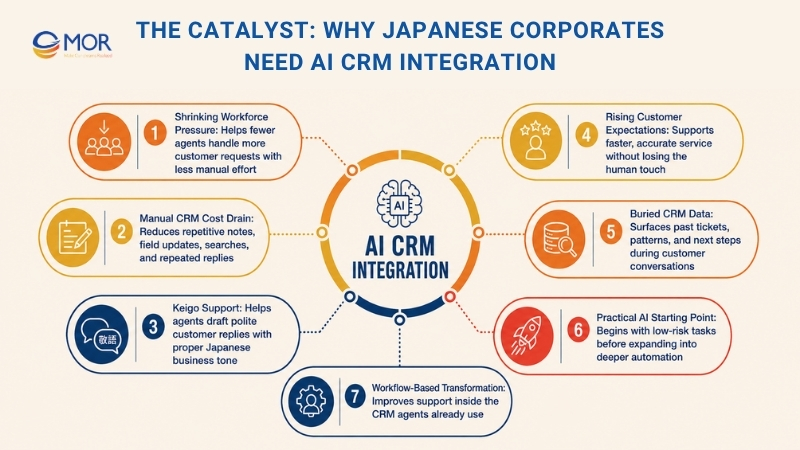
Japan’s large companies are under real pressure to serve more customers with fewer people. The push to Integrate AI CRM comes from daily work that has become too slow, too manual, and too hard to scale across busy service teams.
A shrinking workforce raises the pressure
Japan’s labor shortage is no longer a future concern. According to Japan’s Ministry of Internal Affairs and Communications, people aged 65 and older accounted for about 29% of the population in 2023, contributing to a steadily shrinking working-age population. When fewer agents must handle more tickets, every manual step starts to feel expensive. AI can take over repetitive CRM work like call summaries, ticket tags, routing notes, and follow-up reminders, so agents spend more time on real customer problems.
Manual CRM work quietly drains budget
Many companies already own strong CRM solutions, but staff still copy notes, update fields, search past cases, and write the same replies again and again. That is where CRM operational efficiency often breaks down. For example, Mitsubishi UFJ Financial Group (MUFG), which has explored generative AI tools to help employees draft documents, summarize information, and reduce routine administrative work. While the use cases extend beyond CRM alone, they highlight a common challenge across Japanese enterprises: valuable employee time is often consumed by repetitive information-processing tasks. A smarter CRM setup can remove small delays that happen hundreds or thousands of times each week, freeing agents to focus on higher-value customer interactions.
Keigo makes support harder to standardize
Japanese business communication needs the right tone, especially in customer service. A junior agent may understand the issue but still struggle to write a polished reply with proper keigo. A Generative AI CRM workflow can suggest polite drafts based on company style, past cases, and approved wording, while the human agent keeps final control.
Customer expectations keep rising
Japanese customers often expect fast replies, accurate details, and careful service. Research from Salesforce’s State of the Connected Customer report found that 88% of customers say the experience a company provides is as important as its products or services. AI coding assistant CRM tools help agents respond faster without rushing the human side of service, which matters in high-touch support.
Data sitting in the CRM is not enough
Many CRMs hold years of customer records, but the data often stays buried. Agents still need to search, compare, and interpret it by hand. When companies Integrate AI CRM, the system can read past tickets, find patterns, suggest next steps, and surface the right information during the conversation.
Enterprise AI implementation needs a practical starting point
Large companies should not jump straight into autonomous AI agents. A safer path starts with lower-risk tasks, such as auto-summaries, CRM field updates, and response drafts. Once the team proves value, they can expand into routing, Tier-1 automation, and more advanced decision support.
Japan corporate digital transformation needs workflow change
Many digital projects fail because they add a new tool without fixing the daily process. AI works best when it sits inside the current CRM, where agents already work. A real-world example is Fujitsu, which has incorporated generative AI capabilities into customer and employee support workflows to help staff access information and complete tasks more efficiently within existing business systems. The lesson is that value comes from improving the workflow itself, not from adding another standalone application. No extra tab. No copy-paste into outside tools. Just faster support inside the system the team uses every day.
For Japanese corporations, the reason to adopt AI in CRM is practical: fewer wasted minutes, better support quality, and less strain on agents. Done well, AI CRM Integration services turns an existing CRM from a record-keeping system into a working assistant for service, sales, and operations.
Step-by-Step AI CRM Integration Services Strategy
A good rollout starts with a simple rule: do not automate a broken process. Before Japanese teams Integrate AI CRM, they should check CRM data quality, privacy rules, access rights, knowledge-base content, and current service KPIs. That early work makes the rollout easier to measure and much safer to scale.
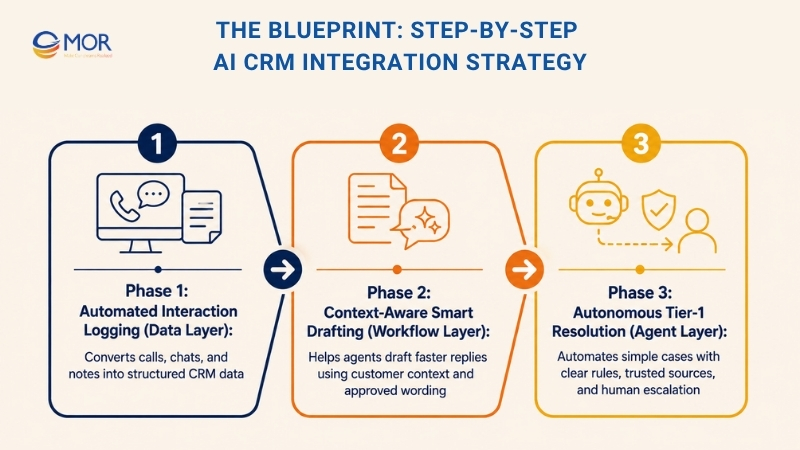
Phase 1: Automated Interaction Logging (Data Layer)
Manual logging is usually the first place CRM cost starts to leak. Agents finish a call, then spend several minutes writing notes, tagging issues, updating fields, and setting follow-up tasks. AI can take that slow admin work and turn it into structured CRM data within the same workflow.
- Secure API connection: The LLM connects to the CRM through approved APIs, not random copy-paste actions. This keeps customer data inside controlled systems and gives IT teams a clearer way to manage access, logs, and permissions.
- Call and chat transcription: The AI automation turns voice calls, chat threads, and service notes into searchable text. For busy support teams, this saves time and gives managers a cleaner record of what happened during each customer exchange.
- Structured CRM extraction: A strong setup does more than summarize. It pulls out customer intent, issue type, urgency, sentiment, product name, next action, follow-up needs, and escalation signals. That is where CRM operational efficiency starts to improve in a real, measurable way.
- Automatic field updates: The AI can suggest or update fields inside Salesforce, HubSpot, Kintone, or a custom CRM. Agents no longer need to click through the same fields after every call. Small savings add up fast when a team handles thousands of tickets each month.
- Human review for risky fields: Some fields should not update without approval. Complaint category, refund request, contract status, legal notes, and VIP customer labels should still pass through human review. A safe Enterprise AI implementation keeps control where it matters.
- Better handover between teams: When a case moves from Tier-1 support to a specialist, the AI-generated summary gives the next person a quick view of the issue. No one has to reread a long thread just to understand the basic story.
This phase is a smart starting point because it does not ask AI to make high-risk decisions. It removes repetitive CRM work, gives teams cleaner data, and builds trust before deeper automation begins.
Phase 2: Context-Aware Smart Drafting (Workflow Layer)
Once logging is under control, response drafting becomes the next clear target. Many agents spend a large part of the day writing similar replies with small changes. A reviewable AI assistant can help them write faster while staying close to brand voice, policy, and Japanese business tone.
- Drafts inside the CRM interface: The assistant should sit inside the CRM screen where agents already work. No extra tab. No outside chatbot. No copying sensitive customer data into an external tool. That simple design choice supports adoption and lowers data risk.
- Customer context in every reply: The AI reads the ticket history, customer profile, order status, past complaints, service level, and approved knowledge sources before drafting. The reply feels more relevant because it is based on the actual case, not a generic template.
- Keigo support for Japanese Japan service teams: Proper keigo can slow down new agents, especially when they handle complaints or formal requests. A Generative AI CRM workflow can suggest polite wording that fits the company’s tone, while the agent checks the final message before sending.
- Brand-aligned response patterns: Companies can train the assistant on approved phrases, product language, service rules, and escalation policies. This helps reduce the gap between senior and junior agents. A new staff member gets useful guidance without waiting for a manager to rewrite every reply.
- Human approval before sending: AI-generated replies should be treated as drafts. Agents remain responsible for final approval, especially when the case involves refunds, contracts, angry customers, personal data, legal wording, or high-value accounts.
- Faster internal notes: The assistant can also draft internal case notes, follow-up reminders, and manager summaries. These small writing tasks are easy to overlook, but they take real time across a large support team.
- Learning from edits: When agents revise AI drafts, those edits can show where the model needs better guidance. Maybe the tone is too stiff. Maybe the refund wording is too vague. Maybe the keigo sounds unnatural. Those patterns help improve the workflow over time.
This phase works best when teams treat AI as a writing partner, not a final decision-maker. The goal is faster drafting with better consistency, while human agents keep judgment, empathy, and accountability.
Phase 3: Autonomous Tier-1 Resolution (Agent Layer)
After the first two phases prove value, companies can move toward bounded AI agents. This is where AI CRM Integration services become more active. The CRM no longer only records and drafts. It can answer simple requests, check approved sources, and close low-risk cases when the rules are clear.
- RAG-based answers from approved sources: A RAG-driven agent pulls answers from trusted knowledge bases, CRM records, FAQ pages, policy documents, and product data. This lowers the risk of invented answers because the agent is grounded in approved content.
- Low-risk use cases first: Start with routine inquiries like order tracking, password reset guidance, business-hour questions, delivery status, invoice copy requests, and basic product details. These cases are repetitive, easy to define, and safer for early automation.
- Clear limits on what AI can resolve: The agent should not handle every Tier-1 ticket from day one. Sensitive cases, unclear requests, complaints, refund disputes, medical or financial issues, and emotional conversations need human handoff. Boundaries protect service quality.
- Human escalation built into the flow: A good AI agent knows when to stop. If confidence is low, data is missing, or the customer sounds upset, it should move the case to a human agent with a clean summary and suggested next step.
- CRM actions with permission checks: Some agents can read information only. Others may trigger a password reset, create a return request, or update ticket status. Each action needs role-based access, audit logs, and business rules before going live.
- Continuous monitoring after launch: Track containment rate, reopen rate, customer satisfaction, escalation accuracy, and agent override rate. A high containment rate means little if customers reopen the same issue later. Real quality shows up after the case is closed.
- Gradual scope expansion: Once the first set of use cases performs well, the team can add more workflows. This slow build is safer than launching broad automation too early. It also gives leaders better proof for AI CRM cost reduction.
Autonomous resolution can bring strong value, but only when the scope is tight and the handoff is clear. For Japanese enterprises, the best path is to Integrate AI CRM in layers: log first, draft next, then automate routine service only after the system has earned trust.
Overcoming Integration Hurdles in a Corporate Environment
Large companies rarely struggle with AI because the idea is weak. The hard part is fitting AI into rules, teams, systems, and service standards that already exist. For Japanese enterprises, the path works best when governance, user habits, and customer trust are built into the rollout from day one.
Data privacy needs more than a private cloud
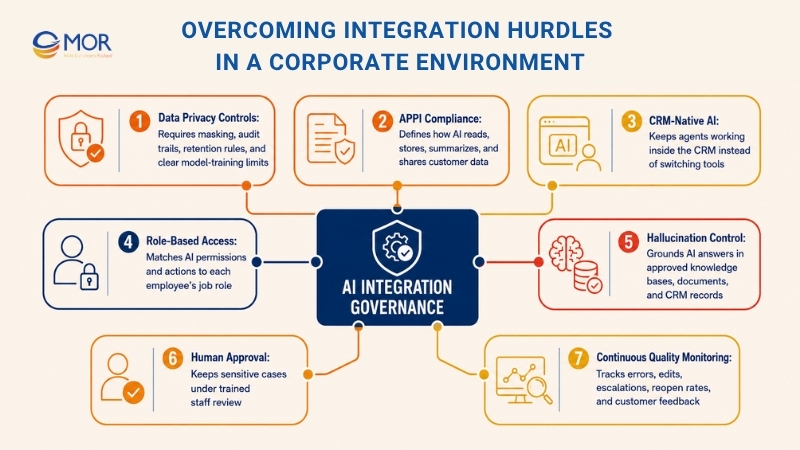
A private cloud or local LLM can help, but that alone is not enough. Teams also need role-based access, personal data masking, audit trails, retention rules, and clear limits on whether customer data is used for model training.
APPI compliance must sit inside the design
Japan’s Act on the Protection of Personal Information affects how customer records, call logs, chat messages, and support notes are handled. Before companies Integrate AI CRM, legal, IT, and business teams should agree on what data the AI can read, store, summarize, and pass to agents.
The AI should live inside the CRM
Adoption drops fast when agents need to jump between tools. The assistant should work inside Salesforce, HubSpot, Kintone, or the company’s custom CRM, where the team already manages cases. That also lowers the risk of staff copying customer data into outside AI tools.
Access rules should match real job roles
A Tier-1 agent, team leader, sales manager, and compliance officer should not see the same data or trigger the same AI actions. A careful enterprise AI platform maps permissions to job roles, then records who reviewed, edited, approved, or rejected each AI suggestion.
Hallucination control needs practical checks
AI responses should come from approved sources, not open-ended guesses. The system should use trusted knowledge bases, product documents, CRM records, and policy files. When confidence is low, the case should move to a human agent.
Human approval protects high-empathy service
Complaints, refunds, contract changes, legal wording, VIP customers, and emotional cases need human judgment. AI can prepare the context, suggest a reply, and pull policy references, but the final decision should stay with trained staff.
Quality monitoring must continue after launch
The work does not end when the model goes live. Teams should track wrong suggestions, agent edits, reopen rates, escalation accuracy, and customer feedback. When the knowledge base changes, the AI workflow should be tested again before agents rely on it.
Omotenashi still matters
Japanese customer service depends on care, timing, and tone. A good AI setup should protect that standard, not flatten every reply into a generic script. Keigo support, brand voice checks, and clear escalation paths help keep the service warm and human.
These risks are real, but they are manageable with the right setup. Strong AI CRM Integration services balance automation, governance, and customer experience, so the CRM becomes smarter without making the service feel careless.
The 30% ROI Breakdown: Where the Savings Come From
A 30% reduction in CRM operating costs should be treated as a case-specific result or a mature target scenario, best presented under 12-Month Post-Integration Metrics rather than as a guaranteed outcome. In Japan, it usually comes from small time savings repeated across thousands of tickets, calls, chats, and follow-ups. The real number depends on CRM data quality, adoption rate, workflow design, AI accuracy, and the cost of running the system.
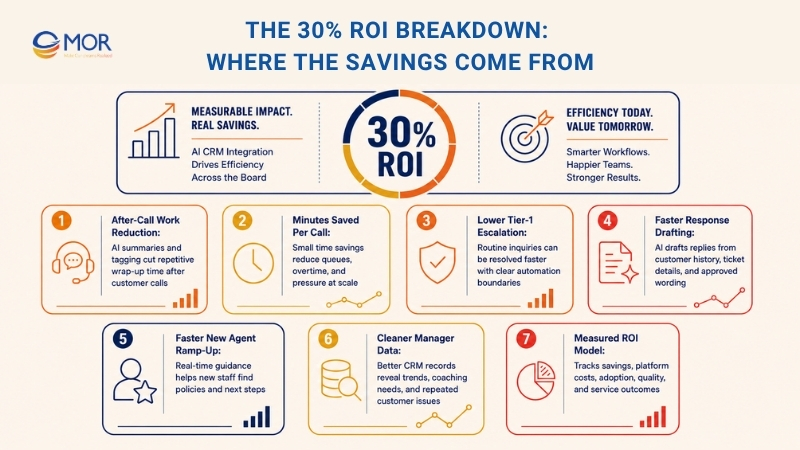
45% reduction in after-call work
In a strong rollout, AI-assisted summaries and tagging can cut after-call work by a large margin. A practical baseline might look like this: agents who once spent 10 minutes wrapping up a call may spend 5 or 6 minutes after the AI creates the summary, fills key fields, and suggests the next action.
5 to 10 minutes saved per call
This saving sounds small until the volume grows. A support center handling thousands of monthly calls can turn a few saved minutes into lower overtime, shorter queues, and better agent capacity. That is where AI CRM cost reduction starts to show up in finance reports.
25% drop in Tier-1 ticket escalation
The strongest gains usually come from routine, knowledge-based inquiries. Order tracking, password reset guidance, business-hour questions, invoice copy requests, and basic status updates are good candidates. Sensitive or unclear cases should still move to human agents.
Faster response drafting
A Generative AI CRM workflow can draft replies based on customer history, ticket details, policy documents, and approved keigo patterns. Agents still review the message, but they no longer start from a blank screen every time.
Shorter time-to-productivity for new agents
Real-time AI guidance can help new staff find policy references, use approved wording, and choose the right next step inside the CRM. Instead of claiming every team can cut training from 4 weeks to 5 days, a safer metric is faster ramp-up time backed by actual performance data.
Cleaner data for managers
When AI captures intent, urgency, issue type, sentiment, and follow-up needs, managers get better CRM records. Cleaner data helps them spot process gaps, staff coaching needs, and repeated customer pain points without waiting for manual reports.
The cost side still matters
AI platform fees, integration work, cloud hosting, monitoring, training, and knowledge-base upkeep should be part of the ROI model. A serious AI CRM cost reduction plan counts these costs before claiming savings.
Measure before and after
Track average handle time, after-call work, escalation rate, reopen rate, first-contact resolution, CSAT, agent adoption, and cost per ticket. Without a baseline, the 30% figure becomes a nice headline but a weak business case.
The savings come from compounding micro-efficiencies. Faster summaries, fewer repeated drafts, cleaner routing, and lower routine escalation all work together. For enterprises that want to Integrate AI CRM, the ROI story should be measured, not assumed.
MOR Software supports enterprises in Japan with AI CRM Integration services that connect Salesforce and other CRM platforms with intelligent automation capabilities. By combining CRM expertise, system integration experience, and AI tech stacks, MOR Software helps organizations streamline customer service operations, improve CRM operational efficiency, and reduce manual workloads while maintaining compliance, security, and service quality standards.
Conclusion
Successful AI CRM Integration services improve CRM operations without replacing existing systems. It adds AI to current tools, data, and workflows to automate routine tasks. The best approach is to let AI handle repetitive work such as logging, tagging, routing, and drafting, while human agents focus on empathy and complex customer interactions. Start with simple use cases like auto-summaries and reply drafts, then expand gradually. This helps organizations improve CRM operational efficiency and achieve sustainable AI CRM cost reduction.
If your organization is planning an AI-powered CRM transformation and needs expert guidance on strategy, integration, governance, or custom AI development, MOR Software can help. Our team supports enterprises in designing and implementing secure, scalable AI CRM solutions tailored to business goals and compliance requirements. Contact MOR Software to discuss your AI CRM roadmap and discover how to accelerate ROI while maintaining exceptional customer experience.
"Evolution is not a destination, it is a disciplined journey of innovation."
Phung Van Tu


CEO MOR AI
MOR SOFTWARE
Frequently Asked Questions (FAQs)
What is AI CRM Integration?
AI CRM Integration means adding AI capabilities to an existing CRM system, such as Salesforce, HubSpot, Kintone, or a custom CRM. The AI can help summarize calls, draft replies, route tickets, update records, and support agents during customer interactions.
How does AI improve CRM operations?
AI improves CRM operations by removing repetitive manual work. It can capture customer intent, summarize long conversations, suggest next steps, and prepare response drafts. Agents still stay in control, but they spend less time on admin tasks.
Does a company need to replace its CRM to use AI?
No. Most companies can add AI to the CRM they already use. The better path is usually to connect AI through secure APIs, approved knowledge sources, and role-based access rules.
Which CRM tasks should businesses automate first?
Start with low-risk tasks. Good first use cases include call summaries, chat summaries, ticket tagging, field updates, follow-up reminders, and reply drafts. These tasks save time without giving AI too much control too early.
Can AI handle customer replies automatically?
Yes, but only for simple and low-risk cases at the beginning. Routine questions like order tracking, password reset guidance, business-hour details, and basic FAQs are safer starting points. Sensitive cases should move to a human agent.
How does AI support Japanese customer service teams?
AI can help agents write replies with proper tone, brand language, and keigo. This is useful for new agents who understand the issue but need help wording a polite and professional response.
Is AI safe for customer data in CRM systems?
AI can be safe when the setup includes strong governance. Companies need access control, data masking, audit logs, retention rules, and clear policies on how customer data is used. Compliance planning should start before the rollout.
What are the main risks of AI CRM projects?
The main risks include poor data quality, weak access control, inaccurate AI replies, low staff adoption, and unclear handoff rules. A good rollout keeps humans involved, especially for complaints, refunds, legal issues, and emotional cases.
How can companies measure ROI from AI CRM Integration?
Companies should track before-and-after metrics. Useful KPIs include after-call work, average handle time, escalation rate, first-contact resolution, reopen rate, customer satisfaction, agent adoption, and cost per ticket.
How should enterprises start an AI CRM project?
Start small. Test one or two practical use cases, such as auto-summaries or AI-assisted reply drafting. Once the team sees real results and trust grows, the company can expand into routing support and bounded AI agents.
Share


Make Our-Dreams Realized


© 2023 . MOR Software. All Rights Reserved
Sitemap
Privacy Policy
Terms of Use

Rate this article
0
over 5.0 based on 0 reviews
Your rating on this news:
Name
*Email
*Write your comment
*Send your comment
1