


Odoo Inventory Management Guide | Features, Setup & Use Cases
Stock work gets messy fast when sales, purchasing, warehouse teams, and finance all keep separate records. Odoo inventory management solves that problem by linking stock moves with orders, routes, picking, shipping, and accounting in one system. This MOR Software guide walks you through the core setup, business use cases, trade-offs, and implementation points you should check before rolling it out.
Key Takeaways
- Odoo inventory management gives teams one place to manage products, warehouses, locations, replenishment, picking, delivery, traceability, and valuation.
- The best setup starts with clean product data, clear warehouse locations, and simple putaway rules before adding routes, barcode flows, and automation.
- Daily workflows such as receipts, deliveries, replenishment, barcode scanning, traceability, valuation, and reporting should be tested early so teams can work with accurate stock data.
What Is Odoo Inventory Management?
Odoo Inventory is the stock and warehouse app inside Odoo ERP. It helps companies track where goods come from, where they sit, where they go next, and how each move affects daily operations. In plain terms, it turns inventory from a spreadsheet job into a live business flow.
The Odoo inventory module uses a double-entry stock method. Each move has a source and a destination. When a product moves from a vendor location into your warehouse, the vendor side goes down and the warehouse side goes up. When the item ships to a customer, the warehouse goes down and the customer location records the outgoing move.
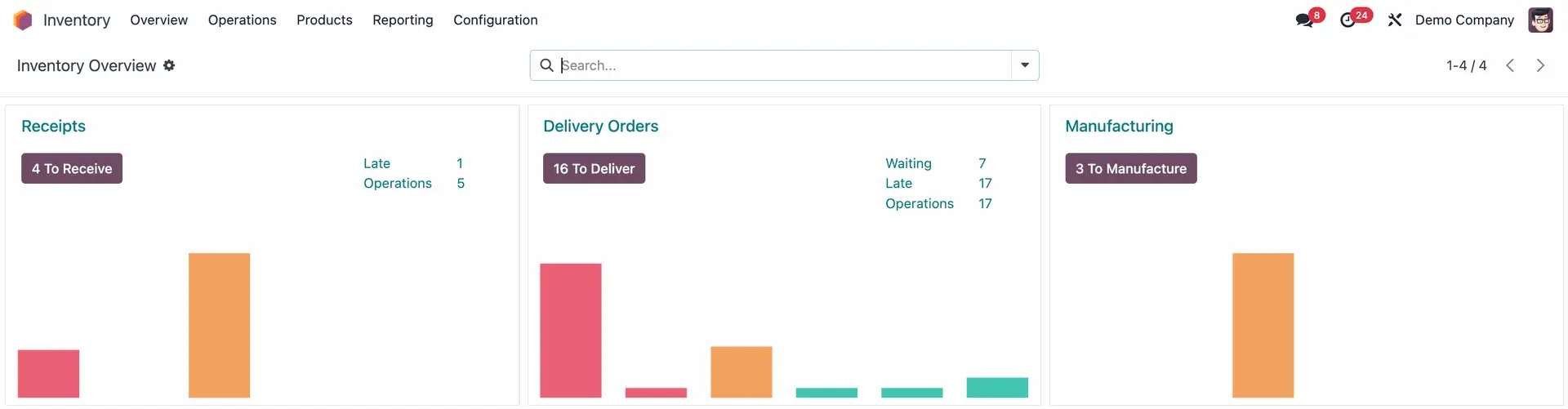
That logic sounds simple, yet it solves a common headache. Many teams count stock twice, update sales once, and then fix finance later. Odoo Inventory keeps those steps tied together, so the sales team, buyer, warehouse lead, and accountant can work from the same record.
Odoo inventory also works as a warehouse management system. It covers products, receipts, deliveries, internal transfers, stock counts, scraps, lots, serial numbers, packages, replenishment, reporting, and shipping connectors. You can start with one warehouse and scale to several sites when the business grows.
This setup fits companies that need more than stock counts. A retailer may need real-time availability before confirming orders. A manufacturer may need raw material checks before production starts. A distributor may need route rules across several warehouses. Odoo brings those actions into one flow instead of leaving each team to chase updates.
>>> Explore how Odoo manufacturing software works, its key features, and how manufacturers can use it to improve production performance.
Core System Overview & Key Features of Odoo Inventory Management
An Odoo inventory management system overview and key features check should start with the daily jobs your team already runs. Receiving goods, reserving stock, picking orders, printing labels, replenishing low-stock items, and checking valuation all belong in the same flow.
The main value of Odoo ERP inventory management is that it connects inventory with Sales, Purchase, Manufacturing, Accounting, Barcode, and eCommerce. A sales order can reserve available stock. A purchase order can feed incoming quantities. A manufacturing order can consume components and produce finished goods. An invoice can use the same movement history later.
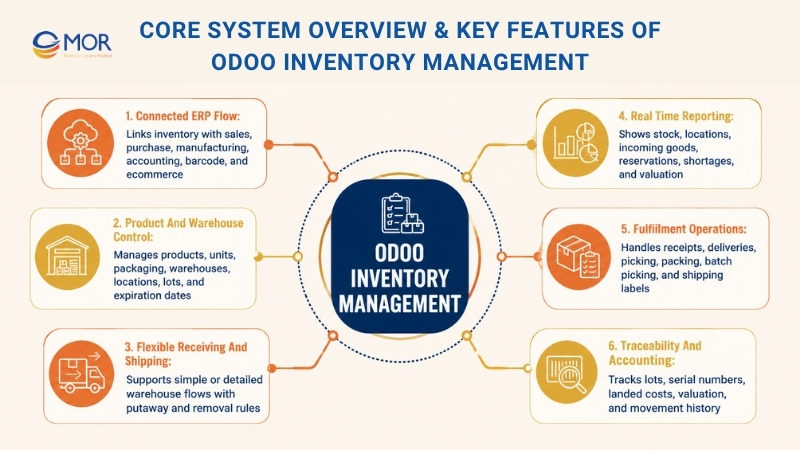
Odoo 19 inventory management features cover several layers of warehouse work. Product management supports product types, units of measure, packaging, serial numbers, lots, and expiration dates. Warehouses and locations help teams map physical storage. Replenishment tools support make-to-order, reordering rules, manufacturing lead times, and forecast reports.
Shipping and receiving flows can be as simple or detailed as you need. Smaller teams may use one-step receipt and delivery. Larger sites may use two-step or three-step flows with receiving, quality checks, stock, picking, packing, and delivery. Putaway rules help route new items to the right shelf. Removal rules help pick the right stock based on FIFO, LIFO, FEFO, closest location, or package rules.
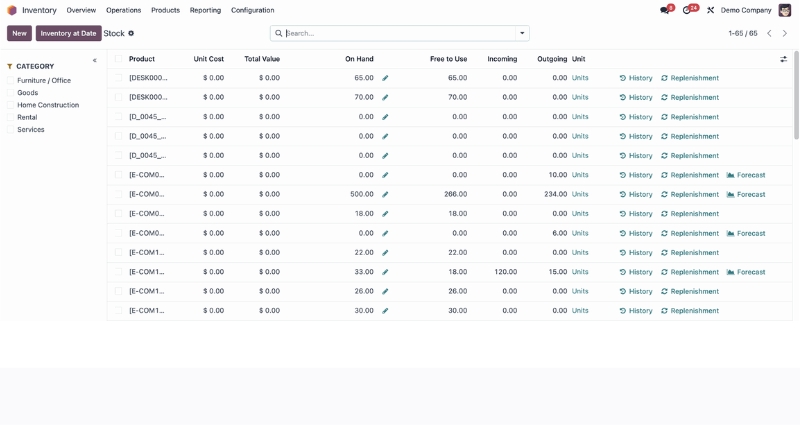
The reporting side helps managers answer basic but hard questions: What do we have? Where is it? What is coming in? What is already reserved? What will run out soon? Instead of waiting for a weekly sheet, teams can review forecasted stock, moves history, stock valuation, and inventory dashboards inside the system.
The strongest features usually sit in these groups:
- Stock control: warehouses, locations, internal transfers, inventory counts, scraps, and stock adjustment history.
- Fulfilment: receipts, deliveries, picking, packing, batch picking, cluster picking, wave transfers, and shipping labels.
- Replenishment: reordering rules, replenishment reports, purchase triggers, make-to-order routes, lead times, and forecasted stock.
- Traceability: lots, serial numbers, expiration dates, valuation by lots, and product movement history.
- Accounting link: inventory valuation, landed costs, costing methods, and real-time stock value records.
These tools make inventory management in Odoo useful for teams that have outgrown spreadsheets but do not want a heavy system that takes years to change.
Odoo Inventory Management Supports Various Business Use Cases
Odoo inventory management works best when the setup matches how your company sells, buys, stores, and ships. A single warehouse retail shop does not need the same route map as a manufacturer with raw materials, subcontractors, and finished goods.
In sections below, we’ll show you how different teams use the same core app in different ways. This is where a careful setup saves time later. If your current process is messy, do not copy it into Odoo as-is. Clean it up before configuration.
eCommerce And Retail Fulfilment
Retail and eCommerce teams care about speed, stock accuracy, and order promises. Odoo can connect online sales with stock availability, delivery orders, barcodes, shipping methods, and replenishment rules. When an item sells, the system can reserve it and move it into the right picking flow.
A CRM inventory handoff matters here because the sales team may need to check product availability before making a promise to a customer. A CRM inventory system can also give customer service staff cleaner answers when buyers ask about delivery status, returns, or replacements.
For multi-channel sellers, Odoo can act as the shared stock layer behind websites, POS counters, marketplaces, and warehouse teams. The benefit is simple: fewer oversold items, fewer manual edits, and fewer last-minute calls from the warehouse.
Manufacturing And Assembly
Manufacturers need more than on-hand quantity. They need to know whether raw materials are ready, where work-in-progress sits, and when finished goods can ship. Odoo Inventory connects with Manufacturing so production orders can consume components and add finished stock back into the right location.
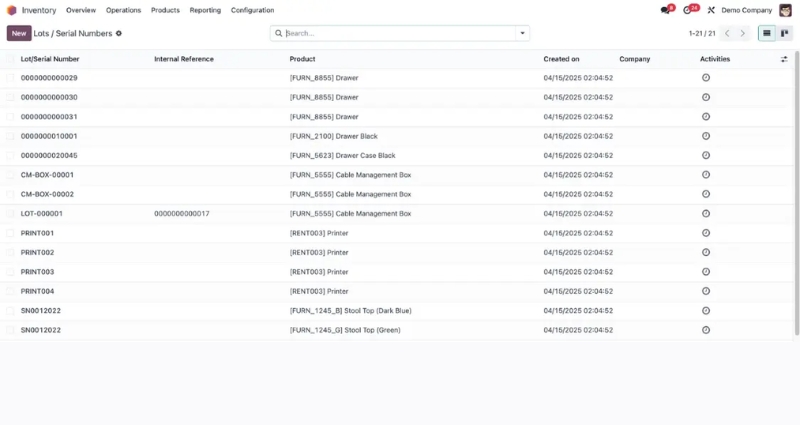
Lot and serial tracking matter in this flow. If a batch has a quality issue, the team can trace which supplier provided it, which production order used it, and which customers received the finished product. That makes recalls and audits less painful.
Distribution And Wholesale
Wholesale teams often manage bigger order volumes, several storage zones, scheduled deliveries, and inter-warehouse transfers. Odoo supports these flows with route rules, replenishment logic, forecast views, and transfer records.
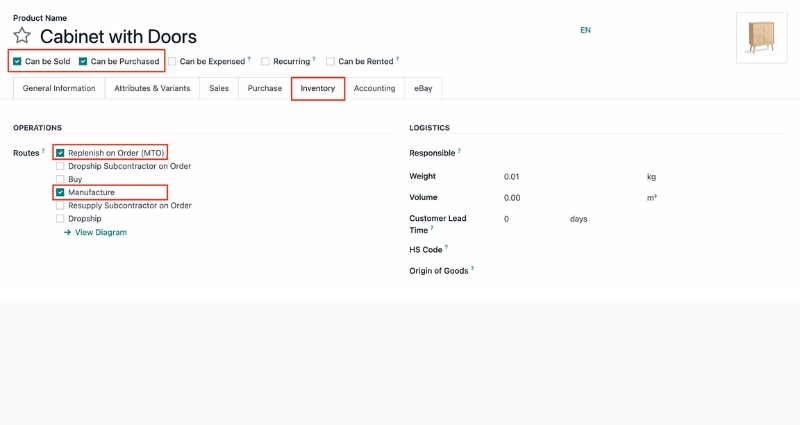
Say your main warehouse supplies two regional sites. Odoo can track incoming purchase orders, outgoing wholesale orders, and internal transfer moves. Managers can see what is available now and what should arrive before the next shipment window.
Health, Pharmaceuticals, And Food
Healthcare, pharmaceutical, and food teams need stronger control over expiry dates, batch data, cold storage, and audit records. Odoo can track lots, serial numbers, expiration dates, FIFO, and FEFO picking. That helps teams move older or earlier-expiring stock before newer items when the rules call for it.
This use case needs care during setup. Storage locations, unit conversion, product categories, expiry rules, and access rights should be tested before the first live receipt. A small setup mistake can turn into a costly traceability problem later.
Getting Started With Odoo Inventory Management
We will provide a practical Odoo inventory management tutorial for teams that want a clean start. It follows the common flow used in many setup guides: create products, stock items in warehouses, create locations, and add putaway rules.
Use the official Odoo inventory management documentation for the latest menu names and version notes. The steps below stay close to the common Odoo flow, but your database may look a little different based on installed apps, user rights, and version settings.
Products Creation
A clean inventory setup starts with clean product records. Go to Inventory, then Products, then Products, and select Create. Add the product name, product type, unit of measure, purchase unit, sales price, cost, category, vendor, barcode, and tracking method when needed.
Product type matters. Storable products affect stock. Consumable products do not need the same stock control. Services do not sit in the warehouse. Get this wrong, and your reports will never feel right.
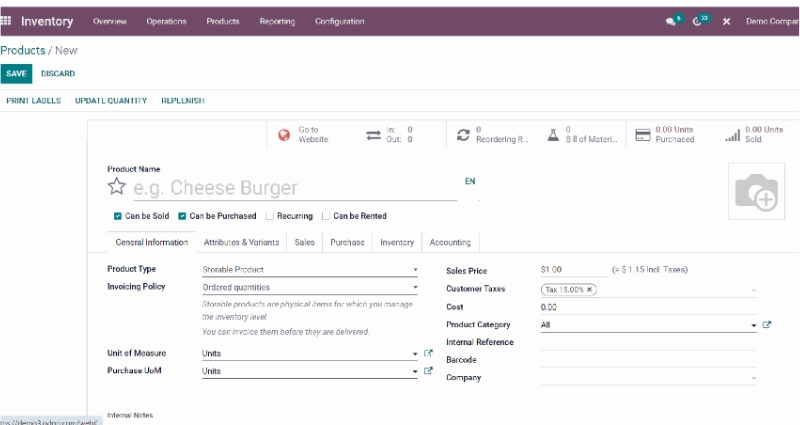
You should also define whether the item can be sold, purchased, rented, manufactured, or tracked by lot or serial number. For a simple retail item, the form may be short. For a regulated product, the same form may include expiration dates, vendor lead time, package rules, and valuation settings.
Items Stocking
After products are ready, the next step is stock structure. Odoo uses warehouses as broad physical storage sites. A warehouse has an address and a short code. It can also contain many storage locations, like receiving docks, shelves, bins, quality areas, or packing zones.
To create a warehouse, go to Configuration, then Warehouses, then Create. Add the warehouse name, short name, company, and address. Keep the short code short and clear because it will appear in operation names and stock moves.
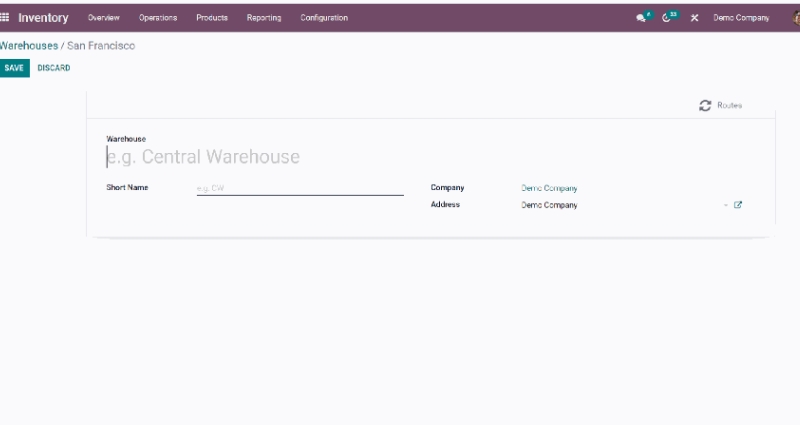
This is also where your team should agree on naming rules. Names like WH1, WH2, HCM, HN, or Osaka may work well. Names like Main, Main New, Main 2, and Temp will confuse people by month three.
Create Locations
Locations are the specific storage areas within an Odoo warehouse. They can represent shelves, aisles, packing stations, quality control zones, dispatch areas, or cold storage rooms. Each warehouse can contain multiple locations, allowing businesses to organize inventory based on their operational workflow.
To create a new location, navigate to Configuration → Locations.
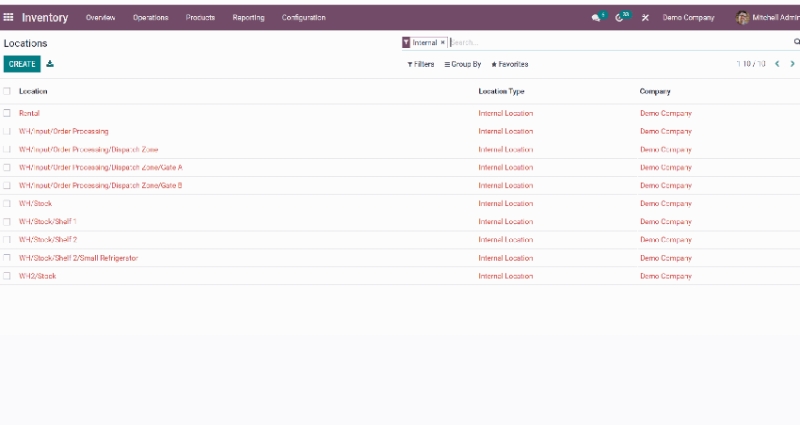
Once the Locations dashboard opens, you can review all existing warehouse locations and their corresponding location types. Click Create to add a new location and define where inventory will be stored or processed.
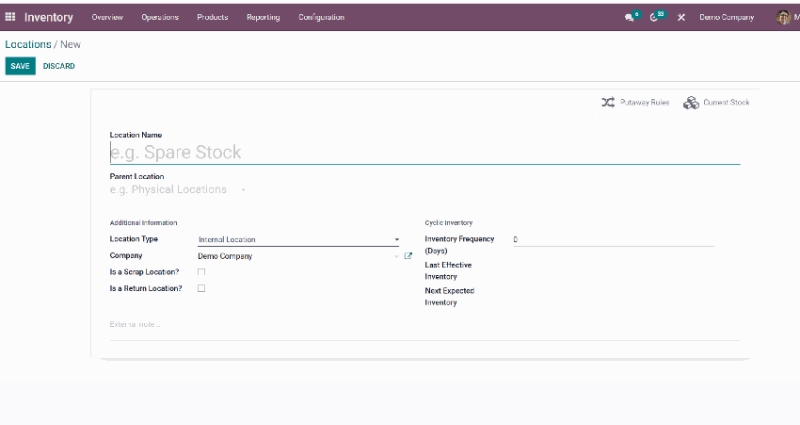
When creating a location, specify the Parent Location, select the appropriate Location Type, and assign it to the correct company if applicable. A well-structured location hierarchy improves inventory accuracy, simplifies stock movements, and makes warehouse operations easier to manage.
As a best practice, keep your warehouse structure as simple as possible when getting started. Most businesses only need a few core locations, such as Stock, Receiving, Packing, and Scrap. Additional shelf or aisle locations can be added later as warehouse operations become more complex.
Putaway Rules
Putaway Rules help Odoo automatically assign incoming products to the most appropriate storage location. Instead of placing goods wherever space is available, warehouse staff can rely on predefined rules to ensure products are stored consistently and efficiently from the moment they are received.
To create a putaway rule, navigate to Configuration → Putaway Rules, then click Create.
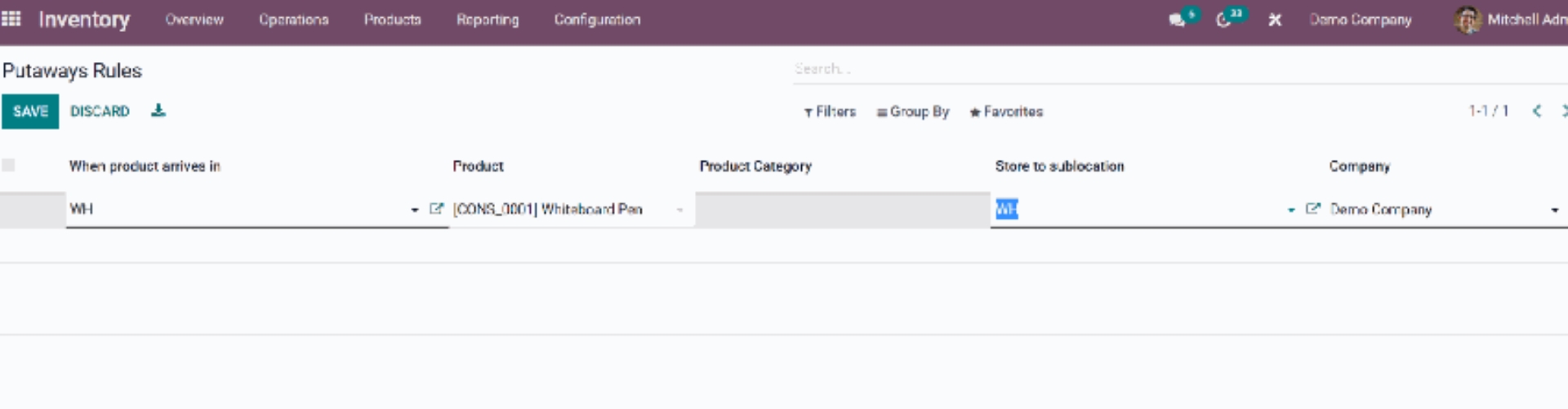
When creating a rule, choose the incoming location, specify either a product or product category, and define the destination sublocation where the items should be stored. For example, small spare parts can be directed to Shelf A, while larger products can automatically be assigned to a dedicated storage zone.
Putaway Rules are especially useful for warehouses with multiple storage locations. They help ensure that products requiring special handling, such as refrigerated goods, hazardous materials, or fast-moving inventory, are always routed to the correct destination. Before deploying the rules in daily operations, test them with a sample receipt to verify that Odoo recommends the expected storage location. This helps identify configuration issues early and ensures warehouse processes remain accurate and efficient.
Odoo Inventory Workflows To Run After Setup
A basic setup brings products, warehouses, and locations into Odoo. But day-to-day value comes when your team uses the right workflows and keeps them consistent. This is where Odoo inventory management helps you cut repeated checks, avoid blind spots, and track stock movement with more control.
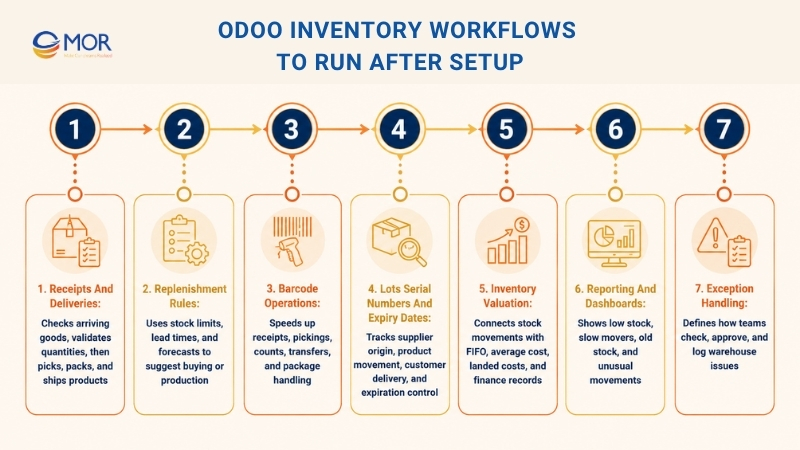
- Receipts and deliveries: These are the daily backbone of warehouse work. When goods arrive, your receiving team checks quantities, lots, serial numbers, and destination locations before validating the receipt. When goods leave, the delivery team picks, packs, and ships the right products. Small teams can keep this as a one-step flow, but larger warehouses may need two-step or three-step routes.
- Replenishment rules: Reordering should not start only when shelves are already empty. Odoo can use minimum stock, maximum stock, vendor lead times, and forecasts to suggest purchase orders or manufacturing orders. Your team gets a clearer buying plan and fewer last-minute supplier calls.
- Barcode operations: Barcode scanning keeps warehouse work faster and cleaner. Workers can scan receipts, pickings, stock counts, transfers, and packages instead of typing product data by hand. This helps a lot when order volume grows and small input mistakes start costing real time.
- Lots, serial numbers, and expiry dates: Traceability is key for goods that need tight control. Odoo lets you track which supplier an item came from, where it moved, and which customer received it. Expiration dates and FEFO rules are useful for food, healthcare, chemicals, and other sensitive products.
- Inventory valuation: Stock movement and finance should not live in separate corners. Odoo supports FIFO, average cost, and standard price. It can also record landed costs, scrap costs, and valuation changes. When stock moves are posted correctly, finance teams get cleaner records with less backtracking.
- Reporting and dashboards: Reports help managers see stock risks before they turn into problems. Forecasted stock reports, stock reports, location reports, movement history, and dashboards can show low-stock items, slow-moving products, old stock, and unusual movements. Use these reports in weekly operations meetings, not only when something breaks.
- Exception handling: Warehouses rarely run in a perfect straight line. Products can arrive short, get damaged, move to the wrong shelf, or miss a barcode. Your workflow should say who checks the issue, who approves changes, and how the correction is logged in Odoo.
- Simple workflow rules: Odoo can handle detailed routes, but your team still needs plain rules. Everyone should know what happens when goods arrive, where they go, who validates each step, and who checks the reports. A short workflow map on the wall can save more time than a long manual nobody reads.
A strong workflow does not need to be complicated. Start with the flows your team uses every day, then refine them as volume grows. When the process is clear, Odoo becomes easier to trust, and your warehouse team spends less time chasing stock data.
Strengths And Weaknesses Of Odoo Inventory Management
Many businesses compare Odoo inventory management features strengths weaknesses before deciding whether the platform is the right fit. Odoo is strong, but it is not magic. It works well when business rules are clear, master data is clean, and users follow the process.
Area | Strength | Weakness To Watch |
Modular ERP fit | Inventory links with Sales, Purchase, Manufacturing, Accounting, Barcode, and eCommerce. | Extra apps can add setup work if the company does not define scope early. |
Warehouse control | Warehouses, locations, routes, transfers, and picking flows can support simple or detailed operations. | Overbuilt routes can slow users down if the warehouse process is still unclear. |
Traceability | Lots, serial numbers, expiration dates, and movement history support regulated stock. | Teams must scan and record data correctly, or traceability gaps will appear. |
Replenishment | Rules, forecasts, lead times, and make-to-order flows help buyers plan stock. | Bad vendor data and old sales assumptions can trigger wrong purchase suggestions. |
Reporting | Stock, forecast, location, move, and valuation views give managers faster answers. | Reports only work well when product categories, units, locations, and costing rules are clean. |
Odoo is a good fit when a company wants one business system that can grow step by step. It is also a good choice for teams that want inventory management Odoo workflows to connect with sales, purchasing, finance, and production without building a custom platform from scratch.
The main weakness is poor preparation. If product names are inconsistent, units of measure are wrong, or warehouse teams skip scans, Odoo will show bad data faster. That is not a system flaw. It is a setup and adoption problem.
Another risk is adding too much too soon. A business may want barcode, multi-warehouse, lots, FEFO, landed costs, shipping connectors, and manufacturing on day one. That can work for a mature team. For most companies, a phased rollout works better: master data, stock moves, replenishment, barcode, then deeper reporting.
Odoo Inventory Vs SAP: When Should Businesses Compare Them?
Some teams search for "evaluate the operations management company SAP on Odoo inventory management" when they actually mean SAP vs Odoo for stock and warehouse operations. The comparison makes sense, but the right answer depends on company size, budget, process maturity, and system goals.
SAP is often chosen by large enterprises with strict global process control, heavy governance, and deep finance or supply chain needs. It can suit complex multinational groups, but the setup may be costly and long. Odoo is usually more flexible for mid-sized firms and growth-stage companies that want ERP modules to go live faster and change with the business.
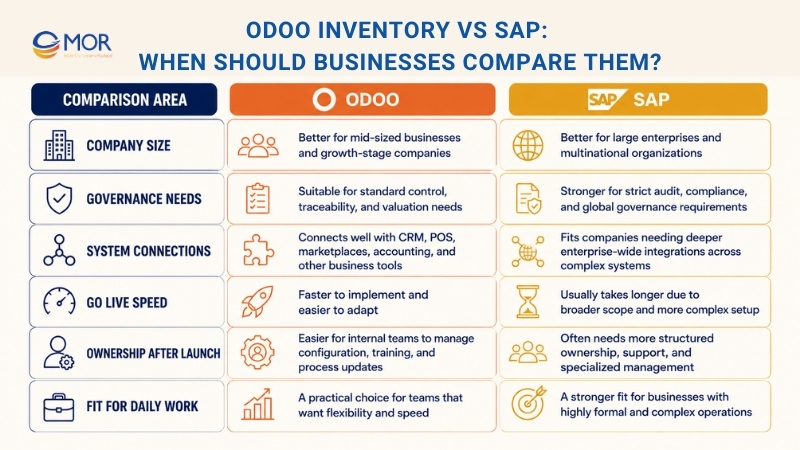
Odoo can also be a strong affordable inventory management choice when the company wants ERP coverage without a large SAP-style rollout. The trade-off is that Odoo projects still need serious planning. A low license or setup cost does not help if the project skips data migration, user training, integration testing, or warehouse process design.
A smart comparison should ask these questions:
- How many warehouses, product lines, users, and legal entities need support?
- How strict are audit, traceability, valuation, and compliance needs?
- Which systems must connect to inventory, such as CRM, POS, marketplaces, 3PL, accounting, or BI?
- How fast does the company need to go live?
- Who will own configuration, training, data quality, and process change after launch?
For many mid-market teams, Odoo gives a good balance between control and speed. For very large groups with highly formal global processes, SAP may still be the safer fit. The point is not to pick the bigger name. The point is to pick the system your team can run well every day.
How MOR Software Helps Companies Implement Odoo Inventory Management
Software alone does not fix warehouse work. The real job is translating your business flow into a system people can use. As an official Odoo development partner, MOR Software helps companies plan, set up, integrate, customize, test, and maintain Odoo for real operations.
MOR Software can start with a process review. We map your products, warehouses, locations, sales channels, purchasing flow, manufacturing steps, accounting rules, shipping partners, and reporting needs. Then we shape the Odoo setup around your real work, not a generic demo database.
The implementation work may include product master data cleanup, warehouse and location setup, receipt and delivery flows, replenishment rules, barcode setup, lot and serial tracking, putaway and removal rules, user roles, dashboards, and training materials. If your team needs an Odoo inventory management demo, MOR Software can prepare one around your products and warehouse rules so stakeholders see the flow before full rollout.
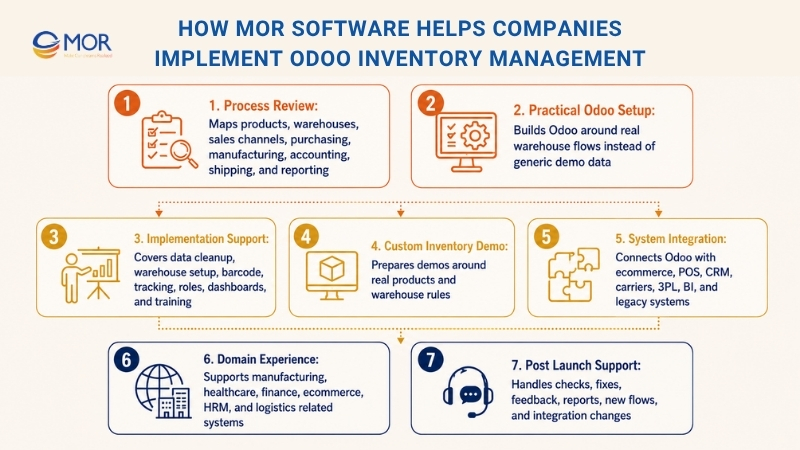
Integration is often the hard part. Your inventory may need to connect with eCommerce sites, POS, CRM, shipping carriers, manufacturing accounting tools, 3PL systems, vendor portals, BI dashboards, or legacy systems. MOR Software has broad experience in web apps, mobile apps, Salesforce work, offshore software testing, API work, testing, and cloud systems. That matters when Odoo must sit inside a wider business stack.
MOR Software also brings domain experience across manufacturing, healthcare, finance, eCommerce, HRM, and logistics-related systems. That background helps our team ask better questions during analysis. A food company needs expiry rules. A medical business needs traceability and privacy. A retailer needs fast fulfilment and returns. A manufacturer needs production-linked stock data.
A good Odoo rollout should not end on go-live day. MOR Software can support post-launch checks, bug fixes, user feedback, report tuning, new warehouse flows, and integration changes. Inventory work changes as the business grows. Your system should keep up without forcing the team back to spreadsheets.
Conclusion
Odoo inventory management gives businesses a practical way to connect stock, warehouse, sales, purchase, manufacturing, shipping, and finance work. The system is strong, but the rollout must start with clean product data, clear locations, tested rules, and trained users. If your team is planning a new Odoo setup or wants to fix a messy one, MOR Software can help design, build, integrate, and support the right daily flow for your business. Contact us today to discuss your Odoo inventory needs.
"Mr. Cong’s guiding philosophy is simplicity, believing that the simplest solutions are often the most powerful. He sees trust, empowerment, and the opportunity to demonstrate one’s abilities as the key elements that set MOR apart from traditional IT companies."
Mac Tien Cong


Division Manager (Hanoi Branch)
MOR SOFTWARE
Frequently Asked Questions (FAQs)
What is Odoo inventory management?
Odoo inventory management is the use of Odoo Inventory to control products, warehouses, locations, stock moves, replenishment, picking, packing, shipping, traceability, and valuation in one ERP system.
Is Odoo Inventory good for small businesses?
Yes. Small businesses can start with basic products, one warehouse, simple receipts, and simple deliveries. They can add barcode, multi-warehouse, manufacturing, or shipping connectors later.
Can Odoo manage several warehouses?
Yes. Odoo can manage several warehouses, storage locations, internal transfers, transit locations, route rules, and replenishment between sites.
Does Odoo support barcode scanning?
Yes. Odoo supports barcode workflows for receipts, picking, transfers, stock counts, and other warehouse actions. Teams can also print labels when the setup includes the right barcode and carrier rules.
Can Odoo track lots, serial numbers, and expiry dates?
Yes. Odoo can track lots, serial numbers, expiration dates, and movement history. This is useful for food, medical, pharmaceutical, electronics, and warranty-driven products.
What is the difference between warehouses and locations in Odoo?
A warehouse is a physical storage site with an address. A location is a smaller area inside or linked to that warehouse, such as a shelf, aisle, dock, packing zone, vendor location, customer location, or transit area.
Can Odoo automate replenishment?
Yes. Odoo can use reordering rules, forecasts, lead times, and make-to-order routes to suggest or trigger purchases, manufacturing orders, or inter-warehouse transfers.
Is Odoo Inventory better than SAP for warehouse management?
Odoo can be better for teams that need a flexible, modular ERP with faster rollout and lower project cost. SAP may fit larger enterprises with strict global control and very complex process needs.
How long does an Odoo Inventory implementation take?
A simple setup may take a few weeks. A larger rollout with data migration, barcode workflows, multi-warehouse routing, accounting, manufacturing, and system integration can take several months.
Share


Make Our-Dreams Realized


© 2023 . MOR Software. All Rights Reserved
Sitemap
Privacy Policy
Terms of Use

Rate this article
0
over 5.0 based on 0 reviews
Your rating on this news:
Name
*Email
*Write your comment
*Send your comment
1