


ERP vs Accounting Software: Key Differences and Time to Upgrade
Choosing between ERP vs accounting software gets harder once finance tools add inventory, payroll, project tracking, and reporting. The real decision is scope: accounting software records financial activity, and ERP links finance to the work that creates each transaction. In this guide, MOR Software will compare functions, data flow, cost, business fit, and the warning signs that point to an ERP move. You’ll see when to retain, connect, or replace your current system.
Key Takeaways
- Accounting software fits companies that mainly need reliable books, invoices, payments, tax records, and financial statements.
- ERP becomes a stronger choice when finance depends on live data from sales, purchasing, inventory, projects, production, or logistics.
- Company size alone doesn’t decide the answer. Process complexity, reporting delays, system links, and internal readiness carry more weight.
ERP vs Accounting Software: Quick Comparison
The fastest ERP vs accounting software comparison starts with ownership. Accounting tools focus on finance, whereas ERP connects wider work through shared records. SAP describes a similar split: accounting records completed activity, and ERP coordinates company-wide activity.
Decision Area | Accounting Software | ERP |
Primary purpose | Record and report financial activity | Connect finance and operational work |
Main users | Accountants, bookkeepers, finance leaders | Finance, sales, purchasing, warehouse, HR, operations, and managers |
Financial functions | General ledger, AP, AR, invoices, bank matching, statements | Finance plus wider business modules |
Operational scope | Limited or handled through add-ons | Sales, stock, procurement, projects, manufacturing, HR, logistics |
Data structure | Finance-led records | Shared master data across departments |
Automation | Finance tasks and simple approvals | End-to-end business workflows |
Reporting | Financial statements and finance reports | Financial and operational reporting |
Setup effort | Usually narrower | Cross-team process, data, and training work |
Growth fit | Strong when operations stay simple | Strong when business units and workflows become connected |
Take a quick example. Accounting software records an invoice and payment. ERP can also reserve stock, trigger fulfillment, update purchasing demand, record revenue, and calculate product margin from the same sale.
>>> Explore the best manufacturing financial software and what really matters when selecting accounting software for manufacturing that fits your operations.
ERP vs Accounting Software: What Each System Is Built to Manage
The phrase accounting software vs ERP makes the products sound interchangeable. A sound ERP vs accounting software review starts with their boundaries: one manages the books, and the other can manage the work behind them.
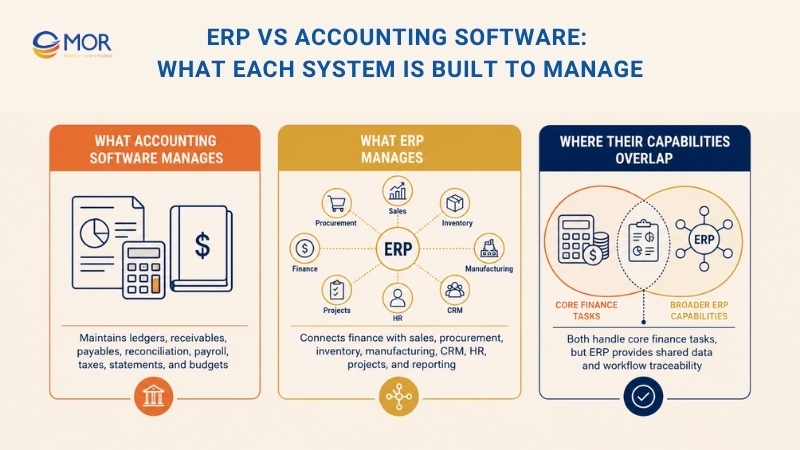
What Accounting Software Manages
Accounting software keeps financial records ready for review. Its narrow scope often means fewer users and a shorter setup.
- General ledger: Stores journal entries and account balances.
- AP and AR: Tracks bills, invoices, payments, and outstanding amounts.
- Bank reconciliation: Matches bank activity with recorded transactions.
- Expenses and payroll: Records staff spending and links payroll data.
- Tax records: Supports tax preparation, filing data, and controls.
- Financial statements: Produces balance sheets, income statements, and cash flow reports.
- Budget control: Compares planned spending with actual financial results.
What ERP Manages
ERP includes accounting and extends into revenue, cost, stock, labor, and service processes. Oracle and SAP describe ERP through connected functions including finance, HR, supply chain, manufacturing, sales, and procurement.
- Sales and orders: Connects quotes, pricing, fulfillment, and billing.
- Procurement: Manages purchase requests, orders, receipts, suppliers, and approvals.
- Inventory: Tracks items, locations, transfers, lots, and valuation.
- Manufacturing: Plans materials, work orders, capacity, and production cost.
- CRM and service: Links customers, opportunities, support, and sales activity.
- HR and projects: Connects staff, time, resources, expenses, milestones, and invoices.
- Business reporting: Combines financial and operating measures.
Where Their Capabilities Overlap
Invoices, payments, AP, AR, expenses, budgets, and compliance reports appear in ERP and accounting software. A finance product with add-ons may look like ERP yet still lack shared data and connected workflows.
For example, a finance tool can record inventory value after an import. An ERP can trace the value back to receipts, warehouse moves, landed cost, production use, returns, and sales orders.
Eight ERP vs Accounting Software Differences That Shape the Decision
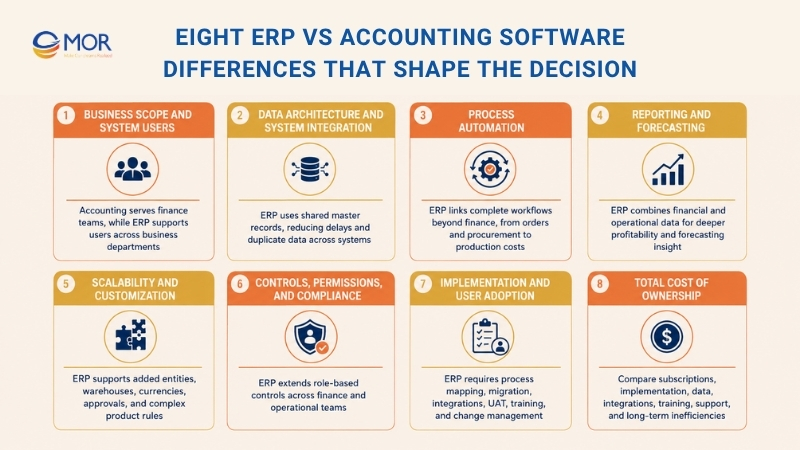
Searches for ERP vs accounting software key differences 2025 or 2026 center on eight areas: scope, data, automation, reporting, growth, control, rollout effort, and cost. Each one changes system ownership.
Area | Accounting Software | ERP |
Scope | Finance-led | Business-wide |
Users | Finance and owners | Cross-department teams |
Data | Imports and connected tools | Shared master records |
Automation | Finance tasks | Linked operating processes |
Reporting | Financial results | Financial plus operational results |
Growth | Handles simple scale well | Handles added entities and workflows |
Control | Finance permissions | Role-based controls across teams |
Ownership cost | Lower entry price | Wider project and care costs |
Business Scope and System Users
Accounting software serves finance staff, owners, and external accountants. Daily use stays close to bookkeeping, payments, tax records, and month-end work.
ERP reaches sales, procurement, warehouse, production, service, HR, and management. Teams need shared data, approval, and access rules.
Data Architecture and System Integration
In the ERP vs accounting software decision, data structure often exposes the gap. Accounting tools receive records through files, connectors, APIs, or manual entry, creating more chances for delay and duplication.
ERP keeps customers, vendors, products, accounts, employees, and locations in shared master records. One bad record can spread across finance and operations. Gartner estimates poor data quality costs organizations at least $12.9 million per year on average.
Process Automation
Accounting software creates recurring invoices, matches transactions, categorizes spending, and routes finance approvals. Its automation often stops at another department’s boundary.
ERP handles order to cash, procure to pay, project to invoice, and production to cost. One approved order can reserve stock, trigger delivery, update demand, prepare an invoice, and post accounting entries.
Reporting and Forecasting
In an ERP vs accounting software comparison, reporting depth shows how far the system reaches. Accounting reports explain revenue, expenses, assets, liabilities, and cash after transactions reach the books.
ERP combines the books with operating data, linking profit to product mix or project revenue to labor and committed cost. APQC reports that top performers complete the annual close in 10 days or less, compared with a median of 18 days and 35 days for slower performers.
Scalability and Customization
Accounting software can support years of growth when the operating model stays simple. Revenue alone doesn’t create an ERP need.
New entities, warehouses, currencies, approvals, price rules, and product lines can turn workarounds into daily delays. Configure standard functions before adding custom code that raises upgrade and care work.
Controls, Permissions, and Compliance
Finance tools include access roles, approvals, audit history, and period controls. They may be enough when risk stays inside accounting.
ERP extends permissions across purchasing, stock, projects, HR, sales, and production. Buyers may create requests without approval rights, and warehouse staff may confirm receipts without seeing supplier bank details. The system supports separation but doesn’t guarantee compliance.
Implementation and User Adoption
Accounting setup stays near finance and covers accounts, balances, tax settings, bank links, templates, and training. Few operational teams need to change their daily work.
ERP rollout crosses departments and requires process maps, data moves, integrations, UAT, role training, and change support. Prosci reports that projects with excellent change management are about seven times more likely to meet objectives than projects with poor change management.
Total Cost of Ownership
The ERP vs accounting software cost comparison must cover more than subscriptions. The ERP vs accounting software decision also carries discovery, process design, migration, integrations, custom work, testing, training, internal labor, support, and upgrade costs.
Cost Area | Accounting Software | ERP |
Subscription | Usually lower | Depends on users, modules, and plan |
Setup | Finance-led configuration | Cross-team design and rollout |
Data work | Accounts and balances | Master data, open work, stock, history |
Integration | Several point connections | Core system links and retained apps |
Training | Smaller user group | Role-based training across teams |
Long-term care | Product updates and connectors | Governance, support, tests, and release planning |
Staying on accounting software also costs money through repeated entry, spreadsheets, failed syncs, late reports, and corrections. Compare total business cost across three to five years, not the first invoice.
When Accounting Software Still Works and When It Starts to Fail
A fair ERP vs accounting review starts with one check: does the current finance product still work? A broader ERP vs accounting software project makes sense only after that answer is clear. Moving too early creates disruption; waiting too long leaves finance cleaning up problems created elsewhere.
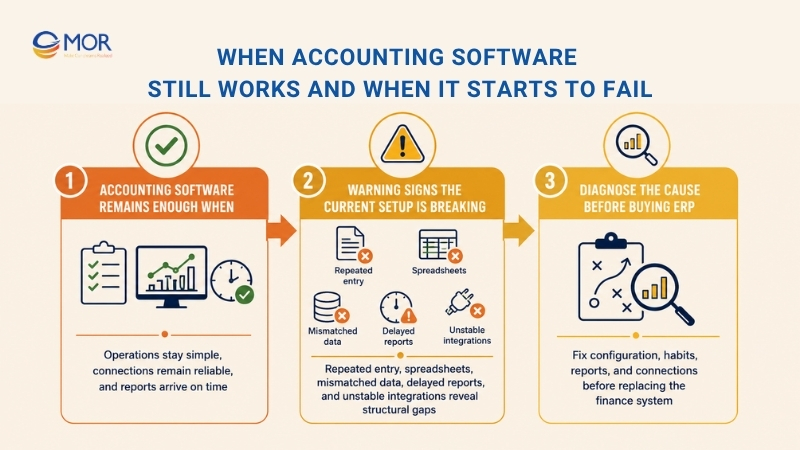
Accounting Software Remains Enough When
A finance-led tool still fits well when operational work stays simple and connected apps exchange data without constant repair. The points below describe that stable state.
- Simple structure: The company has one entity or a small group with basic consolidation needs.
- Finance-first need: Bookkeeping, invoicing, payments, tax records, and reporting remain the main goals.
- Limited stock work: Inventory is absent or doesn’t need deep warehouse rules.
- Reliable connections: CRM, payroll management system, eCommerce, and other systems send clean data on time.
- Manageable volume: Transaction counts don’t create long queues or large reconciliation work.
- Simple approvals: Spending and billing rules don’t cross many teams or levels.
- Timely reports: Monthly finance reports arrive before leadership decisions.
- Good adoption: Staff use the product as designed and follow agreed data rules.
Warning Signs the Current Setup Is Breaking
The warning signs usually appear outside the accounting screen. Teams build extra files and manual checks because the finance product can’t see the operating process.
- Repeated entry: Staff type the same customer, order, or supplier data into several systems.
- Spreadsheet dependence: Finance spends days merging reports and fixing mismatched totals.
- Stock mismatch: Warehouse quantities and accounting values disagree.
- Late reporting: Management receives reports after pricing, buying, or staffing decisions.
- Different numbers: Sales, operations, and finance use separate versions of revenue or margin.
- Longer close: Month-end work grows each time the company adds volume or a new entity.
- Email approvals: Purchasing and spending decisions stay buried in inboxes or chat threads.
- Weak profitability detail: Product, warehouse, customer, or project profit is hard to calculate.
- Fragile integrations: Connectors lag, fail, or need repeated manual correction.
- Limited control: Audit history and access roles no longer match current risk.
Diagnose the Cause Before Buying ERP
Check configuration, user habits, unused reports, and broken connections before starting an ERP project. A poorly configured accounting tool can look weaker than it is.
Separate finance issues from structural operating issues. ERP is the right response when finance accuracy depends on live work across departments, not when the real problem is weak data discipline or unclear management rules.
Do You Need Full ERP or a Middle-Ground System?
The ERP vs accounting software choice isn’t limited to a basic finance tool or a full suite. Many companies need a middle layer that solves finance complexity without replacing every business product.
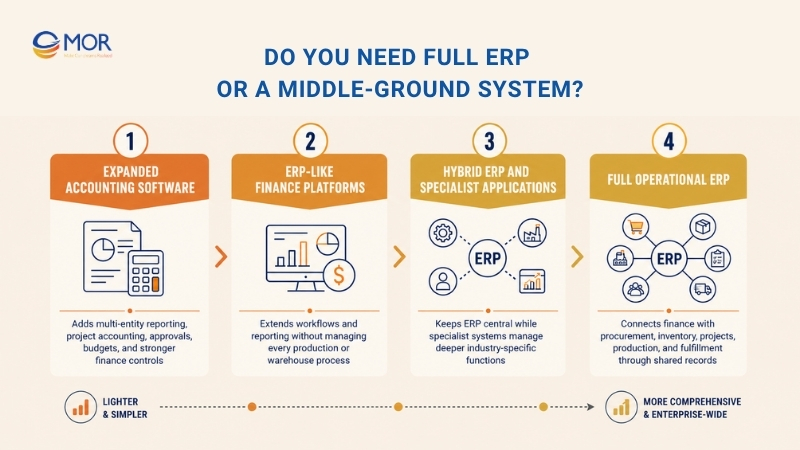
Expanded Accounting Software
A stronger finance product can add multi-entity reporting, project accounting, approvals, budgets, and deeper permissions. Buyers reviewing accounting ERP system examples should check which product owns operational data and which only receives it. This level fits when the pain remains inside finance.
The setup stays narrower than ERP, but CRM, stock, HR, or project tools still need clean connections. Buyers comparing ERP or accounting system options should test those links under real transaction volume.
ERP-Like Finance Platforms
These platforms sit between finance software and full operational ERP. They may include entity management, workflow rules, project finance, purchasing, and stronger reporting without taking over production or warehouse work.
Ignore the ‘ERP-lite’ label and inspect data ownership. Ask which records live in the platform, which processes remain outside it, and how errors move back to the team.
Hybrid ERP and Specialist Applications
A hybrid setup keeps ERP as the main record for core processes. Specialist applications handle work that needs deeper industry logic. Common examples include Salesforce CRM, payroll, eCommerce, product design, field service, or transport management.
Define one owner for each data object. Customer, item, price, stock, employee, and invoice records need clear source rules, API direction, update timing, error logs, and recovery steps.
Full Operational ERP
Full ERP fits when finance can’t stay accurate without live data from procurement, inventory, projects, production, or fulfillment. It gives departments shared processes and one operating record.
For a concrete case, Odoo reported that Belgian chocolate maker Twerk connected accounting, inventory, and sales, then cut end-of-quarter administration from five days to two hours. Shared operating records removed much of the quarter-end handoff.
Which System Fits Your Business Model?
Revenue and cost paths should guide the choice. The operating model decides the fit of ERP systems and accounting software, so a practical ERP vs accounting software review follows each path.
Business Model | Accounting Software Fits When | ERP Fits When | Main Trigger |
Professional services | Simple billing and payroll | Time, projects, and WIP drive profit | Project control |
Retail and eCommerce | One simple sales channel | Stock, returns, channels, and finance connect | Stock growth |
Distribution and logistics | Simple items and warehousing | Transfers, landed cost, and fulfillment connect | Inventory accuracy |
Manufacturing | Light assembly | BOMs, work orders, quality, and costing matter | Production control |
Multi-entity business | Finance consolidation is enough | Entities share operational data | Shared operations |
Early-stage business | Current tools work | Complexity appears early | Workflow complexity |
Professional Services and Consulting Firms
Accounting software supports simple billing and reports. Service firms need a broader platform when time, resources, work in progress, and billing rules drive profit. An ERP vs accounting system review should follow one project to final margin.
Retail and eCommerce Businesses
A single store may run well on accounting software. ERP becomes useful when stores, warehouses, returns, marketplaces, suppliers, and finance share product data. A buyer searching Odoo vs Quickbooks enterprise ERP vs accounting software is comparing Odoo’s connected app suite with a finance-led starting point.
Wholesale, Distribution, and Logistics Companies
Distribution links purchasing, transfers, landed cost, delivery, and billing. ERP records stock movement and its financial result together, limiting warehouse-to-finance reconciliation.
Manufacturing Companies
Manufacturers often need ERP early because materials, work orders, quality, labor, and cost share data. Deloitte’s 2025 survey found that 54% use a unified data model standard and 48% use a training and adoption standard.
Multi-Entity or International Businesses
A stronger accounting platform can handle consolidation and local reporting. ERP fits when entities share suppliers, products, warehouses, customers, or teams. Test local rules and group reports before selection.
Early-Stage and Operationally Simple Businesses
Keep the finance product when records stay accurate and reports arrive on time. Maintain an exit path through clean exports, documented APIs, stable item codes, and disciplined customer data.
How to Move From Accounting Software to ERP Without Disrupting Operations
Moving from ERP vs. accounting software comparison to delivery changes the work. The ERP vs accounting software decision must lead into process design, data work, integrations, tests, training, and launch control. A staged plan protects daily operations while each new workflow proves stable.
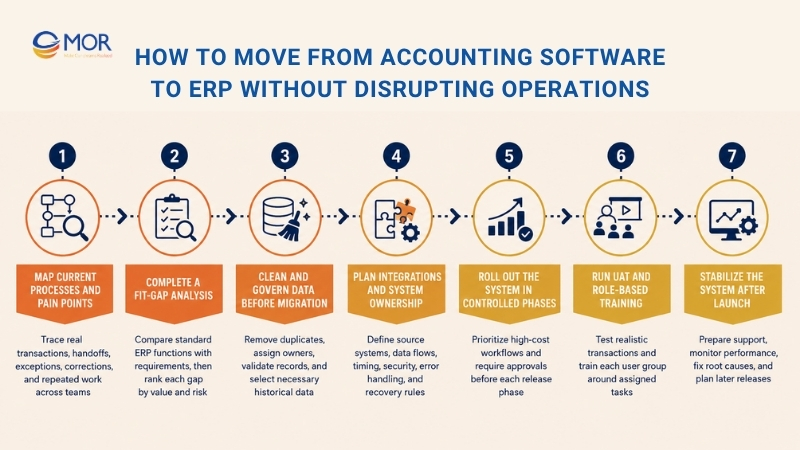
Map Current Processes and Pain Points
Document how teams exchange data and follow real transactions, including exceptions and corrections. Interview the people who perform the work, not only managers who review reports.
- Map handoffs: Record where data changes teams or systems.
- Set priorities: Mark repeated work and separate required flows from later improvements.
Complete a Fit-Gap Analysis
Compare standard ERP functions with required processes. Give each gap a treatment, owner, cost, and risk. Rank gaps by business value and launch risk.
- Configuration or process change: Use standard settings or adopt a cleaner flow.
- Integration or custom work: Connect retained products and build only for real gaps.
- Out of scope: Delay work that doesn’t support the first release.
Clean and Govern Data Before Migration
Review master data, tax records, inventory, employees, and open transactions. Remove duplicates and obsolete records before test migration begins.
- Assign owners: Name an owner and validation rules for each data group.
- Choose history: Move what audit, service, and reporting need, not every old record.
Plan Integrations and System Ownership
List systems that will be replaced, retained, or connected, then name the source of truth for each data group. Unclear ownership creates duplicate updates and disputed reports.
- Define flow: State which system sends each record and when.
- Handle errors: Build logs, alerts, retry rules, security checks, and recovery steps.
Roll Out the System in Controlled Phases
Start with workflows that create the highest cost or risk. Finance and core operations often form the first release.
- Limit scope: Avoid moving every entity, site, and module at once.
- Set gates: Require data, testing, and training approval before each phase.
Run UAT and Role-Based Training
UAT must test complete work. Users should create normal transactions, exceptions, reversals, approvals, and reports with realistic data and access rights.
- Use real roles: Include users across finance and operations.
- Set acceptance rules: State what must work and train each group by task.
Stabilize the System After Launch
Prepare cutover, backup, rollback, and support plans. Track errors, speed, data quality, adoption, and report accuracy after launch.
- Run a support desk: Route issues by severity and owner.
- Plan later releases: Fix root causes and treat go-live as the start of system ownership.
Move Beyond Accounting Software With MOR Software's ERP Expertise
For companies moving past the ERP vs accounting software decision, MOR Software supports ERP consulting, Odoo ERP implementation, custom enterprise development, integration, QA, and long-term engineering capacity across each delivery phase. The company announced a strategic Odoo partnership in January 2026 and now supports business-led ERP work across consulting, implementation, custom modules, integration, and system care.
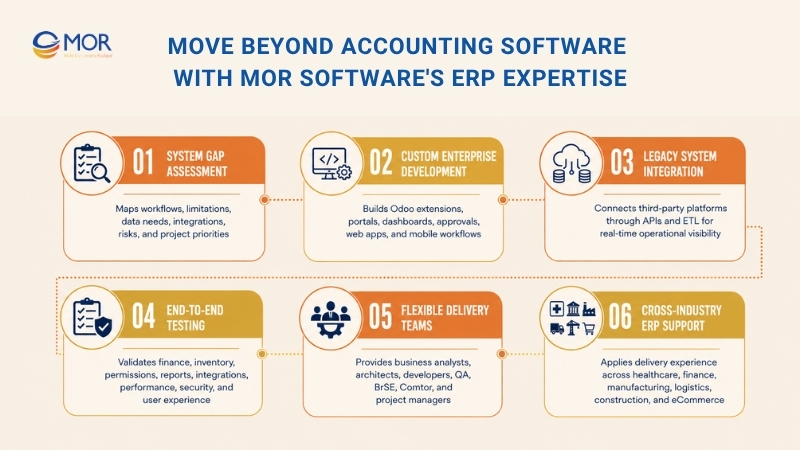
- Assess the current system gap: MOR Software’s business analysts and IT consultants map workflows, system limits, data needs, integration points, and project priorities before build work starts.
- Build custom enterprise functions: Our teams create ERP extensions, internal portals, dashboards, approval tools, web apps, mobile layers, and custom operating workflows. Frontend, backend, cloud, and database skills support the wider system.
- Connect legacy and third-party systems: In a contingent workforce management project, MOR Software linked internal data with Salesforce and Slack through API Gateway and ETL. The five-month build used an eight-person cross-functional team and created real-time attendance visibility.
- Test full business workflows: MOR Software covers functional, integration, performance, security, compatibility, accessibility, and user-experience testing. ERP tests can include finance posting, stock movement, access rights, reports, and system links.
- Form the right delivery team: A delivery unit may include project managers, business analysts, software architects, developers, QA, QC, BrSE, and Comtor roles. Team size and skills can change as the project moves through planning, build, test, launch, and care.
- Support complex operating environments: MOR Software’s project history covers healthcare, eCommerce, HRM, finance, manufacturing, logistics, media, construction, and enterprise management systems. Its Salesforce and Slack case also proves practical API and ETL delivery around legacy data.
MOR Software fits companies that need custom Odoo work, legacy system integration, web or mobile access, system testing, or a dedicated engineering team around an enterprise platform. Share your current systems, operating gaps, and priority workflows with our team before you select or replace the core product.
Conclusion
The right ERP vs accounting software choice depends on operational complexity, not company size or a long product list. Keep accounting software when finance remains accurate, connected, and timely. Move toward ERP when shared data and cross-team workflows shape financial results. MOR Software can map your current systems, review Odoo or custom ERP needs, plan integration and migration, and build a phased delivery path tied to real business work. Contact us to discuss your operational gaps and choose the right ERP approach for your business.
MOR SOFTWARE
Frequently Asked Questions (FAQs)
Is ERP the same as accounting software?
No. Accounting software focuses on financial records, payments, reconciliation, tax data, and statements. ERP adds links to sales, purchasing, inventory, projects, HR, production, and logistics.
Can an ERP system completely replace accounting software?
Yes, when the ERP finance module supports the company’s accounting, tax, reporting, and control needs. Some companies keep a specialist finance product because of local rules, group policy, or deeper reporting needs.
Is ERP better than accounting software for small businesses?
Not always. A small manufacturer may need ERP before a larger service firm. Process complexity, stock, entities, reporting, and system links give a better answer than employee count.
What is the biggest difference between the two systems?
Scope is the biggest difference. Accounting software records financial activity. ERP connects finance with the business processes that create revenue, cost, inventory movement, labor use, and service delivery.
How much does ERP cost compared with accounting software?
No single price covers every project. Users, modules, migration, integrations, custom work, training, internal labor, testing, support, and hosting shape the cost. Compare three-to-five-year ownership, not subscription alone.
How long does it take to move from accounting software to ERP?
The timeline depends on modules, entities, process gaps, data quality, links, users, and rollout method. A focused finance and inventory phase moves faster than a company-wide program.
What are the clearest signs that a business needs ERP?
Watch for repeated data entry, spreadsheet consolidation, stock and finance mismatches, long closes, late management reports, weak profitability detail, manual intercompany work, and unstable integrations. These signals point to structural process gaps.
Can accounting software connect with inventory, CRM, or payroll instead of using ERP?
Yes. Good APIs and stable ownership rules can support a connected stack for years. ERP becomes more attractive when link failures, duplicate records, sync delays, and reporting work exceed the cost of a shared platform.
What data should a company migrate into a new ERP system?
Most projects move master data, balances, open invoices and bills, stock, active orders, contracts, tax data, and selected history. Audit, service, and reporting needs set the scope.
Should a company customize ERP to match its current processes?
Start with configuration and process review. Custom work fits real gaps that standard settings can’t cover. Copying every old habit into code raises test, upgrade, and maintenance work, so each change needs a clear business case.
Share


Make Our-Dreams Realized


© 2023 . MOR Software. All Rights Reserved
Sitemap
Privacy Policy
Terms of Use

Rate this article
0
over 5.0 based on 0 reviews
Your rating on this news:
Name
*Email
*Write your comment
*Send your comment
1