


HR Tech Stack: A Business Guide for 2026
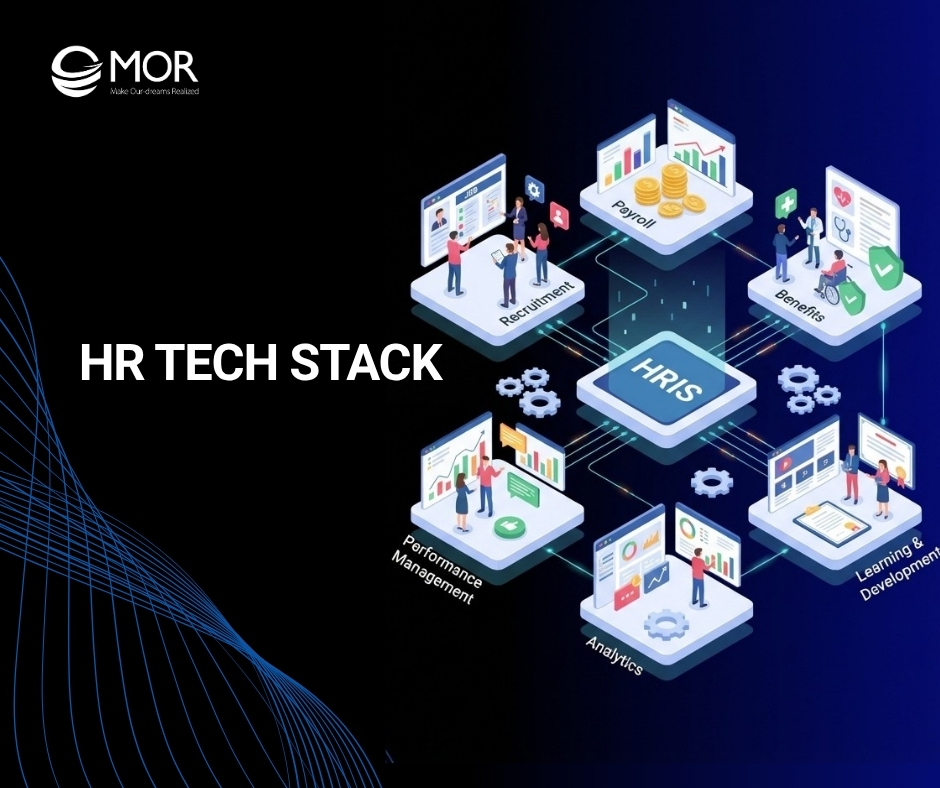
A messy HR tech stack slows hiring, creates data gaps, and sends managers back to spreadsheets. When tools do not connect, HR teams lose time and trust in the system. In this guide, MOR Software will show you how to build a cleaner setup, choose the right tools, and avoid costly mistakes as your business grows.
What Is An HR Tech Stack?
An HR tech stack is the set of software and platforms your company uses to run HR work across the full employee journey. From a new hire’s first day to their final day with the business, this setup should cover onboarding, performance, development, engagement, and compensation.
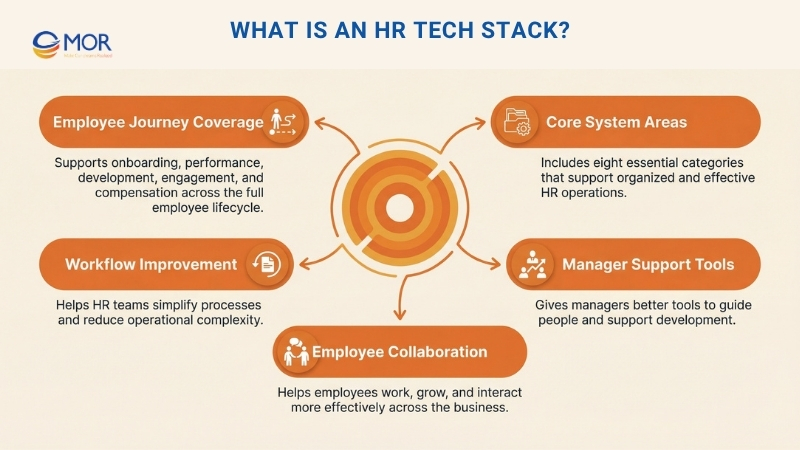
If your role involves updating and simplifying HR operations, your HR technology stack needs to include eight core areas. These parts give human resource development teams a more organized way to work and give managers and employees the tools they need to grow and work together.
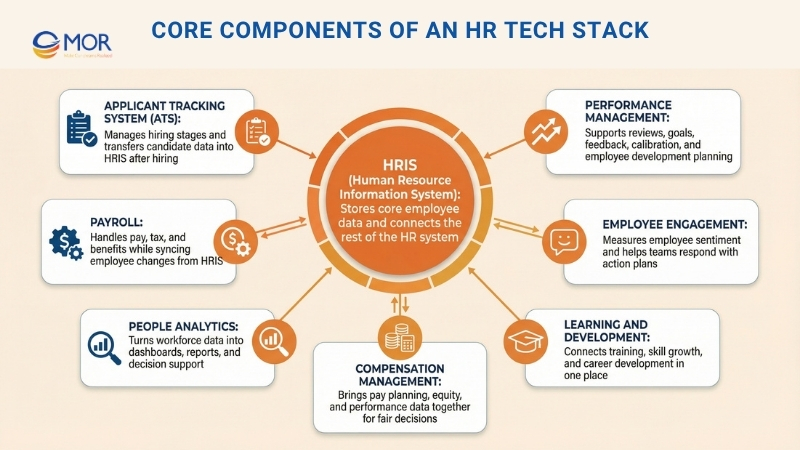
Core Components Of An HR Tech Stack
In a typical HR tech stack diagram, these are the main functions, the key points to review in each one, and the mistakes worth watching before you choose a tool.
HRIS (Human Resource Information System)
Your HRIS platform sits at the center of the whole HR tech stack. It holds employee records, org charts, documents, leave tracking, and basic processes like onboarding and job changes.
You can think of HRIS as the main source of employee data that all other tools should connect to.
When that foundation is weak, information becomes scattered, reporting lines stop matching across systems, and even a basic question like “how many people report to this manager?” becomes hard to answer.
A people-focused HRIS solves this by tying core HR work to performance and development, so employee data appears where managers and teams already handle daily tasks.
At the same time, AI in HR can spot patterns like repeated absences and handle routine steps such as onboarding approvals or document requests, which cuts manual work and gives managers useful context without calling on HR for every small action.
Performance Management
Your performance management system manages reviews, goal setting, ongoing feedback, calibration, where managers align ratings across teams, and development plans.
It gives managers a clearer way to run fair review cycles and helps employees understand expectations and future growth paths.
Many HR teams struggle because performance information sits in separate places. Strong platforms bring reviews, goals, feedback, and learning together, so managers can assess employees with a fuller view and plan development with better judgment.
Employee Engagement
Employee engagement platforms usually include surveys, pulse checks, and action planning features. They help you understand how employees feel, what may be driving retention or turnover, and whether your people efforts are making a real difference.
If a survey shows that employees do not feel clear about career growth, you might begin a development planning effort and send another pulse survey three months later to see if things have improved.
In the same way, if results point to workload pressure or burnout, you can create an action plan around team capacity or better prioritization, then review whether scores rise in the next survey round.
Learning And Development
A learning and development platform includes onboarding paths, training programs, skill tracking, and growth resources. Strong L&D systems help new employees ramp up faster, close skill gaps across teams, and get ready for internal promotions.
From what we have seen with HR teams, when learning tools sit apart from performance and development planning, employees finish courses that do not match their real goals or career direction.
That is why you should look for a system that connects learning paths to performance data and career frameworks, in line with best practices for building corporate training technology stack. When training is linked to reviews, managers can assign courses for real skill gaps, and when learning connects with development plans, employees can see how that training helps them move toward a new role.
Compensation Management
Compensation management covers salary bands, equity allocation, merit increase cycles, and compensation planning. When this works well, it supports fair and transparent pay decisions and helps HR run structured review cycles that connect pay with performance.
The hardest part of compensation is bringing together performance ratings, market data, budget limits, and equity issues, especially when that information sits in different systems.
Connected platforms place compensation cycles, performance ratings, and organizational data in one view, giving HR and leadership the full picture they need to make fair decisions instead of working from partial information.
AI can also support this work by suggesting fair pay changes from performance data, flagging possible pay gaps across teams or groups, and helping managers explain compensation decisions in a clearer way.
People Analytics
People analytics includes dashboards, reporting, and workforce insights that help HR make decisions based on data.
In a strong setup, you should be able to review engagement scores, turnover hr risk management, performance patterns, and compensation equity across the business without pulling together exports from several systems.
With standalone analytics tools, the problem is often delay. Once you export, combine, and review data from different platforms, the picture you are using is already outdated.
Payroll
Payroll covers salary processing, tax compliance, and benefits administration. For businesses operating across countries and dealing with complex tax and benefits rules, that often means using specialist payroll management tools, which is common in an HR tech stack for international teams.
Still, much of the manual effort comes from collecting employee data, tracking absences, and bringing compensation updates together.
Whatever route you choose, the key point is that your payroll tool must connect with HRIS, so employee changes move through automatically and compensation data returns to the system without manual entry.
Applicant Tracking System (ATS)
An applicant tracking system ATS manages hiring pipelines, candidate records, interview scheduling, and offer management. Like payroll, you may still need a specialist tool when hiring becomes more complex, especially for high-volume recruiting or multi-country hiring, where tech stack integration for recruitment matters more.
The most important transfer happens when a candidate accepts an offer, and the advantages of using a unified recruiting tech stack become clear because contact details, job title, start date, and compensation should move directly from the ATS into HRIS.
This handoff removes duplicate entry, lowers onboarding mistakes, and helps new hires get set up correctly from day one. Without that connection, HR teams have to type the same information again, which wastes time and raises the chance of mismatched data between recruiting records and employee records.
Benefits Of A Solid HR Tech Stack
Using technology well is no longer optional for modern businesses. A solid HR tech stack can support your company in several important ways:
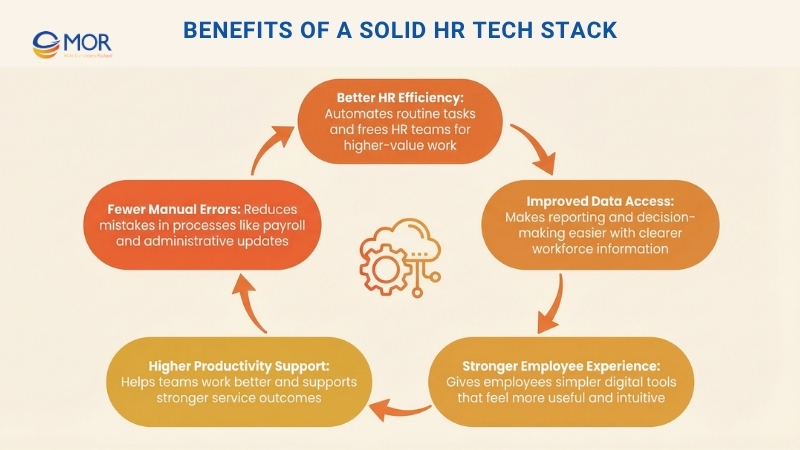
Helping you work better as an HR professional
When routine work is automated, you get more done in less time. You can also gather and review data more easily, create reports, and make decisions based on facts. That extra efficiency gives you more room to focus on higher-value work and support both employees and leadership more effectively. It can also lower operating costs over time.
Improving the digital employee experience
Employees expect workplace tools to feel simple and useful, just like the apps they use outside work. When they can use digital HR tools that are clear, smooth, and practical, their overall experience improves. That can strengthen engagement, support productivity, and help your business serve customers better.
Reducing errors
When you move detailed processes into digital systems and automate admin tasks that need accuracy, human mistakes become less common. Payroll is one clear example, since errors can happen when deductions or pay updates are entered by hand in several different places.
How To Build An HR Tech Stack?
Putting together the right HR tech stack does not happen overnight, and good HR technology implementation usually needs a series of clear decisions. These steps can help you move in the right direction:
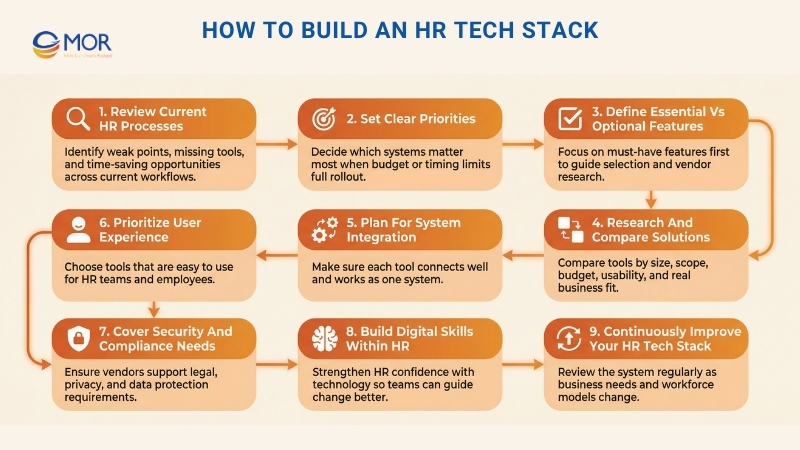
Review Your Current HR Processes
Begin with a close look at where your current setup is falling short. Speak with the people involved inside and outside the HR team so you can examine existing processes and workflows across each area. Review the tools you already use and look for missing capabilities, weak points, and places where time could be saved.
Set Clear Priorities
You may find more needs than your budget can support, so you might need to roll things out in stages. If full implementation is not possible at once, you will need to decide which part of the HR tech stack matters most right now, while also considering leadership priorities.
A good example could be an attendance tool if spreadsheet tracking is becoming messy, or an applicant tracking system if your company is hiring at a fast pace.
Define Essential Vs Optional Features
When money is limited, it makes sense to focus first on the features you truly need and leave aside extras that are not necessary. This helps you shape your RFPs and keeps your research focused on the right solutions.
Research And Compare Solutions
Because there are so many options on the market, you need to narrow them down to the ones that match your company size, business scope, and budget. A good starting point is reading reviews and asking peers for their input.
After you have a short list, book demos or try free trials so you can see how the features work and whether the tools are easy to use. You want solutions that save real time and will be used often enough to make the investment worthwhile.
Plan For System Integration
Tools that do not connect well with one another often create more work instead of solving it. You do not want separate systems for every HR task if they make work slower and harder. Each part of your setup should connect and function as one.
When you speak with vendors or review products, tell them which tools are already in place and ask whether the integrations already exist or whether custom connections can be created.
Prioritize User Experience
If your goal is to get more value from an HR tech stack, the tools must be easy to use and simple to move through. A strong experience for both HR teams and employees matters a lot. It makes adoption smoother and helps improve your company’s digital employee experience.
You should also check whether proper support is available when users need help or face issues. If your business does not have internal IT support, make sure the vendor can step in when needed.
Cover Security And Compliance Needs
HR plays an important role in keeping business practices ethical, protecting sensitive information, and making sure employee policies follow the law. Your technology tools need to support all of that.
For example, if part of your workforce operates remotely, company information must stay protected. If your business works in Europe, the vendor you choose must meet GDPR requirements. You should also confirm that any algorithms used by the vendor are checked regularly and remain transparent.
Build Digital Skills Within HR
Confidence with technology and a solid level of digital dexterity can make a big difference when you build a strong system. When you understand how technology helps HR teams and employees work better, and when you can adapt to new tools quickly, you are in a stronger position to guide change.
Looking at how other departments use digital tools is one useful way to strengthen those skills. You can also keep learning through trend reports and new ideas in the market.
Continuously Improve Your HR Tech Stack
After your HR tech stack goes live, you will need to review from time to time how well it supports your business. As your company expands or changes direction, your needs will shift as well.
One example is remote work. If more of your employees begin working from different locations, your systems should adapt to that change. You should also keep an eye on new types of technology that may strengthen your setup.
How To Audit Your HR Tech Stack Before Adding New Tools
Before you spend time on one more vendor demo, go through the three steps below so you can see what your business really needs from its HR tech stack.
As you do that, keep asking yourself these questions:
“Does this integrate well enough that no one has to do manual data entry or reconciliation?”
If the answer is no, you either need to improve the integration or move that function into your main platform.
“Is there another tool that does this?”
When the answer is yes, one of those tools probably should not stay. Overlapping systems and duplicate tools often lead to confusion, mismatched data, and unnecessary spending.
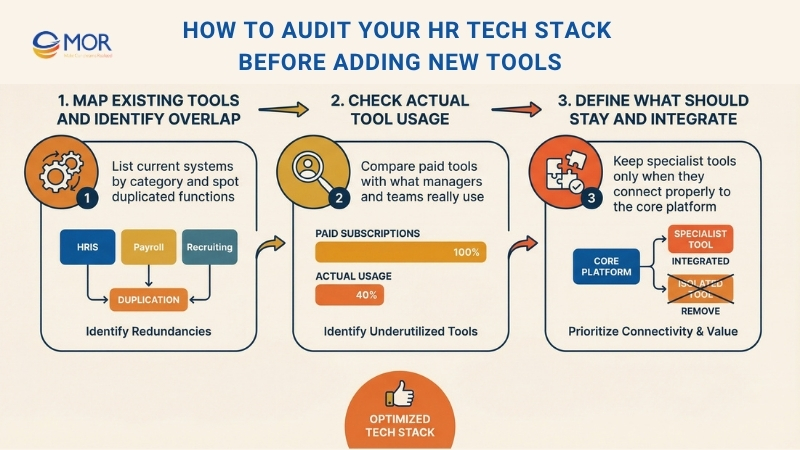
Map Existing Tools And Identify Overlap
Write down the tools you already use by category, such as HRIS, performance management, employee engagement, learning management, compensation, and analytics, then check where functions overlap. If you are using two survey platforms or several performance review tools, that is usually a strong sign that consolidation is possible.
Check Actual Tool Usage
Ask managers which systems they truly use and which ones are mostly ignored. Look for workarounds too. Are people still keeping side spreadsheets or sharing feedback through Slack because the paid tools feel too hard to use? Many HR teams are surprised when they compare “tools we pay for” with “tools people use,” and that gap can be very useful when deciding what deserves to stay in your HR tech stack.
Define What Should Stay And Integrate
Specialist systems like ATS and payroll still make sense for difficult hiring needs or multi-country tax rules, but they must connect properly with your core platform. Candidate details should move automatically into your HRIS once someone is hired, and payroll updates should return to the same system automatically. In the same way, performance data should feed compensation planning without the need for exports.
Common Mistakes When Building An HR Tech Stack
A connected HR tech stack can create major value for a business. Still, many companies run into problems during planning and rollout. When you avoid these mistakes early, you can prevent wasted time, extra costs, and a lot of unnecessary stress.
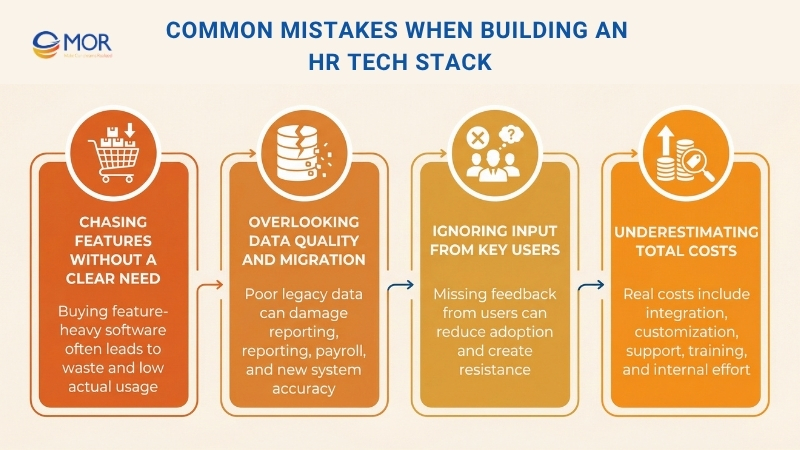
Chasing Features Without A Clear Need
Do not commit to costly software packed with features if you do not have a clear reason for using it. In many cases, businesses use only a small share of what the full platform can do. Keep your attention on the functions that fix real business issues, not on everything a vendor is trying to sell.
Overlooking Data Quality And Migration
Do not expect data transfer from one system to another to be simple. Weak data in an older platform, such as wrong job titles or incomplete dates, can create serious problems for reporting and payroll in the new setup. Cleaning your data needs to be a major part of the rollout plan, especially when sensitive records are moving into new HR payroll software.
Ignoring Input From Key Users
Do not launch a new platform without getting feedback from the people who will actually use it. That group includes managers, finance teams, and IT. When their input is missing, resistance grows and adoption often stays low. A new system affects the whole business, so feedback on the interface and important workflows matters during selection. This matters even more when the platform handles employee data and workflows across countries.
Underestimating Total Costs
Do not look only at the subscription price. You also need to account for other major expenses. These may include integration work, customization, ongoing support, and the internal time your team spends on admin and training. The real price of a system often goes well beyond the first contract. A careful financial review is needed if you want a realistic view of the investment.
Real Examples Of HR Tech Stack By Company Size
To make HR tech stack examples easier to picture, it helps to look at how different businesses often structure their systems. These HR tech stacks usually change with company size, hiring needs, compliance pressure, and the level of process maturity.
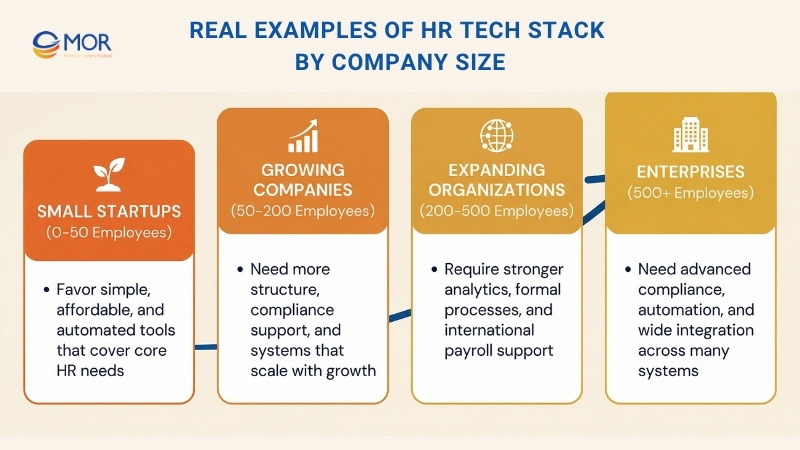
Small Startups (0–50 Employees)
For smaller startups, the goal is usually to keep things simple, affordable, and as automated as possible. At this stage, companies often choose tools that cover the basics without adding too much complexity.
- Focus: Keep the setup simple, budget-friendly, and automated where possible.
- HRIS/Payroll: Gusto, Rippling, and Justworks are common options, especially if the business uses an EOR.
- Recruiting/ATS: BreezyHR, Lever, and Workable are often suitable for early hiring needs.
- Performance Management: Lattice in a lighter version, 15Five, and Culture Amp are typical choices.
- Engagement & Feedback: Officevibe, Peakon, and TinyPulse can help teams gather employee feedback.
- Learning & Development (LMS): Trainual and Lessonly can support early training efforts.
- Benefits & Compliance: Gusto, Rippling, or Deel may be used, especially when global compliance starts to matter.
Growing Companies (50–200 Employees)
As a company grows, its needs usually shift toward scale, compliance, and more structured processes. At this point, businesses often need tools that can support a larger workforce without losing control over operations.
- Focus: Support growth, maintain compliance, and build more structured workflows.
- HRIS/Payroll: BambooHR, HiBob, Paycor, and Rippling are often used in this range.
- Recruiting/ATS: Greenhouse, Lever, and Workable remain common choices.
- Performance Management: Lattice, 15Five, and Culture Amp can support more formal review cycles.
- Engagement & Feedback: Peakon, Officevibe, and Quantum Workplace are typical options.
- Learning & Development (LMS): Lessonly, LearnUpon, and Docebo may be a strong fit.
- Benefits & Compliance: Rippling, Zenefits, and Sequoia One as a PEO can help manage this area.
Expanding Organizations (200–500 Employees)
For companies moving into a broader and more mature stage, the HR tech stack often needs to support international payroll, more structured HR processes, and deeper analytics. This is where businesses usually need stronger systems to manage complexity across regions and teams.
- Focus: Handle international payroll, formalize HR operations, and strengthen analytics.
- HRIS/Payroll: HiBob, Workday Core, ADP Workforce Now, and Rippling with global support are often considered.
- Recruiting/ATS: Greenhouse, Lever, and SmartRecruiters are widely used.
- Performance Management: Lattice, Culture Amp, and 15Five can support more advanced review programs.
- Engagement & Feedback: Peakon, Culture Amp, and Qualtrics are common in this stage.
- Learning & Development (LMS): Docebo, Lessonly, and SAP Litmos are often selected.
- Global Payroll & Compliance: Deel, Papaya Global, Remote, and Velocity Global can support cross-border operations.
Enterprises (500+ Employees)
Larger enterprises usually need platforms built for heavy compliance demands, advanced automation, and wide integration needs. Their people management tech stack often has to support large teams, detailed controls, and many connected systems.
- Focus: Prioritize enterprise-level compliance, automation, and integration support.
- HRIS/Payroll: Workday, SAP SuccessFactors, Oracle HCM, and UKG are well-known enterprise options.
- Recruiting/ATS: Greenhouse Enterprise, iCIMS, SmartRecruiters, and Avature are often used.
- Performance Management: Workday, Lattice Enterprise, Culture Amp, and SuccessFactors PM can support complex review structures.
- Engagement & Feedback: Qualtrics, Glint, and Culture Amp are commonly used.
- Learning & Development (LMS): Cornerstone OnDemand, Docebo, and SAP Litmos are popular choices.
- Global Payroll & Compliance: ADP GlobalView, Deel, Papaya Global, and CloudPay can support enterprise payroll and compliance needs.
Future Outlook And Trends In The HR Tech Stack
The HR tech stack keeps changing as new tools enter the market. Growth in AI, machine learning, and new ways of working around the world are pushing that change forward. Business leaders need systems that can adjust to these shifts. The tools you choose now should be strong enough to connect with the next wave of solutions.
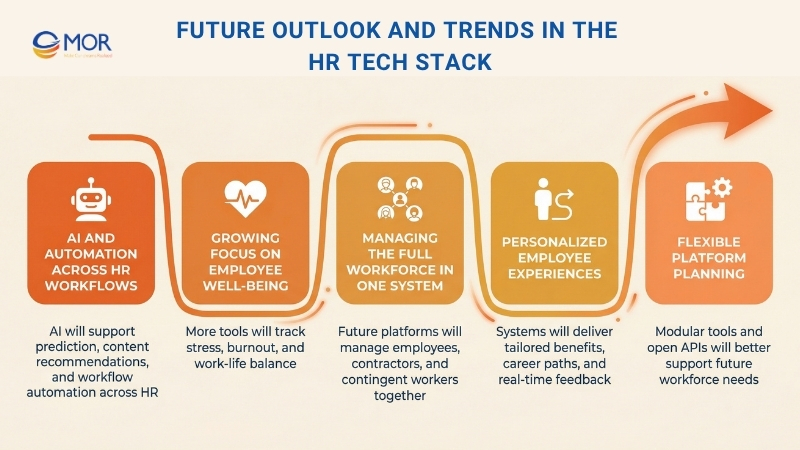
The biggest developments shaping the future are listed below:
AI And Automation Across HR Workflows
AI in HR tech stacks will move far past simple chatbot use and become part of core workflows. It will help identify employees with a high chance of leaving, recommend learning content that fits each person, and create job descriptions automatically. That shift can raise the strategic role of HR and move more attention from admin work to forecasting and planning.
Growing Focus On Employee Well-Being
Future systems will include more tools that track and support employee well-being, stress, and work-life balance. Managers will use data from these tools to respond earlier to signs of burnout. Research from Gallup shows that this is already a major concern across industries.
Managing The Full Workforce In One System
The line between full-time staff, contractors, and contingent workers will become less clear. Future platforms will manage the whole workforce in one place. They will support different payroll models, compliance rules, and performance measures at the same time.
Personalized Employee Experiences
Future systems will create a more tailored employee experience. They will support custom benefits, career paths shaped around personal skills, and ongoing feedback in real time instead of relying only on yearly reviews.
To get ready, business leaders should focus on tools that are modular, support open APIs, and show a clear direction for AI integration. When organizations choose a flexible, connected HR tech stack, they put themselves in a better position for current needs and for the future demands of the workforce.
MOR Software Helps Businesses Build an HR Tech Stack That Actually Works
A lot of teams buy new software, but the setup still feels hard to manage. Information stays split across tools. Reports take too long to pull. Managers end up going back to spreadsheets.
At MOR Software, we look at your HR AI tech stack through the way your team already works. We begin with your current process, then shape a setup around your real workflows. We do not push extra platforms. We do not leave you with tools that do the same job twice.
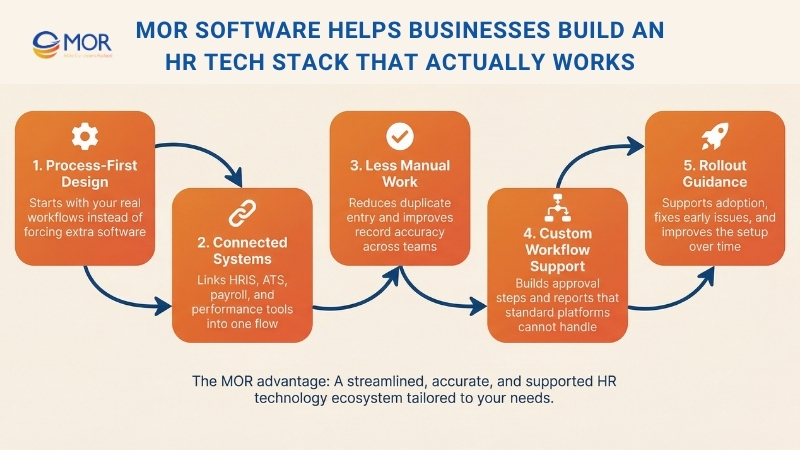
We connect your systems so information moves on its own instead of relying on manual entry. HRIS integration, ATS, automated payroll systems, and performance platforms can work as one connected flow. That cuts repeated tasks and helps keep records accurate across departments.
We also create the missing parts that standard products cannot handle. Some businesses need custom steps, approval rules, or reporting views. We build those parts so the system matches the way your company actually operates.
Our team also stays involved during rollout and adoption. We help your HR team learn the HR AI tools, solve early issues, and update the setup as the business expands. In projects like workforce management systems and HR platform integrations, we keep seeing the same result. Value comes from the right tools working together, not from adding more of them.
Conclusion
A strong HR tech stack gives your business more than better tools. It creates cleaner data, smoother workflows, and a better experience for HR teams, managers, and employees. The key is not adding more software. It is building a system that fits the way your company works today and can grow with you tomorrow. If you are planning your next HR system move, contact MOR Software and let us help you build a setup that works.
MOR SOFTWARE
Frequently Asked Questions (FAQs)
What is an HR tech stack?
An HR tech stack is a group of tools used to manage hiring, employee data, performance, learning, payroll, and engagement across the employee lifecycle.
What systems are usually included in an HR tech stack?
It often includes HRIS, ATS, payroll software, performance tools, engagement platforms, learning systems, and analytics dashboards.
Why do companies need this type of system?
It helps reduce manual work, improve accuracy, and give HR teams better visibility. It also supports faster decisions and smoother operations.
What is the difference between HRIS and an HR tech stack?
HRIS is one core system for storing employee data. The full setup includes HRIS plus other tools like recruiting, payroll, and performance management.
How do you choose the right setup for your company?
Start with your business needs. Focus on key gaps, budget, and team size. Then select tools that integrate well and are easy to use.
Should small businesses invest in an HR tech stack?
Yes, but keep it simple. Start with basic systems like HRIS and payroll, then expand as the company grows.
What are common mistakes when building an HR tech stack?
Using too many tools, ignoring integration, and not involving end users early. These often lead to low adoption and inconsistent data.
How do you choose hiring tools that integrate with payroll systems?
Focus on tools that offer native integrations or reliable APIs with your existing payroll software, support real-time data syncing, and ensure compliance with local labor and tax regulations. It also helps to check user reviews and test how smoothly candidate data flows into payroll without manual re-entry.
How important are integrations between HR tools?
They are very important. Without integration, teams must re-enter data across systems, which increases errors and slows work.
Can an HR tech stack support remote teams?
Yes. Most tools are cloud-based, so employees and managers can access them from anywhere.
How often should you review your HR tech stack?
At least once a year. As your company grows, your needs change, so your systems should be updated to match.
Share


Make Our-Dreams Realized


© 2023 . MOR Software. All Rights Reserved
Sitemap
Privacy Policy
Terms of Use

Rate this article
0
over 5.0 based on 0 reviews
Your rating on this news:
Name
*Email
*Write your comment
*Send your comment
1