


Odoo Payroll: Setup, Workflow, HR Modules & Compliance 2026
Payroll errors are expensive, slow to fix, and stressful for HR teams. Odoo payroll helps connect salary rules, contracts, attendance, time off, payslips, taxes, and accounting in one flow. This MOR Software’s guide will show you how the module works, what to check before setup, and how to roll it out with fewer surprises.
Key Takeaways
- Odoo payroll works best when salary structures, employee contracts, attendance, time off, and accounting rules are set up before the first pay run.
- Local tax rules, statutory payroll deductions, overtime, benefits, and leave policies need careful review to avoid wrong payslips and compliance issues.
- A safer rollout starts with one pilot group, clean access rights, payroll testing, team training, and staged expansion across branches or countries.
What Is Odoo Payroll?
Odoo Payroll is a payroll management system inside the Odoo HR suite. It connects employee records, attendance, time off, contracts, accounting, and salary rules so HR teams can process pay with fewer manual steps.
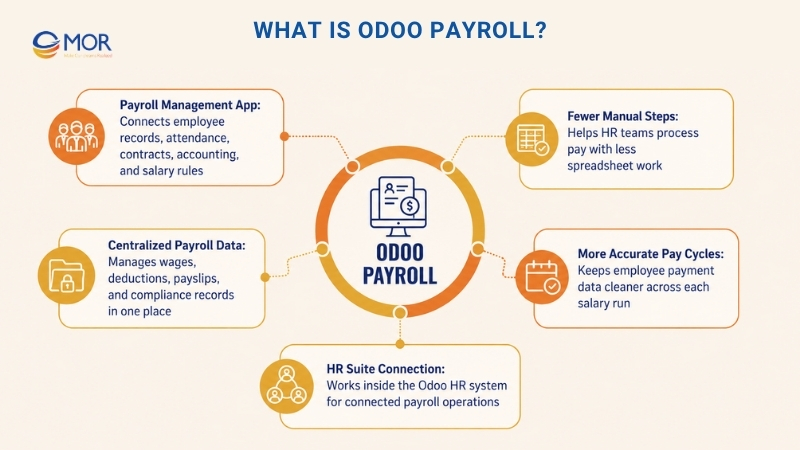
For many businesses, payroll Odoo search intent usually comes from one clear need: they want one place to manage wages, deductions, payslips, and compliance records. The platform helps teams keep employee payment data more accurate across each pay cycle.
Odoo Payroll Architecture: Salary Structures, Rules, And Categories
The Odoo payroll module uses several connected layers to calculate employee pay. Before you set up salary formulas, it helps to understand how each layer affects payslip results.
Payroll Hierarchy
The payroll app arranges pay logic through a clear structure:
Level | What It Controls | Example |
Structure Type | Main worker group and payment schedule | Monthly Employee, Hourly Worker, Contractor |
Salary Structure | Pay package linked to one structure type | US Monthly Employee, UK Monthly Employee |
Salary Rule | One calculation item shown on a payslip | Basic Salary, Income Tax, Health Insurance |
Rule Category | Group used to arrange payslip lines | Gross, Deductions, Net Pay, Employer Cost |
This setup lets one Odoo database support different employee groups, payment cycles, and local payroll rules within the same salary management flow.
Salary Rule Categories
Odoo payroll uses common rule groups to arrange each payslip line:
- Base Pay: Salary amount taken from the employee contract
- Extra Pay: Housing, travel, meals, and other added payments
- Total Gross Pay: Basic pay plus all extra pay items
- Employee Deductions: Tax, social insurance, health insurance, loan payments, and other worker-side deductions
- Take-Home Pay: Final amount sent to the employee after deductions
- Company Contributions: Employer-side costs, including social insurance, pension matching, and insurance payments
- Full Employer Cost: Total company cost after net pay, deductions, and employer contributions are counted
Key Odoo Payroll Features That Drive Business Value
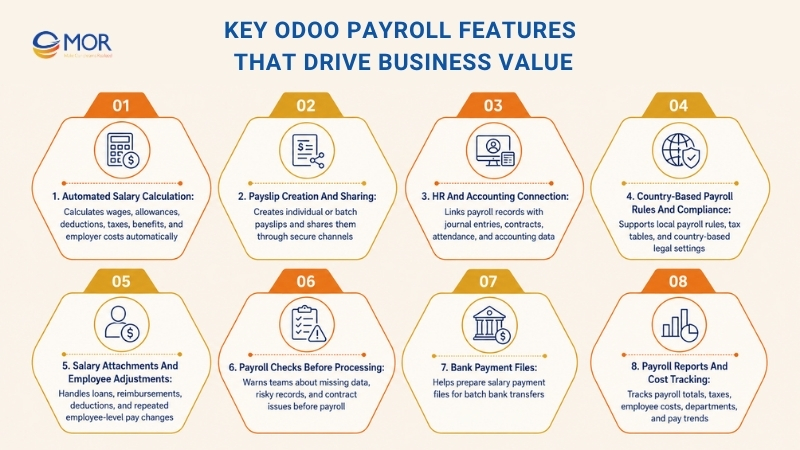
Odoo payroll features matter when a business wants better value from its HRMS setup. Salary calculation, compliance checks, payment files, and reports help HR and finance teams cut spreadsheet work, lower error rates, and keep pay runs tied to local rules.
Automated Salary Calculation
Salary formulas in Odoo payroll calculate wages, allowances, deductions, taxes, employer costs, and employee benefits through rules set in advance. This removes most manual spreadsheet work and helps human resource development teams run salary cycles with fewer mistakes.
Payslip Creation And Sharing
Teams can create payslips one by one or in batches, then share them safely through email or the employee portal. Staff can view pay details, deductions, allowances, and net salary in a clean format.
HR And Accounting Connection
Payroll records can create accounting journal entries without separate manual posting, which lowers mismatch issues between HR and finance. This connection ties contracts, attendance, salary structures, payroll expenses, and accounting data into one working process.
Country-Based Payroll Rules And Compliance
Odoo payroll supports country-based settings for national pay rules, legal requirements, and regional tax tables through ready-made configurations. These settings help companies match payroll rules with local authorities and tax systems, including Vietnam General Department of Taxation requirements or Canada CRA compliance.
Salary Attachments And Employee Adjustments
Salary attachments help HR teams manage repeated or time-limited employee changes inside the payroll process. These entries can include medical support, child support, staff loans, reimbursements, wage deductions, and other pay-related items that change each salary run.
Payroll Checks Before Processing
Central payroll dashboards can warn HR managers about missing or risky items before salaries are processed. These checks may show expired work permits, missing bank details, incomplete employee profiles, or workers without active contracts, which helps teams avoid pay delays and compliance issues.
Bank Payment Files
The payroll app can support bank payment reports that help businesses prepare batch salary transfers. Based on country and setup, companies can create payment files, including NACHA files in the US or Autopay files in other markets, so salary payments can move through bank systems with less manual work.
Payroll Reports And Cost Tracking
Teams can review payroll totals, tax summaries, employee costs, cost centers, department expenses, and pay trends for better budget planning. These reports help HR and finance teams read labor costs, check payroll results, and make better business decisions.
>>> Explore how businesses can set up payroll operations, compare global managed payroll providers, and choose the right model for 2026.
Step-By-Step Odoo Payroll Setup Guide
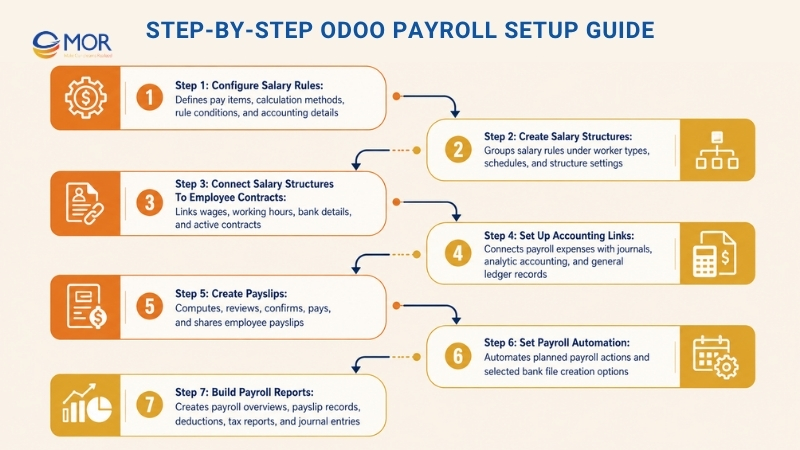
This Odoo Payroll setup guide gives HR administrators and new users a practical way to configure the system. Teams should also review Odoo payroll documentation during setup so salary rules, contracts, accounting links, and reports match the right business process.
Step 1: Configure Salary Rules
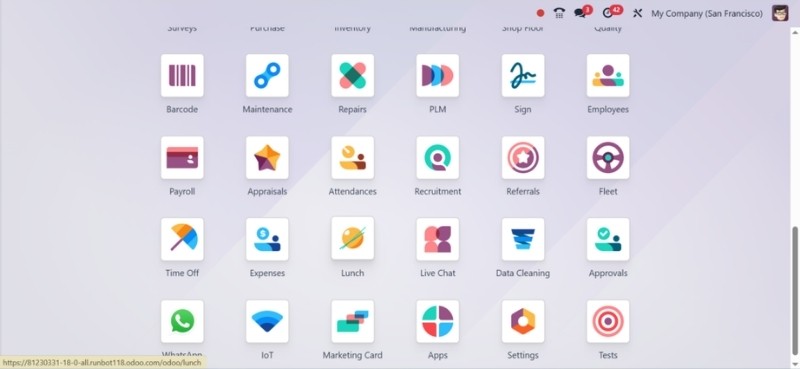
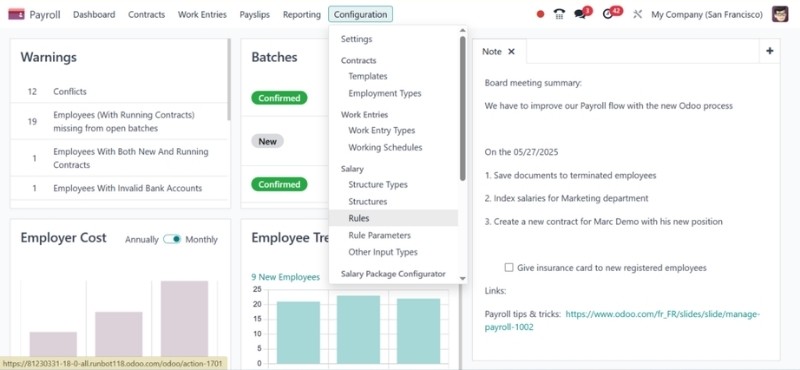
Path: Payroll → Configuration → Salary Rules
- Select Create.
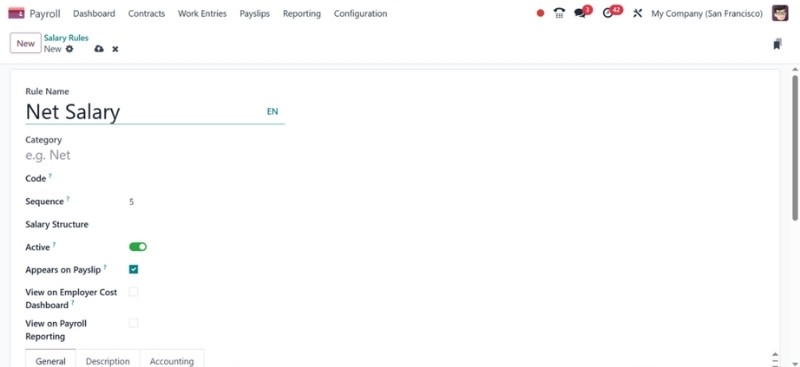
- Fill in:
- Rule Title: Use names like Basic Salary, HRA, or Provident Fund.
- Rule Group: Choose the right group, including Allowances or Deductions.
- Short Code: Add brief and unique codes, including BASIC or HRA.
- Calculation Method:
- Fixed: Use this for fixed amounts.
- Percentage: Use this for a share of another item, such as 10% of BASIC.
- Python Code: Use this for more complex logic.
- Add rule conditions, such as rules that only apply to full-time employees.
- Set Accounting Details: Choose debit and credit accounts when the rule must connect with accounting.
Step 2: Create Salary Structures
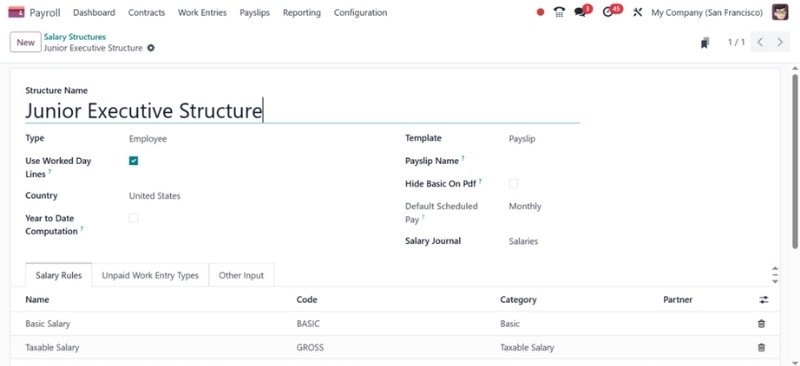
Path: Payroll → Configuration → Salary Structures
- l in:
- Structure Name: Use names like Junior Executive Structure.
- Worker Type: Select Employee.
- Add salary rules through the “Add a line” button.
- Choose the company, working schedule, and structure type.
- Turn on Use Worked Day Lines when the structure needs attendance or timesheet data.
Step 3: Connect Salary Structures To Employee Contracts
Path: Employees → Select Employee → Contracts Tab → Create
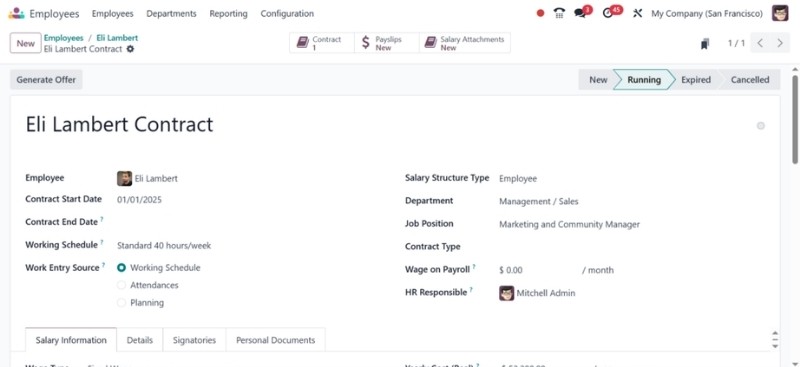
Set these details:
- Start Date and End Date, when needed
- Wage Type, such as Monthly or Hourly
- Salary Structure, based on step 2
- Working Hours, for hourly pay setups
- Bank Account Details
Set the contract status to Running so the system can include that employee in payroll processing.
Step 4: Set Up Accounting Links
Path: Payroll → Configuration → Settings
- Select Generate Accounting Entries.
- Turn on Analytic Accounting when departments need cost tracking.
- Choose a default Payroll Journal, such as Payroll Expenses.
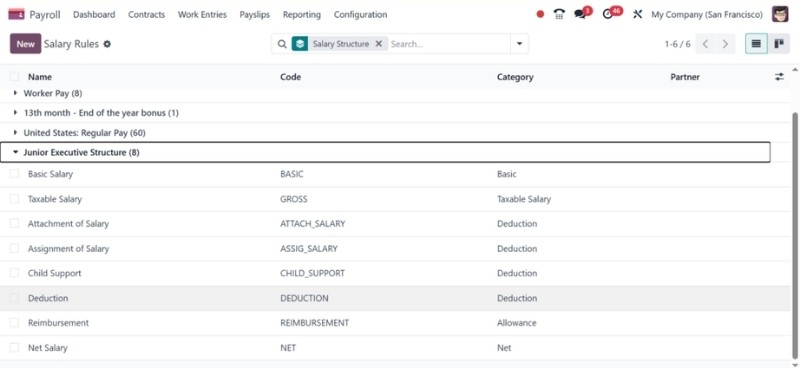
You also need to set journal accounts under Payroll → Configuration → Salary Rules → Accounting section. This setup sends payroll expenses into your general ledger without separate manual posting.
Step 5: Create Payslips
Path: Payroll → Payslips → Create
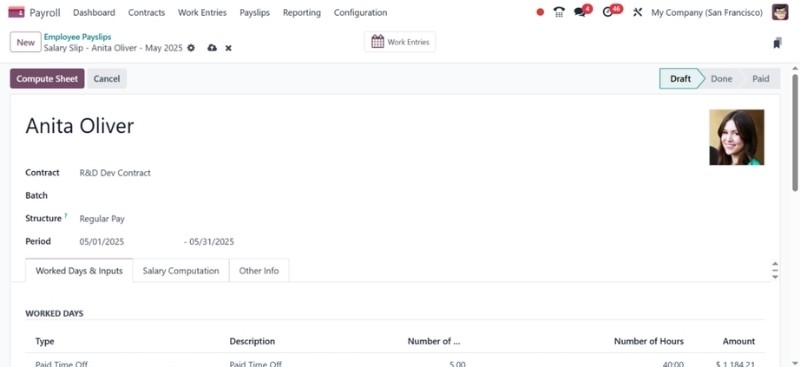
- Choose an employee.
- Add:
- Pay Period: Start date and end date.
- Structure: Odoo payroll can pull this from the employee contract.
- Click Compute Sheet to review the pay breakdown.
- Click Confirm to approve the payslip.
- When needed, click Mark as Paid and Send by Email.
***Use “Batch Payslips” for group processing:*Payroll → Payslips Batches → Create
Step 6: Set Payroll Automation
Enterprise-only options may include:
- Planned Payroll Actions: Run payroll every month through Settings → Developer Mode → Technical → Automation → Scheduled Actions
- Automatic Bank File Creation: Turn on SEPA or use local bank file formats. Open Payroll Settings to activate bank links.
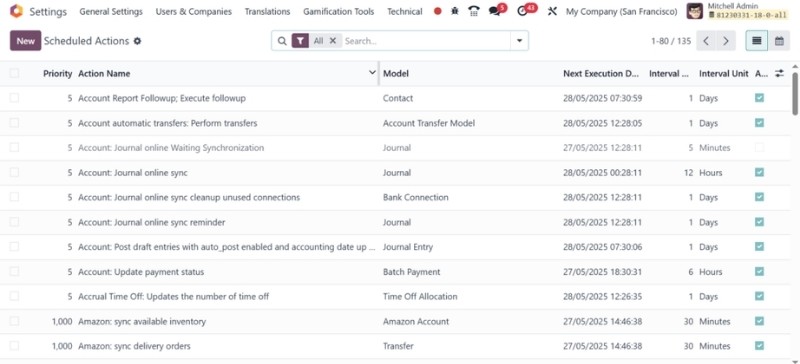
Step 7: Build Payroll Reports
Path: Payroll → Reporting
Common reports include:
- Payroll Overview
- Employee Payslip Records
- Deduction Report
- Tax Reports
- Accounting Journal Entries
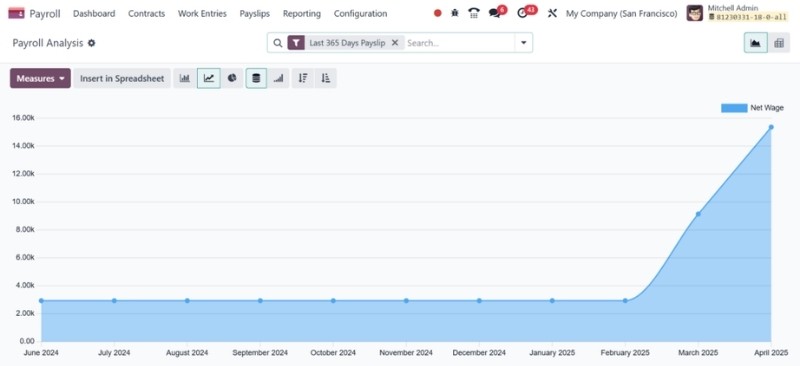
Odoo Payroll Tax Calculations And Compliance
Payroll tax settings often differ by country, region, employee group, benefit plan, and tax year. Odoo payroll localization helps companies manage this work through local payroll packages, rule-based salary formulas, required deduction setup, and report formats that support compliant pay runs in different markets.
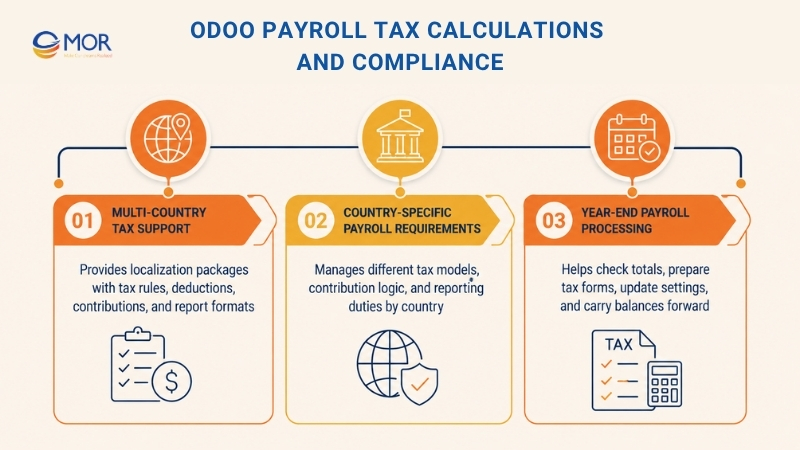
Multi-Country Tax Support
Odoo 19 provides payroll localization packages for more than 50 countries, so companies can set up payroll based on local tax rules and labor laws. Each package may cover income tax tables, social security settings, employer-paid contributions, required deductions, and payroll report formats.
These local settings help HR and finance teams run payroll with fewer manual edits. Teams do not need to create every tax formula from zero, since they can start with ready salary structures and then adjust them to match company rules, employee contracts, and regional compliance needs.
Supported setup items often include:
- Income Tax Ranges: Tax tables matched with the right fiscal year
- Social Insurance Settings: Contribution percentages, salary caps, and employer matching rules
- Required Worker Deductions: Mandatory deductions under local payroll laws
- Government Report Formats: Payroll reports and filings requested by local authorities
- Pay Rule Setup: Flexible formulas for allowances, deductions, benefits, and employer-paid costs
Country-Specific Payroll Requirements
Every country has different payroll rules, so local setup helps lower compliance risk. The platform lets businesses manage tax models, contribution logic, and reporting duties from one payroll workspace, including use cases like Odoo payroll US support.
Country | Payroll Setup Items |
United States | Federal and state tax tables, W-4 data, 401(k) deductions, FICA contributions |
United Kingdom | PAYE tax codes, National Insurance, student loan deductions, pension auto-enrollment |
Germany | Lohnsteuer classes, Solidaritaetszuschlag, Kirchensteuer, Sozialversicherung |
India | PF, ESI, Professional Tax, TDS, Section 80 deductions, Form 16 preparation |
UAE | WPS compliance, gratuity rules, no personal income tax setup |
Saudi Arabia | GOSI contributions, end-of-service benefits, Saudization payroll rules |
This local payroll setup also supports teams researching Odoo payroll Australia or Odoo payroll Kenya for regional branches and global hiring plans. HR teams can manage country rules while keeping payroll data, employee profiles, contracts, and accounting entries linked inside Odoo.
Year-End Payroll Processing
Year-end payroll work needs careful review before companies close the financial year and send required reports. The payroll app supports this process by helping teams check yearly payroll totals, prepare tax documents, update contribution settings, and move employee balances into the next cycle.
Common year-end payroll tasks include:
- Checking Yearly Payroll Figures: Match year-to-date salary, deduction, tax, and contribution amounts with payslip records.
- Preparing Employee Tax Forms: Create required worker tax documents, including W-2 in the United States, P60 in the United Kingdom, or Lohnsteuerbescheinigung in Germany.
- Sending Annual Reports: Submit payroll summaries and employer filings to the correct tax office.
- Refreshing Tax Settings: Add new tax brackets, social security rates, and contribution ceilings for the new fiscal year.
- Carrying Balances Forward: Reset annual leave, adjust benefits, and prepare employee records for the next pay cycle.
These tools give HR and finance teams a better way to handle tax calculations, statutory deductions, payroll reports, and compliance work across countries. The result is less manual payroll effort and cleaner records through the full year.
Odoo Payroll Rules For Overtime, Benefits, And Special Pay
Odoo Payroll helps companies handle pay cases that go past fixed monthly wages. These cases include overtime, benefit deductions, employer costs, salary advances, employee loans, bonuses, and other special pay inputs. Strong salary rules and connected HR data help teams process these items with better accuracy and fewer manual edits.
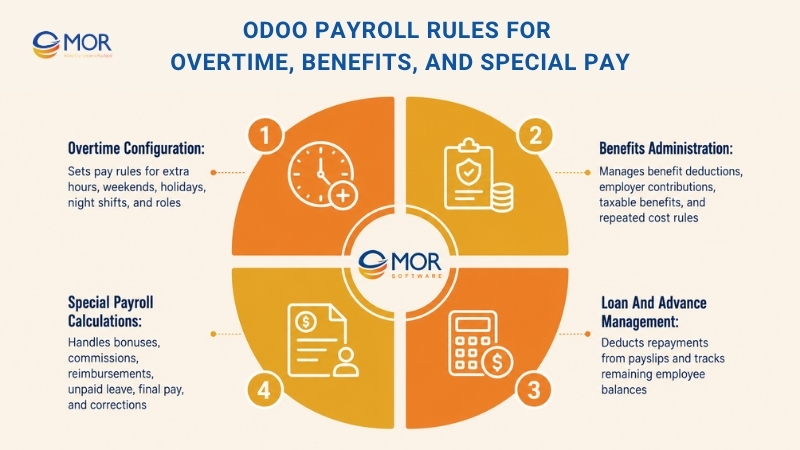
Overtime Configuration
Overtime rules can follow local labor law, employee contracts, and internal company policy. HR teams can set different rates for weekday overtime, weekend work, public holidays, and night shifts, then apply those rules during salary calculation.
Common overtime setups include:
- Extra Weekly Hours: Hours above the normal weekly limit, often paid at 1.5x the regular hourly wage
- Weekend Work Pay: Saturday or Sunday work paid at a higher rate, often 1.5x or 2x based on policy
- Public Holiday Pay: Holiday work paid at premium rates, often 2x or 2.5x the normal rate
- Night Shift Extra Pay: Added pay percentage for staff who work overnight
- Role-Based Overtime Logic: Different formulas for full-time staff, part-time staff, hourly workers, or shift teams
When the Attendance module is active, overtime hours can come from employee check-in and check-out records. Companies that do not track attendance can still enter overtime through payslip input lines. This gives teams room to handle different work models without separate spreadsheets.
Benefits Administration
The payroll module can manage benefit deductions and employer contributions through salary rules, contract data, and payslip inputs. This helps HR teams process employee benefits as part of the normal pay cycle instead of running them in a separate process.
Common benefit types include:
- Medical Plan Costs: Different plans for employee-only, spouse, or family coverage, with different company and employee payment shares
- Dental And Vision Plans: Add-on plans handled through separate deduction lines
- Life Insurance Coverage: Employer-paid basic coverage plus optional employee-paid plans
- Retirement Contributions: 401(k), pension, provident fund, or similar plans with employer matching formulas
- Flexible Spending Plans: Pre-tax deductions for healthcare, childcare, or dependent care costs
- Equity-Based Pay: Vesting schedules and taxable pay items linked to payroll calculation
- Food, Travel, And Housing Support: Fixed or changing benefits added to payslips based on company policy
These benefit rules can apply based on contracts, salary structures, departments, or selected benefit plans. HR and finance teams get better control over repeated deductions, taxable benefits, and employer-side costs.
Loan And Advance Management
Employee loans and salary advances can also run through payroll rules. This lets companies deduct agreed repayment amounts from payslips and track what remains over time.
A normal loan or advance process includes:
- Add The Approved Amount: Enter the loan or advance value and repayment terms in the employee record.
- Set A Deduction Rule: Define repayment amount, frequency, and calculation logic.
- Send The Deduction To Payslips: Apply the rule during each pay cycle until the amount is fully repaid.
- Review The Outstanding Balance: HR teams can check unpaid amounts through payslip inputs or payroll records.
- Update The Plan When Needed: Payroll managers can revise repayment terms if the employee pays early or receives a new deduction plan.
This setup helps businesses manage staff loans, salary advances, equipment repayments, training fee recovery, and other employee-level payroll changes with clearer records.
Special Payroll Calculations
Odoo Payroll can also handle pay items that depend on company rules or employee cases, not only standard wages. These items can be added through salary rules, work entries, or manual payslip inputs.
Common special calculations include:
- Result-Based Bonuses: One-time or repeated bonus payments tied to personal, team, or company results
- Sales Commission Pay: Variable pay for sales teams based on revenue, targets, or deal size
- Business Expense Paybacks: Approved work expenses added to payroll when needed
- Unpaid Leave Reductions: Salary cuts based on approved unpaid absence records
- Final Employment Payments: Last salary, unused leave, severance, and other exit-related pay items
- Backdated Pay Fixes: Corrections for salary changes, missing payments, or contract updates entered late
These special pay items help businesses adjust the payroll app to real compensation rules. HR teams can create repeatable logic and review exceptions before final payslips are approved.
Odoo Payroll Integrations With HR, Attendance, Expenses, And Accounting
Odoo payroll integration works best when payroll data connects with other HR and finance modules instead of sitting alone. Time Off, Attendance, Expenses, Contracts, and Accounting data can move into payroll calculations, which helps HR teams avoid repeated data entry and process payslips with fewer manual fixes.
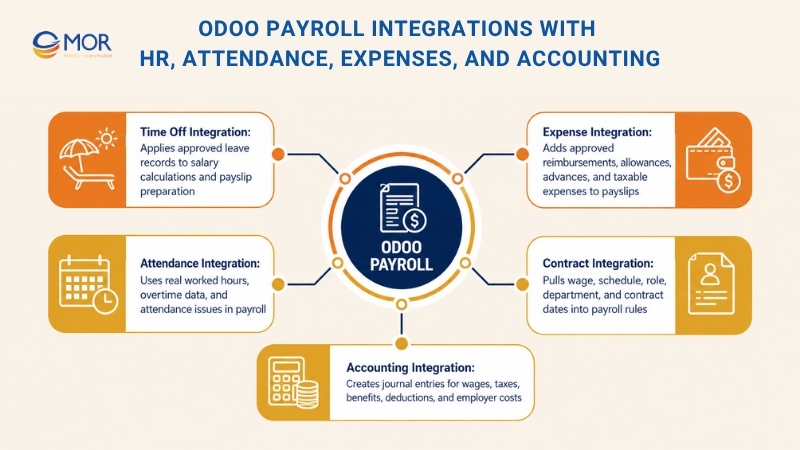
Time Off Integration
When the Time Off module is turned on, leave records can affect salary calculations directly. This works well for companies that handle different leave types, including paid annual leave, unpaid leave, sick leave, maternity leave, and special company leave.
Key payroll use cases include:
- Unpaid Absence Reductions: Unpaid leave days can lower gross salary based on the employee’s work schedule and salary structure.
- Paid Leave Treatment: Approved paid leave keeps payroll unchanged, so staff still receive normal salary.
- Sick Leave Pay Rules: Sick leave can use a set pay percentage based on local law or company policy.
- Leave Balance Display: Remaining leave days can appear on payslips for employee reference.
- Approved Leave Control: Only approved leave records enter payroll, which helps managers avoid unverified deductions.
This link helps HR teams handle absence-based salary changes with better accuracy. Payroll managers no longer need to check leave data one record at a time, since approved Time Off data can support payslip preparation.
Attendance Integration
When attendance tracking is active, real worked hours can flow into payroll calculation. This is useful for hourly staff, shift teams, part-time employees, and companies that calculate salary based on recorded working time.
Common attendance-based payroll rules include:
- Hourly Pay Calculation: Real worked hours can calculate salary for hourly employees.
- Extra Hours Calculation: Overtime can be calculated from work schedules, overtime rules, and company policy.
- Late Check-In Deductions: Late arrivals can create salary deductions when the rule is active.
- Early Check-Out Deductions: Early departures can lower payable hours when tied to payroll rules.
- Attendance Issue Review: Missing check-ins, missing check-outs, unusual hours, and mismatched records can be flagged before payroll runs.
This connection helps payroll teams spot attendance problems before salaries are confirmed. It also lowers payroll disputes because salary results are tied to recorded work hours and approved schedules.
Expense Integration
Employee expenses can connect with payroll when reimbursements or allowances need to show on payslips. This gives companies a way to handle selected expense payments together with monthly salary processing.
Expense-related payroll use cases include:
- Approved Expense Paybacks: Approved expenses can be paid through payroll instead of accounts payable.
- Daily Travel Allowances: Per diem amounts can be set as payslip inputs.
- Travel Advance Clearing: Advances can be deducted from the final reimbursement amount on the payslip.
- Taxable Reimbursement Items: Some expense payments can be treated as taxable income when local rules require it.
- One-Off Employee Adjustments: Single-cycle expense payments can be added without changing the employee’s base wage.
This setup gives finance and HR teams a cleaner method for handling reimbursements, allowances, and expense-linked salary items in one payroll flow.
Contract Integration
Employee contracts are a core data source for Odoo HR payroll. Salary structures, wage amounts, work schedules, job titles, departments, and contract dates can all change payroll rules.
Contract-based payroll data may include:
- Main Wage Amount: Monthly, weekly, or hourly pay values used in salary calculation.
- Pay Structure: The rule set used to calculate allowances, deductions, taxes, and net pay.
- Work Schedule: Standard hours used for attendance, overtime, and unpaid leave calculations.
- Employment Date Range: Payroll can calculate salary only during the active contract period.
- Team And Role Data: Payroll reports can group labor costs by department, branch, function, or cost center.
This keeps payroll tied to the newest contract data. When a contract is updated, payroll teams can check the new salary rules and avoid using old wage details.
Accounting Integration
Payroll and accounting links help companies turn salary results into finance records. After payslips are confirmed, the Odoo payroll system can create accounting entries for wages, employer contributions, taxes, and other payroll expenses.
Key accounting benefits include:
- Auto-Created Journal Entries: Payroll results can create accounting moves without re-entering data.
- Cost Type Mapping: Salary costs, benefits, taxes, and deductions can be posted to the right accounts.
- Analytic Cost Tracking: Payroll expenses can be linked to departments, projects, branches, or analytic accounts.
- Reconciliation Help: Finance teams can match payroll liabilities, bank payments, and accounting records more easily.
- Faster Month-End Close: Payroll data can reach accounting reports sooner, which helps reduce closing delays.
These HR module links create one connected process from employee records to payslips, approvals, accounting entries, and reports. Businesses get a more stable payroll process, and HR and finance teams work from the same data source.
Common Odoo Payroll And HR Implementation Risks
Odoo Payroll can improve salary operations, but setup mistakes can create wrong payslips, weak controls, and delays during go-live. The main risks often come from local payroll rules, leave policies, and onboarding steps that are not mapped clearly before launch.
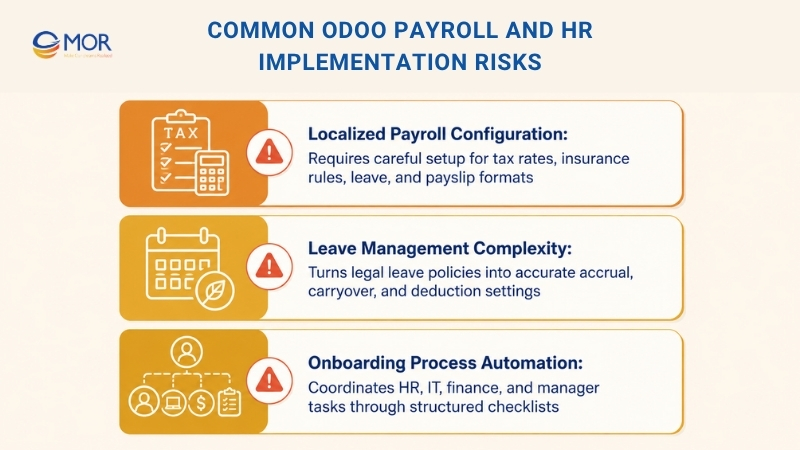
Localized Payroll Configuration
Payroll is often the most country-specific part of an HR system. Tax rates, social insurance rules, statutory leave, and payslip formats can differ a lot between countries, and laws can change often. Odoo salary structures can model many payroll rules, but wrong setup can still produce payslips that look correct at first glance.
For payroll projects, MOR Software can support requirement analysis, system configuration, custom module review, integration, testing, and long-term improvement. Before the first live pay run, each payroll rule should be checked against manual calculations, and teams should run parallel payroll for at least one pay period before fully moving to Odoo.
For multi-country payroll, the setup becomes much harder. Each country may need its own salary structure, leave type setup, and sometimes its own Odoo company. Multi-company Odoo can support this model, but the setup effort is still large, so companies should review edition needs, access rules, accounting links, and localization scope before rollout.
Leave Management Complexity
Leave rules are often more complex than they look. UK statutory leave, US state-level PTO rules, and European parental leave rules each have their own accrual, carryover, and leave interaction logic. Setting this up in Odoo means legal rules must be turned into leave type settings, so teams need HR knowledge and Odoo configuration skills at the same time.
Common setup errors include leave accrual without a required cap, part-time entitlement rules without pro-rata logic, and missed links between sick leave and annual leave. In many countries, sickness during annual leave can mean the annual leave days must be restored.
Onboarding Process Automation
Employee onboarding needs several teams to act at the right time. IT creates accounts, HR collects signed papers, Finance prepares payroll data, and the hiring manager gets equipment ready. Without a clear workflow, steps can be missed and new hires may start work without the tools they need.
Odoo activities and automated actions can create onboarding checklists. When an employee record is created with a start date, the system can create tasks for each onboarding step, assign them to the right person, and set due dates based on the start date. This can be built with native Odoo automation, so a separate onboarding module is not always needed.
Odoo Payroll Rollout Plan For A Safer Go-Live
A safe payroll rollout needs more than system setup. HR, accounting, payroll managers, and department leaders need one shared process, one set of data rules, and clear approval duties. A phased rollout helps companies lower payroll errors, protect salary data, and understand Odoo payroll pricing in relation to setup scope, support, and go-live risk.
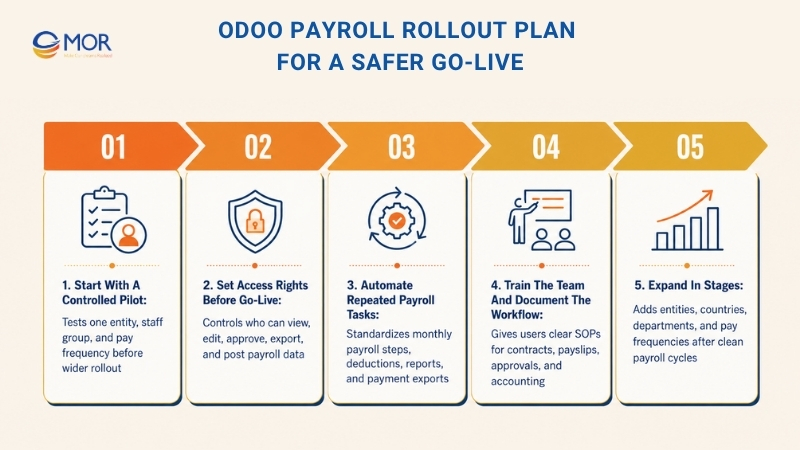
Start With A Controlled Pilot
Begin with one legal entity, one staff group, and one pay frequency before using the payroll app across the whole company. This pilot helps the team test salary structures, employee contracts, work schedules, payroll rules, accounting journals, and report formats in a safe setup.
During the pilot, HR and finance teams should compare sample payslips with past payroll results. They should also review employee tags, departments, cost centers, tax rules, salary attachments, and journal entries before running a full pay cycle. After the first setup works well, the business can reuse it and adjust it for other branches, countries, or worker groups.
Set Access Rights Before Go-Live
Payroll data is private, so access rights should be set before launch. Businesses need to decide who can view payslips, edit salary rules, approve payroll batches, update contracts, export bank files, and post accounting entries.
Tighter access rights lower the chance of accidental changes to formulas, deductions, benefits, or tax rules. They also improve internal control because HR managers, payroll staff, and finance users stay within assigned roles. Larger companies should add approval layers so payroll batches are reviewed before final confirmation.
Automate Repeated Payroll Tasks
After the main payroll flow works well, companies should automate repeated steps so each cycle stays more consistent. Odoo can help standardize payslip creation, journal entry posting, repeated salary deductions, benefit rules, bank payment exports, and payroll reports.
Automation works well for tasks that repeat every month, including loan deductions, insurance contributions, attendance-based pay changes, and employer cost allocation. When repeated steps follow fixed rules, HR and accounting teams can close payroll faster and spend less time checking the same items.
Train The Team And Document The Workflow
Payroll users need short, clear instructions rather than long technical guides. A simple SOP should explain how to check contracts, approve time off, review attendance issues, create payslips, validate payroll batches, export payment files, and post accounting entries.
This guide should sit inside the company’s ERP workspace or shared internal knowledge base, so HR and accounting teams can use it during every payroll cycle. Training should focus on real workflows, frequent mistakes, approval duties, and the checks users must complete before confirming payroll.
Expand In Stages
After the pilot runs without issues, expand Odoo Payroll step by step. A safe approach is to wait for at least two clean payroll cycles before adding new entities, countries, departments, or pay frequencies. This gives the team enough time to confirm that salary rules, accounting entries, reports, and payment files work as planned.
When the system grows, reuse the parts that already work and localize only what needs to change. This can include country tax rules, statutory deductions, social insurance, work schedules, benefit plans, and bank payment formats. A staged rollout keeps the platform easier to control and helps the business build a stable payroll process across teams and regions.
Need Professional Odoo Payroll Implementation For Your HR Team?
Odoo Payroll can handle salary rules, contracts, payslips, taxes, attendance, time off, and accounting. But the setup must match how your business pays people in real life. One wrong rule can affect every payslip in the cycle.
At MOR Software, we help businesses turn Odoo Payroll from a complex setup into a clear payroll process. We work with your HR, finance, and operation teams to review salary structures, contract rules, approval flows, payslip logic, and accounting entries before the system goes live.
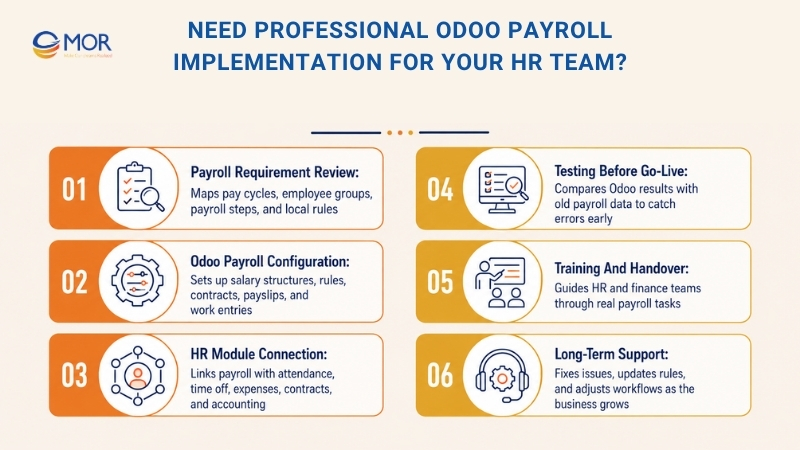
Our team can support your business with:
- Payroll requirement review: Map current payroll steps, pay cycles, employee groups, and local rules
- Odoo Payroll configuration: Set up salary structures, rules, contracts, payslips, and work entries
- HR module connection: Link payroll with attendance, time off tracking, expenses, contracts, and accounting
- Testing before go-live: Compare Odoo results with old payroll data to catch errors early
- Training and handover: Guide HR and finance teams through real payroll tasks
- Long-term support: Fix issues, update rules, and adjust workflows as the business grows
If your business wants to run Odoo Payroll with cleaner data, fewer manual checks, and stronger control, MOR Software can support the full setup from planning to rollout.
Conclusion
Odoo payroll can give HR and finance teams a cleaner way to manage salaries, payslips, tax rules, attendance, time off, and accounting. Yet the setup needs careful planning, testing, and local payroll knowledge. MOR Software helps businesses review requirements, configure workflows, connect HR modules, test pay runs, and support long-term changes. If your team needs a safer payroll Odoo rollout, contact us to discuss your project.
"Mr. Cong’s guiding philosophy is simplicity, believing that the simplest solutions are often the most powerful. He sees trust, empowerment, and the opportunity to demonstrate one’s abilities as the key elements that set MOR apart from traditional IT companies."
Mac Tien Cong


Division Manager (Hanoi Branch)
MOR SOFTWARE
Frequently Asked Questions (FAQs)
What is Odoo Payroll?
Odoo Payroll is an HR tool that helps companies calculate salaries, create payslips, manage deductions, and connect payroll data with employee contracts, attendance, time off, and accounting.
Does Odoo have payroll?
Yes. If you are asking “does Odoo do payroll,” the answer is yes. Odoo has a payroll app that helps businesses manage salary calculations, payslips, salary rules, employee contracts, deductions, and payroll-related accounting entries.
How does payroll work in Odoo?
Payroll in Odoo starts with employee contracts. The system uses salary structures, salary rules, worked days, leave records, and other inputs to calculate gross pay, deductions, employer costs, and net salary.
Can Odoo handle salary rules for different employee groups?
Yes. Companies can create different salary structures for monthly staff, hourly workers, part-time staff, contractors, or employees in different countries. Each structure can have its own rules for pay, tax, benefits, and deductions.
Does Odoo Payroll connect with accounting?
Yes. After payslips are confirmed, Odoo can create journal entries for salary expenses, taxes, employer contributions, and payroll liabilities. This helps HR and finance work from the same data.
Can Odoo calculate overtime and unpaid leave?
Yes. Odoo can calculate overtime, unpaid leave, late arrivals, early departures, and shift-based pay when attendance and time off records are connected to salary rules.
Does Odoo support payroll compliance in different countries?
Odoo supports country-based payroll localization for many markets. These setups may include tax brackets, social security rules, statutory deductions, reporting formats, and local payslip requirements.
Can employees access their payslips in Odoo?
Yes. Employees can view payslips through the employee portal when access is set up. They can check salary details, allowances, deductions, and net pay without asking HR for every copy.
What data should be ready before setting up payroll?
You should prepare employee records, active contracts, wage types, salary structures, work schedules, bank details, tax information, leave policies, attendance rules, and accounting accounts.
Is Odoo suitable for multi-country payroll?
Yes, but the setup needs careful planning. Each country may need separate salary structures, tax rules, leave policies, reporting formats, and company settings. A test run is needed before using it for live payroll.
Share


Make Our-Dreams Realized


© 2023 . MOR Software. All Rights Reserved
Sitemap
Privacy Policy
Terms of Use

Rate this article
0
over 5.0 based on 0 reviews
Your rating on this news:
Name
*Email
*Write your comment
*Send your comment
1