


10 Best Property Development Management Software Reviewed In 2026
Managing land deals, budgets, contractors, permits, and buyer updates through spreadsheets can get messy fast. Property development management software gives developers one place to track projects, control costs, and keep every stakeholder aligned. In this MOR Software’s guide, we will compare the best real estate development software in 2026 and show when a custom platform makes more sense.
Key Takeaways
- Property development management software helps developers manage budgets, schedules, documents, approvals, contractors, and buyer communication from one central platform.
- The top options include Buildbite, Buildertrend, Mastt, Admicom, Fieldwire, Procore, LetsBuild, Northspyre, INGENIOUS.BUILD, and Autodesk Construction Cloud.
- The right choice depends on your project size, workflow depth, reporting needs, integration gaps, and whether your team needs a ready-made tool or a custom system.
10 Best Property Development Management Software In 2026
Choosing the right platform starts with knowing what each tool does best. Some teams need simple site coordination, while others need real estate development management software for budgets, investor reports, approvals, and portfolio visibility. The table below gives you a quick view before we break down each option.
Software | Best Fit | Main Strength | Notable Function | Learning Curve | Integration Fit | Pricing Style |
Buildbite | Small to Medium | Job control | Mobile-first tasks, time logs, and client sign-offs | Simple to use, quick setup | Good | Tiered, $90/mo to $205/mo |
Buildertrend | Small to Medium | Residential building and sales tracking | CRM, contracts, e-signatures, and client portal | Medium, due to many tools | Medium | Tiered, $499/mo to $1,099/mo |
Mastt | Medium to Large | Cost control and portfolio reports | AI-based document capture for contracts, invoices, and PDFs | Medium, finance-led | Medium | First project free, then from $150/project/mo |
Admicom | Medium to Large | Full construction lifecycle control | Cost and quantity tracking with live order updates | Medium | Strong for finance flows | Quote-based, not public |
Fieldwire | Medium to Large | Site coordination | Field tasks, inspections, RFIs, and BIM viewer | Easy to start | Medium | Per user, $39 to $79/user/mo |
Procore | Large | Enterprise construction control | Project, labor, and finance tools in one platform | Medium to hard | Excellent | Quote-based, estimated from around $375/mo |
LetsBuild | Large | Facility and project control | Live teamwork, defect tracking, and QHSE workflows | Medium, setup may take time | Not very clear | Quote-based, not public |
Northspyre | Medium to Enterprise | Real estate development management software | Budget forecasts, funding portal, and investor reports | Medium | Strong for development finance flows | Quote-based, Pro and Enterprise editions |
INGENIOUS.BUILD | Medium to Enterprise | Unified development and construction platform | Financials, capital planning, workflows, and reports in one system | Medium | Good, but check niche tools first | Quote-based, not public |
Autodesk Construction Cloud | Medium to Enterprise | BIM and construction coordination | BIM coordination, document control, cost tracking, and 400+ integrations | Medium to hard | Excellent | Product and bundle-based pricing |
Buildbite - Best For Small Real Estate Development Teams
Buildbite is a simple custom real estate software development for small and medium teams that need clear tools for tasks, time logs, records, approvals, and live updates.
The platform brings site workers, office teams, subcontractors, vendors, and clients into one mobile-first workspace. Instead of chasing updates through email, phone calls, WhatsApp, and spreadsheets, teams can keep work notes, media files, task updates, and client sign-offs in one place.
Buildbite works well for SMEs that need a low-cost property development project management software without a long setup period. Teams can open projects, split them into stages, assign jobs, record hours, add photos or videos, and create reports for billing and project records.
Buildbite main tools
- Job stage control: Build project stages, give tasks to team members, and check progress.
- Work hour logging: Track time by worker, job, or project.
- Live team chat: Use staff chat and client chat to cut down scattered messages.
- Approval flow: Send finished work for manager or client sign-off.
- Project records: Add photos, videos, and files to keep a full work history.
- Report creation: Create time reports, project reports, and final handover reports.
- Mobile project access: Run project work from phones or tablets.
Buildbite strengths
- Simple interface
- Quick setup
- Mobile-first layout
- Good live communication tools
- Clear and affordable pricing
- Good match for small and mid-sized teams
Buildbite drawbacks
- Not built for very large projects worth hundreds of millions.
- Not the best fit for complex capital planning, lender reports, or portfolio governance.
- More useful for job control than deep development finance.
Buildbite plans
Buildbite comes with three paid plans:
- Basic: $90 per month, for up to 5 team members or subcontractors per project.
- Standard: $150 per month, for up to 20 team members or subcontractors per project.
- Premium: $205 per month, for up to 50 team members or subcontractors per project.
Buildertrend - Best For Residential Builders That Need Sales Tools
Buildertrend is construction management software made for residential property developers. If you build homes, remodel properties, or work as a specialty contractor, Buildertrend helps you handle planning, schedules, budgets, and team communication.
Its sales tool is one of the main reasons many teams choose it. The platform includes a CRM space for lead tracking, quick contract creation with e-signatures, and email campaigns that help you stay close to prospects during the sales cycle, which may also fit teams exploring rental property management software development for residential workflows.
Buildertrend main tools
- Sales and lead tracking: Handle sales tasks and lead flows together with construction work.
- Project work control: Follow project progress and manage jobs in the app.
- Team and client messaging: Use live chat, messages, and a client portal for updates.
- Mobile access: Let users open the system from mobile devices.
Buildertrend strengths
- Easy-to-use interface
- Broad set of tools
- Mobile app
- Unlimited users
Buildertrend drawbacks
- Takes time to learn because it has many tools
- Limited dedicated field functions
- Cost may feel high beside other options, based on user count
Buildertrend plans
Buildertrend has three plans: Essential at $499/month, Advanced at $799/month, and Complete at $1,099/month. Each plan can get a discount for the first month.
Mastt - Best For Cost Control, Draw Management, And Portfolio Reporting
Mastt is AI project management software in construction built for problems real estate development teams face every day. It lets developers track budgets, actual costs, committed spend, and cost-to-complete inside one platform.
Development managers can handle draw requests, pay applications, and change orders through clear approval steps. Its AI automation tools read contracts, invoices, and PDFs, so teams spend less time typing data and more time checking reports.
Mastt suits developers that manage many projects, phases, and funding models at once. Teams can view portfolio cash flow, cost changes, and forecast risk across live developments, which also helps when they compare software subscriptions with property management software development cost.
With Mastt, you can bring in schedules from Microsoft Project or Primavera P6 and compare milestones with budgets. Audit trails and clean reports also help with lender needs, investor updates, and internal checks.
Mastt main tools
- Portfolio views: Bring budget, cash flow, and project status into one view.
- Cost and budget checks: Follow approved budget, actual spend, variance, and cost-to-complete.
- Cash flow forecasting: Plan expected spend by period and funding stage.
- Contract and commitment logs: Track committed costs across vendors and consultants.
- Change control: Record changes with approval status and cost effect.
- Draw and payment tracking: Follow invoices, payments, retentions, and certificates.
- Risk and report logs: Record risks, effects, and response plans.
- Schedule links: Add MS Project and P6 schedules for reporting.
- AI document reading: Use AI chat and PDF reading to pull and check data.
Mastt strengths
- Good fit for owner-side project control and development finance teams
- Clear view of many active projects and portfolios
- Faster lender and investor updates through organized dashboards
- Stronger control over changes, commitments, and commercial risk
- Less need for spreadsheets due to one project control space
Mastt drawbacks
- Not focused on field crew control or daily site logs
- Best for developers that care most about cost, reporting, and governance flows
Mastt plans
- Free: First project is free, with no credit card needed
- Professional: From $150 per active project per month
- Enterprise: Custom pricing for teams with 10 or more projects
Admicom - Best For Construction Lifecycle Management
Admicom helps large construction firms control the full building process, from estimates and files to project tracking and staff training. Its cost and quantity tool stands out because it helps teams follow spending and find places where money may be saved through property development management software.
Admicom main tools
- Quantity calculation
- Project and order control
- Purchase and invoice allocation
- Sales invoicing
- Time tracking
- Inventory control
- Resource planning and control
- Digital waybills or consignment notes
Admicom strengths
- Field app is simple and quick to learn
- Live order tracking and invoicing can speed up payment flow
- Strong link with finance management processes
Admicom drawbacks
- Some user reviews mention app bugs, but many of those reviews are old.
- Pricing is not shown publicly.
Admicom plans
Admicom does not list pricing on its website.
Fieldwire - Best For Jobsite Coordination And Monitoring
Fieldwire is a jobsite management platform that links site teams with office teams, from foremen to project managers and all roles between them. This project management software for property development has been used on over 1,000,000 projects worldwide to open and share information, plan work, manage jobs, and check progress.
Fieldwire helps teams work better together by giving them one space for tasks, drawings, inspections, RFIs, submittals, and field reports.
Fieldwire main tools
- Task control
- Scheduling
- Snag lists and inspections
- RFIs and submittals
- Change orders
- File control
- Specifications and plan viewing
- BIM viewer
- As-built drawings
- Reports and digital forms
Fieldwire strengths
- Simple interface with quick setup
- Wide tool set for project tracking from start to finish
- Helps teams communicate in one shared space
- Works well for large projects
Fieldwire drawbacks
- Pricing may rise fast, mainly for small teams with only a few projects.
- Some users say document and drawing workflows can feel clunky.
Fieldwire plans
Fieldwire charges per user, based on the tools included in each tier, from $39 to $79 per user per month.
Procore - Best For Large Commercial And Enterprise Construction Projects
If you manage work beyond single homes and small commercial sites, including commercial centers, infrastructure jobs, or large housing projects, Procore may be a strong option.
It is a large-scale construction management solution with tools built for the size, people, and complexity of major construction work and future development plans.
Procore main tools
- Preconstruction control
- Project control
- Workforce control
- Financial control
- Construction data and intelligence
Procore strengths
- Strong integration options
- Good customer service
- Wide construction tool set
- Good fit for enterprise construction teams
Procore drawbacks
- Long setup process and steep learning curve
- Free trial covers only selected tools, including estimating
- May cost too much for smaller teams
Procore plans
Procore does not show pricing on its website. Based on third-party reviews, plans may start at around $375 per month.
LetsBuild - Best For Large Facility And Project Management Teams
LetsBuild is cloud-based property development management software made to give large civil, commercial, and residential projects live visibility and stronger control.
It serves executives, site managers, and foremen with tools for planning, workflow control, quality checks, inspections, compliance, and project communication.
LetsBuild main tools
- LB Aproplan defect flow: Helps teams manage defects, handovers, and QHSE checklists with automatic data capture and report creation.
- LB Geniebelt live planning: Supports live teamwork and progress tracking, which helps teams avoid double bookings and missed deadlines.
- LB Maintenance inspection tools: Helps teams collect inspection data, plan schedules, create reports, and manage compliance.
LetsBuild strengths
- Wide tool set for project control from start to finish
- Live task control and communication
- Strong tools for large-scale projects
LetsBuild drawbacks
- Setup and learning can take time
- May cost too much for smaller firms
- Many user reviews are old, so recent feedback is limited
- Pricing is not shown publicly
LetsBuild plans
LetsBuild does not list pricing on its website.
Northspyre - Best For Full-Cycle Real Estate Development Management
Northspyre is a real estate development management software platform made for development teams that need better control over budgets, forecasts, reports, and stakeholder work.
The platform supports developers from acquisition and pre-development through construction, closeout, and stabilization. It brings project data into one place, automates routine work, and gives teams live views of financial results across active projects.
Northspyre is a strong fit for commercial real estate developers that manage complex projects with many vendors, funding sources, budgets, approvals, and investor reporting needs.
Northspyre main tools
- Development workflow control: Keep project data, budgets, tasks, and stakeholders in one place.
- Financial planning tools: Support deal tracking, underwriting, and budget planning.
- Budget tracking: Follow actuals, commitments, forecasts, and cost changes.
- Vendor control: Manage vendor tasks, files, and project costs.
- Reports and dashboards: Build live views for project and portfolio status.
- Funding workspace: Share draw reports and funding data with lenders and investors.
- AI-assisted workflows: Use predictive tools and automation to cut manual admin work.
Northspyre strengths
- Built for real estate developers
- Covers the full development cycle well
- Strong for budget forecasts and cost visibility
- Useful for lender, investor, and executive reports
- Helps teams move away from spreadsheets and scattered workflows
Northspyre drawbacks
- Less focused on daily field work than tools like Fieldwire or Procore
- May feel too complex for small teams
- Pricing is not shown publicly
Northspyre plans
Northspyre sells Pro and Enterprise editions, but pricing is quote-based and requires direct contact with the company.
INGENIOUS.BUILD - Best For Developers, Owners, And Construction Teams
INGENIOUS.BUILD is a connected construction management platform for real estate development and construction teams that need financials, project workflows, construction admin, capital planning, and reporting in one property development management system.
It fits developers, owners, and construction teams that run multi-phase work where financials, RFIs, submittals, approvals, budgets, schedules, and stakeholder updates must stay linked.
The platform gives real estate development teams one shared source of truth across planning, construction, and closeout.
INGENIOUS.BUILD main tools
- Financial control: Track budgets, costs, commitments, and financial results.
- Project workflow tools: Manage schedules, tasks, workflows, and teamwork.
- Construction admin: Handle RFIs, submittals, files, and approvals.
- Capital planning: Give development teams planning tools and portfolio views.
- Reporting views: Track project results and stakeholder updates.
- Multi-project tracking: View active projects, timelines, budgets, and activity in one place.
INGENIOUS.BUILD strengths
- Good all-in-one fit for real estate developers and construction teams
- Balances finance visibility with construction workflows
- Useful for multi-phase projects with many stakeholders
- Brings team, project, and approval data into one space
- Modern interface for technical and non-technical users
INGENIOUS.BUILD drawbacks
- Pricing is not public
- Teams moving from spreadsheets or simpler tools may need onboarding
- Some niche integrations should be checked before rollout
INGENIOUS.BUILD plans
Pricing is not shown on the website. Teams need to contact INGENIOUS.BUILD for a custom quote.
Autodesk Construction Cloud - Best For BIM And Design-Build Coordination
Autodesk Construction Cloud is a construction management platform for teams that need strong design teamwork, BIM coordination, project files, cost tracking, safety checks, and field-to-office workflows.
For real estate developers, Autodesk Construction Cloud is useful when projects include architects, engineers, contractors, BIM teams, and design-build delivery. It links design data with construction work, so teams can close coordination gaps and see project results more clearly.
Its large integration network also suits firms that already use Autodesk products or need links with ERP, CRM, document systems, and analytics tools.
Autodesk Construction Cloud main tools
- Design team workspace: Link design teams, models, and project files.
- BIM coordination: Manage model coordination, clash checks, and design reviews.
- Project control: Handle RFIs, submittals, issues, meetings, and workflows.
- Cost tracking: Follow budgets, contracts, change orders, and cost activity.
- Quality and safety checks: Manage inspections, checklists, safety items, and field reports.
- File control: Keep drawings, specifications, and project documents in one place.
- Tool connections: Connect with more than 400 pre-built integrations.
Autodesk Construction Cloud strengths
- Strong fit for BIM-heavy and design-build projects
- Good design and construction coordination tools
- Large integration network
- Works well for teams already using Autodesk products
- Useful for projects with heavy documentation needs
Autodesk Construction Cloud drawbacks
- Can feel complex for small teams
- Pricing and packages may change based on selected product bundles
- More focused on design and construction coordination than full real estate development finance
Autodesk Construction Cloud plans
Autodesk Construction Cloud pricing depends on the products and bundles a team chooses. Autodesk lists some plans publicly and asks teams to request pricing for others.
What Is Property Development Management Software?
Property development management software is one central platform that helps developers control the full property lifecycle, from land purchase and feasibility checks to planning, construction, sales, and after-handover work. Teams no longer need to depend on loose spreadsheets, email threads, and manual steps because project data, contracts, messages, budgets, and sales records can stay in one shared place.
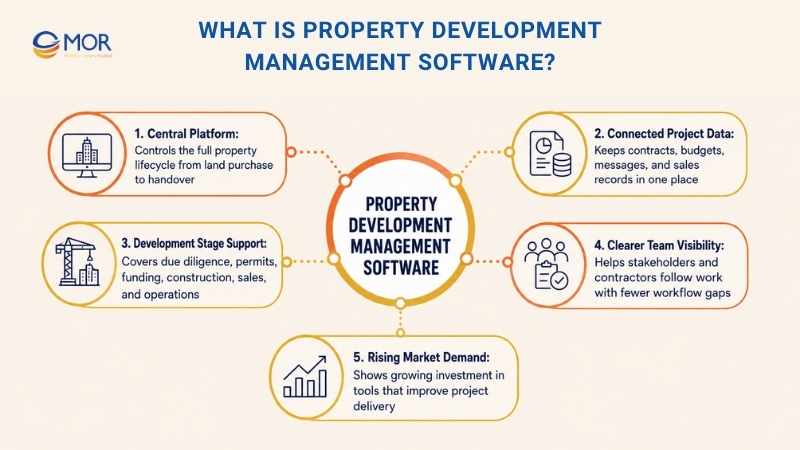
Modern systems often support each main development stage, including land purchase, due diligence, design, permits, funding, construction project management, marketing, sales, buyer care, warranty control, and property operations. This gives developers a clearer view of work, helps stakeholders and contractors work together, and limits delays caused by broken workflows.
Demand keeps rising as developers move away from old systems and adopt connected digital platforms. The property management software market is expected to reach $2 billion by 2027, which shows how much the industry is investing in tools that help teams work better and deliver stronger project results.
Key Benefits Of Property Development Management Software
Still using separate tools to manage your daily work? Here’s how software for property developers can support your business.
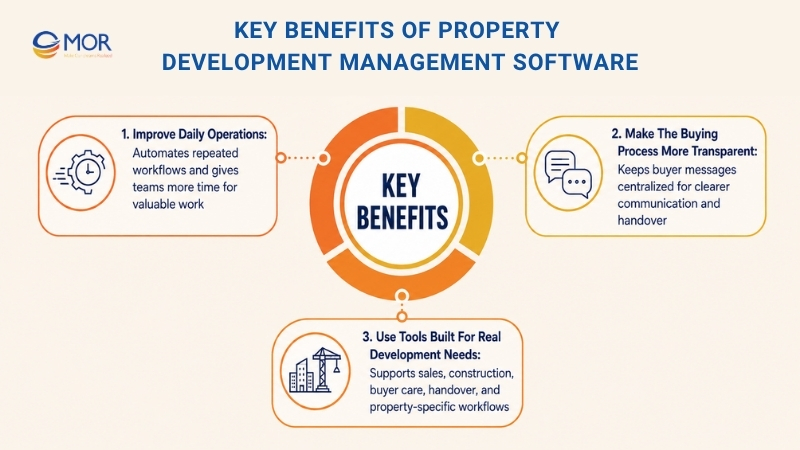
Improve Daily Operations
Project delays can happen for many reasons. Manual work is often one of them because tasks build up fast and stop important work from moving forward.
There’s another risk. If your team still handles repeated tasks by hand, errors can happen, and important details can get missed.
A real estate development software platform can turn repeated workflows into clear steps and help more deals move through your pipeline. It also gives your team more time for higher-value work. One study found that employees using automation save about 3.6 hours each week.
Make The Buying Process More Transparent
Buyers care about agents who are honest and reliable. Yet most buyers, 90%, also rate communication skills as “very important” when judging agents.
AGENT SKILLS AND QUALITIES RATED "VERY IMPORTANT"
Exhibit 4-11 (Percent of Respondents)
Agent Skills And Qualities | All Buyers | 25 To 33 | 34 To 43 | 44 To 58 | 59 To 68 | 69 To 77 | 78 To 98 |
Honesty and integrity | 98% | 97% | 98% | 97% | 98% | 97% | 98% |
Knowledge of purchase process | 94 | 96 | 95 | 92 | 93 | 93 | 91 |
Responsiveness | 94 | 93 | 93 | 94 | 95 | 92 | 94 |
Knowledge of real estate market | 92 | 91 | 94 | 91 | 92 | 90 | 96 |
Communication skills | 90 | 90 | 91 | 91 | 91 | 84 | 82 |
Negotiation skills | 83 | 84 | 86 | 84 | 81 | 75 | 78 |
People skills | 80 | 78 | 80 | 80 | 82 | 78 | 71 |
Knowledge of local area | 77 | 69 | 75 | 77 | 78 | 80 | 81 |
Skills with technology | 47 | 40 | 44 | 45 | 50 | 51 | 52 |
Source: 2024 NAR Home Buyers and Sellers Generational Trends.
It becomes hard to follow old buyer conversations when your team uses many channels. A property management platform can keep all messages in one place and give buyers a clearer process from first contact to handover.
Use Tools Built For Real Development Needs
General CRMs can be useful because they serve many types of businesses. Still, they often miss property-specific tools, mainly when your business needs support across sales, construction, buyer care, and handover.
The right property development solution gives you tools made for actual development work. These may include lead tracking, buyer updates, post-purchase warranty records, and more. Another benefit is faster setup, so teams can start seeing value sooner without heavy custom work.
Not every real estate tool will fit your needs. If your team has unique workflows, property management software development may be a better fit than forcing a generic system to work.
Key Features To Look For In Property Development Management Software
There are many property development software options on the market. Use these features to narrow your choices.
Pipeline Management
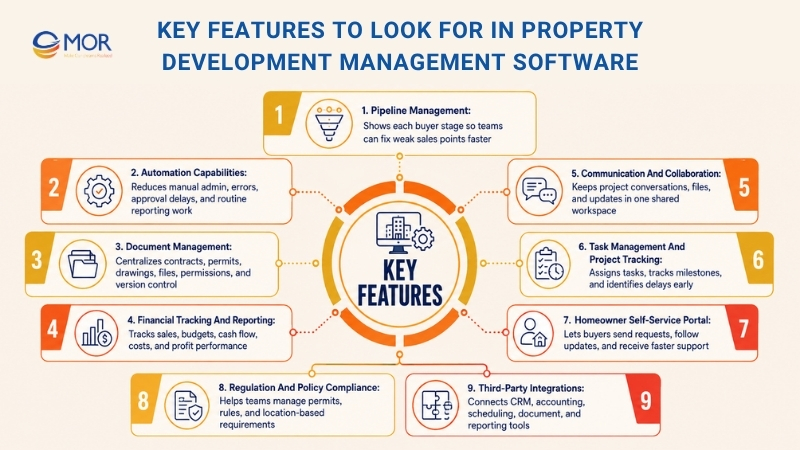
Pick software with strong pipeline tracking tools. When you can see where each buyer sits in the sales process, your team can spot weak points in the pipeline and fix them faster.
A simple case: if deals often stop during negotiation, your sales team can prepare better answers to buyer concerns and close more deals.
Automation Capabilities
“Nobody enjoys spending hours on manual admin.”
The smartest way to remove slow manual work is to find where automation can save time and effort. That means you should look for a development management platform with strong automation tools.
Automation helps turn manual jobs into cleaner workflows and lowers the risk of human mistakes.
Automation also points to smarter platform functions, including dashboards, analytics, and live data collection. These tools help you read numbers like conversion, churn, and ROI with more clarity. Then your team can spend more time serving buyers and changing internal steps to match what they need.
Modern automation can also handle approval flows, routine reports, task alerts, and status updates. If you plan to develop property management software, these workflows should be mapped early so the system can keep projects moving and keep every team member updated.
Document Management
Property development projects come with a lot of paperwork, including purchase deals, inspection forms, permits, contracts, drawings, and compliance files. Without one system, your team can lose many hours finding, sorting, and updating these records.
Choose a platform with strong document management tools. It should help you sort files by project with ease and support digital forms and contracts that make the sales process faster.
A central file hub also helps every stakeholder work from the newest project file. Version control, user permissions, and audit logs lower mistakes, stop duplicate files, and limit the risk of using old information.
Financial Tracking And Reporting
Your team needs to measure sales results before it can improve the sales plan. Choose property development management software with clear reports and sales dashboards. This will help you follow important business numbers and find patterns that help your team win more deals.
The software should also support budget variance checks, cash flow forecasts, and profit dashboards beyond sales reports. Live financial data helps development teams find cost overruns early, plan future spend, and make better investment calls across the project lifecycle.
Communication And Collaboration
Property development work depends on steady communication between developers, architects, contractors, consultants, investors, and buyers. Scattered email threads and chat apps often create slow replies, missed updates, and unclear ownership.
Look for a platform that keeps conversations, project talks, file sharing, and team updates in one place. Built-in messages, activity feeds, and role-based communication help every party stay aligned while making each development stage easier to follow.
Task Management And Project Tracking
Running several developments at once needs a clear view of each project stage. Without structured task control, one delayed activity can affect construction schedules, contractor coordination, and the final delivery date.
Choose a property project management platform that lets you assign tasks, watch milestones, check completion status, and receive live progress updates. This helps project managers find bottlenecks early, improve accountability, and keep work on schedule.
Homeowner Self-Service Portal
Brian Solis, Salesforce’s Global Innovation Evangelist, shares this advice for business owners:
"In times of change, make customers’ needs and expectations your corporate North Star. Keeping customers at the center will inspire loyalty and deepen trust."
Buyers feel the same way. Nearly 90% of buyers say a company’s experience matters as much as its products or services.
Strong buyer relationships depend on a good experience across the full home-buying journey. Look for tools that make buyer communication easier. A homeowner portal should let buyers send requests and track updates, so your team can solve issues faster and keep buyers satisfied.
Regulation And Policy Compliance
Like any business, real estate development comes with detailed legal rules. If a team fails to comply, the penalties can be serious.
Any property development management software you choose should include tools that help your team manage industry rules and local requirements. This may include permit tracking and policy checks tied to each project location.
Third-Party Integrations
Your sales process likely depends on many tools. You may use Slack for team chat, LinkedIn Sales Navigator for lead research, and QuickBooks for finance work.
Whatever systems your team uses, make sure they connect with your chosen real estate software. This keeps data in one place and helps prevent data silos, where information sits in one system but cannot be seen in another.
Native integrations also remove repeated data entry across CRM, accounting, project scheduling, document management, and reporting tools. This gives each department one trusted data source for the real estate development lifecycle and helps daily work run with fewer gaps.
How To Choose The Right Property Development Management Software
Choosing the right property development management software takes more than checking tools and prices. Developers need to see how the system matches their workflows, project size, team roles, reporting needs, and growth plans. The best platform should make daily work easier, show project status clearly, and help teams manage budgets, files, schedules, contractors, and client updates in one place.
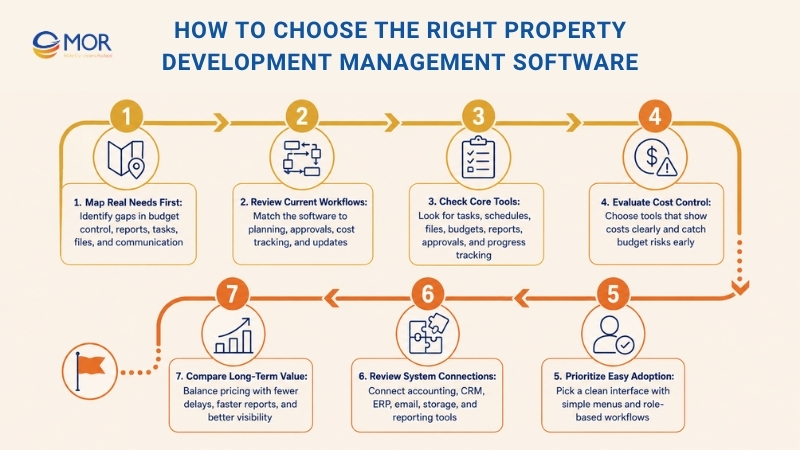
Map your real needs first
Start with the gaps in your current process. These may include clearer budget control, faster reports, better task ownership, easier file management, stronger communication, or more visibility across development projects.
Check how work happens now
Review how your team handles planning, approvals, cost tracking, reports, contractor updates, document sharing, and client communication. This helps you choose a system that fits your real work instead of forcing people into a tool that feels unnatural.
Look at core project tools
A strong solution should cover task control, schedules, file storage, budget tracking, reports, approval flows, communication, and progress checks. These tools help developers manage complex projects from early planning to handover.
Review cost and budget controls
Property development includes many cost layers, including land costs, construction budgets, contractor payments, invoices, change orders, and margins. Choose software that helps your team see costs clearly and catch budget risks early.
Check file control strength
Development work depends on contracts, drawings, permits, reports, invoices, legal files, and handover records. The platform should help users upload, sort, search, update, and share files without messy folders or long email chains.
Think about stakeholder teamwork
Property development teams often work with project managers, site teams, contractors, consultants, finance teams, clients, and executives. The platform should support smooth teamwork while giving each user access only to the data they need.
Check flexibility and growth fit
Your software should match your project types, approval paths, report formats, and team setup. It should also grow with your business as you move from a few projects to many developments, locations, or departments.
Keep ease of use high
Even a rich platform can fail if people find it hard to use. Pick software with a clean interface, simple menus, and role-based workflows so site teams, office staff, and managers can adopt it faster.
Review system connections
Property development management software becomes more useful when it connects with accounting tools, CRM systems, ERP platforms, document storage, email, or reporting dashboards. Good connections cut repeated data entry and help daily work run better.
Check data safety and access rules
Development projects include private financial, legal, client, and contractor information. Choose software with role-based access, secure storage, activity logs, and permission controls to protect important business data.
Compare support and training
Reliable support matters during setup, migration, and daily use. Look for vendors that provide onboarding, guides, training, technical support, and clear help so your team can use the system well.
Look past the lowest price
The cheapest tool may cost more later if it creates workflow issues or lacks needed functions. Compare the price with the value it brings, including fewer delays, faster reports, better budget control, less manual work, and clearer project visibility.
Build Your Custom Property Development Management Software With MOR Software
Ready-made platforms work well when your team follows a common process. But property developers often deal with approval layers, budget rules, site updates, buyer messages, and reports that do not fit a fixed tool. That is when custom property development management software makes sense.
MOR Software builds web and mobile systems around real business workflows. The team can help you map each step, design the user flow, build the platform, connect it with your current tools, test it, and maintain it after launch.
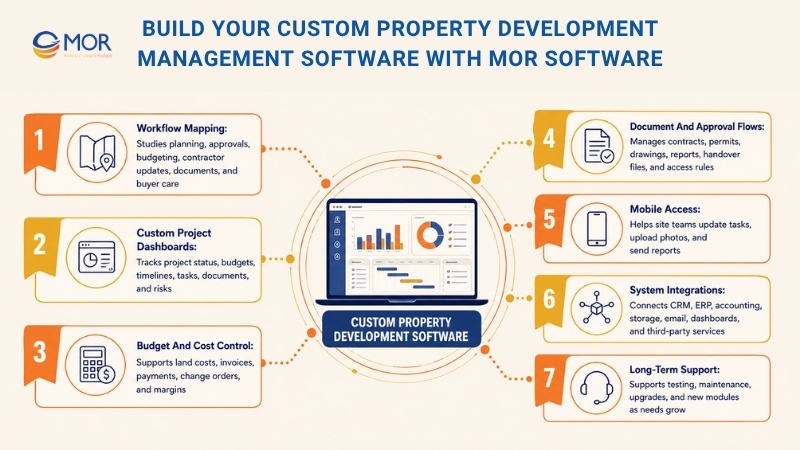
- Workflow mapping: MOR Software studies how your team handles planning, approvals, budgeting, contractor updates, document sharing, and buyer care before building the system.
- Custom project dashboards: Your team can track project status, budgets, timelines, tasks, documents, and risks from one place.
- Budget and cost control: The platform can support land costs, construction budgets, invoices, contractor payments, change orders, and project margins.
- Document and approval flows: Teams can manage contracts, permits, drawings, reports, and handover files with clear access rules and approval steps.
- Mobile access for site teams: MOR Software can build mobile apps that help field teams update tasks, upload photos, send reports, and communicate faster from the site.
- System integrations: The platform can connect with CRM, ERP, accounting tools, cloud storage, email, reporting CRM dashboards, or third-party services.
- Security and user roles: Each user can access the right data based on their role, whether they are a developer, manager, contractor, buyer, or executive.
- Long-term support: MOR Software can help with testing, maintenance, upgrades, and new manufacturing modules as your project needs grow.
With the right custom platform, property developers do not have to bend their process around a generic tool. They can build a system that matches how their teams plan, build, sell, report, and grow.
Conclusion
Property development management software gives developers better control over project data, costs, documents, teams, and buyer updates. Ready-made tools can work well for standard workflows, but complex projects often need a system built around real business rules. MOR Software can help you design and build a custom property development platform that fits your process, integrates with your current tools, and scales with future projects. Contact MOR Software today to build a custom property development platform that fits your workflow and growth plans.
MOR SOFTWARE
Frequently Asked Questions (FAQs)
What is property development management software?
It is a platform that helps real estate developers manage projects, budgets, documents, approvals, site updates, and buyer communication in one place. It gives teams a clearer view of each development stage, from planning to handover.
Who needs this type of software?
Real estate developers, construction managers, project owners, asset managers, and development finance teams can use it. It is most useful for teams managing many vendors, documents, timelines, budgets, and stakeholders at the same time.
How to choose property management software for developers?
Start with your business needs. Check if the software supports project tracking, budget control, document storage, reporting, approvals, and integrations with your current tools. Also review pricing, user access, mobile support, and how easy it is for your team to adopt.
What features should real estate developers look for?
Look for budget tracking, task management, document control, reporting dashboards, communication tools, role-based permissions, mobile access, and third-party integrations. These features help teams stay aligned and keep project data easier to manage.
Can small development teams use this software?
Yes. Small teams can use it to replace spreadsheets, scattered emails, and manual reports. A simple platform can help them track tasks, store files, update clients, and monitor project costs without adding too much admin work.
How does it help with project budget control?
The software can track planned budgets, actual costs, approved changes, invoices, and cost variance. This helps managers spot budget risks earlier and make better decisions before small cost issues grow bigger.
Does it replace construction management software?
Not always. Some tools focus on real estate development, while others focus more on jobsite tasks. Development teams may need both financial visibility and construction tracking, depending on project size and workflow.
Can it improve communication between office and site teams?
Yes. Teams can share updates, photos, task notes, documents, and approval requests in one system. This reduces missed messages and helps managers see what is happening on site without chasing updates across many channels.
Is custom software better than ready-made software?
It depends on your workflow. Ready-made tools are faster to start with and often cost less upfront. Custom software makes more sense when your team has unique approval steps, reporting needs, budget rules, or integrations that standard tools cannot handle well.
How do you measure success after implementation?
Track fewer project delays, faster reports, lower rework, better budget control, cleaner documents, and stronger communication. User adoption also matters. If the team uses the system daily, the rollout is more likely to work.
Share


Make Our-Dreams Realized


© 2023 . MOR Software. All Rights Reserved
Sitemap
Privacy Policy
Terms of Use

Rate this article
0
over 5.0 based on 0 reviews
Your rating on this news:
Name
*Email
*Write your comment
*Send your comment
1