


Software Development for Real Estate: A Complete Guide 2026
Real estate teams often manage listings, leads, leases, payments, documents, maintenance, and reports across separate systems. As portfolios grow, duplicate data and manual handoffs block clear decisions. This MOR Software guide will explain how software development for real estate connects these operations, what products to build, which delivery path fits, and what each project may cost.
Key Takeaways
- Real estate software should solve a defined workflow problem, then connect the data, roles, rules, and systems behind that process.
- Custom builds fit unique operations, API extensions connect useful systems, and platform setup suits standard workflows with limited change.
- Project results depend on discovery, data quality, integration planning, user adoption, testing, and clear ownership after launch.
Software Development for Real Estate Overview 2026
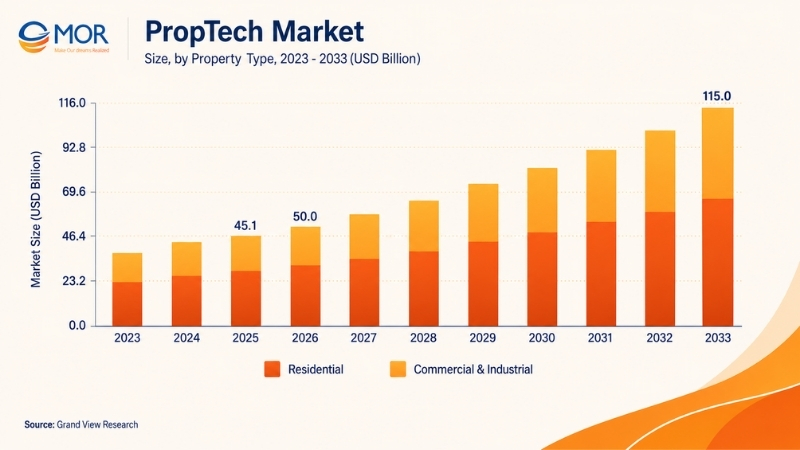
The global PropTech market reached USD 45.1 billion in 2025 and is estimated at USD 50.1 billion in 2026. Grand View Research expects it to reach USD 115 billion by 2033, based on a 12.6% CAGR between 2026 and 2033. Residential products held 56.3% of the market in 2025, and software represented 62% of the solution segment.
Growth now covers far more than property search sites. Brokerages need connected lead systems, developers need project and land controls, property managers need tenant portals, and investors need accurate portfolio data.
Demand also comes from established operators replacing spreadsheets and disconnected applications. Cloud services, AI automation, IoT sensors, geospatial data, virtual tours, and automated property operations now shape many software development for real estate projects.
The direction is practical: create one reliable data flow across property, customer, transaction, financial, and building operations.
Key Features in Software Development for Real Estate
A real estate platform earns its place when it shortens a task, raises data accuracy, or gives a user information they couldn’t access before. A polished dashboard has little value if staff still re-enter data into Salesforce, Excel, an accounting system, and a property portal.
Plan functions around the full user journey. Search tools, workflow rules, payments, documents, integrations, analytics, and user permissions must work as one product.
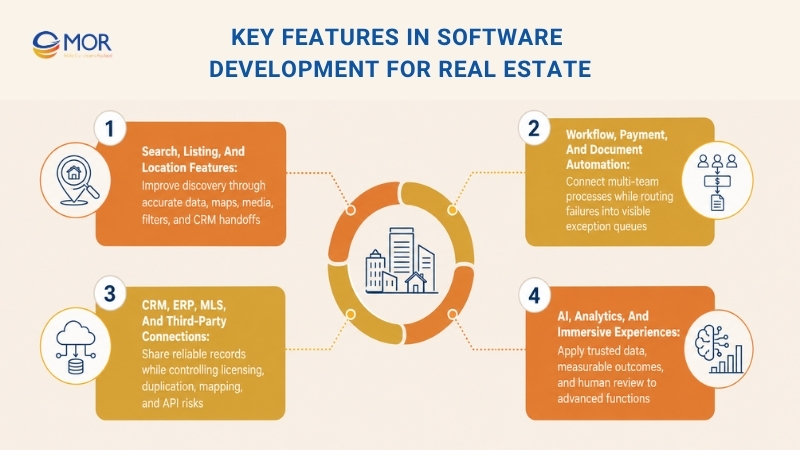
Search, Listing, and Location Features
Property discovery should help users find a relevant listing without fighting a long filter form. The underlying data also needs clear ownership, status rules, and update schedules.
- Search experience: Combine standard filters with natural-language queries, map clusters, saved criteria, sorting rules, and property alerts.
- Property content: Present clear images, video, floor plans, 360-degree media, documents, and virtual staging in one listing record.
- Location intelligence: Add Mapbox or Google Maps, commute data, nearby services, zoning layers, neighborhood records, and PostGIS queries.
- Listing governance: Track verification status, publication dates, price changes, attribution, listing expiry, and feed updates.
- Performance controls: Cache common searches, resize media, index property data, and test results against real production volumes.
Search also has a commercial role. Each inquiry should pass the listing ID, search source, selected criteria, and contact details into the CRM so an agent receives the full story.
Workflow, Payment, and Document Automation
Real estate work crosses teams. A lead becomes a viewing, an application becomes a lease, and a maintenance ticket becomes a vendor invoice.
- Application-to-lease: Collect applicant data, check required files, route reviews, generate the lease, and record signatures.
- Lead-to-viewing: Assign the lead, check agent availability, book a tour, send reminders, and record the outcome.
- Offer-to-close: Manage approvals, deadlines, identity checks, documents, and transaction status through one controlled path.
- Maintenance-to-resolution: Open a ticket, set urgency, dispatch staff, record photos, request approval, and close the work order.
- Invoice-to-payment: Match approved work with invoices, send data to finance, track payment status, and retain an audit record.
- Renewal management: Detect approaching dates, prepare renewal options, notify the right user, and record the final decision.
Each chain needs exception handling. A failed payment, missing file, disputed invoice, or expired listing should enter a visible queue rather than disappear inside an email thread.
CRM, ERP, MLS, and Third-Party Connections
Integrations stop users from treating the new product as another isolated tool. They also create project risk when ownership, limits, and error handling remain unclear.
Integration category | Common examples | Data exchanged | Operational value | Main implementation risk |
Listing data | MLS, IDX, VOW, RESO Web API | Listings, agents, status, media | Current property search | Licensing and display rules |
CRM | Salesforce, HubSpot, custom real estate CRM | Leads, contacts, tasks, activity | Shared customer records | Duplicate data |
ERP and finance | Odoo offshore development, SAP, QuickBooks, custom finance systems | Bills, invoices, budgets, payments | Financial control | Account mapping |
Payments | Stripe, Adyen, local gateways | Charges, refunds, settlement status | Faster collection | Reconciliation gaps |
Electronic signatures | DocuSign, Adobe Acrobat Sign | Contracts, signers, status | Shorter document cycles | Identity and retention rules |
Maps | Mapbox, Google Maps API | Coordinates, routes, boundaries | Property discovery | Usage costs and geocoding errors |
Identity services | KYC, AML, screening platforms | Identity and review status | Transaction control | Data privacy |
Building systems | IoT gateways, access systems, BMS | Sensor, access, and equipment events | Property operations | Device compatibility |
BI tools | Power BI, Tableau, Looker | Metrics and data models | Shared reporting | Conflicting metric definitions |
RESO describes its Web API as the modern data transport method for the real estate sector and treats RETS as a deprecated approach. Yet MLS, IDX, VOW, and RESO connections only apply to products that need market listing data. Internal construction, lease, facility, and investment systems may not need them.
AI, Analytics, and Immersive Experiences
AI functions need dependable property data and a defined business result. A chatbot connected to outdated records will answer faster, but it will still give the wrong answer.
- Property search: Match natural-language requests with listing attributes and user behavior.
- Valuation: Estimate prices, select comparable properties, and report confidence ranges.
- Lead management: Score inquiries, assign agents, and recommend a follow-up action.
- Document work: Classify files and extract names, dates, clauses, and payment terms.
- Property media: Tag images, detect quality issues, build floor plans, and prepare virtual staging.
- Portfolio management: Flag maintenance risk, tenant risk, occupancy changes, and unusual costs.
- Customer service: Answer approved questions for buyers, tenants, owners, and vendors.
- Visualization: Connect AR, VR, digital twins, and interactive property plans.
Human review must remain part of high-risk decisions. Valuation approval, applicant rejection, contract acceptance, large payments, and compliance exceptions need named owners.
Real Estate Software Products Worth Building Around Actual Workflows
Product choice should start with a bottleneck. A brokerage losing leads needs a different system than a developer tracking loan draws or a property manager handling hundreds of maintenance requests.
Strong software development for real estate links the product type to a measurable result. That result may be faster inquiry response, lower month-end work, fewer missed renewals, better cost forecasting, or clearer asset reporting.
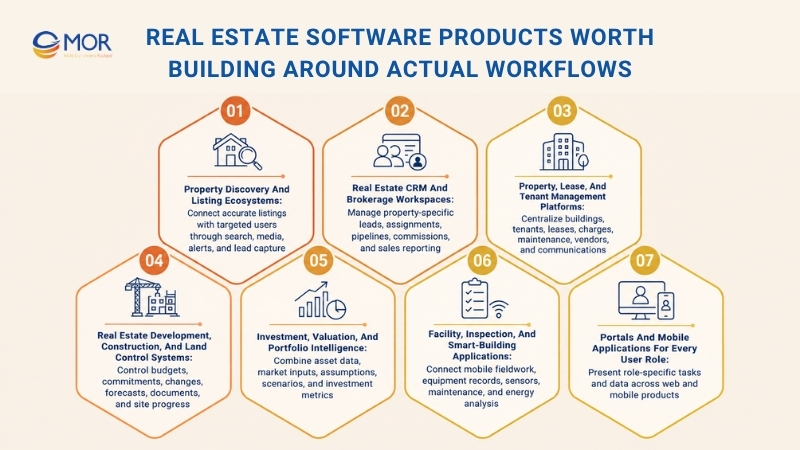
Property Discovery and Listing Ecosystems
A property marketplace connects listing supply with buyers, renters, agents, or investors. Its value depends on data accuracy and a search flow that fits the target market.
- Marketplace management: Give administrators control over listings, users, subscriptions, moderation, and publication rules.
- Map-based discovery: Let users search by area, route, boundary, distance, or nearby services.
- Saved activity: Store searches, shortlisted properties, comparison lists, and alert preferences.
- Listing distribution: Publish data across approved portals and record source-specific status.
- Lead capture: Send inquiry details and property data into the sales workspace.
- Media experience: Support galleries, floor plans, video, 360-degree tours, and interactive maps.
- Market access: Add language, currency, measurement, and regional display rules where needed.
A startup may launch one listing category in one city. Larger platforms may support sales, long-term rentals, short stays, commercial units, land, and investment properties.
Real Estate CRM and Brokerage Workspaces
Generic CRMs often miss property preferences, viewing records, co-brokering, referral fees, and commission stages. CRM software for real estate developers may also track buyers, unit inventory, reservation status, payment schedules, and handover tasks.
- Lead capture: Collect inquiries from portals, advertising, websites, calls, and events with source attribution.
- Contact profiles: Store buyer, seller, landlord, tenant, partner, and investor relationships.
- Property matching: Connect stated needs with units, listings, and future projects.
- Agent assignment: Route work by location, language, property type, workload, or deal value.
- Pipeline control: Track inquiry, qualification, viewing, offer, negotiation, reservation, and closing.
- Follow-up rules: Create tasks and messages based on customer activity or missed deadlines.
- Commission records: Calculate agent, broker, referral, and partner shares against approved rules.
- Sales reporting: Compare source quality, agent response, viewing conversion, and closed revenue.
The system should show why a lead received a score or assignment. Hidden rules create disputes and weaken adoption.
Property, Lease, and Tenant Management Platforms
Property operations need one record for each building, unit, tenant, lease, charge, document, ticket, and vendor. The platform can support residential, commercial, mixed-use, student, or short-term assets.
- Tenant onboarding: Collect identity data, documents, deposits, contacts, and access requirements.
- Lease administration: Generate agreements, track amendments, record dates, and manage renewals.
- Rent and fees: Schedule charges, accept online payments, apply approved rules, and track balances.
- Maintenance: Register requests, set priority, assign work, attach photos, and record resolution.
- Vendor work: Manage insurance, contracts, service areas, quotes, visits, and invoice status.
- Inspection records: Use mobile forms, photos, notes, signatures, and issue lists.
- Tenant communication: Send notices, payment reminders, building updates, and case messages.
- Move-in and move-out: Track checklists, keys, meter readings, condition, deposits, and final bills.
For commercial assets, custom software development for commercial real estate may add complex rent structures, CAM recovery, tenant improvements, portfolios, and several legal entities.
Real Estate Development, Construction, and Land Control Systems
Development teams need cost and delivery control before invoices reach accounting. Project management software for real estate development must capture commitments, changes, forecasts, drawings, approvals, and site progress against one project structure.
Workflow | Common manual problem | Software capability | Business outcome |
Project budgets | Several spreadsheet versions | Cost codes, revisions, actuals, forecasts | Clear budget position |
Commitments | Contracts remain outside finance records | Contract and purchase commitment register | Earlier cost visibility |
Change orders | Approval trails sit in email | Request, review, approval, and budget updates | Controlled scope changes |
Loan draws | Teams gather files manually | Draw workflow and document package | Shorter preparation time |
Contractor work | Site and office records differ | Tasks, RFIs, drawings, photos, and reports | Shared project status |
Cost to complete | Forecasts use old information | Revised forecasts by cost code and package | Earlier overrun detection |
Land and lots | Inventory status is unclear | Phase, lot, builder, sale, and takedown records | Better land control |
Project documents | Files use inconsistent names | Version control, permissions, and approval history | Easier retrieval |
A capital project management software comparison for real estate developers should test cost control, field access, document rules, accounting links, and portfolio reporting. The longest feature list doesn’t identify the right system.
The best development project software for real estate is the product that matches your approval chain, budget structure, site reporting, and finance process. Accounting software for real estate developers may hold the official ledger, but it rarely replaces site, contract, and project controls.
Investment, Valuation, and Portfolio Intelligence
Investment systems join asset facts, lease terms, operating figures, market data, and scenario models. The user should be able to move from a portfolio result to the source record behind it.
- Valuation analysis: Run automated valuation models and comparable market analysis.
- Income analysis: Review rent, vacancy, NOI, operating expenses, and cash flow.
- Investment metrics: Calculate cap rate, IRR, equity multiple, debt coverage, and yield.
- Asset hierarchy: Organize funds, owners, portfolios, buildings, units, and leases.
- Scenario planning: Test rent growth, vacancy, financing, exit value, and capital expenditure.
- Risk reporting: Track tenant exposure, lease expiry, location, climate, and cost risk.
- Benchmarking: Compare assets against internal targets and approved market sources.
A reliable model retains assumptions, dates, data sources, and calculation versions. One unexplained score won’t support an investment committee or lender review.
Facility, Inspection, and Smart-Building Applications
Field teams need fast mobile tools, even when site connectivity is weak. Building applications can connect human tasks with sensors, equipment, access events, and energy records.
- Inspection apps: Record checklists, defects, photos, signatures, and follow-up work.
- Preventive maintenance: Schedule service by calendar, usage, condition, or sensor event.
- Field reporting: Give site teams tasks, drawings, locations, comments, and offline access.
- IoT records: Receive meter, temperature, occupancy, air quality, leak, and equipment data.
- Equipment history: Store asset details, manuals, service records, parts, and warranty dates.
- Contractor control: Assign work, review proof, record time, and approve completion.
- Energy analysis: Compare consumption by property, floor, system, tenant, or time period.
A short example comes from MOR Software’s construction mobile app. It combined job lists, image records, real-time messaging, reports, and drawing tools through React Native and FastAPI, proving how field and office work can share one product record.
Portals and Mobile Applications for Every User Role
One large menu rarely works for buyers, tenants, agents, investors, and administrators. Role-based products present the tasks and data each person needs.
User role | Main functions |
Buyer | Search, save, compare, book, message, and submit documents |
Seller | Create a listing, review activity, approve changes, and track offers |
Agent | Manage leads, tours, listings, documents, tasks, and commissions |
Tenant | Pay rent, view lease data, submit tickets, and receive notices |
Landlord | Review income, occupancy, maintenance, and tenant records |
Property manager | Run leases, billing, work orders, inspections, and vendors |
Contractor | Receive jobs, access instructions, upload proof, and submit invoices |
Investor | Review assets, forecasts, returns, risks, and documents |
Administrator | Control users, roles, integrations, rules, data, and audit records |
Mobile access needs a clear job. Field inspections, on-site maintenance, property tours, photos, push notifications, and offline forms suit mobile products. Heavy portfolio reporting may remain better on the web.
AI-Native Features Reshaping Real Estate Development in 2026
AI-native products place models, trusted data, workflow actions, and review points inside the system design. Adoption has moved past casual experiments: JLL found that 88% of investors, owners, and landlords had started AI pilots, alongside 92% of corporate occupiers, yet only 5% of occupiers said they had met all program goals.
That gap deserves attention. A useful AI software for real estate development must act on current records, follow permissions, explain its output, and return uncertain cases to a person.
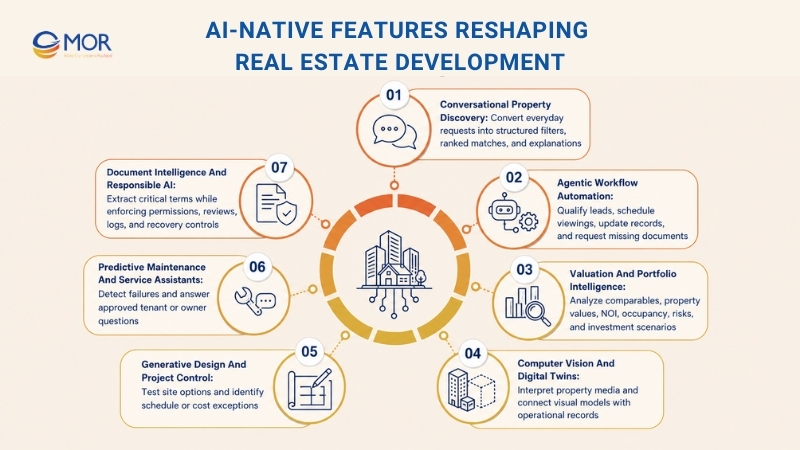
Conversational property discovery
Let users describe budget, area, commute, amenities, size, and lifestyle needs in everyday words. The model can translate that request into structured filters, rank results, and explain each match.
Agentic lead and transaction workflows
AI agents can qualify inquiries, assign leads, book viewings, update CRM records, request missing files, and prepare follow-ups. Approval rules should stop them before financial, contractual, or compliance decisions.
Automated valuation and comparable analysis
Models can combine transaction records, listing history, property attributes, location, rent, and market changes. Show comparable assets, confidence ranges, source dates, and model limits beside the estimate.
AI portfolio and investment intelligence
Analyze NOI, occupancy, rent, cost movement, lease expiry, tenant risk, and market signals across an asset base. Analysts can test acquisition and capital plans without rebuilding the same spreadsheet each month.
Computer vision for property data
Read listing images, inspection photos, construction media, and video feeds. Use the output for room labels, property attributes, visible defects, floor plans, media checks, and progress records.
Digital twins and immersive property experiences
Connect 3D scans, 360-degree media, AR, and VR with property and equipment records. Buyers can tour remotely, project teams can compare work with plans, and facility teams can locate asset data inside a visual building model.
Generative design and site planning
Generate site layouts or space options against zoning, cost, energy, unit mix, and area limits. Architects and engineers still own design review, professional judgment, and formal approval.
Predictive project control
Review BIM data, budgets, schedules, RFIs, inspection notes, and change orders for delay or cost signals. Project managers receive a focused exception list instead of another static report.
Predictive maintenance and building operations
Combine IoT signals, work orders, asset history, and service records to flag likely failure. A model may identify an abnormal water pattern, open a ticket, locate the affected unit, and prepare a vendor request.
Tenant and owner service assistants
Give users approved answers about payments, lease dates, maintenance status, access, and shared files. Responses should cite the internal record and hand the conversation to staff when data is missing.
Document intelligence
Extract names, dates, payment rules, renewal clauses, obligations, and exceptions from leases, applications, inspections, and transaction files. Low-confidence output should enter a review queue.
Responsible AI controls
Apply role permissions, approved sources, activity logs, model tests, human checkpoints, and clear recovery steps. Screen scoring, valuation, and recommendations for false or unfair output before release.
McKinsey estimates that automation and AI could create USD 430 billion to USD 550 billion in annual value across real estate, construction, and development. Its 2026 analysis also describes agentic work across maintenance, leasing, asset management, and capital projects, where systems complete routine steps inside approved boundaries.
Don’t pick the best AI software for real estate development by the model name. Start with one repeated task, clean data, an accountable owner, and a measurable result. Lead response time, lease review time, maintenance closure, forecast accuracy, and search conversion make stronger starting points.
Software Development for Real Estate: Custom Build, Platform Configuration or API Integration?
The right delivery path depends on workflow difference, current systems, timing, data ownership, and long-term control. A custom build isn’t the default answer, and a packaged product isn’t automatically cheaper after integration and workarounds.
Compare the Four Delivery Paths
Each delivery path balances speed, control, ownership, and cost differently. Compare them against your current systems, product goals, integration needs, and long-term roadmap before choosing one.
Delivery path | Best fit | Initial release | Customization | Integration control | IP ownership | Estimated cost | Main limitation |
Full custom development | Unique product or operating model | 3 to 9 months | High | High | Usually client-owned | $80,000 to $500,000+ | Higher starting cost |
Platform configuration | Standard CRM, ERP, lease, or finance workflows | 1 to 4 months | Low to medium | Medium | Platform-dependent | $20,000 to $150,000 | Platform limits |
API-first extension | Useful core system with missing workflows | 2 to 6 months | Medium to high | High around connected services | Mixed | $40,000 to $250,000 | API dependency |
Legacy modernization | Valuable system blocked by old code or architecture | 4 to 18 months | High | High | Existing ownership applies | $150,000 to $1 million+ | Migration and cutover risk |
Treat these as planning ranges, not quotes. Team location, mobile coverage, AI work, security, migration, integrations, media, and user volume can move a project far outside the table.
Custom software development for the real estate industry fits when the process itself creates commercial value. Custom software development for commercial real estate also makes sense when lease rules, asset structures, approvals, and integrations can’t fit a standard product.
Use Six Questions to Select the Right Path
The best delivery path depends on how much control your business needs over workflows, data, timing, and IP. Use these questions to compare each option against real operating requirements.
- Is the workflow a business advantage? Build or extend when the way you search, sell, lease, develop, or manage property sets the company apart.
- Can a packaged platform support the roles and rules? Test real scenarios before choosing. A sales demo rarely exposes permission, reporting, or exception limits.
- Which systems and data sources must remain? List each source of truth, integration owner, API limit, file feed, and manual handoff.
- How fast must the first usable release arrive? A narrow API extension may reach users sooner than a replacement program.
- What scale must the product handle? Count users, properties, listings, documents, media, transactions, and peak activity.
- Who needs control over data and IP? Confirm ownership of source code, models, schemas, documentation, and generated data before signing.
Configure standard workflows. Integrate systems that still serve their purpose. Modernize valuable products blocked by technical debt. Build custom when the workflow, data, or customer experience creates measurable value.
Software Development for Real Estate Roadmap
A clear roadmap turns a broad idea into controlled releases. Each stage should end with evidence, a decision, and named ownership before development moves ahead.
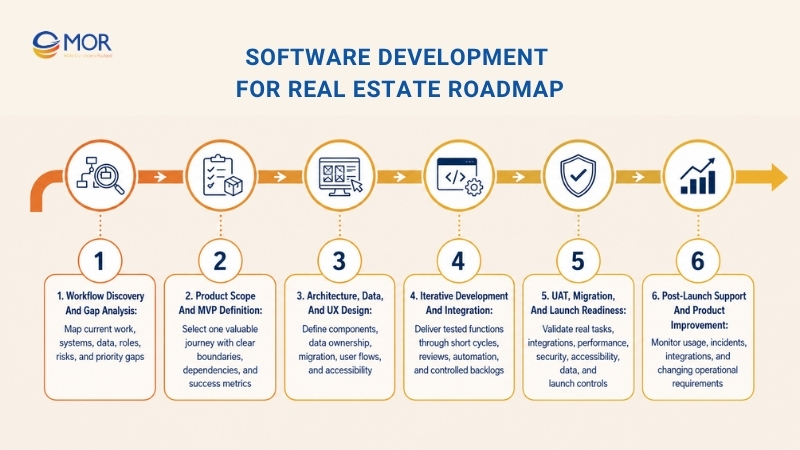
Workflow Discovery and Gap Analysis
Start with staff who perform the work, not a feature wish list. Trace the current process, including spreadsheets, emails, calls, portals, approvals, and repeated data entry.
- Stakeholder interviews: Record goals, pain points, decisions, exceptions, and success measures.
- System audit: Map current applications, data, vendors, contracts, and technical limits.
- Workflow maps: Document triggers, steps, decisions, handoffs, delays, and owners.
- Data sources: Identify each system of record and data-quality issue.
- Compliance boundaries: Mark personal, financial, contractual, and market-specific data.
- User roles: Define who views, creates, edits, approves, exports, and deletes information.
- Gap analysis: Compare current capability with the proposed product.
- Priority list: Rank requirements by business value, dependency, risk, and effort.
The exit point is an agreed problem statement and scope boundary. Without that, estimation remains guesswork.
Product Scope and MVP Definition
The MVP should complete one valuable journey. A property marketplace may focus on verified listings, search, inquiry, and agent response before adding investment tools or broad automation.
- Core journey: Select the user action that proves demand or removes the largest delay.
- MVP boundary: Separate launch requirements from later ideas.
- Adoption risk: Test the concept with users who will work in the product.
- Integration dependency: Confirm access, limits, cost, and test environments.
- Release priorities: Order functions around usable outcomes rather than technical layers.
- Success metrics: Define adoption, time, accuracy, conversion, cost, or revenue targets.
Architecture, Data, and UX Design
Translate the approved scope into a technical plan before development starts. Architecture, data rules, and user experience must support the same business process.
- Architecture: Select application components, hosting, APIs, databases, storage, queues, search, and deployment controls.
- Data: Define models, source ownership, migration, sync rules, retention, and audit needs.
- Experience: Map user flows, wireframes, prototypes, mobile behavior, and accessibility requirements.
Prototype difficult journeys before coding. A ten-minute usability test can expose a confusing approval path that would cost far more to rebuild after release.
Iterative Development and Integration
Work in short delivery cycles with visible acceptance criteria. Teams should present working functions, test results, risks, and pending decisions at each review.
- Application work: Build front-end, back-end, database, search, and administrative functions.
- API connectors: Create authentication, mapping, retries, alerts, and reconciliation.
- Automated tests: Cover business rules, APIs, permissions, and repeat release checks.
- Sprint reviews: Let business users test completed workflows against agreed scenarios.
- Backlog control: Reorder work when evidence changes the plan.
- CI/CD: Automate builds, tests, security checks, and deployment steps.
- Technical records: Keep architecture decisions, data rules, and operating instructions current.
UAT, Migration, and Launch Readiness
User acceptance testing confirms that the product supports actual work. It shouldn’t become a late visual review.
- Functional testing: Check each rule, action, status, and exception.
- Integration testing: Test successful calls, failures, retries, duplicates, and delayed data.
- Performance testing: Measure search, uploads, reports, sync, and peak traffic.
- Security testing: Review access, APIs, sessions, files, logs, and common attack paths.
- Accessibility testing: Check keyboard use, labels, contrast, scaling, and screen readers.
- Data validation: Reconcile source and destination totals, records, balances, and files.
- UAT: Ask users to complete realistic tasks without step-by-step help.
- Launch plan: Prepare training, support, rollback, monitoring, and ownership.
Post-Launch Support and Product Improvement
Launch begins the operating phase. Real users will reveal slow tasks, unclear labels, data exceptions, and missing controls.
Track system health, incidents, user activity, integration failures, search behavior, and support demand. Release fixes and product changes through the same testing and approval process used during development.
A well-run software development for real estate roadmap also plans for listing schema changes, new payment rules, new property types, added markets, and user growth.
Software Development for Real Estate: Security and Compliance
Real estate platforms hold names, addresses, financial records, identity documents, contracts, access data, and investment information. Security decisions need to enter architecture planning rather than appear as a final checklist.
IBM reported a USD 4.4 million global average cost for a data breach in 2025. Its research also found that 97% of organizations reporting an AI-related security incident lacked proper AI access controls.
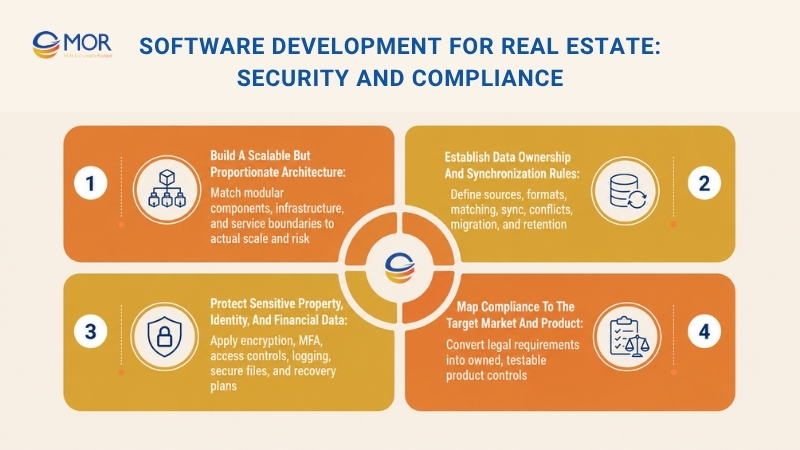
Build a Scalable but Proportionate Architecture
Architecture should match the product’s real size and risk. A focused MVP doesn’t need dozens of services, yet one unstructured codebase will become hard to change as integrations and teams grow.
- User interfaces: Separate public search, user portals, mobile apps, and administration where their risks differ.
- API gateway: Control authentication, rate limits, routing, versioning, and request logs.
- Business services: Group listings, users, leases, payments, maintenance, projects, and reporting around clear boundaries.
- Integration layer: Isolate external APIs, file feeds, ETL, retries, and vendor-specific mapping.
- Operational database: Store current business records with transactions, constraints, and access rules.
- Search engine: Index text, filters, maps, and ranking data without replacing the system of record.
- Analytics warehouse: Keep reporting workloads and historic models away from live transactions.
- Media storage: Control property images, plans, contracts, reports, and inspection files.
- Identity and access: Manage roles, sessions, MFA, service accounts, and permission changes.
- Monitoring and logging: Track errors, performance, security events, integrations, and user actions.
A modular monolith often fits a new product with one engineering team. Microservices become useful when separate domains need independent scaling, deployment, security, or ownership.
Establish Data Ownership and Synchronization Rules
A system can’t reconcile property data when nobody knows which record wins. Set ownership before building integrations.
- Source of truth: Name the owner for listings, contacts, leases, invoices, payments, and documents.
- Normalization: Map source values into shared formats for addresses, users, units, status, currency, and dates.
- Deduplication: Define matching rules for people, properties, companies, listings, and transactions.
- Synchronization: Choose real-time events, scheduled jobs, or manual approval based on urgency.
- Conflict handling: Decide what happens when two systems change the same record.
- Migration: Clean, map, test, reconcile, and prepare rollback before production transfer.
- Retention: Set storage, archival, deletion, legal hold, and backup periods.
For example, a CRM may own lead activity, a property platform may own unit status, and an ERP may own invoices. Copying every field in every direction creates loops and conflicting records.
Protect Sensitive Property, Identity, and Financial Data
Real estate platforms store personal, contractual, and financial records that require strict access controls. Security must cover every user, file, API, and connected service across the product.
- Encryption: Protect data in transit and at rest, including backups and document storage.
- Multi-factor authentication: Apply stronger sign-in controls to staff, owners, and administrators.
- Role-based access: Limit data and actions by job, property, entity, portfolio, and approval level.
- Least privilege: Give users and service accounts only the rights needed for their task.
- Audit logs: Record sensitive views, edits, approvals, exports, permission changes, and AI actions.
- API security: Use managed secrets, short-lived tokens, rate limits, validation, and allowlists where suitable.
- Tenant isolation: Prevent one customer in a SaaS product from accessing another customer’s data.
- Secure files: Scan uploads, control links, restrict downloads, and record access.
- Backup and recovery: Test restoration, recovery timing, and ownership rather than relying on an untested backup.
- Incident response: Define detection, containment, communication, investigation, and recovery duties.
Map Compliance to the Target Market and Product
Compliance depends on location, customer type, transaction model, data, and product use. The software team should translate legal advice into testable controls.
Area | Affected workflow | Product control | Owner | Validation method |
Personal data | Registration, CRM, tenant records | Consent, permissions, retention, deletion | Privacy owner | Data-flow and access review |
Electronic signatures | Leases, offers, approvals | Identity, timestamp, document integrity | Legal owner | Signature and audit tests |
Listing rules | Search, display, syndication | Attribution, status, fields, expiry | Listing operations | Feed and display review |
Fair housing | Search, matching, screening | Controlled criteria and bias tests | Compliance owner | Scenario testing |
Accessibility | Public sites and portals | Keyboard, labels, contrast, assistive support | Product owner | Accessibility audit |
AML and identity | Transactions and onboarding | Verification, review, escalation, records | Compliance team | Provider and case review |
Financial records | Billing, draws, invoices | Approval, reconciliation, retention | Finance owner | Ledger reconciliation |
Valuation standards | Appraisal and analysis | Sources, assumptions, review, versioning | Valuation owner | Model and report review |
Local counsel and compliance specialists should confirm the final controls. Developers can build the rules, but they shouldn’t interpret jurisdiction-specific legal duties alone.
Software Development for Real Estate: Cost and Timeline
No single project price applies across a listing MVP, tenant platform, investment system, and enterprise development suite. Costs follow scope, team shape, integrations, data work, security, platforms, and expected scale.
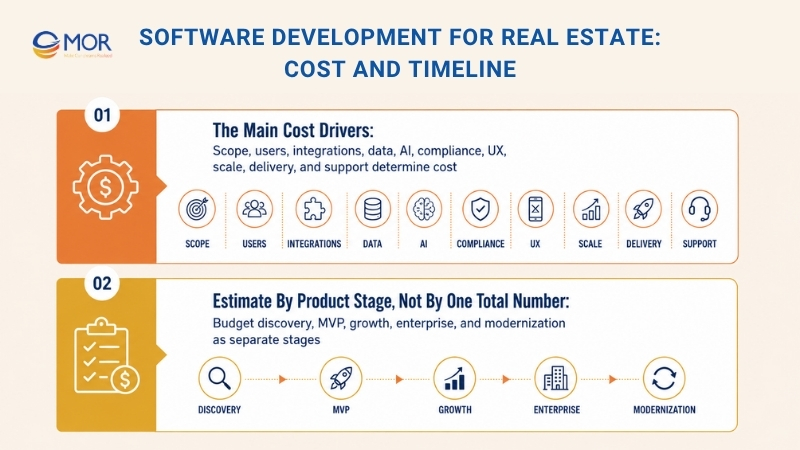
The Main Cost Drivers
Project cost rises when scope, integrations, data work, user roles, and security requirements become more complex. Estimate each driver separately so the budget reflects the work behind the final product.
- Product scope: Each workflow adds screens, rules, states, tests, permissions, and operating records.
- User coverage: Public websites, staff portals, mobile apps, partner portals, and administration raise effort.
- Integration load: MLS, CRM, ERP, payments, signatures, maps, identity, and IoT need separate mapping and testing.
- Data complexity: Migration, search, geospatial records, media, history, and analytics add specialist work.
- AI depth: A controlled assistant costs less than a model pipeline with training, evaluation, monitoring, and workflow actions.
- Compliance: Security design, logging, legal review, evidence, and specialist tests raise the build plan.
- UX requirements: Standard forms differ from map tools, digital twins, floor-plan editors, and field apps.
- Scale: High listing volume, image traffic, concurrent users, and large reports shape infrastructure.
- Delivery model: Fixed scope, dedicated team, staff augmentation, and mixed models allocate risk differently.
- Post-launch work: Hosting, monitoring, support, security fixes, vendor changes, and product releases need a yearly budget.
Estimate by Product Stage, Not by One Total Number
A single price range hides major differences in scope and team structure. Estimate the project by delivery stage, then state the assumptions behind each duration and budget range.
Product stage | Typical scope | Typical team | Main deliverables | Estimated duration | Planning budget |
Discovery and prototype | Research, workflow map, UX prototype, architecture | BA, designer, architect | Scope and tested concept | 2 to 6 weeks | $10,000 to $40,000 |
Focused MVP | One main user journey, basic admin, limited integrations | 4 to 7 people | Usable first release | 2 to 4 months | $40,000 to $150,000 |
Integrated growth platform | Several roles, web or mobile, 2 to 5 integrations | 6 to 12 people | Production platform | 4 to 8 months | $150,000 to $400,000 |
Enterprise ecosystem | Several modules, markets, entities, and data sources | 10 to 25+ people | Enterprise product suite | 8 to 18 months | $400,000 to $1 million+ |
Legacy modernization | Audit, refactoring, migration, cloud, parallel rollout | 6 to 20+ people | Rebuilt or renewed system | 6 to 18 months | $250,000 to $1 million+ |
Accounting software for real estate development may lower scope when the finance system already fits. Yet heavy customization, poor APIs, and complex migration can make a ‘cheap’ platform extension cost more than expected.
Software Development for Real Estate Risks and Solutions
Most project failures begin before coding. Unclear scope, weak data, poor adoption, and hidden ownership create more damage than the choice between Java, .NET, Node.js, or Python.
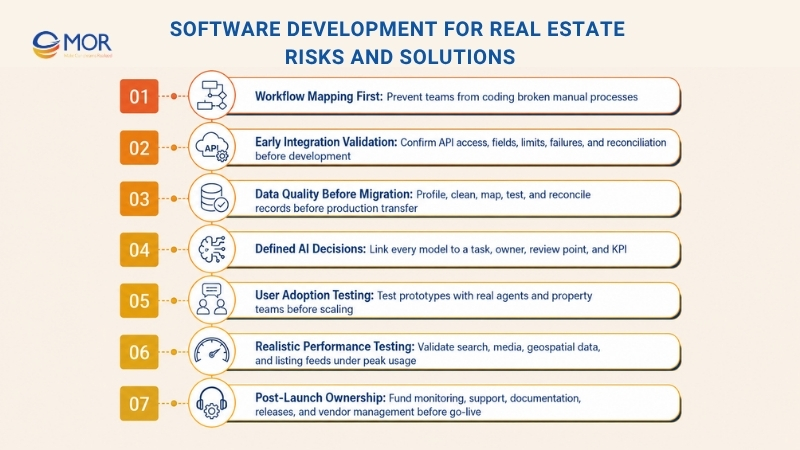
- Building before mapping workflows: Teams may copy a broken manual process into code. Run interviews and Gap analysis, then agree on decisions, exceptions, and ownership before finalizing requirements.
- Treating integration as a late task: A vendor API may lack required fields, write access, test data, or acceptable limits. Validate access, mapping, failure handling, and reconciliation during architecture work.
- Migrating unreliable data: Duplicate properties, mixed address formats, missing tenant IDs, and old statuses will travel into the new product. Profile, clean, map, test, and reconcile data before the final migration.
- Adding AI without a defined decision: A broad AI goal produces demos that don’t change a business result. Tie each model to a named task, input, output, review point, owner, and KPI.
- Ignoring agent and property-team adoption: Staff return to spreadsheets when screens add clicks or hide information. Test prototypes with real users and measure task completion before scaling the build.
- Underestimating search and media performance: Geospatial queries, high-resolution images, 3D assets, and listing feeds may work in a small test but fail under real traffic. Test realistic data and peak usage early.
- Planning only for launch: External schemas, payment rules, security threats, and user needs will change. Assign support ownership, release funding, monitoring, documentation, and vendor management before go-live.
- Choosing tools before business rules: Teams may debate cloud platforms or programming languages without defining the process. Select the stack after scope, risk, integration, and operating needs are known.
A stable project has a visible decision log. When scope changes, the team records the reason, cost, timeline, acceptance criteria, and responsible owner.
How to Evaluate Real Estate Software Development Company
A vendor’s website may list the same technologies as twenty competitors. Delivery evidence, team quality, discovery skill, and post-launch ownership reveal the real difference.
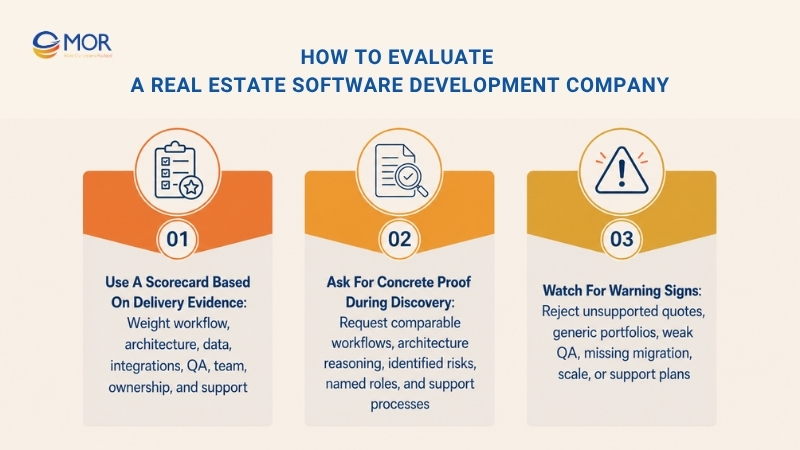
Use a Scorecard Based on Delivery Evidence
A structured scorecard keeps vendor selection tied to proof rather than sales claims. Weight each criterion by project risk, then record the evidence, score, gaps, and follow-up questions for every shortlisted company.
Evaluation area | Suggested weight | Evidence to request | Main risk | Follow-up question |
Workflow understanding | 15% | Discovery samples and process maps | Generic product design | Which exceptions did you identify? |
Relevant delivery | 10% | Case studies and references | No comparable workflow | Which parts were built by your team? |
Architecture | 10% | Architecture examples and decision records | Weak scalability or high cost | Why does this design fit our scope? |
Data engineering | 10% | Migration, ETL, search, and analytics work | Bad data reaches production | How will you reconcile records? |
Integration work | 10% | API, ERP, CRM, payment, or listing links | Hidden vendor dependency | What happens when an API fails? |
Security and QA | 10% | Test plans, certifications, security process | Late defects and access gaps | Which controls enter each sprint? |
UX and mobile | 5% | Real user flows and shipped products | Low adoption | How do users test prototypes? |
AI capability | 5% | Model tests, monitoring, and production use | Demo-only AI | How will you measure accuracy? |
Team composition | 10% | Named roles, seniority, availability | Junior-heavy delivery | Who owns architecture and QA? |
Communication | 5% | Reporting samples and meeting plan | Slow decisions | How are blockers escalated? |
IP and documentation | 5% | Contract terms and handover list | Vendor lock-in | What does the client receive? |
Support model | 5% | SLA, monitoring, and release process | Weak post-launch care | Who responds after go-live? |
Software development services for real estate should include clear answers about data, integrations, testing, deployment, and ownership. A low hourly rate has little value when rework or poor handover extends the project.
Ask for Concrete Proof During Discovery
A capable vendor should support every claim with delivery evidence, technical reasoning, and named ownership. Use discovery sessions to test how well the team understands your workflows, risks, integrations, and post-launch needs.
- Comparable workflows: Ask which listing, lease, booking, project, document, field, CRM, or analytics workflows the team has delivered.
- Architecture reasoning: Request a plain explanation of the proposed components, data flow, integrations, and main trade-offs.
- Risk identification: Check whether the vendor finds unclear scope, API limits, migration problems, and user-adoption issues before estimation.
- Named responsibilities: Confirm who owns product analysis, design, architecture, development, QA, DevOps, security, and communication.
- Post-launch ownership: Review monitoring, incidents, fixes, updates, service levels, documentation, and knowledge transfer.
Watch for Warning Signs
A strong vendor explains assumptions, risks, ownership, and post-launch support before asking for commitment. Vague estimates or technology-heavy promises often point to delivery gaps that appear later.
- Immediate fixed quote: A precise price without discovery often hides assumptions or later change requests.
- Generic portfolio: Attractive screenshots don’t prove data, integration, or domain skill.
- Unclear QA ownership: ‘Developers test their own work’ won’t cover the full release risk.
- No migration plan: Data transfer needs profiling, mapping, cleaning, tests, and reconciliation.
- No scale assumptions: Architecture estimates need expected users, properties, files, and peak load.
- No support model: The vendor should explain what happens after the first production release.
- Technology-led promises: AI, blockchain, microservices, and cloud labels don’t replace a delivery plan.
Build Real Estate Software With MOR Software
Real estate products need connected property data, user roles, transactions, payments, documents, and field operations. MOR Software supports business analysis, product design, web and mobile engineering, system integration, testing, deployment, and maintenance across the development cycle.
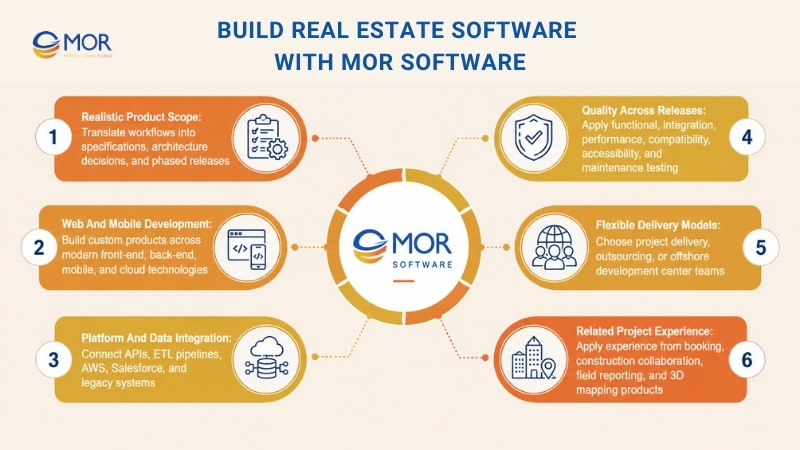
- Define a realistic product scope: MOR Software’s business analysts and solution architects can translate listing, lease, property development design management, booking, investment, and field requirements into user flows, specifications, architecture choices, and phased releases.
- Develop web and mobile products: Verified MOR capabilities cover custom software outsourcing, web applications, mobile app development, AI, IoT, and Salesforce. Its stack includes ReactJS, NextJS, Angular, Vue.js, Node.js, Java, Python, .NET, PHP, Go, Swift, Kotlin, React Native, Apex, and Lightning Web Components.
- Integrate platforms and property data: We have delivered API, ETL, AWS, Salesforce, and legacy-system connections. Its Salesforce scope covers consulting, implementation, development, integration, management, maintenance, and multi-cloud customization.
- Build quality into each release: Our service materials cover QC, functional testing, integration testing, performance work, compatibility, accessibility, and maintenance. ISO 9001:2015 and ISO 27001:2013 certifications support its quality and information-security processes.
- Choose a suitable delivery model: Clients can use project delivery, software outsourcing, or an offshore software center. We can form teams that include developers, business analysts, architects, project managers, QA engineers, QC staff, and bridge engineers.
- Apply related project experience: MOR built SpaceShare, a space and office booking app with AWS and automated camera check-in. Other related work includes a construction collaboration app with real-time field reporting and a 3D Map SDK supporting 360-degree media and interactive objects.
The service fits PropTech startups, brokerages, property managers, developers, and enterprise teams planning an MVP, custom mobile app development, web platform, Salesforce-connected product, integration layer, or long-term engineering team.
Share your target users, core workflow, integrations, data sources, expected scale, and launch date with MOR Software. Our team can then recommend the architecture, stack, delivery model, and team structure that fit the project.
Conclusion
Connected data and clear workflow ownership determine whether a property platform works after launch. Strong software development for real estate starts with discovery, selects a suitable build path, and adds testing, security, integration, and support from the beginning. MOR Software supports real estate and PropTech teams across consulting, custom development, mobile, web, Salesforce, QA, integration, and offshore delivery. Contact MOR Software to review your scope, data, architecture, and launch plan.
MOR SOFTWARE
Frequently Asked Questions (FAQs)
What does software development for real estate include?
It covers customer-facing products, internal operating systems, integrations, data platforms, mobile apps, and analytics. Common projects include property marketplaces, CRM, tenant portals, lease systems, development controls, booking tools, investment dashboards, inspection apps, and building-management products.
When should a real estate company choose custom software instead of SaaS?
Choose custom work when your workflow creates commercial value, packaged products can’t support the required rules, or you need greater control over data and IP. SaaS fits standard processes, smaller teams, limited integrations, and companies that need a faster initial rollout.
Which real estate software product should a business build first?
Start with the workflow causing the largest measurable loss or delay. Compare lead leakage, lease processing, maintenance, project cost control, reporting, or data duplication, then select one user journey with reliable inputs and a clear KPI.
How much does software development for real estate cost?
A focused MVP may cost $40,000 to $150,000, while an integrated platform may run $150,000 to $400,000. Enterprise systems and modernization programs can pass $1 million. Scope, team region, data, integrations, AI, security, mobile coverage, and support shape the final estimate.
Does every real estate platform need MLS or IDX integration?
No. Marketplaces, brokerage sites, home-search tools, and listing CRMs often need listing feeds. Property management, development, construction, facility, accounting, inspection, and investment systems may work without MLS or IDX data.
Which integrations are common in real estate software?
Common connections include Salesforce, Odoo ERP, accounting platforms, payment gateways, electronic signatures, Mapbox, Google Maps API, email, calendars, KYC providers, BI tools, access systems, IoT platforms, and market-specific listing feeds.
How should real estate software protect buyer and tenant data?
Apply encryption, MFA, role-based access, least-privilege rights, audit logs, secure APIs, controlled file links, backup tests, and incident plans. Map each data type to an owner, purpose, storage period, access rule, and deletion process.
Which AI functions create practical value in real estate software?
Useful areas include natural-language property search, lead scoring, comparable analysis, lease extraction, maintenance prediction, construction risk alerts, portfolio analysis, and controlled tenant assistants. Each use case needs trusted data, a review point, and a measurable business result.
How should a company choose a real estate software development partner?
Review discovery skill, relevant workflow evidence, architecture, integration work, data engineering, QA, security, team roles, communication, IP terms, and support. Ask the vendor to explain risks and trade-offs before accepting a quote.
How long does it take to develop a real estate platform?
A prototype may take two to six weeks. A focused MVP commonly needs two to four months, a growth platform may take four to eight months, and an enterprise system may need eight to eighteen months. Data migration and external approvals can extend those ranges.
Share


Make Our-Dreams Realized


© 2023 . MOR Software. All Rights Reserved
Sitemap
Privacy Policy
Terms of Use

Rate this article
0
over 5.0 based on 0 reviews
Your rating on this news:
Name
*Email
*Write your comment
*Send your comment
1