


CRM Project Management: Complete Guide for 2026
Sales may close a deal with full customer details, yet delivery can still start with missing requirements, copied spreadsheets, and scattered messages. CRM project management connects customer data with the work that follows each sale, so teams can keep ownership, scope, tasks, and communication aligned. This MOR Software guide will explain how the model works, where it fits, and which tools support it.
Key Takeaways
- CRM data becomes far more useful when contacts, opportunities, commitments, tasks, milestones, and delivery results stay connected through the customer lifecycle.
- Businesses can choose a native CRM-PM platform, connect specialized systems through APIs, or build a custom setup when standard workflows don't fit.
- Software selection should reflect your CRM depth, project complexity, handoff rules, reporting needs, integration scope, security requirements, and total cost.
What Is CRM Project Management?
CRM project management is the practice of linking customer relationship data to the projects, tasks, owners, deadlines, and deliverables created for those customers. The CRM side stores leads, contacts, accounts, opportunities, and communication history. The project side handles tasks, milestones, schedules, resources, and delivery responsibilities.
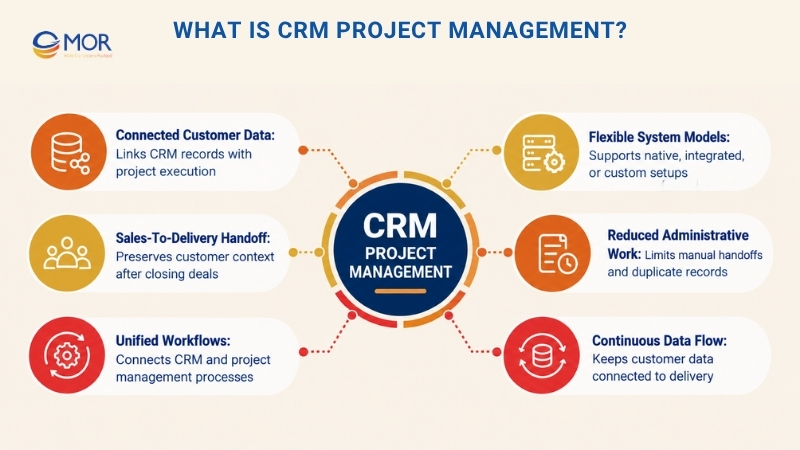
Teams usually connect CRM and project management in three ways: use one platform with native CRM and PM functions, connect separate systems through APIs or integration tools, or build a custom CRM-PM application around existing processes. The goal stays the same: customer data should follow the work instead of getting lost when sales hands an account to delivery. Salesforce's 2026 State of Sales reports that sales reps spend 60% of their time on non-selling work, which puts a real cost on administrative handoffs and disconnected records.
How CRM Project Management Works Across the Client Lifecycle
A good CRM project management process connects each customer stage to the work created at that stage. Sales can see what happens after a deal closes, and project teams can trace requirements back to the original account, opportunity, scope, or conversation.
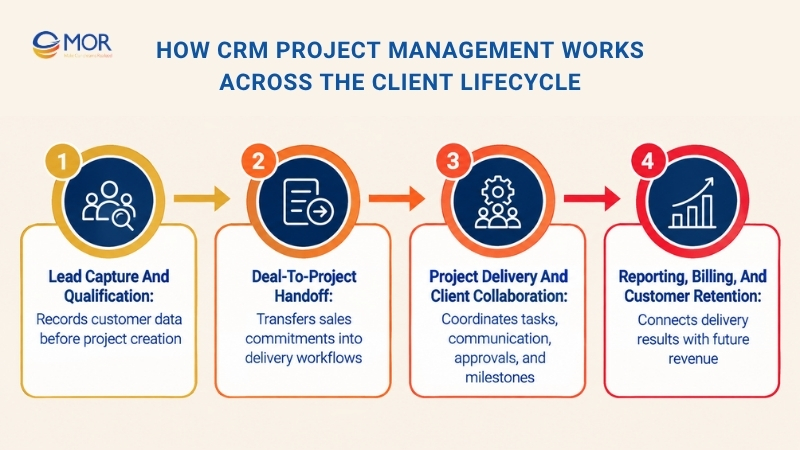
Lead Capture and Qualification
The process starts before a project exists. CRM records store names, companies, emails, calls, form submissions, lead sources, qualification notes, scores, and opportunity values.
Sales teams can then move qualified leads into opportunities under defined pipeline stages. A clean record at this point gives later project teams the commercial details they need without asking sales to rebuild the brief.
Lead qualification also creates an early record of expected work. Project managers may use tentative scope, expected close date, estimated value, or service type to prepare resources before a deal reaches Closed Won.
Deal-to-Project Handoff
The handoff begins when a deal reaches a defined trigger, often Closed Won or contract approval. The system can create a project, copy selected customer requirements, assign an owner, apply a project template, and schedule kickoff tasks.
This connection between CRM and project records removes a common weak spot: sales knows what was promised, but delivery receives only a task name. A structured handoff can carry contact details, contract value, products, deadlines, scope notes, files, and special commitments into the delivery record.
Automation can take this further. A signed deal for a software implementation, for instance, might create discovery, data migration, configuration, UAT, training, and launch tasks based on the purchased package.
Project Delivery and Client Collaboration
Once delivery starts, teams need more than customer records. They need task ownership, dependencies, milestones, files, comments, approvals, deadlines, capacity data, and a clear view of work in progress.
Client-facing work can also sit beside internal work. A portal might show a customer upcoming milestones and approval requests, while the project team keeps internal estimates, risks, and technical notes restricted to staff.
A connected setup also keeps communication tied to the right account. Instead of searching email, chat, and PM tools separately, staff can trace a request to the customer, project, task, and responsible person.
Reporting, Billing, and Customer Retention
Delivery data becomes valuable again after the project closes. Teams can connect completed work, time entries, project cost, invoices, issues, satisfaction data, and support activity back to the customer record.
That gives CRM in project management a wider role than sales tracking alone. Account managers can review past delivery before a renewal call, finance can compare contract value with actual effort, and managers can identify customers that consume more resources than expected.
Retention work then starts with better information. A customer with strong delivery results and a successful implementation may become a logical renewal or expansion candidate, while repeated delays or escalations signal the need for account attention.
CRM vs Project Management: What Is the Difference?
CRM manages relationships and revenue activity, while project management manages execution. A project management CRM starts closer to task delivery and adds customer records, whereas CRM project management keeps customer and project information connected across the same business process.
Area | CRM | Project Management | CRM Project Management |
Primary focus | Customer relationships | Work execution | Customer-related work |
Core records | Leads, contacts, deals | Tasks, projects | Customers + projects |
Main users | Sales, marketing, service | PMs, delivery teams | Sales + delivery + service |
Timeline | Customer lifecycle | Project lifecycle | Lead-to-delivery lifecycle |
Reporting | Pipeline, revenue | Progress, resources | Revenue + delivery performance |
CRM solutions can track a customer who bought a $50,000 implementation. Project management tracks who will configure the system, when UAT starts, and which tasks block launch. The combined model links those two views, giving management a clearer picture of commercial value and delivery status.
Why Businesses Use CRM and Project Management Together
Disconnected sales and delivery systems create extra admin at the exact point where information needs to move quickly. CRM project management gives teams a shared operating record instead of asking each department to maintain its own version of the customer.
PMI's Pulse of the Profession 2024 reported an average 73.8% project performance rate across respondents. Better systems won't fix weak project practices on their own, but connected customer, scope, and delivery data gives teams a stronger base for managing work.
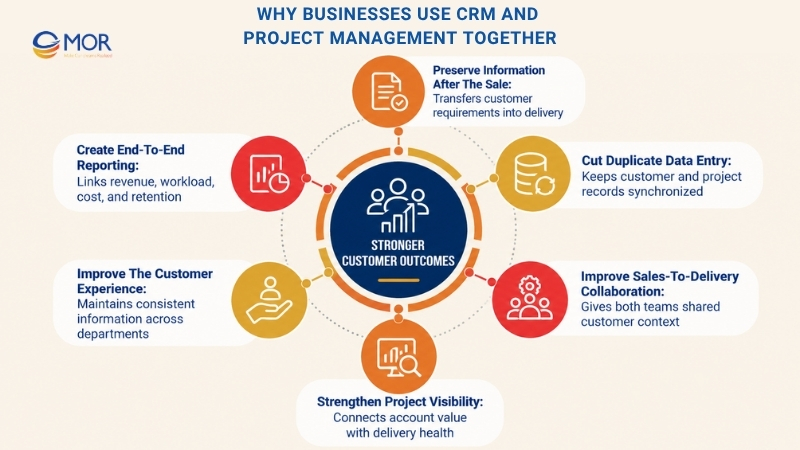
- Preserve information after the sale: Transfer customer requirements, contacts, commitments, products, contract data, and scope notes into delivery. Project teams can start with the same information sales used to close the deal.
- Cut duplicate data entry: Keep customer and project records connected instead of copying names, values, deadlines, and notes between spreadsheets. Good online CRM project management also keeps remote sales and delivery teams working from the same current data.
- Improve sales-to-delivery collaboration: Sales can check project status without messaging the project manager for every update. Delivery teams can review deal history when a customer asks about a promise or requirement.
- Strengthen project visibility: Link account value to project health, resource use, deadlines, and scope changes. Managers can see which high-value accounts need attention instead of reviewing CRM and PM reports separately.
- Improve the customer experience: Staff don't need to ask customers for information they already shared with another department. Communication stays more consistent because each team has access to relevant account history.
- Create end-to-end reporting: Connect revenue, workload, billable time, project cost, margin, customer health, and renewal activity. This gives management a business view that separate CRM and task systems rarely produce without extra data work.
Key CRM Project Management Features
Good CRM project management software connects customer information to execution instead of placing two unrelated modules behind the same login. The strongest capabilities create a usable link between sales activity, project work, team capacity, and customer outcomes.
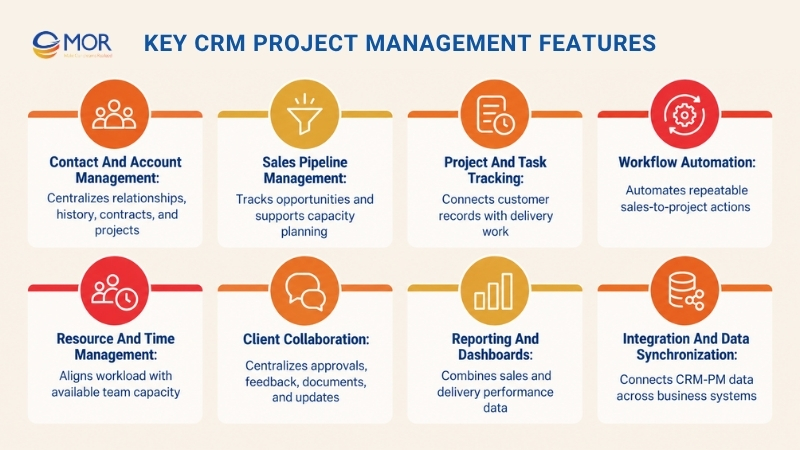
Contact and Account Management
Contact records should hold more than names and phone numbers. Accounts need relationship history, stakeholder roles, opportunities, contracts, files, service history, and links to active or completed projects.
A strong CRM system project management setup lets a delivery manager open an account and see which projects belong to it. Sales staff can do the reverse, checking delivery status before contacting the customer about an expansion.
Sales Pipeline Management
Pipeline management tracks each opportunity through qualification, proposal, negotiation, and close stages. Custom fields can capture expected value, service type, estimated start date, implementation tier, or other details that later affect delivery.
Pipeline data also helps operational planning. A delivery lead might see three large opportunities expected to close in the same month and prepare capacity before every contract is signed.
Project and Task Tracking
Projects need tasks, owners, priorities, dependencies, deadlines, milestones, and status rules. Views may include lists, Kanban boards, calendars, Gantt charts, or workload screens based on the work being managed.
A CRM and task manager connection becomes useful when each task links back to a customer, opportunity, project, or contract. That relationship makes work easier to trace and gives sales teams a better view of post-sale progress.
Workflow Automation
Automation handles repeatable actions that otherwise create administrative work. Common rules include assigning a lead, creating a project after a won deal, applying a template, notifying an account owner, creating follow-up tasks, or updating customer status after a milestone.
The strongest rules use business conditions rather than generic reminders. A high-value implementation could trigger an approval step and senior project owner, while a smaller onboarding package follows a simpler template.
Resource and Time Management
Project managers need to know who is available before assigning new work. Capacity views, planned hours, time logs, utilization data, and skill-based assignments help teams match expected demand with real staff availability.
This becomes more useful when pipeline data feeds resource planning. Pending deals can show likely future demand, giving managers time to adjust assignments or staffing before the work starts.
Client Collaboration
Customer work often requires approvals, documents, comments, status updates, meetings, and feedback. Client portals or controlled external access can keep these activities linked to the project record.
A simple example is design approval. The client reviews an asset, leaves feedback, and approves the final version in the same workspace. The task then changes status and the project owner receives the update without a separate email chain.
Reporting and Dashboards
Dashboards should connect sales and project measures that management actually uses. Useful combinations include opportunity value against resource demand, project margin against contract value, or customer health against open support issues.
This is where CRM in project management becomes especially useful for business reporting. Managers can evaluate revenue and delivery together instead of drawing conclusions from a sales dashboard that knows nothing about project cost or delays.
Integration and Data Synchronization
Most companies already use accounting platforms, ERP systems, email, calendars, service desks, communication apps, data warehouses, or legacy systems. APIs, ETL, webhooks, and middleware can connect those tools to the CRM-PM process.
Integration depth matters. One-way contact export is very different from bidirectional synchronization that updates accounts, opportunities, projects, milestones, invoices, and custom fields according to business rules.
Common CRM Project Management Use Cases
CRM project management works best where winning a customer creates follow-on work that must be planned and delivered. This makes CRM for project management relevant to consulting, SaaS, IT services, agencies, implementation teams, and many businesses that manage customer-specific work.
For smaller firms, CRM and project management for small business often starts with a simple need: stop maintaining one customer list for sales and another work list for delivery. The use cases below show where the connection starts producing practical value.
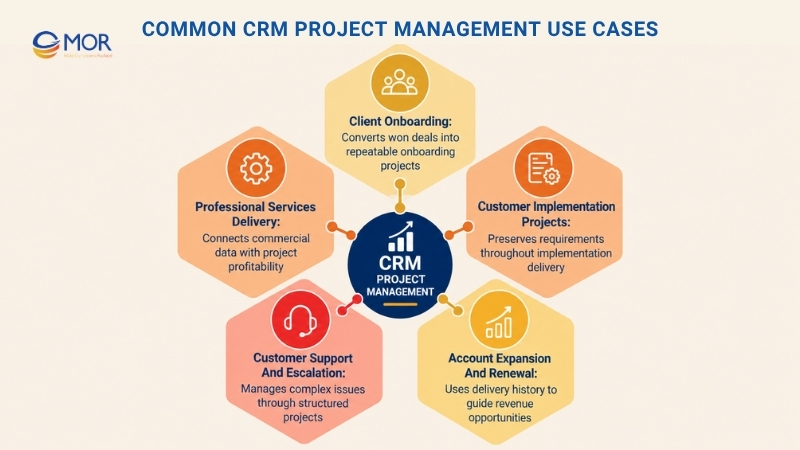
Client Onboarding
A Closed Won deal can create a standard onboarding project. Customer details, purchased package, kickoff date, documents, assigned staff, and setup tasks move into the project record.
This works well for agencies, software vendors, financial services, and B2B subscriptions. Each new customer follows a repeatable process, yet teams can still adjust tasks for special contract terms.
Professional Services Delivery
Consultancies and agencies often manage proposals, client contacts, delivery schedules, billable time, budgets, and invoices around the same account. Connecting these records helps teams understand project profitability without rebuilding commercial data later.
A consultant can review the original proposal before a scope discussion, for example. Finance can then compare contracted work against logged time and billed amounts.
Customer Implementation Projects
Software and SaaS companies often create substantial work after the sale. Configuration, migration, integration, testing, UAT, training, and go-live can span weeks or months.
Connecting the original opportunity to the implementation project preserves requirements and ownership. Account teams can also monitor launch status without requesting manual updates from delivery every few days.
Customer Support and Escalation
Some customer problems outgrow a normal help-desk ticket. A major migration issue, product rollout problem, or recurring service failure may require a structured project with owners, tasks, technical work, and management review.
Linking that project back to the CRM account gives service and account teams the same history. It also makes repeated issues easier to spot during renewal discussions.
Account Expansion and Renewal
Completed projects contain useful signals for future revenue. Delivery quality, project margin, support activity, adoption, delays, and stakeholder feedback can inform renewal and expansion planning.
An account manager doesn't need to rely only on the sales record. Project history shows what the company actually delivered and where the customer may need more work.
10 Best CRM Project Management Software for 2026
The best platform depends on sales complexity, delivery work, reporting needs, team size, and integration requirements. We assessed CRM project management options across CRM-first systems, PM-first products, professional services platforms, and enterprise ecosystems rather than treating every product as interchangeable.
Some buyers describe this category as project management software CRM, while others want dedicated CRM and project management software under one operating model. The distinction matters. A strong sales CRM with basic tasks won't replace deep resource planning, and a strong PM platform may still need a separate CRM for complex sales operations.
Software | Best For | CRM Type | PM Type | Starting Price | Free Trial / Demo | User Score |
monday CRM | Visual sales-to-project workflows | CRM-first | Connected work management | $12/seat/month annually | Free trial | 4.6/5 G2 |
Pipeline CRM | Sales teams with light post-sale work | CRM-first | Tasks + integrations | $25/user/month annually | 14-day trial | 4.3/5 G2 |
Zoho CRM + Zoho Projects | Zoho ecosystem users | CRM + dedicated PM | Dedicated Zoho Projects | About $18/user/month annually | 15-day trials | 4.1/5 CRM; 4.3/5 Projects |
Insightly | Relationship-linked delivery | CRM-first | Native projects | $29/user/month annually | 14-day trial | 4.2/5 G2 |
Scoro | Professional services profitability | PSA + CRM | Native PM | $19.90/user/month annually | 14-day trial | 4.5/5 G2 |
HubSpot | Marketing-led customer operations | CRM-first | Tasks, workflows, tickets | $7/seat/month annual Starter price shown currently | Free plan/demo | 4.4/5 G2 |
Pipedrive + Projects | Pipeline-first SMBs | CRM-first | Projects add-on | About $30/seat/month for Lite + Projects | 14-day trials | 4.3/5 G2 |
Bitrix24 | Small businesses consolidating tools | All-in-one | Native tasks/projects | $49/organization/month annually | Free plan | 4.1/5 G2 |
Teamwork.com | Client service delivery | PM-first | Native PM + CRM options | $9.99/user/month annually | 14-day trial/demo | 4.4/5 G2 |
Salesforce + PSA | Enterprise CRM-led projects | Enterprise CRM | PSA ecosystem | $25/user/month + PSA costs | Free trial/demo | 4.4/5 G2 |
Pricing changes frequently and may vary by billing term, region, seats, add-ons, and promotions. Check each vendor's current plan before budgeting.
1. monday CRM: Best for visual sales-to-project workflows
- Free trial available
- From $12/seat/month, billed annually
- User Score: 4.6/5 on G2
monday CRM is a sales CRM built on monday.com's visual work platform. It manages leads, contacts, deals, activities, quotes, dashboards, and automations, while monday Work Management can handle deeper delivery workflows.
Best Fit for monday CRM
monday CRM fits small and mid-sized teams that prefer visual boards and need flexible sales processes. It also suits cross-functional teams already using monday.com for operational work.
The product makes sense when sales and delivery need related boards without a highly rigid CRM structure. Companies with complex enterprise governance may need deeper configuration or higher-tier plans.
Why monday CRM Made Our List
Its visual data model makes sales-to-delivery workflows easy to understand. Teams can create deal stages, custom fields, status rules, linked boards, notifications, and automations without heavy development work.
A won deal can trigger delivery activity across connected monday boards. Yet richer project controls usually depend on monday Work Management rather than monday CRM alone, so buyers should review the combined cost.
Core Capabilities of monday CRM
- Visual deal pipelines: Track opportunities through custom stages using boards that teams can scan quickly.
- Connected boards: Link sales records with delivery boards so project teams can reference account and deal information.
- Automation rules: Trigger assignments, notifications, status changes, and handoff actions after defined events.
- Dashboards: Combine pipeline activity, workload, tasks, and team measures into visual reporting.
Strengths and Limitations
Strengths:
- Flexible visual workflows
- Low-code configuration
- Strong fit with the wider monday.com work platform
Limitations:
- Full project depth may require monday Work Management
- Higher automation and reporting limits sit on higher plans
2. Pipeline CRM: Best for teams that sell and deliver
- 14-day free trial, no credit card required
- From $25/user/month, billed annually
- User Score: 4.3/5 on G2
Pipeline CRM is a sales-first CRM focused on deal tracking, contacts, activities, reporting, and sales automation. Its plans run from $25 to $49 per user per month on annual billing, while richer project work generally depends on integrations rather than a full native PM suite.
Best Fit for Pipeline CRM
Pipeline CRM fits B2B sales teams that need a straightforward customer and deal system. It works particularly well when post-sale delivery consists of follow-ups, activities, account tasks, and handoff coordination rather than deep Gantt planning.
Companies running complex project portfolios should pair it with dedicated PM software. The value comes from keeping sales simple while passing needed data into delivery.
Why Pipeline CRM Made Our List
Pipeline CRM keeps its attention on sales execution instead of trying to become a broad business suite. That makes it easier for sales teams that don't want dozens of PM modules inside their CRM.
Its activity records and custom fields can support basic post-sale coordination. For deeper delivery, integrations let companies preserve Pipeline as the sales system while project teams work elsewhere.
Core Capabilities of Pipeline CRM
- Sales pipelines: Manage deals, stages, values, owners, and forecasts.
- Activity tracking: Record calls, emails, tasks, and follow-up work around each deal.
- Custom fields: Capture delivery-related data that needs to pass to another system.
- Reporting: Track deals, activity, performance, and sales results across teams.
Strengths and Limitations
Strengths:
- Sales-first design
- Straightforward pricing
- Good fit for teams that want a focused CRM
Limitations:
- Less native PM depth than dedicated project systems
- Complex delivery usually requires an external integration
3. Zoho CRM + Zoho Projects: Best for Zoho ecosystem users
- 15-day trials available
- Zoho CRM Standard: $14/user/month annually; Zoho Projects Premium: $4/user/month annually
- User Score: 4.1/5 for Zoho CRM and 4.3/5 for Zoho Projects on G2
Zoho takes a connected-app approach. Zoho CRM handles leads, deals, contacts, workflows, and customer records, while Zoho Projects manages projects, tasks, dependencies, Gantt charts, time logs, budgets, and project automation.
Best Fit for Zoho CRM + Zoho Projects
The combination suits cost-conscious small and mid-sized businesses that already use Zoho apps. It can also work well for teams that want more project depth than a CRM's built-in task list.
The main tradeoff is the app boundary. Sales and delivery stay connected inside the Zoho ecosystem, but staff still work across separate CRM and Projects products.
Why Zoho CRM + Zoho Projects Made Our List
Zoho provides real depth on each side instead of making project management a small CRM tab. Zoho CRM Standard starts at $14 per user per month on annual billing, and current Zoho Projects Premium pricing is $4.
That creates a relatively low entry point for a two-product setup. Teams can also connect other Zoho products for finance, analytics, service, files, and communication as requirements grow.
Core Capabilities of Zoho CRM + Zoho Projects
- Opportunity management: Track leads, contacts, accounts, deals, scoring, and sales workflows.
- Project planning: Use tasks, dependencies, Gantt charts, milestones, and project templates.
- Time and budget tracking: Record work hours and compare delivery against plans.
- Zoho ecosystem connections: Share data across Zoho applications instead of building every integration independently.
Strengths and Limitations
Strengths:
- Low entry price
- Dedicated CRM and PM products
- Broad Zoho ecosystem
Limitations:
- Users switch between connected applications
- Configuration becomes more involved as more Zoho apps are added
4. Insightly: Best for relationship-linked project delivery
- 14-day free trial
- From $29/user/month, billed annually
- User Score: 4.2/5 on G2
Insightly is a CRM that includes project management in its Plus plan. It connects contacts, organizations, opportunities, projects, tasks, reports, and dashboards inside one account structure.
Best Fit for Insightly
Insightly fits service businesses where customer relationships continue after the sale. Agencies, consultants, implementation teams, and B2B providers can keep account and project history linked without buying a separate PM product for basic delivery.
It also suits teams that care about relationship mapping. Users can connect people, organizations, opportunities, and projects so the record reflects how stakeholders relate to each piece of work.
Why Insightly Made Our List
Native project management starts on its $29 Plus plan, so the handoff doesn't depend on a second product. A team can convert customer work into projects, carry relevant information forward, assign tasks, and report on delivery.
The relationship model is another strong point. It keeps customer stakeholders tied to opportunities and projects, which is useful for accounts involving several decision-makers or partner organizations.
Core Capabilities of Insightly
- Relationship linking: Connect contacts, organizations, opportunities, and projects.
- Native project management: Track projects and tasks within the CRM environment.
- Business dashboards: Review pipeline and project data through pre-built or custom reports.
- Workflow rules: Automate selected sales and project actions on higher tiers.
Strengths and Limitations
Strengths:
- Native projects at the entry paid CRM tier
- Strong relationship mapping
- One account structure for sales and delivery
Limitations:
- Richer automation requires higher plans
- Resource planning is lighter than PSA-focused products
5. Scoro: Best for professional services profitability
- 14-day free trial
- From $19.90/user/month, billed annually; five-seat minimum
- User Score: 4.5/5 on G2
Scoro is a professional services automation platform that connects customer records, quotes, projects, time, resources, costs, invoices, and reporting. Its Core plan starts at $19.90 per user per month on annual billing, though the full sales pipeline appears in the Performance tier or as an add-on depending on configuration.
Best Fit for Scoro
Scoro fits businesses that earn revenue through client projects and need close control over margin. Consulting firms, agencies, IT services, architecture teams, and similar businesses can track commercial and delivery data in one system.
It becomes more attractive when project profitability matters as much as task completion. Companies needing only lightweight CRM and to-do lists may find the system broader than necessary.
Why Scoro Made Our List
Scoro connects quote, delivery, resource use, time, cost, and billing. That gives professional services managers a stronger financial view than most general-purpose task tools.
Project managers can compare quoted work against actual effort, while finance can see billable time and invoicing data. The five-seat minimum and higher plan requirements for richer sales functions should be included in budget planning.
Core Capabilities of Scoro
- Project planning: Manage phases, milestones, tasks, Gantt dependencies, and project templates.
- Resource planning: Review capacity, workload, bookings, and utilization.
- Financial control: Track project budgets, labor cost, invoices, margin, and forecasts.
- Sales and customer records: Manage contacts, quotes, and pipeline activity according to the selected tier.
Strengths and Limitations
Strengths:
- Strong project financial controls
- Native time and resource planning
- Good fit for professional services
Limitations:
- Minimum of five seats
- Full sales pipeline capability may require a higher plan or add-on
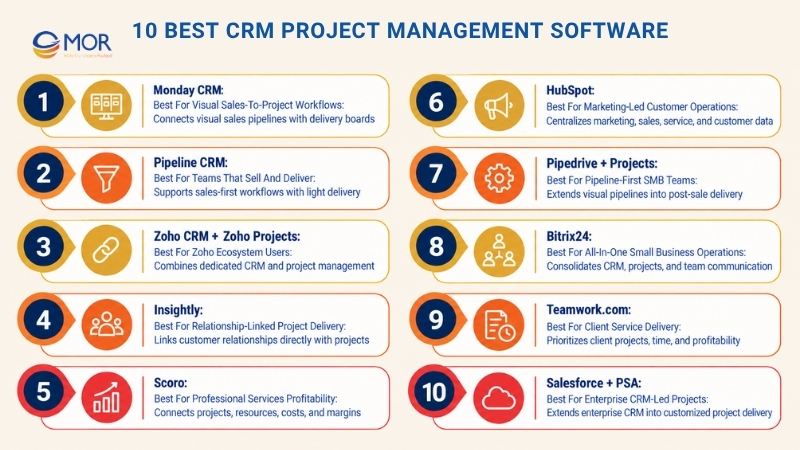
6. HubSpot: Best for marketing-led customer operations
- Free plan available
- Sales Hub Starter currently displays from $7/seat/month on annual billing
- User Score: 4.4/5 on G2
HubSpot connects CRM records with marketing, sales, service, content, and data tools. It provides tasks, pipelines, workflows, tickets, sequences, customer communication, and reporting, but its project planning depth is lighter than dedicated PM systems.
Best Fit for HubSpot
HubSpot fits businesses where customer acquisition and revenue operations carry more weight than complex project scheduling. Marketing agencies, SaaS firms, B2B companies, and service teams can keep customer activity highly visible across departments.
Delivery teams that need resource planning, dependencies, portfolio controls, or detailed project budgets will usually connect HubSpot to a dedicated PM platform.
Why HubSpot Made Our List
Customer information stays central across marketing, sales, and service. That makes post-sale coordination easier when tasks, tickets, communications, and account activity need to stay visible around the same customer.
HubSpot also provides a strong automation layer as companies move into higher tiers. The tradeoff is cost growth and limited native project depth compared with dedicated delivery tools.
Core Capabilities of HubSpot
- Unified customer record: Store sales, marketing, service, and communication history together.
- Deal pipelines: Track opportunities, stages, activities, and sales ownership.
- Workflow automation: Create follow-up actions, internal notifications, and process rules.
- Service tickets: Connect post-sale issues and support activity to customer records.
Strengths and Limitations
Strengths:
- Strong customer lifecycle visibility
- Broad marketing, sales, and service ecosystem
- Large integration marketplace
Limitations:
- Native PM depth remains limited
- Higher-tier packages can raise total cost quickly
7. Pipedrive + Projects: Best for pipeline-first SMB teams
- 14-day CRM trial; Projects also supports trial access
- Pipedrive Lite starts at $14/seat/month annually, and Projects starts at $16/project seat
- User Score: 4.3/5 on G2
Pipedrive is a visual sales CRM, while its Projects add-on handles work after the sale. Lite plus a Projects seat starts around $30 per user per month before other add-ons.
Best Fit for Pipedrive + Projects
Pipedrive suits small and mid-sized sales teams that want a very clear pipeline. Projects works well when delivery consists of phases, activities, tasks, files, and standard customer work rather than complex resource portfolios.
Premium and Ultimate plans include Projects, while Lite and Growth treat it as a paid add-on. Companies should compare those tiers before assuming the cheapest base CRM produces the lowest combined cost.
Why Pipedrive + Projects Made Our List
The transition between sale and delivery is easy to understand. Teams can keep the visual sales pipeline they already know and create organized post-sale work under the same vendor.
This model also limits unnecessary project seats. On Lite and Growth, only people assigned a Projects seat need paid project access, which can suit companies where sales staff don't manage delivery work directly.
Core Capabilities of Pipedrive + Projects
- Visual pipeline: Manage leads and deals through clear stages.
- Post-sale projects: Organize tasks, activities, project phases, and follow-ups after a win.
- Project templates: Reuse standard delivery structures for common customer services.
- Connected customer records: Keep project work associated with CRM accounts and deals.
Strengths and Limitations
Strengths:
- Easy sales pipeline
- Natural post-sale workflow
- Flexible Projects seat assignment on lower tiers
Limitations:
- Projects costs extra on Lite and Growth
- Less resource and financial depth than PSA platforms
8. Bitrix24: Best for all-in-one small business operations
- Free plan for 1-2 users
- Basic starts at $49/organization/month on annual billing and includes five users
- User Score: 4.1/5 on G2
Bitrix24 combines CRM, tasks, projects, calendars, chat, calls, sales pipelines, and other business functions under flat organization-level pricing. The free plan already includes basic CRM plus Kanban and Gantt task views.
Best Fit for Bitrix24
Bitrix24 fits small companies that want to replace several separate subscriptions. A five-person team can use the Basic annual plan for a flat $49 per organization per month rather than paying five separate per-seat fees.
It also suits businesses that prefer one workspace for communication, CRM, and project activity. Teams wanting a highly focused interface may need extra onboarding time because the product covers a wide range of business functions.
Why Bitrix24 Made Our List
Its pricing model stands out in a market dominated by per-user charges. The Basic plan includes five users, while larger tiers support broader teams under organization pricing.
CRM and project functions also live under one vendor. That makes Bitrix24 practical for small firms that care more about consolidation than deep specialization in every module.
Core Capabilities of Bitrix24
- CRM pipelines: Manage contacts, deals, recurring sales, and customer communication.
- Task boards: Use Kanban and Gantt views for project work.
- Team communication: Connect chat, calls, calendars, and internal work.
- Flat pricing tiers: Pay by organization with user limits defined by plan.
Strengths and Limitations
Strengths:
- Flat organization pricing
- CRM and projects in one product family
- Useful free tier for very small teams
Limitations:
- Broad interface can take time to learn
- Deeper controls may require higher plans
9. Teamwork.com: Best for client service delivery
- 14-day free trial and demo
- Basics starts at $9.99/user/month, billed annually
- User Score: 4.4/5 on G2
Teamwork.com is a PM-first platform built around client work, projects, time, workload, budgets, and profitability. CRM requirements can be handled through Teamwork's CRM products or external CRM integrations, so buyers should check the exact package needed for their sales process.
Best Fit for Teamwork.com
Teamwork.com fits agencies, consulting teams, service providers, and other companies that spend most of their day delivering client projects. Its project model is stronger when billable work, time, capacity, and project profitability take priority.
Businesses with complex sales forecasting or enterprise CRM requirements may keep an existing CRM and connect it to Teamwork. That approach preserves PM depth without forcing delivery teams into a sales-first application.
Why Teamwork.com Made Our List
Teamwork.com puts client delivery at the center of the product. Its Basics plan includes Gantt, table, list, and board views, unlimited templates, billable time tracking, and reporting.
This PM-first approach is useful when project execution carries more complexity than sales. The buyer should still assess CRM depth separately, especially if the sales team needs detailed pipeline automation, lead scoring, or complex account structures.
Core Capabilities of Teamwork.com
- Client project planning: Manage tasks, milestones, templates, and project views.
- Time tracking: Record billable work directly against projects.
- Workload management: Plan assignments and team capacity.
- CRM connectivity: Link client-delivery work with external or Teamwork CRM data based on the chosen setup.
Strengths and Limitations
Strengths:
- Strong client-project orientation
- Time and profitability controls
- Flexible project views
Limitations:
- CRM isn't the main product focus
- Full CRM requirements may need another Teamwork product or integration
10. Salesforce + PSA: Best for enterprise CRM-led projects
- Free trials and demos available
- Salesforce Starter Suite starts at $25/user/month; PSA and implementation costs are separate
- User Score: 4.4/5 for Agentforce Sales, formerly Salesforce Sales Cloud, on G2
Salesforce can act as the account, contact, lead, opportunity, automation, and reporting system of record. Companies then extend delivery through AppExchange project applications, professional services automation products, custom Salesforce development, or integrations with external PM platforms.
Best Fit for Salesforce + PSA
This setup fits mid-market and enterprise organizations with mature sales operations, complex permissions, custom objects, integration requirements, and customer data already stored in Salesforce. Professional services firms can add PSA functions for resources, time, billing, forecasting, and delivery.
It also fits companies that need substantial customization. Smaller businesses may find the implementation effort and total ownership cost difficult to justify.
Why Salesforce + PSA Made Our List
Salesforce provides a strong base when customer data must remain central across business processes. Flow Builder, AppExchange, APIs, custom applications, custom records, dashboards, and permission controls give technical teams many ways to model sales-to-delivery workflows.
The tradeoff is architectural choice. Teams must decide whether project work belongs inside Salesforce, in a PSA application, or in another platform connected through APIs.
Core Capabilities of Salesforce + PSA
- Customer data model: Manage accounts, contacts, leads, opportunities, activities, and custom records.
- Process automation: Use flows, approvals, assignments, and application logic for handoffs.
- Extensible project delivery: Add PSA or project functionality through AppExchange or custom development.
- Enterprise reporting: Connect customer, sales, and delivery data through Salesforce reporting and analytics tools.
Strengths and Limitations
Strengths:
- Deep CRM controls
- Large application and integration ecosystem
- Strong customization options for complex processes
Limitations:
- PSA costs sit outside the base CRM price
- Architecture, implementation, and administration require more planning
How to Choose the Right CRM Project Management Tool
A CRM and project management tool should match the way your company sells and delivers work. Start with the process that creates the most operational friction, then evaluate whether CRM project management depth is strong enough on each side.
A salesperson may care most about pipeline automation, for instance, while a delivery manager needs dependencies, resources, budgets, and time tracking. Buying the product with the longest checklist won't fix that mismatch.
Decision Factor | What to Evaluate | Warning Sign |
Platform model | CRM-first, PM-first, or all-in-one | Tool is strong on only one side |
CRM depth | Leads, opportunities, contacts, automation | Only basic contact fields |
PM depth | Tasks, dependencies, resources, budgets | CRM simply adds a checklist |
Handoff automation | Won deal -> project | Manual re-entry required |
Integrations | Accounting, email, ERP, support | One-way or unreliable sync |
Reporting | CRM + project data together | Separate reporting databases |
Scalability | Permissions, workflows, automation | Workflow breaks as team grows |
Cost | Seats, add-ons, implementation | Low base price but costly add-ons |
Security | SSO, roles, audit controls | Limited controls on lower plans |
Usability | Adoption across sales and delivery | Heavy admin dependence |
The platform model narrows the field quickly:
- CRM-first: Prioritize pipeline, opportunity, account, and customer management. This works when sales complexity is high and delivery needs are moderate.
- PM-first: Prioritize tasks, resources, dependencies, budgets, and delivery controls. Project management with CRM fits teams where execution drives the daily workload and customer tracking is lighter.
- All-in-one: Keep customer and delivery records under one product family. This can simplify ownership, but teams still need to test the CRM and PM modules independently.
- Integrated stack: Keep specialized CRM and PM tools and connect them through APIs, middleware, or custom integration. This gives each department deeper software, but your business owns more integration maintenance.
Run one real customer scenario during every product trial. Create a lead, close the opportunity, hand the work to delivery, assign staff, change scope, report progress, and close the project. That test exposes far more than a polished sales demo.
Future of CRM Project Management
The next phase of CRM project management will focus on systems that act on connected customer and project data, not just display it. AI agents, predictive models, API-based architectures, and richer data links are pushing sales and delivery systems toward more automated decisions.
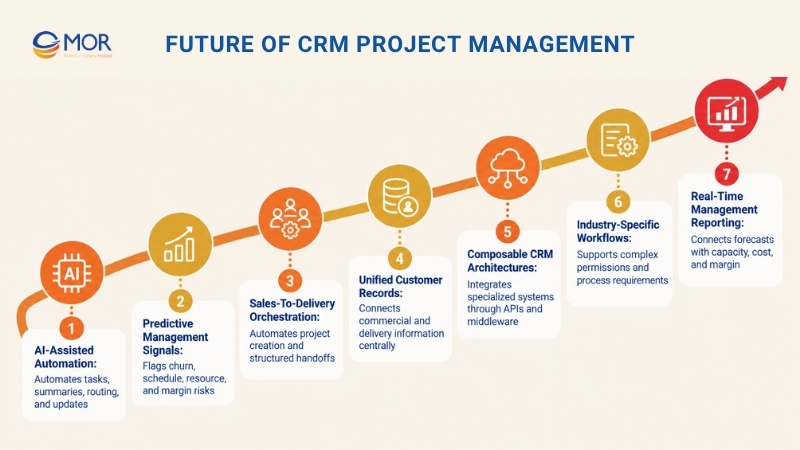
- AI-assisted workflow automation: Agents will take on more task creation, follow-ups, summaries, record updates, routing, and project alerts. Gartner predicts that 33% of enterprise software applications will include agentic AI by 2028, up from less than 1% in 2024.
- Predictive customer and project signals: Connected systems can use customer history, pipeline activity, workload, deadlines, and delivery data to flag possible churn, schedule risk, resource pressure, or margin problems earlier. Microsoft reports that 66% of surveyed AI users say AI has let them spend more time on high-value work, while 58% say they're producing work they couldn't have produced a year earlier.
- Stronger sales-to-delivery orchestration: A deal-stage change can create projects, apply templates, assign roles, transfer scope, request approvals, and notify stakeholders according to defined rules. Manual kickoff administration will keep shrinking where processes are standardized.
- Unified customer and project records: Companies will connect opportunities, contracts, projects, support history, costs, invoices, and account activity more closely. Managers will expect one customer view that also explains delivery status and commercial performance.
- Composable CRM architectures: APIs, webhooks, middleware, and custom modules let companies connect specialized systems instead of forcing every process into one SaaS suite. This approach suits organizations with established ERP, accounting, support, or legacy platforms.
- Industry-specific workflows: Healthcare, manufacturing, logistics, professional services, and financial businesses often need different approval paths, data permissions, records, and reporting rules. Generic templates will still work for simpler cases, but complex operations will demand deeper configuration.
- Real-time management reporting: Sales forecasts will increasingly sit beside project capacity, cost, margin, support activity, and customer health. That connection can expose revenue that looks strong in CRM but creates delivery pressure or low margins.
- Higher demand for custom systems: Companies with legacy applications, custom approval rules, industry data, or unusual delivery models may outgrow standard SaaS packages. Salesforce, APIs, ETL, and custom applications can provide a more tailored operating model when standard workflows become restrictive.
The direction is practical: customer and project data will become more connected, and software will act on that data earlier. Companies should prepare clean ownership rules, stable data structures, and clear handoff logic before adding more automation.
Develop Custom CRM Project Management with MOR Software
Standard software fits many common workflows, but complex companies often need customer data, project delivery, legacy systems, and internal rules to work together in a more tailored way. MOR Software supports custom CRM project management through Salesforce consulting, implementation, development, Salesforce ERP integration, management, maintenance, customization, data migration, and third-party system connections.
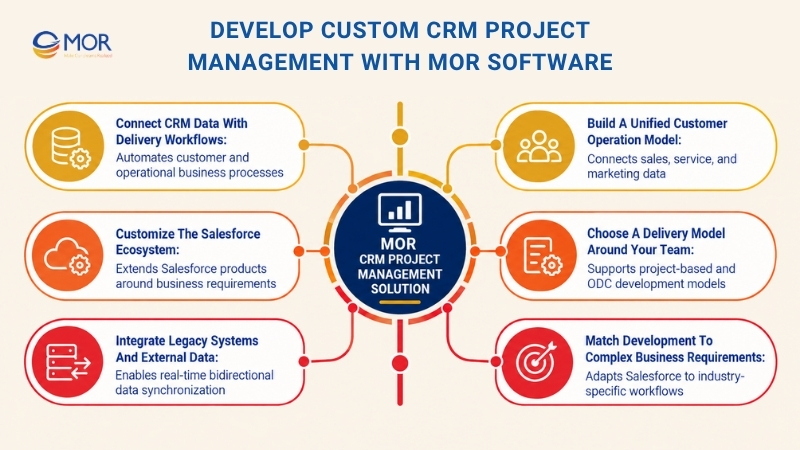
- Connect CRM data with delivery workflows: MOR Software develops customized Salesforce applications for business process automation. These applications can run as standalone systems or connect to third-party platforms, which fits companies that need customer and operational data to move through defined internal processes.
- Customize the Salesforce ecosystem: MOR Software works across Sales Cloud, Service Cloud, Marketing Cloud, Community Cloud, Pardot, Field Service Lightning, and MuleSoft. Its materials identify MOR as a Global Salesforce Consulting Partner, supported by certified Salesforce Developers, Product Consultants, Administrators, and Architects.
- Integrate legacy systems and external data: In one Japanese HRM project, MOR Software integrated Salesforce with a legacy time-attendance system using Apex, Lightning Web Components, Lambda, TypeScript, API Gateway, and ETL. The 15-month project involved 18 members and produced real-time bidirectional synchronization plus more accurate data management.
- Build a unified customer operation model: Another Salesforce project combined Sales Cloud, Service Cloud, Experience Cloud, and Account Engagement. A 30-developer team worked for 18 months using Apex, LWC, Aura, and Visualforce to connect customer data, automate sales work, support customer service, and manage marketing activity.
- Choose a delivery model around your team: MOR supports project-based development for defined requirements and Offshore Development Center models when clients need an extended engineering team. Its Salesforce practice also works in two-week Agile sprints with defined deliverables and visible progress.
- Match development to complex business requirements: MOR's Salesforce materials cite experience in HRM, manufacturing, logistics, fintech, and retail. That domain range matters when workflows involve industry-specific records, integrations, permissions, or process rules that generic CRM templates can't represent well.
If your current CRM can't support the way sales data and project delivery need to work together, review MOR Software's Salesforce development services. Then contact MOR Software to map your process, integration scope, and suitable delivery model before development starts.
Conclusion
CRM project management works best when customer records, delivery work, and ownership follow the same business process. Map your handoff gaps, compare CRM depth against project needs, then choose a native platform, integrated stack, or custom Salesforce setup that fits real operations. MOR Software can help connect legacy data, Salesforce, and delivery workflows around your requirements.
Contact MOR Software to discuss your project and plan the right technical approach.
"Mr. Cong’s guiding philosophy is simplicity, believing that the simplest solutions are often the most powerful. He sees trust, empowerment, and the opportunity to demonstrate one’s abilities as the key elements that set MOR apart from traditional IT companies."
Mac Tien Cong


Division Manager (Hanoi Branch)
MOR SOFTWARE
Frequently Asked Questions (FAQs)
What is CRM project management?
CRM project management connects customer relationship records with the work delivered for those customers. It links leads, accounts, opportunities, communications, tasks, milestones, owners, deadlines, resources, and project results so sales and delivery teams can work from related information.
What is the difference between CRM and project management?
CRM tracks customer relationships, contacts, opportunities, sales activity, and account history. Project management tracks tasks, schedules, dependencies, resources, budgets, and deliverables, while a connected setup links commercial records to the work created after a sale.
Can CRM software replace project management software?
A CRM can replace separate PM software when projects are simple and mainly require tasks, owners, due dates, and basic status tracking. Complex resource planning, dependencies, project budgets, portfolio reporting, or detailed time controls usually justify dedicated PM capability.
What is the best CRM project management software?
There isn't one universal winner. Monday CRM suits visual workflows, Insightly provides native project functions, Scoro targets professional services, Pipedrive connects sales with straightforward post-sale projects, and Salesforce plus PSA fits larger organizations needing deeper customization.
Which CRM platforms have built-in project management?
Insightly, Bitrix24, Scoro, and platforms with connected project modules can manage customer records and delivery work under one product family. For tiny teams, really simple systems free CRM project management features may cover contacts and follow-up tasks, but deeper scheduling and resource work usually requires more capable software.
Can CRM and project management tools sync automatically?
Yes. Native integrations, APIs, webhooks, ETL tools, and middleware can synchronize accounts, contacts, opportunities, custom fields, project status, and other records. Strong integrations also support bidirectional updates and rules such as creating a project automatically when an opportunity reaches Closed Won.
How does CRM project management improve sales-to-delivery handoffs?
It transfers customer data and scope into delivery through a defined workflow. The project owner can receive contact details, purchased services, commercial notes, deadlines, files, and commitments without asking sales to re-enter the same information.
What features should CRM project management software include?
Look for contact and account records, opportunity pipelines, tasks, milestones, workflows, client communication, resource planning, time tracking, dashboards, permissions, API access, and data synchronization. The right mix depends on how complex your sales and delivery processes are.
How much does CRM project management software cost?
Entry prices vary widely. Current examples range from monday CRM at $12 per seat per month annually to Salesforce Starter Suite at $25 per user per month before PSA, implementation, or integration costs. Add-ons, minimum seats, automation, migration, support, and custom development can raise total ownership cost.
Is an all-in-one CRM + PM better than integrating separate tools?
An all-in-one system works well when its CRM and PM modules match your daily workflows and the shared data model saves meaningful admin work. Separate specialized tools make more sense when sales or delivery requires deeper functions, provided the integration can maintain reliable bidirectional data and handoff automation.
Share


Make Our-Dreams Realized


© 2023 . MOR Software. All Rights Reserved
Sitemap
Privacy Policy
Terms of Use

Rate this article
0
over 5.0 based on 0 reviews
Your rating on this news:
Name
*Email
*Write your comment
*Send your comment
1