


Dropshipping Odoo Guide: Setup, Workflow and Integrations
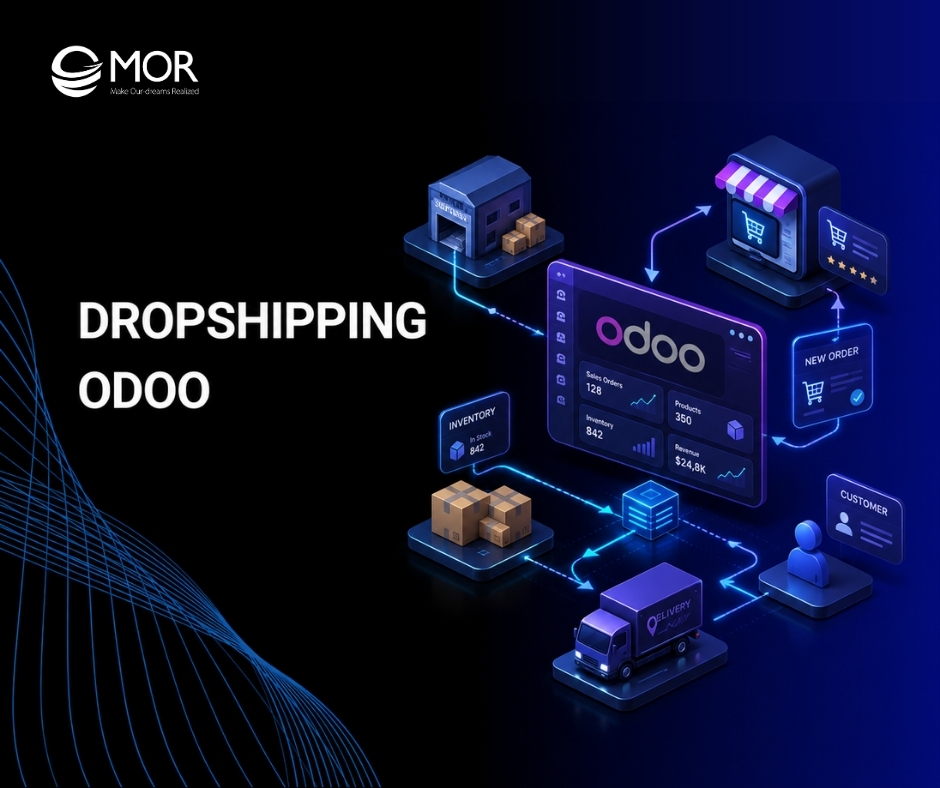
Running an online store without stock sounds simple until vendor emails, late shipments, and manual purchase orders pile up. That is where dropshipping Odoo becomes useful. It connects sales, purchase, and inventory work so teams can sell products, route orders to suppliers, and track delivery in one place. In this guide, MOR Software walks through the setup, daily flow, risks, and integration choices that matter most.
Key Takeaways
- Dropshipping in Odoo links sales and purchase work. A confirmed sales order can create a supplier RFQ, then a purchase order and dropship receipt.
- The product setup matters more than the sales screen. Product type, vendor price, and the Dropship route must be correct before orders start.
- Standard Odoo is enough for simple vendor flows. Larger ecommerce teams often need WMS, 3PL, marketplace, EDI, carrier, or accounting integration.
What Is Dropshipping in Odoo?
Dropshipping is an order fulfillment method where the seller does not keep the product in its own warehouse. The customer buys from your store. Your supplier ships the item straight to the customer. Your team still controls the sale, price, customer record, and service process.
Odoo turns that flow into linked documents. Instead of asking sales staff to email the supplier by hand, Odoo can connect the sales order to the purchase step. That gives the buyer, vendor, product, quantity, price, and delivery address a clear path.
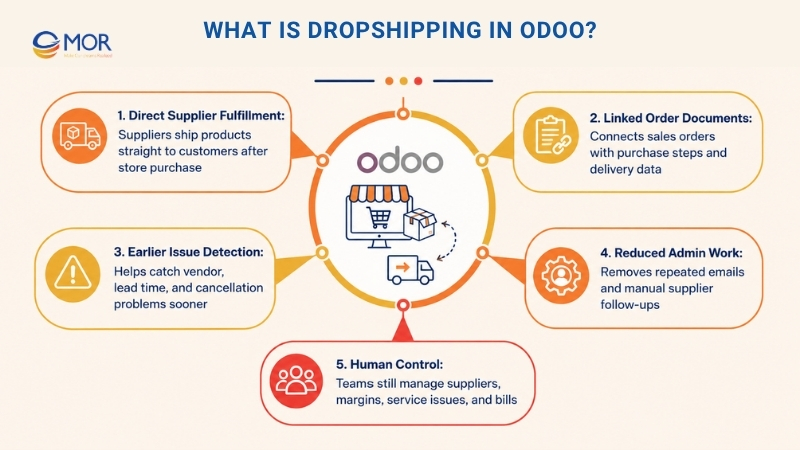
This matters because dropshipping often fails in small details. A missing vendor price can block a purchase order. A wrong lead time can set the wrong promise date. A canceled sale can still leave an active supplier order. Odoo gives teams one system to catch these issues earlier.
The goal is not to remove people from the process. The goal is to remove repeated admin work. Your team still chooses suppliers, checks margins, manages service issues, and reviews bills.
How Dropshipping Odoo Works From Sale to Delivery
A drop shipping oDoo flow usually starts in the Sales app and ends with a validated dropship receipt. The supplier handles the physical shipment, but Odoo keeps the documents linked so teams can follow the order without hunting through emails.
Stage | Odoo record | Owner | What happens |
Customer order | Sales Order | Sales team | The buyer, product, quantity, price, and delivery address are recorded. |
Supplier request | RFQ | Purchase team | Odoo creates or prepares the supplier request based on the product vendor. |
Supplier order | Purchase Order | Purchase team | The RFQ becomes a PO after confirmation. |
Direct shipment | Dropship Receipt | Inventory or operations team | The record shows vendor as source and customer as destination. |
Billing | Customer invoice and vendor bill | Accounting team | Your team checks margin, invoice status, and supplier billing. |
The flow gives each team one job. Sales owns the customer promise. Purchase owns the supplier order. Inventory watches the dropship receipt. Accounting checks the bill and invoice. That split helps teams move faster without losing control.
Why Ecommerce Teams Use Odoo for Dropshipping
Odoo is a good fit when your store has many SKUs but does not want to buy every item upfront. You can test more products, work with suppliers, and still keep the order trail in your ERP.
The biggest value is fewer manual handoffs. When the product is set up right, the system can create the buying document from the selling document. That cuts copy-paste work and lowers the risk of sending the wrong product, quantity, or address.
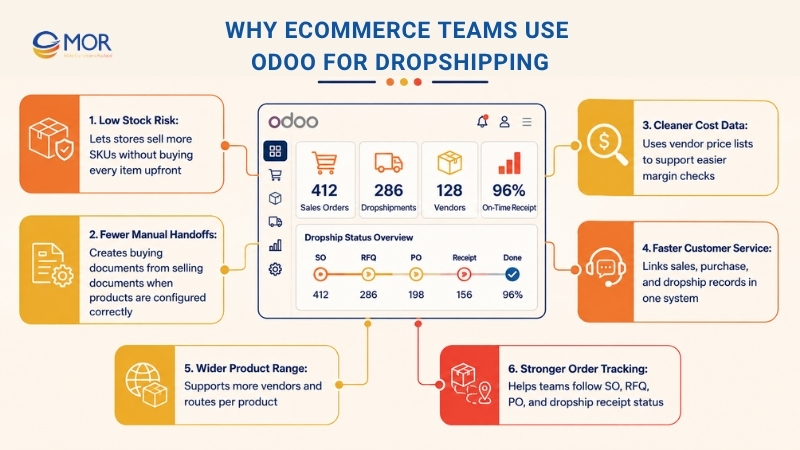
Teams also get cleaner cost data. Vendor price lists feed into purchase documents, so margin checks become easier. When the supplier price changes, the product record should change too. That simple habit protects profit on each order.
Dropshipping Odoo also helps when customer service needs an answer. Instead of asking three teams where the order is, staff can check the linked sales, purchase, and dropship records. One source of truth saves time when a buyer asks, “Where is my package?”
Business need | How Odoo helps | What to watch |
Sell without holding stock | Route products from supplier to customer | Supplier reliability still matters |
Keep product costs clear | Store vendor price and lead time on the product | Price lists must stay current |
Track order status | Link SO, RFQ, PO, and dropship receipt | Teams need a clear validation rule |
Grow product range | Add vendors and routes per product | Too many suppliers need a stronger control model |
>>> Explore Odoo CRM features and how they support real sales teams.
Dropshipping Odoo Setup in Odoo 19: Step-by-Step Guide
If you’re wondering how to set dropshipping in Odoo, this section will show you the complete setup based on the Odoo 19 workflow shown in the uploaded reference guides. Keep in mind that some menu names or settings may vary depending on your database, edition, or installed apps. MOR Software recommends testing the complete workflow in a staging database before using it with live orders.
Step 1: Turn on Dropshipping in Purchase Settings
Open the Purchase app, then go to Configuration and Settings. In the Logistics area, tick Dropshipping and save the change.
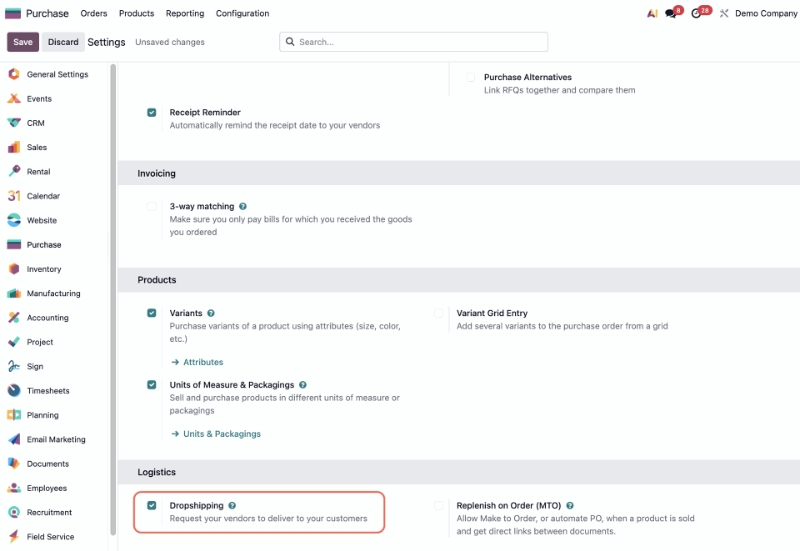
This creates the Odoo dropship route and the related operation type. Without this switch, your product form will not show the route you need.
Step 2: Set Product Type, Vendor, and Price
Open Sales, then Products. Choose an existing product or create a new one. Set the product type as Goods, then make sure it can be sold and purchased.
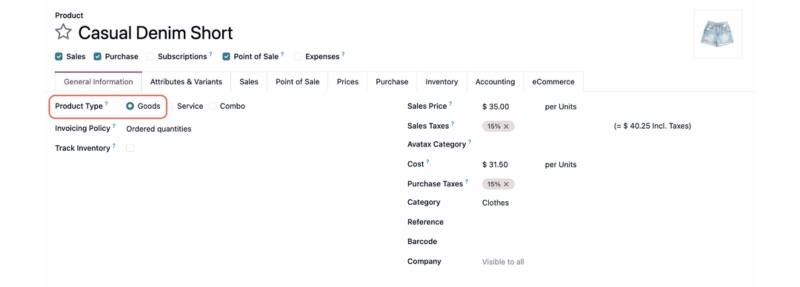
Move to the Purchase tab. Add the supplier and the price you pay that supplier. This price is what Odoo uses when it builds the supplier document.
Step 3: Add the Supplier Price in the Purchase Tab
The supplier line is more than a contact field. It tells Odoo who should receive the order and what cost should sit on the RFQ.
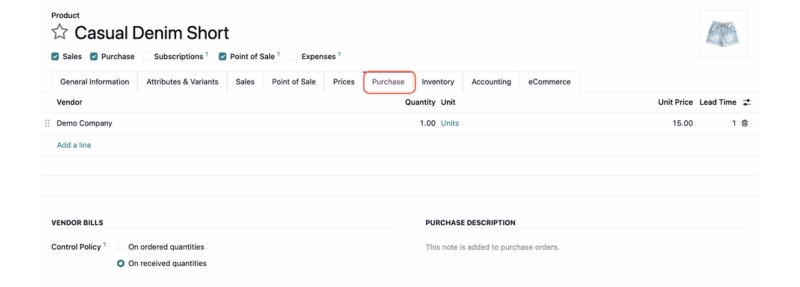
If one product has many suppliers, put the preferred vendor at the top. Odoo will pick that supplier first unless your team changes the document by hand.
Step 4: Select the Dropship Route on the Product
Go to the Inventory tab on the product. Under Routes, select Dropship. This tells Odoo not to plan a normal warehouse delivery for that product.
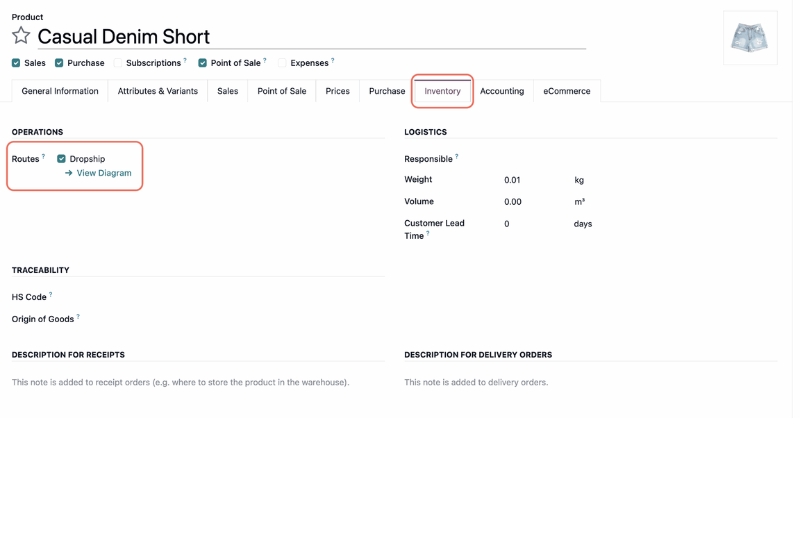
Do not rush this step. A product can look right in Sales but still fail at order time when the route is missing.
Step 5: Create and Confirm a Sales Order
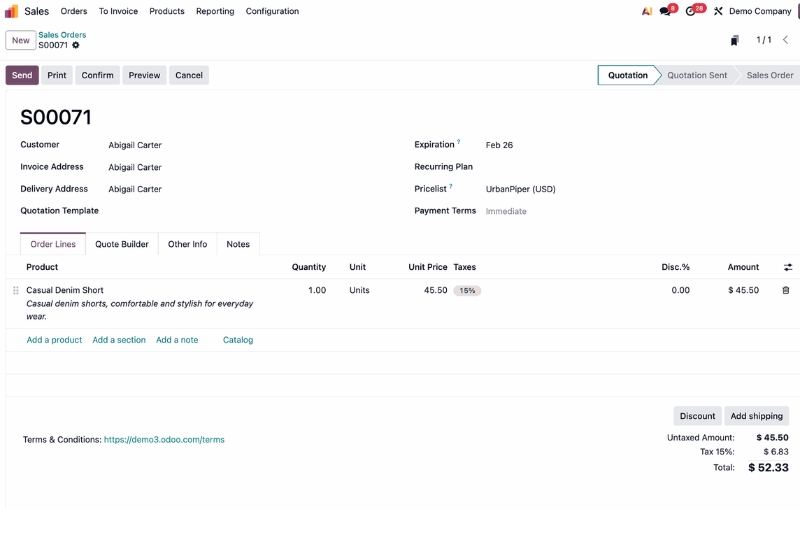
Create a sales order for the customer and add the dropship product. Confirm the order.
Odoo then creates the supplier request tied to that sale. Your team no longer needs to retype the product, quantity, and customer delivery address into a separate buying process.
Step 6: Confirm the RFQ and Review the Purchase Order
Open the RFQ in Purchase. Check supplier, price, arrival date, dropship address, and order quantity. Then confirm the order so it becomes a purchase order.
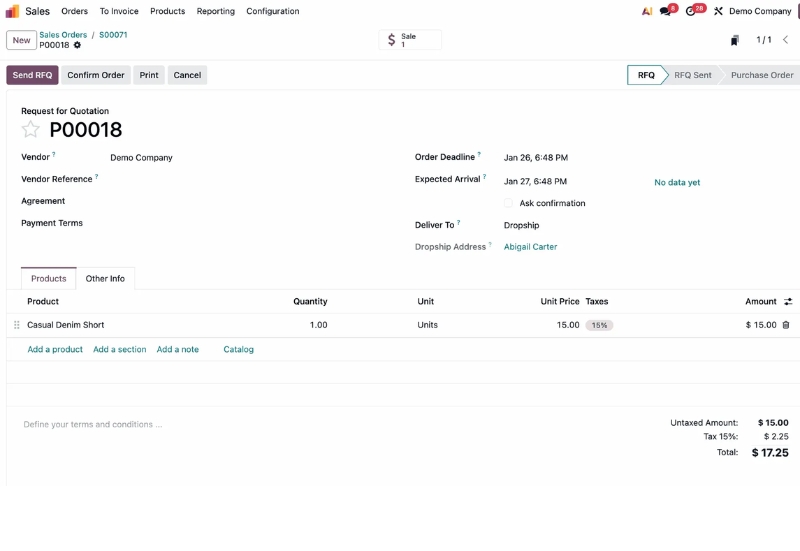
This is a good place to catch issues before the supplier ships anything. If the customer address is wrong, fix it before the vendor starts fulfillment.
Step 7: Validate the Dropship Receipt
When the supplier confirms shipment or delivery, open the dropship receipt. The record should show the operation type as Dropship.
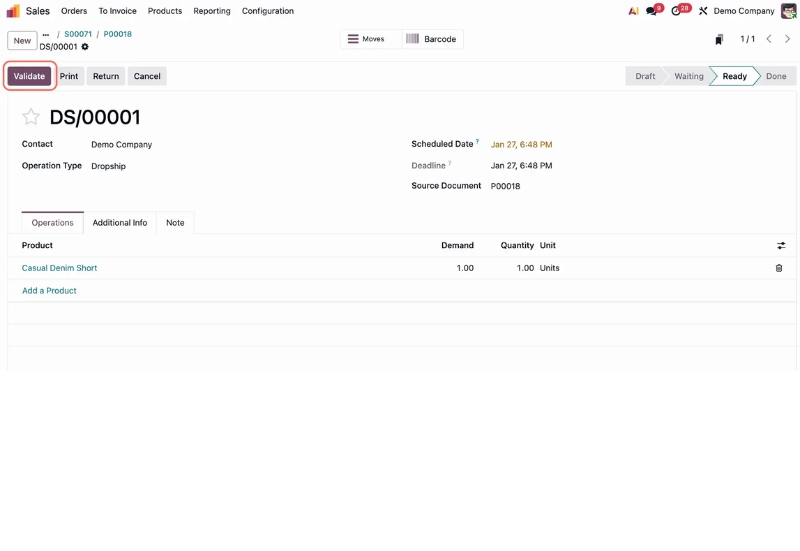
Validate it when the order status is right. That tells Odoo the dropship move is complete and lets the rest of the billing flow move forward.
Step 8: Check All Dropship Orders in Inventory
Teams that handle many orders should not rely on single sales orders only. Use the Inventory overview to watch the Dropship card and open the records that still need work. This view helps operations staff spot late or pending dropship moves before customers complain.
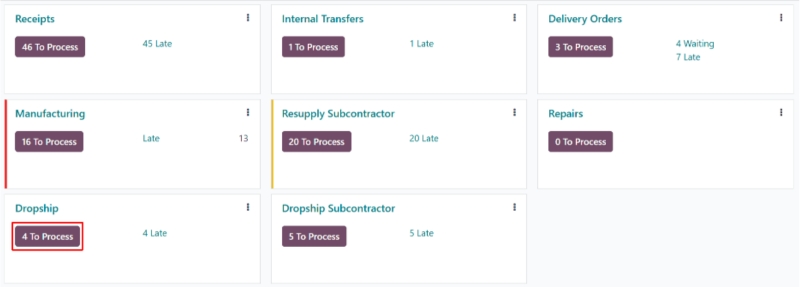
If your menus or fields look different, compare them with the latest Odoo documentation dropshipping guide because options can vary between Odoo editions and installed modules.
Common Dropshipping Odoo Setup Mistakes That Cause Order Problems
Most Odoo dropshipping problems start with product data. The order screen gets the blame, but the product route, vendor line, cost, and lead time usually caused the issue earlier.
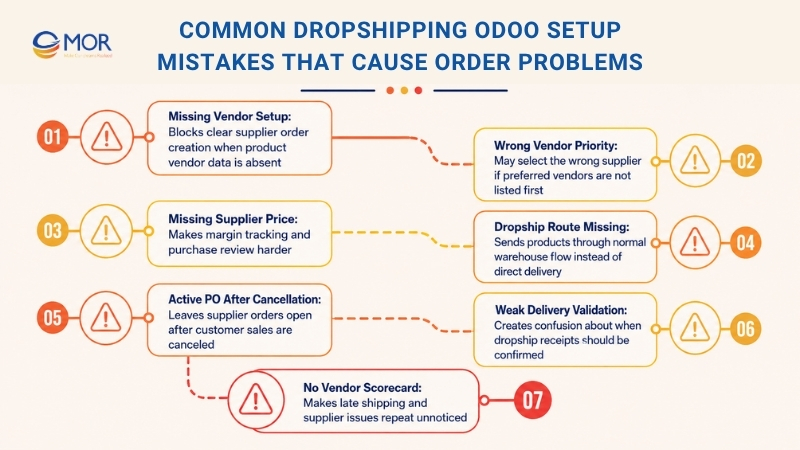
- Missing vendor on the product: Odoo cannot create a clear supplier order when it does not know who supplies the item.
- Wrong vendor priority: The first vendor on the product list may be selected by default. Put your preferred supplier first.
- No supplier price: A blank or outdated cost can break margin tracking and make purchase review harder.
- Dropship route not selected: The product may follow a normal warehouse flow instead of direct supplier delivery.
- Sales order canceled, PO still active: Cancel the linked purchase order as well when the customer order is canceled.
- Weak delivery validation rule: Your team must decide when to validate the dropship receipt, at supplier shipment, carrier pickup, or confirmed customer delivery.
- No vendor scorecard: Without supplier performance tracking, late shipping becomes a repeated surprise.
When Standard Odoo Dropshipping Is Enough
Standard Odoo can handle many dropshipping flows without custom work. It fits best when the process is simple, the supplier count is small, and every team agrees on the same order rules.
Standard Odoo fits when... | You may need more work when... |
Order volume is manageable | Orders come from many stores, regions, or marketplaces |
Suppliers use simple data formats | Suppliers need custom files, API calls, or EDI messages |
A small team reviews purchase orders | You need automated supplier selection rules |
Stock visibility needs are basic | You need near real-time stock from WMS or 3PL systems |
Accounting flow is simple | You need custom billing rules, tax mapping, or region logic |
A small fashion store with three suppliers may be fine with standard Odoo. A cross-border marketplace seller with many carriers, supplier portals, and tax rules will need a deeper setup.
As a dropshipping wholesale business Odoo operation grows, businesses often move beyond the standard workflow by adding marketplace integrations, warehouse systems, or supplier automation to support higher order volumes.
When You Need Custom Odoo Integrations
As order volume grows, the biggest problem is no longer how to turn on the Dropship route. The hard part is keeping dropship Odoo aligned with supplier systems, marketplaces, carriers, and finance tools.
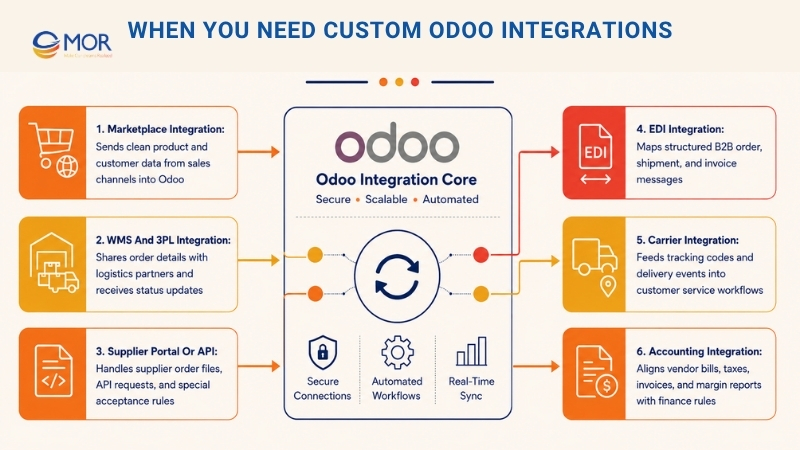
- Marketplace integration: Connect Shopify, WooCommerce, Shopee, Lazada, Amazon, or other channels so orders enter Odoo with clean product and customer data.
- WMS and 3PL integration: Send order details to warehouses or logistics partners, then receive status updates back into Odoo.
- Supplier portal or API integration: Some suppliers need order files, custom API requests, or special rules before they accept an order.
- EDI integration: B2B partners may rely on structured order, shipment, and invoice messages. This calls for clear mapping and strong error handling.
- Carrier integration: Tracking codes, shipping status, and delivery events should feed back into the customer service flow.
- Accounting integration: Vendor bills, taxes, customer invoices, and margin reports must match the business rules used by finance.
Custom work should not start with coding. Start with a process map. List every sales channel, supplier, data field, order status, and exception case. Then decide what Odoo should automate and what staff should still review.
Practical Tips for Better Odoo Dropshipping Operations
Good dropshipping Odoo is not only a setup task. It is a daily operating habit. The teams that win with Odoo usually treat vendor data like product data, not as a side note.
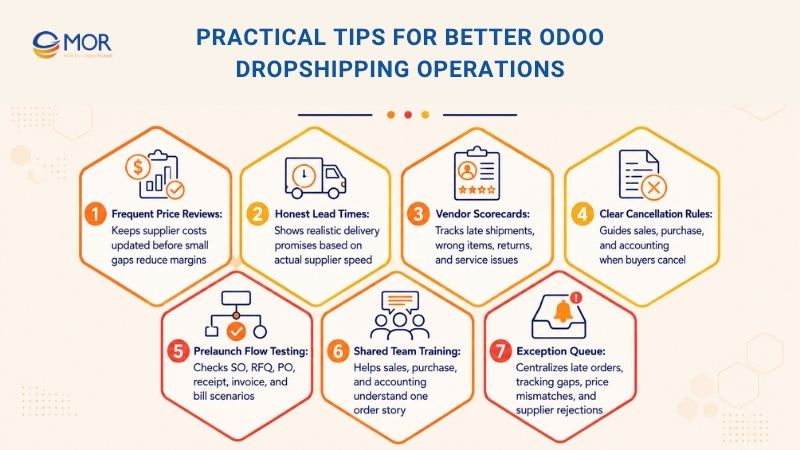
- Review vendor prices often. Supplier prices change, and small cost gaps can eat the whole margin.
- Use lead times honestly. If a supplier usually ships in four days, do not show a one-day promise on the product.
- Build a vendor scorecard. Track late shipments, wrong items, returns, and service issues by supplier.
- Create a cancellation rule. Sales, purchase, and accounting teams should know what to do when a buyer cancels.
- Test the flow before launch. Run sample orders for every supplier and product group. Check SO, RFQ, PO, receipt, invoice, and bill.
- Train every team on the same order story. Sales should know what Purchase sees. Accounting should know when receipts are validated.
- Keep a simple exception queue. Late orders, missing tracking codes, price mismatches, and supplier rejections need one shared review place.
These habits sound basic. They work. A clean supplier list and a clear cancellation rule can save more time than a fancy dashboard.
How MOR Software Helps Businesses Build Odoo Dropshipping Solutions
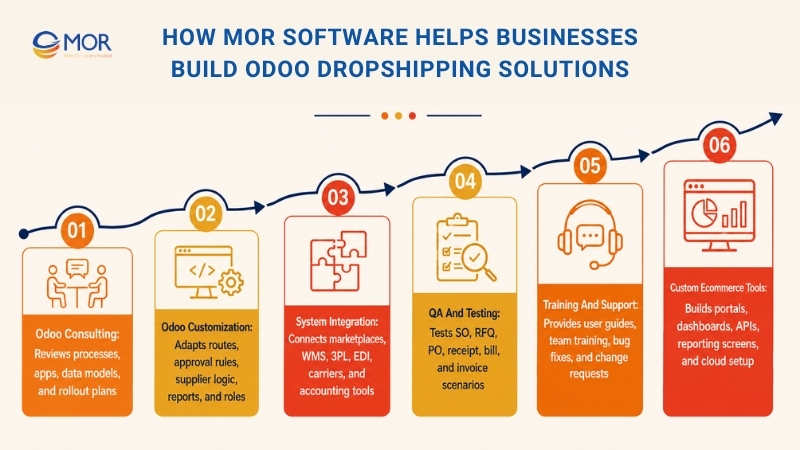
Odoo gives ecommerce teams a strong base, but every business has its own supplier rules, order paths, and reporting needs. As an Odoo development partner, MOR Software helps companies plan, build, customize, integrate, test, and support Odoo development services for real business work.
MOR Software brings software development, ERP, ecommerce, web app, integration, QA, and offshore team experience into one delivery model. That matters for Odoo dropshipping because the system often touches sales channels, suppliers, inventory, finance, and customer service at the same time.
MOR Software has worked on ecommerce management systems that connect product data, cross-border shopping flows, and cloud infrastructure. That type of work is close to what many dropshipping Odoo projects need: clean data, clear order logic, and stable integration with outside systems.
A good Odoo partner will not only switch on a setting. The partner should study the current order flow, ask how suppliers receive orders, check how finance handles vendor bills, and define what staff should see when something goes wrong.
MOR service area | What it covers | Why it matters for dropshipping |
Process review, app selection, data model, and rollout plan | The setup matches how your team sells and buys | |
Routes, approval rules, supplier logic, reports, and user roles | The flow fits your business instead of forcing workarounds | |
System integration | Marketplaces, WMS, 3PL, EDI, carriers, and accounting tools | Order data moves with fewer manual steps |
QA and testing | Scenario testing across SO, RFQ, PO, receipt, bill, and invoice | Teams catch errors before launch |
Training and support | User guides, team training, bug fixes, and change requests | Staff keep using the system the right way |
For teams selling across many channels, MOR Software can also help with custom ecommerce portals, supplier dashboards, backend APIs, reporting screens, and cloud setup. The aim is simple: make Odoo the working center of the dropshipping process, not just another tool staff have to update.
Conclusion
Dropshipping Odoo is a smart choice when ecommerce teams want to sell more products without owning every item in stock. The setup is simple on paper, but success depends on accurate product data, supplier rules, purchase review, dropship validation, and connected systems.
MOR Software can help your team turn Odoo into a practical dropshipping hub, from setup and integration to testing and support. Contact MOR Software when your Odoo rollout needs a partner who understands ecommerce and custom software.
"Mr. Cong’s guiding philosophy is simplicity, believing that the simplest solutions are often the most powerful. He sees trust, empowerment, and the opportunity to demonstrate one’s abilities as the key elements that set MOR apart from traditional IT companies."
Mac Tien Cong


Division Manager (Hanoi Branch)
MOR SOFTWARE
Frequently Asked Questions (FAQs)
What is dropshipping in Odoo?
Dropshipping in Odoo lets a seller route customer orders to a supplier that ships the product directly to the customer. Odoo links sales, purchase, and inventory records so teams can track the process without holding stock.
How does Odoo create a purchase order for a dropship product?
When the product has a vendor and the Dropship route is selected, a confirmed sales order can create a linked RFQ. After review, the RFQ becomes a purchase order for the supplier.
How do I set up dropshipping Odoo 19?
Turn on Dropshipping in Purchase settings. Then open the product, set it as Goods, add the vendor and price in the Purchase tab, select Dropship in the Inventory tab, and test the sales order flow.
Can one product have many dropshipping suppliers in Odoo?
Yes. You can add many vendors to a product. Odoo usually uses the vendor at the top of the list first, so vendor order matters.
Does Odoo track stock for dropship products?
Odoo can track the order movement without receiving the stock into your warehouse. The dropship receipt shows the vendor as the source and the customer as the destination.
What happens if a customer cancels a dropship order?
The team should cancel the related purchase order too. If the supplier order stays active, the vendor may still ship or bill for the product.
Can Odoo connect to Shopify, Shopee, Lazada, or Amazon for dropshipping?
Yes, Odoo can connect to ecommerce channels through native apps, connectors, APIs, or custom integration. The right method depends on order volume, product data, and channel rules.
Is standard Odoo enough for high-volume dropshipping?
Standard Odoo may work for simple flows. High-volume teams often need WMS, 3PL, marketplace, carrier, EDI, or finance integration to keep data current.
When should a business use an Odoo partner for dropshipping?
Use a partner when suppliers have special rules, orders come from many channels, data needs cleanup, or the business needs custom reports, approval flows, and long-term support.
Share


Make Our-Dreams Realized


© 2023 . MOR Software. All Rights Reserved
Sitemap
Privacy Policy
Terms of Use

Rate this article
0
over 5.0 based on 0 reviews
Your rating on this news:
Name
*Email
*Write your comment
*Send your comment
1