


Top 15 Essential HR Software for Retail Industry in 2026

Retail teams deal with changing shifts, high turnover, payroll errors, and scattered employee data every week. The right HR software for retail can help stores manage people, schedules, payroll, hiring, and performance from one place. In this guide, MOR Software will explore the best HR software for retail and how to choose a system that fits real store operations.
Key Takeaways
- HR software for retail helps store teams manage employee records, scheduling, payroll management system, time off, hiring, onboarding, employee review template, and reporting with fewer manual steps.
- Leading HR software for retail solutions include Odoo, BambooHR, Gusto, Rippling, UKG Ready, Deputy, Zoho People, ADP Workforce Now, Paycor, and Workday, each offering different strengths for retail workforce management.
- Odoo is a strong choice for retailers that want HR to connect with CRM, accounting, inventory, approvals, and daily operations in one business system.
15 Best HR Software For Retail Teams In 2026
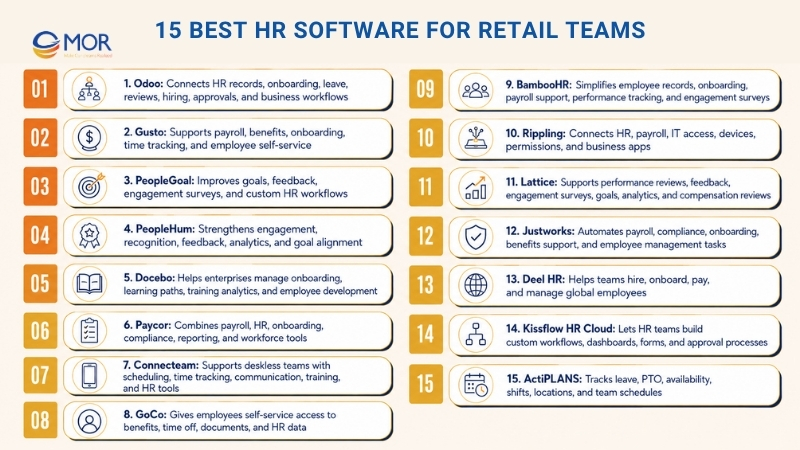
Retail teams need HR tools that can handle store staff, shifts, payroll, hiring, training, and performance without adding more manual work. This list of HR software compares 15 platforms that can support retail teams in 2026, including HR software for retail teams that need better control over daily workforce tasks.
HR Software For Retail Teams | Best Fit | Top Tools | Pricing |
Odoo | HR teams that need one shared system for staff data, onboarding, leave, reviews, hiring, and wider business workflows | Employee profiles, onboarding and offboarding steps, appraisals, leave tracking, recruitment, approvals, and payroll-related flows | One App Free: $0 for one app with unlimited users. Standard: from US$16.90/user/month. Custom: from US$25.50/user/month |
Gusto | Small and growing teams that need payroll, benefits, onboarding, and simple HR work in one place | Full-service payroll, tax filing, employee self-service, benefits management, time tracking, and onboarding | Simple: $49/mo + $6/person/month. Plus: $80/mo + $12/person/month. Premium: $180/mo + $22/person/month |
PeopleGoal | Teams that want stronger employee performance and engagement | Goal tracking, 360 feedback, employee surveys, automated HR workflows, and integrations | Free 7-day trial. Paid plans start at $4/user/month |
PeopleHum | Teams that need live feedback and people data to improve employee experience and retention | Repetitive HR task automation, engagement tracking, feedback tools, and people analytics | Free 7-day trial. Paid plans start at $2 per employee/month |
Docebo | Companies that need better onboarding and learning paths for staff growth | Workflow automation, integrations, reports and analytics, and social learning | Custom pricing, contact the team |
Paycor | Small and mid-sized companies that need payroll, HR, onboarding, compliance, and workforce tools | Payroll and tax filing, HR compliance, onboarding, leave management, reporting, analytics, and mobile access | Basic: $99/mo + $5/employee/month. Essential: $149/mo + $6/employee/month. Complete: $199/mo + $7/employee/month |
Connecteam | Deskless, mobile, and frontline teams that need daily workforce control | Mobile app, scheduling, time clock, team chat, forms, checklists, training, and HR tools | Small Business Plan: $0 for up to 10 users. Basic: $35/mo. Advanced: $59/mo. Expert: $119/mo for the first 30 users |
GoCo | Teams that want stronger employee self-service | Onboarding, time and attendance, payroll, and HR compliance | Custom pricing, contact the team |
BambooHR | Teams that need performance tools, payroll support, and onboarding | Employee data and people reports, payroll support, and time tracking | Custom pricing, contact the team |
Rippling | Teams that need to control IT, payroll, and HR work from one system | Integrations, analytics, custom workflows, payroll tools, and access controls | Custom pricing, contact the team |
Lattice | Teams that want a clearer people management workflow | Employee engagement, feedback, and performance reviews | Custom pricing, contact the team |
Justworks | Teams that need support for remote employee management | Time tracking, benefits management, and benefits support | Payroll: $8/month/person + $50/month base fee. PEO Basic: $59/month/person. PEO Plus: $109/month/person |
Deel HR | Teams that need scalable HR flows for onboarding, payments, and global work | Payroll data, payment automation, and localized payroll tax support | Deel HR: $0. Deel Engage: Starts at $20/employee/month |
Kissflow HR Cloud | Teams that want to build custom employee workflows | Unified dashboard, custom workflows, and integrations | Basic: Starts at $1,500/month, includes 50 users. Enterprise: Custom pricing |
ActiPLANS | Teams that need leave, PTO, availability, and shared schedule visibility | Leave requests, PTO accrual, team leave calendar, shift assignment, status tracking, location tracking, and mobile access | Free: $0 for 1-3 users with limited tools. Paid plans start from about $1.5/user/month on annual billing |
Odoo
Odoo is a modular employee management platform that helps HR teams bring employee data, onboarding, reviews, time off, hiring, and business tasks into one shared system. Rather than managing HR files, staff documents, approvals, and performance work in different places, Odoo puts them inside one business platform.
The Employees app acts as the main place for employee data. HR teams can keep staff profiles, departments, office locations, contracts, skills, private details, and documents together, then add more apps for hiring, referrals, leave, appraisals, approvals, planning, expenses, and payroll-related work when the business needs more tools.
Odoo also works well for companies that want HR tasks to link with daily business operations. If your team already runs Odoo for manufacturing accounting software, CRM, project work, inventory, or approvals, employee data can support wider department workflows with less manual updating.
For growing retail teams, Odoo’s main strength is its flexible setup. You can begin with one HR app, then add more apps as your process grows, which makes it a strong option for businesses looking for HR management software for retail industry that can later become part of a larger ERP system.
Key tools:
- Unified staff records: Odoo helps HR teams keep employee profiles, departments, job titles, work sites, contracts, and files in one system. When a new staff member joins, their contact details, role, manager, skills, and work data can all sit in one profile.
- Joining and exit workflows: Odoo lets HR teams build clear steps for new hires and leaving staff. Each workflow can start a set list of tasks, like collecting papers, giving work tools, booking training, or preparing exit actions.
- Review and performance tools: Odoo links staff profiles with appraisal flows, so managers and employees can ask for or manage reviews when needed. This keeps feedback and performance talks connected to the right employee record.
- Leave and attendance view: Odoo supports time-off requests, approvals, and team availability tracking. HR teams can manage annual leave, sick leave, and other absence types with a clearer view across departments.
- Linked HR and business apps: Odoo can connect HR work with hiring, approvals, expenses, planning, payroll, project tasks, and accounting. This helps companies move away from scattered tools and build a more connected employee management workflow.
Pros:
- Modular setup that can begin with core employee management and grow into wider HR flows
- Good match for companies already using Odoo apps or planning to adopt them
- Staff records stay in one place with linked documents, teams, and roles
- Custom setup can support companies with unique HR rules
- One App Free plan can make early adoption easier for smaller teams
- Helpful for businesses that need HR linked with ERP, CRM, accounting, and operations
Limitations:
- Setup and custom work may need technical help, mainly for companies with complex HR flows
- Small teams that only need basic scheduling or Odoo payroll may find the wider Odoo suite too broad
Ratings:
- G2: 4.3/5
- Capterra: 4.2/5
For businesses that want Odoo to support a wider HR and ERP setup, MOR Software can help with the full rollout. As an official Odoo partner, MOR Software supports configuration, Odoo customization, and deployment for real business workflows, including employee management, approvals, payroll-related tasks, accounting, CRM, inventory, and daily operations.
Gusto
Built for small and growing companies, Gusto is an employee management platform that brings payroll, benefits, onboarding, time tracking, and HR tools into one simple system. It works well for teams that want less manual payroll work and want employees to check pay, tax, and benefits details on their own.
With Gusto, employers can run payroll as often as needed, submit federal and state payroll taxes, manage direct deposit, support new hire setup, and keep employee records in one dashboard. The platform also covers health benefits, retirement plans, workers’ compensation, time tracking, PTO, and HR support based on the selected plan and add-ons.
For companies that need payroll and HR to work together, Gusto keeps employee records, payroll details, tax papers, and benefits information linked. This can cut repeated data entry and make daily HR admin easier for business owners, managers, and HR teams.
If you pay W-2 employees, contractors, or a mixed team, Gusto makes payroll tasks easier while giving staff a clear place to view pay stubs, tax forms, benefits data, and onboarding tasks. This makes it a practical pick for teams comparing HR software for small businesses.
Key tools:
- Full-service payroll with federal, state, and local tax submissions
- Employee self-service for pay stubs, tax forms, onboarding, and personal updates
- Benefits management for health insurance, retirement plans, workers’ compensation, HSAs, FSAs, and commuter benefits
- Time tracking, PTO rules, holiday pay, and payroll sync on selected plans or add-ons
- HR resources, compliance notices, performance tools, and dedicated support on higher plans
Pros:
- Simple payroll and HR platform for small and growing companies
- Unlimited payroll runs across plans
- Strong self-service tools for employees
- Payroll, benefits, onboarding, and HR records stay in one place
- Good connections with accounting, time tracking, and business tools
Limitations:
- Total cost can rise when teams add more staff, benefits, and HR add-ons
- Reporting and custom setup may feel basic for companies with complex HR or payroll needs
Ratings:
- G2: 4.6/5
- Capterra: 4.6/5
PeopleGoal
PeopleGoal is a strong but simple employee productivity management platform made to improve staff performance, engagement, and development. It gives teams custom workflows, goal tracking, and 360-degree feedback, so each employee’s goals can stay aligned with company targets.
The platform includes an App Engine for no-code setup, which lets HR teams build workflows around their own needs. It can support onboarding, performance reviews, and employee engagement surveys without making HR teams depend on heavy technical work.
It also connects with HRIS and automated payroll systems, so teams can manage people data with less effort. With live people data, automated workflows, and helpful support, PeopleGoal makes HR work clearer and more useful while keeping the platform simple.
Key tools
- Performance and goal management: Link company goals with individual goals through OKRs, SMART goals, and live progress tracking.
- Full-circle feedback and reviews: Run fair employee reviews with input from managers, peers, and direct reports.
- Employee surveys and engagement checks: Send pulse surveys and quarterly surveys to measure engagement, track satisfaction, and guide action.
- Custom HR workflows and task automation: Build onboarding, offboarding, leave management, and other HR flows without code.
- Integrations and people reports: Connect with HRIS, payroll, and analytics tools while viewing live, data-led reports.
Pros
- HR teams can create workflows that fit their exact process without waiting for developers.
- Employees get a clearer path for feedback, recognition, and career growth.
- Reviews become more useful because managers can use richer people data and input from several sources.
- HR process management becomes easier because automation cuts repeated work and saves time.
- The platform is simple to use, and the support team is ready when teams need help.
Limitations:
- The platform does not include a downloadable or on-premise option.
- A dark mode interface is not available.
Ratings
- G2: 4.5 out of 5 stars.
- Capterra: 4.5 out of 5 stars.
PeopleHum
Created for companies that place strong value on their people, PeopleHum is employee engagement software built to improve team connection, feedback, and performance. It brings engagement tools, automation, and analytics into one platform that supports culture, productivity, and retention.
With PeopleHum, HR teams can keep engagement active through pulse surveys, recognition, feedback loops, goal alignment, and smart nudges shaped with AI in HR. From new hire setup to long-term development, the platform helps employees stay motivated and connected to company goals.
PeopleHum connects with existing HR systems and communication tools to create a joined employee engagement experience. The platform works as one center for engagement data, so teams can track sentiment, celebrate good work, and turn people data into action.
Key tools:
- AI-powered pulse surveys, feedback tools, and engagement analytics
- Recognition walls, birthday reminders, and milestone automation for team celebrations
- Goal alignment and OKR tracking for clearer performance engagement
- Personalized communication and engagement nudges through automation
- Mobile-first platform with a built-in chatbot for quick interaction
Pros:
- Full engagement suite with feedback, recognition, and goal tools
- AI-led data that can help spot disengagement early
- Connects well with existing HR systems and communication tools
- Custom dashboards for HR leaders and managers
- Scales well and can suit growing organizations
Limitations:
- The tool set may be more than very small teams need
- Some connections may need help from support during setup
Ratings:
- G2: 4.5/5
- Capterra: 4.6/5
Docebo
Made for modern enterprises, Docebo is a flexible, scalable, AI-powered learning platform with many integrations that help connect your tech stack, simplify training work, and improve the employee experience.
With Docebo, your team can manage thousands of employees and keep them active through AI-led suggestions and custom learning journeys, from onboarding to ongoing training, that support your company goals.
Docebo connects with your HRIS integration, CRM, and other key business tools, helping your team keep learning systems joined with the wider business. Training content and learning data stay in one place, which makes user control, admin work, and version tracking easier.
For brands comparing HR software for retail, Docebo is useful when staff training, onboarding, and store-level learning need more structure across many teams.
Key tools:
- Native and custom integrations with automation to make admin work easier
- One learning hub that supports company culture, knowledge sharing, and internal communication
- Strong reports and analytics to guide learning decisions
- AI-led learning suggestions and content creation to keep employees engaged
- Mobile-responsive design so employees can learn from any location
Pros:
- Large set of native and custom integrations
- Central learning hub for employee training and communication
- Flexible setup that can serve large organizations
- Highly custom front end for branded employee learning
- Fast and helpful customer support
Limitations:
- It may feel too complex and expensive for small businesses
- The first setup can feel heavy because the platform includes many tools and custom options
Ratings:
- G2: 4.4/5
- Capterra: 4.4/5
Paycor
Paycor is employee management software for companies that need payroll, HR, onboarding, time management, compliance, and talent tools inside one HCM platform. It is a useful choice for small and mid-sized businesses that want to handle employee records, payroll, tax filing, recruiting, time off, and reporting without moving between many separate tools.
The platform helps HR teams pay staff, manage compliance tasks, onboard new hires, store employee records, and support workforce planning. Paycor also includes mobile access, employee self-service, standard and custom reports, plus add-ons for benefits, recruiting, time scheduling, workers’ compensation, and performance management.
For managers, Paycor gives clearer access to staff data, labor costs, leave, and HR tasks. For employees, the mobile app makes it easier to check pay stubs, tax forms, shifts, schedules, benefits, and time-off requests.
Paycor suits companies that want HR payroll software for retail with payroll at the center and space to grow into wider HR, workforce planning, analytics, and talent tools.
Key tools:
- Payroll and tax management: Paycor supports payroll runs, federal and state tax filing, direct deposit, auto-run payroll, new hire filing, and employee self-service.
- Self-service and mobile access for staff: Employees can view pay stubs, open tax papers, manage benefits, ask for time off, and check schedules through the mobile app.
- New hire setup and HR compliance: Higher plans support onboarding, E-Verify, digital signatures, HR templates, compliance tools, and employee document storage.
- Reports and workforce data: Paycor gives teams standard reports, custom report building, scheduled reports, and higher-level analytics on selected plans.
- Workforce and talent tools: Teams can add time scheduling, recruiting, performance reviews, goal tracking, surveys, and automated workflows based on their needs.
Pros:
- Payroll, HR, onboarding, and employee data sit in one platform
- Mobile app supports simple employee self-service
- Good fit for small and mid-sized companies that need payroll plus HR tools
- Reports help teams track payroll, compliance, and workforce data
- Add-on modules give growing teams more room to adjust
Limitations:
- Some users mention technical issues and slower support responses
- Pricing and tool access can change based on company size, bundle, and selected add-ons
Ratings:
- G2: 3.9/5
- Capterra: 4.3/5
Connecteam
Connecteam is mainly built as an employee management app for deskless, mobile, and frontline teams. The platform is grouped into three main hubs: Operations, Communications, and HR & Skills, which makes it useful for HR managers, store managers, operations leaders, and business owners who manage distributed teams.
The software helps users handle communication, scheduling, time tracking, task management, forms, checklists, training, recognition, and HR work for employees who do not sit at a desk. If your employees work in retail, construction, healthcare, hospitality, cleaning, field service, or another mobile-first sector, Connecteam gives managers practical tools to manage daily work on mobile and desktop.
Connecteam also supports HR teams with onboarding, documents, leave, courses, quizzes, org charts, employee timelines, rewards, and celebrations. This makes it a strong retail employee management software option for businesses that need operational control and employee engagement in one mobile-friendly app.
Key tools:
- Employee scheduling, open shifts, shift collaboration, and live schedule updates
- Time clock with GPS, timesheets, payroll connections, and leave management
- Team communication tools, company feed, updates, chats, surveys, and polls
- Digital forms, checklists, tasks, and workflow tools for daily work
- HR & Skills tools, including onboarding, documents, courses, quizzes, recognition, rewards, and org charts
Pros:
- Strong mobile app for deskless and frontline workers
- Brings scheduling, time tracking, communication, training, and HR tools into one platform
- Free Small Business Plan for up to 10 users
- Helpful for teams that need live updates across stores, sites, or work locations
- Easy for employees to open schedules, updates, tasks, and files from their phones
Limitations:
- Pricing can become harder to compare when teams need several hubs or higher-level tools
- Some users mention issues with notifications, performance, or loading speed
Ratings:
- G2: 4.6/5
- Capterra: 4.7/5
GoCo
GoCo gives employees self-service tools to manage benefits, request time off, and open documents without asking HR for every small task. This can include benefit areas like health insurance and retirement contributions. This setup can improve employee satisfaction and give HR teams more time for higher-value work.
GoCo also includes tools for employee tracking, performance management, and automated payroll. These tools support better accuracy and save time when HR teams manage staff data.
Key tools:
- Digital onboarding for new hires, so they can complete forms and training online
- Compliance tracking with automatic updates for labor law and rule changes
- Benefits management and payroll automation to make routine HR tasks easier
- Tools to manage employee performance and track workforce data
Pros:
- Connects with business tools like Slack, Microsoft Teams, Zapier, QuickBooks Online, and Greenhouse
- Makes employee onboarding easier to manage
- Gives teams one system for storing employee data
Limitations:
- Custom options may be limited for teams with very complex HR workflows
- Reporting tools could go deeper for employee performance and HR data analysis
Ratings:
- G2: 4.6/5
- Capterra: 4.6/5
BambooHR
BambooHR makes core HR tasks easier because teams can manage them from one place. If your team handles new hires, payroll organization, or performance tracking, BambooHR can support those needs.
The software helps teams keep employee records updated, run engagement surveys, and check how people perform. It also gives access to data that helps teams see how engagement, performance, and employee turnover relate to each other.
For teams comparing HR management software for retailers, BambooHR is a good fit when employee records, onboarding, payroll support, and performance work need to stay simple and clear.
Key tools:
- One platform for hiring, onboarding, payroll, and employee data management
- Tools for performance reviews and employee engagement surveys
- Communication hub for announcements and project-related talks
- Digital acknowledgments from employees for key updates and policies
- Integrations with apps like Slack, TalentLMS, and Payscale for connected operations
Pros:
- Mobile app lets users open HR tasks from anywhere
- Self-service tools allow employees to update details and send requests on their own
- Helps managers track performance and engagement with less effort
Limitations:
- Higher-level tools may require added costs
- Pricing information is not always shown clearly at the start
Ratings:
- G2: 4.4/5
- Capterra: 4.6/5
Rippling
Rippling automates regular HR work like onboarding, payroll, and offboarding so your team can spend more time on higher-value tasks. Its onboarding flow helps new staff get needed accounts, including email and software access, from one place. This helps them start work sooner from their first day.
Rippling works well for companies that want HR systems software to connect HR, payroll, access, devices, and business apps under one workforce platform.
Key tools:
- Payroll management that handles bonuses, deductions, and pay changes for each employee
- Live performance analytics to track staff performance across teams
- Custom roles and permissions to give staff access to the right tools without extra confusion
- Offboarding tools to handle compliance steps and protect records
- Integrations with tools like Slack, DocuSign, QuickBooks, and Microsoft 365
Pros:
- Clean and simple interface that most users can learn quickly
- Payroll templates adjust when roles and benefits change
- Online learning center gives fast help when users need support
Limitations:
- Interface and app layout custom options are limited
- Some users have reported trouble getting support responses
Ratings:
- G2: 4.8/5
- Capterra: 4.9/5
Lattice
Lattice helps teams manage people work with less friction, while keeping focus on talent growth and employee engagement. The platform includes tools for regular feedback, performance reviews, and one-on-one meetings. It also gives HR teams useful people data, so you can make better choices for team growth and business needs. For teams comparing HR software for retail, this platform can be helpful when performance and engagement matter across store teams or remote roles.
Key tools:
- Performance management with tools for regular feedback, reviews, and one-on-one meetings
- Employee engagement tools, including surveys to check and respond to staff satisfaction
- People analytics for tracking HR numbers, finding trends, and creating reports
- Goal setting and tracking with Objectives and Key Results (OKRs) to keep teams aligned
- Compensation review tool that connects performance with pay decisions
Pros:
- Includes useful tools for performance management and employee engagement
- Can be adjusted for different review formats and goal-setting needs
- Simple interface that users can move through with ease
- Gives helpful people data through its analytics tool
- Strong customer support
Limitations:
- Goal-setting tools may feel less simple for some users
- Mobile apps can have bugs and may lack some tools
- Connecting the platform with other systems can take time
- Keeping goals and Key Results (KRs) apart may confuse some teams
Ratings:
- G2: 4.7/5
- Capterra: 4.5/5
Justworks
Justworks is a strong employee management platform built for small and mid-sized companies in areas like professional services, finance, technology, and nonprofit work. It makes HR easier to manage through automation for payroll, compliance, and employee management tasks.
The system also helps employees stay updated on work hours and pay dates. Direct access to support also lets employees ask about healthcare, deductions, and taxes without going through HR every time.
Key tools:
- Online onboarding for employees and contractors
- Employee information management
- Paid time off setup and control
- Safe storage for key employee files, employee handbook, and company policies
- Company calendar sync with personal calendars
- Access rights management
Pros:
- Makes onboarding and benefits enrollment easier for new hires
- Gives employees direct help for benefits and payroll questions
Limitations:
- It targets smaller companies, but some teams may still find the price high
Ratings:
- G2: 4.6/5
- Capterra: 4.6/5
Build a more connected HR setup with MOR Software
Contact Us
Deel HR
Deel HR helps companies hire, onboard, and pay employees in different countries with less stress. The platform makes payroll management and local labor law compliance easier to handle. It also helps teams manage contractor invoices and time-off tracking in one place.
Deel is known for making HR tasks simpler without making the user experience difficult. You get ready-made employment contract templates that lower paperwork and save time. The platform also collects key details like bank data and work permits on its own, so new hires can move through onboarding with fewer delays.
Key tools:
- Ready-made employment contract templates and automatic data collection, including bank details and permits
- Automatic contractor invoice creation, bulk payment tools, and payroll reports for HRIS employees paid outside Deel
- Global compliance and payroll management in over 90 countries, including background checks and immigration support
- Time Off tool for attendance tracking and absence management
Pros:
- Global payroll tools for payments and compliance across currencies
- EOR payroll services let companies hire global talent without opening a local entity. If your team wants to hire an employee in India through EOR services, you only choose India as the hiring country, set the role and salary in INR, and the EOR partner manages statutory registration for you
- GDPR compliance supports stronger data protection
Limitations:
- Pricing can become high, mainly when charged per worker
- Users who know traditional payroll systems may need more time to learn the platform
Ratings:
- G2: 4.8/5
- Capterra: 4.8/5
Kissflow HR Cloud
Kissflow HR Cloud helps HR teams create custom workflows, dashboards, checklists, and forms without needing deep technical skills. Built-in analytics and reports help teams check process results and see where work slows down. Collaboration tools also keep teams connected, which supports smoother daily HR work.
For teams that need HR software for retail with flexible workflow design, Kissflow can support process control across tasks like approvals, onboarding, and internal requests.
Key tools:
- The visual Kanban board lets HR teams move tasks across columns like “To Do,” “In Progress,” and “Completed”
- Document sharing, smart alerts, and social collaboration tools
- Live analytics show employee performance metrics, including task completion rates and average response times
- Users can upload, share, and work on HR documents inside the platform, including employee handbooks, policy guides, and training materials
- Security is a core focus for Kissflow, with privacy tools like encryption and multi-factor authentication
Pros:
- Makes it easier to build custom employee management systems with limited coding
- Includes strong analytics for checking and improving process results
- Connects well with common business apps
Limitations:
- Custom options may be limited for complex workflows with detailed business rules
- Non-technical users may need time to learn deeper functions
Ratings:
- G2: 4.3/5
- Capterra: 4.1/5
ActiPLANS
ActiPLANS is leave and availability planning software for teams that need a clear view of who is working, who is off, and how schedules shift each week. It keeps leave requests, approvals, and shared scheduling in one place, so managers can avoid coverage gaps and keep teams on the same page.
Key tools:
- Time-Off Request Flow: Employees can send leave requests or short absence notes, while managers can approve or decline them with fewer messages.
- PTO Balance Tracking: The system can automate PTO rules and keep balances current based on your company policy.
- Shared Leave Calendar: Managers can see planned absences on one timeline and catch schedule overlaps early.
- Shift Planning Support: Teams can plan staffing and assign shifts while checking approved days off.
- Availability And Location View: Work status labels, like out of office or remote, help teams know who can be reached.
- Mobile Access: Employees can request leave and check who is away from work without needing a desk.
Pros:
- Gives managers a clear view of team availability and planned leave
- Low starting price, listed from about $1.5 per user/month on annual billing
Limitations:
- The platform focuses on leave and scheduling, so payroll, hiring, and performance tools would often need another system
- Mobile app tools are more limited than the web version
Ratings:
- G2: 5.0/5
- Capterra: 4.6/5
Must-Have Features In HR Software For Retail
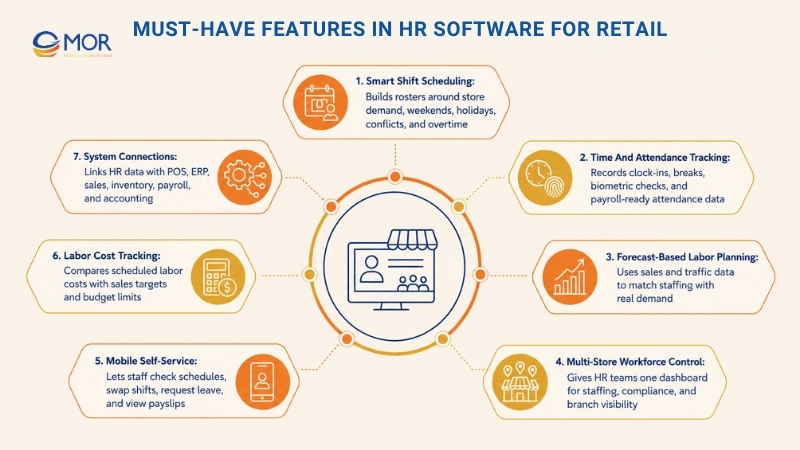
A complete HR platform can include many tools. Some systems also focus on one or a few HR jobs only. For retail businesses, the best HR software for retail should support the way stores hire, schedule, pay, and manage staff.
Retail companies have workforce needs tied to:
- Many hourly and shift-based employees
- Daily or weekly pay cycles
- Many stores or branches
- High staff turnover
- Complex labor rules
- Deskless employees and store-based teams
Retail teams should treat these tools as must-haves or strong signs of a better-fit retail workforce platform.
Tool | Why Retail Teams Need It | Common Use Case |
Smart Shift Scheduling And Rostering | Retail stores need the right number of staff during busy hours, weekends, and holidays. Too many or too few employees can raise costs or hurt service. | Build shift rosters based on demand, support shift swaps or shift bids, and flag conflicts or overtime before schedules are approved. |
Time And Attendance Tracking With Mobile Or Biometric Options | Hourly workers need to clock in and out, record breaks, prevent buddy punching, and support clock-ins through kiosks or mobile devices. | Use fingerprint clocking, biometric checks, or geofenced mobile clock-ins that work only at store locations. Send clock data into payroll. |
Forecast-Based Labor Planning | Sales and foot traffic forecasts help teams match staffing with real demand. Retail HR software can use sales data to guide labor planning. | If POS data points to higher traffic on Friday evening, the system can suggest more shifts or extra staff. |
Multi-Store Workforce Control | Retail chains run many stores, so HR teams need to view, compare, and manage staff across all locations. | Use one dashboard to review attendance, staffing levels, compliance, and policy rollout by store. |
Leave And Absence Management Linked To Schedules | In retail, one unplanned absence can leave a store short-staffed. The HR platform should connect leave approval with shift planning. | When an employee asks for a day off, the system checks coverage, suggests replacements, or warns managers about staffing gaps. |
Payroll, Wage, And Overtime Calculation | Retail payroll must handle variable hours, overtime, night or weekend rates, bonuses, and commissions. | Calculate wages, taxes, shift premiums, and connect payroll with POS or accounting tools. |
Mobile Self-Service For Staff And Managers | Many retail employees do not use desktop HR systems during work. They need fast access from phones. | Employees can check schedules, swap shifts, request leave, and view payslips. Managers can approve requests from mobile devices. |
Labor Cost Tracking And Budget Planning | Retailers need to compare real labor cost with targets, often as a share of sales. | Dashboards compare scheduled labor cost with projected sales and warn managers when costs go over budget. |
Retail Workforce Reports And Analytics | Retail leaders need HR data and store data together to guide staffing, promotions, and turnover planning. | Create reports on turnover by store, average shift hours, overtime by branch, no-shows, and labor cost against sales. |
POS, ERP, Sales, And Inventory Connections | HR data becomes more useful when labor hours connect with sales, stock, and finance data. | Use real sales data to check schedule plans and connect payroll with accounting or ERP systems. |
Key Benefits Of HR Software For Retail Businesses
Many companies use HRIS platforms to keep employee data in one place and automate daily HR work.
An HRIS works like the digital base for workforce records, HR tasks, and admin processes across the company.
In simple terms, an HRIS gives teams one central place to manage employee data and HR work. Instead of storing staff details in spreadsheets, payroll tools, and paper files, the system brings workforce data into one connected platform.
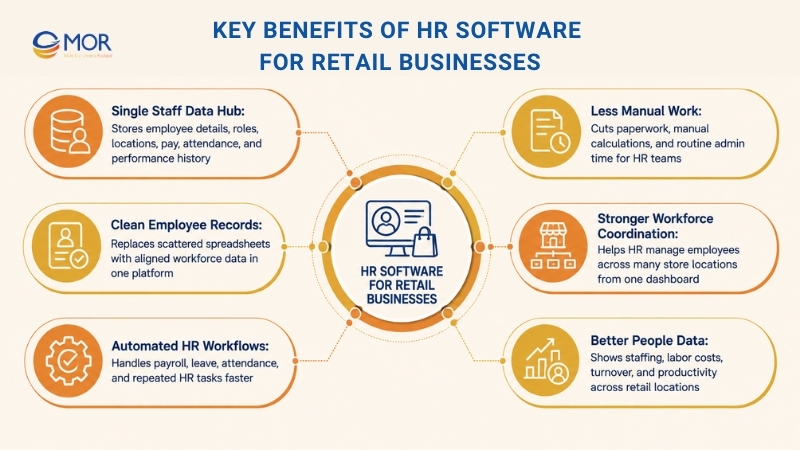
This matters a lot for retail organizations. Retail companies often manage dozens or even hundreds of stores, and each location has its own people, shifts, and daily needs. Without one shared system, HR work across stores can become slow, messy, and hard to control.
HRIS adoption helps retail teams handle these issues through better visibility, automation, and workforce coordination.
Single staff data hub
A major benefit of using HRIS is the ability to build one shared employee database. HRIS platforms keep employee data in one system, including personal details, job roles, store locations, pay structures, attendance records, and performance history.
Clean employee records
When workforce data sits in one platform, HR teams can keep records aligned and move away from scattered spreadsheets or separate systems. Research cited by Appvizer says HRIS adoption can raise HR management efficiency by up to 35% through automation and centralized data.
Automated HR workflows
Another strong benefit of HRIS platforms is HR process automation. Many retail HR tasks involve repeated admin work, including payroll processing, leave management, and attendance tracking.
Less manual work and paperwork
HRIS platforms handle many of these flows automatically, which cuts manual calculations and paper-based work. Studies from Ema show HR automation can help HR staff save around seven hours per week on admin tasks.
Stronger workforce coordination
HRIS systems also help teams coordinate workforce work across retail operations. A central dashboard lets HR teams manage employees across many store locations without using a separate system for each branch.
Better people data and reports
HRIS platforms give leaders stronger workforce analytics. Retail executives can view live data on staffing levels, labor costs, employee turnover, and workforce productivity across locations. This helps teams make better choices for workforce planning and operations.
With HR software for retail companies, retail organizations can move away from fragmented HR work and build a more data-led way to manage people, costs, and store visibility.
How To Choose The Right HR Software For Retail
Choosing HR software for retail is a major decision for retail organizations, mainly for companies that run many branches, regions, or business units.
Retail companies often manage large teams, high turnover, rotating shifts, and complex payroll rules.
These daily needs call for HR systems that can manage distributed workforces while keeping employee data accurate and safe.
Due to this level of complexity, not every HR platform fits retail operations. Some systems are made for small teams or office-based companies and may not have the tools needed for multi-branch retail work.

Retail organizations should review HR systems carefully across key points like scalability, integration, security, and workforce management tools.
The right system helps HR teams manage employees with less effort while keeping a clear view of the full retail network.
Retail organizations should focus on the following points when choosing an HR system.
Workforce Scalability
Retail organizations should choose HR systems that can grow with the business.
Retail companies often expand through new stores, new regions, or larger seasonal teams during holidays and sales campaigns.
When the business grows, the HR system must manage more employee records and HR tasks without slowing down.
A scalable HR system should support complex company structures, including branch networks, different business units, and regional workforce admin. The platform should also manage rising workforce data volume without performance issues.
Scalable HR systems help HR teams manage people operations as the company grows, so the business does not need to replace HR technology after every growth stage.
Multi-Location And Multi-Branch Support
Retail companies usually run many stores, distribution centers, and operating units.
For that reason, the HR system should manage employees across many locations from one central platform.
The system should let companies assign employees to exact stores or operating units, so HR teams can track workforce spread across branches. It should also support branch-level HR work, giving store managers or regional leaders access to the workforce data they need.
The system should also include workforce reports by store or region. This helps retail leaders watch staffing levels, labor costs, and employee performance across the whole retail network.
Data Security And Compliance Controls
Retail organizations must also check whether their HR system can protect sensitive employee data.
HR systems store important workforce data, including personal employee details, salary information, bank data, and tax records. For this reason, the platform needs strong security controls to keep this information safe.
A trusted HR software for retail should include security tools that protect employee data and control user access.
- Data encryption to protect sensitive staff information
- Role-based access control to limit system access to approved users
- Audit logs that record system actions and data changes
Retail organizations should also check whether the HR platform follows global security standards like ISO 27001.
Strong HRIS security matters because HR systems often store the most sensitive people data in the business.
Payroll And Workforce System Integration
Retail organizations should also select HR systems that connect well with other workforce tools.
Many HR teams use several operating systems, including:
- attendance tracking tools
- payroll software
- shift scheduling platforms
- accounting systems
When these systems run alone, HR teams often have to match employee data across tools by hand. This adds more admin work and raises the chance of payroll errors.
Good HRIS integration lets attendance systems, retail payroll software, and scheduling tools sync employee data on their own, which lowers manual checking across store locations.
This connection cuts repeated data entry and keeps workforce data aligned across operating systems.
Workforce Analytics And Reporting
Workforce visibility is another key point retail organizations should review when choosing an HR system.
Retail leaders need live data on workforce numbers, including labor costs, turnover, attendance patterns, and employee productivity across store locations.
A modern HR system should include analytics dashboards and reporting tools that let managers track workforce results across many locations.
If your business works with an hr reporting software provider for retail, the system should help HR leaders spot workforce trends, check staffing plans, and make data-led choices that improve daily operations.
Cloud-Based HR Access
Retail organizations should also choose HR systems built with cloud-based access.
Cloud HR platforms let HR teams and store managers open employee data from any location, which matters for companies with stores spread across different areas.
A cloud HR system often gives teams several benefits, including:
- centralized employee data storage
- automatic software updates
- stable system performance
- flexible scaling when workforce size grows
Cloud setup helps retail companies manage HR tasks with less dependence on on-site systems that can be harder to maintain or expand.
When retail organizations adopt a cloud HR system, they gain a more accessible and scalable way to manage workforce operations across branches and locations.
Best Practices For Using HR Software For Retail Workforce Management
HR software for retail can help retail organizations build stronger workforce control, but the system alone will not fix every process. Retail companies also need clear operating practices that connect HR workflows with the tools inside the HR platform.
When HR workflows match the system’s tools, retail teams can improve daily operations, keep better visibility across locations, and manage HR work in a consistent way across the store network.
These practices can help large retail organizations manage their people more effectively with HRIS platforms.
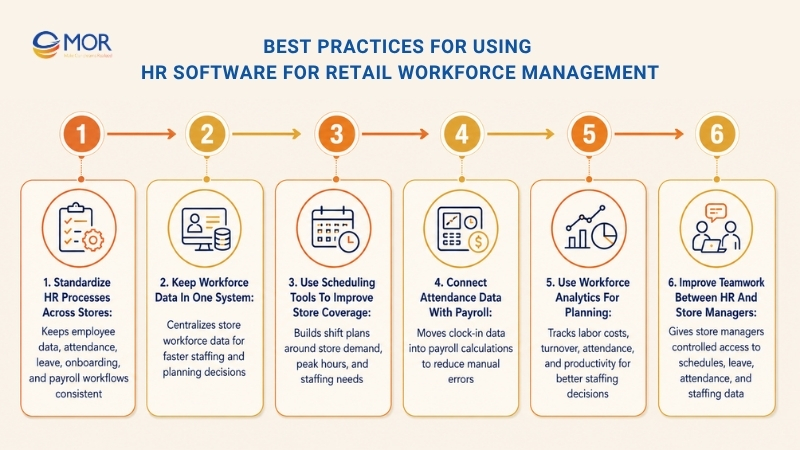
Standardize HR Processes Across Stores
One of the hardest parts of large retail HR work is keeping each store consistent. When every store handles HR tasks in its own way, people operations can quickly become uneven.
Retail organizations should use their HRIS platform to set the same HR steps across all branches. This includes standard workflows for employee data, attendance tracking, leave requests, onboarding, and payroll admin.
When companies set standard processes inside the HRIS system, all locations can follow the same rules and policies. This supports compliance with company policies and labor rules, while lowering admin errors and differences across the retail network.
Keep Workforce Data In One System
Retail organizations should use HRIS platforms to build one employee database that gathers workforce data from every store location.
Centralized workforce data helps HR leaders and retail executives review staffing levels, employee spread, attendance trends, and workforce results from one platform.
Instead of collecting data from separate systems or store spreadsheets, managers can open live workforce data through central dashboards.
Retail organizations should set up HRIS dashboards so HR teams and leadership can track key workforce numbers across regions, stores, or operating units.
This shared visibility helps managers make faster and better choices, mainly when handling staff shortages, schedule changes, or workforce planning issues.
Use Scheduling Tools To Improve Store Coverage
Retail operations often need flexible staffing because workforce demand changes with store traffic, promotions, and seasonal sales periods.
HR software for retail with scheduling tools helps retail organizations manage shift-based teams with less manual work. Managers can build clear shift schedules, assign staff to shifts, and adjust staffing based on store demand.
Automated scheduling also helps support company rules for working hours and overtime, while lowering the chance of scheduling conflicts.
When retail organizations use HRIS scheduling tools, they can keep enough staff during peak hours, cut scheduling mistakes, and improve workforce planning across store locations.
Connect Attendance Data With Payroll
Retail payroll often depends on accurate attendance data because many retail employees are paid through hourly wages, overtime, and performance incentives.
To keep payroll accurate, retail organizations should connect attendance tracking systems with their HRIS platform.
Attendance tools like biometric devices, mobile clock-in apps, or GPS-based attendance systems can capture employee working hours automatically. Once linked with HRIS platforms, this data can move straight into payroll calculations.
This connection removes manual data entry and lowers payroll error risk. It also helps HR teams finish payroll faster while keeping pay records accurate.
Use Workforce Analytics For Planning
Modern HRIS platforms include analytics and reporting tools that help companies review workforce performance and operating trends.
Retail companies should use these tools often to monitor labor costs, employee turnover, attendance patterns, and workforce productivity across locations.
HR leaders can use this data to find weak spots in operations, spot staffing gaps, or review workforce performance trends.
When retail organizations review workforce analytics on a regular basis, they can improve workforce planning, adjust labor allocation, and create staff retention actions that support better store operations.
Improve Teamwork Between HR And Store Managers
Strong retail workforce management depends on close work between central HR teams and store-level managers.
Store managers often manage daily workforce tasks, including scheduling, attendance checks, and shift coordination. HRIS platforms can support this teamwork through controlled system access for store managers.
With the right permissions, store managers can manage schedules, approve leave requests, check attendance records, and review staff availability inside the HRIS system. When paired with hr recruitment software for retail, this also helps store managers and HR teams handle hiring requests, candidate handoffs, and staffing needs faster.
Better teamwork between HR and store leaders keeps workforce management consistent across locations while helping store managers respond to daily business needs more quickly.
How MOR Software Helps Businesses Implement Odoo For Retail HR And Operations
Choosing Odoo as HR software for retail is a smart move when your company needs more than a basic HR tool. Retail teams often need employee records, shift data, approvals, payroll-related workflows, CRM, accounting, inventory, and daily operations to work in one connected system. That is where Odoo can bring real value.
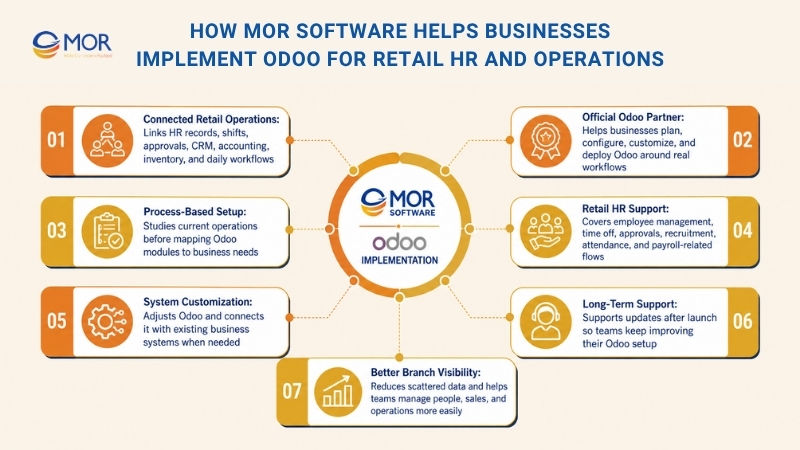
MOR Software is an official Odoo development partner that helps businesses plan, configure, customize, and deploy Odoo based on real workflows. Instead of forcing teams to change how they work overnight, MOR Software studies current processes first, then maps Odoo manufacturing modules to each business need.
For retail companies, this can include employee management, time off, approvals, recruitment, attendance data, payroll-related flows, accounting, CRM, inventory, and store operations. When needed, MOR Software can also customize Odoo, connect it with existing systems, and support long-term updates after launch.
This makes Odoo a practical choice for growing retailers that want HR software to connect with wider business operations. With the right setup, teams can cut scattered data, improve branch visibility, and manage people, sales, and operations with fewer manual steps.
Conclusion
Finding HR software for retail becomes easier when you know what your stores need each day. The right system should help you manage staff data, shifts, payroll, hiring, leave, reports, and branch operations without adding more admin work. For retailers that want HR to connect with wider business processes, Odoo is a strong option. MOR Software can help you plan, configure, customize, and deploy Odoo for real retail workflows.
Contact us today to discuss your retail HR requirements and find the best Odoo solution for your business.
"Solutions Director at MOR Software, has extensive expertise in software development and management. He leads innovative projects and provides strategic solutions to enhance business operations, helping clients achieve digital transformation goals."
Pham Huu Canh


Solutions Director
MOR SOFTWARE
Frequently Asked Questions (FAQs)
What is HR software for retail?
HR software for retail is a system that helps retail teams manage employee records, shifts, attendance, payroll, leave, onboarding, and store-level workforce data in one place. It is built for teams with hourly workers, rotating shifts, and staff spread across many store locations.
Why do retail businesses need HR software?
Retail businesses often deal with changing schedules, high turnover, seasonal hiring, payroll errors, and staff across many branches. HR software gives managers a clearer view of who is working, who is off, and where staffing gaps may happen.
What functions should HR Software for Retail include?
It should include shift scheduling, time and attendance tracking, leave management, payroll support, employee self-service, store-level reporting, labor cost tracking, and mobile access. For retail chains, multi-location workforce management is also a must-have.
How does retail HR software improve shift scheduling?
Retail HR software helps managers plan shifts based on store hours, busy periods, employee availability, and labor budgets. It can also flag schedule conflicts, overtime risks, and staffing gaps before they affect daily store operations.
Can HR software track attendance for store employees?
Yes. Many platforms support mobile clock-ins, biometric attendance, kiosk check-ins, or GPS-based attendance. This helps retail teams track working hours, breaks, lateness, and absences with fewer manual records.
Is HR Software for Retail useful for small stores?
Yes. Small stores can use it to manage staff records, shifts, leave requests, and payroll data with less paperwork. A small team may not need a full enterprise system, but a simple HR tool can still save time and cut errors.
How does HR software support payroll in retail?
Retail payroll often includes hourly wages, overtime, shift premiums, bonuses, commissions, and part-time pay. HR software connects attendance and scheduling data with payroll, so pay runs become more accurate and easier to check.
Can retail employees use HR software on mobile phones?
Yes. Mobile access is useful because many retail employees do not work at desks. They can check schedules, request leave, swap shifts, view payslips, update details, and receive store updates from their phones.
How does retail HR software help reduce employee turnover?
It creates a better work experience through clearer schedules, faster onboarding, fairer leave handling, and easier communication. Managers also get data on attendance, performance, and staff patterns, which helps them spot problems earlier.
How should a business choose the right HR software for retail?
Start with the real store problems. Check whether the system supports shift work, mobile access, payroll needs, multi-location teams, compliance, reporting, and future growth. The right choice should match daily store workflows, not only head office needs.
Share


Make Our-Dreams Realized


© 2023 . MOR Software. All Rights Reserved
Sitemap
Privacy Policy
Terms of Use

Rate this article
0
over 5.0 based on 0 reviews
Your rating on this news:
Name
*Email
*Write your comment
*Send your comment
1