


Manufacturing Inventory Management Software: A Complete Business Guide
Managing stock across production, warehouses, and suppliers often leads to delays, errors, and rising costs. The right manufacturing inventory management software helps you stay in control with real-time data and smarter planning. In this MOR Software’s guide, we’ll explore the best tools, key features, and proven ways to improve your inventory operations.
Top Manufacturing Inventory Management Software Options In 2026
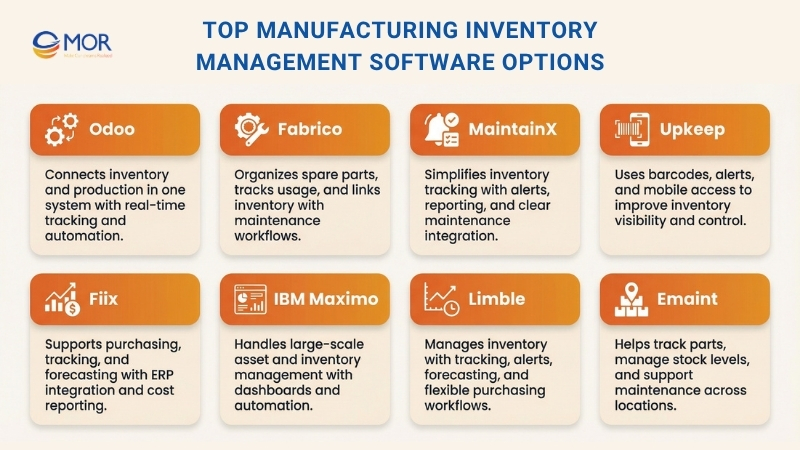
If you are searching for reliable manufacturing inventory management software, you are in the right place. We’ve gathered a shortlist of strong options to help you decide with confidence.
Odoo
Odoo gives manufacturers a unified system that connects inventory and production. It brings together warehouse tasks, replenishment, traceability, and manufacturing orders in one place. This makes it a solid choice for teams that need more than simple stock tracking, especially when planning and shop floor work must stay in sync with inventory data. Many teams consider it among the best manufacturing inventory software because of this flexibility.
The platform helps teams avoid stock shortages, gain clearer visibility, and move faster across receiving, storage, picking, and production steps. It supports barcode, QR code, and GS1 workflows, while also providing real-time reports on stock movements and production activity. With built-in forecasting, replenishment alerts, and automated purchasing triggers, it acts like a full production inventory system that helps teams stay ahead of delays.
Some examples of how Odoo’s software works in practice include:
- Barcode-enabled warehouse operations: Teams manage receipts, picking, and inventory updates with barcode scanning, helping speed up daily work and cut down manual mistakes.
- Clear product traceability: The system delivers real-time reports on stock, inventory movements, and production, making it easier to follow materials and finished goods across operations.
- Automated replenishment and forecasting: Procurement teams receive low-stock alerts, review forecasts, and create requests for quotation automatically when stock drops below set levels.
- Manufacturing order planning and shop floor control: The Odoo manufacturing module allows teams to plan and process production orders, while the work center panel supports real-time activity on the shop floor.
Key Features
- Barcode, QR code, and GS1 compatibility
- Real-time inventory visibility and traceability
- Replenishment alerts with demand forecasting
- Multi-warehouse and smart routing support
- Inventory valuation tracking methods
- Manufacturing planning order and work center management
- Fully connected inventory and production workflows
Price
Free trial: Odoo provides a free trial, and its One App Free plan starts at $0 for one app with unlimited users on Odoo Online, making it a strong example of free manufacturing software for small business.
- One App Free: $0
- Standard: US$16.90 per user/month with annual billing, or US$21.10 per user/month with monthly billing
- Custom: Contact Odoo for pricing, including multi-company setup, custom development, API access, and deployment on Odoo Online, Odoo.sh, or on-premise
Fabrico
Fabrico provides a structured system for managing spare parts within manufacturing environments. It helps teams organize storage locations, track usage, and maintain clear visibility over materials and spare components. This platform works well as a tool tracking software for manufacturing, especially for teams that rely heavily on maintenance operations.
A key strength of this solution is how it links inventory records with everyday maintenance tasks. Technicians can quickly find the parts they need, log usage instantly, and receive alerts when stock drops below set levels. This improves coordination, reduces delays, and supports stable production output. It also aligns well with tool inventory management software needs in maintenance-heavy environments.
The platform also improves cost control and reporting. When connected to accounting systems, stock movements are reflected automatically in financial data. This helps teams monitor expenses, manage stock levels, and keep a clear view of operational costs without switching tools.
Key Features
- Delivery and storage of spare parts and materials
- Spare parts tracking during maintenance tasks
- Low stock notifications
- Integration with accounting systems
- QR code scanning and mobile access
- Cloud-based platform
Price
Free trial: Available with full access to features for evaluation purposes.
- Light: Contact for pricing
- Full: Contact for pricing
- Enterprise: Custom pricing with unlimited users, dedicated support, and tailored features
Key Features
- Delivery and storage of spare parts and materials
- Writing off spare parts by the responsible technician
- Notification of minimum quantities
- Integration with accounting software
- QR code scanning and a mobile app
- Cloud-based
Price
Free trial: A free trial is available for all users who want to experience the product with full access to all features and functionalities.
- Light: Contact us for a quote
- Full: Contact us for a quote
- Enterprise: Custom pricing, including unlimited users and data, plus a dedicated account manager, tailored features, staff training, and custom SLAs
MaintainX
MaintainX delivers a complete system for managing spare parts and inventory in manufacturing settings. It helps teams handle stock smoothly, with tools that support tracking, reporting, and maintenance workflows. Many teams use it as their go-to inventory tracking software for manufacturing due to its simplicity and clarity.
Users can rely on low stock alerts to keep inventory levels under control. When stock reaches a set threshold, the system allows you to create purchase orders quickly. It also helps maintenance teams calculate reorder points, so materials arrive at the right time.
The platform also includes detailed inventory reporting tools. These help you track costs and understand how materials are used across operations. Each user can easily see where parts are consumed most often, helping teams plan budgets and manage stock more effectively.
When a part is removed from storage, it can be scanned using a QR code or barcode scanner. This updates the system instantly, showing that the item is now in use within your facility. It helps maintenance teams keep accurate records without extra manual work.
MaintainX also includes a searchable history of all parts. Every change is recorded, creating a full digital audit trail. Users can add notes or images to explain updates, making it easier for teams to understand past decisions and maintain clear records.
Key Features
- Low inventory alerts
- Full inventory reporting
- QR and barcode scanning
- Searchable parts history
Price
Free trial: The Basic plan costs $0 per user/month and is free for lifetime use. It works well for small teams that need simple work order tracking.
- Essential: $21 per user/month
- Premium: $59 per user/month
- Enterprise: Custom pricing based on organizational needs
UpKeep
UpKeep also delivers manufacturing inventory management software designed for maintenance teams, starting with barcode support to keep documentation consistent. You can generate a barcode for any item in your inventory with a single click. This allows technicians to instantly fill in work orders when they scan a part’s unique code, making it a practical inventory control software for manufacturing.
Reducing downtime is another key function of this platform. It works when you assign a minimum stock level to each item. Your maintenance team will receive alerts once stock reaches that level or begins to run low.
Another advantage of this system is the visibility it provides. When inventory counts are linked to work orders, they update automatically. This makes it easy to check both the location and quantity of parts in stock at any time. You can avoid ordering too much and spending extra on urgent deliveries. Purchase orders can also be created quickly as PDFs with just a few steps.
If you need deeper business insights, the platform supports that as well. Through data visualizations, you can track how much different parts have cost over time. It also helps you spot patterns in work order expenses, which can support better cost control.
Finally, maintenance teams can access the system from anywhere and review past diagnostic records when needed. With this inventory management system for manufacturers, daily operations become easier to manage and more responsive.
Key Features
- Consistent documentation with barcodes
- Accurate part quantities with minimum stock levels
- Automatically updated inventory counts
- Simplified purchase orders through alerts
- Data visualizations for business insights
- Access to parts information from any location
- Mobile application
Price
Free trial: The most popular Business Plus package can be accessed for free, with custom pricing available upon request.
- Lite: $20 per user/month
- Starter: $45 per user/month
- Professional: $75 per user/month
Fiix
Fiix provides manufacturing inventory management software that helps maintenance teams handle purchasing decisions with greater confidence.
For example, you can make purchasing easier by setting minimum stock levels. The system also allows data sharing between your CMMS and ERP platforms. In addition, vendor details are stored and organized in one place.
Another way this solution supports operations is through better inventory organization and usage. You can trust that stock levels remain accurate. The correct spare part can be located quickly, and items can be shared across different facilities when needed.
The system also supports tracking and reporting for spare parts, including costs and usage. This helps organizations apply inventory optimization tools for manufacturing companies, allowing faster and more informed decisions. You can search for parts and supplier data easily while applying the FIFO principle.
Data can also be explored through visual dashboards. The parts forecasting report within the analytics panel helps you decide what to order and when. It also shows the quantities required for future demand.
Key Features
- Inventory purchasing
- Inventory organization and usage
- Inventory tracking and reporting
Price
Free trial: Fiix provides a trial valued at $0.
- Basic: $45 per user/month, with one month free on annual billing
- Professional: $75 per user/month, with one month free on annual billing
- Enterprise: Custom pricing available upon request
>>> A manufacturing CRM helps align sales and production for smoother results. Let's explore the best options for 2026 with MOR Software.
IBM Maximo
IBM Maximo provides manufacturing inventory management software designed for large-scale operations, with role-based dashboards that can be configured to match different user needs. These dashboards give quick access to business applications and next actions. At the same time, automated approval processes help reduce repetitive manual tasks. This solution supports industrial inventory management, helping organizations cut downtime, lower costs, and extend the life of critical assets while improving asset control.
Standard industry data models and workflows also help speed up operations while keeping asset management processes consistent. With this unified setup, teams can adjust workspaces, work plans, and add-ons to access key information about tasks without delay.
Key Features
- Configurable role-based dashboards
- Industry data models and workflows
- Unified asset management processes
- Financial and performance analytics
- Improved maintenance workflows
Price
- Free trial: IBM Maximo does not provide a free trial option
- Essentials: Includes maintenance and inspection capabilities
- Standard: Pricing available upon request
- Premium: Pricing available upon request
- Software only: Pricing available upon request
Limble
Limble provides a manufacturing inventory solution that helps maintenance teams manage stock with ease while supporting tracking, reporting, forecasting, and custom purchasing workflows. These functions help teams stay organized and respond quickly to changes in inventory.
When managing inventory, the platform allows teams to check available spare parts, their locations, and when quantities may run out. This is supported through barcode scanning for quick access. Teams also receive instant push and email alerts whenever stock changes, whether items are running low or newly added. This makes it a practical small business manufacturing inventory software for teams that need real-time updates.
With tracking, reporting, and forecasting features, organizations can improve operations and get more value from their assets. Real-time reports and automatic tracking of parts usage show which materials are used and their costs. Forecasting tools also help identify future needs and track unused stock.
The system also supports purchasing workflows that help avoid excess or outdated inventory. Custom workflows allow purchase orders to be sent directly to suppliers, helping teams manage procurement more effectively.
Key Features
- Inventory organization and management
- Tracking, reporting, and forecasting
- Barcode lookup functionality
- Push and email notifications
- Custom purchasing workflows
Price
Free trial: The Basic plan is free and includes limited features.
- Standard: $28 per user/month, or $23 per user/month with annual billing
- Premium: $69 per user/month, or $59 per user/month with annual billing
- Enterprise: Custom pricing available upon request
eMaint
eMaint is the final option in this list, built for teams that need small manufacturing inventory management software to handle spare parts and maintenance tasks more efficiently. It helps organizations save time when locating parts, cut down urgent shipping costs, simplify issuing processes, remove duplicate data entry, and gain stronger control over inventory.
Tracking spare parts is straightforward, since you can move through the platform to find what your team needs. After locating the item, you can assign it to a work order and complete the maintenance task. When all required parts are available in your system, you gain better confidence and control during maintenance situations.
Organizations can also adjust inventory levels to avoid shortages and overspending. You can define minimum stock thresholds so items are replenished before running out. The system also allows you to request and share spare parts across different locations. This manufacturing inventory software platform gives you a full view of inventory reports across the entire organization.
Key Features
- Simple tracking and navigation of spare parts
- Assigning spare parts to work orders
- Reorder lists for inventory control
- Dashboards for slow-moving inventory
- Simplified purchasing processes
- Sharing spare parts across multiple sites
- Mobile application for organization-wide access
Price
Free trial: eMaint provides three main pricing plans but does not include a free trial.
- Team: Pricing starts at $69 per user/month
- Professional: Pricing starts at $85 per user/month
- Enterprise: Custom quotes are available upon request
Side By Side Comparison Of Top Manufacturing Inventory Management Software
This quick comparison highlights how each manufacturing inventory solution fits different business needs. It also helps you see which platform aligns best with your operations and budget, especially if you are searching for the best manufacturing software.
Software | Best For | Core Strength | Key Capabilities | Pricing Snapshot |
Odoo | Manufacturers that need a unified system | Inventory and production combined in one platform | Real-time tracking, BoM, MRP, barcode workflows, demand forecasting | Free plan available, paid from around $16.90/user/month |
Fabrico | Operations with heavy maintenance needs | Spare parts inventory control | Maintenance inventory tracking, stock alerts, accounting integration, QR scanning | Free trial, custom pricing |
MaintainX | Teams focused on maintenance visibility | Clear and simple inventory tracking | Low stock alerts, reporting tools, QR and barcode scanning, audit history | Free plan, paid from $21/user/month |
UpKeep | Maintenance teams working on mobile | Easy tracking and quick updates | Barcode tracking, work order updates, alerts, operational insights | From $20/user/month |
Fiix | Organizations using CMMS systems | Inventory linked with maintenance workflows | Inventory tracking, purchasing tools, reporting, ERP integration | From $45/user/month |
IBM Maximo | Large enterprises with complex assets | Scalable asset and inventory control | Dashboards, workflows, analytics, maintenance planning | Custom pricing |
Limble | Mid-sized teams needing fast setup | Simple tracking with alerts | Reporting, forecasting, barcode lookup, notifications | Free plan, paid from $28/user/month |
eMaint | Multi-location operations | Spare parts and work order integration | Inventory tracking, reporting, multi-site support, mobile access | From $69/user/month |
How Does Manufacturing Inventory Management Software Work?
When inventory data spreads across many locations, the main issue is not tracking quantities but keeping everything consistent as items move between teams, systems, and fulfillment paths. Transfers, returns, store fulfillment, and cross-channel orders add complexity that simple transaction updates cannot manage well.
In retail and eCommerce settings, this approach grows into what many call inventory intelligence. Based on large-scale deployments, Bar Code India (BCI) designs systems that focus on maintaining continuity as stock moves between distribution centers, warehouses, and stores. The goal is to support manufacturing inventory tracking even when movement patterns are not linear, such as store-to-store transfers, online returns, or fulfillment from different locations.
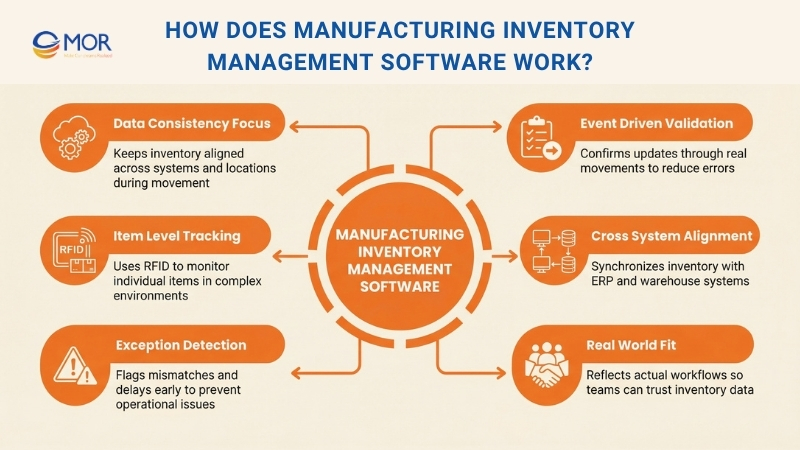
To answer how an inventory management system for manufacturers works, the process usually includes the following steps:
- Event-driven stock validation: Inventory updates are confirmed through real movement events instead of assumptions, which helps reduce errors during high-volume operations.
- Item-level identification where required: RFID workflows allow each unit to be tracked in complex environments, giving better control over fast-moving or high-value items.
- Cross-system alignment: Inventory data stays consistent across warehouse systems, ERP platforms, and sales channels, so all teams work from the same source of truth.
- Exception surfacing: Unusual movements, delays, or mismatches are detected early, so teams can fix issues before they affect service or costs.
In real operations, this software works best when it reflects how your business actually runs, so your team can trust the data without second-guessing it.
Top 10 Features Of Manufacturing Inventory Management Software You Should Check
Not every manufacturing inventory management software includes the capabilities your business requires. We’ve outlined ten key features you should look for before choosing a manufacturing inventory solution.
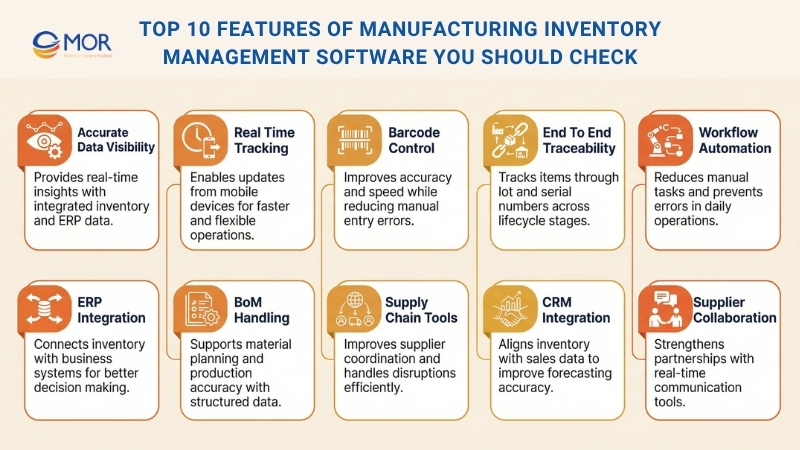
Accurate Inventory Data And Visibility
The core role of any Odoo manufacturing inventory software is to deliver accurate, real-time data about your stock. You should choose a system that provides detailed inventory insights, including ABC analysis, real-time location tracking, and transaction reporting. It is important to note that many systems claim accuracy but still operate in isolation rather than within an integrated ERP environment. This can lead to mismatches and errors because inventory is not aligned with other business functions. A material inventory management software that connects across departments will give you more reliable and precise data.
Real-Time Tracking Across Devices
The ability to monitor inventory from mobile devices or tablets is now one of the most effective ways to keep your data current. When your team can record updates directly from a device, they can manage inventory faster and from any location, saving time and improving productivity. A system with real-time tracking also helps reduce the need for extra hardware used for data entry and storage. Mobile access allows remote data visibility and lowers the risk of losing important information, making it a strong example of manufacturing inventory tracking software.
Barcode-Based Inventory Control
Manufacturing inventory management software such as Rootstock supports barcode scanning to record stock movements quickly and accurately. This helps your business cut costs, save time, improve workflow efficiency, and lower overhead by removing uncertainty. Manual data entry takes time and often leads to errors, while barcode scanning is fast, dependable, and requires minimal training. These codes can be used not only for products but also for tracking pricing, shipments, equipment, and even verifying authenticity or handling returns. With accurate, real-time data from barcode tracking, you can avoid ordering excess stock and reduce holding costs. Extra inventory ties up capital and takes up valuable space that could be used for more profitable activities. This approach helps you save time, reduce effort, and locate items or equipment without confusion.
End-To-End Traceability With Lot And Serial Tracking
Traceability allows your business to monitor the status and location of every item in your inventory. This includes tracking one step back to where the item was sourced and one step forward to the customer who received it. With this level of visibility, you save time, cost, and effort since all information is stored digitally instead of in physical records. With lot tracking and serial number tracking, Rootstock gives manufacturers the tools needed to take full control of their inventory. You can explore its capabilities further through a 60-second demo to see how traceability supports your operations.
Workflow Automation Capabilities
Automation plays a key role in any effective manufacturing inventory management software. When routine workflows are automated, the risk of human error is reduced, helping avoid incorrect reports, stock shortages, delayed shipments, and lost customers. It also saves time and cost when collecting, organizing, and analyzing inventory data. At the same time, it allows your accounting team to focus on more valuable tasks instead of manual data handling. You can view an on-demand demo to understand how automation can improve inventory processes and deliver measurable results.
ERP Integration Capabilities
Manufacturing inventory software delivers better results when connected to an ERP system that links all business functions. Many companies already use ERP platforms but still rely on separate tools for inventory control. When these systems are integrated, you gain better visibility and a clearer understanding of operations across departments. This allows you to make inventory decisions based on real sales data, supply chain updates, and overall business performance.
Bill Of Materials (BoM) Handling
Effective inventory management depends on a clear understanding of the materials required to produce your goods. A well-managed Bill of Materials (BoM) helps you plan purchases, estimate costs accurately, and avoid delays in production. It also allows you to respond quickly to supply issues, since materials can be replaced with alternatives and updates can be applied across product lines automatically. This capability is essential in any manufacturing inventory management software that supports production planning and material control.
Supply Chain Coordination Tools
Supply chain capabilities are a key part of any manufacturing inventory solution. When you store vendor details and purchase order history in one place, you can rank suppliers more effectively and negotiate better terms. Clear visibility across the supply chain also helps you respond quickly to short shipments, picking errors, delivery delays, and canceled orders. This allows your operations to continue smoothly without interruptions in production.
CRM Integration For Sales Alignment
A manufacturing inventory system that connects with a CRM can greatly support production planning and stock control. Sales data helps improve demand forecasts and reduces extra costs caused by holding too much inventory. It also allows lot and serial numbers to be tracked through the full sales fulfillment process, giving you complete visibility. You can explore a free demo to see how Rootstock Inventory Management connects with the Salesforce platform and supports end-to-end operations.
Supplier Collaboration Support
Managing supplier relationships requires a clear and structured approach to get the best results. When your business strategy aligns with the right partners, both sides can gain value through regular collaboration. Manufacturing inventory management software that includes real-time communication tools like Slack and shared portals helps build stronger, long-term partnerships. These tools support faster coordination and help create more stable and profitable supplier relationships.
Business Benefits Of Manufacturing Inventory Management Software
Manufacturing inventory management software helps improve how your warehouse and operations run. It simplifies traditional processes and allows manufacturing companies that manage inventory to work faster and with better control.
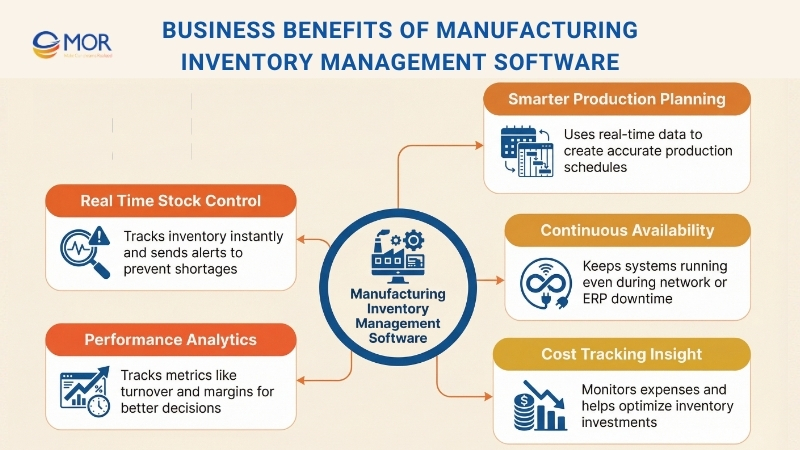
Real-Time Stock Control
Real-time tracking gives you instant visibility into stock levels across all your locations. You can follow inventory movements as they occur, with stock quantities updating automatically after each transaction.
The system also sends alerts when inventory runs low, so you can restock before production is affected. This level of visibility, combined with tools like barcode scanning and lot tracking, removes manual counting errors and improves overall accuracy.
Smarter Production Planning
Planning your production schedule becomes easier with manufacturing inventory software. The platform uses real-time data on material availability, machine capacity, and workforce resources to create accurate production timelines.
Handling production and assembly orders is essential in manufacturing resource planning systems, as it supports smooth integration and flexibility for growing businesses. In addition, dynamic scheduling tools adjust workflows based on current conditions, helping you respond quickly to unexpected changes. Many teams also see this as part of the best project management software for manufacturing when planning complex operations.
For better control, advanced planning tools support drag-and-drop scheduling through calendar views and Gantt charts, giving you a clear and visual way to manage production timelines.
Continuous System Availability
Continuous availability is an important capability for manufacturers, helping your operations stay active even during unexpected issues like network failures or ERP downtime. This approach combines high availability with disaster recovery to provide constant access to your critical systems, supporting operations 24/7/365.
The platform uses a structure that includes primary nodes, replica nodes, data nodes, and witness nodes to keep data flowing without interruption. Your team can continue working with replicated data even when ERP connections are down, and synchronization resumes automatically once the connection returns. This setup keeps data accurate and allows supply chain activities to continue smoothly, even in remote or difficult conditions.
Cost Control And Performance Tracking
Manufacturing inventory management software gives you the tools to manage and monitor costs more effectively. Detailed cost tracking provides clear visibility into inventory investments and storage expenses. The system calculates real production costs based on material usage, labor time, and overhead, giving you a full view of your spending.
With access to historical cost data, you can study patterns and identify ways to lower expenses. Advanced analytics track important metrics such as inventory turnover and holding costs, helping you maintain the right balance between stock levels and shortage risks. The platform also monitors profit margins by product line, supporting better financial decisions. Built-in reports help you compare different inventory strategies and choose the best order quantities and reorder points.
What To Consider Before Implementing Manufacturing Inventory Management Software
Rolling out a new manufacturing inventory management software requires careful preparation. You should review key factors to make sure the implementation runs smoothly and supports your long-term goals as an inventory management solution for manufacturing.
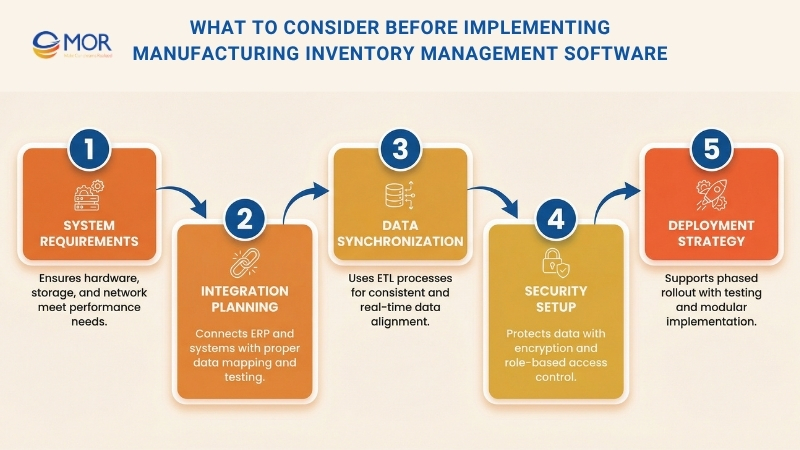
System Requirements
First, you need to confirm that your hardware and network setup can support the system properly.
This includes:
- Memory: Minimum 16GB RAM
- Processing Power: Quad-core processors running at 2.5GHz or higher
- Storage: At least 500GB of available space
Your network setup should also meet these requirements:
- Server Infrastructure: Dedicated servers with backup power systems for stability
- Network Connectivity: At least 100Mbps for reliable data transfer
- Remote Access: Secure VPN access for off-site operations
- Data Backup: Strong backup systems with daily automated backups
- Operating System: Compatible systems such as Windows Server 2016 or newer
- Security: SSL certificates for secure data encryption
- Mobile Support: Compatibility with mobile devices used in warehouse scanning
Integration With Existing Systems
The platform should integrate smoothly with your ERP, accounting tools, and shop floor systems. This process often starts with a full review of your current setup to identify any compatibility gaps. Proper database mapping is important to keep data flowing correctly between systems, and custom connectors may be required when systems do not match directly.
Clear communication with suppliers and integration across supply chain tools also plays an important role. This helps you keep materials available and respond quickly to disruptions.
Many systems use ETL (Extract, Transform, Load) processes to align data formats between platforms. Real-time synchronization allows updates to appear instantly across all connected systems, giving you a single and accurate view of your data. Modern integration setups often support both cloud and on-premise environments, giving you flexibility in how you deploy the system.
Security also matters. Encrypted connections and role-based access control help protect data during transfers. The integration structure should include error-handling processes to keep systems stable, while regular monitoring helps avoid data bottlenecks and downtime.
Before going live, you should run full integration tests. This helps confirm compatibility and reduces risks. Many systems use a modular approach, so you can roll out core functions first and then add more features as your team becomes familiar with the platform.
Best Practices When Using Manufacturing Inventory Management Software
Getting the most value from manufacturing inventory management software requires a clear and planned approach. You need the right steps to improve ROI and make the transition smooth, especially when choosing the best manufacturing software for small business.
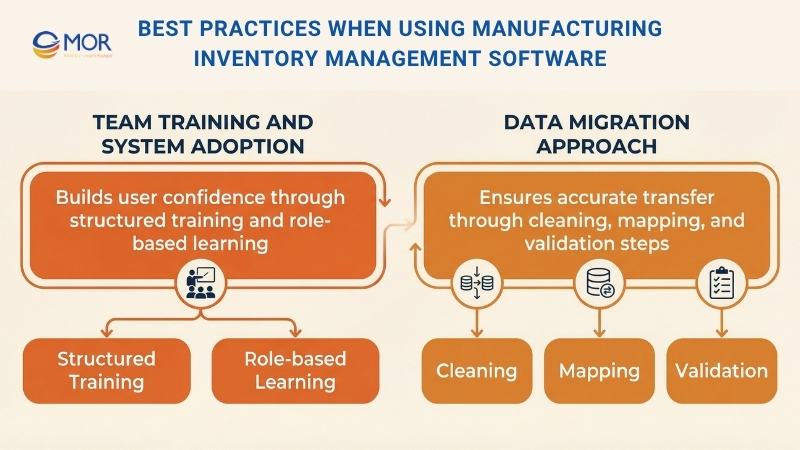
Team Training And System Adoption
User adoption is the foundation of a successful rollout, and it starts with a well-structured training program that gives your team hands-on experience with the platform’s main functions.
- Start with the basics, guiding your team through simple navigation and daily tasks. Then move to reporting tools, helping them create and understand the data they need. Troubleshooting should also be included, so your team can solve common issues without depending too much on IT support.
- Adjust the training based on roles and departments to make it more effective. Warehouse staff, for example, need detailed training on scanning processes, while procurement teams should focus on creating and managing purchase orders.
- Select key team members in each department to act as internal champions. These individuals can support others, share knowledge, and create a more collaborative learning environment.
- Before launching the system, run User Acceptance Testing (UAT) in a test environment. This helps you find and fix gaps before they affect real operations. Regular feedback sessions also help teams share challenges and improve processes over time.
- Track performance indicators such as system logs, completed transactions, and error reduction rates. These metrics help you measure how well users are adapting and show where extra training or support may be needed.
Data Migration Approach
A successful data migration is essential for a smooth transition and reliable record management. You can follow a clear three-step process to move your data into the new system with confidence.
- Data Cleaning: The first step focuses on preparing clean and accurate data. You should remove duplicate records, standardize product codes across all systems, and verify past transaction data. This careful process helps improve the accuracy of your inventory values and usage patterns, giving you a solid base for reporting and analysis in the new platform.
- Mapping: The next step is to match data fields from your old system, including tools like the best inventory management software for retail store, to the new one. This process keeps important details such as lot numbers, serial tracking, and supplier information intact. For more complex cases, custom scripts can help maintain relationships between Bill of Materials (BoM), work orders, and inventory locations. You should also run parallel testing to compare both systems and identify any differences before completing the migration.
- Delta Migration: The final step focuses on capturing all new transactions during the transition period so no data is lost. Automated validation tools help check data completeness and quickly flag any issues. To reduce disruption, you should plan your migration timeline carefully, avoid peak production periods, and schedule major transfers during planned downtime.
MOR Software Delivers Odoo Implementation That Fits Real Manufacturing Operations
In this guide, you have seen how manufacturing inventory management software improves stock control, production planning, and data accuracy. These results only happen when the system is set up correctly. That is where MOR Software supports your team.
We implement Odoo based on how your operations actually work. Our team collaborates with your production, warehouse, and planning teams to understand real workflows before system setup. From BoM and MRP configuration to shop floor execution, everything matches your daily processes.
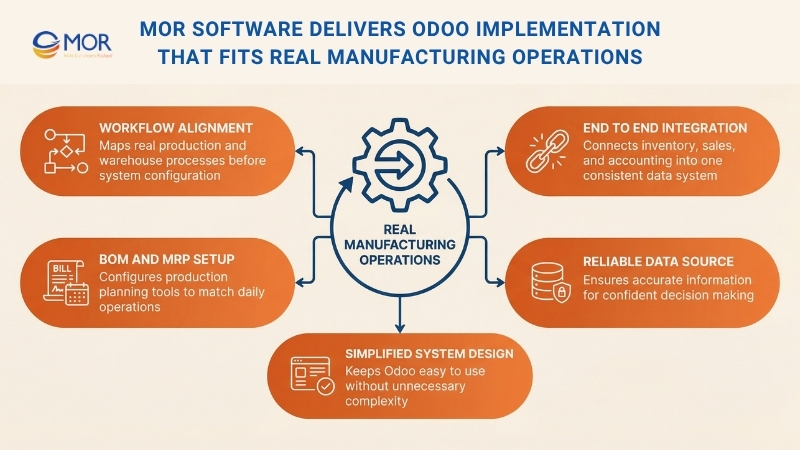
We also manage system integration to keep data aligned across inventory, sales, and accounting. This helps reduce data gaps and gives your team a single, reliable source of information.
Our focus stays on simplicity. We remove unnecessary complexity and keep the platform easy to use. Your team can work with Odoo daily without confusion and rely on accurate data for every decision. Contact MOR Software today to discuss how we can support your manufacturing lead time operations.
Conclusion
Choosing the right manufacturing inventory management software can change how your operations run day to day. With the right setup, you gain better control, clearer data, and smoother production planning. The key is not just the tool, but how it fits your real workflows.
At MOR Software, we help you turn systems like Odoo into practical solutions your team can rely on. Ready to improve your inventory operations? Contact us today.
MOR SOFTWARE
Frequently Asked Questions (FAQs)
What is manufacturing inventory management software?
It is a system that helps track raw materials, components, and finished goods across production and storage. It connects inventory data with orders, purchasing, and production activities so teams can manage stock with better accuracy.
How is it different from basic inventory software?
Basic tools focus on stock counts. Manufacturing systems go further by linking inventory with production workflows, BoM, and shop floor activities.
Who should use manufacturing inventory management software?
Manufacturers of all sizes can benefit, especially those handling complex production, multiple warehouses, or frequent stock movements.
Can it help reduce stock shortages?
Yes. The system uses real-time data and alerts to signal low stock levels early, helping teams restock before production is affected.
Does it support production planning?
Yes. It connects inventory with MRP and scheduling tools, allowing teams to plan production based on available materials and capacity.
Is real-time tracking important?
Very. Real-time updates help teams make quick decisions and avoid errors caused by outdated information.
Can it integrate with other business systems?
Most solutions connect with ERP, accounting, and sales platforms to keep data consistent across departments.
How does barcode or QR scanning help?
Scanning speeds up inventory updates, reduces manual entry, and improves accuracy during receiving, picking, and production.
Is it suitable for multi-warehouse operations?
Yes. It can track inventory across multiple locations and manage transfers between warehouses.
What should companies prepare before implementation?
They should review current workflows, clean existing data, and plan how the new system will connect with other tools already in use.
Share


Make Our-Dreams Realized


© 2023 . MOR Software. All Rights Reserved
Sitemap
Privacy Policy
Terms of Use

Rate this article
0
over 5.0 based on 0 reviews
Your rating on this news:
Name
*Email
*Write your comment
*Send your comment
1