


Odoo Accounting: Features, Setup, Pricing & Guide for 2026
Finance data often sits across invoices, bank accounts, purchasing records, inventory systems, and spreadsheets. That separation creates extra entry work and makes month-end reporting harder than it needs to be. Odoo Accounting places finance inside the wider Odoo ERP suite, so accounting records can follow real business activity. In this guide, MOR Software will cover its functions, automation, integrations, setup, pricing, rollout checks, and support options for 2026.
Key Takeaways
- Odoo connects accounting with sales, purchasing, inventory, payments, expenses, and other business records inside the same ERP database.
- Finance teams can automate invoice capture, payment collection, bank reconciliation, reporting, budgeting, asset accounting, and local tax workflows.
- A successful rollout depends on clean master data, correct fiscal localization, realistic UAT, controlled customization, and clear ownership after go-live.
What Is Odoo Accounting?
The Odoo accounting system is the full finance application inside Odoo ERP. It manages journal entries, receivables, payables, bank transactions, taxes, financial statements, budgets, assets, and other records that finance teams use every day.
Odoo invoicing has a narrower job. It handles customer invoices, vendor bills, and payments, whereas the Accounting app adds financial reporting, reconciliation, budget management, asset records, and wider accounting controls.
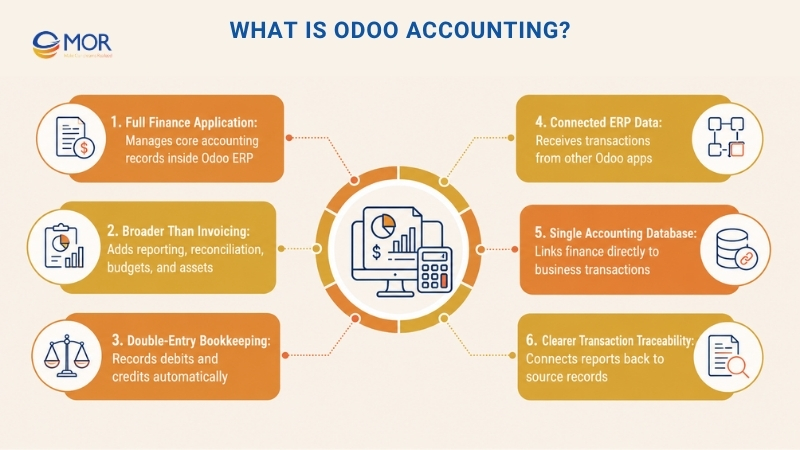
Double-entry bookkeeping sits behind each accounting transaction. When a customer invoice, vendor bill, expense, POS transaction, or inventory valuation creates an accounting event, Odoo records the related debit and credit entries.
That connection changes how finance teams work. Instead of rebuilding operational activity inside separate manufacturing accounting software, Odoo Accounting can receive records generated through Sales, Purchase, Inventory, Expenses, and other Odoo apps.
The result is one accounting database tied to real business transactions. Finance teams spend less time moving figures between systems and gain a clearer route from a report back to the transaction that created it.
What Are the Main Features of Odoo Accounting?
The main Odoo accounting features cover invoice processing, customer collections, supplier payments, bank reconciliation, reporting, budgeting, asset accounting, and fiscal localization. Each function sits inside a connected ERP structure rather than an isolated finance tool.
That matters when an invoice depends on a sales order or inventory value depends on warehouse activity. Odoo Accounting can carry that data into finance records without rebuilding the same transaction elsewhere.
Manage Receivables and Payables in One Workflow
Receivables and payables often create heavy admin work because finance teams deal with documents, due dates, currencies, customer credit, and corrections at the same time. Odoo brings these tasks into one workflow and links them with the source transaction.
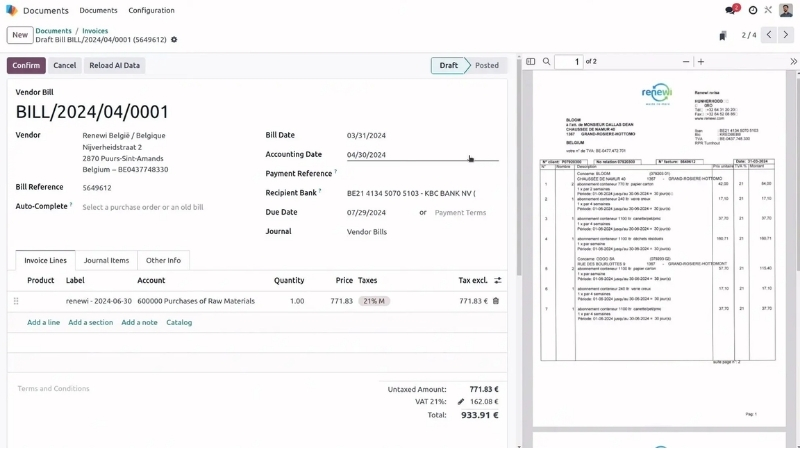
- AI-Based Document Reading: Odoo can read invoice and bill data through OCR and AI, then prepare records for finance staff to review. Odoo reports a 98% recognition rate for its AI invoice data capture on its Accounting product page.
- Repeated Bill Screening: The system can flag duplicate vendor bills before posting, which gives finance teams another check against accidental double entry.
- Automatic Draft Creation: Draft invoices can come from sales orders, subscriptions, projects, timesheets, or other connected records instead of manual re-entry.
- Customer Credit Tracking: Credit limits help sales and finance teams see when a customer's total receivable exposure passes a defined threshold.
- Overdue Payment Reminders: Follow-up rules can trigger reminders based on how long an invoice has remained unpaid.
- Credit Note Handling: Finance users can create refunds or credit notes directly from the related invoice or vendor bill.
- Foreign Currency Processing: Odoo stores transaction values in the original currency and the company's base currency, then records exchange gains or losses during reconciliation.
Collect Customer Payments Through Connected Channels
A finished invoice still needs a reliable collection process. Odoo links invoices with customer-facing payment methods so finance teams can move payment data back into the same accounting record.
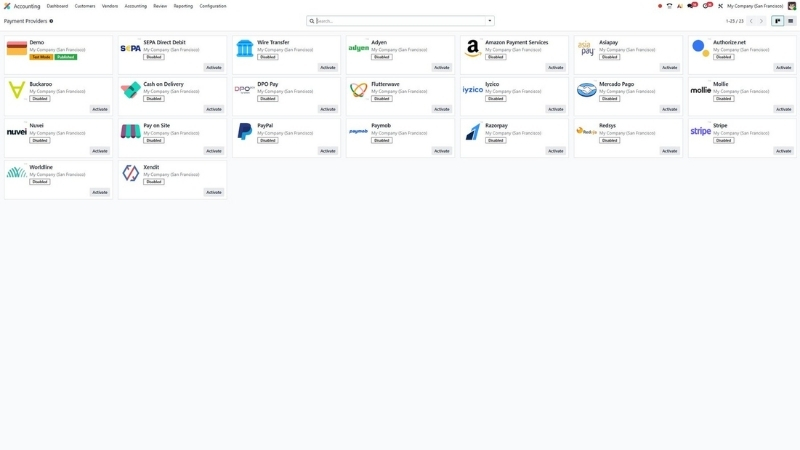
- Integrated Payment Providers: Businesses can connect supported providers including Stripe, PayPal, Adyen, Authorize.net, and other payment services.
- Customer Billing Portal: Customers can review, download, and pay invoices through their Odoo portal without waiting for finance staff to resend documents.
- QR Payment Access: Supported invoice formats can carry QR codes so customers can complete payments through mobile banking apps.
- Direct Debit Collection: Recurring payments can follow supported direct debit mandates, including SEPA workflows where applicable.
- Invoice Payment Matching: Incoming payments can connect to open invoices, which keeps receivable balances and collection records aligned.
These workflows can shorten the distance between issuing an invoice and recording its settlement. Finance staff still control validation, but routine collection tasks don't need the same level of manual handling.
Control Supplier and Intercompany Payments
Payables need control as much as speed. Supplier payment workflows become harder when a company deals with large payment batches, approval rules, different bank formats, and related legal entities.
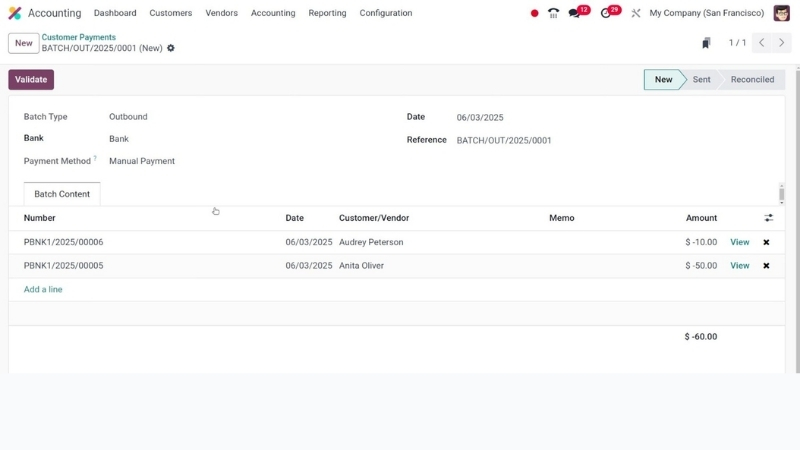
- Consolidated Vendor Batches: Finance teams can group several supplier bills into one payment batch rather than process each item separately.
- Electronic Transfer Files: Odoo supports bank transfer workflows and regional payment standards according to the company's setup.
- Bulk Check Preparation: Companies that still pay suppliers by check can prepare batches instead of creating each check one at a time.
- Multi-Step Payment Approval: Approval levels can be applied to sensitive or high-value payments when the business process requires extra review.
- Intercompany Transaction Handling: Related companies can record corresponding bills and invoices inside a shared Odoo environment.
For a group with several entities, these controls can remove a lot of spreadsheet-based coordination. The finance team gains a more traceable record of who approved, posted, and settled each transaction.
Automate Bank and Cash Reconciliation
Bank reconciliation is one of the most repetitive parts of accounting when transaction volume rises. Odoo Accounting imports bank activity, suggests matches, and keeps outstanding items visible until they’re resolved.
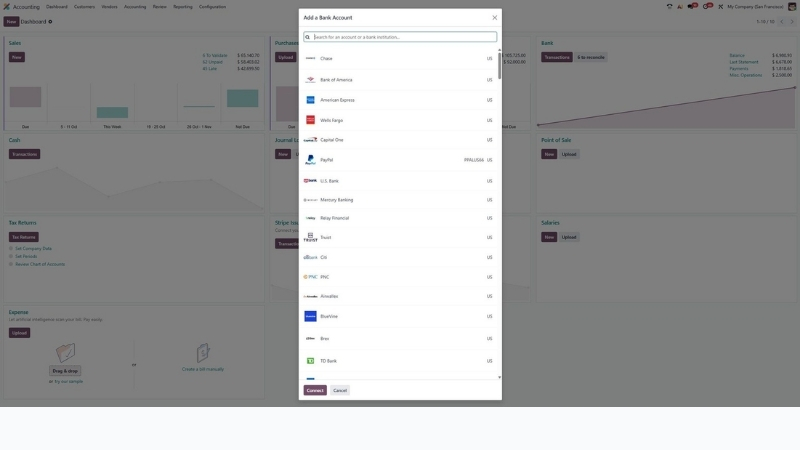
- Connected Bank Imports: Supported institutions can send transactions directly into Odoo through bank synchronization.
- Statement File Support: Finance teams can import OFX, QIF, CSV, CAMT.053, and CODA files when direct synchronization isn't the right route.
- Suggested Transaction Matches: Odoo compares bank lines with invoices, payments, and journal items to propose reconciliation matches.
- Attached Record Review: Supporting documents can stay close to the related transaction, which makes review work easier.
- Payment Validation Checks: Available controls help finance teams verify payment information before completing sensitive actions.
- Accounting Period Locks: Lock dates stop unwanted changes after a period has been reviewed and closed.
Odoo states that its reconciliation tool automatically matches 95% of invoices and payments and leaves the remainder for user review. The figure comes from its Accounting Features page and should be treated as a vendor-reported product metric rather than a guaranteed rate for every company.
Monitor Financial Performance and Accounting Controls
Accounting data loses value when managers receive it weeks after the underlying transaction. Odoo updates financial reports as entries are posted, so finance teams can work with current records instead of rebuilding reporting packs outside the ERP.
- Current Finance Metrics: Users can review receivables, payables, cash movements, and other finance measures using posted accounting data.
- Cash Planning: Expected receipts, payments, and due dates support short-term liquidity planning.
- Entry Review Controls: Accounting teams can inspect records that need extra attention before close or reporting.
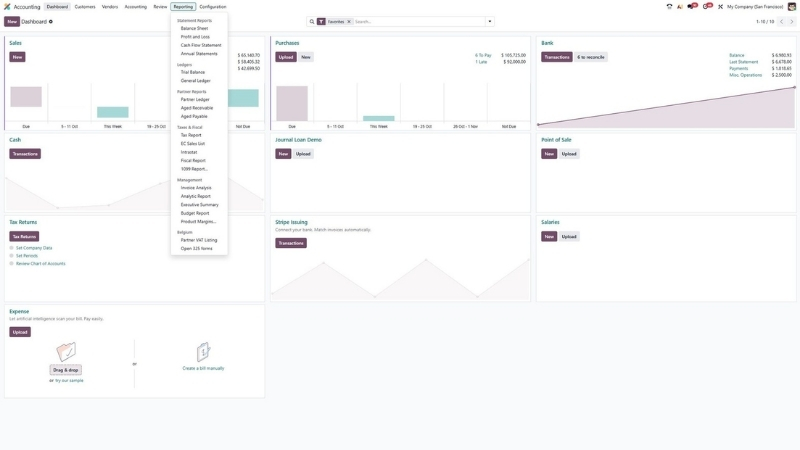
- Financial Statements: Balance sheets, profit and loss statements, cash flow statements, trial balances, and ledgers sit inside the reporting area.
- Connected Spreadsheet Analysis: Odoo spreadsheets can work against current business data for models, management analysis, and planning.
- Currency-Level Analysis: Invoice analysis can normalize figures into company currency when finance teams compare international activity.
- Recurring Management Reports: Teams can prepare regular reporting packs without rebuilding the source data each month.
- Group Reporting: Multi-company environments can combine accounting records for consolidated views when the account structure is configured correctly.
The Odoo 19 documentation also lists aged receivables, aged payables, audit trails, budget reports, deferred revenue, depreciation schedules, product margins, and other reports. That range gives finance teams more room to keep management reporting close to the transaction data.
Track Budgets and Analytic Performance
Financial accounts tell you what happened. Odoo analytic accounting adds another layer so you can see where costs and revenue belong inside the business.
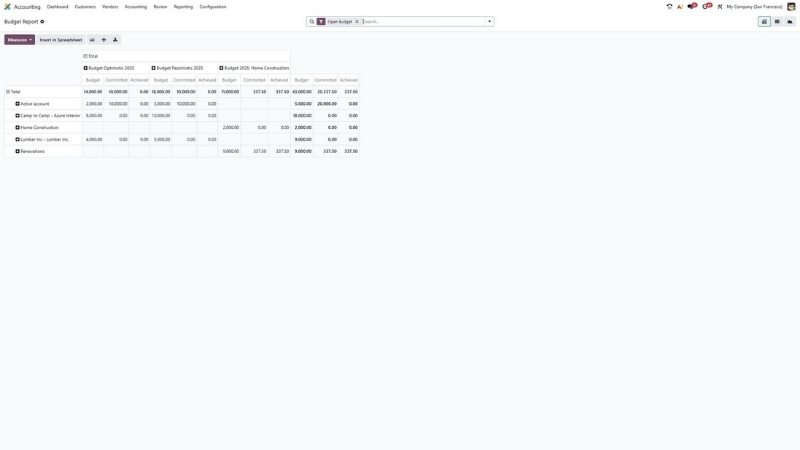
- Business-Dimension Cost Tracking: Analytic accounts can represent departments, projects, contracts, cost centers, campaigns, or other management units.
- Plan-to-Actual Comparison: Budget reports can compare planned, committed, and achieved amounts across a selected period.
- Layered Analytic Plans: Teams can create plans, sub-plans, and hierarchies when one reporting dimension isn't enough.
- Split Cost Allocation: One accounting entry can distribute value across several analytic dimensions according to defined percentages.
In practice, an analytic account Odoo teams create acts like an internal reporting label rather than another general-ledger account. It lets managers study profitability and spending without making the statutory chart of accounts unnecessarily complex.
Manage Assets and Period-Based Revenue or Expenses
Fixed assets, deferred revenue, and deferred expenses create timing work that can become messy in spreadsheets. Odoo keeps the schedules and related accounting entries tied to the source records.
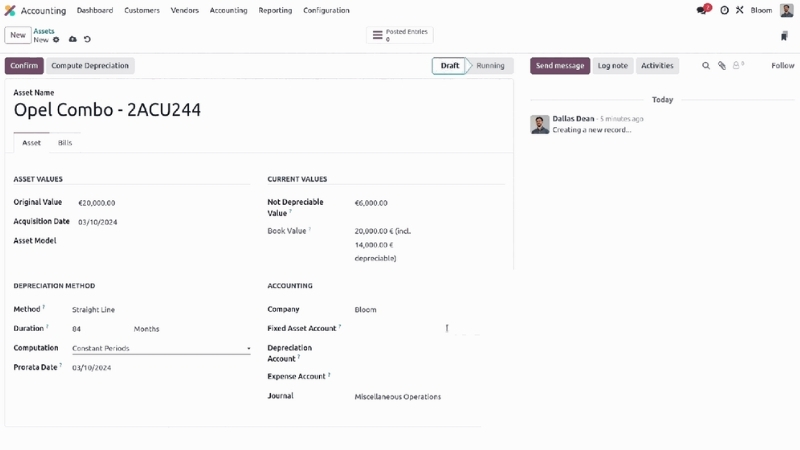
- Asset Record Management: Finance teams can record original value, account mapping, depreciation method, and useful life for each asset.
- Scheduled Depreciation: Odoo can calculate depreciation schedules and prepare the related journal entries according to the defined method.
- Revenue Deferral: Income can be recognized across the periods that relate to the underlying service or contract.
- Expense Deferral: Qualifying costs can move across accounting periods instead of hitting one period in full.
- Cutoff Adjustments: Finance teams can place income and expenses in the correct reporting period during close.
- Batch Record Changes: Relevant accounting records can be updated in groups when finance teams need to make the same adjustment at scale.
These tools become more useful as contract terms and asset volumes grow. The accounting team gains a clear link between the original transaction, the schedule, and the posted entries.
Support Local and International Accounting Requirements
A finance system must follow the rules of each legal entity that uses it. Odoo handles country-based localization through fiscal packages that configure accounting elements according to supported local requirements.
- Country Fiscal Packages: Local packages can load charts of accounts, taxes, fiscal positions, reports, and related settings.
- Regional Tax Rules: Tax calculation can change according to the company, transaction, customer, product, and fiscal position.
- Electronic Invoice Formats: Odoo supports country-dependent e-invoicing formats, including Peppol in supported markets.
- Local Reporting Rules: Companies can configure statutory reports according to the fiscal package available for their country.
- Regional Payment Standards: Payment methods and bank-transfer formats depend on the legal entity and market.
- Traceable Finance Records: Journal entries, supporting documents, reports, and lock dates provide a record for internal and external review.
Odoo 19 documentation states that the Accounting app supports over 100 countries through standard mechanisms and country-specific modules. You can check the current coverage on the official Accounting documentation before deciding that a localization fits your entity.
How Odoo Accounting Connects With Other Business Apps
Accounting becomes more useful when the source transaction doesn't stop at a department boundary. An Odoo accounting integration can pass sales, purchasing, stock, expense, payment, and eCommerce data into finance records without separate re-entry.
The table below shows where those links appear in a typical Odoo Accounting environment.
Connected System | Accounting Data Flow | Finance Outcome |
Odoo Sales | Confirmed sales activity feeds customer invoicing | Less repeated invoice entry |
Odoo Purchase | Purchase and receipt records support vendor-bill workflows | Better payable control |
Odoo Inventory | Stock moves and valuation rules create accounting records | Inventory and finance stay aligned |
Odoo eCommerce | Orders, payments, refunds, and delivery activity enter connected workflows | Cleaner online-sales records |
Odoo Expenses | Approved employee expenses enter finance processes | Faster expense posting |
Banks and payment providers | Transactions and settlements enter accounting journals | Quicker reconciliation |
External systems and APIs | Financial records exchange data with outside platforms | Wider system connectivity |
Native Odoo apps cover many common flows, but some companies still depend on payroll systems, banking platforms, eCommerce tools, legacy ERPs, or custom applications. Odoo provides import-export tools and external API access according to the chosen plan and deployment model.
Integration design should define which system owns each field before development begins. A customer balance, product cost, tax code, or payment status shouldn't have two systems trying to become the source of truth at the same time.
That ownership rule matters during error handling as well. Good integration design records failed transfers, retries, mapping errors, and reconciliation gaps so finance teams know when data didn't arrive as expected.
What Benefits Does Odoo Accounting Offer Finance Teams?
The biggest gain comes from connected data rather than isolated automation. Odoo Accounting can take a transaction created by another business team and carry the accounting result into the same ERP database.
That cuts repeated entry and gives finance staff more time for review, control, and analysis.
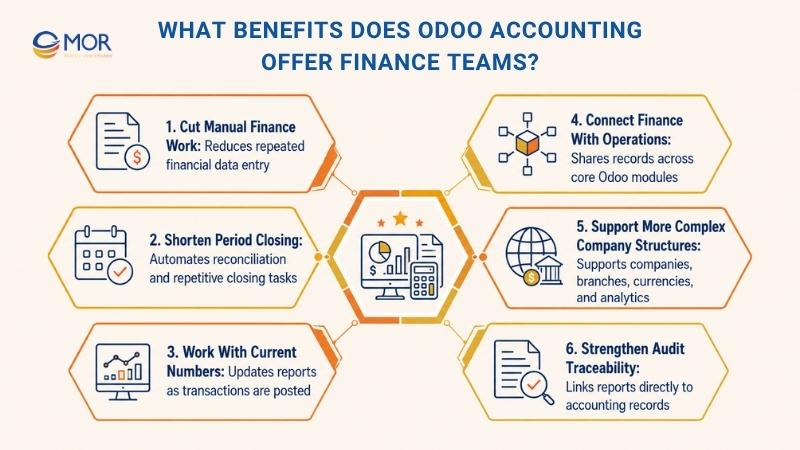
- Cut Manual Finance Work: Sales orders, vendor records, expenses, stock values, and imported documents can feed accounting workflows without rebuilding each record by hand.
- Shorten Period Closing: Reconciliation suggestions, period locks, current reports, and connected source documents can remove repetitive close work.
- Work With Current Numbers: Reports update as entries are posted, giving managers a more current view of cash, receivables, payables, and operating results.
- Connect Finance With Operations: Sales, Purchase, Inventory, Expenses, eCommerce, and Accounting can share the same underlying business records.
- Support More Complex Company Structures: Multi-company, branch, currency, and analytic settings give growing groups a path to manage finance inside one ERP environment.
- Strengthen Audit Traceability: Reports can link back to journals, invoices, payments, bills, and other accounting records instead of ending at a spreadsheet total.
A real accounting-team example comes from KPMG. Wim Van den Brande, Head of KPMG Tax, Legal & Accountancy, said a VAT close that once took 4 days was completed in 3 hours after moving the work to Odoo.
Results will vary according to data quality, transaction volume, configuration, and internal process discipline. Still, the case shows why finance automation delivers the most value when accounting data already sits close to the operational event that created it.
How to Set Up Odoo Accounting Correctly
Setup decisions shape every invoice, payment, tax entry, and report that comes later. Odoo accounting setup and implementation for small businesses may start with fewer entities and integrations, but the same discipline still applies.
Odoo 19 now gives detailed migration guidance for companies leaving legacy accounting software. The Odoo accounting documentation tells teams to verify fiscal localization, prepare master data, configure accounting settings, load opening entries, and practice the transition in a test database before cutover.
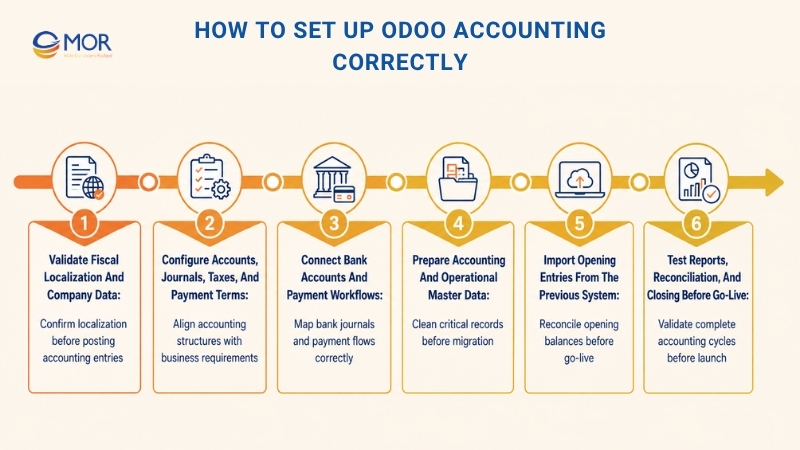
Validate Fiscal Localization and Company Data
Start with the legal entity and country. Odoo selects a fiscal localization based on the company's country, and that package can load preconfigured taxes, fiscal positions, charts of accounts, and legal statements.
Check the package before any journal entries are posted because changing localization later becomes much harder. Company name, tax ID, fiscal year, tax return frequency, addresses, and legal reporting details should match the entity that will keep the books.
Multi-country groups need extra care here. Odoo allows separate companies to run different fiscal localizations, whereas branches follow the parent company's localization rules.
Configure Accounts, Journals, Taxes, and Payment Terms
The chart of accounts gives every financial transaction a home. Review the standard chart first, then add or map accounts that your reporting and statutory rules require.
Set up sales, purchase, bank, cash, and miscellaneous journals around the real posting process. Default accounts also need review because products, product categories, contacts, inventory valuation, and journals can depend on them.
Taxes and fiscal positions deserve the same attention. Odoo can calculate taxes inside Sales, Purchase, Accounting, and POS, but the configuration needs to reflect the legal rules that apply to your company.
Payment terms finish this part of the setup. Define normal due dates, installments, and supplier or customer terms so receivable and payable aging reports reflect the agreements your business actually uses.
Connect Bank Accounts and Payment Workflows
Bank setup starts with deciding whether to use direct synchronization or imported statements. Connected institutions can send transactions into Odoo, and other banks can work through supported statement files.
Map each account to the correct bank journal before testing reconciliation. Payment methods, outstanding receipt accounts, outstanding payment accounts, and payment-provider settings should also follow the real movement of money.
Run sample receipts and supplier payments before opening the system to everyday users. A technically successful bank connection can still produce poor accounting if journal mapping or clearing accounts are wrong.
Prepare Accounting and Operational Master Data
Clean master data prevents small problems from spreading across thousands of transactions. Prepare customers, vendors, products, product categories, currencies, bank details, payment terms, account assignments, and tax information before the main migration.
Old systems often contain duplicate suppliers, inactive customers, outdated tax IDs, and product records with inconsistent account mappings. Moving all of that data unchanged simply moves the mess into a new ERP.
Decide what should be migrated and what should remain in the historical system. A clean opening database is usually more useful than a 'complete' database full of old records nobody trusts.
Import Opening Entries From the Previous System
A migration needs a defined financial cutoff. Open customer invoices, unpaid vendor bills, inventory values, trial balances, bank transactions, and credit-card items should reconcile to the closing records in the old system.
Odoo 19 separates these opening entries from normal master-data imports. That distinction is useful because a contact record and an opening receivable balance carry very different accounting risk.
Reconcile totals before the new ERP becomes the accounting source of record. If the opening trial balance doesn't agree with the legacy system, fixing it after go-live usually creates more work because new transactions are already moving through the database.
Test Reports, Reconciliation, and Closing Before Go-Live
UAT should test a full accounting cycle, not a few screens. Create realistic sales, purchases, invoices, bills, receipts, payments, bank lines, tax entries, corrections, and closing activities inside a test database.
Check the balance sheet, profit and loss, receivable aging, payable aging, tax report, and general ledger against known expected results. Users also need to test access rights, bank validation, approval steps, and lock dates.
A short parallel run can expose mapping errors before the final cutover. Odoo itself recommends practicing migration in a test database and keeping the old accounting workflow available during the transition in case issues appear.
How Much Does Odoo Accounting Cost in 2026?
The Odoo accounting price depends on the subscription plan, user count, deployment type, and the amount of implementation work around the software. License cost is only one part of the budget.
As checked in August 2026, Odoo ERP pricing on the annual-billing page lists One App Free at $0, Standard at $24.90 per user/month, and Custom at $49 per user/month. Odoo marks Standard and Custom promotional pricing with conditions, so buyers should confirm the current regional terms before signing.
Cost Area | What It Covers | Why It Matters |
One App Free | One selected app and unlimited users on Odoo Online | Low software entry cost when the single-app model fits |
Standard | Standard Odoo apps on Odoo Online | Fits companies that don't need external API or custom-code requirements |
Custom | All apps plus Studio, multi-company, External API, and broader hosting choices | Fits deeper ERP and integration needs |
Odoo.sh / hosting | Hosting and infrastructure tied to custom deployments | Can add cost outside a simple SaaS setup |
Implementation | Process analysis, configuration, migration, testing, training, and go-live | Often takes more work than buying the license |
Custom modules | Code written for company-specific processes | Adds development, testing, and future upgrade work |
Maintenance | Bug fixes, changes, monitoring, upgrades, and user support | Forms part of long-term total cost |
A Standard license may look cheaper than a Custom deployment, but licenses alone don't show total cost of ownership. Data migration, integration, UAT, training, custom modules, and post-launch support often shape the real budget.
Project scope makes the biggest difference. A single-company setup with standard invoices and bank reconciliation needs far less work than a multi-company rollout tied to manufacturing, inventory, eCommerce, custom approval rules, and external finance systems.
Ask for cost estimates by workstream rather than one large number. That lets you see how much goes into configuration, integration, migration, custom development, testing, training, and support.
What to Check Before Choosing Odoo Accounting
A product can meet a long list of requirements and still fail when the rollout doesn't fit the company's real processes. Evaluate Odoo Accounting against your legal rules, system architecture, data, controls, and internal skills before approving the scope.
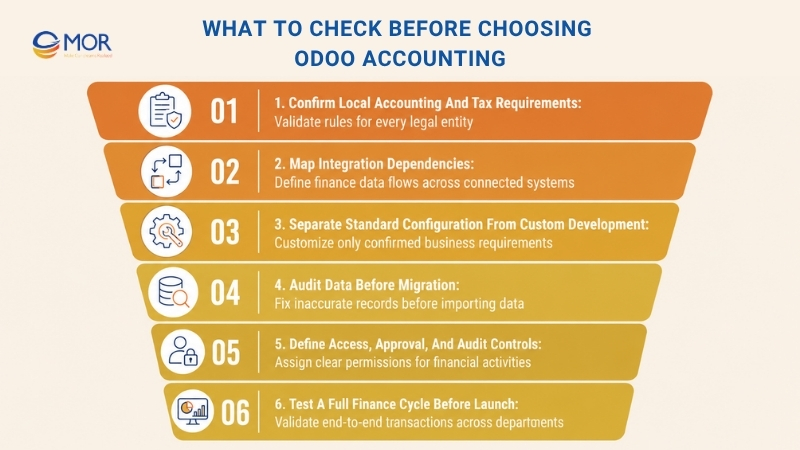
Confirm Local Accounting and Tax Requirements
Start with each legal entity, not the group as a whole. Confirm the chart of accounts, tax calculation, fiscal year, statutory reports, currency rules, audit files, and electronic invoice formats required in every country.
Never assume that one country's localization behaves the same way in another market. Check the current Odoo fiscal-localization documentation and test the exact reports your finance team needs.
Map Integration Dependencies
List every system that exchanges finance-related data. Banks, payment gateways, payroll, eCommerce, CRM, inventory tools, legacy software, tax platforms, and reporting applications can all affect accounting records.
For each integration, define the source system, destination, transfer timing, field ownership, retry method, and reconciliation process. Missing that work early is how 'simple' integrations become long support projects.
Separate Standard Configuration From Custom Development
Native configuration should cover the requirement whenever it fits the business process. Studio, third-party modules, APIs, and custom code belong in the scope only when standard Odoo can't meet a confirmed need.
Every custom change adds code that must be tested during upgrades. Keep customization tied to measurable business requirements rather than personal screen preferences.
For teams comparing Odoo accounting vs QuickBooks, the decision often comes down to scope. QuickBooks focuses on accounting, whereas Odoo sits inside a broader ERP suite that can connect finance with sales, purchasing, inventory, manufacturing, CRM, and other operations.
Audit Data Before Migration
Look for duplicate contacts, missing tax numbers, old accounts, inconsistent payment terms, unpaid documents, stock-value differences, and unused master records. Fixing those records before migration is much easier than correcting thousands of linked entries later.
Set rules for historical data too. Some companies need several years of detail inside Odoo; others can keep old transactions read-only in the legacy system and move only opening balances plus active records.
Define Access, Approval, and Audit Controls
Map who can create, approve, post, pay, reconcile, close, and reopen financial records. Accountants, finance managers, system administrators, bank approvers, and external accountants shouldn't automatically receive the same permissions.
Period locks need named owners as well. When everyone can reopen a closed period, month-end control quickly becomes unreliable.
Test a Full Finance Cycle Before Launch
Run one realistic process across departments before go-live. Start with a real type of sales or purchase transaction, then follow its invoice, payment, reconciliation, tax treatment, reporting result, correction path, and closing entry.
That test often catches gaps that isolated screen testing misses. Finance needs to see how one business event travels through the whole system, not only whether each individual form loads correctly.
Streamline Odoo Accounting With MOR Software
A finance rollout often needs more than standard configuration. MOR Software supports Odoo Accounting projects through Odoo consulting, implementation, module development, integration, flexible Odoo resources, and Application Management Services.
Our work starts with business processes and then moves into system decisions. That model fits companies looking for an Odoo business accounting consultant who can work alongside functional consultants and technical developers rather than handing finance requirements between separate vendors.
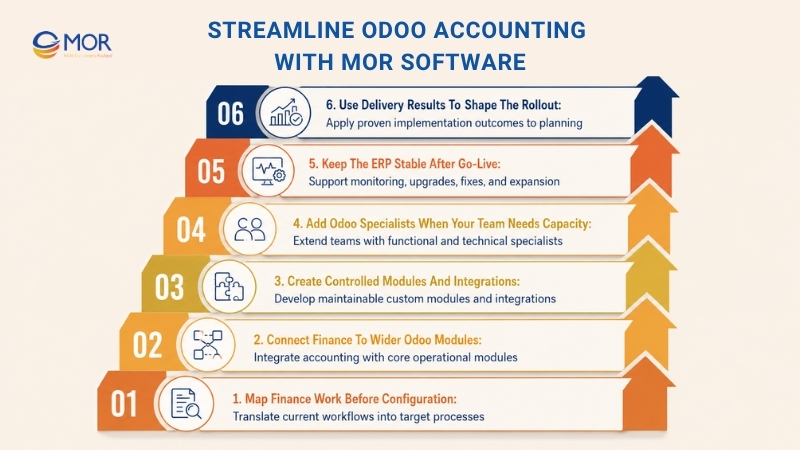
- Map Finance Work Before Configuration: Our consultants assess current processes and requirements, then map the as-is workflow into a target process. This helps classify each need as standard configuration, integration, process change, or custom development.
- Connect Finance to Wider Odoo Modules: MOR Software implements core modules including Sales, Purchase, Odoo inventory management, and Accounting. Manufacturing and Logistics can join the scope when financial records depend on production or distribution activity.
- Create Controlled Modules and Integrations: Our Odoo service covers industry-focused module development and third-party integrations. MOR's service material calls for small, maintainable, reusable modules rather than large blocks of unnecessary custom code.
- Add Odoo Specialists When Your Team Needs Capacity: Functional consultants can handle analysis and configuration, and technical developers can take customization and integration work. MOR supports part-time or full-time engagement plus monthly or quarterly contract models.
- Keep the ERP Stable After Go-Live: Application Management Services cover incidents, bug fixes, system monitoring, module expansion, upgrades, and ongoing support. The delivery process also includes user manuals, centralized training, UAT, user training, warranty, and maintenance.
- Use Delivery Results to Shape the Rollout: MOR's Odoo materials report that a manufacturing implementation using Manufacturing, Inventory, and Accounting cut inventory holding costs by 35% and raised production scheduling efficiency by 50%. A distribution project connecting Sales, Purchase, Inventory, and Logistics reached 99% order-fulfillment accuracy.
MOR Software also lists CMMI Level 3, ISO 9001:2015, and ISO 27001:2013 among its delivery credentials. Its Odoo service page describes Scrum and MVP methods alongside a staged process covering requirements, implementation, onboarding, UAT, training, warranty, and maintenance.
Bring your current accounting workflow, integration list, migration scope, and reporting requirements to the first discussion. We can map which needs fit standard Odoo and where configuration, API work, custom manufacturing modules, or long-term support make sense for your project.
Conclusion
Odoo Accounting can bring invoices, payments, banks, taxes, reporting, budgets, assets, and operating data into one connected ERP process. The real result depends on correct localization, clean data, sensible customization, strong UAT, and support after launch. MOR Software can assess your finance workflow and define a practical Odoo scope around those needs. Contact MOR Software to discuss your Odoo project and turn your accounting requirements into a clear implementation plan.
"Mr. Cong’s guiding philosophy is simplicity, believing that the simplest solutions are often the most powerful. He sees trust, empowerment, and the opportunity to demonstrate one’s abilities as the key elements that set MOR apart from traditional IT companies."
Mac Tien Cong


Division Manager (Hanoi Branch)
MOR SOFTWARE
Frequently Asked Questions (FAQs)
What is Odoo Accounting?
Odoo Accounting is the finance and bookkeeping application inside the Odoo ERP suite. It covers invoices, vendor bills, payments, journals, bank reconciliation, taxes, reporting, budgets, assets, analytic accounting, and other finance processes while sharing data with connected Odoo apps.
The system follows double-entry bookkeeping and creates underlying journal entries for accounting events. This gives finance teams a direct link between operational transactions and the financial records created from them.
Is Odoo Accounting free?
Odoo has a One App Free plan at $0 for one app with unlimited users on Odoo Online, subject to Odoo's current plan rules. Standard and Custom plans apply when your company needs the wider app suite or capabilities included in those paid tiers.
Software cost doesn't cover every rollout expense. Migration, consulting, integration, custom modules, training, special hosting needs, and long-term support can add to total project cost.
What is the difference between Odoo Accounting and Odoo Invoicing?
The Invoicing app focuses on creating invoices, sending them to customers, handling vendor bills, and recording payments. Accounting includes those tasks plus financial statements, bank reconciliation, budgets, assets, tax reporting, analytic accounting, and wider finance controls.
A small team may start with invoicing when its needs are narrow. Companies needing full bookkeeping and financial management usually require the Accounting application.
Does Odoo Accounting support bank reconciliation?
Yes. Odoo supports bank synchronization where available, statement imports, reconciliation suggestions, outstanding payments, and matching between bank transactions and financial records.
Finance teams can import OFX, QIF, CSV, CAMT.053, and CODA statements where those formats apply. The reconciliation interface then helps users match bank activity against invoices, bills, payments, and journal entries.
Can Odoo Accounting manage multiple companies and currencies?
Yes, Odoo supports multi-company accounting and foreign-currency transactions when the subscription and configuration fit those requirements. Each company can have its own chart of accounts, and shared account mapping can support consolidated reporting.
Foreign-currency transactions store the transaction currency alongside the company's base currency. Odoo then accounts for exchange gains and losses when related journal items are reconciled.
Is Odoo accounting powerful enough for multi-entity businesses?
It can fit multi-entity structures that need companies, branches, currencies, intercompany activity, and consolidated reporting. The setup still requires careful account mapping, entity permissions, local fiscal packages, and ownership rules.
Legal structure matters here. Entities in different countries may need separate company configurations rather than branches because branches follow the fiscal localization of their parent company.
Does Odoo Accounting support local taxes and e-invoicing?
Odoo uses fiscal-localization modules to configure country-dependent accounting requirements. These packages can include tax rules, charts of accounts, fiscal positions, reports, and related legal settings.
Electronic invoicing is available across supported countries and formats, including Peppol in applicable markets. Check the exact country documentation before rollout because tax and e-invoice support differs by jurisdiction.
Can Odoo Accounting integrate with other business systems?
Yes. Native Odoo apps already connect finance with Sales, Purchase, Inventory, Expenses, eCommerce, and other business functions, and external systems can exchange data through supported APIs or imports.
External API access depends on the Odoo plan. Custom integration work may also need field mapping, authentication, error handling, retry logic, monitoring, and reconciliation rules.
Can an external accountant access Odoo Accounting?
Yes. Odoo allows companies to add an accountant as a user and assign accounting and bank permissions according to the required access level.
Odoo 19 also documents options for sharing invoice and bill records with external accountants, including access rights, journal-copy workflows, and ZIP exports. Permissions should stay limited to the work the accountant needs to perform.
How much does Odoo Accounting cost?
Current Odoo pricing depends on the country, billing period, plan, and user count. One App Free, Standard, and Custom each cover different deployment and system needs, so there isn't one fixed cost for every accounting project.
Implementation cost sits outside the simple license comparison. Process analysis, migration, integrations, custom modules, UAT, training, hosting, and support can change the total budget by far more than a small difference in monthly subscription price.
Is Odoo Accounting suitable for small and growing businesses?
Yes, when a small business needs finance to connect with wider operations. A company searching for cloud based small business accounting software may find Odoo especially relevant when sales, stock, purchasing, CRM, or eCommerce will eventually need to share the same data.
The fit becomes stronger when the company expects more users, entities, workflows, or integrations over time. A very small firm that needs only basic bookkeeping should still compare the cost and setup effort against simpler accounting-only tools.
Share


Make Our-Dreams Realized


© 2023 . MOR Software. All Rights Reserved
Sitemap
Privacy Policy
Terms of Use

Rate this article
0
over 5.0 based on 0 reviews
Your rating on this news:
Name
*Email
*Write your comment
*Send your comment
1