


Odoo Migration Services: Complete Guide for Businesses in 2026
Old Odoo setups can slow teams down, create data risks, and turn upgrades into stressful projects. Odoo migration services help businesses move with less disruption, whether the job involves Odoo ERP migration services or a full system refresh. In this guide, MOR Software will walk you through the process, key risks, real costs, and what to look for before making the switch.
What Is Odoo Migration? Types And Key Concepts Explained
What does migration mean in Odoo? Put simply, Odoo migration services cover the move of business data, modules, and custom work from one Odoo release to another, or the switch from another ERP platform into Odoo. The goal is to carry over your current processes, workflows, and records in a clean way, with no missing data and no major break in daily work.
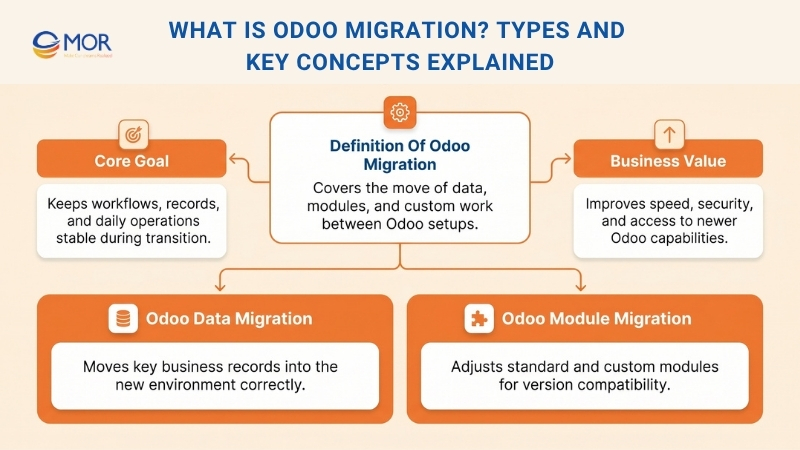
There are two core parts in this kind of ERP move, and each one supports a different side of the system.
- Odoo Data Migration: This part makes sure old records, including customers, suppliers, invoices, orders, and finance data, are transferred correctly.
- Odoo Module Migration: This part focuses on updating or reshaping current modules, whether they are standard tools or custom-built ones, so they can run on the newer Odoo version.
This type of move helps companies use newer tools, stronger security, and better speed in Odoo, while still keeping business work running.
Our Odoo Migration Services
As a reliable partner for your Odoo migration service, MOR Software delivers full support that helps your business move forward faster and with fewer setbacks.
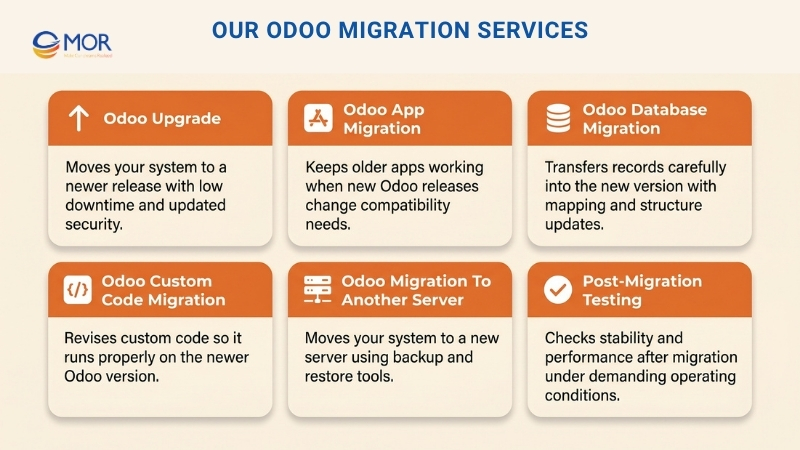
Odoo Upgrade
An Odoo upgrade moves your current system to a newer release in a controlled way. We take care of code changes, database updates, and custom function revisions while keeping downtime low and opening access to newer tools and recent security fixes. Our team helps you keep operations stable through expert work built around your platform.
Odoo App Migration
Odoo Studio includes 1000+ apps built for many business needs. You only need to choose the tool that fits your work, purchase it, and then install or connect it. As new apps continue to enter the market for different types of companies, older ones may need changes when newer releases come out. That is where Odoo manufacturing module migration becomes useful, because it helps those apps keep working after the shift.
Odoo Database Migration
The movement of current records into a newer ERP version is known as Odoo database migration. Because data loss and transfer mistakes can cause real problems, this step must be handled with care. Your existing records need to be adjusted so they fit the newer platform or release. Table structures and mapped fields may need updates as well. After that, the new environment must receive the imported data through Odoo migration services, often with support from Odoo data migration services when the dataset is large or complex.
Odoo Custom Code Migration
Moving custom code from one version to another is called Odoo code migration. Existing code can be revised and tailored again when needed. Changes made to apps may also lead to code changes. In many cases, the code behind the Odoo app must be updated so it can run well on the newer release.
Odoo Migration To Another Server
It is also possible to move your Odoo system from one server to a different one during this transition. You can create a backup of the database first and then restore it later on the target server with Odoo Database Manager.
Post-Migration Testing
After all updates are finished, the migrated environment still needs testing, just like an Odoo ERP integration system after first deployment. This review should happen under demanding conditions. Through that work, we can judge how stable the platform is and how well it can keep running after the migration is done.
Importance Of Odoo ERP Migration Services
Companies today cannot keep carrying the problems that come with old ERP software. That is why many firms turn to Odoo migration services, and why Odoo erp migration services have become a real priority for growing teams:
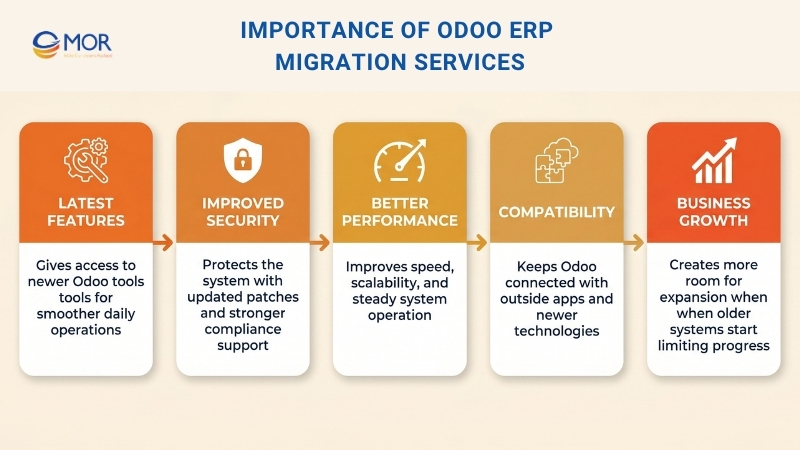
- Access to Latest Features: Every new Odoo release introduces newer tools that help daily work move more smoothly and support stronger output.
- Improved Security: A system move helps keep your setup protected through current security patches and updated compliance support.
- Better Performance: Recent Odoo versions are built for better speed, easier scaling, and steadier operation.
- Compatibility: Many businesses connect Odoo with outside apps, and migration helps those links stay current with newer technology.
- Business Growth: When a company gets bigger, older systems may start to fall behind. A move to a newer version gives the business more room to expand.
Top 5 Benefits Of Odoo Migration Services
Moving to a newer Odoo version gives businesses more than a simple technical change. It creates a firmer base for the system, brings better support for everyday work, and gives companies more space to grow without old limits holding them back. When Odoo migration services are planned well, they can lift performance across teams and create long-term business value.
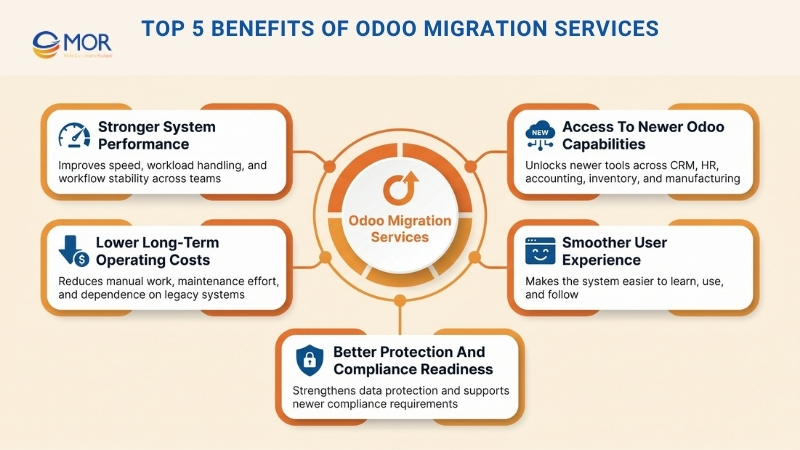
Stronger System Performance
One major gain from this kind of platform move is better system performance. Newer Odoo releases are made to run faster, handle data with less friction, and manage larger workloads in a steadier way. That means staff can finish work sooner, face fewer slowdowns, and deal with fewer breaks during the day. Quicker loading, stronger database handling, and steadier workflows all help raise output across the company.
Access To Newer Odoo Capabilities
Each new Odoo release brings refreshed tools and changes across major areas like CRM software, HR, accounting, inventory, manufacturing, and supply chain work. When a business shifts to a newer version, it can use those additions instead of staying tied to an older setup. These changes can support clearer reporting, smarter automation, and better teamwork. With those newer options in place, companies are better prepared for changing business needs.
Lower Long-Term Operating Costs
Although the project needs spending at the start, Odoo migration services can help cut costs over time. Older systems often need more manual effort, more maintenance work, and more attention to keep aging custom changes alive. Those hidden expenses build up and can pull down day-to-day performance. When a business moves to a newer Odoo version, it can lower maintenance effort, depend less on legacy systems, and run operations in a better way. Over time, that can support tighter spending control and a better return.
Smoother User Experience
A newer Odoo setup often comes with a cleaner look, easier movement across the system, and workflows that feel simpler to use. That makes it easier for employees to learn the platform, complete tasks, and work with more confidence. When the system feels clearer and easier to follow, adoption tends to rise and teams are less likely to get stuck in routine work. A better user experience also helps the business internally because staff can spend less time dealing with confusion and more time on work that matters.
Better Protection And Compliance Readiness
Security is one more strong reason many businesses choose this kind of move. Running an older version can raise the chance of security problems, unsupported parts, or conflicts with newer compliance rules. A move to a later release gives companies access to current security updates, platform fixes, and stronger protection for key data. This matters even more for businesses that handle customer details, financial records, and internal operating data every day.
>>> Explore how Odoo implementation services work, what they cost, which modules matter first, and how the right rollout can turn a complex ERP project into a practical system your business can actually use.
How Odoo Migration Services Work (8 Stages)
To prepare for a successful move, businesses need to understand how Odoo migration services work. This is not one simple technical task. It is an Odoo migration process made up of planning, system checks, code and data work, testing, and support after launch. Every stage has a clear role in lowering risk and helping the upgraded setup work the right way for your business.
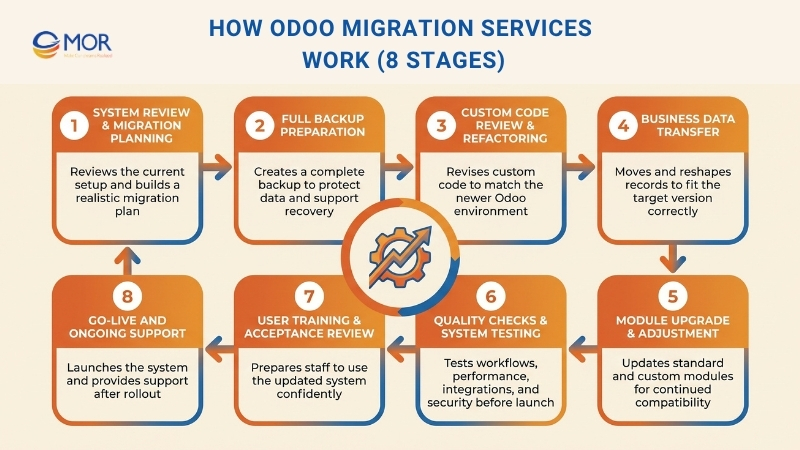
System Review And Migration Planning
The work begins with a close review of the current Odoo environment. Consultants study the version in use, the number of modules, the amount of custom work, the existing workflows, the outside integrations, and the volume of data that must move. This stage helps uncover possible risks, technical limits, and business needs before any real change starts. After that review, the team builds a migration plan with clear timing, technical actions, and resource use, so the project can move in a steady and realistic way.
Full Backup Preparation
Before the move starts, all current information must be protected through a complete database backup. This should include major business records, settings, attachments, and system details that may be needed if recovery is required. A dependable backup gives the project a fallback point from start to finish. If something unexpected happens during the transition, that backup helps protect valuable information and gives the team a way to restore the original setup if needed.
Custom Code Review And Refactoring
Custom code work is often one of the most technical parts of the project. Since Odoo versions can differ a lot in framework layout, development rules, and supported functions, custom code from the old setup may fail in the newer one. Developers need to inspect current custom modules, scripts, and changes, then revise, tune, or rebuild them so they match the updated environment. This step helps keep company-specific functions available after the move and lowers the chance of later system issues.
Business Data Transfer
The transfer of business records sits at the center of the project. At this point, Odoo migration services handle the movement of customers, suppliers, invoices, products, stock levels, orders, and finance history from the old setup into the new one. This is not a basic copy task. Odoo data migration often requires cleanup, field mapping, checks, and data reshaping so the records match the structure of the target version. Careful handling is needed to keep the information correct, consistent, and complete across the whole business.
Module Upgrade And Adjustment
Standard Odoo modules also need updates so they fit the newer release. Core modules may come with changed settings, features, or workflows, so they must be checked and set up again after the move. At the same time, custom modules may need to be rebuilt or adjusted so they stay compatible. This stage helps both default and custom business functions keep running well in the updated system without disturbing daily work.
Quality Checks And System Testing
After the data, code, and modules have been moved, the upgraded system must go through testing and quality review. At this point, the team checks whether the new setup works properly, whether workflows behave as expected, and whether any unresolved errors are still present. This review often includes function testing, performance checks, integration review, and security checks. Careful testing helps catch problems before go-live and lowers the chance of disruption later.
User Training And Acceptance Review
A project can succeed on the technical side and still face problems if users are not ready for the updated platform. That is why training and user acceptance matter during this stage. Staff need time to learn the newer tools, changed workflows, and interface updates so they can use the system with confidence. User acceptance testing also helps confirm that the migrated platform supports real business work from the user side, not just from the technical side.
Go-Live And Ongoing Support
Once testing and approval are done, the migrated Odoo system moves into the live environment. This is the point where the business starts using the updated version in normal daily work. Even so, the project does not stop at launch. Support after go-live still matters because it helps solve unexpected issues, adjust performance, and guide users during the change period. Continued support helps the new setup stay stable, useful, and aligned with business goals.
Things To Know Before Odoo ERP Migration
Before we begin any move in Odoo, there are several points that deserve close attention. Odoo migration services involve more than shifting records from one release to another. The work also covers data protection, lower business interruption, technical checks, and user readiness for the new setup. When these parts are handled well from the start, the whole transition becomes safer, smoother, and easier to manage.
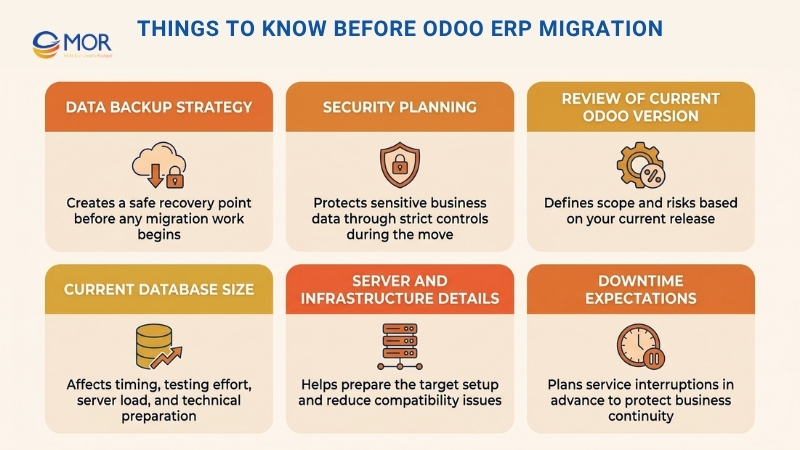
Data Backup Strategy
A full backup of your current Odoo database, documents, and system settings should come first before any migration work starts. This step helps lower the chance of permanent loss if a problem appears during the move. A proper backup also gives us a safe recovery point, so your business can return to normal faster if needed. In many projects, that backup includes transaction records, attachments, configurations, custom modules, and user access settings.
Security Planning
Security planning must stay at the center of Odoo migration services from start to finish. Business systems often store finance records, customer data, supplier details, staff files, and other private documents that need careful handling. We use strict controls during the move to protect that information from unauthorized entry, data leaks, or accidental exposure. This can include protected server access, limited permissions, encrypted transfers, and close checks through each stage of the project.
Review Of Current Odoo Version
You need a clear view of your current Odoo version before deciding on the migration path. Each release may come with a different structure, feature set, workflow design, and technical demand, especially if you are using Odoo enterprise. Some versions are easier to move forward from, but others may require extra work because of old modules, legacy custom work, or unsupported functions. A proper review of the current setup helps define the project scope, uncover possible issues, and estimate the work needed for a successful move.
Current Database Size
The size of the current database has a strong effect on both project timing and technical preparation. A bigger database often means more records to move, check, and test. If the platform holds years of old data, detailed links between records, or large transaction volumes, the move may need extra time and more system capacity. Database volume also shapes backup time, testing effort, server load, and post-migration checks, so it should be reviewed early.
Server And Infrastructure Details
A stable migration depends on a clear understanding of the current client-server setup. That includes the hosting model, server resources, operating system, database structure, storage limits, and any existing integrations linked to Odoo. When we have a full picture of that environment, we can extract the current database correctly, prepare the target setup, and move the system with fewer interruptions. It also lowers the risk of compatibility trouble or speed issues after launch.
Downtime Expectations
Downtime planning is an important part of any Odoo upgrade and migration services project. Even when the work is managed well, a short interruption may still be needed during final rollout, testing, or system cutover. Estimating that pause in advance helps businesses plan around key operations, stay away from busy hours, and update internal teams in a clear way. With good preparation, the break in service can stay smaller and business continuity can be protected more effectively.
Common Odoo ERP Migration Challenges And How To Handle Them
Even though Odoo migration services can bring strong long-term value, the work may still come with several obstacles. These problems can affect project timing, data quality, system stability, and user experience when they are not managed well. When businesses know the common risks early, they can prepare better and avoid many preventable issues.
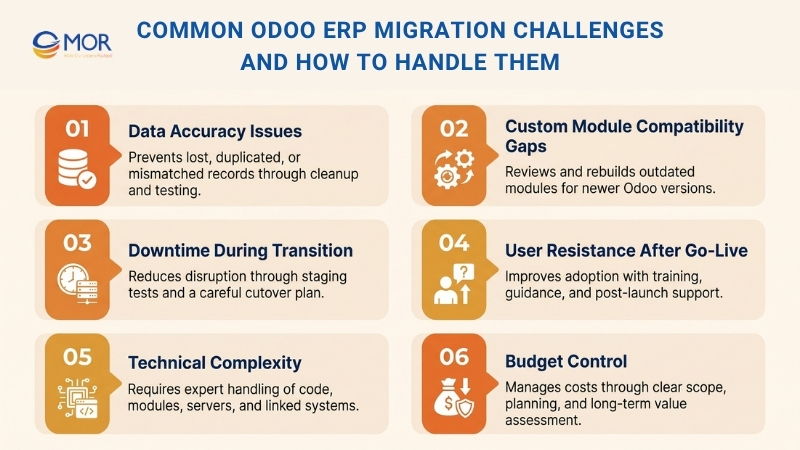
Data Accuracy Issues
One of the biggest worries in a migration project is whether the data will move correctly from the old setup to the new one. If the work is rushed or testing is weak, records can be lost, repeated, damaged, or matched to the wrong fields. Even small mistakes in customer files, accounting entries, stock numbers, or sales history can lead to bigger business issues later. To deal with this risk, companies should clean the data before the move, check major records carefully, and run repeated tests before go-live.
Custom Module Compatibility Gaps
Custom modules often create serious problems during this kind of system move because they may fail in newer Odoo versions. Some custom functions depend on old code, outdated dependencies, or workflows that no longer match the upgraded setup. Because of that, some modules may need review, partial rewriting, or full redevelopment before they can work again. A technical check of all custom work at an early stage can help avoid delays, manage spending, and set more realistic project expectations.
Downtime During Transition
Poor planning can cause unplanned downtime, and Odoo migration services may then interrupt daily work, slow order handling, and hurt customer support. This risk is even higher for businesses that depend on Odoo for sales, finance, logistics, or internal communication. Even a brief outage can create confusion when teams are not warned ahead of time. The best way to limit that risk is to schedule the move with care, test the workflow in a staging setup, and build a full cutover plan before the final switch.
User Resistance After Go-Live
A project can go well on the technical side and still create problems for the business after launch. Staff may feel uneasy with the new interface, the revised workflows, or the way the system now behaves. If users do not know how to work inside the new setup, output may fall during the first stage after go-live. This issue can be handled through clear updates, practical training, user guides, and support after launch, and that also helps teams accept the change with more confidence.
Technical Complexity
An Odoo move is often harder than it first appears. It may involve database structure changes, module compatibility checks, server preparation, testing, and updates to linked systems. Businesses that do not have strong internal technical support may struggle to handle those demands on their own. A mistake in one area can quickly spread into wider system trouble. Working with experienced Odoo specialists helps make this work more manageable and gives each stage the right technical attention.
Budget Control
A migration project requires real spending in time, skill, and budget. Costs can include consulting work, redevelopment of custom modules, testing, staff training, infrastructure changes, and support after go-live. When the scope is unclear at the beginning, extra expenses can appear during the project. To keep control of spending, businesses should weigh the near-term migration bill against the long-term value of a safer, newer, and more scalable Odoo setup, and careful planning helps them do that.
How Much Do Odoo Migration Services Cost?
Odoo migration services do not come with one standard price because each project begins from a different starting point. The final amount usually depends on the version gap, database size, number of custom modules, integration difficulty, data cleanup work, and the level of testing and post-launch support needed. Odoo’s own project estimator says implementation cost is shaped by analysis, setup, data import, training, and custom work, and it suggests a deeper review when a project involves more than 50 users. In the wider market, a basic Odoo upgrade can begin at about $5,000, but a large migration with heavy custom work may go far beyond $100,000.
Migration Scope | Common Project Type | Estimated Cost (USD) |
Basic Version Upgrade | Small database, standard modules, limited custom code, light testing | $5,000 to $12,000 |
Small Business Migration | Light custom work, moderate data cleanup, a few workflow changes | $12,000 to $20,000 |
Mid-Size Migration | Several modules, custom workflows, third-party integrations, full testing | $20,000 to $75,000 |
Large or Highly Customized Migration | Multi-company setup, large datasets, many custom modules, complex integrations | $75,000 to $150,000+ |
Enterprise-Scale Migration | Deep architecture changes, major refactoring, strict compliance needs, long support window | $150,000 to $250,000+ |
These numbers reflect current market ranges, not a fixed rule. In general, Odoo migrations services for small projects may range from $5,000 to $20,000, medium projects from $20,000 to $75,000, and large transitions from $75,000 to $250,000+. In some markets, especially when businesses compare offshore options such as Odoo data migration services in india, vendors may also charge $75 to $150+ per hour based on the project scope and technical difficulty.
Businesses should also account for extra spending outside the migration work itself. This can include Enterprise licenses, data transfer work, user training, redevelopment of custom modules, and hosting, since Odoo.sh is not part of the main Odoo subscription price.
How To Choose The Right Odoo Migration Services Partner
Picking the right provider can strongly shape how well your Odoo upgrade moves from planning to launch. A good partner does more than move records from one system to another. You need a team that can review the current setup, find risks early, and guide each phase with clear communication, whether you are comparing global vendors or an Odoo migration service provider in USA.
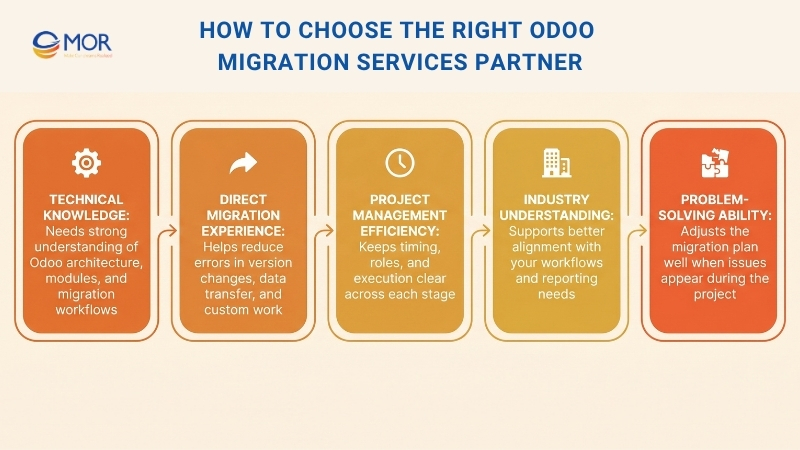
In most cases, the best partner is one that understands both the technical side of Odoo and the daily reality of your business. When those two areas are handled well, the move becomes easier to control, easier to test, and easier to release without causing avoidable disruption.
- Trained professionals: A dependable partner should have certified or well-prepared specialists who know Odoo architecture, modules, and migration workflows well.
- Experience in Odoo migration: Past migration work matters because a team with direct experience can handle version changes, custom modules, and data issues with fewer errors.
- Efficiency for planning and management: Good planning keeps the project on track, so the partner should set realistic timing, assign roles clearly, and manage each phase with care.
- Industry knowledge: A partner with background in your sector can understand your workflows, reporting demands, and business priorities more quickly.
- Expertise: Technical ability matters, but problem-solving matters too, so the right team should know how to adjust the migration route when issues come up.
Why Choose MOR Software for Trusted Odoo Migration Services?
Choosing the right team for Odoo migration services can make the difference between a smooth upgrade and a costly disruption. A trusted Odoo development company helps you move faster, avoid technical setbacks, and keep business operations stable. With MOR Software, you can expect:
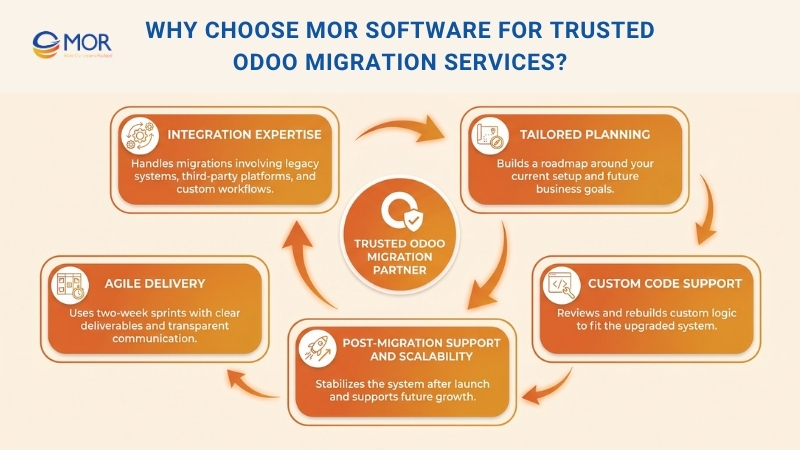
- Strong system integration expertise: We handle complex migrations that involve legacy systems, third-party platforms, and custom business workflows.
- Tailored migration planning: We build a migration roadmap around your current Odoo setup, business processes, and future goals.
- Support for custom modules and code: We review, adjust, and rebuild custom logic when needed so your upgraded system still fits how your teams work.
- Agile delivery with clear progress: We work in two-week sprints, with defined deliverables and transparent communication throughout the project.
- Post-migration support and scalability: We stay involved after go-live to help stabilize performance, fix issues, and prepare your system for future growth.
What are the benefits of choosing MOR Software as your migration partner? You get more than technical execution. You get a team that understands software delivery, integration challenges, and long-term system stability. That helps your Odoo migration stay practical, controlled, and ready to support business growth.
Conclusion
Odoo migration is not just a version change. It affects your data, workflows, users, and future system stability. The right plan helps you avoid downtime, control cost, and keep your business moving without major setbacks. With strong technical skills and hands-on delivery experience, MOR Software supports businesses through each stage of the transition. If you are planning your next Odoo move, contact us to discuss the right path for your system.
MOR SOFTWARE
Frequently Asked Questions (FAQs)
What are Odoo migration services?
Odoo migration services refer to moving your current Odoo system to a newer version or a different environment while keeping data, modules, and workflows intact.
When should a business consider migrating Odoo?
You should plan a migration when your current version is outdated, slow, no longer supported, or cannot handle new business needs.
How long does an Odoo migration project usually take?
It depends on system size and complexity. Small projects may take a few weeks, while larger setups can take several months.
What data is transferred during migration?
Key records like customers, vendors, invoices, products, inventory, and financial data are usually migrated to the new system.
Can custom modules be kept after migration?
Yes, but they often need to be reviewed and adjusted to match the structure of the new Odoo version.
Is there any downtime during Odoo migration services?
Some downtime is expected, especially during final deployment. Careful planning helps keep it short and controlled.
What are the main risks of Odoo migration services?
Common risks include data errors, module incompatibility, system downtime, and user confusion after the upgrade.
How can businesses reduce migration risks?
Good preparation helps a lot. This includes full backups, testing in a staging environment, and clear rollout planning.
How much do Odoo migration services cost?
Costs vary based on system size, customization level, and integrations. Projects can range from a few thousand to over six figures.
Do users need training after migration?
Yes, training is often needed so teams can understand new features, updated workflows, and system changes.
Share


Make Our-Dreams Realized


© 2023 . MOR Software. All Rights Reserved
Sitemap
Privacy Policy
Terms of Use

Rate this article
0
over 5.0 based on 0 reviews
Your rating on this news:
Name
*Email
*Write your comment
*Send your comment
1