


Odoo Website Development: Comprehensive Guide 2026
Odoo website development helps businesses create websites that connect directly with CRM, Sales, Inventory, and other Odoo ERP applications. It supports standard business websites, online stores, and custom portals through one platform. But choosing the right development approach affects your budget, hosting, and long-term maintenance. In this guide, MOR Software will cover the available options, core features, development steps, and costs to help you plan your project.
Key Takeaways
- Odoo supports no-code website creation, low-code customization, and custom development for businesses with different technical needs.
- Website development costs depend on Odoo licensing, hosting, design requirements, integrations, and ongoing support.
- Successful Odoo websites need clear business goals, proper ERP connections, mobile-friendly design, and thorough testing before launch.
What Is Odoo Website Development?
Odoo website development refers to the process of designing, creating, customizing, and maintaining websites using the Odoo platform. It allows businesses to establish an online presence through a content management system (CMS) built into Odoo ERP.
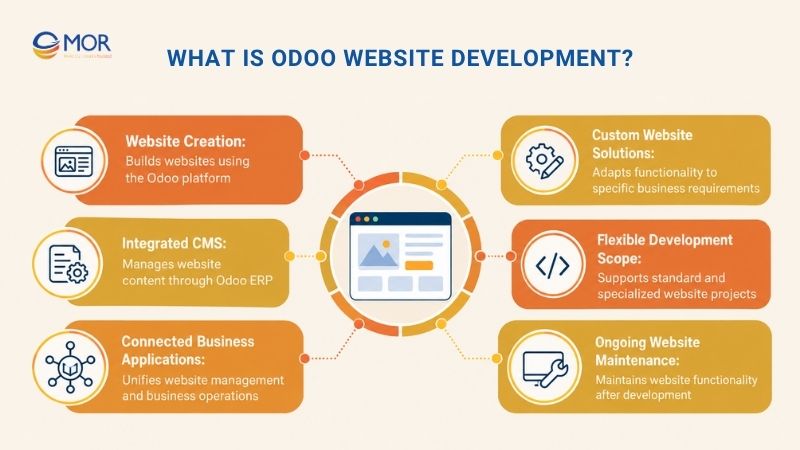
Unlike standalone website platforms, Odoo Website operates within a broader suite of business applications. It provides a shared environment for website management and business operations.
The development process can involve standard website creation or specialized solutions designed around business requirements. Its scope depends on the website's purpose, functional needs, and level of customization.
What Types of Website Development Can You Build with Odoo?
Odoo supports several development approaches, depending on your technical skills and project requirements. Businesses can start with visual editing tools or choose custom development for specialized workflows.
Development option | What it allows | Technical requirements | Best suited for |
No-Code Website Development | Create pages, edit layouts, manage menus, and configure basic SEO settings through visual tools | No programming skills required | Startups, small businesses, and corporate websites |
Low-Code Website Customization | Modify themes, configure built-in functions, and adjust website behavior through supported tools | Basic Odoo configuration knowledge | Growing businesses needing greater design and functional control |
Custom Odoo Website Development | Create custom themes, modules, widgets, and workflows using Python, XML, QWeb, SCSS, and JavaScript | Professional development skills and compatible hosting | Enterprises, custom portals, and complex business websites |
No-code development suits companies that need to launch standard pages quickly. Odoo's visual editor lets users manage content without writing code, making it practical for teams planning to build website without coding.
Custom development provides deeper control over website behavior. Developers can extend Odoo through tailored modules and business logic, making odoo app development relevant for projects involving specialized functions.
Hosting determines which approach your business can use.
- Odoo Online: A managed cloud service suitable for standard websites. It doesn't support installing custom Python modules.
- Odoo.sh: Odoo's cloud development platform supports custom modules, Git-based development, and staging environments.
- Self-hosting: Businesses manage Odoo on their own infrastructure, gaining direct control over servers and deployments.
Odoo also provides a One App Free plan with website hosting. According to its official domain documentation, eligible Odoo Online databases can register a domain free for one year.
Supported custom domains also receive SSL certificate management through Odoo. Domain renewal charges and other hosting expenses depend on the chosen setup.
Key Features That Power Odoo Website Development
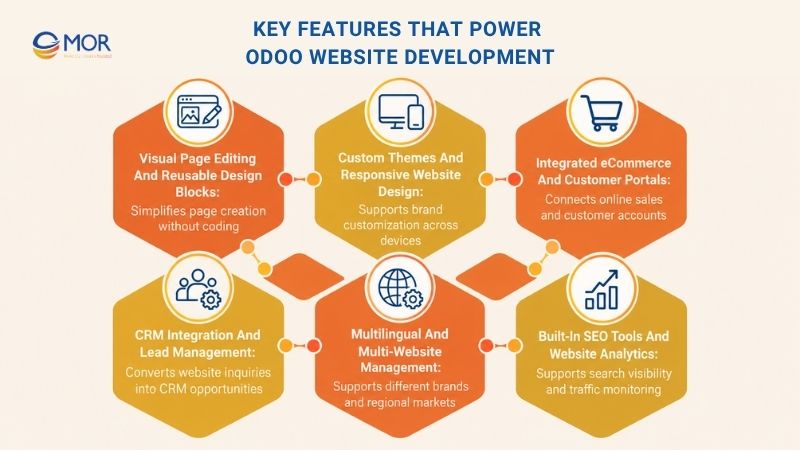
The value of Odoo website development comes from its connection to business applications and its flexible content tools. These capabilities support website management, customer communication, online selling, and regional expansion.
Visual Page Editing and Reusable Design Blocks
The odoo website builder provides a drag-and-drop interface for creating pages through reusable content blocks. Users can insert banners, images, text sections, buttons, testimonials, and forms without editing source code.
Marketing teams can also update content directly on the page. For example, a service company can change its landing page, replace campaign banners, and publish new offers without asking developers to rebuild the layout.
Reusable building blocks keep page designs consistent across the website. Teams can apply familiar layouts to new pages and spend less time recreating common elements.
Custom Themes and Responsive Website Design
Odoo includes ready-made themes that support changes to colors, fonts, navigation, and page layouts. These themes provide a starting point for websites that follow standard design patterns.
Businesses with specific branding requirements may need custom themes. Developers can work with QWeb templates, Bootstrap, SCSS, and JavaScript to create tailored layouts and interactive elements.
Responsive design also supports access across smartphones, tablets, and desktop devices. A well-planned layout keeps menus readable, images appropriately sized, and actions accessible on smaller screens.
Integrated eCommerce and Customer Portals
Odoo connects online storefronts with product catalogs, customer accounts, quotations, and order processing. Businesses can manage these functions through the same system that supports their sales operations.
For companies planning odoo ecommerce website development, this connection can limit repetitive data entry between the storefront and back-office systems. Product availability, order information, and customer records can follow configured business workflows.
Checkout quality deserves attention. The Baymard Institute reports an average cart abandonment rate of 70.22%, based on 50 studies, highlighting the need to review checkout usability before launch.
Many odoo ecommerce websites serve retailers and distributors with complex catalogs. Businesses can review Odoo for ecommerce when assessing product management, order processing, and store requirements.
Customer portals extend these functions by giving registered users access to relevant account information. Depending on the installed applications, customers may view quotations, orders, invoices, and other authorized records.
CRM Integration and Lead Management
Odoo website forms can send customer inquiries directly into CRM workflows. This removes the need for staff to manually transfer contact details between separate tools.
For instance, a visitor completing a quotation form can generate an opportunity in Odoo CRM. Sales teams can then review the request, assign responsibility, and manage follow-up activities.
Live chat and other customer contact functions add further ways to collect inquiries. These connections become useful when a company wants website interactions to support a structured sales process.
For broader system planning, odoo erp development also covers the business applications and workflows that may sit behind the website.
Multilingual and Multi-Website Management
Odoo supports several websites within one database. Each website can have its own domain, theme, navigation, and content, making it suitable for companies managing different brands or regional markets.
Multilingual tools allow teams to prepare content in different languages. A company operating in Japan and Vietnam, for example, can provide localized service pages for each audience.
Regional websites still need careful content management. Language-specific URLs, accurate translations, and consistent navigation support visitors and search engines.
Built-In SEO Tools and Website Analytics
Odoo provides tools for editing page titles, meta descriptions, URLs, and image descriptions. It also supports XML sitemaps, redirects, and multilingual SEO settings.
Website owners can connect Google Analytics to track traffic and visitor activity. Odoo also supports Plausible Analytics, depending on the deployment setup.
These tools support ongoing search performance reviews. Yet strong rankings still depend on content quality, website speed, mobile usability, and sound technical setup.
Odoo's SEO documentation explains the available controls for metadata, indexing, structured data, and site migration.
How to Develop an Odoo Website Step by Step
A structured Odoo website development process starts with business requirements and ends with a tested website ready for daily use. The following 11 steps cover planning, configuration, content creation, integrations, and launch preparation.
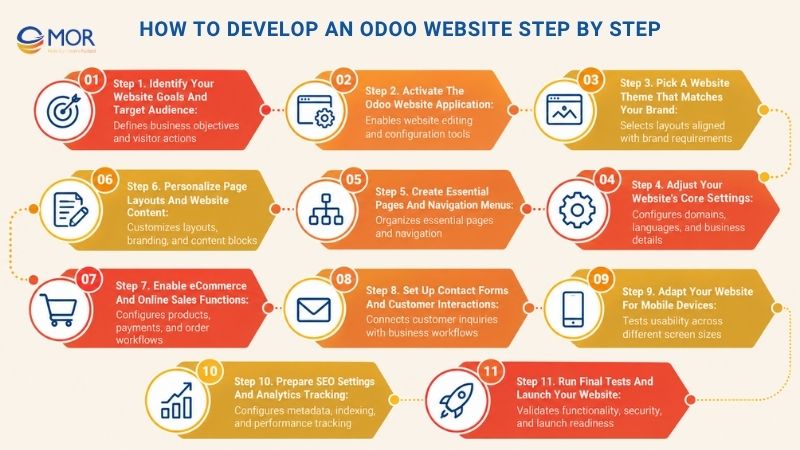
Step 1. Identify Your Website Goals and Target Audience
Start with the business outcome your website should deliver. A B2B company may prioritize lead generation, whereas a retailer needs product discovery, checkout, and order tracking.
Define your audience and the actions visitors should complete. These could include requesting a quotation, booking an appointment, registering an account, or purchasing a product.
Document the required pages and business connections before design begins. For example, a distributor may need customer-specific pricing linked to Odoo Sales, which affects the development scope.
Step 2. Activate the Odoo Website Application
Choose your Odoo deployment environment based on the level of customization your website requires. Standard websites can use Odoo Online, but custom module projects need a compatible environment.
Open the Odoo Apps dashboard, locate the Website application, and activate it if it isn't already installed. The website editor and related configuration tools will become available in your database.
Review any application dependencies before installing extra modules. Your selected Odoo plan and required functions may affect subscription costs.
Step 3. Pick a Website Theme That Matches Your Brand
Odoo provides website themes with layouts suited to different business needs. Review the available designs and select one that fits your content structure and brand identity.
Pay attention to navigation, page spacing, headings, and mobile behavior. A theme may look attractive in a preview but still require changes to support a large product catalog or complex service pages.
For a custom project, prepare design requirements before writing code. Define the elements that need to differ from standard templates, then confirm which changes require custom theme development.
Step 4. Adjust Your Website's Core Settings
Configure the website name, business details, primary language, and domain settings. Check the configuration menu for the options available in your Odoo version.
Companies serving regional customers should review language, currency, and relevant business settings early. These choices can affect how visitors view products, prices, and account information.
Domain configuration also needs attention before publishing. Confirm the DNS records, HTTPS access, and connection between the domain and the correct Odoo website.
Step 5. Create Essential Pages and Navigation Menus
Create the main pages visitors need to understand your business. Most corporate websites begin with Home, About Us, Services, Contact, and relevant product or resource pages.
Keep navigation organized around user goals. For example, a software company may separate its services, industries, case studies, and contact information into clear menu groups.
Assign readable URLs to each page. Consistent naming also makes content management easier as your website grows.
If you plan a large content library, establish categories before publishing articles. This prevents overlapping pages and confusing navigation later.
Step 6. Personalize Page Layouts and Website Content
Open the Odoo visual editor and place content blocks on your pages. Text sections, images, buttons, galleries, and forms can be arranged according to the selected theme.
Adjust typography, colors, spacing, and calls to action to match your brand. Reusable elements can keep service pages and campaign landing pages consistent.
Teams that develop Odoo website content regularly should establish a shared set of page components. Editors can then publish new pages without rebuilding the same layout.
For specialized interfaces, developers may create custom snippets or templates. Odoo's official theme development guide documents how theme modules manage styles, templates, and JavaScript assets.
Step 7. Enable eCommerce and Online Sales Functions
Install or activate the required eCommerce functions if your website sells products or services. Configure product information, categories, pricing, and checkout options.
Set up payment providers and relevant delivery methods based on the supported Odoo configuration. Then connect your storefront to the required Sales, Inventory, and Accounting workflows.
Businesses comparing custom odoo e-commerce website development services should identify which checkout or order management functions aren't covered by standard Odoo settings.
A retailer may need customer-specific product catalogs, pricing rules, or external fulfillment systems. These requirements can increase development and testing effort.
Companies planning building a dropshipping store with Odoo should also check supplier data, stock availability, shipping notifications, and order status updates.
Step 8. Set Up Contact Forms and Customer Interactions
Add forms that match your website's goals, including contact requests, consultation inquiries, newsletter subscriptions, or event registrations.
Odoo's form editor supports several actions, depending on the installed applications. Submissions can create CRM opportunities, helpdesk tickets, customer records, or other supported entries.
Check that each form sends information to the correct destination. A working form that routes inquiries to the wrong sales team still creates unnecessary administrative work.
Customer portals, live chat, and appointment scheduling can support more complex visitor journeys. Configure access rights carefully when users need to view private records.
Step 9. Adapt Your Website for Mobile Devices
Preview every main page on desktop, tablet, and mobile screens. Inspect menus, image sizes, button spacing, form fields, and checkout steps.
Mobile usability also affects search visibility. Google announced that after July 5, 2024, its Search crawling would use Googlebot Smartphone for the remaining sites still receiving desktop crawling.
Test the real mobile experience rather than relying only on the editor preview. Product filters, large images, and interactive menus may behave differently on smaller devices.
If your business also needs a dedicated shopping app, assess ecommerce mobile app development services separately from the website scope.
Step 10. Prepare SEO Settings and Analytics Tracking
Configure each page's SEO title, meta description, and URL. Add descriptive alt text to images and check internal links between related pages.
Odoo can generate an XML sitemap, but you should still review indexing settings and page visibility. If you're moving an existing website, prepare redirects for URLs that will change.
Set up Google Analytics or another supported analytics tool to monitor website activity. Use Google Search Console to review indexing, search queries, and crawl issues.
Track metrics that connect to business goals. For a service website, completed inquiry forms may be more useful than raw pageviews.
Step 11. Run Final Tests and Launch Your Website
Test your website before making it public. Check navigation, mobile layouts, forms, payment flows, user accounts, and links to other Odoo applications.
For custom projects, test integrations and access permissions under different user roles. A customer should never gain access to another customer's private records.
Run performance and security checks, then confirm backups and rollback procedures. In larger projects, complete user acceptance testing (UAT) with the business teams that will manage the website.
Publish the site after the major issues have been resolved. Monitor errors, form submissions, website traffic, and customer feedback during the first weeks of operation.
How Much Does Odoo Website Development Cost?
The cost of Odoo website development depends on licensing, hosting, design complexity, and custom features. A standard business website generally requires less development work than a custom eCommerce store with external integrations.
The following table separates official Odoo pricing from illustrative project budget allowances.
Cost component | Estimated cost (USD) | What it includes | Main cost drivers | Budget consideration |
Odoo licensing | $0 or 24.90–49/user/month* | One App Free, Standard, Custom plans | Plan, user count, required capabilities | Recurring subscription |
Hosting and infrastructure | $0 for Odoo Online hosting; Odoo.sh workers from $57.60/month* | Cloud hosting, storage, deployment | Hosting type, workers, storage, staging | Recurring infrastructure costs |
Website design | 1,500–5,000/project**
| Theme setup, responsive UI/UX, page layouts | Page count, branding, design scope | One-time design budget |
Custom development | 1,500–5,000/custom module**
| Modules, templates, custom business logic | Developer hours, feature complexity | One-time development budget |
Third-party integrations | 4,000–12,000/project**
| External APIs, payment systems, data synchronization | Number of systems, data mapping, testing | Integration budget |
Maintenance and support | 500–1,500/month**
| Bug fixes, updates, technical support | Custom code, support hours, service scope | Recurring support budget |
Standard and Custom subscription figures reflect advertised US introductory annual-billing rates. The discount applies to eligible initial users for 12 months. Odoo.sh hosting is an extra expense.
The design, custom development, integration, and maintenance ranges marked ** are illustrative budgeting allowances, not verified market averages or MOR Software quotes. Actual proposals can fall outside these ranges.
Odoo's published pricing lists $24.90 per user/month for Standard and $49 per user/month for Custom under the introductory annual-billing terms. Odoo.sh separately lists $57.60 per worker/month, with storage and staging charged according to the selected configuration.
Your actual project budget depends on the work required. A standard theme may need limited design changes, but a specialized customer portal could require custom backend logic, API development, and extensive testing.
There are also expenses beyond the initial launch:
- Licensing and hosting: Review subscription renewals, infrastructure costs, and any paid services.
- Custom functionality: Budget for modifications that go beyond standard Odoo applications.
- System integration: Account for API mapping, data validation, and error handling.
- Ongoing maintenance: Reserve resources for updates, testing, support, and custom code compatibility.
When comparing proposals from an odoo e-commerce website development company, check which expenses are included in the quoted price. Development fees, software subscriptions, hosting, and maintenance should appear as separate budget items.
The same rule applies when evaluating an odoo website developer for smaller projects. Ask for a defined scope, deliverables, support terms, and assumptions behind the estimate.
Common Odoo Website Development Risks and Fixes
Odoo website development can face problems when project requirements, hosting decisions, and integrations aren't planned early. Most issues involve customization limits, website migration, performance, data connections, or future upgrades.
Development risk | Common cause | Recommended solution | Validation before launch |
Limited customization | Standard tools cannot support required workflows | Confirm feature requirements and select compatible hosting | Test custom functions in a development environment |
Migration-related SEO loss | Changed URLs, missing redirects, lost content | Map existing URLs and retain valuable content | Audit redirects and indexing settings |
Slow website performance | Large images, heavy scripts, inefficient queries | Refine assets, code, and infrastructure settings | Run Core Web Vitals and device tests |
Integration failures | Incorrect data mapping or unreliable API connections | Define data rules and error handling | Test complete business workflows |
Security and access issues | Incorrect permissions or exposed application endpoints | Review user roles, controllers, and record access | Test access under different user accounts |
Upgrade and maintenance problems | Custom code incompatible with new Odoo versions | Maintain version control and use staging environments | Test upgrades before production deployment |
Performance needs measurable targets. Google's Core Web Vitals guidance recommends a Largest Contentful Paint (LCP) of 2.5 seconds or less, an Interaction to Next Paint (INP) of 200 milliseconds or less, and a Cumulative Layout Shift (CLS) of 0.1 or less for a good user experience.
For example, an online store may pass basic functional testing but still load slowly because of oversized product images. Image compression, script review, and server configuration should be included in performance checks.
Migration carries another risk. Existing WordPress pages may already rank for business keywords, and changing their URLs without proper redirects can disrupt search traffic.
Preserve valuable content, map old URLs to new ones, and monitor Google Search Console after launch. Website migration needs its own testing checklist rather than being treated as a simple content upload.
Custom Odoo modules also need ongoing attention. A feature that works on one Odoo version may require code changes when the platform upgrades.
Use staging environments to test new releases before applying them to production. Documenting custom modules and integration rules also makes future maintenance easier.
Develop Custom Odoo Websites with MOR Software
An Odoo website only pays off when it stays in sync with the rest of your business: products, prices, stock levels, orders, customers, and invoices. When it doesn’t, teams end up re-keying data and fixing mismatches after launch.
MOR Software is an official Odoo Partner with certified Odoo developers, backed by 500+ professionals across 8 global offices. Founded in 2016, we are ranked among Vietnam’s Top 10 ICT companies and hold ISO 27001 (information security) and ISO 9001 (quality management) certifications. We combine that Odoo expertise with in-house web engineering to build websites, eCommerce platforms, and connected business applications around how your company actually operates.
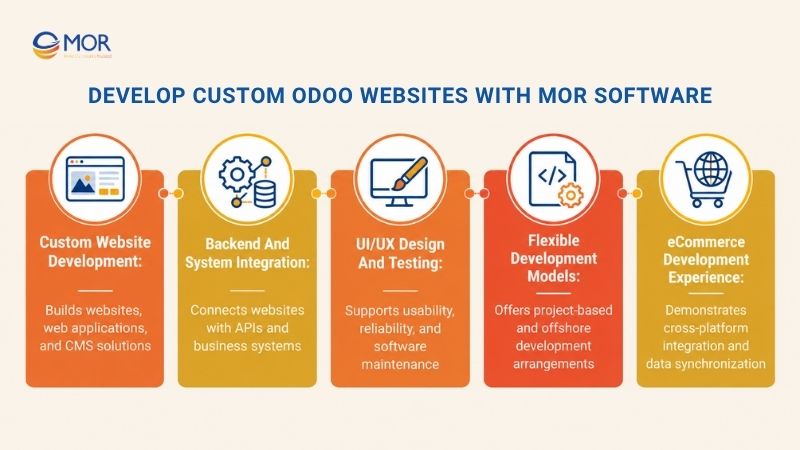
What we deliver
- Custom development on the Odoo stack. Our team builds bespoke Odoo modules and custom front-end experiences using Python, JavaScript, XML/QWeb, OWL, and PostgreSQL, so your website is built to fit your processes instead of a generic theme.
- Integration with your existing systems. We connect Odoo through REST and JSON-RPC APIs to eCommerce platforms, WMS, TMS, and third-party ERP systems, so product, order, and customer data flows between systems instead of being copied by hand.
- Commerce-ready back-office logic. For distribution, wholesale, and retail businesses, we configure Odoo to handle omnichannel orders (eCommerce, POS, B2B portal, field sales), multi-tier pricelists, credit limit checks, and multi-warehouse inventory.
- Testing before launch. Our ISTQB-certified QA engineers run functional, integration, and performance tests, so issues are caught before your customers find them.
- Support after go-live. SLA-backed support, version upgrades, performance monitoring, and structured user training keep your site stable as Odoo and your requirements evolve.
- Engagement models that fit your team. Choose project-based delivery, or embed dedicated Odoo consultants and developers into your team, part-time or full-time, on-site or remote.
Cross-platform eCommerce experience
Our E-commerce Management System project connected international shopping services for Korean and Vietnamese users. An eight-member team spent nine months building it with PHP, NestJS, NextJS, and AWS, with a core focus on synchronizing product data across commerce platforms.
This is the kind of engineering a serious Odoo website depends on: reliable data synchronization, multi-platform integration, and a scalable architecture. We apply the same approach when connecting Odoo websites to inventory, accounting, and external sales channels.
How we work
Every engagement starts with discovery and runs in phases. We work in 2-week sprints, track progress in Jira, and assign a dedicated project manager to every project. We sign a strict NDA on every engagement, and full IP ownership transfers to you on delivery.
Choosing an Odoo website development company? Ask each vendor for Odoo-specific project references as well as general web engineering skills. MOR is a strong fit for businesses that need custom Odoo ERP development, system integration, QA, and flexible development resources.
Ready to plan your Odoo website? Contact and send us your requirements, current systems, required integrations, and target timeline. Our team will review them and reply with a preliminary assessment of scope, integration approach, and key risks.
Conclusion
Odoo website development gives businesses a practical way to build websites connected to sales, customer management, and operational systems. The right choice depends on your customization needs, hosting model, development budget, and future plans. MOR Software supports businesses that need custom web development, system integration, QA, and technical delivery resources.
"Mr. Cong’s guiding philosophy is simplicity, believing that the simplest solutions are often the most powerful. He sees trust, empowerment, and the opportunity to demonstrate one’s abilities as the key elements that set MOR apart from traditional IT companies."
Mac Tien Cong


Division Manager (Hanoi Branch)
MOR SOFTWARE
Frequently Asked Questions (FAQs)
Can you build a website with Odoo without coding?
Yes. Odoo provides visual editing tools that let users create pages, adjust layouts, and update content without programming skills. Its drag-and-drop interface works well for standard websites, landing pages, and business content. Specialized functions may still require developers.
What is the difference between Odoo Website Builder and custom website development?
Odoo's standard builder focuses on visual editing, ready-made themes, and built-in functionality. Custom development extends the platform through tailored modules, templates, and business logic. The right approach depends on your design requirements, operational workflows, and hosting environment.
Which programming languages are used in Odoo website development?
Odoo uses Python for backend logic and XML-based QWeb templates for page rendering. Developers also work with HTML, SCSS, JavaScript, and related frontend tools. The chosen technologies depend on the type of customization and the Odoo version.
What types of business websites can Odoo support?
Odoo supports corporate websites, online stores, blogs, event registration pages, booking websites, and customer portals. These options depend on the relevant installed applications and configuration. Reviewing odoo website examples can help businesses identify suitable layouts and functions for their projects.
Can an Odoo website integrate with CRM and inventory management?
Yes. Odoo Website can connect with CRM, Sales, Inventory, and eCommerce applications when they are installed and configured. Contact forms can create CRM records, and online transactions can follow connected order workflows. Specialized external integrations may require custom development.
What is the difference between Odoo Online and Odoo.sh for website development?
Odoo Online provides managed hosting for standard Odoo applications but doesn't support custom Python modules. Odoo.sh supports custom module deployment, development branches, and staging environments. Businesses requiring extensive code customization should review Odoo.sh or self-hosted deployment.
Is Odoo Website Builder free to use?
Odoo provides a One App Free plan that supports eligible website use on Odoo Online. Additional business applications, custom development requirements, or different hosting choices may change the subscription needs. Check the current pricing terms before selecting a plan.
How much does custom Odoo website development cost?
Costs vary based on website design, custom modules, ERP connections, integrations, and testing. A basic website generally costs less to develop than a complex customer portal or online store. Request an itemized estimate covering implementation, hosting, licensing, and maintenance.
Is Odoo Website good for SEO?
Odoo includes tools for managing metadata, URLs, image descriptions, redirects, and sitemaps. It also supports multilingual SEO settings and analytics connections. These functions provide a foundation for search visibility, but content quality, performance, and site structure still affect results.
Can you migrate an existing WordPress website to Odoo?
Yes. WordPress content, images, and page structures can be moved to Odoo through a planned migration process. Custom themes, plugins, and functions may need replacement or redevelopment. Preserve relevant URLs or add redirects, then test the new website before launch.
Share


Make Our-Dreams Realized


© 2023 . MOR Software. All Rights Reserved
Sitemap
Privacy Policy
Terms of Use

Rate this article
0
over 5.0 based on 0 reviews
Your rating on this news:
Name
*Email
*Write your comment
*Send your comment
1