


Salesforce App Development: Step-by-Step Guide for Businesses
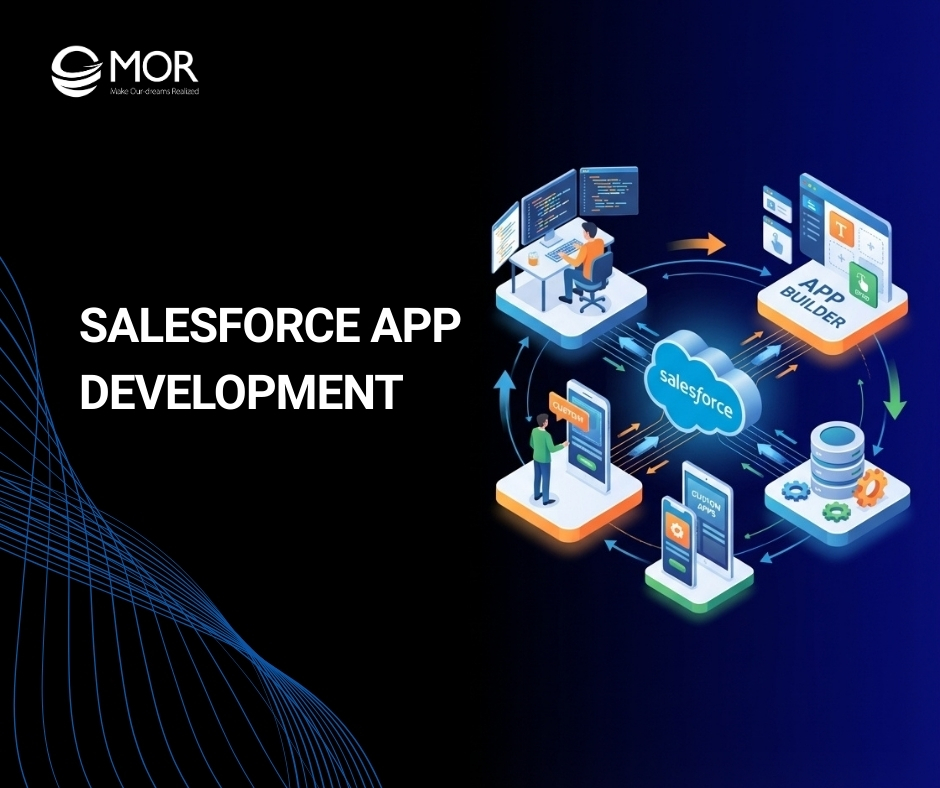
Many businesses struggle to extend their CRM systems beyond standard features, which often limits automation, integration, and scalability. Salesforce app development helps companies build tailored solutions that match their exact workflows and operational needs. In this guide, MOR Software will explore how developing applications on the Salesforce platform works, the technologies involved, and the steps businesses can follow to create powerful Salesforce-based applications.
Salesforce App Development
Salesforce app development focuses on building custom applications within the Salesforce ecosystem to simplify business operations, automate everyday work, and strengthen customer relationships. These solutions may operate inside an organization for internal teams or be distributed publicly through Salesforce AppExchange.
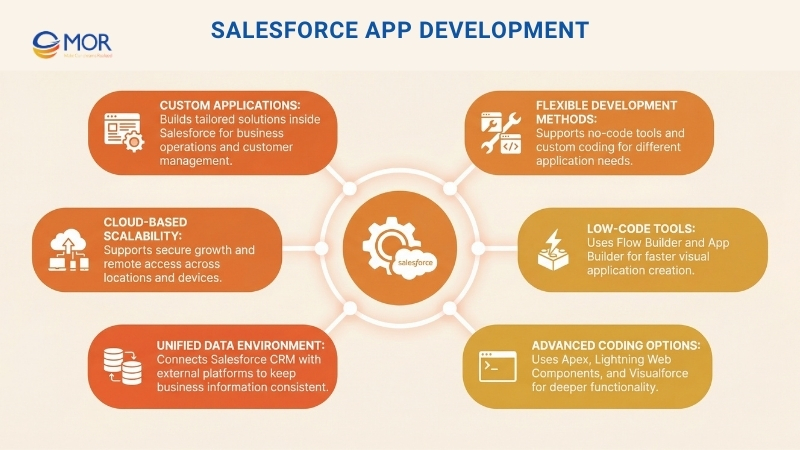
Salesforce provides two main approaches for creating applications on its platform:
- No-Code/Low-Code Tools: You can design applications without writing code through tools like Flow Builder and App Builder.
- Custom Development: For more sophisticated functionality, developers rely on apex salesforce (Salesforce’s coding language), Lightning Web Components, and Visualforce to construct applications with advanced capabilities.
These solutions connect easily with Salesforce’s core CRM environment and external platforms, allowing all your business information to stay unified. Since Salesforce operates in the cloud, the applications built on it can grow with your organization, remain secure, and be accessed from almost any location.
Key Features Of Salesforce App Development
Modern Salesforce app development offers a set of platform capabilities that help organizations design reliable, scalable, and secure business applications. These features support everything from infrastructure management to automation, data processing, and user experience. Understanding these characteristics helps businesses evaluate how applications built on the Salesforce platform support operational requirements, integrate with existing systems, and adapt as organizations expand.
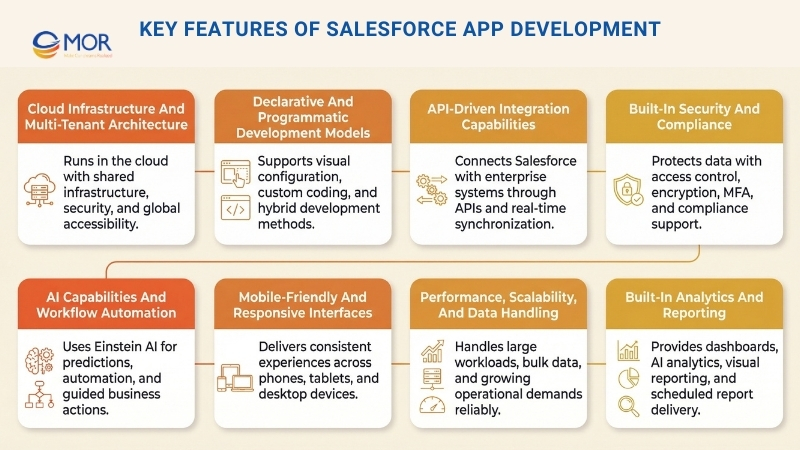
Cloud Infrastructure And Multi-Tenant Architecture
Applications developed on Salesforce operate on a fully cloud-based environment. This model allows organizations to reduce the financial burden of maintaining on-site infrastructure. The platform uses a multi-tenant structure that supports reliability, scalability, and strong security standards while enabling many companies to share the same technology environment efficiently.
- No Infrastructure Management: These applications run entirely in the cloud, eliminating the need to manage physical servers or maintain internal hardware systems.
- Multi-Tenant Efficiency: A single software environment serves multiple organizations, allowing efficient resource usage and strong performance while maintaining strict data separation.
- Automatic Updates: Salesforce releases three major platform updates each year. These updates strengthen security, improve compliance features, and introduce new capabilities without interrupting existing solutions.
- Global Access And Mobility: Users can open these tools from virtually any location, using any internet-connected device.
Declarative And Programmatic Development Models
The Salesforce platform supports both configuration-based development and code-driven development. This flexibility allows organizations to choose the approach that matches their technical requirements and available expertise. Maintaining a consistent user experience strategy during design also helps ensure teams can easily adopt the system.
- No-Code / Low-Code Declarative Development: Teams can create applications using visual tools and configuration features that require little or no coding.
- App Builder: A drag-and-drop environment used to design custom applications and organize user interfaces.
- Flow Builder And Process Builder: Tools that automate operational processes without requiring written logic.
- Object Manager: A salesforce configuration tool that allows organizations to define custom data objects, fields, and relationships.
- Custom Development Through Code: Developers can build more advanced functionality through Salesforce programming tools designed for enterprise-level solutions.
- Apex: Salesforce’s proprietary object-oriented language used to implement complex business logic.
- Lightning Web Components (LWC): A modern front-end framework designed to build reusable and responsive user interface components.
- Visualforce: A framework that allows developers to design tailored interfaces using markup similar to HTML.
- Hybrid Development: Many hybrid mobile app development solutions combine declarative tools with coded solutions. This blended method enables teams to move quickly while still allowing deeper customization where required.
API-Driven Integration Capabilities
The architecture behind Salesforce app development allows applications to connect easily with external software, legacy platforms, and enterprise systems. This design supports consistent information exchange and helps organizations maintain connected workflows across multiple tools.
- REST And SOAP APIs: The Salesforce platform provides powerful application programming interfaces that allow systems to connect with tools such as ERP platforms, accounting systems, and HR management software.
- Native Integrations: Salesforce works smoothly with widely used platforms including Google Workspace, Microsoft 365, Slack, and other productivity solutions.
- Middleware Support: Integration technologies such as enterprise integration patterns mulesoft and Boomi allow Salesforce environments to communicate with complex enterprise IT infrastructures.
- Data Synchronization: Real-time synchronization ensures that information remains consistent between Salesforce and connected systems, preventing isolated data storage across platforms.
Built-In Security And Compliance
Security is a fundamental aspect of the Salesforce platform, helping organizations maintain compliance requirements while protecting customer and operational data.
- Role-Based Access Control (RBAC): Administrators can determine which users are allowed to view or modify certain records, objects, and fields according to their roles within the organization.
- Data Encryption: The platform applies AES-256 encryption to protect information both while stored and during data transfer, reducing the risk of unauthorized access.
- Multi-Factor Authentication (MFA): Additional identity verification ensures that only approved users can sign in to the system.
- Regulatory Compliance: Salesforce aligns with international security regulations and certifications, including GDPR (General Data Protection Regulation), HIPAA (Health Insurance Portability and Accountability Act), SOC 2, ISO 27001, and CCPA (California Consumer Privacy Act).
- Audit And Logging Capabilities: The system records user activity and data modifications, enabling organizations to monitor compliance requirements and detect potential security issues.
AI Capabilities And Workflow Automation
Artificial intelligence plays a growing role in Salesforce platform application development. Einstein AI introduces machine learning, predictive analysis, and automated processes that help organizations improve operational decisions and productivity.
- Predictive Analytics: The system reviews historical information to anticipate customer behavior patterns, emerging trends, and future sales performance.
- Automated Data Processing: Artificial intelligence automatically organizes leads, allocates opportunities, and streamlines operational workflows.
- Einstein Bots And Conversational AI: Intelligent chatbots assist customers by responding to common questions and handling support interactions automatically.
- Next Best Action Recommendations: AI analyzes real-time information and suggests personalized actions for sales representatives and customer support teams.
Mobile-Friendly And Responsive Interfaces
Modern solutions created through Salesforce mobile app development support consistent user experiences across smartphones, tablets, and desktop environments. These capabilities help employees and customers interact with applications regardless of location or device type.
- Salesforce Mobile App: Users can view dashboards, reports, and customer information directly from their mobile devices.
- Offline Mode Support: Employees can continue working without an internet connection, while the system synchronizes data once connectivity returns.
- Lightning Responsive UI: Lightning Experience automatically adjusts layouts and components to different screen sizes, ensuring a smooth interface on any device.
- Progressive Web Apps (PWAs): Web-based solutions behave like mobile applications, increasing performance and accessibility.
Organizations planning large-scale mobile solutions often choose to hire Salesforce mobile app developers to ensure these applications perform reliably across multiple devices and operating systems.
Performance, Scalability, And Data Handling
Solutions created through Salesforce app development are designed to manage significant data volumes and heavy transaction activity while maintaining reliable system speed. The platform’s architecture supports growing operational demands without affecting application stability.
- Cloud Elasticity: Salesforce automatically adjusts computing resources based on system activity, helping prevent slowdowns during peak workloads.
- Bulk Data Processing And Batch Apex: These capabilities allow organizations to process millions of records efficiently while maintaining normal application performance.
- Optimized Query Performance: The platform uses SOQL (Salesforce Object Query Language) to retrieve and manage information quickly and accurately.
- Multi-Org And Multi-Language Support: Large organizations can operate multiple departments or regional operations within the same platform environment.
Built-In Analytics And Reporting
Applications developed on the Salesforce platform include integrated reporting and analytics capabilities that allow organizations to monitor operational results and evaluate business performance.
- Custom Dashboards And Reports: Users can design interactive dashboards that display real-time operational data.
- Embedded AI-Powered Analytics: Salesforce CRM Analytics, previously known as Einstein Analytics, provides advanced analytical tools that reveal deeper patterns within organizational data.
- Data Visualization: Charts, graphs, and structured data tables help teams interpret information and support strategic decisions.
- Scheduled And Automated Reports: Reports can be generated and delivered automatically on a scheduled basis, reducing the need for manual reporting tasks.
Ultimately, Salesforce-powered application development focuses on building flexible, intelligent solutions that help organizations remain efficient, connected, and prepared for future growth.
Benefits Of Salesforce App Development For Businesses
Although Salesforce already delivers a powerful CRM system, every company operates with different processes, workflows, and customer engagement models. Salesforce app development allows organizations to extend the platform with tailored applications that better match specific operational needs and business strategies.
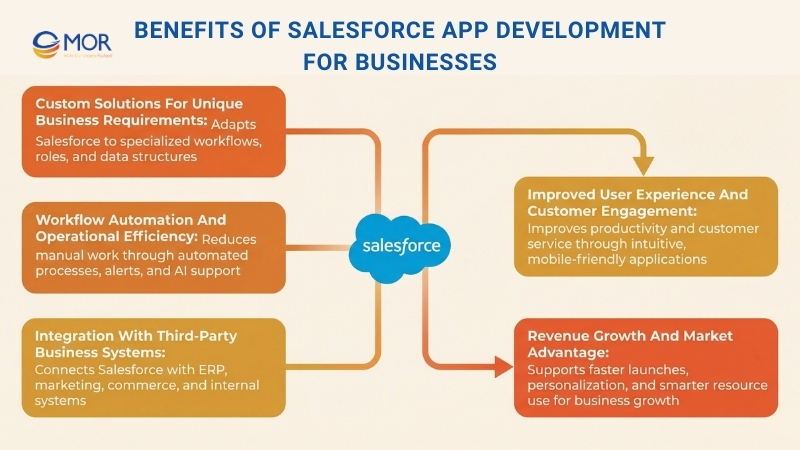
These solutions often reshape how teams operate, manage data, and interact with customers.
Custom Solutions For Unique Business Requirements
Each organization works in its own way, and standard CRM features may not always align with a company’s industry-focused or process-oriented requirements. Through Salesforce custom app development, businesses can adjust the platform to support their exact operational needs.
- Industry-Focused Customization: Every industry faces different operational challenges and requirements, which organizations can address through applications built with specialized workflows.
- Tailored User Interfaces: Teams can design role-specific dashboards, forms, and reports that align closely with employee responsibilities and internal processes.
- Custom Data Structures: Developers can create new objects and fields to store industry-specific information that does not exist in standard Salesforce modules.
When platform configuration options reach their limits, deeper customization becomes necessary. Understanding how Salesforce configuration differs from customization helps organizations choose the most suitable solution.
Workflow Automation And Operational Efficiency
Many organizations still rely on repetitive manual tasks that slow down operations and increase the chance of mistakes. Salesforce app development makes it possible to automate workflows, which reduces manual effort and improves operational efficiency.
- Automated Workflows And Approval Processes: Business operations such as order approvals, invoice validation, and contract management can be handled through automated workflows.
- AI-Supported Automation: Salesforce Einstein AI helps automate data classification, lead evaluation, and predictive suggestions that support business decisions.
- Task And Notification Automation: Automated alerts ensure employees stay informed about important actions such as follow-ups, deal completion, or compliance checks.
Automation allows teams to spend less time on repetitive work, reduce human error, and focus more on customer relationships and long-term business growth.
Integration With Third-Party Business Systems
Most companies operate with multiple software platforms alongside Salesforce, including ERP tools, accounting systems, marketing automation solutions, and customer service platforms. When these tools remain disconnected, organizations often face fragmented data, repeated work, and operational inefficiencies.
Through custom app development Salesforce, businesses can connect these systems and maintain consistent information across their technology environment.
- ERP And Accounting Software Integration: Organizations can synchronize Salesforce with platforms such as SAP, Oracle, QuickBooks, and NetSuite, ensuring financial records and customer information remain consistent across systems.
- Marketing Automation Integration: Salesforce can connect with platforms like Marketo, HubSpot, and Google Ads, allowing marketing teams to monitor campaign performance and manage lead nurturing activities effectively.
- E-Commerce And Payment Gateways: Custom applications allow integration between Salesforce and platforms such as Shopify, PayPal, and Stripe, enabling companies to track transactions and customer purchase activity.
- Custom API Development: Organizations can design their own APIs to link Salesforce with internal legacy platforms and specialized software systems.
Integrating these external technologies with Salesforce helps organizations maintain a single, reliable data source, where information remains unified. This approach supports more accurate decisions and improves operational efficiency.
Improved User Experience And Customer Engagement
An intuitive and well-structured Salesforce environment improves employee productivity and strengthens customer interactions. The experience becomes more efficient when applications simplify tasks, reduce system complexity, and present important information clearly.
Many organizations implement Salesforce mobile app development services to deliver consistent experiences across both internal teams and customers.
- Role-Based Dashboards And Reports: Employees gain access to real-time data and key performance indicators relevant to their specific responsibilities.
- Self-Service Customer Portals: Businesses can create client-facing applications where customers review orders, request assistance, and update personal details.
- Mobile-Friendly Access: Applications designed for smartphones and tablets allow employees to stay connected and productive even when working remotely.
When these tools are designed with usability in mind, employees adopt them faster and complete their daily responsibilities more efficiently.
Revenue Growth And Market Advantage
Implementing applications through Salesforce app development strengthens sales operations, customer service delivery, and marketing activities. These improvements support revenue expansion and help organizations maintain a stronger position in competitive markets.
- Predictive Analytics For Sales And Marketing: Advanced analytics help companies identify sales patterns, forecast revenue performance, and tailor customer outreach based on data insights.
- Customer Retention And Personalization: AI-driven applications review customer activity and provide personalized product suggestions that improve engagement.
- Optimized Resource Allocation: Automating repetitive tasks reduces operational expenses and minimizes inefficiencies, allowing organizations to direct resources toward growth initiatives.
- Faster Time To Market: Custom Salesforce-powered applications allow businesses to respond quickly to changing market demands and introduce new services faster than competitors.
For many organizations, developing custom applications on the Salesforce platform may require more planning compared with ready-made solutions that can be installed and configured immediately. However, because businesses operate with diverse processes and requirements, they ultimately need tools that support their workflows instead of limiting them. Custom development within Salesforce provides the flexibility needed to achieve that goal.
Key Components Of Salesforce App Development
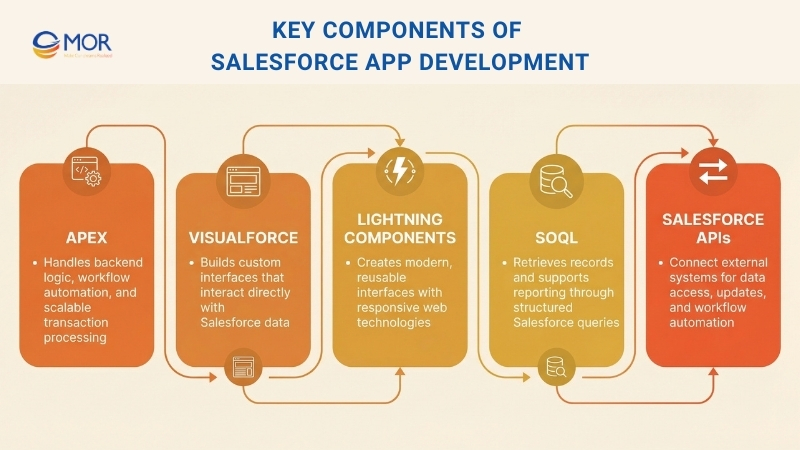
Several core technologies support Salesforce app development and make it possible to build powerful applications within the platform. These components allow developers to create business logic, design user interfaces, manage data, and connect external systems while maintaining strong performance across the CRM environment.
Apex
Apex is a programming languages benchmark designed specifically for Salesforce. Developers rely on it to control transaction logic and manage how processes run on the platform’s servers. This technology allows a certified Salesforce developer to automate operations and build applications that scale with your organization across the entire Salesforce ecosystem.
It enables teams to define detailed business rules, modify system capabilities, and automate workflows inside the platform.
Visualforce
Visualforce is a specialized markup language used to design custom user interfaces inside Salesforce. This technology works directly within the Lightning Platform, allowing developers to create dynamic pages that connect smoothly with organizational data. It functions similarly to HTML but is designed specifically for the Salesforce environment.
It helps developers build pages that present and interact with your company’s data effectively. Visualforce also includes Standard Controllers, which manage basic database operations on the server side.
Lightning Components
Developers use Lightning Components to design modern user interfaces for Experience Builder websites, Salesforce-based applications, and Lightning Experience. These components remain lightweight and efficient because they use Lightning Design System markup and predefined styling classes.
Creating web applications within the platform becomes more modern with Lightning Web Components (LWC). This framework uses standard web technologies such as HTML, CSS, and JavaScript to produce reusable and efficient interface elements.
Salesforce Object Query Language (SOQL)
Salesforce Object Query Language (SOQL) allows users to search organizational data stored inside Salesforce for specific records and information. It works effectively for retrieving data and generating reports.
This query language enables users to locate particular records according to defined conditions. Teams can design simple but powerful queries using SOQL across different development environments.
Salesforce APIs
Salesforce APIs (Application Programming Interfaces) provide structured rules and tools that allow external systems to communicate with Salesforce. A certified Salesforce developer uses these interfaces to access data, update records, and automate operational workflows.
REST and SOAP APIs are widely used for programmatic access to platform data and metadata. These interfaces make it easier for salesforce integration with other applications, services, and enterprise systems.
Common Salesforce App Development Approaches
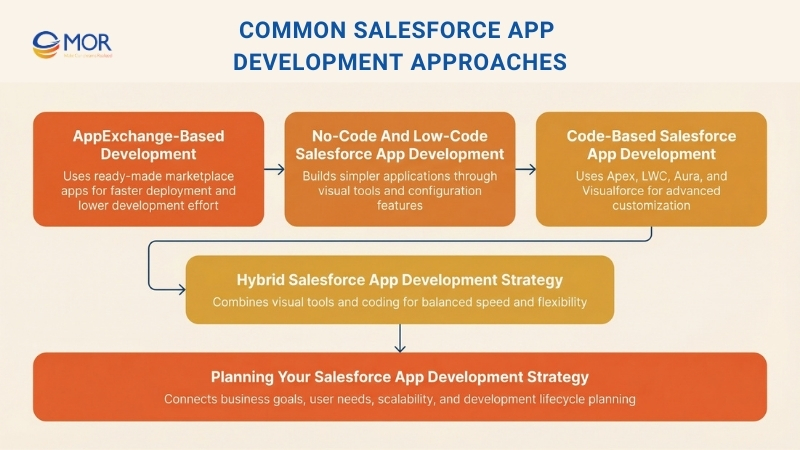
Organizations that plan Salesforce app development usually evaluate several methods for creating applications on the platform. In most cases, companies consider four main approaches: declarative solutions using no-code or low-code tools, programmatic development through coding, hybrid strategies that combine both methods, and AppExchange-based options that rely on ready-made solutions. Each method offers different advantages, and the best choice depends on project complexity, business goals, and available technical resources.
AppExchange-Based Development
Salesforce AppExchange provides a marketplace of ready-made applications built by third-party vendors. These solutions address specific operational needs and often reduce the requirement for building fully custom systems from scratch. This approach allows organizations to launch solutions quickly with lower development costs and minimal implementation effort.
However, although these options offer fast deployment, organizations should evaluate possible customization limitations, subscription costs, and reliance on external vendors before selecting this option. It works well for businesses that want quick solutions without rebuilding existing functionality.
If you are exploring this approach, review a complete guide on Salesforce AppExchange to understand its advantages, commonly used applications, and other useful insights.
No-Code And Low-Code Salesforce App Development
The declarative method uses built-in Salesforce tools to create applications without traditional coding. Features such as Lightning App Builder, Flow Builder, and Object Manager allow users to design business workflows and automate operational processes. Tools such as Approval Processes and Validation Rules also help define data structures and create intuitive user interfaces through a point-and-click approach.
This development method suits projects that require rapid implementation, simple maintenance, and accessibility for business users who do not have coding knowledge. However, it generally works best for straightforward applications, since highly complex workflows, advanced integrations, or heavily customized interfaces usually require programmatic development support.
This method fits many simple use cases, though understanding its strengths and limitations remains important before choosing how to build your solution. A detailed explanation of Salesforce’s low-code platform can help you evaluate whether this approach meets your needs.
Code-Based Salesforce App Development
The programmatic method within Salesforce app development involves writing custom code to implement advanced functionality. This model uses Apex to control backend operations, Lightning Web Components (LWC) to build modern interfaces, Aura for legacy component structures, and Visualforce to support traditional page layouts. This approach is typically chosen for custom Salesforce development, especially when organizations require highly tailored solutions that extend beyond the platform’s built-in features.
Hybrid Salesforce App Development Strategy
The hybrid strategy combines declarative configuration and programmatic development in a structured way to balance speed, flexibility, and functionality. Standard adjustments, workflow automation, and user interface elements can be created through declarative tools, while Apex and Lightning Web Components manage advanced backend logic, integrations with external systems, or specialized interface features.
This method remains one of the most widely used strategies for building applications on the Salesforce platform because it balances efficiency and adaptability. It allows organizations to scale solutions smoothly with minimal disruption to existing systems. However, successful implementation requires strong coordination between administrators and developers to maintain stability and long-term maintainability.
Planning Your Salesforce App Development Strategy
Choosing the correct development approach is only the beginning of creating a Salesforce application that supports your business objectives.
Whether your organization selects a declarative method, a fully coded approach, a hybrid model, or an AppExchange-based solution, the next important step involves translating that strategy into a structured development process. Understanding the Salesforce development lifecycle becomes essential at this stage, as it helps ensure a smooth transition from planning to deployment.
Creating a custom application on Salesforce requires more than configuration or coding alone. It demands a clear strategy that considers business requirements, user experience, scalability, and integration needs.
In the following section, the guide explains the full process of building a custom Salesforce application through a practical example, outlining the key steps required for a stable and scalable implementation.
Salesforce App Development Process: Step-By-Step Guide
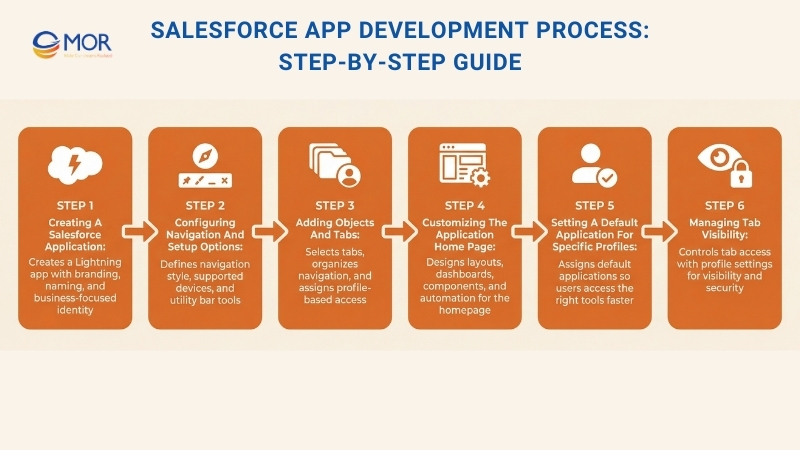
Building applications through Salesforce app development requires a structured process that ensures each feature aligns with business goals and operational requirements. The following steps describe how organizations can create and configure applications inside the Salesforce environment.
Step 1: Creating A Salesforce Application
- Go to Setup, search for App Manager, and open it.
- Create a new Lightning App:
- Select New Lightning App located in the top-right corner.
- Add the app name and branding elements such as logo and color scheme for the application
You can improve the user experience with branding elements like logos and color themes that reflect the organization’s identity. This also helps users easily recognize the custom Salesforce application.
Note:
- It is recommended to follow a clear naming structure for the application so users can easily find and understand it.
- In the example scenario, the app name is Event Management, with the description: Application designed for the Event Management Team. The logo is also created specifically for the Event Management environment.
Step 2: Configuring Navigation And Setup Options
The next screen displays Setup and Navigation Options.
These settings allow you to personalize the application based on specific business requirements.
1. Navigation Style Configuration: Standard Navigation (for internal users)
Console Navigation: Designed for service agents who manage multiple cases at the same time.
In this example, the Event Management application is intended for internal staff, so Standard Navigation is selected as the navigation type. The team managing events should also access the application from both desktop and mobile devices to improve productivity. For that reason, Desktop and Phone are selected as the supported form factors. Since no additional personalization is required, all optional checkboxes remain unchecked.
2. Utility Bar Setup:
The following screen focuses on Utility Items, which appear in the bottom-left corner of the interface.
You should use the utility bar to provide constant access to helpful tools such as notes, recent items, or a softphone, regardless of which tab users are viewing. Selecting the right tools for your application can help increase user efficiency.
The system also provides several alignment options:
- Select the required utility tools according to business requirements:
In the example scenario, users responsible for event management must access Phone, Recent Items, and Notes at any moment regardless of the tab they are currently using. For this reason, these three utility items are added to the utility bar.
Step 3: Adding Objects And Tabs
1. Select The Required Objects And Tabs
Next, choose the objects or tabs that the application requires:
- Arrange the objects in a sequence that allows users to access important information quickly.
- Keep the navigation structure simple so users are not overwhelmed with too many tabs.
- The first tab in the list becomes the default landing tab.
For the Event Management application, the required tabs include Home, Campaign, Events, Leads, Contacts, Tasks, Chatter, Reports, and Dashboards.
2. Assign User Profiles
- In the final step, choose the user profiles that should have permission to access the application.
In this example scenario, the Custom Sales Profile, Marketing User, and System Administrator profiles are the only roles that require access to the Event Management application.
Step 4: Customizing The Application Home Page
You can now configure the Home Page for the Event Management Team.
- Navigate to Setup → Lightning App Builder → New Lightning Page.
- Adjust the page layout according to your needs:
- Dashboards can be placed on the page to present dynamic information in a clear and concise way.
- Add related lists connected to child objects.
- Create custom Lightning Web Components if needed.
- Build CRM Analytics collections such as dashboards or reports.
- Design Screen Flows and other automation elements.
- Save and activate the page, then choose the applications where this page should appear.
- This configuration determines how the Event Management application appears to users.
- Before assigning user profiles, it is recommended to test how the application performs across different users and devices. Many teams rely on Salesforce automation testing tools to verify system performance, resolve early issues, and ensure a smooth deployment.
Note
If you want dashboards to display data according to each user’s security and sharing permissions, open the dashboard editor and select the gear icon (settings). Then locate the View Dashboard As option and choose The Dashboard Viewer.
Step 5: Setting A Default Application For Specific Profiles
How can you set an application as the default for a specific profile?
This configuration directs users to the application they need when they log in. It also helps profile-based users quickly locate and access the tools designed for their responsibilities.
- Select Profile and open Edit.
- Navigate to Custom App Settings and mark the application as Default.
Note: It is recommended that users within a specific profile only see the applications relevant to their roles. This approach improves both security and ease of access. In this example, the Event Management application is assigned as the default for the Custom Sales Profile and Marketing User Profile.
Step 6: Managing Tab Visibility
How can a tab be set to visible or hidden by default?
- Open the required profile, then choose Edit.
- Navigate to Tab Permissions and adjust the visibility settings for the selected applications. The available options include Default On, Default Off, and Tab Hidden.
This walkthrough demonstrates a basic example of how a custom application can be created within the Salesforce ecosystem. Regardless of the industry you operate in, having a tailored application inside the platform allows organizations to align tools and workflows with their operational needs.
Best Practices For Successful Salesforce App Development
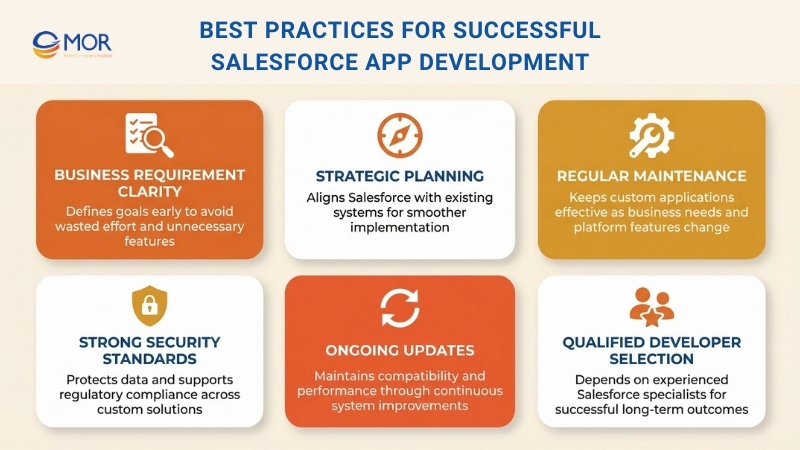
Organizations that invest in Salesforce app development often achieve better results when they follow a structured set of practices. Clear planning, proper maintenance, and strong security standards help ensure that applications built on the platform continue to support long-term business goals.
Understand Your Business Requirements
Identify your exact needs before starting development. A clear understanding of objectives helps prevent unnecessary spending and avoids investing time in features that do not support your goals.
Develop A Strategic Plan
Evaluate how the Salesforce platform will interact with your existing tools and systems. Proper planning helps ensure that all systems work together smoothly.
Maintain Applications Regularly
As business needs change and the Salesforce platform continues to evolve, updates become necessary. Many organizations choose to hire a Salesforce app development company to maintain their custom applications and keep them functioning effectively over time.
Protect Data And Systems
Ensure that your custom Salesforce solutions follow strong security practices and comply with the regulations that apply to your industry.
Keep Applications Updated
Regular updates and system maintenance help ensure that Salesforce-based solutions continue to operate efficiently and remain compatible with platform improvements.
Select Qualified Salesforce Developers
Custom Salesforce applications can strengthen customer support, improve internal processes, and support product development initiatives. These advantages depend on selecting experienced Salesforce developers and consultants who understand the platform well.
How To Select The Right Salesforce App Development Company
Choosing a reliable Salesforce app development company plays an important role in the success of your project. The right partner should understand your business goals, provide strong technical capabilities, and support your application after deployment.
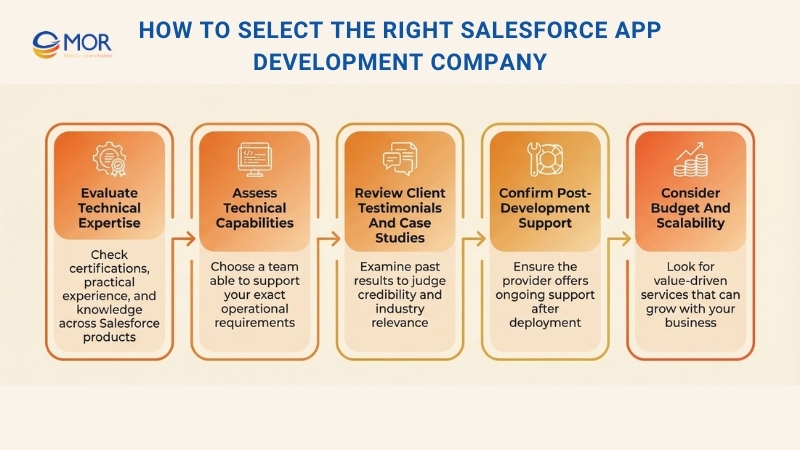
Evaluate Technical Expertise
Start with reviewing the team’s technical background. Ensure the company employs developers who hold the proper certifications and practical experience. It is also important to confirm that they work with different Salesforce products, including Sales Cloud, Service Cloud, and Marketing Cloud.
Assess Technical Capabilities
Then focus on identifying a team with strong technical skills that can support your specific business requirements. Choose a provider that delivers Salesforce solutions designed specifically for your operations. Their experience can contribute useful ideas and help ensure long-term project success.
Review Client Testimonials And Case Studies
Check client testimonials from previous projects to understand the company’s credibility. These reviews help you decide whether the provider fits your business needs. Read authentic feedback from clients to learn about the Salesforce solutions they delivered. It is even more beneficial if they have completed projects within your industry, since this indicates a stronger understanding of your objectives and challenges.
Confirm Post-Development Support
A dependable partner also offers Salesforce support services after development is complete. This is an important sign that you are working with a reliable provider. Ongoing support helps monitor your Salesforce environment and detect issues before they affect performance. Continuous assistance also helps maintain system updates and keeps your platform aligned with evolving business needs.
Consider Budget And Scalability
The final factor to review is the company’s pricing structure and ability to scale solutions. This ensures you receive high-quality development services that remain within your budget. Look for a provider that focuses on delivering value without reducing quality. It is also important that their solutions can scale as your organization grows.
Why Businesses Partner With MOR Software For Salesforce App Development
Creating applications on Salesforce requires more than technical skills. It also demands a clear understanding of how business operations function in real environments. MOR Software delivers Salesforce app development services that help organizations design solutions aligned with actual operational requirements instead of relying on standard platform configurations.
Our team works with key Salesforce technologies such as Apex, Lightning Web Components, Visualforce, and Salesforce APIs to build custom applications that automate workflows, organize data efficiently, and support complex operational logic. With this development approach, companies can extend the platform beyond traditional CRM solutions and create systems designed around their internal processes.
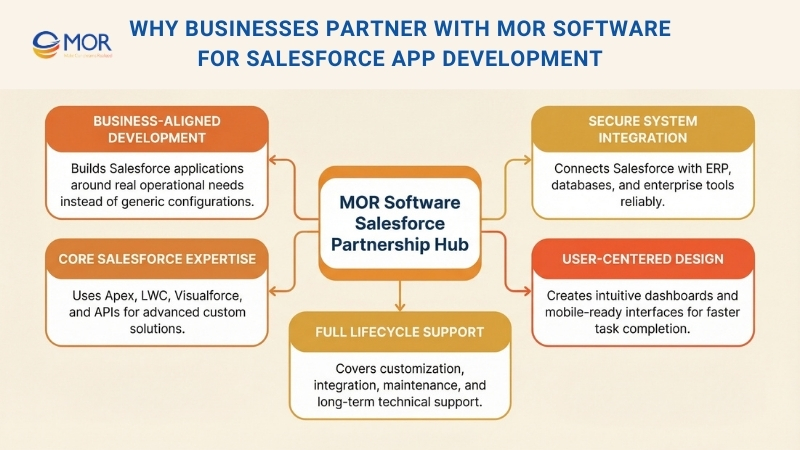
System integration is another important focus area. Many businesses require salesforce outsourcing to connect with ERP systems, internal databases, marketing platforms, and other enterprise tools. MOR Software develops secure integrations that enable accurate data exchange between systems while maintaining consistency and reliability.
User experience also plays a major role in application design. Our salesforce developers create intuitive interfaces, role-based dashboards, and mobile-optimized layouts that allow teams to access information quickly and complete tasks more efficiently.
In addition to development, MOR Software supports the full lifecycle of Salesforce-based applications. Our services include platform customization, third-party system integration, ongoing maintenance, and long-term technical support. This approach helps organizations maintain a reliable and scalable Salesforce environment as their business operations continue to grow. Contact us to discuss how our Salesforce experts can help you design, build, and scale applications tailored to your business goals.
Conclusion
Salesforce app development gives businesses the flexibility to build CRM solutions that truly match their workflows, integrations, and growth plans. With the right strategy, companies can create scalable applications that improve efficiency, connect systems, and support better decision-making across teams. MOR Software helps organizations design, build, and maintain Salesforce-based applications that align with real operational needs. If you are planning to develop custom solutions on the Salesforce platform, contact us to explore how our team can support your project.
MOR SOFTWARE
Frequently Asked Questions (FAQs)
What is Salesforce app development?
Salesforce app development refers to the process of building applications on the Salesforce platform to support business operations, automate workflows, and manage customer data. These applications can be created using configuration tools or custom code, depending on the complexity of the business requirements.
What types of applications can be built on Salesforce?
Organizations can build internal business applications for employees or commercial applications distributed through Salesforce AppExchange. These apps may support sales management, customer service, marketing automation, analytics, project tracking, or industry-specific processes.
What technologies are commonly used in Salesforce app development?
Developers typically use Apex for backend logic, Lightning Web Components for modern user interfaces, Visualforce for custom pages, and Salesforce APIs for integrations. These technologies work together to build scalable and secure applications.
Can Salesforce applications integrate with other systems?
Yes. Salesforce applications can connect with external systems such as ERP platforms, payment systems, marketing tools, and databases through APIs. REST and SOAP APIs are commonly used to exchange data between Salesforce and third-party platforms.
What is the difference between low-code and custom Salesforce development?
Low-code development uses built-in configuration tools like Flow Builder and App Builder to create applications without extensive programming. Custom development involves writing code with Apex and Lightning Web Components to support complex workflows or advanced integrations.
How long does Salesforce app development usually take?
The development timeline depends on project complexity. Simple applications built with configuration tools may take a few weeks, while large enterprise solutions with custom code and integrations can take several months to design, build, and test.
Are Salesforce apps secure?
Salesforce includes strong security controls such as role-based access, encryption, multi-factor authentication, and audit logs. These features help organizations protect sensitive business and customer data while maintaining regulatory compliance.
Can Salesforce apps support mobile users?
Yes. Salesforce applications are designed to work on mobile devices through the Salesforce mobile app. Developers can also build responsive interfaces so users can access applications from smartphones and tablets.
How scalable are Salesforce applications?
Salesforce apps run on cloud infrastructure, which allows them to scale as business needs grow. Companies can handle larger data volumes, more users, and additional integrations without major system changes.
How do businesses maintain and update Salesforce applications?
Organizations maintain Salesforce applications through regular updates, performance monitoring, and security reviews. Developers often use Salesforce tools such as sandboxes and deployment pipelines to safely test and release new features or improvements.
Share


Make Our-Dreams Realized


© 2023 . MOR Software. All Rights Reserved
Sitemap
Privacy Policy
Terms of Use

Rate this article
0
over 5.0 based on 0 reviews
Your rating on this news:
Name
*Email
*Write your comment
*Send your comment
1