


Salesforce Marketing Cloud Implementation Services Guide [2026]
A Salesforce Marketing Cloud rollout can stall when data, journeys, and CRM links are planned in isolation. Salesforce marketing cloud implementation services bring these parts into one clear delivery path, from discovery to post-launch tuning. This MOR Software guide covers the process, cost, common delays, and the Salesforce marketing cloud implementation roadmap your team can use in 2026.
Key Takeaways
- A complete rollout follows seven clear delivery phases, including discovery, solution design, Data Extensions, Journey Builder, CRM links, testing, launch, and campaign tuning.
- Project cost depends on scope, with factors such as Business Units, data quality, system links, journey count, compliance needs, and team training shaping the final budget.
- Post-launch work remains important, as early campaign data helps teams improve segments, sending times, journey paths, deliverability, and reporting after go-live.
What Are Salesforce Marketing Cloud Implementation?
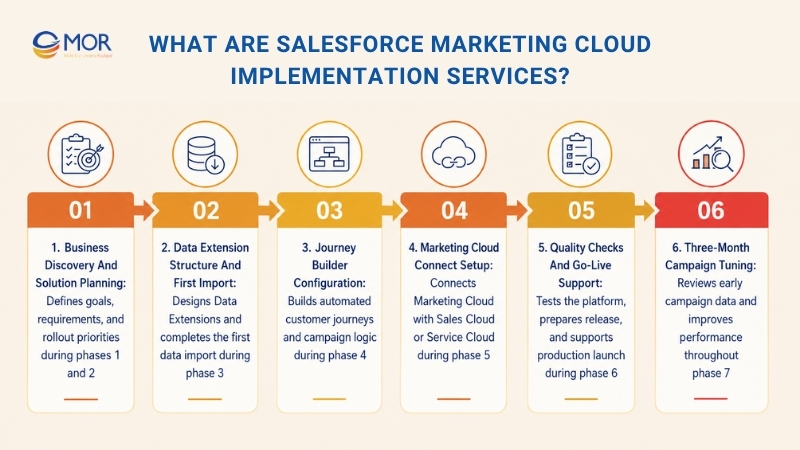
Marketing Cloud implementation covers the work between signing a Salesforce agreement and launching the first live campaign. The exact scope depends on the delivery partner, but MOR Software typically handles:
- Business discovery and solution planning during phases 1 and 2.
- Data Extension structure and the first data import during phase 3.
- Journey Builder configuration during phase 4.
- Marketing Cloud Connect setup when Sales Cloud or Service Cloud forms part of the project during phase 5.
- Quality checks, launch preparation, production release, and go-live help during phase 6.
- Campaign review and tuning for the first 3 months during phase 7.
Some delivery teams finish after phase 6, then charge a separate managed-service fee for later work. MOR Software keeps the first three months of campaign tuning inside the engagement because early send data gives the clearest signs of what needs to change.
Key Salesforce Marketing Cloud Implementation Services
Salesforce marketing cloud implementation services can include several products, data tools, and campaign channels. Salesforce marketing cloud consulting services help you choose the right parts, connect them, and shape each setup around clear business goals.
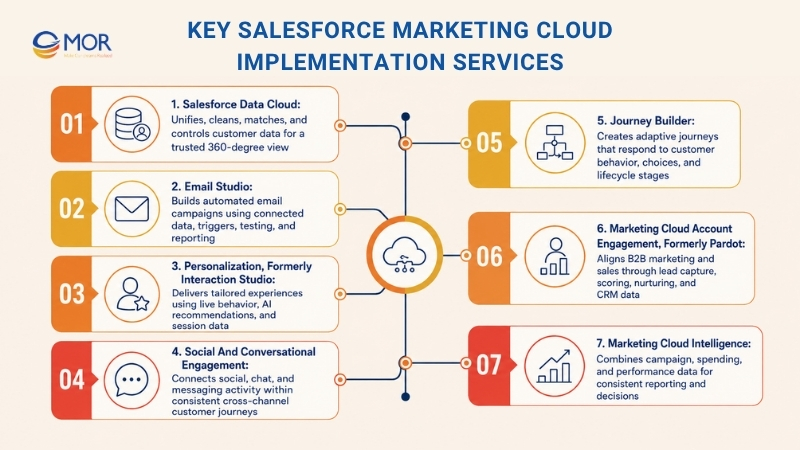
Salesforce Data Cloud
Bring customer records together and make them ready for use through Salesforce Data Cloud. We help businesses link, clean, match, and control live data from many systems so teams can work with one trusted 360-degree customer view. That base supports live audience groups, event-based journeys, and AI personalization across Marketing Cloud.
Email Studio
Create relevant email campaigns using connected customer data and smart workflow automation in Email Studio. We help brands manage changing content, action-based triggers, testing, and reporting so email programs can respond to each customer's current needs.
Personalization, Formerly Interaction Studio
Shape each customer touchpoint through live decisions and tailored content. We use behavior data, AI suggestions, and session details to deliver useful experiences across websites, mobile apps, and other connected channels during the customer journey.
Social And Conversational Engagement
Connect social media, chat, and messaging activity to the wider Marketing Cloud plan. We activate customer data across these touchpoints so each message stays relevant and supports the same cross-channel journey.
Journey Builder
Plan and run connected customer journeys based on live events and customer data. Our team helps brands replace fixed campaign paths with journeys that change based on behavior, choices, and customer lifecycle stages.
Marketing Cloud Account Engagement, Formerly Pardot
Support B2B marketing through joined sales data, lead workflows, and campaign automation. We connect marketing and sales teams through lead capture, scoring, and nurture programs that use Salesforce records to move qualified leads through the pipeline.
Marketing Cloud Intelligence
Turn campaign data into reports your team can act on through Marketing Cloud Intelligence. We combine channel, spend, and performance records in one analytics layer so teams can track results, manage budgets, and make decisions using consistent data.
Salesforce Marketing Cloud Implementation Process
A clear Salesforce marketing cloud implementation roadmap divides the rollout into seven linked phases, each with defined work and a useful output.
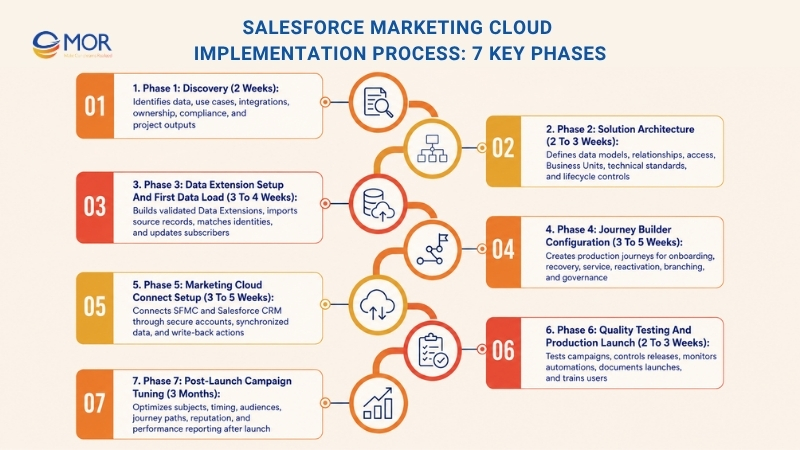
Phase 1: Discovery (2 Weeks)
Many project teams give discovery too little time. A focused 2-hour workshop in week one can prevent several weeks of redesign near launch. A strong discovery review follows five question areas.
The five question areas are:
- Customer data sources. Which stable subscriber ID connects your CRM software, online store, loyalty program, and in-store POS data? The Contact Key decision matters because every later record and journey depends on it.
- Business use cases. Which campaigns must launch in the first 90 days, and which ideas belong in the 12-month plan? Mixing these lists often creates a data model that is larger than the first release needs. A simple ranking method can narrow twenty ideas to the first four campaigns.
- System connections. Which platforms must exchange information with SFMC, including CRM, MDM, loyalty tools, POS systems, or an analytics warehouse? Each added connection can add one to three weeks to phase 5.
- Daily ownership. Who will manage SFMC after the project team hands over the platform? Your team's skill level affects the amount of training, written guidance, and automation complexity needed.
- Legal and consent rules. Which GDPR, CAN-SPAM, and local rules apply to your audiences? The review should turn these rules into clear consent, storage, and sending controls.
Output: a solution architecture brief for phase 2 and a working schedule for phases 3 through 7.
Phase 2: Solution Architecture (2 To 3 Weeks)
The architecture phase fixes choices that affect every later task. The main decisions include:
- Customer data structure. Select the Contact Key, define the Subscriber Key method, and separate Data Extensions into master, event, and sendable groups. A short data-model workshop can test whether this structure fits the planned journeys.
- Record relationships. Set the 1:1, 1:Many, and Many:Many links inside Contact Builder. These links affect how Journey Builder reads related customer records.
- Sending identity and access. Plan Sender Authentication Package, From Address Management, Delivery Profiles, and user permissions. The same review should apply Salesforce security best practices to roles, login access, data rights, and connected apps.
- Business Unit design. Decide whether one Business Unit is enough or whether brands, regions, or business lines need separate units. This choice sets the Contact Key namespace and the rules for shared data.
- Technical standards. Define Content Builder folders, Data Extension prefixes, journey names, release controls, and Salesforce best practice Apex rules for any custom CRM logic. Clear standards help several marketers and developers work in the same org without creating confusion.
Output: a solution diagram, a naming standards document, and an application lifecycle management plan.
Phase 3: Data Extension Setup And First Data Load (3 To 4 Weeks)
Rushed Data Extension work often creates long-term platform debt. Each Data Extension needs four choices before creation: sendable status, primary key, fields that may stay empty, and field types. A written design sheet records each choice before build work starts.
Beyond the design work, Salesforce marketing cloud implementation services cover:
- Core schema creation. Build master, event, and sendable Data Extensions based on the approved solution diagram. Add filtered and random Data Extensions where campaign needs call for them. The selected type should match how each audience or event record will be used.
- First source import. Load customer records from CRM, online sales, and loyalty systems. Compare row totals, remove duplicate records, and check Contact Key matching. A repeatable import flow makes later loads easier to control.
- Identity matching table. Create an IdentityCrossref Data Extension that links CRM IDs, e-commerce IDs, and loyalty IDs. Later audience queries can use this table as the shared join point.
- All Subscribers updates. Set the rule that carries email-address changes into the All Subscribers List. This prevents old addresses from remaining active after a customer update.
- Data checks. Review sample records from every Data Extension, compare them with each source platform, and record any mismatch. The project team should close or accept each issue before journey testing starts.
Output: a ready-to-use Data Extension structure, the first loaded records, and a completed validation report.
Phase 4: Journey Builder Configuration (3 To 5 Weeks)
Journey Builder brings the customer-facing campaign work into one place. This phase includes:
- New-subscriber sequence. Build the first live customer journey with three to five emails. Entry may come through an API Event or a sendable Data Extension, based on the source system.
- Cart recovery flow. Start the journey after an online cart event and remove the customer after a completed order. Clear exit rules stop buyers from receiving messages that no longer match their status.
- Service messages. Configure order notices, account alerts, and password resets through the Transactional Send journey type. These sends need direct triggers and strict data rules.
- Inactive-customer outreach. Create campaigns that bring back customers who have stopped opening, clicking, or buying. Audience cleanup rules should remove invalid or unresponsive records over time.
- Branching rules. Select Decision, Random, Engagement, Path Optimizer, or Einstein Scoring splits based on the campaign goal. Each split should have a clear reason, success measure, and fallback path.
- Journey control records. Maintain a journey list, entry-source map, goal, owner, and exit rule for every flow. This record helps teams review old journeys before they copy or change them.
Output: four to eight production journeys prepared for launch testing.
Phase 5: Marketing Cloud Connect Setup (3 To 5 Weeks)
Marketing Cloud Connect links SFMC with Salesforce Sales Cloud or Service Cloud. Not every project needs this connection. You can leave phase 5 out when Marketing Cloud runs alone or a nightly batch transfer meets the business need. The decision should depend on data timing, CRM actions, and the campaign entry rules.
When Marketing Cloud Connect forms part of the scope:
- Integration account setup. Create a service account in Salesforce for the connection. Give it only the object and field permissions needed for approved read and write tasks.
- Synced CRM tables. Configure Synchronized Data Extensions that receive selected Salesforce records. Set filters and sync rules so Marketing Cloud receives useful data without copying fields that campaigns never use.
- CRM-based journey entry. Use Salesforce Entry Sources to start journeys after approved CRM events. Entry rules should block duplicate or incomplete records before they enter a live path.
- CRM record updates. Add Salesforce Activities where journey steps need to change leads, contacts, cases, or other CRM records. Each write-back action needs an owner and a clear rule for failed updates.
- Sales-user email sending. Let sales staff send personal messages from Salesforce through the SFMC delivery system. Templates, sender access, and tracking rules should stay under shared marketing control.
Allow another two to three weeks after installation for small fixes before calling the connection stable. Refresh tokens, field sync settings, and ID matching often reveal early issues during the first month.
Phase 6: Quality Testing And Production Launch (2 To 3 Weeks)
Salesforce marketing cloud implementation services at this stage include:
- Campaign release review. Use an eleven-point check that covers the audience, sender, content, links, consent, and tracking before a live send. A fixed review can prevent most common production mistakes.
- Controlled send path. Start with an internal QA message, then release to one percent of the audience before the full send. This order gives the team time to catch data or content problems with limited reach.
- Automation stop rules. Configure Verification Activities to pause an automation when a data test fails. This protects customers when imports contain missing, empty, or unexpected values.
- Launch monitoring tools. Prepare a Send Log Data Extension, automation alerts, and subject-line and preheader checks. These records help the team find failed steps and trace what happened after a send.
- Production runbook. Write the release steps in order, assign an owner to each action, and record the fallback plan. The team should know who makes the final launch call and who handles recovery.
- User handover sessions. Train your staff on Content Builder, Journey Builder, and Email Studio reports. Complete the knowledge transfer before the project team leaves daily operations.
Output: a production-ready SFMC org and an internal team prepared to run it.
Phase 7: Post-Launch Campaign Tuning (3 Months)
Many engagements leave out this phase, yet early campaign gains often come from it. During the first three months after launch, real customer actions create enough data for useful changes. The team reviews that evidence through a working Salesforce marketing cloud implementation checklist and updates the setup.
The tuning work includes:
- Email subject experiments. Run one-variable A/B tests on each major campaign. Keeping one changing item makes the result easier to read and apply.
- Delivery-time adjustment. Use Einstein Send Time Optimization for journeys that do not require an exact send hour. Compare the result against the first launch baseline before wider use.
- Audience group revision. Build tighter segments using opening, clicking, buying, and inactivity patterns from the first ninety days. Remove rules that create groups too small to measure or too broad to personalize.
- Journey path changes. Update exits, split routes, and wait-by-attribute timing based on real customer movement. Changes should solve a known problem rather than add more branches.
- Inbox and reputation checks. Track open, bounce, and complaint trends across each major send. Early drops can signal audience quality, content, or sender-reputation trouble.
- Regular performance reports. Prepare weekly campaign summaries and monthly dashboards for business reviews through Marketing Cloud Intelligence or Email Studio reports. Each report should connect activity to a campaign goal.
Without this phase, the platform may launch well but remain close to its starting performance. A structured three-month review can raise open rates by twenty to forty percent compared with the phase 6 baseline.
Salesforce Marketing Cloud Implementation Services Cost In 2026
Salesforce marketing cloud implementation services often range from $60,000 to $250,000 for mid-market and enterprise work. Large global programs that connect several Salesforce clouds may pass $400,000 and can reach $1 million or more. These estimates apply to project delivery, not Salesforce license fees. Salesforce product costs change based on the products, add-ons, contacts, messages, and usage terms in your contract. Businesses researching Salesforce implementation market size 2026 should keep platform fees and partner delivery fees in separate budget lines.
Implementation Scenario | Common Project Scope | Estimated Service Cost |
Salesforce implementation for mid market with a specialist partner | One Business Unit, Marketing Cloud Connect, four to six journeys, data setup, testing, training, and three months of tuning | $60,000 to $120,000 |
Enterprise rollout with a specialist partner | Several Business Units, difficult system links, a larger data model, more than ten journeys, governance, and post-launch review | $150,000 to $250,000 |
Mid-market or enterprise work with a mid-sized consultancy | A similar technical scope plus more project control, written records, governance, and stakeholder meetings | $120,000 to $250,000 |
Global program led by a large consulting group | International release, several Salesforce clouds, strict compliance needs, a large team, and company-wide change work | $400,000 to $1 million+ |
These ranges show why companies using the same Salesforce product can receive very different quotes. A single-brand business with clean CRM records and five main journeys needs much less work than a group managing several markets, brands, customer IDs, old systems, and local rules. Current planning ranges place a specialist-led mid-market project near $60,000 to $120,000, while complex enterprise programs often fall between $150,000 and $250,000.
Mistakes Delay Salesforce Marketing Cloud Implementation Services
Five common mistakes can turn a planned twelve-week rollout into a twenty-week project, while Salesforce marketing cloud implementation services become more costly through rework and platform debt:
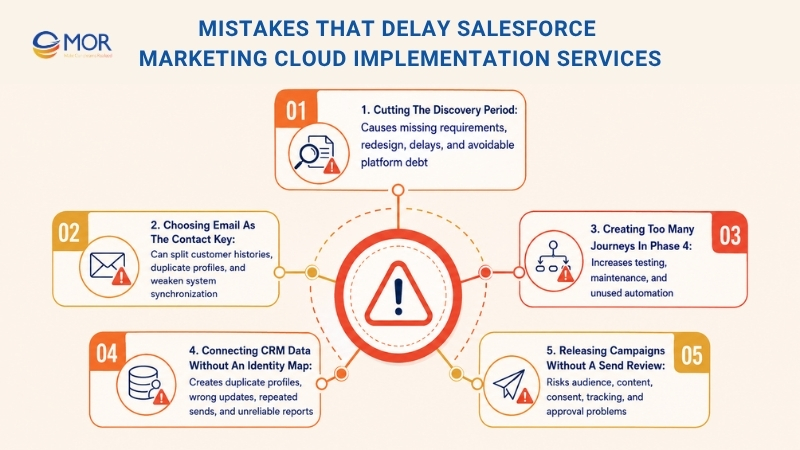
Cutting the discovery period
Teams may believe their needs are already clear and ask developers to begin at once. Yet discovery often finds missing data sources, unwritten campaign steps, legal duties, and hidden system links. Removing this work can force the team to rebuild the solution design during later phases.
Choosing email as the Contact Key
People change email addresses, but their customer identity should stay stable. An email-based primary ID can divide engagement history, create repeated profiles, and damage sync between Marketing Cloud and linked systems. A fixed CRM or customer ID usually gives the platform a safer long-term base.
Creating too many journeys in phase 4
A plan for ten or twelve journeys may sound strong, but most teams need only three or four high-value flows in the first ninety days. Building all journeys together increases test work, adds care needs, and leaves unused automation inside the org. Start with journeys tied to a measured business result, then add more after real campaign data appears.
Connecting CRM data without an identity map
CRM IDs, Contact Keys, Subscriber Keys, and outside customer IDs need one written match rule before Marketing Cloud Connect goes live. Missing rules can create several profiles for the same person across SFMC and Salesforce CRM. The result may include wrong updates, weak audience groups, repeated sends, and unreliable reports.
Releasing campaigns without a send review
Casual checking does not give enough protection for a live audience. One missing suppression rule, broken personal field, wrong audience filter, or unfinished subject line can reach thousands of people in minutes. A fixed release review should check recipients, sender details, links, tracking, content, mobile display, consent, and approval before each major send.
Perspectives From The Field: What Experienced SFMC Teams Learn
A Marketing Cloud plan can look tidy in a workshop, but live campaign work often finds issues the meeting did not show. Lists of top agencies for Salesforce marketing cloud implementation may help build a shortlist, yet experienced Salesforce marketing cloud implementation partners usually reach the same view: campaign screens are not the hardest part. Teams comparing Salesforce marketing cloud implementation services in India with groups in Vietnam or other markets should focus on data ownership, ID rules, internal decisions, and daily operating habits.
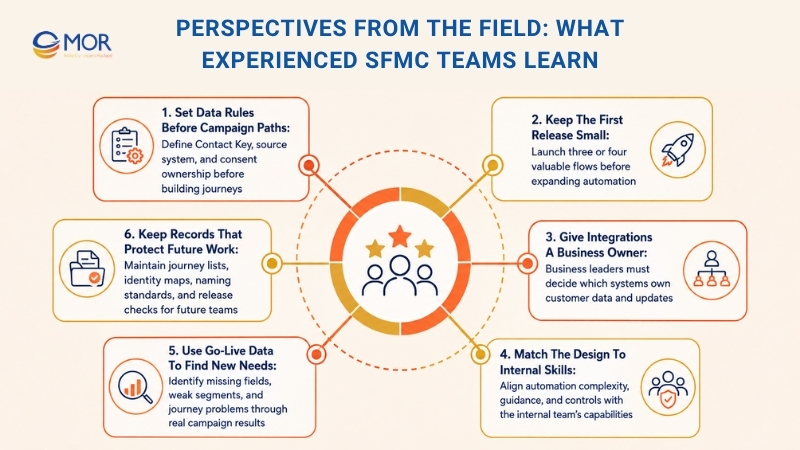
- Set data rules before campaign paths. A team can create a welcome journey within days, but duplicate or poorly matched customer profiles will weaken every message. One owner must be named for the Contact Key, source system, and consent record before journey work moves too far.
- Keep the first release small. Stakeholders often begin with ten or twenty journey ideas. A stronger first launch may contain only three or four flows linked to clear business goals. This gives the team time to test source data, correct entry rules, and study customer actions before the setup grows.
- Give integrations a business owner. Marketing Cloud Connect and custom APIs can move records between systems. They cannot decide which platform owns an email address, lead stage, or customer choice. Marketing, sales, service, and data leaders must agree on these rules before developers build the connection.
- Match the design to internal skills. A complex setup may look impressive but can become hard to run when the marketing team lacks the needed skills. Skilled consulting teams adjust automation depth, written guidance, and control rules based on the people who will manage the platform after launch.
- Use go-live data to find new needs. Real sends can uncover missing fields, weak segments, surprise exits, and changes in inbox results. A useful implementation engagement needs a planned review period after launch instead of ending after the first production campaign.
- Keep records that protect future work. Journey lists, ID maps, naming standards, and release checks can feel like added work during the build. Months later, these records help new staff understand past choices and stop older journeys from becoming hard to change.
The practical lesson is simple. SFMC success depends less on the number of configured products and more on whether your data model, working rules, and internal team can support daily campaign work.
Need A Salesforce Marketing Cloud Implementation Partner?
MOR Software supports businesses that need connected customer data, campaign automation, and managed customer journeys across Salesforce products. As a Global Salesforce Consulting Partner, MOR brings together certified salesforce developers, consultants, administrators, and architects for work across Marketing Cloud, Account Engagement, Sales Cloud, Service Cloud, Experience Cloud, and MuleSoft integration.
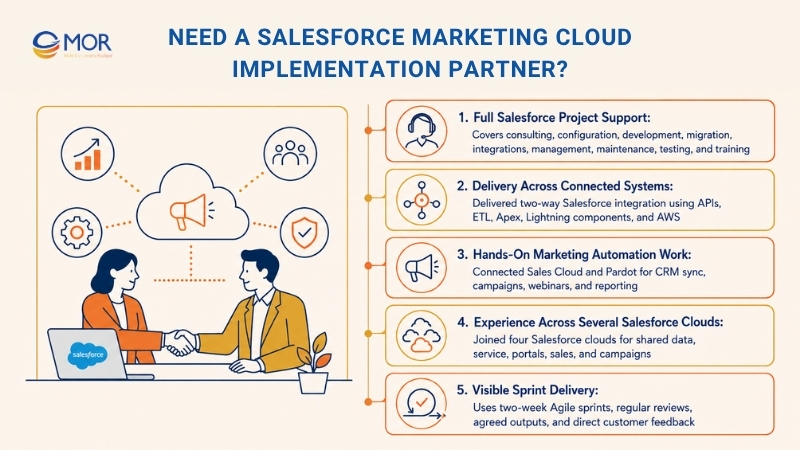
- Full Salesforce project support. MOR Software covers consulting, setup, custom salesforce development, migration, outside-system links, platform management, and maintenance. Our team can review your current org, plan the target design, connect customer records, configure automation, test each flow, and train your staff after launch.
- Delivery across connected systems. MOR integrated Salesforce with a Japanese company's older attendance platform using API Gateway, ETL, Apex, Lightning Web Components, and AWS Lambda. The fifteen-month engagement used eighteen team members and delivered live two-way data sync.
- Hands-on marketing automation work. MOR also connected Sales Cloud with Pardot for a Japanese media business. The project used Engagement Studio, automated CRM sync, landing pages, webinar flows, customer-data capture, and sales forecast reports.
- Experience across several Salesforce clouds. Another Customer 360 engagement joined Sales Cloud, Service Cloud, Experience Cloud, and Account Engagement. A thirty-person team worked for eighteen months on shared customer data, sales tasks, service processes, online portals, and targeted campaigns.
- Visible sprint delivery. MOR Software works in two-week Agile sprints with agreed outputs, regular reviews, and direct customer feedback. This working style gives business and technical teams a clear view of progress before the project moves into another phase.
Review MOR Software's Salesforce outsourcing services and case studies to see how our teams plan and deliver each engagement. Contact us to discuss your data sources, main journeys, system links, timeline, and the Salesforce marketing cloud implementation partner your project needs.
Conclusion
Salesforce Marketing Cloud can support stronger customer journeys only when data, systems, and campaign rules work together. A clear plan helps your team control costs, avoid launch delays, and build a setup that remains manageable after go-live. With the right Salesforce marketing cloud implementation services, your team can ensure a smooth rollout and long-term success. MOR Software brings certified Salesforce skills, multi-cloud delivery experience, and two-week Agile sprints to each project.
Contact MOR Software to discuss your data sources, priority journeys, integrations, timeline, and the right team for your rollout.
"Mr. Cong’s guiding philosophy is simplicity, believing that the simplest solutions are often the most powerful. He sees trust, empowerment, and the opportunity to demonstrate one’s abilities as the key elements that set MOR apart from traditional IT companies."
Mac Tien Cong


Division Manager (Hanoi Branch)
MOR SOFTWARE
Frequently Asked Questions (FAQs)
What are Salesforce Marketing Cloud implementation services?
Salesforce Marketing Cloud implementation services cover discovery, architecture, data setup, platform configuration, journey creation, system integration, testing, launch support, training, and post-launch improvements.
How long does a Salesforce Marketing Cloud implementation take?
A standard project may take 12 to 20 weeks. The timeline depends on data quality, integration needs, Business Unit structure, campaign scope, testing requirements, and the number of journeys planned for launch.
What budget should a business prepare for Salesforce Marketing Cloud implementation?
Mid-market projects often cost between $60,000 and $120,000. Enterprise projects with several Business Units, complex integrations, and more than ten journeys may cost $150,000 to $250,000 or more.
What should be completed before implementation begins?
Teams should define business goals, priority use cases, customer data sources, system connections, privacy rules, project owners, and the staff responsible for running the platform after launch.
What systems can connect with Salesforce Marketing Cloud?
Common connections include Salesforce Sales Cloud, Service Cloud, Data Cloud, eCommerce platforms, loyalty systems, POS platforms, mobile apps, websites, data warehouses, and analytics tools.
Can Salesforce Marketing Cloud support multiple brands or regions?
Yes. Companies can use separate Business Units for different brands, markets, or business lines. The implementation should define shared data rules, user access, sender settings, naming standards, and campaign ownership before the account structure is built.
How many customer journeys should be built during the first release?
Most teams should begin with three to eight journeys tied to clear business goals. Welcome, abandoned cart, transactional, onboarding, and re-engagement journeys are common starting points.
What is the biggest data risk during implementation?
Poor identity mapping creates the most trouble. Using unstable identifiers can produce duplicate contacts, broken customer history, inaccurate segments, and conflicting records across connected systems.
What happens after the platform goes live?
The team should review deliverability, campaign results, audience behavior, journey exits, split paths, send timing, and reporting. The first 90 days provide useful data for refining the setup.
How do you choose a partner for Salesforce Marketing Cloud implementation services?
Review recent SFMC projects, named delivery staff, technical credentials, architecture skills, integration experience, pricing terms, training plans, and the support included after go-live.
Share


Make Our-Dreams Realized


© 2023 . MOR Software. All Rights Reserved
Sitemap
Privacy Policy
Terms of Use

Rate this article
0
over 5.0 based on 0 reviews
Your rating on this news:
Name
*Email
*Write your comment
*Send your comment
1