


How Odoo for Retail Maximizes Efficiency in Every Step 2026
Retail teams lose time when checkout, inventory, online orders, and accounting sit in separate tools. Odoo for retail gives stores one connected system for POS, stock, eCommerce, CRM, and finance, but setup quality decides the result. This MOR Software guide will show how Odoo ERP for retail works, what it costs, and when it fits your growth plan.
Key Takeaways
- Odoo for retail connects core store operations: Retailers can manage POS, inventory, sales, accounting, eCommerce, CRM, and marketing in one system.
- Customization decides real business value: Odoo works best when POS flows, product data, warehouse rules, and reports match how your stores run.
- Cost and timeline depend on scope: User count, hosting, data migration, integrations, custom workflows, and training all shape the final budget.
Why Odoo Is Essential For Retail Success
Retail teams need far more than a simple checkout app. They need one connected place for sales, stock updates, customer records, online orders, supplier details, finance, and reports, without moving between many tools. For many stores, Odoo for retail works well because the apps sit together in one system. This Odoo ERP for retail industry setup lets businesses begin with core tools, then add more when daily work gets bigger.
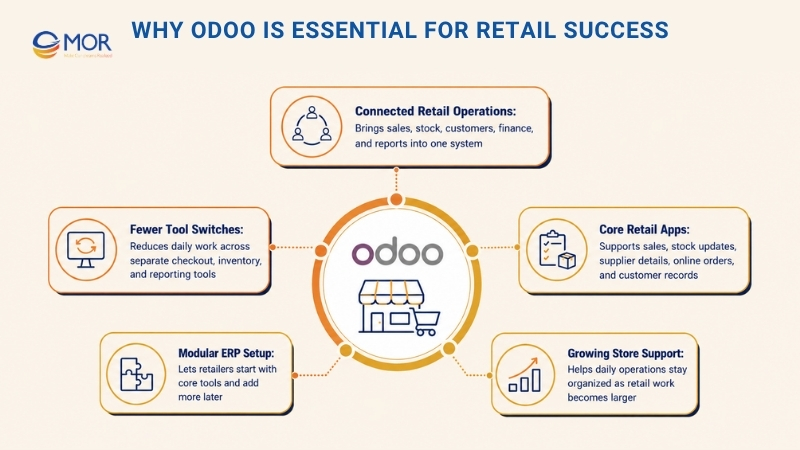
Odoo does not push every retailer into the same rigid setup. The platform lets each business shape an ERP system around how its stores really work. A small fashion shop may begin with POS, Inventory, and Accounting. A larger chain may later connect eCommerce, CRM, Marketing Automation, Purchase, HR, and deeper reports. That makes the system useful for many retail models, including one-store shops and omnichannel brands that sell through stores, websites, marketplaces, and mobile channels.
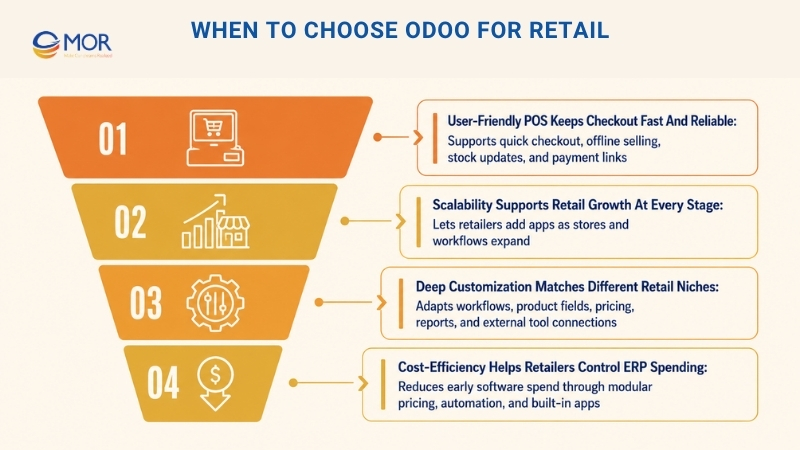
User-Friendly POS Keeps Checkout Fast And Reliable
Checkout can make or break the store experience. Shoppers want fast service, correct prices, easy payment choices, and a buying flow that feels simple. Odoo for retail supports this through its Point of Sale (POS) app, which gives cashiers and floor staff a clean screen they can learn quickly.
A key strength of Odoo retail POS is that it can run with or without internet access. When the connection fails, staff can still complete orders and keep the line moving. After the internet comes back, the platform sends those offline sales into the main database. This works well for stores in malls, pop-up shops, high-traffic areas, or places where the network is not always stable.
The POS also links with stock, finance, customer profiles, rewards, and payment tools. After a sale is completed, inventory changes at once, sales records move into accounting, and customer buying history can be saved for later campaigns. This helps retail teams cut manual tasks and avoid the common mistakes that happen when POS tools sit apart from the rest of the business.
Scalability Supports Retail Growth At Every Stage
Retail growth rarely happens all at once. A business may start with one shop, then add more locations, open an online store, build a warehouse, enter wholesale, or launch its own product line. Odoo can support that path because teams can turn on new apps only when they need them.
A new store can begin with Inventory and POS for stock control and in-store selling. As operations grow, the business can connect eCommerce for online sales, CRM for customer care, Marketing for campaigns, Purchase for suppliers, Accounting for finance, and HR for people management. This modular setup helps retailers avoid buying a large system too early.
Growth also becomes harder when a retailer runs more than one site. Odoo can handle stock across stores, different warehouses, central buying, transfers between branches, and reports for each location. Store leaders can review sales results, see best-selling products, and decide where items should move. This gives teams stronger control when the business becomes too large for manual tracking.
Deep Customization Matches Different Retail Niches
Retail companies do not all follow the same process. A clothing store may care about sizes, colors, seasonal lines, returns, and reward points. An electronics shop may need serial numbers, warranties, repairs, and supplier history. A grocery business may need barcode use, lot tracking, expiry dates, fast checkout, and frequent restocking.
Odoo can be shaped around these retail needs. Teams can change workflows, product fields, POS layouts, price rules, discount logic, report views, and approval steps. The platform can also connect with outside tools, including payment providers, delivery services, online marketplaces, barcode devices, accounting apps, and customer engagement software.
This flexibility makes the retail solution helpful for companies that no longer fit basic store software. The business does not need to bend its process around the system. Instead, Odoo can be set up around the retailer’s current way of working. With the right setup partner, stores can build a platform that supports daily tasks, helps teams work faster, and gives managers a clearer view of operations.
Cost-Efficiency Helps Retailers Control ERP Spending
Retailers often need to manage software budgets with care, especially when profit margins are thin. Large enterprise software development platforms like SAP or Oracle may bring high license costs, long rollout periods, and costly upkeep. For many small and mid-sized retail companies, those tools can be too costly or too heavy for what they truly need.
Odoo gives retailers a more practical cost path through modular pricing, flexible hosting choices, and many built-in apps. A store can begin with the main modules, then add more tools as sales grow. This helps limit early spending and lowers the chance of paying for software the team will not use.
Automation also supports better cost control. The platform can cut manual entry, lower stock errors, speed up buying, make invoicing easier, and bring reports into one place. These gains save time for store staff, warehouse teams, finance teams, and managers. In the long run, retailers can lower Total Cost of Ownership while still using an ERP system for sales, stock, customer work, and growth.
Key Odoo For Retail Modules And Features Businesses Should Know
Odoo gives retailers a full set of tools for day-to-day store work. From stock and sales to finance and staff tasks, Odoo for retail brings key operations into one place. For companies comparing Odoo ERP for retail, these modules help teams work with better speed, fewer errors, and a stronger customer experience.
Purchase Management
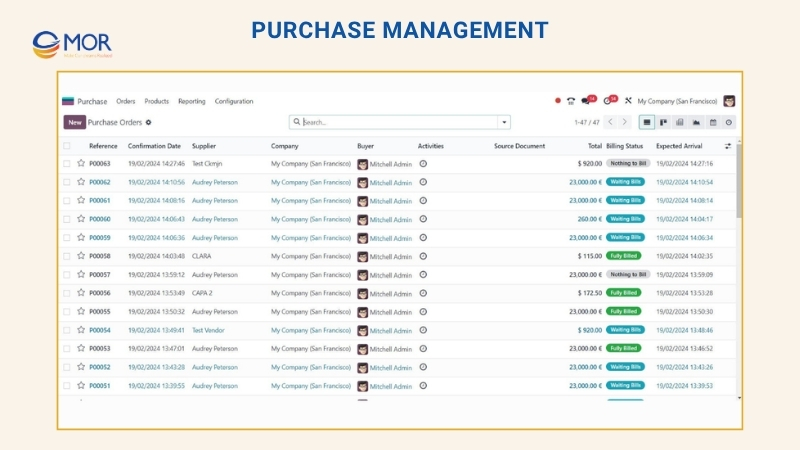
Smart buying plays a major part in retail performance. Odoo’s purchasing tool can trigger restocking based on live stock data. If you use one supplier or many suppliers, the system helps group them and choose the right option for each need. It also makes vendor bill creation and payment tracking easier.
Key Functions:
- Simpler Buying Flow: Covers purchase requests, supplier quote handling, and purchase orders.
- Stock Cost Tracking: Monitors minimum order quantities (MOQs), landed costs, and serial or lot details.
- Vendor Control: Supports supplier performance checks, multi-currency buying, and scheduled payments.
Inventory And Stock Management
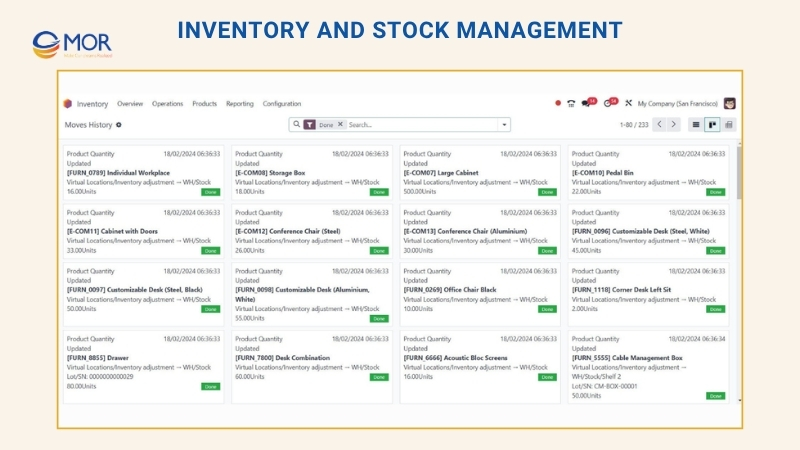
Stock control sits at the center of retail work. Odoo’s inventory app gives teams the tools to handle transfers, storage areas, and product movement with less guesswork. This also supports Odoo retail management for stores that need tighter control over daily stock activity.
Key Functions:
- Live Stock View: Tracks products with barcode use and serial number support.
- Smart Stock Flow: Supports automatic replenishment and better stock placement.
- Flexible Reports And Control: Handles many locations, different units of measure, and quality checks.
Sales Management And POS
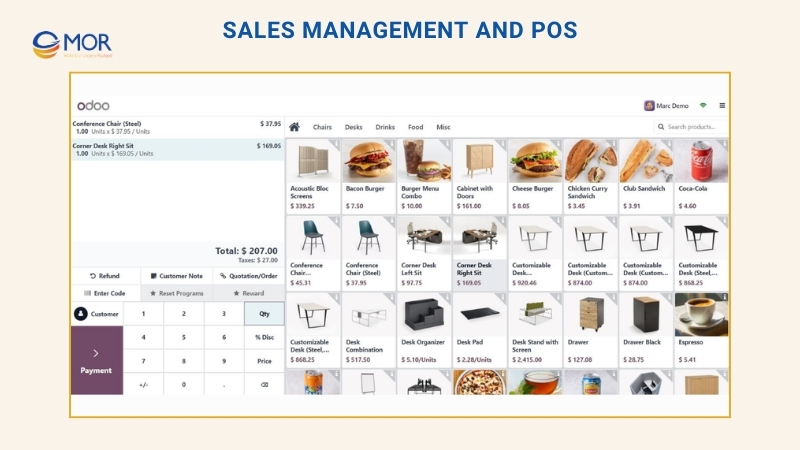
Odoo’s POS app helps retail teams run store sales while keeping inventory in sync. Odoo for retail also supports touchscreen checkout, which helps cashiers work faster and lets staff sign in or out with biometric devices.
Key Functions:
- Order And Sales Control: Covers quotations, sales orders, invoices, and detailed reports.
- Checkout Tools: Includes touchscreen use, offline selling, different payment methods, and customer profile handling.
Finance And Accounting
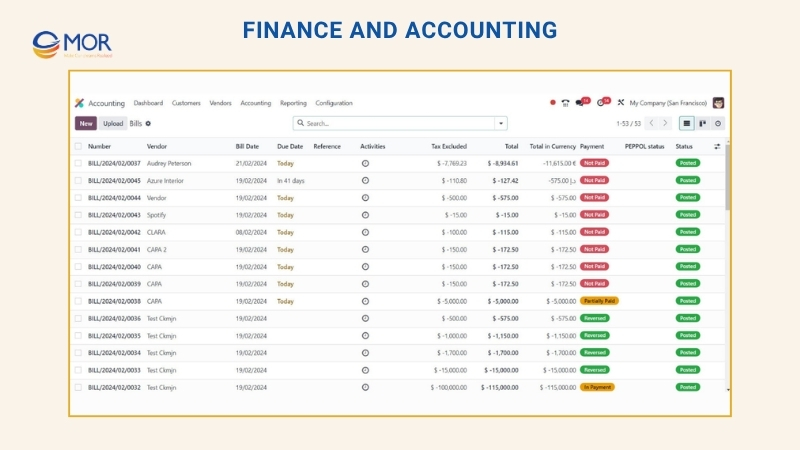
Money management matters in every store, and Odoo manufacturing accounting software for retail helps automate sales invoices and supplier bills. The accounting app gives teams a full view of store finance, including deposits and asset tracking.
Key Functions:
- Faster Bookkeeping And Matching: Supports multi-currency records and automatic accounting flows.
- Invoice And Bill Handling: Includes flexible invoice layouts and online payment choices.
- Report And Data Views: Gives live dashboards and reports that teams can adjust.
- Cash Flow Support: Sends payment reminders and supports forecast and budget planning.
- Tax Handling: Calculates taxes and can connect with tax systems.
Production Management
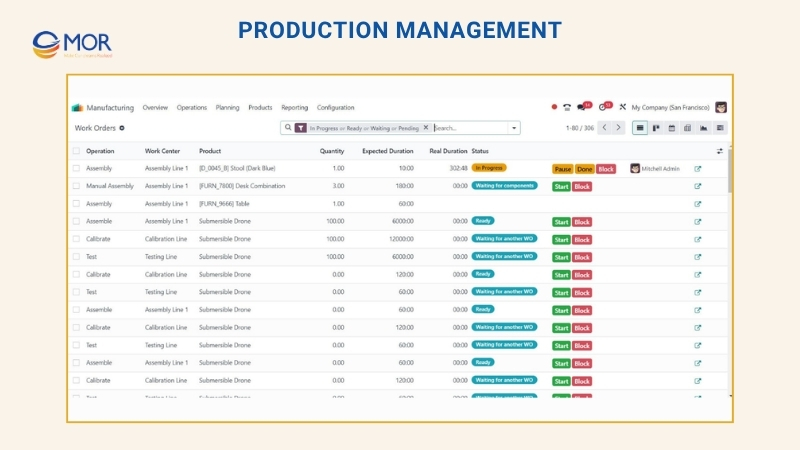
Odoo’s manufacturing app gives retail brands tools to manage production work, from job tracking to quality checks. It also helps control stock during production, cut waste, and keep finished goods ready on time.
Key Functions:
- Production Planning: Manages bills of materials (BOMs) and work orders.
- Shop Floor Control: Supports production execution, floor activity, and cost review.
- Traceable Operations: Gives live tracking and product traceability.
Human Resources Management
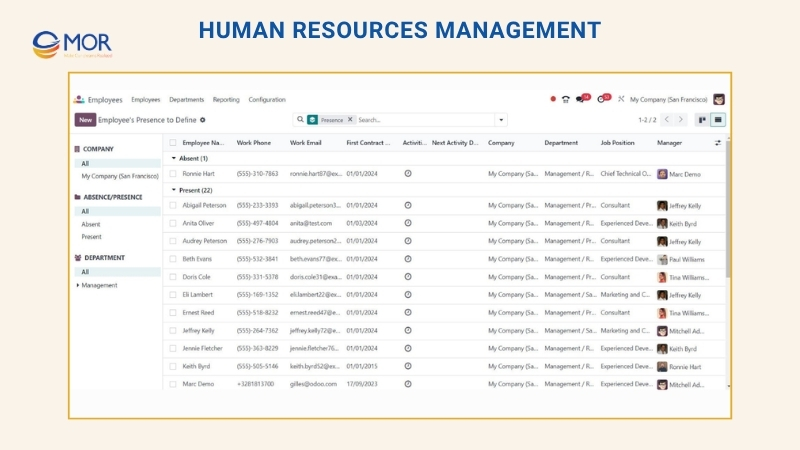
Odoo for retail can also support staff management through HR analytics tools for hiring, onboarding, payroll management, and performance checks. Automation helps lower errors and gives employees a more organized work setup.
Key Functions:
- Hiring And Onboarding Flow: Manages job applications and onboarding steps.
- Payroll Support: Handles payroll across countries and links with accounting software.
- Staff Performance And Growth: Supports goal tracking and review cycles.
- Team Communication: Includes employee surveys and attendance records.
Marketing And ECommerce
Odoo’s marketing and online selling tools help retailers reach shoppers and turn visits into orders. Odoo ERP for retail and ecommerce also keeps customer data in one place, which helps with ads, rewards, and repeat sales.
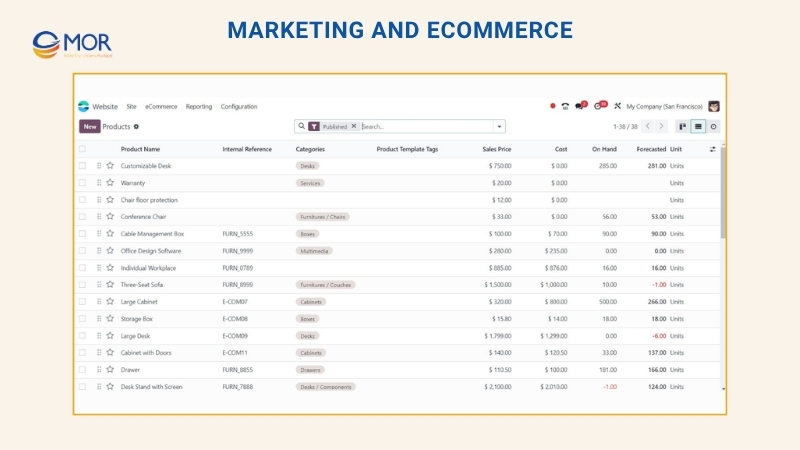
Key Functions:
- Campaign Automation: Covers targeted email campaigns and landing page creation.
- Online Store Tools: Includes a website builder, product management, and several payment gateways.
- Customer Data Management: Brings customer records together for better grouping and targeting.
Top 10 Benefits Of Odoo For Retail Customization
Odoo for retail becomes more useful when it fits the way your stores, teams, and customers already work. With the right setup, Odoo solutions for retailers can support checkout, stock control, online sales, vendor tasks, reports, and growth without adding extra noise to daily operations.
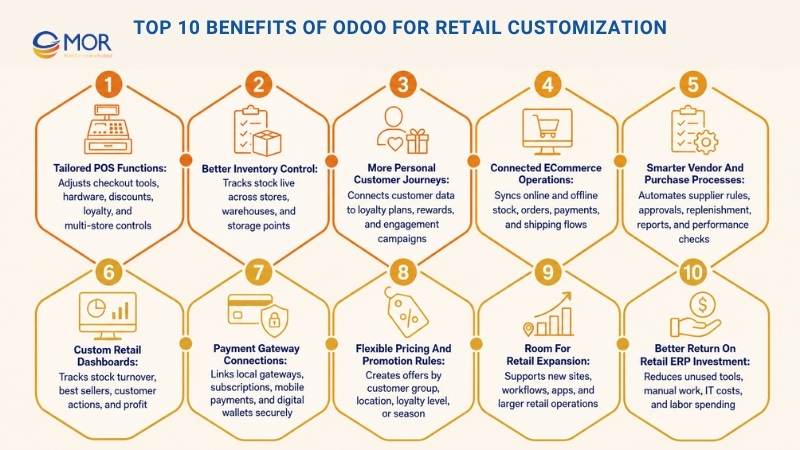
Tailored POS Functions
The POS module in Odoo can be adjusted to suit your store setup, including barcode scanners, payment devices, receipt printers, and special hardware. The Odoo retail platform can also support custom tools like layered discounts, gift cards, loyalty points, and multi-store controls.
Better Inventory Control
Custom settings give retailers live stock tracking across different stores, warehouses, and storage points. You can create reorder rules, get alerts for low stock or excess stock, and refill products based on sales patterns. This helps prevent missed sales from empty shelves and lowers the chance of tying up cash in too much inventory.
More Personal Customer Journeys
Deeper changes to Odoo’s CRM and sales apps let retailers build loyalty plans and custom rewards that bring shoppers back. This retail ERP can connect customer data from each touchpoint, helping teams see buying patterns and plan stronger engagement campaigns.
Connected ECommerce Operations
Custom connectors keep online and offline stock, orders, and customer records aligned across the business. Odoo eCommerce integration for retail business can support different payment options, automatic order handling, and smoother shipping flows. This keeps the customer journey steady across channels and makes back-office work easier.
Smarter Vendor And Purchase Processes
Customized Odoo for retail can automate buying tasks and supplier workflows, including vendor rules, approval steps, replenishment, and custom reports for better supplier talks and performance checks. This helps shorten waiting time and keeps stock at healthier levels.
Custom Retail Dashboards
Odoo customization helps retailers build reports for stock turnover, best-selling products, customer actions, and profit. The retail management software can also connect with outside analytics tools to add richer data, giving teams better support for daily choices and long-term plans.
Payment Gateway Connections
Retailers now need to accept several payment types. Odoo customization can connect local payment gateways, subscription tools, mobile payments, and digital wallets while keeping security and compliance in place. These links help customers pay with less friction and build trust at checkout.
Flexible Pricing And Promotion Rules
Custom price and discount rules let retailers build offers around customer groups, locations, or loyalty levels. Odoo for retail can also support seasonal pricing, short sales events, and automatic promotions that help draw more shoppers and keep prices competitive.
Room For Retail Expansion
Customizing Odoo helps the system grow as your business opens new sites or needs fresh workflows and apps. Its modular design makes expansion easier, so retailers do not need to replace the full setup when operations become larger.
Better Return On Retail ERP Investment
A tailored Odoo setup removes unused tools and cuts down on manual work, which can lower IT costs and labor spending. Automation and cleaner workflows give your team more time for higher-value work, helping sales and margins improve over time.
Odoo For Retail Implementation Requirements
Odoo for retail implementation requires more than module selection. Retailers need to plan for compliance, system connections, data transfer, store processes, and staff training. A strong Odoo implementation service for retail brings POS, inventory, eCommerce, accounting, loyalty, and customer data together in one trusted system.
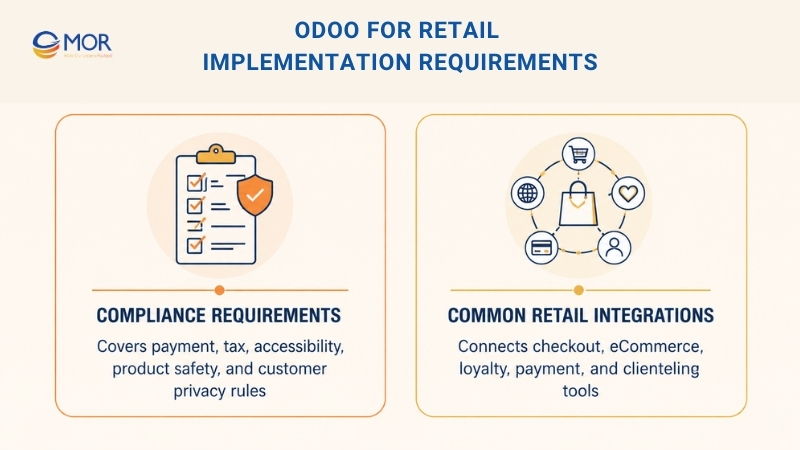
Compliance Requirements
Retail companies work with private customer, payment, and product information, so compliance needs early attention during setup.
- Secure Card Payment Standards: Retailers that take card payments need safe payment processing, correct data handling, and payment gateway connections that follow PCI DSS rules.
- Regional Sales Tax Rules: Companies selling in more than one state or region must set tax logic correctly, so sales tax can be calculated, collected, and reported.
- Accessible Online Store Design: Retailers with eCommerce sites should make their stores usable for people with disabilities, including clear menus, readable pages, and checkout flows that follow WCAG 2.1.
- Product Safety Controls: Retailers that sell controlled goods may need item tracking, recall steps, safety records, and clear product details.
- Customer Privacy Rules: Retailers that collect shopper data must handle consent, privacy requests, customer files, and data protection with care.
Common Retail Integrations
Many retail companies already use several platforms before they move to Odoo. These tools must be checked and connected in the right way, so information can move cleanly through the business.
- Store Checkout Platforms: Retailers may connect or replace tools like Square, Lightspeed, or Oracle MICROS, depending on their current store setup.
- Online Selling Platforms: Links with Shopify, Magento, BigCommerce, or Odoo’s own eCommerce app help sync orders, stock, prices, and customer details.
- Loyalty And CRM Tools: Systems like Yotpo or Klaviyo may need access to buying history, customer groups, reward points, and campaign records.
- Payment Providers: Retailers often need payment links with Stripe, Adyen, or local processors.
- Clienteling And Endless-Aisle Tools: These apps help store staff review customer profiles, suggest items, check stock in other locations, and sell products that are not available on the shop floor. Custom Odoo apps for retail and distribution can support these flows when standard connectors are not enough.
Odoo For Retail Cost And Timeline
The price of Odoo for retail depends on user count, hosting choice, rollout size, custom workflows, and outside system connections. Retailers should not look only at the monthly license because the real budget often covers setup, data transfer, POS configuration, inventory mapping, payment gateway integration links, staff training, testing, and support after launch.
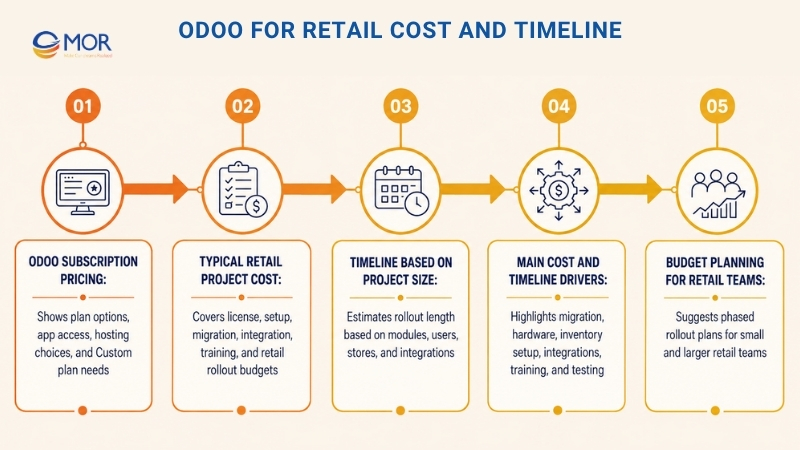
Odoo Subscription Pricing
Odoo’s public pricing has three main choices. The One App Free plan is $0 and gives access to one app with unlimited users. The Standard plan starts at $24.90 per user per month and gives access to all apps on Odoo Online. The Custom plan starts at $49.00 per user per month and includes all apps, Odoo Studio, multi-company use, external API access, and hosting choices like Odoo Online, Odoo.sh, or on-premise. Odoo also states that Odoo.sh hosting fees are separate from the Custom plan price.
For many retail businesses, the Standard plan can work well when they use built-in POS, Inventory, Sales, eCommerce, CRM, Accounting, and Marketing apps without deep changes. The Custom plan is a better fit for retailers that need custom checkout flows, multi-company control, complex integrations, or deeper backend work. Companies comparing Odoo for retail in India may also need to review local partner rates, tax rules, and support costs before choosing a plan.
Typical Retail Project Cost
A retail Odoo rollout usually costs more than the software license. ERPResearch notes that Odoo retail pricing starts at $24.90 per user per month, with many retail projects landing around $10K to $80K and a typical rollout window of 1 to 4 months. This range gives small and mid-sized retailers a useful starting point when they need POS, inventory, eCommerce, CRM, and accounting in one connected setup.
Costs can rise when a retailer needs several store locations, complex stock rules, barcode workflows, Shopify or Magento links, custom reports, loyalty data transfer, payment gateway setup, or detailed approval steps. AppVerticals also notes that licenses are often only one part of the first-year budget, while setup work, migration, integrations, and training often drive more of the total cost.
Timeline Based On Project Size
A small retailer that needs only a few main apps can usually launch sooner. A basic Odoo retail setup with POS, Inventory, Sales, and Accounting may take around 8 to 14 weeks. A mid-size project with 5 to 8 modules, 20 to 75 users, eCommerce links, and several store workflows may take about 16 to 22 weeks. A large rollout with 8 or more modules, 75+ users, custom features, multi-location stock, and several integrations may need 24 to 32 weeks or more.
For retail teams, the schedule often depends on product data quality, store count, payment tools, eCommerce links, and the level of customization. Every added store, warehouse, payment method, marketplace, or loyalty tool creates more setup and testing work before launch.
Main Cost And Timeline Drivers
Retailers should set aside extra time and budget for five major areas. The first is data migration, including product catalogs, SKU variants, customer records, supplier lists, stock balances, and past sales. The second is POS and hardware setup, mainly when stores use barcode scanners, receipt printers, cash drawers, weighing scales, or self-service kiosks. The third is inventory configuration, including warehouses, internal moves, reorder points, safety stock, and lot or serial tracking.
The fourth area is integration work. Retail businesses often need Odoo to connect with Shopify, Magento, BigCommerce, Stripe, Adyen, shipping firms, loyalty platforms, or marketplace tools. The fifth area is training and testing. Store teams, warehouse staff, finance users, and managers need time to test real work cases before go-live, including checkout, returns, exchanges, stock transfers, online orders, click and collect, and end-of-day reconciliation.
Budget Planning For Retail Teams
For a small retailer, the first phase should focus on the apps that affect daily work most: POS, Inventory, Sales, Accounting, and maybe eCommerce. This keeps the rollout easier to control and helps the team launch faster. Once the system is steady, the business can add CRM, Marketing Automation, HR, deeper analytics, loyalty tools, and custom dashboards.
For a larger retailer, a phased rollout is safer. The first stage can cover store operations and stock control. The second stage can add eCommerce, loyalty, marketing, and customer grouping. The third stage can focus on deeper reports, custom workflows, automation, and fine-tuning. This path lowers rollout risk and helps teams adopt Odoo without disrupting daily store work.
When To Choose Odoo For Retail
The right ERP depends on how your retail business sells, handles stock, supports customers, and plans future growth. Odoo for retail works well for companies that need one connected system instead of separate tools for POS, inventory, eCommerce, CRM, accounting, and marketing. It helps Odoo for retailers cut manual tasks, see stock more clearly, and keep stores aligned across sales channels.
Odoo fits small and mid-sized retailers that want room to adapt without the high cost of old enterprise systems. A company can begin with the most needed apps, then add more tools as work becomes more complex. This makes Odoo useful for single-location shops, growing chains, omnichannel sellers, specialty stores, and businesses that want online and offline sales in one place.
Odoo Stock Control For Retail
Choose Odoo when your company needs live stock data across stores, warehouses, and online channels. Retailers can check product availability, move stock between locations, create reorder rules, and lower the risk of stockouts or excess items.
Odoo Checkout For Stores
Odoo is a strong fit when checkout must be fast, steady, and linked with stock and finance. Its POS supports online and offline sales, several payment options, customer profiles, and loyalty tools.
Odoo Omnichannel Retail Setup
Choose Odoo if your business sells through physical stores, websites, marketplaces, and mobile channels. The platform helps align stock, orders, prices, campaigns, and customer data across touchpoints.
Odoo Online Store Support
Odoo works well for retailers that want to manage web sales and store operations in the same system. Product lists, online orders, customer details, and stock levels can stay connected without constant manual updates.
Odoo CRM For Retail Engagement
Retailers should consider Odoo when they want stronger repeat sales and better loyalty. Odoo CRM helps track buying history, group customers, build personal offers, and support focused campaigns.
Odoo For Growing Stores
Odoo fits businesses that plan to open new branches, add product lines, grow online sales, or create more detailed workflows. Its modular setup lets retailers add POS, Inventory, Accounting, CRM, Marketing, HR, and other apps over time.
Odoo Custom Workflows For Retail
Choose Odoo if your store has special processes that basic software cannot support well. It can be adjusted for product variants, barcode steps, loyalty rules, pricing policies, returns, supplier control, and reporting needs.
Odoo Retail ERP Cost Control
Odoo is a practical option for retailers that want ERP power without paying for a large system at the start. Its modular pricing and flexible rollout help businesses manage software costs and setup spending.
Odoo may not be the best match for very large companies that need complex multi-entity consolidation, advanced finance structures, or heavy enterprise analytics from the first day. Those retailers may need to compare Odoo with bigger ERP platforms. For most growing retail businesses, the platform gives a strong balance of cost control, flexibility, automation, and room to scale.
Why Choose MOR Software For Your Odoo Retail Project?
Choosing Odoo for retail is only the first step. The real value comes from how well the system fits your store operations, product data, POS workflow, inventory rules, eCommerce setup, and customer journey. This is where MOR Software can support retailers that need more than a basic ERP setup.
As an IT outsourcing firm in Vietnam, MOR Software works across web development, mobile development, salesforce custom development, offshore development, software outsourcing, QC and testing, and IT consulting services. MOR also has experience in retail-related domains, along with HRM, manufacturing, logistics, and fintech.
Odoo retail consulting and planning
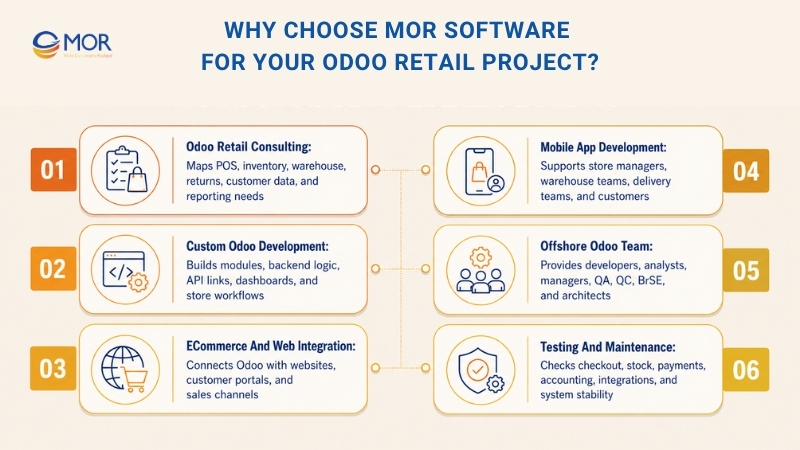
MOR Software can help retailers map real business workflows before best Odoo integration starts. This includes POS flow, inventory movement, warehouse rules, online orders, customer data, returns, and reporting needs.
Custom Odoo development for retail workflows
Retailers often need features that standard ERP setups cannot fully cover. MOR Software can support custom modules, backend logic, API connections, dashboards, and store-specific workflows based on actual retail operations.
Odoo eCommerce and web integration
MOR Software provides web app and eCommerce development services, including websites, web applications, CMS solutions, QA testing, maintenance, consulting, and system integration. This helps retailers connect Odoo with online stores, customer portals, and sales channels.
Odoo mobile app development
Retail teams may need mobile tools for store managers, warehouse staff, delivery teams, or customers. MOR Software provides native, hybrid, PWA, wearable, and embedded mobile development, along with mobile backend and third-party software integration.
Offshore Odoo development team
For retailers that need long-term ERP development capacity, MOR Software can build dedicated offshore teams with developers, business analysts, project managers, QA, QC, BrSE, and software architects. MOR also manages the operational side, including recruitment, payroll, and team scaling.
Testing and maintenance after launch
Retail ERP projects need careful testing before go-live because small errors can affect checkout, stock levels, payments, and accounting. MOR Software’s service model includes QA, integration testing, maintenance, and support, which can help retailers keep their Odoo system stable after launch.
MOR Software is a strong fit for retailers that want to customize Odoo for retail around real store needs, not a generic ERP setup. We can support the full path from business analysis and system design to development, integration, testing, launch, and long-term improvement. For retail businesses planning POS, inventory, eCommerce, CRM, accounting, or omnichannel workflows with Odoo, MOR Software can help turn the plan into a working system.
Conclusion
Odoo for retail can give retailers a cleaner way to manage stores, stock, online sales, finance, and customer data without jumping between separate tools. The best results come when the system is planned around real workflows, not a generic template. MOR Software can help retail teams with consulting, custom development, integration, testing, and long-term support. Ready to build a practical Odoo retail setup? Contact us to discuss your project.
MOR SOFTWARE
Frequently Asked Questions (FAQs)
What is Odoo for retail?
Odoo for retail is an ERP setup that connects POS, inventory, eCommerce, CRM, accounting, purchasing, and marketing in one system. It helps retailers manage daily store and online operations with shared data.
Is Odoo good for small retail businesses?
Yes. Odoo works well for small retailers because they can start with POS, Inventory, and Accounting first. As the business grows, they can add eCommerce, CRM, Marketing, HR, and more apps.
Can Odoo manage POS and eCommerce together?
Yes. Odoo can connect in-store sales with online orders. Product data, stock levels, customer records, payments, and sales reports can stay aligned across POS and eCommerce.
How does Odoo help retailers prevent stockouts?
Odoo tracks stock in real time and supports automated reorder rules. Retailers can set minimum stock levels, review sales history, and plan replenishment before products run out.
Does Odoo support multi-store inventory management?
Yes. Odoo for retail supports multiple stores, warehouses, and stock locations. Retailers can track inventory by location, move products between branches, and view stock data from one place.
Can Odoo support click and collect?
Yes. Odoo can support click and collect through eCommerce, inventory, and store pickup workflows. Customers can order online and pick up items at a selected store when stock is available.
What retail modules should businesses start with in Odoo?
Most retailers should start with POS, Inventory, Sales, Purchase, Accounting, and eCommerce. CRM and Marketing can be added later when the business needs better customer targeting.
How much does Odoo for retail cost?
The cost depends on users, modules, hosting, customization, and integrations. A basic setup may start with Odoo’s monthly subscription, while full retail projects often need extra budget for setup, migration, testing, and training.
Can Odoo be customized for specific retail workflows?
Yes. Odoo for retail can be customized for product variants, barcode workflows, loyalty rules, pricing, returns, supplier management, reports, and store approval flows.
When should a retailer choose Odoo instead of another ERP?
Choose Odoo when your retail business needs a flexible, affordable, and modular ERP. It is a good fit for retailers that want connected POS, inventory, eCommerce, CRM, and accounting without a heavy enterprise system.
Share


Make Our-Dreams Realized


© 2023 . MOR Software. All Rights Reserved
Sitemap
Privacy Policy
Terms of Use

Rate this article
0
over 5.0 based on 0 reviews
Your rating on this news:
Name
*Email
*Write your comment
*Send your comment
1