


Video Annotation Services for AI and Computer Vision [2026 Guide]
Raw footage has little training value until each object, action, and event carries a clear label. Weak track IDs or vague action boundaries can spread errors across thousands of connected frames. This MOR Software guide will explain how video annotation services work, which methods fit each computer vision task, what drives cost, and how to assess workflow, QA, security, and provider fit before production begins.
Key Takeaways
- Match labels to model goals. A suitable video annotation service starts with the target task, required accuracy, and final data format.
- Test temporal quality. Strong video annotation services check track IDs, occlusion, keyframes, mask drift, and action boundaries across the full sequence.
- Run a real pilot. Representative footage reveals guideline gaps, hidden costs, review effort, and delivery risks before the main batch starts.
What Are Video Annotation Services?
Video annotation converts raw footage into structured training data for custom computer vision solutions. Annotators mark objects, movements, actions, scene regions, and time-based events across related frames.
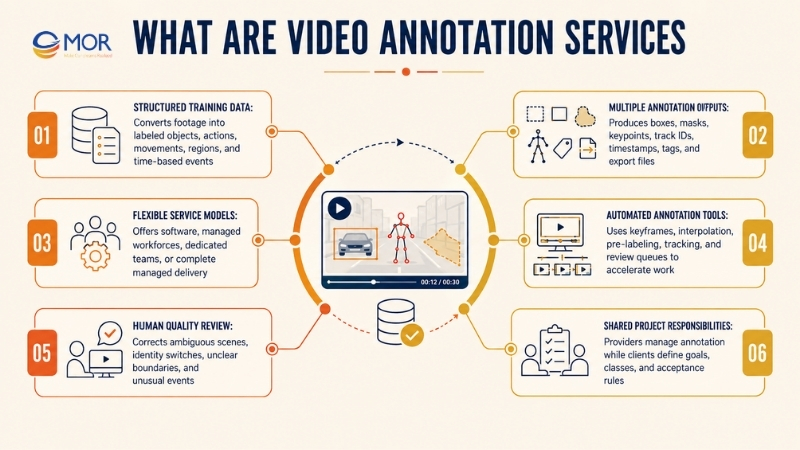
A project may produce bounding boxes, segmentation masks, keypoints, track IDs, timestamps, scene tags, QA reports, and export files. Human reviewers still handle ambiguous scenes, even when automation creates the first set of labels.
Video annotation services usually follow one of four delivery models:
Service model | What the provider handles | Client responsibility | Suitable project |
Annotation software | Tools, user roles, labeling UI, export options | Recruit annotators, write rules, manage QA | Teams with an internal data workforce |
Managed workforce | Recruitment, training, labeling, supervision | Define classes, review samples, accept output | Large batches with clear requirements |
Dedicated annotation team | Long-term staff assigned to one account | Give regular feedback and domain direction | Continuous data programs |
End-to-end managed delivery | Scoping, pilot, tooling, labeling, QA, and delivery | Set model goals and acceptance rules | Complex or time-sensitive AI programs |
Many video annotation platforms support track mode, keyframes, linear interpolation, automated pre-labeling, and review queues. CVAT, for example, lets annotators mark selected keyframes while the software calculates positions between them. Human checks remain necessary when an object changes direction, becomes hidden, or leaves the frame.
An AI video annotation service often combines machine-generated labels with trained reviewers. The system handles repeatable motion, and people correct identity switches, unclear boundaries, or unusual events before delivery.
Why Video Annotation Quality Shapes Model Performance
A computer vision model reads pixels, not business meaning. Labels teach it to identify people, objects, actions, and events across connected frames.
Video adds a time layer to that task. The same object must keep one identity as it moves, overlaps another object, disappears, and returns.
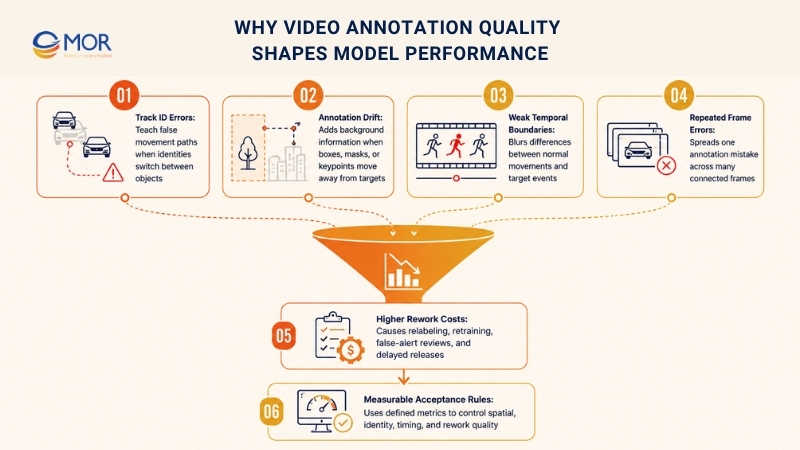
- Track ID errors: A track ID that jumps from one vehicle to another teaches the model a false movement path. That error can damage an entire sequence, not just one frame.
- Annotation drift: Boxes, masks, or keypoints may move away from the target over time. The model then learns part of the background as if it belonged to the object.
- Weak temporal boundaries: An action label marked too early or too late can blur the difference between normal movement and a target event. Fall detection is a common example.
- Repeated frame errors: Video frames are connected, so one mistake can spread across dozens or hundreds of frames. Static image errors usually stay inside one sample.
- Higher rework costs: Poor labels force teams to relabel footage, retrain models, inspect false alerts, and delay release. Low-cost annotation can become expensive once correction work starts.
- Measurable acceptance rules: Set clear quality targets before production begins. Useful metrics include Intersection over Union, identity-switch limits, inter-annotator agreement, temporal tolerance, and rework rate.
Core Video Annotation Techniques for Computer Vision
No single method fits every computer vision task. Strong video annotation services select the least complex method that still gives the model enough information.
A retail shelf detector may need boxes. Surgical analysis may require pixel masks and exact procedure timestamps.
Bounding Boxes and Object Tracking
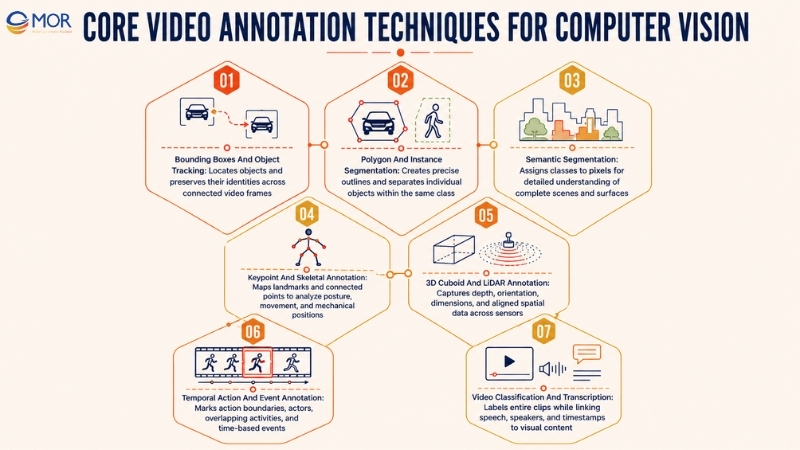
Bounding boxes place rectangles around visible objects. They suit detection models that need location and class data without an exact object outline.
Tracking links each box to a persistent ID. An annotator may label ‘Vehicle 12’ at the start, then preserve that ID as the vehicle moves through later frames.
- Use for object detection: Track cars, workers, products, packages, animals, or equipment.
- Set clear identity rules: Define what happens when similar objects overlap or cross paths.
- Mark occlusion states: Record when an object remains present but becomes partly or fully hidden.
- Handle exits and returns: State when an object keeps its former ID after leaving the screen.
- Control interpolation: Add a new keyframe after changes in direction, size, speed, or visibility.
Boxes take less work than pixel-level methods. Yet crowded footage can still demand heavy review since one identity switch may damage a long track.
Polygon and Instance Segmentation
Polygons follow an object’s visible outline through a set of connected points. They remove much of the background included inside a rectangular box.
Instance segmentation goes further. It assigns a separate mask to each object, even when several objects share the same class.
- Choose precise boundaries: Use polygons when background pixels could confuse the model.
- Separate nearby instances: Keep each pedestrian, plant, product, or defect distinct.
- Define partial visibility: State whether annotators label only the visible area or estimate the hidden shape.
- Set point limits: Too many vertices raise labor time without always adding model value.
- Review crowded scenes: Overlap and thin boundaries often create inconsistent masks.
Medical videos, agricultural drone footage, industrial inspection, and packed retail scenes often need this level of detail. The tradeoff is higher labor and a stricter QA process.
Semantic Segmentation
Semantic segmentation assigns a class to each relevant pixel. Every road pixel may receive one label, every vehicle pixel another, and each background region its own class.
The method supports full scene understanding, but temporal consistency needs close control. A road mask should not flicker at its edges because two adjacent frames were labeled under different rules.
- Map full scene regions: Roads, floors, walls, organs, vegetation, equipment, and damaged surfaces.
- Set class priority: Explain which label takes priority when regions overlap.
- Control mask drift: Compare nearby frames instead of reviewing each image alone.
- Define uncertain borders: Give visual examples for shadows, reflections, blur, and transparent objects.
- Check small regions: Thin tools, cables, cracks, and road markings are easy to miss.
Pixel-level work costs more than boxes or clip tags. Use it when the model needs shape, area, or surface information that simpler labels can’t supply.
Keypoint and Skeletal Annotation
Keypoints mark fixed locations on a person, animal, face, or object. Common points include shoulders, elbows, knees, eyes, corners, and tool joints.
Lines can connect those points into a skeleton. The model then learns posture, movement, gesture, or mechanical position.
- Map each landmark: Use one fixed point order across every task.
- Record visibility: Separate visible, hidden, and out-of-frame points.
- Set pose rules: Define how to mark crouching, turning, sitting, or partial bodies.
- Track point stability: Watch for sudden jumps between nearby frames.
- Add domain review: Medical and industrial motion may need a subject expert.
Sports analysis, rehabilitation, workplace safety, biometrics, and gesture control often rely on keypoints. Point accuracy matters more than the count of labeled frames when small movement differences carry meaning.
3D Cuboid and LiDAR Annotation
A 3D cuboid adds depth, size, position, and orientation to an object. It gives the model spatial information that a flat rectangle can’t represent.
LiDAR annotation links camera footage to point cloud data. Teams must align objects across sensors, timestamps, and coordinate systems.
- Capture orientation: Record the direction a car, robot, package, or machine faces.
- Set object dimensions: Define rules for partly visible objects and unusual shapes.
- Align sensor data: Check camera frames against LiDAR points and calibration files.
- Track through depth: Maintain identity when objects cross at different distances.
- Validate coordinate output: Test the exported labels inside the target training pipeline.
Autonomous systems often work at a very large scale. Berkeley’s BDD100K dataset contains 100,000 videos, more than 1,000 hours of driving, and over 100 million frames, showing why AI automation, sampling, and strict schemas are needed for road data.
Temporal Action and Event Annotation
Temporal annotation marks what happens and when it happens. Each label has a start point, an end point, an actor, and sometimes a confidence score.
Atomic actions may last a few frames. Composite activities may contain a sequence of smaller actions.
- Define action boundaries: State the first frame that counts and the frame where the action ends.
- Allow overlapping labels: A worker may walk, carry a box, and talk during the same time range.
- Separate actions and events: ‘Running’ is an action, while ‘entering a restricted zone’ is an event.
- Link actors to tracks: Connect the event label to the correct person or object.
- Create escalation rules: Send unclear intent or partial events to a senior reviewer.
Google’s AVA dataset contains 80 atomic actions across 430 15-minute movie clips, resulting in 1.62M action labels. Several labels can apply to the same person, which mirrors the complexity found in real activity-recognition projects.
Video Classification and Transcription
Video classification applies labels to a whole clip or scene segment. It works when the model needs a broad category rather than the location of each object.
Transcription adds speech, speaker, or subtitle data. A multimodal model may use that text alongside visual labels.
- Label scene type: Indoor, highway, clinical, warehouse, or retail floor.
- Mark content category: Tutorial, incident, procedure, inspection, or customer interaction.
- Assign risk levels: Low, medium, or high risk under client-defined rules.
- Add time-linked transcripts: Connect speech to the correct timestamp and speaker.
- Set language rules: Define spelling, filler words, accents, and unclear audio.
This method fits media search, education, moderation, meeting analysis, and multimodal model training. It also costs less than dense frame annotation when clip-level meaning is enough.
How a Professional Video Annotation Workflow Works
A reliable workflow controls ambiguity before production. Good video annotation services don’t start with thousands of files and a short class list.
They study the model goal, inspect representative footage, build visual rules, and test those rules through a pilot.
Workflow stage | Main task | Required output | Main risk control |
Goal definition | Map model tasks, classes, attributes, and metrics | Approved scope and label ontology | Stop labels that don’t support the model |
Data assessment | Review resolution, frame rate, motion, density, and blur | Dataset profile and risk list | Flag footage that needs special treatment |
Guideline design | Write class, boundary, ID, occlusion, and event rules | Visual annotation guide | Remove different interpretations |
Pilot batch | Label a small set of normal and difficult clips | Pilot output and QA report | Find rule gaps before scale |
Calibration | Compare annotators and revise weak rules | Agreement scores and updated guide | Align the team around one standard |
Pre-labeling | Apply tracking, interpolation, or model predictions | Draft labels | Keep automation under human review |
Production | Assign tasks and complete labeling | Main annotation batch | Track throughput and rejection rates |
QA review | Run human review and automated checks | Accepted data and defect log | Catch temporal and schema errors |
Export validation | Test files inside the client pipeline | Approved export package | Prevent format and class-mapping failures |
Model feedback | Review model errors against labels | New edge cases and rule changes | Improve later batches based on model behavior |
Automation can change the project economics. Amazon SageMaker Ground Truth reported that automatic labeling could lower labeling costs by up to 70% compared with a human-only process. The saving depends on repeatable data and a model that can learn from a human-labeled seed set.
Still, automated labels need supervision. Erratic motion, camera cuts, reflections, heavy occlusion, and rare classes can break an otherwise stable track.
A paid pilot should include ordinary footage and the awkward clips teams often hide until later. Those clips expose weak label definitions, tool limits, review load, and training gaps.
Where Video Annotation Creates Business Value
The value of video annotation services comes from the decisions a trained model can support. Each industry needs different classes, timing rules, and accuracy checks.
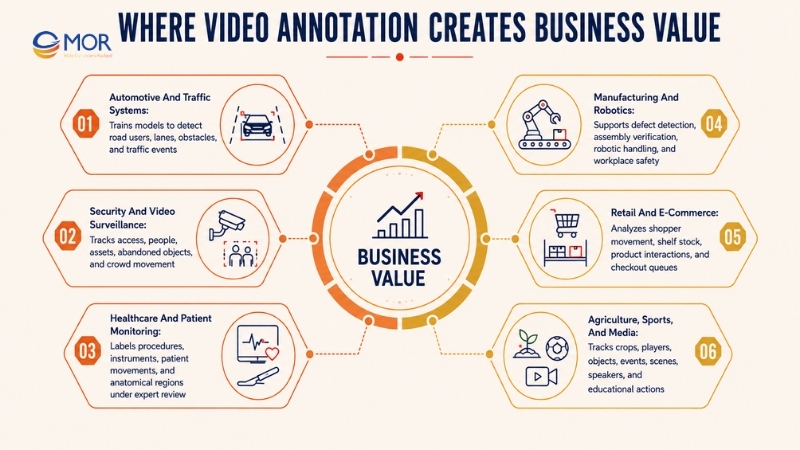
Automotive and Traffic Systems
Road models need to detect objects and understand their movement through changing conditions. Labels may cover cars, cyclists, lanes, traffic lights, signs, obstacles, and incidents.
- Train perception models: Mark road users and their positions across time.
- Support lane analysis: Trace boundaries, road edges, and legal driving areas.
- Detect traffic events: Label collisions, stopped vehicles, illegal turns, or blocked lanes.
- Build ADAS data: Create 2D, 3D, and sensor-linked training sets.
Large driving datasets contain rain, darkness, glare, unusual vehicles, and crowded intersections. Sampling only clean daytime footage gives the model a narrow view of real roads.
Security and Video Surveillance
Surveillance models study behavior across long, often uneventful footage. The annotation plan must separate normal activity from a defined event.
- Monitor access: Label entry into restricted or high-risk areas.
- Track people and assets: Keep identities stable across cameras when the project supports re-identification.
- Detect abandoned objects: Mark the owner, drop time, and unattended period.
- Study crowd flow: Track density, direction, queues, and blocked exits.
A simple ‘suspicious’ label creates inconsistent results. Teams need observable rules, for example, entering a zone after a set time or leaving an object for a stated duration.
Healthcare and Patient Monitoring
Healthcare video may contain patient movement, clinical procedures, scans, tools, or staff actions. Data rules must match the medical question and the required level of review.
- Label procedure stages: Mark the start and end of defined clinical steps.
- Track instruments: Connect tools to anatomy, staff, or procedure phases.
- Study patient movement: Record posture, walking patterns, falls, or rehabilitation exercises.
- Mark anatomical regions: Use landmarks, boxes, or segmentation under expert guidance.
Domain reviewers play a direct role here. A general annotator can follow clear visual rules, but a trained specialist should decide medically ambiguous cases.
Manufacturing and Robotics
Factory footage helps models inspect products, guide machines, and detect unsafe activity. Fast conveyor belts and repetitive parts can make small errors hard to spot.
- Detect defects: Mark cracks, missing parts, wrong placement, and surface damage.
- Verify assembly: Label each stage of a production sequence.
- Guide robotic handling: Mark grasp points, object pose, and free space.
- Track worker safety: Record PPE, unsafe zones, lifting posture, or machine contact.
Frame sampling needs care. A defect visible for only a few frames may disappear when the project samples too widely.
Retail and E-Commerce
Retail video can support store operations, product analytics, and loss prevention. The label plan should connect shopper actions to shelves, products, queues, and checkout areas.
- Track shopper movement: Measure paths, dwell time, and store-zone visits.
- Watch shelf stock: Detect gaps, misplaced goods, or blocked labels.
- Label product interaction: Record pick-up, return, comparison, or purchase-related actions.
- Study queues: Mark queue length, wait time, and service points.
A customer standing near a shelf doesn’t always mean product interest. Action labels need visible evidence, not guesses about intent.
Agriculture, Sports, and Media
Agricultural video can track plants, animals, pests, and equipment. Sports projects focus on players, objects, poses, and timed events.
Media teams often use classification, timestamps, transcription, and face or object tracking to make archives searchable.
- Agriculture: Mark crop health, weeds, livestock movement, and machinery paths.
- Sports: Track players, equipment, poses, formations, and scoring events.
- Media: Add scene, topic, speaker, and content labels.
- Education: Link actions, demonstrations, and speech to training material.
The TAO benchmark contains 2,907 videos across 833 object categories. That broad label set reflects a common real-world issue: systems outside narrow lab settings may meet far more object types than the first ontology covers.
Video Annotation Challenges That Damage Training Data
The main challenges of scaling video annotation service for big datasets come from time, identity, ambiguity, and team consistency. High frame rates multiply small process flaws.
Challenge | Dataset effect | Model risk | Control |
Temporal inconsistency | Labels change across nearby frames | Flickering or unstable predictions | Review frame sequences, not isolated images |
Identity switching | One track ID moves to another object | False paths and weak re-identification | Set ID, exit, return, and overlap rules |
Occlusion | Hidden objects lose labels or IDs | The model forgets objects behind blockers | Use visibility states and re-entry rules |
Annotation drift | Boxes, masks, or points move off target | Poor location and boundary learning | Add correction keyframes and sliding-window checks |
Motion blur | Boundaries become unclear | Noisy object shapes and missed events | Define blur tolerance and escalation rules |
Guideline ambiguity | Annotators make different choices | Low agreement and high rework | Add visual examples for each edge case |
Dataset scale | Task volume rises quickly | Rushed work and uneven review | Split jobs, sample risk, and track team metrics |
Visual fatigue | Attention drops over long sessions | Missed objects and careless IDs | Use shorter tasks and rotation |
Tool limitations | Slow playback or weak tracking | Lower throughput and more manual work | Test tooling during the pilot |
Security exposure | Faces, plates, clinics, or workplaces become visible | Privacy, contract, and access risk | Limit access, encrypt data, and control retention |
Rare classes create a quiet problem. A provider may score well on common objects but fail on the few examples the model needs most.
Class imbalance should shape QA sampling. Reviewers need to inspect rare events, crowded scenes, and unusual lighting at a higher rate than routine footage.
Tool choice also affects throughput. Interpolation works well for predictable movement, but camera cuts and sudden motion need more keyframes. CVAT’s track mode follows this model: annotators update selected frames, and the system calculates the frames between them.
How Video Annotation Services Control Quality, Security and Delivery
Good labels need measurable rules, layered review, controlled data access, and validated exports. Marketing claims like ‘high accuracy’ say little without a metric and test method.
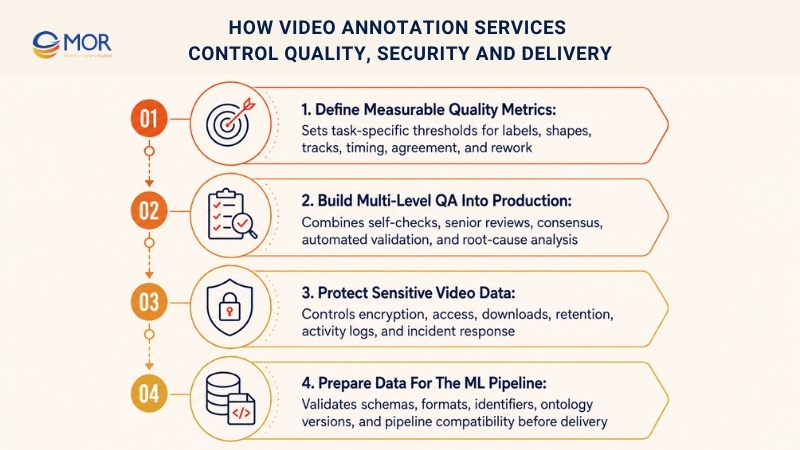
Define Measurable Quality Metrics
Different annotation tasks need different quality checks. A single accuracy percentage can hide identity or timing problems.
- Label accuracy: Compare assigned classes and attributes against approved ground truth.
- Intersection over Union: Measure the overlap between a predicted shape and its accepted reference.
- Inter-annotator agreement: Track how often trained workers make the same decision.
- Track consistency: Count identity switches, broken tracks, and false re-entry.
- Temporal tolerance: Measure how far action boundaries differ from the approved frame.
- Rework rate: Record the share of labels returned for correction.
Set acceptance thresholds per class. Tiny objects and heavy occlusion may need a different tolerance than large, fully visible objects.
Build Multi-Level QA Into Production
Quality review should run during production, not after the final upload. Early defect patterns give the team time to correct rules and retrain annotators.
- Primary checks: Annotators review their own tasks before submission.
- Senior review: Experienced reviewers inspect difficult clips and random samples.
- Consensus review: Two or more annotators label the same data when decisions are subjective.
- Schema checks: Scripts find missing IDs, invalid classes, broken polygons, or empty fields.
- Model-assisted checks: A model flags unusual label shapes, jumps, or class changes.
- Root-cause review: Managers group repeat errors by rule, annotator, class, or tool.
A defect log should record the error type, correction, reason, and guideline update. That record turns rework into process learning.
Protect Sensitive Video Data
Footage may show faces, vehicle plates, private workplaces, homes, or medical procedures. Access should follow the smallest practical scope.
A buyer reviewing video annotation service providers confidentiality security terms should ask for operational proof, not a policy page alone.
- Encrypt transfer and storage: Protect data during upload, processing, and delivery.
- Apply role-based access: Let each worker open only assigned tasks.
- Limit local copies: Block uncontrolled downloads or removable storage when needed.
- Set retention rules: Define when raw data, labels, backups, and logs are deleted.
- Record activity: Keep logs for access, export, review, and file changes.
- Plan incidents: State who reports a breach, when the client is told, and what records are available.
The contract should also identify subcontractors, workforce locations, and approved processing environments. Vague answers create risk for regulated projects.
Prepare Data for the ML Pipeline
Labels have value only when your training system can read them. Confirm class names, attributes, coordinate systems, file paths, frame numbers, and object IDs before the full export.
Common outputs include COCO, YOLO, MOT, nuScenes, BDD100K, and client-defined JSON schemas. The provider should test sample files inside your pipeline rather than rely on a successful export message.
Keep ontology versions alongside each data release. A model team needs to know when a class changed, an attribute was added, or an occlusion rule was revised.
Video Annotation Services: Outsource or Build an In-House Team?
The right model depends on data volume, privacy needs, internal skills, and how often requirements change. Companies often outsource video annotation services when they need faster staffing or specialist methods without building a full annotation operation.
Decision factor | Outsourced service | In-house team | Better fit |
Recruitment | Provider recruits and manages staff | Client hires each role | Outsource for fast capacity |
Training | Provider trains under client rules | Client owns all training | In-house for deep internal knowledge |
Process control | Shared through SLA and reports | Direct daily control | In-house for sensitive, changing work |
Scale | Team size can rise or fall | Hiring limits growth speed | Outsource for changing volume |
Domain knowledge | Must be proven through staff and pilots | Built inside the company | In-house for rare expert work |
Tools | Provider may supply or use client tools | Client buys and runs tools | Depends on current setup |
QA | Provider manages reviewer layers | Client designs and staffs QA | Outsource when no QA operation exists |
Cost structure | Variable project or team cost | Salaries, tools, management, facilities | Outsource for uneven demand |
Knowledge retention | Needs documentation and stable staff | Knowledge stays inside the company | In-house for long programs |
Delivery duration | Faster start after pilot | Slower initial staffing | Outsource for near-term milestones |
Choose an internal team when annotation runs continuously, carries strict access limits, and relies on knowledge that’s hard to document.
Use outsourcing when data volume changes, specialist methods are needed, or your ML engineers need to stay focused on model work.
A hybrid setup often works well. Internal domain experts write the ontology and approve edge cases, while an external team handles production and first-level QA.
What Drives Video Annotation Services Cost?
There’s no useful universal rate. Cost changes with the unit of work, scene density, technique, QA depth, security controls, and delivery schedule.
Teams searching for affordable video annotation services in AI should compare the cost per accepted label. A cheap first pass can become expensive after rejection, correction, and model retraining.
Cost driver | Lower-cost condition | Higher-cost condition | Budget question |
Billable unit | Clear per-frame, per-minute, or per-task scope | Unclear definitions and changing scope | What counts as one accepted unit? |
Annotation type | Clip tags or simple boxes | Segmentation, keypoints, 3D, or temporal events | Which label detail does the model need? |
Object density | One or two clear objects | Crowds, shelves, traffic, or overlapping parts | Is billing based on frames or objects? |
Video quality | Stable camera and clear footage | Blur, glare, low light, or camera cuts | How are unusable frames charged? |
Motion | Slow, predictable paths | Fast or irregular movement | Can interpolation handle the sequence? |
Class count | Small, distinct ontology | Many similar classes and attributes | How much training does the taxonomy need? |
Expertise | General visual rules | Medical, engineering, or scientific review | Is expert review billed separately? |
QA depth | Sampling under clear rules | Full review, consensus, or specialist checks | Which review layers are included? |
Security | Standard cloud workflow | Private network, strict location, or controlled rooms | Are security costs part of the quote? |
Export work | Standard supported schema | Custom transformations and pipeline tests | Does delivery include format validation? |
Timeline | Planned production schedule | Rush work or weekend coverage | What premium applies to a shorter deadline? |
Rework | Limited corrections under stable rules | Frequent requirement changes | Which revisions are included? |
Searches for video annotation services free usually lead to open-source tools or limited trials. The software may cost nothing, but you still carry workforce, training, QA, hosting, security, and project-management costs.
Ask each provider to separate annotation labor, review, management, tools, data preparation, rework, and expert input. One blended price hides the parts most likely to change.
How to Choose a Video Annotation Service Provider
The best video annotation services fit your model, footage, security rules, and internal process. Provider size or a long method list doesn’t prove project fit.
Test each claim against a paid pilot built around your real data.
Evaluation area | Evidence to request | Warning sign | Pilot test |
Technique fit | Samples using the required method | Only clean marketing examples | Include blur, overlap, and fast motion |
Domain fit | Related project details and reviewer roles | Broad claims without proof | Test domain-specific edge cases |
Guideline process | Sample guide and change-control method | A short class list treated as enough | Ask the team to draft rules from a sample |
Pilot quality | Metrics, defect log, and reviewer notes | Accuracy stated without calculation | Compare output against your gold set |
Temporal control | ID, occlusion, re-entry, and keyframe rules | Frame-only QA | Inspect full tracks and action sequences |
Team training | Training plan and calibration results | Workers start production immediately | Measure agreement after training |
Security | Access map, encryption, retention, and deletion terms | Generic security statement | Trace one file through the workflow |
Tool fit | Supported imports, exports, APIs, and reviewer tools | Manual conversions after delivery | Load a sample export into your pipeline |
Scale | Staffing plan and QA ratio | Volume promises without reviewer capacity | Increase pilot volume in a second batch |
Pricing | Itemized scope and revision terms | Low unit rate with hidden review fees | Calculate cost per accepted item |
Communication | Named owners, reports, and escalation path | One sales contact for all issues | Run a live edge-case review session |
Start with technique fit. A team strong in bounding boxes may lack the skills for surgical segmentation or 3D sensor alignment.
Then study the guideline process. Providers should question vague classes, identify missing states, and propose visual edge cases before quoting full production.
Check reviewer capacity as closely as annotator capacity. Adding 50 labelers without enough senior reviewers can increase throughput while lowering agreement.
Ask for stable team rules too. Continuous projects suffer when trained workers leave and replacements start without calibration.
Pricing needs the same level of detail. Include data preparation, annotation, QA, project control, rework, expert review, platform fees, and export changes.
A real pilot closes the gap between promises and performance. Use representative footage, a written scorecard, and a review meeting where the provider explains each disputed label.
Deliver Reliable Video AI Systems With MOR Software
Annotation is only one part of a working computer vision product. Companies also need ingestion tools, APIs, review screens, data pipelines, cloud systems, model connections, access controls, and production testing.
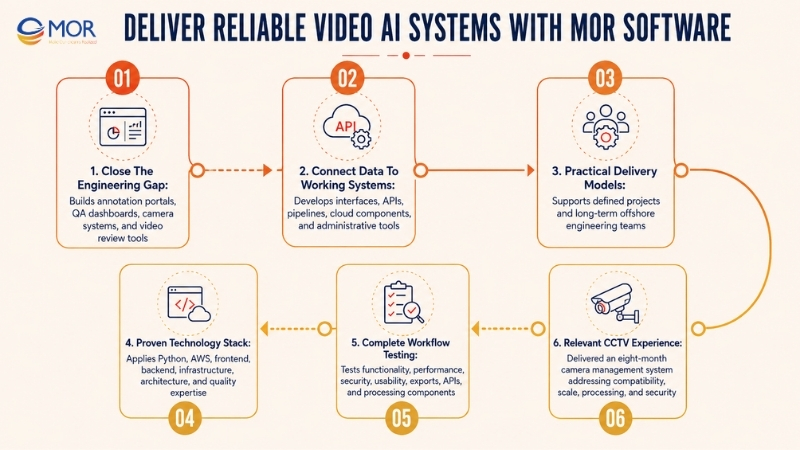
MOR Software supports the engineering work around video annotation services through agentic AI solution development services, custom software outsourcing delivery, offshore teams, and QC and testing. The company’s documented process covers project-based delivery and offshore development, backed by roles across business analysis, architecture, software engineering, QA, and QC.
- Close the engineering gap: MOR Software can build or modernize annotation portals, QA dashboards, camera systems, video review tools, model integration layers, and computer vision products.
- Connect data to working systems: Our teams develop web interfaces, backend services, APIs, cloud components, processing pipelines, and admin tools that move data through collection, review, training, and release.
- Select a practical delivery model: Project-based work fits defined products and upgrades. An Offshore Software Center fits companies that need a long-term team working as an extension of internal engineering.
- Apply proven technologies: MOR Software’s materials document Python and AWS within its engineering stack. Teams can also cover frontend, backend, infrastructure, architecture, business analysis, and quality control.
- Test the whole workflow: MOR Software’s QC services cover functional, performance, security, and usability testing. These tests apply to upload tools, annotation screens, reviewer queues, exports, APIs, and video-processing components.
- Use relevant delivery proof: The CCTV Management System was built over 8 months by a four-member team using fastest programming languages C++, Python, and QT. The system covered server and camera setup, recording settings, file exports, and object-activity logs while addressing camera compatibility, real-time processing, scale, and data security.
This setup fits AI companies, surveillance vendors, manufacturers, healthcare technology teams, and enterprises that need a complete video product rather than annotation labor alone.
Share your video sources, annotation schema, target model output, current stack, security rules, and sample workflow. MOR Software can run a gap analysis and map a phased delivery plan tied to your real product needs.
Conclusion
The right video annotation services turn raw footage into consistent data that matches your model, workflow, and security rules. Compare providers through real pilots, measurable QA, clear pricing, and pipeline-tested exports rather than broad accuracy claims. MOR Software can build the software systems around your video AI workflow, including review tools, APIs, cloud components, model connections, and testing. Contact MOR Software to discuss your footage, schema, product goals, and delivery plan.
"Evolution is not a destination, it is a disciplined journey of innovation."
Phung Van Tu


CEO MOR AI
MOR SOFTWARE
Frequently Asked Questions (FAQs)
What is video annotation?
Video annotation adds structured labels to objects, actions, scenes, and events inside video footage so computer vision models can detect, classify, track, segment, and interpret activity over time. Common outputs include boxes, polygons, masks, keypoints, track IDs, timestamps, transcripts, and clip tags in a format that matches the model pipeline.
How does video annotation differ from image annotation?
Image annotation treats each picture as a separate sample, while video annotation links labels across connected frames. Annotators must manage movement, object identity, keyframes, interpolation, occlusion, re-entry, camera cuts, and temporal boundaries.
Which video annotation technique should I choose?
Use bounding boxes for basic detection and tracking, polygons or segmentation for exact object boundaries, keypoints for pose and motion, cuboids or LiDAR labels for spatial perception, and temporal labels for actions or events. The best method is the simplest one that still meets your model requirements.
How do providers maintain consistency across frames?
Providers use persistent track IDs, fixed class rules, visibility states, keyframes, interpolation, and sequence-level QA. Reviewers inspect full tracks, while automated checks flag missing IDs, sudden position jumps, invalid class changes, and broken timelines.
How much do video annotation services cost?
Pricing depends on video length, frame rate, object count, class count, annotation type, motion, blur, expertise, QA depth, security, and delivery time. Providers may charge per frame, minute, object, task, hour, batch, or worker, so buyers should compare the total cost per accepted annotation.
How long does a video annotation project take?
Typical turnaround times for video annotation services depend on footage volume, label type, team size, pilot results, review depth, and correction rate. Simple classification may take days, while dense segmentation, long tracks, or specialist-reviewed medical footage may take weeks or months.
How is video annotation accuracy measured?
Accuracy is measured through class accuracy, Intersection over Union, inter-annotator agreement, identity-switch rates, broken tracks, temporal boundary tolerance, and rework rates. The final scorecard should combine the metrics that match your model task.
Is outsourcing better than in-house video annotation?
Outsourcing fits changing volumes, short deadlines, and projects that need trained annotators quickly, while in-house teams suit continuous work with strict access rules or deep domain knowledge. A hybrid model works well when internal experts control the ontology and an external team handles production.
How should sensitive video data be protected?
Sensitive footage requires encrypted transfer and storage, role-based access, controlled processing areas, audit logs, and written retention rules. Contracts should also define data locations, workforce locations, subcontractors, deletion timing, incident duties, and backup handling.
What should a video annotation pilot include?
A pilot should use footage that reflects the real dataset, including rare classes, blur, overlap, occlusion, low light, fast motion, camera cuts, and unclear boundaries. It should produce sample labels, updated guidelines, quality scores, throughput data, a defect log, and a tested export before full production.
Share


Make Our-Dreams Realized


© 2023 . MOR Software. All Rights Reserved
Sitemap
Privacy Policy
Terms of Use

Rate this article
0
over 5.0 based on 0 reviews
Your rating on this news:
Name
*Email
*Write your comment
*Send your comment
1