


WordPress Salesforce Integration: Methods, Costs & Setup in 2026
Disconnected website and CRM data slows lead assignment, creates duplicate records, and leaves sales teams with partial customer profiles. WordPress Salesforce integration connects website activity to Salesforce workflows, but the right setup depends on data direction, volume, Salesforce objects, and business rules. This guide by MOR Software will compare native tools, plugins, middleware, and custom API development.
Key Takeaways
- Map the data flow before selecting a tool. Define which WordPress actions create or update Salesforce records, which platform owns each field, and how the system handles duplicates or errors.
- Match the integration method to the use case. Form add-ons suit lead capture, sync plugins support memberships and WooCommerce, middleware connects several apps, and custom APIs handle portals or complex logic.
- Plan for long-term ownership from the start. A stable WordPress Salesforce integration needs secure OAuth access, clear field mapping, API monitoring, testing, retry rules, and ongoing maintenance.
What Is WordPress Salesforce Integration?
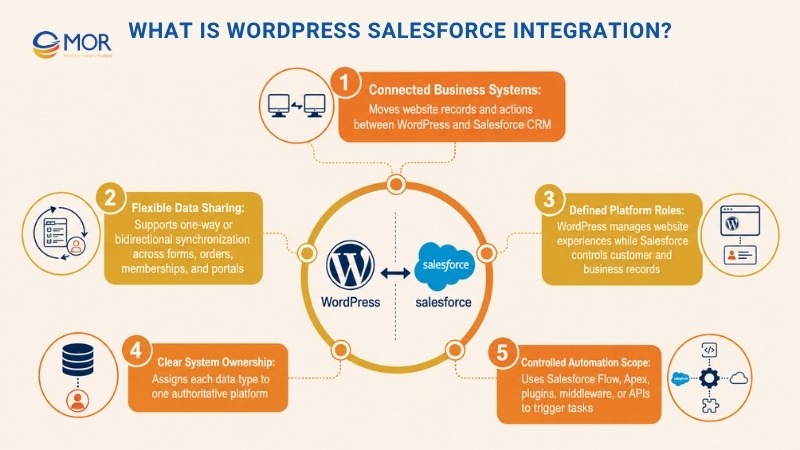
WordPress Salesforce integration connects a WordPress website to Salesforce CRM so records and actions can move between the platforms. WordPress may collect forms, user accounts, memberships, WooCommerce orders, or portal requests. Salesforce then manages Leads, Contacts, Accounts, Opportunities, Cases, Campaigns, and custom objects.
WordPress runs 41.2% of all websites and holds 59.1% of the known CMS market as of July 24, 2026. That scale explains why many companies need WordPress data connected to their sales and service systems.
A basic WordPress integration with Salesforce may send a form submission into one Lead record. A larger setup can display Salesforce account data in a customer portal, process WooCommerce orders, or keep records updated in two directions.
Four decisions define the integration:
- Data direction: Records may travel from WordPress into Salesforce, from Salesforce into WordPress, or in both directions.
- Platform roles: WordPress usually manages the website experience. Salesforce manages customer and business records.
- System ownership: One platform must own each data type. For example, Salesforce may own contact status while WordPress owns login preferences.
- Automation scope: Salesforce Flow, Apex, plugins, middleware, or APIs may start tasks after data arrives.
Without clear ownership, one platform can overwrite newer data held by the other. Teams must settle that rule before they map fields or select tools.
What Can WordPress And Salesforce Share?
Salesforce held 20.0% of the worldwide CRM application market in 2025. Its broad use across sales, marketing, and service has created many reasons to connect CRM records with WordPress sites.
The scope of Salesforce CRM integration with WordPress can cover a single contact form or a full account portal. Start with the business event that matters, then map only the data needed to complete it.
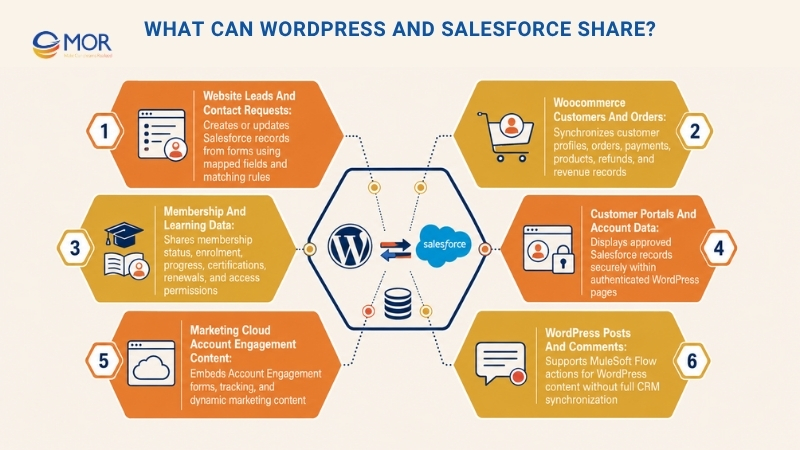
Website Leads And Contact Requests
A form submission can create or update a Salesforce Lead, Contact, Case, or custom object. Useful fields often include the landing page, campaign source, UTM values, location, company size, product interest, and consent status.
Salesforce Flow can then assign the lead, create a task, notify an account owner, or add the person to a campaign. A matching rule should check the email address or another stable ID before a new record is created.
For example, a service inquiry from a large company may go to an enterprise sales queue. A request from an existing customer may create a Case instead of another Lead.
WooCommerce Customers And Orders
WooCommerce data can update Salesforce Contacts, Accounts, Opportunities, Orders, Products, or custom commerce objects. Common records include customer profiles, order items, payments, subscriptions, refunds, and order status.
The object design depends on how your Salesforce team reports revenue. Some businesses map each WooCommerce order to an Opportunity. Others use Salesforce Orders and Order Products.
Stable customer and order IDs stop repeat records. Status rules also matter. A failed payment shouldn’t appear as completed revenue in Salesforce.
Membership And Learning Data
Membership and learning sites often need user status shared across WordPress and Salesforce. Records may include membership plans, course enrolment, progress, renewal dates, certifications, or account access.
Salesforce may act as the system of record for membership status. WordPress can read that status and grant the correct content access through MemberPress, LearnDash, Paid Memberships Pro, or custom code.
A status change in Salesforce can suspend access after a contract ends. Course completion in WordPress can also update a Salesforce Contact or training record.
Customer Portals And Account Data
A portal can display selected Salesforce records inside authenticated WordPress pages. Customers may view subscriptions, open Cases, invoices, service requests, appointment status, or account details.
Salesforce to WordPress data should pass through server-side code. WordPress requests approved fields, stores the response in a short cache, and renders safe HTML. OAuth secrets must stay away from browser-side JavaScript.
Write access needs tighter rules. Decide which fields customers may change and which validations Salesforce must run before accepting an update.
Marketing Cloud Account Engagement Content
The official Account Engagement plugin adds marketing forms and dynamic content to WordPress.org pages and posts. Salesforce requires Account Engagement API access and a WordPress administrator who can install and configure the plugin.
This setup suits businesses already using Account Engagement, formerly Pardot. Website interactions can connect to prospect records, campaigns, form activity, and marketing workflows.
The plugin doesn’t replace a general CRM sync. Its focus remains Account Engagement forms, tracking, and marketing content.
WordPress Posts And Comments
Salesforce also provides a WordPress Connector through MuleSoft integration for Flow: Integration. It treats WordPress as a target for Flow actions involving posts and comments, rather than acting as a full CRM synchronization tool.
That distinction prevents a common mistake. A WordPress Salesforce connector designed for content actions won’t automatically sync WooCommerce orders, memberships, Contacts, and custom Salesforce objects.
Five WordPress Salesforce Integration Methods Compared
The right method follows the required data flow. Map the source, destination, timing, match keys, and failure action before you buy a plugin.
MuleSoft’s 2026 Connectivity Benchmark Report found that 95% of organizations face integration challenges. A rushed tool choice can add another disconnected system instead of solving the first one.
Form Builder Add-Ons
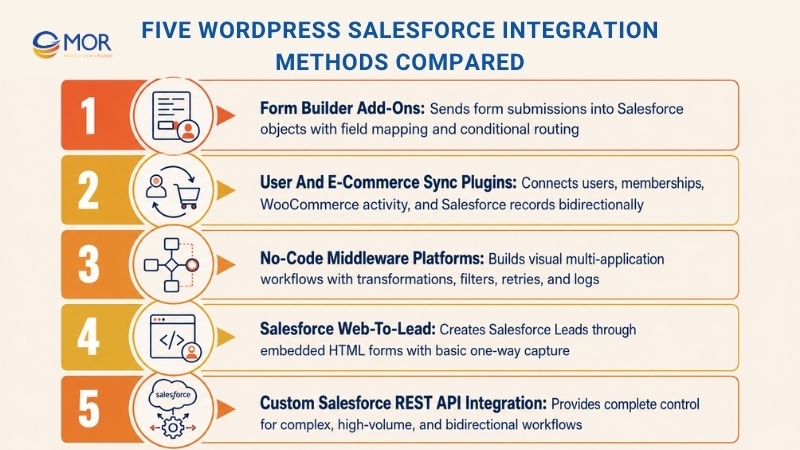
Form add-ons send WordPress submissions directly into Salesforce. WPForms, Gravity Forms, Formidable Forms, and Ninja Forms support this through native add-ons or third-party extensions.
Field mapping connects form inputs to Leads, Contacts, Accounts, Cases, or custom objects. Conditional feeds can route different submissions to separate objects or Salesforce accounts. Logs and manual resubmission help when a request fails.
Gravity Forms supports Salesforce object mapping, conditional logic, and several feeds from one form. Its Salesforce add-on requires an Elite, Nonprofit, or Developer licence.
Typical cost: Around $259 to $300 per year for a form package that includes Salesforce access. Gravity Forms Elite costs $259 per year, while WPForms Elite and Formidable Forms Elite list promotional prices of $299.50 per year.
Best fit: Contact forms, quote requests, registrations, and standard lead capture.
Main limit: Complex transformations and two-way account sync usually need another method.
User And E-Commerce Sync Plugins
Plugins like WP Fusion and miniOrange Object Data Sync connect WordPress users, memberships, WooCommerce activity, forms, posts, and Salesforce records.
These tools go further than form capture. They may update user profiles, apply access rules, move order details, and pull selected Salesforce changes back into WordPress.
WP Fusion supports bidirectional Salesforce sync and connections with more than 100 WordPress plugins. Its paid plans start at $297 per year for one site and reach $647 per year for unlimited sites.
Best fit: Membership platforms, learning portals, customer accounts, and online stores.
Main limit: Your architecture stays tied to the plugin’s supported objects, hooks, and update cycle.
No-Code Middleware Platforms
Zapier, Make, Workato, and MuleSoft connect WordPress and Salesforce through visual workflows. They can also add email platforms, Slack, payment gateway integration tools, ERP systems, and data stores to the same process.
A workflow may receive a WordPress form, transform several values, search Salesforce for a matching Contact, update the record, and notify a sales channel. Built-in scheduling, filters, retry rules, and execution logs lower the amount of custom code.
Salesforce counts as a premium app in Zapier and requires a paid Zapier plan. Paid plans currently start at $19.99 per month, though task volume and team controls raise the total.
Best fit: Cross-application workflows with moderate logic and volume.
Main limit: Task fees and workflow sprawl grow as more records and steps are added.
Salesforce Web-to-Lead
Salesforce can generate an HTML Web-to-Lead form for placement on a WordPress page. Each valid submission creates a Lead based on the selected fields.
The same idea applies to Web-to-Case for support requests. Lead assignment rules, campaign values, hidden fields, and return pages can shape the process after submission.
A WordPress Salesforce web-to-lead setup has no separate plugin cost. Yet the form has limits around styling, file uploads, complex validation, and two-way data movement. Changes also require edits to the HTML on your website.
Typical cost: Free software setup within an eligible Salesforce account.
Best fit: Basic lead forms with simple field needs.
Main limit: One-way capture with limited control over the website experience.
Custom Salesforce REST API Integration
Custom development connects server-side WordPress PHP to Salesforce REST API endpoints. OAuth 2.0 handles authorization through an External Client App or an existing Connected App.
Salesforce now recommends External Client Apps for new integrations. Creation of new Connected Apps became restricted in Spring 2026, though existing Connected Apps continue to work.
A custom WordPress Salesforce API can work with Leads, Contacts, Accounts, Cases, Opportunities, Files, custom objects, and WordPress custom post types. Queues, scheduled jobs, caching, conflict rules, and detailed logs give your team control over the full process.
Apex REST endpoints also make sense when Salesforce must apply business rules before returning a response.
Typical cost: Higher upfront development cost plus testing, monitoring, and maintenance.
Best fit: High-volume sites, customer portals, custom Salesforce orgs, regulated data, and complex two-way workflows.
Main limit: The business needs long-term technical ownership.
WordPress Salesforce Integration Methods: Quick Comparison
Integration Method | Suitable Use Case | Common Tools | Implementation Effort | Supported Data Flow | Custom Object Support | Typical Pricing | Main Trade-Off |
Form integration add-ons | Contact forms, quote requests, registrations, and simple lead capture | WPForms, Gravity Forms, Formidable Forms | Low | Usually WordPress to Salesforce | Available on selected plans | Around $259 to $300 per year, plus setup | Limited data transformation and two-way sync |
User and commerce sync plugins | Membership sites, LMS platforms, customer accounts, and WooCommerce stores | WP Fusion, miniOrange Object Data Sync | Low to medium | One-way or bidirectional | Depends on the plugin and licence | Free entry plans or paid licences from about $297 per year | The integration depends on supported hooks, objects, and plugin updates |
No-code middleware | Workflows connecting WordPress, Salesforce, email, Slack, payments, or ERP systems | Zapier, Make, Workato, MuleSoft | Medium | One-way or bidirectional | Usually available | Monthly or task-based pricing | Fees and workflow maintenance increase as volume and steps grow |
Salesforce Web-to-Lead | Simple website lead forms with a small budget | Salesforce Web-to-Lead HTML form | Low | WordPress to Salesforce only | Limited to supported lead fields | No separate connector fee | Basic design, validation, routing, and error controls |
Custom REST API integration | Customer portals, high-volume websites, custom Salesforce orgs, and complex business rules | Salesforce REST API, Apex REST, External Client Apps | High | Fully configurable in either direction | Full support | Custom project pricing, often with ongoing support costs | Requires skilled developers, testing, monitoring, and long-term ownership |
WordPress Salesforce Plugins And Connectors By Use Case
Popularity doesn’t prove that a plugin fits your data model. Compare sync direction, object support, error controls, security, maintenance history, and total licence cost before approval.
Tool | Best Suited To | Connection Method | What It Handles | Starting Price Or Adoption Signal | Main Consideration |
WPForms | Teams that already collect leads through WPForms | Built-in Salesforce add-on | Creates Salesforce records, maps form fields, and applies conditional routing | Elite plan from $299.50 per year | Mainly designed for form-to-CRM transfers |
Gravity Forms | Complex forms that need several Salesforce actions | Built-in Salesforce add-on | Sends separate feeds to Contacts, Campaigns, Leads, and related records | Elite plan from $259 per year | Complex setups need careful feed and duplicate-rule testing |
Formidable Forms | Applications, calculators, and forms tied to custom objects | Built-in Salesforce add-on | Maps structured form data to Leads, Contacts, and custom Salesforce objects | Elite plan from $299.50 per year | Requires Salesforce API access and a supported licence |
WP Fusion | Membership, LMS, WooCommerce, and logged-in user activity | Bidirectional CRM sync plugin | Shares purchases, user profiles, course progress, tags, and membership changes | Paid plans from $297 per year | Coverage depends on the supported WordPress plugins and Salesforce fields |
CRM Perks | Websites using several popular form builders | Third-party form connector | Sends submissions from Contact Form 7, Elementor, WPForms, Ninja Forms, and Formidable Forms | More than 2,000 active installations | Best for form capture rather than full account synchronization |
Object Sync for Salesforce | Teams that need WordPress content linked to Salesforce records | Object mapping and sync plugin | Connects users, posts, custom post types, and Salesforce objects | More than 500 active installations | Complex relationships may require custom development |
miniOrange Object Data Sync | Sites that need broader WordPress and WooCommerce synchronization | One-way or bidirectional sync plugin | Covers users, forms, products, orders, posts, attachments, and custom objects | More than 200 active installations | Pricing and object coverage depend on the chosen package |
Zapier | Workflows connecting Salesforce with WordPress and other business apps | Cloud-based middleware | Links forms and website events to Salesforce, Slack, email, payments, and other platforms | Paid plans from $19.99 per month | Task charges rise as workflow volume and step count increase |
Account Engagement | Marketing teams already using Salesforce Account Engagement | Official Salesforce WordPress plugin | Embeds marketing forms, tracking, and dynamic Pardot content | Free plugin; Account Engagement subscription required | Focuses on marketing activity rather than full CRM data sync |
Active installation counts can indicate plugin adoption and maintenance activity. They don’t confirm that a tool supports your objects, data volume, or security requirements.
Check these points before approval:
- Sync direction: Confirm one-way, read-only, or bidirectional data movement.
- Object support: Review standard objects, custom objects, relationships, and attachments.
- Mapping rules: Check conditional logic, lookups, transformations, and external IDs.
- Failure controls: Require logs, alerts, queues, manual retries, and clear error messages.
- Authentication: Confirm OAuth support and protected credential storage.
- Maintenance record: Review recent updates, WordPress compatibility, changelogs, and support history.
- Full cost: Include licences, setup, testing, API access, and ongoing maintenance.
How To Implement WordPress Salesforce Integration
A WordPress Salesforce integration tutorial should start with the business process, not the installation screen. Teams asking how to integrate Salesforce with WordPress need to define the record flow before touching plugins or API settings.
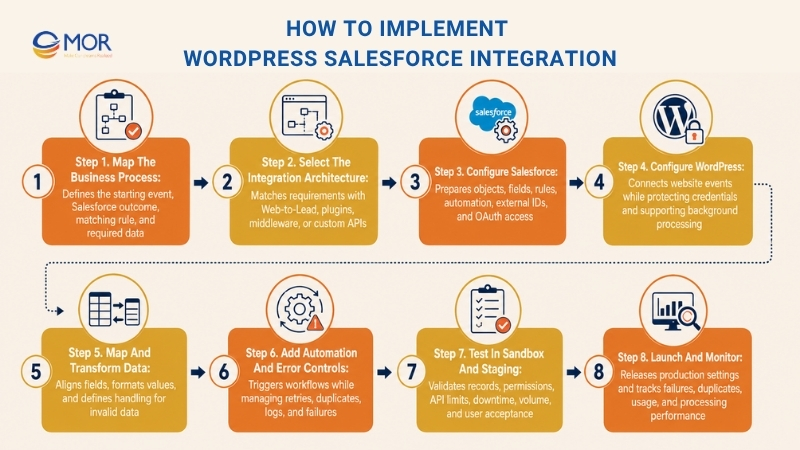
Step 1. Map The Business Process
Identify the WordPress action that starts the process. It may be a form submission, account update, order, course completion, or support request.
Document what should happen in Salesforce afterward. Name the target object, matching rule, owner, Flow, campaign, and response shown to the user.
Remove data that serves no business purpose. A smaller payload is easier to validate, secure, and maintain.
Step 2. Select The Integration Architecture
Match the requirement to Salesforce Web-to-Lead, a plugin, middleware, or custom API development. Confirm object support, sync direction, expected volume, and failure controls before approval.
Review licence terms and API access at this stage. A plugin purchase won’t help when the Salesforce edition blocks the required API.
A basic flow may look like this:
WordPress event → queue → integration layer → Salesforce object → Flow or assignment rule
Two-way setups add a return path, match keys, and conflict rules.
Step 3. Configure Salesforce
Prepare the standard objects, custom objects, fields, record types, and relationships used by the integration. Add external ID fields for records that need stable matching.
Review validation rules, duplicate rules, assignment logic, and Salesforce Flow. A valid API request may still fail when the record breaks a Salesforce rule.
Create an External Client App for new OAuth-based work. Existing projects may keep their Connected App where Salesforce still supports it.
Step 4. Configure WordPress
Install the selected plugin or build a custom integration module. Connect form events, WooCommerce hooks, user updates, membership actions, or custom post types.
Store secrets outside themes and public repositories. Environment variables or protected server configuration provide a safer location than hardcoded PHP.
Background processing also matters. A form should confirm receipt quickly, even when Salesforce takes longer to respond.
Step 5. Map And Transform Data
Match every WordPress input to a Salesforce API field name. Document data type, required status, default value, and transformation rule.
Normalize phone numbers, dates, currencies, country codes, and picklist values before sending them. Define how blank, unknown, and invalid values should behave.
For example, a WordPress field may collect ‘United States’ while Salesforce expects ‘US’. The mapping layer must handle that difference.
Step 6. Add Automation And Error Controls
Trigger the correct Salesforce Flow, assignment, campaign, or notification after the record arrives. Keep business rules in one place where possible.
Queue temporary failures and retry them after increasing delays. Add idempotency keys so a repeated submission doesn’t create another record.
Logs should record the request time, target object, response code, Salesforce record ID, and failure reason. Hide personal values that administrators don’t need for troubleshooting.
Step 7. Test In Sandbox And Staging
Connect a WordPress staging site to a Salesforce sandbox. Test successful records, invalid values, duplicates, expired tokens, permission errors, API limits, and Salesforce downtime.
Run volume tests using realistic traffic patterns. A process that works for ten submissions may behave differently during a product launch or event registration period.
Complete UAT with sales, marketing, service, and website teams. Technical success means little when records reach the wrong queue or users receive the wrong confirmation.
Step 8. Launch And Monitor
Move settings into production through a controlled release. Confirm OAuth access, field mappings, Flow activation, callbacks, and scheduled jobs.
Track queue depth, API usage, failed records, duplicate rates, and processing time. Assign owners for WordPress issues, Salesforce rules, security changes, and business requests.
The integration needs review whenever forms, Salesforce fields, plugins, workflows, or customer processes change.
Technical Requirements For A Successful WordPress Salesforce Integration
Technical readiness determines whether WordPress Salesforce integration stays stable after launch. A small checklist can prevent weeks of rework.
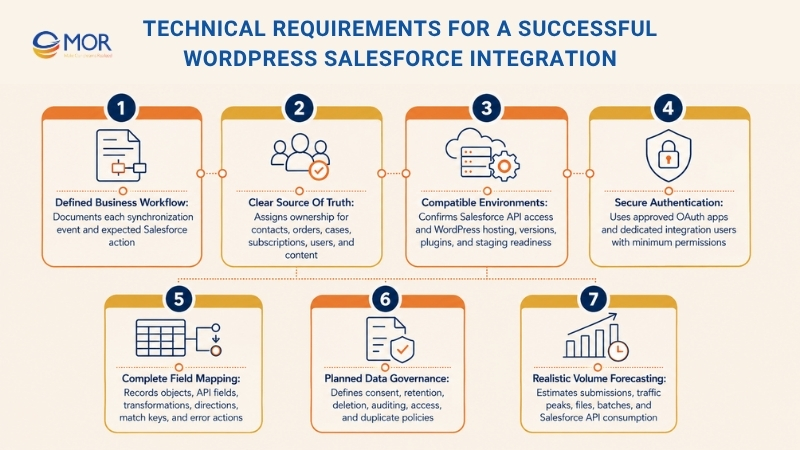
- Business workflow: Define the event that starts each sync and the expected Salesforce action.
- Source of truth: Assign ownership for Contacts, users, orders, Cases, subscriptions, and content.
- Salesforce edition: Confirm API access, sandbox access, add-ons, and account limits.
- WordPress environment: Review HTTPS, hosting, PHP, WordPress version, plugin compatibility, cron jobs, and staging access.
- Salesforce objects: List objects, record types, required fields, validation rules, and relationships.
- Authentication: Prepare an External Client App or an approved existing Connected App.
- Integration user: Create a dedicated account with minimum object and field access.
- Field map: Record WordPress sources, Salesforce API names, data types, and transformations.
- Duplicate policy: Choose matching rules based on email, customer ID, order ID, or another stable key.
- Volume forecast: Estimate submissions, batch sizes, traffic peaks, files, and API calls.
- Data governance: Define consent, retention, deletion, audit, and access rules.
- Testing environments: Pair WordPress staging with a Salesforce sandbox.
Salesforce recommends a separate integration user for each connection. The Salesforce Integration user licence creates an API-only profile, after which permission sets grant only the access the process needs.
Use a field map before development:
WordPress Source | Salesforce Object | Salesforce Field | Direction | Required | Transformation | Match Key | Error Action |
Contact form email | Lead | WP to SF | Yes | Lowercase | Queue and alert | ||
WooCommerce order ID | Order | External_Order_ID__c | WP to SF | Yes | None | External ID | Retry |
Membership status | Contact | Member_Status__c | Two-way | Yes | Picklist map | Salesforce ID | Flag conflict |
Case status | Case | Status | SF to WP | Yes | Display label | Case ID | Show cached value |
The document becomes a shared reference for developers, Salesforce admins, testers, and business owners. Update it whenever either system changes.
WordPress Salesforce Integration Best Practices For Security And Performance
A working connection can still expose data, lose submissions, or slow the website. Security, API use, and failure recovery belong in the original design.
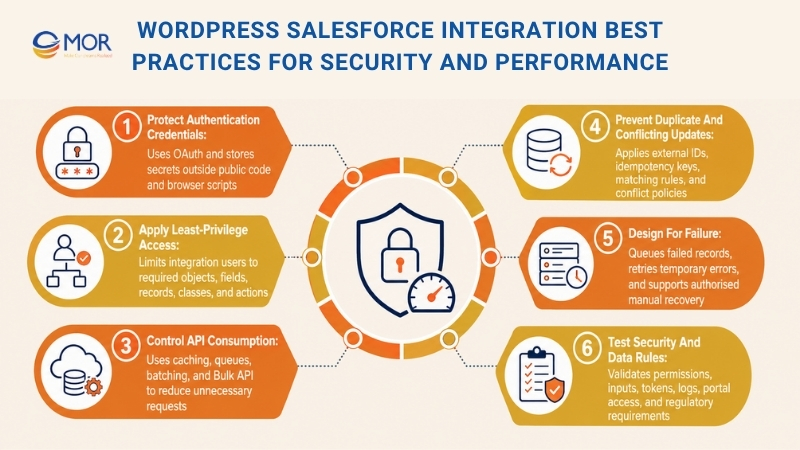
Protect Authentication Credentials
Use OAuth 2.0 instead of storing a Salesforce username and password. External Client Apps and Connected Apps request Salesforce REST API access through OAuth.
Keep client secrets and refresh tokens in environment variables or protected server settings. Browser-side scripts must never receive those credentials.
Rotate secrets when staff or vendors change. Remove old apps and tokens that no active process needs.
Apply Least-Privilege Access
Create a dedicated Salesforce integration user. Grant access only to the objects, fields, records, Apex classes, and API actions needed for that connection.
Don’t use a System Administrator account as the easy shortcut. It gives the external process far more access than its job requires.
Filter outbound Salesforce queries too. WordPress should receive only the fields approved for the website or portal.
Control API Consumption
Cache Salesforce records displayed on WordPress. A product list or account summary shouldn’t call Salesforce on every page view.
Queue writes instead of making website users wait for the full Salesforce process. Batch large updates through Bulk API where the use case supports it.
Paid Salesforce organizations, including Enterprise Edition, start at 100,000 API requests within a rolling 24-hour period. The allowance grows based on provisioned licences, and teams can buy extra capacity.
Prevent Duplicate And Conflicting Updates
Use Salesforce matching rules and stable external IDs. Email may work for simple lead capture, but order IDs, membership IDs, or customer IDs are safer for other records.
Add idempotency keys to repeatable requests. A browser refresh or timeout shouldn’t create another Opportunity or Case.
Two-way synchronization needs a conflict policy. Choose which platform wins when records change close together, and prevent loops where each update triggers another update back.
Design For Failure
Network problems and Salesforce outages will happen. Store failed work in a queue rather than discarding it.
Retry temporary errors after increasing delays. Stop retries for permanent errors, including invalid fields or failed validation rules, and send those records to an administrator.
Give authorised users a manual retry option. They should see the failure reason before they send the record again.
Test Security And Data Rules
Use HTTPS for every request. Validate WordPress inputs before sending them and sanitize Salesforce data before displaying it.
Test expired tokens, missing permissions, malformed requests, unexpected field values, and unauthorised portal access. Include GDPR, CCPA, or industry rules where the project stores personal or regulated records.
Before launch, confirm:
- OAuth secrets aren’t stored in public code.
- The integration user has minimum access.
- Personal data isn’t written into open logs.
- Failed records remain recoverable.
- Cached portal data has a suitable expiry.
- Security and permission tests pass in staging.
WordPress Salesforce Integration Cost And Maintenance
A WordPress Salesforce integration may cost nothing for a basic Web-to-Lead form, around $259 to $647 per year for licensed plugins, or $5,000 to $25,000 for custom API work. Larger portals, legacy migration, regulated data, and enterprise middleware can pass $50,000.
These are planning ranges, not fixed quotes. Object count, data direction, volume, and business logic drive the final total.
Integration Type | Estimated Initial Cost | Recurring Cost | Customization | Maintenance Need | Suitable Project |
Salesforce Web-to-Lead | $0 to $1,000 | Low | Low | Low | Basic lead forms |
Form plugin | $500 to $3,000 setup | $259 to $300+ yearly | Low to medium | Medium | Forms and registrations |
User or commerce plugin | $1,500 to $8,000 setup | $297 to $647+ yearly | Medium | Medium | WooCommerce and memberships |
No-code middleware | $1,000 to $10,000 setup | $20 to $500+ monthly | Medium | Medium to high | Cross-app workflows |
Custom REST API | $5,000 to $25,000+ | Support and hosting | High | High | Portals and custom objects |
Enterprise iPaaS | $25,000 to $100,000+ | Custom licence | High | High | Large system programmes |
A cheap plugin becomes expensive when it creates duplicates or loses orders. IBM placed the 2025 global average cost of a data breach at $4.44 million, so access control and secure maintenance belong in the cost model rather than an optional later phase.
Need Help With WordPress Salesforce Integration?
A standard form plugin works for narrow lead capture. Custom objects, old systems, two-way records, portals, migration, and strict data rules need deeper Salesforce and web development skills.
MOR Software combines Salesforce consulting services with web application development and API integration. Our Salesforce portfolio covers consulting, implementation, offshore salesforce commerce cloud development, integration, management, and maintenance.
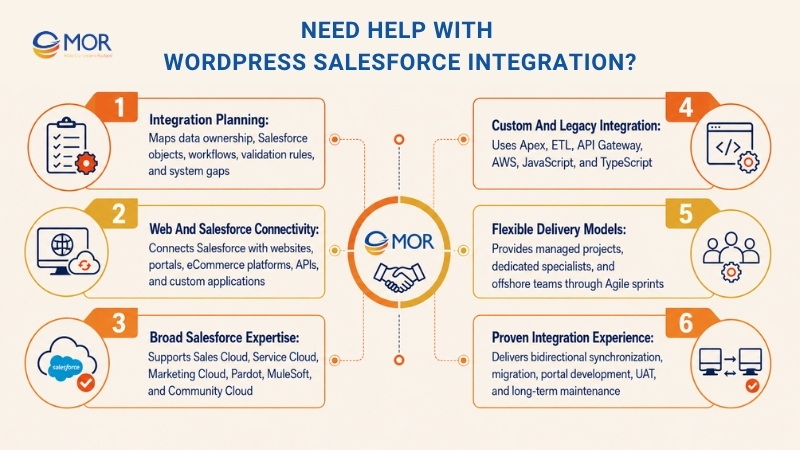
- Map The Integration Before Coding: MOR business analysts can document data ownership, object mappings, workflows, validation rules, and system gaps before development starts.
- Connect Salesforce And Web Systems: The web development team handles websites, web apps, eCommerce systems, custom CMS work, external APIs, QA, and maintenance.
- Work Across The Salesforce Stack: MOR’s service materials cover Sales Cloud, Service Cloud, Marketing Cloud, Community Cloud, Pardot, Field Service Lightning, and MuleSoft.
- Handle Custom And Legacy Systems: Relevant skills include Force.com, Apex, Visualforce, Lightning Web Components, API Gateway, ETL, AWS, JavaScript, and TypeScript.
- Select A Suitable Delivery Model: Businesses can work with a managed project team, dedicated software teams, or an offshore development team. MOR uses two-week Agile sprints with defined outputs and regular demonstrations.
- Review Proven Integration Work: MOR connected a Japanese time-attendance platform to Salesforce through real-time bidirectional synchronization, API Gateway, and ETL migration. The 15-month project used Apex, Lightning Web Components, Lambda, Servlet, and TypeScript with a team of 18 members.
The service fits mid-sized companies and enterprises running customised Salesforce orgs, customer portals, WooCommerce systems, membership platforms, or legacy databases. It also suits projects that need architecture, development, migration, UAT, and maintenance under one plan.
Prepare your current WordPress workflows, Salesforce objects, daily transaction volume, and known data problems. MOR Software can use those details to run an integration assessment and create a practical delivery roadmap.
Conclusion
A stable WordPress Salesforce integration starts with a clear data map, ownership rules, and an architecture that matches your volume and business logic. Plugins handle standard forms, while middleware and custom APIs support broader workflows, portals, and two-way data. MOR Software brings Salesforce consulting, web development, API integration, migration, testing, and maintenance under one delivery plan. Contact MOR Software to review your objects, workflows, costs, and technical requirements before development begins.
"Mr. Cong’s guiding philosophy is simplicity, believing that the simplest solutions are often the most powerful. He sees trust, empowerment, and the opportunity to demonstrate one’s abilities as the key elements that set MOR apart from traditional IT companies."
Mac Tien Cong


Division Manager (Hanoi Branch)
MOR SOFTWARE
Frequently Asked Questions (FAQs)
What is WordPress Salesforce integration?
WordPress Salesforce integration connects website data and actions with Salesforce CRM. It can send form leads, WooCommerce orders, user changes, or support requests into Salesforce. Larger setups can also display approved Salesforce records in WordPress or keep selected data updated in both systems.
How do I connect a WordPress website to Salesforce?
Choose Salesforce Web-to-Lead, a form add-on, a sync plugin, middleware, or custom REST API development. The right choice depends on the Salesforce objects, data direction, volume, and rules involved. Map the workflow and fields before installing a tool.
Does WordPress Salesforce integration require Salesforce API access?
Web-to-Lead doesn’t require a general API connection. Most form add-ons, sync plugins, middleware tools, and custom integrations do require Salesforce API access. Availability depends on your Salesforce edition, licence setup, and any purchased API add-ons.
Can WordPress forms create Salesforce Leads, Contacts, and custom objects?
Yes. Gravity Forms, WPForms, Formidable Forms, and other connectors can create standard or custom Salesforce records. Object support depends on the add-on. Check conditional feeds, custom field mapping, duplicate handling, and failed-submission recovery before selecting one.
Can Salesforce data be displayed on a WordPress website?
Yes. WordPress can request approved Salesforce records through REST API or a suitable sync plugin. Server-side authentication, field-level permissions, caching, and sanitized output protect the data. Public pages should display only records intended for public access.
Can WooCommerce orders and customer data sync with Salesforce?
Yes. Orders, products, customers, subscriptions, payments, and refunds can map to Salesforce standard or custom objects. WP Fusion, miniOrange, middleware, or custom APIs can handle the work. Stable external IDs help prevent duplicate customers and orders.
What is the difference between one-way and bidirectional Salesforce sync?
One-way sync sends data in a single direction, usually WordPress into Salesforce. Bidirectional sync allows approved changes to travel back as well. Two-way setups need conflict rules, match keys, loop prevention, stronger logs, and stricter permission controls.
Which integration method works best for a high-traffic WordPress site?
A queued custom API or an enterprise-grade integration platform usually fits high traffic better than synchronous form processing. Caching, batch requests, background jobs, API monitoring, and recovery queues protect page speed and prevent records from being lost during traffic peaks.
How much does WordPress Salesforce integration cost?
Basic Web-to-Lead can cost little beyond setup time. Licensed plugins often cost $259 to $647 per year. Custom API projects may start near $5,000 and rise past $25,000. Portals, migrations, compliance work, and high-volume flows raise the total.
How can I prevent duplicate records and failed Salesforce syncs?
Use Salesforce matching rules, external IDs, idempotency keys, validation, and clear error queues. Temporary failures should retry automatically. Permanent errors need an administrator alert and manual recovery path. Logs should show the record, time, response code, and failure reason.
Do I need a developer for WordPress Salesforce integration?
Simple Web-to-Lead forms and standard form add-ons may not require a developer. Custom objects, two-way sync, WooCommerce rules, customer portals, Apex endpoints, and strict security controls usually need WordPress and Salesforce development skills.
Can I show Salesforce product information on my website?
Yes. WordPress can query selected Salesforce Product or custom object records and display them through a block, shortcode, or template. Use caching instead of requesting Salesforce on every page load. Restrict fields and prices according to the visitor’s access level.
Share


Make Our-Dreams Realized


© 2023 . MOR Software. All Rights Reserved
Sitemap
Privacy Policy
Terms of Use

Rate this article
0
over 5.0 based on 0 reviews
Your rating on this news:
Name
*Email
*Write your comment
*Send your comment
1