


Salesforce AppExchange App Development: Complete Guide 2026
Salesforce AppExchange app development requires more than writing Apex code and building Lightning components. Your application must work across customer environments, pass Salesforce's security review, and support future updates without disrupting existing users. The move to AgentExchange in 2026 also brings changes to marketplace distribution. In this guide, MOR Software outlines the development process, required technologies, packaging rules, costs, and practical steps businesses should consider before launching a Salesforce application.
Key Takeaways
- Salesforce recommends second-generation managed packaging (2GP) for new AppExchange applications. Developers should plan for namespaces, source control, automated testing, and upgrade compatibility early in the project.
- AppExchange security review and marketplace publishing require separate preparation. Security checks, technical documentation, package releases, and listing approvals all affect launch timelines.
- Development costs depend on application complexity, external integrations, security requirements, and long-term support. A clear product scope helps teams control spending and avoid expensive changes after development begins.
What Is Salesforce AppExchange App Development?
Salesforce AppExchange app development is the process of designing, building, testing, and distributing applications that extend Salesforce's core capabilities. These applications may add custom CRM functions, connect external systems, automate business processes, or support industry-specific operations.
Unlike a custom application built for one company's Salesforce organization, an AppExchange product must serve different customers. Each customer may have unique user permissions, data structures, Salesforce editions, and installed applications.
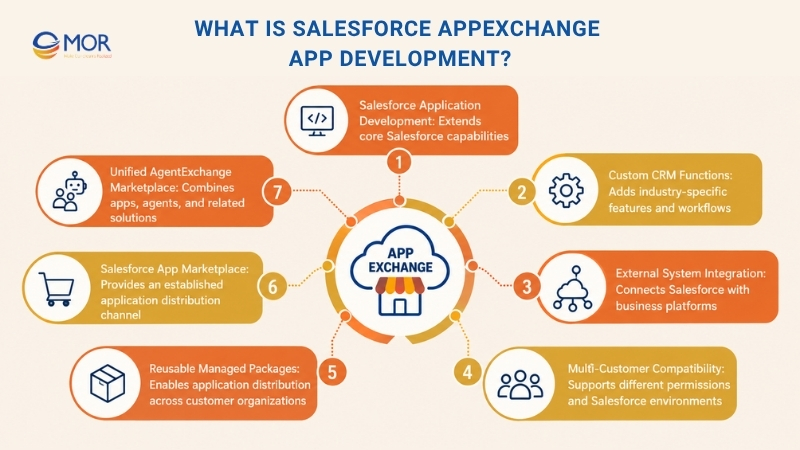
For example, a financial services company might develop an application that connects Salesforce Sales Cloud with an external loan management system. The same product could then serve other financial institutions through a reusable managed package.
Applications distributed through the Salesforce app marketplace include CRM tools, analytics platforms, integration products, and industry applications.
The market already has a large installed base. According to Salesforce Architects, AppExchange had more than 10,000 applications and 14.3 million installations as of October 2025. This gives new developers an established distribution channel, but it also raises customer expectations for security, installation, and support.
In April 2026, Salesforce combined AppExchange, AgentExchange, and Slack Marketplace into a unified marketplace under the AgentExchange name. Traditional Salesforce apps remain part of that marketplace, so the development requirements discussed in this guide still apply.
Which Tools and Technologies Support AppExchange App Development?
Choosing the right technology stack affects application performance, maintenance, and package compatibility. Most AppExchange app development projects use Salesforce's native tools, supported by API services, version control, and automated testing.
Technology | Primary Function | When to Use It |
Apex | Executes custom business logic on Salesforce | Complex calculations, triggers, validation rules, and backend processing |
Lightning Web Components (LWC) | Builds user interfaces with web standards | Custom dashboards, forms, and interactive application screens |
Salesforce Flow | Automates business processes through visual tools | Approval flows, notifications, and record updates |
Salesforce APIs | Connects Salesforce with external systems | ERP integration, payment services, and data synchronization |
Salesforce DX | Supports source-driven development and package management | Version control, team collaboration, and managed 2GP development |
Salesforce CLI | Runs development, testing, and release commands | Automated builds, package versioning, and deployment pipelines |
Salesforce Code Analyzer | Detects code quality and security issues | Security preparation and continuous code scanning |
Agentforce tools | Adds AI agents and related actions | Applications that need AI-driven workflows or agent integrations |
Git and CI/CD tools | Tracks source changes and automates testing | Team development, controlled releases, and repeatable deployments |
Apex and LWC handle many custom application requirements. For a deeper look at server-side development, our guide to Apex Salesforce explains its role in business logic and platform automation.
Not every product needs extensive Apex code. A simple Salesforce extension may rely on Flow and standard metadata, whereas an integration-heavy application can require custom APIs and external cloud services.
Developers should also check which metadata types Salesforce supports in managed packages. A component that works inside a development organization won't always behave the same way after installation in a customer's environment.
How to Build a Salesforce AppExchange App?
Building a distributable Salesforce product involves seven main stages. The process begins with partner registration and development setup, then moves through application coding, packaging, testing, security review, and publication.
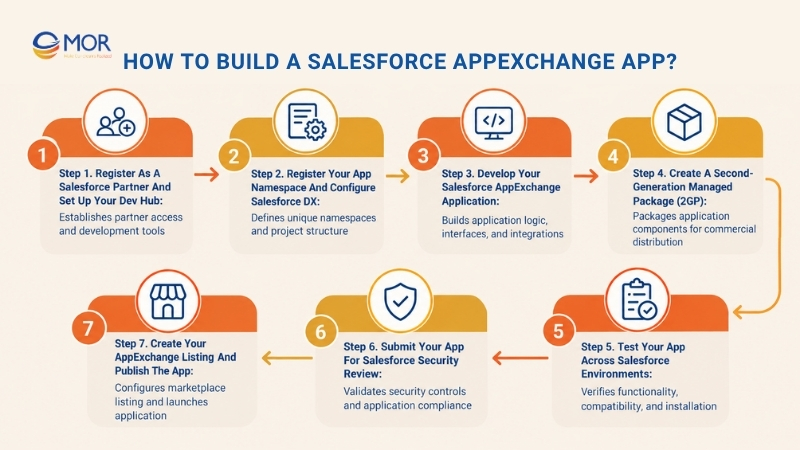
Step 1. Register as a Salesforce Partner and Set Up Your Dev Hub
Salesforce partner registration provides access to the resources needed to develop and distribute applications. Set up the development environment before creating the first package.
- Partner registration: Join the Salesforce Partner Program and access the Partner Community. Review the agreements and requirements that apply to your planned distribution model.
- Partner Business Org: Set up your Partner Business Org (PBO), which provides access to partner tools and supports managed package development.
- Dev Hub configuration: Enable Dev Hub and second-generation packaging to manage scratch orgs, package versions, and linked namespaces.
- Development tools: Install Salesforce CLI and Visual Studio Code with Salesforce Extensions. Connect the project to Git for source tracking.
For teams handling several products, the PBO also helps centralize development resources. Salesforce recommends using the PBO's Dev Hub instead of spreading package operations across unrelated organizations.
Step 2. Register Your App Namespace and Configure Salesforce DX
A namespace gives the managed package a unique prefix for supported components. It prevents naming conflicts when customers install applications from different publishers.
- Namespace registration: Create a suitable Developer Edition org, register a unique namespace, and link it to the PBO Dev Hub.
- Salesforce DX project: Create the project structure and configure the sfdx-project.json file with package directories and version information.
- Metadata planning: Identify the Apex classes, custom objects, Lightning components, permission sets, and other metadata the application needs.
- Dependency management: Document required Salesforce products and any external package dependencies before coding begins.
Namespace decisions deserve early attention because they affect the product's identity and package structure. Changing major packaging choices after development has progressed can lead to substantial rework.
Step 3. Develop Your Salesforce AppExchange Application
Application development should follow a defined product scope and account for subscriber environments. Start with the main business workflow and build the components required to support it.
- Application logic: Use Apex classes and triggers for calculations, validations, and processing that standard platform tools can't handle.
- User interface: Create responsive screens with Lightning Web Components. Keep navigation consistent with Salesforce Lightning Experience.
- Workflow automation: Apply Salesforce Flow to record updates, approvals, and routine tasks where declarative tools meet the requirements.
- System integration: Connect external applications through Salesforce APIs, suitable authentication methods, and integration services.
Consider an HRM application that sends employee attendance records into Salesforce. Developers must map external records to Salesforce objects, control duplicate entries, and handle failed API requests without losing data.
Teams also need to account for governor limits. These platform limits control resource usage, including database operations and processing time, so a function that works with ten records should also be tested with larger workloads.
Step 4. Create a Second-Generation Managed Package (2GP)
Managed 2GP packages allow independent software vendors (ISVs) to distribute versioned applications to Salesforce customers. Salesforce recommends this approach for new AppExchange products.
- Package creation: Use Salesforce CLI to create a managed package and define its contents through Salesforce DX.
- Beta versions: Build package versions for development, testing, and verification before a public release.
- Package dependencies: Define version relationships and supported dependencies to maintain an upgrade path.
- Release preparation: Promote a tested beta package to released status when it meets Salesforce's requirements.
Salesforce's managed 2GP distribution documentation specifies a minimum 75% Apex code coverage requirement before a package version can be released. Every Apex trigger in the package also needs test coverage.
A released package version can be distributed to production subscriber organizations. Beta versions should remain in appropriate testing environments.
For teams familiar with unlocked packages, the distinction is straightforward: managed packages support commercial ISV distribution and publisher-controlled upgrades. Unlocked packages generally suit internal application development, where administrators need more freedom to modify packaged metadata.
Step 5. Test Your App Across Salesforce Environments
Testing must reflect the conditions your customers will encounter. A package can work inside a developer's organization and still fail after installation elsewhere.
- Functional testing: Verify business logic, Lightning components, Salesforce Flow behavior, and external API responses.
- Installation testing: Install the package in non-namespaced scratch orgs or suitable test environments that represent subscriber organizations.
- Compatibility testing: Check supported Salesforce editions, permissions, dependencies, record volumes, and package upgrade paths.
- Automated testing: Run Apex tests and deployment checks through CI/CD pipelines to catch defects before each release.
Pay close attention to installation permissions. For example, an application might pass functional testing under a System Administrator account but fail when a user has restricted access to required objects or fields.
Upgrade testing deserves the same care as initial installation. Existing subscribers may hold business records created by earlier versions, and package changes must preserve access to that data.
Step 6. Submit Your App for Salesforce Security Review
Security review checks whether the application meets Salesforce's security standards before marketplace distribution. Developers should prepare the required evidence and resolve known vulnerabilities before submitting.
- Security preparation: Review object permissions, field-level access, record sharing, credential handling, and data exposure risks.
- Code scanning: Run Salesforce Code Analyzer and address findings related to application security.
- Technical documentation: Prepare architecture details, data flows, test instructions, and access to required test environments.
- Review submission: Connect the solution through Partner Console and complete the applicable security review workflow.
Automated scans are only part of the process. Salesforce may identify other issues during manual review, so developers should plan for remediation and retesting.
Step 7. Create Your AppExchange Listing and Publish the App
Once the package and review requirements are ready, configure the product listing through Partner Console. The listing must describe what customers are installing and how the application works.
- Listing setup: Create the product listing and associate it with the appropriate released package.
- Product information: Add the description, screenshots, supported Salesforce products, installation guidance, and technical resources.
- Commercial requirements: Select an applicable pricing model and complete the required partner agreements and approvals.
- Application launch: Review the approved listing, confirm installation links, and publish the product on AgentExchange.
After launch, maintain the package through controlled updates and clear release notes. Subscriber support and upgrade planning become ongoing product responsibilities.
How to Prepare for the AppExchange Security Review
Security review is a major milestone in Salesforce AppExchange app development. Salesforce checks the application's code, data handling, external services, and security controls before approving applicable marketplace listings.
Plan for the review during development rather than leaving all checks until the package is ready to publish. Salesforce's AgentExchange publishing training advises partners to allow 2–4 weeks for the security review process. Actual timelines depend on the submission and any required fixes.
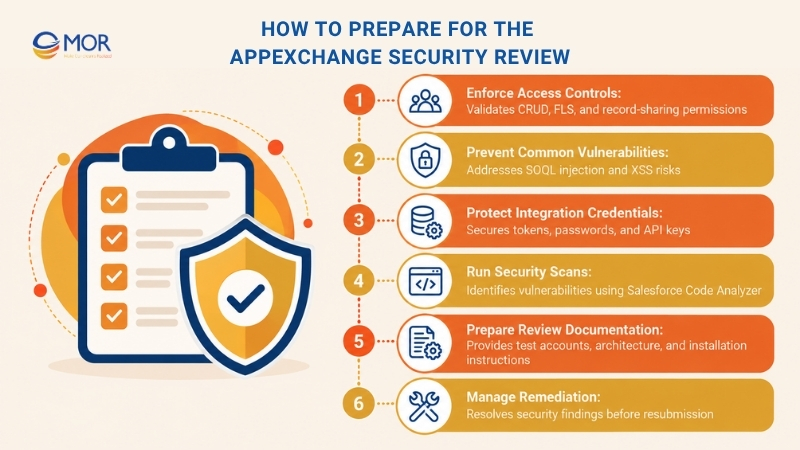
The following checks should be part of the review preparation process:
- Enforce access controls: Validate create, read, update, and delete (CRUD) permissions and field-level security (FLS). Check record-sharing behavior so users can access only the information permitted by their Salesforce roles.
- Prevent common vulnerabilities: Review SOQL injection, cross-site scripting (XSS), unsafe input handling, and insecure API endpoints. Test the application against realistic misuse scenarios.
- Protect integration credentials: Store secrets through suitable Salesforce credential management tools. Avoid hardcoding tokens, passwords, or external service keys in Apex classes.
- Run security scans: Use Salesforce Code Analyzer with the required AppExchange rules and recommended security checks. Document findings, fixes, and justified false positives.
- Prepare review documentation: Supply working test accounts, installation instructions, architecture details, and data-flow information. Include external services that process or store customer data.
- Manage remediation: Review the security findings, address affected components, run regression tests, and prepare a new submission when required.
Salesforce's Code Analyzer guide for AppExchange security review explains how to generate the required scan reports. These reports form part of the submission evidence.
Passing an automated scan doesn't guarantee approval. External libraries, access-control errors, or insecure integration flows may still need further work.
A useful approach is to assign security checks to each development sprint. That keeps vulnerability fixes close to the code changes that introduced them and limits the amount of rework before submission.
How to Deploy and Publish a Salesforce AppExchange App
Publishing an application involves more than uploading a managed package. Partners must connect the correct solution, complete listing details, meet approval requirements, and confirm that customers can install the released version.
Salesforce unified its marketplaces under AgentExchange in April 2026. According to Salesforce's AgentExchange documentation, the unified marketplace includes more than 13,000 solutions, spanning applications, agents, and related tools.
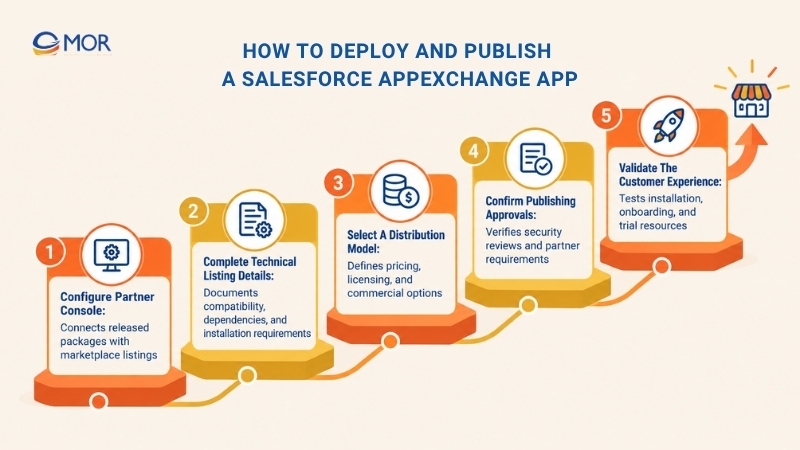
For publishers, the technical release process remains closely tied to Salesforce packaging and partner systems.
- Configure Partner Console: Connect the organization containing the released package and associate the solution with its marketplace listing. Verify that the correct package version is selected.
- Complete technical listing details: State supported Salesforce editions, installation requirements, product dependencies, configuration steps, and support resources. Clear documentation helps customers evaluate deployment needs.
- Select a distribution model: Choose an applicable free, freemium, or paid model. Review licensing requirements and determine whether the License Management App or other approved tools are needed.
- Confirm publishing approvals: Check security review status, listing plan approval, partner agreements, and required product information before publication.
- Validate the customer experience: Test installation links, onboarding instructions, and trial resources. Track subscriber issues after launch and plan corrections through future package releases.
Salesforce's AgentExchange listing guidance describes the listing process, including pricing setup, solution linking, and customer trial configuration.
For example, an application that connects Salesforce with an accounting platform should explain which API credentials customers need, what permissions administrators must grant, and how the initial data sync works.
After publication, monitor installation failures, support tickets, and package adoption. These records help the development team identify usability problems and prioritize later releases.
Salesforce AppExchange App Development Cost Breakdown
The cost of Salesforce AppExchange app development typically ranges from $25,000 to $150,000+, depending on application complexity, integration requirements, and team structure. According to Noltic's AppExchange cost analysis, planning, design, development, and testing account for most of the initial investment.
Budget planning should separate one-time development expenses from recurring costs after launch.
Cost component | Estimated cost (USD) | Main cost drivers | Budget considerations |
Discovery and planning | 3,000–10,000
| Business analysis, requirements, product scope | Define the MVP and technical risks before coding |
Architecture and design | 4,000–15,000
| Data models, permissions, integration design | Account for subscriber differences and future upgrades |
Application development | 12,000–55,000
| Apex logic, LWC interfaces, Salesforce Flow | Costs grow with custom workflows and product complexity |
External integration | 3,000–20,000
| APIs, authentication, middleware, ETL | Include third-party services and data mapping |
Testing and QA | 3,000–15,000
| Unit tests, installation tests, compatibility checks | Plan for different Salesforce editions and permission models |
Security review | 2,000–10,000 + $999 per attempt
| Code scanning, documentation, remediation | Development preparation costs are separate from Salesforce's review fee for paid apps |
Packaging and publishing | 2,000–8,000
| Managed 2GP, version setup, listing preparation | Include package release and installation testing |
Infrastructure and licensing | 100–2,000+/month
| Cloud hosting, external APIs, billing systems | Separate third-party charges from development costs |
Maintenance and support | 1,000–5,000+/month
| Bug fixes, Salesforce releases, package upgrades | Reserve a recurring budget for subscriber support |
Note: Development ranges are illustrative planning estimates, not fixed Salesforce prices or MOR Software quotations. Individual cost components vary by project and should not be treated as independent add-ons to published total project benchmarks. Monthly estimates represent possible operating budgets, not mandatory platform charges.
Salesforce's official security review guidance lists $999 per submission attempt for paid applications. Free applications currently have no security review fee under the policy described in Salesforce's developer guidance. Partners should confirm applicable fees before submission.
An MVP can limit initial spending when the team focuses on a small set of proven user needs. Security controls, installation testing, and package compatibility should remain in scope even for an early release.
Two applications with similar interfaces may have very different budgets. A Salesforce app that requires legacy ERP integration, strict data permissions, and custom API processing needs more development and testing than a simple workflow tool.
Commercial costs also need separate review. Partner agreements, marketplace revenue-sharing terms, third-party licensing, and ongoing maintenance can increase the total cost of ownership after publication.
Best Practices for Salesforce AppExchange App Development
Reliable Salesforce AppExchange app development starts with architecture decisions that support different subscriber environments. Security, performance, package management, and maintenance should shape the product before its first public release.
The following practices help development teams limit technical problems and prepare applications for long-term use.
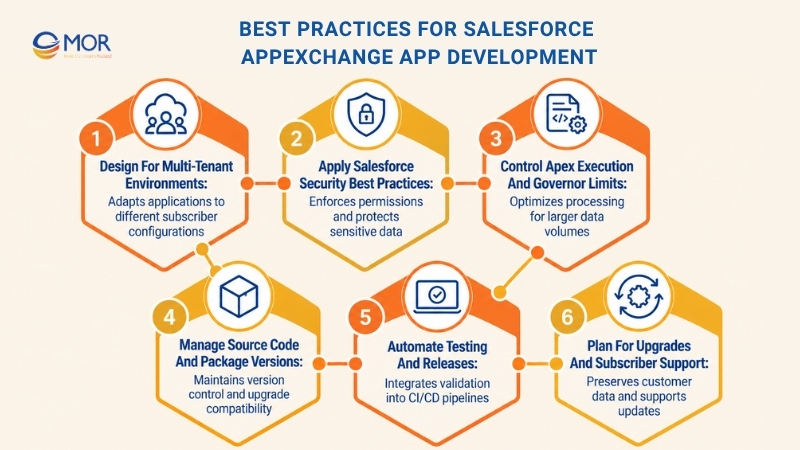
- Design for multi-tenant environments: Avoid hardcoded organization IDs, user references, and environment-specific settings. Use configuration metadata and test different subscriber permissions, record volumes, and Salesforce editions. A product should adapt to customer settings without requiring changes to its source code.
- Apply Salesforce security best practices: Enforce CRUD, FLS, and record-sharing rules throughout the application. Validate user input and keep external credentials in suitable protected storage. Security tests should include standard users, restricted roles, and integration accounts.
- Control Apex execution and governor limits: Write bulkified Apex that processes collections of records rather than running separate database queries for every record. Use selective SOQL queries and asynchronous processing when appropriate. Test larger data sets to detect resource problems early.
- Manage source code and package versions: Keep Salesforce metadata in version control and maintain clear package dependencies through Salesforce DX. Use managed 2GP for new commercial ISV products. Preserve a valid upgrade path between released versions so existing customers can receive future changes.
- Automate testing and releases: Connect Apex unit tests, security scanning, and package validation to CI/CD pipelines. Review deployment results before promoting package versions. Teams can follow broader Salesforce best practices to improve development discipline across their projects.
- Plan for upgrades and subscriber support: Document configuration changes, test package upgrades, and preserve customer data during migrations. Track Salesforce seasonal releases for changes that could affect application behavior. Clear release notes also help administrators understand what has changed.
For a commercial Salesforce product, maintainability deserves attention from the start. A small shortcut in configuration or permissions can become a recurring support problem when hundreds of customer organizations install the same package.
Common Challenges in Salesforce AppExchange Development
Most AppExchange launch delays come from technical assumptions made early in the project. Weak product validation, unmanaged dependencies, and incomplete security checks can create expensive changes close to release.
Development challenge | Potential impact | Recommended mitigation |
Unclear product requirements | Unnecessary features and repeated development changes | Validate user problems and define an MVP |
Hardcoded organization settings | Installation failures across subscriber environments | Use configurable metadata and test independent orgs |
Poor governor limit management | Errors during large record operations | Bulkify Apex and test realistic data volumes |
Late security preparation | Review findings and delayed publication | Add security testing to development sprints |
Package upgrade issues | Broken workflows or blocked customer updates | Test version ancestry and upgrade paths |
Incomplete dependencies | Installation errors and missing functionality | Document package and Salesforce product requirements |
Weak onboarding documentation | Customer setup errors and extra support requests | Provide clear installation and configuration instructions |
Consider a team that develops an application under administrator-level permissions only. The product may appear ready until a customer's sales team tries to use it with restricted object access.
Testing representative user roles before release catches these problems when they are easier to fix. The same principle applies to API errors, unusual data volumes, and existing customer package installations.
How to Choose a Salesforce AppExchange Development Partner
The right AppExchange app development partner should understand Salesforce product engineering and the requirements of distributing software to different customer organizations. Experience in ordinary CRM customization doesn't automatically prove expertise in managed packaging and marketplace delivery.
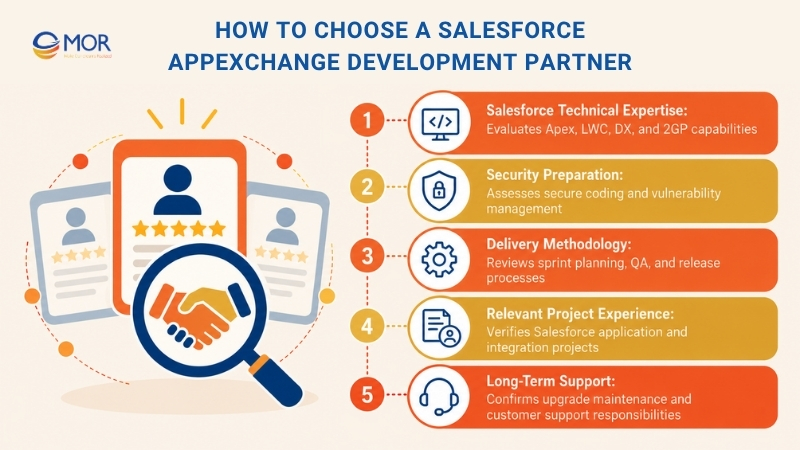
Evaluate potential partners against the work your product requires.
- Salesforce technical expertise: Review experience with Apex, Lightning Web Components, Salesforce DX, managed 2GP, and external API integrations. Ask how the team handles package dependencies and subscriber configuration.
- Security preparation: Assess their approach to secure coding, Code Analyzer, access controls, and vulnerability remediation. Request practical examples of security testing processes.
- Delivery methodology: Check sprint planning, source control, automated testing, QA responsibilities, and release management. Confirm how the team communicates technical risks and scope changes.
- Relevant project experience: Request examples of Salesforce applications, integration platforms, or AppExchange-related work. Verify which parts of the project the vendor delivered.
- Long-term support: Clarify who manages package upgrades, technical documentation, customer issues, and Salesforce platform changes after publication.
Team structure also affects delivery. Some businesses need an end-to-end Salesforce development company, whereas others need extra engineers to support an existing internal product team.
Before deciding to hire a Salesforce developer, map the required responsibilities across backend logic, LWC development, API integration, QA, and DevOps. This reveals skill gaps and makes vendor comparisons more meaningful.
Salesforce AppExchange App Development With MOR Software
MOR Software supports businesses that need custom Salesforce applications, enterprise integrations, and dedicated engineering capacity. Our Salesforce development services combine technical delivery with business analysis, architecture planning, and quality assurance.
Our experience includes Salesforce-based HRM applications and legacy-system integration projects. These capabilities are relevant to ISVs and enterprises preparing applications for broader deployment.
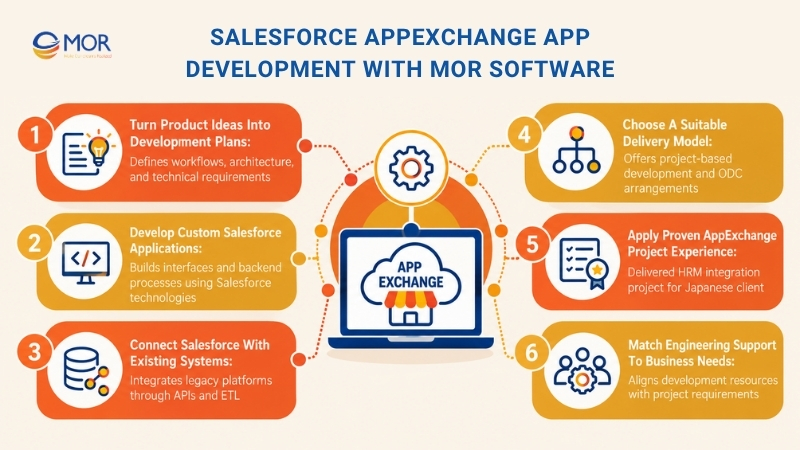
- Turn product ideas into development plans: Our business analysis and software architecture services help define workflows, integration needs, data models, and technical constraints. Teams can prioritize the application's core functions before committing to a full build.
- Develop custom Salesforce applications: MOR works with Apex, Lightning Web Components, Visualforce, and Force.com. These technologies support application interfaces, backend processes, workflow automation, and business-specific functions.
- Connect Salesforce with existing systems: Our integration experience includes API Gateway, ETL processes, and bidirectional data synchronization. This work addresses projects where Salesforce must exchange data with legacy platforms or external business applications.
- Choose a suitable delivery model: MOR supports project-based development and Offshore Development Center (ODC) arrangements. Agile Scrum, DevOps, and QA practices help teams manage requirements, testing, and implementation tasks.
- Apply proven AppExchange project experience: In our Integration Salesforce With Legacy System case study, an 18-member team spent 15 months building an HRM system on AppExchange for a Japanese client. The project used Apex, LWC, Servlet, AWS Lambda, and TypeScript, integrating PitTouch attendance devices through API Gateway and ETL processes.
- Match engineering support to business needs: Our services suit ISVs developing HRM products, companies connecting Salesforce to legacy systems, and enterprises seeking additional engineering capacity. We assess each project's technical scope before recommending a development approach.
Businesses also need to distinguish marketplace products from applications built for internal use. MOR Software can support the development of custom Salesforce solutions when the priority is a single organization's workflow rather than public AppExchange distribution.
Contact MOR Software to discuss your Salesforce application requirements, integration challenges, and development scope. Our team can assess the project and recommend an approach based on your business goals and existing systems.
Conclusion
Salesforce AppExchange app development requires careful planning across architecture, packaging, testing, security, and publishing. Teams that prepare for subscriber compatibility and future upgrades early can avoid many common launch problems. MOR Software supports custom Salesforce engineering, API integration, and project delivery for businesses building Salesforce-based products.
If your team needs help defining a technical scope or delivering an application, contact us to discuss your requirements and the right development approach.
"Mr. Cong’s guiding philosophy is simplicity, believing that the simplest solutions are often the most powerful. He sees trust, empowerment, and the opportunity to demonstrate one’s abilities as the key elements that set MOR apart from traditional IT companies."
Mac Tien Cong


Division Manager (Hanoi Branch)
MOR SOFTWARE
Frequently Asked Questions (FAQs)
What is Salesforce AppExchange app development?
Salesforce AppExchange app development involves building applications, integrations, and components for distribution through Salesforce's marketplace. Developers use technologies including Apex, Lightning Web Components, Salesforce APIs, and managed packages. These applications must support different customer organizations and meet applicable security and publishing requirements.
Is Salesforce AppExchange now called AgentExchange?
Yes. In April 2026, Salesforce combined AppExchange, AgentExchange, and Slack Marketplace into one marketplace under the AgentExchange name. The unified platform includes traditional Salesforce applications, AI agents, Slack solutions, and related tools. The term AppExchange remains widely used when discussing Salesforce application development.
Do I need to become a Salesforce partner to publish an app?
Publishing a commercial Salesforce application through the partner marketplace requires following Salesforce's applicable partner registration, agreement, and listing processes. Partners use resources including the Partner Business Org and Partner Console. Requirements depend on the solution type and distribution model, so review the current Salesforce Partner Program documentation.
What programming languages are used to build AppExchange apps?
Apex is commonly used for Salesforce backend logic. Lightning Web Components rely on JavaScript, HTML, and CSS for user interfaces. Developers may also use Java, TypeScript, Python, or other languages for external integrations and cloud services. Salesforce Flow supports automation without writing all business logic in code.
Can I create an AppExchange app without writing Apex code?
Yes, some applications can rely on Salesforce Flow, standard configuration, and supported metadata. The amount of code depends on the product's requirements. Complex processing, custom integrations, or specialized business rules may require Apex. Developers should assess package support and security requirements before choosing a low-code approach.
What is the difference between managed and unlocked packages?
Managed packages support ISV distribution and provide publisher-controlled component behavior, versioning, and upgrades. Unlocked packages are generally intended for internal application development and allow greater flexibility to modify metadata. Salesforce recommends second-generation managed packaging for new commercial applications distributed through AppExchange.
How long does it take to develop a Salesforce AppExchange app?
Development time depends on application scope, team size, integrations, and testing needs. A small MVP can take a few months, whereas a complex enterprise product may require a longer schedule. Teams must also account for package preparation, security review, listing approvals, and any remediation work.
Does every AppExchange app need to pass a security review?
Salesforce requires security review for applicable solution types, including managed Salesforce Platform packages distributed through the marketplace. Requirements can differ for other listing types. Developers should check the current AgentExchange security rules and prepare code scans, test access, and technical documentation before submission.
Can I publish a free Salesforce AppExchange application?
Yes. Salesforce supports free listings along with freemium and paid distribution models. The available options and related business requirements depend on the solution type and partner agreements. A free product may still need to meet applicable security, technical, and publishing requirements.
Can I update my AppExchange app after it has been published?
Yes. Developers can create and release new managed package versions to fix bugs and add functionality. Package ancestry, component compatibility, and subscriber data must be considered before releasing updates. Testing the upgrade process helps prevent existing customer installations from breaking.
Share


Make Our-Dreams Realized


© 2023 . MOR Software. All Rights Reserved
Sitemap
Privacy Policy
Terms of Use

Rate this article
0
over 5.0 based on 0 reviews
Your rating on this news:
Name
*Email
*Write your comment
*Send your comment
1