


AI Virtual Agent for Technical Support Demo Request: 2026 Guide
A polished demo can make almost any AI support tool look ready for production. An AI virtual agent for technical support demo request should test something harder: real tickets, your knowledge sources, system permissions, escalation rules, and backend actions. This MOR Software’s guide will focus on what buyers should prepare, test, measure, and verify before approving a pilot or purchase, so the final decision rests on operational evidence rather than a scripted sales flow.
Key Takeaways
- Test the agent against real support cases, including ambiguous tickets, outdated documentation, failed troubleshooting paths, and requests that should reach a human.
- Judge completed resolutions, source accuracy, backend actions, handoff quality, permissions, and operating cost rather than relying on deflection alone.
- Treat the demo as the first technical gate. A controlled pilot should follow before any large deployment or long-term platform commitment.
What an AI Virtual Agent Must Prove in a Support Demo
An AI virtual agent handles support conversations, retrieves company knowledge, reasons through a problem, calls connected tools, and passes unresolved cases to people. For an AI virtual agent for technical support demo request, the real test is how much of that chain works against your systems rather than a vendor's prepared environment.
That distinction matters because AI virtual agents for customer support now sit closer to workflow automation than traditional chatbots. If you still need to separate the two categories, our guide to AI agent vs chatbot covers the differences in autonomy, tool use, reasoning, and action execution.
Zoom-commissioned Morning Consult research found that 43% of consumers cite resolution failure as their biggest frustration with automated support. Fast answers have little value when the issue remains open.
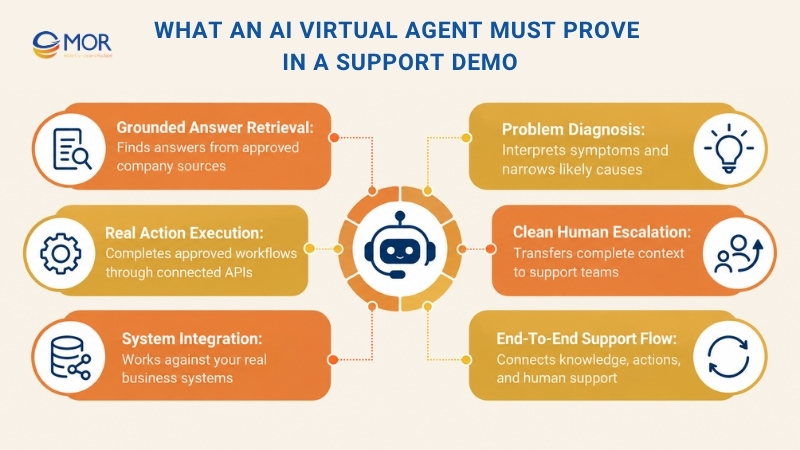
A serious demo should prove four jobs:
- Retrieve grounded answers: The agent should find the right information in approved product documentation, policies, tickets, CRM records, or internal knowledge. Ask it to expose the source behind each answer rather than returning polished text with no traceable basis.
- Diagnose the problem: Technical users rarely describe an issue in perfect support terminology. The agent should interpret symptoms, ask useful follow-up questions, remember earlier details, and narrow the likely cause before suggesting a fix.
- Execute real actions: A useful virtual agent for customer service should do more than explain how to reset an account. It should call the right API, follow permission rules, complete the reset, verify the result, and record what happened when the workflow allows automation.
- Escalate cleanly: Some cases belong with an engineer or live support rep. The agent should transfer the transcript, detected issue, previous troubleshooting steps, account data, and cited sources so the human doesn't restart the investigation.
That last pair separates an enterprise digital assistant from a conversational search box. AI agents for customer support create more value when they can connect knowledge, decisions, system actions, and human support in one controlled flow.
How to Prepare Before You Request an AI Support Demo
Good evaluation starts before the call. Before sending an AI virtual agent for technical support demo request, build a test pack based on your actual workload rather than letting the vendor decide what success looks like.
A useful test pack doesn't need hundreds of cases. Ten to twenty well-selected tickets will reveal far more than 100 easy FAQ questions.
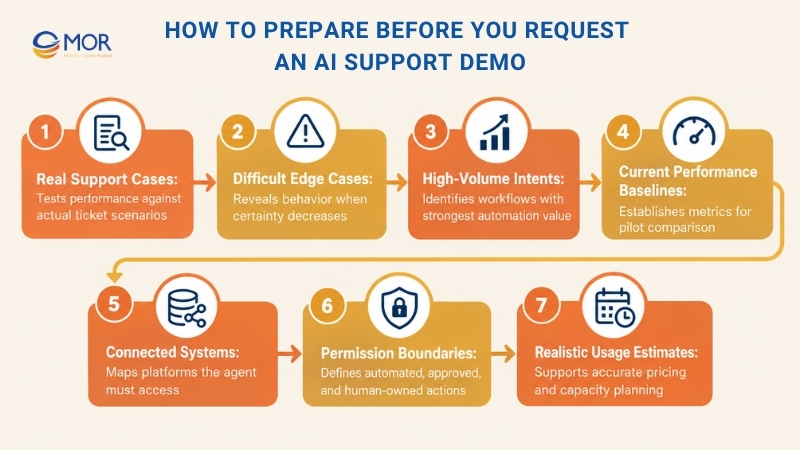
- Select real support cases: Anonymize recent tickets and preserve the issue description, troubleshooting history, final resolution, and escalation path. Mix routine requests with tickets that took your team time to diagnose.
- Add difficult cases on purpose: Include vague descriptions, incomplete details, user mistakes, stale documentation, conflicting articles, and requests that fall outside the agent's approved scope. A virtual support agent should behave safely when certainty drops.
- Map your highest-volume intents: Group tickets into areas such as login problems, configuration errors, billing access, license requests, API failures, connectivity problems, and account changes. Volume tells you where automation can create meaningful operational value.
- Record current baselines: Capture average resolution time, first-contact resolution, reopen rate, escalation rate, CSAT, and cost per case. You need a 'before' state or the pilot will produce attractive numbers with no useful reference point.
- List every connected system: Document the helpdesk, CRM, identity platform, knowledge base, monitoring stack, billing service, internal APIs, and communication channels the agent may need to read or update.
- Define permission boundaries: Mark which operations can run automatically, which require approval, and which must stay human-owned. Do this before anyone demonstrates a password reset or account change.
- Estimate realistic usage: Give vendors monthly ticket counts, expected AI conversation volume, peak demand, and growth assumptions. That data becomes necessary when pricing is tied to resolutions, messages, API calls, or tokens.
- Send test conditions early: Tell the vendor that real cases will be part of the session. A team willing to work against unfamiliar data gives you a better basis for evaluation than one that insists on controlled scripts.
This preparation also makes choosing an AI agent development company easier if your needs move beyond a ready-made platform. You already have the workflow map, data requirements, system list, and acceptance criteria needed for a custom build.
12 Tests to Run During an AI Virtual Agent Demo
AI agent adoption is moving fast, yet production scale still lags experimentation. McKinsey's 2025 global survey found 62% of respondents said their organizations were at least experimenting with AI agents, while 23% reported scaling an agentic AI system somewhere in the enterprise.
That gap is a useful warning for buyers. Your AI virtual agent for technical support demo request should test production behavior, not simply prove that a model can answer a handful of prompts.
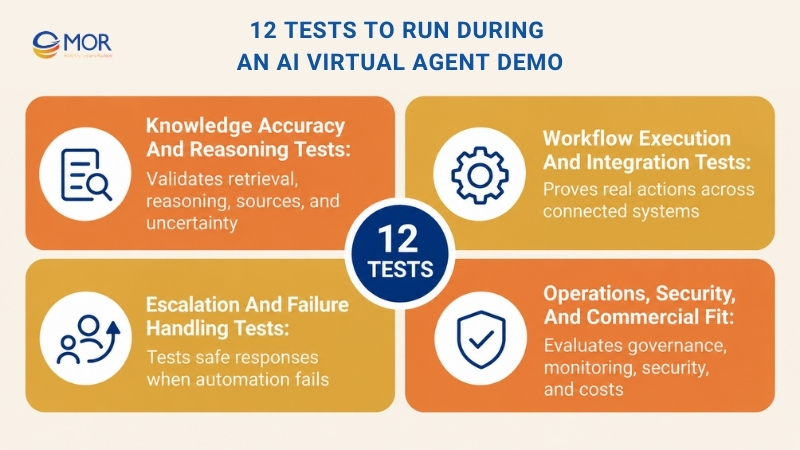
Knowledge Accuracy and Reasoning Tests
Support accuracy starts with retrieval. A fluent response can still be wrong, outdated, or drawn from general model knowledge rather than your approved source set.
Test the agent's ability to retrieve, reason, and express uncertainty before testing flashy workflow actions. AI enterprise search solutions are relevant here because the quality of retrieval often determines the quality of the final support answer.
- Run unfamiliar real tickets: Give the agent tickets it hasn't seen during setup. Mix clear product questions with shorthand, spelling errors, vague symptoms, and user assumptions that turn out to be wrong.
- Verify every source: Ask the vendor to show which article, database entry, ticket, or record supported the answer. Then check that the source really contains the claimed information.
- Create conflicting evidence: Add an old knowledge article beside a newer policy that contradicts it. Watch whether the agent selects the latest source, flags the conflict, or confidently chooses the wrong instruction.
Good reasoning should also expose uncertainty. If the evidence isn't strong enough, clarification or escalation is better than a polished guess.
Workflow Execution and Integration Tests
Answering is only one layer of technical support. Real ticket deflection often requires a system action after the conversation identifies the right path.
Make the agent execute work live. The demo should show the API call, permission check, response, error handling, and final ticket update rather than jumping straight to a success screen.
- Trigger a real backend action: Ask the agent to unlock an account, retrieve subscription status, update an approved field, or create a support ticket containing the right category and priority.
- Test a cross-system workflow: Give it a case that requires data from a CRM, an identity service, and the helpdesk before any action is allowed. Check the order of calls and what happens when one system returns incomplete data.
- Check permission boundaries: Use two test users with different roles. The agent should permit the approved user action and block the same request when the second account lacks authority.
Tool use becomes especially important for agentic systems. If your team is assessing build choices as well as products, popular AI agent frameworks can help you see how tool calling, state, retrieval, and orchestration fit together behind the interface.
Escalation and Failure Handling Tests
The safest agent knows when automation should stop. A demo that only shows successful resolutions leaves one of the biggest production risks untouched.
Gartner surveyed 3,566 B2B and B2C customers in early 2026 and found 87% said companies using GenAI for customer service must provide access to a human agent. That makes escalation design a customer requirement, not a fallback buried deep in the workflow.
- Force an unsupported request: Ask for something outside the connected knowledge or approved scope. The agent should refuse, ask a useful question, or send the case onward without inventing instructions.
- Trigger human escalation: Inspect what reaches the human rep. The handoff should contain the conversation history, user details, attempted fixes, identified symptoms, relevant sources, and any backend results already collected.
- Interrupt the expected flow: Change a key detail halfway through the interaction. A user may say the issue affects one account, then reveal that an entire team is locked out. The agent should adapt instead of blindly following the earlier path.
Failure behavior is often more valuable than the best demo answer. Production support contains noise, missing data, bad assumptions, expired permissions, API timeouts, and users who change direction halfway through a conversation.
Operations, Security, and Commercial Fit
A good session should also show how the agent is run after launch. Ask to see the admin side rather than spending the whole meeting inside the customer chat window.
Operations determine how quickly your team can identify weak answers, correct knowledge gaps, and stop a bad workflow before it affects more users.
- Inspect failure analytics: Ask for low-confidence conversations, escalations, abandoned sessions, bad ratings, failed tool calls, and reopened cases. Your team needs a review queue rather than a dashboard filled only with positive averages.
- Test governance controls: Inspect permission settings, action logs, model changes, release controls, data retention settings, and rollback options. Ask who can change prompts, workflows, sources, and connected tools.
- Model real costs: Use your current monthly volume, then rerun the calculation at two and three times that amount. Add API use, professional services, extra environments, data storage, premium security controls, and support tiers.
A demo passes this stage when you can see how the product behaves on a bad day, not just when everything works.
Technical Support Workflows the Demo Should Handle Live
A strong AI virtual agent for technical support demo request needs workflow tests tied to the problems your team actually receives. Technical support has high-value automation candidates because many cases combine repeatable policies, structured data, APIs, and a clear human fallback.
The industries benefiting from virtual agents often share those conditions. SaaS, telecom, finance, healthcare, retail, internal IT, and managed services may use different terminology, yet many workflows follow similar patterns. Our guide to agentic AI use cases across industries covers the wider set of operational applications.
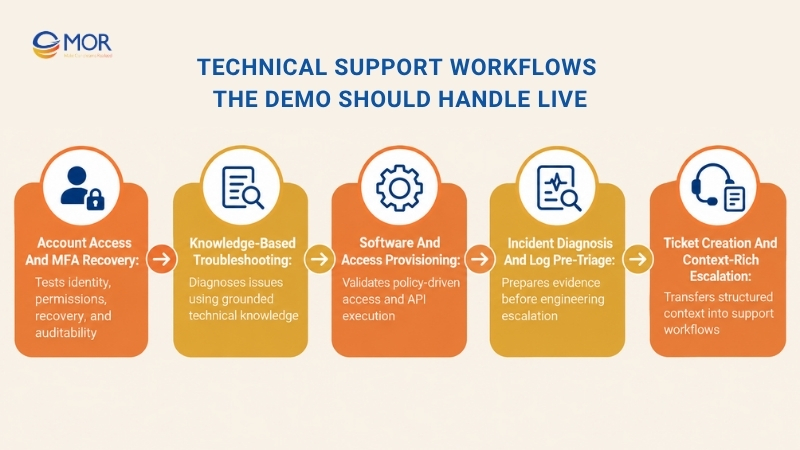
Account Access and MFA Recovery
Account access is a strong demo case because it mixes identity checks, policy rules, user communication, and backend action. A vendor can't hide behind good language generation when the workflow has to change an actual account.
A live test should include a standard recovery case and one case that requires escalation.
- Identity verification: Check which signals verify the user and what happens when verification fails.
- Password reset: Require the agent to trigger the approved reset path and confirm completion.
- MFA recovery: Test lost-device recovery, re-enrollment, locked authenticators, and fallback methods.
- Permission checks: Verify that user role and account status are checked before any sensitive operation.
- Audit records: Confirm that identity checks, approvals, actions, and outcomes enter the system log.
Knowledge-Based Troubleshooting
Technical troubleshooting exposes retrieval quality faster than FAQ tests. Users describe symptoms, not article titles, so the agent has to connect their wording with product documentation and known issues.
The strongest flow gathers evidence before prescribing a fix.
- Find the right documentation: Query approved manuals, product notes, internal guides, and resolved cases.
- Ask diagnostic questions: Gather version, environment, error code, recent changes, and affected scope.
- Maintain conversation memory: Keep earlier answers available through later troubleshooting turns.
- Detect knowledge conflicts: Flag old instructions or conflicting articles rather than merging them into one risky response.
- Cite the source: Let the user or agent verify where each technical instruction came from.
This workflow is also a natural place for retrieval-augmented generation and internal search. The AI should find the smallest useful evidence set rather than dump whole documents into the conversation.
Software and Access Provisioning
Provisioning tests whether the agent can follow policy instead of simply understanding intent. A request for software access may require license checks, manager approval, role validation, and a final call to an admin API.
For instance, a user asks for access to an analytics tool. The agent checks the user's department, available license, approval rule, and existing entitlement before creating or executing the change.
- License validation: Confirm availability before approving the request.
- Role checks: Match requested access against job or group permissions.
- Approval gates: Route higher-risk access to an approved human.
- API execution: Perform the change through the connected administration service.
- Completion check: Confirm the account received the correct permission.
- Expiry rules: Remove temporary access at the approved date.
Incident Diagnosis and Log Pre-Triage
Complex technical cases often begin with log gathering rather than a final fix. The agent can save engineering time if it collects the right evidence before escalation.
AI-based virtual support agents for network teams can use the same pattern for service outages, connectivity faults, device failures, and infrastructure events.
- Identify the environment: Gather product version, operating system, deployment type, region, and relevant service.
- Retrieve logs: Pull permitted logs or guide the user through collection when direct access isn't available.
- Match known signatures: Check error patterns against known incidents or documented fixes.
- Prepare a preliminary diagnosis: Summarize the most likely cause and the evidence behind it.
- Package the case: Attach logs, user answers, system results, and attempted fixes before sending the ticket to engineering.
The agent doesn't need to solve every incident. A well-prepared engineering handoff can be valuable on its own because it cuts repetitive information gathering.
Ticket Creation and Context-Rich Escalation
Poor escalation creates duplicate work. The user repeats the story, the human reads the whole transcript, and the technical investigation starts again.
A good workflow sends a structured support package into the ticketing system.
- Classify the issue: Assign the right product, category, severity, and queue.
- Attach the transcript: Preserve the customer's original wording and later clarifications.
- Record attempted fixes: Show each troubleshooting step and its result.
- Add customer data: Include approved account, plan, environment, and recent-case information.
- Attach knowledge sources: Record the articles or records referenced during the AI interaction.
- Route the ticket: Send the case to the right support or engineering group based on business rules.
Questions to Ask During an AI Virtual Agent Demo
During an AI virtual agent for technical support demo request, your questions should force the vendor to expose data flow, failure behavior, permissions, maintenance work, and real cost. A yes-or-no capability checklist won't tell you how the platform behaves inside your support operation.
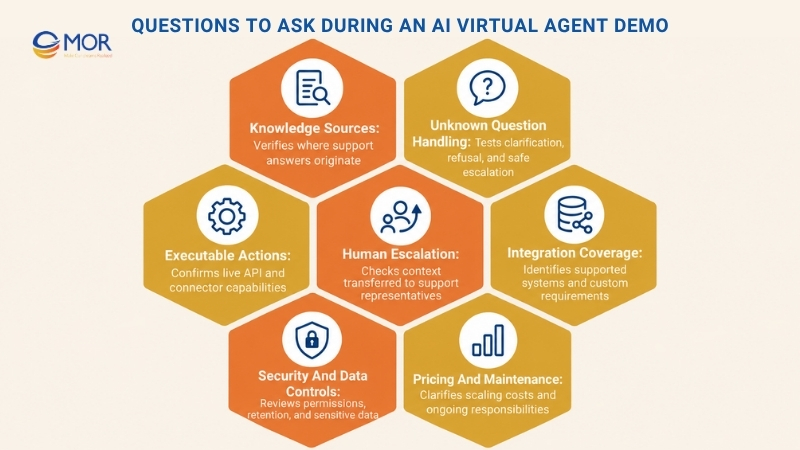
Use the discussion to make the vendor show the answer whenever possible.
- Where do answers come from? Ask which knowledge bases, internal documents, ticket histories, CRM records, or databases ground responses. Request a source trace for at least one correct answer and one uncertain answer.
- What happens when the agent doesn't know? Feed it a question with no valid answer. Look for clarification, safe refusal, or escalation rather than confident invention.
- What actions can the agent execute? Ask for the exact systems it can read and write. Then pick one support action and have the vendor run it live through an API or approved connector.
- How does human escalation work? Request a complete handoff. Check the transcript, account details, diagnosis, attempted fixes, source references, and tool results that reach the human rep.
- Which systems can it integrate with? Cover ITSM, CRM, identity, knowledge, monitoring, billing, webhooks, APIs, and custom internal tools. Native connectors matter less when a major internal system still requires heavy custom work.
- How are permissions and sensitive actions controlled? Ask to see RBAC, SSO, approval rules, least-privilege settings, and restrictions for account or data changes.
- How is customer data handled? Ask where information is processed, what is stored, retention length, model-training policy, deletion controls, and available regional hosting.
- How do teams monitor poor responses? Request failed conversations, low-confidence replies, abandoned interactions, escalations, CSAT, bad tool calls, and reopened tickets.
- Who maintains the agent after deployment? Clarify who updates knowledge, reviews weak answers, changes workflows, tests connectors, and approves model changes. Ask what work stays with your team.
- How does pricing scale with usage? Request cost projections at your actual ticket volume, then repeat the estimate at higher usage. Include implementation, API consumption, premium security, storage, support, and change requests.
These questions also help you connect technical evaluation with AI-driven customer experience. A support agent can score well in a lab and still create customer friction if escalation, access control, and resolution quality are weak.
Integration Checks for Your Existing Support Stack
An AI virtual agent for technical support demo request should include your current architecture because the agent's value depends on what it can read, decide, and change. Standalone conversation quality tells you little about the work required once the product reaches production.
The same concern applies to an AI-driven virtual assistant for enterprises. AI virtual assistants for complex enterprise workflows often cross helpdesk, CRM, knowledge, identity, monitoring, and custom business systems during one request.
System Layer | What the Agent Must Demonstrate | Demo Question | Proof to Request |
Helpdesk / ITSM | Create, classify, update, route, and close tickets under approved rules | Can the agent write a complete ticket after failed troubleshooting? | Live ticket containing transcript, category, priority, and attempted fixes |
Knowledge sources | Retrieve current answers from approved internal content | Which source produced this instruction? | Citation, source ID, version, or article link |
CRM / customer records | Read permitted customer and account data | Can the agent pull the correct plan, entitlement, or case history? | Live record retrieval with access controls |
Identity and access | Verify users and execute approved account workflows | Can a user without permission trigger this action? | Role test showing an allowed and blocked request |
Monitoring and logs | Collect technical evidence and identify known patterns | Can the agent retrieve logs for this incident? | Log retrieval, filtering, and case attachment |
Billing / account platforms | Retrieve or change approved account details | Which payment or subscription operations can the agent run? | Tool call plus audit record |
APIs and webhooks | Connect internal services that lack native connectors | How is authentication, timeout, and error handling managed? | Live custom API call and failure response |
Communication channels | Keep conversation history across supported channels | What happens when the user moves from chat to a live agent? | Transfer showing retained case information |
Read / write permissions | Separate information retrieval from system changes | Which tools are read-only? | Permission map and blocked-action demo |
Data freshness | Use current records rather than stale copies | How quickly does changed source data appear? | Update a source and retest the answer |
Custom integration depth often decides whether a vendor fits. If the product requires unusual tool chains, studying the best autonomous AI agents can help you benchmark autonomy, action execution, and deployment models before signing a platform contract.
How to Evaluate Pricing, Setup, and Ongoing Effort
Pricing can make an AI virtual agent for technical support demo request look simple at first and expensive later. The quote needs to reflect the entire operating model, including setup, integrations, usage, support, maintenance, data preparation, and internal labor.
Commercial pressure is already rising. IBM's 2025 study of 3,500 senior executives found 92% expect agentic AI to deliver measurable ROI within two years, which raises the bar for proving economic value rather than funding open-ended experiments.
Cost Area | What to Ask | Hidden Cost to Watch | Scaling Effect |
Per resolution | What counts as a billable resolved case? | Vendor may count cases later reopened by humans | Cost rises with successful automation volume |
Per conversation | When does a new conversation begin? | Repeat sessions or channel changes may create extra charges | High repeat-contact volume increases spend |
Seat / platform | Which admin, agent, and manager users need paid seats? | Analytics or admin access may sit in higher plans | Team growth adds recurring licenses |
Token / API usage | Which model and tool calls create usage charges? | Long transcripts and retrieval calls increase consumption | Complex cases may cost far more than FAQs |
Setup | What work is included before launch? | Discovery, data cleanup, configuration, and staging may be separate | Mostly front-loaded |
Integration | Are connectors included or billed as custom work? | Internal APIs often require extra engineering | More systems create more build and maintenance work |
Knowledge migration | Who prepares and cleans source content? | Poorly structured documents create hidden internal labor | Content volume increases migration effort |
Ongoing tuning | Who reviews failed conversations and weak retrieval? | Internal support teams may inherit recurring QA work | Workload grows as scope expands |
Security / hosting | Which controls sit behind premium plans? | SSO, regional hosting, private environments, or audit controls may cost extra | Enterprise requirements can change the base price |
Support | What SLA and technical help come with the contract? | Faster vendor response may require a higher tier | Higher production dependency raises support needs |
An AI virtual agent free tier may help your team inspect the interface or run basic prompts. It rarely reveals enterprise integration cost, permission design, production support, or the effort required to maintain knowledge quality.
Calculate three scenarios before procurement: your current volume, a realistic growth case, and a high-demand month. Then derive cost per successful resolution rather than cost per conversation alone.
What to Do After the Demo: Run a Controlled Pilot
A demo answers whether the product deserves more testing. After an AI virtual agent for technical support demo request, move into a bounded pilot before approving broad production access.
Keep the first deployment narrow enough that bad behavior is visible and reversible. One support category with reliable historical data is usually easier to judge than a launch across every product and channel.
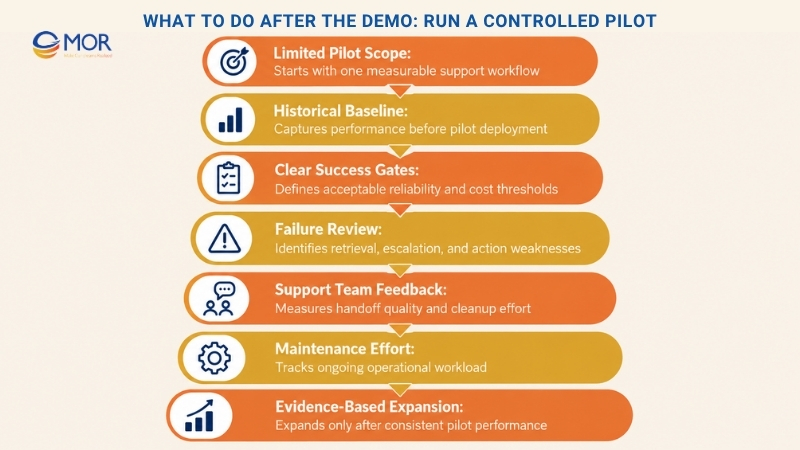
- Limit the scope: Pick one channel, product line, or high-volume ticket class. Account access, knowledge troubleshooting, and standard provisioning often provide measurable baselines.
- Freeze the baseline: Capture several weeks of historical resolution time, first-contact resolution, reopen rate, escalation rate, CSAT, and handling cost before the pilot starts.
- Define success gates: Set acceptable ranges for resolution, source accuracy, reopens, escalations, failed actions, and cost. A pilot shouldn't pass because one headline number looks good.
- Review failed conversations: Read hallucinations, poor retrieval, unnecessary escalation, abandoned sessions, bad API actions, and incorrect permission decisions. Failure review usually produces the clearest backlog for improvement.
- Include support agents: Ask the team handling escalations whether cases arrive better prepared. Track cleanup work as well as saved handling time.
- Test maintenance effort: Measure the hours needed to update documentation, approve workflow changes, test connectors, review low-confidence cases, and manage access rules.
- Expand only after evidence: Add more ticket classes once the first workflow performs consistently. Production scope should grow with measured reliability.
A pilot can also expose a different conclusion: a packaged product may not fit your data or workflow. At that point, a custom build or hybrid setup becomes easier to justify because your team already knows which requirements caused the gap.
Turn Your AI Support Use Case Into a Working Solution With MOR Software
Some technical support programs need tighter integration, custom data handling, proprietary workflows, or a dedicated engineering team beyond what an off-the-shelf agent provides. MOR Software supports that type of project through AI services that include feasibility assessment, data engineering, custom model services, Generative AI integration, plus edge and cloud deployment.
That service mix fits teams that already know the workflows they want to automate but still need architecture, integration, development, testing, and deployment work around the AI layer.
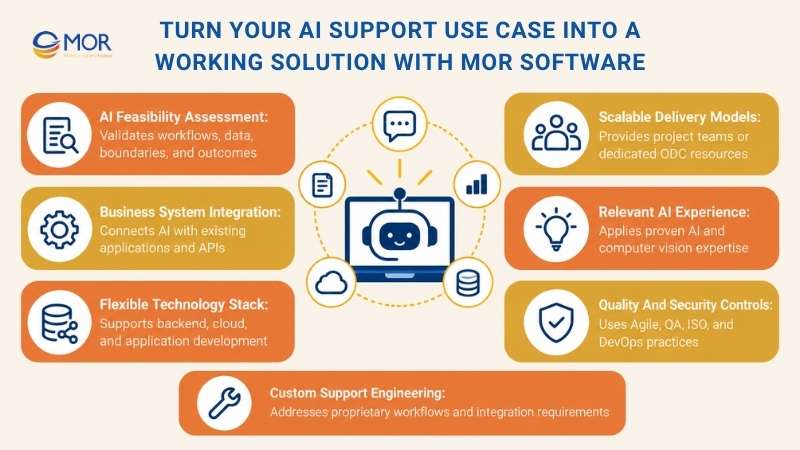
- Validate the use case before development: MOR Software includes AI feasibility assessment in its service scope. We can map your target tickets, available data, system dependencies, automation boundaries, and expected results before a larger engineering commitment.
- Connect AI to existing business systems: MOR Software provides data engineering and Generative AI CRM integration alongside IT consulting, software architecture consulting, technology consulting, and application modernization. That combination fits support programs that must connect an agent to internal applications rather than replace the existing stack.
- Build around the required technology stack: MOR Software's documented engineering stack includes fastest programming languages Node.js, Java, PHP, C#, .NET, Python, JavaScript, ReactJS, Salesforce, Kotlin, Flutter, and AWS. Teams can use those skills around AI services for backend logic, cloud deployment, business applications, APIs, and system integration.
- Match delivery to project scope: MOR Software supports project-based development and Offshore Development Center arrangements. Its ODC model can add developers, Business Analysts, QA, project management, and other software roles according to the project's stage and staffing needs.
- Use relevant project proof: MOR Software's service materials include AI-Powered Semantic Search Transformation and AI Person Counter & Demographic Detection among its AI case studies. Its wider portfolio also includes a CCTV management platform built with C++ and Python, where the team handled camera integration, real-time video processing, activity detection, and secure data handling.
- Add testing and security controls: MOR Software documents Agile development, DevOps and QA support, ISTQB-certified talent, ISO 9001 quality management, and ISO 27001 information security management. Its materials also show delivery operations in Vietnam and Japan, supporting companies that need an offshore engineering model with defined quality processes.
MOR Software is a practical fit when your support project needs proprietary data, custom APIs, cloud infrastructure, dedicated engineering capacity, or business rules that a standard agent can't cover.
If your pilot exposes those gaps, review our guide to choosing an AI agent development company, then contact MOR Software with your target cases, systems, data sources, and deployment needs.
Conclusion
A successful AI virtual agent for technical support demo request should leave you with evidence on real resolutions, integrations, security, escalation, maintenance, and cost. The demo is only the first gate; production value must still be proven through a controlled pilot. If packaged tools can't fit your support data or workflows, MOR Software can assess the use case and develop the required AI and integration layer. Contact us to discuss your project.
"Evolution is not a destination, it is a disciplined journey of innovation."
Phung Van Tu


CEO MOR AI
MOR SOFTWARE
Frequently Asked Questions (FAQs)
What should I expect from an AI virtual agent for technical support demo?
Expect the vendor to demonstrate knowledge retrieval, diagnostic questioning, backend actions, escalation, permissions, analytics, and administration. Ask for real technical cases rather than a prepared FAQ flow. A useful session should also show how the agent behaves when information is missing, a tool fails, or a request exceeds its approved authority.
What should I prepare before requesting an AI virtual agent demo?
Prepare 10 to 20 anonymized tickets, your common support intents, baseline service metrics, system list, security requirements, permission rules, and expected ticket volume. Include several difficult cases. This gives the vendor enough information to demonstrate real fit and gives your team common criteria for scoring each candidate.
Should vendors test the AI virtual agent using our real support tickets?
Yes. Real anonymized tickets expose ambiguity, unusual wording, missing details, stale documentation, and product-specific terminology that vendor scripts often avoid. Keep sensitive information out of the test set unless the vendor has already passed your security review. The goal is realistic behavior without creating unnecessary data risk.
How can I tell whether an AI virtual agent is grounded in our knowledge base?
Ask the agent to cite the source behind each technical answer. Open the cited article or record and confirm the instruction appears there. Then introduce conflicting or outdated content. A grounded system should identify the right source version, flag uncertainty, or ask for clarification instead of inventing a merged answer.
What technical support tasks should an AI virtual agent automate?
Start with repeatable tasks tied to clear policies and accessible systems. Common candidates include account recovery, MFA help, standard troubleshooting, software provisioning, access requests, status checks, ticket classification, knowledge retrieval, log collection, and structured escalation. Higher-risk changes should retain approval gates until the workflow has proven reliable.
How should an AI virtual agent hand off a case to a human agent?
The human should receive a structured case package rather than an empty ticket. Include the transcript, user details, detected issue, troubleshooting steps, system results, source references, failed actions, and current status. The customer shouldn't have to repeat the same technical history once the case reaches a support rep.
What integrations should I test during an AI virtual agent demo?
Test the systems that determine whether the agent can complete work: ITSM, CRM, identity, knowledge, monitoring, billing, internal APIs, communication channels, and custom tools. Give greater weight to write actions and error handling. Reading customer data is easier than making a permitted change and verifying that it succeeded.
What security questions should I ask an AI virtual agent vendor?
Ask about data processing location, retention, deletion, training use, encryption, regional hosting, SSO, RBAC, audit logs, permission boundaries, approval gates, and model changes. Request written documentation for claims tied to compliance. You should also know who can change prompts, tools, workflow rules, and production access.
Which metrics should I use to evaluate an AI support agent pilot?
Track true resolution rate, first-contact resolution, reopen rate, escalation rate, average resolution time, CSAT, failed tool calls, abandonment, and cost per successful resolution. Review human cleanup work too. High containment can hide poor service when users give up or open another ticket soon after the AI marks a case resolved.
How much does an AI virtual agent for technical support cost?
Cost depends on the vendor's billing model, integration work, model usage, ticket volume, security requirements, hosting, support tier, and maintenance load. Pricing may use conversations, resolutions, seats, tokens, or API calls. Build a forecast at current volume and higher usage, then include internal staff time for tuning, QA, and knowledge maintenance.
Share


Make Our-Dreams Realized


© 2023 . MOR Software. All Rights Reserved
Sitemap
Privacy Policy
Terms of Use

Rate this article
0
over 5.0 based on 0 reviews
Your rating on this news:
Name
*Email
*Write your comment
*Send your comment
1