


Legacy Systems Modernization: A Comprehensive Guide 2026
Outdated technology can keep daily operations running, yet rising maintenance costs, security gaps, and integration issues often hold businesses back. Legacy systems modernization helps companies update existing infrastructure while preserving valuable business functions. This MOR Software guide will cover modernization strategies, implementation steps, AI applications, costs, and common risks to help you plan a practical upgrade without putting business operations at unnecessary risk.
Key Takeaways
- Legacy modernization updates outdated systems through cloud migration, code refactoring, architecture changes, and system integration, without always requiring a complete rebuild.
- A successful modernization plan starts with technical assessment, followed by strategy selection, pilot testing, phased deployment, and performance tracking.
- Costs and timelines depend on system complexity, data dependencies, and the chosen approach. AI tools can assist with code analysis, documentation, testing, and migration planning.
What Is Legacy Systems Modernization?
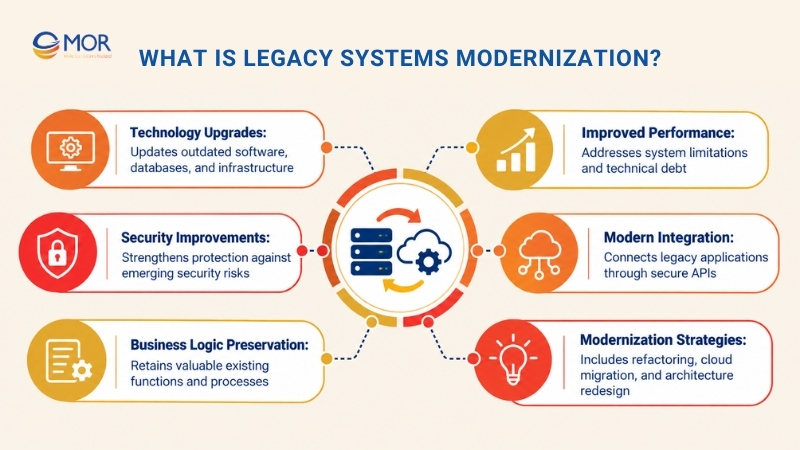
Legacy systems modernization is the process of upgrading outdated software, infrastructure, databases, and system architecture to meet current business and technical requirements. It improves performance, security, maintainability, and integration capabilities while preserving existing functions that still provide business value.
A system doesn't become outdated simply because it's old. A platform built ten years ago may still handle thousands of transactions without issues, while a newer application may already struggle with integration or scaling.
The real concern is how well the technology supports current operations. As technical requirements change, older systems often accumulate maintenance problems and complex dependencies. McKinsey's research on technical debt found that surveyed CIOs estimated technical debt at 20% to 40% of their technology estate's value before depreciation.
Modernization addresses these limitations through several technical changes, including code refactoring, database upgrades, cloud adoption, API integration, and architecture redesign.
It also differs from routine maintenance. Maintenance keeps an existing system working, while modernization changes the technology to support new requirements. Cloud migration may form part of the project, but moving old software to another server doesn't necessarily fix its underlying design.
For example, a manufacturer may continue using its existing ERP for inventory and production management. Adding secure APIs could connect that ERP to a modern reporting platform without replacing its core business logic.
This approach extends the useful life of a legacy solution and gives businesses greater control over their modernization investments. Understanding the limits of existing legacy software is the starting point for deciding what should change.
When Should Businesses Modernize Legacy Systems?
An outdated system may remain functional long after it becomes expensive to support. The right time to modernize legacy systems is when maintenance demands, security concerns, or technical restrictions begin affecting business operations.
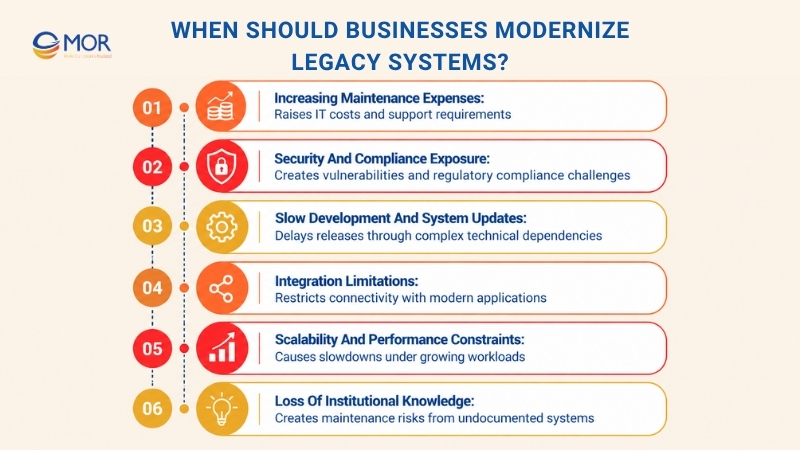
Several warning signs deserve attention:
- Increasing maintenance expenses: Aging servers, unsupported frameworks, and specialized developers can consume a large share of IT spending. A 2025 U.S. Government Accountability Office report found that approximately 79% of planned federal IT spending across 24 major agencies went toward operations and maintenance. This includes existing systems, though the agency couldn't determine how much was spent solely on legacy technology.
- Security and compliance exposure: Unsupported operating systems and outdated software libraries may stop receiving security patches. Older platforms can also lack modern access controls, encryption options, and detailed audit records, making compliance work harder.
- Slow development and system updates: A small change in a tightly connected application can trigger unexpected problems elsewhere. Developers must spend additional time reviewing dependencies and testing existing functions, delaying releases and increasing engineering costs.
- Integration limitations: Many legacy platforms rely on proprietary interfaces, batch processing, or isolated databases. Connecting them with Salesforce, cloud applications, AI services, or modern APIs often requires custom connectors and extra maintenance.
- Scalability and performance constraints: Older architectures may struggle with growing transaction volumes, large datasets, and real-time processing. Frequent slowdowns or unplanned outages indicate that the existing infrastructure no longer matches business demand.
- Loss of institutional knowledge: Some organizations rely on a small group of engineers who understand their original systems. Missing documentation and outdated programming languages make replacement hiring and technical handovers increasingly difficult.
These problems affect companies differently. A bank may prioritize regulatory controls and transaction reliability, while a retailer may need faster integrations and better inventory visibility.
For businesses modernizing legacy systems, the goal is to target the restrictions causing measurable costs or operational risks. Applications that continue working well can remain in place until a stronger reason for change emerges.
Legacy Systems Modernization Strategies Compared
Legacy systems modernization includes several approaches, each involving a different level of technical change, investment, and operational risk. The right choice depends on the condition of your existing system and what the business needs it to accomplish.
The following table compares nine commonly used strategies and portfolio decisions.
Strategy | What changes | Best-fit scenario | Main trade-off |
Retain | Existing systems remain unchanged | Stable systems providing continued business value | Existing technical limits remain |
Retire | Unused or redundant systems are removed | Obsolete functions and duplicate tools | Dependencies must be identified before removal |
Rehost | Applications move to new servers or cloud infrastructure | Aging hardware and urgent infrastructure migration | Existing code problems remain |
Replatform | Runtime, database, or hosting components are upgraded | Applications with sound business logic | Major architecture problems remain |
Refactor | Existing code is restructured without changing intended behavior | Systems affected by technical debt | Requires careful testing and engineering effort |
Rearchitect | Core architecture is redesigned into more modular components | Tightly coupled enterprise systems | Greater technical complexity and transition effort |
Rebuild | Existing functionality is recreated using modern technology | Systems with unsustainable code or architecture | High development cost and longer delivery |
Replace | Existing applications are exchanged for SaaS or commercial products | Standard business functions | Data migration and process changes |
Encapsulate | APIs or integration layers are added around existing systems | Immediate connectivity requirements | Dependence on the legacy core continues |
Retaining and retiring applications are portfolio management decisions rather than modernization techniques themselves. They're still useful choices because not every system needs development work.
Rehosting and replatforming generally involve fewer changes than rebuilding. They suit businesses that need infrastructure improvements or better platform support but still have usable application logic.
Refactoring and rearchitecting require deeper technical work. Refactoring improves existing code structure, while rearchitecting changes how application components communicate and operate. A monolithic enterprise system, for instance, may be divided into independently deployed services when the original design prevents scaling.
Rebuilding and replacing involve broader changes. A rebuild creates a new custom system, while replacement commonly involves adopting a SaaS or commercial off-the-shelf solution.
Encapsulation provides another path. An API layer can expose existing functionality to modern applications, allowing businesses to add capabilities while keeping the legacy core operational.
Large enterprises often combine several approaches. A company might rehost its reporting application, refactor a billing module, retire an unused tool, and expose its ERP data through APIs.
That mix should follow business priorities. For projects involving enterprise software development, preserving established business rules can be just as valuable as introducing newer technology.
A Step-by-Step Legacy Systems Modernization Roadmap
A phased roadmap helps companies modernize business systems without placing every function at risk during a single release. It also gives engineering teams opportunities to test assumptions, verify results, and adjust plans before making larger changes.
The process of how to modernize legacy systems generally follows five stages.
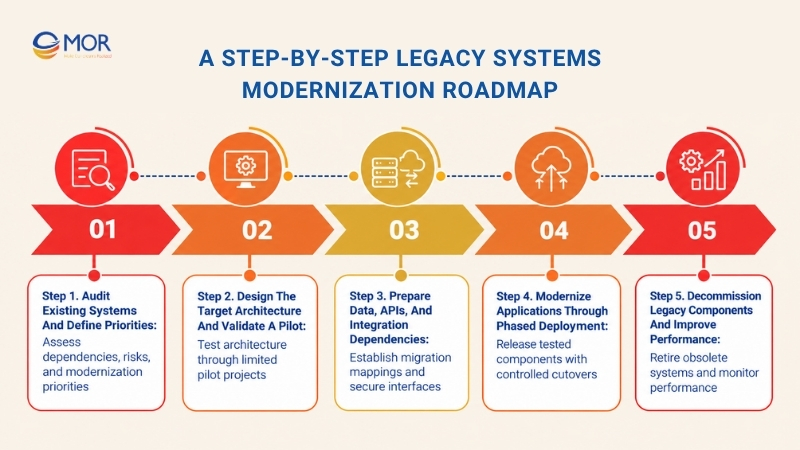
Step 1. Audit Existing Systems and Define Priorities
Start with a complete assessment of your current applications, infrastructure, and business processes. Legacy environments often contain undocumented connections that become visible only when developers attempt to change or retire components.
The initial audit should establish what exists, how it works, and which problems deserve attention first.
- System inventory: Record application names, operating systems, databases, programming languages, frameworks, hosting environments, and technical owners. Include vendor support status and known maintenance issues.
- Dependency mapping: Identify APIs, database connections, scheduled jobs, file transfers, and links between business departments. These relationships help reveal which changes could interrupt other services.
- Technical assessment: Review code quality, architecture, security vulnerabilities, documentation, and infrastructure capacity. Record the most expensive or difficult components to maintain.
- Business prioritization: Rank systems according to business value, operational risk, modernization effort, and future requirements. High-value systems with manageable technical scope are suitable starting points.
- Baseline measurements: Collect current maintenance costs, application response times, incident rates, deployment frequency, and service availability. These figures will support later performance comparisons.
The assessment should also identify systems that can remain unchanged or be retired. Unnecessary modernization creates costs without delivering meaningful business improvements.
Expected output: An application inventory, dependency map, technical risk assessment, and prioritized modernization backlog.
Step 2. Design the Target Architecture and Validate a Pilot
Once the assessment is complete, define how the modernized environment should function. Architecture decisions should reflect the system's actual workload, integration requirements, security needs, and long-term operating costs.
A small pilot tests those decisions before the organization commits to a wider rollout.
- Architecture design: Define application components, database structures, APIs, integration layers, hosting environments, and security boundaries. Record how the future architecture will interact with systems that remain in use.
- Strategy selection: Assign a suitable modernization approach to each major component. A stable billing engine may need an API wrapper, while an outdated reporting module may benefit from a rebuild.
- Technology evaluation: Compare suitable cloud services, development frameworks, databases, containers, and deployment tools. AWS, Microsoft Azure, and Google Cloud are common options, though business requirements determine the final choice.
- Pilot development: Select a manageable function with clear business value and limited dependencies. The pilot should be large enough to test the approach without exposing the entire organization to migration risk.
- Validation criteria: Set measurable requirements for response time, data accuracy, security, system compatibility, and user acceptance.
For example, a company could pilot the modernization of its employee reporting module before changing its main HRM database. The team can test integration behavior and confirm that existing reports still produce accurate results.
Expected output: A validated target architecture, working pilot, and revised modernization plan based on test findings.
Step 3. Prepare Data, APIs, and Integration Dependencies
Data migration often becomes one of the hardest parts of a modernization project. Legacy databases may contain inconsistent formats, duplicated records, undocumented relationships, and rules that newer applications don't recognize.
The migration plan must account for these issues before production data begins moving.
- Data assessment: Review data structures, record quality, ownership, and retention requirements. Identify fields that need cleaning, conversion, or mapping.
- Migration planning: Define extraction, transformation, loading, validation, and reconciliation procedures. For data migration from legacy systems to modern database environments, establish how each field and business rule maps to the new structure.
- API development: Build interfaces for functions that modern applications need to access. Document authentication, authorization, versioning, error handling, and expected responses.
- Data synchronization: Decide how old and new applications will exchange records during the transition. Event-driven updates, change data capture, and controlled batch transfers are possible methods.
- Security controls: Protect information during transfer and storage through encryption, access permissions, monitoring, and relevant compliance controls.
Migration testing should compare source and destination records, including totals, relationships, dates, and transaction histories. A technically successful transfer still requires business-level validation.
Expected output: Approved data mappings, tested integration interfaces, migration procedures, and reconciliation reports.
Step 4. Modernize Applications Through Phased Deployment
Phased delivery allows engineering teams to introduce modern components while existing services remain operational. This is particularly useful for ERP, finance, healthcare, and other business systems where prolonged downtime is unacceptable.
Each deployment should have clear acceptance criteria and a practical recovery plan.
- Incremental development: Work through prioritized modules in controlled releases. Keep unrelated functions unchanged until their dependencies and requirements have been assessed.
- Strangler Fig Pattern: Introduce new components around the existing application and gradually redirect selected requests to them. Retire the corresponding legacy functions once the replacements have passed testing.
- Automated testing: Create regression, integration, performance, and security tests. Verify that modernized functions preserve the intended behavior of existing business processes.
- CI/CD implementation: Configure continuous integration and delivery pipelines to build, test, and release software consistently. Automated checks help engineering teams detect problems earlier.
- Controlled cutover: Use deployment windows, routing rules, feature flags, and rollback plans when moving traffic or data to new components.
- User acceptance testing: Ask business users to verify real workflows, reports, permissions, and exception cases before accepting the new release.
The pilot may also uncover legacy behavior that was never documented. Treat these findings as project requirements, not unexpected details to ignore.
Expected output: Tested production components, release records, user acceptance results, and controlled migration procedures.
Step 5. Decommission Legacy Components and Improve Performance
A modernization project still carries costs when obsolete components remain active after their replacements are working. Old servers, duplicate databases, and unused interfaces can continue generating maintenance and security obligations.
Decommissioning should begin only after the team confirms that the new services meet business requirements.
- Component retirement: Identify inactive services and verify that no remaining systems depend on them. Remove unnecessary infrastructure through approved shutdown procedures.
- Data retention: Archive or transfer historical information according to operational needs, retention rules, and contractual obligations.
- Performance monitoring: Compare response times, uptime, error rates, and infrastructure spending against the original baseline.
- Knowledge transfer: Deliver technical documentation, architecture diagrams, support instructions, and operational runbooks to the teams maintaining the modernized environment.
- Continuous improvement: Schedule technical reviews, update development standards, and address new technical debt before it becomes difficult to manage.
Businesses should continue tracking operational results after the final deployment. An application that performs well during acceptance testing still needs production monitoring as user activity and transaction volumes change.
Expected output: A stable modern environment, retired legacy components, documented handover materials, and verified performance results.
How AI Accelerates Legacy Systems Modernization
AI-assisted development tools can shorten parts of the engineering workload involved in legacy systems modernization. They help teams understand unfamiliar code, identify dependencies, draft tests, and prepare migration logic, though experienced engineers still need to verify the results.
GitHub's 2025 Octoverse research reported that 72.6% of developers using Copilot code review said it improved their effectiveness. This reflects user-reported experience with AI code review, not a measured modernization speed increase.
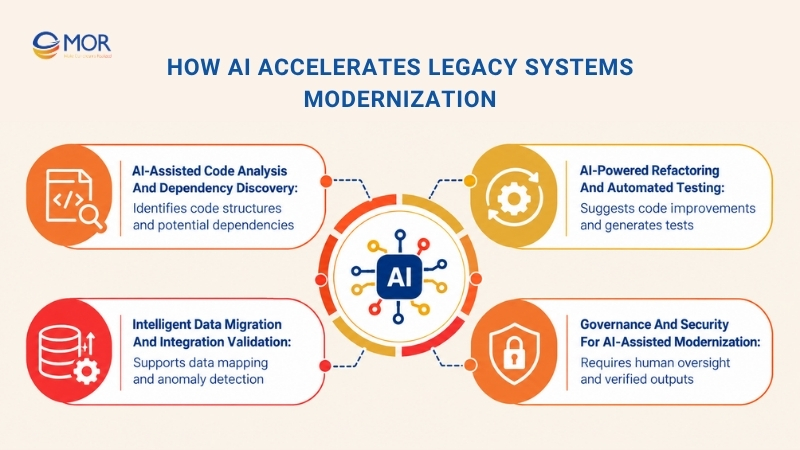
AI-Assisted Code Analysis and Dependency Discovery
Legacy applications often contain years of code changes, inconsistent naming, and incomplete technical documents. AI tools can help developers examine these codebases and organize what they find.
- Legacy code analysis: AI assistants can explain COBOL, Java, .NET, and other code structures, helping developers understand unfamiliar functions and dependencies.
- Dependency identification: Code analysis tools can identify possible relationships between modules, database queries, and shared functions. Engineers must confirm these findings against the actual system.
- Documentation generation: AI can draft function descriptions, interface notes, and technical summaries based on code and approved project materials.
These capabilities are useful when the original developers are unavailable. Yet, generated explanations still need review because business rules may exist outside the source code.
AI-Powered Refactoring and Automated Testing
AI can assist with code changes after engineers understand the existing application's behavior. Its value is strongest when teams have reliable tests and clear architectural rules.
- Code refactoring assistance: AI tools can suggest simpler code structures, identify duplication, and draft code translations. Developers remain responsible for checking functional compatibility.
- Test generation: AI can draft unit tests, regression tests, and edge-case scenarios based on existing functions and technical requirements.
- Quality assurance: Peer review, automated tests, performance checks, and security scans remain necessary before generated code reaches production.
Teams considering AI-powered legacy code modernization should begin with limited, testable tasks. Large-scale automatic rewriting introduces risks when the original business logic is poorly documented.
Intelligent Data Migration and Integration Validation
AI tools can assist data engineers in reviewing large schemas and identifying inconsistent records. This helps teams prepare migration mappings and investigate possible data quality problems.
- Data mapping: AI can suggest relationships between legacy database fields and target schemas, subject to human approval.
- Data validation: Anomaly detection can flag duplicated records, unusual values, and inconsistent formats for further review.
- Integration testing: AI can draft API test cases, sample payloads, and documentation for known integration contracts.
Financial totals, customer identifiers, and regulated information still require deterministic validation. AI-generated suggestions should support, rather than replace, reconciliation checks.
Governance and Security for AI-Assisted Modernization
Enterprise source code and migration data may contain commercially sensitive information. Tool selection needs to account for access permissions, hosting restrictions, and organizational security policies.
- Human oversight: Assign engineers to approve code changes, architectural decisions, and migration procedures.
- Data protection: Review how AI tools process, store, and share source code, internal documents, and production records.
- Output verification: Test generated code for incorrect logic, invented dependencies, security weaknesses, and compatibility problems.
The safest approach is to apply AI to defined engineering tasks and measure its usefulness against existing development and quality standards.
Cloud and API Integration in Legacy Modernization
Cloud infrastructure and modern APIs support legacy systems modernization when existing applications need better connectivity, flexible capacity, or access to new business services. Their effectiveness depends on the underlying architecture, data quality, and integration design.
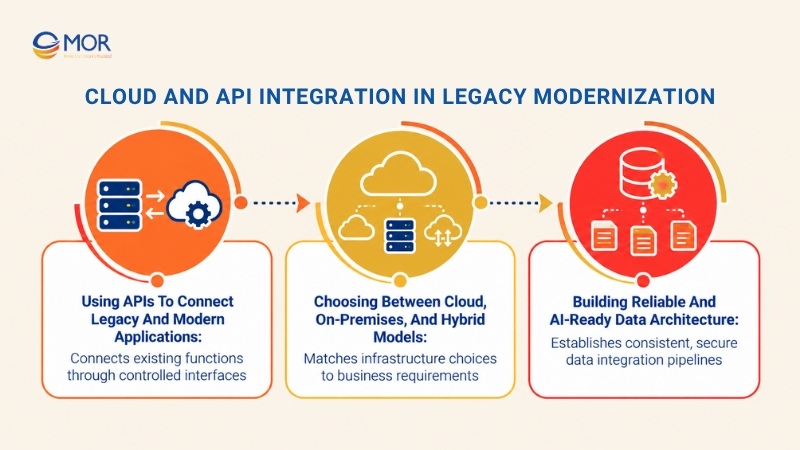
Using APIs to Connect Legacy and Modern Applications
API encapsulation allows existing applications to expose selected functions without major changes to their core code. An API Gateway can manage requests, authentication, access permissions, and communication between systems.
For example, a business can connect its legacy ERP with Salesforce for customer and order data exchange. The design should define record ownership, synchronization frequency, and error handling before development begins.
Enterprise integration patterns also matter. Teams planning salesforce ERP connectivity can examine mulesoft integration patterns and CRM integration architecture to understand common approaches to middleware, APIs, and data flows.
According to MuleSoft's 2026 Connectivity Benchmark Report, only 27% of applications were connected on average across surveyed organizations. Older systems often require additional integration work before their data becomes accessible to newer platforms.
Choosing Between Cloud, On-Premises, and Hybrid Models
Cloud modernization can provide scalable infrastructure, managed databases, and deployment services. On-premises environments remain relevant when businesses need direct infrastructure control or have strict technical and data-location requirements.
Hybrid architecture connects on-premises systems with cloud services. It lets organizations move selected workloads while retaining existing systems that cannot yet be migrated.
The choice between on premise software vs cloud should consider workload demand, security rules, integration latency, migration effort, and ongoing costs. Cloud hosting alone won't repair poor code structure or undocumented business logic.
Building Reliable and AI-Ready Data Architecture
Modern applications need consistent data formats, secure access, and dependable integration pipelines. Data ownership and quality rules should be established before connecting enterprise records to analytics or AI services.
A legacy systems to modern data integration migration project should document source systems, target schemas, data mappings, synchronization rules, and validation responsibilities. These controls support accurate reporting and limit errors across connected platforms.
AI adoption becomes more practical when approved systems can access current, well-structured information through controlled interfaces.
Legacy Systems Modernization Costs and Timelines
Legacy systems modernization costs depend on the size of the existing environment, technical debt, data dependencies, and the amount of architectural change required. A limited infrastructure migration generally takes less engineering effort than rebuilding a tightly connected enterprise platform.
The following estimates draw on Trango Tech's 2026 modernization cost guide and describe broad planning scenarios rather than fixed market prices.
Modernization scope | Main activities and cost drivers | Estimated timeline | Estimated cost (USD) |
Assessment and planning | Architecture audit, technical debt review, dependency mapping, risk analysis, and project roadmap | 2–6 weeks | 15,000–40,000 |
Rehosting or replatforming | Infrastructure migration, platform compatibility, hosting changes, and configuration | 3 weeks–3 months | 20,000–150,000
|
Code refactoring | Code restructuring, framework updates, maintainability improvements, and regression testing | 3–6 months | 150,000–300,000
|
System rearchitecture or rebuilding | Architecture redesign, application redevelopment, API integration, data migration, security, and testing | 12–24 months | 300,000–500,000+
|
Enterprise ERP or mainframe modernization | Enterprise platform transformation, large-scale data migration, system integration, and compliance work | 18–36 months | 1million–10 million+
|
Note: These are indicative planning estimates, not MOR Software quotations or guaranteed industry averages. Project scope, location, delivery model, and technical requirements can produce different costs and timelines. The listed approaches are not necessarily sequential, and their estimated budgets shouldn't be added together automatically.
Several factors can move a project outside these ranges.
Budget considerations: Poor documentation, tightly coupled code, large datasets, and extensive third-party integrations increase discovery and engineering work. Parallel operation during migration may also require additional hosting and support spending.
Total cost of ownership (TCO): Include implementation fees, infrastructure, licenses, data transfer, testing, employee training, and post-launch maintenance. The cheapest initial approach may carry higher operating expenses if technical debt remains unresolved.
Modernization ROI: Compare the total investment with expected maintenance savings, fewer service incidents, improved delivery speed, and lower manual processing costs. Use conservative estimates and track actual outcomes after deployment.
An initial technical assessment provides a stronger basis for budgeting than a general cost range. It also helps clarify which improvements can be delivered in the first project phase.
Common Legacy Modernization Challenges and Solutions
Legacy systems modernization projects often encounter problems that were difficult to detect during routine maintenance. Undocumented dependencies, migration errors, and unclear project ownership can create delays once engineering work begins.
The table below connects common risks with practical mitigation measures.
Challenge | Potential business impact | Recommended mitigation |
Incomplete documentation | Hidden dependencies cause unexpected errors and scope changes | Map system connections, interview domain experts, and build tests around existing behavior |
Migration-related downtime | Employees and customers lose access to business services | Use phased deployment, parallel operation, controlled cutovers, and rollback plans |
Data integrity issues | Incorrect records affect reporting, transactions, and business decisions | Validate source data, reconcile migrated records, and monitor synchronization |
Security and compliance gaps | Data exposure, audit failures, and unauthorized access | Apply access controls, encryption, security testing, and audit logging throughout delivery |
Limited technical expertise | Slow development, knowledge loss, and dependence on a few specialists | Document business rules, transfer knowledge, and involve experienced engineering teams |
Budget overruns | Delayed delivery and additional unplanned spending | Define project boundaries, review estimates after discovery, and apply phase-level approval gates |
Resistance to change | Low adoption, workflow errors, and delayed acceptance | Involve business users early, conduct UAT, and provide targeted training |
Security deserves particular attention during migration. IBM's 2025 Cost of a Data Breach Report reported a global average breach cost of $4.44 million. The figure covers the studied breaches generally, rather than breaches caused solely by outdated systems.
Backup and recovery planning should also cover the period when old and new environments operate together. A shortlist of the best backup platforms for mixed legacy and modern systems should be assessed against supported workloads, recovery time objectives, data consistency, and restore testing.
Clear ownership helps teams manage these risks. Assign business and technical owners to each migration phase, and require evidence that acceptance conditions have been met before major cutovers.
How to Measure Legacy Systems Modernization Success
Modernization results should be measured against the problems identified during the original system assessment. Tracking legacy systems modernization performance helps businesses confirm whether the investment has delivered the expected operational and financial improvements.
A practical measurement plan should combine engineering, security, financial, and business KPIs.
KPI | What it measures | How to evaluate improvement |
Maintenance cost | Infrastructure, licensing, support, and repair expenses | Compare recurring costs before and after modernization |
Deployment frequency | Frequency of production software releases | Track successful deployments over a consistent period |
Lead time for changes | Time between approved development changes and production releases | Compare median delivery time across similar changes |
System availability | Uptime and service interruptions | Monitor availability against agreed service targets |
Application performance | Response time, throughput, and resource consumption | Compare results under equivalent workloads |
Security posture | Vulnerabilities, patch coverage, and audit findings | Monitor unresolved findings and remediation times |
Business productivity | Manual work, process completion time, and user satisfaction | Compare operational measurements before and after deployment |
Modernization ROI | Financial gains relative to total project investment | Compare realized benefits against implementation and operating costs |
Teams should establish baseline values before changing the system. Without them, a faster application or lower maintenance bill may be difficult to demonstrate.
For financial reporting, a basic ROI calculation is:
ROI (%) = [(Total Financial Benefits − Total Modernization Costs) / Total Modernization Costs] × 100
For example, a project costing $200,000 that generates $280,000 in cumulative net financial benefits before project costs would produce an estimated 40% ROI. This is an illustrative calculation, not a MOR Software project result.
Continue measuring outcomes after each rollout. Early improvements in deployment speed may appear before savings in infrastructure or maintenance become visible.
How MOR Software Supports Legacy Systems Modernization
Legacy modernization becomes difficult when a business must protect existing operations while fixing expensive technical limitations. At MOR Software, we focus on the specific problems holding each system back, then connect the required engineering work with practical business outcomes.
Our experience in IT consulting, system integration, custom development, and dedicated delivery teams supports companies that need to modernize without unnecessary replacement or disruption.
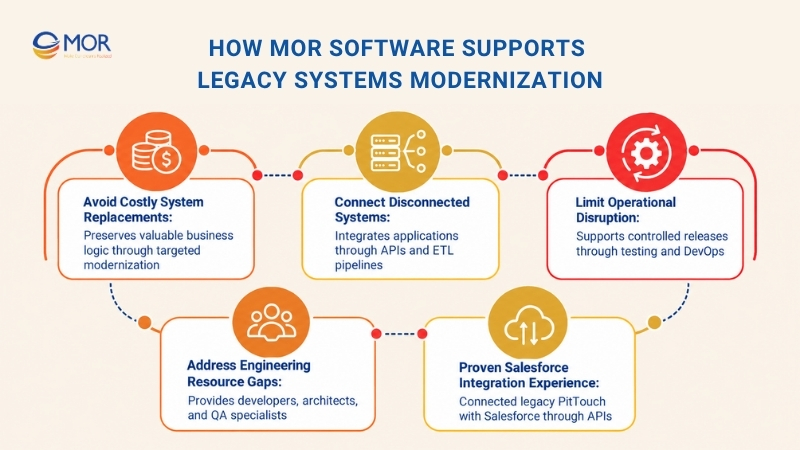
- Avoid costly system replacements: Some enterprise systems still contain years of valuable business logic, even when their technical foundations are outdated. Through IT consulting services at MOR Software, we can examine architecture, dependencies, operating costs, and technical gaps. This assessment helps businesses decide which components to retain, refactor, rearchitect, or replace, so modernization spending targets real problems.
- Connect disconnected systems without rebuilding everything: Separate databases, manual transfers, and incompatible applications can delay daily operations. Our integration capabilities cover custom APIs, API Gateways, ETL pipelines, and data synchronization with platforms such as Salesforce. Existing systems can continue performing established functions while modern services access the information they need.
- Limit operational disruption during upgrades: Downtime and data errors can make companies hesitant to change business systems. MOR Software applies Agile development, testing, integration validation, and DevOps practices to support controlled releases. Our engineering teams can verify individual changes, check business workflows, and prepare migration procedures before wider deployment.
- Address engineering resource gaps: Maintaining outdated platforms often requires knowledge that internal teams struggle to replace. Our offshore development model gives clients access to developers, software architects, QA engineers, and project management support based on project needs. This provides additional delivery capacity without requiring companies to establish an entirely new internal engineering department.
Businesses evaluating legacy system modernization consulting or legacy system modernization services should look for evidence that a provider can handle existing systems, complex integration requirements, and production risks.
Proven MOR Software Experience: Salesforce and Legacy HRM Integration
A documented legacy system modernization case study from MOR Software illustrates how targeted integration can address a business problem without replacing every existing component.
A Japanese HRM company needed to connect its legacy PitTouch time clock system with Salesforce. The project required real-time, bidirectional data exchange, historical data migration, and controlled API communication.
Our 18-member team worked on the project over 15 months. We developed an HRM application on Salesforce AppExchange, implemented an API Gateway, and applied ETL processes to migrate legacy records. The solution used Apex, Lightning Web Components, AWS Lambda, and TypeScript.
The delivered system supported real-time attendance data synchronization, improved data accuracy, and simplified HRM operations. The existing time clock system remained part of the connected environment.
Read the documented project to see how we integrated Salesforce with a legacy system.
Find Out What Your Legacy System Needs Before Committing to a Rebuild
High maintenance costs, disconnected applications, and outdated infrastructure don't always require a full replacement. The right decision starts with understanding which technical problems affect your business most.
Share your current architecture, integration requirements, and main operational bottlenecks with MOR Software. Our engineering team can review your situation, discuss suitable modernization options, and help define the scope of an initial technical assessment.
Request a Technical Consultation with MOR Software
Conclusion
Legacy systems modernization works best when companies assess existing technology, select the right strategy, and measure results at each stage. Phased implementation, careful data migration, and targeted AI assistance can make upgrades easier to manage. MOR Software supports these efforts through technical consulting, system integration, and software engineering. If outdated systems are increasing your costs or blocking new capabilities, contact us to review your technical bottlenecks and discuss a practical first modernization phase.
"Evolution is not a destination, it is a disciplined journey of innovation."
Phung Van Tu


CEO MOR AI
MOR SOFTWARE
Frequently Asked Questions (FAQs)
What is the difference between legacy modernization and migration?
Legacy modernization improves outdated software, infrastructure, or system architecture to meet current business needs. Migration moves applications, data, or workloads to another environment. A cloud migration may support modernization, but transferring unchanged applications doesn't automatically resolve existing code or architecture problems.
When should a business modernize its legacy systems?
Businesses should consider modernization when maintenance costs rise, security support ends, system changes become slow, or integration problems affect operations. Frequent outages, outdated technology, and dependence on a few legacy specialists are additional warning signs. An assessment helps determine which systems require immediate attention.
Is it better to modernize or replace a legacy system?
Modernization is often suitable when an existing system still contains valuable business logic and can be improved at a reasonable cost. Replacement becomes more practical when the architecture is unsustainable or a suitable commercial product meets the requirements. Compare total ownership costs and migration risks before deciding.
Can legacy systems be modernized without downtime?
Many modernization activities can be completed with little or no user-visible downtime through phased deployment, parallel environments, API integration, and controlled traffic switching. Actual downtime depends on system architecture, data consistency requirements, and migration procedures. Recovery and rollback plans remain necessary for production changes.
How long does legacy systems modernization take?
A limited modernization project may take several weeks or months, while complex enterprise programs can extend beyond a year. Project duration depends on code quality, system dependencies, data volume, and the chosen approach. A pilot provides useful evidence for refining the wider delivery schedule.
How much does legacy systems modernization cost?
Costs range from tens of thousands of dollars for limited assessments or migrations to millions for large enterprise transformations. The main variables include system size, architectural complexity, data migration, integrations, security requirements, and testing. A technical assessment is necessary for a project-specific estimate.
How does AI support legacy application modernization?
AI assists developers with code analysis, dependency discovery, documentation, code translation, and test generation. These tools can shorten selected engineering tasks and help teams understand unfamiliar code. Human review, regression testing, and security validation remain necessary because AI-generated results may contain incorrect assumptions or logic.
Can legacy systems be modernized without moving to the cloud?
Yes. Businesses can modernize on-premises systems through code refactoring, architecture changes, database upgrades, API development, and security improvements. Hybrid deployment is another option when certain workloads must remain on existing infrastructure. Cloud migration should follow operational requirements rather than become a default requirement.
What are the biggest risks in legacy systems modernization?
Common risks include undocumented business rules, inaccurate data migration, service disruption, security gaps, and budget overruns. Teams can manage these risks through dependency mapping, phased releases, automated testing, data reconciliation, and clear decision gates. Experienced domain specialists are particularly useful when original documentation is missing.
How can enterprises calculate legacy modernization ROI?
Calculate modernization ROI by comparing total project costs with the financial benefits achieved over a defined period. Benefits may include lower maintenance spending, fewer incidents, faster releases, and less manual work. Record baseline figures before development and use actual operating data to validate the estimated return.
Share


Make Our-Dreams Realized


© 2023 . MOR Software. All Rights Reserved
Sitemap
Privacy Policy
Terms of Use

Rate this article
0
over 5.0 based on 0 reviews
Your rating on this news:
Name
*Email
*Write your comment
*Send your comment
1