


AI Legacy Code Modernization: The Ultimate Guide for Businesses
Old systems often hide business rules in places no one wants to touch. AI legacy code modernization helps teams read, test, refactor, and migrate aging software with less guesswork, but AI-assisted legacy upgrades still need clear human control. This MOR Software’s guide will show you how businesses can modernize safely without risking daily operations.
Key Takeaways
- AI can speed up legacy code analysis, testing, documentation, and refactoring, but engineers must still review every change.
- Safe modernization starts with current behavior, dependency maps, regression tests, and small releases, not a full rewrite.
- The best results come from using AI as support, not autopilot, with clear quality gates, security checks, and rollback plans.
What AI Legacy Code Modernization Actually Means
AI legacy code modernization is not a “click once and replace everything” shortcut. In real projects, AI helps your team:
- l Refactors And Version Upgrades through controlled technical changes,
- Protect Code Quality with CI, internal rules, and security checks.
Teams that talk about AI legacy modernization usually care about one practical goal: lowering doubt before refactoring starts. They want to pull out system behavior and business rules first, then change the code with more confidence. A helpful developer view appears in the LLMDevs discussion.
Why Legacy Code Is Hard To Modernize Safely
Old systems create trouble in two places: the code itself and the setup around it.
Inside the codebase, teams may find years of messy dependencies, hidden side effects, mixed logic, outdated libraries, weak tests, and thin documentation. Data rules and system behavior often sit too close together. One small update in a controller can affect reports, batch jobs, or outside interfaces.
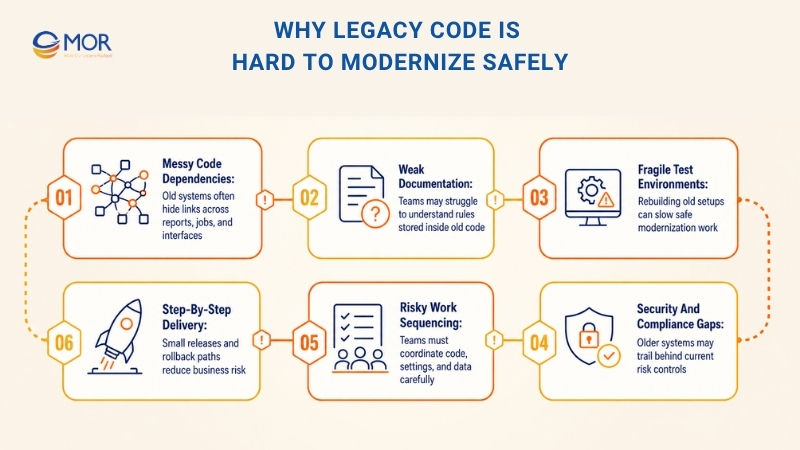
Outside the code, the test environment may be hard to rebuild, releases may break often, system visibility may be weak, and security or compliance may trail behind. Fixing this takes more than editing files. Teams still need to protect SLAs, control risk, and align people before choosing the right legacy system AI plan.
The toughest part of fragile systems is sequencing the work across code, settings, and data, then proving the application still runs correctly. That calls for clear requirements, early tests, small work packages, safe data moves, and discipline against a rushed full rewrite. Teams should move step by step with guardrails and rollback paths, so progress does not put the business at risk.
7 Approaches For AI Legacy Code Modernization
Modernizing old applications takes more than deciding whether to rewrite. AI legacy code modernization is a business call about lowering risk, improving daily work, and opening room for new plans. Application rationalization is a smart first move. List the systems, rate each one by business value, support cost, technical health, and risk, then choose what to improve, merge, leave alone, or retire. After that, teams can match each system to an AI code modernization path that fits budget, timing, and cloud plans.
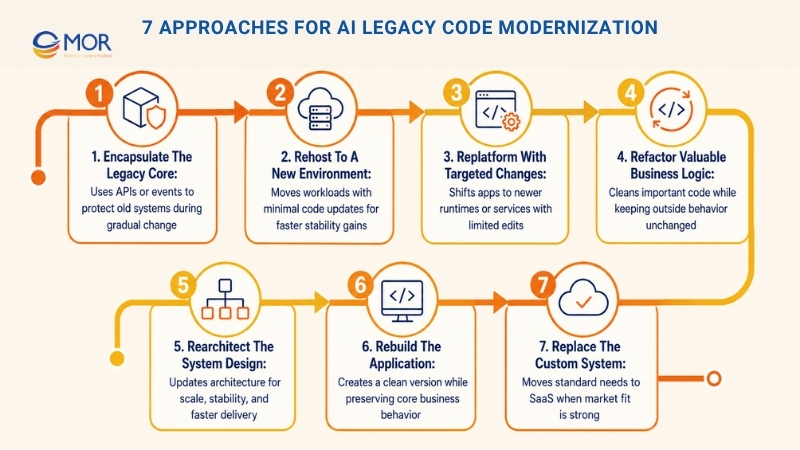
Encapsulate The Legacy Core
Place stable APIs or event layers around the old system, so teams can add new work without touching the core right away. This shields users and connected systems from older interfaces and gives the team time to plan larger changes. Encapsulation often works well with a strangler migration pattern, where fresh functions sit outside the old system as the legacy parts slowly shrink.
Rehost To A New Environment
Move the workload to newer infrastructure with very small code updates, like shifting a VM from an internal data center to cloud hosting. This can bring faster gains in stability, cost tracking, and basic automation, yet the code and system design remain mostly unchanged. Use this route when time is tight and deeper work would create too much risk.
Replatform With Targeted Changes
Shift the application to a newer runtime or managed service with limited, focused edits. Common moves include containers, managed databases, or serverless API entry points like AWS API Gateway. This path can improve operations and scale without a full redesign. For many teams, AI legacy code modernization in this area gives quick cloud value with only light code changes.
Refactor Valuable Business Logic
Clean up the code structure so it becomes easier to work with, but keep the outside behavior the same. Refactoring work may include breaking up large modules, adding tests, deleting unused code, and upgrading libraries. The aim is to make old code simpler to maintain and safer to change. Refactoring makes sense when the business logic still matters, but the codebase has become hard to manage.
Rearchitect The System Design
Update the system design so it can meet new goals around scale, stability, or faster delivery. Teams might move away from a large monolith, introduce bounded services, use event-based flows, or separate data stores. In this path, architecture guides the change and often creates the strongest long-term room to move.
Rebuild The Application
Create the application again from scratch, but keep the same scope and core behavior. This gives teams a clean base for technology choices, testing habits, and release practices, which can raise delivery speed a lot. Rebuilds fit best when the current build blocks change, but the business rules still match how the company works.
Replace The Custom System
Shut down the custom application and move to a ready-made commercial or SaaS product. This can lower long-term cost and risk when the market already has a good match for the business need. Replacement often fits standard areas like HR, finance, or CRM solutions. The tradeoff is less room for custom setup, so teams should test fit and integration early.
These routes can work together. Many teams start with encapsulation, then rehost or replatform to make operations steadier before refactoring or rearchitecting chosen areas. Rebuild or replacement may come later when the business is ready. The right order depends on risk appetite, team skills, and how urgent the modernization push is.
>>> Explore the most effective AI languages used for AI development and how to select what truly fits your project.
How Can AI Enable Legacy Code Modernization
AI does not work like a magic button. It behaves more like a tireless teammate that can read large files, track details, and handle repeat work. Used with care, AI for legacy code modernization can move a team from “we need to fix this someday” to tested software that runs. The eight cases below show practical AI-assisted modernization tasks created with Claude Code CLI.
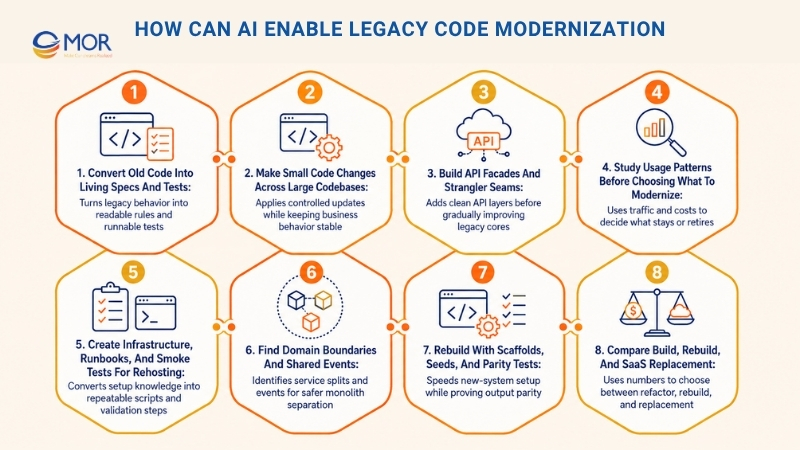
Convert Old Code Into Living Specs And Tests
Record the system’s real behavior in simple business language and runnable tests. This gives teams a stable view of current logic, so they can clean up structure, repair design flaws, or shift technology without losing business rules.
Sample Prompt:
"Review ./cobol/ and ./jcl/ together with sample outputs in ./samples/ratings.csv. Create a short business-readable spec for rating logic and a Python test suite that preserves today’s behavior. Use golden files from ratings.csv. Keep the wording clear for non-technical readers."
Sample Output:
Premium rules v1
- If driver_age < 25 and vehicle_class in {"sport","performance"} apply surcharge S3 = 0.12
- If prior_claims >= 2 apply penalty P2 = 0.07
- Multi-vehicle discount 0.05 if household_vehicles >= 2
- Round to nearest cent after all adjustments
—-------
# tools/build_golden.py
import csv, json, os
os.makedirs("tests/golden", exist_ok=True)
with open("samples/ratings.csv") as f:
for i,row in enumerate(csv.DictReader(f), start=1):
case = {"input": row, "expected_total": float(row["total_premium"])}
with open(f"tests/golden/case_{i}.json","w") as o:
json.dump(case, o, indent=2)
print("golden files written")
—-------
# tests/test_rating_rules.py
import glob, json, math
from legacy_adapter import calc_premium # wrapper around COBOL batch calc
def cases():
for path in glob.glob("tests/golden/*.json"):
with open(path) as f:
yield path, json.load(f)
def money_eq(a, b): return math.isclose(a, b, rel_tol=0, abs_tol=0.01)
def test_golden_parity():
for path, case in cases():
got = calc_premium(case["input"])
assert money_eq(got, case["expected_total"]), f"mismatch in{path}"
def test_young_driver_surcharge_applies():
base = {"driver_age": 22, "vehicle_class": "sport", "prior_claims": 0, "base": 1000}
assert money_eq(calc_premium(base), 1120.00)
Make Small Code Changes Across Large Codebases
Apply many controlled technical edits across one or several repositories to meet a runtime or platform target. Typical AI use cases include library updates, API changes, logging rule updates, or container preparation. Business behavior stays intact, while the code becomes more uniform and ready for the target environment.
Sample Prompt
Build an OpenRewrite recipe that upgrades services from Java 8 to 17 and Spring Boot 2.7 to 3.2. Change Apache HttpClient to java.net.http.HttpClient.
Sample Output
# rewrite.yml
type: specs.openrewrite.org/v1beta/recipe
name: company.upgrade-java17-spring3-httpclient
recipeList:
- org.openrewrite.java.migrate.UpgradeToJava17
- org.openrewrite.java.spring.boot3.UpgradeSpringBoot_3_2
- org.openrewrite.java.ChangeType:
oldFullyQualifiedTypeName: org.apache.http.client.HttpClient
newFullyQualifiedTypeName: java.net.http.HttpClient
- org.openrewrite.java.migrate.JavaxToJakarta
Build API Facades And Strangler Seams
Place a clean API layer before the old application and send traffic through that layer. New functions can connect to the facade as the team slowly moves or rewrites the inner parts. This lowers tight coupling and gives the team safer room to improve the core.
Sample Prompt
Read ./traffic/*.har and create OpenAPI v3 for Orders with POST /orders and GET /orders/{id}. Create an Express facade that connects these routes to the legacy endpoints.
Sample Output
openapi: 3.0.3
info: { title: Orders API, version: '1.0' }
paths:
/orders:
post:
requestBody:
required: true
content:
application/json:
schema: { $ref: '#/components/schemas/CreateOrder' }
responses: { '201': { description: Created } }
/orders/{id}:
get: { responses: { '200': { description: OK } } }
components:
schemas:
CreateOrder:
type: object
required: [customerId, items]
properties:
customerId: { type: string }
items:
type: array
items: { type: object, required: [sku, qty], properties: { sku: {type: string}, qty: {type: integer} } }
—-------
// api/facade.js
import express from "express";
import fetch from "node-fetch";
const app = express(); app.use(express.json());
const toLegacyCreate = b => ({ custId: b.customerId, lines: b.items.map(i => ({ sku: i.sku, q: i.qty })) });
const fromLegacy = r => ({ id: r.ordId, status: r.stat, total: r.total });
app.post("/orders", async (req, res) => {
const r = await fetch(process.env.LEGACY_URL + "/createOrder", {
method: "POST",
headers: { "Content-Type": "application/json" },
body: JSON.stringify(toLegacyCreate(req.body))
});
if (!r.ok) return res.status(502).json({ error: "legacy error" });
res.status(201).json(fromLegacy(await r.json()));
});
app.get("/orders/:id", async (req, res) => {
const r = await fetch(process.env.LEGACY_URL + `/order?id=${req.params.id}`);
if (!r.ok) return res.status(404).end();
res.json(fromLegacy(await r.json()));
});
app.listen(8080);
Study Usage Patterns Before Choosing What To Modernize
Use actual traffic and cost figures to choose what should stay, merge, or go away. For AI legacy code modernization, this step cuts the work down before engineers spend time on old apps that no longer matter or duplicate other systems.
Sample Prompt
Review api_logs.csv and service_costs.csv. Identify endpoints with no use in 180 days, group services by cost and traffic, then suggest which ones to retire or combine.
Sample Output
import pandas as pd
from sklearn.preprocessing import StandardScaler
from sklearn.cluster import KMeans
logs = pd.read_csv("api_logs_features.csv") # req_per_day, latency_p95_ms, distinct_flows, service
costs = pd.read_csv("service_costs.csv") # monthly_cost, service
df = logs.merge(costs, on="service")
X = StandardScaler().fit_transform(df[["req_per_day","latency_p95_ms","monthly_cost","distinct_flows"]])
df["cluster"] = KMeans(n_clusters=4, n_init="auto").fit_predict(X)
candidates = df[(df["req_per_day"] < 5) & (df["monthly_cost"] > 2000)]
print("retire candidates:\\n", candidates[["service","monthly_cost"]].sort_values("monthly_cost", ascending=False))
—
"Retire: hr-letter-2, hr-letter-3 (zero traffic 6 months). Consolidate into hr-letter-1.
Replace: expense-legacy with SaaS-X (85 percent feature overlap). Integration cost low.
Keep: payroll-core (high traffic, unique features)."
Create Infrastructure, Runbooks, And Smoke Tests For Rehosting
Convert setup knowledge stored in people’s heads into infrastructure as code (IaC), a clear switch-over plan, and fast health checks. This makes a lift-and-shift move less risky because setup and validation become scripted, repeatable, and easier to review.
Sample Prompt
Read /runbooks/windows-farm.md, /scripts/.ps1, and /configs/.ini. Generate Terraform for EC2, a runbook named Cutover Tuesday 7 pm, and a bash smoke test that calls /healthz and creates one sample order.
Sample Output
# infra/main.tf
module "orders" {
source = "terraform-aws-modules/ec2-instance/aws"
name = "orders-svc"
instance_type = "m6i.large"
ami = data.aws_ami.al2023.id
user_data = file("bootstrap.ps1")
vpc_security_group_ids = [aws_security_group.orders.id]
}
resource "aws_security_group" "orders" {
name = "orders-sg"
ingress { from_port=8080, to_port=8080, protocol="tcp", cidr_blocks=["10.0.0.0/16"] }
egress { from_port=0, to_port=0, protocol="-1", cidr_blocks=["0.0.0.0/0"] }
}
Pre-checks
- Stop releases. Check the latest AMI. Confirm backups are under 24h old.
Cutover 19:00
- Drain target group orders-tg.
- Release a canary to one instance. Run smoke tests.
- Move 10 percent of traffic. Watch for 15 minutes. If results stay clean, move to 100 percent.
Rollback
- Route the target group back to asg-orders-old. Restore the snapshot when needed.
#!/usr/bin/env bash
set -euo pipefail
BASE=${1:-<http://orders.internal:8080>}
curl -fsS "$BASE/healthz" | grep "ok"
curl -fsS -X POST "$BASE/orders" -H 'Content-Type: application/json' \\
-d '{"customerId":"demo","items":[{"sku":"ABC","qty":1}]}' | jq -e '.id'
echo "smoke tests passed"
Find Domain Boundaries And Shared Events
Spot the natural splits across code and data, then name the events that connect those areas. Teams can split a monolith into bounded services little by little, which supports scale and faster delivery without a risky all-at-once rewrite.
Sample Prompt
Review ./src and docs/erd.png. Suggest bounded contexts for catalog, pricing, inventory, and checkout. Create JSON schemas for core events and small Kafka producer and consumer samples.
Sample Output
{
"event": "PriceChanged",
"version": 1,
"product_id": "SKU-123",
"old_price": 19.99,
"new_price": 17.99,
"currency": "USD",
"occurred_at": "2025-08-20T12:34:56Z",
"source": "pricing-service"
}
—-------
from kafka import KafkaProducer
import json, time
producer = KafkaProducer(bootstrap_servers=["kafka:9092"], value_serializer=lambda v: json.dumps(v).encode())
def publish_price_changed(sku, old, new):
evt = {"event":"PriceChanged","version":1,"occurred_at":time.strftime("%Y-%m-%dT%H:%M:%SZ", time.gmtime()),
"product_id":sku,"old_price":old,"new_price":new,"currency":"USD","source":"pricing-service"}
producer.send("price-events", evt)
—-------
from kafka import KafkaConsumer
import json
consumer = KafkaConsumer("price-events", bootstrap_servers=["kafka:9092"], value_deserializer=lambda v: json.loads(v.decode()))
for msg in consumer:
evt = msg.value
# TODO update read model or invalidate cache
—-------
Catalog -> emits ProductUpdated
Pricing -> emits PriceChanged
Inventory -> emits InventoryAdjusted
Checkout -> consumes ProductUpdated, PriceChanged, InventoryAdjusted
Rebuild With Scaffolds, Seeds, And Parity Tests
Begin again on a newer stack, while proving the new system gives the same results as the old one during the changeover. In AI legacy code modernization, scaffolds can speed up setup, dual runs, or replay work. Property-based tests can reveal edge cases early.
Sample Prompt
Create a Go HTTP service with /price. Add a Python parity test that checks new pricing against the legacy function. Include a small dual-write adapter for creating orders."
Sample Output
// cmd/pricing/main.go
package main
import ("encoding/json"; "log"; "net/http"; "time")
type PriceRequest struct{ SKU string; Qty int }
type PriceResponse struct{ SKU string; Price float64; Currency string }
func priceHandler(w http.ResponseWriter, r *http.Request) {
start := time.Now()
var req PriceRequest
if err := json.NewDecoder(r.Body).Decode(&req); err != nil { w.WriteHeader(400); return }
resp := PriceResponse{SKU: req.SKU, Price: 17.99, Currency: "USD"} // TODO call domain
json.NewEncoder(w).Encode(resp)
log.Printf("path=/price sku=%s qty=%d latency_ms=%d", req.SKU, req.Qty, time.Since(start).Milliseconds())
}
func main() { http.HandleFunc("/price", priceHandler); log.Fatal(http.ListenAndServe(":8081", nil)) }
—-------
# tests/test_parity.py
from hypothesis import given, strategies as st
from new_impl import price as new_price
from legacy_impl import price as legacy_price
@given(sku=st.from_regex(r"[A-Z0-9\\-]{3,12}"), qty=st.integers(min_value=1, max_value=10))
def test_new_matches_legacy_for_many_inputs(sku, qty):
assert round(new_price(sku, qty), 2) == round(legacy_price(sku, qty), 2)
—
import requests
def create_order(new_order):
r1 = requests.post("<http://new/orders>", json=new_order, timeout=2)
r2 = requests.post("<http://legacy/order_create>", json=map_to_legacy(new_order), timeout=2)
return r1.status_code == 201 and r2.ok
Compare Build, Rebuild, And SaaS Replacement
Review long-term spend, functional fit, and integration work across three choices: keep and refactor, rebuild, or move to SaaS. The result is a clear plan backed by numbers, showing where custom software still makes business sense.
Sample Prompt
Use usage.csv, vendor_pricing.csv, and run_costs.csv to calculate five-year NPV for keep plus refactor, rebuild, and SaaS replacement at a 10 percent discount rate. List the main integration hotspots and create a TypeScript adapter stub for the vendor journal API.
Sample Output
import numpy as np, pandas as pd
# thousands of dollars per year
keep_refactor = [300, 120, 120, 120, 120]
rebuild = [800, 90, 90, 90, 90]
saas = [400, 70, 70, 70, 70]
def npv(stream, rate=0.10):
return sum(v / ((1 + rate) ** t) for t, v in enumerate(stream))
print("NPV keep+refactor:", round(npv(keep_refactor), 1))
print("NPV rebuild:", round(npv(rebuild), 1))
print("NPV replace with SaaS:", round(npv(saas), 1))
Sample Hotspots
- Journal posting and reconciliation
- User provisioning and SSO mapping
- Historical report backfill
Sample Adapter
// adapters/vendorLedger.ts
type JournalLine = { account: string; debit?: number; credit?: number };
type JournalEntry = { id: string; date: Date; lines: JournalLine[] };
function mapAccount(a: string): string {
const map: Record<string,string> = { "1000": "Assets:Cash", "2000": "Liabilities:AP" };
return map[a] ?? a;
}
export async function postJournal(entry: JournalEntry): Promise<string> {
const payload = {
date: entry.date.toISOString().slice(0,10),
lines: entry.lines.map(l => ({ account: mapAccount(l.account), debit: l.debit, credit: l.credit })),
externalId: entry.id
};
const res = await fetch(`${process.env.VENDOR_URL}/journals`, {
method: "POST",
headers: { "Authorization": `Bearer ${process.env.TOKEN}`, "Content-Type":"application/json" },
body: JSON.stringify(payload)
});
if (!res.ok) throw new Error(`Vendor error ${res.status}`);
const { id } = await res.json();
return id;
}
At its strongest, AI turns broad modernization ideas into code that teams can inspect, run, and trust. It creates plain-language specs and tests that protect business rules, applies code changes that clean up APIs, and places simple facades in front of brittle systems so teams can improve the core in stages. It also narrows scope through keep-or-retire signals, supports rehosting with IaC and smoke tests, and points teams toward clearer domain splits with events.
When rebuilding makes sense, AI can prove output parity before cutover. A smart replacement plan uses numbers and adapter stubs to support the decision. The end result is steady, lower-risk work through commits, tests, and runbooks that make old code easier to support and more ready for a cloud-friendly architecture.
A Safer AI Legacy Code Modernization: 9 Steps With Quality Gates
Legacy code modernization using AI agent frameworks can make code review, refactoring, testing, and documentation move faster. Yet old systems often run core business processes, connect to older tools, hide dependencies, and carry behavior that people use every day. A safe process should help AI work quickly without letting unchecked code reach production.
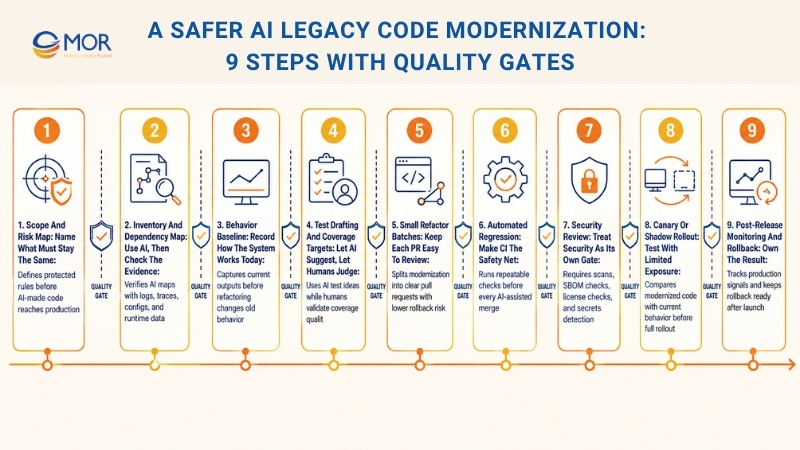
Scope And Risk Map: Name What Must Stay The Same
Before anyone edits code, write a clear list of things the team must not break. This list should cover major system outputs, public APIs, business rules, user flows, legal limits, speed targets, and connections that support daily work.
This step gives everyone the same line to protect. AI may offer changes, yet the modernization work still needs to preserve the behavior users and the business depend on most.
Review Gate: Core rules are written down and signed off before any AI-made code reaches the main branch.
Inventory And Dependency Map: Use AI, Then Check The Evidence
AI can summarize modules, explain older logic, find system touchpoints, and sketch a dependency map. This makes discovery quicker, mainly when documents are thin or missing.
Still, AI output should never become the final answer on its own. Check the dependency map against logs, traffic records, runtime traces, release files, database usage, and configuration data.
Review Gate: Key dependencies are proven with real system data, not accepted from AI guesses alone.
Behavior Baseline: Record How The System Works Today
Before refactoring starts, build a baseline that shows how the application behaves now. AI legacy code modernization may use golden master tests, characterization tests, API snapshots, sample input-output pairs, and near-production scenarios for this step.
The point is not to decide whether today’s behavior is ideal. Some older behavior may feel odd, yet users, reports, integrations, or downstream tools may already rely on it. A baseline stops quiet “fixes” from breaking real work.
Review Gate: Baseline tests run in a stable way, can be repeated, and sit inside CI before the modernization effort begins.
Test Drafting And Coverage Targets: Let AI Suggest, Let Humans Judge
AI can draft unit tests, edge cases, test data, failure paths, and areas with weak coverage. This helps when the system is large, poorly tested, or hard for teams to read.
Yet tests need the same careful review as production code. Weak tests can make teams feel safe when they are not. Test names should be clear, assertions should check the right result, and key flows should be covered in a way the team trusts.
Review Gate: Core business flows have useful coverage, and tests fail when major behavior changes.
Small Refactor Batches: Keep Each PR Easy To Review
AI can push teams toward large diffs because it rewrites code quickly. That speed turns risky when reviewers cannot explain the change.
Split modernization work into small pull requests with one clear goal. A PR may rename one module, extract one service, clean one function, or replace one outdated pattern. Smaller updates make reviews easier, lower rollback risk, and help teams learn from each change.
Review Gate: Each PR has one clear purpose, and reviewers can explain it without a long meeting.
Automated Regression: Make CI The Safety Net
Modernization should not depend on manual checks after every AI-assisted edit. Set up CI so each refactor must pass baseline tests, unit tests, integration tests, lint checks, and build checks before merge.
AI can create code quickly, but that speed only helps when regression checks run on their own. A strong CI flow makes quality control repeatable, not a rushed task before release.
Review Gate: CI stops merges when regressions show up, and teams do not rely on “temporary bypasses.”
Security Review: Treat Security As Its Own Gate
Code that looks clean can still carry security problems. AI legacy code modernization should include SAST, dependency scans, SBOM checks, license checks, and secrets scanning in the workflow.
AI review and human review can catch logic errors, but they should not replace security tools. Old systems may already include outdated packages, weak patterns, exposed secrets, or risky dependencies. Modernization gives teams a chance to find and fix those risks.
Review Gate: Security checks are required, repeatable, and linked to clear fix steps.
Canary Or Shadow Rollout: Test With Limited Exposure
Do not jump straight from merge to full production traffic. Use a canary release, feature flag, shadow route, or small traffic slice to compare the modernized code with the current system.
This step helps when outputs, latency, purchase steps, or transaction flows must stay steady. Start with limited exposure, compare results, then expand only when the data looks safe.
Review Gate: Release metrics and rollback triggers are agreed before launch, not during an incident.
Post-Release Monitoring And Rollback: Own The Result
After launch, track error rates, latency, infrastructure usage, queue time, data mismatches, user actions, and business signals. Tests may pass, yet real traffic can still reveal drift.
A rollback plan should exist before release day. The team needs to know who decides, how rollback works, which signals trigger action, and how lessons are recorded afterward.
Review Gate: Rollback is practiced, quick, and owned by named people.
AI makes modernization move faster, but gates make it safer. A good workflow can cut manual work, improve code understanding, raise test coverage, and support safer refactoring without turning production into a test lab.
AI Legacy Code Modernization Tools: The Categories That Matter
When teams search for legacy code modernization AI tools, it helps to think by category instead of chasing brand names:
- IDE Code Helpers: local refactors and small code changes with lower risk
- Repository Search And Summaries: quicker discovery across files and modules
- AI Test Drafting Tools: scaffolds and edge case ideas that humans still check
- Security And Static Analysis: SAST, secrets checks, and policy scans
- Dependency And SBOM Platforms: supply-chain visibility and upgrade planning
- CI Quality Controls: lint checks, test gates, and rule enforcement
- Observability Platforms: production signals that confirm behavior has not drifted
- Migration Support Tools: framework upgrades and removal of deprecated code
- Agent-Based Workflows: task coordination with clear human approvals
Static analyzers, LLM refactoring helpers, and code-map platforms can speed up modernization, but tools alone do not make a plan. Strong legacy upgrades still need architecture, data flow, security rules, and business goals to line up.
Many companies add wider AI transformation services to this toolset so the work fits a broader technology and operations plan, not a one-off code cleanup.
Public sector modernization is also starting to use AI for legacy complexity, but strict checking and governance still matter. GitLab’s view on AI and government legacy code gives a practical example.
For teams planning this work, the quickest safe start is a risk-first setup: map dependencies, lock current behavior, add CI and security gates, then modernize in small slices.
>>> Let's highlight leading autonomous AI agents, key categories, and practical insights to help you move forward with clarity and confidence.
What Developers Need From AI Assistants In Legacy Modernization
30% of developers who use AI in the SDLC apply it to codebase reviews. The hard part is building AI tools that truly help. Helpful AI depends on understanding, not blind prediction. Instead of guessing, a trained assistant studies and indexes all legacy repositories so it can show how parts connect before it suggests changes.
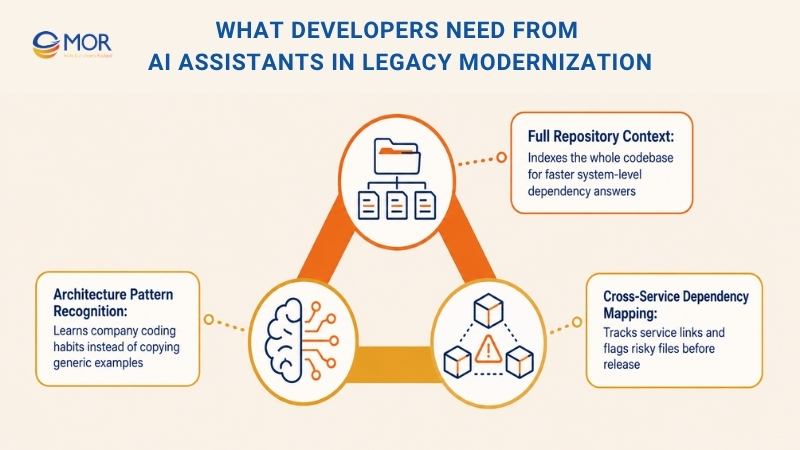
Full Repository Context
The AI assistant should index the full legacy codebase, not only the file currently open. Done well, this lets you ask system-level questions like “Which services consume Order.totalAmount after checkout?” and get all related results fast. AI can point out:
- where the value is stored in code,
- data prepared for reporting,
- related edge cases covered in unit tests,
- connected microservices that may fail when the field changes.
This makes the work simpler and faster. Teams can view system dependencies without hunting for each one manually. If you add a new field, a smart autocomplete can also suggest updates to the DTO and database schema at the same time. That saves a fair bit of back-and-forth.
Architecture Pattern Recognition
Each company has its own legacy coding habits. A useful AI coding assistant studies and follows your architecture instead of copying public examples from a textbook. These patterns often include the items below:
- Custom authentication wrapper type,
- Internal data access layer structure,
- Folder structures and naming rules.
A trained assistant spots these links and uses them in its output, so it does not damage the system’s logic.
Cross-Service Dependency Mapping
Modern applications often include hundreds of repositories and services. AI assistants can map these links without asking developers to trace everything by hand. They can also follow changes and flag risky files or services before release.
This makes AI assistants useful to developers across many parts of modernization work.
AI Legacy Code Modernization Implementation Best Practices
Even a good plan can fall apart when daily delivery is messy. AI legacy code modernization works better when teams handle each change like a controlled software release. The aim is not speed at any cost. The real aim is to understand the old system, protect today’s behavior, and improve it through small tested steps.
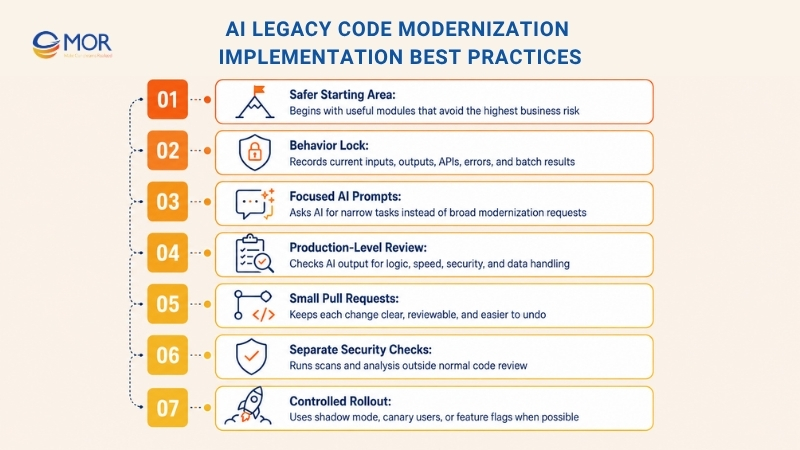
- Pick A Safer System Area First: Select a module that matters but does not hold the highest business risk. Internal reports, admin tasks, and support workflows are safer test areas before payments, customer data, or core transactions.
- Lock Today’s Behavior Before Refactoring: Record sample inputs, outputs, API replies, error paths, and batch results. Old logic may look strange, yet real users may still rely on it.
- Use Focused And Testable AI Prompts: Avoid wide prompts like “modernize this system.” Ask AI to explain one function, list dependencies, draft tests, or suggest one safer split.
- Review AI Output As Production Code: Developers should check logic, names, speed, data handling, and security. QA should test the full business flow, not just the edited file.
- Work Through Small Pull Requests: Large AI-made diffs are hard to review and harder to undo. One pull request should carry one goal, one risk, and one clear review route.
- Keep Security Separate From Code Review: Run dependency scans, secrets checks, license checks, and static analysis in the pipeline. Legacy systems often carry old libraries and weak patterns.
- Roll Out In Controlled Steps: Use shadow mode, canary users, or feature flags when the system supports them. Watch logs, latency, error rates, and business signals after each release.
- Write Down Decisions During The Work: Short notes on changed rules, replaced modules, and known risks save time later. That small record may help another team avoid the same search months later.
Low code AI legacy modernization benefits often show up in this kind of controlled delivery. Teams can test small ideas faster, but still keep review, security, and release gates in place.
AI Legacy Code Modernization Risks And Limits
AI legacy code modernization can speed up old-system work, but teams need to plan for real limits.
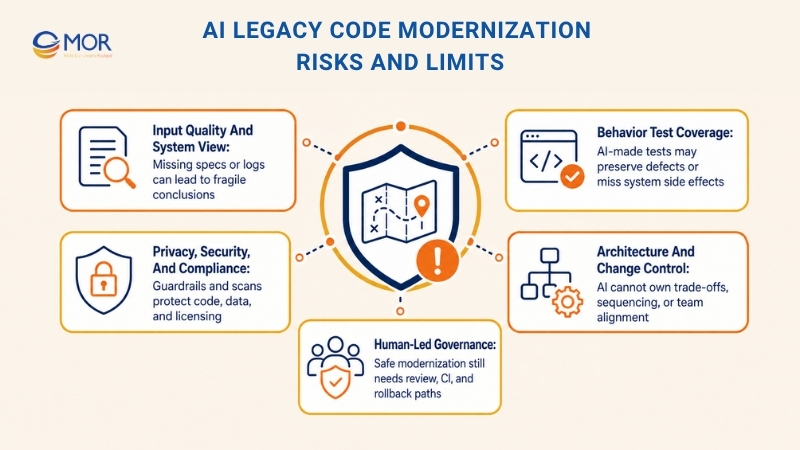
- Input Quality And System View: Models only work from the material they receive. Old specs, missing logs, and edge cases outside the sample set can lead to weak conclusions and fragile code.
- Behavior Test Coverage: AI-made tests and golden files may preserve old defects or miss side effects between systems. SMEs, exploratory testing, and production controls are still needed.
- Privacy, Security, And Compliance: Code generation may add vulnerabilities, expose secrets, or copy licensed patterns. Guardrails, SAST/DAST, SBOMs, and clear data rules still matter.
- Architecture And Change Control: AI can suggest edits, but it cannot own trade-off choices, work order, or team alignment. Weak governance, low CI standards, and missing rollback paths make large edits risky.
Application modernization using generative AI works best when teams respect these limits. AI can turn plans into steady visible progress, but it is a sharp tool, not an autopilot.
Key Considerations For AI Legacy Code Modernization
AI legacy code modernization needs careful planning from the start. AI can speed up discovery, code study, testing, refactoring, and documentation, but it can also create new risks when teams use it without clear controls.
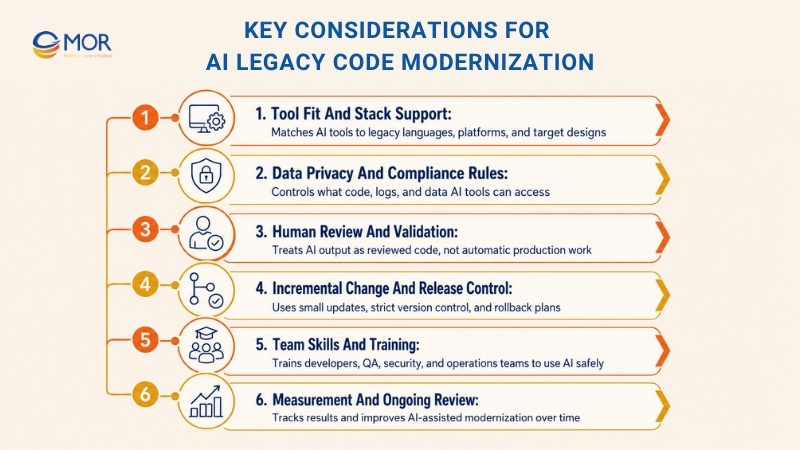
Tool Fit And Stack Support
Not every AI solution handles old systems well. This matters when a company uses niche technology, older languages, or custom platforms with poor documentation.
Teams should assess AI tools and platforms against their own tech stack and modernization goals. A tool that works well for modern JavaScript or Python may struggle with a COBOL mainframe, older .NET software, or a heavily customized ERP system.
For projects built on legacy languages, you may need a specialized model or a model trained on your own codebase. Check which languages, frameworks, database for machine learning, and architecture patterns the tool can read.
You should also review how the tool connects to your development environment and engineering pipelines. Some teams choose open-source AI tools they can tune. Others prefer vendor tools made for certain legacy-to-modern migration paths.
Infrastructure also deserves close attention. Will the AI run through a public cloud service, private cloud, or on-premise setup? For legacy systems with sensitive business logic or regulated data, a private or on-premise setup may be required.
Before a wider rollout, test the AI on a small part of the codebase. This helps the team check accuracy, fit, output quality, and setup effort.
The right tool should fit the way your engineers work. It may run as an IDE plugin, command-line tool, or script inside a CI/CD pipeline. Most of all, it should understand the old technology and the target design your team wants.
Data Privacy And Compliance Rules
AI use on legacy code brings data governance to the front. This is very important in banking, healthcare, insurance, retail, and public services.
Legacy code and databases may hold sensitive business rules, personal data, customer files, finance logic, or security settings. These assets should not be sent to outside AI APIs without review.
Before teams use AI, they should set clear data handling and privacy rules. They may need to anonymize code samples, redact logs, remove customer data, or limit which files the tool can access.
Some companies may choose multimodal AI models that run fully inside their own environment. This lowers the chance that sensitive information leaves company systems.
Compliance teams should also check whether AI-made code creates legal or licensing risk. Model output may contain patterns that look like copyrighted code, open-source snippets, or licensed logic. Teams need to inspect these outputs before use.
Companies should create an internal governance model for AI-assisted development. This model should state which code AI may write, which modules it may refactor, and which reviews are required.
In regulated settings, some AI suggestions may need approval from compliance, security, or architecture leaders. Safety-sensitive modules may also need stricter review before any AI-assisted change is accepted.
AI can help compliance when it finds hard-coded secrets, risky dependencies, or outdated libraries. Still, teams need to use it in a controlled and auditable way.
Keep a clear record of AI involvement. Save what AI suggested, what developers accepted, and what finally reached the codebase. This record builds trust and helps future audits.
Human Review And Validation
AI can make modernization faster, but human skill remains the final quality gate. Every AI-assisted modernization effort needs a strong validation step.
Developers should review all AI-made code. It should also pass automated checks, including linters, static analysis, type checks, and build validation.
Functional testing cannot be skipped. Even when teams use AI-generated tests, engineers still need to test key flows, edge cases, and business rules.
A common risk is that AI-written tests can preserve defects from the old system. A test may prove what the system does today, but that does not always mean the behavior is correct.
Subject matter experts should help review expected outcomes. They can tell whether the test matches true business behavior or only repeats an old bug.
When results do not match, people need to make the call. Sometimes the change may be a real bug fix. Other times, it may be a risky behavior shift that should be corrected.
Code reviews should include security checks too. AI-made changes can add hidden vulnerabilities, unsafe patterns, weak validation, or risky dependencies.
The safest way is to treat AI as a helper, not as an unchecked developer. Use it to move faster, then review, test, and verify before release.
Incremental Change And Release Control
A full “big bang” replacement is risky, even when AI supports the work. AI legacy code modernization is safer when teams use incremental modernization with clear release control.
AI can help divide a large modernization effort into smaller parts. Teams may update one service, one module, one integration, or one workflow at a time.
This lets the business release, watch, and learn through shorter cycles. If trouble appears, the team can roll back a small change instead of handling a full-system failure.
DevOps and CI/CD pipelines should also be ready for AI-assisted development. AI can create many changes quickly, so automated tests and staged releases matter more.
Change control is not only technical. Stakeholders need to know what AI is doing, what risks remain, and why modernization still needs careful planning.
Teams also need training on how to read AI suggestions. Developers should know when to accept, reject, edit, or challenge AI-made output.
Rollback plans are necessary. If an AI-assisted refactor breaks production, the team needs a quick route back to the last stable version.
Version control should stay strict. Use feature branches, small pull requests, code owners, and merge approvals. Large AI-made edits should not skip the normal engineering process.
The aim is to use AI speed without losing control. A disciplined process keeps the work orderly, even when AI creates many changes across the system.
Team Skills And Training
Using AI for legacy modernization changes more than the toolset. It also changes how developers, QA engineers, security teams, and operations teams work.
Invest in training development and QA teams on AI tools. People need to know what the tools can do, where they fail, and how to review the output.
Developers may need skills in prompt writing, AI-assisted debugging, test review, and code validation. The quality of their questions affects the quality of AI answers.
Give teams room to experiment on non-critical code. This helps them learn strengths and limits without creating production risk.
Roles may change too. Developers may spend less time writing repeated code from scratch and more time reviewing, refining, testing, and validating AI-made work.
Teams should treat this shift as useful. AI can handle repetitive tasks, giving developers more time for architecture, system behavior, business logic, and hard problem solving.
Some people may doubt AI at first. Clear rules, internal demos, pilot results, and success stories can build confidence.
Coding standards also need updates. Teams may set rules for AI-made code, comments, non-obvious logic, and review steps before merge.
Cross-team involvement matters as well. QA, security, DevOps, and product teams should understand how AI joins modernization because the changes affect their work.
Collaboration gets smoother when everyone understands the tool’s strengths and limits. Skilled people using AI well will get better results than either side working alone.
Measurement And Ongoing Review
AI-assisted modernization should be treated as a repeatable process that improves over time. Teams need clear metrics to measure results and refine the work.
Useful metrics may include refactoring speed, test coverage, defect rates, review time, deployment frequency, rollback frequency, and production incidents after AI-assisted updates.
This data helps prove ROI to stakeholders. It also shows where AI works well and where extra control is needed.
The AI may perform well in code conversion but struggle with performance tuning. It may draft useful tests but miss key business edge cases. These findings help teams improve the workflow.
Create a feedback loop where developers report AI mistakes, weak suggestions, or false assumptions. These lessons can improve prompts, tool settings, review checklists, and governance rules.
Some companies may set up a small AI modernization center of excellence. This group can gather lessons from each project, keep best practices, and guide other engineering teams.
As AI models improve, teams should review new versions and capabilities. A newer model may support more languages, write clearer explanations, or connect better with developer tools.
Still, consistency matters. Teams should not switch tools too often without checking risk, quality, and governance needs.
From a governance view, review AI use on a regular basis. Check whether it still meets security, compliance, quality, and audit needs.
Ongoing improvement applies to the process as much as the code. As more legacy systems are modernized, the team playbook becomes clearer, safer, and easier to repeat.
Over time, the company builds stronger skill in AI-assisted development. That strength can become a long-term edge as more parts of software work become AI-supported.
How MOR Software Supports AI Legacy Code Modernization Projects
AI can read old code fast. It can suggest tests, explain modules, and draft refactors. But a legacy system still needs human judgment, clear release control, and a team that knows how to protect business logic.
That is where MOR Software can support AI legacy code modernization projects. We help businesses turn old, hard-to-maintain systems into software that is easier to read, test, extend, and run.
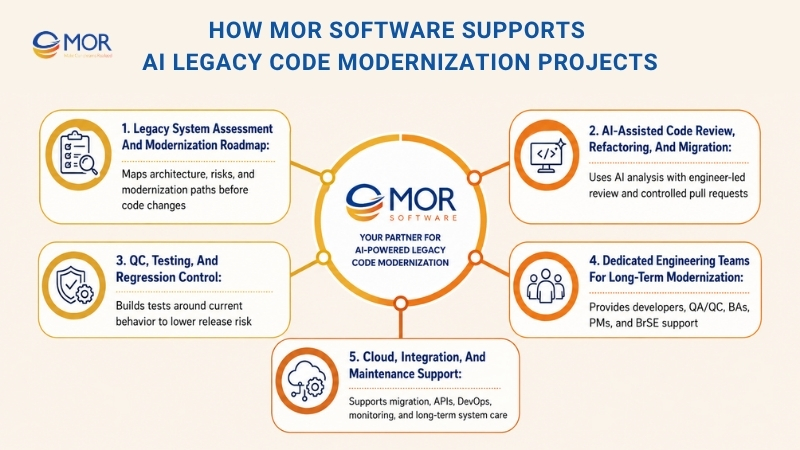
Legacy System Assessment And Modernization Roadmap
Many legacy projects start with one vague request: “We need to modernize this system.”
That is not enough. Before changing code, we help teams understand what the system does, where the risks sit, and which parts carry the most business value.
Our team can review the current architecture, code structure, integrations, database flows, API connections, third-party services, and release process. We also help map pain points, such as slow delivery, fragile deployments, high maintenance work, weak test coverage, or poor documentation.
From there, we help choose the right path. Some systems need refactoring. Some need replatforming. Some should move piece by piece through a strangler pattern. Others may need a rebuild only for selected modules.
The goal is simple: no blind rewrite. No risky “all at once” move. Just a clear plan tied to business risk, system behavior, and delivery goals.
AI-Assisted Code Review, Refactoring, And Migration
AI is useful when it works inside a controlled engineering process. MOR Software can help set up that process for legacy systems across web apps, mobile apps, Salesforce systems, cloud services, and custom enterprise software.
We can use AI-assisted analysis to scan code, explain old logic, group related modules, find repeated patterns, and suggest safer refactor paths. This helps teams see the system faster, especially when documentation is missing or the original offshore AI developers are no longer there.
But AI output should never go straight to production. Our engineers review the code, check business rules, compare outputs, and split changes into small pull requests.
This is how ai legacy code modernization becomes practical. AI speeds up discovery and repetitive work. Engineers keep control over architecture, code quality, and release decisions.
QC, Testing, And Regression Control
Legacy systems often break in places nobody expects. A change in one payment rule may affect reports. A small API update may break a batch job. A cleaned-up function may change an old edge case that users still depend on.
For that reason, testing cannot sit at the end of the project.
MOR Software can help build test plans around current behavior. That may include golden master tests, regression tests, API tests, integration tests, performance checks, and security checks. Our QC team can also help compare old and new outputs before each release.
This gives teams more confidence as modernization moves forward. Code changes become smaller, review becomes clearer, and release risk becomes easier to manage.
Dedicated Engineering Teams For Long-Term Modernization
Legacy modernization often takes more than a few quick sprints. Teams may need to assess the system, add tests, refactor modules, migrate data, rebuild parts of the product, and support new releases over time.
MOR Software can set up dedicated teams for this work. The team may include developers, QA/QC engineers, business analysts, project managers, and BrSE support when needed.
This model works well for businesses that want steady modernization without building a large internal team from scratch. You can start with a focused team for assessment and testing, then scale the team when the roadmap becomes clearer.
Cloud, Integration, And Maintenance Support
Modernization rarely stops at code cleanup. Many projects also need cloud migration, API redesign, data sync, Salesforce ERP integration, DevOps setup, monitoring, and long-term support.
MOR Software can support these parts in one delivery model. We work across web development, mobile development, Salesforce development, offshore development, software outsourcing, QC and testing, and IT consulting.
After release, we can continue supporting the system through maintenance, performance checks, bug fixes, and new module development. That matters because legacy modernization is not a one-time cleanup. It is a step-by-step move toward software that can keep up with the business.
Metrics To Track In AI Legacy Code Modernization
AI legacy code modernization should be measured through outcomes that show whether work is faster, safer, and more useful.
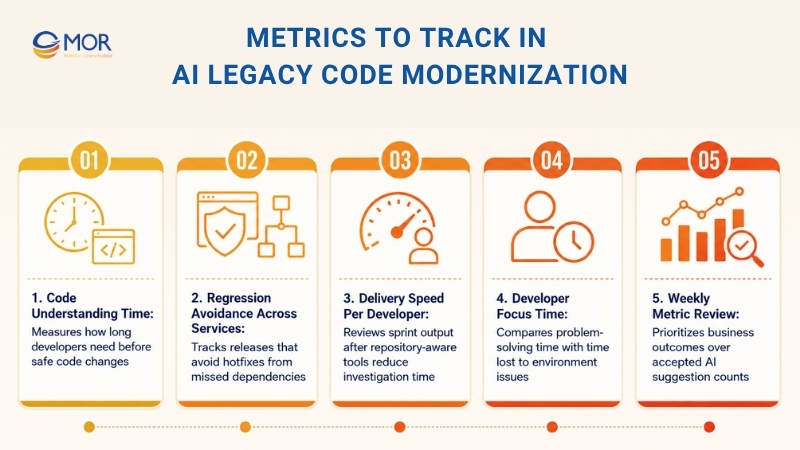
- Code Understanding Time: Track how long developers spend reading legacy code, finding connections, and building enough understanding before making changes. Good tools often cut this time by about 30%.
- Regression Avoidance Across Services: Measure the share of releases that do not need hotfixes for missed dependencies. Before release, context-aware tools should reveal hidden links instead of leaving teams to find them through production alarms.
- Delivery Speed Per Developer: Watch the number of stories each developer completes in a sprint. Teams using repository-aware tools report 20 to 50% faster delivery because they spend less time stopping to ask, “how does this work?”
- Developer Focus Time: Compare time spent solving problems with time spent fighting the environment. Longer focus time is tied closely to job satisfaction and retention.
- Review these numbers every week, and ignore vanity stats like the number of accepted AI suggestions. Business results depend on how well developers work, not how often people click accept.
The main idea is simple: focus on understanding instead of prediction, use real numbers to prove value, and keep only the tools that speed delivery and prevent regressions.
Conclusion
AI legacy code modernization gives businesses a safer way to deal with old systems, technical debt, and rising maintenance costs. The best results come from a clear roadmap, human review, strong testing, and controlled releases. AI can speed up the work, but skilled engineers keep the system stable. If your business needs a trusted team for legacy modernization, contact MOR Software to discuss your project.
"Evolution is not a destination, it is a disciplined journey of innovation."
Phung Van Tu


CEO MOR AI
MOR SOFTWARE
Frequently Asked Questions (FAQs)
What is AI legacy code modernization?
AI legacy code modernization means using AI to read, document, test, refactor, migrate, or rebuild old software systems while engineers still review the code and control every major change.
How does AI help with legacy code modernization?
AI helps teams understand old systems faster by summarizing code, tracing data flows, finding repeated logic, drafting docs, and suggesting safer refactor steps.
Can AI fully replace developers in legacy modernization projects?
No. AI can support developers, but humans still need to review output, check business rules, test behavior, and manage release risk.
What are the main risks of AI legacy code modernization?
The main risk is silent behavior change, where new code looks cleaner but acts differently. Other risks include weak tests, wrong AI assumptions, missed dependencies, and poor rollback plans.
What types of legacy systems can AI help modernize?
AI can help modernize old web apps, mobile apps, monoliths, mainframe systems, internal tools, Salesforce systems, ERP modules, and custom enterprise software.
What should teams do before using AI on legacy code?
Teams should map modules, APIs, databases, batch jobs, dependencies, and user flows, then create behavior baselines with tests and sample outputs.
Is AI better for refactoring or rebuilding legacy systems?
AI can help with both, but refactoring is often safer at the start because it keeps current behavior while improving code structure.
What tools are used in AI legacy code modernization?
Common tools include code assistants, repo search tools, test generators, dependency scanners, static analysis tools, CI tools, security scanners, and migration helpers.
How do you measure success in legacy code modernization with AI?
Teams can track code understanding time, test coverage, defect rate, release speed, rollback rate, change failure rate, and time to restore service after issues.
When should a business start an AI legacy code modernization project?
A business should start when old software slows releases, raises maintenance work, blocks integration, creates security risks, or depends too much on a few people.
Share


Make Our-Dreams Realized


© 2023 . MOR Software. All Rights Reserved
Sitemap
Privacy Policy
Terms of Use

Rate this article
0
over 5.0 based on 0 reviews
Your rating on this news:
Name
*Email
*Write your comment
*Send your comment
1