


Odoo Community vs Enterprise (2026): Full Comparison and Costs
Odoo Community vs Enterprise comes down to licensing, available functions, and long-term operating costs. Community provides a free, open-source ERP foundation, while Enterprise adds paid applications and services. Yet subscription fees represent only part of your ERP budget. Hosting, customization, maintenance, and support also shape the decision. In this guide, MOR Software will compare the two editions to help you choose the right solution for your business.
Key Takeaways
- Odoo Community is free to license and covers core business processes. Enterprise adds more applications, deeper business functions, and official support.
- Community requires you to manage hosting, development, and maintenance. Enterprise includes managed hosting options and vendor-backed upgrade services, subject to your plan.
- The right choice depends on your required modules, technical resources, and three-year total cost of ownership, rather than software licensing alone.
What Is the Difference Between Odoo Community and Enterprise?
The main Odoo Community vs Enterprise difference lies in licensing, functionality, and technical responsibility. Community is the open-source edition, distributed under the LGPLv3 license. Businesses can install it on their own servers, modify its code, and use its core applications without paying an edition license fee.
Enterprise is a licensed version built on the same technical foundation. It adds business applications, richer functions, official support, and access to Odoo's managed hosting services. The commercial modules require a valid subscription, as outlined in Odoo's licensing documentation.
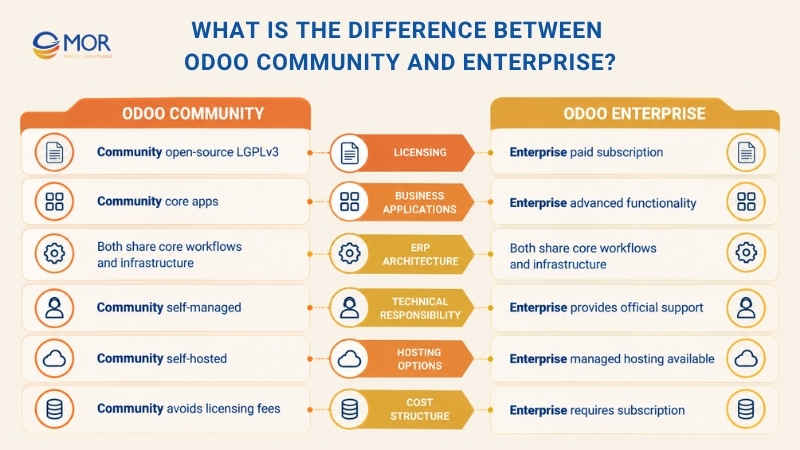
The two editions share the same underlying ERP architecture and many standard workflows. Sales orders, customer records, purchases, and inventory movements follow similar principles, making it possible to move between editions when business needs change.
The Odoo Community edition vs Enterprise decision depends on how much functionality you need and who will manage the system. Community gives technical teams more direct control. Enterprise shifts part of the maintenance and support workload to Odoo.
For businesses evaluating open ERP software, these differences affect implementation budgets and the work required after launch.
Odoo Community vs Enterprise: Key Differences at a Glance
To compare Odoo Community vs Enterprise fairly, start with the capabilities and services included in each edition. The table summarizes the main differences based on Odoo's official editions comparison.
Comparison criteria | Odoo Community | Odoo Enterprise |
Licensing | Free, open-source LGPLv3 | Commercial subscription |
Subscription costs | No edition license fee | Per-user subscription based on plan |
Core ERP applications | CRM, Sales, Purchase, Inventory, Project, and more | Community functions plus extra applications |
Accounting | Invoicing and basic finance workflows | Full Accounting, bank reconciliation, OCR, and detailed reports |
Inventory and manufacturing | Core warehouse and MRP functions | Barcode, Shop Floor, Quality, and PLM |
Odoo Studio | Not included | Available through eligible plans |
Hosting options | Self-hosted or third-party cloud | Odoo Online, Odoo.sh, or self-hosted |
Mobile access | Web browser | Web browser and official mobile apps |
Official support | Community or third-party support | Odoo functional support |
Version upgrades | Managed internally or by a partner | Official database upgrade services |
Best suited for | Businesses with standard processes and technical resources | Businesses requiring more built-in tools and managed services |
The biggest gaps appear in financial management, manufacturing operations, customization, and system administration. A small company with standard workflows may need little beyond Community, but complex business processes often require Enterprise functions.
Odoo Community vs Enterprise: Features by Department
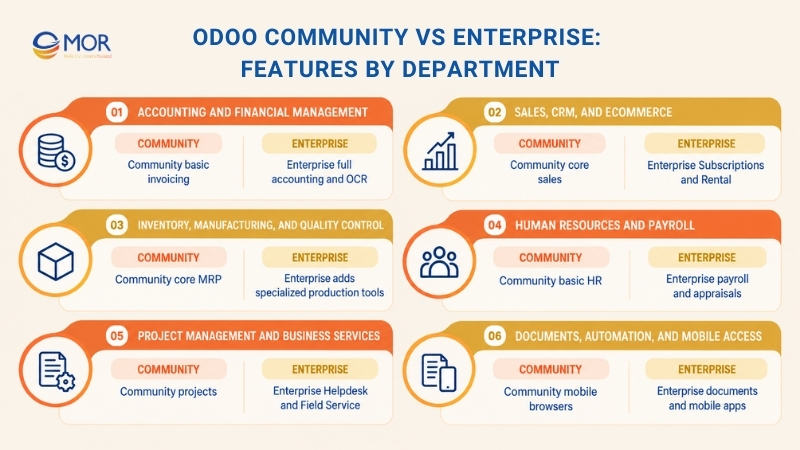
The Odoo community vs enterprise comparison becomes more useful when you examine daily operations. Each department has different requirements, and the presence of an application doesn't always mean both editions have the same functions.
Accounting and financial management
Community covers invoicing, customer payments, vendor bills, and basic financial workflows. These tools work for businesses that handle detailed bookkeeping through another system or a separate accounting provider.
Enterprise adds comprehensive Accounting functions, including general ledger management, bank reconciliation, analytic accounting, financial reports, and OCR-based document processing. Finance teams can manage more tasks inside one ERP system, with less reliance on separate tools.
Local tax rules still need attention. Country-specific accounting reports, e-invoicing, and tax requirements may require localization modules, configuration, or custom development in either edition.
Sales, CRM, and eCommerce
CRM, Sales, Point of Sale, Website, and eCommerce form part of Odoo's shared business application foundation. Teams can track leads, issue quotations, manage sales orders, and process online purchases through connected workflows.
Enterprise expands sales management through applications like Subscriptions and Rental. A business billing customers every month, for example, can use Subscriptions to manage recurring invoices and renewals within Odoo.
Companies running straightforward sales processes may find Community sufficient. If you're comparing separate CRM platforms, our Odoo vs Salesforce guide covers another useful purchasing decision.
Inventory, manufacturing, and quality control
Community includes inventory management, purchasing, and core Manufacturing Resource Planning (MRP). Businesses can maintain stock records, manage bills of materials, and process manufacturing orders.
Enterprise adds Barcode, Shop Floor, Product Lifecycle Management (PLM), and Quality applications. These functions support scanner-based stock operations, production tracking, engineering changes, and formal quality checks.
For instance, a manufacturer operating several production lines may need Shop Floor to record work directly at production stations. Community can manage basic manufacturing orders, but equivalent specialized workflows may require custom modules.
Human resources and payroll
Community includes core HR applications for employee records, recruitment, and time-off management. Smaller teams can maintain staff information and handle routine HR processes without purchasing the commercial edition.
Enterprise adds functions like Payroll, Appraisals, and Referrals. These tools suit companies managing formal employee reviews, payroll operations, and wider HR programs.
Payroll needs vary across countries. Check local tax calculations, statutory reports, and payroll rules before assuming the standard application meets every requirement.
Project management and business services
Community supports Project and Timesheets, allowing service teams to assign tasks, record working hours, and monitor project progress. This may be enough for a small agency or consulting company.
Enterprise extends service operations through Helpdesk, Field Service, Planning, and more detailed project views. Companies managing customer support tickets or on-site technicians gain tools designed for those workflows.
The distinction becomes noticeable when service delivery grows. Tracking internal tasks is relatively simple; managing field appointments, service requests, and team schedules requires a wider set of functions.
Documents, automation, and mobile access
Enterprise includes applications like Documents, Sign, and Knowledge, along with additional automation capabilities. Staff can manage approval documents, sign agreements electronically, and access shared information within Odoo.
Its official Android and iOS applications also support teams working away from their desks. Community remains accessible through mobile browsers, but the mobile experience differs.
Application availability can change between releases. For Odoo 19 Community vs Enterprise comparisons, use the matching version's application list. Odoo introduced version 20 at Odoo Experience on September 24, 2026, making version checks especially relevant for new projects.
Odoo Community vs Enterprise: Pricing and Total Cost
The Odoo Community vs Odoo Enterprise cost comparison starts with licensing, but the final ERP budget includes implementation, hosting, customization, and ongoing support. Community has no license fee, while Enterprise charges per user. The table below illustrates how these expenses can add up over three years.
Estimated three-year cost comparison for a 10-user business (USD)
Cost component | Odoo Community | Odoo Enterprise | Budget consideration |
Software licensing | $0 | $10,800 | Enterprise assumes $30/user/month |
Initial implementation | $10,000 | $8,000 | Configuration, setup, and deployment |
Hosting infrastructure | $4,320 | $0 | Community assumes $120/month; Enterprise uses Odoo Online |
Custom development | $5,000 | $2,000 | Additional modules and workflow changes |
Third-party applications | $0 | $0 | Assumes no paid add-ons |
Integration and migration | $3,000 | $3,000 | Data transfer, system connections, and training |
Maintenance and security | $9,000 | $3,600 | Administration, monitoring, and technical support |
Upgrades | $3,000 | $1,000 | Version migration and custom module testing |
Total three-year TCO | $34,320 | $28,400 | Enterprise costs $5,920 less in this scenario |
Note: These figures are illustrative budget assumptions, not official Odoo quotations or guaranteed market rates. They exclude taxes and assume a small deployment with standard workflows. Actual costs depend on user count, business requirements, hosting, development scope, and the implementation provider.
How Odoo Enterprise pricing works
Odoo Enterprise has Standard and Custom subscription plans. As a 2026 US market reference, Standard pricing is approximately 25–31 per user/month, while Custom is approximately 37–47 per user/month. Actual rates depend on the region, billing cycle, and available discounts.
Check Odoo's official pricing before budgeting. Odoo.sh hosting and implementation services may incur separate charges.
Which edition costs less over three years?
In this example, Enterprise costs $5,920 less because its built-in functions and included hosting limit the need for custom development and technical maintenance.
Community can still cost less for businesses with internal developers and simple workflows. For larger or more complex deployments, compare implementation quotations and ongoing expenses before deciding.
For additional pricing benchmarks, see MOR's Odoo implementation cost guide.
Hosting Options: Odoo Online, Odoo.sh, and Self-Hosting
Hosting determines who manages your ERP infrastructure, security updates, backups, and server performance. Odoo Community vs Enterprise hosting options also affect how easily developers can install custom modules and connect external systems.
Hosting option | Supported edition | Custom modules | Infrastructure responsibility | Best use case |
Self-hosted server | Community and Enterprise | Supported | Internal IT or contracted provider | Businesses requiring direct server control |
Third-party cloud hosting | Community and Enterprise | Supported | Customer and hosting provider | Flexible private-cloud deployments |
Odoo Online | Enterprise | Custom server-side modules not supported | Odoo manages the platform | Standard business workflows |
Odoo.sh | Enterprise with eligible plan | Supported through Git-based development | Odoo manages the platform; customer manages custom code | Projects requiring custom applications |
Odoo online is the managed SaaS option. Businesses access their databases through a browser, and Odoo handles server administration, backups, and platform maintenance. The trade-off is limited support for custom server-side modules.
Odoo.sh provides a managed environment for companies that need custom Python modules, staging environments, and code deployments. Self-hosting gives greater infrastructure control, but your organization or hosting partner must handle more technical work.
Reliability also affects the hosting choice. According to Odoo's Cloud Service Level Agreement, its monthly platform uptime target is 99.9%, equivalent to approximately 45 minutes of unplanned downtime per month, excluding scheduled maintenance. This is a service objective, not a promise that every database will experience zero interruptions.
The right hosting model depends on your security policies, integration requirements, technical team, and budget. A simple ERP rollout may work on Odoo Online, but custom applications often make Odoo.sh or self-hosting a better match.
Customization and Integrations: Where Do They Differ?
Customization determines how well Odoo follows your existing processes. Odoo Community vs Enterprise differs in the tools available for modifying the system, though businesses can extend either edition through software development.
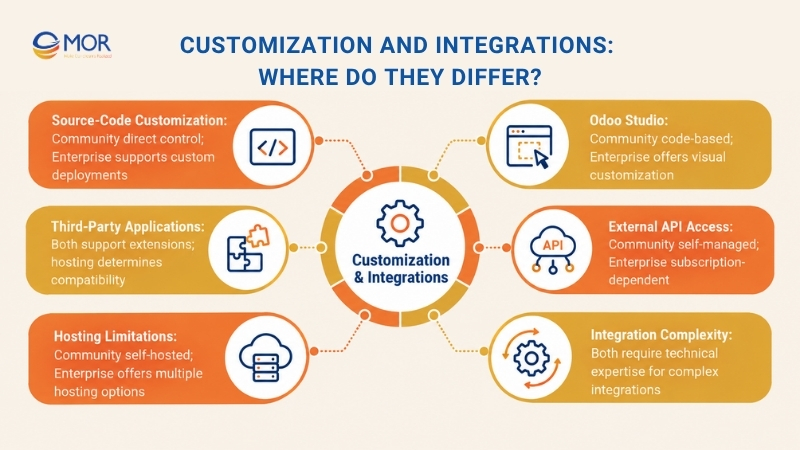
- Source-code customization: Community developers can modify and extend business functions through Python, XML, and custom Odoo modules. This supports complex workflows but requires technical skills and long-term code maintenance.
- Odoo Studio: Enterprise customers on eligible plans can create fields, adjust forms, and build simple applications through a visual interface. More complex business logic still requires developers.
- Third-party applications: The Odoo Apps marketplace contains commercial and open-source extensions. The Odoo Community Association also maintains community-driven modules that extend standard ERP capabilities.
Odoo reports more than 50,000 community-contributed apps on its company information page. That number reflects ecosystem size, not a guarantee that every module is free, supported, or compatible with your deployment. - External API access: Community installations allow developers to build integrations using their own infrastructure. Enterprise's hosted external API entitlement depends on the subscription plan, with the Custom plan providing access to the official external API.
- Hosting limitations: Odoo Online doesn't support conventional custom Python add-ons. Businesses that need server-side modifications can select Odoo.sh or a self-hosted Enterprise deployment.
- Integration complexity: CRM, payment gateways, eCommerce systems, and legacy databases may require middleware, data mapping, and API development. The edition alone doesn't determine the final integration cost.
For organizations needing specialized workflows, our guide to Odoo ERP customization in the US explains the development decisions involved.
Support, Security and Upgrades Compared
Support arrangements affect the time and resources needed to keep an ERP system running. The Odoo Enterprise vs Odoo Community comparison becomes especially relevant when companies lack a dedicated technical team.
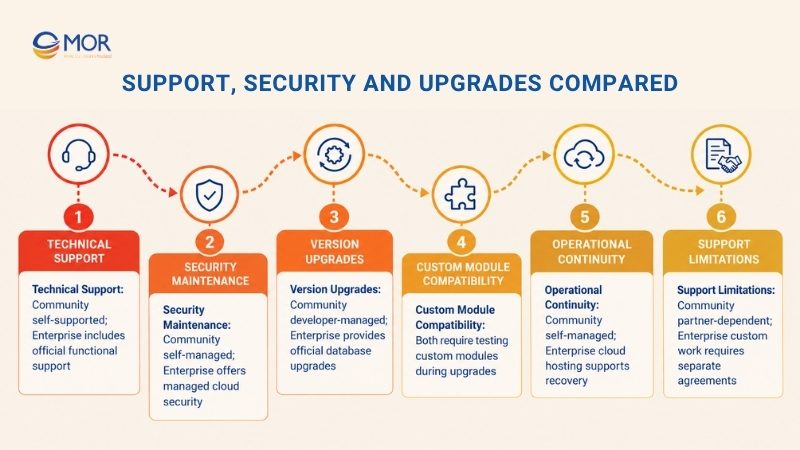
- Technical support: Community users rely on documentation, public forums, internal developers, or paid implementation partners. Enterprise subscriptions include official functional support from Odoo for covered standard functions.
- Security maintenance: Self-hosted installations require someone to manage server patches, access controls, monitoring, and backups. Odoo manages more infrastructure security tasks for databases hosted on its cloud platforms.
- Version upgrades: Community upgrades require internal technical work or support from an external provider. Enterprise customers have access to Odoo's official database upgrade services under applicable subscription terms.
- Custom module compatibility: Custom code and third-party extensions need compatibility reviews when moving to a newer Odoo release. Official database conversion doesn't automatically cover every external module.
- Operational continuity: Server incidents, failed upgrades, and data recovery need clear ownership. Businesses should define response responsibilities and recovery procedures before launch.
- Support limitations: Standard Enterprise support covers defined software functions and qualifying issues. Custom development, workflow changes, and other consulting work may require a separate service agreement.
For example, a company using heavily customized Community modules must test those modules during a major upgrade. The same principle applies to Enterprise deployments containing custom code.
Odoo's Enterprise Subscription Agreement sets out the scope of official support and upgrade services, including the customer's responsibility for testing and unsupported extensions.
Practical Checklist Before Selecting an Odoo Edition
Your ERP requirements should determine the edition. A Community vs enterprise Odoo evaluation works best when you compare real workflows, technical resources, and the cost of maintaining the system over time.
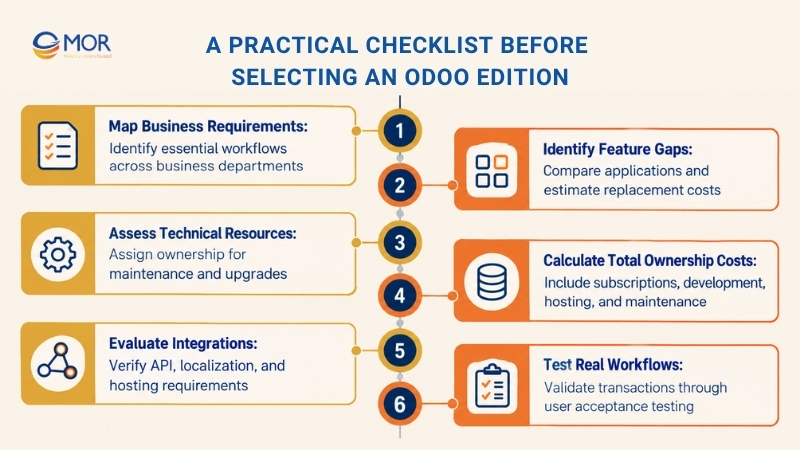
- Map business requirements: List the processes your ERP must handle, including sales, purchasing, accounting, inventory, and manufacturing. Mark each function as required or optional.
- Identify feature gaps: Check which applications are included in Community and which require Enterprise. Estimate the cost of developing or purchasing replacements for missing functions.
- Assess technical resources: Identify who will manage server administration, custom modules, security updates, and upgrades. Community works better when these responsibilities have clear owners.
- Calculate total ownership costs: Build a three-year budget covering subscriptions, development, hosting, integrations, maintenance, training, and migration.
- Evaluate integrations: Confirm API needs, accounting localization, third-party software compatibility, and hosting limits before selecting an edition.
- Test real workflows: Run representative transactions in a demo or staging database. Include finance staff, warehouse users, and operational managers in user acceptance testing.
Businesses with complex requirements can use professional Odoo consultancy services to review gaps before development begins.
How MOR Software Can Help Evaluate Your Odoo Options
Choosing between Odoo Community and Enterprise requires a clear understanding of your business processes, technical resources, and long-term costs. Community provides open-source flexibility, while Enterprise adds licensed applications and vendor services. At MOR Software JSC, we help businesses evaluate these differences and select an ERP solution that fits their operational needs and growth plans.
Our Odoo ERP development services cover consulting, implementation, customization, integration, and ongoing technical support. We assess your existing systems and business requirements before recommending an implementation approach.
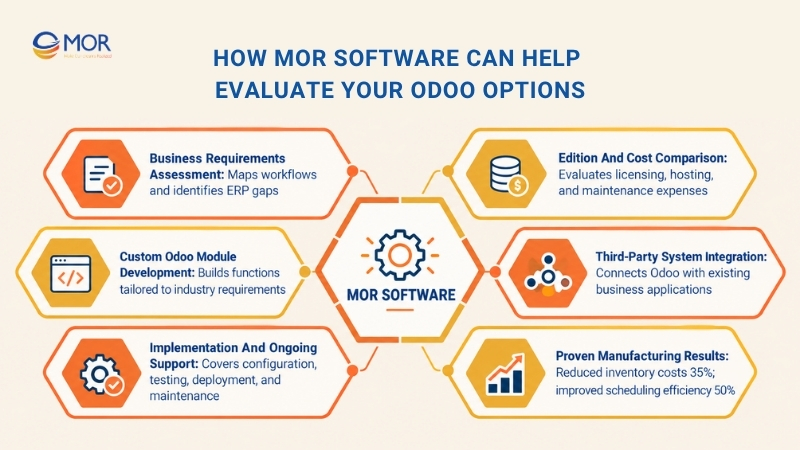
- Assess business requirements and ERP suitability: Our consultants analyze current workflows, identify operational gaps, and map business processes across Sales, Purchase, Inventory, Accounting, and Manufacturing. We determine which requirements each Odoo edition can support.
- Compare implementation costs and technical requirements: We assess licensing, hosting, customization, and maintenance expenses to help businesses understand the total cost of ownership. This includes evaluating the trade-offs between Community's development flexibility and Enterprise's built-in capabilities.
- Develop custom Odoo modules and integrations: Our developers build industry-specific modules, extend existing functions, and connect Odoo ERP with third-party applications. We design integrations around your current IT infrastructure and business workflows.
- Support implementation and long-term maintenance: Our team handles system configuration, testing, user training, and deployment. Through Application Management Services (AMS), we also provide post-launch troubleshooting, performance monitoring, module upgrades, and technical support.
Our Odoo implementation experience spans manufacturing and distribution. In one manufacturing project, our team implemented Odoo Manufacturing, Inventory, and Accounting modules, helping the client cut inventory holding costs by 35% and improve production scheduling efficiency by 50%.
Explore our Odoo development services or contact us for a free consultation to discuss your ERP requirements, estimate implementation costs, and plan a solution that supports future growth.
Conclusion
Odoo Community vs Enterprise depends on your operational requirements, budget, and technical capacity. Community suits businesses seeking licensing flexibility and direct system control. Enterprise provides broader functionality and managed services for teams that need them. A sound ERP decision starts with accurate requirements and realistic ownership costs.
MOR Software can assess your implementation needs and plan the technical work. Contact us to discuss your Odoo project and request a tailored consultation.
"Mr. Cong’s guiding philosophy is simplicity, believing that the simplest solutions are often the most powerful. He sees trust, empowerment, and the opportunity to demonstrate one’s abilities as the key elements that set MOR apart from traditional IT companies."
Mac Tien Cong


Division Manager (Hanoi Branch)
MOR SOFTWARE
Frequently Asked Questions (FAQs)
Is Odoo Community completely free to use?
Odoo Community has no edition licensing fee, and its source code is publicly available under LGPLv3. Yet businesses still pay for hosting, implementation, custom development, and maintenance. The total cost depends on project complexity and available technical resources.
What is the biggest difference between Odoo Community and Enterprise?
The main difference is access to commercial applications and services. Community provides core ERP functions without licensing fees. Enterprise adds more built-in tools, official support, managed hosting options, and database upgrade services under a paid subscription.
Which Odoo modules are not included in Community Edition?
Community doesn't include standard Enterprise applications like Odoo Studio, Helpdesk, Sign, PLM, and the full Accounting suite. Exact application availability depends on the version. Third-party modules may provide similar functions, but licensing, compatibility, and support vary.
Does Odoo Community include accounting functionality?
Community includes invoicing and basic financial workflows. It lacks many functions available in Enterprise's full Accounting application, including comprehensive financial reporting and built-in bank reconciliation tools. Third-party modules can extend Community accounting, depending on local requirements.
Can Odoo Community handle inventory and manufacturing?
Yes. Community includes Inventory, Purchase, and core Manufacturing functions. Companies can manage stock, bills of materials, and production orders. Enterprise adds specialized tools like Barcode, Shop Floor, Quality, and PLM for more complex warehouse and production operations.
How much does Odoo Enterprise cost per user?
Odoo Enterprise uses per-user subscription pricing. Rates depend on the Standard or Custom plan, billing cycle, location, and promotional terms. Implementation services, custom modules, and certain hosting arrangements may incur separate fees. Check Odoo's official pricing page for current rates.
Is Odoo Studio available in Community Edition?
No. Odoo Studio is a commercial customization application available through eligible Enterprise subscription plans. Community users can still modify their ERP through Python development, XML views, and third-party modules, but these changes require technical skills.
Can Odoo Community run on Odoo Online or Odoo.sh?
Community can run on self-managed servers or third-party cloud infrastructure. Odoo Online and Odoo.sh are commercial hosting services associated with Enterprise subscriptions. Businesses using Community need to arrange their own hosting and technical maintenance.
Can I upgrade from Odoo Community to Enterprise without losing data?
Yes. Odoo supports transitions from Community to Enterprise, subject to version compatibility and technical requirements. Back up the database and test custom modules before upgrading. For complex deployments, review our guide to Odoo migration in the US.
Is Odoo Enterprise worth the cost for a small business?
Enterprise can be worth the subscription when a small business needs full accounting, no-code customization, or vendor support. Community may be more economical for standard workflows backed by capable technical staff. Compare three-year ownership costs before deciding.
Share


Make Our-Dreams Realized


© 2023 . MOR Software. All Rights Reserved
Sitemap
Privacy Policy
Terms of Use

Rate this article
0
over 5.0 based on 0 reviews
Your rating on this news:
Name
*Email
*Write your comment
*Send your comment
1