


Odoo Project Management: Business Guide for 2026
Projects become hard to control when tasks sit in one tool, timesheets in another, and client updates live inside email threads. Odoo project management brings this work into the wider Odoo ERP system, connecting delivery with people, time, documents, costs, and business data. In this guide, MOR Software will explain the main functions, real workflows, setup choices, business uses, and implementation practices that matter in 2026.
Key Takeaways
- Odoo connects project planning, tasks, dependencies, timesheets, documents, reporting, and related ERP records inside one business platform.
- Kanban, Gantt, Calendar, List, Graph, and Pivot views give teams different ways to control schedules, workload, progress, and project data.
- The strongest results come from mapping real processes before configuration, setting clear ownership rules, and connecting Project with the Odoo apps your operation already needs.
What Is Odoo Project Management?
Odoo project management is Odoo ERP's system for planning projects, assigning work, tracking time, coordinating teams, and following project performance. The Odoo project management module organizes work through projects, tasks, stages, activities, milestones, subtasks, and dependencies.
Kanban provides the main visual task workflow. Teams can move tasks across stages, assign owners, set priorities, add tags, and monitor status without opening a separate scheduling tool.
Other views serve different jobs. Gantt maps tasks against dates and dependencies, Calendar focuses on deadlines, List supports detailed filtering and bulk work, and Graph or Pivot views support analysis. Odoo also records project updates, resources, milestones, costs, revenue, and profitability when the related apps are active.
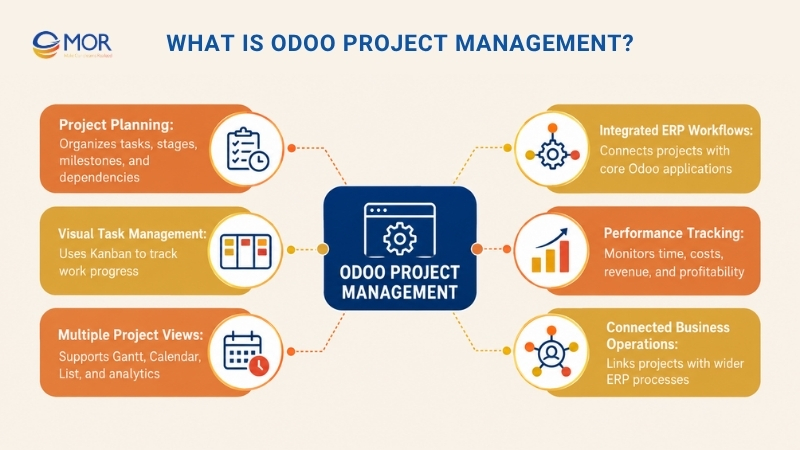
Project sits inside the broader Odoo ERP suite. Sales, Timesheets, Planning, Expenses, Field Service, Helpdesk, Accounting, and Documents can share records with project workflows rather than passing files between separate systems.
That wider ecosystem has reached considerable scale. Odoo's current company data reports 28 million users, 8,000+ employees, 21,000+ partners, and 50 main applications.
Teams assessing Odoo for project management should focus on that connected model. A service company may link project hours to invoices, whereas an engineering team may care more about dependencies, resource planning, documents, and milestones.
This also changes how Odoo fits searches for software open source project management tools. Odoo extends beyond task tracking because Project can sit beside CRM, finance, inventory, purchasing, manufacturing, and service operations in the same ERP environment.
Core Features of Odoo Project Management
The main Odoo project management features cover much more than a digital task board. Odoo structures the full flow around project creation, work assignment, scheduling, communication, time, automation, reporting, and connections with other apps.
The practical value appears when those functions follow the way your teams already deliver work. A well-built workflow can show who owns a task, what blocks it, how long it took, what it cost, and what happens after completion.
Create Projects, Tasks, and Reusable Templates
Project setup establishes the rules that later control work. Odoo lets teams create a project, define its basic information, then break delivery into tasks and subtasks.
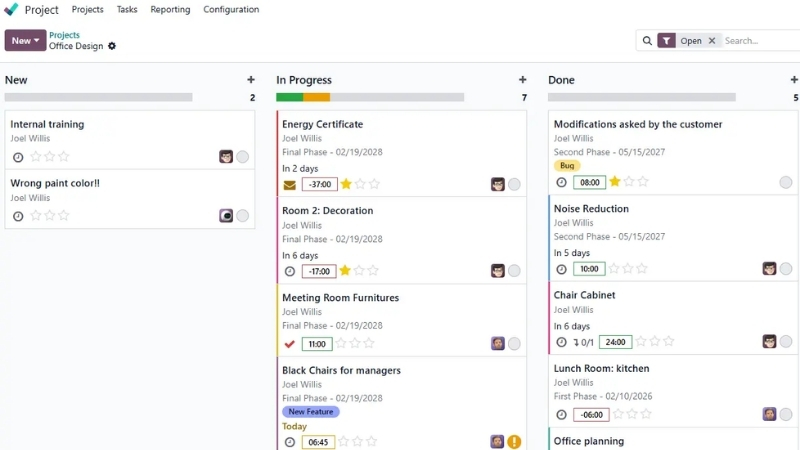
- Set up the project: Define the project name, customer, responsible manager, planned dates, allocated hours, tags, visibility, and related settings. Keep fields tied to decisions that managers actually need to make.
- Break work into tasks: Add assignees, descriptions, allocated time, deadlines, tags, and priority. Task forms can also hold customer and sales-order information for billable projects.
- Structure repeatable work: Use project templates, recurring tasks, and subtasks where the same workflow returns each week, month, client engagement, or service cycle.
- Capture work through different channels: Staff can create tasks manually, but Odoo can also turn incoming emails or website-form submissions into tasks. Email subjects, message bodies, senders, and recipients can feed the task record automatically.
A consulting firm, for instance, could create one template containing discovery, specification, client approval, delivery, UAT, and handover tasks. Each new engagement starts with the same structure instead of rebuilding the board.
Manage Stages, Priorities, Deadlines, and Dependencies
Tasks need structure after creation. Odoo project management gives teams controls for stages, status, priority, deadlines, subtasks, milestones, and dependency relationships.
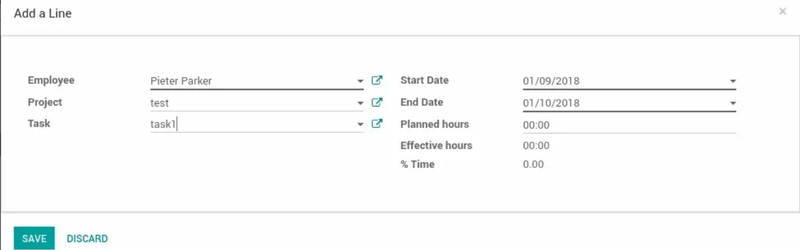
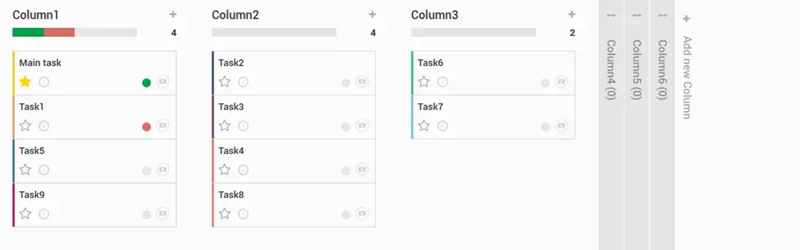
- Shape task stages: Build stages around real work states like Backlog, Analysis, Development, Review, UAT, and Done. Keep the number manageable so the board reflects progress rather than internal bureaucracy.
- Signal priority and status: Stars, tags, assignees, status values, and deadlines make urgent or delayed tasks visible. Overdue dates can surface directly in project views.
- Break complex work down: Subtasks separate a large deliverable into smaller units, whereas milestones mark major progress points across the wider project.
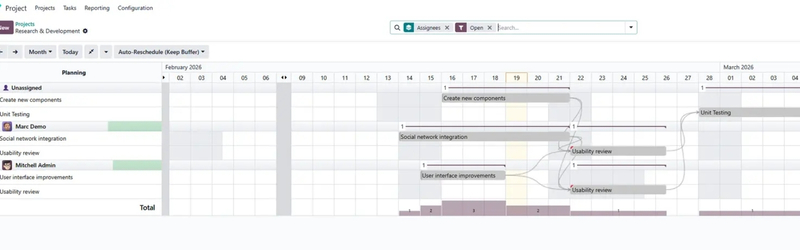
- Control execution order: Link successor tasks to predecessor tasks when one activity can't start before another finishes. The Gantt view can display these links visually.
- Handle blocked work: Odoo can place successor tasks in a Waiting state until predecessor tasks reach an accepted completion status. That stops dependent work from being treated as ready too early.
Dependencies become particularly useful for implementation projects. Data migration shouldn't move into final validation before cleansing finishes, and go-live shouldn't begin before UAT approval.
Plan Work in Kanban, Gantt, Calendar, and List Views
Different roles need different views of the same project. A developer may work from Kanban all day, yet a project lead may spend more time in Gantt and reporting.
- Kanban: Organize tasks by stage and move cards through the workflow using drag and drop. Filters can narrow work by assignee, deadline, tag, or other criteria.
- Gantt: Place tasks on a timeline, inspect dependencies, review planned dates, and move work when schedules change. Resource conflicts become easier to spot when several tasks overlap.
- Calendar: Display deadline-driven work by date. Teams can reschedule tasks by moving them to another day.
- List: Review detailed task information, filter records, group them, edit fields, or handle larger sets of records in bulk.
- Graph and Pivot views: Analyze project data across task stages, assignees, projects, tags, time, or other business dimensions.
The choice isn't permanent. Staff can switch views based on the decision in front of them, which makes the same project data useful at operational and management levels.
Collaborate Through Chatter, Followers, and Documents
Project information loses value when decisions live in private inboxes. Odoo addresses this through Chatter, followers, activities, attachments, access controls, and customer portal functions.
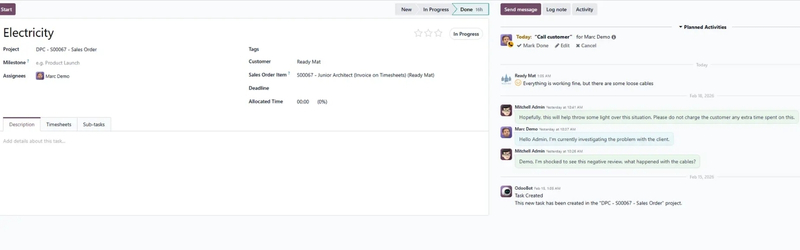
- Centralize project conversations: Chatter records messages, notes, mentions, emails, and activity history against the relevant task.
- Keep stakeholders informed: Followers receive updates tied to the records they follow. Teams can control who needs visibility rather than copying whole departments into every discussion.
- Work with external users: Project visibility rules and portal access let clients or other outside collaborators see approved project information according to assigned permissions.
- Keep files beside the work: Attach specifications, images, plans, reports, or supporting files to tasks. Incoming email attachments can also remain attached to the task record.
- Keep an audit trail: Recorded changes make handovers easier. A colleague who joins midway can review earlier discussion and project history instead of chasing background through chat messages.
That structure becomes useful when the original task owner is unavailable. The project record still holds the discussion, files, dates, and decision history.
Track Time, Assignments, and Team Capacity
Time data connects project activity with workload and commercial results. Odoo Timesheets can record effort against projects and tasks, then feed related planning or billing workflows.
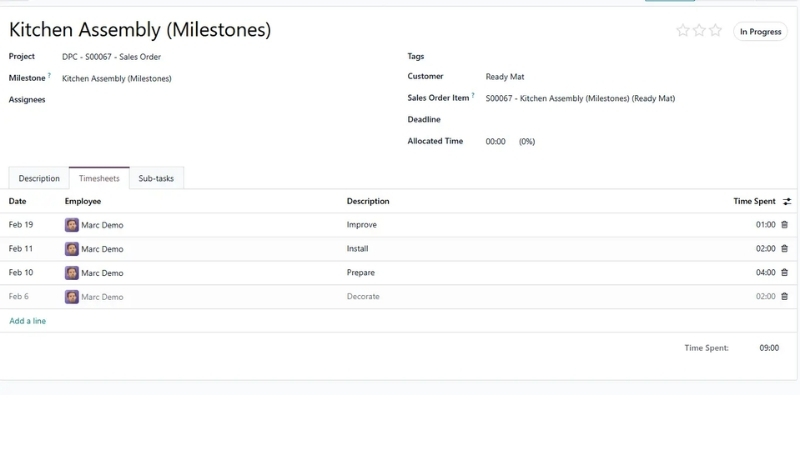
- Record task effort: Staff log time against the task they worked on. This gives managers a clearer view of where project hours actually went.
- Separate planned and actual work: Allocated time provides an estimate, whereas timesheets record real effort. The difference helps expose tasks that regularly run over plan.
- Track billable work: Service businesses can connect recorded hours to client billing rules when the related Sales and invoicing setup is in place.
- Review team workload: Planning data helps managers see assignments across staff and projects rather than treating each project in isolation.
- Prevent overload: When an employee has too much scheduled work, managers can move dates, change ownership, or rebalance assignments before deadlines start slipping.
For an Odoo project manager, this planned-versus-actual view is particularly useful. Persistent overruns often point to weak estimates, unclear scope, missing skills, or tasks that are too large.
Automate Repetitive Project Work
Repetitive coordination consumes time quickly. Odoo can automate recurring tasks, task intake, activities, reminders, assignments, emails, and rule-based actions where the database configuration supports them.
- Repeat standard tasks: Set recurring work for routine reviews, service visits, monthly reporting, maintenance, or other repeat cycles.
- Trigger automatic actions: Rules can create records, change fields, assign people, schedule activities, or send messages after defined events.
- Turn incoming requests into tasks: Email aliases and website forms can create project tasks without staff copying the information manually.
- Schedule follow-up activities: Calls, meetings, reminders, due dates, and owners can sit directly against a project or related record.
- Cut admin work: Keep automation focused on predictable actions. Human review still belongs in approvals, scope changes, risk decisions, and unusual exceptions.
AI adds another layer to project work. Our guide to AI in project management covers where AI can support planning, analysis, communication, and project decisions without turning every workflow into an automated black box.
Monitor Progress, Budgets, and Profitability
Completion percentage alone doesn't tell managers whether a project is healthy. Odoo project management can connect progress data with time, costs, revenue, resources, milestones, and other operational records.
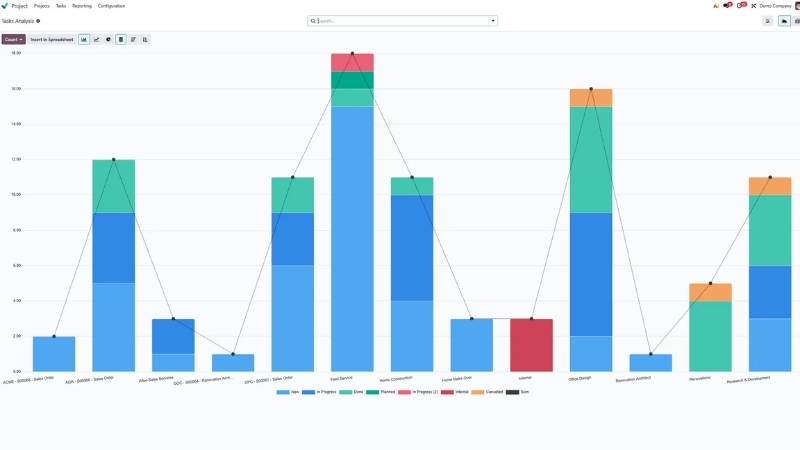
- Follow project progress: Review task stages, milestones, project updates, blocked work, overdue items, and current status.
- Track time performance: Compare allocated hours against recorded effort to identify tasks consuming more capacity than expected.
- Watch financial performance: Connected Timesheets, Expenses, Sales, Purchases, budgets, and accounting records can support project cost and profitability analysis.
- Analyze delivery data: Dashboards, task analysis, Graph views, Pivot views, and reporting tools help managers study recurring patterns rather than inspecting tasks one by one.
- Catch problems earlier: A project showing rising hours, overdue dependencies, or weak margin needs action before the final delivery date.
Good reporting supports better project decisions, but tools don't replace management skill. PMI's 2024 Pulse of the Profession reported an average 73.8% project performance rate across surveyed respondents, with project performance measured through the share of completed projects that met business goals.
Connect Project With Other Odoo Apps
The strongest case for Odoo ERP project management appears when Project needs to exchange information with the rest of the business. Connected apps remove many manual handoffs between delivery, finance, service, and operations.
- Timesheets: Record the time employees spend on project tasks and use it for workload or billing analysis.
- Sales: Link project work with sales orders, customer commitments, and billable services.
- Planning: Allocate people and working time across projects.
- Field Service: Connect project work with interventions performed at customer or field locations.
- Expenses and Accounting: Bring project-related costs, expenses, invoices, and financial records into wider finance processes.
- Helpdesk: Convert support tickets into project tasks, or move task information back into service workflows.
- Documents: Keep project files in a dedicated workspace and connect them with the relevant operational records.
Before adding external platforms, map what Odoo already covers. Projects that still need a legacy ERP, warehouse platform, BI tool, payment service, or industry application should define data ownership before integrating Odoo with existing ERP systems.
Industries That Benefit from Odoo Project Management
Odoo project management fits businesses where delivery depends on tasks, deadlines, people, client work, time records, costs, or field activities. Fit gets stronger when those projects already depend on other Odoo data.
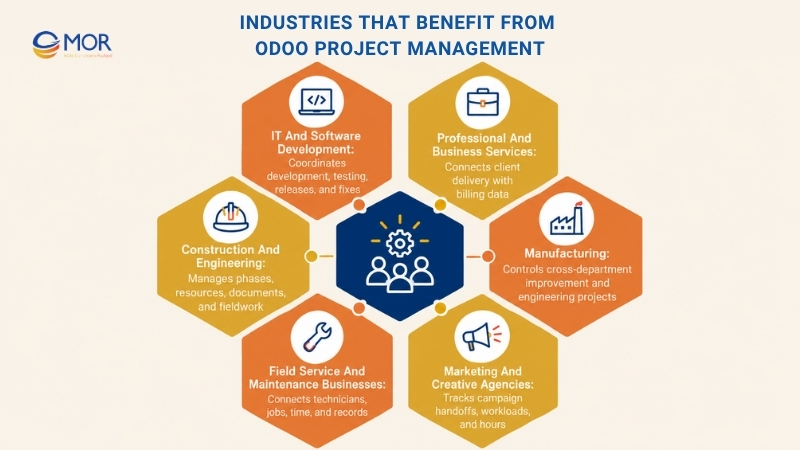
IT and Software Development
Software teams need clear ownership across specifications, development, QA, UAT, releases, and fixes. Odoo can arrange that work around tasks, subtasks, stages, dependencies, timesheets, documents, and deadlines.
- Sprint and task coordination: An Odoo agile project management setup can map backlog work, development, code review, testing, UAT, and release stages.
- Time and delivery tracking: Teams can connect planned hours with timesheets and inspect repeated overruns.
- Client collaboration: Chatter, portal access, documents, and project updates keep approvals tied to delivery records.
Professional and Business Services
Consulting firms, agencies, advisory teams, and other service businesses often sell time, defined deliverables, or milestone-based engagements. Project records can connect delivery activity with customer and billing data.
- Client project tracking: Organize engagements around tasks, milestones, dates, owners, and agreed outputs.
- Billable time control: Record staff time against client work and connect eligible hours with commercial records.
- Project profitability: Review labor effort, expenses, sales values, and margin before the engagement closes.
Construction and Engineering
Construction and engineering projects depend heavily on sequence, deadlines, documentation, resource planning, and field coordination. Gantt, dependencies, documents, milestones, and Field Service links match these needs well.
- Project phase planning: Map design, review, procurement, site work, inspection, and handover against dates and predecessor tasks.
- Resource coordination: Use Planning to assign engineers, technicians, or site staff across active work.
- Field coordination: Connect project records to on-site interventions where field activity forms part of delivery.
Manufacturing
Manufacturing teams also manage work outside normal production orders. Plant upgrades, engineering changes, new-product introductions, equipment projects, and process-improvement programs all need project control.
- Internal project control: Track engineering and improvement activities outside standard production transactions.
- Cross-team coordination: Connect project work with Manufacturing, Purchase, Inventory, Expenses, Planning, or Sales when the project touches those processes.
- Milestone visibility: Give management one view of major dates and responsibilities across departments.
Field Service and Maintenance Businesses
Service teams need to connect planned jobs with technicians, customer records, field work, time, documents, and follow-up actions. Odoo Project and Field Service can support that relationship.
- On-site work coordination: Link work packages to assigned staff, tasks, activities, and deadlines.
- Resource planning: Schedule technicians against capacity and expected workload.
- Centralized job records: Keep notes, files, time, customer messages, and follow-up activity attached to the work.
Marketing and Creative Agencies
Campaign delivery usually contains many small handoffs: briefs, copy, design, review, approval, publishing, and performance reporting. A project board makes ownership visible without forcing teams into spreadsheets.
- Campaign workflow management: Map deliverables through review and approval stages.
- Workload visibility: Check who owns each item and where deadlines conflict.
- Time and client reporting: Record project hours for workload analysis, retainer control, or billing.
What Odoo Project Management Can Improve for Your Team
A useful Odoo project management review should judge operating results rather than count screens and buttons. The real test is whether the system gives teams better control over work, decisions, time, and money.
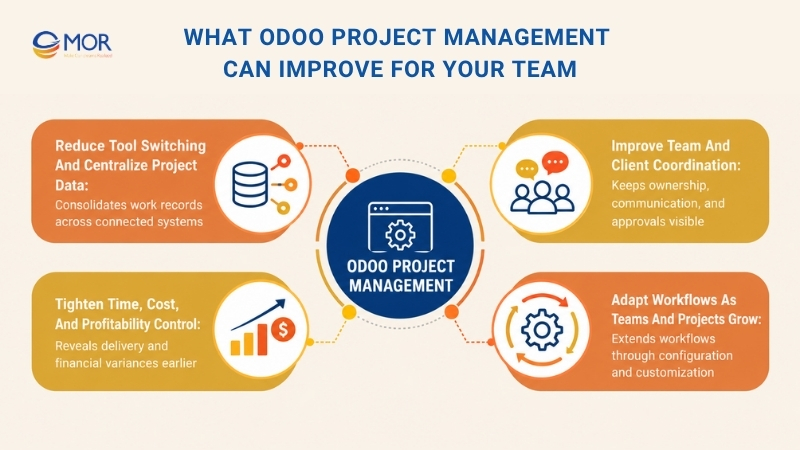
Reduce Tool Switching and Centralize Project Data
Disconnected project tools create hidden admin work. Staff copy status updates between chat, spreadsheets, timesheets, email, file storage, and finance systems, often without noticing how much time that work consumes.
Asana's Anatomy of Work research reports that knowledge workers spend 60% of their time on 'work about work', including status chasing, tool switching, and unnecessary coordination.
Odoo can't remove every administrative task. It can place tasks, communication, documents, time, customer information, and related ERP records closer together, which cuts repeated entry and gives managers a more consistent project record.
Improve Team and Client Coordination
Ownership becomes easier to manage when every task shows its assignee, deadline, status, activity history, and related discussion. Chatter keeps questions next to the work rather than sending staff back through old chat threads.
Client access can also stay controlled. Portal and visibility settings let external users see approved project information without giving them the same access as internal employees.
That helps during handovers too. When one person leaves a project, the next person can read recorded decisions and attached files instead of rebuilding the history through calls and forwarded emails.
Tighten Time, Cost, and Profitability Control
A project can finish on time and still lose money. Managers need planned hours, recorded hours, expenses, revenue, billable work, and related project costs early enough to act.
Timesheets provide the operational side of that picture. Sales, Expenses, Accounting, Purchase, and other connected apps can add the financial side when the project structure requires them.
The practical signal is variance. If a task planned for 20 hours repeatedly takes 35, management can revisit estimates, scope, staffing, training, or the work process before the same gap spreads into the next project.
Adapt Workflows as Teams and Projects Grow
Small teams often begin with a basic Kanban board. Growth brings more roles, approvals, project types, customer access rules, integrations, reporting needs, and recurring work.
Odoo supports that growth through templates, stages, custom fields, dependencies, automation, apps, and custom modules. Yet customization needs discipline. Every added field or rule should solve a real operating requirement.
When standard configuration stops fitting, Odoo ERP customization for project workflows can extend the system without turning the database into a collection of one-off fixes.
Odoo Project Management Setup Checklist Before Go-Live
A weak setup can make good software harder to use. Teams should settle ownership, stages, access, task intake, timing rules, connected apps, and reporting before opening the system to the whole business.
Use the Odoo project management documentation as a technical reference, then test those settings against your own operating rules. A real project usually exposes gaps faster than a long configuration meeting.
Setup Area | What to Configure | Why It Matters |
Project scope and ownership | Define project types, owners, responsibilities, expected outputs, and escalation paths. | Prevents teams from using the same project structure for unrelated work. |
Core project fields | Set project manager, customer, planned dates, allocated hours, tags, and company where relevant. | Gives managers consistent fields for filtering, planning, and reporting. |
Visibility and external access | Decide which projects are private, internal, or shared with portal users. Set collaborator access levels. | Protects internal records and limits client access to the right information. |
Task workflow | Configure stages, statuses, assignees, deadlines, priorities, tags, and completion rules. | Keeps Kanban and reporting tied to real work states. |
Task intake | Decide when staff create tasks manually and when email aliases or website forms create them. | Prevents duplicate intake paths and missing requests. |
Work structure | Configure subtasks, recurring tasks, milestones, and dependencies where the process needs them. | Makes complex or repeating work easier to control. |
Time and commercial rules | Set allocated hours, timesheets, Planning, billing logic, Expenses, Sales, or Accounting connections. | Connects delivery activity with capacity and project economics. |
Management controls | Configure activities, dashboards, reports, filters, saved views, and useful top-bar records. | Gives managers a repeatable way to review project health. |
Run one representative workflow before broad rollout. Pick a project that contains real users, dates, approvals, timesheets, documents, dependencies, and reporting needs.
Then document what changes. MOR Software's guide to Odoo implementation methodology explains why process mapping, testing, UAT, training, and controlled go-live matter across wider Odoo deployments.
Best Practices for Executing Odoo Project Management Successfully
Good Odoo project management starts before the team moves its first Kanban card. Define the process, ownership, measurement rules, and exception handling first, then configure Odoo around those decisions.
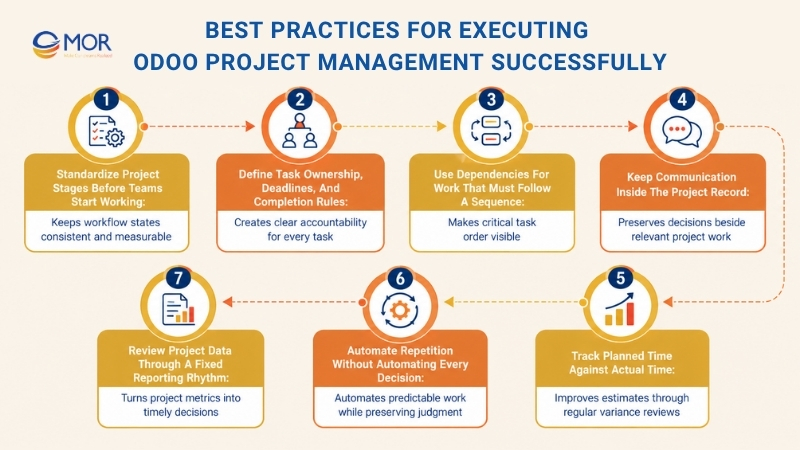
Standardize Project Stages Before Teams Start Working
Stage names should describe a meaningful change in work state. If one department treats 'Review' as internal QA and another uses it for client approval, reports quickly become misleading.
- Map the real workflow: Follow how work actually moves between roles, not how an old spreadsheet labels it.
- Keep stage definitions consistent: Give each stage a documented entry and exit condition.
- Avoid excessive stages: Too many columns slow daily work and hide the stages managers really need to watch.
Standard templates help when several projects use the same delivery model. Separate templates make more sense when workflows differ materially.
Define Task Ownership, Deadlines, and Completion Rules
Every active task needs a person accountable for moving it forward. Contributors can still collaborate, but one visible owner prevents the familiar 'someone else is handling it' problem.
- Assign one clear owner: Keep accountability visible even when several specialists contribute.
- Set realistic deadlines: Base dates on workload, dependency order, approval time, and resource capacity.
- Define done: State what evidence, approval, test, or deliverable must exist before the task closes.
A deadline without a completion rule creates false progress. Teams may mark work complete even though review or client acceptance is still pending.
Use Dependencies for Work That Must Follow a Sequence
Dependencies belong on work where order changes the outcome. Don't connect every task to every other task simply because Gantt supports it.
- Map predecessor tasks: Identify the activities that truly block later work.
- Use Gantt for timing: Review dependency chains across teams when several dates interact.
- Resolve blockers early: Treat Waiting tasks as management signals rather than normal backlog items.
A migration project gives a simple example: cleansing must finish before final import validation. Linking those tasks makes the sequence visible to the full team.
Keep Communication Inside the Project Record
Important project decisions need a durable home. Chatter works best when teams record approvals, scope clarifications, blockers, and delivery questions against the task they affect.
- Use Chatter for project history: Keep decisions and work discussions tied to records.
- Control followers: Add people who need updates and remove those who don't.
- Attach documents to the right task: Store specifications, evidence, designs, and handover files where the work happened.
This habit pays off months later. Teams can reconstruct why a decision was made without searching across personal inboxes or chat channels.
Track Planned Time Against Actual Time
Estimates get better only when teams compare them with reality. Record planned hours before work starts, then keep timesheets current enough for managers to act during delivery.
- Estimate before work starts: Use allocated hours where time affects capacity, cost, or billing.
- Record timesheets consistently: Choose a simple time-entry rule that staff can follow every day.
- Review variances: Repeated gaps should feed future estimates, staffing choices, and scope discussions.
Don't wait for project close. Weekly variance reviews can expose a task consuming twice its planned effort when there is still time to respond.
Automate Repetition Without Automating Every Decision
Automation works best on predictable work. Recurring tasks, reminders, assignments, and intake rules can remove routine clicks without hiding project risk.
- Automate predictable actions: Start with repeat work that follows clear conditions.
- Keep exceptions visible: Leave scope, risk, quality, and approval decisions in human hands.
- Review rules periodically: Remove automation that no longer reflects the team's process.
Too much automation creates its own admin problem. A smaller set of trusted rules usually works better than dozens of triggers nobody wants to touch.
Review Project Data Through a Fixed Reporting Rhythm
Dashboards become useful when the team knows when and why to review them. Pick a reporting rhythm that matches project speed: daily for urgent delivery, weekly for standard projects, or milestone-based for slower work.
- Check delivery metrics regularly: Review overdue tasks, milestones, blockers, workload, and dependency risk.
- Watch financial signals: Follow time, costs, revenue, expenses, and profitability where those records are connected.
- Act on exceptions: Spend review time on projects outside agreed thresholds instead of reading every healthy task.
The report should lead to a decision. Otherwise, it becomes another dashboard everyone opens and nobody uses.
Streamline Odoo Project Workflows With MOR Software
Standard Odoo fits many project processes, but some businesses need Project tied into wider ERP operations, legacy systems, custom approvals, or industry rules. MOR Software JSC supports this work through Odoo consulting and implementation, module development, technical resources, and Application Management Services.
Our approach starts with business processes, then moves into configuration and Odoo software ERP development. That order matters when Odoo project management must sit beside Sales, Purchase, Inventory, Accounting, Manufacturing, Logistics, or outside systems.
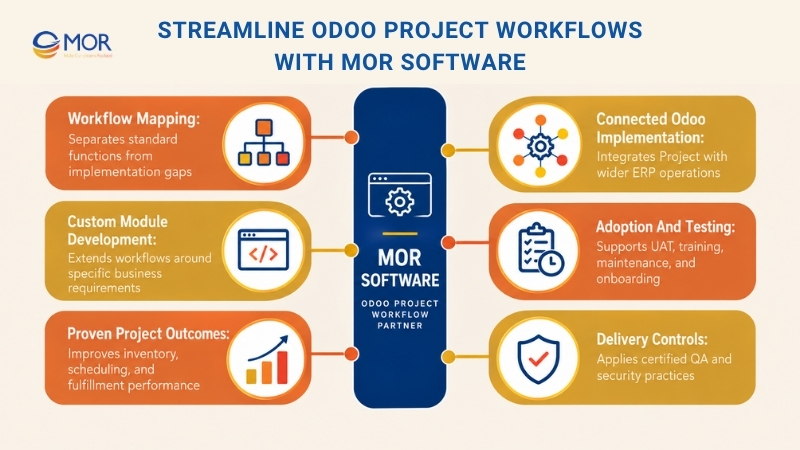
- Map workflows before configuration: Our consultants review current processes, requirements, roles, and handoffs before defining the target setup. This work separates standard Odoo functions from the gaps that need configuration, integration, or custom development.
- Implement connected Odoo modules: We support Odoo ERP consulting services and implementation across operational modules rather than treating Project as an isolated board. Read more about our Odoo implementation services when your rollout spans several departments.
- Extend business-specific gaps: MOR Software provides Odoo Module Development for workflows that standard configuration doesn't cover. We can build targeted modules or API connections around defined business rules instead of changing the system without a clear operating reason.
- Support adoption and testing: Our supplied Odoo delivery process covers requirements confirmation, implementation or development, testing, onboarding, UAT, user training, warranty, and maintenance. Teams that need continued help can use ongoing Odoo support services after go-live.
- Back decisions with project evidence: MOR's Odoo materials report a manufacturing implementation that cut inventory holding costs by 35% and improved production scheduling efficiency by 50%. A distribution project connected Sales, Purchase, Inventory, and Logistics and reached 99% order-fulfillment accuracy while unifying inventory across warehouses.
- Bring delivery controls into the project: MOR's materials also state CMMI Level 3, ISO 9001:2015, ISO 27001:2013, ISTQB, and Odoo certificates as part of its delivery background. Those controls matter most for companies that need ERP work connected with broader software engineering, QA, APIs, cloud systems, or long-term maintenance.
This setup fits businesses whose project workflows cross several Odoo modules or require custom logic and third-party systems. Share your current process, user roles, integrations, reporting needs, and problem areas with our team so we can separate standard configuration from work that genuinely needs development.
Conclusion
Odoo project management gives businesses one connected structure for tasks, schedules, dependencies, collaboration, time, reporting, and wider ERP workflows. Strong results still depend on process design, disciplined configuration, and user adoption. If your project requires custom modules, integrations, migration, or long-term support, review the Odoo development services at MOR Software and contact us with your current workflow, required modules, integrations, and rollout goals.
"Mr. Cong’s guiding philosophy is simplicity, believing that the simplest solutions are often the most powerful. He sees trust, empowerment, and the opportunity to demonstrate one’s abilities as the key elements that set MOR apart from traditional IT companies."
Mac Tien Cong


Division Manager (Hanoi Branch)
MOR SOFTWARE
Frequently Asked Questions (FAQs)
What is Odoo Project Management?
Odoo project management is Odoo ERP's application for organizing projects, tasks, schedules, team activity, time, documents, and delivery records. Teams can work through Kanban, Gantt, Calendar, List, Graph, and Pivot views. Project can also connect with Timesheets, Sales, Planning, Expenses, Field Service, Helpdesk, Documents, and other Odoo apps, depending on the business process.
How do you create a project in Odoo?
Open the Project app and create a new project, then define its name and relevant settings. Teams can add a customer, project manager, dates, allocated hours, tags, visibility, and other fields based on the installed apps.
After creation, add stages and tasks that reflect the delivery workflow. Templates are useful when new projects regularly follow the same process.
What project views are available in Odoo?
Odoo Project supports Kanban, Gantt, Calendar, List, Graph, and Pivot-style analysis depending on the setup and edition. Kanban works well for stage-based task management, whereas Gantt focuses on timing and dependencies.
Calendar supports date-driven scheduling, List provides detailed record control, and reporting views help managers analyze project data. Staff can switch views without creating separate copies of the project.
How do task dependencies work in Odoo Project?
A dependency connects a successor task to one or more predecessor tasks that must finish first. Users can create the link from a task form or visually in the Gantt view.
Odoo can place the successor task in Waiting status until the blocking work reaches an accepted completion status. This keeps sequential project work from starting prematurely.
Can Odoo track timesheets and billable project hours?
Yes. Staff can record working time against projects and tasks through Timesheets, then use those records for workload, cost, or billing processes based on the business setup.
For teams researching Odoo project management free options, Odoo currently lists a $0 One App Free plan with one app and unlimited users on Odoo Online. Standard and Custom plans cover wider app use and customization needs, so Odoo project management pricing should be assessed against the complete ERP scope rather than Project alone.
Can clients and external users access Odoo projects?
Yes. Odoo supports project sharing and portal access, with visibility settings that control what internal or outside users can see.
Access rules should be planned carefully before rollout. Client users may need project updates, tasks, documents, or discussions, but they usually don't need the same rights as employees or administrators.
Can Odoo create project tasks automatically?
Yes. Tasks can be created manually or through automated intake routes, including project email aliases and website forms.
Odoo can map an incoming email's subject, sender, body, recipients, and message history into the resulting task. Automated actions and recurring-task rules can also handle repeat work after defined conditions occur.
Which Odoo apps integrate with the Project module?
Common connections include Timesheets, Sales, Planning, Field Service, Expenses, Accounting, Helpdesk, and Documents. The exact set depends on what your company installs and how processes are configured.
The value comes from shared records. A service project, for example, can connect task effort with timesheets, customer sales records, expenses, and billing instead of maintaining four separate project files.
Can Odoo Project Management be customized for unique workflows?
Yes. Odoo supports configurable stages, tags, fields, automated actions, templates, permissions, and connected apps. Odoo Studio, custom modules, APIs, and third-party applications can extend the system further when standard setup doesn't cover a requirement.
Custom work needs a defined reason, though. Teams should keep changes maintainable and test upgrade behavior rather than turning every preference into code.
When should a business use an Odoo implementation or development partner?
A partner becomes useful when your project crosses several modules, involves migration, external integrations, custom workflows, complex permissions, or significant user adoption work. External help also makes sense when your internal team lacks Odoo functional or technical capacity.
Look for a partner that can map processes, configure standard functions, identify real development gaps, run testing and UAT, train users, and stay involved after launch. That combination usually matters more than simply getting the database online.
Share


Make Our-Dreams Realized


© 2023 . MOR Software. All Rights Reserved
Sitemap
Privacy Policy
Terms of Use

Rate this article
0
over 5.0 based on 0 reviews
Your rating on this news:
Name
*Email
*Write your comment
*Send your comment
1