


Salesforce Lead Management: Process, Setup and Best Practices

A new lead arrives, but nobody claims it. Another gets three follow-up calls, and a qualified prospect sits untouched for days. Salesforce lead management helps sales teams prevent these gaps through clear records, ownership rules, qualification, and timely follow-ups. In this guide, MOR Software will help you know how the process works, which Sales Cloud tools to configure, and how to track results you can act on.
Key Takeaways
- Salesforce organizes prospect records through capture, qualification, assignment, follow-up, and conversion, with clear outcomes for leads that aren't ready to buy.
- Assignment rules, Salesforce Flow, scoring methods, and response-time SLAs work together when each lead has an owner and a defined action.
- Reports should reveal missed contacts, aging leads, weak sources, and conversion gaps. MOR Software can support custom Salesforce workflows and integrations when standard setup falls short.
What Is Salesforce Lead Management?
Salesforce lead management is the process of collecting prospect details, tracking sales activity, deciding who should follow up, and moving qualified leads toward deals. It sits inside Salesforce CRM, primarily through the Lead object and related Sales Cloud tools. The setup gives every inquiry a status, owner, and recorded history.
Lead generation attracts potential buyers. Lead management in CRM determines what happens after they respond. Lead management in Salesforce adds clear ownership and conversion records. Opportunity management begins once a sales team is pursuing a defined deal, which may start when a qualified lead is converted.
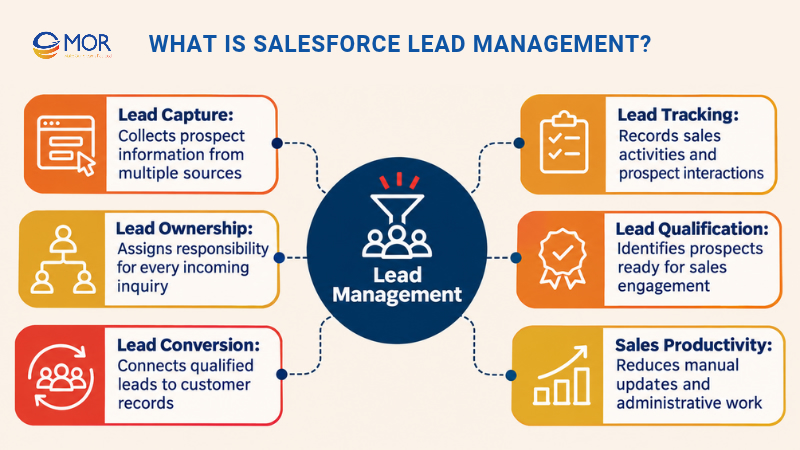
Salesforce keeps those records distinct. A Lead represents an individual or company not yet qualified under your sales process. A Contact represents a person connected to an Account, and an Opportunity records a possible deal, including its stage and expected value. Conversion can link a person to an existing account rather than creating another one.
Time is the payoff. Salesforce's 2026 State of Sales findings say the average seller spends only 40% of their time selling. Better lead ownership and fewer manual updates protect the hours that remain. Teams comparing Hubspot vs Salesforce vs Pipedrive for lead management should start with those daily tasks, not a long feature checklist.
How Does the Salesforce Lead Management Work?
The Salesforce lead management process flow follows five stages: intake, marketing review, sales acceptance, sales qualification, and a final outcome. Salesforce doesn't impose every business label below as a fixed Lead Status. MQL, SAL, and SQL are team-defined milestones that need matching fields, ownership rules, and reporting logic.
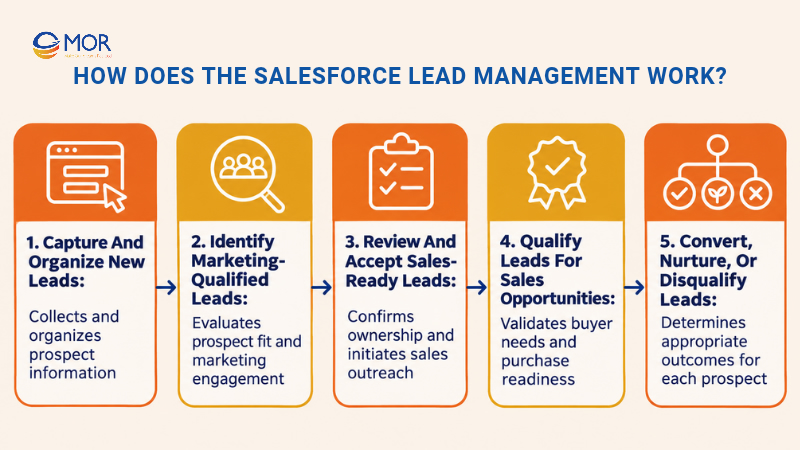
Capture and Organize New Leads
A lead might come from a website form, an event list, an advertisement, a referral, or a rep's own research. Salesforce Web-to-Lead can create records from website submissions, and imports or integrations bring in data collected elsewhere. Start with a small set of useful fields: name, company, contact method, source, region, and product interest.
Salesforce leads management starts with clean intake. If the company field says 'N/A' or a form sends a free-text country, automated routing may fail before a rep sees the record. Set sensible required fields, use picklists where possible, and give new records a starting status and owner or intake queue.
Identify Marketing-Qualified Leads
Marketing-qualified leads (MQLs) meet agreed signs of fit or engagement. A prospect at a target-sized company who requests a product guide may qualify for review, but downloading one document doesn't automatically make that person ready for a sales call. Teams need shared definitions for what counts as meaningful interest.
Marketing tools can record campaign activity and send relevant data to Salesforce. A score, a campaign response, or an explicit demo request can then trigger a review. HubSpot's 2026 marketing performance analysis lists sales and marketing misalignment at 27.6% among reported challenges, a reminder that qualification rules need agreement across teams.
Review and Accept Sales-Ready Leads
A sales development representative (SDR) reviews the MQL and decides whether outreach should begin. The Sales Accepted Lead (SAL) stage records that handoff. It should capture the accepting rep, acceptance time, and a reason when the lead is declined or returned to marketing.
The lead management process in Salesforce stops marketing from assuming someone is working a record that remains in a shared queue. Salesforce tasks, notifications, and agreed response windows give the receiving team a specific deadline. Managers can then see which leads were accepted and which were left in limbo.
Qualify Leads for Sales Opportunities
Sales qualification tests whether there is a genuine sales opportunity. Reps may ask about budget, decision authority, business needs, and purchase timing, or use a model suited to their deal cycle. Discovery notes belong on the record, where another rep can find them without starting the conversation again.
For a practical lead management example, consider a software buyer who requests a demo for an enterprise rollout. The SDR confirms a clear need and a planned purchase window, then records the stakeholders and requirements. That information should carry into the opportunity rather than disappear in email threads.
Convert, Nurture, or Disqualify Leads
A qualified Salesforce Lead can become a Contact linked to a new or existing Account. The rep may also create an Opportunity when a deal is ready to track. Proper field mapping carries selected custom information into the new records; duplicate checks help prevent a second version of the same customer.
Not every lead deserves conversion today. A suitable buyer with no current project may enter a nurture program through a CRM with email automation workflow. Poor-fit inquiries need consistent disqualification reasons, which later explain where prospecting time went. These outcomes also keep your sales pipeline optimization reports tied to actual sales activity.
Key Salesforce Lead Management Features
Salesforce teams often call this collection of tools the Salesforce lead management module, although it isn't one single screen. The lead management system Salesforce provides combines records, views, routing controls, conversion actions, automation, and reports.
Salesforce Feature | Primary Function | Practical Application |
Lead records and list views | Store prospect details, status, ownership, and activity history. | Create views for new, overdue, or high-priority leads so reps know what to work. |
Lead Intelligence View | Surfaces engagement and activity signals in a focused lead workspace. | Check which records are idle, overdue, or due for contact after an admin enables the view. |
Assignment rules and queues | Send new leads to a matching user or shared team queue. | Route website inquiries by region or product and catch unmatched records. |
Duplicate Management | Apply matching and duplicate rules to flag or block suspect records. | Check imported contacts and prevent repeat outreach under different names. |
Lead conversion | Connect qualified leads with Contacts, Accounts, and optional Opportunities. | Preserve the sales conversation when a prospect becomes an active deal. |
Salesforce Flow | Run record-triggered and scheduled automation. | Create tasks, update fields, send alerts, and manage follow-up exceptions. |
Reports and dashboards | Display lead volume, aging, routing, and conversion data. | Compare response times and opportunity creation across teams and sources. |
For lead management Salesforce administrators also need to check permissions, layouts, and conversion field maps. Learning how to manage leads in Salesforce starts with these controls. Go to Setup, review the Lead object in Object Manager, then configure Lead Settings, Queues, and Lead Assignment Rules. Test a website lead, an imported lead, and a duplicate before rollout.
A best CRM for lead management Hubspot Salesforce Pipedrive shortlist should start with real sales rules, supported by top ranked CRM software research. The Hubspot vs Salesforce vs Pipedrive lead management automation comparison should test routing exceptions and missed handoffs. Teams using the two CRMs together can check hubspot salesforce integration before changing source fields.
There's no single 'manage leads permission Salesforce' switch. Check Lead permissions, sharing, and Convert Leads access. Einstein scoring varies by edition and license. Give new reps Salesforce lead management training on status changes and conversion, not only navigation.
Salesforce Lead Routing and Assignment Strategies
A routing rule should answer one question quickly: who owns this inquiry? Salesforce lead management works best when assignment follows the way your team sells. Standard assignment rules evaluate criteria in order and send a record to a user or queue; round robin and more complex ownership logic may need Salesforce Flow or a dedicated routing tool.
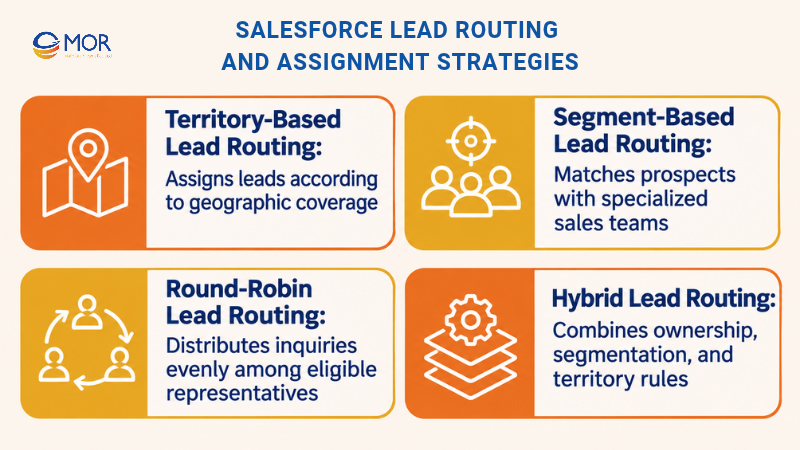
Territory-Based Lead Routing
Territory routing works for sales teams divided by geography. Country, state, or region fields guide assignment, but ownership rules must still account for strategic accounts and shared coverage. The setup should cover these cases:
- Geographic assignment: Use a consistent region field to direct new leads to the correct team or rep.
- Territory exceptions: Send named accounts to their existing owner before applying the general map.
- Best fit: Choose this model when responsibility follows local markets, languages, or service areas.
A lead from Canada shouldn't land with a US-only team because a free-text country value was misspelled. Standardized values prevent that kind of quiet routing error.
Segment-Based Lead Routing
Segment routing is useful when one team handles enterprise buyers and another works with smaller accounts. Product interest, company size, or industry helps determine the best owner. Keep the logic readable when buyers qualify for several teams.
- Company segmentation: Route by employee band, revenue category, or another field your sales process already uses.
- Product-based routing: Assign technical requests to relevant product specialists.
- Best fit: Use segment routing when expertise or account size matters more than geography.
Round-Robin Lead Routing
Round robin rotates assignment among eligible reps in a team. It can prevent one person from receiving the entire inbound queue, but a fair rotation still needs rules for absences, working hours, and capacity. Standard Lead Assignment Rules don't rotate ownership by themselves.
- Balanced distribution: Rotate new records across a defined group rather than assigning each one manually.
- Automation requirements: Build Flow logic or use suitable routing software to track the last assignee and eligible users.
- Best fit: Apply round robin to high-volume inquiries handled by reps with similar responsibilities.
Hybrid Lead Routing
Hybrid routing combines ownership checks, segmentation, territories, and team distribution. It suits complex B2B sales processes where existing account relationships must take priority. Document the hierarchy before creating any rule entries.
- Routing priorities: Check named account ownership, then product or segment, then territory, followed by team distribution.
- Fallback assignment: Route unmatched or incomplete records to a triage queue that someone checks daily.
- Routing validation: Test exceptions, incomplete data, and changes to active rules before release.
Salesforce evaluates an assignment rule's entries in order and stops at the first match. Put narrow exceptions above broad conditions, and test the catch-all behavior so a record never disappears into an unmonitored queue.
Salesforce Lead Management Best Practices
Scoring helps reps sort suitable prospects from casual interest. You can build simple scoring rules through fields and Flow, use marketing scoring through Account Engagement, or apply licensed AI capabilities. Predictive lead scoring is useful only when the underlying data and qualification definitions are sound.
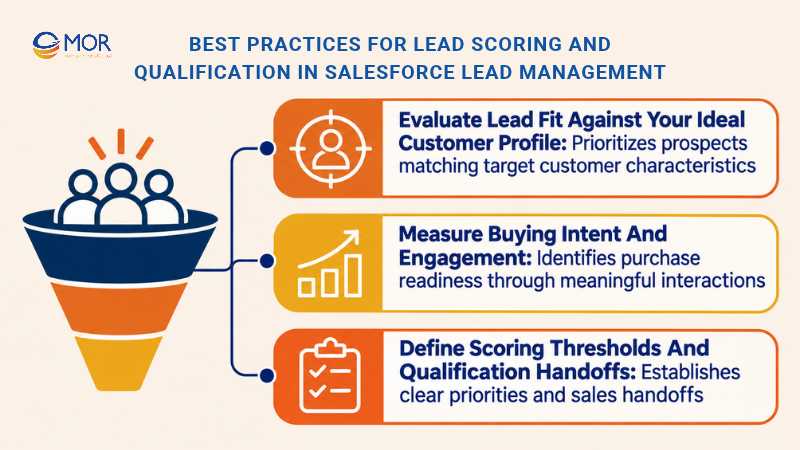
Evaluate Lead Fit Against Your Ideal Customer Profile
Fit describes who the buyer is, not what they clicked. Set criteria using deals your team has actually won. Keep the inputs visible so reps understand why one lead ranks above another.
- Company attributes: Assess industry, employee range, location, and target market.
- Buyer relevance: Record job role, buying influence, and likely decision authority.
- Qualification criteria: Document what makes a prospect suitable, borderline, or outside your target.
Measure Buying Intent and Engagement
Intent indicates whether a buyer may act soon. A direct demo request usually calls for faster follow-up than a casual article view. Combine meaningful behavior with fit rather than counting every page click as equal.
- High-intent activities: Give more weight to requests for pricing, demonstrations, or direct sales contact.
- Engagement signals: Review campaign responses, relevant downloads, and repeat high-interest visits.
- Activity data: Feed reliable events into Salesforce through approved integrations before using them to trigger sales action.
An organization already using Pardot Salesforce integration may have scoring and grading information available through Account Engagement. Salesforce Einstein lead scoring, under the right license and setup, uses historical patterns to rank leads. Neither should be mistaken for a universal default feature of basic Sales Cloud.
Define Scoring Thresholds and Qualification Handoffs
Choose thresholds that change behavior. For example, a sample 100-point system could assign up to 50 points for fit and 50 for intent. The bands below are illustrative company rules, not Salesforce defaults.
- Scoring model: Keep weighting documented so sales and marketing can explain each result.
- Priority categories: Mark 70–100 as Hot, 40–69 as Warm, and under 40 as Nurture for an initial test.
- Sales handoffs: Trigger SDR review when an agreed threshold or a high-intent action is reached.
- Model validation: Compare scores with meetings held and opportunities created, then adjust what fails.
How to Automate Lead Follow-Ups and SLAs in Salesforce
Even accurate routing won't save a prospect if the first call arrives too late. A service-level agreement (SLA) defines response deadlines, ownership, and the action taken when the deadline passes. The 2011 Harvard Business Review lead-response study found that firms attempting contact within an hour were nearly seven times as likely to qualify a web lead as firms that tried even an hour later. The study is older, but the operational lesson remains useful: measure response time rather than assuming someone followed up.
Define Response-Time SLAs by Lead Priority
One deadline for every lead rarely reflects buyer intent. A demo request warrants a different response target than an old conference list. Set realistic windows around business hours and time zones.
- High-priority leads: Use a short first-contact target for direct sales inquiries and urgent requests.
- Standard leads: Set separate deadlines for general inquiries and scheduled prospecting.
- Business hours: Apply working calendars and holiday rules before marking an owner late.
Create Automated Follow-Up Workflows
Salesforce Flow can connect assignment to daily sales work. For example, a record-triggered flow can create a call task when a new lead enters an SDR's queue. Review the Salesforce workflow engine before designing complex dependencies or duplicate triggers.
- Task creation: Create a due task when the lead receives its owner or moves to a defined priority status.
- Owner notifications: Alert the correct rep through Salesforce and agreed communication channels.
- Status updates: Record the first meaningful contact and keep activity timestamps consistent.
For teams adding Salesforce automation, the rule should always have a clear owner, trigger, and exit condition. Otherwise, a small workflow can create duplicate tasks or reminders that nobody trusts.
Escalate Missed Follow-Ups
Alerts alone won't solve an untouched queue. An escalation process should identify missed deadlines and state who takes over. Keep an audit trail to distinguish weak routing from capacity issues.
- SLA monitoring: Compare first-contact time against the agreed deadline.
- Escalation rules: Notify a manager or reassign the lead when the defined breach condition occurs.
- Performance review: Examine aging leads, overdue tasks, and repeated assignment changes by team.
Salesforce Lead Management Metrics and Reports
A dashboard needs to show where prospects stall, not simply how many records entered Salesforce. Salesforce lead management reporting works when the team records consistent statuses, owners, and timestamps for every handoff.
KPI | What It Measures | Recommended Salesforce Reporting Approach |
Lead response time | Time from lead creation or assignment to first meaningful outreach. | Capture a first-touch timestamp with automation or controlled activity logic. |
Lead assignment time | Delay before a new record receives its intended owner. | Compare creation and assignment timestamps, using custom tracking if required. |
SLA compliance rate | Share of leads contacted inside the agreed response window. | Report on captured deadlines and first-touch times by team and priority. |
Lead-to-opportunity conversion | Share of leads resulting in an opportunity. | Filter converted leads and linked opportunity records using a consistent denominator. |
MQL-to-SQL conversion | Share of marketing-qualified leads reaching sales qualification. | Track custom lifecycle dates or statuses, then report on stage movement. |
Lead aging | Time since creation or last meaningful sales activity. | Group open leads by age brackets and activity gaps. |
Lead source performance | Conversion and qualification results by acquisition source. | Segment lead and opportunity reports by standardized source values. |
Lead reassignment rate | Frequency of owner changes after the first assignment. | Maintain owner-change history or custom audit fields and report by team. |
A CRM dashboard should let a manager spot a three-day-old demo request, open the lead record, and see exactly who owns the follow-up. Standard Salesforce reports handle many counts and filters; time-to-first-touch and SLA reporting often need custom timestamps and Flow logic.
Define every KPI before building charts. For example, counting a scheduled task as 'contacted' will inflate response performance unless your team agrees that the task reflects real outreach. Good reporting feeds weekly coaching and routing changes, not just monthly slides.
Common Salesforce Lead Management Problems and Fixes
A broken assignment rule can look like a sales performance problem. Review the data and automation before asking reps to work faster. The most common failures have testable causes.
Problem | Likely Cause | Recommended Fix |
Wrong lead owner | A broad condition matches before a narrow rule, or field values are malformed. | Check rule-entry order, criteria, and actual field values; test sample records. |
Leads stuck in queues | No monitored owner, unclear membership, or failed fallback routing. | Assign a triage owner, review queue membership, and audit age daily. |
Duplicate lead records | Imports, web forms, and conversion use inconsistent matching. | Tune duplicate rules, review imports, and test Salesforce duplicate management lead conversion checks. |
Missing lead information | Optional fields, free-text values, or weak validation. | Standardize picklists, required fields, and conversion field mapping. |
Missed follow-ups | No due task, first-touch tracking, or breach escalation. | Create Flow tasks, monitor SLAs, and alert a manager when necessary. |
Misleading conversion reports | Inconsistent statuses or different definitions of conversion. | Define one funnel policy and use the same report filters across teams. |
Automation doesn't fire | Wrong trigger conditions, inactive rules, or permission issues. | Review Flow debug details, rule activation, execution context, and access. |
Salesforce documented a precise example in its May 2026 assignment-rule troubleshooting note: an extra comma at the start or end of a comma-separated state list can produce overly broad matches. That may send many records to the first user and prevent later rule entries from running. Small syntax mistakes deserve a place in every routing test plan.
How MOR Software Supports Salesforce Lead Management
When teams rely on separate forms, marketing tools, and legacy systems, Salesforce configuration becomes an integration project. MOR Software is a Salesforce Global Consulting Partner with certified consultants, developers, administrators, and architects. We support the design, development, integration, and ongoing care of Salesforce solutions built around your sales process.
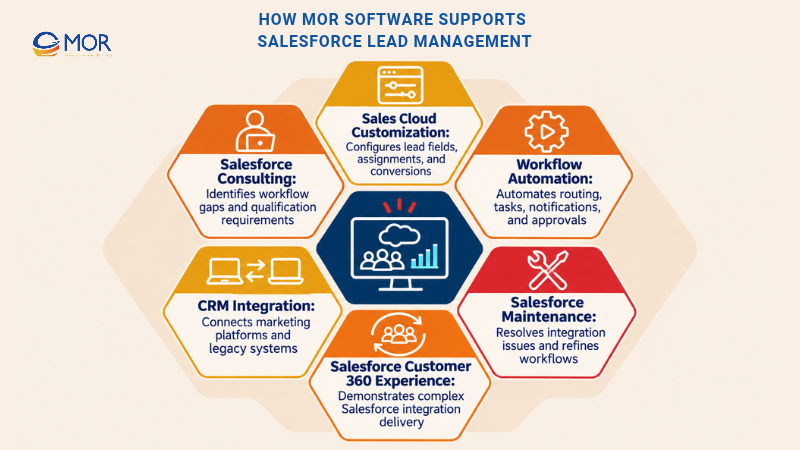
The services most relevant to a lead workflow include:
- Salesforce consulting: Review lead sources, owner rules, qualification definitions, and gaps in the current CRM setup.
- Sales Cloud customization: Configure lead fields, page layouts, assignment logic, and conversion processes to match the sales team.
- Workflow automation: Build Salesforce Flow and, when needed, custom development for routing, tasks, notifications, and approvals.
- CRM integration: Connect Salesforce with marketing tools, APIs, and legacy systems so useful prospect data reaches the right record.
- Salesforce maintenance: Test updates, fix integration faults, and refine workflows when teams or territories change.
A MOR Software Salesforce Customer 360 case study documents a project involving 30 developers over 18 months. The work connected marketing campaign data with Sales Cloud, Service Cloud, Experience Cloud, and Account Engagement, and automated sales tasks. It demonstrates relevant delivery experience without assuming the same design fits every company.
Explore Salesforce development services at MOR Software if lead routing, conversion, or data exchange has grown difficult to maintain. We can review the existing process and define changes that fit your team.
Conclusion
Salesforce lead management works when every lead reaches the right person, gets a timely response, and moves toward a clear outcome. Well-configured lead records, routing, scoring, Flow automation, and reports give your team the structure to do that. If custom rules or disconnected systems are slowing sales work, MOR Software can review your Salesforce setup and plan practical changes. Contact us to discuss your lead workflow, integration needs, and the gaps affecting your pipeline.
"Mr. Cong’s guiding philosophy is simplicity, believing that the simplest solutions are often the most powerful. He sees trust, empowerment, and the opportunity to demonstrate one’s abilities as the key elements that set MOR apart from traditional IT companies."
Mac Tien Cong


Division Manager (Hanoi Branch)
MOR SOFTWARE
Frequently Asked Questions (FAQs)
What is a Salesforce lead, and how is it different from a contact?
A Salesforce Lead is a prospect who has not yet passed your organization's qualification process. A Contact is a person linked to an Account, which represents a company or another customer relationship. An Opportunity tracks a possible sale. Lead conversion can create or link these related records.
How do I capture new leads automatically in Salesforce?
Use Web-to-Lead for website forms, connect marketing platforms, or import structured records through supported tools. Salesforce's Web-to-Lead guidance states a standard limit of 500 leads in a 24-hour period for supported editions. Plan an API-based intake path if your volume exceeds that limit.
How do lead assignment rules work in Salesforce?
Assignment rules check each rule entry in its stated order and select the first one whose conditions match the lead. That entry assigns a user or queue. Keep narrow conditions ahead of broad ones, and use a fallback owner for records that do not match the intended criteria.
Can Salesforce automatically distribute leads using round robin?
Yes, but standard Lead Assignment Rules do not include a full round-robin rotation by themselves. Salesforce Flow or a specialized routing application can distribute records among eligible reps. Test the logic for staff absences, owner changes, and simultaneous incoming leads before relying on it for production traffic.
What is Salesforce Lead Intelligence View?
Lead Intelligence View is a Salesforce workspace for reviewing lead activity and finding records that need attention. It can surface overdue, idle, or uncontacted leads. Your administrator may need to turn it on and add its button before sales representatives can use it.
Does Salesforce offer built-in lead scoring?
Salesforce supports several scoring approaches, but availability varies. Teams can build simple scoring rules with custom fields and automation, use marketing scores through Account Engagement, or access Einstein Lead Scoring under supported licenses. Check your edition and historical data before choosing an AI-based model.
How can I prevent duplicate leads in Salesforce?
Start with matching and duplicate rules based on dependable identifiers, including email and company details where suitable. Test how those rules behave during form submissions, imports, and conversions. Also review existing Accounts and Contacts before a rep creates new records, especially when a buyer returns through another campaign.
What happens when I convert a lead in Salesforce?
Salesforce links the qualified person to a new or existing Contact and Account, with an Opportunity created when needed. Selected fields, notes, and related information can carry over according to the configuration. Conversion can't be reversed through a standard undo action, so check duplicates and mappings first.
How do I automate lead follow-up in Salesforce?
Use Salesforce Flow to create tasks, update fields, and notify owners when leads arrive or change status. Add deadlines and business-hour logic if the team follows an SLA. Test failure paths and reassignment triggers, then report on the time between lead receipt and the first meaningful sales action.
Which metrics should I track for Salesforce lead management?
Track response time, assignment delays, SLA compliance, lead age, source quality, and lead-to-opportunity conversion. Teams using MQL and SQL stages should measure those handoffs too. Build a consistent definition for each metric, then review results by team and source so managers can spot where follow-ups fail.
Share


Make Our-Dreams Realized


© 2023 . MOR Software. All Rights Reserved
Sitemap
Privacy Policy
Terms of Use

Rate this article
0
over 5.0 based on 0 reviews
Your rating on this news:
Name
*Email
*Write your comment
*Send your comment
1