


Salesforce Test Automation: Complete 2026 Guide for Businesses
Salesforce updates, custom workflows, and integrations can break without warning, and manual checks rarely keep up. Salesforce test automation gives businesses a safer way to test releases, protect user journeys, and compare Salesforce test automation tools with less guesswork. In this guide, MOR Software will walk through the testing types, tools, challenges, and best practices your team should know in 2026.
What Is Salesforce Test Automation?
Salesforce test automation means using automated tools, scripts, and testing models to check whether Salesforce apps work as planned across many business cases.
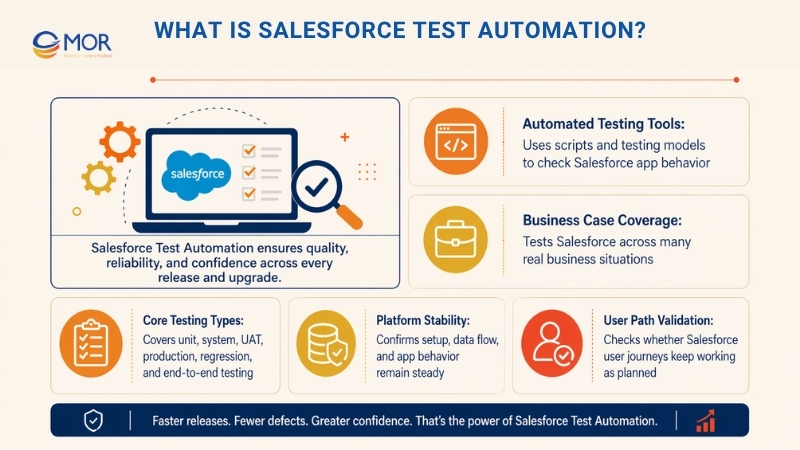
Salesforce automation testing can include unit testing, system checks, user acceptance testing (UAT), production checks, regression testing, end-to-end testing, and more. The goal is to confirm that Salesforce setup, data flow, app behavior, and user paths stay stable.
Key Benefits Of Salesforce Test Automation
Salesforce is a flexible platform with deep setup options, custom code, and frequent updates, including three major seasonal releases each year. These releases may add new functions, change current behavior, or affect custom work and connected systems your business depends on.
Sales, marketing, customer support, and eCommerce teams often run key daily work inside Salesforce. That makes steady testing important for uptime, speed, and user trust.
Automated testing for Salesforce helps you manage the following:
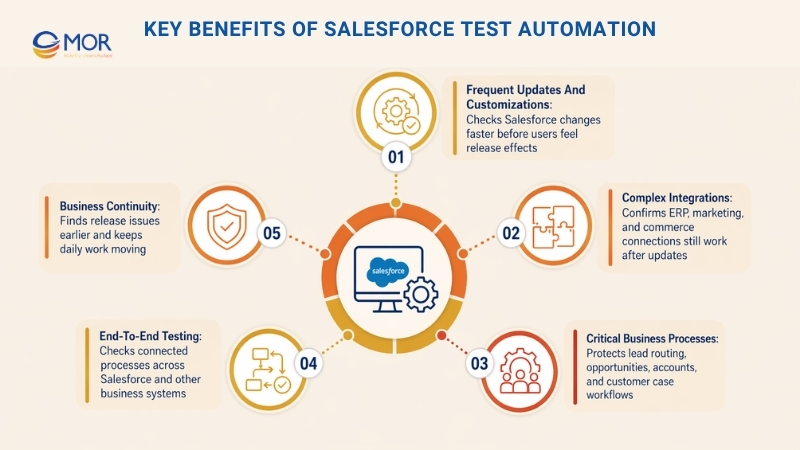
- Frequent updates and customizations: Salesforce releases create a constant need to check current functions before users feel the effect. Salesforce test automation gives teams a faster and more repeatable way to check changes.
- Complex integrations: Many companies connect salesforce integration with ERP, including Dynamics 365 and SAP, marketing tools like HubSpot and Google Analytics, and commerce platforms like Shopify and Magento. Automated checks help confirm that these connections still work after updates.
- Critical business processes: Salesforce often supports lead routing, opportunity tracking, account records, and customer cases. Salesforce test automation helps protect these flows so teams can work with fewer surprises.
- End-to-end testing: Full quality checks should cover workflows that cross Salesforce, third-party apps, and internal systems. Automated end-to-end testing checks whether these joined processes behave as one working flow.
- Business continuity: Automated tests can catch issues earlier in the release cycle. This lowers the chance of major production faults and helps teams keep business work moving.
>>> Walk through the top CRM solutions built to fix those problems, helping your manufacturing team work smarter, faster, and more efficiently.
Key Salesforce Testing Types Teams Should Understand
A Salesforce testing plan works like a safety net around your business workflows. Each testing type checks a different risk area, from small code behavior to real user actions. A strong automated testing QA setup helps teams know which method to use, when to use it, and how it protects the platform.
These testing types also support each other in layers. Native Salesforce checks often sit at the base, while manual review and exploratory checks catch cases that scripted tests may miss. Better coverage comes from using the right mix, not relying on one method.
Unit Testing For Apex And Custom Logic
Unit testing checks the smallest pieces of Salesforce logic. Business users rarely see this level, but Salesforce developers depend on it to keep custom work stable across edits and releases.
This method tests single methods, triggers, and classes apart from the full system. The best unit tests still use realistic data so results match real business use.
Integration Testing For Salesforce And External Apps
Integration testing checks whether Salesforce and outside systems pass data and actions correctly. When a lead enters Salesforce, starts a marketing flow, and updates an ERP record, this testing checks that the full chain works.
It also checks whether workflows across systems stay stable after updates, new connections, or setup changes. Integration tests often catch problems unit tests miss, including format errors, timing issues, and missing data.
A real case: A lead-to-cash flow may start with Salesforce receiving leads from a marketing tool. The record then passes through qualification rules before a qualified opportunity moves to an ERP system for credit review and order setup.
System Testing For Full Business Workflows
System testing reviews Salesforce as users experience it. This wider testing method checks not only single functions, but also full workflows from start to finish.
This is where quality work becomes more visible to business teams. It checks whether Salesforce customization supports the promised business result. Salesforce UI testing may also appear here to confirm that interface changes do not slow daily work.
Regression Testing For Safe Changes
Functional and regression checks are core parts of long-term Salesforce quality work. Because platform releases happen often, Salesforce automated regression testing helps teams keep the system steady.
Regression work can get complex in Salesforce because one small change may affect reports, workflows, integrations, and screens at the same time.
Companies that use strong Salesforce test automation for regression testing often report fewer deployment issues and faster fixes when defects appear.
UAT For Real Business Validation
User acceptance testing acts as the bridge between technical delivery and real business value. It lets actual users test whether Salesforce supports their daily jobs in a practical way.
UAT often finds gaps that technical checks do not catch, including slow workflows, unclear screens, or missing rules. It is where platform logic meets real business use.
Performance Testing For Growth And Scale
Performance testing matters because business growth often brings more records, more users, and more connected workflows. Salesforce test automation can help confirm whether the platform keeps working under heavier use.
This testing also needs to continue over time because usage patterns change. A setup that works for 100 users and 50,000 records may struggle when it grows to 500 users and 500,000 records.
Security Testing For Access And Compliance
Security testing checks some of the most sensitive parts of a Salesforce setup. With more rules, audits, and cyber risks, many businesses now treat this testing as a must-have.
Salesforce security checks must account for its shared cloud model, roles, permissions, and data-sharing rules. These needs create testing problems that many standard software systems do not have.
Exploratory Testing For Unknown Risks
Exploratory testing brings human judgment into Salesforce quality work. Automated testing is strong at checking known paths, but exploratory checks can find strange behavior, unclear user flows, and hidden risks.
This approach tests new or complex components in ways that may not appear in written test cases. It is useful when teams work with new Salesforce functions or custom elements that are still changing.
This kind of testing can also improve the Salesforce setup by showing where users may struggle after launch.
Next, we will look at the problems that make Salesforce testing harder than standard effective software testing. These issues often need tools and methods built around the Salesforce platform.
Top Salesforce Test Automation Tools Worth Comparing
A careful review of Salesforce automation testing tools can help your team choose a platform that fits your setup, skill level, and release pace. Many Salesforce test automation tools support low-code or no-code test creation, cross-browser checks, and CI/CD workflows. The best tools for Salesforce depend on your org size, data model, and integration depth.
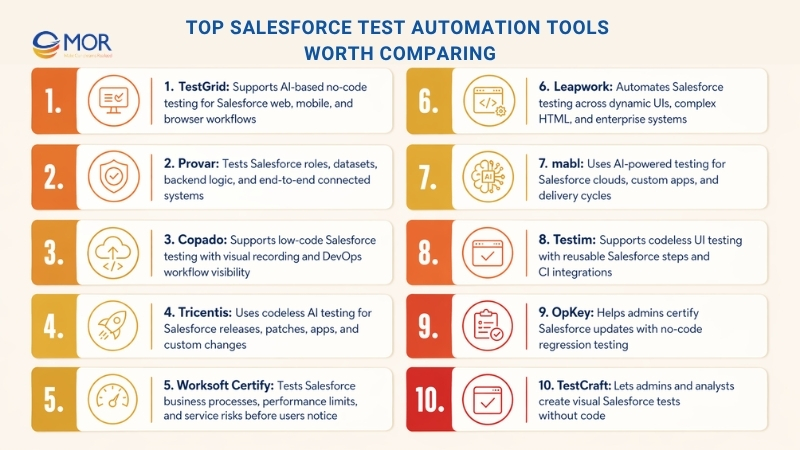
1. TestGrid
TestGrid is an AI-based Salesforce test automation platform for web, mobile, and browser testing. QA teams can build steady automated tests without heavy scripts, which makes it useful for Salesforce Classic, Lightning, and custom domains.
TestGrid works well for teams testing dynamic Salesforce screens, regular platform changes, and permission-led workflows. Its visual recorder, real-device checks, and codeless setup help teams test key user paths with less upkeep.
Key features
- Build no-code Salesforce tests with a visual recorder that tracks clicks, field entries, checks, and user actions
- Run tests on real devices and browsers to review Salesforce behavior across web and mobile use
- Work with dynamic Salesforce elements, component changes, and shifting screen structures through steadier automation
- Schedule test runs, group test suites, and view reports with screenshots, logs, pass or fail status, and run history
Pricing
TestGrid has a free plan, while paid plans begin at $25/month for manual testing and $99/month for end-to-end automation. Enterprise pricing is shared on request.
2. Provar
Provar is a Salesforce testing tool that supports tests with changing real-world datasets. You can review backend logic during UI testing and check whether Salesforce-linked systems work from end to end.
Provar states that teams can create Salesforce tests 90% faster and cut maintenance by 80%. It also supports role-based test flows so each user path reflects the correct access and experience.
Key features
- Test real Salesforce user roles and access paths
- Lower upkeep through metadata-aware test design
- Check records, confirm values, and manage test data with speed and control
- Test workflows across APIs, databases, emails, and web apps inside one test case
Pricing
- Custom pricing available
3. Copado
Copado supports Salesforce test automation through low-code options, including a drag-and-drop Flow Editor and Visual Recorder.
It can help teams with salesforce workflow automation using a keyword library, release-safe tests, and a shared method across desktop, web, and mobile channels.
Key features
- Create tests faster with natural language keywords, called QWords, that act like human tester steps
- Review the end-to-end delivery process with Value Stream Maps and DevOps metrics
- Build end-to-end tests through QEditor script view or inside VS Code for deeper control
- Run parallel tests with cloneable robots to shorten feedback and support debugging
Pricing
- Custom pricing available
4. Tricentis
Tricentis is a codeless AI testing platform built to work at Agile and DevOps speed. It supports Salesforce innovation across seasonal releases, small patches, third-party apps, and custom changes.
Its Salesforce Scan function can create an automation model of a Salesforce org in about 60 seconds, which can save many hours of test creation and upkeep.
Key features
- Reduce problems with Salesforce dynamic IDs through Tricentis Tosca intelligent object recognition
- Reuse automated tests across Salesforce Classic, Salesforce Lightning, and later Salesforce versions
- Support automated testing across Salesforce products, industry clouds, and AppExchange apps
- Scan console apps like Service Cloud to capture controls, frame changes, tab changes, quick actions, and side panels
Pricing
- Custom pricing available
5. Worksoft Certify
Worksoft Certify is software for Salesforce testing automation. It helps teams spot performance limits and possible service issues before users feel them across Salesforce clouds.
Worksoft Certify also gives development teams a way to ship higher-quality functions on schedule.
Key features
- Build personal user journeys across Salesforce clouds and touchpoints
- Automate business process testing to cut manual work and lower error risk
- Respond to changing CRM needs with faster validation
- Test large data sets more quickly and improve data quality checks
Pricing
- Custom pricing available
6. Leapwork
Leapwork is a test automation tool for Salesforce that supports dynamic UIs, complex HTML, and heavy DOM structures.
You do not need to code to create Salesforce test automation in Leapwork. The platform detects changing UI elements in Salesforce and uses the same visual method across enterprise apps.
Teams can grow automation coverage quickly for a Seasonal Release, a new integration, or a third-party app.
Key features
- Find what failed and why through video recordings, data views, and activity logs
- Test across web, desktop, mobile, virtual, cloud, and legacy systems
- Run tests through your cloud provider, local machines, or remote computers
- Confirm that data updates or syncs correctly between Salesforce and other systems
Pricing
- Custom pricing available
7. mabl
mabl is an AI-powered testing platform that makes test creation easier for Salesforce implementations. It can support standard Salesforce clouds and custom applications through the delivery cycle.
Salesforce often runs key business work, including salesforce einstein, eCommerce, and custom enterprise apps. Strong test coverage helps teams release faster with fewer defects.
Key features
- Cut testing time through low-code creation, parallel runs, and broad Salesforce coverage
- Lower upkeep with AI-based auto-healing that adjusts to Salesforce updates and dynamic elements
- Increase coverage with end-to-end testing across UI, APIs, emails, PDFs, and third-party systems
- Handle Shadow DOM, changing fields, and complex integrations without metadata or admin access
Pricing
- Custom pricing available
8. Testim
Testim is an automated UI and functional testing platform. It supports faster test creation through codeless, recorder-based authoring and still allows Apex and JavaScript edits when needed.
Testim also helps teams store, find, and reuse tests across projects, workspaces, and user groups. It is often used in AI-led end-to-end test automation strategy for Salesforce test automation.
Key features
- Create and reuse pre-built no-code steps for common Salesforce actions
- Find elements on dynamic Salesforce Lightning pages to make test creation and upkeep easier
- Check access levels with no-code steps for Login-As, CPQ, Salesforce permissions, picklist checks, and field visibility
- Connect with general CI tools like Jenkins and Azure DevOps, plus Salesforce-specific tools like AutoRABIT, Copado, and Gearset
Pricing
- Custom pricing available
9. OpKey
OpKey is a no-code testing platform for Salesforce that helps teams certify Salesforce updates quickly. It supports patch and platform update checks without constant script upkeep.
OpKey lets Salesforce admins run regression tests for each app change. Its library includes 30,000+ ready-made templates for test suites, reports, and dashboards.
Key features
- Test complex controls in both Salesforce versions with one shared function
- Work across Sales Cloud, Services Cloud, Marketing Cloud, CPQ, Billing, and custom Salesforce apps
- Review process logs to find current tests and spot missing coverage
- Send clear certification reports that show when updates are ready for production
Pricing
- Custom pricing available
10. TestCraft
TestCraft is a known Salesforce automation testing tool. It lets admins and business analysts create visual automated tests with drag-and-drop actions and no code.
TestCraft can also suggest many test ideas so more parts of the Salesforce app are covered. Teams may also use it with other tools, including Selenium, Cypress, and Playwright.
Key features
- Manage dynamic Salesforce Lightning components with less effort
- Test Salesforce customizations so they work as planned
- Check integrations between Salesforce and other systems for better data flow and app behavior
- Use information sets used in machine learning to find elements again through locator rules and pattern logic
Pricing
- Free and open-source
Common Salesforce Test Automation Challenges
Picture a failed integration where the cause might sit in custom Apex code, a third-party app, a workflow rule, or an outside API, while every symptom looks the same. That kind of case shows why Salesforce test automation challenges are different from normal software testing issues.
Most Salesforce testing problems come from the platform’s main strengths: flexibility, deep connections, and constant change. The same traits that make Salesforce useful also make testing harder.
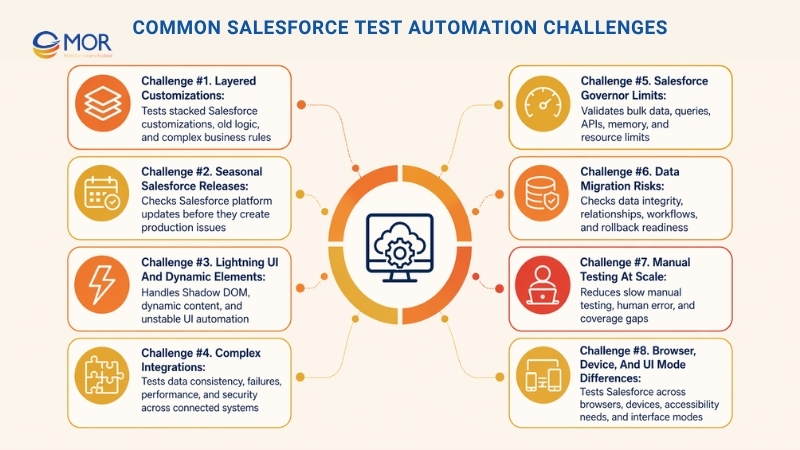
Challenge #1. Layered Customizations
Salesforce allows deep changes, and many companies build one layer on top of another for years. A large Salesforce org may contain old custom code from several vendors, built by different teams, with different methods and weak documents.
Business impact of customization complexity
- Root cause analysis paralysis. When an opportunity cannot close, the fault may sit in a validation rule, Process Builder flow, apex salesforce trigger, third-party app, or integration middleware working together
- Testing scope explosion. Full coverage must check each customization and the way those custom parts interact across the system
- Knowledge dependency. Testing often depends on long-time staff who understand old setup choices that are not written down
A global manufacturer found that its quote process had custom pricing rules, approval steps, and ERP links with more than 50 decision points across 12 customization layers. When tests failed, the team needed knowledge of Apex, Process Builder, validation rules, and external APIs to find the cause.
Testing strategy response
Strong Salesforce testing for layered customizations needs several testing layers:
Modular testing approaches. Check each customization layer on its own before testing how it works with other layers. This makes problems easier to locate.
End-to-end testing. Test full workflows from the first step to the last step so all layers work together.
Documentation-driven testing. Record business rules and decision points in test documents. This lowers risk when key people leave.
Collaborative testing. Bring developers, business users, and testers into test planning. Each group sees risks the others may miss.
Challenge #2. Seasonal Salesforce Releases
Salesforce release cycles create a special testing risk: the platform under your setup changes three times per year. New functions may also interact with current custom work in unexpected ways.
The business risk:
- Regression surprises. Core Salesforce functions that worked before may act differently after platform updates
- Feature conflicts. New Salesforce functions may clash with older custom work
- Testing debt accumulation. Teams that skip release checks build risk over time
Teams that run broad test validation before each Salesforce release can see up to 85% fewer post-update issues than teams that wait and react after users complain.
Release testing strategy
Continuous testing helps teams find platform-fit issues before they reach production:
Pre-release sandbox testing. Use Salesforce release candidate environments to check your setup against new platform changes before production updates arrive.
Automated regression suites. Build test suites that run against new platform versions without manual work.
Impact assessment processes. Review new Salesforce functions against current customizations before they create conflicts.
Rollback procedures. Test and document rollback steps before production releases so teams can recover quickly when problems happen.
Platform update testing is different from code deployment testing. Salesforce makes the platform change, but your company carries the business risk.
Challenge #3. Lightning UI And Dynamic Elements
Salesforce UI testing has technical problems that normal web apps often do not have. Lightning components use Shadow DOM, so common tools like Selenium may fail to find page elements in a steady way.
Technical challenge details:
- Shadow DOM encapsulation. Component details stay hidden from outside scripts, which makes element lookup hard
- Dynamic content loading. Page parts can appear, disappear, or change based on user action and data state
- Asynchronous operations. Lightning components load data in the background, which creates timing issues for automated scripts
Manual testing often becomes the backup when automation breaks, but this does not scale with release speed and org complexity. Some teams report that UI automation failure rates can pass 40% in Lightning setups without Salesforce-specific tools.
Modern solution approaches
Good Lightning component testing needs methods that fit the current Salesforce architecture:
Native lightning testing framework. Use Salesforce’s own testing model for component-level checks. It understands Shadow DOM better than many outside tools.
AI-powered testing tools. Use smart tools that adjust when dynamic content changes. These tools learn element patterns and lower upkeep.
Visual testing approaches. Check the screen result and function instead of the DOM structure. Screenshot comparison can avoid many Shadow DOM limits.
Hybrid testing strategies. Mix automated scripts with manual checks for broader coverage. Use automation for stable paths and human review for complex user decisions.
Challenge #4. Complex Integrations
Salesforce and outside systems create testing risks across teams, vendors, data owners, and technical layers. Integration testing must check not only system connection, but also whether business processes keep working across each linked app.
Multi-dimensional integration challenges
- Data consistency. Customer data must stay aligned across CRM, ERP, marketing, and support systems
- Error propagation. Teams need to know how one system failure affects later steps
- Performance interdependencies. Load in one tool may slow connected systems
- Security boundaries. Data protection must work across every system link
Think about an order-to-cash process where Salesforce creates opportunities, a pricing tool builds quotes, ERP creates orders, and a support platform updates customer records. Testing this process needs shared test data, stable environments, and planned cases across several teams.
Integration testing strategy
Service virtualization. Build mock versions of external systems for independent tests. This lets you test Salesforce connections without waiting for other teams.
Contract testing. Check API rules between systems before full integration. This catches interface changes before production breaks.
Data flow testing. Check data quality as records move between systems. Customer data should stay accurate across the full stack.
Failure mode testing. Test error handling and recovery. Check what happens when outside systems are slow, offline, or return strange responses.
Challenge #5. Salesforce Governor Limits
Native Salesforce testing must account for platform resource rules that do not exist in many standard apps. Governor limits affect database queries, API calls, memory use, and many other actions.
Governor limit testing challenges
- Bulk data testing. Check that custom logic still works when records arrive in large groups
- Query optimization. Make sure business logic does not exceed SOQL query limits
- API rate limiting. Test integration behavior when API limits are close or reached
- Memory management. Check performance when code handles large object sets
Business Risk: Governor limit errors in production can stop key workflows. One poor trigger can block opportunity updates during month-end close.
Testing strategy for governor limit compliance
Volume testing with production-scale data. Test with realistic data size, not small clean samples. Code may pass with 100 records and fail with 10,000.
Resource monitoring during execution. Track SOQL queries, API calls, and memory while tests run. Find heavy operations before they hit limits.
Limit simulation testing. Restrict resources during testing to see how the system acts near limits. Test safe failure and recovery paths.
Performance optimization validation. Confirm that key business flows stay within resource limits during busy periods.
Challenge #6. Data Migration Risks
Data migration testing checks more than accuracy. It also confirms whether sales history, customer links, and daily workflows still work during and after migration.
Data migration testing dimensions
- Data integrity. Check that no records are lost, changed, or damaged during migration;
- Relationship preservation. Keep object links and parent-child records correct across the move;
- Business logic validation. Confirm that moved data starts the right automations;
- Performance validation. Check that the new setup works well with real data volume.
Comprehensive test coverage for migrations
Migration testing needs checks at several points.
Pre-migration validation. Clean and verify source data before the move starts. Bad source data creates bad target data.
Migration process testing. Use sample data that reflects real records to find mapping issues. Catch data conversion faults before the full move.
Post-migration validation. Test workflows with migrated data. Make sure automations and rules work with real customer records.
Rollback testing. Test and document recovery steps before migration. A tested backup plan matters when issues appear.
Challenge #7. Manual Testing At Scale
Manual testing hits a limit as Salesforce setups become larger and more business-heavy. Testing matters, but old manual methods struggle under complex custom work and fast release cycles.
Manual testing limitations:
- Time constraints. Manual checks for complex workflows may take weeks, while the business wants answers in days;
- Human error. Repeated test steps can lead to mistakes, mainly under time pressure;
- Knowledge dependencies. Manual testing quality depends on people who know the exact workflow;
- Coverage gaps. Human testers cannot check every possible scenario mix.
Testing strategy for scalability
Companies that use strong Salesforce test automation often report 60-80% shorter testing cycles and 90% better coverage consistency. Salesforce testing automation gives teams a way to cover repeat checks without draining tester time.
Automate repetitive scenarios. Keep manual work for exploration and business rule review. Let automation handle regression and data checks.
Risk-based testing prioritization. Test high-risk workflows first. Focus human skill on cases that could harm the business most.
Knowledge documentation. Turn testing knowledge into reusable cases and steps. This lowers dependence on a few experts.
Hybrid testing approaches. Mix automated checks with manual review. Use each method where it gives the most value.
Challenge #8. Browser, Device, And UI Mode Differences
Testing Salesforce across browsers, devices, and UI modes creates many possible combinations. The testing plan must account for user experience differences that can affect adoption and daily work.
Cross-platform testing complexity:
- Browser behavior differences. A function that works in Chrome may fail in Safari or Internet Explorer
- Classic vs. lightning. Teams moving between interfaces must check both modes during the change
- Mobile responsiveness. Field teams need steady access on tablets and smartphones
- Accessibility compliance. Tests must confirm that users with disabilities can complete key work
Suitable testing strategy
Good cross-platform testing should focus on actual user needs:
Browser compatibility matrices. Test the browsers your users rely on most. Use real user data, not a wish to cover everything.
Device-specific testing. Check key mobile workflows on actual devices. Field sales and service teams rely on mobile access.
Interface transition testing. When moving from Classic to Lightning, test business flows in both modes until the change is complete.
Accessibility validation. Add accessibility checks to regular test cycles. Start early so compliance is part of normal delivery.
These Salesforce testing problems show why general testing methods often fall short. Specialized tools and methods exist because the platform has its own limits, update rhythm, and integration needs.
How To Choose A Salesforce Test Automation Solution
Salesforce developers and admins often become responsible for testing because they understand the platform’s technical side. That can work, but it may keep testing locked inside technical teams.
User-friendly no-code tools can help close that gap. They let business process experts work with QA teams, making user journeys more realistic and improving test results.
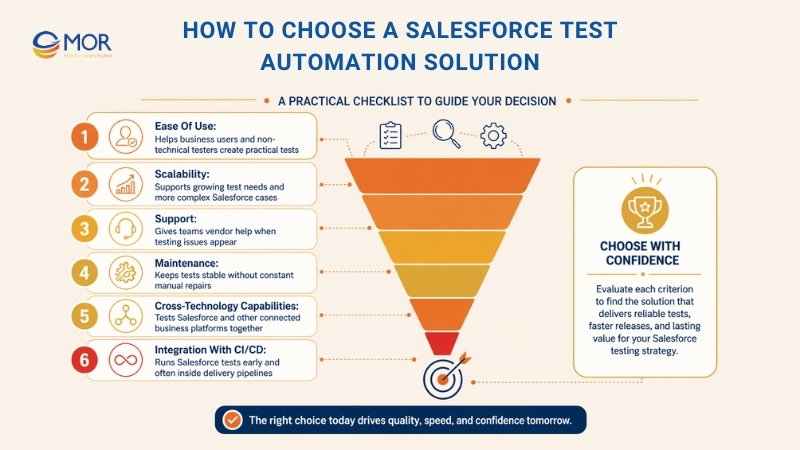
Look for these traits when choosing test automation for Salesforce:
- testers.
- Scalability: The solution should support growing test needs and complex cases.
- Support: Choose a vendor with strong support so your team can get help when issues appear.
- Maintenance: A low-upkeep platform helps teams keep tests running without constant manual fixes.
- Cross-technology capabilities: The tool should test other apps and platforms connected with Salesforce.
- Integration with CI/CD: The tool should connect with your CI/CD pipeline so testing can run often and early.
Salesforce Test Automation Best Practices For Enterprise Teams
Salesforce test automation works best when enterprise teams start small, choose high-risk workflows, and connect testing with real delivery cycles. A strong plan should cover reusable test cases, early sprint checks, DevOps center salesforce pipelines, and clear ROI metrics. This helps large teams avoid test debt, catch issues sooner, and keep Salesforce releases steady as the org
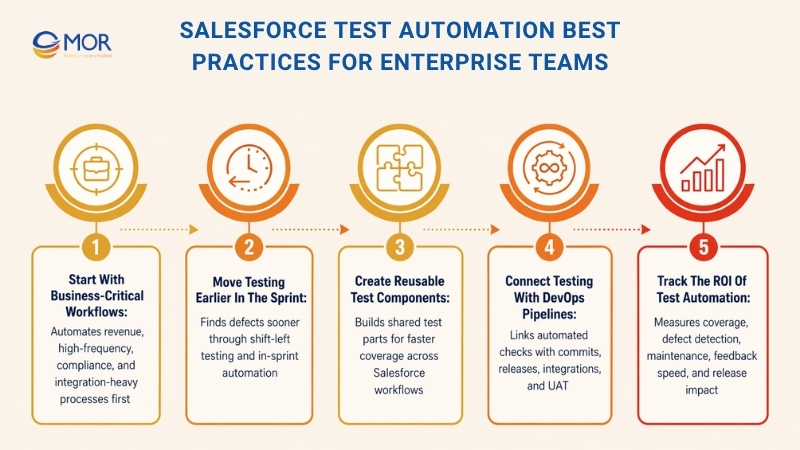
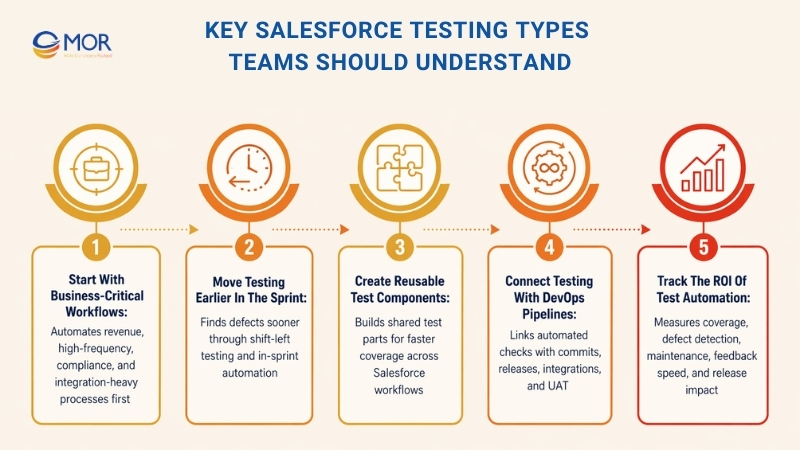
Start With Business-Critical Workflows
Large companies often stall when they try to automate every process at once. A better path is to start with workflows that carry the most business value:
- Revenue-Critical Workflows: Sales processes, opportunity tracking, quote creation, and order handling affect revenue directly. Defects in these flows cause real business loss.
- High-Frequency Transactions: Workflows used many times each day gain the most from automation. Case creation, contact edits, and activity logging are strong starting points.
- Regulatory Compliance: Audit-heavy workflows need steady checks. Automated tests help teams meet these obligations in a repeatable way.
- Integration Points: Workflows that cross Salesforce and outside systems carry higher failure risk. End-to-end business process testing should take priority over narrow unit checks.
Move Testing Earlier In The Sprint
Old testing models often wait until development is done. When QA receives work late, defects cost more to fix and release time becomes tight.
Shift-left testing brings validation closer to the start of development. Testers can build automation from requirements before code exists, developers can run checks during coding, and defects can be fixed sooner.
AI-native tools can support this shift by turning wireframes, user stories, or BDD specs into tests. One data company created functional and regression tests from wireframes before the app existed. 84% of those tests passed on first run against the real application.
In-sprint automation goes further because test work finishes inside the same sprint as the feature. Test debt does not pile up, and teams avoid the stop-start pattern of building first and testing later.
Create Reusable Test Components
Do not create a new one-off script for every case. Build reusable test parts that reflect common business actions, object work, and workflow steps.
Group these parts by function: Account Management, Opportunity Processing, Case Handling, and Product Configuration. Write clear notes so team members know the purpose, inputs, and expected result of each component.
As the library grows, new tests become assembly work instead of fresh authoring. Teams can combine current parts, add case-specific rules, and get wider coverage with less effort. This method scales well as Salesforce setups grow.
Connect Testing With DevOps Pipelines
Testing that sits apart from development creates delay, confusion, and rework. Salesforce test automation should connect with delivery workflows through automated testing DevOps practices:
Automated Smoke Tests
Run light smoke tests on every code commit so teams get fast feedback on key functions.
Comprehensive Regression: Run full regression suites nightly or on release candidate builds so defects do not reach production.
Integration Testing: Run end-to-end process tests whenever connected systems change, so Salesforce keeps sending and receiving data correctly.
UAT Automation: Let business users run automated UAT cases when they need them, without waiting for manual test slots.
One enterprise connected its Virtuoso test suite with Jira and XRay, creating traceability between requirements, test cases, and defects. QA teams ran tests inside Jira tickets, results updated user stories, and developers received failure details without extra handoff.
Track The ROI Of Test Automation
Testing spend should connect to clear business value. Track these metrics:
- Test Coverage: Percentage of workflows, user stories, or requirements checked by automated tests.
- Defect Detection Rate: Number of defects found before production compared with defects found after release. A better ratio shows stronger testing.
- Maintenance Effort: Time spent fixing broken tests compared with time spent adding coverage. Lower upkeep is a sign of healthier automation.
- Execution Frequency: How often tests run. More frequent runs show that testing is part of the delivery flow.
- Time to Feedback: How quickly developers see test results after commits. Faster feedback means faster fixes.
- Release Cycle Time: How test automation changes release speed. Shorter release cycles show business value.
The Future Of Salesforce Test Automation
The future of Salesforce test automation is moving toward smarter, earlier, and more continuous validation. AI can help teams create tests faster, pick high-risk areas, and spot weak coverage before defects reach users. For businesses, this means fewer release delays, stronger Salesforce stability, and more confidence when updates, integrations, or custom workflows change.
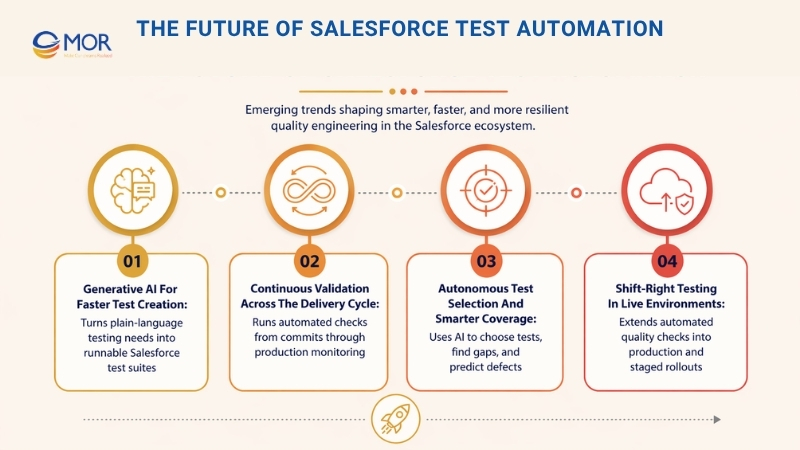
Generative AI For Faster Test Creation
Large language models are changing how teams create Salesforce tests. Instead of writing each scenario by hand, QA teams can describe the needed check in simple language, and generative AI can produce runnable test automation.
“I need to check that high-value Opportunities start approval flows when discounts pass 15%, send alerts to the right managers, and update commission rules after approval” can become a full generated test suite.
This does not remove human skill. It helps subject experts focus on what should be tested, while AI handles much of the test-building work.
Continuous Validation Across The Delivery Cycle
The line between a testing phase and a development phase is getting smaller. Modern companies expect Salesforce test automation to run across the full delivery cycle:
- Commit-Level Testing: Each code commit starts automated smoke tests and gives quick feedback.
- Feature Branch Testing: Pull requests include automated test runs to check that new work does not break current functions.
- Environment Promotion: Moving code between sandboxes starts regression checks to confirm environment match.
- Production Monitoring: Synthetic transactions check live Salesforce behavior before users report faults.
This ongoing method can cut defect repair cost by 90% or more compared with late testing models. Bugs found minutes after a commit may take hours to fix, while bugs found weeks later may take days.
Autonomous Test Selection And Smarter Coverage
The next step is autonomous testing, where AI can run tests and decide what to test, when to test, and how to tune test suites:
- Risk-Based Test Selection: AI reviews code changes, defect history, and business risk to choose tests for each deployment.
- Self-Optimizing Coverage: Machine learning finds repeated tests, coverage gaps, and better run order.
- Predictive Quality Analytics: AI predicts where defects may appear based on code complexity, change volume, and past patterns.
- Autonomous Exploratory Testing: Smart bots move through Salesforce apps to find bugs, odd behavior, and edge cases people may miss.
These abilities are already appearing and will shape software testing over the next decade.
Shift-Right Testing In Live Environments
Shift-left testing moves checks earlier, and shift-right testing extends checks into production:
- Synthetic Monitoring: Automated tests run in production to confirm users can complete key workflows.
- Chaos Engineering: Teams introduce controlled failures in production-like or live systems to test recovery.
- A/B Testing Integration: Automated tests check that experiment features work before wider rollout.
- Progressive Deployment Validation: As releases reach user groups in stages, automated tests check each group before the rollout expands.
Together with shift-left, this builds continuous quality checks from requirements through live operations.
Bring Salesforce Test Automation Into Real Delivery With MOR Software
Salesforce test automation works best when it fits real delivery, not just a testing checklist. Many teams need help connecting business rules, custom Salesforce logic, third-party systems, release pipelines, and long-term maintenance into one working model.
MOR Software supports Salesforce CRM consulting, implementation, development, integration, management, salesforce outsourcing, customization, data migration, and Lightning migration. Our Salesforce team works across cloud products, custom apps, and connected systems, so businesses can move from testing plans to stable delivery.
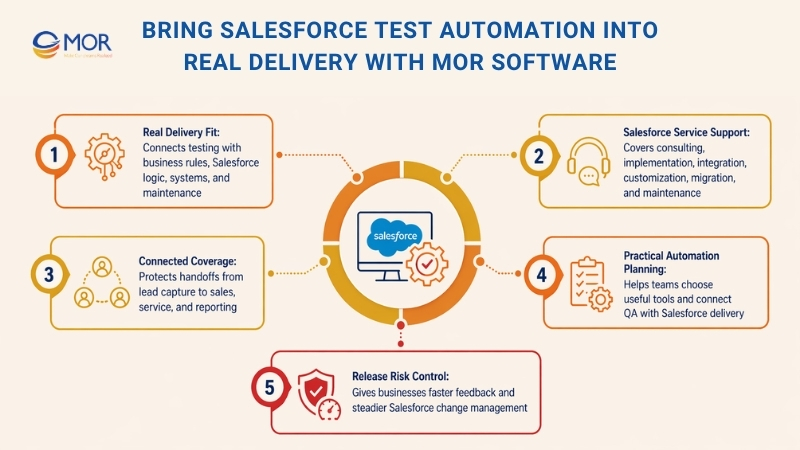
For teams building a sales force automation solution, testing should protect every handoff, from lead capture and sales workflows to service cases and reporting. MOR Software can help your team design the right test coverage, choose practical automation tools, and connect QA with Salesforce delivery.
A stronger testing setup gives your business fewer release risks, faster feedback, and better control over change. If your Salesforce org keeps growing, the right automation plan helps it grow without turning every release into a fire drill.
Conclusion
Salesforce test automation helps businesses release changes with fewer risks, faster feedback, and better control over complex workflows. From regression checks to UAT, performance testing, and DevOps pipelines, the right setup keeps Salesforce stable as your business grows. If your team needs support with Salesforce testing, integration, customization, or long-term delivery, MOR Software can help turn your testing plan into real results. Contact MOR Software to discuss your Salesforce project today.
MOR SOFTWARE
Frequently Asked Questions (FAQs)
What is Salesforce test automation?
Salesforce test automation uses software tools to run tests on Salesforce workflows, custom apps, integrations, and user actions without repeating every check by hand. It helps teams find defects faster before changes reach users.
Why do businesses need Salesforce test automation?
Businesses need it because Salesforce often supports sales, service, finance, marketing, and operations. One broken flow can delay deals, block support cases, or cause data errors across connected systems.
What Salesforce tests can be automated?
Teams can automate regression tests, end-to-end tests, UI tests, integration tests, API tests, smoke tests, and data validation checks. Custom Apex logic and repeated user journeys are also strong candidates.
Is manual Salesforce testing still needed?
Yes. Manual testing is still useful for exploratory checks, user experience review, and new workflow validation. Automation handles repeatable tests, while manual testing finds issues that scripts may miss.
What are the biggest challenges in testing Salesforce?
The main challenges include frequent Salesforce releases, dynamic Lightning components, custom fields, complex permissions, API integrations, and large data migrations. These areas need careful test planning.
How often should Salesforce regression tests run?
Regression tests should run before major releases, after configuration changes, during sandbox testing, and before production deployment. Many teams also run core test suites daily or after each code change.
What tools are used for Salesforce test automation?
Common tools include Provar, Copado, Tricentis, TestGrid, Leapwork, mabl, Testim, OpKey, Worksoft Certify, and TestCraft. The right tool depends on your org size, budget, technical skill, and testing goals.
Can Salesforce Lightning be tested with automation tools?
Yes, but Lightning can be harder to test due to dynamic elements and Shadow DOM. Teams should use tools that can handle changing UI elements, role-based views, and asynchronous page behavior.
How do you choose the right Salesforce testing tool?
Look at ease of use, support for Salesforce metadata, CI/CD integration, reporting, browser coverage, real-device testing, and maintenance effort. A tool should fit your team’s workflow, not add more work.
When should a company start automating Salesforce tests?
A company should start when manual testing becomes slow, releases happen often, or bugs keep appearing after deployment. Start with high-risk workflows like lead routing, approvals, quotes, cases, and integrations.
Share


Make Our-Dreams Realized


© 2023 . MOR Software. All Rights Reserved
Sitemap
Privacy Policy
Terms of Use

Rate this article
0
over 5.0 based on 0 reviews
Your rating on this news:
Name
*Email
*Write your comment
*Send your comment
1