


Best 10 AI Agents for Law Firms to Boost Task Efficiency 2026
AI agents for law firms are no longer a side experiment. Lawyers now use them to review contracts, summarize case files, manage intake, and cut slow manual work without losing control. This MOR Software guide will help you compare legal AI agents, understand the best AI agents for law firms 2026, and plan safer adoption.
Key Takeaways
- AI agents for law firms help legal teams handle repeatable work faster, including client intake, contract review, legal research, document summaries, billing, compliance tracking, and client communication.
- The top legal AI agent platforms covered in this guide are Spellbook, Harvey AI, Legora, Thomson Reuters CoCounsel Legal, Lexis+ With Protégé, Eudia, Supio, Clio Manage AI, Ironclad CLM, and vLex Vincent AI.
- Successful legal AI adoption still needs lawyer review, verified citations, data security, workflow fit, audit trails, and clear governance before AI output reaches clients or courts.
What Are AI Agents For Law Firms?
Legal AI agents are software systems that carry out defined tasks with limited daily input from people. In legal work, they can review files, scan legal sources, prepare written content, and route case data across systems.
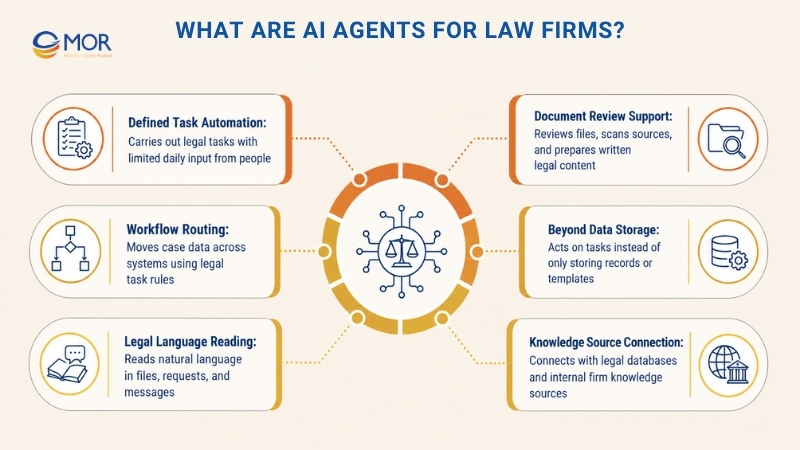
An AI agent for law firms differs from older legal software because it can act on a task, not just store data. A normal AI automation tool may hold templates or records, but an agent can read an agreement, spot risk, suggest edits, and prepare a reply with fewer manual steps.
Most legal AI agents work through:
- Reading natural language in legal files, requests, and messages
- Connecting with legal databases and internal knowledge sources
- Applying workflow rules built for legal tasks and practice areas
- Studying patterns across documents, case data, and past outcomes
What Problems Do AI Agents Help Fix In Law Firms?
Legal teams face many daily blockers, and using AI in law firms can help remove work that slows people down, including:
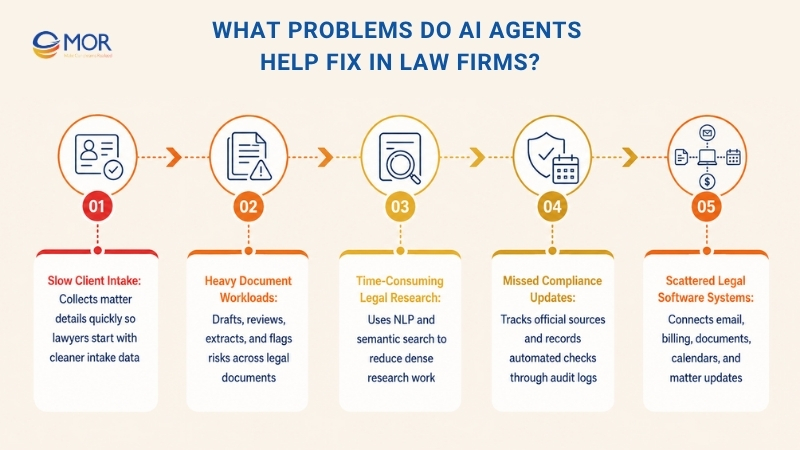
Slow Client Intake
Many practices miss strong leads because their first response comes too late.
AI voice agents for law firms can answer fast and collect intake details through clear, matter-specific questions.
In employment cases, they may ask about the end date of employment, contract terms, unpaid wages, and related documents. In injury matters, they may collect accident facts, insurer details, medical visits, and witness notes.
That gives your legal team cleaner intake data at the start, so lawyers can move to higher-value work sooner.
Heavy Document Workloads
Drafting and checking legal files take up a major part of daily work in many firms.
Associates often begin with a template, revise clauses, send drafts around, then revise them again. This slow loop can hold back progress in large employment disputes or corporate deals.
AI agents for law firms can change how drafting begins. The system can prepare a structured draft from your firm’s past filings, templates, and internal standards. It can also shift wording based on the right jurisdiction and practice area.
When review volume spikes, the agent can examine large sets of legal documents within minutes. It can mark ‘odd’ wording that falls outside firm rules, like a buried indemnity clause inside a long contract.
These tools can also extract key dates, named parties, duties, and deadlines from case materials.
Time-Consuming Legal Research
Legal research often moves in a straight line: ‘find case, make notes, write memo.’ That method relies heavily on exact keywords, so relevant decisions can slip through.
Legal AI agents use natural language processing tools and semantic search to read the intent behind a legal query. They may find a ‘duty to defend’ decision even when the search asks about ‘insurance obligations.’
For legal research, the system can connect to verified legal databases. In a similar way, an AI search agency for law firms would focus on source-backed answers, not loose web results.
Litigation teams can review decisions across jurisdictions and study patterns that may shape case results. Attorneys still set the case plan, but these tools cut research drag and ease the mental load during dense legal work.
Missed Compliance Updates
Many firm leaders worry that small legal updates or human mistakes may create risk later.
AI agents for legal teams can track official sources on a regular basis. They spot rule changes and compare them with active matters.
These systems add checks inside normal workflows and record each automated step through audit logs. The logs show time stamps and decision paths. During a compliance review, your team can pull structured records much faster.
Scattered Legal Software Systems
Your legal operations likely depend on separate tools for email, billing, document storage, calendars, and matter updates.
Legal autonomous AI agents can use orchestration layers to connect actions across those systems. A new email may trigger deadline extraction from an attachment, update the case management system, record billing time, and draft client notes in order. This is where an AI automation agency for law firms can help turn separate tools into one joined workflow.
10 Best Legal AI Agent Platforms For Law Firms In 2026
The list below gives you a fast view of the best AI agents for law firms 2026. We compared each platform based on legal task fit, data privacy, privilege safeguards, agent behavior, workflow links, and access for different firm sizes.
Tool | Main Value | Best Fit |
Spellbook | Contract Drafting And Review | Solo to mid-size firms |
Harvey AI | Cross-practice legal intelligence | Am Law 100 and Fortune 500 teams |
Legora | Agent-led legal workflows | Mid-size to large firms |
CoCounsel Legal | Litigation and research work | Firms of all sizes |
Lexis+ With Protégé | Verified research and workflow support | Mid-size to large firms |
Eudia | Enterprise legal knowledge | Enterprise and in-house teams |
Supio | Personal injury and mass tort document intelligence | Plaintiff-side firms |
Clio Manage AI | Practice management work | Solo to mid-size firms |
Ironclad CLM | Contract lifecycle management | In-house and legal ops teams |
vLex Vincent AI | Research and litigation intelligence | Law firms, in-house teams, and cross-border practices |
The ten platforms below cover contract review, legal research, litigation support, contract lifecycle work, and daily legal operations for lawyers and legal analytics teams.
Spellbook
Spellbook is a legal AI coding assistant that works inside Microsoft Word and supports contract drafting, review, and negotiation. It draws from firm knowledge, past documents, and clause libraries, so lawyers can move faster on routine contract work while still checking each edit.
- Contract Risk Review: Finds risky terms, missing language, and odd wording, then suggests redlines with tracked changes.
- Negotiation Rulesets: Uses your firm’s standards to review contracts and point out issues that need legal review.
- Agreement Drafting: Creates clauses and full contracts from templates, precedent files, and internal materials.
- Term Comparison And Q&A: Checks clauses against market norms and answers contract questions with cited support.
- Linked Document Updates: Changes party names, terms, and drafting details across related files through Associate.
Pricing: Custom. Public pricing is not listed.
Best for: Solo to mid-size firms and legal departments that handle steady contract drafting, review, and negotiation inside Word.
Harvey AI
Harvey AI is built for Am Law 100 firms and Fortune 500 legal departments. It works as a high-end research and analysis platform, with Vault for bulk document review and a Word add-in for drafting tasks.
- Vault And Assistant: Reviews large document sets for diligence, research, and review projects.
- LexisNexis Connection: Reads complex PDF tables and checks them against the large legal database from LexisNexis.
- Plain-Language Research: Lets lawyers run research across connected legal databases through natural language prompts.
- Word Drafting Add-In: Helps draft and edit documents in Word, with redline suggestions tied to firm playbooks.
- Enterprise Data Controls: Built for legal organizations with strict data governance needs.
Pricing: Custom. Reports often place pricing around $1,000-$1,200 per lawyer per month, with many sources noting a 20-seat minimum.
Best for: Large firms and Fortune 500 legal teams that can support enterprise AI budgets and want custom agents trained around internal data.
Legora
Legora lets enterprise legal teams create workflow agents for defined practice areas through its portal and agent-led work system. After its Walter AI acquisition, the platform widened its agentic AI for law firms capability and now supports fuller matter workflows.
- Table-Based Review: Turns contracts and files into structured, searchable tables with citations.
- Agent-Led Task Chains: Runs multi-step legal work that can shorten eDiscovery review from weeks to days through AI document processing. Agents can move across tools, from Outlook intake to iManage research and Word drafting, without constant human handoffs.
- Team Workflow Portal: Gives legal teams one place to manage tasks, reviews, and shared workflows.
- Document System Links: Adds a Word add-in and connections with iManage, SharePoint, NetDocuments, and Clio to support document workflow automation.
Pricing: Starts at $3,000 per user per year, with a 10-seat minimum.
Best for: Mid-market to Global 100 firms, plus litigation and M&A teams that need agent-led research and document workflows with strong enterprise security.
Thomson Reuters CoCounsel Legal
Thomson Reuters released CoCounsel Legal with Deep Research in August 2025. The platform links legal research databases with AI agents for law firms, allowing lawyers to compare case law by jurisdiction through its Westlaw connection.
- Deep Legal Research: Runs multi-step research using Westlaw’s checked legal database.
- Workflow Chain Builder: A beta tool that lets users connect tasks into set sequences.
- Goal-Based Agent: A single chat-style workspace decides when to use research, summary, or drafting skills based on your request.
- Large File Review: Reviews up to 10,000 documents per batch in beta.
- Client Data Rule: Thomson Reuters says client data is not used to train models.
Pricing: Custom pricing.
Best for: Firms of any size that already use Westlaw and want a legal-grade assistant tied closely to the Thomson Reuters product set.
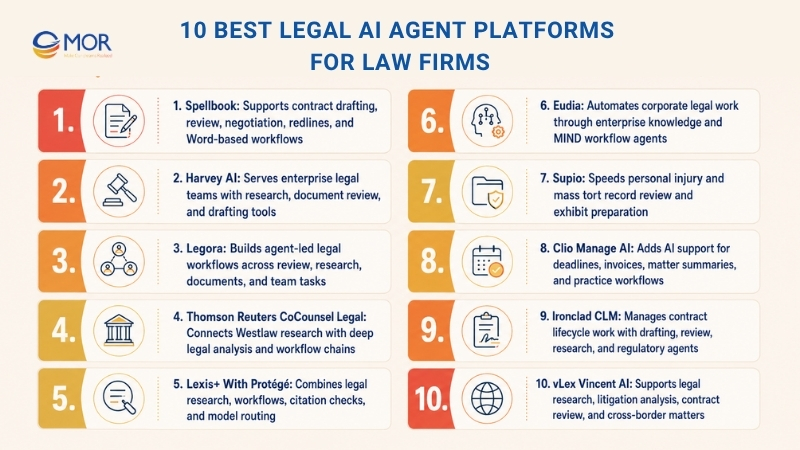
Lexis+ With Protégé
LexisNexis renamed Lexis+ AI as Lexis+ With Protégé in February 2026. The change shows its move from research assistant to broader workflow platform, with legal document review, case summaries, memos, and citation generation through NLP in one tool.
- 300+ Ready Workflows: Provides prepared templates for common legal tasks across practice areas.
- Model Routing Setup: Selects the right multimodal AI model from Anthropic, Google, and OpenAI based on the task type and needed output.
- Shepard’s Case Check: Runs live citation checks through Shepard’s and warns users when a case has been overturned.
- No-Code Workflow Builder: Lets firms turn internal playbooks into automated legal AI workflows without code.
Pricing: Custom pricing, with matter-based and per-user options.
Best for: Research-heavy practices that rely on Shepard’s citation checks and need ready workflows across several practice areas.
Eudia
Eudia serves corporate legal departments only. It uses an Enterprise Brain, Expert Digital Twins, and MIND Agents to automate in-house legal work.
- Enterprise Knowledge Layer: Builds one central knowledge base from the organization’s legal data.
- Senior Expertise Replica: Creates AI versions of expert legal knowledge for common questions and tasks.
- MIND Workflow Agents: Runs autonomous multi-step processes for legal operations.
- ServiceNow Connection: Links legal workflows to enterprise service management through ServiceNow.
Pricing: Custom, enterprise only.
Best for: Fortune 1000 legal departments and public sector teams that want to preserve internal knowledge and remove legal bottlenecks.
Supio
Supio focuses on personal injury and mass tort litigation. Its Document Intelligence system added new functions in February 2026, including Instant Ledger, Tabular Analysis, Knowledge Base, and Exhibit Builder.
- Instant Financial Ledger: Creates billing records and financial ledgers from case data.
- Structured Data Review: Pulls organized data from medical and financial records.
- Exhibit Preparation Tool: Builds exhibit materials for settlement and trial work.
- Firm Knowledge Base: Uses firm-specific data and improves as teams keep working with it.
- Security Certifications: Supports HIPAA, PHIPA, SOC 2 Type II, and GDPR across the platform.
Pricing: Custom. Public pricing is not listed.
Best for: Personal injury and mass tort firms that need faster medical record review and exhibit preparation.
Clio Manage AI
Clio Manage AI grew from Clio Duo into a wider AI layer for practice management. It supports deadline capture, AI invoice creation, matter summaries, and drafting through Clio Draft, while Clio says it does not train on client data.
- Deadline Capture: Finds court dates and filing deadlines from uploaded documents.
- Matter Action Prompt: Suggests the next step in a matter through an AI action card.
- Invoice Creation: Builds invoices from tracked time and matter data.
- Case Status Summaries: Gives one-click summaries of matter status, key dates, and recent activity.
- Practice Tool Connection: Lets non-technical paralegals create and launch legal AI agents inside Clio without coding.
Pricing: From $49 per user per month for EasyStart to $149 per user per month for Complete.
Best for: Solo lawyers and small to mid-size firms that want AI agents for law firms inside their existing practice management system.
Ironclad CLM
Ironclad CLM is a contract lifecycle management platform with Jurist AI, a set of focused agents for drafting, editing, review, and research. In early 2026, Ironclad added Ironclad Assistant on top of those tools.
- Contract Workflow Agents: Intake, redline, and research agents use your company playbooks and flag risks based on past contract history.
- Regulatory Watch Agent: Tracks official and regulatory sources and detects rule changes.
- Checked Legal Sources: Reviews legal research citations against verified sources and supports Bluebook formatting.
- Salesforce Link: Connects contract work with Salesforce CRM solutions for sales-led legal teams.
Pricing: Custom, enterprise only.
Best for: In-house legal departments that need contract lifecycle management with AI agents built into each stage.
vLex Vincent AI
vLex Vincent AI is a legal AI assistant for research, litigation review, contract analysis, and judge research. Since vLex is part of Clio, Vincent AI works well for firms that want AI legal research linked to a wide legal content base.
The platform supports Big Law teams, in-house departments, and small practices. Its coverage spans more than 100 jurisdictions, making it useful for cross-border legal work.
- Legal Source Research: Supports AI-assisted research across the vLex database and related legal sources.
- Litigation Review: Reviews litigation files, arguments, legal issues, and case strategy.
- Agreement Analysis: Checks contracts and finds legal or drafting issues.
- Judge And Court Research: Helps lawyers study judges, courts, and litigation patterns before case planning.
- International Research Reach: Supports firms that handle cross-border disputes or multi-jurisdiction legal questions.
Pricing: Custom. Public pricing is not listed.
Best for: Law firms, in-house teams, and cross-border practices that need AI research, litigation analysis, and contract review across several jurisdictions.
10 Key Use Cases Of AI Agents For Law Firms
AI agents for lawyers work best when they support repeatable legal tasks with clear inputs and review steps. These use cases show where legal teams can save time without handing full judgment to software.
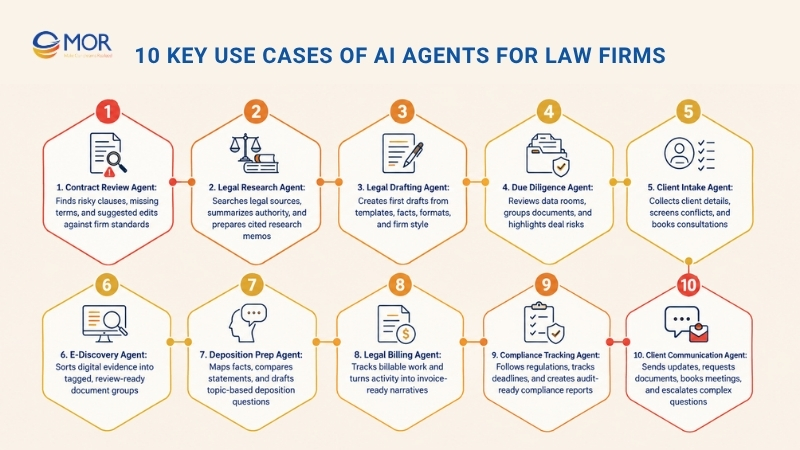
Contract Review Agent
A contract review agent reads agreements to find risk points, missing clauses, and terms that may hurt your position. AI agents for law firms can compare each contract with your standard wording and mark gaps.
Main tasks:
- Finds absent or risky clauses
- Reviews definitions that do not match across sections
- Marks liability terms that may favor the other side
- Checks the contract against your standard templates
- Creates a review note with suggested edits
Good fit: Corporate attorneys, in-house legal teams, and contract teams that review many agreements each week.
Time gained: A first contract review that may take 2-3 hours can often move to 10-15 minutes, with a clear issue report from the agent.
Legal Research Agent
This agent finds case law, statutes, and legal authority from plain-language questions. Rather than spend hours building Boolean searches, you can ask the system in simple legal terms.
Main tasks:
- Searches several legal databases at the same time
- Summarizes useful cases and their holdings
- Separates helpful authority from cases that may weaken the point
- Follows new updates in selected practice areas
- Prepares research memos with citations
Good fit: Litigators, appellate attorneys, and legal teams that need relevant case law fast.
Time gained: Research that may require 4-6 hours can often be narrowed to the strongest sources in 30-45 minutes.
Legal Drafting Agent
A legal drafting agent prepares first drafts for common documents, including demand letters, motions, contracts, and client letters. You add the main facts and requirements, then the tool creates a working draft.
Main tasks:
- Builds drafts from templates and past examples
- Adjusts language to match your firm’s writing style
- Adds matter-specific facts and details
- Keeps formatting and structure consistent
- Suggests other wording for different tones
Good fit: Lawyers who often draft the same type of legal document with new facts, parties, and timelines. An AI writer for legal work can be useful here, as long as lawyers review every final version.
Time gained: A first draft that may take 1-2 hours can often be prepared in 15-20 minutes, giving lawyers more time for review and strategy.
Due Diligence Agent
Due diligence often means checking hundreds or thousands of files during mergers, acquisitions, and investment deals. AI agents for law firms can process data rooms and point out risks, gaps, and conflicts.
Main tasks:
- Reviews full data rooms with limited manual sorting
- Groups documents by type and importance
- Finds red flags and risk items
- Compares facts across related files
- Produces due diligence reports and checklists
Good fit: M&A lawyers, corporate teams, and investment groups that manage due diligence reviews.
Time gained: A first-pass review of large file sets that may take weeks can move to days, with high-risk items placed at the top.
Client Intake Agent
A client intake agent manages the first intake steps, including information collection, appointment booking, and basic case screening. It can work through chat, email, or web forms.
Main tasks:
- Asks questions tied to the right practice area
- Collects and sorts client details
- Screens for conflicts of interest
- Books first consultations
- Shares basic details about services and fees
Good fit: Firms that receive many new client requests, mainly in personal injury, family law, or other consumer-facing areas.
Time gained: Admin staff spend less time on early screening calls, and lawyers speak more often with qualified prospects.
E-Discovery Agent
E-discovery agents handle electronic evidence in litigation, including emails, files, chat records, and other data. They sort, search, and tag useful materials for legal review.
Main tasks:
- Processes and indexes large volumes of digital evidence
- Applies relevance filters tied to case issues
- Tags documents by topics, people, and events
- Spots privileged communications
- Shrinks large data sets into review-ready groups
Good fit: Litigators working on matters with heavy digital evidence and discovery demands.
Time gained: Document review time and cost can fall by 60-80% through smart filtering and priority ranking.
Deposition Prep Agent
This agent supports deposition planning through case file review, fact mapping, inconsistency checks, and topic-based question drafts.
Main tasks:
- Reviews case records and pulls out useful facts
- Compares witness statements for conflicts
- Suggests deposition questions grouped by topic
- Flags impeachment angles
- Builds exhibit lists and reference notes
Good fit: Trial lawyers who need strong deposition outlines without spending too much time on file sorting.
Time gained: Deposition preparation that may need 6-8 hours can often move to 2-3 hours, with cleaner organization.
Legal Billing Agent
A legal billing agent records time, creates invoices, and helps keep billing entries accurate. AI agents for law firms can capture billable work from emails, calls, documents, and task activity.
Main tasks:
- Tracks time spent on emails, calls, and document work
- Turns work notes into billing narratives
- Sorts tasks by matter and billing code
- Finds possible billing mistakes
- Creates formatted invoices inside the firm’s billing tool
Good fit: Lawyers who bill hourly and want to capture more time without manual entry after every task.
Time gained: Billing entries and invoice work that may take 1-2 hours each week can often drop to 15-20 minutes.
Compliance Tracking Agent
For firms and in-house teams that manage regulatory duties, this agent watches legal updates, filing dates, and compliance tasks.
Main tasks:
- Follows regulatory updates tied to your sector
- Tracks filing dates and compliance deadlines
- Sends alerts before key requirements arrive
- Creates compliance reports and checklists
- Keeps audit trails for compliance activity
Good fit: In-house counsel, compliance officers, and firms that handle regulated matters.
Time gained: Manual rule tracking may take several hours each week. Automation cuts that work down to checking alerts and reports.
Client Communication Agent
This agent manages routine client contact, including case updates, appointment reminders, document requests, and common questions. It can run through email, text messages, or client portals.
Main tasks:
- Sends planned case updates to clients
- Answers common case-related questions
- Requests and collects client documents
- Books meetings and sends reminders
- Sends complex questions to attorneys
Good fit: Firms with heavy client contact that want faster replies without hiring more staff. AI support agents for law firms are useful here when the answers stay within approved scripts and review rules.
Time gained: Routine client messages that may take 5-10 hours per attorney each week can often be handled through automation.
What To Look For When Evaluating AI Agents For Law Firms
Legal AI has a lot of bold sales claims, and some tools still perform below what the marketing suggests. The points below help you sort useful platforms from tools that create risk.
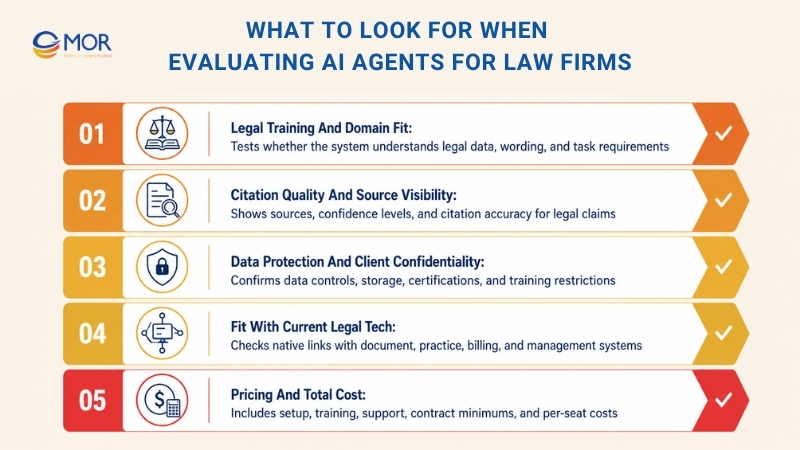
Legal Training And Domain Fit
Ask each vendor how well the system understands legal work. A general model placed on legal tasks can create more false answers and weaker legal wording than a system trained on legal materials.
Ask what legal data shaped the model, what corpus it uses, and how its hallucination rate compares with general AI systems. You should be able to test those claims with independent results before you buy.
Citation Quality And Source Visibility
The most reliable AI agents for law firms 2025 2026 should show source material for any legal claim used in client work or filings. Ask whether the platform links each claim to a source, marks low-confidence answers, and shares measured citation error rates.
Test this with real matters from your practice area during a trial. AI agents for law firms should make source review easier, not hide where answers came from.
Data Protection And Client Confidentiality
Client privilege leaves no room for weak data controls. Confirm whether the vendor trains future models on your prompts or files, since serious legal AI providers usually say they do not and put that promise in the contract.
Check where the data is stored, where it is processed, which security certifications the vendor holds, and whether the product meets your data residency duties. For many firms, SOC 2 Type II should be the floor, not the ceiling.
Fit With Current Legal Tech
Legal teams often rely on fixed systems like iManage, NetDocuments, Clio, practice management tools, and billing software. If an AI agent does not connect to your document system, lawyers may avoid it.
Check native links before you shortlist a tool. If lawyers must copy content out of a DMS and paste it into a separate AI screen, use will likely drop.
Pricing And Total Cost
Most serious legal AI tools do not show prices on their websites, so you will need a sales call. This is common in legal tech, but your business case should allow for it.
Include setup time, staff training, vendor services, contract minimums, and support needs when you calculate total cost. Per-seat pricing can rise fast once larger teams start using the platform.
How Lawyers Can Verify AI Output And Prevent Citation Errors
The main worry around AI agents for law firms is not only speed. Lawyers need to know whether the work can be trusted.
Leading legal AI platforms are now much more accurate than general chatbots. Still, they may produce wrong citations, old case law, missing analysis, or strong-sounding conclusions with weak authority.
These risks can be controlled. Citation problems often happen when lawyers treat AI output as final work instead of reviewable work.
Treat the system as a research assistant, not the final legal voice. When lawyers pair AI speed with professional judgment, firms can cut drafting time and still keep the standards clients and courts expect.
Check That Every Case Citation Is Real
Do not trust a citation only because it looks like a normal legal reference. Even strong models can produce made-up case names, wrong reporter details, or merged facts from different cases.
Check each citation in trusted legal research tools before it goes into a memo, contract advice, client note, or court filing. You can use Westlaw, Lexis+, Bloomberg Law, or official court databases.
Sample issue:
The AI gives this citation:
Smith v. Johnson, 542 F.3d 321 (9th Cir. 2023)
A quick database search shows that the case does not exist, which stops a serious filing mistake before it reaches the court.
Confirm The Holding Matches The Argument
A case can be real and still fail to support the point the AI suggests. The system may find a valid authority but describe the court’s reasoning too broadly or miss limits in the ruling.
Read the key parts of the opinion yourself, mainly the holding and the court’s reasoning. The authority must support your argument in the way the draft says it does.
Sample issue:
The AI says a Supreme Court ruling proves that employers are always liable for employee privacy breaches.
After checking the opinion, you find that the rule applies only to a narrow set of facts involving intentional misconduct, not every privacy breach.
Check Whether The Authority Is Still Valid
Precedent changes all the time. Later courts may overturn, narrow, distinguish, or limit a case, and new legislation may replace the older rule.
Use citator tools like KeyCite or Shepard’s before you rely on any authority. This step is a must when AI agents for law firms recommend older cases.
Sample issue:
An AI assistant suggests a leading employment case from several years ago. KeyCite shows that a newer appellate decision has partly overruled it, so you need stronger and more current support.
Match Quotes Against The Original Source
AI may turn legal text into a paraphrase while making it look like a direct quote. A few changed words can shift the meaning and hurt credibility in a filing.
Compare every quote with the official case, statute, or rule. Check the words, punctuation, and surrounding context before you include it.
Sample issue:
The AI writes:
"The employer has a duty to provide reasonable accommodations."
The real judgment says:
"The employer may have a duty to provide reasonable accommodations under the circumstances presented."
Those extra words change the legal meaning in a major way.
Review Jurisdiction, Statutes, And Rules
AI can mix up jurisdictions, pull old statutory text, or cite rules that later changed. The risk is higher for firms working across states or countries.
Confirm that each statute, rule, and regulation applies to the right place and reflects the latest legal text.
Sample issue:
An AI draft cites a California employment statute for a dispute governed by Texas law. The idea may look similar, but the wrong jurisdiction can weaken the advice.
Keep A Basic Verification Log
A simple review record shows care and helps firms create quality control rules. It is useful for AI-assisted drafting because it records who checked the work, which sources were reviewed, and when the review took place.
It also helps colleagues review files together and supports new AI governance policies.
A simple verification log may look like this:
Review Check | Status |
Citation found in legal database | ✓ |
Holding checked against original opinion | ✓ |
Current validity reviewed through KeyCite or Shepard’s | ✓ |
Quotes checked word for word | ✓ |
Jurisdiction confirmed | ✓ |
Reviewer and review date recorded | ✓ |
This review step usually adds only a few minutes to an AI-assisted workflow. It can greatly cut the risk of fake citations, weak authority, and professional liability.
The strongest firms use AI to speed up legal work, then rely on experienced lawyers for the final legal judgment before anything reaches a client or court.
Ethics, Security, And Governance For Legal AI Adoption
AI does not pause your duties as a lawyer. It can also open new paths for mistakes if the rules are not clear.
Start with client secrecy. Putting client files into a public AI tool without an enterprise contract that blocks the vendor from training on your data creates major risk. Read the terms closely and choose platforms with clear zero-retention and data-isolation rules.
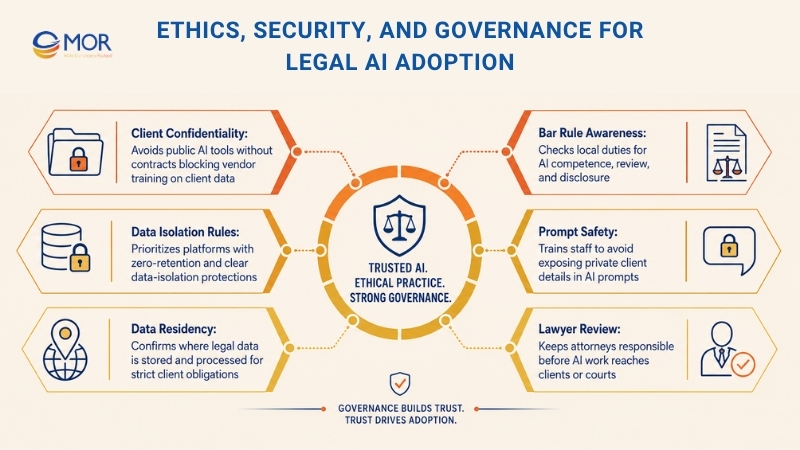
Bar rules differ from one place to another. Some state bars now expect attorneys to understand the tools they use, review AI work, and, in some AI use cases, tell others when AI helped create work product. Check what your state bar requires now, since legal AI regulatory compliance also covers data residency, security standards, and vendor terms.
Two areas often get too little attention: where data lives and how people write prompts. If your firm serves global clients or works under strict rules, the storage and processing location of your data may matter as much as security. Staff prompts can also expose private client details, even when the AI platform itself is secure.
No AI content should go straight into client work or court filings without lawyer review. AI supports attorneys; it does not replace legal judgment. Your duty stays the same even when an AI automation agency for law firms or a legal AI platform helps prepare the draft.
Getting Started With AI Agents For Law Firms
Using legal AI agents does not mean changing your whole firm at once. The firms that get the best results often start small, add AI to one workflow, measure the result, then expand after the tool proves its value. This keeps risk lower, helps staff learn faster, and makes sure each rollout brings clear business value.
Instead of asking, “How can we use AI in every area?”, ask, “Which repeated task takes too much time but does not need deep legal judgment?” That starting point often gives the fastest return while helping your team build trust in AI agents for law firm automation.
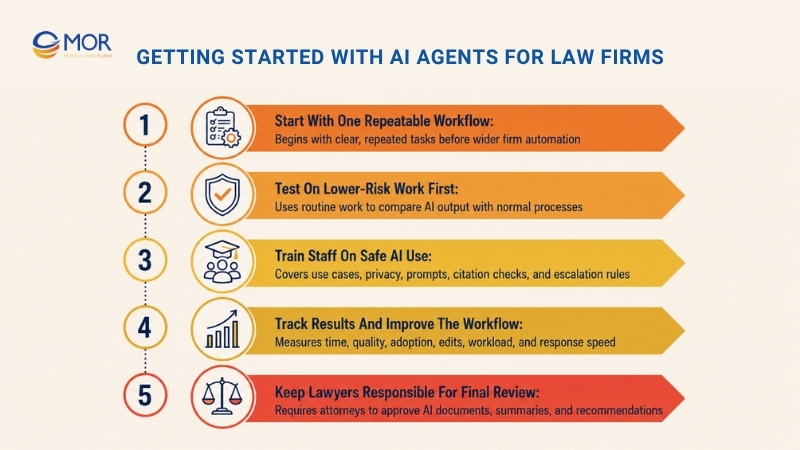
Start With One Repeatable Workflow
Do not try to automate every legal process at the same time. Pick one repeated task with clear steps and a steady pattern. This helps your team see how AI agents work without disturbing the systems they already use.
Good starting points include:
- Contract review and clause extraction
- Client intake and conflict checks
- Legal document summarization
- Matter organization
- First-draft document preparation
Sample case:
A small employment firm spends close to five hours each week checking standard employment contracts. After adding an AI agent to find restrictive covenants, termination clauses, and unusual contract terms, lawyers cut the first review to under two hours while still doing the final legal check.
Test On Lower-Risk Work First
Do not start AI use on your largest litigation matters or hardest transactions. Use AI agents for law firms on routine work first, where senior lawyers can compare the output with the usual process.
This gives your team time to learn what the agent does well, spot repeated errors, and improve prompts before using it on sensitive work.
Sample case:
A firm does not begin with an AI agent drafting a major appellate brief. It first uses the tool to summarize discovery files and sort deposition transcripts. After the team sees steady quality, it later moves AI into more complex drafting work.
Train Staff On Safe AI Use
Software alone will not fix weak workflows. Anyone who uses AI agents should know what the system can do, where it can fail, and when a person must step in.
Training should cover:
- Proper use cases
- Data privacy and confidentiality rules
- Prompt-writing good practices
- Citation checking steps
- Escalation rules when AI gives unclear or mixed results
Sample case:
A firm writes a short internal rule that AI may prepare first drafts of internal memos. Only licensed attorneys may approve legal analysis, client advice, or court filings.
Track Results And Improve The Workflow
Treat AI rollout as ongoing work, not a one-time software setup. Check often whether the agent is saving time and giving steady quality.
Useful metrics include:
- Time saved per matter
- Drop in admin workload
- Accuracy of drafted documents
- Number of edits needed
- User adoption across the firm
- Client response times
When results fall short, adjust prompts, change the workflow, or move different tasks to the AI agent. Small fixes over time can lead to major gains in team output.
Sample case:
A real estate practice sees that its AI agent sometimes misses unusual lease terms. After the team adds clearer prompt rules and sample clauses, extraction accuracy rises in later matters.
Keep Lawyers Responsible For Final Review
AI agents should support legal work, not replace a lawyer’s judgment. A qualified attorney should review every AI-made document, legal summary, or client recommendation before it leaves the firm.
Human review still matters because lawyers must read legal detail, weigh strategy, protect client interests, and meet ethics rules. AI can speed up the first draft, but the lawyer stays accountable.
Sample case:
An AI agent prepares an early draft of a commercial lease from the firm’s standard template. Before sending it to the client, the lead attorney checks every clause, confirms the agreed business terms, reviews legal references, and edits where needed. The AI handles the repeated drafting work, while the lawyer gives the final legal skill and approval clients expect.
Legal AI Trends In 2026: What Law Firms Should Watch Next
These six trends draw from predictions shared by Gartner, Forrester, Thomson Reuters, Bloomberg Law, the ACC, and writers in the Artificial Lawyer 2026 Predictions Report. Together, they show a legal sector going through a deep shift, not just testing a new tool. The best AI agents for law firms 2025 2026 will be judged by governance, fit, and real legal results.
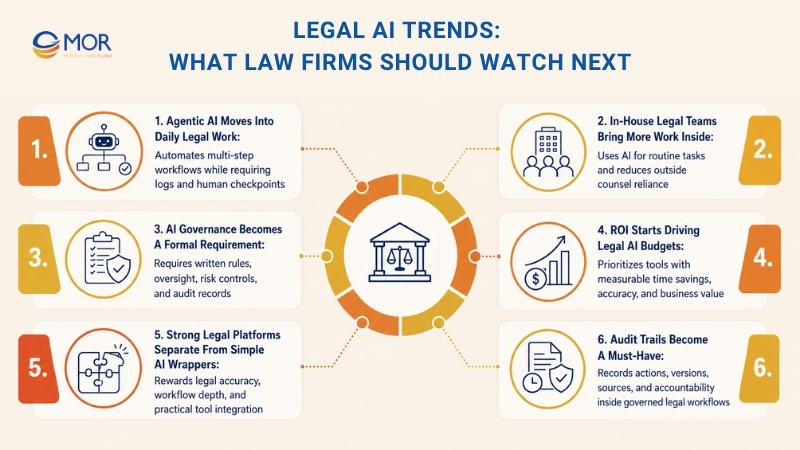
Agentic AI Moves Into Daily Legal Work
The main technical change in 2026 is the move from prompt-based assistants to agents that can plan and finish multi-step workflows on their own. Agentic systems do more than answer questions like older legal AI tools. They can track contract dates, pull clauses, route approvals, and complete research steps with less daily direction.
Large vendors have already moved in this direction. Thomson Reuters CoCounsel launched agentic workflows in early 2026. LexisNexis released Protégé, an agentic assistant that can complete tasks and check its own work. Gartner expects 40 percent of enterprise apps to include task-specific AI agents in 2026, up from under 5 percent today. Yet Gartner also warns that over 40 percent of agentic AI projects may be cancelled by 2027 due to rising costs or weak business value.
The risk comes when teams launch these systems without rules. Agentic tools that act without human checkpoints can create new error and liability problems.
In daily work
Legal teams that use agentic AI need logged, structured workflows instead of full autonomy. Auditability is what separates helpful agents from risky ones.
In-House Legal Teams Bring More Work Inside
64 percent of in-house legal teams now expect to rely less on outside counsel because of AI tools they are building internally. This may be the biggest structural change for the profession.
In-house teams are using AI for routine tasks like NDA review, contract intake, invoice review from outside counsel, and first-pass compliance checks. Law firms that cannot show AI skill on client matters may fall behind, and that gap can grow each year. Everlaw’s Chief Legal Officer also noted that 60 percent of in-house teams do not know whether their firms use AI on their matters. Transparency is no longer a nice extra. It is becoming a basic demand.
In daily work
Law firms need clear proof that AI agents for law firms can cut time and cost on client work. In-house teams need legal AI tools that can handle repeated work without adding more headcount.
AI Governance Becomes A Formal Requirement
Governance is now part of legal AI adoption. The EU AI Act comes into full force for high-risk systems in August 2026, and AI used in legal services fits within the high-risk group. Penalties can reach 35 million euros or 7 percent of global revenue. Organizations must run conformity checks, set risk management systems, and keep human oversight active.
In the US, the Colorado AI Act starts in June 2026. State privacy and AI laws across more than a dozen states are also creating a more complex rule set. ABA Formal Opinion 512 already sets duties for AI competence, confidentiality, and supervision.
Legal AI is moving away from stand-alone trials. It is moving into legal workflow systems where governance and audit trails must be built into the design from the start.
In daily work
Every AI tool used for legal work needs written governance rules: what it does, who reviews it, how errors are found, and how the audit record is kept.
The EU AI Act and ABA Formal Opinion 512 make AI governance a real professional duty in 2026. Audit trails and human oversight are now basic needs. Photo: Unsplash / Scott Graham
ROI Starts Driving Legal AI Budgets
Forrester’s 2026 predictions say the AI hype cycle is ending. Enterprises are expected to push 25 percent of planned AI spend into 2027 due to ROI concerns. Only 15 percent of AI decision-makers reported EBITDA gains in the past 12 months.
This does not mean legal AI is failing. It means the market is sorting itself out. Tools with measurable time savings keep growing, while tools that look good in demos but fail in daily work get cut. Thomson Reuters found that teams with clear AI plans are 2x more likely to see revenue growth and 3.5x more likely to gain key AI benefits. Planning beats random testing.
In daily work
Each AI tool needs a clear ROI case: time saved, errors cut, and disputes avoided. Trial budgets are giving way to operating budgets that need proof.
Strong Legal Platforms Separate From Simple AI Wrappers
The legal AI market has many tools that are little more than ChatGPT with legal templates. But ChatGPT is built for broad use, not trained only for legal work, which can lead to wrong or weak answers where accuracy matters most.
In 2026, legal teams are drawing a sharper line. Strong legal AI platforms are trained on legal data, built for legal workflows, and placed inside the tools lawyers already use. They cover broader legal work instead of dressing one function up as a platform. The market will reward depth, legal accuracy, and practical fit.
In daily work
Choosing an AI tool means checking whether it understands legal language, connects with current workflows, and has proven accuracy on legal tasks, not just broad AI benchmarks.
Audit Trails Become A Must-Have
As AI enters live legal workflows, the question of accountability becomes harder to ignore. As legal AI grows more capable and more autonomous, trust, judgment, and responsibility become central issues. In legal work, technology may support decisions, but a person remains responsible.
This changes what buyers should expect from the product. Legal AI tools in 2026 must show not only what they did, but also how they recorded each action. Immutable logs, version records, and blockchain-backed document integrity are no longer special add-ons. They are base requirements for tools used in governed legal work.
In daily work
Source checks, clear audit trails, and document anchoring are the operating standards that let legal AI tools work in regulated and accountable settings in 2026.
“In 2026, legal AI will move from stand-alone agent trials into legal and contract workflow systems where governance and auditability sit inside the product design. When teams ask to see guardrails, they will increasingly ask to see the workflow.”
David Silbert, Senior Director Growth Strategy, DocuSign, via Artificial Lawyer 2026 Predictions
MOR Software’s Custom AI Agents for Law Firms
MOR Software works as a custom software development and AI agent development partner for law firms and legal tech companies. It does not sell a ready-made legal AI tool. Instead, the team builds AI agents around each firm’s workflows, data rules, review steps, and security needs. This matters because legal work involves confidential files, strict ethics rules, and high client trust. A generic AI tool may feel quick at first, but it can create risk when it touches contracts, case notes, client messages, or internal knowledge.
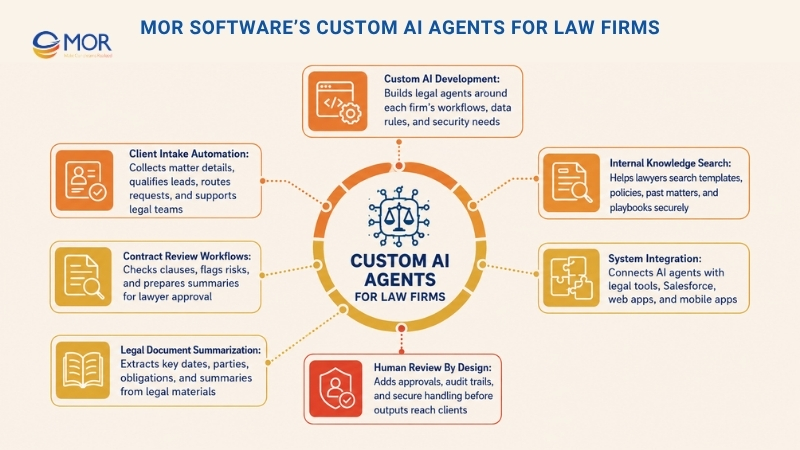
- Client intake automation: Build AI agents that collect matter details, qualify leads, route requests, and send them to the right legal team.
- Contract review workflows: Create custom review flows that check clauses, flag risks, and prepare summaries for lawyer approval.
- Legal document summarization: Turn long case files, contracts, or discovery materials into clear summaries with key dates, parties, and obligations.
- Internal knowledge search: Help lawyers search firm templates, policies, past matters, and playbooks through secure AI-powered search.
- System integration: Connect AI agents with case management tools, Salesforce, document systems, web apps, and mobile apps.
- Reliable delivery support: MOR Software brings offshore software development teams, QA and testing, long-term maintenance, and post-launch support.
- Human review by design: Every workflow can include approval steps, audit trails, and secure data handling before any output reaches clients or courts.
Conclusion
AI agents for law firms can save hours on research, drafting, intake, and compliance work, but safe use needs more than a tool subscription. Firms should compare platforms carefully, test low-risk workflows, verify every legal output, and keep lawyers in charge of final review. If your firm needs custom legal AI built around its workflows, data rules, and security needs, contact MOR Software to discuss your project.
"Evolution is not a destination, it is a disciplined journey of innovation."
Phung Van Tu


CEO MOR AI
MOR SOFTWARE
Frequently Asked Questions (FAQs)
What are AI agents for law firms?
They are AI-powered systems that help legal teams complete tasks like intake, research, drafting, document review, billing, and client updates. Unlike basic chatbots, they can follow a workflow, pull data from approved sources, and prepare work for lawyer review.
Are legal AI agents replacing lawyers?
No. They support lawyers by handling repeat tasks and preparing first drafts or summaries. Legal judgment, strategy, ethics, and final approval still belong to attorneys.
What tasks can legal AI agents handle?
They can help with contract review, legal research, document summaries, client intake, compliance tracking, e-discovery, deposition prep, billing notes, and routine client communication.
Are legal AI agents safe to use with confidential client data?
They can be safe when the firm uses secure tools with strong data controls. Law firms should check data storage, model training rules, access rights, encryption, and audit logs before uploading client files.
Can AI-generated legal research be trusted?
It should always be checked. AI can make citation mistakes, miss updates, or misread a holding. Lawyers should verify cases, statutes, quotes, and jurisdiction before using the output.
What is the best way to start using legal AI agents?
Start with one repeatable, low-risk workflow. Good first choices include document summaries, internal research support, intake questions, or contract clause extraction.
How much do legal AI agent tools cost?
Pricing depends on the vendor, number of users, data setup, integrations, and support level. Some tools use per-user pricing, while enterprise platforms often require custom quotes and minimum seat counts.
What should a firm check before choosing a legal AI tool?
Check legal data quality, citation support, security terms, workflow fit, integrations, user training, pricing, and vendor support. A strong demo should use real workflows, not generic examples.
Do small law firms need AI agents?
Small firms can benefit when they handle repeat work but have limited staff. These tools can help with intake, drafting, document review, scheduling, and client updates.
What risks come with AI agents for law firms?
Main risks include wrong citations, weak legal reasoning, privacy issues, biased outputs, and overreliance on automation. Firms can lower these risks with lawyer review, clear usage rules, secure systems, and audit trails.
Share


Make Our-Dreams Realized


© 2023 . MOR Software. All Rights Reserved
Sitemap
Privacy Policy
Terms of Use

Rate this article
0
over 5.0 based on 0 reviews
Your rating on this news:
Name
*Email
*Write your comment
*Send your comment
1